What's inside
- Key Takeaways
- Quick Picks
- How We Chose These Picks
- How does the right choice differ between a food business and a retail shop?
- What should you plan for after the printer is installed?
- Comparison Table
- Bluetooth or WiFi — which wireless does your counter actually need?
- How do you verify POS compatibility before the printer arrives?
- Common Mistakes When Buying a Wireless Receipt Printer
- Final Recommendation
- Frequently Asked Questions
- Related Guides
As an Amazon Associate I earn from qualifying purchases. This post may contain affiliate links at no extra cost to you.
widgetverdict.com is reader-supported. When you buy through links on our site, we may earn an affiliate commission.
Finding the best wireless receipt printers starts with a question most product pages blur: wireless how? A receipt printer can reach your point-of-sale system over Bluetooth from a tablet three feet away, over WiFi from a router across the building, or over a cable that never moves — and those three paths suit three different kinds of business. The six machines below were chosen because their listing titles state their connections plainly, so you can match the radio to the counter instead of discovering the mismatch after the box is open. Two paper widths run through the set, 80mm and 58mm, and that split matters as much as the wireless standard, because a printer that cannot swallow the paper your receipts need is the wrong printer no matter how clean its connection is.
One honesty note belongs up front, because it shapes several verdicts in this guide. None of the six titles claims compatibility with Square or any other named point-of-sale platform beyond what is printed in each listing. One title, the Rongta’s, goes further and warns outright that the printer does not work with Square. The MUNBYN title lists platforms it does not support. So this guide judges the six on what their titles do establish — interface, paper width, cutter, command language, stated operating systems — and leaves platform pairing as a check you run against your own software before ordering, using the steps in the how-to section near the end.
Read the set as three pairs. First, two full-size 80mm counter printers that add a wireless path to a wired foundation: the NETUM NT-861 with Bluetooth alongside USB and LAN, and the Star TSP143IIIBi built around Bluetooth for phones and tablets. Second, two 80mm machines aimed at fixed stations with broader connection menus: the Volcora, the only WiFi model here, and the MUNBYN with Bluetooth plus USB, serial and Ethernet. Third, two portables that leave the counter entirely: a 58mm NETUM pocket printer and an 80mm Rongta that travels. Between them they cover the till, the kitchen pass, the market stall and the delivery round.
Reading each review against its printer’s own title keeps the comparison honest. Each one opens with what the printer’s own title establishes, because the title is the one text the seller must stand behind, and only then moves to judgement: which counter it suits, which it does not, and what remains unverified. Where a figure appears — a speed, a width — it comes from the title under review. Where a title is silent, the review says so and moves on, and the spec list at the end of each section gathers the title’s facts in one place so you can compare without re-reading prose.
Key Takeaways
- Bluetooth is the dominant radio in this set — five of the six titles name it — while WiFi appears only on the Volcora, which pairs it with USB.
- Paper width divides the guide: four picks print on 80mm stock and two are built for 58mm or portable use, so choose the width before you choose the radio.
- Every full-size pick here carries an auto cutter per its title; the two portables are tear-off machines by design.
- Platform compatibility is the trap in this category — one title warns against Square explicitly and another lists unsupported delivery platforms, so verify your POS pairing from the title outward.
- ESC/POS support, named on the NETUM NT-861 and Volcora titles, is the command language most receipt software expects; treat its presence as a real feature, not filler.
Quick Picks
| Pick | Badge | Why it earns its place |
|---|---|---|
| NETUM NT-861 Bluetooth Thermal Receipt Printer | Best all-round counter pick | 80mm printing at a title-stated 260mm/s with Bluetooth, USB and LAN on one machine, plus an auto cutter and ESC/POS support. |
| Star Micronics TSP143IIIBi Bluetooth Receipt Printer | Best for tablet-first shops | Bluetooth pairing aimed at iOS, Android and Windows per its title, with an auto-cutter and an internal power supply that keeps the counter tidy. |
| Volcora Thermal Receipt Printer 80mm | Best WiFi option | The only WiFi interface in this guide, with USB alongside, cash drawer support, wall mounting and a kitchen-printer brief in its title. |
| MUNBYN Bluetooth Thermal Receipt Printer 80mm | Widest wired menu | Bluetooth plus USB, serial and Ethernet on an 80mm body — and a title that honestly names the platforms it does not support. |
| NETUM Bluetooth Receipt Printer 58mm Portable | Best compact portable | A pocketable 58mm Bluetooth printer for Android and Windows, sized for sellers who print narrow receipts away from a fixed till. |
| Rongta Portable 80mm POS Receipt Printer | Best wide-format portable | Full 80mm width in a mobile body with USB and Bluetooth — with a title that warns plainly it does not work with Square. |
How We Chose These Picks
The first filter was the title itself. A printer only entered this guide if its listing title named a wireless interface outright — Bluetooth or WiFi in so many words — because a receipt printer bought for wireless work should not require guesswork about whether a radio is inside. That single rule produced a Bluetooth-heavy set, which reflects the category honestly: at receipt-printer distances, Bluetooth is the common tool, and WiFi is the exception worth calling out when it appears.
The second filter was paper width, applied as a spread rather than a cutoff. A guide that listed six 80mm counter machines would fail the market trader, and one that listed six pocket printers would fail the restaurant. So the final six hold both widths and both body types, and each review states its width early, because width decides what a receipt can show: itemised bills with long dish names breathe on 80mm, while a 58mm slip is a summary and should be chosen as one.
Third, we weighed the unglamorous details titles bother to print. An auto cutter changes the rhythm of a busy till. An internal power supply removes a brick from the floor. Cash drawer support turns a printer into the hub of the counter. ESC/POS naming signals that mainstream receipt software can drive the machine in its native tongue. Where a title printed a speed, we repeated it; where it printed a warning, we kept the warning in the review rather than sanding it off, because a limitation stated by the seller is the most trustworthy sentence on the page.
Every survivor earned its place by answering a different counter need. Duplicates were cut even when they looked strong, because six variations on one counter printer help nobody. What survived is a set where every machine answers a different first question: How fast is the till? How tidy is the counter? How far is the router? How old is the wiring? How narrow is the receipt? How wide must a travelling receipt be?
One more discipline ran through the selection: nothing in these reviews depends on a claim the title does not make. You will not find a platform blessed, a speed invented or a cutter assumed. That restraint costs the guide some swagger and buys it the only thing that matters at a counter — the property of still being right when the box is opened. When a pick interests you, the natural next step is the manufacturer’s own documentation for the details titles omit, and the how-to section below turns that into a checklist rather than a hope.

NETUM NT-861 Bluetooth Thermal Receipt Printer — Best all-round counter pick
The NT-861 reads like a checklist written by someone who has staffed a till. Its title stacks the three interfaces a retail or restaurant counter actually cycles through — USB for the fixed terminal, LAN for the networked back office, Bluetooth for the tablet that floats between tables — and puts an auto cutter on top, so receipts separate themselves instead of tearing at whatever angle a rushed hand chooses. For a business whose point of sale is part fixed and part mobile, that combination means one printer can serve both halves without a second purchase waiting in the storeroom.
Speed is the one performance figure this title volunteers: 260mm/s, stated plainly. Treat that number the way you would treat any single headline figure — as the maker’s own rating under its own test conditions — but recognise what it signals about intent. This is a printer aimed at queues. A café at the morning peak or a shop counter at closing time feels print speed not in millimetres but in seconds per customer, and a machine specified at this level is built for throughput rather than occasional slips.
ESC/POS support, named in the title, is the quiet line that matters to software. ESC/POS is the command dialect most receipt applications speak natively, so a printer advertising it is telling your POS software, in advance, that the conversation should be straightforward. Combined with the black finish the title notes and the retail-and-restaurant brief it claims, the NT-861 presents as the set’s generalist: nothing exotic, everything present, aimed at the widest band of counters.
Consider how it would actually spend a Saturday. Morning: the fixed terminal drives it over USB while the queue is predictable. Afternoon: a staff member takes table orders on a tablet, and the same printer takes those jobs over Bluetooth without anyone re-plugging a cable or re-thinking the setup. Evening: the LAN connection lets the office reconcile the day from the back room printer queue. A machine that can be reached three ways absorbs the small improvisations of a trading day, and improvisation is where single-interface printers quietly become second printers — bought in a hurry, at the worst moment, to cover the gap.
- Paper width: 80mm
- Interfaces named in title: USB, LAN, Bluetooth
- Print speed: 260mm/s as stated in the listing title
- Cutter: Auto cutter
- Command support: ESC/POS
- Stated setting: Retail and restaurant
Strengths
- Three interfaces on one body, so the same printer can follow a business from wired terminal to tablet service.
- The stated 260mm/s rating is the clearest throughput signal in this guide.
- Auto cutter plus ESC/POS covers the two daily-grind features counters ask about most.
Trade-offs
- No WiFi in the title — the wireless path is Bluetooth, which is a same-room technology.
- The title names no operating systems, so platform pairing needs the verification steps later in this guide.
- Its 80mm appetite means a second, narrower paper stock if you also run 58mm devices.
Best for: a retail or restaurant counter that mixes a fixed terminal with tablet service and wants one 80mm printer to cover both. Not suited for: a business whose printer must sit beyond Bluetooth range of every device that sends it work.

Star Micronics TSP143IIIBi Bluetooth Receipt Printer — Best for tablet-first shops
Star Micronics builds point-of-sale hardware for a living, and the TSP143IIIBi’s title shows that focus in the order of its claims: Bluetooth first, then the three operating systems it courts — iOS, Android and Windows. That trio is the tablet-till world in one line. If your register is an iPad on a stand, a phone in an apron or a Windows terminal under the counter, this title is speaking directly to your setup, and it does so without promising any specific POS application by name — a restraint worth noticing in a category full of implied compatibilities.
The internal power supply is the detail regulars will appreciate most. Many receipt printers ship with an external brick that ends up on the floor, in the cable tangle, or lost during a refit. Building the supply into the body, as this title states, means one mains lead and a cleaner counter — a small thing at installation that stays a small mercy every cleaning night afterwards. The auto-cutter keeps receipts uniform, and the grey finish the title mentions suits the light-coloured counters common in cafés and boutiques.
What the title does not print is equally instructive. No paper width is stated in the words provided, no speed figure appears, and no wired interface is named — Bluetooth is the whole connection story here. A buyer whose setup needs a USB fallback for a fixed PC should register that absence now rather than at unboxing. For the tablet-first shop the title addresses, though, the proposition is clean: one radio, three platforms, tidy power, done. If that is your counter, check price on Amazon and confirm the current listing details match your paper stock before ordering.
Dedicated POS makers bring a longevity advantage worth weighing. Receipt printers outlive the tablets paired with them — a counter printer commonly serves through two or three generations of till hardware — so the manufacturer’s depth in this one product category matters more than it does for the device in your hand. Star’s title language, narrow and platform-focused, reads like a company describing the thing it has made for years rather than a brand extending into a new aisle. That does not guarantee any individual unit’s service life, but it is the right kind of signal to weight when the plan is to install once and stop thinking about the printer entirely.
Placement advice for this one is simple: it belongs where the tablet lives. Bluetooth’s range is a room, not a building, so the Star earns its keep on the counter the tablet never leaves — the salon reception desk, the boutique till, the café counter with one stand and one queue. Ask it to serve a second station across the premises and you are asking the wrong radio to do a network’s job.
- Paper width: Not stated in the listing title — verify with the manufacturer documentation
- Interfaces named in title: Bluetooth
- Platforms named in title: iOS, Android, Windows
- Cutter: Auto-cutter
- Power: Internal power supply
- Finish: Gray, per title
Strengths
- The clearest platform statement in the guide — iOS, Android and Windows are all named.
- Internal power supply removes the loose brick from under the counter.
- A single-purpose Bluetooth design keeps setup simple for tablet-based tills.
Trade-offs
- No wired interface is named in the title, so there is no printed fallback if Bluetooth pairing misbehaves.
- Paper width and print speed are absent from the title and must be confirmed from documentation.
- Shops running a named POS platform still need to verify pairing — the title names operating systems, not applications.
Best for: tablet-first cafés, salons and boutiques printing from iOS, Android or Windows devices at the counter. Not suited for: a fixed PC till that requires a USB connection the title never mentions.

Volcora Thermal Receipt Printer 80mm — Best WiFi option
The Volcora holds a distinction none of the other five can claim: its title names WiFi. That single word changes where a printer can live. Bluetooth tethers a machine to a nearby device; a WiFi printer joins the building’s network and takes jobs from anywhere on it, which is why the title’s other phrases — kitchen printer, wall mount — belong in the same breath. A kitchen printer sits where the orders are cooked, not where they are taken, and the distance between those two points is exactly the distance Bluetooth handles badly and a network connection handles without thinking.
The supporting cast in the title is practical. USB stands alongside WiFi for the terminal that sits next to the printer. ESC/POS command support is stated, and cash drawer support is stated too — the printer can act as the trigger point for the drawer, which is how most small counters wire their money. Wall mounting, also named, suits the pass and the prep line, where counter space is measured in chopping boards and a printer earns its place vertically or not at all. Windows, Mac and Linux are the operating systems the title lists, a broader computer spread than the tablet-focused Star offers.
The honest gaps: the title prints no speed figure and names no Bluetooth, so a phone-to-printer direct pairing is not the story here — the network is. A one-person operation whose entire system is a phone and a printer may find the network-first design more infrastructure than the job needs. But for the restaurant that wants tickets appearing in the kitchen the moment the table orders, this is the only pick in the guide whose title describes that architecture outright.
Kitchen printing deserves one more honest paragraph, because it is where wireless receipt printing earns its keep. A ticket that prints at the pass the second the order is sent removes the walk — the server carrying a docket, the shout across a noisy room, the order reconstructed from memory at the grill. It also creates a paper trail timed by the system rather than by someone’s footsteps. Heat, steam and distance punish electronics in kitchens, and no title here promises environmental ratings, so placement still matters: wall-mounted, per the title’s own suggestion, up off the wet surfaces and out of the splash zone is where this printer’s design points.
- Print width: 80mm
- Connections in title: USB, WiFi
- Platforms named in title: Windows, Mac, Linux
- Command support: ESC/POS, with cash drawer support
- Mounting: Wall mount, per title
- Stated setting: Kitchen and general POS use
Strengths
- WiFi makes it the one pick that can take jobs from across the premises, not just across the counter.
- Cash drawer support lets it anchor a traditional till setup.
- Wall mounting and the kitchen framing suit hot, crowded prep areas.
Trade-offs
- No Bluetooth in the title — devices must reach it through the network or USB.
- No print speed is stated, so throughput comparisons rest on the other titles’ figures.
- A network printer needs a network worth the name; weak WiFi at the pass will show up as late tickets.
Best for: restaurants and cafés that want order tickets printed in the kitchen over the house network. Not suited for: a solo seller whose whole setup is one phone and who needs direct Bluetooth pairing.

MUNBYN Bluetooth Thermal Receipt Printer 80mm — Widest wired menu
The MUNBYN’s title does two things at once, and both deserve credit. First, it lists the broadest connection menu in this guide: Bluetooth for the wireless path, plus USB, serial and Ethernet wired options on the same 80mm body, model P047. Serial is the telling inclusion — it is the interface of older tills and long-installed systems, the port that keeps a new printer compatible with the terminal a business already owns and is not ready to replace. A printer that speaks to the old machine and the new tablet in the same shift is solving a real migration problem.
Second, the title performs an act of honesty its rivals mostly avoid: it names what the printer does not support. PayPal, DoorDash and Grubhub are called out as unsupported, in the listing itself, before money changes hands. That single clause will save some buyers a return and should shape how every reader uses this guide — compatibility is specific, never assumed, and a seller willing to print the exclusions is giving you the pattern to demand from every listing. The title does state compatibility with Android, Windows PC and iOS, which covers the mainstream device spread.
The width is 80mm and the colour black, per the title; beyond that, the listing words provided state no cutter and no speed, so those details belong on your verify-before-ordering list rather than in this review as facts. Judged on what is printed, the MUNBYN is the pragmatist’s pick: maximum cabling flexibility, a Bluetooth path for modern devices, and exclusions stated in daylight. Businesses built on the named unsupported platforms should walk past it without regret — the title has done them the favour of saying so early.
Think about who else benefits from that four-interface spread: the business that keeps a spare. Counters fail at the worst times, and a spare printer that only fits one station is half a spare. A unit carrying Bluetooth, USB, serial and Ethernet can be dropped into almost any position in almost any shop and be printing within the hour, which makes the P047 a rational second purchase even for businesses whose main stations are already covered — the insurance printer, kept in its box until the Friday the main one stops mid-queue.
- Roll width: 80mm
- Connection menu in title: Bluetooth, USB, Serial, Ethernet
- Platforms named in title: Android, Windows PC, iOS
- Named exclusions in title: PayPal, DoorDash, Grubhub not supported
- Model: P047, per title
Strengths
- Serial alongside Ethernet and USB makes it the easiest fit for mixed old-and-new till estates.
- The title’s explicit exclusions prevent the most common compatibility mistake in this category.
- Bluetooth plus three wired options means one spare printer can cover almost any station.
Trade-offs
- Delivery-platform and PayPal users are excluded by the title itself — that ends the discussion for those businesses.
- Cutter and speed details are not in the title and need confirming before purchase.
- Four interfaces is flexibility, but also more setup choices for a first-time installer to get wrong.
Best for: established shops with legacy serial tills that are adding Bluetooth devices gradually. Not suited for: any business whose orders arrive through PayPal, DoorDash or Grubhub.
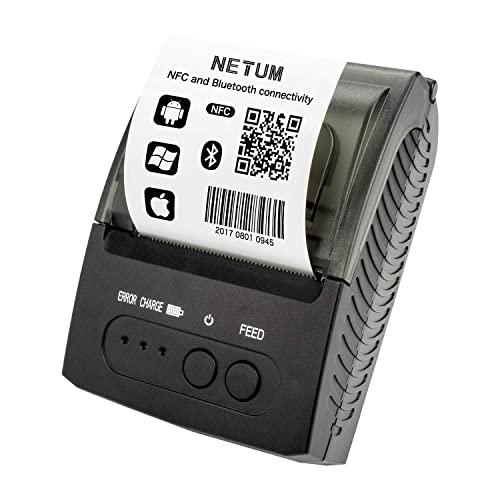
NETUM Bluetooth Receipt Printer 58mm Portable — Best compact portable
Every guide needs the pick that admits the counter is optional. This NETUM is a portable 58mm mini thermal printer, Bluetooth-connected, compatible with Android and Windows per its title — a machine for the stallholder, the mobile valeter, the tradesperson invoicing at the door, the café running a second collection point on the pavement. Its receipts are narrow by design, and the review should be plain about what narrow means: a 58mm slip carries totals, a short item list and a thank-you comfortably, and turns a forty-line itemised bill into a ribbon.
Portability reframes every other judgement. At the counter, the questions are speed and interfaces; in a bag, the questions are size, simplicity and whether the connection survives being opened twenty times a day in twenty different places. Bluetooth is the right radio for that life because it pairs device-to-printer directly, with no router to find and no network password to beg at a client’s premises. The title’s platform pair, Android and Windows, matches the phones and small laptops that mobile sellers actually carry.
The limits follow from the same facts. The title names no iOS, so iPhone-based sellers should treat compatibility as unproven until they verify it. No cutter is mentioned — portables tear — and no wired interface is listed, which is normal for the class but worth registering if you hoped to dock it at a fixed till on weekdays. Chosen for the job it describes, though, it is the lightest answer in this guide to the question of printing a receipt where no counter exists. Sellers curious about the current bundle should check price on Amazon, since portable kits vary in what they include.
Running costs deserve a word at this size. Narrow 58mm rolls are the cheapest thermal stock in common use and turn up everywhere from office suppliers to market wholesalers, so a portable built on that width is easy to feed in any town. The trade is frequency: a small printer with a small roll changes paper more often, and the moment to learn the loading routine is at home, not in front of a customer holding out a hand. Practise the swap twice and it becomes a ten-second gesture; skip the practice and it becomes a performance.
- Stock width: 58mm
- Radio named in title: Bluetooth
- Platforms named in title: Android, Windows
- Form: Portable mini printer
Strengths
- Genuinely portable format for sellers who work away from a fixed point of sale.
- Direct Bluetooth pairing needs no network at the customer’s site.
- 58mm paper is the cheapest, most widely stocked narrow format.
Trade-offs
- iOS is absent from the title’s compatibility list.
- Narrow receipts cannot carry long itemised bills gracefully.
- No wired fallback is named for days when it works at a desk.
Best for: mobile sellers on Android or Windows who hand over short receipts at markets, doors and kerbsides. Not suited for: restaurants printing long itemised bills, or sellers whose only device is an iPhone.

Rongta Portable 80mm POS Receipt Printer — Best wide-format portable
The Rongta RPP300, to give it the model name its title carries, exists for a specific frustration: portable printers usually mean narrow paper, and some businesses cannot go narrow. A wholesaler’s delivery note, a market trader’s itemised receipt, a pop-up restaurant’s full bill — these want the 80mm width of a counter machine in a body that travels. This title offers exactly that pairing, portable form with 80mm paper, connected by USB and Bluetooth to phone or computer, as the listing puts it.
Then the title does something remarkable: it warns you. “Do Not Square” is printed right in the listing — the seller telling Square users, before purchase, that this printer is not for them. Read generously, that is the most useful clause in this entire guide, because Square compatibility is the single most assumed-and-absent feature in the receipt printer market. If your till is Square, stop here and choose differently; the title has saved you a return label. If your till is not Square, the warning costs you nothing and tells you the seller understands the category’s sharpest edge.
Beyond width and connections, the title is spare: no speed, no cutter, no platform list beyond phone and computer. That spareness is the portable trade in miniature — you gain width and mobility, you give up the specification depth of the counter machines. For delivery rounds and temporary sites where the receipt must look like the one from the shop, the RPP300’s proposition is coherent and, thanks to its own warning label, unusually honest about its boundaries.
One practical consequence of the wide-paper portable format: your existing 80mm roll stock from the shop fits the travelling printer, so the round does not need its own paper inventory. Businesses running both a counter machine and a delivery operation quietly save the duplicated stock, the wrong-roll mistakes and the emergency purchases that follow them. It is an unglamorous advantage, and like most unglamorous advantages in this category, it is the kind that still matters in year three.
If you run both shop and round from one small team, that shared stock also means the travelling kit can be assembled in a hurry — printer, spare roll from the counter drawer, out the door — without a separate checklist living in somebody’s memory.
- Receipt width: 80mm
- Links named in title: USB, Bluetooth
- Platforms named in title: Phone and computer, generally
- Form: Portable, model RPP300 per title
- Named exclusion in title: Does not work with Square
Strengths
- Full 80mm receipts from a portable body — the width travellers usually have to surrender.
- USB as well as Bluetooth, so it can dock at a computer when the round ends.
- The Square warning is printed in the title, preventing the costliest mismatch in the category.
Trade-offs
- Square users are excluded outright, by the seller’s own statement.
- The title offers no speed or cutter information to compare against counter models.
- Wide paper in a portable means a bigger carry than the 58mm pocket machines.
Best for: delivery drivers and pop-up sellers whose receipts must match the full-width shop format. Not suited for: any business running Square as its point of sale.
How does the right choice differ between a food business and a retail shop?
Retail printing is a receipt problem: one document, at one moment, handed to one customer who may bring it back in a month. The virtues that matter are legibility, a clean cut, and a receipt long enough to carry the returns policy and the itemised basket. That is why the retail end of this guide clusters around 80mm counter machines with auto cutters — the NT-861 and the Star — and why speed at the till is a retail virtue: the queue is the experience, and the receipt is its final second.
Food printing is a ticket problem, and tickets are plural. One order can need a kitchen ticket, a bar ticket, a counter receipt and a delivery slip, printed in different places at the same second, from a device that never leaves the pass. Distance and routing replace speed as the deciding virtues, which is why the WiFi Volcora and its kitchen framing matter to restaurants in a way they never will to a boutique. A café with a pavement collection point adds a third pattern: the portable at the hatch, taking short orders on narrow paper while the counter machine handles the bills.
The two trades also fail differently. A retail printer failing means a handwritten receipt and an apology — embarrassing, survivable. A kitchen printer failing silently means food never ordered, tables never served, and a failure discovered by an angry customer twenty minutes later. Food businesses should therefore weight the fallback plan and the pairing map from the earlier section twice as heavily, and should test-print at the start of every service until the habit feels as natural as sharpening the knives.
Hybrid businesses — the farm shop with a café, the bakery with a wholesale round — should resist buying one printer to stretch across all three patterns. The sets in this guide are cheap to combine compared with the cost of a compromised station: a counter machine for the till, a network machine for the kitchen, a portable for the round is a system; one mid-range printer carried between rooms is a daily negotiation. Buy the system when the trading day genuinely has three shapes, and buy the single machine only when it honestly has one.
Seasonality bends the answer too. A shop that is retail-quiet eleven months a year and runs a Christmas market stall for five weekends does not need a second permanent station; it needs the portable pick and a drawer to keep it in. A restaurant adding a summer terrace, by contrast, has changed its geography for a third of the year, and the terrace’s distance from the till is a network question, not a Bluetooth hope. Let the calendar vote alongside the floor plan: temporary shapes get portable answers, permanent shapes get installed ones.
What should you plan for after the printer is installed?
Paper is the first plan. Thermal rolls are the only consumable these machines eat, and the discipline is boring: one width per printer, bought ahead, stored dry and out of direct sunlight, because thermal coating degrades with heat and light before it ever meets the print head. Keep the roll you are using plus one spare within arm’s reach of each station, and keep the bulk stock somewhere else, so a busy shift never turns into a stockroom trip. Businesses that standardise on one width across counter and portable machines — the Rongta and the counter picks share 80mm in this guide — halve the ways this can go wrong.
The second plan is the pairing map. Write down, on paper, in the office, which device sends to which printer and by which path. It sounds like bureaucracy until the Saturday a relief manager faces a silent printer and a queue: the map turns a mystery into a sequence — check the named device, check the named connection, re-pair or rejoin, test print. Wireless printing’s failures are almost never exotic; they are forgotten pairings, a tablet updated overnight, a router replaced by the broadband engineer. A map and a labelled cable shorten every one of those mornings.
Third, rehearse the fallback. When wireless printing stops mid-service — it will, once, at the worst time — the counter needs a decided answer, not a debate. The answer might be the wired path on a multi-interface machine like the NT-861 or the MUNBYN, or a handwritten receipt book kept under the till for exactly this hour, or a second printer already paired and waiting. Decide it on a quiet Tuesday, tell every staff member, and the failure becomes an anecdote instead of a reviews page entry.
Finally, keep the first configuration you got working. Photograph the settings screens, note the network name the printer joined, and save one known-good test receipt. Every future change — new router, new tablet, new software version — then has a baseline to return to, and “it worked before we changed X” becomes the most valuable sentence in your troubleshooting vocabulary.
Staff training is the last piece, and it is mostly about the cutter and the roll. Show every person who works the till how to load paper the right way round — thermal stock prints on one side only, and a roll loaded backwards produces blank receipts and a very specific kind of panic — and how to clear a torn strip from the cutter path. Those two skills cover the overwhelming majority of printer incidents a small business will ever see, and they take four minutes to teach on a quiet afternoon.
Comparison Table
| Printer | Width | Wireless | Other interfaces in title | Cutter in title |
|---|---|---|---|---|
| NETUM NT-861 | 80mm | Bluetooth | USB, LAN | Auto cutter |
| Star TSP143IIIBi | — | Bluetooth | None named | Auto-cutter |
| Volcora 80mm | 80mm | WiFi | USB | Auto cutter |
| MUNBYN P047 | 80mm | Bluetooth | USB, Serial, Ethernet | — |
| NETUM 58mm Portable | 58mm | Bluetooth | None named | — |
| Rongta RPP300 | 80mm | Bluetooth | USB | — |
Bluetooth or WiFi — which wireless does your counter actually need?
Start with distance, because distance decides almost everything. Bluetooth is a conversation between two devices in the same room: a tablet and its printer, a phone and its pocket printer. It needs no network, no password and no infrastructure, and it fails gracefully — step too far away and the job simply does not print. WiFi is a building service. The printer joins the network once and then accepts work from any device on it, which is why the WiFi pick in this guide is framed as a kitchen machine: the order originates at the till and materialises thirty feet away through two doorways.
Next, count your sending devices. One tablet that never leaves the stand pairs happily with one Bluetooth printer, and the pairing survives staff changes because there is nothing to reconfigure. Three terminals, a phone for phone orders and a back-office PC all sending to two printers is a network topology, and forcing it through Bluetooth pairings creates a map nobody remembers. If you cannot draw your printing setup as a single line between two devices, you are describing a network, and you should buy for one.
Then think about failure. A Bluetooth problem is local: re-pair the two devices and trade resumes, usually in a minute, at the cost of the queue’s patience. A WiFi problem can be the router, the password changed during a refit, or interference at the pass — broader causes, but also a broader fix that restores every device at once. Small single-till businesses usually prefer the local failure; multi-station sites accept the network risk because the alternative is unmanageable. Neither answer is wrong. What is wrong is buying the radio first and inventing the justification afterwards.
There is a hybrid pattern worth naming, because two picks here embody it: wireless for the moving device, wired for the anchored one, on the same printer. A counter machine with Bluetooth and USB — or Bluetooth, USB and LAN, like the NT-861 — lets the fixed terminal keep its cable while the tablet roams. If your setup has one device that never moves and one that never sits still, that dual nature is not a compromise; it is the correct architecture, and it is cheaper than two specialised printers.
How do you verify POS compatibility before the printer arrives?
Begin with the title, read literally. Note every platform the listing names as supported and every platform it names as excluded — this guide’s MUNBYN and Rongta titles show that sellers do print exclusions when they exist. If your point-of-sale system appears in neither list, treat compatibility as unknown, not as implied. The word of a listing title is evidence; the silence of a listing title is just silence.
Move to your software’s own documentation next. Every serious POS application maintains a list of printers it has tested, usually organised by connection type. Find your candidate on that list in the exact configuration you intend to run — a printer approved over USB is not thereby approved over Bluetooth, because the software talks to each path differently. If the application publishes no list, its support channel is the authority; a two-line answer from them outweighs any amount of forum optimism.
Check the command language while you are there. Two titles in this guide name ESC/POS support, the dialect most receipt software expects. If your software specifies a command set, match it against the printer’s documentation before ordering. Then confirm the paper width your receipts are designed for — a template laid out for 80mm prints cramped and clipped on 58mm — and keep the first roll you load as the reference for every reorder.
Finally, plan the first morning. Install the printer, pair or join it, and run the software’s test print plus one real transaction — a small sale you refund immediately — before the doors open. Every incompatibility in this category announces itself at that test; the businesses that suffer are the ones whose first print is a real customer standing at a real queue.
Keep the evidence as you go. Screenshot the listing title you relied on, save the software’s supported-hardware page, and keep both with the invoice. If a dispute or a return ever follows, the question will be what was claimed and what was checked, and the buyer with the screenshots is the buyer whose return is a formality. It takes ninety seconds at purchase time and settles arguments months later.
Common Mistakes When Buying a Wireless Receipt Printer
Assuming platform compatibility is the expensive one, and the titles in this guide practically plead with buyers not to do it. One seller prints a Square warning in the listing name itself; another lists unsupported platforms in its title. When the exclusions are that visible and buyers still order the wrong machine, the failure is not research depth — it is the habit of reading a title as a promise instead of a specification. Read the exclusions first, the features second.
There is a subtler version of the same failure: reading the features and stopping. A title that lists Bluetooth, three operating systems and an auto cutter has told you a great deal, but the buyer who needs a cash-drawer kick or a specific application’s blessing has not finished reading until the documentation answers those two questions. Features lists are beginnings. The purchases that go wrong are the ones treated as endings.
Buying the width last is the quiet mistake. Paper width decides receipt layout, roll cost and whether your existing stock fits, yet shoppers routinely choose by radio and price, then discover their templates were designed for a wider slip. Width is a five-second check: it is printed in most of these titles in millimetres. Spend the five seconds.
Confusing the two wireless standards causes the third classic failure: a Bluetooth printer installed where the sending device is two rooms away, or a network printer bought for a market stall with no network. Match the radio to the geography of your working day, not to which word sounds more modern. Bluetooth is not a lesser WiFi; it is a different tool with a shorter arm.
Ask about the cash drawer before you buy anything. Two titles here mention the cash drawer relationship — one supports a drawer outright, others are silent. If your till workflow expects the printer to trigger the drawer, silence in the title means verification homework, not a feature. A counter is a system; the printer is one component; buy for the system.
And a fifth, quieter mistake: never test-printing until the first real customer. Every section of this guide returns to it because it is the cheapest insurance in retail — one test transaction on installation day converts every unknown in this category into a known, while there is still time to swap, re-pair or reorder. The businesses with printer horror stories almost always skipped the same ten minutes.
Final Recommendation
Most counters should start with the NETUM NT-861: it is the only pick whose title combines 80mm width, a stated high speed, an auto cutter, ESC/POS and three interfaces, which makes it the safest single answer to an unspecified till. Tablet-first shops should take the Star TSP143IIIBi for its named three-platform Bluetooth and tidy internal power supply. Kitchens belong to the Volcora, the guide’s one WiFi machine. Legacy estates belong to the MUNBYN, mobile sellers to the 58mm NETUM, and wide-receipt travellers to the Rongta — provided Square is not their till, as its title demands you check.
Once your chosen printer reaches the countertop, spend the first morning the way the verification section describes: pair it, join it, print a test, run one small real transaction and refund it. A wireless receipt printer proves itself in that half hour or reveals exactly why it will not — and either answer, learned before the doors open, is worth more than any badge in this guide.
Frequently Asked Questions
Does a Bluetooth receipt printer need WiFi or internet to work?
No. Bluetooth is a direct link between the sending device and the printer, so a tablet and a Bluetooth printer can work together in a building with no network at all. Internet access matters to your POS application for payments and syncing, but the print job itself travels only as far as the printer beside you.
Can I use one of these printers with Square?
Only if the specific listing and Square’s own supported-hardware list both say so. In this guide, the Rongta title states outright that its printer does not work with Square, and no other title here claims Square support. Treat Square pairing as something to prove from both sides before ordering, never as a default.
What is the real difference between 58mm and 80mm receipts?
Width, and everything width carries: characters per line, logo size, how much itemisation fits before the slip becomes unwieldy. An 80mm receipt suits itemised restaurant and retail bills; a 58mm receipt suits totals, short lists and portable selling. Your software template should be designed for the width you buy.
Why does ESC/POS keep appearing in these titles?
Because it is the command language most receipt software uses to tell a printer what to do — text, cuts, drawer kicks. A title naming ESC/POS support is signalling that mainstream applications can drive the printer in their native dialect. It is a compatibility clue, not a guarantee for any one named application.
Are expensive receipt printers quieter or more reliable by default?
Price alone proves neither, and this guide deliberately ranks by fit rather than cost. The signals worth weighting are the ones visible in these titles: a maker that specialises in point-of-sale hardware, interfaces that match your actual devices, and limitations printed where you can read them before purchase. A modest printer whose title matches your setup exactly will serve you better than a flagship whose connection menu you use a third of.
Can two devices share one wireless receipt printer?
Over a network, yes — that is the WiFi model in this guide, which any device on the network can send to. Over Bluetooth, pairing is essentially one-to-one at a time, so shared access means either a network printer or a multi-interface counter machine whose wired and wireless paths serve different devices.
How far can a Bluetooth receipt printer be from the tablet?
Plan for the same room. Bluetooth is designed for short-range links, and walls, metal shelving and kitchen equipment all shorten it further. If the printer must live in a different room from the device sending the work, that is the WiFi pick’s job in this guide — or a wired machine’s.
Do thermal receipt printers need ink or toner?
No. Every pick in this guide is a thermal printer: heat darkens coated paper, so the only consumable is the roll itself. That is why paper width and stocking the right rolls matter more to running costs than anything resembling a cartridge.
Related Guides
If your counter work is wired by design, our guide to digital thermal receipt printers covers the USB and Ethernet workhorses from Star and Epson. For selling beyond the counter entirely, the portable receipt printer roundup compares pocket 58mm and travelling 80mm machines, and when the labels matter more than the receipts, the commercial label printer guide takes over from there.


