What's inside
- Key Takeaways
- Quick Picks
- How We Chose These Picks
- Comparison Table
- USB or Ethernet — how should a fixed counter choose?
- How do you confirm paper width and software pairing for a printer whose title omits them?
- Star or Epson — does the family matter as much as the model?
- What does a decade of counter service actually demand from these machines?
- Common Mistakes When Buying a Counter Receipt Printer
- Final Recommendation
- Frequently Asked Questions
- Related Guides
As an Amazon Associate I earn from qualifying purchases. This post may contain affiliate links at no extra cost to you.
widgetverdict.com is reader-supported. When you buy through links on our site, we may earn an affiliate commission.
The phrase best digital thermal receipt printers needs defining before it needs ranking, because every receipt printer in a modern shop is thermal and most are digital in some sense. In this guide the word digital earns its place through interfaces: these are the counter workhorses whose titles describe digital connections — USB in its several forms, Ethernet networking, Android Open Accessory, cloud printing — rather than radios. If the wireless roundup on this site is about printers that roam, this one is about printers that anchor: machines bolted into a point-of-sale system by cable and network, chosen by businesses that print thousands of receipts a month and cannot have the printer be the interesting part of the day.
The six split cleanly into two families. Three are Star Micronics TSP100-series machines — the TSP143IIIU on USB, the TSP143IIILAN on Ethernet, and the TSP143IVUE combining USB and Ethernet with Android Open Accessory and CloudPRNT in its title. Three are Epsons from the TM line: the TM-T88VII, the TM-T88VI and the TM-T20IV. That two-maker structure is not laziness; it is the honest shape of this shelf, where two specialist manufacturers have defined the counter-printer category for decades and most serious shortlists are a conversation between their lineups.
Speed figures appear in this guide only where a title prints them, and the contrast is instructive. The TM-T88VII’s title states 500 mm/sec outright. The TM-T20IV’s title states 310 mm/s. The Star titles state no speed at all, and the TM-T88VI’s title offers a figure in different units — 10 ppm — alongside 203 dpi. Read those differences as information about each listing rather than as a league table: a maker that prints a speed in the title is inviting the comparison; a maker that does not is asking to be judged on connection, construction and ecosystem instead.
One more framing note. Paper width is stated in only one of the six titles — the TM-T20IV’s, at 80mm. The others leave width to their documentation, and this guide follows them: spec boxes mark the field with the standard note rather than guessing, and the buying sections explain how to confirm width from the manufacturer’s own pages before you commit. Width still matters enormously; it simply has to be verified one step beyond the title for five of these six machines.
Why devote a whole guide to wired machines in a wireless decade? Because the counter is not a pocket. The printer that serves a shop’s busiest hour sits in one place, plugged into systems that also sit in one place, and for that duty a cable is not a limitation — it is a guarantee that the connection existing at 9 a.m. is the connection that exists at the Saturday peak. The six titles below were written by the two makers who understand that duty best, and the reviews read them the way an installer would: connection first, stated figures second, everything else after.
Key Takeaways
- “Digital” in this guide means wired digital interfaces — USB, Ethernet, Android Open Accessory and CloudPRNT — the connections of fixed point-of-sale systems.
- The set is two families deep: three Star TSP100-series printers and three Epson TM-series printers, the two lineages that dominate serious counters.
- Only the Epson titles print speed figures: 500 mm/sec on the TM-T88VII and 310 mm/s on the TM-T20IV, both quoted exactly as stated.
- Internal power supplies appear across the Star titles — one less brick under the counter on every one of those installs.
- Legacy connections survive here deliberately: the TM-T88VI title lists a parallel interface and the TM-T20IV lists serial, for tills that predate USB-everything.
Quick Picks
| Pick | Badge | Why it earns its place |
|---|---|---|
| Star Micronics TSP143IIIU USB Receipt Printer | Best straightforward USB counter printer | Device and MFi USB ports per its title, an auto-cutter, and a power supply built into the body — the tidy single-terminal install. |
| Star Micronics TSP143IIILAN Ethernet Receipt Printer | Best simple network printer | Ethernet as the headline connection, the family’s auto-cutter and built-in power supply, for counters that print over the LAN. |
| Star Micronics TSP143IVUE Receipt Printer | Most connected Star | USB and Ethernet plus Android Open Accessory and CloudPRNT in the title — the bridge between local tills and cloud ordering. |
| Epson TM-T88VII Thermal POS Printer | Fastest title in the guide | Its listing states 500 mm/sec with USB and Ethernet — the throughput flagship for queues that never shorten. |
| Epson TM-T88VI Thermal Receipt Printer | Best for legacy estates | Ethernet, USB and a parallel interface in one title, with 203 dpi stated — a bridge for older systems. |
| Epson TM-T20IV Thermal Receipt Printer | Best value workhorse brief | USB, Ethernet and serial, 310 mm/s and an auto cutter per its title, with 80mm paper and Energy Star named. |
How We Chose These Picks
The entry rule was a title that describes a digital interface in words: USB, Ethernet or LAN, a named accessory protocol, a cloud print service. That rule sounds narrow until you notice what it excludes — printers whose listings gesture at connectivity with adjectives. A counter printer is infrastructure. The businesses buying from this page will wire the machine into a till, a network and a routine, and they deserve a shortlist built from stated connections rather than vibes.
Within that rule, family depth counted. The TSP100 series and the TM-T88 line are the two best-documented counter-printer families in the business, which matters after purchase: documentation, driver support and service knowledge accumulate around high-volume models in a way they never do around one-season listings. Choosing three from each family gives the reader a genuine comparison — connection philosophy, power arrangement, stated speed — inside lineages with long public records, instead of six unrelated boxes united only by a search term.
The third filter was honesty about figures. Where a title states a speed, this guide quotes it in the maker’s own units and says whose figure it is. Where a title is silent, the review does not fill the silence with a number borrowed from a sibling model, because sibling models differ — sometimes by exactly the margin that decides a purchase. You will find the same discipline on resolution: the two Epson titles that state dpi figures get them quoted; the rest are described by connection and role.
Finally, each pick had to own a distinct station. A USB printer for the single terminal. A LAN printer for the networked counter. A cloud-ready printer for the hybrid shop. A flagship for the queue that never ends. A parallel-port bridge for the estate that cannot rewire. A serial-equipped all-rounder for the business replacing one ageing machine with one new one. Six stations, six answers, no duplicates wearing different badges.
A note on what did not influence the selection: headline size. The largest number in these six titles — the flagship’s speed — earned its model a review, not the crown, because crowns in this guide go to fit. A buyer who finishes these reviews knowing which architecture their counter runs will choose well even if they choose against our ordering; a buyer who finishes knowing only which number is biggest has been entertained, not advised. The sections after the reviews exist to teach that architecture question properly.
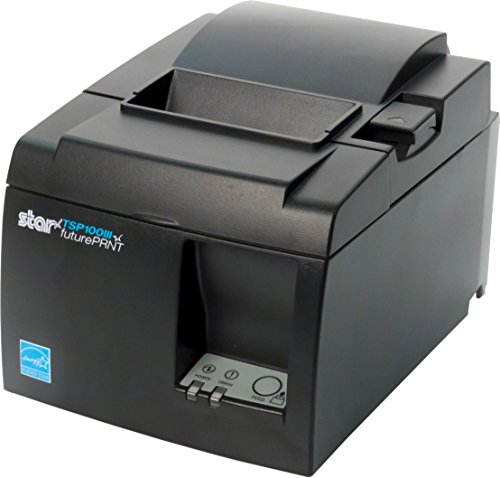
Star Micronics TSP143IIIU USB Receipt Printer — Best straightforward USB counter printer
Start with the two USB ports, because the title’s phrasing — device and MFi USB ports — is doing more work than it first appears. A printer with a device port talks to the terminal; a printer that also offers MFi USB speaks the licensed dialect Apple hardware expects, which is why this model turns up in iPad-till conversations so often. The title does not name operating systems or applications, and this review will not either: what it establishes is a USB printer built with both the computer side and the Apple-accessory side of the counter in mind.
The supporting details are the ones that make an install disappear. An auto-cutter, stated in the title, means every receipt leaves at the same length with the same clean edge — a small consistency customers register without noticing. An internal power supply, also stated, removes the external brick that otherwise migrates around the floor until somebody kicks it loose mid-service. Grey, per the title, is the finish. Taken together, the listing describes a machine designed to be installed once, cabled once and then ignored for years, which is the highest praise a counter printer can earn.
What is absent matters as much. No Ethernet appears in this title, so network printing — several terminals sending to one printer over the LAN — is not this model’s printed promise; its sibling with LAN in the name covers that station two reviews down. No speed figure is printed either, so a buyer choosing on throughput alone should look at the Epson flagship’s stated number and then decide how much the silence here weighs. For the single-terminal shop, though, the proposition is admirably narrow: USB done properly, cutter included, power supply inside, finished.
Picture the install. The printer lands beside the terminal, one USB lead connects them, the mains lead goes to the wall, and the first test receipt confirms the pairing of hardware your software already knows how to drive. There is no network to join, no address to assign, no pairing to repeat when a new staff tablet arrives. Simplicity at this level is not a missing feature; it is the feature, purchased deliberately by businesses whose printing needs begin and end at one counter.
It is worth pausing on the MFi detail once more, because it illustrates how to read this whole category. A title phrase like that is a deliberate inclusion — somebody at Star chose those words because the port’s licensing matters to a class of buyers. Titles in this market are compressed specification sheets, and the reader who treats every clause as load-bearing will consistently out-buy the reader who skims for the model number. This USB model rewards that close reading: nearly everything a single-terminal shop needs to know is present in its dozen or so title words.
- Interfaces named in title: Device and MFi USB ports
- Cutter: Auto-cutter
- Power: Internal power supply
- Finish: Gray, per title
- Paper width: Not stated in the listing title — verify with the manufacturer documentation
Strengths
- Two kinds of USB in the title cover both the terminal connection and the Apple-accessory path.
- Internal power supply and auto-cutter make for the tidiest single-counter install in this guide.
- A narrow, clearly bounded brief: everything the title promises is visible in the title.
Trade-offs
- No network interface is named, so multi-terminal LAN printing is outside its printed brief.
- Neither speed nor paper width appears in the title, so both need a documentation check before ordering.
- USB ties it to a terminal within cable reach — this is an anchored printer by design.
Best for: single-terminal shops and iPad-based tills that want a wired USB printer installed once and forgotten. Not suited for: a multi-terminal business that needs several stations printing to one machine over the network.

Star Micronics TSP143IIILAN Ethernet Receipt Printer — Best simple network printer
The LAN model’s title is the shortest argument in this guide: Ethernet thermal receipt printer, auto-cutter, internal power supply, gray. Where the USB model’s world is one terminal and one cable, this machine’s world is the local network. An Ethernet receipt printer takes an address on the LAN and then accepts jobs from any authorised terminal on it — the second till added in the spring, the office PC printing end-of-day summaries, the replacement tablet that arrives next year. The connection decision is made once, at the network, instead of being re-made at every device.
That architecture suits a particular kind of growth. A business with one counter today and two next year does not want to re-buy its printing when the second terminal lands; a LAN printer absorbs the new terminal as a configuration detail. It also suits distance inside a building: the printer can sit where the paper handling is easiest — near the packing bench, by the collection point — while the terminals stay where the customers are, as long as a network point reaches both. Ethernet’s unfashionable virtue is that it simply works at building scale, through walls that defeat short-range radios, at speeds receipts never strain.
The family resemblances to its USB sibling are plain in the title: the same auto-cutter, the same internal power supply, the same grey finish. What the title does not print is any USB port, any speed figure or any paper width — the listing provided is a study in doing one job. Buyers should register that plainly: if your till software expects a USB-attached printer, this is the wrong sibling, and the family makes the right one. If your software prints over the network, this title’s economy is the point. Network printing also brings one duty the USB model never asks for: somebody must manage addresses and the occasional router change, a task the after-install section below takes seriously.
There is a quiet reliability argument for cable in a building full of radios. The counter environment is hostile to wireless in ways spec sheets ignore: refrigeration units, metal shelving, a dozen neighbouring networks, staff phones hunting for signal. A receipt printer on Ethernet is indifferent to all of it. For businesses whose busiest hour cannot include a printing mystery, that indifference is worth the cable run, and this model is the guide’s cleanest expression of it.
Budget the install honestly and it is still small: a cable to the nearest network point, an address the router will keep giving it, and a line in the office notebook recording both. What you are buying with that half hour is a printer whose availability no longer depends on which tablet is charged, which staff phone is nearby or which neighbouring network changed its channel overnight. Counters that have lived through one wireless mystery at peak usually describe that trade as the bargain of their year.
- Connection named in title: Ethernet (LAN)
- Finish: Gray, per title
- Power supply: Internal
- Cutter: Auto-cutter
- Paper width: not given in the listing title; consult the manufacturer’s documentation for this model
Strengths
- Ethernet lets every terminal on the network share one printer — the scalable counter architecture.
- The internal power supply keeps the install as tidy as its USB sibling’s.
- Cabled networking shrugs off the interference that plagues busy retail airspace.
Trade-offs
- No USB is named in the title, so direct-attached till setups should choose the sibling model.
- It needs a network point near the printer and someone willing to manage basic addressing.
- Speed and paper width are absent from the title and must be confirmed from Star’s documentation.
Best for: growing shops that expect a second terminal and want one network printer to serve the whole counter. Not suited for: a single PC till whose software only knows how to print to a USB-attached device.

Star Micronics TSP143IVUE Receipt Printer — Most connected Star
The TSP143IVUE’s title reads like a map of where point of sale has been travelling. USB and Ethernet cover the local world — the terminal beside it, the network around it. Android Open Accessory, named in full in the title, is the wired protocol that lets an Android device treat the printer as an accessory rather than a stranger. And CloudPRNT, Star’s cloud printing service, points outward: orders placed through web and cloud ordering systems can be routed to this printer without a local terminal brokering every job. Four connection ideas in one listing, each aimed at a different architecture a modern shop might actually run.
That breadth makes this the bridge pick of the guide. Consider the business mid-migration: a counter terminal today, a tablet experiment on weekends, an online ordering channel launching next quarter. A printer fluent in USB, Ethernet, Android accessory mode and cloud routing does not need replacing at any of those steps. The cutter and internal power supply carry over from its siblings — the title states both — so the physical install keeps the family tidiness while the connection menu widens. Grey again, per the title; the TSP100 line keeps its wardrobe simple.
Breadth has a price in attention rather than money. Each path you actually use must be configured, and a cloud path adds an account and a service relationship to a device category that usually asks for neither. A shop that will only ever print from one USB terminal is buying connections it will never open, and the simpler sibling two reviews up is the honest choice for that counter. But a shop whose ordering channels are multiplying — walk-in, tablet, web — is exactly the shop this title was written for, and for that shop the extra interfaces are not decoration; they are the difference between one printer and a printer per channel.
One caution belongs with CloudPRNT specifically: a cloud service is a dependency, and dependencies deserve a question before purchase — what happens to web orders on the day the service or the shop’s internet connection is down? The local paths on this same machine are the answer the title itself provides: USB and Ethernet keep the counter printing while the cloud path waits for the sky to clear. A printer that can fall back to cable is a printer whose cloud feature can be enjoyed without being feared.
The Android Open Accessory line deserves its own sentence of respect, because wired Android connections are the unglamorous workhorse of tablet point of sale. Wireless pairing drifts, batteries die, and a cable that also defines the relationship between tablet and printer removes a category of morning surprises. A shop building its till around an Android tablet should read that AOA clause as the title’s handshake: this printer expects your setup, by name, in print.
- Interfaces named in title: USB, Ethernet (LAN)
- Additional paths in title: Android Open Accessory (AOA), CloudPRNT
- Cutter: Yes, per title
- Power: Internal power supply
- Finish: Gray, per title
- Paper width: absent from the listing title; the manufacturer’s specification page carries it
— local, network, Android accessory and cloud in one title.
Trade-offs
- Cloud printing adds an account and a service dependency that simpler counters do not need.
- Four connection paths mean more configuration decisions at install time.
- Paper width is not in the title, so roll stock must be confirmed from documentation first.
Best for: hybrid shops taking orders at the counter, on tablets and through the web, who want one printer fluent in all three. Not suited for: a single-terminal shop that will never use more than one of its four connection paths.

Epson TM-T88VII Thermal POS Printer — Fastest title in the guide
Five hundred millimetres per second. The TM-T88VII’s title leads its argument with the largest speed figure printed anywhere in this guide, and the figure deserves a careful reading rather than applause. It is the manufacturer’s stated rating, in the manufacturer’s units, under the manufacturer’s conditions — and it still tells you something real: this printer was specified for environments where receipts are a throughput problem. Supermarket-style queues, transit ticket counters, stadium concessions at half-time: places where the printer is a production machine and its seconds are counted in aggregate across thousands of transactions.
The connections are the professional pair — USB and Ethernet, both in the title — which means the flagship can attach directly to a terminal or join the network like the LAN Star above. Resolution is stated too: 180 x 180 DPI, the one resolution figure in this guide printed as a two-axis value. Black is the finish. What the title withholds is equally notable: no cutter is mentioned in the words provided, and no paper width. A buyer for whom an auto-cutter is non-negotiable should verify that detail in Epson’s documentation rather than assuming flagship status implies it — assumptions about unlisted features are how flagship purchases go wrong.
The TM-T88 name itself carries weight in this category; the line has been the default serious counter printer for so long that till software, service engineers and paper suppliers all treat it as a known quantity. The VII is the generation whose title advertises the speed above. For a business whose current printer is the bottleneck at peak — staff waiting, customers watching paper crawl — the upgrade logic writes itself: keep the architecture, remove the wait. For a quieter counter, the same title is over-specification, and the TM-T20IV below offers the same family discipline with a gentler brief. Readers comparing current listings should check price on Amazon for both before deciding which end of the family their queue justifies.
One more consideration belongs to high-speed printing generally: the faster the printer, the more the rest of the system must keep up. Paper loading, cutter cycles if fitted, staff tearing and handing — the human loop around the machine sets the real pace once raw print speed passes a threshold. The TM-T88VII’s stated figure clears that threshold with room to spare, which is precisely its point: after this upgrade, the printer will never again be the slowest part of your transaction.
Flagship purchases also buy headroom against growth. A counter doing comfortable volume today and planning a second location, a delivery channel or a seasonal kiosk is really buying the printer its busiest plausible future needs. The VII’s stated speed is the kind of specification that stays adequate through several of those futures, which is the economic case for it in one sentence: fewer re-purchases across the decade than a machine bought exactly to today’s measure.
- Interfaces named in title: USB and Ethernet
- Print speed: 500 mm/sec, as stated in the listing title
- Resolution: 180 x 180 DPI, per title
- Print method: Direct thermal, per title
- Finish: Black, per title
- Paper width: Not stated in the listing title — verify with the manufacturer documentation
Strengths
- The highest stated speed in the guide — a title that invites throughput comparison directly.
- USB plus Ethernet covers both direct-attach and networked installations.
- A stated resolution figure gives buyers a concrete print-quality datum to compare.
Trade-offs
- The title provided names no cutter, so that detail must be confirmed before purchase.
- Its throughput brief is wasted on counters whose queues are measured in minutes, not seconds.
- Paper width is absent from the title, as with most of this guide’s listings.
Best for: high-volume counters where receipt speed is a measured bottleneck at peak trading. Not suited for: a low-volume desk where the printer idles between occasional invoices.

Epson TM-T88VI Thermal Receipt Printer — Best for legacy estates
The TM-T88VI’s title contains a word that stopped appearing in new product names years ago: parallel. Ethernet, USB and parallel interfaces, all three listed, in a black office receipt printer stating 203 dpi, monochrome, simplex. That parallel port is not nostalgia. It is a bridge plank laid deliberately toward the installed base — the generations of tills, scales and back-office systems that still speak parallel and still work, in businesses that see no reason to replace functioning equipment because a connector fashion changed. This printer lets those systems keep their interface while the business gains a current-generation Epson at the other end of the cable.
The title’s other figures need translation care. It states 10 ppm — pages per minute — a unit borrowed from office printing that sits awkwardly on a receipt machine, and this guide quotes it exactly as printed rather than converting it into the millimetres-per-second its siblings use, because conversions invent precision the seller did not claim. The 203 dpi resolution figure, by contrast, is directly comparable as a print-density datum. Monochrome and simplex need no translation: receipts are one colour, one side, and always have been.
Position the VI honestly against its younger sibling above. The VII’s title shouts speed; the VI’s title lists connections. They are answers to different questions — How fast? versus What will it plug into? — and an estate with mixed generations of equipment asks the second question far more often than the first. A business replacing printers one station at a time, across hardware bought in three different decades, will find this title’s menu the most forgiving in the guide. The forgiving menu has one cost: with three interfaces comes a setup choice at every install, and the discipline of documenting which station uses which port, from the after-install section, stops being optional.
There is also a purchasing-strategy reading of this model. Standardising an estate on a printer that accepts every interface the estate contains means any unit can serve any station — spares become universal, swaps become minutes, and the storeroom holds one model instead of three. For multi-site businesses running inherited equipment, that universality can outweigh a sibling’s speed advantage everywhere except the single busiest counter, which can have the VII while the rest of the estate runs on bridges.
A last word in this model’s defence: legacy interfaces are often read as a sign of an old product, when here they signal the opposite — a current product designed by people who counted the installed base before drawing the port panel. The businesses that need this printer know exactly who they are, usually because a newer, sleeker model already failed to connect to something they own. For them, this title’s unfashionable third interface is the entire reason to buy, and it is a good reason.
- Interfaces named in title: Ethernet, USB, Parallel
- Resolution: 203 dpi, per title
- Speed as printed in title: 10 ppm (quoted in the maker’s own unit)
- Output: Monochrome, simplex, per title
- Finish: Black, per title
- Paper width: the listing title omits it; see the manufacturer’s documentation before ordering rolls
— unique in this guide.
Trade-offs
- The title’s speed figure uses office-printer units, which frustrates direct comparison with its siblings.
- Parallel cabling is bulky and increasingly hard to source at short notice.
- Estates that have fully modernised gain nothing from the legacy port they are paying to carry.
Best for: businesses with older parallel-equipped tills that want a current Epson without rewiring the estate. Not suited for: a brand-new installation with no legacy hardware, where the parallel port is dead weight.

Epson TM-T20IV Thermal Receipt Printer — Best value workhorse brief
The TM-T20IV’s title is the most generous in this guide — it is the only one that states its paper width. Eighty millimetres, printed right there alongside USB, Ethernet and serial interfaces, a 310 mm/s speed, an auto cutter, Energy Star and a stated audience of retail, restaurant and business use. A buyer can learn more about this machine from its title alone than about any other pick here, and that generosity is itself a buying signal: the listing behaves like a specification sheet because the printer is aimed at buyers who read them.
Serial is the connection to notice. Like the parallel port on the TM-T88VI, serial is a legacy handshake — the interface of older terminals and long-installed systems — and its presence beside USB and Ethernet makes the T20IV a one-box answer for the shop replacing a single ageing printer attached to a single ageing till. The stated 310 mm/s sits below the flagship’s figure and far above the pace of any human handing over change; for the overwhelming majority of counters, it is the point where print speed stops being the conversation. The auto cutter, confirmed in the title, keeps the receipt rhythm clean, and Energy Star naming speaks to businesses that count running costs across a fleet.
The TM-T20 line has historically been Epson’s accessible entry into serious counter printing, and this title keeps that posture: everything a small business’s main printer needs, nothing pitched at stadium throughput. The honest limits are the family’s, not the model’s — a buyer whose peak genuinely involves continuous queue pressure should be reading the TM-T88VII’s title instead, and a buyer needing cloud routing should be reading the Star IVUE’s. Within its stated brief, though, this is the most completely described printer in the guide, and the one whose purchase requires the fewest verification errands afterwards.
Note what the complete title does to the buying process. Width known, speed known, cutter known, three interfaces known: the remaining checks shrink to software pairing and price. That is the correct shape of a workhorse purchase — a short afternoon, not a research project — and it is why this model closes the guide’s reviews as the default recommendation for the ordinary busy counter in the final section.
The serial port also gives this model a quiet second career: as the estate’s spare. A replacement printer that can attach by USB to the new till, by Ethernet to the network, or by serial to the ancient terminal in the second shop is the spare that always fits, and shops with more than one ageing station should weigh that flexibility as heavily as the speed figure. Workhorses earn their name across years and across roles, and this title describes a machine specified for exactly that kind of service.
- Interfaces named in title: USB, Ethernet, Serial
- Print speed: 310 mm/s, as stated in the listing title
- Paper width: 80mm, per title
- Cutter: Auto cutter
- Certification named in title: Energy Star
- Stated setting: Retail, restaurant and business use
Strengths
- The only title here that states paper width — 80mm, no verification errand required.
- Serial alongside USB and Ethernet makes it a drop-in replacement for ageing single printers.
- Speed, cutter and width all stated: the most decision-ready listing in the guide.
Trade-offs
- Its stated speed is below the TM-T88VII flagship’s, for counters that truly need the maximum.
- No cloud or accessory protocol appears in the title — web-order routing is not its brief.
- Serial helps only estates that still run it; fully modern setups carry an unused port.
Best for: the ordinary busy retail or restaurant counter replacing one printer and wanting every key fact stated up front. Not suited for: extreme-throughput venues, or shops whose ordering runs through cloud services.
Comparison Table
| Printer | Interfaces in title | Speed in title | Cutter in title | Power in title |
|---|---|---|---|---|
| Star TSP143IIIU | Device and MFi USB | — | Auto-cutter | Internal supply |
| Star TSP143IIILAN | Ethernet (LAN) | — | Auto-cutter | Internal supply |
| Star TSP143IVUE | USB, Ethernet, AOA, CloudPRNT | — | Yes | Internal supply |
| Epson TM-T88VII | USB, Ethernet | 500 mm/sec | — | — |
| Epson TM-T88VI | Ethernet, USB, Parallel | 10 ppm | — | — |
| Epson TM-T20IV | USB, Ethernet, Serial | 310 mm/s | Auto cutter | — |
USB or Ethernet — how should a fixed counter choose?
Ask how many devices will ever send this printer a job. If the honest answer is one — one terminal, one counter, one workflow — USB is the simpler technology and the TSP143IIIU is built exactly for it: no addresses, no network dependency, a cable that either works or visibly does not. Simplicity compounds over years of staff changes, because there is nothing about a USB install for a new manager to misunderstand.
If the answer is two or more, or might become two or more, Ethernet earns its cable. A network printer is a shared resource: terminals come and go, the printer stays. The LAN Star and both network-capable Epsons embody that pattern. The cost is a small amount of network administration — an address, a place in the router’s world, a note in the office of what was assigned — and the after-install section below treats that bookkeeping as part of the purchase.
Distance inside the building breaks ties. USB is a desk-length technology; Ethernet is a building-length one. A printer that must live at the packing bench while the till lives at the door is a network printer whether you planned it that way or not. Measure your counter’s geography before you fall in love with an interface, because the cable you cannot run decides the question for you.
There is a middle pattern, and two picks here serve it: USB for the terminal that owns the printer, Ethernet for everyone else, on the same machine. The TM-T88VII and TM-T20IV both carry the pair, which lets a shop install simply today — one cable, one terminal — and inherit network sharing later without replacing the printer. When a title offers both, it is offering a migration path, and migration paths are worth real money to a business whose till count is a plan rather than a fact.
How do you confirm paper width and software pairing for a printer whose title omits them?
Start at the manufacturer’s specification page for the exact model — not the family page, not a sibling’s listing. Width, cutter type and supported interfaces are stated there in the maker’s own words, and a screenshot of that page belongs with your invoice. Five of the six titles in this guide omit width; the TM-T20IV’s title, which includes it, shows the exception rather than the rule, so build the documentation check into every purchase in this category as a habit.
Then check your point-of-sale software’s supported-hardware list for the exact model and the exact connection you intend to use. Approval over USB does not imply approval over Ethernet, because the software drives each path separately. If the model appears only under a sibling’s name, ask the software vendor directly; a one-line confirmation from them is worth more than a page of hopeful forum posts, and it creates a record if the pairing later disappoints.
Match the command set while you are in the documentation. Receipt software speaks to these printers in a command dialect, and both families in this guide publish which dialects each model accepts. Confirm the printer accepts the dialect your software sends before the box is opened, not after the first garbled test page.
Finish with the physical rehearsal: install, connect by the intended path only, print the software’s test receipt, then run one genuine small transaction and refund it. Every specification you verified on paper becomes a fact about your counter in that half hour — or reveals itself as a misunderstanding while returns are still easy.
Star or Epson — does the family matter as much as the model?
More than newcomers expect, less than partisans claim. The practical differences live in ecosystems: which till software lists which models by name, which local service engineers know which family by heart, which paper and parts your usual supplier stocks without a special order. A shop already running one family happily should need a positive reason to switch, because the switching costs are real and the printing, at this level, is excellent on both sides of the aisle.
Where the families’ titles in this guide genuinely diverge is emphasis. Star’s three listings lead with connection and power arrangement — USB variants, LAN, accessory and cloud paths, internal supplies throughout — and print no speeds. Epson’s three listings print speeds on two models, resolution on two, and keep a legacy interface alive on two. Neither emphasis is a verdict on the hardware; both are statements about what each maker believes its buyers compare first. Read your own priorities in that mirror: if your first question is always how it connects, you are shopping Star’s way; if it is always how fast and how sharp, you are shopping Epson’s.
The deciding test, when the shortlist narrows to one model from each family, is your software’s supported list. Whichever model your point-of-sale application names explicitly, in the configuration you intend to run, is the safer purchase — full stop. Ecosystem questions outrank spec questions at the counter, because the counter’s job is to trade, and trading depends on the pairing that is documented rather than the pairing that is probable.
One more family-level consideration is worth airing: service literature and spare parts follow volume. Both families here sell in the kind of numbers that keep documentation current, firmware maintained and rollers and cutters obtainable years after purchase. An obscure printer can print beautifully on day one and become unrepairable trivia by year three for want of a part nobody stocks. The two lineages in this guide have the opposite profile, and for equipment bought to be forgotten, that profile is a feature as real as any port.
What does a decade of counter service actually demand from these machines?
Less than buyers fear, and different things than buyers expect. The daily demands are paper, loaded the right way round, and a cutter path kept clear of torn strips. The weekly demand is a glance at the network — is the printer still at its address, still answering — in shops that print over Ethernet. The annual demand is a decision about spares: one boxed unit, standardised across stations where the estate allows it, converts a printer failure from a trading emergency into a ten-minute swap.
What a decade does not demand is novelty. The two families in this guide have long public histories precisely because counters reward continuity: the same model, the same paper, the same routine, understood by every member of staff. When a replacement is finally needed, buying the current generation of the same family — the path from a TM-T88VI estate to TM-T88VII flagships at the busiest stations, say — preserves the staff’s knowledge while refreshing the hardware. Churn is a cost; in this category, loyalty to a lineage is a saving.
Documentation is the decade-scale habit that ties the others together. Record each printer’s model, connection path, network address where it has one, and the date it went in, in one page kept with the shop’s other infrastructure notes. That single page is what turns a replacement, five years from now, from archaeology into shopping: you will know what the estate contains, what each station expects, and which current model answers the same brief. The six titles in this guide will have successors by then; the page ensures you meet them prepared.
Common Mistakes When Buying a Counter Receipt Printer
Comparing speeds across units without noticing the units is the signature error of this category, and the TM-T88VI’s title — 10 ppm, sitting in a guide where its siblings speak millimetres per second — is the standing example. A figure in pages per minute and a figure in millimetres per second describe the same printer through different windows, and any ranking that lines them up as equals is fiction. Compare like with like, quote each maker’s figure in the maker’s terms, and let architecture and fit carry the rest of the decision.
Assuming a sibling’s features is the second error. Families share names, shapes and brochures; they do not share every port. The Star that takes USB is not the Star that takes Ethernet, and the Epson whose title states a cutter is not thereby proof about the Epson whose title does not. Read the title of the exact model in your basket — it takes twenty seconds and prevents the most common return in this category.
Skipping the width check because “receipt printers are all the same” is the third. They are not, and the five silent titles in this guide are five opportunities to order the wrong rolls for a year. Width lives in the documentation when it is not in the title; go and read it there.
The fourth mistake is buying for the counter you wish you had. A cloud-ready printer in a shop with no online ordering, a parallel bridge in a shop with no legacy till, a flagship in a shop with no queue — each is a fine machine answering an unasked question. The six titles here are honest about the questions they answer. Match yours to the one being asked at your counter today, with one eye on the terminal you genuinely plan to add — not the empire you daydream about.
A fifth mistake hides in the storeroom: ordering paper by habit after changing printers. A new model can mean a new width, and the first month of a new printer is exactly when the old rolls run out and the reorder goes through on autopilot. Put the new model’s width on the office documentation page the day it is installed, and tape one correct roll’s label inside the storeroom door. Future you, reordering in a hurry, will be grateful.
Final Recommendation
For most established counters, the Epson TM-T20IV is the recommendation that requires the fewest asterisks: width, speed, cutter and three interfaces all stated in its title, from the family that defines the category. Throughput-critical sites should step up to the TM-T88VII and its stated 500 mm/sec. Estates carrying parallel hardware belong to the TM-T88VI. On the Star side, single-terminal shops take the TSP143IIIU, networked counters the TSP143IIILAN, and hybrid shops with web ordering the TSP143IVUE — three tidy answers to three distinct architectures, which is what a good family is for. Note, finally, what the six titles collectively prove: in this category the specification is the sales pitch, and the makers who print theirs plainly are the ones whose machines counters end up keeping.
Whichever family and model you settle on, run the rehearsal from the verification section before the first trading day: connect by the intended path, print the test, run one small transaction and refund it. A digital counter printer’s whole promise is that it will behave identically ten thousand times; the rehearsal is where you collect the first proof, while every alternative is still returnable.
Frequently Asked Questions
What makes a receipt printer “digital” in this guide’s sense?
Its interfaces. The six picks connect through digital paths — USB, Ethernet, Android Open Accessory, cloud printing — rather than through radios or purely mechanical means. The word describes how the printer joins your system, and in this category the joining is the decision.
Why do the Star titles state no print speed?
Because the listings provided do not print one, and this guide quotes figures only from the title under review. Star’s own documentation carries the specifications for each model; check there, and weigh the absence fairly — a maker can emphasise connection and construction in a title without its machines being slow.
Is 500 mm/sec meaningfully faster than 310 mm/s?
On paper, yes — both figures are manufacturer-stated ratings, and the TM-T88VII’s is the larger. At a real counter, the difference shows only when printing is continuous at peak: long itemised receipts back to back. For a counter whose printer pauses between customers, the human loop, not the print head, sets the pace either way.
Can a parallel-port printer really work with a modern business?
That is exactly the TM-T88VI’s purpose. The parallel interface serves the older device; the same unit’s USB and Ethernet serve newer ones. It is a bridge, bought by estates whose equipment spans generations and whose replacement programme is gradual.
Should a small café buy the flagship or the workhorse?
The workhorse, in almost every case this guide can imagine. A café’s printer pauses between orders by the nature of the trade, so the TM-T20IV’s stated speed and complete title answer the need with room to spare. The flagship’s case strengthens with continuous printing — long queues, long receipts, no pauses — and cafés that genuinely trade that way at peak already know who they are.
What is CloudPRNT, in plain terms?
It is Star’s cloud printing path, named in the TSP143IVUE’s title: orders originating in web or cloud systems are routed to the printer without a local terminal handling each job. For shops taking online orders, it closes the gap between the website and the counter — with the local USB and Ethernet paths remaining as the fallback when the internet falters.
Do these printers need ink?
No. All six are thermal printers — heat acting on coated paper — so rolls are the only consumable. That is why the width verification in this guide matters: the wrong roll width is the one supply mistake this category makes easy, and the one most likely to be discovered at the worst possible moment, mid-queue, with the storeroom locked.
Related Guides
When the printer has to leave the building, the portable receipt printer roundup covers pocket and travelling machines in both widths. Shops whose shipping desk outgrows receipts should move to the commercial label printer guide, and organisations printing staff credentials will find the PVC card printer comparison the natural next step.



[…] your counter work is wired by design, our guide to digital thermal receipt printers covers the USB and Ethernet workhorses from Star and Epson. For selling beyond the counter […]