What's inside
- Key Takeaways
- Quick Picks
- How We Chose These Picks
- Comparison
- What can a laptop at this level honestly do — and not do?
- How do you check the update date and set up a Chromebook properly?
- Who is a $150 laptop genuinely right for?
- What happens when a Chromebook reaches its update date?
- Common Mistakes
- Final Recommendation
- Frequently Asked Questions
- Related Guides
As an Amazon Associate I earn from qualifying purchases. This post may contain affiliate links at no extra cost to you.
widgetverdict.com is reader-supported. When you buy through links on our site, we may earn an affiliate commission.
How the links work at this end of the market: four machines below carry Amazon links, where you can check price on Amazon and read the exact configuration in the listing title, and two are covered in prose. Two of the four linked listings are Renewed — professionally refurbished — and both are labelled as such everywhere they appear. The $150 figure throughout is the topic’s budget frame, not a price printed on any individual machine.
This guide begins with the sentence its category usually buries under adjectives: the best 150 dollar laptops are not small versions of real laptops, and pretending otherwise would make everything after this paragraph worthless. At this budget, the market offers exactly two things — education Chromebooks built for school fleets and schoolbags, in screens of 11.6 inches at plain HD resolution, and older refurbished machines whose specifications vary with whatever the refurbisher happened to have on the shelf that month. There is no 15 inch screen here, no Full HD, no metal, no backlit keyboard worth mentioning, no power worth benchmarking. What there is, bought with open eyes, is something genuinely valuable: a simple, tough, cloud-based computer that handles the web, documents, video calls, school platforms and streaming with a minimum of fuss, cost and consequence. For the right buyer, that is not a consolation prize. It is the correct tool, at the correct price, for a defined job with a defined end.
The wrong buyer is just as clearly defined, and this guide will keep naming them: anyone who needs Windows software, real offline storage, a screen for long reading, games beyond the browser, or a machine to last five years as a primary computer. Those buyers should save longer, and several guides on this site exist to help them. The right buyer — a parent equipping a child for school, a household adding a second machine for homework and calls, a writer who lives in documents, an older relative whose computing is email and family photographs in the cloud — will find the four linked picks below to be honest tools with their limits printed on the label, in ink.
Two limits deserve the headline treatment before any pick is praised. Storage on these machines is measured in tens of gigabytes, because they are designed to keep files in the cloud rather than on the device — a philosophy that works beautifully until it meets a large offline life. And every Chromebook carries an expiry concept Windows buyers never face: the Auto Update Expiration, the date after which Google stops delivering ChromeOS updates to that model. A cheap Chromebook near its expiration date is a short-lived Chromebook whatever its condition, and checking that date is the single most important act in this entire purchase. The picks and the advice below are organised around those two facts.
Key Takeaways
- At this budget you are buying an 11.6 inch education Chromebook with an HD screen — every linked pick here is exactly that, stated plainly rather than dressed up.
- The ASUS Chromebook CR11 is the newest design in the guide: an Intel N100, 4GB of memory and 64GB of eMMC — the largest local storage here — in a ruggedised, spill-resistant school chassis.
- Two linked picks are Renewed listings — the Dell Chromebook 11 3100 and the Lenovo 300e — refurbished school-fleet machines, labelled as such in their badges, spec lists and analyses.
- Check the Auto Update Expiration (AUE) date before buying any Chromebook: updates stop on that date, and it matters more than the machine’s physical condition.
- Storage is cloud-first by design: 16GB to 64GB locally, which suits documents and schoolwork and excludes large offline libraries entirely.
Quick Picks
| Pick | Badge | Why it is here |
|---|---|---|
| Samsung Chromebook 4 | Simple Standard | An 11.6 inch HD Chromebook with a Celeron N4000, 4GB and 32GB eMMC — the category in its purest form. |
| Dell Chromebook 11 3100 (Renewed) | Renewed Fleet Machine | A refurbished school-fleet Dell with a Celeron N4020 and 16GB of flash storage — Renewed status stated openly. |
| Lenovo 300e Chromebook (Renewed) | Renewed Touch Convertible | A refurbished 11.6 inch touchscreen 2-in-1 with 32GB of flash storage — the only touch pick here. |
| ASUS Chromebook CR11 | Newest and Toughest | A current ruggedised design: N100 processor, 64GB eMMC, spill-resistant keyboard, antimicrobial guard. |
| HP Chromebook 11 | Prose Pick | HP’s education staple across many generations; specification and update horizon vary by exact model. |
| Acer Chromebook 311 | Prose Pick | Acer’s long-running school and home Chromebook line; buy by exact model and its update date. |
How We Chose These Picks
Honesty was the selection criterion before all others, because this category’s listings reward scepticism. A pick could be linked only if its listing title stated the machine’s essential facts — screen size and resolution, processor, memory, storage — in plain text, and two of the four linked picks additionally state their Renewed status in the title, which this guide repeats rather than softens. Machines whose listings hide behind stock photographs and adjectives were excluded regardless of price, because at this budget the gap between a good purchase and a regrettable one is almost entirely a gap in information.
The second criterion was fitness for the Chromebook’s actual job. These machines were judged as cloud computers: browser speed for classroom and home platforms, keyboard quality for small hands and long documents, durability for schoolbags, battery behaviour across a school day, and the simplicity that lets a non-technical household run one without a resident expert. Specifications that dominate other guides — graphics, storage speed, display colour — were weighed only where they touch that job, which is to say lightly, and the guide says so rather than inventing contests these machines were never entered in.
Price discipline completed the method, because this category’s listings are a carnival of false comparisons — a refurbished machine photographed like new stock, an expiring model priced like a current one, a storage figure padded by a memory card in the box. Every pick below survived the same audit: its title states its facts, its status is declared in its title or its absence of a status word means new, and its specification justifies its place without a single adjective doing unpaid work. At this budget, the audit is not pedantry. It is the difference between the category’s genuine bargains and its traps, and the traps outnumber the bargains.
The update horizon was the third gate, and it eliminated quietly. Chromebooks are defined by their Auto Update Expiration dates, and a responsible guide cannot recommend a model whose remaining update life is measured in months as if it were equivalent to one with years left. Exact dates vary by model and are Google’s to publish, so this guide’s method is to direct every buyer to verify the specific model’s date before purchase — and to weight the newest design here, the ASUS CR11, accordingly. Durability claims were read the same way: the education lines below were engineered for fleets of children, which is the harshest durability testing in the industry, and their reputations were earned in classrooms rather than in copy.
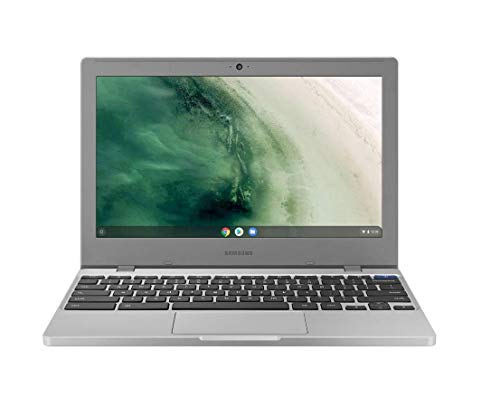
Samsung Chromebook 4 — Simple Standard
The Chromebook 4 is the category distilled: an 11.6 inch HD display, an Intel Celeron N4000 processor, 4GB of memory and 32GB of eMMC storage, with gigabit Wi-Fi, running ChromeOS. Samsung’s contribution to the formula is finish — the Chromebook 4 has always felt a half-step more polished than its school-fleet rivals, with a tidy design and a screen surround that does not announce its price. As the guide’s standard-bearer it defines the honest baseline: this is what the budget buys when it buys new, from a major maker, without refurbishment in its history.
What that baseline does well is the whole of the Chromebook proposition. It boots in seconds, because ChromeOS carries almost nothing to load. It runs the web — school platforms, documents, email, video calls, streaming — at the speed of the connection rather than the speed of the hardware, which is the trick the entire category is built on. It asks nothing of its owner: no maintenance, no antivirus, no updates to schedule, because updates arrive and install themselves in the background. For a child, a grandparent, or a household’s second machine, that absence of administration is not a missing feature. It is the feature.
The limits are the category’s limits, wearing Samsung’s badge. The HD screen — 1366 by 768 class resolution — is adequate for video and web pages and visibly coarse for long reading; text is legible, never lovely. The 32GB of eMMC storage is a landing strip, not a warehouse: the operating system and a modest set of offline files live there, and everything else belongs in the cloud, which means a household with slow or absent internet will feel the design’s assumption daily. Four gigabytes of memory runs a sensible number of tabs and asks discipline beyond it. And the Celeron N4000, while perfectly matched to browser work, defines a hard ceiling — this machine will never edit video, run Windows software, or play anything beyond browser and Android casual games, and no accessory changes that.
The update question must be asked of this model specifically, as of every pick here: the Chromebook 4 is not a new design, and its remaining ChromeOS update life is a fact to verify on Google’s published schedule before money moves. A buyer who checks that date and finds years remaining gets the category’s purest product. A buyer who skips the check is gambling the entire purchase on a date they could have read in a minute — the one gamble this guide exists to prevent.
Within its borders, the Samsung is the recommendation for the buyer who wants the category’s standard product with no refurbishment in its story and no surprises in its behaviour: the school machine, the kitchen-counter machine, the grandparents’ window to the family. Bought for those duties, with its update date verified, it will be remembered as money spent exactly right.
Classroom teachers tend to give the Chromebook 4 the review that matters most in this category: it disappears. It opens, it connects, the lesson starts, and the machine’s personality never becomes the lesson’s subject — no update prompts staging an ambush, no settings requiring a technician, no child’s session collapsing into an error message with a code in it. Simplicity at fleet scale is an engineering achievement, and the Samsung carries it into the home unchanged: the grandparent’s video call simply starts, the way appliances are supposed to.
- Panel: 11.6 inch HD display, per the listing
- Chip: Intel Celeron N4000
- Memory and storage: 4GB RAM with 32GB eMMC
- Wireless: gigabit Wi-Fi noted in the listing
- System: ChromeOS — verify this model’s Auto Update Expiration date before buying
Strengths
- The category’s baseline in its cleanest, newest-stock form
- ChromeOS simplicity — no maintenance, automatic updates
- Samsung’s finish feels a half-step above the fleet norm
Trade-offs
- HD resolution is coarse for long reading
- 32GB local storage assumes a cloud life
- Update horizon must be verified — the design is not new
Best for: children, grandparents and second-machine households.
Not suited for: offline workers and anyone needing Windows software.

Dell Chromebook 11 3100 (Renewed) — Renewed Fleet Machine
The bracket is the biography: this Dell is a Renewed listing, a machine that began life in a school fleet, was retired, professionally refurbished and tested, and is sold again under the Renewed programme’s guarantee. Its listing states the specification plainly — an 11.6 inch screen at 1366 by 768, an Intel Celeron N4020, 4GB of memory and 16GB of flash storage, with ChromeOS, Intel HD graphics and Bluetooth. Dell’s 3100 was engineered for the most destructive users in computing — other people’s children, by the classroom — and its design priorities were hinges, corners, keyboards and ports that survive being carried by the screen. A refurbished example carries that engineering at the lowest money in this guide.
The case for the renewed fleet machine is economic and, in its way, principled. School Chromebooks are retired on schedules, not on condition — fleets are replaced in waves while thousands of individual machines still work perfectly — and the refurbishment channel exists to catch them. The buyer gets fleet-grade durability and a guarantee; the machine gets a second life instead of a shredder. For a household equipping a child whose own relationship with hardware is, charitably, developing, there is a certain wisdom in a computer that has already survived a school and costs accordingly little to replace if the experiment ends badly.
The compromises must be stated with the same clarity. Sixteen gigabytes of flash storage is the smallest figure in this guide — enough for ChromeOS and a lean set of offline files, nothing more — and it hard-codes the cloud-first life: documents in Drive, photographs in a library service, downloads treated as temporary guests. Cosmetic wear is part of the renewed bargain; the guarantee covers function, not beauty. And the update horizon is the sharpest question in the guide: a fleet-era model’s remaining ChromeOS update life may be short, and a buyer must verify the 3100’s Auto Update Expiration date before purchase and price the machine as a tool for the years that remain, not the years they wish remained.
Judged that way — as a durable, guaranteed, short-to-medium-term school and homework machine at the floor of the market — the Dell earns its place. Judged as a five-year primary computer, it fails on storage and horizon alike, and this guide would rather lose the sale than blur that line. Buy it for the child, the homework desk, the spare room; inspect it on arrival while the return window is open; check its update date first. Do those three things and the renewed Dell is the shrewdest money in the article.
Dell’s fleet engineering shows in a place home buyers rarely inspect and children always test: the hinges and the corners. The 3100 was specified for a life of being opened one-handed, dropped from desk height and carried by anything graspable, and a refurbished unit’s chassis carries that specification intact even when its surfaces show their history. For the buyer, the translation is simple — the parts of this machine most likely to be abused by its next owner are the parts least likely to fail, which is the correct way around for a child’s computer.
- Status: Renewed — refurbished school-fleet machine, stated in the title
- Panel: 11.6 inch, 1366 x 768, per the listing
- Chip: Intel Celeron N4020
- Memory and storage: 4GB RAM with 16GB flash storage — the guide’s smallest
- Build: fleet-engineered durability for classroom service
Strengths
- Fleet-grade toughness at the market’s floor
- Renewed guarantee behind a professionally tested machine
- The rational first computer for a young student
Trade-offs
- 16GB of storage hard-codes a cloud-only life
- Cosmetic wear is part of the refurbished bargain
- Update horizon may be short — verify the AUE date first
Best for: a child’s school machine and homework desks.
Not suited for: a primary computer expected to serve five years.

Lenovo 300e Chromebook (Renewed) — Renewed Touch Convertible
The second Renewed pick earns its place with the one feature the rest of the guide cannot offer at this money: a touchscreen that folds. The Lenovo 300e’s listing describes an 11.6 inch touchscreen 2-in-1 with a MediaTek M8173C quad-core processor, 4GB of LPDDR3 memory and 32GB of flash storage, running ChromeOS — and, in brackets that this guide repeats rather than hides, the word Renewed. The 300e line was Lenovo’s education convertible, built to be flipped into tablet and tent modes by students all day, and its hinge and touch layer were engineered to fleet standards for exactly that abuse. Refurbished, it becomes the cheapest route in this guide to a genuinely flexible little computer.
Flexibility at 11.6 inches is worth more than flexibility at 15, because the machine is small enough for its postures to be real. Tablet mode turns it into a reading slate and a drawing surface for a child; tent mode props it for a video on a kitchen counter or a call on a crowded desk; the touchscreen makes ChromeOS’s Android applications feel native rather than translated. For a young student, whose computing is half tapping by instinct, the 300e meets its user in the user’s own language — the only pick here that does.
The MediaTek processor is the specification to understand before buying. It is an efficiency chip from an earlier generation, adequate for the browser-and-apps life the machine is built for, and noticeably less sprightly than the Intel chips in the Samsung and ASUS picks when tabs multiply. The 4GB of LPDDR3 memory sets the same discipline. None of this matters for documents, classes and video; all of it matters if the buyer’s imagination is quietly furnishing the machine with heavier duties. The 300e is a school-and-homework convertible, full stop, and its refurbished status adds the standing instructions: inspect on arrival, expect the possibility of cosmetic marks, and verify the model’s Auto Update Expiration date before purchase, because a fleet-era convertible’s remaining update life is the true measure of its value.
With those checks done, the 300e is the guide’s most characterful pick — the one a child will actually love rather than merely use, and the one whose second life as a kitchen or spare-room tablet will likely outlast its school career. Character is not a specification, but at this budget, on a machine bought for a young person, it may be the one that decides whether the computer gets used for homework at all.
There is a homework-table diplomacy to the 300e worth picturing: folded flat, it is a shared surface two siblings can work over; tented, it shows one child a video while the keyboard hides from sticky fingers; in tablet mode with a finger or a basic stylus, it becomes the maths worksheet and the drawing page. No other pick in this guide changes shape to suit the task, and for the youngest users in the category — the ones for whom a laptop is still partly a toy — the shape-changing is not a feature list, it is the whole relationship.
- Status: Renewed — refurbished listing, stated in the title
- Panel: 11.6 inch touchscreen, 2-in-1 convertible
- Chip: MediaTek M8173C quad-core, 2.1GHz, per the listing
- Memory and storage: 4GB LPDDR3 with 32GB flash storage
- Model: 81H00000US — verify its Auto Update Expiration date before buying
Strengths
- The only touchscreen convertible in the guide
- Fleet-engineered hinge built for student handling
- Tablet mode gives it a second life around the house
Trade-offs
- MediaTek chip is the least sprightly here
- Renewed condition varies — inspect on arrival
- Update horizon is the decisive check for this model
Best for: young students who tap, flip and draw.
Not suited for: heavy multitaskers and long-horizon buyers.

ASUS Chromebook CR11 — Newest and Toughest
The CR11 is what the education Chromebook grew up to be. ASUS’s listing describes a ruggedised 11.6 inch machine with an Intel N100 processor, 4GB of memory and 64GB of eMMC storage, an antimicrobial guard on its surfaces, and a spill-resistant keyboard, in Mineral Grey. Every element of that sentence is a generation’s progress over the older picks: the N100 is a current, efficient processor that makes the Celeron-era machines feel their age; 64GB is the largest local storage in this guide, doubling the Samsung and quadrupling the Dell; and the ruggedisation — built for drops, spills and the microbial reality of classrooms — is engineered in rather than hoped for. This is the pick for the buyer who wants the category’s idea in its most current form.
Durability deserves its own paragraph because at this budget it is the closest thing to a luxury. School laptops die by water bottle, by backpack, by the drop from a desk — and the CR11 was designed by people who studied those deaths. A keyboard that shrugs off a spilled drink, surfaces treated against the germs of thirty children, a chassis built to be dropped by professionals at dropping: for a household buying for a young student, these are not specifications, they are the difference between a computer that survives the school year and a second purchase in February. ASUS sells this machine to fleets; the home buyer inherits the fleet’s engineering requirements for free.
The newest design also buys the guide’s most valuable invisible asset: time. A current model’s ChromeOS update horizon stretches years beyond the fleet-era picks, which converts directly into the machine’s useful life — security updates, browser updates, and compatibility with the platforms schools keep adopting. The standing instruction still applies — verify the CR11’s specific Auto Update Expiration date before purchase — but a buyer choosing between this and an older design is largely choosing how many years the machine remains a citizen of the current internet, and the CR11’s answer is the longest here.
The category’s ceilings remain, and this guide will not let the newest pick pretend otherwise. The screen is 11.6 inches at HD class resolution; the memory is 4GB; ChromeOS is ChromeOS, with its cloud-first storage philosophy and its inability to run Windows software. The CR11 is not a small flagship. It is the best-executed version of a deliberately simple idea — and for the child, the classroom and the homework desk, simple and tough and current beats ambitious and fragile at any price, let alone at this one.
If the budget stretches to exactly one machine in this guide bought without a refurbishment story and without an imminent horizon, this is it. The CR11 is the recommendation this article would hand to a school, a parent, or a grandparent equipping a grandchild — with the AUE check performed, as always, before the box is opened rather than after.
School IT departments buy machines like the CR11 for a reason home buyers can borrow wholesale: total cost across the fleet’s life, where a model that survives drops and spills simply costs less than a prettier model that does not, whatever the shelf prices say. A household with one unit is a fleet of one, and the arithmetic is identical — the rugged machine’s premium, where one exists, is repaid the first time a water bottle empties itself into a schoolbag. Durability is the only insurance policy in this guide that comes built into the product.
- Panel: 11.6 inch display, ruggedised chassis, per the listing
- Chip: Intel N100 — the most current processor in this guide
- Memory and storage: 4GB RAM with 64GB eMMC — the guide’s largest local storage
- Protection: spill-resistant keyboard, antimicrobial guard
- Finish: Mineral Grey; verify the Auto Update Expiration date before buying
Strengths
- Current design with the longest update runway here
- Ruggedisation engineered for real school accidents
- 64GB of storage relaxes the cloud-only discipline
Trade-offs
- Still an HD 11.6 inch screen — the category’s ceiling
- 4GB of memory asks tab discipline
- ChromeOS excludes Windows software entirely
Best for: young students and buyers wanting the newest, toughest design.
Not suited for: anyone whose software list starts with Windows.
HP Chromebook 11 — Prose Pick
HP’s Chromebook 11 is less a model than a dynasty — a name applied across many generations of education machines, sold to fleets in enormous numbers and resold into the refurbished channel in nearly as many. That breadth is precisely why it is a prose pick: an “HP Chromebook 11” can be several different computers wearing one badge, with different processors, storage sizes and, most importantly, different Auto Update Expiration dates. The family’s virtues are consistent — simple, sturdy, keyboard-first school machines with HP’s service reach behind them — but the individual machine in any given listing is a specific generation with a specific horizon, and the listing’s details are the only version of the truth that matters.
Shopped correctly, a Chromebook 11 can be the shrewdest purchase in this entire category. The method is mechanical: identify the exact model from the listing, look up its AUE date on Google’s published schedule, confirm its storage is at least 32GB if the buyer has any offline life at all, and inspect any refurbished unit on arrival. A late-generation example with years of updates remaining is a bargain by any measure. An early example near its expiration is a paperweight with a keyboard, whatever its price — and the tragedy of this category is that both wear the same name and often the same photograph.
For the household buyer, the Chromebook 11’s appeal is the same as the Dell’s, with HP’s badge: a machine a child can be trusted with, a school platform can be run on, and a budget can survive replacing. Its dynasty status means parts, chargers and knowledge are everywhere. Just let the model number, not the name, make the decision.
Chargers and parts deserve their sentence in the dynasty picks’ favour: a machine sold to fleets in the millions leaves behind an ecosystem of inexpensive chargers, screens and keyboards in every marketplace, so the inevitable accident — the lost charger, the cracked corner — is a small purchase rather than a service saga. Obscure machines strand their owners; dynasties surround theirs with spares. For a child’s computer, which will meet its accident on a schedule nobody controls, that ecosystem is worth real money and never appears in a listing.
- Identity: a multi-generation education dynasty, not a single model
- Critical check: the exact model’s Auto Update Expiration date
- Storage guidance: 32GB or more for any offline life
- Ownership: HP’s service reach and universal parts availability
- Buying check: judge the generation in the listing, never the badge
Strengths
- Enormous installed base means parts and knowledge everywhere
- Late generations with long horizons are genuine bargains
- Simple, sturdy, school-proven design
Trade-offs
- The name conceals several different computers
- Early generations may sit near update expiration
- Refurbished condition varies by seller
Best for: methodical shoppers willing to check the exact model and date.
Not suited for: anyone buying on the badge alone.
Acer Chromebook 311 — Prose Pick
Acer’s Chromebook 311 line is the other great education dynasty, a long-running family of 11.6 inch machines that schools buy by the pallet and households buy by the same logic as the HP: simplicity, sturdiness, and a price that treats a child’s first computer as equipment rather than as an heirloom. Like the HP, the 311 name covers multiple generations and processor families — MediaTek and Intel variants among them — which is why this guide covers it in prose and repeats the category’s central instruction: the exact model and its update date are the product; the badge is the packaging.
The 311 family’s character is cheerful utility. Acer builds these machines light, with keyboards sized for school desks and batteries tuned for the school day, and the line’s longevity means its behaviours are known quantities — teachers, IT departments and parents have run them for years and documented everything. For home use, that translates into a machine with no surprises in either direction: it will do the web, the documents, the calls and the classes, and it will not do anything else, and both halves of that sentence have been true of every generation.
The buying method mirrors the HP’s, with one Acer-specific emphasis: processor variants within the 311 line differ in sprightliness more than the name suggests, so a listing that states its chip plainly is a listing worth trusting, and one that hides behind the family name should be passed over for one that does not. Pair that with the AUE check and the storage floor, and the 311 becomes what it has been for a decade of classrooms — a safe pair of hands.
In this guide’s map, the 311 and the HP are the dynasty picks: not linked, not lesser, simply requiring the buyer’s own verification where the linked four have had theirs done. Households that enjoy a bargain hunt will find the best value in this entire article hiding inside these two families, one careful listing at a time.
Acer’s line has one more household virtue worth naming: familiarity across generations. A family that buys a 311 for a second child after the first child’s machine has served its term finds the same layout, the same chargers in many cases, and the same behaviours — the small continuities that make a household’s technology feel like infrastructure rather than a series of experiments. Continuity is a dull word and a genuine comfort, and the long-running education lines are the only place in this category where it can be bought on purpose.
- Identity: Acer’s long-running 11.6 inch education line
- Critical check: exact model, its chip, and its AUE date
- Character: light, simple, school-day battery discipline
- Storage guidance: confirm the figure in the listing title
- Buying check: a listing that hides its chip is a listing to skip
Strengths
- A decade of classroom proof behind the design
- Light and simple for young users
- Bargains hide in the family’s later generations
Trade-offs
- Generations and chips vary widely under one name
- HD screen and 4GB-class memory are the family’s ceiling
- Verification is the buyer’s own work
Best for: bargain hunters willing to verify a model and a date.
Not suited for: shoppers expecting all the checking done for them.
Comparison
| Pick | Status | Proven core | Watch out for |
|---|---|---|---|
| Samsung Chromebook 4 | New | Celeron N4000, 4GB, 32GB eMMC, 11.6 inch HD | Verify the model’s update expiration date |
| Dell Chromebook 11 3100 | Renewed | Celeron N4020, 4GB, 16GB flash, 11.6 inch 1366 x 768 | Smallest storage here; horizon may be short |
| Lenovo 300e Chromebook | Renewed | MediaTek M8173C, 4GB, 32GB flash, 11.6 inch touch 2-in-1 | Least sprightly chip; inspect condition on arrival |
| ASUS Chromebook CR11 | New | Intel N100, 4GB, 64GB eMMC, ruggedised 11.6 inch | Still HD and 4GB — the category’s ceiling applies |
| HP Chromebook 11 | Mostly renewed stock | Generation-dependent — identify the exact model | Same name, many computers, many expiry dates |
| Acer Chromebook 311 | New and renewed stock | Generation-dependent — chip varies by model | Listings that hide the chip are listings to skip |
What can a laptop at this level honestly do — and not do?
The honest capability list is longer than sceptics expect. A Chromebook in this guide browses the full web, runs school and office platforms in the browser, writes and edits documents, joins video calls, streams film and music, handles email and banking, plays browser and Android casual games, and prints to modern printers. It does all of that quickly, quietly, and with an administrative burden of approximately zero — no updates to manage, no antivirus to feed, no settings to curate. For a child, a student in the humanities, a writer, or an older relative, that list is not a subset of computing. It is computing, complete, in the form most people actually use it.
The honest exclusion list is equally clear, and this guide will not soften it. No Windows or Mac software runs here — not the desktop Office suite’s full power, not professional creative tools, not engineering applications. Storage excludes large local libraries, serious photography workflows and big game installations by arithmetic. The HD screens exclude comfortable long-form reading and any work where text quality is the work. The processors exclude video editing, heavy multitasking and modern gaming entirely. And the update horizon excludes permanence: every Chromebook is a machine with a published sunset, bought for a span rather than for a decade.
Read those two lists against your own week and the purchase decides itself. If your computing lives in the first list, this budget buys you a tool with nothing missing. If it lives in the second, no bargain at this level is a bargain, and the correct move is to save towards the classes covered elsewhere on this site. The worst outcome in this category is not a cheap laptop; it is a cheap laptop bought for the wrong list.
How do you check the update date and set up a Chromebook properly?
The update check takes one minute and protects the entire purchase. Find the exact model name or number from the listing — not the family name, the model — then look it up on Google’s published Auto Update Expiration schedule, which lists every Chromebook model’s date. The date you find is the date after which that model stops receiving ChromeOS updates: security fixes, browser versions and platform features all end there. A machine with several years remaining is a sound purchase; a machine inside its final year should be priced and planned as a short-term tool, whatever its physical condition. Sellers of refurbished units rarely volunteer this date. Ask, or look it up, before the money moves — afterwards, the knowledge is only regret.
Setup, by contrast, is the category’s party trick. Sign in with a Google account and the machine configures itself: bookmarks, documents and applications arrive from the cloud, and a child or grandparent can be working within minutes. The few deliberate steps worth taking are a supervised account for a young user, which gives a parent oversight of applications and screen time; a check that the household printer is recognised before it is needed in a panic; and a small stock of essential files — the school documents, the travel papers — marked for offline availability, because the cloud-first design’s one true weakness is a dead connection at a live moment.
Finally, plan the machine’s span out loud. A Chromebook bought for a school stage, a course, or a grandparent’s email era has a natural term, and naming it at purchase — three school years, the length of the degree, until the update date — turns the category’s famous limitation into an ordinary plan. Machines bought with a term in mind are replaced calmly. Machines bought as forever are resented on schedule.
Who is a $150 laptop genuinely right for?
The clearest case is the schoolchild. A primary or early secondary student’s computing is a list this category recites perfectly: a learning platform, documents, research in a browser, video lessons, a camera for photographing homework. Layer on the education designs’ durability and the price’s replaceability, and the Chromebook is not the budget option for that child — it is the correct option, the one schools themselves chose by the million after testing every alternative. A parent buying a Windows laptop for the same duties is mostly buying capabilities the school day never touches, in a chassis the schoolbag will treat no kinder.
The second case is the single-purpose adult. The writer who works in documents and wants a machine that does nothing else — no games library tempting, no settings to maintain, a battery that outlasts the café session. The grandparent whose computing is family photographs in a shared album, email, video calls and the news, and whose previous computer frightened them with warnings they could not interpret. The household that needs a second screen for homework so the main computer is free. Each of these lives fits inside the Chromebook’s capability list without touching its walls, and for each, the money saved against a Windows machine is not a compromise extracted but a budget correctly refused.
The third case is the institution in miniature: the small club, the community class, the volunteer organisation that needs several identical machines for a defined programme. Fleet logic — buy Chromebooks, manage them centrally, replace without drama — scales down to five units as gracefully as it scales up to five thousand, and the renewed channel exists precisely to serve buyers at that scale with machines whose first lives were spent proving the model. If your need is plural, simple and defined, this category was, quite literally, designed for you.
What happens when a Chromebook reaches its update date?
Nothing dramatic, and that is what makes the date easy to underestimate. The machine keeps working. The browser opens, the documents load, the calls connect — for a while. Then the drift begins: the browser version falls behind the web’s expectations, a school platform adopts a feature the old system cannot render, a banking site declines the outdated browser on security grounds, and the machine’s usefulness erodes site by site rather than failing all at once. Security maintenance has ended, which for a computer whose entire life is online is the serious part: the foundation stops being repaired while the weather continues.
The practical consequence is that a Chromebook’s end is a slope, not a cliff, and owners routinely ride the slope longer than they should — particularly with children’s machines and grandparents’ machines, where the person least able to judge the risk is the person using the device. This guide’s insistence on checking the date before purchase is aimed at that slope: buy a machine whose supported years cover its intended job with margin, and the question of riding past the date never becomes a household decision. The term is printed by Google, in public, for every model. The only way to be surprised by it is not to look.
There are honourable second lives after the date — a media player for downloaded content, a kitchen display, a typing machine — and the education chassis in this guide are durable enough to serve them. But a second life is a bonus, not a plan. Plan the purchase around the supported years, enjoy any afterlife as found money, and the category’s one real trap will never have your household’s name on it.
Common Mistakes
Skipping the update-date check is the category’s defining error, and it is not close. Buyers inspect screens, compare processors and haggle over storage, then discover a year later that their bargain’s ChromeOS updates ended before their child’s school year did. The date is published, the lookup takes a minute, and the information is worth more than every other specification in this guide combined. There is no second mistake with consequences on that scale, which is why this one gets the paragraph to itself.
Buying a Chromebook for a Windows job runs second. The relative who needs one specific Windows application, the student whose course mandates one specific program, the worker whose employer’s systems assume a desktop suite — each discovers the incompatibility after the return window’s peak, and each concludes wrongly that cheap laptops are useless. The tool was fine; the assignment was wrong. Read the exclusion list before the price.
The third mistake is subtler: treating the smallest storage as a rounding error. Sixteen gigabytes, as in the renewed Dell, is a working specification only inside a fully cloud-based life; households with patchy internet, large offline needs or a child’s download habits will hit its wall weekly. Match the storage to the connection and the habits, not to the optimism. At this budget, honesty about limits is not pessimism — it is the entire skill of buying well.
Final Recommendation
For most buyers in this category, the ASUS Chromebook CR11 is the answer: the newest design, the toughest construction, the largest storage and the longest update runway, in a machine built to survive the school years it will serve. It is the one pick here that asks the fewest apologies of its category, and for a child or a classroom it is the guide’s clear first name.
Choose the Samsung Chromebook 4 for the category’s standard product in new condition, the renewed Lenovo 300e for the child who needs touch and a folding screen, and the renewed Dell 3100 for the toughest fleet machine at the floor of the market — each with its status understood and its update date verified. The HP and Acer dynasties hold the category’s hidden bargains for buyers willing to do the model-and-date detective work themselves. And hold the guide’s founding sentence as the final word: at this budget you are buying a simple, honest cloud computer for a defined job and a defined span. Bought that way, it is one of the best-value purchases in all of computing. Bought any other way, it is a lesson — and lessons, unlike Chromebooks, are never cheap, never ruggedised, and never, ever returnable.
Frequently Asked Questions
What is the Auto Update Expiration date, and why does it matter so much?
It is the date Google publishes for each Chromebook model after which that model stops receiving ChromeOS updates — security patches, browser upgrades and new features alike. Think of it as the machine’s citizenship papers for the modern web: while they are current, every site and school platform treats the Chromebook as a full citizen; once they lapse, the welcome cools site by site, in ways no amount of careful ownership can reverse. A machine past its date still switches on, but it falls behind the web’s requirements and loses its security maintenance, which for a cloud computer is the whole foundation. Check the exact model’s date before buying any Chromebook in this guide; it is worth more than the processor, the storage and the condition combined.
Can a Chromebook run Microsoft Office and other Windows programs?
Not the Windows desktop programs. Chromebooks run the web versions of Office and Google’s own document tools in the browser, plus Android applications — which covers documents, spreadsheets, presentations and schoolwork for most users. If a specific Windows application is mandatory for your work or course, a Chromebook at any price is the wrong tool, and this guide’s honesty on that point is deliberate: save towards a Windows machine instead.
Is 16GB or 32GB of storage really enough?
For the life these machines are designed for, yes: ChromeOS itself is small, documents and school files live in the cloud, and streaming replaces downloading. It is not enough for a local photo library, a music collection, large offline video or big games — those lives need a different category of machine. The ASUS CR11’s 64GB is the roomiest here and suits users who want a modest offline cushion; the Dell’s 16GB suits only the fully cloud-committed.
Are Renewed Chromebooks a good idea?
They can be the category’s best value, bought with the guide’s three checks: inspect the machine on arrival while returns are open, accept that the guarantee covers function rather than cosmetic perfection, and verify the model’s update expiration date before purchase, because a refurbished fleet machine’s remaining update life defines its real lifespan. One more comfort for the cautious: a renewed Chromebook holds almost no data risk in either direction — the previous owner’s world was wiped in refurbishment, and your own life on the machine lives in your account, in the cloud, rather than on its small drive. The Dell 3100 and Lenovo 300e in this guide are exactly that bargain — fleet-tough machines at the market’s floor, with their status declared.
Can these laptops be used without internet?
Partially, and plan for it rather than discovering it. Documents can be marked for offline work, some applications run offline, and downloaded media plays anywhere. The households that thrive with Chromebooks treat connectivity the way sailors treat weather — assumed, respected, and prepared for: the important files synced before the journey, the film downloaded before the flight, the school documents cached before the countryside weekend. Two minutes of preparation converts the category’s one structural weakness into a non-event, and it is a fair price for everything else these machines give back in simplicity. But the design centre of a Chromebook is the connection — a household with unreliable internet will feel the seams daily, and a buyer whose life is substantially offline should choose a Windows machine with real local storage. For connected homes and schools, the question rarely arises; for cabins and commutes, download deliberately before departure.
How long will a laptop at this price last?
Physically, the education designs here are built to survive years of school handling — the CR11’s ruggedisation is the extreme example. Practically, the update expiration date sets the term: a current model offers years of supported life, a fleet-era renewed model offers the years that remain on its schedule. Buy the term knowingly, match it to the job — a school stage, a course, a grandparent’s email years — and the machine will have lasted exactly as long as it was supposed to.
Related Guides
If this budget’s limits have clarified what you actually need, the next rungs are mapped elsewhere on the site: the premium survey in the best 1500 dollar laptops shows the far end of the laptop universe, the gaming edition in the best 1500 dollar laptops gaming covers the play-first machines, and the big-screen field in the best 16 inch laptops starts where these 11.6 inch screens leave off.
Related guides
- Best Gaming Keyboard: Six Boards From Rapid-Trigger Esports Picks to Macro Flagships
- Best Time Machine Compatible Hard Drives: Mac-Ready and Reformatted Picks
- Best 3.0 Qualcomm Quick Chargers: QC 3.0 Adapters That Still Earn Their Outlet
- Best 3D Mechanical Engineering Laptops: Certified Workstations for CAD and Simulation


