What's inside
- Before the Shortlist: What Your Venue Decides for You
- Key Takeaways
- Quick Picks
- How We Chose These Picks
- Comparison
- How to Choose a Middle-Range Projector for 3D Video Mapping
- How Do You Align a Piece When the Projector Cannot Sit Square?
- How Long Should a Middle-Tier Show Run Each Night?
- What Does “Middle Range” Actually Buy You?
- How Do You Rehearse a Middle-Venue Piece?
- Which Surfaces in a Middle Venue Map Best?
- When Should a Middle-Tier Buyer Step Up to Production?
- Common Mistakes
- Final Recommendation
- Frequently Asked Questions
- Related Guides
As an Amazon Associate I earn from qualifying purchases. This post may contain affiliate links at no extra cost to you.
[SITE_DOMAIN] is reader-supported. When you buy through links on our site, we may earn an affiliate commission.
Before the Shortlist: What Your Venue Decides for You
Open any linked name below and the listing will try to sell you a projector. Resist for one minute and inventory your venue instead: the surface’s size and material, the hours your pieces run, the ambient light you cannot switch off, and the distance your room or site actually offers. Middle-range mapping is a negotiation between a machine and a venue, and the venue’s terms — written down before shopping — are what separate a deliberate purchase from an optimistic one.
The best projectors for middle range 3d video mapping occupy the tier where this craft gets serious without getting industrial. Below this tier sit the mini projectors: charming, portable, and quickly outmatched by any surface larger than a doorway or any room that cannot be fully darkened. Above it sit production machines: brighter, heavier, built for arenas and rental fleets, and priced for organisations. The middle is where community theatres, churches, schools, independent artists, event stylists and ambitious households actually live — surfaces of one room or one facade, audiences of dozens, budgets with a ceiling.
What the middle tier buys, concretely, is headroom. Headroom in brightness, so a piece survives a hall’s safety lighting. Headroom in placement, so the machine fits the room that exists rather than the room in the brochure. Headroom in hours, so a laser or a business-grade engine runs a whole festival weekend without drama. What the middle tier does not buy — with one bundled exception in this guide — is the mapping itself. Warping still comes from software on a computer, or from a kit, and every review below states plainly which arrangement its machine assumes.
Brightness claims in this tier need a literate reader. One pick here labels its figure with the ANSI standard; one prints a large figure without the label; one is a business projector quoting colour and white brightness in the 3LCD tradition; two make claims in phrases or adjectives rather than numbers. This guide quotes each claim exactly in its own class and never converts between classes — a discipline that matters more in the middle tier than anywhere, because this is where marketing numbers grow ambitious.
The six machines below are ranked by mapping usefulness within the tier: a kit-carrying flagship that defines the tier’s ceiling, a laser installer with real geometry tools, an honestly rated value engine, a business 3LCD with serious stated brightness, and two smart consumer projectors whose auto-everything convenience serves small venues and first pieces. Each is a legitimate middle-range answer; they differ in which compromise they have chosen, and the reviews name the compromises as carefully as the strengths.
Key Takeaways
- The middle tier buys headroom — brightness, placement and running hours — not the mapping itself, which still comes from a kit or your software.
- The Nebula X1 Pro is the tier’s ceiling: a SpaceFlow mapping kit with templates plus a standard-labelled 3,500 ANSI lumens.
- The Epson EX3290 is the business route: 3LCD colour and white brightness stated at 4,000 lumens, twin HDMI, and no mapping features claimed or implied.
- Only two picks label brightness with a standard a planner can bank on (ANSI on the Nebula and the NICPOW); read every other figure as its maker’s wording.
- Auto focus and auto keystone on the smart picks square a picture quickly but never warp one — alignment to a surface remains your software’s job.
Quick Picks
| Pick | Badge | Why it earns its place |
|---|---|---|
| Nebula X1 Pro SpaceFlow Kit | The tier’s ceiling, kit included | SpaceFlow 4K AI mapping kit, 3,500 ANSI lumens, triple laser and 7.1.4 Dolby Atmos sound. |
| ViewSonic LS740HD | Geometry tools for real rooms | 1080P laser with optical zoom, keystone, corner adjustment and 360 projection. |
| NICPOW 2000 ANSI Projector | Labelled brightness, vast canvas | A stated 2,000 ANSI lumens, zoom and a 300-inch image ceiling for large simple surfaces. |
| Epson EX3290 | The business engine | 3-chip 3LCD WXGA with 4,000 lumens of colour and white brightness and two HDMI ports. |
| VISSPL Smart 4K Projector | Convenience for small venues | AI auto focus, built-in Netflix and portable smart design for first pieces and tests. |
| ONOAYO ONO5Pro 2.0 Outdoor Projector | Sound that fills a garden | A verified real-lumen claim, 80W Dolby Audio, licensed apps and AI auto focus. |
How We Chose These Picks
Tier honesty governed the sort. Each candidate had to be defensibly middle-range: clearly beyond mini-projector capability in stated brightness, build intent or placement tools, yet short of production-class machinery in scale and ambition. Machines whose titles described only bedroom novelty were excluded however charming; machines designed for arenas would have distorted the guide’s prices and promises alike.
Within the tier, mapping usefulness was scored on the three things middle venues actually consume. First, alignment support: kits, corner tools, zoom, credible keystone. Second, brightness that can be planned with — labelled figures outranking larger unlabelled ones, because a community hall booked for a Saturday cannot be re-lit around a marketing claim. Third, running temperament: laser engines and business designs that treat a six-hour event day as routine.
Claim classes were kept separate throughout, and spec boxes transcribe silences rather than filling them. Several of these titles omit throw, native resolution or geometry detail that a mapper would love to have; the omissions are printed in the reviews, and the listing is named as the place each one must be settled.
Finally, the set was balanced across the tier’s real buyers. A kit flagship for the artist who wants finished shows now; a laser installer for the venue technician; a labelled value engine for the school or church hall; a business 3LCD for the organisation buying through sensible channels; and two smart machines for the small venue and the first piece. Six versions of one buyer would have made a tidier guide and a less useful one.
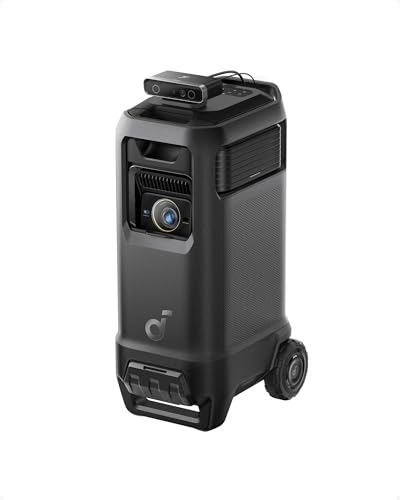
Nebula X1 Pro SpaceFlow Kit — The tier’s ceiling, kit included
In a tier defined by bringing your own software, the X1 Pro is the exception that proves the definition: its title includes a SpaceFlow 4K AI mapping kit, a library of more than 100 ready-to-use templates, 3,500 ANSI lumens from a triple laser engine, a 56,000:1 contrast figure and 7.1.4 Dolby Atmos sound at 40W. It sits at the middle tier’s ceiling because it is, in effect, a small production system folded into one box — kit, light and sound design travelling together.
For middle venues, that integration solves the tier’s characteristic problem, which is not quality but staffing. A community theatre, a wedding venue, a school hall: these places have one technician, or none, and a show that requires a laptop, a licence, a projector and a PA is a show with four failure points and one exhausted volunteer. A kit machine with templates collapses the rehearsal into placement and timing, and the show can be run by the person who also locks up.
The brightness figure deserves its standard’s respect. Three thousand five hundred ANSI lumens, labelled, is plannable brightness: enough for a hall with house lights dimmed rather than killed, enough for a facade after dark, enough for a stage piece that shares the evening with other lighting. Paired with the stated contrast, it supports the bold, high-contrast content grammar that mapping rewards.
The Atmos system is the Pro’s argument over its standard sibling, and in middle venues it is a stronger argument than in homes. Halls and gardens eat sound; a designed spatial system inside the projector removes the separate PA from the kit list and the get-in schedule alike. Pieces where the audio is composed — reveals, ceremonies, brand moments — gain a dimension that no template can substitute.
The open questions are the kit questions, and middle-tier buyers should ask them in venue language. How are surfaces captured and stored? Can a show built for one hall be re-fitted to another? Does the kit warp your own footage, or only arrange its templates? How are cues timed for a ceremony? The listing and the maker’s documentation hold those answers; the title, for all its completeness, does not. When you check the X1 Pro kit’s price on Amazon, weigh it against the full alternative system — projector, software licence, speakers, and the hours of whoever would run them — because that system, not a bare projector, is its true comparison.
- Mapping: SpaceFlow 4K AI mapping kit with 100+ templates, per title
- Brightness: 3,500 ANSI lumens, per title
- Contrast: 56,000:1, per title
- Light source: triple laser, per title
- Sound: 7.1.4 Dolby Atmos, 40W, per title
- Show programming and cue detail: Not stated in the listing title — verify with the manufacturer documentation
Strengths
- Complete kit route: mapping, templates, light and sound in one purchase
- Standard-labelled brightness a venue can plan around
- Atmos sound retires the separate PA for composed pieces
Trade-offs
- Kit’s depth for original, multi-surface work is unconfirmed by the title
- Ceiling-of-tier pricing within a middle-range guide
- Organisations with existing sound systems pay for audio twice
Best for: one-technician venues and event stylists who need finished mapped shows without a software apprenticeship.
Not suited for: artists building original multi-projector pieces — the title does not state blending, live-input or free-warp capabilities, so the kit’s ceiling must be confirmed before it is composed for.

ViewSonic LS740HD — Geometry tools for real rooms
Middle venues are geometry problems wearing social clothes: the hall with the beam, the church with the pillar, the gallery whose only power point is in the wrong corner. The LS740HD answers with the tier’s most practical toolkit — a 1080P laser engine with optical zoom, keystone correction, corner adjustment and 360-degree projection — and no mapping pretensions whatsoever. Its title names classrooms, auditoriums and golf simulation among its habitats, which is another way of saying it expects to work for a living.
Corner adjustment is the feature middle-tier buyers should learn to shop for by name. When the projector cannot sit square to the surface — the normal condition, not the exception — each corner of the image can be drawn to its mark independently, giving mapping software a plausible rectangle to refine instead of a parallelogram to rescue. Optical zoom completes the pair: the image fitted to the surface from the position the room permits, whether that position was chosen for its power socket, its sightlines or its distance from the audience’s heads.
The brightness figure is printed as 5500 lumens without the ANSI label, reported here as the title’s wording and never as a measurement against the labelled figures in this guide. Context still speaks: a maker aiming a laser machine at auditoriums is aiming at rooms where dimness is a complaint, and the laser source suits the tier’s long event days — dusk-to-late shows, festival weekends, a season of Saturday hires — without lamp etiquette.
Resolution is 1080P Full HD, stated plainly, and for mapped surfaces at venue distances that is a rational allocation of budget: the audience reads transformation and fit, not pixel structure, and the money not spent on resolution visibly went into placement tools instead. Buyers whose pieces are read close — product plinths, museum labels — should weigh the 4K-claiming picks more heavily; buyers wrapping walls and stages will not miss the pixels.
Budget the system, not the box: this projector plus mapping software plus the computer that runs it is the purchase, and its Amazon price should be read beside the software licence before the kit flagship above it is judged expensive. For venues with a technician and a laptop already in the cupboard, this is frequently the tier’s most sensible money — professional placement behaviour without production-class cost or weight.
- Resolution: 1080P Full HD, per title
- Brightness: 5500 lumens as worded in the title (not labelled ANSI)
- Light source: laser, per title
- Geometry: optical zoom, keystone, corner adjustment, 360 projection, per title
- Stated venues: classroom, auditorium, golf simulation, home theater
- Mapping software or kit: Not stated in the listing title — verify with the manufacturer documentation
Strengths
- Corner adjustment and zoom tame real rooms’ imposed positions
- Laser engine built for long, repeated event days
- Established maker’s documentation suits venue purchasing
Trade-offs
- Software, licence and laptop are entirely the buyer’s problem
- Brightness figure carries no ANSI label in the title
- 1080P ceiling for close-read pieces
Best for: venue technicians pairing their own mapping software with a forgiving laser engine.
Not suited for: kit-free beginners — with no mapping tools named in the title, the first show waits on software the buyer has not yet chosen or learned.
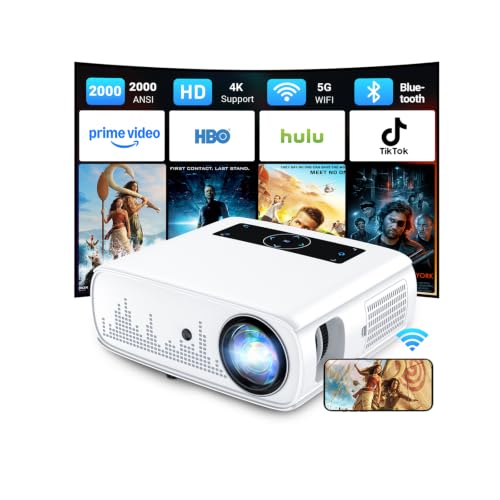
NICPOW 2000 ANSI Projector — Labelled brightness, vast canvas
The NICPOW is the middle tier’s argument that honesty scales. Its title states 2,000 ANSI lumens — the standard’s label, the lowest labelled figure in this guide, and one a planner can actually use — then spends its ambition on canvas and welcome: zoom, an image up to 300 inches, and a connection list spanning HDMI, USB and AV through phones, tablets, laptops, DVD players, TV sticks and game consoles. For a school hall, a church or a community artist wrapping one large, simple surface, that combination covers the whole job description.
Scale is this machine’s dialect of headroom. Middle venues often have one big, forgiving surface — a hall’s end wall, a gym’s blank expanse, a gable — and a projector that can fill it from a practical distance turns a modest budget into a spectacle. Zoom does the fitting, letting the image be sized to the architecture from where the machine can stand, and 300 inches of ceiling means the fitting rarely runs out of lens.
Two thousand ANSI lumens defines the lighting contract plainly: evenings, darkened halls, controlled light. Inside that contract the figure is sufficient for bold mapped content on light surfaces, and the label means a buyer can know it before the box arrives — a courtesy the larger unlabelled figures in this tier do not extend. Pieces planned for safety-lit halls or bright foyers should step up to the labelled 3,500 class or accept a smaller, denser image.
The 4K wording is “4K Supported” — signals accepted, native resolution unclaimed — and in this tier that honesty about wording matches the honesty about brightness. WiFi and Bluetooth serve the rehearsal room: designs cast from a phone for a quick look at the real wall, then the show itself delivered by cable from the laptop running the warping software, as serious middle-tier work is normally arranged.
No keystone or corner correction is named in the title, so placement discipline substitutes: position the machine squarely, take time over the stand, and let the software’s warp absorb the remainder. Its Amazon listing is worth checking for the current price and any geometry detail in the full description — at this end of the tier, confirmed extras are bonuses, and the labelled brightness plus canvas are already the substance of the deal.
- Brightness: 2,000 ANSI lumens, per title
- Signal: 4K Supported, per title (acceptance, not a native 4K claim)
- Image size: up to 300 inches, with zoom, per title
- Wireless: WiFi and Bluetooth, per title
- Connections named: HDMI, USB, AV, smartphone, pad, laptop, DVD, TV stick, PS5
- Keystone or corner correction: Not stated in the listing title — verify with the manufacturer documentation
Strengths
- Labelled brightness a hall can be booked around
- Zoom and a vast image ceiling fit one big surface well
- Accepts nearly any source a school or church owns
Trade-offs
- Labelled figure is the tier’s floor — lit halls will defeat it
- No geometry tools are named for off-square positions
- Sound is unmentioned in the title; plan speakers separately
Best for: schools, churches and community artists wrapping one large surface in controlled light.
Not suited for: venues that cannot darken — at a stated 2,000 ANSI lumens, a safety-lit hall is a condition the title itself rules out.

Epson EX3290 — The business engine
The EX3290 enters this guide from the boardroom, and its review keeps that passport visible. The title describes a 3-chip 3LCD widescreen WXGA video projector with a built-in speaker, 4,000 lumens of colour and white brightness, and two HDMI ports. Nothing in it mentions mapping, video art or events — and yet business projectors quietly power a large share of the world’s middle-tier mapping, because they are bright in a stated, colour-honest way, built for daily hours, and purchasable through channels organisations trust. This is that machine, assessed for that second career.
The brightness wording deserves translation into plain terms. In the 3LCD tradition, colour brightness and white brightness are quoted separately because lamp-and-panel designs historically produced whites far brighter than colours; a title quoting both at 4,000 lumens is claiming the colours keep up with the whites. For mapping — a discipline made entirely of coloured light — that is the relevant promise, and it is quoted here as the maker’s wording, in its own claim class, not converted into ANSI terms the title never used.
WXGA is a widescreen business resolution, wider than the old boardroom standard and short of Full HD. On mapped walls and stages at audience distance, the practical cost is small; on close-read surfaces it will show. Twin HDMI ports, meanwhile, are a venue feature disguised as a specification: the show laptop and the backup source — or the media player for the loop between live pieces — can both stay connected, and changeovers stop involving a cable passed hand to hand in the dark.
The built-in speaker is stated without a wattage, so treat it as announcement-grade audio: fine for a spoken introduction or a small room, not the sound system of a composed piece. Organisations mapping ceremonies should budget external sound and credit this machine purely as a light engine with exemplary manners.
Why include a business projector in a mapping guide at all? Because the middle tier’s buyers include exactly the institutions this machine was built for, and its virtues — stated colour brightness, twin inputs, a maker’s support network, tolerance for daily use — map directly onto their constraints. The warping, as ever, comes from software the institution supplies. Check the EX3290’s Amazon price against the laser picks with the institution’s own arithmetic: purchase route, support, and the cost of the software seat it presupposes.
- Imaging: 3-chip 3LCD, widescreen WXGA, per title
- Brightness: 4000 lumens of colour and white brightness, as worded in the title
- Inputs: 2x HDMI ports, per title
- Sound: built-in speaker, per title (no wattage stated)
- Form intent: business video projector, per title
- Mapping, keystone and zoom detail: Not stated in the listing title — verify with the manufacturer documentation
Strengths
- Colour and white brightness both stated — the claim mapping cares about
- Twin HDMI keeps show and backup sources connected
- Business build and support suit institutional buyers
Trade-offs
- WXGA resolution trails the tier’s 1080P and 4K-claiming picks
- No mapping or geometry features are claimed at all
- Built-in speaker is announcement-grade, wattage unstated
Best for: institutions mapping with their own software through a business-grade, colour-honest engine.
Not suited for: close-read or fine-detail pieces — the title’s WXGA resolution is the ceiling, and no geometry tools are named to refine the fit.

VISSPL Smart 4K Projector — Convenience for small venues
The VISSPL represents the middle tier’s lower shore: a portable smart projector, described as high brightness with no figure printed, carrying AI auto focus, 3D Dolby Audio, built-in Netflix and WiFi Bluetooth, framed by its maker for outdoor movies and bedroom ceilings. Its mapping career is real but specific — small venues, first pieces, prototypes and festive surfaces — and its review holds it to exactly that scope, because a machine honestly placed serves its buyer better than a machine flattered into the wrong tier.
Auto focus is its working virtue. Small-venue mapping is itinerant: the machine is carried to the surface, aimed, moved, aimed again, and a projector that restores its own sharpness after every move keeps a one-person setup moving at the speed of the idea. Paired with its smart platform, the VISSPL can run a test piece from a streaming app or a cast phone in minutes — the fastest route in this guide from unboxing to a glowing wall, provided the wall is modest and the room can darken.
The limits are structural and should be bought knowingly. With no brightness figure printed, no venue can be promised from the title; with no keystone, corner or warping tool named, alignment is manual and the mapping itself must be pre-baked into content or supplied by a connected device. The 3D in its title belongs to its audio wording. None of this disqualifies the machine from its role; all of it defines the role’s borders.
That role, stated positively, is the sketchbook and the party. Artists prototype on machines like this before committing a venue piece to serious hardware; households run a birthday name across a wall, a festive scene in a window, a looping backdrop behind a band in a garage. At those scales, in the dark, the VISSPL’s conveniences are not compromises but the entire point, and its price tier — visible on its Amazon page — is the tier where an experiment costs less than a venue hire.
Buyers tempted to stretch it upward should re-read the tier’s definition: the moment a piece must survive a lit hall or cover a stage, the labelled-brightness picks above it stop being upgrades and become requirements. The VISSPL is the guide’s honest floor, and floors are load-bearing precisely because they are not asked to be ceilings.
- Brightness: described as high brightness; no figure stated in the title
- Focus: AI auto focus, per title
- Platform: Netflix named; smart projector with WiFi and Bluetooth
- Audio wording: 3D Dolby Audio, per title
- Form: portable, outdoor and bedroom/ceiling framing, per title
- Keystone, corner and warping tools: Not stated in the listing title — verify with the manufacturer documentation
Strengths
- Auto focus keeps one-person small-venue setups fast
- Built-in streaming runs test pieces without a laptop
- Portable form doubles as the household’s movie projector
Trade-offs
- No brightness figure exists to plan a venue around
- No alignment tools are named in the title
- Scope is small surfaces in darkenable rooms, firmly
Best for: first pieces, prototypes and festive small-venue displays in the dark.
Not suited for: booked halls with fixed lighting — no stated brightness figure means no lighting condition can be promised from the title.

ONOAYO ONO5Pro 2.0 Outdoor Projector — Sound that fills a garden
The ONO5Pro 2.0 makes its brightness case in words — a bracketed “Verified Real-Lumen” claim — and its sound case in numbers: 80W of Dolby Audio, the strongest stated audio in this guide, twice the wattage of the kit flagship. Add officially licensed apps, AI auto focus and a smart platform over WiFi and Bluetooth, framed for bedroom and outdoor use, and the machine’s middle-tier role clarifies: atmospheric pieces in gardens, courtyards and small outdoor venues, where the show is an environment rather than an exhibit.
Atmospheric work has its own technical logic. A garden facade glowing with a slow seasonal piece, a courtyard wall breathing colour behind a reception, a backdrop that turns a marquee into somewhere — these pieces are read peripherally, at distance, through conversation, and their success is measured in mood rather than detail. For that work, sound genuinely rivals light: 80W carried by the projector itself fills a garden without a PA, a mixer or a second pair of hands, and the licensed apps keep the content pipeline — films, loops, ambient visuals — dependable between shows.
Auto focus serves the outdoor routine, where a machine is positioned on grass, gravel or a garden table and nudged by every cable tug. The mapping arrangement is the tier’s usual one, stated without varnish: no kit and no geometry tools are named, so warping arrives from a connected device or is pre-rendered into the content, and alignment is placement plus patience.
The brightness claim’s missing number is the purchase’s one real interrogation point. A maker asserting verified lumens is answering the market’s inflated figures rhetorically; a buyer planning a specific venue needs the figure itself, and the listing is where it must be found — or its absence accepted as a limit on the venues that can be promised. In unlit gardens after dark, the machine’s framing suggests confidence; in a lit courtyard, the unnumbered claim should be tested inside the return window rather than trusted.
Read its Amazon page for the current price with that test in mind, and weigh the 80W system against the speaker it replaces in your own kit list. For the right buyer — garden venues, receptions, seasonal atmosphere — this is the tier’s most complete one-box mood machine, bought with eyes open about the one number it declines to print.
- Brightness: “Verified Real-Lumen” claim in title; no figure stated
- Sound: 80W Dolby Audio, per title
- Focus: AI auto focus, per title
- Platform: officially licensed apps, smart projector, WiFi and Bluetooth
- Stated use: bedroom and outdoor, per title
- Mapping kit and geometry tools: Not stated in the listing title — verify with the manufacturer documentation
Strengths
- 80W sound system fills outdoor spaces without a PA
- Licensed apps keep content dependable between shows
- Auto focus suits improvised outdoor positions
Trade-offs
- Brightness claim carries no figure a venue can be booked against
- No warping or alignment tools are named
- Atmospheric scope: detail-critical pieces belong to other picks
Best for: gardens, courtyards and receptions where the mapped piece is an atmosphere with sound.
Not suited for: venues contracted to a brightness specification — the title states no figure such a contract could cite.
Comparison
| Pick | Middle-tier route and headline facts | Venue it suits first |
|---|---|---|
| Nebula X1 Pro Kit | Kit route; 3,500 ANSI; triple laser; templates; Atmos sound | The one-technician venue |
| ViewSonic LS740HD | Software route; 1080P laser; zoom, corner adjustment, 360 projection | The awkward professional room |
| NICPOW 2000 ANSI | Software route; 2,000 ANSI stated; zoom; 300-inch image | The big dark hall on a budget |
| Epson EX3290 | Software route; 3LCD WXGA; 4,000 colour and white brightness; 2x HDMI | The institution with channels to satisfy |
| VISSPL Smart 4K | Pre-baked content; AI auto focus; Netflix built in; portable | The first piece and the party |
| ONOAYO ONO5Pro 2.0 | Pre-baked content; verified-lumen claim; 80W Dolby Audio | The garden atmosphere |
How to Choose a Middle-Range Projector for 3D Video Mapping
Define your venue’s worst evening, then buy for it. Not the dark, empty rehearsal afternoon — the real show: house lights at their mandated level, audience in place, the surface at its true distance. A machine that survives the worst evening makes every other evening easy, and the middle tier exists precisely to serve venues whose worst evenings are demanding but not extreme.
Choose the warping arrangement as a staffing decision. A kit suits venues where the operator is also the host, the teacher or the volunteer. Software suits venues with a technician and a laptop already in the building. Pre-baked content suits loops and atmospheres that repeat unchanged. All three arrangements appear in this guide; matching the arrangement to the rota matters more than matching any specification to any other.
Read brightness in its claim classes and refuse to average them. ANSI-labelled figures can be compared and contracted. A business projector’s colour-and-white wording is a different, respectable claim in its own tradition. Unlabelled large figures and verified phrases are makers’ rhetoric until a listing publishes a number. A middle-tier buyer who keeps those classes separate will never book a hall on a mood.
Ask, too, who maintains the machine in February. Middle-tier gear lives in cupboards, is borrowed by other groups, and is set up by whoever drew the rota. Machines from established makers carry documentation, parts and answers that survive staff changes; smart consumer machines carry the convenience of the familiar. Neither virtue is imaginary, and a venue that knows its own turnover will know which one it is buying.
Weigh the supporting cast last: stands, cables, sound, the computer, the licence. Middle-range shows fail at their edges — a stand too short, a cable too short, a speaker too small — far more often than at their centres. Price the whole rig against the venue’s worst evening, and the right pick usually identifies itself.
How Do You Align a Piece When the Projector Cannot Sit Square?
Accept the position, then correct in layers — the order matters. Begin physically: get the machine as close to square and as close to the intended distance as the room permits, because every degree corrected physically is a degree the digital tools do not have to spend. Level the stand, centre the image on the surface’s middle, and only then reach for the menus.
Correct digitally in the projector’s own order next: keystone for the trapezoid, corner adjustment — where the machine offers it, as the ViewSonic here does — for the corners that keystone cannot satisfy. The aim is a plausible rectangle occupying the surface correctly, not a perfect one; perfection is the software’s department, and software warps best from a good starting geometry.
Finish in the mapping application, where the warp grid is drawn onto the surface’s real features — corners, edges, architectural lines — and saved as the show’s own file. Then protect the result like the asset it is: mark the stand’s feet on the floor, note the machine’s settings, photograph the aligned image beside a photograph of the setup. Rebuilding that alignment from evidence takes minutes; rebuilding it from memory, on show day, takes the afternoon the audience was promised.
How Long Should a Middle-Tier Show Run Each Night?
As long as the venue’s story requires — and the machine should be chosen as if the longest night is the normal one. A wedding piece may run ninety minutes; a festival installation may run from dusk to midnight for three consecutive days; a church’s seasonal display may run every evening for a month. Those are different endurance contracts, and they are why this guide credits laser engines and business builds: both design traditions assume the machine will be switched on by other people, for hours, without ceremony or complaint.
Heat and noise are the endurance questions titles rarely answer, so they belong on the listing checklist for any long-run purchase. A machine that roars beside a quiet ceremony, or that cooks itself in a warm hall, fails a contract its brightness figure won. Read owner accounts of long sessions where they exist, plan ventilation and placement for the machine you choose, and remember that the audience hears the projector whenever the piece goes quiet — which, in well-designed mapping, is often.
Loops deserve a final endurance thought. Middle-tier pieces commonly loop for hours, and a loop that is charming at four minutes can be unbearable at forty. Build loops with variation, silence and darkness inside them, and let the machine rest inside its own content; the projector’s endurance and the audience’s are, in practice, the same specification.
What Does “Middle Range” Actually Buy You?
Insurance against the three failures that end amateur shows. The first is light: a piece that looked rich in a blacked-out rehearsal and washed out under show conditions. Labelled, tier-appropriate brightness is insurance paid in advance. The second is fit: a projector that cannot be positioned where the room demands, or cannot correct the position it is given. Zoom, corner tools and kit guidance are that insurance. The third is endurance: a machine asked to run a festival day that behaves like it was asked to run a film. Laser engines and business builds carry that policy in their design briefs.
What the tier pointedly does not insure is authorship. With the kit exception, these machines will not design, warp or cue your piece; they make your piece possible at a scale and reliability the mini tier cannot promise. Buyers who understand that division — machine as insurer, human as author — are the buyers this tier was built for, and they are rarely disappointed by it.
How Do You Rehearse a Middle-Venue Piece?
In the venue, at show hour, with the show’s real light — there is no substitute, and middle-tier work is where the habit must form, because these venues are bookable, repeatable and unforgiving of assumption. Load the actual content onto the actual machine through the actual cable run. Align to the actual surface and photograph the result. Time the setup and the strike, because venue hire is billed in hours and goodwill in minutes.
Rehearse the failure as well as the show. Content file corrupted, laptop asleep, cable kicked loose mid-piece: middle venues forgive a ninety-second recovery executed calmly and remember a ten-minute panic forever. A backup source on the second HDMI, a copy of the show on the machine’s own platform where the design allows, a spare cable coiled at the stand — these are the tier’s professional courtesies, and they cost almost nothing beside the booking they protect.
Finally, watch one full run from the audience’s worst seat. Middle venues have them — the side chair, the standing room by the door — and a piece that reads there reads everywhere. Adjust content boldness and sound from that seat, not from the technician’s position beside the machine, because the show exists where its audience sits.
Which Surfaces in a Middle Venue Map Best?
Flat, light and matte — in that order of importance, and most middle venues own at least one wall that qualifies. The end wall of a hall, a painted stage flat, a light render facade: these return light honestly, forgive modest brightness, and let alignment be judged clearly. Surfaces that curve gently — a rounded pillar, a shallow arch — map beautifully once the warping is trusted, and often become the venue’s signature piece precisely because a rectangle could never have flattered them.
Difficult surfaces announce themselves honestly too. Dark brick drinks coloured light and returns a fraction of it; glossy paint throws the audience’s own reflections back at them; deep texture breaks fine content into noise. None of these forbids mapping — all of them demand brighter, bolder, simpler content, designed for the surface rather than despite it. A test patch at dusk, one square metre of the real wall carrying the real content, settles more arguments than any specification in this guide.
Temporary surfaces deserve a mention because middle venues use them constantly: a hung cloth, a foam-board set piece, a paper screen. Cloth moves in draughts and must be tensioned like a sail; foam board is light, cheap and superbly matte, and can be cut to the exact shape the piece imagines. Several celebrated middle-tier shows are, on inspection, a business projector and a sheet of foam board — proof that in this tier, surface craft routinely outranks machinery.
When Should a Middle-Tier Buyer Step Up to Production?
When the venue stops forgiving. Daylight or near-daylight conditions, surfaces beyond a single room’s scale, multi-projector blends, live generative content under show control, audiences in the hundreds with contracts attached — each is a production condition, and meeting one honestly is cheaper than failing it with middle-tier optimism. The step up buys brightness classes, lens options and redundancy that this guide’s machines do not claim.
Until one of those conditions is truly yours, the middle tier is not a compromise but the correct instrument — lighter to move, simpler to staff, cheaper to replace, and, on the surfaces it was sized for, indistinguishable in result from machinery several times its weight. Most mapped pieces in the world are middle-tier pieces. Buy for the work you actually do, keep the rehearsal habit, and let the production catalogue wait until a venue, in writing, demands it.
Common Mistakes
Comparing brightness figures across claim classes is the middle tier’s signature error, because this is where the classes collide most confusingly. An ANSI figure, a colour-brightness figure, a bare large figure and a verified phrase are four different kinds of statement. Treating them as one league table manufactures confidence that the first lit hall will confiscate.
Buying the projector and forgetting the system runs second. Software licences, a capable laptop, stands, long cables and sound are not accessories to a middle-tier show; they are most of it. A budget consumed entirely by the machine is a show that cannot be staged, however excellent the machine.
Assuming auto-everything equals mapping is the third. Auto focus sharpens; auto keystone squares; neither warps a rectangle around a gable, a pillar or a stage set. The warping lives in a kit or in software, and a buyer who has not decided which one owns their show has not finished shopping.
Designing content on a monitor and never on the surface is the quiet fifth. A mapped piece exists on brick, render or cloth, at venue distance, in venue light; a design perfected on a bright desk screen is a hypothesis about that existence, nothing more. Project the draft onto the real surface early — even a single scene, even unfinished — and let the wall edit the work while editing is still free.
Skipping the venue rehearsal completes the set. Middle venues are bookable precisely so they can be rehearsed, and every surprise they hold — the beam, the socket, the safety light that cannot be dimmed — is cheaper to meet on a Tuesday than on the Saturday the audience arrives.
Leaving the alignment unrecorded is a smaller error with a long shadow. A middle venue’s piece will be rebuilt — next month, next season, by someone else entirely — and an alignment that exists only in one technician’s muscle memory is an alignment the venue does not truly own. Photograph the result beside the setup, mark the stand’s feet on the floor, and file the warping project with the content it belongs to. The habit costs ten minutes at the end of a successful night and returns whole afternoons at the start of the next one.
Final Recommendation
For the middle tier’s typical buyer — a real venue, a real date, a small team — the ViewSonic LS740HD is this guide’s workhorse recommendation: laser endurance, corner-level geometry, and no pretensions, leaving the show’s authorship where it belongs, with you and your software. Choose the Nebula X1 Pro instead when the team is one person and the show must be finished quickly, because its kit and templates convert money directly into rehearsal hours saved. Institutions should take the Epson’s colour-honest business route, budget-conscious halls the NICPOW’s labelled canvas, and first pieces the VISSPL or the ONOAYO, whose sound makes gardens feel produced.
Whichever machine is chosen, rehearse it in the venue, at show hour, against the worst seat and the worst lighting the booking allows. Middle-range mapping is the craft at its most democratic — real surfaces, real audiences, attainable machinery — and its successes are built almost entirely from that one unglamorous habit.
Archive the show the way venues archive productions: the content files, the warping project, a photograph of the aligned result, and a page of notes — position, distance, settings, cable run, the name of the person who made it work. Middle-tier pieces are revived constantly, by different hands, in the same rooms, and the difference between a revival that takes an afternoon and one that takes a week is that folder. The projector is the purchase; the archive is the institution’s memory, and it is worth building from the very first piece.
One more distinction is worth carrying out of this guide, because middle-tier buyers meet it in every listing they open afterwards: the difference between a projector that is bright and a projector that is bright enough. Enough is a relationship — between the machine, the surface, the room and the hour — and it cannot be printed on a box. The titles above give you claims in four different dialects; the venue gives you the fifth fact, its own light, and only the two together answer the question. Measure the room, read the labels in their classes, and the middle tier will do the rest honestly.
Frequently Asked Questions
What makes a projector “middle range” for mapping?
Headroom without industrial scale: brightness that survives a dimmed hall, placement tools or a kit for real rooms, and an engine built for event-length hours — at a size, weight and price a small organisation or serious household can own.
Is the Epson EX3290 really a mapping projector?
It is a business projector that can serve as a mapping light engine. Its title claims 3LCD WXGA imaging, 4,000 lumens of colour and white brightness and twin HDMI — and no mapping features at all. The warping must come from software you supply, as with most professional rigs.
Which pick includes actual mapping tools?
Only the Nebula X1 Pro, whose title includes the SpaceFlow mapping kit and a template library. Every other pick expects warping from your software or from content prepared in advance.
Can 2,000 ANSI lumens really cover a hall?
One large surface in a darkened hall, yes — that is the NICPOW’s stated contract, with zoom and a 300-inch image ceiling. A hall that cannot darken, or a very wide multi-surface piece, belongs to the labelled 3,500 ANSI class or beyond.
Is WXGA enough resolution for a mapped wall?
At venue distances, generally yes. A mapped wall is read as transformation and fit rather than as fine detail, and the Epson’s WXGA widescreen image covers that reading honestly. Pieces designed to be studied at arm’s length — text, labels, intricate line work — are where the 1080P and 4K-claiming picks earn their premium, and buyers planning such pieces should weight resolution accordingly.
How many hours a day can these machines run?
Event-length days are the tier’s design assumption, particularly for the laser ViewSonic and the business Epson, whose categories are built around daily institutional use. Exact duty guidance belongs to each maker’s documentation — check it for the specific model, plan ventilation, and treat fan noise as part of the venue test, since a quiet piece reveals a loud machine.
What software do middle-tier mappers use?
Typically a dedicated mapping application on a laptop — MadMapper and Resolume are the names the field reaches for — feeding the projector by HDMI while the software handles warping, masking and cues. Kit owners use their bundle’s guided system instead, and loop-based pieces are often rendered once into a finished video file and played back without live software at all.
Do auto focus and auto keystone replace mapping software?
No. Auto focus sharpens the image and auto keystone squares it; neither warps content around architecture. They speed up setup for the smart picks, but the mapping itself still comes from a kit, from software, or from content prepared in advance.
The middle tier rewards a particular kind of buyer: the one who measures the room before the catalogue, staffs the show before the specification, and rehearses before the audience. Give it those three courtesies and it will give you, in return, the most satisfying ratio in this entire craft — production feeling, community budget, and a machine that fits in a cupboard when the season ends.
Related Guides
- Best projectors for production mapping — the tier above, for events and stages
- Best ambient projectors for D&D — projection at table scale, indoors
- Best projectors for tabletop RPGs — downward projection for battle maps


