What's inside
- Reading a Tabletop Listing With a Tape Measure Beside You
- Key Takeaways
- Quick Picks
- How We Chose These Picks
- Comparison
- How to Choose a Projector for Tabletop RPGs
- What Should the DM Prepare Digitally Before Session One?
- How Do You Set the Grid to Match Your Miniatures?
- Projector, Paper Maps or a TV in the Table — Which Is Right?
- How Do You Handle Player Shadows and Reach?
- How Do You Keep a Downward Rig Stable for a Whole Campaign?
- Common Mistakes
- Final Recommendation
- Frequently Asked Questions
- Related Guides
As an Amazon Associate I earn from qualifying purchases. This post may contain affiliate links at no extra cost to you.
[SITE_DOMAIN] is reader-supported. When you buy through links on our site, we may earn an affiliate commission.
Reading a Tabletop Listing With a Tape Measure Beside You
Each linked name below opens that model’s own Amazon page, and tabletop buyers should read listings differently from cinema buyers: not for the largest image, but for the aim, the throw and the recovery. Note your ceiling or shelf height, your table’s width, and whether the machine must travel to other people’s houses. The listing confirms the projector; those three facts decide whether its dungeon lands on your table or on the wall behind the DM.
The best projectors for tabletop rpgs share one defining motion: they point down. A battle map belongs on the table, under the miniatures, where hands can move figures across it and dice can be rolled beside it — and projecting downward is a different discipline from projecting at a wall. The machine must live above the table on a mount, a stand or a shelf; its image must be sized to the table’s play area rather than to a screen; its grid must stay square under the weekly assault of elbows and rulebooks; and its light must survive a room lit well enough to read character sheets by. Every pick in this guide was chosen inside that discipline.
Two hardware families serve it here. At the head stands an ultra-short-throw laser projector — a machine designed to throw a large image from very close, which at a table means a wide, even map from a low, stable perch at the table’s edge or above its end, with a stated resolution and a laser’s temperament. Behind it stand five rotating mini projectors, the hobby’s workhorses: small bodies that turn through 90, 180 or 270 degrees on their own stands, aimed down from shelves and tripods, re-squaring themselves with auto keystone after every knock, and costing little enough to travel to whichever house hosts this month.
An honest alternative deserves its paragraph before any machine is praised: paper. Printed battle-map books and poster maps — the kind sold by map-book makers such as CZYY and Loke — need no power, no darkness and no alignment, and for many groups they remain the right answer. They are mentioned here as the prose-only alternative they are, not as picks, because this guide’s subject is projection; but a group deciding between a projector and a shelf of map books should know the books’ virtues are real, and that projection wins on living maps — fog of war, animated terrain, a hundred dungeons in one laptop — rather than on simplicity.
Brightness at table scale is planned in the class’s own terms. Only the mini projectors’ titles here are largely silent on figures — none of the five prints a lumen number — so this guide plans them, as it planned their cousins in the ambient guide, for dimmed or zoned light and table-sized images, and records each silence in its spec box. The UST laser at the head of the guide is assessed on its stated design rather than an invented figure as well. DMs who play at noon in a glass room should solve the room first; no honest reading of these titles promises otherwise.
Key Takeaways
- Tabletop projection is downward projection: aim, throw and a square grid matter more than cinema specifications.
- The Optoma ML1080UST is the specialist — an ultra-short-throw 1080p laser with a built-in battery and Google TV, built to throw a big image from very close.
- The five rotating minis trade on aim: 90 to 270 degrees of swing, auto keystone, and bodies small enough to travel between houses.
- One mini states a short-throw design (270-degree model) — the mini family’s closest answer to the UST’s geometry.
- Paper map books remain a legitimate, power-free alternative; projection wins on living, changeable maps, not on simplicity.
Quick Picks
| Pick | Badge | Why it earns its place |
|---|---|---|
| Optoma ML1080UST Photon GO | The tabletop specialist | Ultra-short-throw 1080p portable laser with two 10W speakers, Google TV and a built-in battery. |
| Magcubic HY300Pro Mini Projector | The proven all-rounder | Portable mini with auto vertical keystone and 180-degree rotation for down, wall and ceiling. |
| Philoent Mini Projector WiFi 6 | Quiet, current, fast focus | WiFi 6 and Bluetooth 5.4, built-in apps, 180-degree rotation, fast focus and a stated 25 dB. |
| Mini Projector 4K Support Full HD 1080P | Short throw, widest swing | A stated short-throw design with 270-degree rotation and ceiling projection among its stated uses. |
| Mini Projector Android 12 Electric Focus | Focus at a button’s press | Android 12 with built-in apps, electric focus and 1080P support in a portable mini. |
| HP MC400 Portable Projector | Power-bank portable, brand-backed | USB-C power-bank compatibility, WiFi 6, auto keystone and a 90-degree rotating body. |
How We Chose These Picks
Downward suitability governed everything. A candidate had to be aimable at a table from a plausible perch — by ultra-short throw from the table’s edge, or by a rotating body on a stand — and had to offer some recovery mechanism, keystone or focus, for the disturbances a game table guarantees. Pure cinema machines, however bright, were excluded: a projector that cannot be aimed down and re-squared quickly is a projector the campaign will abandon by session three.
Throw honesty came second. Titles were read for what they actually claim about distance: one genuine ultra-short-throw design, one mini stating short throw, and the rest silent — with the silences printed in the spec boxes rather than smoothed over. A DM planning a rig deserves to know which machines promise their geometry and which must be measured in the room.
Session temperament came third: portability for travelling games, battery or power-bank freedom for tables far from sockets, quiet operation for a machine that sits within earshot of every whispered plan, and focus systems that restore the map without a menu expedition. These are the virtues a campaign actually consumes, weekly, for years.
Finally, the set was balanced between the dedicated and the borrowed. One machine here is a tabletop instrument a group might buy for the campaign alone; the other five are household minis the table borrows — cheaper, more portable, and honest about the dim-room, table-size contract they all share.

Optoma ML1080UST Photon GO — The tabletop specialist
Ultra-short throw changes the tabletop problem completely, and this Optoma is the only machine in the guide built on it. An ultra-short-throw projector produces a large image from a very short distance, which at a game table translates into a rig no rotating mini can imitate: the machine sits low and close — at the table’s end, on a short stand, or on a shelf just above the play area — and throws a wide, even map across the surface without a tall perch, a long light path over the players’ heads, or shadows from every raised hand. The geometry that other picks achieve with stands and swing, this one achieves with optics.
The stated specification supports the role seriously. Resolution is 1080p, claimed outright; the light source is laser, with the long, steady temperament laser brings to a machine that will run four-hour sessions weekly; and the title adds a gaming figure — 1080p at 27ms — which at a table reads as responsiveness for the DM’s laptop and virtual tabletop rather than for twitch play. Two built-in 10W speakers give the rig its own voice for ambient loops and narration at table distance, the strongest stated audio among these six.
Google TV and a built-in battery complete an unusual portrait: a specialist that is also self-contained. The battery frees the rig from the table’s nearest socket — a genuine liberation in rooms where the table is central and the walls are far — and the smart platform lets the machine hold ambient content, reference art and break-time entertainment without occupying the DM’s laptop, which remains dedicated to the map and the campaign’s secrets.
Its production framing in the title — home cinema and gaming portable — should be read as versatility rather than distraction: between campaigns this is a serious portable cinema projector, which is how a specialist earns its place in a household that does not play every week. The tabletop case rests on the throw, the resolution and the laser, and those three are stated where it counts.
No brightness figure is printed in the title, and the review records that silence in the spec box rather than estimating around it; the listing’s published specification is the document a bright-room group must consult. Within the dimmed or zoned light that tabletop play assumes, the design’s logic — short light path, even coverage, no shadows — is the strongest in this guide. When you check the Photon GO’s price on Amazon, weigh it against the stand, mount and session hours the minis below will quietly add to their own totals; the specialist’s arithmetic is better than its headline suggests.
- Throw: ultra short throw, per title
- Resolution: 1080p stated, per title
- Light source: laser, per title
- Sound: two 10W built-in speakers, per title
- Platform and power: Google TV; built-in battery, per title
- Brightness: Not stated in the listing title — verify with the manufacturer documentation
Strengths
- UST optics give a wide, shadow-light map from a low perch
- Laser engine and stated 1080p suit long weekly sessions
- Battery and Google TV make the rig self-contained
Trade-offs
- No brightness figure is printed to plan a bright room with
- Specialist pricing above the mini class
- Fixed close perch must suit the table’s layout
Best for: dedicated game rooms wanting a permanent, low-perch downward map rig.
Not suited for: groups who must confirm brightness before buying — the title prints no figure, so a bright room cannot be specified from the title alone.

Magcubic HY300Pro Mini Projector — The proven all-rounder
The HY300Pro is the mini the hobby reaches for first, and its title explains the habit: a portable projector with WiFi and Bluetooth, 4K signal support, auto vertical keystone and a body rotating through 180 degrees. On a stand or shelf above the table, that rotation aims the map down; the auto vertical keystone squares the grid after the stand is nudged, the shelf is bumped, the cat asserts itself. Between sessions the same machine swings to the wall for the handout, the ceiling for the night sky, and the garden fence for a film — a versatility that makes it the easiest machine in this guide for a household to justify.
Its table virtues are the family’s virtues, proven by ubiquity: quick setup, forgiving mechanics, a price tier where a spilled drink is a story rather than a claim. The DM’s workflow runs through it naturally — maps cast or cabled from the laptop running the virtual tabletop, a phone taking over for the ambient loop at the break — and the 4K wording, support rather than native claim, is honestly irrelevant at table size, where squareness and contrast carry the map.
The boundaries are the class’s boundaries, stated once more without varnish: no brightness figure is printed, so the room dims or zones its light; keystone is vertical only, so the stand must be placed with its horizontal aim already honest; and the downward rig — stand, shelf or mount — is the buyer’s own arrangement, budgeted alongside the machine.
Groups choosing their first tabletop projector could do far worse than start here and learn what their own table actually needs: a brighter room, a wider map, a quieter fan, a longer throw. The HY300Pro is the guide’s measuring instrument as much as its recommendation — the machine whose sessions teach the group which specialist, if any, to buy next. Its Amazon page carries the current price, and at this tier the stand deserves to be in the same basket.
- Aiming: 180-degree rotation, per title
- Correction: auto vertical keystone, per title
- Signal: 4K Support, per title (acceptance, not a native 4K claim)
- Wireless: WiFi and Bluetooth, per title
- Form: portable mini, home and outdoor framing, per title
- Brightness: Not stated in the listing title — verify with the manufacturer documentation
Strengths
- Rotation and keystone cover the table’s whole routine
- Portable form travels between hosting houses
- Proven class mechanics at an entry price tier
Trade-offs
- No brightness figure is printed in the title
- Vertical-only keystone demands an honest stand position
- Fan and focus behaviour are listing questions
Best for: first tabletop rigs and travelling groups in dimmable rooms.
Not suited for: bright-room tables — with no stated brightness figure, full room light is outside what the title can promise.

Philoent Mini Projector WiFi 6 — Quiet, current, fast focus
The Philoent’s title reads like a reply to a season of mini-projector complaints: WiFi 6 and Bluetooth 5.4 for the crowded modern house, built-in apps in an upgraded design, 1080P and 4K support wording, 180-degree rotation, automatic keystone correction, fast focus — and a figure no other mini here dares to print: 25 dB. That last number is this review’s headline, because a tabletop projector lives within arm’s reach of the players, and its fan is part of the room’s soundscape whether the DM plans it or not.
Twenty-five decibels, as the title states it, is a quiet-room figure — the register of a whisper’s neighbourhood — and at a game table it buys something real: whispered plans stay whispered, quiet scenes stay quiet, and the machine’s presence fades from the fiction in a way a louder mini’s never quite does. DMs who run horror, intrigue or any campaign built on hush should weigh that stated figure heavily; it is the only acoustic promise in this guide, made by the only maker willing to print one.
Fast focus partners the auto keystone in the recovery department. A tabletop rig is disturbed constantly — the stand is knocked reaching for dice, the machine is swung from map to wall for a reveal and back again — and a projector that refocuses fast and re-squares automatically returns the group to the fiction in seconds rather than in a menu. Session flow is a real specification at a table, and this title is written by someone who appears to know it.
Built-in apps give the machine its independence for the ambient layer — streamed backdrops, reference videos, the break’s entertainment — while the map itself arrives from the DM’s devices over the current-generation wireless or cable. The 1080P and 4K wording is support language, signals accepted, and is reported as such; no brightness figure is printed, so the dimmed-room contract applies in full.
Its natural table is the dedicated one: a regular room, a regular group, a machine whose quiet and quickness will be appreciated weekly rather than occasionally. Look at the Philoent’s Amazon listing for the current price and any brightness detail the full description adds; on the evidence of its title, this is the mini for groups who have already learned that the loudest thing in the room should be the dragon.
- Wireless: WiFi 6 and Bluetooth 5.4, per title
- Noise: 25 dB stated, per title
- Recovery: automatic keystone correction and fast focus, per title
- Aiming: 180-degree rotation, per title
- Platform: built-in apps, per title
- Brightness: Not stated in the listing title — verify with the manufacturer documentation
Strengths
- Stated 25 dB quiet suits whisper-distance table play
- Fast focus plus auto keystone minimise session interruptions
- Current wireless and built-in apps complete the package
Trade-offs
- No brightness figure is printed in the title
- Resolution wording is support language, not a native claim
- Maker is a smaller name; support depth is a listing question
Best for: quiet-room campaigns — horror, intrigue, late-night tables — in dimmed light.
Not suited for: a purchase that must be specified by a stated brightness figure — the title prints none, offering its 25 dB acoustic figure instead.

Mini Projector 4K Support Full HD 1080P — Short throw, widest swing
This unbranded mini makes the two claims the tabletop specialist at the head of this guide would recognise: a stated short-throw design, and the widest rotation in the set — 270 degrees, three-quarters of a full circle, on a body framed for outdoor and indoor use and ceiling projection. Short throw at a table means the map reaches its size from a lower, closer perch: a shorter stand, a nearer shelf, less light path crossing the players’ sightlines and fewer hands shadowing the dungeon. Among the minis, this is the geometry pick.
The 270-degree swing deserves its own sentence, because rotation ranges are usually read as a convenience and at a table they are a rigging language. A body that turns through three-quarters of a circle can aim down from a stand behind the DM, up from a low shelf, or across from almost any perch the room offers, without the base being rebuilt — the machine adapts to the furniture that exists, which in borrowed and multi-use rooms is the entire game.
Resolution wording pairs a 4K Support claim with a Full HD 1080P support line, and this guide reports both as support language — signals the machine accepts — rather than as a native-resolution promise, because that is how the title phrases them. The compatibility list is the class’s standard generous one: smartphone, TV stick, laptop, HDMI, USB and games console, covering the DM’s laptop and the household’s everything else.
Ceiling projection is named among its uses, which at a table cuts both ways usefully: the same machine that throws the map down can, from a ceiling-adjacent perch or an upward swing, put the sky, the prophecy or the boss’s portrait overhead. No brightness figure, keystone detail or speaker claim is printed, so the rig’s recovery and the room’s audio remain the buyer’s arrangements, and the dimmed-room contract applies as it does to every mini here.
The unnamed branding is the honest caveat: support, documentation and longevity are questions the listing must answer, and groups buying for a years-long campaign should weigh the named makers in this guide accordingly. As a geometry-first experiment — does short throw transform our table? — it is the cheapest way to ask a very good question. Its Amazon page carries the current price; buy the stand in the same thought, sized for the low perch its throw rewards.
- Throw: short throw stated, per title
- Aiming: 270-degree rotation, per title
- Signal wording: 4K Support and Full HD 1080P support, per title
- Stated uses: outdoor and indoor, ceiling projection, per title
- Compatibility named: smartphone, TV stick, laptop, HDMI, USB, PS5
- Brightness and keystone detail: Not stated in the listing title — verify with the manufacturer documentation
Strengths
- Only mini stating a short-throw design
- 270-degree swing adapts to almost any perch
- Generous stated compatibility for the DM’s devices
Trade-offs
- No brightness or keystone detail is printed
- Resolution wording is support language throughout
- Unbranded maker — support depth unproven
Best for: tables wanting short-throw geometry and maximum aim from a mini.
Not suited for: campaigns buying a decade of support — the unbranded title offers no maker’s track record to rely on.

Mini Projector Android 12 Electric Focus — Focus at a button’s press
Electric focus is this mini’s distinguishing kindness, and anyone who has balanced on a chair to twist a focus ring above a game table will understand it instantly. The title specifies a portable mini projector with WiFi and Bluetooth, Android 12 with built-in apps, electric focus and 1080P support wording, compatible with HDMI, smartphones and USB, framed for movies and gaming. Focus by remote, from the DM’s seat, without touching the rig: the map sharpens, the session continues, and nobody’s elbow crosses the light path at the worst possible moment.
That single feature reorganises the tabletop rig’s ergonomics. A projector can live higher and further out of reach — on the tall shelf, the mounted bracket, the perch that was always geometrically right and ergonomically impossible — because its one routine adjustment no longer requires a hand on the body. Paired with the downward aim such perches allow, electric focus quietly enables the best rig in the room, and this review credits it as a structural feature rather than a gadget.
Android 12 with built-in apps gives the machine its standalone layer: ambient video, streamed references and break entertainment run from the projector itself, while the map arrives from the DM’s laptop or phone over the stated connections. The 1080P wording is support language and is reported as such. Notably absent from the title are a rotation range and any keystone claim — the two mechanics its siblings lead with — so a buyer must confirm the aiming and squaring arrangements on the listing before assuming this machine swings or self-corrects like the others in its class.
No brightness figure is printed, and the dimmed-room, table-size contract applies in full. Sound is likewise unmentioned, leaving the ambient layer’s audio to the group’s own speaker over Bluetooth.
Choose this mini when the rig’s perch is high and the DM’s chair is far from it — the exact geometry of many real game rooms, where the perfect shelf is always the unreachable one. Its Amazon listing will settle the current price and the rotation and keystone questions its title leaves open; go in asking those two questions by name, because the answers decide whether this is your table’s machine or merely its most thoughtful focus system.
- Focus: electric focus, per title
- Platform: Android 12 with built-in apps, per title
- Wireless: WiFi and Bluetooth, per title
- Signal wording: 1080P support, per title
- Compatibility named: HDMI, smartphone, USB
- Rotation range and keystone: Not stated in the listing title — verify with the manufacturer documentation
Strengths
- Remote electric focus enables high, unreachable perches
- Android platform runs the ambient layer independently
- Portable form suits travelling and multi-use rooms
Trade-offs
- Aiming and keystone arrangements are unstated in the title
- No brightness figure is printed
- No speaker is mentioned for ambient audio
Best for: rigs perched high or far from the DM’s seat, where focus must be remote.
Not suited for: buyers assuming the class’s usual swing and self-squaring — neither a rotation range nor a keystone claim appears in this title.
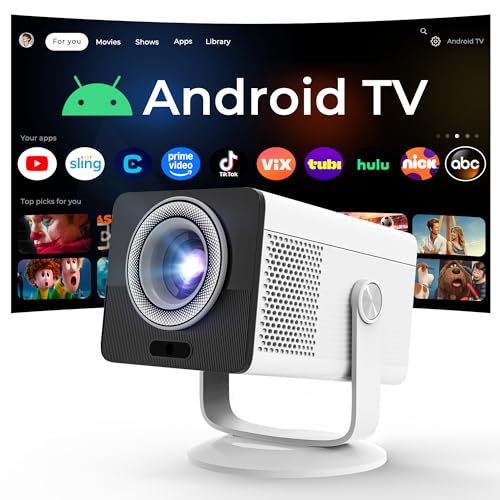
HP MC400 Portable Projector — Power-bank portable, brand-backed
The MC400 brings a familiar computing name to the mini class, and its title spends that credibility on a practical proposition: a portable mini projector with built-in apps on a Smart Android TV system, WiFi 6 and Bluetooth 5.4, 1080P and 4K support wording, auto keystone — and two table-relevant distinctions. The body rotates through 90 degrees, and the machine is compatible with USB-C power banks for outdoor use. Read together: a projector that can run a session where the sockets are not, from a battery the group already owns for its phones.
Power-bank operation is a tabletop feature in disguise. Game tables live in room centres, garden rooms, cabins and convention spaces — places where the nearest socket is a cable run across a walkway. A machine that sips from a USB-C power bank removes the cable from the floor and the trip hazard from the session, and lets the rig be placed by geometry rather than by wiring. Session length then becomes a battery question the group can plan, with a second bank as the cheapest spare part in the hobby.
The 90-degree rotation is the honest limit in its title, and this review states it as one: the swing covers the downward map from a stand and the wall reveal, but not the full ceiling arc its 180- and 270-degree siblings offer. Tables whose atmosphere lives on the ceiling should choose accordingly; tables whose projector lives on one stand, aimed down, will never miss the missing degrees.
Auto keystone restores the grid after knocks, the Android platform runs the ambient layer from the machine itself, and the maker’s name carries the support and documentation expectations that unbranded minis cannot. No brightness figure is printed — the dimmed-room contract applies — and no speaker wattage is stated, so ambient audio planning belongs to the group’s own equipment over Bluetooth.
Its natural home is the travelling campaign and the socket-poor room: the cabin weekend, the garden-room table, the convention one-shot where the rig must run on what fits in a backpack. Check the MC400’s price on Amazon alongside a power bank’s if the group does not already own one; the pair together is the true portable rig, and it is a genuinely liberating one.
- Power: USB-C power-bank compatible, per title
- Aiming: 90-degree rotation, per title
- Correction: auto keystone, per title
- Wireless: WiFi 6 and Bluetooth 5.4, per title
- Platform: built-in apps, Smart Android TV OS, per title
- Brightness and speaker wattage: Not stated in the listing title — verify with the manufacturer documentation
Strengths
- Power-bank running frees the rig from sockets and cable runs
- Established maker’s support and documentation
- Auto keystone and current wireless complete the table kit
Trade-offs
- 90-degree swing cannot reach the ceiling arc
- Session length becomes a battery-planning exercise
- No brightness figure is printed in the title
Best for: travelling campaigns and socket-poor rooms — cabins, gardens, conventions.
Not suited for: ceiling-atmosphere tables — the title’s 90-degree rotation cannot make the upward swing its wider-swinging siblings offer.
Comparison
| Pick | Downward route and headline facts | Table it suits first |
|---|---|---|
| Optoma ML1080UST | Ultra-short-throw laser; 1080p stated; battery; Google TV; 2x 10W speakers | The dedicated game room |
| Magcubic HY300Pro | 180° rotation; auto vertical keystone; WiFi casting | The first rig, any house |
| Philoent Mini WiFi 6 | 180° rotation; auto keystone; fast focus; 25 dB stated | The quiet, late-night table |
| Short-Throw 270° Mini | Short throw stated; 270° rotation; ceiling projection named | The low perch, odd furniture |
| Android 12 Electric Focus | Electric focus by remote; Android apps; rotation unstated | The high, unreachable shelf |
| HP MC400 | 90° rotation; auto keystone; USB-C power-bank running | The travelling campaign |
How to Choose a Projector for Tabletop RPGs
Start with the perch, because the perch chooses the projector class. If the room allows a permanent low position at the table’s end or a close shelf, ultra-short throw becomes possible and the specialist’s shadow-light map is the finest rig in this guide. If the machine must live on a stand or a high shelf and aim down, rotation range and keystone become the deciding specifications, and the minis compete on those mechanics. Decide where the machine will physically live before comparing anything else, and half the catalogue eliminates itself honestly.
Size the image to the play area, not the table. Measure the rectangle your group actually plays inside — the ground the miniatures occupy — and let that rectangle, at figure scale, set the throw and the brightness your room must support. A map fitted to the play area is brighter, sharper and more legible than the same machine’s image sprawled wall to wall, and it leaves the table’s rim for the dice, sheets and drinks that will otherwise migrate into the dungeon.
Plan the room’s light in zones: the table’s pool lowered for the map, a gentle light behind the players for sheets and faces. Every machine here is a dim-zone instrument; the one stated acoustic figure and the absence of stated brightness figures across the minis both point the same way. Curtains and a dimmer will improve any pick in this guide more than the next model up would.
Consider the table’s surface itself while the tape is out. A plain white or pale matte play surface — a board, a cloth, a sheet of foam board cut to the play area — returns a projected map far more faithfully than dark wood or a patterned tablecloth, and costs less than any other upgrade in this guide. Groups routinely discover that the cheapest component of the rig was doing the most for the image, and a dedicated play surface, stored with the campaign’s screens and books, becomes part of the ritual of setting the table.
Finally, choose for the campaign’s logistics: who hosts, who transports, whose sockets, whose shelf. A projector a group actually carries, sets up in ten minutes and packs away without ceremony will serve fifty sessions; a marginally finer machine that nobody wants to rig will serve four. In a hobby measured in campaigns, operability is the specification that compounds.
What Should the DM Prepare Digitally Before Session One?
A campaign folder, built once and maintained like a character. Inside it: the calibration grid file that proved the rig; a library of maps recoloured for projection — darker floors, brighter lines, labels sized for a seated reader across the table; a plain dark image for the moments the table should simply be a table; and a holding visual, the campaign’s sigil or a slow fire, for breaks and cliffhangers. Groups that build this folder in the first month stop improvising their visuals by the second, and the projector graduates from novelty to infrastructure.
Fog of war deserves its own preparation. Whether the virtual tabletop reveals rooms digitally or the DM covers a printed-style map with black rectangles in an image editor, the reveal is the projected table’s signature trick — rehearse its mechanics until the reveal happens at narration speed. A dungeon that opens room by room, exactly as the party’s torch reaches it, is the experience no paper map can counterfeit, and it is worth the one practice session it costs.
Sound belongs in the folder too, even when it lives on a phone: the ambient loop per location, the sting per revelation, kept at volumes tested against conversation. The tables that feel produced are rarely the ones with the most technology; they are the ones whose technology was prepared, in a folder, by someone who had already imagined the evening whole.
How Do You Set the Grid to Match Your Miniatures?
By treating the projector’s zoom and position as a calibration, performed once and then protected. Place a physical reference on the table — a printed grid sheet, a ruler, a terrain piece of known size — and adjust the image until the projected grid and the physical reference agree square for square across the whole play area, not merely at its centre. Keystone first, because a trapezoidal grid cannot be calibrated at any zoom; size second, because the grid’s scale is set by the image’s dimensions; focus last, because calibration deserves a sharp image to judge by.
Then make the calibration permanent. Mark the stand’s feet and the machine’s position, note the settings, and photograph the aligned grid beside the rig. Future sessions start from that evidence in minutes, and the group’s tactical trust in the map — ranges, areas, line of sight — rests on the knowledge that the grid was proven against a ruler, not estimated by eye.
Digital maps should meet the calibration halfway: use map art whose grid is integral and bold, set the virtual tabletop’s grid to the same count as the physical one, and keep a plain calibration grid file in the campaign folder. When a new DM, a new laptop or a borrowed projector enters the rotation, that file rebuilds the table’s foundation in one short ritual.
Projector, Paper Maps or a TV in the Table — Which Is Right?
Each of the three honest answers wins somewhere. Paper map books win on simplicity and light: no power, no darkness, no alignment, a new dungeon at the turn of a page, and a table that works at noon in a bright kitchen. Groups whose play is occasional, mobile or theatre-heavy may never need more, and this guide names the option with respect rather than as a straw man.
A screen set into or onto the table wins on brightness and permanence: a television lying flat under glass reads in full room light and shrugs off drinks, at the cost of a dedicated table, a fixed room and a screen’s reflective manners. It is the right answer for a permanent game room whose group has already decided projection’s dimness is not for them.
Projection wins on life and library: fog of war revealed by the DM’s hand, animated water and fire in the terrain, a hundred maps in one laptop, a rig that travels to any house and vanishes into a drawer afterwards. Its costs — dimmed light, alignment rituals, the class’s modest brightness — are the price of that life. Choose by the campaign you actually run: the one that meets monthly in a borrowed kitchen is a paper or projection campaign; the one with a dedicated room can argue for glass; and the one that wants its dungeons to breathe has only one candidate.
How Do You Handle Player Shadows and Reach?
By designing the table’s choreography as carefully as its rig. A downward light path is crossed by every hand that moves a figure, and while a passing shadow is harmless — even atmospheric — a table where players must constantly lean across the beam becomes a shadow puppet theatre with a dungeon attached. The mitigations are positional: the projector’s perch placed so its light arrives steeply, from above rather than at a raking angle, because steep light shortens every shadow to the hand that casts it; and the play area arranged so the most-reached squares sit nearest the players who reach for them.
Tools help where geometry cannot. A pointer stick, a spare pencil, a pair of long tweezers for the far corners — tables adopt these within a session or two and stop noticing them by the third. Miniatures moved by their bases, from the map’s edge inward, disturb the image least; the DM’s own reveals, conducted from behind the screen at the table’s head, should cross the beam last and least.
The UST pick at this guide’s head exists partly as the structural answer: a short, steep light path from a low perch leaves little room for shadows to grow in. Groups on rotating minis achieve most of the same effect by raising the perch and steepening the aim — one more reason the stand’s height, chosen before the campaign, echoes through every session that follows.
How Do You Keep a Downward Rig Stable for a Whole Campaign?
By converting setup from an improvisation into a fixture, gradually and on purpose. The first sessions can tolerate a stand and good intentions; a campaign deserves the marks on the floor, the noted settings, the cable run that no longer crosses a walkway, and eventually — where the room allows — the mount that makes the machine furniture. Each session’s two-minute setup ritual is the campaign’s real technology, and it is built from evidence: photographs, tape marks, a settings note in the campaign folder.
Protect the rig from the table’s own life. Drinks live outside the light path and below the machine’s shelf; the stand stands where elbows do not reach during dice rolls; the power cable is routed once, safely, and never re-improvised. Projectors die at tables by liquid and by gravity, in that order, and both deaths are prevented by placement decisions made calmly before session one.
Revisit the calibration monthly. Stands settle, shelves are reloaded, machines are borrowed for films and returned at a slightly different angle. A five-minute grid check against the campaign’s calibration file keeps the map’s authority intact — and a map the players trust is a map they plan around, charge across and remember, which is the entire point of projecting it.
Common Mistakes
Buying a cinema projector for a tabletop job is the founding error this guide exists to prevent. Wall-throw machines with long minimum distances and no downward aim make magnificent films and impossible dungeons. The tabletop discipline — aim down, throw short, re-square fast — is a specification set of its own, and it, not brightness, should order the shortlist.
Sizing the map to the whole table runs second. The play area is the map’s home; the rim belongs to the players’ tools. An image fitted inside the play area is brighter and sharper, and it leaves the evening’s drinks somewhere other than inside the dragon’s lair.
Skipping the calibration is the third. An uncalibrated grid quietly lies about every distance in the game, and players feel the lie as unfairness long before they can name it. Ten minutes with a ruler and a reference sheet buys the map a season of trust.
Leaving the rig’s setup to memory is the quiet fifth. A campaign runs for months; stands get moved for films, shelves get reorganised, a borrowed projector returns at a new angle. The group that marked its positions and filed its settings rebuilds in minutes, while the group that trusted memory re-derives its table from scratch in front of an audience of players holding warm drinks. Evidence is a love language at a game table.
Forgetting the players’ light completes the set. A room darkened wholly for the projector makes sheets unreadable and dice archaeology a hobby of its own. Zone the light — table dim, players gently lit — and both the map and the party can see their work.
Final Recommendation
For a dedicated game room, the Optoma ML1080UST is the recommendation this guide defends longest: ultra-short throw is simply the correct geometry for a table, and its laser engine, stated resolution, battery and speakers build the most complete downward rig here. For everyone else — the travelling group, the borrowed room, the first campaign — begin with a rotating mini matched to your perch: the HY300Pro for the all-round start, the Philoent for quiet rooms, the 270-degree short-throw mini for low perches and odd furniture, the electric-focus Android model for the unreachable shelf, and the HP MC400 where sockets are scarce and the campaign travels.
Whichever machine arrives, calibrate its grid against a ruler before the first real door is opened, mark its position like you mean to return, and run one practice combat under the room’s real light. A projected table earns its place in a campaign the same way a good house rule does — by disappearing into the game until nobody remembers playing without it. May your maps stay square, your skies stay dark, and your dragon arrive exactly on the square the grid promised.
One last consideration belongs to the group’s future rather than its first session. Campaigns change tables, houses and membership; a projector that travels, sets up from marked evidence and runs from a prepared folder survives those changes, while a rig married to one room’s furniture often does not. Buy the machine your campaign’s real life can carry — the evidence of this guide is that the hobby’s best tables are not the most elaborate ones, but the ones still glowing, square and calibrated, in session forty.
Frequently Asked Questions
Why project downward instead of onto a wall?
Because the map belongs under the miniatures. A downward image lets players move figures across the terrain itself, keeps sightlines natural around the table, and turns the play area into the display. Wall projection suits reveals and handouts — most groups use downward for the map and the wall, via the same rotating machine, for everything else.
Is ultra-short throw really better for a table?
For a permanent rig, yes: the Optoma’s UST optics throw a wide, even image from a low, close perch, minimising the tall stands, long light paths and hand shadows that rotating minis on stands must manage. The minis answer with price, portability and swing — the better choice depends on the room’s permanence.
How bright are the mini projectors here?
Their titles print no brightness figures, and this guide plans them accordingly: dimmed or zoned light, table-sized images, bold map art. The one stated figure in the wider family is 210 ANSI lumens in the companion ambient guide — a dim-room number. Groups in bright rooms should solve the light first.
Can I use paper maps with a projected table?
Yes, and many groups mix them happily: printed map books for the overland and the tavern, projection for the set-piece dungeons where fog of war and animated terrain earn their setup. The projector is a tool in the campaign’s kit, not a replacement for every page the hobby owns.
How large a table can these projectors cover?
Comfortably, the play area of a typical dining or gaming table — the central rectangle a group actually uses, at figure scale. The UST specialist covers that area from its close perch with the most even light; the minis cover it from their stands in dimmed rooms. Groups with banquet-scale tables should plan on the play area rather than the full surface, which is how experienced tables have always worked.
Do I need a virtual tabletop to use a tabletop projector?
No. A folder of map images, a simple image viewer and a black overlay for reveals will carry a campaign surprisingly far, and several picks here can run ambient content from their own apps besides. A virtual tabletop earns its place when the group wants fog of war, dynamic lighting and a managed map library — it is an upgrade to the workflow, not a prerequisite for the table.
How do I stop drinks and dice from ruining the map?
By zoning the table: the projected play area is a no-drink territory, cups live on side tables or the table’s unlit rim, and dice are rolled in trays at the edges rather than across the dungeon. The rules sound fussy for exactly one session; by the second they are simply how the table works, and the map survives campaigns that would otherwise have ended in a spilled incident.
Can a projector replace my printed map books entirely?
It can, but it does not have to. Projection’s advantages are living maps — fog of war, animated terrain, an endless library — while printed books win on light, simplicity and noon-time kitchens. Many strong tables run both: books for travel and taverns, the projector for the dungeons the campaign will be remembered by.
What stand do I need for downward projection?
A tall, stable stand or shelf behind or above the table that places the machine’s light path over the play area without crossing the players — or, for the UST pick, a low perch at the table’s end. Mark its position once aligned; the stand’s stability and the marks together are what make weekly setup a two-minute ritual.
There is a moment, usually in the second or third session, when the table stops being equipment and starts being terrain — when a player, mid-argument about a retreat, points at the glowing corridor behind their miniature without looking up, because the map has become simply where the characters are. Every rig in this guide, from the laser specialist to the humblest rotating mini, is bought in pursuit of that moment. Set the grid true, keep the light zoned, and it will arrive on schedule.
Related Guides
- Best Fortnite laptops — gaming hardware for the table’s other screen
- Best laptops for Elden Ring — for campaigns that adjourn to the console
- Best laptops for heavily modded Minecraft — the other great tabletop-adjacent hobby


