What's inside
- Where to Buy
- Key Takeaways
- Quick Picks
- How We Chose These Picks
- Comparison Table: The Six as Ableton Machines
- How to Choose Among These Six for Ableton Work
- Does a Bigger Screen Actually Change How You Run a Live Set?
- How Much Storage Does a Working Sample Library Really Need?
- What Should Travel in the Bag Alongside a Performance Laptop?
- What Does Freezing Tracks Tell You About a Laptop Purchase?
- Common Mistakes When Buying a Laptop for Ableton
- Final Recommendation
- Frequently Asked Questions
- Related Guides
As an Amazon Associate I earn from qualifying purchases. This post may contain affiliate links at no extra cost to you.
[SITE_DOMAIN] is reader-supported. When you buy through links on our site, we may earn an affiliate commission.
Where to Buy
Six listings carry this guide, and each one should be opened and read in full before money moves, because every model name here also exists in weaker configurations that this page is not recommending. The MacBook Pro 14 with M4 Pro shows its current figure on its own page — glance at the listing to see what the 24GB build costs this week. Apple’s MacBook Pro 16 with M4 Max and 64GB publishes its number the same way, on the product page itself. For the ASUS ROG Zephyrus G14, the listing page is where the RTX 5080 configuration’s price sits today. Dell’s XPS 16 in the 32GB and 1TB build keeps its figure on its own listing rather than here. The MSI Creator A16 AI+ asks you to open its page for the current number, and the Lenovo Legion Pro 5 does the same on its product page.
Producers searching for the best laptops for music production Ableton workflows actually run are usually solving a stage problem and a studio problem with one purchase. In the studio, the machine has to hold a session together: dozens of tracks, virtual instruments stacked on return channels, a drum rack with every cell carrying its own effects chain, and a browser open beside it all because somebody always needs to check a sample licence mid-session. On stage, the same machine gets carried into a room it has never seen, plugged into a house system it does not control, and asked to launch clips, scenes and backing tracks while a performer stands in front of an audience that did not pay to watch a progress bar. A laptop that is merely fast in a benchmark can still fail the second job. What matters is sustained headroom, storage that loads a full live set quickly, a screen that keeps the Session View legible under stage lighting, and a chassis that tolerates being opened, closed and transported hundreds of times a year.
Ableton Live also shapes the shortlist in a specific way. Live rewards processors that keep many threads busy without faltering, because each track and device chain is work the machine performs continuously, not in bursts. It rewards memory when sessions lean on sampled instruments — a grand piano library, a string section, a folder of multisampled hardware synths — because those samples live in RAM while the set plays. And it rewards storage twice over: sample libraries grow relentlessly, and a live set that loads slowly is a set that makes a venue nervous. The six machines below were picked against those pressures, and they split into two camps. The two MacBooks serve producers committed to macOS, where Live and the Push controller form a tightly integrated rig. The four Windows machines serve everyone else, and among them the graphics cards are almost beside the point for audio work — they matter for the video, streaming and artwork jobs that surround modern production, and this guide says so plainly rather than pretending a GPU renders your reverb.
Key Takeaways
- The MacBook Pro 14 with M4 Pro is the balanced pick: a 12-core CPU and 24GB of unified memory in a body that travels to gigs without complaint.
- The MacBook Pro 16 with M4 Max and 64GB is the ceiling pick, aimed at orchestral templates and live sets carrying hundreds of tracks.
- Among the Windows machines, memory separates the field: the Zephyrus G14, XPS 16 and Creator A16 carry 32GB, while the Legion Pro 5 carries 16GB and suits tighter sessions.
- Storage decides how painful library growth feels — the Zephyrus G14’s 2TB drive is the roomiest here, and the MacBook Pro 14’s 512GB is the tightest.
- No listing title below states audio interface behaviour or driver details, so interface compatibility stays a check you run against your interface maker’s documentation, not a claim this guide makes.
Quick Picks
| Pick | Badge | Why it is here |
|---|---|---|
| Apple MacBook Pro 14 M4 Pro | The Gigging Producer’s Default | 12-core CPU, 24GB of memory and a 14.2-inch XDR screen in the most portable body here. |
| Apple MacBook Pro 16 M4 Max | The Template Ceiling | 64GB of memory and a 16-core CPU for the largest sessions and stage rigs. |
| ASUS ROG Zephyrus G14 | The Compact Windows Powerhouse | 32GB of memory and a 2TB drive inside a 14-inch chassis with a 3K OLED panel. |
| Dell XPS 16 RTX 5060 | The Triple-Thunderbolt Desk Rig | Three Thunderbolt 4 ports, 32GB of memory and a 16.3-inch OLED touchscreen. |
| MSI Creator A16 AI+ | The Big-Screen Studio Seat | A 16-inch QHD+ 240Hz panel, 32GB of memory and a terabyte of NVMe storage. |
| Lenovo Legion Pro 5 | The Session Player’s Value | A Ryzen 9 processor and a bright 500-nit display for focused, track-count-modest work. |
How We Chose These Picks
Selection began with the session, not the spec sheet. A working Ableton session was described in concrete terms: a set built for live performance with scenes arranged down the Session View, instrument racks holding sampled libraries, return tracks carrying shared reverbs and delays, and a master chain that stays on during export. Against that description, three hardware questions dominated. Can the processor sustain many simultaneous device chains without the set stuttering when a new scene launches? Can memory hold the sampled instruments the set depends on, with the operating system and a browser still resident? Can storage load the whole set — samples, presets, recorded stems — fast enough that a soundcheck never becomes a waiting room?
Those questions explain the shape of this list. Every machine here carries at least 16GB of memory, and four carry 32GB or more, because sampled instruments are the single most common reason a producer outgrows a laptop mid-project. Processors are current-generation parts from Apple, AMD and Intel with core counts printed in their listing titles, and where a title prints a core count this guide uses it; where it does not, no count is invented. Screens were judged as Session View surfaces — the grid of clips and scenes has to stay readable at arm’s length on a stage — which is why brightness and size get discussed in the reviews rather than refresh rates, a specification audio work barely touches.
Graphics hardware was treated honestly. Live itself places modest demands on a GPU, so no pick below is recommended because of its graphics card. The Windows machines carry capable NVIDIA or integrated graphics because creator and gaming lines ship that way, and those GPUs earn their keep in the surrounding jobs — editing the performance video, running the stream, designing the artwork. Readers who only make music can read the GPU lines in the spec boxes as a bonus they are not paying a premium to use, and readers who also make video will find the headroom genuinely useful. What this guide will not do is attach numbers to audio performance that no listing title supports: no latency figures, no track-count promises, no claims about any specific interface, because none of the six titles states them.
One more distinction ran through the selection, between the set as written and the set as performed. Writing sessions grow vertically — more plug-ins per track, more takes, more alternatives kept alive — while performance sets grow horizontally, across scenes and stems that must all be ready at once. A laptop can be excellent at one shape and merely adequate at the other, which is why this guide contains both a template-scale machine and several mid-sized ones rather than six variations of the same idea. The producer reading it should locate their own dominant shape first; the shortlist was arranged so that each shape has an obvious home.

Apple MacBook Pro 14 M4 Pro — The Gigging Producer’s Default
Picture the producer this machine fits: a set that tours. The laptop rides in a backpack with a Push controller, gets set on a wobbling table or a flight case, runs the show’s backing tracks and live instruments, then goes back to a hotel room where tomorrow’s edits happen on the same screen. The listing describes a 12-core CPU with a 16-core GPU, 24GB of unified memory and a 512GB SSD behind a 14.2-inch Liquid Retina XDR display, in Space Black. For Live, the meaningful pairing in that list is the processor and the memory. Twelve cores give Live’s track-and-device workload room to spread out, and 24GB holds a serious sampled instrument collection — a couple of large piano and string libraries alongside drum racks — without the machine leaning on its drive mid-set.
The 512GB drive is the configuration’s honest constraint, and it shapes how this machine should be owned. A producer whose sample library already fills a desktop drive will treat this laptop as the performance machine rather than the archive: the live set, its samples and the current project live internally, while the deep library stays on an external drive at home. Managed that way, the size stops mattering. The 14.2-inch XDR panel does stage duty well because Session View is a grid of coloured rectangles that must stay distinguishable under house lighting, and a bright, high-contrast screen is exactly what that grid asks for. The unified memory architecture also means the memory figure printed in the title is shared between processor and graphics, which for audio work is a non-issue — Live will claim what it needs and the GPU’s share stays modest.
- Processor as printed in the listing: M4 Pro with a 12-core CPU and 16-core GPU
- Memory: 24GB unified memory
- Internal storage: 512GB SSD
- Display: 14.2-inch Liquid Retina XDR
- Finish: Space Black
- Audio interface provision: Not stated in the listing title — verify with the manufacturer documentation
Strengths
- 24GB of memory holds the sampled instruments a touring set actually uses, with room for the browser and notes apps running beside Live.
- The 14.2-inch body is the easiest here to carry between venue, studio and home every single day.
- A 12-core processor gives scene launches and dense device chains sustained headroom rather than short bursts.
Trade-offs
- 512GB fills quickly once two or three large sample libraries move in, so external storage becomes part of the rig.
- Memory is fixed at purchase in a unified design — the 24GB figure is the machine’s lifetime ceiling.
- Producers deep in Windows-only plug-ins face a platform switch, not just a hardware upgrade.
Best for: a performing producer whose live set runs sampled instruments and who carries the rig personally to every show.
Not suited for: a producer whose internal sample library already exceeds roughly half a terabyte — the 512GB drive makes the archive live elsewhere from day one.
There is a steadiness to this configuration that suits performance work in particular. Nothing in its specification is extreme, and that is the point: the processor, memory and screen are each sized a notch above what a demanding set requires, so the machine works well inside its limits instead of at their edge. Live rigs fail at edges. A laptop that runs a set at a comfortable fraction of its capacity, night after night, in rooms with questionable power and worse Wi-Fi, is worth more to a working performer than a headline specification that only shines in a review. This is the pick to build a touring template on, freeze the set, and stop thinking about the computer.
Year three asks its own question of this laptop, because a gigging machine lives a harder life than a desk machine. It will be opened in cold green rooms and hot festival tents, plugged into power of uncertain quality, and asked to run a full set within minutes of arriving. A configuration with genuine headroom ages into that life gracefully: as the set grows — and sets always grow — the machine absorbs the growth instead of protesting it. Producers planning to keep a performance laptop for a full album-and-tour cycle should read the 24GB and the 12 cores in that light, as insurance purchased once against the larger show they have not written yet.

Apple MacBook Pro 16 M4 Max — The Template Ceiling
Some sessions are not songs; they are buildings. The film composer with an orchestral template kept permanently loaded, the theatre sound designer running a full show’s worth of cues and stems, the live act whose set carries a string section, a choir library and three sampled pianos at once — these producers do not shop for adequacy. The listing for this machine describes an M4 Max with a 16-core CPU and a 40-core GPU, 64GB of memory and 1TB of storage behind a 16.2-inch Liquid Retina XDR display. The figure that justifies the machine for audio is the 64GB. Sampled orchestral instruments are memory made audible, and a template that keeps every articulation of every section resident — rather than loading and unloading as the arrangement changes — transforms how fast a composer can work and how confidently a show can be run.
The 16-core processor matters in the same direction. A large template is not one heavy task but hundreds of small continuous ones, and Live distributes that work across the cores the machine offers. The terabyte of storage doubles the smaller MacBook’s room, which in library terms is the difference between carrying the full orchestral collection internally and curating a touring subset. The 16.2-inch screen earns its size in Arrangement View, where a long timeline with many lanes stays legible without constant zooming — a genuine working difference for the designer scrubbing through a two-hour show file. The 40-core GPU, stated plainly, is capacity audio work will not use; it belongs to the video and visual work that surrounds productions at this scale, and it is recorded here because the title prints it, not because Live needs it.
- Processor in the title: M4 Max with a 16-core CPU and 40-core GPU
- Memory: 64GB
- Internal storage: 1TB
- Display: 16.2-inch Liquid Retina XDR
- Finish: Space Black
- Audio interface provision: Not stated in the listing title — verify with the manufacturer documentation
Strengths
- 64GB keeps an entire orchestral template resident, ending the load-and-wait cycle between articulations.
- Sixteen cores suit sessions built from hundreds of simultaneous tracks, devices and return chains.
- The larger XDR panel keeps long Arrangement View timelines readable without zoom gymnastics.
Trade-offs
- The 16-inch body is the least backpack-friendly here, and it travels like the workstation it is.
- A producer running thirty-track electronic sets pays for memory and cores that their sessions will never touch.
- Storage still stops at 1TB, so the largest multi-library collections continue to live partly on external drives.
Best for: composers and show designers whose templates keep large sampled libraries permanently loaded and whose sessions run to hundreds of tracks.
Not suited for: a bedroom producer making loop-based tracks — the 64GB of memory and 16 cores would sit idle while the money could have bought instruments and monitoring instead.
Buying this machine is really buying the absence of a decision. Producers working at template scale otherwise spend their lives rationing: which libraries stay loaded, which tracks get frozen before the session can grow, which ideas wait for a render. A 64GB machine removes most of that rationing, and the creative effect is larger than the specification suggests — arrangements get auditioned whole, alternates stay in the session instead of being bounced and forgotten, and a live rig built on it carries the full show rather than a reduced touring edit. If your sessions have ever forced you to freeze a track you were still writing, this is the configuration that hands the decision back.
ASUS ROG Zephyrus G14 — The Compact Windows Powerhouse
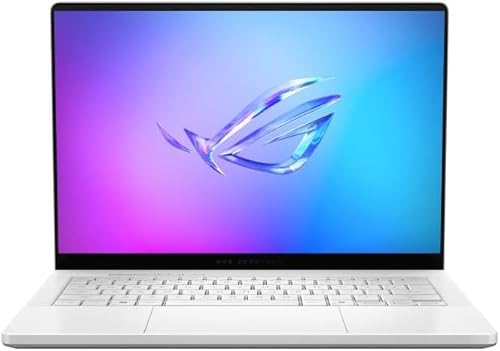
Windows producers who perform have historically faced an awkward shelf: thin creator laptops that throttle their ambitions, or gaming machines built like paving slabs. This 14-inch ASUS threads between them. Its listing describes an AMD Ryzen AI 9 HX 370 processor, an NVIDIA RTX 5080 graphics card, 32GB of RAM and a 2TB SSD behind a 14-inch 3K OLED panel refreshing at 120Hz, in Platinum White, carrying the Copilot+ PC designation. For Ableton work the specification that changes daily life is the 2TB drive. Sample libraries, recorded stems, project backups and the rendered video of last month’s show all fit internally at once, which means the machine that plays the gig is also the machine that holds the catalogue — no external drive dangling from the rig during a performance, no curation ritual before a tour.
The 32GB of memory matches the larger Windows picks here, and it is the figure that decides how this laptop handles a sampled-instrument-heavy set: comfortably, with the full library of the current project resident. The Ryzen processor is a current-generation AMD part, and Live’s workload of many parallel track chains suits a modern multi-core chip of this class. The OLED screen deserves a word for stage use — Session View’s clip colours are the performer’s map of the show, and an OLED panel renders those colours with a separation that stays clear at glancing distance and odd angles. The RTX 5080, again stated honestly, is not an audio feature; it is there for the producer who also cuts the live video, runs visuals, or games on the same machine, and in a 14-inch body it is remarkable capacity for those jobs even if Live never asks for it.
- Processor as printed in the listing: AMD Ryzen AI 9 HX 370
- Graphics card in the title: NVIDIA RTX 5080
- Memory: 32GB RAM
- Internal storage: 2TB SSD
- Display: 14-inch 3K OLED, 120Hz
- Audio interface provision: Not stated in the listing title — verify with the manufacturer documentation
Strengths
- 2TB of internal storage is the most here, ending the external-drive ritual for library-heavy performers.
- 32GB of memory pairs with the big drive to hold both the samples and the set that uses them.
- The 14-inch chassis travels like the smaller MacBook while carrying a far larger drive.
Trade-offs
- A gaming-derived design language, Platinum White shell included, reads less anonymous in formal session settings.
- The powerful graphics card raises the machine’s ceiling for video work that pure audio producers may never use.
- Session View on a 14-inch panel shows fewer visible scenes at once than the 16-inch picks, so large sets scroll more.
Best for: a Windows-based performing producer whose sample library and project archive must live inside the laptop that plays the show.
Not suited for: a performer running a very large scene grid who needs the whole set visible without scrolling — the 14-inch panel is the binding limit, not the processor.
What makes this pick interesting is how its compromises point the right way for its job. It spends its budget on the two resources a live Ableton rig consumes — memory and storage — inside the smallest body on the Windows side of this guide, and lets the screen size be the sacrifice, which is the sacrifice a performer can manage with a well-organised set and a controller. Producers who build their shows around Push will find the pairing natural: the controller carries the launching and tweaking, the laptop carries the library and the engine, and neither is asked to be the other. For a one-bag touring rig on Windows, nothing else here packs as much working room into as little space.

Dell XPS 16 RTX 5060 — The Triple-Thunderbolt Desk Rig
This Dell is the desk anchor of the guide — the machine for a producer whose Ableton work happens at one workstation, with an interface, a controller, a pair of external drives and a monitor all attached at once, and whose performances are recorded rather than toured. The listing describes an Intel Ultra 9 285H processor, an NVIDIA RTX 5060, 32GB of memory and a 1TB drive, behind a 16.3-inch OLED touchscreen at 4K with a 120Hz refresh rate, and it prints a connection detail none of the other listings matches: three Thunderbolt 4 ports. For a studio laptop, port count is not a footnote. An audio interface, a fast sample-library drive and a dock or display chain can each take a high-speed connection without a hub negotiation, and the session stays wired the way it was wired yesterday.
The 32GB of memory and terabyte of storage put it level with the guide’s serious-work tier: full sampled libraries for the current projects, resident in memory while Live runs, with the archive on the external drives its ports make easy. The 16.3-inch 4K OLED touchscreen is the largest and sharpest panel here, and in Arrangement View that resolution shows more of a dense session at once — more tracks, longer stretches of timeline — which is the daily texture of mixing and editing work. Touch input on a DAW is a personal-preference feature; some producers tap and drag clips with it constantly, others ignore it forever, and the listing simply records that the capability exists. The listing also names a 1080P infrared webcam, a backlit keyboard, fingerprint sign-in and Wi-Fi 7, the apparatus of a machine that also handles the video calls and admin of a working studio.
- Processor as printed in the listing: Intel Ultra 9 285H
- Graphics as printed in the listing: NVIDIA RTX 5060
- Memory and storage: 32GB memory, 1TB drive
- Display: 16.3-inch OLED touchscreen, 4K, 120Hz
- Ports named in the title: 3x Thunderbolt 4
- Also in the title: 1080P IR webcam, backlit keyboard, fingerprint reader, Wi-Fi 7, Windows 11 Pro
Strengths
- Three Thunderbolt 4 ports let an interface, a library drive and a dock coexist without hub compromises.
- The 16.3-inch 4K panel shows the widest slice of a session of any pick here, easing dense arrangement work.
- 32GB of memory and a terabyte of storage match the guide’s full working tier for sampled instruments.
Trade-offs
- A 16.3-inch premium body is a desk machine first; nightly gigging would favour the 14-inch picks.
- The touchscreen’s value depends entirely on whether the producer’s hands actually leave the mouse.
- Windows 11 Pro’s extra features serve studio networks and remote access more than the music itself.
Best for: a studio-based producer running a permanently wired desk with an interface, external library drives and a large session on screen.
Not suited for: a performer who carries the laptop to a different venue every night — the 16.3-inch body and desk-first port layout serve a fixed workstation better than a flight case.
Think of this Dell as infrastructure. Its job in a studio is to disappear into the desk: cables that stay plugged, a screen that shows the whole session, enough memory and storage that the current year’s projects simply live on it. Producers whose Ableton work is recording, arranging and mixing — with performance meaning a rendered release rather than a stage — will find its priorities match theirs almost exactly. The triple Thunderbolt provision sounds like a small thing until the first session where the interface, the library drive and the backup drive all need the machine at once, at which point it becomes the reason this laptop, and not a thinner one, anchors the room.
A note on how this machine fits a hybrid week, because few producers only arrange. The same laptop that hosts the editing session will run the production’s video call, carry the project files to a collaborator’s studio, and serve as the playback machine for a listening session in a room with no other equipment. The webcam, fingerprint reader and Wi-Fi 7 in its listing are the unglamorous enablers of that week, and the backlit keyboard matters at the end of it, in a darkened studio, more than any headline specification. Desk machines earn their place across the whole working day, not only inside the DAW.

MSI Creator A16 AI+ — The Big-Screen Studio Seat
MSI’s Creator line aims at people who make things on screens all day, and this A16 configuration gives an Ableton producer a particular luxury: a 16-inch QHD+ panel refreshing at 240Hz, behind which sit an AMD Ryzen AI 9-365 processor, an NVIDIA RTX 4060, 32GB of LPDDR5x memory and a 1TB NVMe SSD, with WiFi 7 and Windows 11 Home, in Lunar Gray. The screen is the argument. Arrangement View at 16 inches with QHD+ resolution shows long timelines with their track lanes stacked readably, and producers who edit audio — nudging clips, aligning transients, comping takes — spend their lives in exactly that view. A large, sharp panel is not decoration for that work; it is the workbench.
The supporting specification is balanced for session work. The 32GB of LPDDR5x memory matches the guide’s serious tier, so sampled libraries for current projects stay resident while Live runs. The terabyte of NVMe storage holds the working library with room for project versions, which matters because Ableton projects multiply — every Collect All and Save creates another full copy of a set’s samples, and producers who version their work honestly consume storage faster than they expect. The RTX 4060 sits in the same honest category as the other Windows GPUs here: irrelevant to Live’s audio engine, useful for the artwork, video and streaming tasks around the music. The 240Hz refresh rate is likewise a display smoothness specification rather than an audio one; it makes interface motion fluid, and this guide records it without pretending it tightens a mix.
- Processor: AMD Ryzen AI 9-365
- Graphics as printed in the listing: NVIDIA RTX 4060
- Memory: 32GB LPDDR5x
- Internal storage: 1TB NVMe SSD
- Display: 16-inch QHD+, 240Hz
- Radios and system in the title: WiFi 7, Windows 11 Home
Strengths
- The 16-inch QHD+ panel gives editing and arrangement work the widest comfortable view in this price of effort.
- 32GB of memory keeps sampled instruments resident through long arranging sessions.
- A terabyte of NVMe storage absorbs Ableton’s habit of duplicating samples with every saved project version.
Trade-offs
- Windows 11 Home lacks the Pro edition’s extras that some studio network setups use.
- The 16-inch body suits a fixed studio seat; it is not the pick for a nightly-carried live rig.
- Its graphics card is a generation behind the Zephyrus’s, which matters only if video work shares the machine.
Best for: an arranging and editing-focused producer who works at one desk and lives in Arrangement View on a large screen.
Not suited for: a touring act that needs the laptop in a backpack nightly — the 16-inch chassis is built for a studio seat, and the 14-inch picks carry better.
The Creator A16 is the quiet pick of this guide: no single headline figure leads the field, yet the combination — big sharp screen, full memory tier, terabyte drive, current AMD processor — covers the whole of a studio producer’s week without a weak point to work around. Producers often buy laptops the way they buy synths, chasing the one spectacular feature, and then discover that daily work is made of ordinary specifications performing reliably together. This machine is the ordinary specifications, all present, none skimped. For a producer setting up a first serious fixed studio, that completeness is worth more than a headline.

Lenovo Legion Pro 5 — The Session Player’s Value
Lenovo’s Legion Pro 5 enters this guide as the machine for the producer whose sets are performances of focused material — electronic sets built from loops, stems and a handful of instrument racks — rather than orchestral sprawls. Its listing describes a 16-inch display at 2560×1600 with a 240Hz refresh rate and 500 nits of brightness, an AMD Ryzen 9 8945HX processor, a GeForce RTX 5060 with 8GB, 16GB of memory and a 1TB drive, plus a 24-zone RGB backlit keyboard, a 5MP webcam and Windows 11 Home, under the Copilot+ PC banner. The processor is a genuinely powerful part — the HX suffix marks AMD’s high-wattage mobile line — and for Live’s continuous track-and-device workload, raw sustained processing is precisely the currency. Sets built from synthesizers and effects rather than giant sample libraries spend processor, not memory, and this machine is rich in the currency those sets spend.
The 16GB of memory is the boundary to respect, and this guide draws it clearly. A set that leans on a few sampled instruments alongside its synths and loops fits; a set that loads a full sampled orchestra does not, and no processor strength compensates, because the samples have nowhere to live. The 500-nit brightness deserves its mention for performance use: stage and booth lighting are unkind to dim panels, and Session View’s clip grid must read at a glance while the producer’s attention is mostly on the room. The terabyte of storage matches the studio picks, holding the working library and project history. The 24-zone RGB keyboard is a gaming inheritance that turns out to be stage-useful in a small way — a dim venue makes any backlit keyboard easier to work on — though this guide credits it as visibility, not as a musical feature.
- Processor as printed in the listing: AMD Ryzen 9 8945HX
- Graphics: GeForce RTX 5060, 8GB
- Memory and storage: 16GB memory, 1TB drive
- Display: 16-inch, 2560×1600, 240Hz, 500 nits
- Keyboard and camera in the title: 24-zone RGB backlit keyboard, 5MP webcam, Windows 11 Home
- Audio interface provision: Not stated in the listing title — verify with the manufacturer documentation
Strengths
- The high-wattage Ryzen 9 suits synth-and-effects sets that spend processing power continuously.
- 500 nits of brightness keeps Session View readable under booth and stage lighting.
- A terabyte of storage matches the studio picks, so the library and project archive fit internally.
Trade-offs
- 16GB of memory is the ceiling: sample-library-heavy sets will outgrow it while synth-based sets thrive.
- The gaming chassis and RGB presentation are bulkier and louder in character than the creator machines.
- Its display refresh rate serves motion smoothness, not audio — buyers should value the brightness instead.
Best for: a live electronic producer whose sets are built from synthesizers, loops and stems, and who plays them from a bright, powerful 16-inch screen.
Not suited for: a composer loading large sampled orchestral libraries — the 16GB of memory, not the strong processor, decides that question against this machine.
Read correctly, the Legion is not a compromised pick but a specialised one. Its specification spends where loop-and-synth performance spends, and saves where that work does not. The producer who recognises their own sets in that description — a screen of clips, a rack of instruments that generate rather than recall sound, stems for the parts that must be exact — gets a machine matched to the work at a gentler position in the range than the creator flagships. The producer whose sets are sample libraries with a sequencer attached should look up the list to the 32GB machines, and this guide would rather say that plainly than let a strong processor disguise a memory ceiling.
Comparison Table: The Six as Ableton Machines
| Pick | Processor (as listed) | Memory | Storage | Screen | Ableton character |
|---|---|---|---|---|---|
| MacBook Pro 14 M4 Pro | M4 Pro, 12-core CPU | 24GB unified | 512GB SSD | 14.2-inch Liquid Retina XDR | The touring set’s balanced engine |
| MacBook Pro 16 M4 Max | M4 Max, 16-core CPU | 64GB | 1TB | 16.2-inch Liquid Retina XDR | Templates and show files at full scale |
| ASUS ROG Zephyrus G14 | Ryzen AI 9 HX 370 | 32GB | 2TB SSD | 14-inch 3K OLED 120Hz | The whole library, carried internally |
| Dell XPS 16 | Intel Ultra 9 285H | 32GB | 1TB | 16.3-inch OLED touch 4K | The wired studio desk anchor |
| MSI Creator A16 AI+ | Ryzen AI 9-365 | 32GB LPDDR5x | 1TB NVMe SSD | 16-inch QHD+ 240Hz | Arrangement work on a big canvas |
| Lenovo Legion Pro 5 | Ryzen 9 8945HX | 16GB | 1TB | 16-inch 2560×1600, 500 nits | Synth-and-loop sets, brightly lit |
Read the table by resource rather than by row. The memory column predicts how much sampled material a set can hold open; the storage column predicts how much of your working life lives inside the machine; the screen column predicts how much of a set or timeline you can supervise at a glance. The processor column, which buyers instinctively read first, predicts the density of synthesis and effects a session sustains — important, but for most Ableton work it is the constraint reached last. Producers who rank the columns in that order tend to end up with the machine their sets actually needed.
How to Choose Among These Six for Ableton Work
Begin with the set, described honestly. Count what your largest session actually contains: how much of it is sampled instruments that must sit in memory, how much is synthesis and effects that consume processing, and how large the project folder has grown. A producer whose set is a sampled band — drums, keys, strings, all recalled from libraries — is shopping for memory first and should be looking at 32GB as the floor and 64GB as the luxury. A producer whose set generates its sound is shopping for sustained processing, and the Legion’s high-wattage Ryzen or any of the current flagship chips will serve, provided the sampled minority fits the memory fitted.
Then decide where the machine works. A laptop that performs nightly should be the one that carries best and shows its Session View brightest — the two 14-inch machines and the bright Legion — while a laptop that anchors a studio should be the one with the ports and the panel for editing, which points at the XPS 16 and the Creator A16. Platform is the third decision, and it is not really about the laptops: it is about the plug-in collection, the interface and the habits already bought and learned. macOS producers with a Push-centred rig will find the two MacBooks the natural continuation of their setup; Windows producers lose nothing essential, because Live itself is the same program, and the Windows picks here carry larger drives at the portable end. Choose the machine whose limits sit outside your set’s habits, and the purchase disappears into the work.
Finally, run your own largest session as the audition, whichever machine you favour. Export nothing, change nothing: open the set that made your current laptop complain, play the densest section, and watch memory and processor behaviour while it runs. Every pick in this guide was chosen to pass that audition at a different scale and price of effort, and the one that passes your set with the most room to spare — not the one with the most impressive single number — is the one that will still feel right when the set has grown by another year of writing. Specifications describe machines; sessions describe producers, and the purchase works when the second description drives the first.
Does a Bigger Screen Actually Change How You Run a Live Set?
It changes what you can supervise. Session View is a grid, and a grid’s usefulness is measured in how much of it is visible without scrolling: on a 14-inch panel a large set shows a window into the show, while a 16-inch panel shows more of the show itself — more scenes in the launch column, more tracks across, fewer moments of hunting for the clip you need while the current scene plays out. Performers who run compact sets, or who launch from a Push controller and treat the laptop screen as a status display, feel little difference. Performers who conduct a large set from the screen — theatre playback, backing-track operation for a band, a DJ-style set with many stems — feel it constantly. Neither answer is a verdict on the smaller machines; it is a reminder that screen size in a live rig is a supervision tool, and supervision needs differ by act.
How Much Storage Does a Working Sample Library Really Need?
More than the purchase-day estimate, because libraries only grow in one direction and Ableton projects duplicate what they use. A single quality sampled piano or string library can occupy a meaningful slice of a small drive; a working collection across drums, keys, strings, synths and found sounds reaches hundreds of gigabytes without any extravagance. Then Collect All and Save begins copying the used samples into every project folder, and the rendered stems and video captures accumulate beside them. Against that arithmetic, the 512GB MacBook Pro 14 asks its owner to curate — current projects internal, archive external — while the 2TB Zephyrus simply absorbs the habit. The terabyte machines sit between: comfortable for a working library, with the archive still happier outside. None of this is a defect in the smaller drives; it is a workflow decision to make before purchase rather than after the first full-disk warning arrives mid-session.
What Should Travel in the Bag Alongside a Performance Laptop?
The laptop is the centre of a live rig, not the whole of it, and the supporting cast deserves the same deliberate thought. A backup of the live set on a separate drive — updated the day of the show, not the week before — turns a hardware failure from a cancelled performance into an inconvenience. The power supply travels with the machine always, because a set run on battery is a set with a countdown attached. Cables deserve spares in the bag: the interface cable and the controller cable at minimum, since cables fail more often than computers and cost almost nothing to duplicate. Finally, the set itself should be frozen into a performance copy, separate from the working project, so that a mid-tour edit can never corrupt the version the audience hears. The machines in this guide differ in memory, storage and screen; the discipline that protects a show is identical for all six.
What Does Freezing Tracks Tell You About a Laptop Purchase?
Freezing is Ableton’s pressure valve: a track’s output is rendered to audio so its instruments and effects stop consuming resources. Every producer freezes occasionally, but the frequency is diagnostic. If freezing is a rare housekeeping step before a mixdown, your current machine’s balance suits your work, and a replacement should preserve that balance at a higher level. If freezing has become a compositional habit — freeze to audition, unfreeze to adjust, freeze again to continue — the session is telling you which resource ran out. Freezing to make room for another sampled instrument is a memory shortage wearing a workflow costume. Freezing because the set stutters when several synth tracks play together is a processing shortage. The distinction decides which column of the comparison table deserves your money, and it is a far more reliable guide than any benchmark, because it is measured on your own music.
There is a subtler lesson in the same habit. Producers who freeze constantly also lose the live quality of their own sets — the frozen track can no longer be played, tweaked or re-performed, which matters enormously when the session doubles as the stage show. A laptop with headroom is therefore not just faster; it keeps more of the set performable. When you read the picks above, read the memory and processor figures as a performability budget: how much of your music stays alive under your hands, on stage, at the moment the audience is watching.
Common Mistakes When Buying a Laptop for Ableton
One recurring misstep is shopping for the graphics card. Live’s audio engine does not render through the GPU, so a buyer who spends the budget on graphics while accepting 16GB of memory has optimised the specification the work ignores and starved the one it consumes — unless video production genuinely shares the machine, in which case the spending should be a conscious split, not an accident of a gaming laptop’s default configuration. A second misstep is counting tracks instead of weighing them: forty audio tracks of stems ask less of a machine than twelve tracks of layered sampled instruments with effects chains, and buyers who audition laptops against the wrong measure discover the difference during their largest session rather than their average one.
A third misstep is ignoring the drive until it announces itself. Sample libraries and project copies grow silently for a year and then fill a small SSD in a single busy month, usually the month with deadlines in it. A fourth is buying the stage laptop and the studio laptop as the same compromise — a 16-inch flagship that is heavy to tour and a port short at the desk — when the honest answer for many producers is a machine chosen for the job it does most, with the other job accommodated rather than optimised. And a fifth, quieter one: forgetting that the interface, controller and software licences already owned define the platform, so a laptop purchase that forces replacing all three costs far more than its own price tag suggests.
Final Recommendation
Most Ableton producers should start at the MacBook Pro 14 with M4 Pro: its balance of a 12-core processor, 24GB of memory and a genuinely portable body covers the widest range of real sets, from studio writing to stage playback. Producers whose templates have outgrown ordinary memory ceilings step up to the 64GB MacBook Pro 16 and stop rationing their arrangements. On the Windows side, the Zephyrus G14 is the performer’s pick for its 2TB of internal room in a 14-inch body, the XPS 16 is the desk rig for its three Thunderbolt 4 ports and vast screen, the Creator A16 is the editor’s seat, and the Legion Pro 5 serves synth-and-loop acts that spend processing rather than memory. Buy against the set you actually perform — its samples weighed, its storage counted, its venue pictured — and whichever of these six matches that description will feel, within a week, less like a purchase than like the place your music simply lives now.
Frequently Asked Questions
Do I need a discrete graphics card to run Ableton Live well?
No. Live’s work is processing and memory: tracks, device chains and sampled instruments. A discrete GPU helps the jobs around production — video editing, visuals, streaming — which is why the Windows creator and gaming machines here carry them, but a producer who only makes music should choose by processor, memory and storage and treat the graphics card as a bonus.
Is 16GB of memory enough for Ableton?
For sets built from loops, stems and synthesizers, yes — the Legion Pro 5 in this guide is specified exactly for that work. For sets built on large sampled libraries, memory is consumed by the samples themselves, and 32GB becomes the comfortable floor. Weigh what your set recalls versus what it generates, and the answer picks itself.
Mac or Windows for a Push-based live rig?
Live and Push work on both platforms, so the decision usually rests on what surrounds them: the plug-ins already owned, the interface already in the rack, the habits already learned. The MacBooks here offer the most integrated Apple-silicon route; the Windows picks answer with larger internal drives at the portable end and, in the XPS 16, a triple-Thunderbolt desk setup.
How should I protect a live set against laptop failure at a show?
Keep a frozen performance copy of the set, carry a same-day backup on a separate drive, and travel with spare cables for the interface and controller. The laptop choice matters less than the discipline: any of these six machines can fail on the wrong night, and the backup plan is what decides whether that becomes a story or a cancellation.
Should I keep my writing sessions and my performance set on the same machine?
Most producers do, and every pick here supports it, provided the performance set is maintained as its own frozen copy rather than as the live working project. The machine’s job is to hold both; the discipline of separating the show version from the writing version is yours. Producers with template-scale writing sessions and nightly shows are the exception — for them, the 64GB machine writes and a lighter pick performs.
Does screen refresh rate matter for music production?
Only cosmetically. A 240Hz panel makes interface motion fluid, and this guide records refresh rates because the listings print them, but no audio decision should rest on one. Brightness and size — how clearly Session View reads under stage light, and how much of the set is visible — are the display specifications a performer should actually weigh.
Related Guides
Production work rarely stays inside one program, so these companion guides continue the same shortlist logic in the neighbouring territories: our FL Studio laptop guide, where the piano roll and plug-in loading set the criteria instead, the broader DAW production guide, covering interfaces and monitoring across programs, and the Blender rendering guide, for producers whose visuals have grown into full 3D work.


