What's inside
- Where to Buy
- Key Takeaways
- Quick Picks
- How We Chose These Picks
- Comparison Table: The Six as FL Studio Machines
- How to Choose Among These Six for FL Studio
- Why Does the Piano Roll Change What a Laptop Screen Is Worth?
- How Many Plug-Ins Can a Channel Rack Hold Before Memory Decides?
- What Travels With a Beatmaker Besides the Laptop?
- When Does a Beatmaker Outgrow a 16GB Machine?
- Common Mistakes When Buying a Laptop for FL Studio
- Final Recommendation
- Frequently Asked Questions
- Related Guides
As an Amazon Associate I earn from qualifying purchases. This post may contain affiliate links at no extra cost to you.
[SITE_DOMAIN] is reader-supported. When you buy through links on our site, we may earn an affiliate commission.
Where to Buy
All six machines below are sold through Amazon listings whose titles carry the exact configuration being recommended, and those titles deserve a slow read before checkout, because each model name also covers smaller builds. The MacBook Pro 14 with M4 Pro keeps its current figure on its own product page, where the 24GB configuration can be confirmed at the same time. Apple’s MacBook Air 15 with the M5 chip lists its price on its page rather than in this guide. The ASUS ROG Zephyrus G14 shows what the RTX 5080 build costs today on the listing itself. MSI’s Creator A16 AI+ publishes its number on its own page, as does Dell’s XPS 16 in the 32GB build on its listing. The smallest machine here, the MacBook Air 13 with M5, likewise carries its figure on its product page.
Anyone hunting for the best laptops for music production FL Studio users will actually enjoy living with should start from how the program is really used, because FL Studio loads a computer differently from a timeline-first DAW. The centre of the program is the piano roll — arguably the most lived-in editor in modern beatmaking — surrounded by the channel rack, the step sequencer and a playlist that assembles patterns into songs. A producer’s hour in FL Studio is an hour of drawing notes, auditioning them instantly, swapping a generator plug-in, drawing more notes, and rendering the result to hear it as audio. That rhythm places its own demands on hardware: plug-ins must load and reload without breaking the flow, the screen must give the piano roll room to breathe, and the machine must hold a growing collection of generators, effects and sample packs while a project is rebuilt dozens of times in an evening.
FL Studio also has a particular history that shapes this shortlist. The program grew up on Windows, and a generation of producers built their plug-in collections, their sample libraries and their muscle memory there. It now runs on macOS as well, which is why this guide deliberately mixes three Apple machines with three Windows machines rather than declaring a winner in a platform argument that is really about each reader’s existing collection. What unites the six is not an operating system. It is a shared fitness for the pattern-based workflow: responsive processors for the constant audition-and-edit cycle, enough memory for plug-in-heavy channels, storage for sample packs that accumulate like weather, and screens that treat the piano roll as the main event rather than a cramped side window.
Key Takeaways
- The MacBook Pro 14 with M4 Pro is the all-round FL Studio machine here: a 12-core CPU and 24GB of unified memory in a portable body.
- The two M5 MacBook Airs are the beatmaker’s travel picks — the 15-inch for piano roll space, the 13-inch for the smallest bag — each with 16GB of memory and a 512GB drive.
- On the Windows side, the Zephyrus G14 pairs 32GB of memory with a 2TB drive, the roomiest combination for sample packs and project archives.
- The MSI Creator A16 and Dell XPS 16 are the big-screen picks, for producers who edit patterns and arrange playlists at one desk.
- Every listing title here is silent on bundled software and audio interface behaviour, so plug-in and interface compatibility remains a check against each maker’s own documentation.
Quick Picks
| Pick | Badge | Why it is here |
|---|---|---|
| Apple MacBook Pro 14 M4 Pro | The All-Round FL Machine | A 12-core CPU and 24GB of memory for plug-in-heavy projects that still travel. |
| Apple MacBook Air 15 M5 | The Piano Roll Traveller | A 15.3-inch screen for the editor, in an Air body that moves between rooms and cities. |
| ASUS ROG Zephyrus G14 | The Sample Pack Vault | 32GB of memory and a 2TB drive for libraries that never stop growing. |
| MSI Creator A16 AI+ | The Playlist Workbench | A 16-inch QHD+ panel and 32GB of memory for arranging at a fixed desk. |
| Dell XPS 16 RTX 5060 | The Connected Studio Seat | Three Thunderbolt 4 ports and a 16.3-inch 4K OLED touchscreen for a wired setup. |
| Apple MacBook Air 13 M5 | The Couch-and-Café Beatmaker | The smallest machine here, for sketching patterns anywhere and finishing them anywhere else. |
How We Chose These Picks
The selection started inside the program. A representative FL Studio project was described the way producers actually build one: a channel rack carrying a dozen or more generators — synthesizers, sampled instruments, drum plug-ins — a mixer with effects chains on the inserts that matter, patterns stacked into a playlist arrangement, and a folder of sample packs the project draws from freely. Three hardware pressures fall out of that description. Plug-ins load constantly in this workflow, swapped and auditioned as sounds are chosen, so a responsive processor and fast storage shape the feel of every session. Sampled instruments and large sample-based generators sit in memory while the project plays, so RAM decides how many the rack can hold before the machine starts negotiating. And the piano roll is where the music is actually written, so screen size and resolution decide how much of a pattern — how many octaves, how many bars — the producer sees while writing it.
Platform balance was the second filter, applied deliberately. FL Studio’s Windows heritage means many readers own Windows-only plug-ins and years of .flp projects organised on Windows habits; its macOS availability means others have moved to Apple silicon and want a machine that honours that move. A guide that served only one side would fail half its readers, so the shortlist carries three machines for each platform, at sizes from 13.6 inches to 16.3. What the guide does not do is rank the platforms against each other — the program is the same program, and the right side of the list is the side where your plug-in licences already live.
What a laptop cannot fix set a hard boundary here. No listing title below names audio interface behaviour, driver details or bundled software, and this guide invents none of them. Graphics cards appear in the Windows spec boxes because the titles print them; FL Studio’s pattern workflow makes modest demands of a GPU, so those cards are discussed as capacity for the video and artwork jobs around the music, never as a reason to choose a machine for beatmaking. Where a specification a beatmaker might want — a bundled controller, a stated port count on the Apple machines — is absent from a title, the spec boxes say so in the locked form rather than guessing.
A word, too, about the shape of a producing week, because laptops are bought for weeks, not for sessions. The same machine that hosts FL Studio will carry the sample-pack downloads, the reference playlists, the video calls with collaborators, the artwork files and the upload queue. Several titles here name the apparatus of that wider week — a 12MP Center Stage camera on both Airs, Wi-Fi 7 across the newer machines, fingerprint sign-in on the Dell — and while none of it writes a single note, all of it decides whether the laptop feels like the centre of a working life or like a single-purpose tool borrowed from one. The shortlist favours machines that can hold the whole week.

Apple MacBook Pro 14 M4 Pro — The All-Round FL Machine
For the producer who has moved their FL Studio life to macOS and wants one machine that does the whole job — writing at home, finishing at a collaborator’s studio, rendering stems for a vocalist in another city — this is the centre of the list. The title describes an M4 Pro with a 12-core CPU and a 16-core GPU, 24GB of unified memory and a 512GB SSD behind a 14.2-inch Liquid Retina XDR display, in Space Black. Translate that into FL Studio terms and the pairing that matters is the processor with the memory. The channel rack’s generators are continuous work, each one synthesising or recalling sound while the pattern loops, and twelve cores give that work room to run in parallel while the playlist scrolls and the piano roll stays responsive under the mouse. The 24GB holds the sampled side of the rack — the piano, the strings, the drum library — alongside the project, the browser and the reference tracks.
The piano roll experience on the 14.2-inch XDR panel is this machine’s quiet advantage. Note editing is a visual craft: velocity lanes, ghost notes from other channels, several octaves of range visible while a melody is drawn against a chord pattern. A bright, high-contrast screen at this size keeps that editor legible and roomy enough for serious writing without an external monitor, which is precisely the situation of the producer working away from their desk. The 512GB drive is the configuration’s discipline: sample packs are heavy, and this machine asks its owner to keep the current collection internal and the archive elsewhere. Producers whose packs already fill a desktop drive should read the Zephyrus’s 2TB as the alternative answer to the same question. Within its storage discipline, though, nothing in this specification asks an FL Studio project to compromise — the rack can be as plug-in-rich as the song wants.
- Chip named in the title: M4 Pro, 12-core CPU, 16-core GPU
- Memory: 24GB unified memory
- Internal storage: 512GB SSD
- Display: 14.2-inch Liquid Retina XDR
- Finish: Space Black
- Bundled software: Not stated in the listing title — verify with the manufacturer documentation
Strengths
- Twelve cores keep a generator-heavy channel rack responsive while patterns loop and edits land.
- 24GB of memory holds the sampled instruments a serious project stacks alongside its synthesizers.
- The XDR panel gives the piano roll a bright, legible canvas at a size that still travels daily.
Trade-offs
- 512GB disciplines the sample pack collection — the archive lives on an external drive.
- Unified memory is fixed at purchase, so the 24GB figure is a lifetime ceiling, not a starting point.
- Producers with Windows-only plug-in licences face replacing them, a cost outside the laptop’s price.
Best for: a macOS-based FL Studio producer whose projects stack sampled instruments beside synthesizers and who works in more than one room.
Not suited for: a producer whose sample pack library alone approaches half a terabyte — the 512GB drive makes curation a weekly chore from the first month.
There is a completeness to this configuration that suits FL Studio’s way of growing. Projects in this program accrete: a pattern becomes a song, a song acquires a remix folder, a remix inherits the original’s entire rack. A machine with headroom in both processing and memory absorbs that accretion without the mid-project freeze-and-render rituals that break a writing session’s thread. Producers tend to underestimate how much of their best work happens in the unbroken hour — the hour where the rack simply keeps up with the ideas. This MacBook is built to protect that hour, at a size that can follow it from the desk to the train to the collaborator’s kitchen table.

Apple MacBook Air 15 M5 — The Piano Roll Traveller
The Air 15 answers a specific FL Studio tension: the piano roll wants a big screen, and the producer wants a light machine. Its title describes a 15.3-inch Liquid Retina display, an M5 chip, 16GB of unified memory and a 512GB SSD, with a 12MP Center Stage camera, Touch ID and Wi-Fi 7, in Midnight. The screen is the story. Fifteen inches of editor space changes pattern writing materially — more bars across the roll, more octaves down it, the velocity lane visible without trading space against the note area — and it arrives in the Air form, the machine a producer carries to a writing session, a lesson, a collaborator’s apartment, without negotiating with their own shoulder. For beatmakers whose writing happens wherever the day puts them, that combination is the product.
The 16GB of memory defines the project’s comfortable scale honestly. A rack of synthesizers and a handful of sampled instruments — the shape of most beats — sits well inside it. A project that loads several large sampled libraries at once leans against the ceiling, and the producer who works that way should step up to the MacBook Pro’s 24GB rather than asking this machine to be something else. The 512GB drive asks the same curation as the Pro’s: the working packs internal, the deep archive external. What the Air gives in return is a writing environment that is simply present more often — in more rooms, on more days — and FL Studio producers know that beats are written when the machine is open, not when it is docked. The Center Stage camera and Touch ID in the title serve the surrounding life of a modern producer: the video call with the vocalist, the quick unlock between takes.
- Chip named in the title: M5
- Memory: 16GB unified memory
- Internal storage: 512GB SSD
- Display: 15.3-inch Liquid Retina
- Camera and sign-in in the title: 12MP Center Stage camera, Touch ID
- Wireless in the title: Wi-Fi 7; finish: Midnight
Strengths
- The 15.3-inch screen gives the piano roll genuine working room in a machine built to be carried.
- 16GB covers the synthesizer-and-samples shape of most beat projects without negotiation.
- Wi-Fi 7 and the current M5 platform give the machine a long useful horizon for a travel role.
Trade-offs
- Projects stacking several large sampled libraries will feel the 16GB ceiling before the Pro’s owners feel theirs.
- 512GB of storage means the sample pack archive lives on an external drive, as with the Pro.
- The Air’s slim form is a portability choice; a permanently wired desk rig is better served by the XPS 16 below.
Best for: a mobile beatmaker who writes patterns in many places and wants the piano roll to have real space wherever it opens.
Not suited for: a producer whose typical project loads multiple large sampled orchestras at once — the 16GB of memory, not the screen, is the deciding limit.
Judge this machine by where your last ten beats were actually written. If the honest answer involves sofas, trains, borrowed desks and kitchen tables, the Air 15 is not a compromise version of a studio laptop — it is the correctly shaped one, with its budget spent on the screen the writing happens on and the portability that gets the writing started. FL Studio rewards presence: the program’s whole design invites opening it for twenty minutes and leaving with a pattern. A laptop that is always within reach, with an editor big enough to write in properly, serves that invitation better than a more powerful machine that lives in another room.
The Air 15 also redraws the one-machine question for travelling producers. A 13-inch machine usually implies a second, larger setup waiting at home; a 15.3-inch screen with this resolution makes the single-machine life plausible, because the editor — the place FL Studio work actually happens — is not the thing being compromised. Producers who finish on the road, sending mixes from wherever the tour or the day job has put them, should weigh that seriously: the finishing stage is where small screens tax a project most, and this is the smallest machine here that does not tax it.
ASUS ROG Zephyrus G14 — The Sample Pack Vault
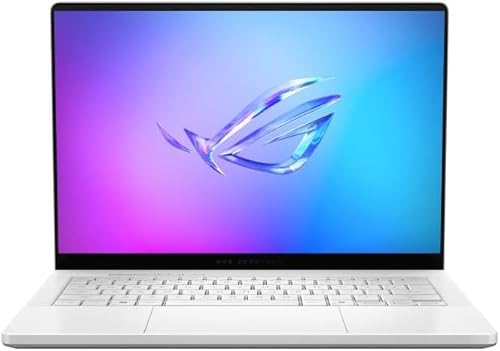
Every FL Studio producer eventually meets the storage wall: the sample packs multiply, the project folders inherit copies of everything they touch, the rendered stems pile up, and one day the drive that seemed generous is performing triage. This ASUS is the guide’s answer to that day. Its title describes an AMD Ryzen AI 9 HX 370, an NVIDIA RTX 5080, 32GB of RAM and a 2TB SSD in a 14-inch body with a 3K OLED panel at 120Hz, finished in Platinum White and carrying the Copilot+ PC label. Two terabytes is not a luxury figure in this workflow; it is the difference between a library that lives inside the machine — every pack, every project, every render, searchable and present — and a library split across drives, where the pack you want is reliably the one on the drive you left behind.
The 32GB of memory completes the pairing, and for FL Studio it is arguably the more musical specification. The channel rack’s appetite grows with ambition: sampled instruments held open beside synthesizers, effects chains kept live rather than rendered, several projects’ worth of sounds auditioned in one sitting. Thirty-two gigabytes lets that appetite run without the machine paging its way through a writing session. The Ryzen processor is a current AMD flagship-class part, well matched to the loop-audition-edit rhythm of pattern work, where responsiveness is felt in milliseconds of interface life rather than in export times. The 3K OLED screen renders the piano roll with the colour separation that FL Studio’s colour-coded patterns exploit — channels and patterns are distinguished by colour in this program, and a vivid panel makes that organisation legible at a glance. The RTX 5080 is recorded as the title prints it; its work in an FL Studio household is the artwork, the visualiser video and the stream, not the beat.
- Processor: AMD Ryzen AI 9 HX 370
- Graphics card in the title: NVIDIA RTX 5080
- Memory: 32GB RAM
- Internal storage: 2TB SSD
- Display: 14-inch 3K OLED, 120Hz
- Bundled software: Not stated in the listing title — verify with the manufacturer documentation
Strengths
- 2TB of internal storage ends the split-library problem for packs, projects and renders alike.
- 32GB of memory lets sampled instruments and synthesizers coexist in the rack without rendering compromises.
- The 3K OLED panel suits FL Studio’s colour-coded patterns and channels unusually well.
Trade-offs
- The 14-inch screen shows fewer playlist tracks at once than the 16-inch picks, so big arrangements scroll.
- Its graphics flagship is capacity most pure beatmaking days will never call on.
- The Platinum White gaming-derived styling is a matter of taste in formal session rooms.
Best for: a Windows FL Studio producer with a large, growing sample library who wants the whole collection inside a portable machine.
Not suited for: a producer who arranges very wide playlists on the laptop screen alone — the 14-inch panel, not the storage or memory, is the binding constraint.
What this machine really sells is the end of a habit: the pre-session ritual of deciding what fits. Producers with split libraries develop an unconscious curation — they reach for the packs that happen to be present, and their sound narrows to their storage. A 2TB internal drive removes the curator from the process. The whole collection is simply there, every writing session starts from the full palette, and the machine’s 32GB of memory means the palette can be loaded generously rather than sampled nervously. For a Windows beatmaker whose library is their instrument, that combination is the most direct upgrade on this list.

MSI Creator A16 AI+ — The Playlist Workbench
If the piano roll is where FL Studio songs are written, the playlist is where they are finished — patterns laid end to end, automation drawn across them, audio clips arranged against the grid — and finishing work is desk work. This MSI is the desk-shaped pick on the Windows side. Its title describes a 16-inch QHD+ panel at 240Hz, an AMD Ryzen AI 9-365 processor, an NVIDIA RTX 4060, 32GB of LPDDR5x memory and a 1TB NVMe SSD, with WiFi 7 and Windows 11 Home, in Lunar Gray. The screen earns the first paragraph: sixteen inches at QHD+ shows a playlist the way arrangers actually need it, with many pattern lanes visible and long stretches of the arrangement in view, so structure can be judged as a whole rather than scrolled through in slices.
The supporting specification matches the role. Thirty-two gigabytes of LPDDR5x memory keeps a full rack of generators and sampled instruments resident while the arrangement plays, which matters during finishing, when the whole project — not a muted subset — is the thing being judged. The terabyte of NVMe storage holds the project and its render history comfortably; FL Studio’s habit of spawning version after version of a song, each with its consolidated audio, consumes space in a way producers consistently underestimate until the drive complains. The RTX 4060 is, as with every Windows pick here, a neighbouring-jobs specification: the cover artwork, the lyric video, the stream overlay. The 240Hz refresh rate makes the interface’s motion smooth, a pleasant quality this guide records without dressing it up as a production feature. Windows 11 Home is what the title states; producers whose studio setup depends on Pro-edition features should note the edition before choosing.
- Processor: AMD Ryzen AI 9-365
- Graphics card in the title: NVIDIA RTX 4060
- Memory: 32GB LPDDR5x
- Internal storage: 1TB NVMe SSD
- Display: 16-inch QHD+, 240Hz
- Radios and system in the title: WiFi 7, Windows 11 Home
Strengths
- The 16-inch QHD+ screen shows playlist structure whole, which is how arrangements are best judged.
- 32GB of memory keeps the entire rack live during finishing, when muted compromises are not acceptable.
- A terabyte of fast storage absorbs FL Studio’s versioning habit without mid-project cleanouts.
Trade-offs
- Windows 11 Home, as titled, lacks Pro features some studio network arrangements rely on.
- The 16-inch body is a desk resident; beatmakers who write on the move should look at the Airs or the G14.
- Its graphics card trails the Zephyrus’s, relevant only when video work shares the machine.
Best for: a Windows producer whose FL Studio work centres on arranging and finishing full songs at a desk, on a screen that shows the whole structure.
Not suited for: a producer who writes primarily away from a desk — the 16-inch chassis stays where it is put, and the portable picks serve that life better.
The Creator A16’s virtue is proportion. Nothing in its specification chases a headline, and nothing in an FL Studio finishing session finds it missing: the screen is big enough, the memory is the full tier, the drive is the comfortable size, the processor is current. Producers assembling a first serious Windows setup often overspend on a single spectacular component and then work around the ordinary one they skimped. This machine refuses that shape. It is the pick for the reader who wants the desk to feel finished — open the playlist, see the song, hear the whole rack, and get on with the decisions that are actually musical.

Dell XPS 16 RTX 5060 — The Connected Studio Seat
The XPS 16 is the FL Studio pick for the producer whose laptop is the centre of a wired room: an audio interface on one connection, a fast drive of sample packs on another, a MIDI controller, an external screen, all of it living together permanently. Its title describes an Intel Ultra 9 285H, an NVIDIA RTX 5060, 32GB of memory and a 1TB drive behind a 16.3-inch OLED touchscreen at 4K and 120Hz — and, distinctively, three Thunderbolt 4 ports, a provision none of the other five titles states. In a wired studio that count is a daily convenience rather than a specification to admire: interface, library drive and dock or display can hold their own high-speed connections simultaneously, and the setup that worked yesterday is the setup that greets you today, untouched.
The screen is the largest and sharpest in this guide, and FL Studio uses screen the way few programs do — the playlist, the mixer and the piano roll are all places a producer lives for hours. At 16.3 inches and 4K, a full arrangement with its mixer open beside it stops feeling like a negotiation between windows. The touchscreen divides opinion honestly: some producers reach for clips and faders directly and would not give it back, others never touch it, and the title simply records that the capability is fitted. The 32GB of memory and terabyte of storage place it in the guide’s full working tier, so the rack can be as sampled and layered as the song demands while the wired drives handle the archive. The title also names a 1080P infrared webcam, a backlit keyboard, a fingerprint reader and Wi-Fi 7 under Windows 11 Pro — the apparatus of a machine that runs the business of a studio as well as the music.
- Processor: Intel Ultra 9 285H
- Graphics card in the title: NVIDIA RTX 5060
- Memory and storage: 32GB memory, 1TB drive
- Display: 16.3-inch OLED touchscreen, 4K, 120Hz
- Ports named in the title: 3x Thunderbolt 4
- Also in the title: 1080P IR webcam, backlit keyboard, fingerprint reader, Wi-Fi 7, Windows 11 Pro
Strengths
- Three stated Thunderbolt 4 ports keep interface, library drive and display wired without hub shuffling.
- The 16.3-inch 4K panel is the most spacious FL Studio canvas here, for playlist and mixer together.
- 32GB of memory and a terabyte of storage match the full working tier for layered, sampled projects.
Trade-offs
- This is a desk anchor: its size and premium build serve a fixed studio better than a daily carry.
- The touchscreen’s worth depends entirely on whether the producer’s workflow actually uses touch.
- Windows 11 Pro’s additions serve the studio’s admin and networking more than its music-making.
Best for: a producer running a permanently connected FL Studio desk, with interface and library drives attached and the full arrangement on one large screen.
Not suited for: a beatmaker who writes in transit and finishes in borrowed rooms — the 16.3-inch body is built to stay at the centre of a wired setup, not to travel with the ideas.
Studios accumulate connections the way projects accumulate patterns, and the XPS 16 is specified for the accumulated state rather than the first day. Its appeal compounds quietly: the session where the interface, the pack drive and the backup drive all need the machine at once; the mix where the playlist and mixer finally share the screen; the evening the whole rack plays live because the memory was never the question. Producers building a room around FL Studio — rather than carrying FL Studio around with them — will find this the most naturally centred machine on the list.

Apple MacBook Air 13 M5 — The Couch-and-Café Beatmaker
The smallest machine in this guide exists for the way beats actually begin: not at the studio desk, but in the twenty unplanned minutes — on a sofa, in a café, in the gap between other obligations — when a rhythm arrives and wants catching. The title describes a 13.6-inch Liquid Retina display, an M5 chip, 16GB of unified memory and a 512GB SSD, with a 12MP Center Stage camera, Touch ID and Wi-Fi 7, in Midnight. Thirteen inches is a deliberate size for this role. The piano roll on it is a sketching surface rather than a finishing canvas: enough to draw the pattern, build the rack, lay the bones of an arrangement, and know whether the idea deserves the desk. FL Studio’s pattern model flatters sketching — a beat is a handful of patterns before it is a song — and a machine this easy to open makes those handfuls happen far more often.
The specification supports the sketch honestly rather than apologetically. Sixteen gigabytes holds the synthesizer-and-samples rack of a developing beat without complaint; the M5 is a current-generation chip, so plug-ins load and audition with the responsiveness that keeps a sketching session in its flow. The 512GB drive carries the working pack collection, with the archive external — the same discipline as its larger Air sibling. Where this machine steps aside is at the finishing stage: dense arrangements, several large sampled libraries open together, a playlist that wants a wide screen. That work belongs to the 15-inch Air, the Pro, or the desk picks, and many producers will own this laptop precisely as the front end of such a setup — the catcher of ideas that the bigger machine then finishes. As a sole machine it suits the producer whose projects stay lean by taste: sample-light, synth-led, finished as much by restraint as by resources.
- Chip named in the title: M5
- Memory: 16GB unified memory
- Internal storage: 512GB SSD
- Display: 13.6-inch Liquid Retina
- Camera and sign-in in the title: 12MP Center Stage camera, Touch ID
- Wireless in the title: Wi-Fi 7; finish: Midnight
Strengths
- The 13.6-inch Air form is the easiest here to open anywhere, which is where sketching actually happens.
- A current M5 chip keeps plug-in loading and pattern auditioning responsive during fast writing.
- 16GB of memory covers the developing beat’s rack without forcing early rendering decisions.
Trade-offs
- The piano roll at 13.6 inches is a sketching surface; dense finishing work wants the 15-inch screen or larger.
- 512GB of storage curates the pack collection, with the archive on an external drive.
- As a sole machine it caps the sampled-library scale a project can grow to.
Best for: a beatmaker whose ideas arrive away from the desk and who sketches patterns wherever the day leaves a gap.
Not suited for: a producer finishing dense, library-heavy arrangements on the laptop alone — the 13.6-inch screen and 16GB of memory mark out the larger picks for that work.
There is a respectable production philosophy embodied in this little machine: that the scarce resource in music is not processing power but captured ideas, and the laptop that gets opened ten extra times a week outperforms, creatively, the stronger laptop that stayed in the studio. FL Studio was practically designed for that philosophy, with its pattern-first workflow turning twenty minutes into a loop worth keeping. The Air 13 is the pick for the producer who recognises their own process in that description — and who either finishes elsewhere or finishes lean, on purpose.
One more quality deserves naming, because sketching machines live or die by it: the speed of beginning. A beat caught in twenty minutes depends on the laptop waking, the program opening and the last project loading before the idea cools. Current-generation chips and fast internal storage — the specification every pick here shares — are what make that beginning feel instant, and they are a large part of why a modestly specified modern Air can serve a writer better than a grander machine from several generations ago. Ideas do not schedule themselves around hardware. The machine that is ready first wins them.
Consider, finally, the render queue at the end of a project, because finishing weeks have their own texture. A producer delivering stems, instrumentals, clean edits and show versions is running the same project through the exporter repeatedly, and responsiveness across that week — projects opening fast, plug-ins loading without ceremony, storage that never interrupts with a warning — is the difference between a delivery that feels professional and one that feels endured. The XPS’s wired stability and full memory tier are aimed squarely at that week, and producers whose income arrives through deliveries should weight it accordingly.
Comparison Table: The Six as FL Studio Machines
| Pick | Processor (as listed) | Memory | Storage | Screen | FL Studio character |
|---|---|---|---|---|---|
| MacBook Pro 14 M4 Pro | M4 Pro, 12-core CPU | 24GB unified | 512GB SSD | 14.2-inch Liquid Retina XDR | The complete project, anywhere |
| MacBook Air 15 M5 | M5 | 16GB unified | 512GB SSD | 15.3-inch Liquid Retina | Editor space that travels |
| ASUS ROG Zephyrus G14 | Ryzen AI 9 HX 370 | 32GB | 2TB SSD | 14-inch 3K OLED 120Hz | The whole library, internal |
| MSI Creator A16 AI+ | Ryzen AI 9-365 | 32GB LPDDR5x | 1TB NVMe SSD | 16-inch QHD+ 240Hz | Arrangements seen whole |
| Dell XPS 16 | Intel Ultra 9 285H | 32GB | 1TB | 16.3-inch OLED touch 4K | The wired room’s centre |
| MacBook Air 13 M5 | M5 | 16GB unified | 512GB SSD | 13.6-inch Liquid Retina | Ideas caught anywhere |
Read the table through the workflow’s eyes. Memory predicts how much of the rack stays live; storage predicts whether the library lives with you or in another room; the screen column predicts how much of the piano roll and playlist you see while deciding. Producers habitually shop the processor column first, yet in FL Studio the processor is felt as responsiveness — the snappiness of a plug-in loading, a pattern looping without a stumble — and every current-generation chip in this list supplies it. The columns that actually ration a producer’s week are the other three.
How to Choose Among These Six for FL Studio
Start with the plug-ins, because they outrank the hardware. List the generators and effects your projects cannot live without and note which platform their licences cover. That list, honestly made, usually decides the Apple-versus-Windows question before any specification is compared — and it should, because replacing a plug-in collection costs more than any difference between these laptops. Windows veterans with years of accumulated licences will find their continuation in the Zephyrus, the Creator or the XPS; producers already living on Apple silicon will find theirs in the Pro or the Airs.
Next, locate where the writing happens. Desk-bound producers should spend on screen and connection: the Creator A16’s playlist canvas, the XPS 16’s wired abundance. Producers who write everywhere should spend on the balance of screen and carry: the Air 15 if the piano roll needs room, the Air 13 if the ideas need catching, the Pro 14 if both writing and finishing must happen on one travelling machine. Finally, weigh the library. Sample-pack collectors should treat storage as a first-order specification — the Zephyrus’s 2TB is the only figure here that simply retires the question — while synth-led producers can let the 512GB machines’ discipline stand, because their projects’ weight sits in presets rather than in gigabytes of audio. Match those three answers and the shortlist resolves itself.
One further test is worth running before the card comes out: open your largest existing project on your current machine and note, honestly, where it complains. A project that loads slowly is asking for storage speed and size. A project that plays but hesitates when plug-ins are swapped is asking for processing responsiveness. A project that forces you to render channels to audio before it will play at all is asking for memory, in the plainest language a session can speak. The six machines here answer those three complaints in different proportions, and the complaint your own project files make is a more trustworthy shopping list than any reviewer’s ranking — including this one. Buy the proportion that matches the complaint, and the new machine will feel less like an upgrade in general than like a specific silence where an annoyance used to live.
Why Does the Piano Roll Change What a Laptop Screen Is Worth?
Because in FL Studio the screen is not displaying the music — it is where the music is written, note by note, with a mouse or a pencil tool. The piano roll’s value scales with how much of it is visible: how many bars of a pattern can be seen while a phrase is shaped, how many octaves are in view while a melody answers a bassline, whether the velocity lane can stay open while notes are drawn. On a small screen the editor becomes a window the producer peers through, zooming and scrolling inside their own idea; on a larger one the idea sits still and the producer moves. That is why this guide treats screen size as a writing specification rather than a viewing one, and why the two Airs — same chip family, same memory — are genuinely different products for this program: the 15-inch is a writing desk that travels, the 13-inch is a notebook that happens to run a studio.
How Many Plug-Ins Can a Channel Rack Hold Before Memory Decides?
Count by kind, not by number. A synthesizer generator consumes processing and very little memory; a sampled instrument consumes memory in proportion to the library it loads, and a rack carrying several of them — a piano, a string patch, a choir, a drum library — can hold gigabytes of sound resident before a single effect is added. Effects then spend processing, some of them lavishly. A project therefore leans on memory and processor in a ratio set by its own instrumentation, and two producers with the same plug-in count can need entirely different laptops. The practical audit is to open your largest existing project, note how much of its weight is sampled, and buy the memory column for that weight with room to grow — because racks, like libraries, only ever grow in one direction across a project’s life.
What Travels With a Beatmaker Besides the Laptop?
Less than a studio, more than nothing. A pair of headphones the producer knows intimately is the true constant — mixes and patterns are judged against them in every room — and they matter more to the travelling workflow than any specification in this guide. A small drive carrying a backup of the project folder and the pack library turns a lost or failed laptop from a catastrophe into an errand. The charger travels always; sketching sessions have a way of becoming finishing sessions. And the projects themselves should be organised for the road: packs consolidated, projects saved with their samples collected, so that a beat started on a train opens identically at the desk. The six machines here differ in how much of that discipline they forgive — the 2TB Zephyrus forgives almost all of it — but none of them replaces the headphones.
When Does a Beatmaker Outgrow a 16GB Machine?
The moment arrives in a recognisable scene: a project that began as a loop now carries a sampled piano under the hook, a string patch doubling the melody, a drum library with every articulation loaded, and a vocal chain kept live for the singer who might drop by — and the machine begins to hesitate where it used to simply play. Nothing has broken; the rack has simply grown past the memory fitted to it. Producers can postpone the moment with housekeeping — rendering sampled parts to audio, purging unused patterns, keeping one project open at a time — and for many that housekeeping is a fair price for a lighter, cheaper machine. But it is worth naming the moment before purchase, because it is predictable: it comes when the sampled side of the rack becomes the project’s foundation rather than its decoration. Producers already living there should buy the 24GB or 32GB tier now; producers whose racks are synthesizer-led can take the 16GB machines and spend the difference on the sounds themselves, which is not a consolation but a legitimate allocation.
Common Mistakes When Buying a Laptop for FL Studio
A frequent error is buying for the export. Rendering a finished track is the one moment a laptop’s full power is easy to measure, so buyers fixate on it — yet rendering happens once per song, while the piano roll, the rack and the playlist are lived in for every hour the song exists. A machine chosen for render speed but skimped on screen or memory optimises the minute and taxes the month. A second error is ignoring where the plug-in licences live: a producer who switches platform for a prettier laptop and discovers their favourite generator is licensed for the other system has bought two problems at once. The licence audit belongs before the laptop shortlist, not after the unboxing.
A third error is underestimating the library’s growth and buying the small drive as a saving. Sample packs are bought in sales, inherited from collaborators and downloaded at 2 a.m. with total sincerity; a 512GB machine serves that habit only with an external archive and the discipline to maintain it, and buyers who know they lack the discipline should buy the storage instead. A fourth is treating the two Airs as the same machine in two sizes — for this program the screen is a writing tool, and the difference between sketching space and finishing space is a workflow decision, not a cosmetic one. A fifth is assuming the desk picks and the travel picks compromise equally: they compromise in opposite directions, and the producer’s actual week — not the imagined one — should arbitrate.
Final Recommendation
For most FL Studio producers choosing one machine, the MacBook Pro 14 with M4 Pro is the safest centre of this list: twelve cores and 24GB of memory in a body that writes, finishes and travels without asking the project to shrink. Windows producers with serious libraries should look first at the Zephyrus G14, whose 2TB drive and 32GB of memory retire the two rations beatmakers feel most; those finishing songs at a desk should weigh the Creator A16’s playlist canvas against the XPS 16’s wired, big-screen studio seat. The Air 15 is the traveller’s writing desk and the Air 13 the idea-catcher, and both are honest machines when their memory and storage disciplines suit the producer’s habits. Choose by licences, by location, by library — in that order — and the laptop that remains will feel less like equipment than like the room where your patterns have always wanted to be written.
And keep the receipt of the decision, in a sense: note which of the three answers drove the purchase. Producers’ work changes shape — the sketching habit becomes a finishing practice, the sample habit becomes a synthesis habit — and the note explains, two years on, whether the machine or the workflow is the thing that moved. The six laptops here will each serve a long producing life; matching the life to the machine is the only step that cannot be delegated to a specification table.
Frequently Asked Questions
Does FL Studio run equally well on Mac and Windows laptops?
The program itself runs on both, and every machine here was chosen to run it well. The practical difference is the ecosystem around your projects: plug-in licences, older project habits and collaborators’ systems. Audit those first; the laptops on both sides of this guide are strong enough that the ecosystem, not the hardware, should cast the deciding vote.
Is 16GB of memory enough for FL Studio production?
For the common shape of a beat — synthesizers, drum plug-ins and a few sampled instruments — yes, and the two Airs in this guide are specified for exactly that work. Projects that stack several large sampled libraries lean on memory much harder, and their producers should be looking at the 24GB Pro or the 32GB Windows picks.
How much storage do sample packs really need?
A working collection of packs, project folders with collected samples, and rendered stems grows to hundreds of gigabytes without any unusual hoarding, and it never shrinks on its own. Producers who keep everything internal should read the 2TB Zephyrus as the comfortable answer; those on 512GB machines should plan the external archive from the first week rather than the first crisis.
Does a touchscreen help in FL Studio?
It depends on the producer’s hands. The XPS 16’s touchscreen lets some users tap clips, drag faders and scroll the playlist directly, and they value it; others work entirely with mouse and keyboard and would never notice its absence. Treat it as a preference feature fitted to one pick, not a criterion for the shortlist.
Should I buy the laptop or upgrade my plug-in collection first?
If the current machine runs FL Studio without stumbling, the sounds usually deserve the money first — a laptop cannot write a better melody, and this guide’s picks assume a machine that has become the bottleneck. When the rack hesitates, the project loads slowly, or the screen crowds the writing, the order reverses: hardware first, because every plug-in bought afterwards will be auditioned on the machine that has to keep up with it.
Can one of the smaller picks really finish a song, or are they only for sketching?
They finish songs — the Airs’ limits are about scale, not capability. A lean, synth-led production can be written, arranged and rendered entirely on the Air 13. What the smaller machines ration is the size of the sampled side of the rack and the amount of the arrangement visible at once, which is why library-heavy finishers are pointed at the larger picks.
Related Guides
The same producers usually work in more than one program before a song is done, so these companions extend the thinking along the workflow: our Ableton laptop guide, where live performance and session work set the criteria, the general DAW production guide, covering the wider world of interfaces and monitoring, and the Unity 3D laptop guide, for producers whose projects have grown game-shaped ambitions.


