What's inside
- Where to Buy
- Introduction
- Key Takeaways
- Quick Picks
- How We Chose These Picks
- Comparison Table
- How to Choose a Large Format Printer for Giclee
- What Makes a Print Giclee Rather Than Merely Large?
- How Much Does Paper Choice Matter at These Sizes?
- When Should a Studio Stop Outsourcing and Buy a Production Machine?
- Common Mistakes in Giclee Printer Buying
- Final Recommendation
- Frequently Asked Questions
- Related Guides
As an Amazon Associate I earn from qualifying purchases. This post may contain affiliate links at no extra cost to you.
[SITE_DOMAIN] is reader-supported. When you buy through links on our site, we may earn an affiliate commission.
Where to Buy
Giclee machines are listed sparely, because their buyers read specification sheets rather than headlines, so approach these six pages expecting to dig. Canon’s imagePROGRAF PRO-2600 and imagePROGRAF PRO-4600 are listed by model name alone — the production tier introducing itself by reputation. The imagePROGRAF PRO-1100 at least states its 17-inch professional wireless identity in full. Epson’s SureColor P900 bundle arrives with cables and a cloth in the box, a domestic touch in a professional list, while the SureColor P700 carries the fullest title here, naming its UltraChrome PRO10 ink and 10-channel printhead. Canon’s imagePROGRAF PRO-6000 closes the list at a stated 60 inches. Open the finalists, read every line of their full specifications, and treat any number not printed there as a question for the maker, not a gap for a reviewer to fill.
Introduction
The best large format printers for giclee work are bought to do one thing supremely well: turn a digital file into a physical print whose colour, tonal depth and surface honour the original artwork, at sizes a wall can feel. Giclee is not a technology but a standard of intent — fine art reproduction and original photographic work printed with archival-minded inks on papers and canvas chosen to last — and the machines below are the ones built for that intent. Six printers only are listed here, all of them genuine machines: three Canon imagePROGRAF production bodies spanning the professional range up to a stated 60-inch flagship, Canon’s 17-inch professional desktop, and Epson’s two SureColor photo printers at 17 and 13 inches. Rolls of canvas and paper surfaced constantly in research for this category and were excluded throughout, because media is what these printers consume, not what they are.
Buyers should know how uneven the evidence is before reading further. Two of the six listing titles are nothing but a model name. One states a width and almost nothing else. Only Epson’s P700 title describes an ink system and a printhead in any detail. This guide therefore writes each review at the altitude its title can support: where a width is stated, the review builds on width; where an ink is named, the review builds on ink; where the title is a name alone, the review discusses the machine’s tier and role and sends the specification work to the listing and the maker’s documentation, where at these prices it belongs. No ink counts, resolutions or speeds have been borrowed from sibling models or from memory.
The shape of the decision is simpler than the price tags suggest. Giclee printing is governed by three variables: the largest print you will actually sell or hang, the papers and canvas your work lives on, and the regularity with which you print. The six machines form a ladder across those variables — 13 and 17 inches for the desktop studio, the production Canons for studios printing wide work as a business — and the reviews are ordered to make the ladder’s rungs, and the cost of climbing past the rung you need, plain to see.
Key Takeaways
- Only printers are listed here — six machines. Canvas and paper rolls that appear in this category’s searches are media, not printers, and were excluded.
- Canon’s imagePROGRAF PRO-6000 is the width flagship with a stated 60-inch professional photographic format; the PRO-2600 and PRO-4600 are listed by name alone as production-tier bodies.
- Canon’s imagePROGRAF PRO-1100 is the 17-inch professional wireless desktop, the classic exhibition step for a home studio.
- Epson’s SureColor P700 carries the most informative title of the six: UltraChrome PRO10 ink and a 10-channel MicroPiezo AMC printhead at 13 inches.
- Epson’s SureColor P900 is the 17-inch Epson option, listed here as a bundle with Ethernet cable, USB cable and fibre cloth.
- Ink systems, speeds and media handling are unstated in most titles, so giclee buyers must finish specification in the makers’ documentation — normal practice at this tier.
Quick Picks
| Pick | Badge | Why it earns a place |
|---|---|---|
| Canon imagePROGRAF PRO-2600 | The production studio tier | Canon’s imagePROGRAF production class for studios printing wide giclee work to order. |
| Canon imagePROGRAF PRO-4600 | The larger production sibling | The step above the PRO-2600 in Canon’s production range, for studios whose commissions run wider. |
| Canon imagePROGRAF PRO-1100 | The 17-inch gallery desktop | 17-inch professional wireless inkjet photo printer for exhibition-scale sheets at home-studio scale. |
| Epson SureColor P900 Bundle | The 17-inch Epson route | 17-inch photo printer bundled with Ethernet cable, USB cable and fibre cloth. |
| Epson SureColor P700 | The documented 13-inch artist machine | 13-inch photo printer with UltraChrome PRO10 ink, wireless connectivity and a 10-channel MicroPiezo AMC printhead. |
| Canon imagePROGRAF PRO-6000 | The 60-inch flagship | 60-inch professional photographic large-format inkjet printer, the widest stated format in this guide. |
How We Chose These Picks
The shortlist was built as a ladder rather than a cluster, because giclee buyers cross-shop across a wider range of scales than almost any other printing audience. At the desktop end, Epson’s P700 at 13 inches and the two 17-inch machines — Canon’s PRO-1100 and Epson’s P900 — cover the home studio where most giclee work is actually produced: editions, exhibition pieces, portfolio prints. Above them, Canon’s production imagePROGRAF bodies serve the studio whose giclee work is a service sold to artists and photographers rather than a practice pursued at home, up to the PRO-6000’s stated 60 inches for work that reads across a gallery. A guide that listed only desktop machines would abandon the professional reader; one that listed only production bodies would be theatre. Both ends are here, labelled as what they are.
Media discipline shaped the exclusions. Researching this category surfaces an endless supply of canvas rolls, fine art papers and ink sets wearing printer-adjacent titles, and every one was set aside: a roll of canvas is a supply decision, made after the machine decision, and mixing the two corrupts a buying guide. The same discipline kept the reviews honest about what a printer purchase actually commits a studio to — a media ecosystem, an ink line, a bench or a room — because at giclee sizes the machine is the beginning of the spending rather than the whole of it.
Manufacturer balance fell out naturally: Canon’s imagePROGRAF line dominates the production widths in current listings, Epson’s SureColor line anchors the desktop artist tier, and the six picks reflect that real market shape instead of an artificial quota. Where the two makers compete directly — the 17-inch desktop — both are present, and the reviews keep their comparison at the level the titles support: Canon’s stated professional wireless proposition against Epson’s bundle and line heritage, with ink-system detail available in this guide only for the P700, whose title supplies it.

Canon imagePROGRAF PRO-2600 — The production studio tier
This listing is a name and nothing more, and the review begins by respecting that. Canon imagePROGRAF PRO-2600: a professional large-format line, a production tier within it, and no stated width, ink configuration, speed or media handling anywhere in the title. A studio reading that terseness correctly will recognise its intended audience — buyers who work from full specification sheets, who will compare this machine against its siblings on documented numbers, and who treat a marketplace title as a signpost rather than a brochure. This guide will not decorate the name with borrowed figures. What can be judged responsibly is the role: a production imagePROGRAF exists to turn a studio’s files into wide giclee output as a business, with the consistency across a run that artists paying for reproduction work are entitled to demand.
That role has a specific economics. A studio printing giclee for others sells trust as much as prints: the artist hands over a file representing months of work and expects the fortieth print to match the first, on the paper agreed, at the size agreed. Production-tier machines are bought to keep that promise at volume, and they are justified by an order book — gallery editions, photographers outsourcing their large work, display pieces for commercial clients — rather than by enthusiasm. The PRO-2600’s place in this guide is as the production tier’s representative rung: the point where a growing studio stops asking which desktop printer to buy next and starts asking whether its wide work should be produced in-house at all.
For the home artist, the correct response to this review is to read it as a boundary. Nothing in a domestic practice needs a production body, and the desktop rungs below — 13 and 17 inches — will carry a home studio’s giclee ambitions for years. For the studio at the boundary, the diligence is the decision: full specifications from the listing and Canon’s documentation, media handling confirmed for the papers and canvas the studio actually sells, service arrangements understood before the order. If that diligence confirms the fit, the PRO-2600 listing is where the conversation starts — open it, check the current price on Amazon, and bring a spreadsheet rather than a wish list.
One production consideration deserves emphasis because artists feel it directly: colour continuity across time. A studio’s giclee clients return — a second edition, a new piece in the same series — and expect the new work to sit beside the old without a visible seam in rendering. Production machines earn their place partly by serving that continuity within a stable media and ink ecosystem, and studios protect it with recorded profiles and settings per paper. A buyer evaluating this tier should therefore ask about the ecosystem around the machine as keenly as about the machine: which papers carry established profiles, how the studio will record its settings, and how reprints a year apart will be matched. The name on the listing cannot answer those questions; the studio’s own process, built around the machine, is the answer.
Service and support form the invisible half of a production purchase, and a studio’s questions should be as specific as its specification sheet: response arrangements when the machine stops mid-edition, the local availability of engineers who know the line, the supply position of its ink and media in the studio’s region. None of that can be read from a listing title, and little of it from a listing page, which is why production purchases involve a conversation with the maker’s channel rather than a checkout. A studio that conducts that conversation before ordering owns a machine with a support story; a studio that skips it owns a machine with a hope. At this tier the difference is measured in met deadlines and missed ones.
- Listing title content: model name only — Canon imagePROGRAF PRO-2600
- Family per title: imagePROGRAF professional large-format line
- Format width: Not stated in the listing title — verify with the manufacturer documentation
- Ink system: Not stated in the listing title — verify with the manufacturer documentation
- Media handling: Not stated in the listing title — verify with the manufacturer documentation
- Print speed: Not stated in the listing title — verify with the manufacturer documentation
Strengths
- Production-tier imagePROGRAF built for studio giclee output as a business.
- Sits within a professional line whose media ecosystem serves reproduction work.
- A serious in-house alternative for studios currently sending wide work out.
Trade-offs
- The title states no specifications at all; every figure must come from documentation.
- Production economics require paid throughput a home practice cannot supply.
- Floor space, media stock and maintenance are business commitments.
Best for: studios producing wide giclee editions and client work in-house on a weekly rhythm.
Not suited for: home artists printing their own work, whose needs end at the 17-inch desktop rung.

Canon imagePROGRAF PRO-4600 — The larger production sibling
The PRO-4600 shares its sibling’s silent listing — a model name, a professional line, nothing else — and sits a step above it in Canon’s production range. That positioning is the review’s foundation: within a maker’s tiered line, the higher-numbered production body exists for the studios whose commissions run larger, whose throughput is heavier, or whose clients’ work simply will not fit the smaller machine’s world. Because the title states no width, this guide assigns it none; the step-up relationship within the range is the fact a buyer starts from, and the documented width, ink system and media handling on the full listing are the facts the decision must be finished with.
Why would a studio climb from one production body to the next? The honest answers are commercial rather than photographic. A commission arrives at a size the current machine cannot serve, and the studio must print it or decline it. A bureau’s markup on outsourced oversize work grows with the order book until in-house production recovers its cost. A gallery client wants a supplier who controls the whole chain from file to framed piece. Against those gains stand the tier’s constants: a bigger footprint, media bought in production quantities, ink consumed at production rates, and an asset that deteriorates in value fastest when it stands idle. The PRO-4600 is therefore the guide’s most conditional recommendation — magnificent arithmetic for the studio whose order book already contains its work, and a very expensive ornament for the studio merely hoping such an order book arrives.
The comparison that matters for this machine is not against the desktops below, which serve a different species of buyer, but against its own sibling and against continued outsourcing. A studio should lay three columns side by side — the PRO-2600’s documented specification, this machine’s, and the bureau invoices of the last year — and let the columns argue. If the bureau column is thin, the conversation ends early and honourably. If it is thick and growing, the PRO-4600’s listing deserves the full professional diligence: specifications, installation requirements, service terms, media trials on the studio’s own papers. Begin that diligence on the listing itself — open it, check the current price on Amazon, and request the documentation a production purchase is entitled to.
Installation and workflow integration belong in this review because at production scale they are part of the product. A machine of this class arrives as a project: access, placement, the flat space around it for handling wide sheets and rolls, the storage for media that must stay clean and flat, the trimming and mounting path the finished work travels. Studios that plan that triangle of machine, media and finishing before delivery start printing within days; studios that improvise it spend the first month moving furniture around an asset that is already depreciating. The PRO-4600’s buyer, by definition, runs a business — and this purchase should be managed like the business decision it is, with the installation plan written before the order is placed.
- Listing title content: model name only — Canon imagePROGRAF PRO-4600
- Position in range: step above the PRO-2600 in Canon’s production line
- Format width: Not stated in the listing title — verify with the manufacturer documentation
- Ink system: Not stated in the listing title — verify with the manufacturer documentation
- Media handling: Not stated in the listing title — verify with the manufacturer documentation
- Print speed: Not stated in the listing title — verify with the manufacturer documentation
Strengths
- The higher production rung for studios whose commissions outgrow the tier below.
- In-house control replaces bureau markups and turnaround on oversize work.
- Professional line backing for media, profiles and service at production scale.
Trade-offs
- No specification whatever in the title; diligence carries the entire decision.
- Idle time is the most expensive state a production asset can be in.
- Installation, space and media stocking are premises-level commitments.
Best for: established studios whose order books already contain wide work beyond the lower production tier.
Not suited for: studios whose wide commissions are occasional, where outsourcing remains the cheaper instrument.

Canon imagePROGRAF PRO-1100 — The 17-inch gallery desktop
Seventeen inches is the size at which a giclee print stops being a page and becomes a presence, and the PRO-1100 is Canon’s professional desktop built for exactly that threshold. Its title is refreshingly complete by this guide’s standards: a 17-inch professional wireless inkjet photo printer, every word of which earns its place. Professional places it in the imagePROGRAF line rather than a consumer range. Inkjet photo printer names the giclee method — fine droplets, art papers, canvas at desktop scale. Wireless matters because a 17-inch body claims a bench, and the bench that fits it is rarely the desk the computer sits at. And 17 inches is the exhibition format: the sheet that mats and frames into the sizes galleries hang and buyers pay for, the size at which a photographer’s or painter’s reproduction stops apologising for its scale.
The working life of a 17-inch desktop is a rhythm of editions and one-offs. An artist proofing a new piece prints at final size and learns things no screen teaches — where the shadows block, where the canvas texture argues with the image, where a crop breathes or suffocates. A photographer preparing an exhibition prints the show in a week of evenings, culls without mercy, and reprints the two frames that demand it. That rhythm is why the desktop tier, not the production tier, is where most giclee actually happens: the work is personal, the runs are short, and the printer’s owner is the artist, standing at the bench judging the sheet under honest light.
What the title withholds is the ink system, and for giclee that omission sends the buyer to the listing with a specific question, because ink architecture is the soul of a giclee machine — the property that governs gamut on matte papers, behaviour on canvas, and the keeping qualities the word giclee promises. This guide claims nothing about the PRO-1100’s ink beyond the inkjet method its title states; the full listing and Canon’s documentation carry that specification, and a buyer comparing it against Epson’s P900 — whose sibling’s title names its ink outright — should extract the equivalent facts for the Canon before deciding. None of that diminishes the machine’s position: it is the Canon desktop a 17-inch artist shortlists first. Open its listing, check the current price on Amazon, and read the ink specification with the attention a decade of prints deserves.
Paper strategy completes the picture of ownership. A 17-inch artist typically settles on two or three papers — a matte workhorse for editions, a textured fine art stock for the pieces that suit it, perhaps a canvas for the gallery-wrapped line — and learns each one’s behaviour with the machine until proofing becomes prediction. That settling is cheaper at 17 inches than at production widths and richer than at 13, which is part of the format’s enduring appeal: it is the largest size at which experimentation still feels affordable, and the smallest at which the results feel like the real thing. Artists who print to sell will recognise that balance as the centre of their practice, and the PRO-1100 sits squarely on it.
There is a selling rhythm specific to 17-inch work worth naming for artists pricing their first exhibition. Pieces at this size occupy the wall between the intimate print and the statement piece, and buyers read them as serious objects — large enough to anchor a room’s calm corner, small enough to live in an ordinary home. That commercial sweet spot is why so many working artists standardise on 17 inches as their ceiling for years, printing 13-inch editions beneath it and sending the rare oversize commission to a trusted bureau. A machine bought to serve exactly that structure, as the PRO-1100 is, tends to be worked hard and replaced reluctantly, which is the most reliable biography a desktop giclee printer can have.
- Class per listing title: 17-inch professional wireless inkjet photo printer
- Format width per title: 17 in
- Line per title: Canon imagePROGRAF
- Ink system: Not stated in the listing title — verify with the manufacturer documentation
- Print speed: Not stated in the listing title — verify with the manufacturer documentation
- Media handling: Not stated in the listing title — verify with the manufacturer documentation
Strengths
- Seventeen-inch output reaches true exhibition and saleable wall sizes.
- Professional imagePROGRAF positioning with wireless bench placement.
- Proofing at final size improves every decision made upstream of the print.
Trade-offs
- The ink system — central to giclee work — is not stated in the title.
- Paper, mounting and framing costs all step up at 17 inches.
- Bench footprint and sheet clearance exceed casual desk setups.
Best for: artists and photographers whose work sells or exhibits at 17-inch sizes from a home studio.
Not suited for: beginners still learning whether they print enough to justify even the 13-inch rung.

Epson SureColor P900 Bundle — The 17-inch Epson route
Epson’s 17-inch answer arrives in this listing as a bundle: the SureColor P900 17-inch photo printer with an Ethernet cable, a USB cable and a fibre cloth. The bundle’s contents are humble, and worth reading correctly. They signal a listing aimed at a buyer who will connect the machine both ways — networked for the studio, cabled for the workstation beside it — and who will keep a cloth near a machine whose wide sheets collect dust the way all wide sheets do. The printer itself carries the SureColor name, Epson’s professional photo line, at the same 17-inch format as Canon’s PRO-1100, which makes this pair the guide’s one direct contest: two makers, one exhibition format, and a decision that will be settled by ink systems, media handling and ecosystems documented on the listings rather than by anything a title can shout.
That contest deserves an honest frame. Artists rarely choose between Canon and Epson desktops on specifications alone; they choose on the papers they already love, the profiles their community shares, the behaviour of matte against gloss in their own body of work, and sometimes on nothing more rational than which maker’s prints they grew up admiring. All of that is legitimate at this tier, because both lines are professional instruments and the differences live in the last few percent of rendering character. What a buyer owes the decision is the documented comparison: ink system against ink system, media range against media range, taken from the two listings and the makers’ pages, tested if possible on the buyer’s own problem file — the deep-shadow piece, the saturated red, the skin tones that forgive nothing.
The bundle’s cables also hint at a placement truth for 17-inch machines: wired Ethernet beside the editing desk is how many studios actually run them, whatever wireless badges promise, because large files and long sessions forgive a cable what they do not forgive a dropped connection. A buyer planning the bench should therefore read this listing’s inclusions as permission to set the machine up properly on day one. Beyond the bundle, the title is silent on ink and speed, and this review claims neither. For the artist whose allegiance or paper cupboard already leans Epson, the P900 is the 17-inch name to interrogate. Open the bundle’s listing, check its current price on Amazon against the PRO-1100’s, and let the documented ink and media specifications finish a contest the titles deliberately leave open.
A word about editions on a desktop 17-inch machine, since that is the work this printer will actually do. An edition is a promise of sameness across weeks: the same paper batch where possible, the same settings recorded, the same viewing light at the cull. Desktop SureColor and imagePROGRAF machines both serve that promise well when the artist’s process does, and both betray it when the process is casual. The machine is therefore best bought as part of a small system — printer, two settled papers, a notebook or file of settings, a consistent lamp — and the bundle’s humble cloth is a fitting emblem of that system: giclee quality is housekeeping as much as hardware, practised daily at the bench.
- Class per listing title: 17-inch photo printer, Epson SureColor line
- Format width per title: 17 in
- Bundle contents per title: Ethernet cable, USB cable, fibre cloth
- Model reference per title: C11CH37201
- Ink system: Not stated in the listing title — verify with the manufacturer documentation
- Print speed: Not stated in the listing title — verify with the manufacturer documentation
Strengths
- Epson’s professional SureColor line at the 17-inch exhibition format.
- Bundle includes both network and USB connection routes from day one.
- A direct, credible alternative to Canon’s PRO-1100 for paper-led buyers.
Trade-offs
- Ink system and speed are unstated in the title, so the key comparison needs the listing.
- Bundle extras are conveniences, not a substitute for the specification check.
- Seventeen-inch media and framing costs apply exactly as on its Canon rival.
Best for: artists standardised on Epson papers and profiles who print editions at 17 inches.
Not suited for: purchases that must be decided from the listing title alone, since the ink specification here requires the full listing.
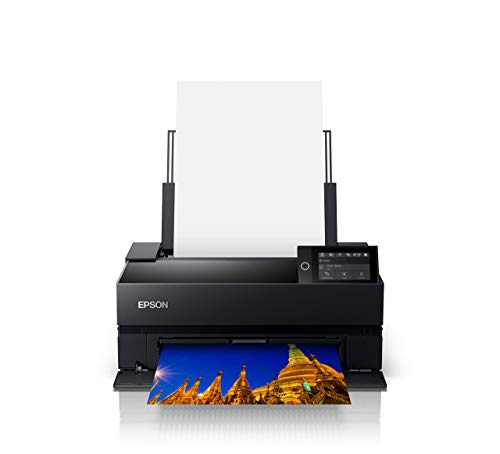
Epson SureColor P700 — The documented 13-inch artist machine
In a guide starved of specification, the P700’s title is a feast: a 13-inch photo printer with UltraChrome PRO10 ink, wireless connectivity, and a 10-channel MicroPiezo AMC printhead, for digital photo printing. Each element carries giclee meaning. UltraChrome PRO10 names the ink system outright — Epson’s professional pigment family in this generation — and pigment is the ink class giclee work is built on, the chemistry that sits in the paper’s coating, renders matte and fine art stocks with depth, and underwrites the keeping promises artists make to buyers. Ten channels in the printhead describe how that ink is laid down: a channel architecture devoted to rendering the subtle transitions — fog, skin, dusk, the greys inside a black-and-white print — where giclee quality is actually judged, because nobody’s reputation was ever made by a saturated midday sky.
Thirteen inches is the thoughtful artist’s format, and the P700 is its most completely described representative here. A 13-inch sheet mats into the sizes that sell at art fairs and hang in homes, proofs a 17-inch ambition honestly at lower cost, and fits a bench in a room that remains a room rather than becoming a print works. For photographers printing their own work for sale, for painters producing reproductions at domestic scale, for the artist whose editions are twenty rather than two hundred, this format is not a compromise but a calibration — the largest size whose paper, ink and framing costs a one-person practice can repeat weekly without flinching.
Wireless connectivity, stated in the title, suits the small studio’s geography: the printer on the bench that fits, the computer where the light is right for editing, no cable dictating either. What the title does not state — speed, media handling specifics — matters less at this tier than anywhere in the guide, because 13-inch giclee work is session-paced rather than throughput-paced, though roll and thick-media questions still belong to the listing for artists whose papers demand them. For the artist who wants the ink system named before money moves, the P700 is this guide’s most transparent purchase. Go to its listing, check the current price on Amazon, and confirm the media range against the papers already in your flat file.
Black-and-white workers should linger on this machine a moment longer. Monochrome printing is where ink channel architecture earns its keep most visibly, because a neutral grey ramp exposes every weakness in how a printer mixes its inks, and the stated 10-channel head with a named professional pigment set is the strongest monochrome signal any title in this guide sends. Photographers whose giclee practice is substantially black and white — a large and serious constituency — will find the P700’s title speaking their language more directly than any rival here, and should weight that fluency heavily before defaulting to a larger format they may not need.
Edition discipline at 13 inches deserves a practical note, because this machine will live or die by it. Print the edition in sessions rather than marathons, record the paper and settings for every session in a notebook that lives beside the machine, and cull under the same lamp each time. Pigment on matte paper rewards that steadiness with the deep, quiet surfaces giclee buyers pay for, and punishes improvisation with editions whose tenth print argues with its first. The P700 supplies the stated hardware half of that discipline — named ink, a serious printhead, a format a home studio can feed — and asks only that the artist supply the other half, which was always the artist’s to supply.
- Class per listing title: 13-inch photo printer, Epson SureColor line
- Ink system per title: UltraChrome PRO10 ink
- Printhead per title: 10-channel MicroPiezo AMC
- Connectivity per title: wireless
- Format width per title: 13 in
- Print speed: Not stated in the listing title — verify with the manufacturer documentation
Strengths
- The ink system and printhead are named in the title — rare, decision-grade candour.
- Pigment ink positioning suits matte, fine art and black-and-white giclee work.
- Thirteen inches keeps paper, ink and framing costs repeatable for a one-person practice.
Trade-offs
- Thirteen inches caps the work below exhibition scale; larger pieces need the 17-inch tier.
- Media handling specifics still require the listing for thick or roll stock plans.
- Session-paced desktop output will not serve a studio selling wide work weekly.
Best for: artists and photographers printing pigment giclee at 13 inches, especially black-and-white work.
Not suited for: artists whose buyers order 17-inch and larger pieces regularly, since this format cannot serve those orders.
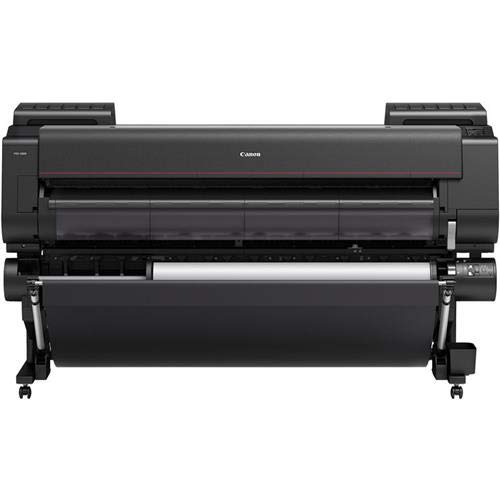
Canon imagePROGRAF PRO-6000 — The 60-inch flagship
The widest stated number in this guide belongs to its oldest flagship: the imagePROGRAF PRO-6000, described in its title as a 60-inch professional photographic large-format inkjet printer. Sixty inches is not a bigger version of desktop printing; it is a different industry sharing a name. Output at that width is gallery centrepieces, exhibition graphics, photographic murals — work that is read across a room and commissioned by institutions, produced on rolls, finished by mounting and framing operations that are themselves a trade. The title’s phrasing, professional photographic, keeps the machine honest about its purpose within that industry: this is photographic output at architectural scale, not a sign printer wearing a photographer’s badge.
A flagship of established standing brings a particular kind of value to the studios that buy it. Its behaviour across papers is documented by years of production use, its quirks are known quantities discussed by the community that runs it, and a studio adopting one inherits that accumulated knowledge instead of pioneering a new model’s childhood. Against that stands the diligence any established flagship demands: condition and configuration on the specific listing, the ink system’s current supply position, and service reach for a machine of this size in the studio’s region. Those are listing-and-documentation questions, and at this tier they are not fine print — they are the purchase.
Who belongs here is easily said and rarely miscounted: the studio or institution whose commissions already arrive at widths the rest of this guide cannot touch, whose floor can give a 60-inch machine its working room, and whose media budget thinks in rolls rather than sheets. Everyone else should enjoy this review as a tour of the ladder’s top rung and buy several rungs lower, where their actual work lives. For the studio that does belong here, the PRO-6000’s stated proposition is admirably plain — professional photographic output at 60 inches from Canon’s large-format line. Read the listing’s full terms with a production manager’s eye, check the current price on Amazon, and verify the ink and media specification in Canon’s documentation before the commission that needs it is on the calendar.
Scale changes even the meaning of a proof at this width. A test strip at full height, a section printed at final size to judge sharpness and colour before a roll is committed, a viewing distance measured in metres rather than arm lengths — the working methods of 60-inch production are their own discipline, and studios entering the tier should budget learning time alongside the machine. That is not a warning against the tier; it is the honest texture of it, and the studios that thrive at flagship width are the ones that treat the first season as an apprenticeship their order book pays for. The PRO-6000, as an established flagship, at least offers the comfort that its lessons have all been learned before, by someone, and written down.
Buyers at this altitude should also think in terms of the work’s afterlife. A 60-inch photographic print is not finished at the output tray; it is mounted, framed or stretched, transported, hung, lit. The studio’s relationships with finishers and framers who can handle the width are as much a part of the purchase as the machine, and commissions should be accepted only where that whole chain is in place. It is another way in which the flagship tier is an industry rather than a product — and why the studios that belong in it tend to know, without being told, that they do.
- Class per listing title: professional photographic large-format inkjet printer
- Format width per title: 60 in
- Line per title: Canon imagePROGRAF
- Ink system: Not stated in the listing title — verify with the manufacturer documentation
- Media handling: Not stated in the listing title — verify with the manufacturer documentation
- Print speed: Not stated in the listing title — verify with the manufacturer documentation
Strengths
- The widest stated format in this guide at 60 inches, for gallery and display work.
- An established flagship with a long production track record behind it.
- Professional photographic positioning within Canon’s large-format line.
Trade-offs
- Condition, configuration and terms on the specific listing need careful verification.
- Premises, rolls and finishing operations are a small print business in themselves.
- The ink system is unstated in the title and must be confirmed in documentation.
Best for: studios and institutions whose commissions already demand photographic output at up to 60 inches.
Not suited for: any home or desktop practice, where its width, footprint and media economics are entirely out of scale.
Comparison Table
| Pick | Format evidence from title | Ink evidence from title | Setting |
|---|---|---|---|
| Canon imagePROGRAF PRO-2600 | Not stated in the listing title | Not stated in the listing title | Production studio |
| Canon imagePROGRAF PRO-4600 | Not stated in the listing title | Not stated in the listing title | Production studio, upper tier |
| Canon imagePROGRAF PRO-1100 | 17 in | Not stated in the listing title | Home studio, exhibition |
| Epson SureColor P900 Bundle | 17 in | Not stated in the listing title | Home studio, exhibition |
| Epson SureColor P700 | 13 in | UltraChrome PRO10, 10-channel head | Home studio, editions |
| Canon imagePROGRAF PRO-6000 | 60 in | Not stated in the listing title | Production flagship |
How to Choose a Large Format Printer for Giclee
Let the largest print you sold, hung or were commissioned for in the last year set the format, and add one size of headroom at most. That single discipline prevents most of this category’s expensive errors, because every step up in width multiplies the costs around the machine — paper and canvas, ink volume, mounting, framing, storage, the bench or room itself — while adding capability only the work can justify. Artists whose year was made of 13-inch sales should be looking at the P700 and treating 17 inches as an ambition to earn; artists already turning away 17-inch orders have their answer in the PRO-1100 and P900; studios fielding wide commissions belong in the production conversation, where the decision is made from documented specifications and order books rather than from listings.
Ink is the second decision, and it should be made on paper — literally. Giclee work lives on matte and fine art stocks and canvas, and the ink system that serves those surfaces, with the keeping qualities buyers are promised, is the machine’s soul. Only one title here names its ink, so for the other five the ink specification is the first document to extract on the listing, ahead of speed, ahead of connectivity, ahead of everything. Then cost the practice, not the printer: a season of your two main papers at your chosen width, ink across a realistic edition schedule, and the finishing path each print travels. The machine whose whole system your work can feed is the right machine; the one whose paper bill makes you hesitate to print is a beautiful mistake.
Colour management is the craft thread that runs through every rung of the ladder, and it scales in cost with the sheet. A screen shows light while a print reflects it, and the translation between the two is managed — calibrated display, the paper maker’s profile for the exact stock loaded, soft-proofing before commitment, finished sheets judged under the light they will hang in. At 13 inches a translation error costs a sheet an artist can shrug at; at production widths the same error costs a painful length of roll, which is why wide studios proof sections at full scale before printing whole pieces. None of the machines in this guide can practise that discipline for its owner. All of them reward it, and the reward grows with every inch of width the discipline protects.
What Makes a Print Giclee Rather Than Merely Large?
Intent and materials, in that order. A giclee print is made to be the artwork — an original or a faithful reproduction, printed with care on a paper or canvas chosen for keeping, with an ink system whose behaviour on that surface is understood. A large print made casually is just a big inkjet output, whatever its dimensions. The machines in this guide qualify because their lines were built for that intent: professional photo and fine art positioning in every title that describes one. The artist completes the definition at the bench — profiling, proofing, culling, recording — which is why two studios can own the same machine and produce work a gallery would separate instantly. Buy the machine for the intent, then practise the intent until the machine disappears.
How Much Does Paper Choice Matter at These Sizes?
More than the printer choice, on many days. Paper is the surface the viewer actually sees and touches; its texture, whiteness and weight decide whether a print reads as an object of value or as a poster, and its coating decides how the ink’s colour and blacks perform. At 17 inches and above, paper is also a serious budget: a season of the wrong stock, or of five stocks where two would do, costs more than the price differences between the printers themselves. The working method is austere — choose two papers, learn them completely, print a body of work on them — and it flatters every machine in this guide equally, which is precisely why experienced giclee printers talk about paper first and hardware second.
When Should a Studio Stop Outsourcing and Buy a Production Machine?
When the bureau invoices, the turnaround delays and the loss of colour control together cost more than ownership — and not before. A studio can measure the first of those from its own accounts, feel the second in its deadline weeks, and judge the third by how often a client’s approved proof came back from the bureau as an approximation. When all three bite at once, the production tier in this guide becomes a business case rather than an aspiration, and the studio should run it with the full diligence the PRO-2600 and PRO-4600 reviews describe. Until then, a bureau relationship plus a strong desktop machine is not a compromise; it is the correct industrial structure for a studio whose wide work is still occasional.
Common Mistakes in Giclee Printer Buying
Buying width for imaginary commissions leads the list, as it does in every large-format category: the 60-inch capability purchased for exhibitions that exist so far only as hopes, taxing every real print with production-scale costs. Confusing media with machines follows — ordering the celebrated canvas roll before owning anything that can print it, or judging a printer by the papers bundled near it rather than by its own documented media range. Artists also sabotage themselves by treating the listing title as the specification, assuming an ink system from a sibling model or a width from a range’s reputation; in a guide where two titles are literally names, that habit is expensive. Proofing small and printing large ruins more editions than any hardware fault, because flaws scale with the sheet. And the quietest mistake is neglecting the room: no flat storage, no trimming space, prints resting on the machine, dust settling where ink will fix it forever.
Final Recommendation
Most giclee buyers reading this guide belong at the desktop rungs, and should choose between them by ink and format: the Epson SureColor P700 where 13 inches covers the work and a named pigment system settles the ink question in the title itself; the Canon PRO-1100 or Epson P900 where exhibitions and buyers are already asking for 17 inches, decided on the documented ink and media specifications. Studios belong higher only when the order book says so — the PRO-2600 and PRO-4600 as production decisions made from full specifications, the PRO-6000 where 60-inch commissions are already real. A giclee printer is a promise an artist makes to a wall; buy the machine whose promise your last year of work can already keep, and let next year’s work argue for the next rung. When the argument comes, it will arrive as orders, commissions and turned-away sizes — evidence, not appetite — and the climb will feel less like spending and more like promotion.
One last consideration belongs to artists selling reproductions of traditional media — watercolour, pastel, charcoal — because giclee began as their technology. The printed reproduction must negotiate with an original that has a physical surface, and paper choice carries most of that negotiation: a textured stock that echoes the original’s paper will convince at arm’s length where a smooth photo paper announces itself as a copy. Artists in that practice should weight media range and profile support above every other criterion in this guide, and should expect their proofing sessions, not their printer’s badge, to decide whether the reproduction honours the original.
Frequently Asked Questions
Are canvas rolls included with any of these printers?
No printer in this guide is a roll of canvas, and no bundle here is described as including media. Canvas and fine art papers are consumables chosen after the machine, matched to its documented media range. Listings in this category frequently place media beside printers in search results, which is why this guide excluded media from the shortlist entirely.
Which pick is best for a home studio?
The desktop three: Epson’s P700 at 13 inches, and Canon’s PRO-1100 and Epson’s P900 at 17 inches. Choose by the largest size you print regularly and by the ink specification on the full listings — the P700’s title names its UltraChrome PRO10 ink, while the two 17-inch titles leave ink to their listings.
Why do the production Canon titles state no specifications?
Production machines are commonly listed by name for professional buyers who work from full specification sheets. The correct response is diligence rather than assumption: open the listing, take the width, ink and media figures from the maker’s documentation, and compare machines on those documented facts only.
What papers should a first giclee printer owner start with?
Two: a reliable matte paper for everyday editions and one finer stock — a textured fine art paper or a canvas — for the pieces that suit it. Learn both completely before adding a third. Paper mastery contributes more to giclee quality than any difference between the machines in this guide.
Can these printers handle canvas as well as paper?
Canvas handling is a media-path specification, and most titles here do not state it. Confirm canvas support, thickness limits and roll or sheet handling for your exact finalist in the manufacturer’s documentation before ordering canvas stock, because a machine’s paper path decides which media it can physically serve.
Related Guides
Colour output for offices rather than galleries is compared in our high-volume colour laser printer guide, where the same discipline about stated specifications applies. The small end of colour printing — the machines behind the photographs that become giclee originals — is covered in our pocket photo printer shortlist and its dye-sublimation family.


