What's inside
- Key Takeaways
- Quick Picks
- How We Chose These Picks
- Side-by-Side Comparison
- How to Choose a 27-Inch IPS Monitor
- Is 4K Worth It at 27 Inches, or Is QHD the Better Buy?
- What Does USB-C Wattage Mean for a Laptop Desk?
- Has 60Hz Become Too Slow for a Work Monitor?
- Common Mistakes
- Final Recommendation
- Frequently Asked Questions
- Related Guides
As an Amazon Associate I earn from qualifying purchases. This post may contain affiliate links at no extra cost to you.
[SITE_DOMAIN] is reader-supported. When you buy through links on our site, we may earn an affiliate commission.
Six live Amazon listings stand behind this roundup, one per monitor, and each is worth the visit before you buy: the full seller specification, the stand and port photographs, and the current price all live there, and in a category where two monitors can share a size, a resolution and a brand while differing in the one cable your laptop needs, the listing is where that difference stops being a surprise. The reviews below were written from the manufacturers’ own listing titles, so the page you open will agree with the review you read.
The search for the best 27 ips monitors lands on the desk’s default size and its default panel for a reason. Twenty-seven inches is where a single screen stops feeling like a compromise — large enough for two windows in honest sizes, small enough for one desk — and IPS is the panel family whose colour and viewing angles suit the mixed life that screen will lead: documents in the morning, photographs at lunch, a film or a game after dark, all viewed from one chair and occasionally from over a shoulder. The six picks here divide that territory by resolution and intent. Four are 4K UHD panels at 3840×2160, three of those from Dell and Acer and LG with refresh rates of 120Hz or 60Hz; two are Full HD panels, a 100Hz Samsung and a 144Hz Dell, for desks that prefer large text and light demands.
Refresh rate is this class’s quiet revolution. The 27-inch IPS work screen used to be a 60Hz object by definition; in this guide, Dell’s two S2725 models run 120Hz, Samsung’s S30GD runs 100Hz and Dell’s SE2726H runs 144Hz, leaving only the LG 27US500-W and the Acer CB272K at the traditional 60Hz. Everyday motion — scrolling, dragging, video — is smoother across almost the whole list than the category’s reputation suggests, and FreeSync or FreeSync Premium appears in most titles for the play these desks see.
Connections draw the other map. USB-C appears on both Dell S2725 models and on the Acer, which adds a stated 90W of power delivery and a speaker; the LG counters with DCI-P3 colour and HDR10; the two Full HD models keep things simpler. Every figure in the reviews comes from a listing title, and where a title is silent — on a stand’s travel, a speaker, a gamut — the spec list records the silence in the mandated sentence rather than filling it from the family reputation.
A note on the two Full HD models, because their presence in an IPS guide needs no apology but benefits from an explanation. Panel family and resolution are independent choices, and the IPS virtues — colour consistency, viewing angle, a picture that holds together when the chair moves — are worth having at any density. A household that reads large type, watches a great deal of streamed video and plays lightly is not buying a lesser monitor when it chooses the Samsung or the big Dell; it is buying the same panel character at the density its eyes prefer, with refresh rates the 4K four mostly do not match. Judge the six as one family at two densities, and the list reads as a range rather than a ranking.
Key Takeaways
- Four picks are 4K UHD IPS at 3840×2160 — the Dell S2725QS and S2725QC at 120Hz, the LG 27US500-W and Acer CB272K at 60Hz — and two are Full HD: the Samsung S30GD at 100Hz and the Dell SE2726H at 144Hz.
- The Dell S2725QS is the most completely specified: 120Hz, a stated 1,500:1 contrast, 350 cd/m2 brightness, USB-C and a height, swivel and pivot stand.
- The Acer CB272K carries the strongest USB-C figure — 90W — plus an Ergo Stand and a stated speaker.
- The LG 27US500-W is the colour-and-media pick, with DCI-P3 90 percent and HDR10 in its title.
- The Dell SE2726H is the speed outlier: the only Full HD panel here at 144Hz with a 1ms figure, aimed at light gaming on a work desk.
Quick Picks
| Pick | Badge | Why it earns a place |
|---|---|---|
| Dell S2725QS | 4K at 120Hz, full stand | 3840×2160 IPS with USB-C, 99 percent sRGB and height, swivel and pivot travel. |
| Dell S2725QC | 163 PPI USB-C clarity | 4K at 120Hz with 163 PPI stated, USB-C, HDMI and DisplayPort in one Dell frame. |
| LG 27US500-W | P3 colour and HDR10 | UltraFine 4K IPS with DCI-P3 90 percent, HDR10 and LG Switch for media-leaning desks. |
| Acer CB272K | USB-C 90W and a speaker | 4K IPS with 90W USB-C charging, an Ergo Stand and a speaker in the title. |
| Samsung S30GD | 100Hz everyday ease | An IPS panel at 100Hz with Game Mode and advanced eye care for the household desk. |
| Dell SE2726H | FHD at 144Hz | Full HD IPS at 144Hz and 1ms with FreeSync and two HDMI inputs for work-and-play desks. |
How We Chose These Picks
Admission required a 27-inch IPS panel stated in the manufacturer’s own listing title, with every specification in the reviews transcribed from that title. The discipline matters in this class because 27-inch IPS is the most crowded shelf in the monitor market — dozens of near-identical models separated by a letter — and the title is the one document that belongs unambiguously to the exact model being sold. Where two Dells differ by a single letter in this very guide, the reviews treat them as the different machines their titles describe.
Resolution was allowed to split the field rather than being forced to a verdict. The 4K four serve readers whose work is text, image and detail; the Full HD pair serve readers whose priorities are large type, easy driving and, in the Dell SE2726H’s case, refresh rate. A guide that pretended one answer covered both would be tidier and wrong, so both stand here with their trades stated in their own reviews.
The connection audit was read literally: USB-C present on three titles, absent from three; power delivery wattage stated only by Acer, at 90W; HDMI and DisplayPort nearly universal. Laptop owners should read those lines as the decision itself, because a 27-inch IPS panel is the classic docking monitor, and the difference between a one-cable desk and a two-cable desk is printed in these titles or nowhere.
Stands and eye care closed the sort. Height, swivel and pivot travel is stated outright on the Dell S2725QS and implied by Acer’s Ergo Stand name, while tilt-only is stated plainly on the LG and the Samsung and flagged in their reviews. Eye-comfort technology appears in the Dell S2725QC’s title, advanced eye care in the Samsung’s, a TÜV 3-Star rating in the Dell SE2726H’s — each recorded where its maker claimed it, and nowhere else.

Dell S2725QS — 4K IPS at 120Hz with the full ergonomic stand
The S2725QS is the most completely specified monitor in this guide, and its title reads like a checklist being closed out: a 27-inch 4K UHD IPS panel at 120Hz with a 5ms figure, FreeSync Premium, 350 cd/m2 brightness, a stated 1,500:1 contrast ratio, 99 percent sRGB, an anti-glare finish, HDMI, DisplayPort and USB-C, on a stand that adjusts for height and swivels and pivots. The 1,500:1 contrast figure deserves a nod for its honesty — that is a strong claim for an IPS panel, stated in the open where the family’s typical figure is lower — and 350 cd/m2 is the brightest backlight among the 4K work picks here.
The 120Hz rate is the specification that changes daily life most. On a work screen it does not announce itself in games; it announces itself in the scroll of a long document, the drag of a window, the pan across a large spreadsheet — the hundred small motions of a desk day, each rendered without the faint judder a 60Hz panel has taught everyone to ignore. Add FreeSync Premium and the same panel handles the evening’s games with tear-free pacing up to that rate. This is the modern form of the do-everything monitor, and Dell has specified it without an obvious hole.
USB-C completes the laptop story, carrying the picture from a portable machine to the big screen over the same class of cable the machine charges with — the title does not state a wattage for this model, so buyers expecting the screen to replace a high-power charger should verify the figure on the listing, a point its sibling’s review returns to. The stand’s full travel, by contrast, is stated completely: height for posture, swivel for sharing, pivot for the portrait document mode that 4K density makes genuinely useful.
Who should simply buy this one? The reader with a mixed desk, a laptop, and no appetite for a second screen or a second-guessing session — the complete specification is the product. Open the S2725QS’s Amazon listing and check the price as the cost of closing the question, because that is what this model sells: not the highest figure in any single column of the comparison table, but the absence of a missing line in every column that matters.
There is a fleet logic behind the completeness, too. Dell builds this line for offices that deploy screens by the dozen, where a missing input or a fixed stand becomes a support ticket multiplied by a floor of desks. A home buyer inherits that conservatism as reliability: the panel assumes nothing about your machines, your posture or your next laptop, and covers each with a stated port or a stated adjustment. In a guide full of specialisation, this is the generalist built by the maker who has to warranty generalists at scale.
Pivot, the least discussed of its stand’s talents, deserves its sentence here because 4K changes what portrait mode means. Rotated, this panel becomes a 2160-pixel-wide document column with the height of a small tower — contracts, code and long-form reading in their native posture, at a density that keeps small print honest. Many owners buy the feature accidentally and then organise their working week around it. A stand that offers it, stated in the title alongside height and swivel, is not a luxury specification; it is a second monitor folded inside the first, waiting for the day the work turns vertical.
- Size and resolution: 27-inch, 4K UHD
- Panel: IPS, anti-glare
- Refresh rate: 120Hz
- Response: 5ms
- Sync: FreeSync Premium
- Brightness: 350 cd/m2
- Contrast: 1,500:1, per listing title
- Colour: 99 percent sRGB
- Inputs: HDMI, DisplayPort, USB-C
- Stand: height adjustable, swivel, pivot
Strengths
- 120Hz on a 4K IPS work panel transforms everyday scrolling and window motion.
- The full stand — height, swivel, pivot — is stated completely in the title.
- A stated 1,500:1 contrast and 350 cd/m2 brightness lead the 4K work picks here.
Trade-offs
- USB-C wattage is not stated in the title, so charging expectations need verifying.
- No speaker is mentioned, so calls need the laptop’s audio or a headset.
- The 5ms figure is a work panel’s number, not a competitive gaming one.
Best for: a mixed laptop desk that wants one 4K screen with full stand travel and 120Hz everyday smoothness.
Not suited for: a high-wattage laptop that must be powered by the monitor itself, with that wattage confirmed by the title alone.

Dell S2725QC — The USB-C sibling with 163 PPI stated
The S2725QC is the S2725QS’s close sibling and the guide’s clearest lesson in reading model codes: another 27-inch 4K UHD IPS Dell at 120Hz with 99 percent sRGB, a 4ms figure and FreeSync Premium, but with the emphasis rearranged — 3840×2160 and 163 PPI printed in the title, USB-C listed first among HDMI and DisplayPort, Eye Comfort Technology named, and an LED Edgelight System describing the backlight. The 163 PPI figure is the density of 4K at 27 inches expressed as a number, and Dell prints it because it is this model’s argument: text at this density needs no scaling apologies.
The differences from its sibling are real even where they are subtle. The response figure improves on paper, 4ms against 5ms. The stand’s travel is not itemised in this title the way it is in the QS’s, so a buyer for whom pivot is essential should verify it on the listing rather than assume the siblings share a stand — assuming anything across a one-letter model change is exactly the error this guide exists to prevent. Eye Comfort Technology is this model’s stated fatigue package, where the QS leads with brightness and contrast figures instead.
Read the pair as Dell offering two tunings of one idea: the QS specified for the desk that wants every ergonomic and brightness figure in writing, the QC specified for the desk that leads with USB-C and pixel density. Either is a complete 4K 120Hz work screen; the choice between them is made of the small print, which is why the small print is quoted so carefully here. If USB-C is the first word in your own requirements, the S2725QC’s Amazon page is the one to open — check the price there with the stand question noted in this review, and the listing will settle what the title leaves open.
The 163 PPI figure also future-proofs in a specific way: operating systems and applications increasingly assume dense displays when they draw their interfaces, and a panel at this density renders that assumption natively, without the fractional scaling that can soften edges on in-between densities. Writers, developers and spreadsheet workers — the readers who stare at glyphs for a living — are the ones who feel that difference hourly, and they are this model’s natural constituency, as its title seems to know.
There is a buying-discipline moral in this sibling pair that extends well beyond Dell. Manufacturers differentiate near-identical models by rearranging emphasis rather than by inventing new hardware, and the rearrangement is always legible in the title if the title is read as a document instead of as a headline. The QC’s document leads with density and USB-C; the QS’s leads with the stand and the brightness. Neither is the better monitor in the abstract — each is the better monitor for the desk whose own priorities are written in the same order. Match the order of your list to the order of theirs, and the one-letter gamble disappears.
- Size and resolution: 27-inch, 4K UHD 3840×2160
- Density: 163 PPI, per listing title
- Panel: IPS, anti-glare
- Refresh rate: 120Hz
- Response: 4ms
- Sync: FreeSync Premium
- Colour: 99 percent sRGB
- Inputs: USB-C, HDMI, DisplayPort
- Backlight: LED Edgelight System
- Eye care: Eye Comfort Technology
Strengths
- 163 PPI is stated outright — 4K density at 27 inches with nothing left to calculate.
- USB-C leads the input list for the one-cable laptop desk.
- A 4ms figure edges its sibling’s on paper for mixed work and play.
Trade-offs
- Stand travel is not itemised in the title, unlike its sibling’s.
- Brightness and contrast figures are not stated here, where the QS states both.
- USB-C wattage is likewise unstated, so charging remains a listing check.
Best for: a USB-C laptop desk that reads text all day and wants 163 PPI density at 120Hz.
Not suited for: a purchase that requires stand travel and brightness figures guaranteed in the title before ordering.
LG 27US500-W — UltraFine 4K with DCI-P3 colour and HDR10
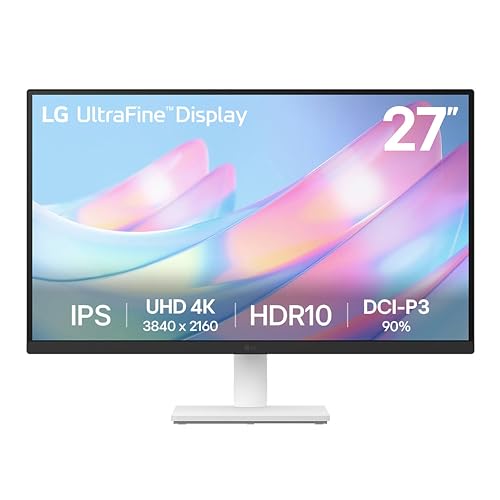
LG’s 27US500-W is the media-and-colour tuning of the 27-inch 4K idea: an UltraFine IPS panel at 3840×2160 and 60Hz, with HDR10, a 5ms figure, 300 nits of typical brightness, DCI-P3 90 percent colour, LG Switch, Flicker Safe and Reader Mode, over HDMI and DisplayPort on a tilt stand. The DCI-P3 figure is the differentiator — a cinema-leaning gamut wider than the sRGB claims of the Dell pair — and it suits the desk whose 4K screen spends its evenings on streamed film and its days on visual work for screens.
HDR10 support pairs with that gamut for video: content mastered with HDR metadata gets its wider brightness vocabulary, at a 300-nit level that suits a normally lit room rather than a dark cinema. LG Switch is the maker’s screen-splitting and device-switching utility, the software half of using one large panel as several workspaces. Reader Mode and Flicker Safe cover the long-document hours, shifting colour temperature toward paper and steadying the backlight’s behaviour — the pair of features LG fits across its work lines, stated here in the title.
The 60Hz rate is this pick’s honest ceiling, and the review will not dress it: scrolling and motion sit at the traditional standard the Dells have moved past, and no sync family is named in the title. What the LG offers instead is colour breadth, HDR10 and the UltraFine name’s fit and finish at the size. Buyers whose screen life is images and film first, motion second, are its audience — photo-adjacent workers, media desks, and anyone whose second screen this will be for content rather than for play. See the 27US500-W’s price on its Amazon listing if that ordering matches yours, and note the tilt-only stand in the same visit, since a riser or arm may join a tall reader’s order.
The white finish implied by the model’s W suffix family and the UltraFine line’s design language suit the bright, minimal desks that dominate current home offices, where a 27-inch screen is as much furniture as instrument. That is a soft virtue and this review weights it softly — the hard specification is the gamut and the HDR — but a screen is the largest object on the desk, and living with its appearance for five years is a legitimate line in the decision, provided it is ranked after the panel facts rather than before them.
LG Switch deserves a more practical description than software usually gets, because on a 4K panel it addresses the size’s one real awkwardness: abundance. Four million extra pixels are only useful if windows land in them tidily, and a splitting utility that snaps applications into a composed layout turns the panel from a large empty field into an organised desk. Owners coming from two smaller monitors will recognise the habit instantly — this is the bezel-free version of it, with the second screen’s worth of space folded into one frame and one stand. The feature costs nothing, appears in the title, and quietly raises the value of every other specification on the list.
- Size and resolution: 27-inch, 4K UHD 3840×2160
- Panel: IPS
- Refresh rate: 60Hz
- Response: 5ms
- HDR: HDR10
- Brightness: 300 nits (Typ.)
- Colour: DCI-P3 90 percent (Typ.)
- Software: LG Switch
- Eye care: Flicker Safe, Reader Mode
- Inputs: HDMI, DisplayPort
- Stand: tilt
Strengths
- DCI-P3 90 percent is the widest colour claim among this guide’s 4K picks.
- HDR10 and 4K density suit a desk whose evenings are streamed film.
- Reader Mode and Flicker Safe are stated for long reading sessions.
Trade-offs
- 60Hz sits at the traditional standard the Dell pair has moved beyond.
- No sync family and no USB-C are stated in the title.
- The tilt-only stand leaves height to a riser or an arm.
Best for: a media-and-image desk that values P3 colour and HDR10 over refresh rate.
Not suited for: a laptop desk built around one USB-C cable, or a gaming setup that needs variable refresh guaranteed in writing.

Acer CB272K — USB-C at a stated 90W, an Ergo Stand and a speaker
The CB272K is the pragmatist’s 4K: a 27-inch IPS panel at 3840×2160 and 60Hz with a 4ms figure, AMD FreeSync, sRGB 99 percent, HDMI, DisplayPort and USB-C carrying a stated 90W, an Ergo Stand, and a speaker named in the title. That 90W figure is the strongest charging claim in this guide — enough to feed most laptops at full speed while the same cable carries the picture — and it converts the monitor into the desk’s docking station in a way the Dell pair, whose titles leave wattage unstated, cannot promise on paper.
The speaker matters for the same reason: a docking monitor that also makes the sound completes the one-cable desk, laptop closed, desk clear, calls handled. Acer’s Ergo Stand branding promises the ergonomic travel its name implies; the title does not itemise the axes, so the listing visit should confirm height and pivot where those axes must be guaranteed in writing — but the intent is stated, which already separates it from the tilt-only models here. FreeSync covers the variable-refresh side for the light play a work desk sees, at a 60Hz ceiling that keeps this panel’s ambitions honest.
This is the pick for the reader whose requirements are written in cables rather than in colour: a laptop that must charge, a desk that must declutter, a screen that must handle a call without peripherals. Colour professionals will note the sRGB 99 percent figure is the standard working gamut, not the LG’s wider P3, and motion-sensitive readers will note the 60Hz. Everyone else gets the most complete docking specification in the guide. Go to the CB272K’s listing on Amazon and check the price against your laptop’s charger rating — if your machine ships with a 90W-class adapter, this panel can retire it from the desk entirely.
There is an institutional echo in this specification as well: Acer’s CB line is built for business deployment, where a monitor that docks, charges and speaks for a fleet of identical laptops saves an IT department a drawer of docks per desk. The home buyer inherits the same arithmetic at a scale of one. When a single purchase removes three objects from a desk — dock, charger, speaker — the panel’s price should be compared against the bundle it replaces, not against bare screens, and on that comparison this Acer is frequently the quiet winner of its class.
The 60Hz ceiling, judged fairly, matters least to exactly the buyer this panel targets. A docking desk’s day is documents, calls, dashboards and video, none of which is transformed by refresh beyond the standard rate, and all of which are transformed by a desk with one cable and no clutter. It is a useful corrective to the refresh-first thinking found across gaming-monitor guides: specifications serve schedules, and a schedule made of meetings is served by wattage and speakers in a way no hertz figure can match. Acer has read that schedule correctly and spent accordingly.
- Size and resolution: 27-inch, 4K 3840×2160
- Panel: IPS
- Refresh rate: 60Hz
- Response: 4ms
- Sync: AMD FreeSync
- Colour: sRGB 99 percent
- Inputs: HDMI, DisplayPort, USB-C 90W
- Stand: Ergo Stand, per listing title
- Speakers: speaker stated in the listing title
Strengths
- USB-C at a stated 90W is the guide’s strongest one-cable charging claim.
- A speaker is stated, completing the dock-and-call desk without peripherals.
- An Ergo Stand is named, where rivals at 60Hz settle for tilt.
Trade-offs
- 60Hz and a single FreeSync tier keep fast play outside its brief.
- The stand’s exact axes are not itemised in the title.
- sRGB 99 percent is the standard gamut, behind the LG’s P3 breadth for media.
Best for: a laptop desk that wants the monitor to be the dock — 90W charging, picture and sound over one cable.
Not suited for: a high-refresh gaming setup, or colour-first work that needs P3 coverage stated in the title.

Samsung S30GD — 100Hz IPS simplicity for the everyday desk
Samsung’s S30GD, in the Essential Monitor line, is the Full HD half of this guide’s argument: a 27-inch IPS panel at a 100Hz refresh rate, on a tilt-only stand, with an ergonomic design claim, Advanced Eye Care and Game Mode. No resolution figure is printed in the title beyond the line’s Full HD class identity — the S30GD is Samsung’s 1080p-class Essential model — and the review treats its density accordingly: at 27 inches, Full HD text is large and relaxed, which is either this panel’s flaw or its kindness depending on the eyes it serves.
The 100Hz rate is the specification to respect here. It lifts this work panel clear of the 60Hz standard by a margin anyone can feel in scrolling and video, and Game Mode gives its light play a dedicated picture setting. Advanced Eye Care is Samsung’s fatigue package, aimed at the longest sitter in the household. The tilt-only stand is stated without apology in the title — this is a set-it-once screen for a desk whose chair and surface already meet it at a sane height — and the ergonomic design phrasing refers to the panel’s broader shaping rather than to stand travel, a distinction the title lets you make if you read it carefully.
Who is it for? The household desk that wants a big, gentle, current screen without 4K’s demands on an older computer, the second screen in a two-monitor setup where the main panel carries the detail, and the buyer who trusts Samsung’s household name and support over a challenger’s specification sheet. Its title is the shortest in this guide, and the review has resisted inflating it; what is promised is size, rate, eye care and simplicity. Check the S30GD’s price on Amazon if that is the brief — and confirm the input list on the same visit, since the title leaves ports to the listing.
Second-screen duty deserves one more line, because it is where panels like this quietly excel for years. A 27-inch IPS with wide viewing angles makes an ideal companion screen — reference material, calls, chat and video sitting beside a sharper main display — and its undemanding signal means almost any machine in the house can drive it, including the ageing laptop that would struggle to feed a 4K panel. Bought as a main screen for a gentle workload or as a companion for a heavy one, the S30GD’s simplicity is the specification.
There is also a fairness point to make about its short title. In a guide that rewards titles for what they state, the S30GD states little — and yet the little is coherent: size, family, rate, eye care, a game mode, a stand described by its one honest axis. A short title from a major maker is not an evasion; it is a product with a narrow, deliberate brief, priced and supported accordingly. Buyers who value a household name’s warranty network and a screen that asks nothing of them will find that brief written for them, and the listing visit exists to fill the remaining lines — ports above all — before the order is placed.
- Size: 27-inch (S30GD)
- Panel: IPS
- Refresh rate: 100Hz
- Stand: tilt only, per listing title
- Features: Game Mode, Advanced Eye Care
- Design: ergonomic design, per listing title
- Resolution class: Full HD class (Essential line); pixel count not printed in the listing title
- Inputs: Not stated in the listing title — verify with the manufacturer documentation
Strengths
- 100Hz on a household IPS panel is a felt upgrade over the 60Hz standard.
- Advanced Eye Care addresses the family’s longest screen sessions.
- IPS angles suit a shared desk and second-screen duty.
Trade-offs
- Full HD class density at 27 inches renders text softer than the 4K picks.
- Tilt-only stand, stated plainly, with no height travel.
- Ports are not named in the title and need a listing check.
Best for: a household or second-screen desk wanting a big, gentle 100Hz IPS panel without 4K demands.
Not suited for: dense document work at close range, or a desk needing height adjustment from the stand.
Dell SE2726H — Full HD at 144Hz, the work desk’s gaming turn
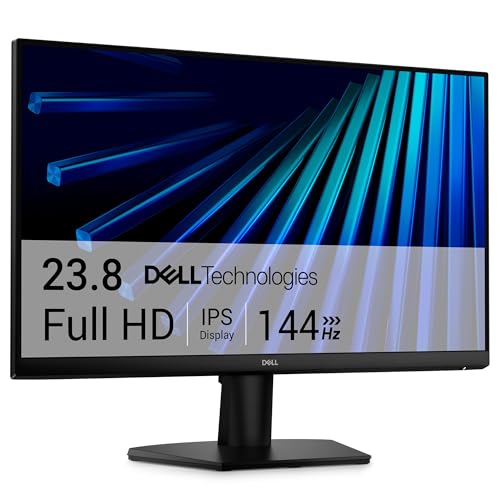
The SE2726H is this guide’s speed story told in Full HD: a 27-inch FHD 1920×1080 IPS panel at 144Hz with a 1ms figure, in-plane switching named in the title, AMD FreeSync, a TÜV 3-Star eye-comfort rating, two HDMI inputs and a tilt stand. One hundred and forty-four hertz on a Dell work-line monitor would have been a contradiction a few years ago; here it is the natural endpoint of the refresh creep this guide’s introduction described, arriving on the panel a work desk can justify and a modest graphics card can actually feed.
The two HDMI inputs suit the desk this panel imagines: a work laptop and a console, or a desktop and a streaming box, living on one screen without cable swaps. FreeSync smooths the play, the 1ms figure is the fastest response claim in this guide — read as the class’s best-case number, as always — and the TÜV 3-Star rating certifies the eye-comfort side for the working hours that dominate the panel’s life. IPS angles keep the picture honest for the colleague standing beside the chair.
The trade is the family one, stated once more without flinching: 1920×1080 across 27 inches is the softest text in this guide, and a document-first reader should take any 4K pick above instead. This Dell is for the desk whose evenings matter as much as its mornings — work all day at comfortable scale, play all evening at 144Hz, one screen, no second purchase and no apology to either half of the day. Its price on Amazon is worth checking against the 4K models precisely because the saving is the point: you are declining density you may not need and buying motion you will feel every day.
There is a generational point here about what a default monitor has become. A 27-inch IPS panel at 144Hz with certified eye comfort and two HDMI inputs, sold as a mainstream Dell, means the work screen and the play screen have merged for the broad middle of buyers — the specialisation now lives at the extremes, in 4K density above and esports ceilings elsewhere. The SE2726H is the merged product in its clearest form, and for the many desks that live in that middle, it may be the most representative pick in this entire guide.
The missing DisplayPort in the title deserves a practical footnote rather than a shrug. Most buyers in this panel’s audience connect by HDMI and will never notice the question; the minority with a DisplayPort-only dock or an older desktop should settle it on the listing before ordering, because a work desk’s cabling is the one part of a purchase that cannot be improvised on delivery day. Dell’s title discipline elsewhere in this guide is exemplary, which makes this single silence easy to forgive and important to check — the two reactions are compatible, and holding both is what reading titles carefully actually means.
- Size and resolution: 27-inch, FHD 1920×1080
- Panel: IPS (in-plane switching)
- Refresh rate: 144Hz
- Response: 1ms
- Sync: AMD FreeSync
- Eye comfort: TÜV 3-Star
- Inputs: 2x HDMI
- Stand: tilt
- DisplayPort: Not stated in the listing title — verify with the manufacturer documentation
Strengths
- 144Hz is the highest refresh rate in this guide, on a mainstream work panel.
- Two HDMI inputs cover the work machine and the console without swapping.
- A TÜV 3-Star eye-comfort rating is stated for the working day.
Trade-offs
- FHD at 27 inches gives the softest text here at reading distance.
- DisplayPort is not stated in the title, an unusual gap to verify.
- Tilt-only stand, with height left to the desk or a riser.
Best for: a work-and-play desk with a modest graphics card that wants 144Hz motion at a comfortable scale.
Not suited for: dense document or image work that needs 4K density, or a DisplayPort-only setup.
Side-by-Side Comparison
| Pick | Resolution | Refresh | USB-C | Colour as titled | Stand |
|---|---|---|---|---|---|
| Dell S2725QS | 4K UHD | 120Hz | Yes, wattage not stated | 99 percent sRGB | Height, swivel, pivot |
| Dell S2725QC | 4K UHD 3840×2160 | 120Hz | Yes, wattage not stated | 99 percent sRGB | Not stated in the listing title |
| LG 27US500-W | 4K UHD 3840×2160 | 60Hz | No | DCI-P3 90 percent | Tilt |
| Acer CB272K | 4K 3840×2160 | 60Hz | Yes, 90W | sRGB 99 percent | Ergo Stand |
| Samsung S30GD | Full HD class | 100Hz | Not stated in the listing title | Not stated in the listing title | Tilt only |
| Dell SE2726H | FHD 1920×1080 | 144Hz | No | Not stated in the listing title | Tilt |
How to Choose a 27-Inch IPS Monitor
Decide the resolution by the work, not by the wish. Text, code, spreadsheets and images at a normal desk distance reward 4K density every hour of every day, and the four 4K picks here divide that territory by refresh, colour and cabling. Large-type comfort, an older computer, a second screen’s duty or a gaming-leaning evening points at the Full HD pair. The wrong direction in either case — 4K bought for a machine that cannot feed it, FHD bought for eyes that read contracts — produces the two classic regrets of this category.
Then settle the cable question, because at this size the monitor is usually a dock. If a laptop is your computer, USB-C is the feature that reorganises the desk, and the wattage is the figure that decides whether it also retires your charger: Acer states 90W, the Dells state the port and not the wattage, and the LG and the Full HD pair do not offer the cable at all. Rank those facts against your laptop’s own charger before ranking anything else.
Refresh comes third, as a quality-of-daylight feature rather than a gaming badge. The step from 60Hz to 100Hz or 120Hz is felt in every scroll, and this guide’s spread — 60, 100, 120, 144 — lets you buy exactly the smoothness your day uses. Players should additionally confirm the sync family in the title of their pick, FreeSync appearing across most of this list.
Close with the stand. A 27-inch screen is big enough to punish a fixed height and small enough that a good stand solves it completely; the Dell S2725QS’s stated height, swivel and pivot travel is the benchmark the others are measured against in these reviews, and tilt-only models should be bought with a riser or arm already in the plan.
Viewing distance ties the whole decision together, and it is the variable buyers measure least. At a typical desk depth, 27 inches of 4K sits close enough for its density to be fully legible, which is the entire case for the resolution at this size; push the same panel across a deep meeting desk and the density is wasted while the Full HD models’ larger type comes into its own. Measure from your chair to the screen’s resting place before choosing, and let that single number arbitrate between the 4K four and the Full HD pair more honestly than any preference you state in the abstract.
Finally, buy for the second year, not the first week. A monitor’s novelty expires in a month; its stand, its ports and its eye comfort are still on duty in year three, and its panel will be driven by at least one computer you do not own yet. The picks in this guide whose titles cover the future — USB-C for the next laptop, refresh headroom for the next card, a stand that fits the next desk — are the ones whose owners write the satisfied long-term reviews. Let that horizon cast the deciding vote whenever two models tie on today’s list.
Is 4K Worth It at 27 Inches, or Is QHD the Better Buy?
At 27 inches, 4K earns its place for text-led work: the density — 163 PPI, as Dell prints on the S2725QC — renders type with a smoothness that QHD approaches but does not match, and modern operating systems scale their interfaces to use it gracefully. QHD’s counter-case is real but lives in a different guide: it asks less of graphics cards for gaming and costs less per panel. Within this guide’s six, the question is 4K against Full HD, and there the answer is plainer — 4K for readers and image workers, Full HD for large-type comfort and refresh value. Buy the density your eyes spend the day on; it is the specification you will notice most, in either direction.
There is a workload test that settles the question faster than any specification debate: open the document, spreadsheet or code file you spend the most hours in, at the size you actually read it, and imagine it first at 163 PPI and then at the Full HD pair’s density. If the imagined softness of the second version bothers you in the imagining, it will bother you hourly in reality, and the 4K four are your list. If it does not — if your day’s text is email, dashboards and calls — the Full HD pair’s comfort and refresh are worth more than pixels you would never interrogate. Preferences stated in the abstract are unreliable; workloads are not.
What Does USB-C Wattage Mean for a Laptop Desk?
It is the difference between a cable that shows you a picture and a cable that runs your desk. A USB-C connection without meaningful power delivery still needs the laptop’s own charger plugged in beside it — two cables, one desk, half the dream. At a stated 90W, the Acer in this guide can charge most laptops at full speed while displaying, so the charger leaves the desk. Between those poles sit unstated figures like the Dell pair’s: the port is promised, the wattage is not, and the honest move is to check the listing against your own laptop’s adapter rating before assuming the one-cable outcome. Thirty seconds of arithmetic at purchase saves a year of two-cable days.
Has 60Hz Become Too Slow for a Work Monitor?
For motion, the honest answer is that 60Hz is now the floor rather than the standard — adequate, and visibly the floor once you have lived with more. The 100Hz Samsung and the 120Hz Dells in this guide exist because the difference is felt in scrolling and window movement by people who never play a game. That said, a 60Hz panel with the right colour, cabling and price — the LG for media, the Acer for docking — remains a rational purchase when its other virtues lead your list. Refresh is a multiplier on a monitor’s other qualities, not a substitute for them; buy it after resolution, colour and cables are right, and let it break ties rather than make them.
Common Mistakes
Confusing the two Dell S2725 models
One letter separates the QS from the QC, and their titles emphasise different things — brightness, contrast and itemised stand travel on one; 163 PPI, USB-C ordering and eye comfort on the other. Buyers who order the sibling they did not research own a fine monitor and a small grievance. Read the full model code on the listing against the review of the exact model you meant, every time, in this guide above all.
Assuming USB-C always means charging
A USB-C port promises a connection, not a wattage. Two of this guide’s three USB-C titles state no power figure at all, and a laptop that needs more than the port delivers will hold its charge or lose it slowly while displaying happily. Match the monitor’s stated or listed wattage to your laptop’s adapter before the one-cable plan is built on it — the Acer’s stated 90W is the standard of clarity to demand.
Buying Full HD for a text profession
The Full HD pair in this guide are good monitors aimed at comfort and refresh, and they will punish a reader of contracts, code or spreadsheets with soft-edged type at 27 inches all day long. Professions that are made of glyphs should buy density first — any of the 4K four — and let refresh and colour argue for second place.
Ignoring the stand on a screen this size
Tilt-only appears three times in this guide’s titles, and each time it is a real constraint: a 27-inch panel at the wrong height taxes the neck hourly. Price the riser or the arm into a tilt-only purchase from the start, or take the Dell S2725QS, whose full travel is printed in its title, and let the problem be solved by the box.
Final Recommendation
Buy the desk you actually sit at. The complete answer is the Dell S2725QS — 4K, 120Hz, full stand, USB-C — with its sibling the S2725QC for readers who lead with density and the same cable. The Acer CB272K owns the docking brief outright at a stated 90W with a speaker included, and the LG 27US500-W owns the colour-and-film brief with its P3 gamut and HDR10. The Full HD pair divide the comfort vote: the Samsung S30GD for the gentle household screen at 100Hz, the Dell SE2726H for the work desk that plays at 144Hz. Twenty-seven inches of IPS is the monitor market’s centre of gravity for a reason — every one of these six is a defensible centre for a desk — so choose by cables, density and stand, in that order, and the centre will hold. When the screen arrives, give it the first-evening hour it deserves: set the rate, position the stand, arrange your windows at the new density, and only then judge it. A panel configured to its owner’s desk reads as a different, better product from the same panel left at defaults, and in this class the configuration is entirely yours to claim.
Frequently Asked Questions
Is 27 inches the right size for a single-monitor desk?
For most desks, it is the size the market has converged on for good reasons: two honest windows side by side, a film at a comfortable scale, and a physical footprint that leaves room for a laptop, speakers and papers. Smaller desks and closer seating can prefer 24 inches; desks built around one immersive screen go ultrawide. Within those edges, 27 inches is the default because it fits the most lives.
Can these monitors run from a laptop with one cable?
Three of them are built for it: both Dell S2725 models and the Acer CB272K carry USB-C video. Only the Acer states its wattage — 90W — so Dell buyers should confirm the charging figure on the listing against their laptop’s adapter. The LG and the two Full HD models take HDMI or DisplayPort instead, which means the laptop’s charger stays on the desk beside the video cable.
Do I need FreeSync if I do not play games?
No, but you lose nothing by having it: the same variable-refresh behaviour that smooths games also smooths variable-rate video and keeps the door open if play ever visits the desk. Most titles in this guide include FreeSync or FreeSync Premium as part of the panel’s standard equipment rather than as a gaming tax, so it should reassure rather than drive the decision.
Which pick is best for photo editing?
For screen-and-web work, the Dell pair’s stated 99 percent sRGB at 4K density is the working answer; for media that targets the wider cinema gamut, the LG’s DCI-P3 90 percent is the relevant figure. None of the six claims the calibration and uniformity credentials of a dedicated proofing display, so professionals grading for clients should treat these as excellent generalist screens rather than reference instruments.
How long will a 27-inch 4K IPS panel stay current?
Years, because its specification sits where interfaces are heading: dense text, USB-C connection, and — on the Dells — refresh headroom above the old standard. The component most likely to date is not the panel but the port set, which is why the USB-C models here carry an advantage that compounds quietly with every laptop replacement.
Should I buy a monitor arm with any of these?
An arm earns its place with the tilt-only picks — the LG, the Samsung and the Dell SE2726H — where it supplies the height their stands withhold, and with any model if your desk is shallow or shared between sitting and standing. For the Dell S2725QS, whose stand already travels through height, swivel and pivot, an arm is a preference rather than a correction. Confirm the panel’s VESA pattern on its listing before ordering an arm for a specific model, since the titles here do not print mount patterns.
Related Guides
Players who want this size tuned for NVIDIA’s ecosystem should continue to our roundup of the best G-Sync monitors at 1440p, where the sync tiers are separated model by model. And readers whose desks have outgrown 27 inches should step up to our guide to the best 30-inch monitors, which opens with the honest state of that size class. At 27 inches, IPS remains the balanced default for most desks: wide viewing angles, honest colour and enough sharpness for text, photo work and everyday play alike.
Related guides
- Best 17 Laptops: The Complete Tier-by-Tier Guide to Big-Screen Machines
- Best 4K Monitors for MacBook Pro: USB-C Panels With Real Power Delivery
- Best Routers for Remote Work: VPN Gateways, Travel Routers and Home Wi-Fi That Holds a Call
- Best Sim Racing Monitors: Ultrawide Cockpits From 34-Inch OLED Speed to the 49-Inch Wrap


