What's inside
- Where to Buy
- Key Takeaways
- Quick Picks
- How These Picks Were Chosen
- Comparison
- How to Choose a 24-Inch USB-C Monitor
- How Much Hub Do You Actually Need Behind a 24-Inch Screen?
- Is QHD Worth It at 24 Inches, or Is FHD Enough?
- What Should You Check the Day a Docking Monitor Arrives?
- Common Mistakes When Buying a 24-Inch USB-C Monitor
- Final Recommendation
- Frequently Asked Questions
- Related Guides
As an Amazon Associate I earn from qualifying purchases. This post may contain affiliate links at no extra cost to you.
[SITE_DOMAIN] is reader-supported. When you buy through links on our site, we may earn an affiliate commission.
Where to Buy
Six 24-inch panels follow, each with its own Amazon listing. The Dell U2424H UltraSharp 24-inch leads on specification density, and its page is the right place to confirm the current figure attached to that long port list. Readers drawn to the Dell P2425HE USB-C Hub Monitor should read its listing with unusual care, because its short title leaves the hub’s details for the product page to tell. The Samsung ViewFinity S6 24-inch is the resolution rebel of the set, and its Amazon page will show what QHD at this size currently costs. The ASUS BE249CGN prints a wattage and a network port in its title, so its listing mainly needs to confirm the number that comes with them. The HP Series 5 Pro USB-C Conferencing Monitor sells a camera as much as a screen, and its page carries the conferencing details in full. The ViewSonic VA2448-MHU closes the set as the home-office all-rounder, with its listing holding the figure that decides its value case.
The search for the best usb c port monitors 24 inches is a search for the desk’s natural size. Twenty-four inches is where a single screen stops being a compromise and becomes a decision: big enough for two documents in honest conversation, small enough for the shallow desks, dorm rooms and second workstations where bigger panels loom. Add USB-C and the 24-inch monitor becomes a docking station with a screen attached — one cable from the laptop carrying the picture down and power back up, with the monitor’s own ports absorbing the peripherals that used to fight over the laptop’s sockets. Every pick in this guide is built around that double identity, and the reviews judge the docking half as severely as the display half.
Hub strength is the axis along which these six diverge most, and it is also the axis their titles describe most unevenly. One Dell prints a port census — two USB-C, two DisplayPort, HDMI, three USB — while its sibling Dell prints almost nothing beyond the words hub monitor, leaving its entire personality to the listing page. The ASUS prints a wattage and an RJ45 network port. The Samsung prints a built-in LAN port and daisy chain support. The HP prints a webcam and speakers because its hub serves meetings. A buyer who reads only resolutions will miss the entire argument of this category, so the reviews below read ports first and pixels second.
Resolution, for the record, splits five-to-one. Five titles state FHD or 1080p; the Samsung ViewFinity S6 states QHD, a genuinely sharper grid at this size, and the guide treats that difference as the Samsung’s headline rather than as a footnote. Refresh rates, where printed, run higher than the office stereotype — 120Hz appears twice, 100Hz once — because the modern 24-inch class has quietly absorbed the smoothness lessons of its gaming cousins while keeping its office manners.
Key Takeaways
- Five picks state FHD or 1080p; the Samsung ViewFinity S6 alone states QHD, making it the sharpness pick at 24 inches.
- Hub descriptions range from the Dell U2424H’s full port census to the Dell P2425HE’s two-word promise, so listing-page verification matters more in this guide than in most.
- Only the ASUS BE249CGN prints a USB-C wattage, at 96W; every other title leaves power delivery unstated and the spec boxes say so.
- Network ports appear twice: RJ45 on the ASUS and a built-in LAN port on the Samsung, both aimed at the one-cable docked desk.
- The HP Series 5 Pro is the conferencing specialist, the only title with a webcam — a 5MP pop-up design — and the only one built around meetings.
Quick Picks
| Pick | Badge | Why it earns a place |
|---|---|---|
| Dell U2424H UltraSharp | Port-census flagship | 120Hz IPS, 98% DCI-P3, 2x USB-C, 2x DisplayPort, HDMI, 3x USB and a three-year warranty in the title. |
| Dell P2425HE Hub Monitor | Quiet hub promise | FHD 1080p USB-C hub monitor whose details live on its listing page. |
| Samsung ViewFinity S6 24 | QHD sharpness pick | QHD resolution, 100Hz, HDR10, built-in LAN and daisy chain support in the title. |
| ASUS BE249CGN | Wattage-and-network pick | 1080P at 120Hz with USB-C 96W, RJ45, daisy-chain DisplayPort and EPEAT Gold in the title. |
| HP Series 5 Pro Conferencing | Meeting-room monitor | 5MP pop-up webcam and 4x3W speakers headline a USB-C conferencing panel. |
| ViewSonic VA2448-MHU | Home-office all-rounder | 120Hz IPS with USB-C, 300 nits, 1ms figure and dual speakers in the title. |
How These Picks Were Chosen
The entry rule joined the keyword’s two halves through the titles: a 24-inch-class panel and a USB-C connection with a docking or hub role. That second clause did quiet but essential work. Plenty of 24-inch monitors carry a USB-C port that amounts to a display input with good manners; this guide wanted the monitors for which USB-C is the desk’s organising principle, the port through which the laptop’s whole working life — picture, power, peripherals, in two cases the network itself — is meant to flow.
Port evidence was then graded rather than merely counted. A title that enumerates its ports gives a buyer something to hold the seller to, and the reviews reward that enumeration by repeating it exactly. A title that summarises — hub monitor, two words doing heavy lifting — is reported as a summary, with its spec box honestly full of gaps for the listing page to fill. Grading evidence this way is not pedantry; in a category where the hub is half the product, the difference between a printed census and a printed shrug is the difference between buying a specification and buying a hope.
Panel claims formed the third pass, and they surprised. Two titles print 120Hz, one prints 100Hz, one prints a DCI-P3 percentage that belongs to a colour tier above the office class, and one prints QHD in a field of FHD. The modern 24-inch monitor has clearly stopped being the dull default of the office catalogue, and the selection kept that variety intact rather than flattening the set into six identical FHD panels with different logos.
Finally, the set was balanced by job. A conferencing specialist with a camera, a networked dock with a LAN port, a QHD sharpness candidate, a colour-leaning flagship, a value all-rounder and one quiet hub promise cover the realistic reasons a buyer types this keyword. A reader who finishes the reviews should know not only which monitor to buy but which job they were actually hiring for, since most disappointment in this category comes from hiring a fine monitor for the wrong job.

Dell U2424H UltraSharp 24-inch — Port-census flagship
The U2424H’s title reads like a customs declaration, and in this category that is the highest compliment available. It describes a Dell UltraSharp 24-inch FHD 1920×1080 monitor at 120Hz on an IPS panel, with a 5ms figure, 98% DCI-P3 colour, two USB-C ports, two DisplayPort connections, HDMI, three USB ports and a three-year warranty, in silver. Count the connections again: seven video-and-data pathways plus the USB trio, on a 24-inch office panel. This is a monitor designed to be the desk’s harbour, into which every device sails and from which the laptop’s single cable draws everything it needs.
The panel claims refuse to let the hub steal the whole story. A 120Hz refresh rate at this size and class remains a genuine pleasure for the scrolling, dragging and timeline-scrubbing that office days are made of, and 98% DCI-P3 lifts the colour conversation out of the sRGB office tier toward the creative space, without the calibration credentials a professional would still go elsewhere to find. The 5ms figure and IPS viewing generosity suit a screen that will be glanced at from the side of the desk as often as it is faced squarely. UltraSharp is Dell’s serious line, and this title argues the case without adjectives.
Two silences temper the census. No wattage is printed for the USB-C connection, so the charging half of the docking promise must be confirmed on the listing page by buyers whose laptops drink deeply — an odd omission in an otherwise exhaustive title, and one the spec box records rather than repairs. No speaker is named either, so the desk’s audio plan needs a separate answer. Neither gap dents the central fact: as a printed specification, this is the most complete document in the guide, and buyers who purchase by document will start here and measure everything else against it.
Who it suits is the maximalist home officer: the worker whose desk hosts a laptop, a desktop, perhaps a console, plus drives and receivers enough to fill three USB ports without trying. The dual DisplayPort and dual USB-C arrangement serves multi-machine desks that lesser hubs make miserable, and the warranty term suits a purchase meant to anchor a desk for years. Buyers with one laptop and no peripherals should recognise that they would be paying for harbour capacity they will never fill, and that the quieter picks below exist for them.
- Size and resolution: 24 inches, FHD 1920×1080
- Panel type: IPS
- Refresh rate: 120Hz
- Response figure: 5ms stated
- Colour: 98% DCI-P3
- Ports: 2x USB-C, 2x DisplayPort, HDMI, 3x USB
- Warranty: 3 years stated in the title
- Finish: silver
- USB-C power delivery: Not stated in the listing title — verify with the manufacturer documentation
- Speakers: Not stated in the listing title — verify with the manufacturer documentation
Strengths
- The fullest port census in this guide, printed in the title.
- 120Hz and 98% DCI-P3 lift panel and colour above office tier.
- A three-year warranty is stated outright.
Trade-offs
- USB-C wattage goes unprinted despite the exhaustive title.
- No speaker is named for calls or media.
- Single-laptop desks will not use the harbour’s capacity.
Best for: a multi-machine desk that needs a 24-inch harbour with dual USB-C, dual DisplayPort and three USB ports, all confirmed in the title. Not suited for: ordering that must have the docking wattage guaranteed before it goes ahead, because this exhaustive title still never prints the power figure.
The U2424H rewards a cabling day done properly at the start. Connect every machine the desk owns, label the inputs in the menu if the panel allows it, and decide which USB-C port owns the laptop permanently, because a harbour with a routine is a dock and a harbour without one is a daily puzzle. Test the colour claim with the photographs or design files your work actually contains, at the brightness your room demands, and set the refresh mode deliberately on each host rather than trusting handshakes. Owners who invest that first hour tend to forget the monitor exists, which for a harbour is the entire ambition. The U2424H’s Amazon page carries its current figure and the wattage answer its title withholds.

Dell P2425HE USB-C Hub Monitor — Quiet hub promise
Every guide benefits from one pick that tests its honesty discipline, and the P2425HE is that pick. Its entire title reads: Dell 24 USBC Hub Monitor P2425HE, FHD 1080p. That is the whole document. From it, a review may honestly claim a 24-inch-class Dell monitor, a USB-C hub function, an FHD 1080p resolution and a model code — and nothing else. No refresh rate, no port census, no wattage, no stand description, no colour figure, no warranty. The spec box below is therefore the emptiest in this guide, and its emptiness is the most truthful thing this review can offer.
Context still allows a fair framing, carefully labelled as framing rather than fact. Dell’s P-series is the company’s mainstream office line, and a hub monitor in that line exists to give fleets and home officers the one-cable life at fleet pricing: the laptop docks, the peripherals gather, the desk clears. The P2425HE’s sibling in this guide, the UltraSharp, shows what Dell prints when it wants applause; this title shows what Dell prints when the buyer is expected to know the genre. Corporate purchasers order monitors like this by the pallet on framework agreements, and the title’s brevity speaks their language — a model code, a size, a function, a resolution.
For the individual buyer, the brevity changes the shopping method rather than the verdict. Everything that matters about this monitor — how many ports the hub actually offers, what wattage it delivers, how its stand moves, whether it can daisy-chain — lives on the listing page and in the model code’s documentation, and a responsible purchase reads those before money moves. That homework is a cost, and buyers who dislike homework should weigh it honestly against the UltraSharp’s printed completeness or the ASUS’s printed wattage below. Buyers who enjoy a specification hunt may find this Dell the value hiding in plain sight, since quiet titles rarely attract a crowd.
Who it suits is therefore specific: the informed buyer, the fleet purchaser, the Dell-standardised office adding one more identical desk. Who it does not suit is the comparison shopper who wants the title to do the work, because this title declines the job almost entirely. The guide includes it because the keyword’s real-world results include it, because its hub promise is genuine as far as it goes, and because a review that admits the limits of its evidence serves readers better than one that pads a short title into a long fantasy.
- Size class: 24 inches
- Resolution: FHD 1080p
- Function: USB-C hub monitor
- Model code: P2425HE
- Refresh rate: Not stated in the listing title — verify with the manufacturer documentation
- Port list: Not stated in the listing title — verify with the manufacturer documentation
- USB-C power delivery: Not stated in the listing title — verify with the manufacturer documentation
- Stand movements: Not stated in the listing title — verify with the manufacturer documentation
- Colour gamut: Not stated in the listing title — verify with the manufacturer documentation
- Speakers: Not stated in the listing title — verify with the manufacturer documentation
Strengths
- A Dell hub monitor at FHD from the mainstream office line.
- The model code P2425HE makes documentation easy to find.
- USB-C hub function is stated plainly in the title.
Trade-offs
- The title itemises almost nothing a buyer needs.
- Every figure that matters requires listing-page verification.
- Comparison shoppers get no help from the title itself.
Best for: a Dell-standardised office or an informed buyer happy to confirm hub ports and wattage from the model documentation before ordering. Not suited for: a purchase that must be justified from the title alone, because this title confirms only size class, resolution and the hub function itself.
The correct way to buy this monitor is to shop backwards: start from the model code, read the documentation the code unlocks, and let the listing page’s port diagram cast the vote the title abstains from. Confirm the wattage against your laptop’s charger, count the hub’s ports against your peripheral pile, and check the stand’s movements against your chair. Buyers who do that homework may end up with exactly the right desk anchor at a fleet-grade positioning. Buyers who skip it are gambling, and the P2425HE’s Amazon listing is where the homework starts and the current figure waits.
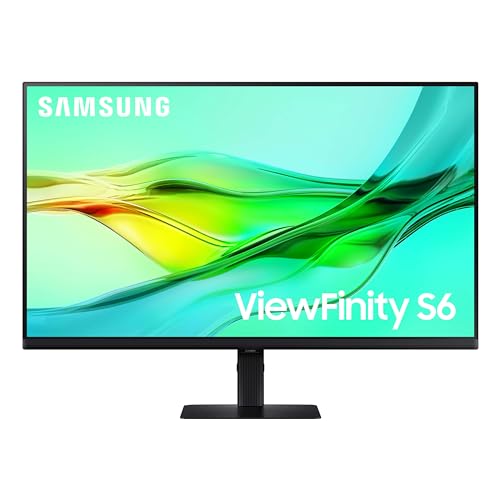
Samsung ViewFinity S6 24-inch — QHD sharpness pick
Samsung’s ViewFinity S6 breaks the guide’s resolution pattern and builds its whole case on the break. Its title describes a 24-inch ViewFinity S6 S60UD series QHD high resolution computer monitor at 100Hz with HDR10, USB-C, a built-in LAN port, daisy chain support, easy setup wording and a height adjustable stand, model LS24D606UANXZA, dated 2024. QHD at 24 inches is a density argument: the same desk footprint as every other pick here, with noticeably finer text and more workspace than the FHD crowd, for the reader whose eyes live at document distance all day.
The docking clauses keep pace with the panel. A built-in LAN port means the network itself joins the monitor, so the laptop’s single cable inherits a wired connection — a feature whose value is invisible until the first video call that Wi-Fi chooses to ruin. Daisy chain support lets a second monitor hang from this one, which is how a 24-inch desk grows into a dual-screen workstation without a separate dock. The 100Hz refresh rate sits between the office standard and the 120Hz pair, close enough to the leaders that scrolling smoothness stops being a reason to choose against it.
HDR10 and the height adjustable stand round out a title that behaves like a checklist for the serious home office. What the title does not print follows the guide’s familiar pattern: no wattage for the USB-C connection, no colour percentage, no speaker. The wattage gap matters for the usual reason and should be settled on the listing page by any buyer docking a larger laptop. The colour silence matters less here because the QHD claim, not a gamut claim, is the panel’s argument, and buyers choose this Samsung for sharpness the way they choose the ProArt in the 4K guide for accuracy.
Who it suits is the text worker with ambitions: the writer, coder or analyst who wants the finest grid a 24-inch desk can offer, the dual-screen planner who values the daisy chain, the remote worker whose calls deserve a wired network. FHD loyalists on tight budgets will find the ViewSonic below friendlier, and colour-first buyers have the Dell flagship above. But for the specific and common complaint that 1080p at 24 inches looks coarse by 2026 standards, this Samsung is the guide’s direct answer.
- Size and resolution: 24 inches, QHD
- Refresh rate: 100Hz
- HDR: HDR10 stated
- Series: ViewFinity S6 (S60UD)
- Network: built-in LAN port
- Multi-monitor: daisy chain support stated
- Stand: height adjustable
- Model code: LS24D606UANXZA
- USB-C power delivery: Not stated in the listing title — verify with the manufacturer documentation
- Colour gamut: Not stated in the listing title — verify with the manufacturer documentation
- Speakers: Not stated in the listing title — verify with the manufacturer documentation
Strengths
- QHD resolution is unique in this 24-inch set.
- A built-in LAN port wires the network through the monitor.
- Daisy chain support lets a second screen follow from this one.
Trade-offs
- USB-C wattage is not printed in the title.
- No colour percentage accompanies the resolution claim.
- QHD scaling needs a deliberate setting on some laptops.
Best for: a text-heavy worker who finds FHD coarse at 24 inches and wants a wired network and a daisy chain riding on the same single cable. Not suited for: a buyer docking a large laptop who needs the charging wattage in writing first, because the Samsung’s title spends its words on resolution and networking instead.
The ViewFinity’s first decision is scaling, and it should be made slowly. QHD at this size tempts owners to run everything tiny in the name of workspace, then bills their eyes by Thursday; spend the first days at the scaling your operating system suggests, then shrink one step at a time only if reading stays effortless at your real distance. Wire the LAN port from day one even if the Wi-Fi seems fine, because the first call it saves will be the important one. Sharpness bought deliberately stays a pleasure; sharpness bought by default and mis-scaled becomes the guide’s most avoidable disappointment. Samsung’s listing for the S6 holds the current figure and the wattage detail.

ASUS BE249CGN 24-inch — Wattage-and-network pick
The BE249CGN holds a distinction that sounds small and behaves large: it is the only title in this guide that prints its USB-C wattage. The full description runs to a 24-inch 1080P 120Hz computer monitor with USB-C at 96W, HDMI and RJ45, on an IPS FHD panel, frameless, with speakers, a height adjustable stand, DisplayPort daisy-chaining, VESA wall mounting and an EPEAT Gold credential. Ninety-six watts is the strongest delivery figure in the entire portable-and-desktop USB-C conversation, and at 24 inches it turns the docking promise from a hope into a number a buyer can compare against a laptop charger.
RJ45 is the second network port in this set, matching the Samsung’s LAN clause with a plainer name, and its presence redraws the desk: the monitor becomes the network’s fixed point, the laptop becomes a guest that docks into wired stability, and the Wi-Fi password stops being a productivity dependency. DisplayPort daisy-chaining extends the same logic to a second screen. Taken together — wattage, network, chain — the ASUS reads less like a monitor with ports and more like a dock that happens to display a picture, which for the hot-desking office is exactly the right way around.
The panel clauses hold up their end: 120Hz matches the Dell flagship’s motion, the frameless design suits the multi-screen desks its daisy chain invites, speakers are built in for the calls its network will carry, and the stand adjusts in height with VESA mounting behind it for arm-based desks. EPEAT Gold is the title’s quiet credential, an environmental rating that fleet buyers and sustainability-reporting employers genuinely filter by, and its presence signals the institutional audience ASUS built this model for.
Who it suits is the hot-desk professional and the small office standardising its desks: one monitor model that charges almost any laptop at full pace, wires it to the network, chains it to a second screen and answers its calls. Colour-first buyers will note the absence of a gamut percentage and look to the Dell; sharpness-first buyers will note the FHD grid and look to the Samsung. For the buyer whose brief begins with the words single cable and means them completely, this ASUS is the most literal fulfilment in the guide.
- Size and resolution: 24 inches, 1080P FHD
- Panel type: IPS, frameless
- Refresh rate: 120Hz
- USB-C power delivery: 96W stated
- Network: RJ45 port
- Inputs: USB-C, HDMI, DisplayPort
- Multi-monitor: DisplayPort daisy-chain
- Audio: speakers named in the title
- Stand: height adjustable; VESA wall mount
- Credential: EPEAT Gold
- Colour gamut: Not stated in the listing title — verify with the manufacturer documentation
Strengths
- 96W is the strongest printed wattage in this guide.
- RJ45 networking and DisplayPort daisy-chaining complete the dock.
- 120Hz, speakers and a height adjustable stand are all named.
Trade-offs
- FHD resolution trails the Samsung’s QHD grid.
- No colour gamut percentage is printed.
- Institutional styling will not win design awards.
Best for: a hot-desking office that wants one 24-inch monitor to charge nearly any laptop at full pace, wire it to the network and chain it onward to a second screen. Not suited for: a sharpness-first reader who has already decided FHD looks coarse at this size, because no wattage figure can sharpen a grid the buyer has rejected.
Deploying the ASUS well is an exercise in finishing the dock: run the network cable to it permanently, set the laptop to trust the wired connection when docked, and let the daisy chain carry the second screen rather than giving the laptop a second video cable out of habit. Test the 96W promise against the hungriest laptop the desk will host, during its heaviest hour, and file the result where the next buyer of the same desk can find it. Institutional monitors earn their keep by being identical and predictable across a dozen desks, and this one’s Amazon page is where a standardising buyer confirms the figure that makes the fleet decision.

HP Series 5 Pro USB-C Conferencing Monitor — Meeting-room monitor
HP’s Series 5 Pro is the only pick in this guide that expects to be looked at as much as looked through. Its title describes a 24-inch FHD USB-C conferencing monitor with a 5MP pop-up webcam, 4x3W speakers, VESA mounting at 100mm, DisplayPort and HDMI, and a Dockztorm USB port expander in the bundle, in black and silver. The webcam is the headline and its pop-up design is the detail that matters: a camera that rises when a meeting starts and sinks away when it ends gives the user a physical privacy gesture, worth more in a home office that doubles as a bedroom than any software indicator light.
Five megapixels is a serious camera figure by monitor standards, where built-in webcams have historically been an apology with a lens. Paired with speakers specified as four units of 3W — the only audio configuration itemised anywhere in this guide — the HP is plainly engineered for the person whose working day is a sequence of calls, and whose face and voice are, professionally speaking, content. A monitor that carries the meeting removes the laptop’s camera from its undignified low angle and removes one more peripheral from the desk’s cable census.
The USB-C conferencing identity ties the package together: one cable docks the laptop, and the monitor supplies the camera, the speakers and the screen for every call that follows. The bundled port expander named in the title extends the hub side, though its exact contribution belongs to the listing page’s description rather than to this review’s invention. VESA mounting at a stated 100mm pattern suits the arm-mounted desks that meeting-heavy workers favour, freeing the surface for the notebook and the coffee that meetings actually require.
Who it suits is the remote professional whose calendar is wall-to-wall video: the manager, the consultant, the teacher of online classes, anyone whose camera is on more hours than it is off. Buyers who rarely meet on video would be paying for a pop-up camera to stay permanently sunk, and the other five picks spend that money on ports, pixels or refresh instead. Judged by its own brief, though, the HP is the most completely imagined object in this guide — a monitor that knows exactly which worker it was built for and says so in its name.
- Size and resolution: 24 inches, FHD
- Camera: 5MP pop-up webcam
- Audio: 4x3W speakers stated
- Inputs: USB-C, DisplayPort, HDMI
- Mounting: VESA mount 100mm
- Bundle: Dockztorm USB port expander named
- Finish: black and silver
- Refresh rate: Not stated in the listing title — verify with the manufacturer documentation
- USB-C power delivery: Not stated in the listing title — verify with the manufacturer documentation
- Panel type: Not stated in the listing title — verify with the manufacturer documentation
Strengths
- The 5MP pop-up webcam is unique in this guide.
- Speakers are itemised as 4x3W, the only audio detail here.
- Pop-up design gives privacy a physical gesture.
Trade-offs
- Refresh rate, wattage and panel type go unstated.
- Non-meeting buyers pay for a camera that stays hidden.
- The expander’s exact role needs the listing page.
Best for: a remote professional whose day is consecutive video calls and who wants camera, speakers and screen unified behind one USB-C cable. Not suited for: a camera-shy workflow of documents and email, because the pop-up webcam that defines this monitor would spend its life sunk and its premium wasted.
The HP’s commissioning ritual is a rehearsal call with a friend rather than a first meeting with a client. Raise the camera, check the framing at your real sitting position, and adjust the monitor’s height until the lens meets your eyes instead of your forehead; then test the speakers at the volume a lively meeting reaches, and the microphone path your software chooses by default, since conferencing gear loves to route audio through the device you least expect. Learn the pop-up’s motion until it is one-handed and thoughtless. Meeting tools should be invisible by the third call, and the Series 5 Pro’s listing on Amazon is where its current figure waits for the worker whose calendar makes the case.

ViewSonic VA2448-MHU — Home-office all-rounder
ViewSonic’s VA2448-MHU closes the guide as the home-office generalist, and its title is a model of the genre: a 24-inch 1080p IPS computer monitor at 120Hz with USB-C, variable refresh rate, HDMI, VGA, USB-C again in the listing’s own enthusiasm, dual speakers, eye care, a frameless design, for home office, laptop, PC and Mac, with a 1ms figure and 300 nits of brightness. Two clauses deserve immediate respect. The brightness figure — 300 nits — is printed, the only one in this guide, and VGA survives in the port list, a legacy courtesy that owners of older desktops and projectors will recognise as the difference between a working screen and an adapter hunt.
The 120Hz rate with variable refresh wording puts this ViewSonic in the guide’s smoothness tier alongside the Dell and the ASUS, at a home-office positioning those two do not claim. A 1ms figure accompanies it, stated as plainly as the title states everything else. For the household whose monitor works documents by day and carries games or fast video by evening — the exact biography of most home-office screens — that motion story matters more than a gamut percentage, and the dual speakers keep the evening half self-contained without a soundbar negotiation.
Eye care and frameless design complete the domestic portrait: a screen tuned for long sessions, in a casing that disappears at the edges when two are placed side by side. The title’s gaps are the by-now familiar pair — no USB-C wattage, so docking strength needs the listing page, and no stand movements itemised, so height-critical buyers should confirm what the stand actually does. Neither gap is unusual; what is unusual is how much else the title manages to state, including the audience and the brightness, in a single breath.
Who it suits is the household buyer outfitting a real home office on a sane plan: one screen for the laptop’s docked days, the family desktop’s evenings and everything between, with legacy VGA forgiveness for the machine in the corner that refuses to retire. Fleet buyers will prefer the ASUS’s printed wattage and network; conferencing professionals have the HP; sharpness hunters have the Samsung. The ViewSonic’s claim is breadth at home, and breadth is what most home offices actually run out of first.
- Size and resolution: 24 inches, 1080p
- Panel type: IPS, frameless
- Refresh rate: 120Hz, variable refresh rate stated
- Response figure: 1ms stated
- Brightness: 300 nits stated
- Inputs: USB-C, HDMI, VGA
- Audio: dual speakers
- Eye comfort: eye care stated
- Stated hosts: home office, laptop, PC, Mac
- USB-C power delivery: Not stated in the listing title — verify with the manufacturer documentation
- Stand movements: Not stated in the listing title — verify with the manufacturer documentation
Strengths
- 300 nits is the only printed brightness figure in this guide.
- 120Hz with a 1ms figure serves work and evening play.
- VGA keeps older machines in the household fleet.
Trade-offs
- USB-C wattage is not printed for docking decisions.
- Stand movements are not itemised in the title.
- FHD resolution is the class standard, not the Samsung’s QHD.
Best for: a home office that must serve a modern laptop, a family desktop and an older VGA machine from one 24-inch screen with speakers built in. Not suited for: a one-cable purist docking a hungry laptop, because the wattage behind this panel’s USB-C port is a listing-page question rather than a title promise.
The ViewSonic’s setup should honour its breadth: connect the household’s machines one at a time, name each input for the machine it serves, and run the oldest VGA device early in the first week while the return window can still arbitrate any disappointment. Set the brightness for the room’s worst hour rather than its best, since 300 stated nits give you a known ceiling to plan around, and decide the eye-care settings during a genuinely long session instead of a five-minute demo. Generalists win loyalty by never being the reason a day went wrong. The VA2448-MHU’s Amazon page holds the current figure for the guide’s broadest household brief.
Comparison
| Pick | Resolution | Refresh | Hub / network note | Notable from title |
|---|---|---|---|---|
| Dell U2424H | FHD 1920×1080 | 120Hz | 2x USB-C, 2x DP, HDMI, 3x USB | 98% DCI-P3, 3-year warranty |
| Dell P2425HE | FHD 1080p | Not stated in the listing title | USB-C hub monitor | Model code only; details on listing page |
| Samsung ViewFinity S6 | QHD | 100Hz | Built-in LAN, daisy chain | HDR10, height adjustable stand |
| ASUS BE249CGN | 1080P FHD | 120Hz | RJ45, DP daisy-chain | USB-C 96W, EPEAT Gold, speakers |
| HP Series 5 Pro | FHD | Not stated in the listing title | USB-C conferencing, expander bundle | 5MP pop-up webcam, 4x3W speakers |
| ViewSonic VA2448-MHU | 1080p | 120Hz | USB-C, HDMI, VGA | 300 nits, 1ms, dual speakers |
Two columns do the sorting in this table. The hub column separates monitors that merely accept a laptop from monitors that organise a desk — a network port, a daisy chain, a port census, a webcam — and it is the column the keyword’s USB-C half is really asking about. The refresh column separates the modern smoothness tier, three panels at 100Hz or above, from the titles that decline to discuss motion at all, which at this size and in this year is itself a positioning statement.
Resolution, the column shoppers open first, mostly refuses to differentiate: five FHD panels and one QHD. That refusal redirects the decision to where it belongs — the job. A conferencing day, a networked hot desk, a four-machine harbour and a household’s mixed fleet are four different purchases wearing the same diagonal, and the table’s honest use is to match the row to the job before comparing anything else.
How to Choose a 24-Inch USB-C Monitor
Count your peripherals before you admire any panel. The hub is half the product in this category, and the right hub is the one whose ports match the pile on your desk: receivers, drives, a headset dongle, perhaps a wired network and a second screen waiting to be chained. Lay the pile out, count it, and compare the count with the censuses these titles print — the Dell flagship’s seven-pathway harbour at one extreme, the quiet Dell’s unprinted promise at the other. A hub with two spare ports is a desk that can grow; a hub filled on day one is a replacement waiting to be scheduled.
Then interrogate the wattage, because a 24-inch docking monitor lives or dies by whether the laptop charges happily beneath it. Only the ASUS prints its figure here — a commanding 96W — so every other pick moves this question to its listing page, where it must be answered against your own charger’s number before the purchase is rational. A monitor that displays beautifully while the laptop slowly starves is a half-dock, and half-docks are how desks accumulate the very cable clutter this category exists to abolish.
Resolution deserves a clear-eyed paragraph at this size. FHD at 24 inches is the settled office standard: text is honest, scaling is effortless, every laptop drives it without strain. QHD, the Samsung’s lone claim, buys finer text and more workspace for readers who sit close and work dense. Neither answer is wrong, but they suit different eyes and different budgets, and the choice should be made by reading your own documents at your own distance during the return window rather than by comparing numbers in a table.
Let the job finish the decision. A meeting-heavy calendar points at the HP’s camera as surely as a compass. A hot-desking office points at the ASUS’s network port and wattage. A multi-machine harbour points at the Dell flagship. A household fleet with a legacy machine points at the ViewSonic’s VGA. Monitors in this class are all competent; the failures come from hiring a competent monitor for a job its title never applied for.
Finally, respect the stand and the second posture. A 24-inch screen is light enough to be moved between desks and rooms, which tempts owners to treat placement casually, yet the neck keeps the same ledger it keeps for heavier panels. Height adjustment appears in some titles here and is summarised or absent in others, so confirm the movement range where your posture depends on it — or plan the monitor arm that a VESA pattern, where stated, makes possible.
How Much Hub Do You Actually Need Behind a 24-Inch Screen?
Less than the catalogues imply and more than the minimalists admit. The honest inventory is your desk’s daily reality: the peripherals that are plugged in every morning, not the ones that visit monthly. A keyboard receiver, a headset dongle and a backup drive make three; add a phone cable and a card reader and the count reaches five, which is already beyond what a token hub survives gracefully. The Dell flagship’s census exists for desks at the heavy end of that count, and its three USB ports plus dual video pathways describe a harbour, not a gesture.
The network question hides inside the hub question. A monitor with a LAN or RJ45 port — the Samsung and the ASUS here — absorbs the desk’s most failure-prone connection into the furniture, where it stops depending on dongles and Wi-Fi weather. For a fixed desk, that absorption is worth more than two extra USB sockets. For a screen that migrates between rooms, it is worth almost nothing, since the network cable anchors the migration. Hubs, like monitors, should be bought for the life they will actually lead.
Daisy chaining is the third hidden clause. A monitor that can feed a second screen from its own output turns a laptop’s single port into a dual-display desk, and both the Samsung and the ASUS print that support. Buyers planning to grow into two screens within the monitor’s life should treat the clause as a first-class feature now, because retrofitting it later means replacing the first monitor or adding the dock this category promised to make unnecessary.
Is QHD Worth It at 24 Inches, or Is FHD Enough?
The case for QHD rests on density and workspace. At 24 inches the Samsung’s finer grid renders text with a smoothness that document workers feel in their shoulders by Friday — less squinting, less leaning — and fits more of a spreadsheet or a timeline into the same glance. For coders, writers and analysts whose raw material is small type, that density is not a luxury; it is the difference between a screen that serves the work and a screen the work must be enlarged to survive.
The case for FHD rests on effortlessness. Every laptop drives it natively, scaling never needs a decision, older machines and consoles feel at home, and five of these six titles — including the guide’s flagship and its conferencing specialist — settle there without apology. A worker whose day is calls, documents at comfortable sizes and web applications will extract nothing from the extra pixels except a higher figure on the invoice and a smaller default font to correct.
The tiebreaker is a ruler and a chair. Sit where you will sit, at the distance you will keep, and read your densest real document on both classes if a showroom or a colleague allows it. Eyes differ more than specifications do, and the correct resolution is the one at which your own reading stays relaxed at four in the afternoon. This guide can rank the claims; only your eyes can rank the experience.
What Should You Check the Day a Docking Monitor Arrives?
Check the charge first, under load, with the laptop doing something honest. Watch the battery through an hour of real work and confirm the trend is upward or at worst level, because a docking monitor that cannot hold its laptop’s charge has failed its founding promise on day one, while every other virtue still has the return window to prove itself.
Check the hub with your entire peripheral pile at once, not one device at a time. Hubs that behave singly can sulk in combination — a drive that disconnects when the headset wakes, a receiver that stutters beside a busy disk — and combination behaviour is the behaviour your working day will actually meet. Rebuild the desk completely, then work a full session on the rebuilt arrangement before declaring it finished.
Check the morning after, as well, by sleeping the whole desk overnight and watching how it wakes. A good docking arrangement returns as a unit — panel lit, laptop charged, peripherals recognised, network present — while a flawed one demands a small ceremony of re-plugging that will be performed, resentfully, two hundred times a year. Ceremonies discovered in the first week can still be returned; ceremonies discovered in the second month simply become part of the house’s folklore, retold whenever a guest asks why the desk needs a particular cable pulled before it will work.
Check the meeting, if meetings are your life, and the legacy machine, if one lives in your house. Join a rehearsal call on the HP or whichever screen will carry your face, and plug the oldest computer you own into the ViewSonic’s VGA or its rivals’ HDMI. A docking monitor is a treaty between every device you own; ratify the treaty while amendments are still free.
Common Mistakes When Buying a 24-Inch USB-C Monitor
Counting the screen and forgetting the harbour. A hub filled on the first morning forces a second hub by the first month, and the one-cable desk dies by accumulation. Count peripherals first and buy the census that fits them.
Assuming USB-C implies strong charging. Five of these six titles print no wattage. The figure that decides whether your laptop thrives under the dock lives on listing pages, and skipping it is the category’s most expensive guess.
Hiring a conferencing monitor for a silent job. The HP’s camera and speakers are a premium paid for meetings. A documents-and-email desk should spend the same money on ports or pixels instead.
Treating a two-word title as a full specification. The P2425HE promises a hub and a resolution and nothing else in print. Buyers who need more must read the model documentation before, not after, the box arrives.
Ignoring the network port’s value at a fixed desk. Wired stability through the monitor ends a whole genre of call failures. Desks that never move should weight LAN and RJ45 clauses more heavily than travellers do.
Final Recommendation
Most single-laptop desks should begin with the ASUS BE249CGN, whose printed 96W, network port and daisy chain make the docking promise fully literal, or the Dell U2424H where the multi-machine harbour and colour tier matter more and the wattage gets confirmed on its page. The Samsung ViewFinity S6 is the sharpness answer, the HP Series 5 Pro is the meetings answer, the ViewSonic VA2448-MHU is the household answer with its brightness figure and VGA forgiveness, and the Dell P2425HE is the fleet answer for buyers who shop by model code and documentation.
Whichever 24-inch panel takes the desk, judge it after one complete working week in the harbour role — every peripheral homed, every call carried, every charge completed — because a docking monitor’s success is measured in the cables that are no longer on the desk, and a week is the shortest time in which an absence can be properly appreciated.
Frequently Asked Questions
Can a 24-inch USB-C monitor charge my laptop and show its picture over one cable?
Yes, that is the category’s founding arrangement. The open question is wattage: the ASUS prints 96W, while the other titles leave the figure to their listing pages, so compare the confirmed number with your laptop’s own charger.
Is FHD sharp enough at 24 inches?
For documents, calls and web work at normal desk distance, yes — it is the class standard five of these six titles choose. Readers who work in dense text all day should audition the Samsung’s QHD grid, which is noticeably finer at the same size.
What is daisy chaining and do I need it?
It lets a second monitor connect through the first, so one laptop port drives two screens. The Samsung and ASUS print support for it. Single-screen desks can ignore the feature; desks planning to grow should not.
Why would a monitor need a network port?
A LAN or RJ45 port in the monitor gives the docked laptop a wired network connection through the same single cable. The Samsung and ASUS offer it, and fixed desks with heavy video-call loads benefit most.
Does a conferencing monitor replace a webcam and speakers?
The HP Series 5 Pro is built to: its title specifies a 5MP pop-up webcam and 4x3W speakers behind the USB-C connection. For meeting-heavy workers that unification is the product; for others it is a premium aimed elsewhere.
Can these monitors work with an older desktop?
Several can over HDMI or DisplayPort, and the ViewSonic even retains VGA for legacy machines. The USB-C docking features belong to the laptop connection, but the panels themselves are happy to display older sources.
Related Guides
The 24-inch dock is one size of a larger idea, and the neighbouring guides cover the others. Readers ready to step up in resolution and screen size should continue to Best USB-C 4K Monitors, where the same single-cable discipline meets a finer grid. Those who need the screen to travel instead of anchoring a desk will find the portable version of the argument in Best USB Type-C Portable Monitors.


