What's inside
- Where to Buy
- Key Takeaways
- Quick Picks
- How These Picks Were Chosen
- Comparison
- How to Choose a Portable Chargeable Monitor
- Do Battery Claims in Listings Deserve Your Trust?
- When Is Wireless Casting the Right Way to Feed a Portable Screen?
- What Should an Untethered Rehearsal Look Like Before You Rely on One?
- Common Mistakes When Buying a Chargeable Portable Monitor
- Final Recommendation
- Frequently Asked Questions
- Related Guides
As an Amazon Associate I earn from qualifying purchases. This post may contain affiliate links at no extra cost to you.
[SITE_DOMAIN] is reader-supported. When you buy through links on our site, we may earn an affiliate commission.
Where to Buy
Six battery-carrying screens follow, each on its own Amazon listing. The UPERFECT UFree V Battery Monitor opens the set with the fullest bundle in the guide, and its page is where the contents of that bundle can be checked item by item. The UPERFECT Battery Touch Monitor carries the largest battery claim here, so its listing deserves a slow read of the endurance wording before the figure beside it is judged. The EVICIV 18.5-inch Battery Portable Monitor is the big wireless canvas, and its Amazon page will show what that much untethered screen currently costs. The KEEPTIME 8000mAh Portable Monitor keeps its pitch close to the category’s core promise, with its product page holding the details and the number. The 16-inch 2.5K Battery Portable Monitor is the resolution outlier, best evaluated by reading its listing’s endurance claim as carefully as its pixel count. The 18.5-inch 10000mAh Wireless Portable Monitor closes the six, its page carrying the full wireless specification for the largest battery class.
The best portable chargeable monitors exist to break a dependency every other portable screen quietly keeps: the wall. A chargeable portable monitor carries its own battery, works where no socket lives — a park bench, a market stall, a site cabin, the far end of a garden — and in most of these designs also accepts a wireless picture, so the laptop or phone feeding it need not even be tethered by a cable. Every endurance figure in this guide, however, is a listing claim, printed in a title by a seller, and the reviews treat those figures exactly that way: as claims to plan around cautiously and to test in the first week, not as laboratory measurements this guide can certify.
The wireless half of the proposition needs the same plain speech. Four of these six titles name AirPlay and Miracast support, which means the picture can arrive by casting rather than by cable — a genuine liberation for presentations, photo sharing and video — and casting carries latency that cables do not. A cast picture trails the source by a beat, which a film audience never notices and a gamer or a fast typist absolutely does. The reviews therefore separate the two lives of every wireless pick: glorious untethered display for watching and showing, and a cable kept in the bag for the work where immediacy matters. Any guide that sells wireless as a pure upgrade is selling something.
Battery arithmetic frames the rest. Capacities printed here run from 8000mAh to 10800mAh, and two titles translate capacity into hours — the EVICIV claiming two to three hours, the 16-inch 2.5K model claiming four to five — while the others leave the translation to the buyer. Screen size taxes the same battery harder at 18.5 inches than at 15.6, brightness taxes it further, and a wireless radio spends what a cable saves. Read every endurance claim as a best-case story told by an interested party, halve it in your planning if the work is critical, and let the first week’s rehearsal supply the true figure for your own brightness and your own content.
Key Takeaways
- Every pick carries a built-in battery; printed capacities run from 8000mAh to 10800mAh, and all endurance figures in this guide are listing claims, not measurements.
- Four titles name AirPlay and Miracast casting; wireless display is liberating for showing and watching, and its latency makes a cable the right choice for gaming and fast interactive work.
- Only two titles translate battery into hours: the EVICIV claims two to three hours and the 16-inch 2.5K model claims four to five.
- The UPERFECT battery touch model is the specification outlier — the largest battery claim, a 120Hz rate and touch in one title.
- Sizes split between four 15.6-inch-class screens and two 18.5-inch canvases whose bigger panels will spend the same class of battery faster.
Quick Picks
| Pick | Badge | Why it earns a place |
|---|---|---|
| UPERFECT UFree V Battery Monitor | Fullest bundle | 8000mAh battery with wireless keyboard, sleeve, stand and VESA in the title. |
| UPERFECT Battery Touch Monitor | Endurance-and-touch flagship | 10800mAh battery claim, 120Hz, 1ms FreeSync wording and touch in the title. |
| EVICIV 18.5-inch Battery Monitor | Big wireless canvas | 10000mAh battery with a stated 2-3 hour claim, 100Hz and 145% sRGB QLED wording. |
| KEEPTIME 8000mAh Portable Monitor | Core-promise traveller | 8000mAh battery, casting support, stand and bag in the title. |
| 16-inch 2.5K Battery Monitor | Sharpness-and-hours pick | 2560×1600 resolution with a stated 4-5 hour battery claim in the title. |
| 18.5-inch 10000mAh Wireless Monitor | Large untethered screen | Rechargeable 10000mAh battery, 100Hz and casting support at 18.5 inches. |
How These Picks Were Chosen
The entry rule was a battery in the title, stated as a capacity or as an explicit battery-powered claim. That sounds like a low bar until the wider market is considered: most portable monitors borrow their power from the host and go dark the moment the laptop sleeps, so a screen that carries its own charge is a genuinely different instrument. Every survivor here prints its battery in its title — five as a milliamp-hour figure, all six as a design identity — which lets the guide compare claims on a shared basis rather than mixing powered and parasitic screens in one ranking.
Claims were then graded by their precision. A title that prints both a capacity and an hours range, as two of these do, gives the buyer two numbers to test against each other and against reality. A title that prints capacity alone leaves the endurance story untold, and the reviews mark that gap rather than estimating an answer, because an estimated battery life in a spec box would be a small fiction with large consequences for anyone planning a working day around it. Precision about uncertainty is the most useful thing a guide to battery products can offer.
The wireless question formed the third pass. Casting support appears in most titles and is reported exactly as named — AirPlay, Miracast — without upgrading any pick into a universal wireless solution, since casting ecosystems have edges that titles do not describe. The reviews also preserve the wired paths each title names, because the cable is not a failure mode in this category; it is the low-latency, full-quality route that the same screen offers when the work demands it, and a buyer should know both routes before paying for either.
Finally, the set was balanced across the category’s real habitats: two 18.5-inch canvases for stalls, sites and shared viewing; a touch flagship for interactive work away from sockets; a bundled traveller with keyboard and sleeve; a sharp 2.5K panel with the longest stated hours; and one core-promise screen that simply carries its charge and its bag. Battery portables are bought for places, not desks, and the six were chosen to cover the places honestly.

UPERFECT UFree V Battery Monitor — Fullest bundle
The UFree V opens the guide by selling a complete untethered workstation rather than a screen alone. Its title describes a 15.6-inch 1080P wireless portable monitor with an 8000mAh battery, bundled with a wireless keyboard, a sleeve and a stand, VESA-mountable, as an external second screen for laptop, PC and phone with AirPlay and Miracast support. The keyboard is the clause that reveals the intent: this product imagines its owner working — typing, presenting, running a stall or a signing table — in a place where the laptop might be closed, distant or borrowed, and the screen-plus-keyboard combination becomes the terminal.
The wireless identity is stated in the product’s first breath, and the honest reading of it follows this guide’s standing rule: casting serves showing and watching beautifully, and the cable in the sleeve serves working and gaming when latency matters. UPERFECT’s bundle logic actually anticipates that duality, since a kit with its own keyboard and sleeve is a kit designed to be carried complete, cable included. The VESA clause adds the fixed-life option — the same screen bolted at a market stall or a reception desk during the week, roaming on its battery at the weekend.
The battery claim itself is printed as capacity only, 8000mAh, with no hours translation in the title, so the endurance story is the buyer’s to measure. At 15.6 inches the panel is in the battery-friendly half of this guide, and the sensible planning posture is the one the intro recommended: treat the claim as a ceiling, learn your real figure across the first week’s brightness settings, and keep the charging habit — overnight, every night the screen works — as non-negotiable as the laptop’s own.
Who it suits is the mobile operator whose screen is a workplace: the market trader with a display that must run all morning, the event staffer running sign-ins, the teacher whose classroom changes hourly, the presenter whose laptop stays in the bag while the screen and keyboard do the public work. Buyers who simply want a battery screen for films in the garden will find the bundle more than they need; buyers whose screen earns money in socket-free places will recognise the bundle as the first title in the category that was designed by someone who has worked a stall.
- Size and resolution: 15.6 inches, 1080P
- Battery: 8000mAh stated
- Wireless: AirPlay and Miracast support stated
- Bundle: wireless keyboard, sleeve, stand included per title
- Mounting: VESA mountable
- Stated hosts: laptop, PC, phone
- Battery life in hours: Not stated in the listing title — verify with the manufacturer documentation
- Panel type: Not stated in the listing title — verify with the manufacturer documentation
- Refresh rate: Not stated in the listing title — verify with the manufacturer documentation
Strengths
- The bundle includes keyboard, sleeve and stand in the title.
- AirPlay and Miracast casting are both named.
- VESA mounting gives the battery screen a fixed-life option.
Trade-offs
- Endurance is stated as capacity, not as hours.
- Wireless casting latency rules out fast interactive play.
- The bundle is more kit than a casual viewer needs.
Best for: a market trader, event staffer or roving teacher who needs a complete battery workstation — screen, keyboard, sleeve and stand — that runs for hours away from any socket. Not suited for: a purchase decision that needs a guaranteed number of working hours in writing before it is made, because this title prints capacity only and leaves endurance to be measured.
Commissioning the UFree V means rehearsing the untethered day in full: charge everything the night before, run the screen at your working brightness on battery alone, cast from the phone and cable from the laptop in turn, and time the whole performance against the hours your real venue demands. Learn the keyboard’s pairing behaviour until it is boring, because a bundle’s promise dies the first time its parts need persuading in public. Note the battery’s behaviour at your brightness, not the listing’s, and write the figure down. Operators who rehearse own a workstation; operators who improvise own a hope. The UFree V’s Amazon page carries the bundle’s full contents and its current figure.
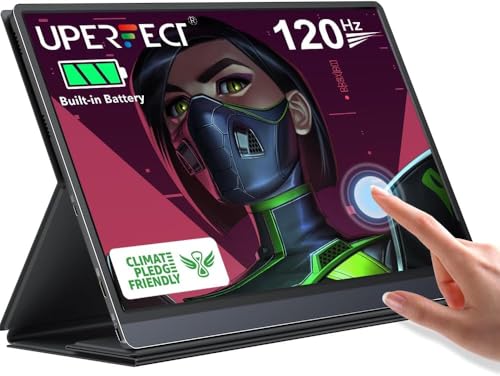
UPERFECT Battery Touch Monitor — Endurance-and-touch flagship
UPERFECT’s second entry is the specification maximalist of the battery world: a portable monitor with a battery-powered touchscreen at 120Hz, 15.6 inches, described as a gaming monitor with a 1ms FreeSync claim, a built-in 10800mAh battery, and Type-C plus mini HDMI connections, as a travel screen for laptop, computer and game consoles. Begin with the battery, because 10800mAh is the largest capacity printed in this guide, and in a category where endurance is the founding promise, the largest number deserves the lead — with the guide’s standing caution attached, that capacity is a claim about stored charge, not a promise of hours, and the title offers no hours figure to complete the story.
The 120Hz and 1ms clauses import gaming ambitions into a battery product, and they deserve a precise reading. Over a cable, a high-refresh battery screen is a coherent idea: the panel can move fast while its battery handles the power, freeing the host from feeding it. Over a wireless cast, those figures become irrelevant, because casting latency dwarfs anything a refresh rate can repay. The title does not claim wireless for this model — its connections are Type-C and mini HDMI — and the review honours that boundary: this is a wired gaming-and-touch screen that happens to carry its own power, which is a rarer and more sensible combination than it first sounds.
Touch completes the flagship’s triple identity. A battery touch screen that works away from sockets serves the interactive habitats — exhibitions, training, point-of-sale demonstrations, field data work — where a keyboard is furniture and a finger is the interface. Combined with the largest battery claim, the touch layer makes this the pick for interactive work in socket-free places, provided the owner’s software lives happily on a 15.6-inch canvas and the endurance rehearsal, run at touch-work brightness, confirms the day fits inside the charge.
Who should hesitate is the pure viewer, who pays for touch and refresh they will never exercise, and the wireless romantic, who should notice this flagship’s connections are cables and choose a casting pick instead. Who should not hesitate is the exhibitor, trainer or field professional whose work is interactive, mobile and measured in hours between sockets. In a guide built on a single promise — the screen carries its own power — this UPERFECT carries the most of everything else as well.
- Size: 15.6 inches
- Battery: 10800mAh built-in, the largest claim in this guide
- Touch: touchscreen stated
- Refresh rate: 120Hz
- Response and sync: 1ms, FreeSync wording stated
- Inputs: Type-C, mini HDMI
- Stated hosts: laptop, computer, game consoles
- Battery life in hours: Not stated in the listing title — verify with the manufacturer documentation
- Wireless casting: Not stated in the listing title — verify with the manufacturer documentation
- Resolution: Not stated in the listing title — verify with the manufacturer documentation
Strengths
- 10800mAh is the largest battery capacity printed here.
- Touch and 120Hz coexist in one battery product.
- Type-C and mini HDMI keep the wired routes complete.
Trade-offs
- No hours figure accompanies the capacity claim.
- No wireless casting is claimed for this model.
- Viewers pay for touch and speed they may not use.
Best for: an exhibitor or field trainer running interactive, touch-driven work for long stretches between sockets, with a cable carrying the picture. Not suited for: a film night built around casting wirelessly from a phone, because this title names Type-C and mini HDMI connections and claims no casting at all.
The flagship’s rehearsal is an endurance audit with the screen doing its real job: touch work at working brightness, the gaming connection tested over its cable, the battery timed from full to the warning you will actually respect. Record the hours your unit delivers rather than the hours its capacity suggests, and plan the charging ritual — top-ups during breaks, a full charge overnight — around the measured figure. A battery product’s owner is its fuel manager, and the owners who thrive are the ones who learn their true range in the first week instead of discovering it during the second hour of a trade show. UPERFECT’s listing for this model holds its current figure and the fine print of its claims.

EVICIV 18.5-inch Battery Portable Monitor — Big wireless canvas
The EVICIV makes the guide’s boldest combination of claims: an 18.5-inch 100Hz wireless portable monitor with a 10000mAh battery translated into a stated two to three hours, AirPlay and Miracast support, a 145% sRGB QLED panel claim, USB-C and HDMI, a sleeve and VESA mounting, as a second screen for laptop and game consoles. That hours figure is the most honest sentence in the battery category, because it admits what physics insists on — a very large, bright, colour-rich panel spends charge quickly — and it lets a buyer plan a morning’s stall or an evening’s film around a number the seller was willing to print.
Two to three hours reframes the product correctly. This is not an all-day workstation; it is a big, beautiful, untethered display for defined occasions — the presentation that must happen where the projector cannot, the shared screen at a site meeting, the film at the end of the garden, the product display at a fair. Within those occasions, the specification sings: QLED colour at 145% sRGB for material that deserves richness, 100Hz for smooth motion in video and casual play, casting so the source can be a phone in a pocket, and a sleeve plus VESA pattern for the journeys between occasions.
The wireless latency rule applies with its usual force: cast for audiences, cable for players. At 18.5 inches the EVICIV will be watched by groups more than it is operated by individuals, which plays to casting’s strengths and forgives its lag. Owners should still keep the cable coiled in the sleeve, because the day a demonstration needs a cursor that keeps up with a hand, the cable transforms the same screen from a display into an instrument.
Who it suits is the occasion-driven owner with big-screen material and short, important hours: the exhibitor, the site manager, the family whose outdoor film nights deserve a real canvas. Who it does not suit is the all-day worker, for whom the printed hours are a confession rather than a mystery, and who should take the 2.5K pick’s longer claim or the flagship’s larger capacity instead. The EVICIV’s honesty about its stamina is precisely what makes it trustworthy for the hours it does claim.
- Size: 18.5 inches
- Battery: 10000mAh, stated life 2-3 hours
- Refresh rate: 100Hz
- Panel claim: QLED, 145% sRGB stated
- Wireless: AirPlay, Miracast support stated
- Inputs: USB-C, HDMI
- Extras: sleeve, VESA mounting
- Stated hosts: laptop, game consoles
- Resolution: Not stated in the listing title — verify with the manufacturer documentation
- Speakers: Not stated in the listing title — verify with the manufacturer documentation
Strengths
- An hours figure is printed beside the capacity — rare honesty.
- 145% sRGB QLED is the richest colour claim in this guide.
- 18.5 inches serves groups rather than a single viewer.
Trade-offs
- Two to three hours bounds it to defined occasions.
- Casting latency excludes fast interactive use.
- The largest canvas is the hardest to carry casually.
Best for: an exhibitor or family running a big wireless display for defined occasions of a few hours — a stall morning, a site meeting, an outdoor film. Not suited for: an all-day workstation away from sockets, because the title itself prints a two-to-three-hour endurance claim that no planning can stretch into a working day.
Own the EVICIV by the occasion and it will never disappoint: charge it the night before the event, run the film or the deck once at home at the brightness the venue will demand, and note whether the printed hours match your unit’s delivery with a small reserve to spare. Decide in advance what the screen does when the battery fades mid-occasion — a cable and a socket as the understudy, rehearsed rather than improvised — and the big canvas becomes a reliable performer instead of a gamble. Event workers who plan the fade own the room. The EVICIV’s Amazon page carries its current figure and the full text of its claims.

KEEPTIME 8000mAh Portable Monitor — Core-promise traveller
The KEEPTIME states the category’s founding promise with the least decoration in the guide: a wireless portable monitor with an 8000mAh battery, 15.6 inches at 1080P on an IPS panel, AirPlay and Miracast support, a stand and a bag, as a second screen for laptop, PC and phone. No keyboard bundle, no touch layer, no refresh heroics — the product is the promise itself, carried in a bag with its own stand, and there is a real market for exactly that purity among travellers who already own every accessory the bundles include.
Its specification aligns with the battery category’s sensible centre. The 1080P IPS panel is the class standard, readable and familiar; the capacity matches the UFree V’s figure, giving the buyer a clean comparison between this screen’s simplicity and that one’s bundle at the same stated charge; the casting pair covers the phone-and-laptop showing life; and the stand-plus-bag pairing acknowledges that a battery screen’s journeys end on borrowed surfaces that owe it nothing. What the title does not print — hours, refresh, colour figures, speakers — is recorded in the spec box as the now-familiar set of questions for the listing page.
The KEEPTIME’s natural habitat is the mobile second screen that occasionally leaves the grid entirely: the consultant whose hotel desk becomes a site cabin, the photographer reviewing work where the shoot happened, the family whose caravan or campsite has no hookup but has films worth watching on something larger than a phone. In those places the difference between a battery portable and a parasitic one is not a feature — it is the difference between a screen and a souvenir.
Who should look elsewhere is the specification shopper who needs printed figures to proceed, and the interactive worker who needs touch. Who should stop here is the traveller whose brief reads, in full: a second screen, 15.6 inches, that works where I work and charges where I sleep. The KEEPTIME’s title answers that brief in one breath, and the discipline of this guide is to let a title that answers its brief stand without demanding it also answer everyone else’s.
- Size and resolution: 15.6 inches, 1080P
- Panel type: IPS
- Battery: 8000mAh stated
- Wireless: AirPlay, Miracast support stated
- Extras: stand and bag included per title
- Stated hosts: laptop, PC, phone
- Battery life in hours: Not stated in the listing title — verify with the manufacturer documentation
- Refresh rate: Not stated in the listing title — verify with the manufacturer documentation
- Speakers: Not stated in the listing title — verify with the manufacturer documentation
- Colour gamut: Not stated in the listing title — verify with the manufacturer documentation
Strengths
- The core promise — battery, casting, bag, stand — is complete.
- 1080P IPS is the class’s proven centre.
- An 8000mAh claim matches the bundled UFree V’s figure.
Trade-offs
- No hours figure translates the capacity claim.
- No touch, keyboard or speaker extras are named.
- Casting latency keeps gaming on the cable.
Best for: a traveller who wants the pure battery second screen — 15.6 inches, casting-capable, bagged and self-standing — without paying for a bundle of extras. Not suited for: a commitment that needs an endurance figure in hours before it is made, because this title states capacity only and the hours must be measured at home.
The KEEPTIME rewards the same first-week audit as every battery pick, performed with its owner’s own content: a full working session at working brightness on battery alone, a cast film from the phone, a cabled session from the laptop, each timed and noted. Simplicity is this screen’s claim, so the audit’s real subject is whether simple stays sufficient across a whole trip — the moment a missing speaker or an unprinted figure becomes a genuine obstacle is the moment the return window should hear about it. Travellers who audit honestly travel contentedly. KEEPTIME’s listing on Amazon is where its current figure completes the brief.

16-inch 2.5K Battery Portable Monitor — Sharpness-and-hours pick
This unbranded-shaped entry pairs the guide’s finest grid with its longest stated endurance: a 16-inch 2.5K wireless portable travel monitor with a built-in battery translated into a claimed four to five hours, AirPlay and Miracast support, a 2560×1600 resolution, and USB-C plus HDMI as an external rechargeable monitor and second screen for laptop, MacBook, PC, phone and tablet. Four to five hours is the only claim in this guide that reaches toward a working day, and 2560×1600 at 16 inches is a density that text workers will feel immediately — the two claims together describe the battery portable for people whose work is reading and writing rather than showing.
The combination deserves the guide’s standard scepticism, applied evenly: driving more pixels usually spends more power, so a title that promises both the sharpest panel and the longest hours is making the category’s most ambitious pair of claims, and the buyer’s rehearsal matters more here than anywhere else in the set. That is not an accusation — it is the correct posture toward any best-case figure — and the reward for verifying it is substantial, because a genuinely sharp, genuinely long-lived battery screen is the closest this category comes to a primary monitor that simply declines to care where the sockets are.
The host list is the widest in the guide, reaching tablets alongside the usual laptops and phones, and the rechargeable wording in the title underlines the product’s identity: this screen expects a charging routine, like a phone or a tablet, and joins the owner’s nightly plug-in census. MacBook naming carries no touch implications here since no touch is claimed, and the casting pair offers the showing life whenever the cable’s latency-free route is not required. No brand name headlines the title, which places extra weight on the listing page’s details and the return window’s protection — a fair trade only for buyers who shop that way deliberately.
Who it suits is the writing professional off-grid: the author in the cabin, the researcher in the archive with one socket for the laptop and none to spare, the editor whose garden office is a genuine office. Its hours claim, if the rehearsal honours even most of it, covers the longest working stretch any pick here attempts. Buyers who need a famous name on the bezel or a printed panel technology should look at the UPERFECT pair above; buyers who need sharpness and stamina in one untethered object have exactly one candidate, and it is this one.
- Size and resolution: 16 inches, 2.5K 2560×1600
- Battery: built-in, stated life 4-5 hours
- Wireless: AirPlay, Miracast support stated
- Inputs: USB-C, HDMI
- Identity: rechargeable external monitor per title
- Stated hosts: laptop, MacBook, PC, phone, tablet
- Battery capacity in mAh: Not stated in the listing title — verify with the manufacturer documentation
- Panel type: Not stated in the listing title — verify with the manufacturer documentation
- Refresh rate: Not stated in the listing title — verify with the manufacturer documentation
- Speakers: Not stated in the listing title — verify with the manufacturer documentation
Strengths
- 2560×1600 is the sharpest resolution in this guide.
- Four to five hours is the longest stated endurance claim.
- The widest host list here includes tablets.
Trade-offs
- Capacity in mAh is not printed, only the hours claim.
- Sharpness and stamina together demand a careful rehearsal.
- No brand name headlines the title.
Best for: a writing or editing professional working away from sockets who needs fine text at 2560×1600 and the longest stated battery life in the category. Not suited for: a spec sheet that wants the battery specified in milliamp-hours by a named brand before ordering, because this title trades in hours and pixels rather than in capacity figures and badges.
This pick’s rehearsal is the most important in the guide, so schedule it like an exam: a full morning of your real work — documents at your brightness, your applications, your casting and cabling habits mixed as the day mixes them — with the battery’s decline timed against the four-to-five-hour claim. If the screen delivers the strong majority of its promise, you own the category’s most capable object; if it delivers half, the window is open and the lesson was cheap. Either way the knowledge is yours before the cabin, the archive or the garden depends on it. Its Amazon listing carries the current figure for the sharpest untethered claim here.

18.5-inch 10000mAh Wireless Portable Monitor — Large untethered screen
The final pick scales the battery idea to its largest canvas: an 18.5-inch 100Hz wireless portable monitor with a rechargeable 10000mAh battery, AirPlay and Miracast support, 1080P FHD resolution, USB-C and HDMI, as an external display and second screen for laptop, MacBook, PC, phone and tablet. Against its same-sized rival, the EVICIV, the comparison is instructive: this title prints the resolution the EVICIV leaves unstated, matches its capacity figure, and declines to translate that capacity into hours, where the EVICIV bravely prints two to three. Two screens, two philosophies of honesty, one shared physics.
The physics deserves the last word in the reviews. An 18.5-inch panel at working brightness is a substantial load, and a 10000mAh claim — shared with the EVICIV, whose own translation was two to three hours — tells a careful buyer roughly what neighbourhood of endurance to plan for, even though this title leaves the translation unprinted and the spec box records the gap rather than borrowing the rival’s number. Planning in that neighbourhood means occasions, not working days: the shared screen for a site briefing, the family film beyond the extension lead’s reach, the classroom display in the room the projector forgot.
Within the occasion brief, the specification is complete and coherent: 100Hz for smooth video and casual motion, FHD stated outright, casting for the phone-in-pocket presentation life, both cable families for the interactive life, and a host list that includes tablets for the household’s shared screen. The rechargeable identity is in the title’s first line, reminding the buyer that this object lives by a charging routine and will forgive many things except being forgotten the night before it is needed.
Who it suits is the group-facing owner who values the stated resolution and the clean specification: the teacher, the site lead, the family entertainer, the small exhibitor whose material is video rather than colour-critical stills — the EVICIV’s QLED claim courts the latter more directly. Who it does not suit is anyone planning long untethered work, for whom the guide’s smaller, longer-claimed picks exist. A big battery screen is a stage, and stages are judged by the performances they host, not by how long the building stays open.
- Size and resolution: 18.5 inches, 1080P FHD
- Battery: rechargeable 10000mAh stated
- Refresh rate: 100Hz
- Wireless: AirPlay, Miracast support stated
- Inputs: USB-C, HDMI
- Stated hosts: laptop, MacBook, PC, phone, tablet
- Battery life in hours: Not stated in the listing title — verify with the manufacturer documentation
- Panel type: Not stated in the listing title — verify with the manufacturer documentation
- Speakers: Not stated in the listing title — verify with the manufacturer documentation
- Colour gamut: Not stated in the listing title — verify with the manufacturer documentation
Strengths
- Resolution is stated outright at 1080P FHD.
- 10000mAh matches the largest big-screen capacity here.
- 100Hz and casting suit group video and presentations.
Trade-offs
- No hours figure translates the capacity claim.
- Big-panel physics bounds untethered sessions to occasions.
- No colour or panel claims accompany the size.
Best for: a teacher, site lead or family running an 18.5-inch shared screen for briefings and films in places a cable cannot conveniently reach. Not suited for: an all-day off-grid worker, because a 10000mAh claim behind an 18.5-inch panel describes occasion-length endurance however the unprinted hours are imagined.
Run this screen’s rehearsal as a dress performance of its biggest intended occasion: the full briefing or the full film, at venue brightness, cast from the device that will actually present, with the battery timed and the cable waiting in reserve. Note where the charge stands at the halfway mark and decide, in the calm of home, what the fade plan is — dimmer picture, cabled finish, or a shorter programme — because a plan made at leisure beats an improvisation made in front of an audience. Big untethered screens reward producers, and its Amazon page is where the current figure for this stage can be confirmed.
Comparison
| Pick | Size / Resolution | Battery claim | Stated hours | Notable from title |
|---|---|---|---|---|
| UPERFECT UFree V | 15.6″ / 1080P | 8000mAh | Not stated in the listing title | Keyboard, sleeve, stand bundle; VESA |
| UPERFECT Battery Touch | 15.6″ / not stated | 10800mAh | Not stated in the listing title | Touch, 120Hz, 1ms FreeSync wording |
| EVICIV 18.5 | 18.5″ / not stated | 10000mAh | 2-3 hours | 100Hz, 145% sRGB QLED claim, sleeve |
| KEEPTIME | 15.6″ / 1080P | 8000mAh | Not stated in the listing title | IPS panel, stand and bag |
| 16-inch 2.5K Battery | 16″ / 2560×1600 | Hours claim only | 4-5 hours | Widest host list, rechargeable identity |
| 18.5-inch 10000mAh Wireless | 18.5″ / 1080P FHD | 10000mAh | Not stated in the listing title | 100Hz, casting, tablet among hosts |
The stated-hours column is the most honest column in this guide precisely because it is mostly empty. Two sellers translated capacity into time; four did not, and the table refuses to fill their silence with estimates borrowed from physics or from rivals. A buyer who understands why that column matters — because a working plan needs hours, not milliamp-hours — will also understand the guide’s repeated instruction to measure endurance at home, in the first week, at working brightness.
The other columns sort the occasions. Touch and refresh isolate the interactive flagship; the QLED claim isolates the colour stage; the 2.5K grid isolates the reader’s screen; the bundle isolates the operator’s workstation. Battery portables are not one product with six prices but six answers to the question of what a screen should do where the sockets are not, and the table’s best use is matching the row to the place.
How to Choose a Portable Chargeable Monitor
Plan in hours, and demand them where you can. Capacity figures describe stored charge; your life is scheduled in hours, and the conversion between the two depends on panel size, brightness and whether a wireless radio is spending alongside the backlight. Prefer the titles that print an hours claim — two here do — and treat every capacity-only claim as a rehearsal assignment: the figure your unit delivers at your brightness, measured in your first week, is the only endurance number that will ever actually govern your plans.
Match panel size to the battery’s burden honestly. The 15.6-inch class is the endurance-friendly shape of this category; the 18.5-inch class buys audience and presence with the same class of charge and therefore lives in occasions rather than days. Neither is a mistake, but confusing them is: a buyer who needs a working day should shop the smaller rows and the longest hours claim, while a buyer who needs a room to see the screen should shop the big rows and plan the event around the printed stamina.
Decide the wireless question by content, not by romance. Casting is a superb servant for films, photographs, decks and dashboards — anything watched rather than operated — and a poor one for games, fast typing and precise cursor work, where its latency is felt in the hands. Every wireless pick here also offers a cable route in its title or its connections, so the mature setup is bilingual: cast for the audience, cable for the operator, and a bag organised so both dialects are always available.
Build the charging ritual into the purchase decision. A chargeable monitor joins the nightly census of devices that must be plugged in — phone, laptop, now screen — and households differ in how much census they tolerate. The owners who thrive with battery screens are the ones who make the ritual automatic: a charging station, a habit, a spare cable that lives where the screen sleeps. If that ritual sounds like a burden rather than a routine, the honest alternative is a conventional portable from the neighbouring guides, powered by the laptop it serves.
Carrying protection deserves a thought of its own in this category, because a battery screen is handled more than a desk panel and charged more than a passive one, which means its corners, ports and glass live a harder life. Two picks here bundle a sleeve, and the rest should be paired with one from the start rather than after the first scuff, since a screen whose whole value is appearing in socket-free places will be carried to all of them in whatever bag the day provides.
Finally, weigh the bundle against the parts you already own. A kit with keyboard, sleeve and stand is a bargain for the operator starting from nothing and a duplication for the traveller whose bag already holds all three. The category’s prices hide inside those bundles, so inventory your existing kit before admiring any row of the comparison table — the cheapest accessory is the one already in your drawer, and the most expensive screen is the one whose extras you buy twice.
Do Battery Claims in Listings Deserve Your Trust?
They deserve your attention and your verification, in that order. A printed capacity is a concrete claim about the cell inside the product, and the two hours claims in this guide are concrete claims about endurance under the seller’s chosen conditions. What no title can tell you is the condition set — the brightness, the content, the wireless state — behind an hours figure, and endurance is exquisitely sensitive to all three. A claim is therefore best read as the upper edge of a range whose lower edge your own usage will discover.
The discovery process is neither difficult nor optional. Run the screen at the brightness your brightest venue demands, with the content your real occasion uses, from a full charge, and write down where the battery stands each hour. That single rehearsal converts a listing claim into a personal specification, and it converts the buyer from a believer into a planner. Every experienced operator of battery equipment — photographers, drone pilots, field recordists — keeps exactly this ledger for exactly this reason.
Scepticism should stay proportionate, though. The claims in these titles are not fantasies; they are best cases, and best cases are useful information about what the hardware can do when conditions cooperate. The failure mode is not buying a screen whose claim was optimistic — it is scheduling an unmissable event around the optimism without ever having run the rehearsal that would have priced it correctly.
When Is Wireless Casting the Right Way to Feed a Portable Screen?
When the screen is being watched rather than operated. A film, a slideshow, a dashboard, a deck advanced by a clicker — these forgive the small delay between source and screen because nothing in them depends on the picture answering a hand in real time. Casting also frees the source device to be a remote control in a pocket or a phone on a tripod, which is why presenters and families love it: the screen becomes a window, and windows do not need to be within arm’s reach of their machines.
When the screen is being operated, the cable wins without a serious contest. Typing into a cast document makes the delay visible in every line; a game makes it decisive; a drawing or editing gesture makes it absurd. The mature owner therefore refuses to treat wireless as the product and wired as the fallback. They are two instruments sharing a panel, chosen per task the way a photographer chooses lenses, and the titles here that name both casting and cable connections are offering exactly that instrument pair.
A middle case deserves its own sentence: the presentation where the presenter also annotates, points or drives a cursor live. That hybrid punishes latency precisely when the audience is watching most closely, and it should be cabled even though its content is a deck. When in doubt, ask whether a hand must keep time with the picture. If one must, plug in; if none must, cast freely and enjoy the empty space where the cable used to be.
What Should an Untethered Rehearsal Look Like Before You Rely on One?
It should look like the real occasion with the stakes removed. Same room or a fair imitation, same brightness the venue will force, same source device, same content at full length, battery starting from the overnight charge it will actually get. Half-measures — twenty bright minutes at a desk — measure a different product from the one a three-hour stall will meet, and the difference is where disappointments are manufactured.
Time the decline rather than merely surviving it. Note the charge at each hour mark, note what the screen reports about itself, and note the moment the picture or the brightness changes character, if it does. That curve is your planning document for every future occasion: it tells you when to dim, when to cable, when to swap in the reserve plan, and it tells you with your unit’s own evidence rather than with a stranger’s review written under unknown lights.
Rehearse the ending, finally. A battery screen’s last ten minutes should be a managed descent — material concluded, audience thanked, cable connected if the show must go on — and the owner who has practised the descent once will perform it calmly forever. Untethered equipment does not fail its owners; it surprises the owners who never asked it, in private, how long it intended to last.
Common Mistakes When Buying a Chargeable Portable Monitor
Reading milliamp-hours as hours. Capacity is stored charge, not endurance. Only two titles here print an hours figure; for the rest, your first-week rehearsal at working brightness is the conversion table.
Casting a game and blaming the panel. Wireless display carries latency that fast interactive content cannot forgive. Keep the cable in the bag and use it whenever a hand must keep time with the picture.
Buying the biggest screen for the longest day. An 18.5-inch panel spends the same class of battery faster than a 15.6-inch one. Match the canvas to the occasion’s length, not to its ambition alone.
Forgetting the night before. A chargeable monitor that was not charged is a heavier, darker ordinary monitor. The charging ritual is part of the product; owners who skip it own the consequence, not a defect.
Planning critical work on a best-case claim. Listing endurance is measured under the seller’s conditions. Halve it in plans that cannot fail, then let your rehearsal replace the guess with a number.
Final Recommendation
Operators who work where sockets are not should start with the UPERFECT UFree V bundle for its complete workstation kit, or the UPERFECT battery touch flagship where the work is interactive and the largest capacity claim matters. Readers and writers off-grid should take the 16-inch 2.5K pick for its sharpness and its four-to-five-hour claim, verified by rehearsal. Occasion owners should choose between the EVICIV’s colour-rich honesty about its two to three hours and the 18.5-inch wireless model’s stated FHD completeness, while the KEEPTIME serves the traveller who wants the core promise without a bundle’s extras.
Whichever battery screen you carry into the socket-free world, let one full rehearsal — your content, your brightness, your hours, timed and written down — stand between the listing’s claims and your first unmissable occasion, because in this category the difference between a tool and a letdown is almost never the hardware; it is whether the owner ever asked the hardware, in private, what it could actually do.
Frequently Asked Questions
How long do these battery monitors actually last?
Only two titles print hours: the EVICIV claims two to three hours and the 16-inch 2.5K model claims four to five. The rest state capacity in milliamp-hours, which is not an endurance figure, so measure your own unit at working brightness during the first week.
Can I use one while it is charging?
Battery portables are designed around a charge-and-work life, and the practical pattern is to work on battery during the occasion and charge overnight or between sessions. Check your chosen listing for any guidance about working while plugged in if all-day tethered use is part of your plan.
Is wireless casting good enough for gaming?
No. Casting introduces latency that fast games punish, which is why every wireless pick here also offers cable connections. Cast films, decks and dashboards freely; cable the screen whenever a hand must keep time with the picture.
Does a bigger battery always mean longer life?
Not by itself. Endurance depends on the panel the battery must feed: the two 10000mAh-class picks here drive 18.5-inch screens, while smaller capacities drive 15.6-inch panels. Compare hours where they are printed, and rehearse where they are not.
Can a battery portable monitor charge my laptop back?
None of these titles claims to power the host, so plan on the screen spending its own charge only on itself. The laptop keeps its own battery budget, which is precisely the independence this category exists to provide.
Which pick is best for a market stall?
The UPERFECT UFree V, whose bundle of screen, wireless keyboard, sleeve and stand is designed for exactly that workplace, with the EVICIV as the larger, shorter-lived alternative when the stall’s display must be seen from further away.
Related Guides
A battery is one answer to the portable power question, and the neighbouring guides give the others. Readers whose laptop can feed the screen happily should continue to Best USB Type-C Portable Monitors for the one-cable mainstream. Owners of Apple’s lightest laptop will find their specific pairing questions answered in Best Portable Monitors for MacBook Air.


