What's inside
- Key Takeaways
- Quick Picks
- How We Chose These Picks
- Why Do Eight Ports Change How a Home Network Grows?
- Port Speed, Port Count, or a Separate Switch: How Should You Decide?
- How Do You Wire an Eight-Port Router Into a Tidy Network?
- How Do You Know You Have Outgrown Four Ports?
- What Happens When Even Eight Ports Run Out?
- The Six Eight-Port Routers, Taken One at a Time
- Counting to Eight: The Port Maps, Compared
- What Port Mistakes Do Buyers Make Most Often?
- Final Recommendation
- Frequently Asked Questions
- Related Guides
As an Amazon Associate I earn from qualifying purchases. This post may contain affiliate links at no extra cost to you.
widgetverdict.com is reader-supported. When you buy through links on our site, we may earn an affiliate commission.
Where to buy: port counts are this guide’s entire subject, so its method is stated before anything is sold: every count below is taken from the verified listing title in our pool, quoted as printed — eight gigabit LAN ports where the title says eight, a full port inventory where the title enumerates one, and an honest flag where a title’s wireless story is thinner than its port story. Routers were counted, not believed.
The best wifi routers 8 port shoppers are looking for exist because four ports stopped being enough. The modern wired census is relentless: a desktop, a work laptop’s dock, a NAS, a television, a console or two, a printer, an access point, a camera recorder — the household or small office that wires what matters runs out of the standard four LAN ports and faces the switch decision. An eight-port router postpones or deletes that decision, keeping one box, one power supply and one management screen in charge of the whole wired estate.
The six picks divide into temperaments. Three are ASUS machines spanning three wireless generations — a Wi-Fi 7 flagship whose port inventory runs to ten sockets at three speeds, a Wi-Fi 6 gaming router whose title simply promises eight ports, and a tri-band ROG veteran with eight gigabit ports and a game accelerator. TP-Link’s entry is a tri-band gaming flagship with eight gigabit LAN ports and a 2.5G WAN. Then the list turns austere: a MikroTik whose eight gigabit LAN ports serve a 2.4 GHz-only wireless side, and a D-Link VPN service router whose eight gigabit ports serve a wired-first network — two picks whose port wealth and wireless modesty must be read together, as their analyses insist.
One clarification before the counting starts, because this category attracts the confusion: an eight-port router is not a router plus a switch in a trench coat, and it is certainly not a switch. A switch alone cannot hold your internet connection or run your network; these six all route — they are the network’s brain, merely a brain with enough hands. Buyers who already own a fine router and merely need sockets should buy the switch and keep the change; buyers choosing the brain itself are in the right guide.
Key Takeaways
- Port counts here are quoted from titles: three picks state eight LAN or gigabit ports outright, one enumerates a ten-socket inventory.
- Speed per port matters as much as count — the RT-BE88U mixes 10G, 2.5G and 1G ports in one bank.
- Two picks trade wireless ambition for ports: the MikroTik is 2.4 GHz-only per its title, and the D-Link’s title makes no Wi-Fi claim at all.
- Eight ports delete the switch for most homes and small offices — one box, one interface, one power supply.
- WAN ports are not LAN ports; the counts that matter for your devices are the LAN side, and the analyses keep them separate.
Quick Picks
| Pick | Badge | Why it earns its place |
|---|---|---|
| ASUS RT-BE88U | The ten-socket flagship | Wi-Fi 7 with two 10G ports, four 2.5G and four 1G — the deepest port bank in the guide. |
| ASUS RT-AX88U AX6000 Dual Band WiFi 6 Gaming Router, 8 Ports | The straightforward eight | Wi-Fi 6 AX6000 whose title promises 8 ports with lifetime security and Adaptive QoS. |
| ASUS ROG Rapture WiFi Gaming Router (GT-AC5300) – Tri Band | Tri-band gaming veteran | Eight gigabit ports, a quad-core CPU and WTFast behind tri-band wireless. |
| TP-Link WiFi 6 Internet Gaming Router – Tri Band High-Speed ax | Eight LAN, printed plainly | The Archer AX10000: tri-band Wi-Fi 6, a 2.5G WAN and 8 Gigabit LAN Ports in the title. |
| MIK-L009UiGS-2HaxD-IN Wi-Fi 6 Router with 8 Gigabit LAN Ports | Ports over wireless | Eight gigabit LAN ports from MikroTik — with a 2.4 GHz-only wireless side, stated openly. |
| D-Link VPN Router, 8 Port Gigabit with Dynamic Web Content | The wired-first entry | A VPN service router with eight gigabit ports and content filtering; its title claims no Wi-Fi. |
How We Chose These Picks
The qualifying exam was arithmetic performed on titles. A pick had to reach eight wired ports by its own listing’s account — eight LAN ports stated, eight ports stated, or an enumerated inventory totalling beyond eight — because a guide about port counts that fudges its own counting has no product to sell. Routers with four heroic ports and a switch bundled in the box were excluded; the eight sockets had to live in the router itself.
The second filter was the honesty audit this batch applies everywhere: what else does the title say, and what does it pointedly not say? The MikroTik’s title states its wireless is 2.4 GHz with the 802.11b/g/n/ax standards — a single-band reality its analysis puts in the first paragraph, not the last. The D-Link’s title claims VPN routing, eight gigabit ports and content filtering, and no wireless at all; it is included as the category’s wired-first citizen and labelled as such at every appearance, because a buyer who needs Wi-Fi from the box must know before the box arrives.
We also kept a place at the table for the category’s specialists, because a port-count guide that only lists gaming flagships has mistaken a shelf for the whole shop. The MikroTik and the D-Link serve premises where the wired network is the network — workshops, wired offices, access-point estates — and their inclusion, with their wireless limitations printed in the same size type as their port counts, is this guide’s way of serving those readers without deceiving the others.
Finally, we weighted the ports’ speeds, not just their census. Eight gigabit ports and a mixed bank of 10G, 2.5G and gigabit are different instruments: the first serves many ordinary devices, the second serves a few fast ones and many ordinary ones, and a household with a multi-gigabit NAS or a faster-than-gigabit internet line should buy the bank, not the census. The analyses keep asking which household each arithmetic belongs to.
Why Do Eight Ports Change How a Home Network Grows?
The four-port ceiling shapes behaviour in ways households rarely notice until it is gone. Devices compete for sockets, so the printer gets unplugged for the console, the NAS migrates to Wi-Fi it should never have joined, and a small switch appears — then a second one, daisy-chained in a cupboard, each with its own power brick and its own silent opinion about the network’s shape. An eight-port router restores a simpler physics: everything that deserves a cable gets one, permanently, and the network’s map fits in one interface’s device list.
Wired connections repay the hospitality. A NAS on a cable delivers its speed without negotiating with the air; a desktop’s video calls stop competing with the microwave; a television streams without buffering through walls the Wi-Fi crosses bravely and badly. The households that benefit most from this guide are the ones with a wired core — desk, storage, entertainment — surrounded by a wireless penumbra of phones and gadgets, which is to say most serious households and nearly every small office. Our guide to Best Wi-Fi Routers and Access Points for Offices and Warehouses covers the sterner end of that wired-core world, where the floor is measured in aisles rather than rooms.
Security quietly improves with the census as well. A wired device is a known device — plugged in by a person, in a place, for a reason — and a router whose list shows eight named, cabled citizens plus the wireless crowd gives its owner a fighting chance of noticing the ninth name that belongs to nobody. Networks are audited by their owners far less often than they should be; a single screen that shows the whole estate makes the audit a glance instead of an expedition.
There is also a management dividend. One router switching its own eight ports sees every wired device in one place, applies rules to them uniformly, and reboots as one organism. The daisy-chained alternative — router, switch, switch — works, but each layer is a place for a cable to be half-seated and a power brick to die unnoticed. Simplicity is not a luxury in infrastructure; it is the maintenance budget, paid in advance.
Port Speed, Port Count, or a Separate Switch: How Should You Decide?
Count first, honestly, on paper: the devices in your home that are wired today, plus the ones that should be, plus two for the future you have not met yet. If the total is six or fewer, the eight-port picks here give you a life without a switch and room to spare. If the total is twelve, no router in this guide saves you from a switch — buy the router for its brain and add the switch for its sockets, without resentment, because that division of labour is legitimate engineering.
Then weigh speed per socket. A household whose wired core is a NAS with a fast interface, a workstation moving large files, or an internet line beyond gigabit should look hard at the RT-BE88U’s mixed bank: its 2.5G and 10G ports, enumerated in its title, let the fast devices be fast while the ordinary eight-port census is still served by the gigabit remainder. A household whose wired devices are all gigabit-or-slower — most are — gains nothing from those premium sockets and should let the AX88U or the Archer AX10000’s uniform eight gigabit ports do the same job with less theatre.
A word, too, for the renter and the small office, who share a constraint the homeowner escapes: they cannot run cables through walls, so their wired world concentrates where the router sits — one desk cluster, one equipment shelf, everything cabled within a room. For them the eight-port router is not a convenience but the entire wired strategy, and its placement — at the desk, not in the hallway cupboard — becomes the network’s founding decision. Count that constituency in when the analyses below talk about port banks as furniture: for a concentrated network, the router is the room’s infrastructure, and eight sockets is what infrastructure means.
And keep the WAN side out of the LAN arithmetic. A router’s WAN port faces the internet; it is not a ninth socket for the printer. Two picks here complicate the counting usefully — the TP-Link’s separate 2.5G WAN beside its eight LAN ports, the ASUS flagship’s assignable high-speed ports — and the analyses keep the two sides of the box distinct, because a buyer counting LAN sockets toward a device census must never spend the WAN port in the tally.
How Do You Wire an Eight-Port Router Into a Tidy Network?
One small ritual completes the installation: the census photograph and its twin, the written list, stored with the household’s other infrastructure notes. Eight cables look identical in a photograph’s thumbnail and utterly distinct in a labelled list — port one, the study desktop; port two, the NAS — and the pair of records together is the difference between a five-minute fix and a Saturday of elimination, two years from now.
Assign the fast ports first. On a mixed bank like the RT-BE88U’s, the 10G and 2.5G sockets are a scarce resource: the NAS, the main workstation and the fastest switch or access-point uplink get them, in that order, and the printer — the classic squanderer of premium ports — takes a gigabit socket where it belongs. On a uniform eight-gigabit router the order hardly matters electrically, but label the cables anyway; the person troubleshooting in two years is you, and you will not remember.
Keep the runs honest. Ethernet forgives a great deal, but a cable pinched in a door or kinked behind a bookcase becomes the network’s mystery fault, blamed on the router for months. Route cables with slack, avoid running them alongside power bricks where a choice exists, and test each wired device at its own speed setting after installation — a link negotiated at a tenth of its rate because of a tired cable is the quietest disappointment in networking.
Cable quality deserves its one stern paragraph. An eight-port bank invites long runs and bargain cables, and Ethernet’s honesty is that a bad run does not fail loudly — it negotiates down, quietly, and the device at its end is blamed for slowness the cable authored. Use cables rated for gigabit or better on every run, replace any that arrive pre-kinked from a drawer of antiques, and after installation glance at each wired device’s link speed in the router’s list: eight ports reporting their full rate is the installation’s certificate, and any port reporting a tenth of it is pointing at its cable.
Finish in the interface: name every wired device in the router’s list while you still know which is which, reserve addresses for the infrastructure — NAS, printer, access points — so they never wander, and photograph the finished port bank with its labels. The photograph is the network’s map, and an eight-port router rewards map-keeping precisely because eight cables are enough to forget. Households that later outgrow even this census can add a switch downstream with a clear conscience, or take the mesh path for the wireless side — our guide to Best Mesh Wifi 6 Routers covers that expansion — while the wired core stays exactly as wired here.
How Do You Know You Have Outgrown Four Ports?
The symptoms arrive as small humiliations rather than a clear announcement. A cable is swapped between the console and the desktop depending on the evening’s plan. The NAS — the one device that most deserves a wire — lives on Wi-Fi because its socket was given to something louder. A switch appears, then migrates, then sprouts a second switch in another room, and the network’s true shape exists in nobody’s head, only in the archaeology of its cupboards. Each symptom is the four-port ceiling charging rent.
Do the census properly before shopping, because households reliably undercount. Walk the rooms with a notebook: desk equipment, entertainment stack, network infrastructure itself — printers, access points, camera recorders, the smart-home hub, the work dock — and then the near future: the NAS you keep meaning to buy, the second console, the home server project. The honest number is usually double the guess. If it lands at six, seven or eight, this guide is your shelf; if it lands at five, a four-port router plus discipline may still serve; if it sails past ten, buy the router for its brain and budget the switch without drama.
There is one more constituency for eight ports that rarely appears in marketing: the household that hosts. A spare wired socket is hospitality — the visiting laptop that needs a real connection for a work call, the friend’s console at a games weekend, the technician’s diagnostic plug. Networks, like houses, are judged by how they treat guests, and a port bank with two sockets in reserve is a house with a spare room.
What Happens When Even Eight Ports Run Out?
It happens to the successful: the wired core grows a second room, a workshop joins the census, the camera count doubles. The eight-port router handles its own succession gracefully, because one of its ports can feed a switch placed where the growth is — the router remains the brain, the switch becomes a distant hand, and the management stays in one interface for everything that matters. This is the correct way to pass eight: not by replacing the router in a panic, but by demoting one socket to an uplink with the network’s map updated accordingly.
The alternative growth path runs through the wireless side. Several picks here are mesh-compatible or built for large homes, and an access point added for coverage consumes exactly one port while relieving the router’s radios of a whole room’s traffic. Growth, in other words, alternates: a port for the new wired cluster, a port for the new wireless territory, the bank shrinking by ones while the network grows by rooms. Buyers who can see that rhythm coming should weight the picks with the strongest ecosystems — the AiMesh-compatible ASUS pair, the large-home TP-Link — because expansion inside one family is always cheaper than expansion across two.
And when the census passes sixteen and the rack gets serious, graduate without sentimentality: the eight-port router becomes the finest spare, the workshop’s brain, or the access-point-fed relative’s upgrade. Infrastructure that retires into usefulness was bought correctly, and the measure of this purchase is not whether it lasts forever but whether every year of it was the right tool.
The Six Eight-Port Routers, Taken One at a Time

ASUS RT-BE88U — The ten-socket flagship
The RT-BE88U does not merely pass this guide’s eight-port exam; it rewrites the paper. Its title enumerates the bank: two 10G ports — itemised as a 10G SFP+ port among them — four 2.5G ports and four 1G ports, beneath Wi-Fi 7 wireless rated up to 7.2 Gbps, with mesh compatibility, subscription-free network security, parental controls and VPN support. Ten sockets at three speeds is not a port count; it is a small switch fabric with a flagship router attached, and it makes this ASUS the census-and-speed answer in a single box.
The SFP+ cage deserves its sentence, because it changes the cabling vocabulary: SFP+ accepts modules and direct-attach cables, letting the router join a fibre run or a short, fast DAC link to a serious switch or NAS — the dialect of small-server closets, spoken here by a home router. The two 10G ports as titled let one fast device arrive and another leave at full rate, the pass-through arrangement a single fast port cannot offer, while the 2.5G quartet serves the new generation of NAS boxes and docks that outgrew gigabit without reaching ten.
There is a future-proofing arithmetic unique to this pick: ports outlive wireless standards. The Wi-Fi 7 radios will be superseded on a familiar cadence, but a 10G socket bought today will still be a fast socket when the third wireless generation from now arrives, because wired speeds move in decades where wireless moves in product cycles. A household buying the BE88U is really buying the bank and renting the radios, and judged on the bank alone — ten sockets, three speeds, a fibre dialect included — the purchase ages more gracefully than anything else in this guide.
Wi-Fi 7 and mesh compatibility complete a pick aimed at the household that is done compromising in either direction — the wired core gets its bank, the wireless side gets the current standard, and AiMesh-style growth (the title says mesh compatible) waits if the floor plan demands it. The cautions are proportion itself: this is the guide’s flagship, with a flagship’s appetite for budget and desk space, and its premium sockets are wasted on a household whose fastest wired device is a printer. Buy it for a wired core with genuine multi-gigabit citizens.
- Port inventory in listing title: x2 10G Ports (incl. 10G SFP+ Port x1), 2.5G Port x4, 1G Port x4
- Wireless in title: WiFi 7, up to 7.2 Gbps
- Mesh in title: Mesh Compatible
- Security in title: Subscription Free Network Security, Parental Controls
- VPN in title: VPN support
Strengths
- Ten sockets across three speeds — the deepest bank here
- SFP+ cage speaks the language of serious wired cores
- Wi-Fi 7 means the wireless side needs no apology either
Trade-offs
- Flagship scope for households that may need half of it
- Premium ports are wasted on gigabit-only devices
- SFP+ modules or cables are a separate purchase
Best for: a wired-heavy household with a fast NAS and a multi-gigabit future.
Not suited for: a mostly-wireless flat counting ports it will never plug.
Begin with the RT-BE88U’s listing if your device census and your speed ambitions both run high — it is the only pick that refuses to make you choose between them.

ASUS RT-AX88U AX6000 Dual Band WiFi 6 Gaming Router, 8 Ports — The straightforward eight
The RT-AX88U makes the cleanest promise in this guide, and makes it in its name: an AX6000 dual-band Wi-Fi 6 gaming router with 8 ports, lifetime security and Adaptive QoS. No inventory to decode, no arithmetic to audit — eight ports, a strong Wi-Fi 6 class, and ASUS’s gaming line refinements. For the buyer who arrived wanting exactly “a good router with eight ports,” this is the pick that answers in the same words.
Adaptive QoS is the feature to understand, because it is the wired census’s quality-of-life companion: with eight devices cabled and a household’s wireless crowd on top, the router’s ability to prioritise the game and the call over the background download is what keeps abundance from becoming congestion. Lifetime security — ASUS’s AiProtection-style suite described in the title as included for the product’s life — removes the subscription question that shadows so many feature lists, a point this batch’s guides keep valuing because the toll compounds across years.
Consider the evening this router was built for, because it is most households’ hardest hour: two wired desktops in calls or games, the NAS backing up on its cable, the television streaming through its port, and a dozen wireless devices murmuring around the edges. A four-port router survives that evening by evicting somebody; the AX88U survives it by having seated everyone before it began, with Adaptive QoS conducting. That is the whole eight-port thesis in one domestic scene, and this pick is its most straightforward expression — no exotic sockets, no band compromises, just enough of everything.
The AX88U’s position in the family is the sensible middle: a generation behind the BE88U’s Wi-Fi 7, a port philosophy of uniform gigabit-class sockets rather than a mixed-speed bank. Households whose wired core is uniformly gigabit — the great majority — lose nothing by that uniformity, and gain a mature, widely owned platform whose behaviours are documented by an army of existing users. It is the eight-port purchase with the fewest asterisks in the guide.
- Ports in listing title: 8 Ports
- Wireless in title: AX6000 Dual Band WiFi 6
- Positioning in title: Gaming Router
- Security in title: Lifetime Security
- Traffic feature in title: Adaptive QoS
Strengths
- The title’s promise is the product: eight ports, no decoding
- Adaptive QoS keeps a full port bank civilised
- Lifetime security avoids the subscription toll
Trade-offs
- No multi-gigabit sockets for a fast NAS to enjoy
- Wi-Fi 6 in a guide that also offers Wi-Fi 7
- Gaming styling and pricing for a workhorse job
Best for: a gigabit household wanting eight ports and current-enough wireless.
Not suited for: a multi-gigabit wired core — the flagship above owns that brief.
The RT-AX88U is the default answer of this category; read its listing first and make the others argue you away from it.

ASUS ROG Rapture WiFi Gaming Router (GT-AC5300) – Tri Band — Tri-band gaming veteran
The GT-AC5300 is the elder statesman of the eight-port idea: a tri-band gigabit wireless gaming router with a quad-core CPU, the WTFast game accelerator, eight GB ports as its title phrases them, AiMesh compatibility and included lifetime internet security. In its day this was the flagship pattern — three wireless bands so the gaming devices could have one to themselves, eight wired sockets so nothing important rode the air at all — and the pattern still describes a certain household perfectly.
Tri-band is the wireless argument here, and it is a real one for gamers: a dedicated band for the gaming machines keeps them out of the household’s general traffic, while the eight gigabit ports serve the desk, the consoles and the storage that prefer cables. WTFast, the gamer private network named in the title, routes game traffic along its own paths — a subscription-flavoured extra whose value depends on the games and the geography, and which the honest buyer will treat as a bonus rather than the reason.
There is a collector’s logic to this pick that deserves a sentence, because gaming households actually live it: the battlestation row — PC, two consoles, a streaming box, a capture machine — is a wired neighbourhood that never moves, and a router bought for it is judged across years of evenings rather than a season of benchmarks. Eight gigabit ports map onto that row almost one-to-one, and the quad-core processor named in the title was specified for exactly the multi-client, QoS-juggling load the row produces at full voice.
The generational honesty this guide owes every pick: the GT-AC5300’s wireless is the Wi-Fi 5 era, and its eight ports are gigabit in a list that now includes 2.5G and 10G sockets. Its case rests on the tri-band layout, the AiMesh second life — it can join or found an ASUS mesh on stock firmware — and the likelihood that a gaming household’s wired census values eight honest gigabit ports over two premium ones. Bought with that understanding, the veteran still earns its shelf.
- Ports in listing title: 8 GB Ports, as the title phrases them
- Wireless in title: Tri Band Gigabit Wireless
- Processor in title: Quad-Core CPU
- Gaming extra in title: WTFast Game Accelerator
- Mesh and security in title: AiMesh Compatible, Included Lifetime Internet Security
Strengths
- Tri-band layout gives gaming traffic a band of its own
- Eight gigabit ports serve a full wired battlestation row
- AiMesh offers a mesh second life within ASUS
Trade-offs
- Wi-Fi 5 generation beneath Wi-Fi 6 and 7 rivals
- All ports gigabit — no multi-gigabit headroom
- WTFast’s value varies by game and region
Best for: a gaming household with many wired machines and a tri-band preference.
Not suited for: a future-proofing buyer — newer standards fill the picks above it.
Judge the GT-AC5300 as the specialist it is: if your evenings are wired, competitive and crowded, its listing still makes a coherent case.
TP-Link WiFi 6 Internet Gaming Router – Tri Band High-Speed ax — Eight LAN, printed plainly
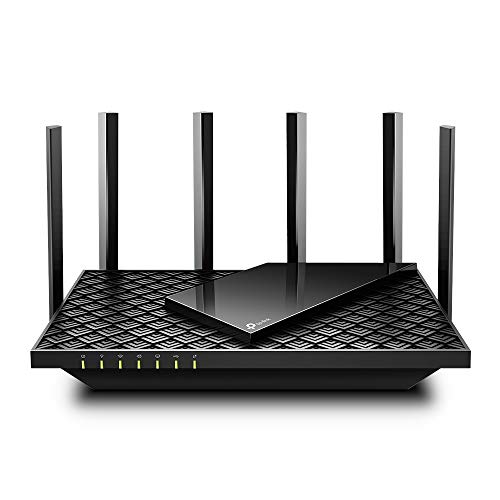
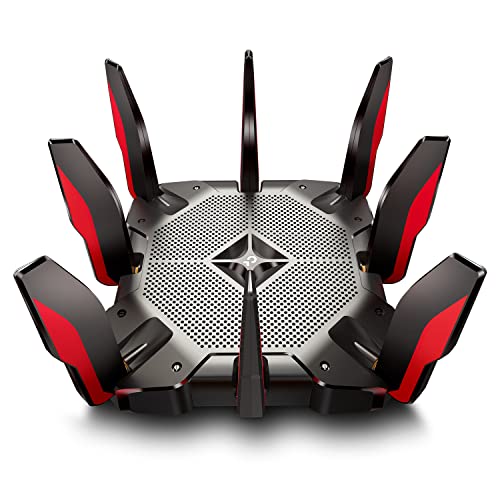
TP-Link’s Archer AX10000 hides its identity in a generic title and its virtue in a precise one: a Wi-Fi 6 tri-band high-speed gaming router for a large home, with a 2.5G WAN and — the phrase this guide exists for — 8 Gigabit LAN Ports, stated outright. Where the ASUS flagship makes you add up an inventory, TP-Link prints the LAN census directly, and adds a “Wireless Smart VPN” claim for the household that wants its router to carry a VPN client’s duties.
The 2.5G WAN is the pick’s second argument, and it is aimed at a specific frustration: the internet plan that crossed gigabit while the router’s front door stayed at one. With the WAN at 2.5G, the plan arrives whole, and the eight gigabit LAN ports distribute it to the wired core without the front door becoming the ceiling. Tri-band Wi-Fi 6 behind that door serves the wireless crowd the same generosity — this is a router designed for a large, device-dense home that refuses to pick which side of the network gets the investment.
The large-home framing in its title should be taken literally in both directions. A tri-band flagship with eight LAN ports is a lot of router — physically, electrically and administratively — and in a two-room flat it would be a monument rather than an appliance. But in the rambling house it was drawn for, where the wired core lives in a study and the wireless crowd fills three floors, the combination of a fast front door, a full port bank and a third wireless band is not excess; it is the first router that has not asked that household to compromise somewhere. Scale is a specification, and this pick’s is printed as plainly as its ports.
MU-MIMO and the wider multi-device story are this class’s home turf; readers comparing implementations will find the deep dive in our guide to Best MU-MIMO WiFi Routers for Homes Where Everything Connects at Once. Here the summary suffices: the AX10000 is the eight-port pick for the household whose problem is everyone, everywhere, all at once — many wired, many wireless, one fast line — and whose budget for the solution is serious but singular.
- LAN ports in listing title: 8 Gigabit LAN Ports
- WAN in title: 2.5G WAN
- Wireless in title: Wi-Fi 6, Tri Band, High-Speed ax
- VPN in title: Wireless Smart VPN
- Positioning in title: Gaming Router for a Large Home
- Model identity: Archer AX10000
Strengths
- Eight gigabit LAN ports stated in so many words
- 2.5G WAN lets a faster-than-gigabit plan arrive whole
- Tri-band Wi-Fi 6 matches the wired generosity
Trade-offs
- LAN ports are gigabit — the flagship’s mixed bank is faster per socket
- Large-home scale is surplus for a flat
- Generic listing title makes the model easy to confuse at a glance
Best for: a large, device-dense home with a fast plan and a wired core.
Not suited for: a small household — its scale would be furniture, not infrastructure.
If your census is long on both sides of the network, the Archer AX10000’s listing is the balanced answer: count its LAN ports, then count yours.

MIK-L009UiGS-2HaxD-IN Wi-Fi 6 Router with 8 Gigabit LAN Ports — Ports over wireless
The MikroTik L009’s title must be read in full, because its two halves argue with each other: a Wi-Fi 6 router with 8 gigabit LAN ports — and then the wireless detail, 2.4 GHz, 802.11b/g/n/ax. That second half is the honest headline. This router’s wireless lives entirely in the 2.4 GHz band, the slow, long-reaching band, with no 5 GHz band in the title at all. Its eight gigabit LAN ports are the product; the Wi-Fi is a convenience for the devices that sip — sensors, plugs, the printer in the corner — and this analysis will not dress it as anything else.
Understood that way, the pick finds its household: the wired-first home or small workshop where the serious machines are cabled, the wireless crowd is a tail of low-demand gadgets, and the router’s job is routing — MikroTik’s home ground, with a configuration depth that rewards the technically inclined far beyond this guide’s scope. The 2.4 GHz band’s long reach even suits sprawling, gadget-scattered premises better than a 5 GHz band would, provided nothing wireless is in a hurry.
MikroTik’s readership deserves a word of its own, because it explains the pick’s presence in a consumer-leaning list. The brand’s routers are administered by people who enjoy administration — network engineers, hobbyists with home labs, small providers — and its software’s depth is the reason its hardware anchors so many workshops and lab benches. A reader who recognises themselves in that description will find the L009’s eight ports attached to the most configurable brain in this guide. A reader who does not should hear the description as the warning it also is.
The warning writes itself and must not be softened: a household expecting its phones, laptops and televisions to live on this router’s Wi-Fi will be disappointed in the first hour, because the fast band simply is not in the title. Pair it with separate access points if the wireless estate matters, or choose any pick above. As a wired brain with a gadget-band radio attached, though, the L009 offers eight gigabit ports with a routing pedigree few consumer boxes can quote.
- LAN ports in listing title: 8 Gigabit LAN Ports
- Wireless in title: 2.4 GHz only, 802.11b/g/n/ax — no 5 GHz band is claimed
- Class name in title: Wi-Fi 6 Router (the ax standard, on the 2.4 GHz band)
- Model string in title: L009UiGS-2HaxD-IN
Strengths
- Eight gigabit LAN ports from a routing-first maker
- 2.4 GHz reach suits scattered low-demand gadgets
- Configuration depth rewards technical owners
Trade-offs
- No 5 GHz band — wireless speed is not this box’s subject
- MikroTik’s interface assumes knowledge home routers forgive
- Wi-Fi households must budget separate access points
Best for: a wired-first workshop or home whose wireless crowd only sips.
Not suited for: any household expecting fast Wi-Fi from the router itself.
Buy the L009 for its ports and its brain, with your eyes open about its band — its own title told you, and so has this guide, twice.
D-Link VPN Router, 8 Port Gigabit with Dynamic Web Content — The wired-first entry
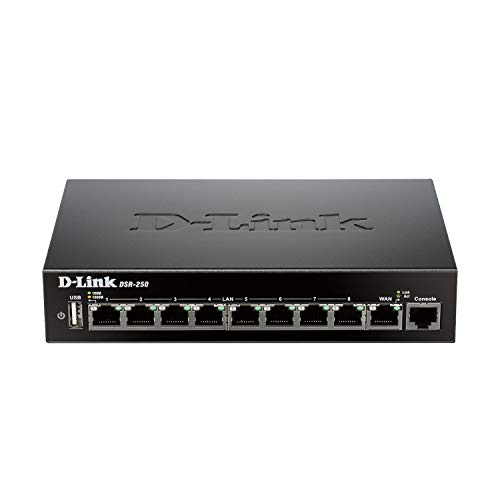
The D-Link DSR-250 closes the list with the guide’s most important act of title-reading. Its listing describes a VPN router with eight gigabit ports and dynamic web content filtering — and says nothing about Wi-Fi at all. In a guide answering a Wi-Fi keyword, that silence is information: this is a wired service router, a business gatekeeper whose eight ports serve a network that gets its wireless from separate access points, or whose work is wired by policy. It is included because its port count and routing are real, and it is labelled at every appearance so no buyer mistakes it for a wireless box.
What it offers instead of radios is governance: VPN routing for the small business or the serious home office, and dynamic web content filtering — the ability to decide, at the network’s edge, which categories of the web the machines behind it may visit. In a small workplace, a training room, a family business with staff machines, that filtering is a policy tool no gaming router in this list pretends to offer, and the eight gigabit ports wire the whole estate it governs.
Small organisations should also weigh the support reality this pick represents. A content-filtering VPN router is equipment an IT provider can standardise on across a dozen small clients — same interface, same policy vocabulary, same port layout on every desk — and that standardisation is worth money to the people who maintain networks for a living. The DSR-250’s longevity in D-Link’s business catalogue is the market’s evidence that the pattern works, and a buyer joining a well-trodden pattern inherits its documentation along with its hardware.
Place it honestly in the taxonomy this guide opened with: it is a router, emphatically not a switch — it holds the connection, builds the tunnels, filters the traffic — that happens to have no wireless of its own in the title’s account. A buyer whose premises already run access points, or whose network is a wired office by design, gets a purpose-built gatekeeper with a full port bank. A buyer who needs Wi-Fi from the box should walk back up this list to the ASUS and TP-Link picks, where the radios live.
- Ports in listing title: 8 Port Gigabit
- Role in title: VPN Router
- Filtering in title: Dynamic Web Content Filtering
- Wireless: the title makes no Wi-Fi claim — treat this as a wired router and plan access points separately
- Model identity: DSR-250
Strengths
- Eight gigabit ports behind a genuine business router
- Content filtering as a network-edge policy tool
- VPN routing for offices and serious home networks
Trade-offs
- No Wi-Fi in the title’s account — access points are on you
- Business orientation assumes an administrator’s mindset
- Its title is terse beyond ports, VPN and filtering
Best for: a wired office or access-point household wanting governance at the edge.
Not suited for: a buyer expecting wireless from the router box itself.
Take the DSR-250 for exactly what its title sells — eight ports, tunnels and a filter — and it will not surprise you; that is the highest compliment this guide pays any listing.
Counting to Eight: The Port Maps, Compared
| Pick | Port map per title | Wireless per title | Best-matched household |
|---|---|---|---|
| ASUS RT-BE88U | 2x 10G (incl. SFP+), 4x 2.5G, 4x 1G | Wi-Fi 7, up to 7.2 Gbps | Multi-gigabit wired core |
| ASUS RT-AX88U AX6000 Dual Band WiFi 6 Gaming Router, 8 Ports | 8 Ports | Wi-Fi 6 AX6000 dual band | Gigabit household, no asterisks |
| ASUS ROG Rapture WiFi Gaming Router (GT-AC5300) – Tri Band | 8 GB Ports | Tri-band gigabit wireless | Wired gaming row |
| TP-Link WiFi 6 Internet Gaming Router – Tri Band High-Speed ax | 8 Gigabit LAN Ports, 2.5G WAN | Wi-Fi 6 tri-band | Large, device-dense home |
| MIK-L009UiGS-2HaxD-IN Wi-Fi 6 Router with 8 Gigabit LAN Ports | 8 Gigabit LAN Ports | 2.4 GHz only, b/g/n/ax | Wired-first workshop |
| D-Link VPN Router, 8 Port Gigabit with Dynamic Web Content | 8 Port Gigabit | No Wi-Fi claimed in title | Wired office with access points |
What Port Mistakes Do Buyers Make Most Often?
The classic is counting the WAN port in the LAN census — arriving at “nine ports” on an eight-LAN router and planning a device that has nowhere to plug. Count the LAN side only, as this guide’s table does. Second is the reverse snobbery: dismissing a uniform gigabit bank because faster sockets exist, when every wired device in the house is gigabit or slower and the premium ports would spend their lives negotiated down. Buy the speeds your devices speak.
Third is forgetting the uplink tax in mesh and access-point plans: every wired access point and every switch you add later consumes one of the eight, so the household at seven devices today is really at nine by the time the dead corner gets its access point. Count the future’s sockets, not just the present’s. Fourth is buying the D-Link or the MikroTik from a skim — seeing eight ports and a familiar keyword, missing that one title claims no Wi-Fi and the other claims one band — which is why this guide repeats those two facts at every appearance rather than trusting a single warning.
Fifth is the aesthetic eviction: hiding a hard-working eight-port flagship in a closed cabinet because the battlestation looked tidier, then troubleshooting the thermal throttling it develops by summer. These are warm machines with vents that mean it; give the bank air and it will give you years. Infrastructure that breathes is infrastructure that lasts, and the tidiest network is the one whose router is allowed to be seen working.
Final Recommendation
Let your census and your fastest device decide. The ordinary gigabit household that simply ran out of sockets: the RT-AX88U, the promise printed on its own name. The wired core with a fast NAS or a multi-gigabit plan arriving: the RT-BE88U and its three-speed bank. The gaming row that wants its own wireless band as well as its cables: the GT-AC5300. The large home dense on both sides of the network: the Archer AX10000, eight LAN ports and a 2.5G front door. The wired-first workshop: the MikroTik, bought for ports and brain with the band limitation embraced. The governed wired office: the DSR-250, access points to follow. Eight ports turned out to be six different answers wearing one number — count your devices, weigh your fastest one, and the right name selects itself.
One last piece of arithmetic to carry into the listings: count your devices, then add the two you have not bought yet, then check that the pick you favour still has a socket in reserve — because the reserve is where the access point, the visitor and the next hobby all live. A port bank bought exactly to today’s census is a four-port problem scheduled for next year. Every pick above was chosen to leave that reserve standing; keep it standing when you choose among them, and the network you wire this month is the network that quietly absorbs the next three years of devices.
Frequently Asked Questions
Is an eight-port router better than a four-port router plus a switch?
For most households, yes in the ways that compound: one box, one interface, one power supply, every wired device visible in a single list, and no daisy-chain to troubleshoot. A separate switch wins when the census grows far past eight, when the wired devices cluster in another room from the router, or when you already own a router you love. The eight-port router is the answer when the count and the location both fit under one roof.
Do all eight ports run at full speed at once?
Routers in this class switch their LAN ports at wire speed for local traffic — devices talking to each other inside the house are not sharing the internet connection’s bandwidth. The shared ceiling appears only on traffic heading out to the internet, where your plan is the limit. That is why a NAS and a workstation can exchange files at full gigabit while a stream runs: the local conversation never leaves the bank.
Why does one pick have only 2.4 GHz Wi-Fi?
Because the MikroTik L009’s design spends its budget on routing and ports, and its title says so plainly: 2.4 GHz, 802.11b/g/n/ax. That band reaches far and serves low-demand devices well, but it is not a fast band and there is no 5 GHz beside it. Buy it as a wired brain with a gadget radio, or add access points — do not buy it as a household’s Wi-Fi and expect the title to have been bluffing.
Does the D-Link pick really have no Wi-Fi?
Its listing title claims VPN routing, eight gigabit ports and content filtering, and makes no wireless claim, so this guide treats it as a wired router throughout. D-Link has sold wireless variants in this family historically, which is exactly why the discipline matters: buy the listing in front of you, not the family’s reputation, and if wireless matters, confirm the exact variant’s specification before ordering — or choose a pick whose title prints its radios.
What should plug into the fastest ports on the RT-BE88U?
In order: the fastest NAS or server, the main workstation, and the uplink to any switch or access point that aggregates many devices. The 10G SFP+ cage suits a DAC or fibre link to serious wired gear. Printers, cameras and media boxes belong on the gigabit ports, where their own interfaces are the ceiling anyway — premium sockets spent on slow devices are the eight-port version of buying a sports car for the school run.
Are the eight ports on these routers all LAN, or are some WAN?
Read each title the way this guide’s table does. The TP-Link states 8 Gigabit LAN Ports and a separate 2.5G WAN — the cleanest accounting here. The ASUS pair promise eight ports in the LAN sense their product class intends. The RT-BE88U enumerates a ten-socket inventory whose fastest ports can serve either side of the network depending on configuration. When a title is ambiguous, the maker’s port diagram is the authority — check it before planning a census that spends every socket.
Can I use an eight-port router with a mesh system?
Yes, in two shapes: the mesh-compatible picks here — the ASUS models name mesh compatibility or AiMesh in their titles — can found or join their own ecosystems, while any pick can feed a separate mesh system’s main unit from one LAN port and serve the wired core behind it. The port bank and the mesh are complements, not rivals: one governs the cables, the other the air.
Will an eight-port router use much more power or desk space?
Somewhat more of both than a compact four-port box — the flagship picks here are full-size machines with serious cooling, and the gaming pair wear their size openly. Budget a shelf rather than a corner, keep the vents’ breathing room sacred, and treat the modest power difference as the cost of the wired estate it runs. The MikroTik and D-Link entries are the compact citizens of the list, sized for shelves and comms cupboards rather than desks.
Should the router or a switch live where the devices are?
The router belongs where the internet enters and the census concentrates; a distant cluster — a workshop, a media room — is better served by one long cable from the bank feeding a small local switch than by relocating the router away from its other duties. The eight ports buy you the right to make that choice deliberately, cluster by cluster, rather than having the four-port ceiling make it for you in a panic.
Related Guides
For the wireless expansion path beyond any single box, continue with Best Mesh Wifi 6 Routers; for the multi-device technology behind the busiest picks here, see Best MU-MIMO WiFi Routers for Homes Where Everything Connects at Once; and for spaces larger than homes, our Best Wi-Fi Routers and Access Points for Offices and Warehouses guide counts ports by the aisle instead.