What's inside
- Where to Buy
- Key Takeaways
- Quick Picks
- How We Chose These Picks
- Comparison Table
- How to Choose a Dockable Business Laptop
- What Makes a Laptop Genuinely Dockable?
- Should You Buy a Laptop-and-Dock Bundle or Separate Pieces?
- How Many Screens Can a Docked Business Laptop Run?
- What Should You Do in the First Week With a New Docked Setup?
- Common Mistakes When Setting Up a Dockable Desk
- Final Recommendation
- Frequently Asked Questions
- Related Guides
As an Amazon Associate I earn from qualifying purchases. This post may contain affiliate links at no extra cost to you.
[SITE_DOMAIN] is reader-supported. When you buy through links on our site, we may earn an affiliate commission.
Where to Buy
Every pick below is a laptop — this guide never recommends a docking station as a product in its own right — and each links to its own Amazon listing. The Lenovo ThinkPad E16 opens the set as a bundle whose title names a docking station among its contents, so its page is where that bundle’s full contents should be read before ordering. The Dell 16-inch business laptop pairs its Ryzen 7 with a docking station set inside its 2TB storage figure, and its listing is the place to separate the internal drive from the bundled part. The HP EliteBook 6 G1a in 16-inch form states twin Thunderbolt 4 ports in its title, and its product page carries the figure for that 32GB configuration. The Dell Latitude 5550 is the fleet veteran of the group, and its listing confirms the Thunderbolt 4 and RJ-45 pairing for a wired desk. The HP Stream 14 is the budget outlier, sold with a docking station set that its title defines as storage, and its page should be read with that definition in mind. The Dell Pro 16 Premium in its 32GB, 1TB configuration closes the set — check its listing for the current total on that richer build.
The one-cable desk is a simple promise with complicated evidence. Sit down, connect a single lead, and the laptop becomes a workstation: external screens light up, the wired network joins, the battery charges, the keyboard and mouse on the desk take over. The best dockable business laptops are the ones that keep that promise daily, and the promise lives or dies on a short list of hardware facts — a Thunderbolt or USB-C connection capable of carrying the desk, enough ports to serve it, and a processor and memory configuration that does not wilt when the laptop’s own screen becomes one of three.
Six laptops are reviewed here, and they reach the dock by two different roads. Three are sold as bundles whose titles name a docking station or a docking station set among the contents — a ThinkPad E16 bundle, a Dell 16-inch bundle, and an HP Stream set whose bundled element is storage rather than a true dock, a distinction its review states in plain terms. The other three earn their place on stated ports: the EliteBook 6 G1a and the Latitude 5550 name Thunderbolt hardware in their titles, and the Dell Pro 16 Premium is included as the premium desk machine of Dell’s current line, with its title’s silences about ports recorded rather than glossed.
One rule governs the whole guide and is worth stating before any review: a docking station is never a pick. Docks are accessories, bought to serve a laptop, and the products ranked here are laptops — machines that can be carried away from the desk and used whole. Where a bundle includes a dock or a dock-branded storage set, the review evaluates the laptop first and treats the bundle as context, because the laptop is what will still matter in three years when the desk has been rearranged twice.
The HP Stream requires a sentence of its own in this introduction, because honesty about it shapes the guide’s credibility. It is a low-power budget machine built around a Celeron processor, and its docking station set is bundled storage, not a workstation dock. It sits in this guide as the budget outlier — the answer for a desk whose ambitions run to a second screen’s worth of documents and a drawer of files, at the lowest commitment in the set — and its review frames it in exactly those terms, without borrowing the language of the Thunderbolt machines around it.
A practical definition will help before the reviews. In this guide, a laptop counts as dockable when its title either states the connection hardware a dock requires or bundles a docking solution with the machine. That definition is deliberately evidence-based rather than theoretical: in principle, most modern laptops can connect to some dock through some port, but a buyer reading listings cannot spend money on principles. The six below are the ones whose own listings make the desk claim, and the reviews grade the strength of each claim — stated ports strongest, purpose-built bundles next, and one premium machine admitted on its line with its port silence recorded in full.
Key Takeaways
- Three picks are laptop-plus-bundle listings: the ThinkPad E16, the Dell 16-inch and the HP Stream, whose docking station set is bundled storage.
- Thunderbolt 4 is stated in the titles of the EliteBook 6 G1a 16-inch (two ports) and the Latitude 5550.
- The Latitude 5550 also states RJ-45 Ethernet and a numeric keypad, the fleet desk’s traditional fixtures.
- Memory reaches 32GB on three picks — the Dell 16-inch bundle, the EliteBook 6 G1a and the Dell Pro 16 Premium configuration here.
- The HP Stream is a Celeron-powered budget machine and is framed as the outlier, not as a workstation.
- No docking station is recommended as a standalone product anywhere in this guide.
Quick Picks
| Pick | Badge | Why it earns a place |
|---|---|---|
| Lenovo ThinkPad E16 (24GB) | Bundle with dock | An Ultra 7 255H, 24GB of memory and a 1TB SSD in a 16-inch ThinkPad sold with a docking station. |
| Dell 16-inch Business Laptop | Storage bundle | A Ryzen 7 250 with 32GB of memory and 2TB of combined storage including a docking station set. |
| HP EliteBook 6 G1a 16-inch | Twin Thunderbolt | A Ryzen 7 250, 32GB of memory, a 1TB SSD and two stated Thunderbolt 4 ports with fast charge. |
| Dell Latitude 5550 | Fleet desk veteran | An Ultra 5 125U with 32GB of memory, Thunderbolt 4, RJ-45 Ethernet and a numeric keypad. |
| HP Stream 14 | Budget outlier | A Celeron N4120 machine with 16GB of memory and a storage bundle, for the lightest desk duties. |
| Dell Pro 16 Premium (32GB/1TB) | Premium desk screen | An Ultra 7 255U and a 16-inch WUXGA display in the richer 32GB, 1TB configuration of Dell’s Premium line. |
How We Chose These Picks
Dockability was the entry requirement, and it was evidenced two ways. A title could state the port hardware a one-cable desk depends on — Thunderbolt 4 above all — or the listing could be a bundle that includes a docking solution among its contents, in which case the bundle itself is the evidence that the seller intends the machine for a desk setup. Picks meeting neither test were excluded, however strong their other figures, because a guide about dockable laptops that admitted machines on general merit would be a general guide wearing a specialist’s title.
Within the set, desk fitness was weighed in the order a desk feels it. Memory first, because a docked laptop drives more pixels and more windows than a travelling one, and the 24GB and 32GB configurations here reflect that. Screen size second, since the laptop’s own panel usually remains part of the docked arrangement. Ports and wired networking third, with Ethernet prized for the desks that still run cable. And honesty last and always: the Stream’s bundled storage is called bundled storage, the Pro 16 Premium’s unstated ports are recorded as unstated, and no pick is credited with a dock it does not ship or a port its title does not name.
The bundles required one further discipline. A docking station inside a bundle is a component, not a co-product, so the reviews assess each bundle by the laptop at its centre — its processor, memory and screen — and treat the bundled element as a starting point for a desk rather than as a reason to overlook a modest machine. That discipline is why the Stream is positioned as an outlier instead of a bargain, and why the E16’s own specification, not its accessory, carries its review.

Lenovo ThinkPad E16 (24GB) — Bundle with dock
The ThinkPad E16 opens the guide because it states its desk intention in its own title: alongside an Intel Ultra 7 255H described as a high-performance processor, 24GB of DDR5 memory, a 1TB PCIe SSD and a 16-inch display, the listing names a docking station among the contents and pitches the machine at work and data analysis, with a backlit keyboard completing the specification. This is a laptop sold as the centre of a desk from the day it arrives, and the review judges it on that basis — laptop first, bundle second.
The laptop itself is well chosen for the role. The Ultra 7 255H is an H-series processor, built for sustained pace, and a docked machine’s workload — several screens of documents, a data set being worked, calls running alongside — is precisely a sustained workload rather than a bursty one. The 24GB of memory is the configuration’s distinctive figure: above the 16GB fleet standard, below the 32GB tier, and sensibly matched to a desk that keeps many windows open across two or three displays. The terabyte of internal SSD storage is fully internal here, a point worth making in a guide where two other picks reach their storage headlines partly through bundles.
The 16-inch display matters in a docked arrangement more than travellers expect. In most desk setups the laptop’s panel stays in use as one of the working screens — the document screen, the call screen, the reference screen — and sixteen inches makes that third display a real workspace rather than a notification strip. The backlit keyboard serves the laptop’s undocked hours. What the title does not state is the port through which the bundled dock connects, nor any Thunderbolt designation, and the spec box records that silence: buyers planning to expand beyond the bundled dock later should confirm the port specification in Lenovo’s documentation.
It suits the professional setting up a permanent home or office desk in one purchase, the analyst whose screens multiply during the working day, and the buyer who prefers a bundle’s simplicity to assembling a desk piece by piece. The bundle’s dock should be read as a starting dock — its full contents and capabilities belong to the listing page — and a desk with demanding multi-monitor ambitions should verify those details before assuming the bundle covers them. As a laptop, though, the E16’s own figures need no assistance from its accessory: processor, memory and storage are all specified at desk grade.
- Processor: Intel Ultra 7 255H
- Memory: 24GB DDR5
- Storage: 1TB PCIe SSD
- Display: 16-inch
- Bundle named in title: Docking station included
- Keyboard: Backlit
- Thunderbolt port: Not stated in the listing title — verify with the manufacturer documentation
- Operating system: Not stated in the listing title — verify with the manufacturer documentation
- Ethernet port: Not stated in the listing title — verify with the manufacturer documentation
Strengths
- An H-series Ultra 7 suits the sustained pace of a multi-screen desk.
- 24GB of memory sits above the fleet standard for docked multitasking.
- A full 1TB of internal SSD storage, with the dock bundled on top.
Trade-offs
- The connection standard for the bundled dock is not stated in the title.
- No operating system edition is named for managed-deployment checks.
- The bundle’s dock contents are summarised, not itemised, in the title.
Best for: a professional building a permanent desk around one laptop in a single purchase. Not suited for: a buyer planning an elaborate multi-monitor dock setup from third-party hardware, because the title states no Thunderbolt port to build that setup on.
Of the three bundles in this guide, this is the one where the laptop would earn its place even if the box contained nothing else — the dock is a convenience, not a crutch.
The data-analysis framing in the title is worth taking seriously as a workload clue. Analysis work at a desk means large files held open, results compared across screens, and long stretches where the processor works at a steady rather than spectacular pace — the H-series chip’s home ground. A desk running that pattern will feel the difference between this machine and a U-series fleet laptop not in any single task, but in the absence of the small hesitations that accumulate across a results-heavy afternoon. That is the E16’s real dock argument: the desk multiplies the workload, and this laptop was specified for the multiplied version.

Dell 16-inch Business Laptop (dock bundle) — Storage bundle
Dell’s 16-inch bundle takes a different route to the desk: an AMD Ryzen 7 250 processor with 32GB of DDR5 memory, AMD Radeon graphics and a 16-inch FHD+ touchscreen, with storage headlined at 2TB and defined in the title as a 1TB SSD plus a 1TB docking station set, alongside a backlit keyboard, an HD webcam, Wi-Fi 6 and Windows 11 Pro in black. The review’s first duty is the storage arithmetic, because the headline and the hardware differ: one terabyte lives inside the laptop, and the second terabyte arrives as the bundled set.
Read that way, the specification is strong. Thirty-two gigabytes of memory is the guide’s joint-highest figure, and a terabyte of internal SSD is a full working drive by any standard in this set. The Ryzen 7 250 and Radeon graphics give the machine the pace for a docked desk’s window load, and the touchscreen adds the direct-manipulation option for the reviews and mark-ups that punctuate office work. Windows 11 Pro keeps the machine eligible for managed environments, which several bundle laptops cannot claim.
The bundled terabyte deserves the same plain treatment as the HP 17’s split storage in another context: capacity that arrives as a set is capacity that lives at the desk, which for a dock-centred machine is a reasonable place for an archive to live. The working files ride on the internal drive; the archive stays home. Buyers should simply refuse to be confused by the headline — the laptop is a 1TB machine with a 1TB desk companion — and judge it, favourably, on exactly that basis. The title names no Thunderbolt port, so the desk connection standard is a documentation check, and the webcam is specified as HD rather than with any infrared designation.
It suits the desk-based professional whose archive is large and local, the buyer who wants 32GB of memory without leaving the bundle format, and the office that prefers its storage expansion to arrive in the same box as the machine. Travellers should note that half the headline storage stays behind when the laptop leaves, and buyers assembling a specific Thunderbolt dock setup should confirm the port story first. As a desk system bought whole, it is the most capacious proposition in the guide.
- Processor: AMD Ryzen 7 250
- Memory: 32GB DDR5
- Storage: 2TB total — 1TB SSD plus 1TB docking station set
- Display: 16-inch FHD+ touchscreen
- Graphics: AMD Radeon Graphics
- Camera: HD webcam
- Wireless: Wi-Fi 6
- Keyboard: Backlit
- Operating system: Windows 11 Pro
- Thunderbolt port: Not stated in the listing title — verify with the manufacturer documentation
Strengths
- 32GB of memory matches the guide’s highest figure for docked multitasking.
- A 1TB internal SSD plus a 1TB bundled set gives the desk archive its own space.
- A touchscreen and Windows 11 Pro widen the machine’s office roles.
Trade-offs
- Half the headline storage is the bundled set, not internal capacity.
- No Thunderbolt port is stated for buyers building a specific dock setup.
- The webcam is HD with no infrared designation for face sign-in.
Best for: a desk-based professional with a large local archive and heavy open-window habits. Not suited for: a travelling consultant needing the full archive on the road, because the second terabyte is a desk-bound bundled set rather than internal storage.
Headline arithmetic aside, this bundle’s centre is a properly specified 32GB laptop — and in a guide about desks, a machine whose expansion lives at the desk is being honest about where its life happens.
The touchscreen deserves a word in the dock context, because touch behaves differently at a desk than on a train. Docked, with the laptop’s panel serving as one of the working displays, touch becomes a pointing tool for the screen directly in front of the user — scrolling a document, tapping through a review, annotating a figure — while the external screens carry the keyboard-driven work. It is a division of labour that makes a 16-inch touchscreen more useful docked than its specification suggests, and buyers building a desk around this bundle should plan the laptop’s panel as an active participant rather than a lid to be closed.

HP EliteBook 6 G1a 16-inch — Twin Thunderbolt
The EliteBook 6 G1a in 16-inch form is the guide’s clearest port-led pick: its title states two Thunderbolt 4 ports outright, alongside an AMD Ryzen 7 250 — parenthetically positioned above an Intel Ultra 7 165U — with 32GB of DDR5 memory, a 1TB SSD, a 16-inch FHD+ anti-glare display, fast charge, a numeric keypad, Wi-Fi 7, an AI PC designation, a backlit keyboard and Windows 11 Pro. Two stated Thunderbolt 4 ports is the specification a one-cable desk is built on, with a port to spare, and everything around it is specified at the same level.
Consider what the twin ports make possible in practice. One cable carries the desk — displays, network, peripherals, power — while the second remains free for the direct connection of the day: a fast external drive, a capture device, a second dock in another room. Fast charge supports the pattern of a machine that docks and undocks through the day, recovering power in the gaps. Wi-Fi 7, the newest wireless standard named in this guide, covers the undocked hours at the current frontier. The specification reads as if the designer began with the dock and worked inward, which is the correct order for this guide’s subject.
The rest of the build sustains the theme. Thirty-two gigabytes of memory and a terabyte of storage are the guide’s top pairing, the Ryzen 7 250 provides the pace, and the numeric keypad — a fixture travellers sacrifice — is present because a 16-inch desk machine should have one, for the figure work desks accumulate. The anti-glare FHD+ panel is a working display rather than a showcase, chosen for long hours under office light, and in a docked arrangement it serves as the third screen without reflections fighting the room.
It suits the professional whose desk is a genuine workstation — multiple displays, wired peripherals, a cable discipline — and the firm issuing a dock-ready flagship at sixteen inches. No dock is bundled, so the desk hardware is the buyer’s own choice, which this guide counts as a feature for serious setups: the ports are stated, the dock can be specified to the desk rather than accepted from a box. On the evidence of titles alone, this is the most completely dockable laptop in the set.
- Processor: AMD Ryzen 7 250
- Memory: 32GB DDR5
- Storage: 1TB SSD
- Display: 16-inch FHD+ anti-glare
- Ports named in title: 2x Thunderbolt 4
- Keyboard: Numeric keypad, backlit
- Wireless: Wi-Fi 7
- Charging: Fast Charge
- Operating system: Windows 11 Pro
- IR camera: Not stated in the listing title — verify with the manufacturer documentation
Strengths
- Two Thunderbolt 4 ports are stated outright, the guide’s clearest dock foundation.
- 32GB of memory and a 1TB SSD match the set’s best capacity pairing.
- A numeric keypad and Wi-Fi 7 serve the desk and the road respectively.
Trade-offs
- No dock is bundled, so the desk hardware is a separate purchase.
- The FHD+ panel prioritises working clarity over display fineness.
- No IR camera is named for face sign-in policies.
Best for: a professional running a multi-display docked workstation from one laptop. Not suited for: a buyer wanting the complete desk in a single box, because this pick supplies the ports and leaves the dock itself to a separate purchase.
If dockability were ranked on stated hardware alone, this EliteBook would top the guide — it is the pick that names its connections and lets the buyer build the desk around them.
There is a fleet dimension to the twin-port specification as well. A firm issuing this EliteBook can standardise one dock model across its senior desks knowing the laptop’s side of the connection is stated and current, and the second port absorbs the exceptions — the presenter screen, the direct drive, the second room’s dock — that make real fleets deviate from their standards. Ports are cheap to print in a title and expensive to retrofit in a building; HP printed two, and the review has weighted that decision accordingly.

Dell Latitude 5550 — Fleet desk veteran
The Latitude 5550 is the fleet establishment’s answer to the dock question, described in its title as the previous generation of the Dell Pro 16 Plus and specified like a machine that has been equipping desks for years: a 15.6-inch FHD display over an Intel Ultra 5 125U, with 32GB of DDR5 memory, a 1TB SSD, an IPS anti-glare panel, Thunderbolt 4, RJ-45 Ethernet, a numeric keypad and Windows 11 Pro, with a parenthetical positioning it above an i7-1355U. Every traditional fixture of the wired business desk is present and named.
The combination of Thunderbolt 4 and RJ-45 in one title is the review’s centre. Thunderbolt carries the modern one-cable desk; Ethernet carries the network the traditional way, down a cable, with the reliability that makes IT departments nostalgic. A machine stating both lets a firm run the desk either way — dock for the full workstation, cable for the simple hot-desk — without adapters mediating between the laptop and the building. Add the numeric keypad for figure work and the 32GB of memory for the docked window load, and the 5550 reads as the complete traditional desk specification, updated with current memory figures.
The Ultra 5 125U is the modest column, a U-series processor a tier below the H-series chips in the E16 and the premium Dell, and for docked office work — documents, portals, spreadsheets across screens — it is sufficient in the way fleet processors are chosen to be. The 15.6-inch size keeps the machine movable between desks and sites in a way the 16-inch picks are not, and the terabyte of internal storage keeps the whole archive on the machine rather than in a bundle. Previous-generation positioning is stated in the title itself, so the buyer knows the platform’s age and can weigh the support horizon accordingly.
It suits the firm equipping desks at scale, the hybrid worker whose week splits between a wired office desk and home, and the buyer who wants the dock story and the cable story in one machine. Individuals chasing the newest platform or an OLED screen should look at the premium picks instead. As a fleet desk machine bought on stated fixtures, the 5550 is the guide’s most traditional and most complete traditional answer.
- Processor: Intel Ultra 5 125U
- Memory: 32GB DDR5
- Storage: 1TB SSD
- Display: 15.6-inch FHD IPS anti-glare
- Ports named in title: Thunderbolt 4, RJ-45 Ethernet
- Keyboard: Numeric keypad
- Operating system: Windows 11 Pro
- Platform note: Previous generation of the Dell Pro 16 Plus, per listing title
- IR camera: Not stated in the listing title — verify with the manufacturer documentation
Strengths
- Thunderbolt 4 and RJ-45 in one title cover docked and cabled desks alike.
- 32GB of memory and a 1TB internal SSD match the guide’s best pairing.
- A numeric keypad serves the figure work a business desk accumulates.
Trade-offs
- The Ultra 5 processor is a tier below the H-series picks for sustained loads.
- Previous-generation positioning shortens the platform’s support runway.
- No camera detail is stated in the title for call-heavy roles.
Best for: a firm equipping wired desks with a standardised, dock-ready fleet machine. Not suited for: a buyer wanting the newest platform generation, because the title itself positions this model as the previous generation of its successor line.
Fleet buyers trust what they can enumerate. The 5550’s title enumerates the entire desk — dock port, network port, keypad, memory, storage — and that enumerability is its recommendation.
The hot-desk scenario is where this combination quietly excels. In offices where staff rotate between desks, a laptop that can take a Thunderbolt dock at one desk and a plain Ethernet cable at another — and drive its full workload either way — removes the adapter lottery that makes hot-desking unpopular. The 5550’s specification was plainly written for buildings as much as for individuals, and buildings change their desks more often than their cabling. A machine fluent in both connection dialects ages gracefully through those rearrangements.
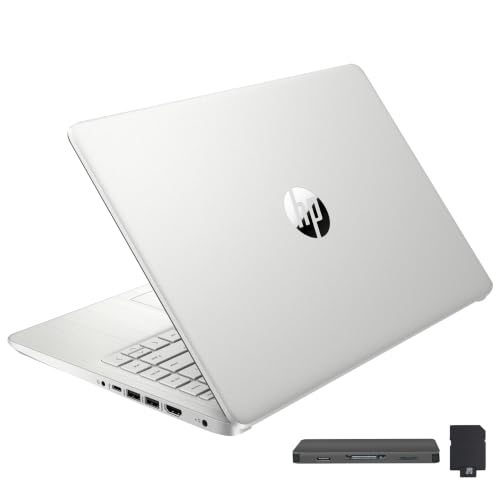
HP Stream 14 (docking station set) — Budget outlier
This review begins with the framing the introduction promised. The HP Stream 14 is a low-power budget laptop built around an Intel Celeron N4120, with 16GB of memory and 416GB of storage defined in its title as 128GB of eMMC plus a 288GB docking station set, Intel UHD graphics, a 720p camera, Wi-Fi, a year of Office 365 and Windows 11 S in silver, behind a 14-inch HD BrightView display. Its docking station set is bundled storage. It is not a workstation dock, it does not turn this machine into a workstation, and nothing in this review will pretend otherwise.
What the Stream honestly offers is a light desk at a light commitment. Sixteen gigabytes of memory is a respectable figure that keeps browser-based work — documents in the cloud, email, video calls at 720p, a second window of reference material — moving without the hesitation older budget machines were known for. The bundled storage set gives the home desk a place for its files beyond the modest 128GB of internal eMMC, which is the configuration’s tightest figure and the one a buyer must plan around: the internal drive is for the system and the current work, not for an archive.
The limits are structural and should be bought knowingly. A Celeron N4120 is an entry-level processor for light duties; sustained multitasking, large local spreadsheets and anything resembling data work will find its ceiling quickly. Windows 11 S, as the edition’s name in the title indicates, is the streamlined variant of the operating system rather than the Pro edition the fleet picks carry, and buyers with specific software to install should check its terms in Microsoft’s documentation. The HD display is a size-and-clarity compromise of the budget tier. None of this is hidden in the listing — the title states each element plainly — and a household with genuinely light needs gets a coherent little desk machine for the smallest commitment in this guide.
It suits a household’s second desk, a student in a browser-based programme, a light administrative corner — the reception inbox, the club secretary’s records — where the work is documents and communication rather than computation. It does not suit a professional desk, and its presence here is as the honest floor of the dockable conversation: the point below which a one-cable workstation stops being a meaningful description. Buyers tempted by its position in a dockable guide should re-read this review’s first paragraph before ordering.
- Processor: Intel Celeron N4120
- Memory: 16GB RAM
- Storage: 416GB total — 128GB eMMC plus 288GB docking station set
- Display: 14-inch HD BrightView
- Graphics: Intel UHD Graphics
- Camera: 720p
- Software named in title: 1 Year Office 365
- Operating system: Windows 11 S
- Thunderbolt port: Not stated in the listing title — verify with the manufacturer documentation
- Bundle note: The docking station set in this listing is bundled storage, per the title’s own storage definition
Strengths
- 16GB of memory keeps browser-based desk work moving at the budget tier.
- The bundled storage set expands a small internal drive for desk files.
- A year of Office 365 is included in the listing for document work.
Trade-offs
- The Celeron processor is an entry-level part for light duties only.
- Internal storage is 128GB of eMMC, the tightest figure in the guide.
- Windows 11 S is the streamlined edition, not the Pro of the fleet picks.
Best for: a household or student running a light, browser-based desk on a small budget. Not suited for: a professional one-cable workstation, because a Celeron processor and 128GB of internal storage cannot carry a multi-screen business desk.
Every category has a floor, and a trustworthy guide labels it. The Stream is this category’s floor — a light desk machine whose bundle is storage, included so that buyers can see exactly where the workstation conversation begins: above it.
One fair question remains: why include it at all? Because buyers searching for dockable laptops will meet this listing and listings like it, marketed with the same vocabulary as the Thunderbolt machines, and a guide that omitted it would leave those buyers to decode the difference alone. The decode is the service. A docking station set that is storage, a Celeron where the others carry Ultra and Ryzen processors, an S edition where they carry Pro — each contrast teaches the category’s real vocabulary faster than any definition could, and a household whose needs match the Stream’s honest specification can now buy it knowingly rather than hopefully.

Dell Pro 16 Premium (32GB/1TB) — Premium desk screen
The Dell Pro 16 Premium returns in this guide in its richer configuration — 32GB of DDR5 memory and a 1TB SSD where the high-end guide’s listing of the same line carried half of each — around an Intel Ultra 7 255U, a 16-inch WUXGA display, a backlit keyboard, a fingerprint reader, Wi-Fi 6E and Windows 11 Pro. It is included among dockable laptops as the premium desk machine of Dell’s current business line: the laptop a firm buys when the desk is a senior person’s permanent station and the screen is the centre of it.
Its dock story must be told with this guide’s usual discipline. The title names no Thunderbolt port and no dock, so the one-cable claim cannot be evidenced from the listing, and the spec box records the gap. What the title does evidence is everything around the connection: the guide’s joint-best memory and storage pairing, a current Ultra 7 processor, the largest and finest non-OLED screen in the set, a stated fingerprint reader and the Pro edition of Windows. A firm standardising on Dell’s current Premium line will confirm the port specification in Dell’s documentation — a reasonable step at this tier — and find the rest of the desk specification already at flagship level.
The 16-inch WUXGA panel is the working centre. In a docked arrangement the laptop’s screen typically remains the primary or the reference display, and WUXGA’s extra vertical room over FHD serves the long documents and wide models that senior desk work consists of. The richer configuration matters here precisely because docked multitasking is the memory-hungry pattern: three screens of windows is a heavier load than one, and 32GB absorbs it without the negotiations a 16GB machine begins by year two.
It suits the senior desk-based professional in a Dell-standardised firm, bought as the premium station and paired with the firm’s chosen dock. Buyers needing the port evidenced in the listing itself should take the EliteBook 6 G1a or the Latitude 5550, whose titles state their Thunderbolt hardware outright. Within a Dell fleet, though, this is the desk flagship — the configuration that corrects the standard Premium’s two modest figures and leaves the screen to make the argument.
- Processor: Intel Ultra 7 255U, 12-core, up to 5.2GHz
- Memory: 32GB DDR5
- Storage: 1TB SSD
- Display: 16-inch WUXGA
- Security hardware named in title: Fingerprint reader
- Wireless: Wi-Fi 6E
- Keyboard: Backlit
- Operating system: Windows 11 Pro
- Thunderbolt port: Not stated in the listing title — verify with the manufacturer documentation
- Ethernet port: Not stated in the listing title — verify with the manufacturer documentation
Strengths
- 32GB of memory and a 1TB SSD correct the standard Premium configuration’s modest figures.
- A 16-inch WUXGA display anchors a senior desk as its primary screen.
- A fingerprint reader is stated, and the Pro line suits managed deployment.
Trade-offs
- No Thunderbolt port is named in the title, so the dock connection needs a documentation check.
- The U-series processor favours efficiency over the H-series picks’ sustained pace.
- No dock or Ethernet is stated for desks that run wired.
Best for: a senior professional at a permanent desk inside a Dell-standardised firm. Not suited for: a buyer needing the dock port evidenced by the listing itself, because this title names no Thunderbolt hardware and the connection must be confirmed in documentation.
As a laptop, this is the strongest Dell desk specification in the guide. Its place in a dockable shortlist rests on its line and its buyer’s documentation check — a distinction this review has kept visible rather than smoothing over.
The richer configuration also changes this machine’s dock economics. A firm buying the 32GB, 1TB build is buying a five-year desk station, and over that horizon the dock paired with it will likely be replaced once while the laptop serves on — another reason the laptop, not the accessory, deserves the scrutiny this review has given it. Screen, memory and storage are the figures that will still be describing the working day in year four; on all three, this configuration is specified at the level a long service life requires.
Arranged by evidence, the set forms a ladder. At the top, two laptops state their Thunderbolt hardware and ask the buyer to choose the dock. In the middle, two bundles include the desk hardware in the box, with laptops strong enough to justify their place without it. At the base, one premium Dell waits on a documentation check to confirm its connection, and one budget HP redefines its bundle as storage and is labelled accordingly. The table below records the ladder in figures, including the internal storage column that bundle headlines make necessary.
Comparison Table
| Pick | Display | Memory | Internal storage | Dock evidence in title | Operating system |
|---|---|---|---|---|---|
| ThinkPad E16 (24GB) | 16-inch | 24GB DDR5 | 1TB SSD | Docking station bundled | Not stated in the listing title |
| Dell 16-inch (dock bundle) | 16-inch FHD+ touchscreen | 32GB DDR5 | 1TB SSD, plus 1TB docking station set | Docking station set bundled | Windows 11 Pro |
| HP EliteBook 6 G1a 16-inch | 16-inch FHD+ anti-glare | 32GB DDR5 | 1TB SSD | 2x Thunderbolt 4 stated | Windows 11 Pro |
| Dell Latitude 5550 | 15.6-inch FHD | 32GB DDR5 | 1TB SSD | Thunderbolt 4 and RJ-45 stated | Windows 11 Pro |
| HP Stream 14 | 14-inch HD | 16GB | 128GB eMMC, plus 288GB docking station set | Bundled storage set | Windows 11 S |
| Dell Pro 16 Premium (32GB/1TB) | 16-inch WUXGA | 32GB DDR5 | 1TB SSD | Not stated in the listing title | Windows 11 Pro |
How to Choose a Dockable Business Laptop
Start by deciding which road to the desk you trust. The port road — a laptop whose title states Thunderbolt 4, like the EliteBook 6 G1a and the Latitude 5550 — lets you choose the dock yourself, match it to your screens, and replace it independently when the desk changes. The bundle road — the E16, the Dell 16-inch, the Stream — trades that freedom for a desk that works out of one box, with the bundle’s contents and limits accepted as part of the purchase. Neither road is superior; they serve buyers who assemble and buyers who unbox, respectively, and confusing the two is where dock purchases go wrong.
Second, count the desk’s real demands before choosing the machine. Screens are the load: each external display adds windows, and windows consume the memory that docked configurations should carry in the 24GB to 32GB range, as four of these six do. Storage should be counted internally — the figure that travels with the laptop — with bundled capacity treated as the desk’s archive rather than the machine’s own. And the network deserves a decision: desks that run cable should shortlist the Latitude’s stated RJ-45 or confirm Ethernet through the dock in documentation.
Third, keep the category discipline this guide opened with. The laptop is the purchase; the dock is furniture. A modest laptop with an impressive dock remains a modest laptop at the airport, in the meeting and in year three, which is why the Stream’s review reads the way it does and why the E16’s review leads with its processor. Buy the machine for the work, let the dock serve it, and verify every connection claim in the title or the documentation — never in the bundle’s branding.
What Makes a Laptop Genuinely Dockable?
Three things, in descending order of importance. A connection capable of carrying the whole desk — display signals, data and power — in one cable, which in current business laptops means Thunderbolt 4 or a fully featured USB-C port, evidenced in the title or the documentation. Enough memory and processor pace to drive the extra screens without the fan becoming a colleague. And a physical life that suits the rhythm: a machine that will be connected and disconnected twice a day for years benefits from fast charge and from ports placed where a desk’s cable actually falls. The picks in this guide meet the test by stated ports or by bundled intent; the buyer’s remaining job is matching the strength of the evidence to the ambition of the desk.
Should You Buy a Laptop-and-Dock Bundle or Separate Pieces?
Bundles suit buyers setting up one desk, once, who value a working arrangement over an optimised one — the E16 is the model citizen of that approach, a strong laptop whose bundled dock removes the second purchase entirely. Separate pieces suit buyers with existing desk hardware, unusual screen arrangements, or a fleet standardising its docks across many machines, and for them the port-stated picks are the correct shortlist. The error to avoid is the hybrid regret: buying a bundle for its dock and discovering the laptop underneath was the compromise, or buying a portless-evidence premium machine and discovering the desk connection was assumed rather than confirmed. Read the title for what it actually sells — in this guide’s set, the titles are unusually willing to tell you.
How Many Screens Can a Docked Business Laptop Run?
The count depends on the dock, the ports and the resolutions involved, and no title in this guide prints a screen count — so this guide invents none. What the titles do establish is the foundation: stated Thunderbolt 4 on the EliteBook and the Latitude is the connection class that multi-display docks are built on, the bundled docks define their own arrangements on their listing pages, and the memory figures here — 24GB and 32GB on the serious desk picks — are sized for multi-window work across whatever screens the setup provides. Buyers planning a specific two- or three-screen arrangement should confirm the exact configuration against the dock and laptop documentation together, because the pair, not either piece alone, determines the result.
What Should You Do in the First Week With a New Docked Setup?
Test the departure, not the arrival. A docked desk proves itself at the moments of transition: connect in the morning and confirm every screen wakes in the right arrangement, undock for a meeting and confirm the laptop carries its work gracefully, return and confirm the reconnection restores the desk without a ritual of cable adjustments. Run that cycle deliberately during the first week, while the purchase can still be reconsidered, and load the machine the way the busiest day will — every window, every screen — rather than admiring it empty. Check, too, that the archive arrangement matches the plan: internal storage for the travelling files, bundled or dock-side storage for the desk’s own, so the first trip away from the desk does not discover a file that stayed behind.
Common Mistakes When Setting Up a Dockable Desk
Reading a bundle’s headline storage as internal storage is the error this guide’s arithmetic exists to prevent. Two picks here reach their storage headlines partly through bundled sets; a buyer planning the laptop’s travelling life around the headline figure will discover the difference at the worst moment, usually in another building. The companion error is assuming a bundled docking station is a full workstation dock — contents vary, the Stream’s set is storage, and the listing page, not the bundle’s name, is where the truth is itemised.
Assuming ports is the second pattern. Thunderbolt is stated in two titles here and absent from four, and a desk built on an assumed port becomes a desk rebuilt on adapters. The third pattern is buying the laptop for the desk and forgetting the road: a docked machine still travels to meetings, and the 16-inch picks that anchor a workstation are furniture-grade portable. Buyers whose weeks split evenly should weigh the 15.6-inch Latitude’s shape as seriously as its ports. None of these errors survives a careful reading of the title at the moment of order — which is, for the last time in this guide, the whole method.
Buyers choosing between the two Thunderbolt picks should let the desk decide: the EliteBook’s 16-inch screen and keypad serve the single permanent workstation, while the Latitude’s 15.6-inch shape and Ethernet serve the desk that shares its machine with the road and the building’s cabling. Both are defensible fleet purchases on stated evidence alone, which is more than most of the dockable market can claim.
Final Recommendation
For the serious one-cable desk, take the HP EliteBook 6 G1a 16-inch: twin stated Thunderbolt 4 ports, 32GB of memory, a terabyte of storage and a numeric keypad make it the most completely dockable specification here, with the dock itself left to your choice. Fleets and wired offices should take the Latitude 5550, whose title enumerates the entire traditional desk. Buyers wanting the desk in one box should take the ThinkPad E16 bundle for its H-series processor and honest internal terabyte, or the Dell 16-inch bundle where 32GB of memory and a large desk archive lead. The Dell Pro 16 Premium in its 32GB configuration is the senior desk’s screen-first choice inside a Dell firm, dock to be confirmed in documentation. And the HP Stream stands as the labelled floor: a light desk for light work, bought only by readers who understood its review. A dockable laptop is a promise made twice a day, at connection and at departure. Buy the machine that keeps both halves.
One last perspective ties the set together. The dock is where a laptop’s specification stops being a list and becomes a routine — the same cable, the same screens, the same chair, hundreds of times a year. Purchases that honour that routine buy memory for the multiplied windows, storage that lives where the work lives, and connections evidenced rather than assumed. The six laptops above were chosen because their titles let a buyer verify all three before the box arrives, and the two that ask for a documentation check say so in their reviews rather than hiding it.
Frequently Asked Questions
Is a docking station itself ever the product being recommended?
No. Every pick in this guide is a laptop. Three listings include a docking station or a docking station set among their contents, and those bundles are evaluated by the laptop at their centre; the dock is context, never the product.
Which picks state Thunderbolt 4 in their titles?
Two: the HP EliteBook 6 G1a 16-inch, which states two Thunderbolt 4 ports, and the Dell Latitude 5550, which states Thunderbolt 4 alongside RJ-45 Ethernet. The other titles name no Thunderbolt hardware, so their dock connections should be confirmed in manufacturer documentation.
What is the HP Stream’s docking station set, exactly?
By the title’s own definition, it is storage: the Stream’s 416GB total is 128GB of internal eMMC plus a 288GB docking station set. It is bundled capacity for the desk, not a workstation dock, and the Stream is positioned in this guide as a low-power budget outlier.
How much memory should a docked laptop carry?
Docked work multiplies windows across screens, so this guide’s serious desk picks carry 24GB or 32GB. Sixteen gigabytes, as on the Stream, suits light browser-based work; the professional desk should start at the E16’s 24GB figure and prefer 32GB where the workload is heavy.
The Dell 16-inch bundle claims 2TB of storage. Is that internal?
Half of it. The title defines the 2TB as a 1TB internal SSD plus a 1TB docking station set. Plan the laptop’s own capacity around the internal terabyte and treat the bundled terabyte as storage that lives at the desk.
Which pick suits a wired office network?
The Dell Latitude 5550. Its title states RJ-45 Ethernet alongside Thunderbolt 4, so the machine can join a cabled network directly or through a dock, with 32GB of memory and a numeric keypad completing the traditional desk specification.
Across the six answers, the recurring theme is arithmetic performed honestly: storage counted where it physically lives, ports credited where a title states them, and a budget bundle described in the vocabulary of what it is. A reader keeping those three habits will read any dockable listing — in this guide or beyond it — more accurately than the marketing around it expects.
Related Guides
A docked desk is one end of the business laptop’s life; the other end is the road. Readers speccing machines that must travel as well as dock should continue to the best thin business laptops, where slim machines keep their business credentials. Those pushing portability to its limit will find the extreme case argued in our guide to the best ultraportable laptops for business. And readers whose workspace extends beyond laptops into making things may be surprised where the fleet’s reading leads next: the best filament 3d printers, judged with the same title-first discipline.


