What's inside
- Key Takeaways
- Quick Picks
- How These Picks Were Chosen
- The Six Headsets in Detail
- Comparison Table
- Which Plug Does Your Desk Actually Have?
- Wearing One Ear All Day: Comfort Notes
- Who Actually Wears a Mono Headset All Day?
- Microphone Manners: Getting the Most From a Mono Boom
- Common Mistakes
- Frequently Asked Questions
- Final Recommendation
- Related Guides
As an Amazon Associate I earn from qualifying purchases. This post may contain affiliate links at no extra cost to you.
widgetverdict.com is reader-supported. When you buy through links on our site, we may earn an affiliate commission.
Where to buy: the safest first click in this roundup is the Poly Blackwire 3210, a single-ear wired headset that connects to a PC or Mac by USB-C or USB-A — the remaining five picks sit in their review sections below, each with its connector and certification details stated before any buying advice.
The best mono wired headsets solve a specific working problem: a person must talk and listen on calls for hours while still hearing the room around them. One earcup leaves the other ear open to a doorbell, a child, a supervisor’s question, a warehouse announcement or the simple social signal that a colleague standing nearby wants a word. That is why mono headsets persist in call centres, dispatch desks, reception roles and hybrid home offices long after stereo models took over music and gaming. Wired, meanwhile, removes the battery from the working day: no charging dock, no low-battery warning mid-call, no pairing ritual when the laptop changes. Plug in, and the headset is on shift.
Sorting these six picks honestly means sorting by three facts. The first is the connector: most here are USB headsets for computers, but the Jabra Evolve 30 II adds a 3.5mm jack that widens its reach to desk phones and controllers, while the Jabra Engage 50’s listing title is silent about its connection — a gap we flag rather than paper over. The second fact is certification: Microsoft Teams and Zoom certifications, and the older Skype for Business optimisation on the EPOS pick, tell a buyer how the headset’s controls and audio tuning were validated, which matters when an employer issues the device. The third fact is microphone engineering, the real battleground of this category: every pick claims noise cancellation, but the Engage 50 fields a three-microphone system, and the claims of the others rest on single noise-cancelling boom designs of differing generations.
Comfort is the quiet fourth fact. A mono headset concentrates all its clamping and weight on one side of the head, so headband balance, earcup padding and total weight decide whether the device is forgotten by ten o’clock or resented by noon. The reviews below treat all-day wear as a primary test, because in this category the headset that comes off early has failed no matter how clean its microphone sounds.
Key Takeaways
- Mono means one earcup: the open ear keeps the wearer aware of the room, the door and nearby colleagues.
- Wired means no battery management — these headsets work the moment the plug seats.
- Most picks connect by USB to a computer; the Evolve 30 II adds a 3.5mm jack for wider device reach.
- Teams and Zoom certifications signal validated call controls and tuning for those platforms.
- Microphone design is the differentiator, from single noise-cancelling booms to the Engage 50’s three-microphone system.
- Single-sided weight and clamping decide all-day comfort more than any audio specification.
Quick Picks
| Pick | Badge | Why it earns its place |
|---|---|---|
| Poly Blackwire 3210 | The dual-USB all-rounder | Single-ear Plantronics-lineage headset with a noise-canceling mic and both USB-C and USB-A connection for PC and Mac, working with Teams and Zoom. |
| Jabra Evolve 30 II (2025 Edition) Headset | The connector diplomat | A 2025-edition single-ear headset offering 3.5mm, USB-A and USB-C paths, a noise-cancelling microphone, Teams certification and call control. |
| Logitech H570e Wired Mono Headset | The in-line control classic | USB mono headset with a noise cancelling microphone, in-line controls with a mute button and an indicator LED for PC, Mac and laptop duty. |
| Yealink UH34 Wired Headset | The plug-and-play team player | USB-A single-ear headset with noise canceling mic and in-line control, certified for Teams and Zoom and aimed at call centres and hybrid work. |
| Jabra Engage 50 Mono | The three-microphone specialist | A call-centre mono headset whose 3-microphone system blocks background noise for agent focus, with enhanced hearing protection. |
| EPOS Sennheiser SC 30 USB ML | The Skype-era veteran | A single-sided business headset with HD sound and a noise-cancelling microphone on USB, built for Skype for Business environments. |
How These Picks Were Chosen
The filter for this roundup was strict about the format and loose about everything else: the product had to be a wired, single-ear headset with a boom microphone, sold for computer or phone calling. Stereo gaming headsets, Bluetooth mono earpieces and USB speakerphones all failed that filter, because a buyer searching for a mono wired headset has already decided the shape of the solution and needs help choosing within it. What remained was then checked for the evidence a listing title can honestly carry: connector types, platform certifications, microphone claims and intended workplace. Where a title states a certification, the review leans on it; where a title is silent — most notably the Engage 50’s connection type — the spec box says so in words, because guessing a connector on a purchasing page helps nobody.
Brand lineage was weighed openly. Poly’s Blackwire line descends from Plantronics, the name that defined the call-centre headset for a generation; Jabra and EPOS (carrying Sennheiser’s enterprise heritage) are the other two institutional suppliers in this space; Logitech and Yealink represent the computer-peripheral and IP-phone worlds respectively. That spread is deliberate. A mono wired headset is often bought by an employer in quantity, and the right answer depends on which ecosystem the employer’s phones, laptops and IT support already speak. The reviews name the home turf of each pick so a purchasing reader can match headset to fleet.
Price positioning was read from the category rather than from figures, since this guide prints none: the six picks span the accessible office tier (Logitech, Yealink, the Blackwire and Evolve lines) up to a professional call-centre instrument in the Engage 50. That spread is intentional. Mono wired headsets are bought both by individuals spending their own money on a home desk and by organisations spending facilities money on a floor, and a roundup that served only one of those buyers would mislead the other. The reviews signal, for each pick, which buyer’s logic it satisfies — personal value, fleet standardisation, or professional specification — so the reader can weigh the right argument.
We also weighted the unglamorous details that decide returns: whether call controls live on an in-line pod where a hand finds them without looking, whether a mute state is visible at a glance, and whether the headset can be worn on either ear — a detail titles rarely state and one we therefore do not claim for any pick here. When a specification is missing from a title, its absence is reported, not filled.
The Six Headsets in Detail

Poly Blackwire 3210
The Blackwire 3210 is the default recommendation for a mixed laptop fleet, and the reason sits in its cable: it connects to a PC or Mac via USB-C or USB-A, which means the same headset serves the older desktop down the hall and the current thin laptop with only small ports. The single-ear design keeps the room audible, the microphone is noise-canceling, and Poly positions it for Teams and Zoom work. The Plantronics lineage in the listing title is more than branding — the Blackwire family has been the issued headset in a great many offices, so IT departments know its behaviour, and replacement familiarity is a genuine workplace virtue.
For the wearer, the mono format’s bargain is awareness for immersion. On a call, speech arrives in one ear while the other ear tracks the household or the office floor, and that split attention is exactly what receptionists, dispatchers, team leads and working parents actually need. The noise-canceling microphone handles the outbound side of the bargain: the caller’s voice is favoured over the room’s clatter, so the open ear does not become an open window for the person on the other end of the line. In a home office with a dog, a kettle and a delivery driver all audible to the wearer, the caller should hear mainly the wearer.
Strengths
- USB-C and USB-A connection covers both current laptops and older desktops with one product.
- Noise-canceling microphone keeps the caller’s focus on the voice rather than the room.
- Single-ear design preserves awareness for roles that cannot seal themselves away.
Trade-offs
- One earcup means no stereo presence for video content or music between calls.
- The listing title does not describe in-line control details, so control layout needs a look at the full listing.
- Computer-only connection: no 3.5mm path to a desk phone or controller.
| Connection | USB-C or USB-A to PC/Mac |
|---|---|
| Design | Single-ear (mono) |
| Microphone | Noise-canceling |
| Platforms named | Microsoft Teams, Zoom |
| Call controls | Control layout is not described in the listing title; review the full listing’s control pod before fleet orders |
Fleet buyers should note the quiet advantage of a headset sold as an Amazon Exclusive variant of a known line: the product is a fixed, identifiable configuration, which simplifies spares and replacements. When a headset is stepped on in month seven — and in offices, headsets get stepped on — the replacement that arrives is the same device the team already knows, with the same fit and the same microphone behaviour, and nobody’s call quality changes under them mid-quarter.
One more workplace reality favours this pick: hot-desking. In offices where nobody owns a desk, the headset is the personal constant carried between workstations, and a model that plugs into either USB generation without an adapter removes the small daily negotiation with whatever machine the morning provides. The Blackwire name also carries residual trust with procurement departments, which sounds like a soft factor until a purchase needs a signature; a line with a long office history gets approved faster than an unknown badge, and the worker wears the result of that approval eight hours a day. Soft factors decide real deployments more often than spec sheets do.
The single-ear layout also changes how a worker uses speakers. With one ear open, many Blackwire wearers keep meeting audio partly in the room — a colleague can overhear a fragment and contribute, a supervisor can catch a problem early. That ambient collaboration is impossible in a sealed stereo headset and undesirable in a formal call centre, but in small teams it is a genuine working style, and mono headsets are its enabling hardware. Poly’s positioning of this model for mainstream Teams and Zoom work suggests the company understands its buyers live in exactly that in-between world: structured calls, unstructured rooms.
Best for: a hybrid worker or small office standardising on one headset across mixed USB-C and USB-A laptops. Not suited for: a desk that must also plug into a 3.5mm desk phone, since this model’s stated paths are USB only. Mixed-fleet buyers can check the Blackwire 3210 listing to confirm the exact connector arrangement in the box.

Jabra Evolve 30 II (2025 Edition) Headset
The Evolve 30 II is the connector diplomat of this roundup: a wired single-ear headset offering a 3.5mm jack alongside USB-A and USB-C connectivity, with a noise-cancelling microphone, Microsoft Teams certification and call control, in a 2025 edition. That combination answers the messy reality of modern desks, where the morning is laptop calls, the afternoon might be a desk phone or a controller-based softphone, and the headset is expected to follow the worker rather than dictate the setup. Jabra’s Evolve line is its office range, and the 30 tier is the accessible end of it — the model a company issues widely rather than reserving for executives.
Teams certification is the credential to weigh. It signifies that the headset’s call control — answering, ending and muting from the headset rather than the screen — has been validated against Microsoft’s platform behaviour, which removes a category of small daily frictions: the missed unmute, the call answered on the wrong device, the meeting joined with the microphone live. For a worker whose day is a wall of Teams calls, those frictions are the job’s texture, and a certified headset smooths them. The single-ear format keeps the office present, and the noise-cancelling boom keeps the office out of the call.
Strengths
- Three connection paths — 3.5mm, USB-A, USB-C — follow the worker across devices.
- Microsoft Teams certification validates call control behaviour on the dominant meeting platform.
- A current 2025 edition, so the design reflects present laptop port realities.
Trade-offs
- Multiple connection paths mean an adapter or controller arrangement to keep track of at the desk.
- Mono listening still trades away stereo for awareness — a deliberate but real compromise.
- Entry-tier positioning means fewer premium materials than Jabra’s higher Evolve models.
| Connection | 3.5mm jack, USB-A, USB-C |
|---|---|
| Design | Single-ear (mono), black |
| Microphone | Noise-cancelling |
| Certification | Microsoft Teams certified, with call control |
| Weight | The listing title gives no weight figure; compare the full listing’s specification if all-day lightness is the deciding factor |
The 3.5mm jack deserves a sentence of respect, because it is quietly becoming the exception in this category. A jack-equipped headset still works when the laptop is closed — into a phone, a tablet, a handheld recorder, a controller — and it works during the USB driver’s worst moments, which every long-serving office worker has met. Buyers equipping a school office, a clinic reception or any desk where devices rotate unpredictably should treat that analogue fallback as insurance rather than nostalgia.
The 2025 edition date is itself information. Headset lines are revised when the installed base’s hardware changes, and a 2025 refresh of an established office model signals that Jabra has re-checked the design against current laptops, current platform behaviour and current expectations of call control. Buyers choosing between a discounted older headset and a current edition should price that re-validation honestly: the saving is real, but so is the risk that an older design’s assumptions — port types, control protocols, wearing expectations — belong to a desk that no longer exists. For a personal purchase the older model may be the smart buy; for a fleet being standardised for years, the current edition is the defensible one.
Best for: a Teams-centred worker whose headset must move between laptop generations and the occasional 3.5mm device. Not suited for: a buyer wanting a single fixed USB-C-only desk setup with no adapters in the drawer, where the simpler Blackwire arrangement tidies better. Diplomats can open the Evolve 30 II listing and confirm which cables and controller the current edition bundles.

Logitech H570e Wired Mono Headset
The H570e is the in-line control classic: a wired mono USB headset whose control pod carries the call — including a mute button — and whose indicator LED shows call status at a glance. Logitech lists it for PC, Mac and laptop use with a noise cancelling microphone. In a category where many headsets hide their controls on an earcup the wearer cannot see, the H570e’s philosophy is tactile: the hand drops to the cable pod, finds the button by touch, and the LED confirms the state. For workers who mute and unmute forty times a day, that tactile loop is the product.
The indicator LED deserves more credit than spec sheets give it. The most common mono-headset failure in real offices is not audio quality; it is the uncertain mute — the wearer unsure whether the room can hear the caller, or the caller can hear the room. A visible status light on the control pod answers the question without a screen, a software panel or a hopeful guess. Combined with the noise cancelling microphone’s outbound filtering, the H570e is engineered around the social mechanics of calls: speak clearly, mute certainly, know which state you are in.
Strengths
- In-line controls with a dedicated mute button, operable by touch without looking down.
- Indicator LED makes call and mute status visible at a glance.
- USB connection suits PC, Mac and laptop desks without adapters.
Trade-offs
- USB-only connection leaves desk phones and 3.5mm devices unserved.
- No platform certification is claimed in the listing title, unlike the Teams-certified picks.
- A long-serving design: buyers wanting the newest materials should compare the 2025 Jabra.
| Connection | USB |
|---|---|
| Design | Mono, black |
| Microphone | Noise cancelling |
| Controls | In-line controls with mute button and indicator LED |
| Certification | No platform certification is named in the listing title; check the full listing if a certified device is an IT requirement |
Logitech’s distribution is the practical footnote: because the H570e has been sold through ordinary computer channels for years, it is the headset a small business can replace same-week from multiple suppliers, and familiarity among IT generalists is high. For a five-person office that cannot afford a device standardisation project, the headset everybody’s technician already understands is a rational standard in itself — a point that rarely appears in reviews and often decides real purchases.
There is a training dividend to controls this legible. New hires in phone-heavy roles make their worst errors in the first fortnight, and most of those errors are mute errors — speaking to a customer while muted, or addressing the room while live. A headset whose state is announced by a light, and whose mute is a distinct physical button rather than a software toggle buried in a meeting window, shortens the dangerous learning period. Supervisors choosing headsets for teams with high turnover should weigh that legibility as a risk control, not a convenience, because the cost of one broadcast mistake dwarfs the price difference between headsets.
Best for: a call-heavy desk worker whose day is governed by the mute button and who wants its state visible. Not suited for: an employer whose IT policy requires a named Teams or Zoom certification on issued devices. Control-first buyers can look over the H570e listing to see the control pod layout in detail.
Yealink UH34 Wired Headset
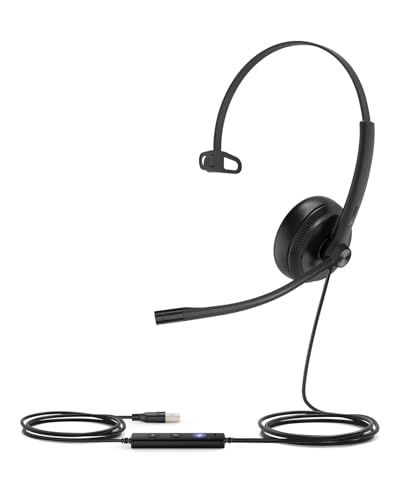
The UH34 arrives from the IP-phone world: a wired USB-A headset with a noise canceling microphone, in-line control and an on-ear single-ear design, certified for Teams and Zoom and described by Yealink as plug and play across PC, laptop and IP phone, for call centre, hybrid work and all-day comfort. Yealink’s home turf is the desk phone on the office desk, and the UH34 reflects that heritage — it is built to be issued, to survive being issued, and to make a new hire productive in the time it takes to plug in a USB connector.
Plug and play is a phrase worth honouring in this category. A headset that needs a driver hunt or a settings expedition before the first call is a headset that generates support tickets; the UH34’s proposition is the opposite, aimed at call centres and hybrid programmes where hundreds of units meet hundreds of laptops. The Teams and Zoom certifications reinforce the same promise from the software side: the platform will recognise the device and its controls as a known quantity. For the individual hybrid worker the benefit is smaller but real — the headset behaves identically at the office desk and the kitchen table.
Strengths
- Teams and Zoom certified, with plug-and-play behaviour across PC, laptop and IP phone.
- In-line control and noise canceling mic cover the call-centre essentials without complexity.
- All-day comfort is a stated design aim, matching its single-ear on-ear format.
Trade-offs
- USB-A only, so USB-C-only laptops need an adapter the other picks avoid.
- On-ear rather than over-ear fit will not suit wearers who dislike pressure on the ear itself.
- Yealink’s ecosystem tilt favours offices already running Yealink phones.
| Connection | USB-A |
|---|---|
| Design | Single-ear, on-ear |
| Microphone | Noise canceling, with in-line control |
| Certifications | Teams and Zoom certified |
| Intended settings | Call centre, hybrid work, PC/laptop/IP phone |
The IP phone compatibility is the detail that separates this pick from the laptop-only crowd. Many hybrid workers still have a hardware phone for the calls that matter — the clinic line, the support queue, the number printed on the website — and a headset that serves both the softphone on the laptop and the phone on the desk removes the two-headset tangle from the working day. Offices mid-migration from desk phones to softphones, which is to say most offices, are precisely the UH34’s natural habitat.
Support economics complete the UH34’s case. Every distinct headset model in a fleet multiplies the troubleshooting scripts, the spare-parts shelf and the chance that a helpdesk call ends with the wrong advice. A plug-and-play model from the same maker as the office’s desk phones collapses several of those variables into one vendor relationship. That is an unglamorous virtue, invisible in a product photograph, and it is the kind of virtue that decides five-hundred-unit orders. Individual buyers inherit the benefit in miniature: a headset the world’s support forums already understand is a headset whose every quirk has a searchable answer.
Best for: a call-centre or hybrid programme issuing headsets across laptops and Yealink-style desk phones. Not suited for: a USB-C-only laptop bag, where the fixed USB-A plug adds a permanent adapter. Programme buyers can review the UH34 listing for the current certification and bundle details.

Jabra Engage 50 Mono
The Engage 50 Mono is the microphone specialist: a wired call-centre headset built around a three-microphone system that blocks background noise to keep agents focused, with enhanced hearing protection for the wearer. Where the other picks treat noise cancellation as a feature, the Engage 50 treats it as the product. Three microphones give the system more information about which sound is the agent’s voice and which is the neighbouring agent, the air conditioning and the office dog, and in a dense call centre that discrimination is the difference between a caller hearing one voice and hearing the floor.
The hearing protection line in the title signals the intended environment just as clearly. Call centres manage acoustic incidents — sudden loud tones, feedback spikes — as an occupational reality, and a headset designed with enhanced hearing protection is designed for eight-hour shifts under professional supervision, not for occasional home calls. That professional gravity cuts both ways: the Engage 50 is arguably over-specified for a quiet home office, and exactly specified for the noisy floor it was drawn for. Buyers should also note what the title does not say: it names no connector, so the connection arrangement must be confirmed on the full listing before this headset is matched to a particular desk setup.
Strengths
- Three-microphone system dedicated to blocking background noise around the agent.
- Enhanced hearing protection suits long, supervised call-centre shifts.
- Purpose-built for agent focus rather than adapted from a general office design.
Trade-offs
- Connection type is not stated in the listing title — verify before matching it to your phones or PCs.
- Professional call-centre specification is more than a quiet home office will ever use.
- Mono format, as throughout this roundup, keeps one ear open at the cost of stereo.
| Connection | Not identified in the listing title — confirm the exact connection on the full listing or Jabra’s documentation |
|---|---|
| Design | Mono telephone headset |
| Microphone | 3-microphone system for background-noise blocking |
| Protection | Enhanced hearing protection |
| Intended setting | Call centre agent work |
There is a management argument for this class of headset that individual buyers can borrow: in a centre, microphone quality is a quality-assurance tool. Recordings are reviewed, coaching is given, disputes are settled from the tape. A three-microphone system that hands reviewers a clean agent channel makes every one of those processes more reliable, and the headset pays for its sophistication in supervision rather than in the agent’s own experience. Home workers rarely record themselves — but every worker whose calls are reviewed, from insurance intake to telehealth support, inherits the same logic.
The three-microphone idea also future-proofs the purchase against the room getting louder. Offices densify; hybrid schedules concentrate the in-office days, so the days a floor is occupied are the days it is full. A headset bought for today’s moderate noise may spend its third year in a room twice as loud, and microphone headroom — like the wireless range discussed in other guides — is cheapest bought at the start. The Engage 50’s specialisation means its buyer is purchasing margin against a foreseeable future, which reframes its professional pricing as planning rather than indulgence, at least for organisations that record, review and answer for their calls.
Best for: a noisy call-centre floor or any recorded-call role where the agent’s channel must stay clean. Not suited for: a purchase that needs the connector confirmed by the title alone, or a quiet spare-room office where its noise armour goes unused. Floor managers can inspect the Engage 50 listing to settle the connection question against their desk hardware.

EPOS Sennheiser SC 30 USB ML
The SC 30 USB ML is the veteran: a single-sided business headset from EPOS carrying Sennheiser’s enterprise lineage, with HD sound, a noise-cancelling microphone and a USB connector, built for Skype for Business — the ML in its name marks that Microsoft Lync-era optimisation. Its presence in a current roundup needs honest framing. Skype for Business has been succeeded by Teams in most organisations, so this pick’s natural buyer is narrower than the others: an organisation still running the older platform, a buyer who values the Sennheiser-derived audio tuning and a simple USB connection, or a fleet replacing like for like.
Judged on its own terms, the formula remains coherent. HD sound in the earpiece, a noise-cancelling boom for the caller’s benefit, a single-sided fit that keeps the room present, and a USB plug that any business laptop accepts. EPOS as a brand exists precisely to carry Sennheiser’s enterprise audio forward, and headsets of this generation earned their installed base by surviving daily office abuse. The reviewer’s caution is about trajectory, not quality: a buyer standardising a new fleet today should weigh whether an optimisation aimed at a retiring platform serves a five-year plan.
Strengths
- HD sound with a noise-cancelling microphone from an enterprise audio lineage.
- Simple USB connection that any business laptop of its era accepts directly.
- Single-sided design keeps the wearer aware of the office around the call.
Trade-offs
- Optimised for Skype for Business, a platform most organisations have replaced with Teams.
- USB connector generation is not detailed in the title; USB-C-only laptops may need an adapter.
- No current-platform certification is claimed in the listing title.
| Connection | USB |
|---|---|
| Design | Single-sided business headset, black |
| Microphone | Noise-cancelling |
| Audio | HD sound |
| Platform focus | Skype for Business |
The like-for-like replacement case deserves its due, because it is more common than buying guides admit. Offices standardised on a headset years ago, trained staff on it, stocked its spares, and built their phone habits around its controls. When units wear out one by one, replacing them with the same model preserves all of that invisible infrastructure. The SC 30’s continued availability serves exactly those fleets, and for them its familiarity is not a compromise — it is the entire point of the purchase.
A final, fair word on HD sound, the claim this pick leads with. In mono headset terms, HD or wideband audio means the caller’s voice carries more of its natural frequency range than old narrowband telephony allowed, which reduces listening fatigue across a long shift — voices sound like people rather than like telephones. The benefit is subtle hour by hour and significant week by week, and it is shared, in fairness, by several modern picks in this roundup. Where the SC 30 earns its mention is in delivering that clarity inside a deliberately conservative package: no new controls to learn, no platform migration bundled into a headset purchase, just a clearer version of the tool the team already uses.
Best for: an organisation maintaining a Skype for Business-era fleet or replacing SC-series headsets like for like. Not suited for: a new fleet standardising on Teams, where the certified Jabra and Yealink picks align with the platform’s future. Fleet maintainers can find the SC 30 USB ML listing to confirm stock and configuration.
Comparison Table
| Headset | Connection | Microphone | Platform signal | Home turf |
|---|---|---|---|---|
| Poly Blackwire 3210 | USB-C or USB-A | Noise-canceling | Works with Teams, Zoom | Mixed laptop fleets |
| Jabra Evolve 30 II (2025) | 3.5mm, USB-A, USB-C | Noise-cancelling | Teams certified, call control | Desks with rotating devices |
| Logitech H570e Mono | USB | Noise cancelling | No certification named in title | Mute-heavy call desks |
| Yealink UH34 | USB-A | Noise canceling, in-line control | Teams/Zoom certified | Call centres, IP-phone offices |
| Jabra Engage 50 Mono | Not stated in title | 3-microphone system | Call-centre professional line | Noisy agent floors |
| EPOS SC 30 USB ML | USB | Noise-cancelling | Skype for Business | Legacy fleet replacement |
Which Plug Does Your Desk Actually Have?
Begin with the hardware census, because it eliminates half the table in a minute. List the devices the headset must serve: the laptop’s actual ports (USB-C only is now common), any desk phone, any second machine. USB-C-only laptops point to the Blackwire 3210 or the Evolve 30 II. A desk that includes a 3.5mm device points to the Evolve alone. An IP-phone estate points to the UH34. A call-centre floor with its own telephony points to the Engage 50, once its connection is confirmed against the floor’s hardware. The census sounds trivial, yet most headset returns in this category are connector returns — the device was fine and the plug was wrong — so the minute spent listing ports is the highest-value minute in the purchase.
A word about buying for a team rather than a person, since mono headsets are so often team purchases. Standardise on one model per role, buy a small float of spares at the same time as the main order, and record which connector variant each desk received. The float matters because headset failures are never scheduled: the spare on the shelf converts a dead headset from a day of speakerphone apologies into a two-minute swap, and it costs a fraction of the disruption it prevents. Individual buyers can borrow the same logic at household scale — the worker whose income depends on calls should own a backup headset, and the previous generation’s still-working unit is the natural candidate.
Then weigh the room the microphone must defeat. A spare bedroom needs only competent noise cancellation, which every pick here offers. A living room shared with a television and children argues a step up. A genuine call-centre floor, with forty voices in one airspace, is the Engage 50’s stated problem and should be bought for accordingly. Finally, weigh the platform: Teams-certified picks repay their credential in call-control smoothness on Microsoft estates, while platform-agnostic USB picks serve mixed Zoom, Meet and softphone environments without favour. Awareness of the open ear is the constant — if the job needs full stereo immersion, this entire category is the wrong shelf, and the stereo sibling of any of these brands is the honest redirect.
Mono wired headsets sit inside a wider family of single-purpose audio tools, and neighbouring needs have their own guides: riders solving the same one-ear problem at speed will find Best Motorcycle Headsets for Half Helmets, younger users at classroom desks are covered by Best Headsets With a Mic for Students, and workers who want the mono idea without the cable should read Best Mono Bluetooth Phone Headsets before deciding the wire is truly wanted.
Wearing One Ear All Day: Comfort Notes
Single-ear comfort is asymmetric comfort, and it rewards small habits. Alternate ears across the day if the headset’s design allows repositioning — many mono headsets rotate the boom for left or right wear, though buyers should confirm that on the specific listing rather than assume it, since the titles here do not state it. Position the headband so its pressure spreads across the skull rather than concentrating above the covered ear, and take the headset off during natural breaks; the open-ear design makes removal easy, which tempts wearers to keep it on through lunch and arrive at four o’clock with a pressure ache they blame on the wrong cause. The earpiece itself should sit without sealing — mono headsets are not earplugs, and a fit that feels plugged is a fit adjusted wrong.
Glasses wearers deserve a specific note, because a mono headband interacts with spectacle arms on the covered side only, which produces an asymmetric pressure that stereo wearers never meet. The remedies are mundane: seat the headset before the glasses, or after, and notice which order your own ears prefer; choose the ear without the hearing aid, the earring or the tender piercing as the covered side; and if the headset allows it, give the uncovered side a turn during the afternoon so the spectacle arm on the working side gets relief. None of this appears on a spec sheet, and all of it decides whether a full-shift wearer keeps the headset or quietly reverts to a speakerphone.
Cable behaviour is the wired format’s comfort tax. Route the cable so it falls behind the chair’s armrest rather than across the lap, keep the in-line control pod within the hand’s natural drop zone, and give the cable a strain-relief loop at the desk edge so a rolling chair tugs the loop rather than the earpiece. These are thirty-second arrangements made once, and they convert the wired headset’s theoretical disadvantage — the tether — into a non-event for the remaining life of the product. Workers who skip them conclude that wired headsets are annoying; workers who make them forget the cable exists, which is the wired format working as intended.
Who Actually Wears a Mono Headset All Day?
The honest answer is: people whose jobs are interrupted for a living. The receptionist who must hear a visitor arrive mid-call. The dispatcher whose radio, telephone and room all compete. The support team lead who fields escalations from the chair next door while staying on a customer call. The insurance intake worker whose calls are recorded and reviewed. The hybrid parent whose office door is also the household’s thoroughfare. What unites them is that sealing off the room would make them worse at the job, not better — their awareness is part of their function — and a mono headset is the only call tool designed around that fact rather than against it.
There is a safety dimension in some of these roles that buying guides rarely mention. Warehouse and facilities staff who take calls while moving through working spaces need the open ear for alarms, vehicles and colleagues’ warnings; a sealed stereo headset in those environments is not a comfort choice but a hazard. Employers in such settings often mandate single-ear devices, and the wired requirement follows from shift length: a headset that must survive a twelve-hour shift without a charging window is a headset with a cable. The picks in this roundup were chosen with those mandated environments in mind as much as with the home office, which is why durability of cable and simplicity of controls recur throughout the reviews.
There is also the matter of the second screen’s tyranny. Modern desk work scatters call controls across meeting windows, softphone panels and operating-system mixers, and every scatter is a chance to unmute into the wrong room. The mono wired headset’s answer is to collapse the important controls back into hardware — a pod in the hand, a button under the thumb, a light in the corner of the eye. Workers in regulated roles, where a live microphone at the wrong moment is a compliance event rather than an embarrassment, choose this category for that collapse as much as for its audio. Hardware state is honest state; software state is a rumour the interface tells you.
Finally, consider the worker whose calls are the minority of the day. For them the headset lives on a hook and is grabbed forty times, and the virtues that matter are instant readiness and zero ceremony — no wake-up delay, no pairing check, no battery gamble. Wired mono headsets are the only category that offers literally zero ceremony, and that is why they survive every prediction of their death: the grab-and-talk desk keeps re-electing them, one hook at a time.
Microphone Manners: Getting the Most From a Mono Boom
Every pick in this guide carries a noise-cancelling boom, and every boom rewards the same handful of habits. Position the microphone near the corner of the mouth rather than directly in front of it; a capsule parked on the lips captures breath blasts on hard consonants and makes the wearer sound like a weather system. Keep the distance constant — the value of a boom over a laptop’s built-in microphone is precisely that the voice stays at one distance while the head turns, types and reaches for coffee. Speak at the volume you would use across a desk, because noise-cancelling systems are tuned for conversational levels and can pump or clip when a wearer shouts into them from two centimetres away.
Test the outbound sound the way the caller hears it. Most meeting platforms offer a test call or a recording check, and a thirty-second sample played back honestly reveals boom position, room echo and the neighbour’s radio more truthfully than any specification. Do the test in the real room at the real hour — the home office at nine in the morning, with the household awake, is a different acoustic from the same room at midnight. Workers who make this single test stop blaming headsets for placement problems, and start sounding like the colleague everyone prefers to have on the call.
One last habit separates the professionals from the merely equipped: they announce their mute discipline to the call itself. A chair who says at the outset that they will mute while others present, and unmute to speak, sets an expectation that makes the occasional two-second delay read as courtesy rather than absence. The headset enables the behaviour; the announcement makes it legible. In recorded environments the same discipline creates cleaner tapes — long stretches of true silence where a room’s coughs, keyboards and side conversations would otherwise sit under the caller’s words, waiting for a reviewer to wonder what was said off the record.
Common Mistakes
- Ordering USB-A headsets for a USB-C laptop fleet. The adapter shuffle that follows costs more goodwill than the headsets saved. Census the ports first.
- Assuming certification is marketing. Teams certification governs whether the headset’s buttons drive the software’s call state; on a Teams estate that is a daily, practical difference.
- Judging the microphone from the wearer’s side. Noise cancellation benefits the caller, not the wearer. Evaluate it by recording a call or asking the other end, never by how the headset feels.
- Ignoring the mute state’s visibility. A headset whose mute cannot be confirmed at a glance will eventually broadcast something private. Prefer a button and an indicator you trust.
- Buying stereo for a mono job. Sealing both ears in a role that needs room awareness creates missed doorbells, missed supervisors and missed children — the format exists because the awareness is the feature.
- Skipping the connector check on the Engage-class picks. When a title does not name the connection, the listing must be read before the headset is matched to hardware.
Employers rolling out a mono standard should pilot before they purchase at scale: issue two candidate models to a dozen representative wearers for a fortnight of real shifts, and let the wearers’ ears vote. The pilot surfaces the things no review can — which headband suits the team’s actual head shapes, which control pod survives the team’s actual habits, which microphone pleases the team’s actual callers. A fortnight of piloting costs a few units and prevents the particular misery of five hundred headsets that everybody hates equally, a misery that purchasing departments remember for years and wearers remember longer.
Frequently Asked Questions
Why choose mono when stereo headsets cost about the same?
Because the open ear is the feature. Roles that mix calls with a physical environment — reception, dispatch, supervision, parenting — need the room in one ear and the caller in the other. Stereo seals the room out, which is better for focus work and worse for every job this category serves.
Does a wired headset really beat a wireless one for desk work?
For a fixed desk, wired removes charging, pairing and battery ageing from the working week, and the connection cannot drop. Wireless earns its place when the worker moves around the room mid-call. The desk-bound majority are served better by the plug, which is why call centres still issue wired headsets at scale.
What does Teams certification change in daily use?
It aligns the headset’s physical controls with the software’s call state: answer, end, mute and volume from the headset behave as the platform expects, and the device is recognised as a validated audio endpoint. On a Teams estate that alignment removes small frictions dozens of times a day.
Can a mono USB headset work with a desk phone?
Only if the phone offers a USB headset path — many IP phones do, which is why the Yealink pick names IP phone use. Traditional analogue desk phones use different connections entirely. Check the phone’s ports, not the headset’s hopes, before assuming compatibility.
Can I wear a mono headset on either ear?
Many mono designs allow the boom to rotate so the headset can be worn on the left or the right, but the listing titles in this roundup do not state it for these six, so treat it as a listing-level check rather than an assumption. If alternating ears across the day matters to you — and for full-shift wearers it should — confirm the rotation on the specific model’s full listing before ordering.
How long should a wired mono headset last in office service?
The electronics rarely fail first; cables, ear cushions and boom hinges are the wear items. A headset treated with basic cable discipline typically serves for years, and models from established office lines remain replaceable like for like, which extends the practical life of the whole fleet standard.
Final Recommendation
Let the desk decide. Mixed modern laptops point to the Blackwire 3210’s dual USB or the Evolve 30 II’s three-path flexibility, with the Jabra’s Teams certification tipping Microsoft estates. Mute-driven call work belongs to the H570e and its honest indicator light; issued-fleet and IP-phone environments belong to the UH34; genuinely noisy floors justify the Engage 50’s three microphones once its connection is confirmed; and legacy Skype-era fleets can hold their standard with the SC 30. Every pick here keeps one ear on the room and the battery question permanently closed — choose the plug your hardware speaks, keep a spare on the shelf if calls pay your wage, and the mono wired format will repay you in the plainest currency a working day has: calls that start instantly, callers who hear only you, and a headset still comfortable when the last meeting finally ends.
Related Guides
Adjacent questions, adjacent guides: Best Motorcycle Headsets for Half Helmets for open-ear thinking on the road, Best Headsets With a Mic for Students for the classroom version of this format, and Best Mono Bluetooth Phone Headsets for cutting the cable while keeping one ear free.