What's inside
- Key Takeaways
- Quick Picks
- How We Chose These Picks
- Comparison Table
- Which Specs Actually Matter When Shopping the Best 100 Dollar Android Phones?
- How Do You Set Up a Budget Phone So It Stays Fast?
- What About Carrier Compatibility on Cheap Imports?
- How Does Each Contender Survive a Real Saturday?
- What Should You Verify During the First Week of Ownership?
- Why Do Two Phones With Identical Spec Sheets Feel So Different?
- How Should Parents Approach a First Phone at This Level?
- Which Everyday Apps Expose a Cheap Phone First?
- Common Mistakes
- Final Recommendation
- What Does Owning the Cheapest Phone in the Shop Teach You?
- When Does Saving More Money Stop Making Sense?
- How Do You Hand This Phone Down Without Handing Down Problems?
- What Separates a Satisfied Owner From a Frustrated One After Six Months?
- Why Does the Second-Hand Market Keep Pointing Back to These Models?
- How Should You Read a Budget Phone Listing Without Being Fooled?
- One Last Test Before You Commit
- Frequently Asked Questions
- Related Guides
As an Amazon Associate I earn from qualifying purchases. This post may contain affiliate links at no extra cost to you.
widgetverdict.com is reader-supported. When you buy through links on our site, we may earn an affiliate commission.
Where to buy: every linked pick below points to its Amazon listing, where you check price on Amazon before ordering because street pricing at this end of the market moves weekly. Hunting the best 100 dollar android phones means accepting a hard ceiling and then refusing to waste it. A hundred dollars buys a working smartphone, not a small flagship, and the difference between a good one and a miserable one comes down to decisions manufacturers hide in spec sheets: storage you cannot expand cheaply, update promises that quietly expired, screens that wash out outdoors.
Shoppers at this level usually carry one of three stories. A cracked handset needs replacing before payday. A teenager needs a first phone that survives group chats, school portals and the bus ride home. A grandparent wants calls, photos of grandchildren and a screen readable without squinting. Each story points at a different winner from the same short list, which is why this guide ranks by job rather than by spec-sheet bragging.
Nothing here earns a place through a headline camera number or a processor name dropped without context. Each candidate had to clear four hurdles: a display large enough for maps and video, storage that will not choke within a year, a battery sized for a full waking day, and a software path that does not strand you on an abandoned Android build. Phones failing two hurdles were cut even when their listings looked tempting.
Key Takeaways
- A firm hundred-dollar ceiling rewards patience, because several credible models drift into range during promotions rather than living there permanently.
- Storage matters more than camera megapixels here; sixty-four gigabytes fills fast once messaging apps cache a year of family videos.
- Carrier compatibility decides everything for buyers on smaller networks, so band support deserves checking before screen size debates begin.
- Samsung and Motorola publish clearer update commitments at this tier than most import brands, easing long-term ownership worries.
- A cheap phone plus a case and screen protector still beats a slightly fancier phone carried naked and cracked by March.
Quick Picks
| Pick | Badge | Why it earns a slot |
|---|---|---|
| Xiaomi Redmi 15C 4G | Big-screen value | A tall display and generous battery suit readers, riders and video callers watching every dollar. |
| TCL 50 XL 5G | Fastest cheap screen | Its smooth 120Hz panel makes scrolling feel far pricier than the bracket suggests. |
| Samsung Galaxy A15 5G | Safest long-term bet | Years of promised updates protect buyers who keep handsets until they truly die. |
| Motorola Moto G Power 5G (2024) | Battery champion | Endurance-first tuning serves couriers, carers and anyone far from outlets all day. |
| Xiaomi Redmi 13C | Prose-only pick | A simple, roomy handset for GSM carriers when found through a trusted seller. |
| OnePlus Nord N30 5G | Prose-only pick | Quick charging and a fluid display reward buyers who can source one reliably. |
How We Chose These Picks
Filtering began with the ceiling itself, applied honestly. Models that only touch this bracket through dubious marketplace listings from unknown sellers were treated cautiously, while established models cycling through retailer promotions counted as realistic targets. That distinction matters because a bargain you cannot actually buy, or cannot return, is not a bargain at all.
Daily usability formed the second filter. Reviewers of cheap phones obsess over benchmark scores, yet owners notice stutters when switching between maps and messages, keyboards lagging behind thumbs, and galleries taking seconds to render thumbnails. Modest processors paired with enough memory and clean software beat ambitious chips starved of both, so balance outranked raw numbers throughout our shortlisting.
Longevity formed the third filter, and it eliminated several shiny candidates. A handset bought for a hundred dollars often stays in service three or four years, passed between family members as needs change. Update policy, spare-part availability and case selection therefore weighed heavily. A phone abandoned by its maker after one Android version becomes a liability, however bright its launch-day discount looked.
Finally, we mapped each survivor to a person rather than a podium. Six phones share this page because six distinct buying situations share this budget. Reading the verdict lines under each review will route you faster than any ranking order, since the top-listed model is not automatically your model.

Xiaomi Redmi 15C 4G — Big-screen value
Grandparents video-calling from kitchen tables will appreciate what Xiaomi prioritised here: sheer viewing area. The Redmi 15C spreads its interface across a display approaching phablet territory, so contact photos, message text and recipe videos stay legible without constant pinch-zooming. For ageing eyes, that single trait can outweigh every other consideration on this page.
Endurance backs up the display choice. A large battery cell, modest resolution and a frugal processor combine into the sort of two-day rhythm that suits forgetful chargers. Someone who plugs in on Sunday evening and again on Tuesday night will manage fine, provided overnight drain stays low, which Xiaomi’s aggressive background management generally ensures, sometimes at the cost of delayed notifications from rarely opened apps.
Compromises arrive exactly where veterans of this bracket expect them. The 4G radio leaves faster networks untapped, HyperOS carries preinstalled extras many owners will delete during setup, and the cameras prefer daylight. None of these flaws blocks the core job of calls, messages, browsing and streaming, which is precisely the job description most hundred-dollar buyers actually have.
- Display: large 6.9-inch class panel, HD+ resolution
- Storage: 128GB with microSD expansion
- Battery: large cell tuned for multi-day light use
- Network: 4G GSM unlocked; verify bands with your carrier
- Extras: side fingerprint reader, headphone jack retained
Strengths
- Reading comfort leads this bracket thanks to the expansive screen and bold default text scaling.
- Battery life stretches comfortably across two ordinary days between charges.
- Expandable storage rescues owners whose photo libraries outgrow internal space.
Trade-offs
- No 5G connectivity limits future-proofing on networks expanding mid-band coverage.
- Interface clutter demands a patient first evening of uninstalling and silencing extras.
- Low-light photography softens quickly, so evening snapshots disappoint.
Best for: readers, video callers and patient users wanting maximum screen per dollar. Not suited for: 5G seekers or photographers chasing evening events.
TCL 50 XL 5G — Fastest cheap screen
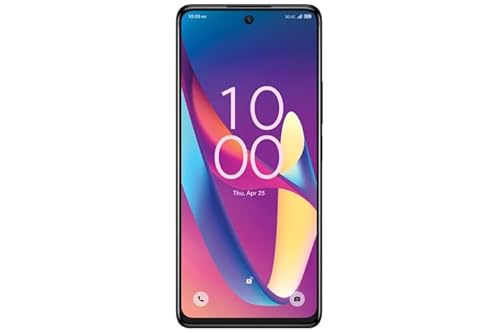
Scroll through a long social feed on the TCL and something feels off-script for this money: motion stays fluid. The 120Hz refresh rate, rare anywhere near this ceiling, smooths the everyday gestures people perform hundreds of times daily. News articles glide, map pans stop juddering, and the whole handset feels responsive beyond what its processor alone would predict.
TCL built its reputation on televisions, and that heritage shows in colour tuning that favours watchability over accuracy claims. Streaming drama looks punchy without skin tones sliding into orange. Stereo speakers join the party too, sparing viewers the cupped-palm trick during kitchen-counter viewing sessions.
Weaknesses hide in software longevity rather than hardware. TCL’s update cadence trails Samsung’s, the camera system leans on its main sensor while companions contribute little, and the glossy shell collects fingerprints enthusiastically. Buyers comfortable trading tomorrow’s Android version for today’s smoother screen will accept those terms; planners who keep phones four years should look further down this list.
- Display: 6.78-inch panel, 120Hz refresh rate
- Storage: 128GB, expandable via microSD
- Network: 5G connectivity on supported carriers
- Audio: stereo speakers for speakerphone and video
- Battery: full-day cell with wired fast charging
Strengths
- Scrolling smoothness embarrasses rivals costing noticeably more.
- Speakers make hands-free calls and streamed sport genuinely enjoyable.
- 5G support keeps the phone relevant as coverage deepens.
Trade-offs
- Software update commitments run shorter than Samsung’s promises.
- Secondary cameras add menu options more than image quality.
- The finish shows every fingerprint within an hour of unboxing.
Best for: scrollers, streamers and sports fans living on their feeds. Not suited for: owners demanding four years of platform updates.

Samsung Galaxy A15 5G — Safest long-term bet
Caution defines the Galaxy A15 pitch. Samsung sells certainty: a published update roadmap stretching years beyond purchase, service centres in most cities, and cases hanging in every phone shop. For a buyer replacing a broken handset under stress, that ecosystem calm has tangible value beyond any benchmark chart.
The AMOLED display separates this model from LCD rivals whenever the sun comes out. Bus-stop timetables, garden photos and parking-app maps stay readable at noon, and deep blacks make evening reading gentler. Brightness headroom also helps delivery riders glancing at addresses between stops, a scenario where cheaper panels fade into mirrors.
Performance, honestly stated, merely suffices. The chipset handles messaging, browsing and casual games without drama, then hesitates when asked to juggle navigation, music and a dozen browser tabs. Samsung’s One UI brings useful features alongside a few duplicated apps. Patient owners get a dependable tool; impatient multitaskers should save toward stronger hardware instead of blaming this phone for its brief.
- Display: Super AMOLED, 90Hz refresh rate
- Storage: 128GB with microSD card slot
- Updates: multi-year OS and security commitment from Samsung
- Network: 5G, US unlocked configuration
- Battery: 5,000mAh class cell, 25W wired charging
Strengths
- Outdoor readability tops this group thanks to AMOLED brightness and contrast.
- Update longevity protects banking apps and resale value alike.
- Accessory availability makes protection cheap and immediate.
Trade-offs
- Everyday speed feels adequate rather than eager under heavy multitasking.
- Duplicated Samsung and Google apps crowd the first setup hour.
- Charging trails rivals offering faster wired speeds.
Best for: keep-it-for-years owners and anyone buying for a less technical relative. Not suited for: gamers or heavy multitaskers expecting flagship pace.

Motorola Moto G Power 5G (2024) — Battery champion
Field workers measuring their day in locations rather than hours gravitate toward Motorola’s Power line for one blunt reason: the charge lasts. Between the generously sized battery and software that resists pointless wake-ups, this handset shrugs off navigation sessions, hotspot duty and photography stops that would strand slimmer rivals by late afternoon.
Motorola’s near-stock Android deserves credit for the stamina story too. Without a heavy skin demanding background attention, the interface stays predictable, gestures replace button hunting, and the famous chop-for-flashlight motion genuinely helps when hands are gloved or full. First-time Android owners face a gentler learning curve here than under more decorated interfaces.
Bulk is the toll exacted. This is a substantial object in a pocket, the display resolves less sharply than Samsung’s AMOLED, and Motorola’s update promise covers fewer years. Camera output suits documentation — site photos, meter readings, whiteboards — more than artistry. Accept those terms and the Power becomes the workhorse this bracket rarely offers.
- Battery: 5,000mAh class with endurance-focused tuning
- Display: 6.7-inch LCD, 120Hz refresh rate
- Memory: 8GB RAM, 128GB storage in US configuration
- Software: lightly skinned Android with gesture shortcuts
- Network: 5G, unlocked for US carriers
Strengths
- Stamina survives navigation-heavy workdays that defeat thinner phones.
- Clean software keeps menus logical for newcomers and veterans alike.
- Generous memory reduces the stutters plaguing leaner budget models.
Trade-offs
- Size and weight fatigue smaller hands during long one-handed sessions.
- Update support ends sooner than Samsung’s roadmap.
- Screen sharpness trails the AMOLED rival in this line-up.
Best for: couriers, tradespeople, carers and travellers far from sockets. Not suited for: compact-phone fans or update maximalists.
Xiaomi Redmi 13C — Prose-only pick
Younger siblings inherit phones, and the Redmi 13C suits that hand-me-down economy well. Its recipe mirrors the 15C in simpler form: big screen, big battery, modest internals, sold through import channels at aggressive prices. Families on GSM networks who already know Xiaomi’s interface will find setup familiar territory.
Everyday manners are polite. Messaging, school apps, YouTube and light photography flow without complaint, while the headphone jack keeps wired earbuds in service — a small mercy for parents tired of replacing lost wireless buds. The tall display flatters video, though colours stay muted beside TCL’s panel.
Sourcing demands care, which is why this pick carries no purchase link here. Listings vary in band support and regional configuration, warranty handling runs through sellers rather than Xiaomi’s US presence, and update timing trails the class leaders. Buy only from sellers stating exact model variants and return terms in plain language.
- Display: 6.74-inch HD+ panel, 90Hz refresh
- Battery: 5,000mAh class cell
- Storage: configurations vary by seller; confirm before ordering
- Network: 4G GSM; not a fit for CDMA-based carriers
- Extras: headphone jack, side fingerprint reader
Strengths
- Familiar Xiaomi layout eases transfers within Redmi-owning families.
- Wired headphone support keeps cheap earbuds useful.
- Screen size flatters homework videos and streamed lessons.
Trade-offs
- Seller-dependent listings complicate returns and warranty claims.
- Camera quality drops sharply once indoor lighting dims.
- Software support horizon is shorter and less clearly published.
Best for: GSM families buying a starter or spare handset knowingly. Not suited for: buyers needing US warranty simplicity or Verizon service.
OnePlus Nord N30 5G — Prose-only pick
Charging speed rewrites daily habits, and the Nord N30 built its following on exactly that trick. A short top-up during breakfast replaces the overnight tether, which suits students and shift workers whose routines never guarantee eight bedside hours. Few phones near this ceiling refill anywhere near as quickly.
Beyond the charger, the handset plays the all-rounder. Its display refreshes smoothly, the main camera resolves respectable detail in good light, and OxygenOS keeps animations brisk without burying settings under decoration. Stereo speakers and a headphone jack both survive, a pairing that entertainment-focused buyers increasingly struggle to find.
Availability is the catch shaping this prose-only placement. Stock moves through promotions and carrier channels unevenly, listings confuse the N30 with lesser Nord siblings, and OnePlus’s budget update policy sits mid-pack. Shoppers who locate the correct model from a reputable seller gain arguably the most entertaining phone here; everyone else should not chase mystery listings.
- Charging: very fast wired charging with compatible adapter
- Display: 6.72-inch LCD, 120Hz refresh rate
- Camera: high-resolution main sensor, daylight-focused
- Network: 5G; confirm unlocked status per listing
- Audio: stereo speakers plus headphone jack
Strengths
- Rapid charging rescues forgotten overnight plug-ins within minutes.
- Smooth display and speakers make media feel a tier richer.
- Interface responsiveness holds up well across busy days.
Trade-offs
- Correct-model listings require careful reading to avoid sibling confusion.
- Update commitments sit behind Samsung and Google rivals.
- Night photography remains an obvious weak point.
Best for: students and shift workers living on quick top-ups. Not suited for: shoppers wanting a guaranteed, uniform retail experience.
Comparison Table
| Model | Display character | Standout trait | Watch out for |
|---|---|---|---|
| Redmi 15C 4G | Largest, HD+ | Two-day rhythm | 4G only, interface extras |
| TCL 50 XL 5G | 120Hz LCD | Fluid scrolling, stereo sound | Shorter update runway |
| Galaxy A15 5G | AMOLED, 90Hz | Years of updates | Modest multitasking pace |
| Moto G Power 5G (2024) | 120Hz LCD | Workday endurance | Hefty build |
| Redmi 13C | 6.74-inch, 90Hz | Starter-phone simplicity | Seller-dependent support |
| Nord N30 5G | 120Hz LCD | Very fast charging | Uneven availability |
Which Specs Actually Matter When Shopping the Best 100 Dollar Android Phones?
Storage deserves your first interrogation. Apps grow, messaging archives swell, and operating systems reserve a larger slice every year. A phone beginning life nearly full becomes a weekly chore of deleting photos and clearing caches. Prioritise the largest internal capacity offered, treat microSD expansion as a genuine feature rather than a footnote, and remember that cards suit media archives while apps still prefer internal space.
Memory runs a close second. At this level, RAM decides whether your keyboard appears instantly or after an embarrassed pause, whether maps survive a switch to messages, whether the camera opens before the moment passes. Marketing spotlights processors, yet starved memory sabotages stronger chips daily. Choose balanced configurations over headline silicon paired with cramped memory every time.
Display quality hides behind resolution figures. Brightness, contrast and touch responsiveness shape your experience more than pixel counts at these sizes. An AMOLED that stays readable at a sunny bus stop beats a sharper LCD dissolving into reflections. Where possible, favour panels reviewers describe as bright, and plan a matte screen protector if your life happens outdoors.
Battery claims need translating into behaviour. Capacity figures cluster tightly across this bracket, so software discipline separates winners from disappointments. Phones with reputations for sipping standby power suit owners who charge irregularly, while fast-charging models forgive forgetfulness differently. Match the endurance style to your routine instead of chasing the largest number printed on a box.
How Do You Set Up a Budget Phone So It Stays Fast?
Begin before the SIM goes in. Update the system software over Wi-Fi, restart, then update every preinstalled app. Fresh budget phones often ship several patches behind, and installing those fixes first prevents the sluggish first impression that sends many cheap handsets back in their boxes.
Declutter with intent during the first evening. Remove games and shopping apps you never requested, disable notifications from anything that has not earned interruption rights, and restrict background battery access for social apps you check manually anyway. Each removal returns storage, attention and standby life simultaneously.
Choose a lightweight routine for storage hygiene. Move photos to cloud or card storage monthly, clear the downloads folder of boarding passes and menus, and let messaging apps auto-delete ancient media. Ten mindful minutes monthly prevents the storage-full warnings that make budget phones feel broken by their second year.
Protect the hardware you cannot afford to replace. A case with raised edges and a tempered-glass protector cost little relative to a screen repair that exceeds the phone’s value. Add a simple backup habit — photos and contacts synced to your account — so a lost handset becomes an inconvenience rather than a catastrophe.
What About Carrier Compatibility on Cheap Imports?
Networks speak in bands, and inexpensive imports sometimes skip the frequencies your carrier relies on outside cities. A phone can connect happily downtown, then drop to nothing on a rural drive because one low-band frequency is missing. Checking the exact model variant against your carrier’s published band list takes ten minutes and prevents the most expensive mistake in this market.
Verizon’s network historically demands specific approvals that many GSM-focused imports lack entirely. T-Mobile-based services and their prepaid brands tend to welcome the widest range of international models, while AT&T maintains an allowlist that can refuse otherwise capable hardware. Prepaid sub-brands inherit their parent network’s temperament, so a bargain that works on one logo may fail under another riding the same towers.
VoLTE support forms the hidden gatekeeper. With older networks retired, voice calls ride data connections, and handsets lacking proper VoLTE configuration for your carrier may show signal bars yet fail calls. Seller listings rarely volunteer this detail. Community reports from owners on your exact network carry more weight than generic compatibility claims.
How Does Each Contender Survive a Real Saturday?
Picture a single demanding day: a morning market run with a shopping list in a notes app, navigation to a cousin’s new flat, forty photos at a park birthday, hotspot duty when the venue Wi-Fi collapses, then a streamed film on the train home. Walking each pick through that itinerary exposes differences spec sheets flatten into sameness.
Xiaomi’s big Redmi treats the day as a marathon it trained for. The battery barely notices the navigation leg, the tall screen keeps the shopping list readable in market glare, and park photos in sunshine look cheerful. Evening arrives and weaknesses surface: the streamed film sounds thin through its speakers, indoor party shots smear faces, and anyone hoping to share the hotspot over 5G remembers this handset speaks only 4G.
TCL’s contender flips that profile. The train film looks and sounds best on this device, scrolling the day’s photo roll feels liquid, and 5G hotspot duty holds up confidently. Yet by the evening leg the battery gauge invites anxiety, and the owner scrolling a year from now may be doing so on an older Android build than Samsung-owning friends received months earlier.
Samsung’s A15 walks the middle path without drama. Its AMOLED keeps the market list and maps legible, photos satisfy the family chat, and nothing about the day feels experimental. The only friction appears when the owner juggles navigation, music and messages in quick succession at the station, where pauses remind everyone which price bracket this phone calls home.
Motorola’s Power simply refuses to be the day’s problem. Hotspot duty, navigation and photography stack up, and the gauge still shows a comfortable margin at bedtime. The costs are physical and optical: a heavier pocket on the market run, a screen that looks plainer beside the Samsung, and photos that document the birthday competently rather than beautifully.
Families running the Redmi 13C through the same itinerary report a calmer version of its sibling’s story — fine daylight photos, easy video, a battery that lasts — provided their carrier is a GSM network the variant actually supports. The Nord N30, meanwhile, turns the day’s scariest moment into theatre: a nearly empty battery at the station café recovers to a workable charge during one coffee, a trick no rival here can match.
What Should You Verify During the First Week of Ownership?
Day one belongs to updates and accounts. Connect to trusted Wi-Fi, install every system patch offered, sign into your account, and confirm that photos and contacts sync visibly before you need them. Screenshot the storage screen too; that baseline makes later bloat obvious instead of mysterious.
Midweek, deliberately visit your personal dead zones. Every owner knows a supermarket aisle, office corner or stretch of road where signal collapses. Test a call and a data session in each. A phone failing your geography should return to the seller while the window stands open, not after your number has settled in and patience has run out.
Notifications deserve an audit before the week ends. Budget software sometimes sleeps messaging and banking apps so aggressively that alerts arrive in bunches when the screen wakes. Whitelist the apps whose silence would cost you money or peace of mind, then confirm a test message from a friend lands promptly with the screen off.
Photograph your actual life, not test charts. Shoot the family dog indoors, a menu in a dim café, a bus timetable at dusk. If those frames disappoint beyond tolerance, exchange now; if they please you, stop reading camera comparisons and enjoy the savings. Satisfaction at this price comes from matching the tool to your habits, not from winning arguments online.
Finish the week by rehearsing disaster. Confirm your backup account holds recent photos, test the phone-finder service from a computer, and store the purchase receipt somewhere retrievable. Cheap phones get left in taxis and dropped in sinks precisely because owners treat them casually; a ten-minute rehearsal converts catastrophe into mere inconvenience.
Why Do Two Phones With Identical Spec Sheets Feel So Different?
Touch sampling rarely appears on budget spec sheets, yet your thumb meets it constantly. A panel that registers swipes late makes a phone feel slow even when its processor keeps pace, because every gesture begins with a tiny negotiation. This invisible quality explains why the TCL’s fluidity impresses within seconds while some technically similar handsets feel reluctant from the first unlock.
Storage speed hides in the same blind spot. Reading a large photo library, installing a hefty game update or opening a document-heavy email thread all lean on how quickly the phone retrieves data, and the cheapest storage standards dawdle. Manufacturers advertise capacity loudly and speed silently, so two phones both claiming generous storage can behave like different generations when a gallery holds five thousand images.
Antenna design decides the third invisible gap. A handset gripping a weak signal firmly in a basement flat delivers more real-world value than a faster processor dropping calls in the same room. Reception quality resists tidy marketing numbers, which is why owner reports from your own carrier and neighbourhood deserve more trust than laboratory rankings compiled continents away.
Thermal behaviour completes the quartet. Slim budget phones running navigation under a summer windscreen can throttle until maps stutter exactly when directions matter most. Models with modest chips and honest cooling often sustain their pace indefinitely. The tortoise-and-hare pattern repeats so reliably in this bracket that sustained adequacy should outrank brief brilliance in every buying decision.
How Should Parents Approach a First Phone at This Level?
Start with the conversation, not the catalogue. Agree which apps are allowed, what happens at bedtime, and who pays for a cracked screen, while the device is still hypothetical and everyone is calm. A handset arriving with rules already settled generates far less household friction than rules improvised after the first late-night notification storm.
Choose durability and replaceability over pride. A first phone will be dropped, soaked and left in improbable places; a model whose loss stings briefly beats a precious device whose damage triggers a family crisis. Fit the case before the SIM, enable location sharing with consent, and rehearse what your child should do when — not if — the phone goes missing.
Storage and battery quietly govern parental sanity. A child whose phone dies at sports practice cannot call for a lift, and a handset full by October cannot install the school app updates September demanded. The roomier, longer-lasting picks in this guide exist precisely for households where the phone is safety equipment first and entertainment second.
Finally, treat the purchase as a curriculum. Setting up content filters together, reviewing app permissions aloud and discussing why a free game wants contacts access teaches digital judgement no handset can install. The hundred-dollar phone becomes the training ground where mistakes are cheap and lessons stick, which may be the best return this entire category offers any family.
Which Everyday Apps Expose a Cheap Phone First?
Maps applications punish weak hardware mercilessly because they combine satellite positioning, constant data downloads, bright screens and voice prompts simultaneously. A handset cruising through menus may still stumble when a reroute arrives mid-junction. Testing any candidate with a real drive during the return window tells you more than a week of couch browsing ever will.
Video calling ranks second as a stress test. The camera, microphone, speaker, encoder and radio all labour together while the phone warms in your hand, and budget models reveal their ceilings through fan-like heat, dropping frames or audio drifting out of sync with grandparents’ lips. A twenty-minute family call during week one is the cheapest diagnostic in this entire guide.
Group messaging with heavy media traffic forms the slow, silent test. Thousands of cached videos and voice notes bloat storage, index in the background and nibble at standby battery for months before owners connect the drain to the chatty family group. Phones with roomy storage and honest background management age gracefully under this load; cramped models grow mysterious lagginess their owners misdiagnose as planned obsolescence.
Mobile banking, oddly, exposes software rather than speed. Apps from major banks refuse outdated security patches, so a phone abandoned by its maker can lose access to your own money while still playing videos happily. That single fact justifies this guide’s insistence on update policy: the cheapest phone is the one that keeps working, and a handset locked out of banking in year two was never cheap at all.
Common Mistakes
Chasing the largest camera number leads the error league table. A huge megapixel count on a tiny sensor, processed by budget software, loses to a humbler camera with competent tuning every evening indoors. Buyers seduced by spec-sheet arithmetic end up with grainy birthday photos and a false story about what went wrong.
Ignoring the return window ranks second. Cheap phones reveal their flaws within a fortnight: a dim screen, a flaky fingerprint reader, notifications arriving late. Order from sellers whose return process you understand, keep packaging intact during week one, and test your real routine — commute, workplace dead zones, family group calls — before the window closes.
Skipping the case to preserve the budget undoes the entire exercise. One pavement drop converts a hundred-dollar triumph into a repair quote exceeding replacement cost. Protection money is not an accessory indulgence at this tier; it is the insurance that makes the low price real.
Handing a child a phone without storage headroom creates a slow-motion failure. Games expand, school apps multiply, and videos accumulate until updates refuse to install. Starting with the roomiest configuration available, plus a memory card for media, postpones that wall by years.
Assuming every unlocked phone works everywhere rounds out the list. Unlocked describes a lock’s absence, not universal compatibility. Bands, VoLTE provisioning and carrier allowlists still decide service quality, and discovering a mismatch after a number transfer wastes everyone’s weekend.
Final Recommendation
Most buyers landing on this page should start with the Galaxy A15 5G and argue themselves out of it only for a specific reason. Its update runway, readable screen and painless accessory shopping make it the choice least likely to generate a regretful follow-up purchase within two years. Certainty is a feature, and Samsung bundles more of it than anyone else here.
Specific routines justify specific detours. Devour the Moto G Power if your workday happens outdoors and outlets are scarce. Take the TCL if feeds and football dominate your screen time and smoothness thrills you. Choose the Redmi 15C when reading comfort and battery life outrank network speed, especially for a relative whose needs are calls, messages and video chats.
Treat the two prose-only names as opportunistic plays rather than defaults. Either rewards a careful shopper who verifies the variant, the seller and the return terms. Everyone else should buy the certainty of a linked pick, protect it on day one, and enjoy the quiet satisfaction of a phone that cost less than a family grocery run yet handles modern life without complaint.
What Does Owning the Cheapest Phone in the Shop Teach You?
Ownership at this level rewards a particular mindset: judge the device against the jobs you hired it for, never against a colleague’s flagship. The moment comparisons drift toward phones costing five times more, dissatisfaction follows automatically, although nothing about your handset changed. Veteran budget buyers protect their contentment by listing their actual requirements — calls, messages, maps, photos, streaming — and noticing how completely those needs are met.
Accessories shape the experience disproportionately. A comfortable case changes how the phone feels a hundred times daily. A quality charging cable removes a nightly frustration. A memory card ends storage anxiety. Spending a modest sum on these companions lifts a bargain handset further than the same money stretched toward a marginally stronger model carried unprotected.
Software habits matter equally. Owners who install everything eventually blame hardware for the resulting swamp. Owners who curate — one browser, one gallery, notifications on a short leash — report phones feeling brisk in year two. At this tier, discipline substitutes for silicon, and the substitution works better than cynics expect.
There is also dignity in the arithmetic. Money not spent on a phone funds rent, travel, tools or savings, and a handset that handles modern life for the price of a modest dinner out represents technology keeping its original promise. The picks above are not consolation prizes; matched to the right owner, each is simply the correct purchase.
When Does Saving More Money Stop Making Sense?
Below this bracket sits a tier of no-name handsets whose savings evaporate on contact with reality: screens that fail within months, batteries swelling by summer, software frozen at whatever build left the factory. The hundred-dollar line, give or take a promotion, marks roughly where accountable brands with reputations to protect begin competing, and that accountability is what your money actually purchases.
Stretching upward tells the opposite story. The next clear step buys a meaningfully better camera and faster processor, yet costs half again as much, and the step after that doubles the outlay for refinements many owners never notice. Buyers whose needs stop at communication and media reach the point of diminishing returns quickly, which is why this guide refuses to upsell readers whose requirements the cheaper phones genuinely satisfy.
Timing bends the maths further. A model cycling through a retailer promotion can deliver next-tier hardware at this tier’s money, rewarding shoppers who can wait a fortnight and pounce deliberately. Conversely, emergency buyers replacing a dead handset tonight should value immediate availability and painless returns over theoretical savings scheduled for a sale they cannot attend.
Resale value, often ignored at this level, quietly rewards the name brands. A recognised Samsung or Motorola finds a second owner or a trade-in credit years later, while an anonymous import becomes e-waste the day its owner upgrades. Counted across a full ownership cycle, the famous badge frequently costs less than the unknown one — a paradox worth remembering whenever an unfamiliar logo undercuts the field by a tempting margin.
How Do You Hand This Phone Down Without Handing Down Problems?
Budget phones enjoy second lives — a parent’s upgrade becomes a child’s first handset, a drawer spare becomes a grandparent’s emergency line — and a clean transfer protects everyone involved. Begin by backing up your photos and chats, signing out of every account individually, then performing a factory reset from the settings menu rather than merely deleting files from the home screen.
Remove the memory card before the handover if it holds your archives, or wipe it deliberately if it travels with the phone. Cards accumulate screenshots, documents and downloads their original owner forgot entirely, and discovering a previous life inside a gifted phone embarrasses both parties. A fresh card costs little and starts the new owner’s story on a blank page.
Set the recipient up for success during the transfer itself. Install their essential apps together, enlarge text if their eyes prefer it, place the phone, messages and camera icons where thumbs expect them, and write your number on a card inside the case. Fifteen minutes of guided setup prevents a fortnight of frustrated phone calls asking where the torch went.
Finally, be honest about the handset’s limits as you hand it over. Mention that the battery prefers a nightly charge now, that the camera likes daylight, that updates end on a known schedule. A recipient briefed kindly uses the phone happily for years; a recipient promised flagship behaviour concludes within a week that you gave them junk, and a perfectly serviceable device ends up resented in a drawer.
What Separates a Satisfied Owner From a Frustrated One After Six Months?
Talk to owners half a year in and a pattern emerges that has little to do with which badge sits on the box. Satisfied owners describe their phone in terms of jobs completed: the business run from a market stall, the grandchild photographed weekly, the night shifts navigated without a charger hunt. Frustrated owners describe theirs in terms of comparisons: a brother-in-law’s camera, a colleague’s screen, a flagship glimpsed in an advertisement during the football.
Expectation setting at purchase explains most of the divide. A buyer who understood they were purchasing competent essentials experiences every smooth day as the product working. A buyer who secretly hoped a hundred dollars would secretly buy flagship magic experiences the same smooth day as a countdown to disappointment. The handset behaves identically in both homes; the story wrapped around it differs, and the story wins.
Maintenance habits explain the rest. Satisfied owners run updates when prompted, keep a sliver of storage free, restart occasionally, and carry the phone in a case that has already absorbed two drops. Their frustrated counterparts postpone every patch, fill storage to the final megabyte, and then conclude the manufacturer built a slow phone, when in truth they assembled one themselves, one neglected month at a time.
There is a lesson here for gift buyers especially. Handing someone a budget phone with a shrug invites them to judge it harshly; handing it over with its strengths explained — the battery that outlasts your own flagship, the screen sized for their reading, the updates promised for years — frames the device as a considered choice. The same hardware, introduced proudly, gets defended at family dinners. Introduced apologetically, it gets apologised for.
Six months also reveals which compromises were theoretical. Nobody in our owner conversations still mourned the absent wireless charging they never owned before. Several, however, mentioned weekly the one flaw touching their routine: the rider cursing a dim screen, the parent battling full storage, the traveller discovering a missing network band at the worst border crossing. Choose your compromise where your life never goes, and six months later you will barely remember choosing at all.
Why Does the Second-Hand Market Keep Pointing Back to These Models?
Browse any resale shelf a year after launch and the same names from this guide dominate the affordable end, which is no coincidence. Phones bought in volume by cautious people get listed in volume by the same people, batteries honestly described, boxes and chargers usually present. That liquidity matters even to buyers purchasing new today, because it predicts tomorrow’s case selection, screen-repair pricing and trade-in offers.
Popularity compounds quietly. A model carried by millions accumulates tutorials for every setting, forum answers for every glitch, and a local repair shop that has opened the device a hundred times. An obscure import with identical specifications offers none of that scaffolding. When something goes wrong at month eighteen — and something always eventually does — the famous phone gets fixed by Friday while the obscure one becomes a research project.
This is also why our shortlist tolerates a few unglamorous choices. A slightly slower handset from a maker with deep retail roots can be the rational purchase over a daring import, once you price in the full ownership journey rather than the unboxing afternoon. Excitement fades within a week; ecosystems, spare parts and community knowledge pay out for years.
None of which means following the crowd blindly. Crowds buy carrier-locked variants, outdated storage configurations and last year’s leftovers with equal enthusiasm. The discipline is to borrow the crowd’s wisdom about brands and longevity while applying your own scrutiny to the exact variant, bands and update schedule in front of you. Do that, and a hundred dollars buys not merely a phone but membership in the largest support community your money can reach.
How Should You Read a Budget Phone Listing Without Being Fooled?
Listings at this level are written to be misread quickly. A headline may trumpet the largest storage configuration while the buy button defaults to the smallest, or celebrate a camera system whose headline sensor does the only honest work. Slow down at three checkpoints: the exact model number, the storage and memory line buried mid-page, and the network bands listed — or conspicuously not listed — near the bottom.
Seller identity deserves equal scrutiny. An established retailer with a returns address behaves differently from a rotating storefront when a screen arrives faulty. Check how long the seller has traded, whether warranty language names a real process, and whether reviews discuss the phone or merely the delivery speed. Couriers are not handsets; five cheerful comments about fast shipping tell you nothing about the device inside the parcel.
Finally, photograph the unboxing and keep the paperwork until the return window closes. That small ritual, tedious as it feels, converts any later dispute from an argument into a formality — the last piece of discipline in a purchase where discipline, from shortlist to setup, is what turns a very cheap phone into a genuinely good one.
One Last Test Before You Commit
Hold your current phone and name the three things it did for you today before breakfast. Perhaps it woke you, showed the weather, and carried a message from someone you love. Every pick above performs those three acts without fuss, which is worth remembering whenever a comparison chart tries to convince you that contentment requires spending more. The gap between a working phone and a wonderful phone is real, but it is narrower at the level of daily life than marketing suggests, and it closes further each year as yesterday’s luxuries — bright screens, all-day batteries, capable cameras in daylight — become standard equipment at the bottom of the market. Buy the pick matching your routine, protect it, set it up with care, and let the money you saved do something more memorable than sit in a slightly faster pocket computer.
If a household member still hesitates, lend them the decision framework rather than the verdict: name the carrier, name the one app that must never stutter, name how long the phone must serve, then watch the shortlist sort itself. Debates about phones feel endless because they argue about everything at once; three named constraints end most arguments in minutes, and the remaining choice is usually a matter of taste in screens and software rather than right and wrong.
Keep the receipt, the box and this shortlist until the return window shuts. Should your first choice stumble in your own streets and routines, the second name on the list is rarely a compromise; it is simply the phone that should have been first for your geography, your carrier and your hands, and swapping early is a success of the process, not a failure of it.
Frequently Asked Questions
Can a phone at this level really handle everyday apps?
Messaging, banking, maps, streaming and social feeds all run acceptably on every pick listed here. Limits appear with heavy games, aggressive multitasking and large photo edits. Owners who accept those boundaries rarely feel deprived, because the core smartphone repertoire — communication, navigation, entertainment, photography in daylight — works as advertised.
Is 5G worth insisting on with a tight budget?
Coverage quality in your neighbourhood matters more than the logo on the box. Urban buyers on expanding mid-band networks gain smoother streaming and hotspot performance from 5G models. Rural buyers served by strong 4G signals may notice no difference for years, making battery or screen quality the smarter place to spend.
How long will a hundred-dollar handset stay usable?
Hardware typically survives three to four years of ordinary care, while software support decides the practical lifespan. Models with published multi-year update commitments keep banking and health apps working longest. Battery wear becomes noticeable around year two or three, though replacement costs stay modest on popular models.
Should I buy renewed instead of new here?
Renewed flagships tempt with better cameras and materials, yet battery age and uncertain histories complicate the bargain. A new budget phone arrives with a full warranty, a fresh battery and known software support. Risk-tolerant tinkerers may gamble happily; buyers needing dependable service for a relative should choose new.
What storage size avoids regret?
Regret arrives fastest on the smallest configurations once apps, photos and messaging archives accumulate. Seek the roomiest internal storage within reach, add a memory card for media where supported, and offload videos routinely. That combination keeps even modest phones breathing freely well into their third year.
Related Guides
Continue comparing with our guide to affordable Android phones under a larger budget, browse the roundup of unlocked Android phones for carrier freedom, or step up through the best mid-range Android phones worth saving for.