What's inside
- Where to Buy These Projectors
- Key Takeaways
- Quick Picks at a Glance
- How the Picks Were Chosen
- The Six WUXGA Projectors With 4000 Lumens in Detail
- Side-by-Side Comparison
- How Do You Choose a WUXGA Projector for a Working Room?
- Why Working Rooms Chose 1920 by 1200
- Laser Versus Lamp in Professional Service
- Networked Projection and the Managed Estate
- Screens and Surfaces for Bright Professional Images
- Commissioning: the First Morning Test Every Room Should Run
- Total Cost Across a Working Life
- Common Mistakes to Avoid
- Frequently Asked Questions
- Final Recommendation
As an Amazon Associate I earn from qualifying purchases. This post may contain affiliate links at no extra cost to you.
[SITE_DOMAIN] is reader-supported. When you buy through links on our site, we may earn an affiliate commission at no extra cost to you. Prices and availability change; check the Amazon listing for the current details.
Where to Buy These Projectors
BenQ LU710 WUXGA Laser — View on Amazon
ViewSonic PG706WU WUXGA — See the listing
ViewSonic LS832WU WUXGA UST — Open the product page
ViewSonic LS920WU WUXGA — Check the Amazon page
Epson PowerLite 2250U WUXGA — View this model
BenQ LU960ST2 WUXGA — See it on Amazon
The best wuxga projectors with 4000 lumens serve the rooms where projection is infrastructure rather than entertainment: boardrooms, classrooms, lecture halls, simulator bays and training spaces that run all day under working light. WUXGA resolution, 1920 by 1200, gives those rooms sixteen percent more vertical canvas than 1080p for documents and data, and the 4,000-lumen threshold is where a projector stops negotiating with ambient light and starts governing the room. All six models below meet the class definition, at figures from exactly 4,000 lumens to a 6,000-lumen venue flagship.
The six divide along the two axes that actually decide professional installations. The first is geometry: standard throw from the BenQ LU710 and ViewSonic pair, ultra-short throw from the LS832WU, short throw from the BenQ LU960ST2. The second is governance: networked fleet machines with LAN control, sealed simulation instruments and one established Epson continuity model. Resolution and brightness get a projector considered; geometry and governance get it installed, supported and renewed.
Specifications are reported from the listing titles, and two models here, the Epson 2250U and the LU960ST2, leave figures unstated that this guide flags rather than fills. Laser against lamp is stated only where a title states it. In a professional category, that discipline is not pedantry; it is the difference between a specification a facilities team can defend in a purchase meeting and a paragraph of plausible invention.
Readers arriving from home projection should adjust one expectation at the door: in this class, the specification is a facilities document, and the pleasures are reliability, legibility and silence from the support desk. A WUXGA room projector that nobody mentions for a year has not failed to excite; it has succeeded completely, and the six reviews below are written in praise of exactly that kind of success.
Key Takeaways
- WUXGA 1920 x 1200 shows more document height than 1080p, which is why working rooms standardize on it.
- Published brightness spans exactly 4,000 lumens on the LU710 and PG706WU to 6,000 on the LS920WU.
- Laser models remove lamp logistics; the lamp-based PG706WU trades that for fleet accessibility.
- Geometry divides the group: standard throw, 0.25 ultra-short throw and short throw for simulators.
- Two titles leave key figures unstated, and those models carry a verify-first note in their reviews.
Quick Picks at a Glance
| Projector | Headline Specification | Short Verdict |
|---|---|---|
| BenQ LU710 WUXGA Laser | 4,000 lumen WUXGA laser, 1.13-1.46 throw | The threshold model, with the richest title in the group |
| ViewSonic PG706WU WUXGA | 4,000 lumens WUXGA, RJ45 LAN, optical zoom | The networked fleet model with published dimensions |
| ViewSonic LS832WU WUXGA UST | WUXGA laser UST, 5,000 lumens, 0.25 throw | The big image from centimetres away |
| ViewSonic LS920WU WUXGA | 6,000 lumens WUXGA laser, 1.6x zoom, 300-inch | The output leader of the comparison |
| Epson PowerLite 2250U WUXGA | Full HD WUXGA 3LCD | The established Epson entry, with figures to verify |
| BenQ LU960ST2 WUXGA | 5,200 lumens WUXGA short throw | The simulation specialist with serious output |
How the Picks Were Chosen
Selection began with the class definition applied strictly: a WUXGA panel and a brightness position at or above the 4,000-lumen line, established from the title where the title speaks and flagged for documentation where it does not. Models below the brightness threshold, however excellent, were excluded, because a size-and-brightness guide that blurs its own premise teaches readers to blur theirs.
The six were then arranged to cover the professional decision space rather than to crown a single winner. A simulator instrument, a networked fleet standard, an ultra-short-throw wall system, a large-venue flagship, an established continuity model and a short-throw simulation specialist each represent a live branch of real procurement, and a reader should be able to locate their own room on that map within the first two reviews.
Finally, every figure in the reviews was audited against its title. Throw ratios appear where printed, LAN control where printed, sealing where printed, and the two models with silent titles carry their silence openly in the spec box. Professional readers forgive a missing figure they are warned about; they do not forgive one that was invented, and neither does this guide.
The Epson home theater relatives of the PowerLite line are compared in the guide to epson Home Projectors.
One more selection principle deserves recording: no model was admitted on brightness alone. A figure at or above the threshold earned a hearing, but geometry, governance and documentation decided the seat, because professional rooms are failed by misplacement and mismanagement far more often than by a few hundred lumens either way in the final accounting of a working installation anywhere in a real building with real users depending on it every single working day of the term.
The Six WUXGA Projectors With 4000 Lumens in Detail

1. BenQ LU710 WUXGA Laser
Laser WUXGA at exactly 4,000 lumens with simulation credentials
- Resolution: WUXGA 1920 x 1200
- Brightness: 4000 lumen
- Light source: Laser
- Throw ratio: 1.13-1.46
- Keystone: Plus/minus 30-degree 2D keystone, corner fit
- Color and sealing: 92% Rec. 709 color, IP5X dustproof
- Inputs: HDMI
The LU710 anchors this comparison at the exact threshold the title promises: 4,000 lumens of laser light behind a WUXGA 1920 by 1200 panel, with the richest specification in the group printed around it. A 1.13 to 1.46 throw ratio, plus-or-minus 30-degree 2D keystone, corner fit, 92 percent Rec. 709 color and IP5X dustproof sealing all appear in the title, because BenQ aimed this machine at golf simulation and professional installation, markets where buyers read specifications the way lawyers read contracts.
WUXGA is the quiet hero of the specification. The 1920 by 1200 canvas carries sixteen percent more vertical resolution than 1080p, and in a working room that height is spent on spreadsheets, code, design drawings and documents that show more rows without scrolling. For a golf simulator the extra height fills the impact screen more completely; for a boardroom it means the quarterly table and the presenter notes share the screen without a compromise font size anywhere.
Laser light at this brightness class changes the maintenance contract entirely. No lamp inventory, no mid-semester dimming, no brightness lottery between rooms in a fleet: the LU710 delivers its 4,000 lumens consistently and asks for filter attention and little else. The IP5X dustproof rating extends that reliability into the environments simulators and workshops actually are, where dust is a condition of the building rather than an accident, and sealed optics stop being a luxury.
The throw ratio deserves a planning paragraph because simulator and boardroom spaces are both dimensionally stubborn. A 1.13 to 1.46 range places the projector a moderate distance from the screen, far enough to keep players and presenters out of the light path, close enough for rooms of ordinary depth. Corner fit and 2D keystone then handle the final alignment digitally at the margins, tools an installer uses once, gratefully, and then locks away.
Against the rest of this group, the LU710 is the precision instrument at the threshold brightness: not the brightest, not the shortest throw, but the most completely specified for a defined professional job. Buyers whose room matches its throw and whose work matches its resolution will find it the easiest model here to justify on paper, because its paper is unusually complete.
For simulation use, mount the LU710 and then calibrate the simulator software to the projected image, not the reverse. The projector corner fit should be the last adjustment in the chain, used to marry the image to the impact screen after the mount and lens have done the honest geometric work.
Strengths
- Exactly 4,000 lumens of laser light with WUXGA resolution
- Published throw ratio, keystone range and corner fit aid planning
- IP5X sealing and 92% Rec. 709 suit simulators and workspaces
Trade-offs
- Threshold brightness leaves less headroom than the 5,000-plus models
- Standard throw does not suit shallow rooms needing ultra-short placement
- HDMI provision is functional rather than expansive for source-heavy systems
Best for: a golf simulator or design room seeking laser WUXGA at the threshold figure with a fully published installation specification
Not suited for: a shallow room seeking ultra-short-throw placement, because the LU710 throw range is a standard-distance design
Simulator planners can verify the LU710 throw figures against their bay dimensions on the listing, then Check price on Amazon.
2. ViewSonic PG706WU WUXGA
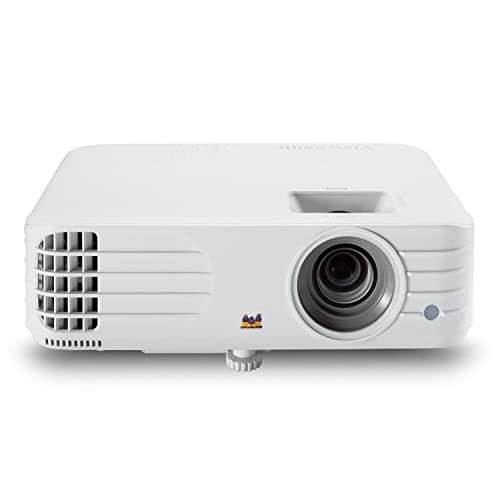
Lamp WUXGA at 4,000 lumens with LAN control and optical zoom
- Brightness: 4000 lumens
- Control: RJ45 LAN control
- Lens: Optical zoom, vertical keystoning
- Dimensions: 4.3 x 12.3 x 8.7 inches as printed in the title
- Use: Home and office, per the title
- Resolution: WUXGA
The PG706WU is the fleet manager choice of this group: a 4,000-lumen WUXGA projector whose title spends its words on RJ45 LAN control, vertical keystoning, optical zoom and even its own dimensions, 4.3 by 12.3 by 8.7 inches. That is the vocabulary of an IT department standardizing rooms, and it tells you exactly how ViewSonic expected this machine to be bought: in quantity, by people who manage projectors they will never personally watch, for rooms that must simply work every morning.
LAN control is the feature that separates managed projectors from domestic ones. Across a network, an administrator can power rooms on and off on schedule, read lamp and filter status, receive alerts and push settings without visiting the ceiling. In a school or an office estate, that capability is worth more than a brightness increment, because the cost of projection at scale is measured in support visits, and every visit the network prevents is the feature paying for itself again.
The optical zoom and vertical keystone pairing handles the installation reality of standardized rooms: mounts placed by builders, screens placed by architects and a projector that must reconcile the two. Zoom reconciles distance; keystone reconciles the last degree of tilt. A lamp-based engine at this level keeps the purchase accessible for fleet budgets, accepting the lamp replacement cycle as a planned, centralized errand rather than a per-room surprise.
WUXGA resolution in this networked context serves the document estate: design reviews, financial models and teaching materials that use the full 1200-line canvas. The title frames the machine for home and office alike, and the honest reading is that its soul is office, with home use as a credible second life for the same unit after a fleet refresh, a path many of these ViewSonic models travel happily.
Published dimensions in a title are a small courtesy that deserves naming, because installation planning lives on them. A buyer can check a mount plate, a ceiling void or a cabinet against 4.3 by 12.3 by 8.7 inches without leaving the listing, and that completeness of information is the PG706WU character in miniature: a professional tool described professionally, at the exact brightness this guide is about.
Enroll the PG706WU on the management network before the installer leaves the room, and test a remote power cycle from the desk it will actually be managed from. A LAN projector discovered to be unreachable after the ceiling closes teaches an expensive lesson that a five-minute test prevents forever.
Strengths
- RJ45 LAN control enables true fleet management
- Optical zoom and vertical keystone ease standardized installs
- Dimensions published in the title simplify mount planning
Trade-offs
- Lamp-based engine brings a planned replacement cycle
- Light source is not stated in the listing title and should be confirmed in the documentation
- Feature set prioritizes management over home entertainment
Best for: an IT-managed estate seeking networked WUXGA rooms at the 4,000-lumen level with centralized control
Not suited for: a home theater seeking entertainment processing, because this specification was written for managed workspaces
Estate managers can confirm the PG706WU network and lens details for their room standard on the product page, then Check price on Amazon.

3. ViewSonic LS832WU WUXGA UST
5,000-lumen laser ultra-short-throw for wall-hugging installs
- Light source: Laser
- Throw: 0.25 ultra short throw
- Correction: H/V keystone, 4 corner adjustment
- Control and inputs: LAN control, dual HDMI
- Use: Business, classroom and conference room, per the title
- Resolution: WUXGA
- Brightness: 5000 lumens
The LS832WU solves the oldest problem in projection, the person standing in the light, by nearly abolishing throw distance. Its title states a 0.25 ultra-short-throw ratio behind a 5,000-lumen laser WUXGA engine, which means the projector sits centimetres from the wall and still fills a presentation-sized image, while the presenter stands beside the screen in clear space with no shadow and no glare in their eyes. For classrooms and conference rooms, that geometry is not a convenience; it is the difference between projection that fights the room and projection that fits it.
Five thousand lumens of laser light behind that geometry covers the bright-room reality of its stated habitats. Classrooms keep lights on for note-taking, conference rooms keep them on for faces and cameras, and an ultra-short-throw image has no long light path through the room air to lose itself in. The combination, high output at point-blank range, is why UST has become the default answer for new presentation installations, and the LS832WU states the whole case in its title without ornament.
The correction toolkit, horizontal and vertical keystone plus four-corner adjustment, exists because walls are not screens and furniture is not level. At ultra-short distances, tiny angular errors become large geometric ones, so the adjustment range is a working necessity rather than a specification garnish. Paired with a proper flat screen or a truly flat wall section, those tools deliver the rectangle; paired with a wavy surface, nothing can, and this guide repeats its standing advice: at UST distances, surface flatness is destiny.
LAN control and dual HDMI place the machine inside the managed estate alongside its PG706 sibling, with the laser engine removing lamp logistics from the same rooms. A school can standardize on wall-mounted UST units that no student can shadow, no teacher can misalign by walking through the beam and no caretaker must re-lamp on a ladder, and the educational value of that boring reliability is difficult to overstate.
The trade is placement discipline. Ultra-short throw demands its exact distance from the wall, a mount or credenza that holds position permanently, and a screen chosen for the steep light angle. Rooms that can give it those three things receive the most civilized presentation geometry in this guide; rooms that need the projector to move between walls should look at the standard-throw models instead.
Measure the LS832WU placement twice and fix it once, permanently. A credenza that staff can nudge will be nudged, and at a 0.25 throw ratio a centimetre of drift is a visible geometry error. The mount or the fixed furniture is part of the optical system at this distance, and it should be installed like it.
Strengths
- 0.25 ultra-short throw removes shadows and presenter glare
- 5,000 lumens of laser light suits lit classrooms and boardrooms
- LAN control and dual HDMI fit managed installations
Trade-offs
- Demands precise fixed placement and a very flat surface
- Steep light angle punishes wavy walls and cheap screens
- Fixed UST role excludes portable or multi-room use
Best for: a classroom or conference room seeking a wall-hugging laser image at 5,000 lumens with nobody standing in the beam
Not suited for: a portable setup seeking to move between rooms, because ultra-short-throw placement is a permanent commitment
Installation planners can check the LS832WU throw distance and mounting details against their wall on the listing, then Check price on Amazon.

4. ViewSonic LS920WU WUXGA
6,000-lumen laser flagship for screens up to 300 inches
- Maximum screen: 300 inch screen per the title
- Lens: 1.6x optical zoom
- Signal: 4K HDR/HLG support, dual HDMI
- Use: Business and education, per the title
- Resolution: WUXGA
- Brightness: 6000 lumens
- Light source: Laser projector
The LS920WU is the output summit of this comparison: 6,000 lumens of laser light behind a WUXGA panel, rated in its title for screens up to 300 inches, with a 1.6x optical zoom, dual HDMI and 4K HDR/HLG signal support. Every figure in that sentence serves the large venue: lecture halls, assembly spaces, big training rooms and houses of worship where the screen is measured in metres and the audience in rows, and where a 4,000-lumen machine is not a value choice but an undersized one.
Brightness at this level is really about distance, both the throw distance the light travels and the viewing distance of the back row. A 300-inch image spreads light across an enormous area, and 6,000 lumens is the class of output that keeps text legible and video convincing at that scale in a room that cannot be fully darkened. The LS920WU does not apologize for its specialization, and buyers with genuinely large rooms will recognize the specification as the first in the list written at their scale.
The 1.6x optical zoom is the installer friend at this size, because large venues rarely offer the exact throw distance a fixed lens demands. A generous zoom range lets the mount go where the structure allows, on a rear wall, a ceiling truss or a projection booth, and still fill the screen precisely. In venues where moving the mount means hiring access equipment, that flexibility converts directly into saved money and saved weekends.
4K HDR/HLG support, read with this guide usual precision, means the LS920WU accepts and handles modern high-quality signals gracefully on its WUXGA panel, which matters as presentation sources and event video move upmarket. Dual HDMI keeps a resident system and a guest source connected together. The machine remains a business and education tool in its title own words, but it is one that will not embarrass a streamed keynote or a filmed performance played through it.
Laser ownership at venue scale completes the case. A lamp change in a high-ceiling hall is an access-equipment event with a safety plan; a laser engine defers that event for years while holding brightness steady for every assembly in between. The LS920WU costs commitment up front and returns it in the currency large venues actually spend: avoided disruption.
Commission the LS920WU with the largest content it will ever show: the finest text slide, at the back row, with house lights at event level. If that test passes, every lesser demand of the venue calendar passes with it, and the installation can be signed off in one visit instead of three.
Strengths
- 6,000 lumens leads this group for genuinely large screens
- 1.6x optical zoom forgives structural mounting constraints
- Laser engine removes lamp logistics from high-ceiling venues
Trade-offs
- Output is wasted on ordinary meeting-room screen sizes
- Large-venue design assumes professional installation
- HDR support is signal handling on a WUXGA panel, not native 4K
Best for: a lecture hall or assembly space seeking 6,000-lumen laser WUXGA for a very large screen and a distant back row
Not suited for: a standard meeting room seeking the threshold figure, because the LS920WU output and scale far exceed that brief
Venue managers can verify the LS920WU zoom range and mounting requirements for their hall on the product page, then Check price on Amazon.
5. Epson PowerLite 2250U WUXGA
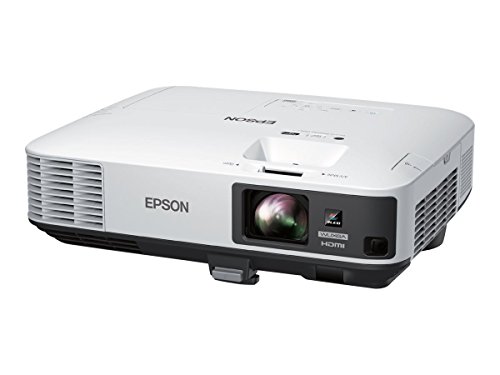
Full HD WUXGA 3LCD from the PowerLite line
- Finish: Black/white as printed in the title
- Product line: PowerLite
- Resolution: Full HD WUXGA
- Imaging technology: 3LCD
- Brightness: Not stated in the listing title – verify with the manufacturer documentation
- Light source: Not stated in the listing title – verify with the manufacturer documentation
The PowerLite 2250U is the elder statesman of this comparison, an Epson Full HD WUXGA 3LCD projector whose title, unusually for this guide, publishes neither its brightness nor its light source, and the spec box records both as not stated with the standing direction to verify. That restraint matters, because this guide premise is WUXGA at 4,000 lumens or above, and the honest position is that the 2250U belongs to this class by its documented position in the PowerLite line while its listing title alone does not prove the figure. Verify it in the manufacturer documentation before designing a room around it.
What the title does establish is the combination that made the PowerLite name a default in institutional rooms: WUXGA resolution with 3LCD imaging, which means the full 1920 by 1200 document canvas with simultaneous color and no color wheel. For the mixed audience of a training room, that pairing delivers legible spreadsheets and calm, saturated video in one machine, and it explains why so many rooms standardized on this line and why so many caretakers still search for the model by name.
The PowerLite ownership pattern is the institutional one: a lamp-based tradition of scheduled filter cleaning, planned lamp replacement and menus that a generation of technicians can navigate blindfolded. Documentation is deep, parts knowledge is widespread and the model behavior is a known quantity in a way no new launch can match. For a facility extending an existing PowerLite estate, that familiarity is a functional specification, whatever the marketplace title omits.
Placement and connection details belong to the documentation rather than this review, and a buyer should extract the throw, lens and input figures from Epson own materials for the exact unit under consideration. PowerLite models served ceiling, cart and portable duties across their lives, and the 2250U individual history, lamp hours and included accessories will vary by listing in the way all established fleet models vary, which makes unit-level verification the price of the model many virtues.
Included in this guide as the continuity choice, the 2250U asks for one extra step the other five do not: documentary confirmation of its headline figures. Buyers who take that step gain an established WUXGA 3LCD machine with the deepest support folklore in the comparison. Buyers who skip it are not buying this projector at all; they are buying its name, and names do not project.
When verifying the 2250U, work from the exact model string on the rating label, because the PowerLite family contains close siblings at several brightness levels. The documentation for the precise variant settles every figure this review has deliberately left open, in about the time a coffee takes to cool.
Strengths
- WUXGA resolution with wheel-free 3LCD color
- PowerLite line brings deep documentation and fleet familiarity
- Black and white finish options suit varied room schemes
Trade-offs
- Brightness is not stated in the listing title and must be verified
- Light source is not stated in the listing title
- Individual unit history varies across surviving listings
Best for: a facility extending a PowerLite estate seeking WUXGA 3LCD continuity, with figures confirmed from Epson documentation
Not suited for: a buyer seeking a brightness figure proven by the listing itself, because this title publishes none
Continuity buyers can open the 2250U listing and then confirm its full specification in the Epson documentation, then Check price on Amazon.

6. BenQ LU960ST2 WUXGA
5,200-lumen short-throw simulation projector
- Imaging technology: Not stated in the listing title – verify with the manufacturer documentation
- Resolution: WUXGA
- Brightness: 5200 lumens
- Throw: Short throw
- Product focus: Simulation projector per the title
- Light source: Not stated in the listing title – verify with the manufacturer documentation
The LU960ST2 closes the group as the simulation specialist with output to spare: 5,200 lumens behind a WUXGA panel in a short-throw chassis, per a title that keeps its focus narrow and professional. Simulation is a demanding brief. The image must be large, close, bright enough to hold against the room the simulator lives in and geometrically convincing across a wide field of view, and a short-throw design lets the projector mount near the screen, out of the player or trainee space entirely.
Short throw at 5,200 lumens is a deliberate pairing. Simulator screens are big and near, so light has little distance to travel but a large area to cover, and the audience, often a single trainee or golfer, stands close enough to read every flaw. WUXGA resolution supplies the vertical canvas that simulator scenery and instrument content use fully, and the brightness keeps daytime-lit simulator bays, which rarely enjoy theater darkness, visually credible.
The title does not state the light source or the imaging technology, and the spec box records both as not stated in keeping with this guide discipline across all six articles. The BenQ simulation line context will tempt knowledgeable readers to fill those gaps from family knowledge, and the correct procedure remains the same as everywhere in this series: confirm in the listing and the manufacturer documentation, where both figures are published properly, before the specification enters a purchase justification.
Against its LU710 sibling, the LU960ST2 trades the standard throw and the threshold brightness for short placement and a substantial output step. The choice between them is a room-geometry decision wearing a model-number disguise: deep bay with a distant mount available, LU710; compact bay or a room where the projector must hug the screen wall, LU960ST2. Simulation buyers should measure the bay before falling for either, because the throw decision, once mounted, is the installation.
As the final pick, the LU960ST2 underlines the guide real subject. WUXGA at 4,000 lumens and above is not one product but a professional class, spanning networked fleet rooms, wall-hugging classrooms, vast halls and simulator bays, and the six machines here divide that class by geometry and governance rather than by quality. The LU960ST2 owns the close, bright, simulated corner of it completely.
In a simulator, align the LU960ST2 to the virtual horizon the software expects before touching any cosmetic adjustment. Simulation credibility lives in that horizon line, and a projector squared to the room but tilted against the simulated world will feel wrong to every trainee who steps into the bay.
Strengths
- 5,200 lumens serves bright simulator bays and large near screens
- Short throw keeps the projector out of the activity space
- WUXGA canvas suits simulator scenery and instrumentation
Trade-offs
- Light source is not stated in the listing title
- Imaging technology is not stated in the listing title
- Short-throw placement limits use in deep, standard-throw rooms
Best for: a simulator bay seeking short-throw WUXGA at 5,200 lumens, with the remaining figures confirmed in BenQ documentation
Not suited for: a deep room seeking standard or long throw, because this chassis was designed to hug the screen wall
Simulation builders can confirm the LU960ST2 throw distance and light source details on the listing and documentation, then Check price on Amazon.
Side-by-Side Comparison
| Projector | Imaging and Resolution | Brightness From the Title | Defining Extra |
|---|---|---|---|
| BenQ LU710 WUXGA Laser | WUXGA 1920 x 1200 laser | 4000 lumen | 1.13-1.46 throw, IP5X |
| ViewSonic PG706WU WUXGA | WUXGA | 4000 lumens | RJ45 LAN control |
| ViewSonic LS832WU WUXGA UST | WUXGA laser UST | 5000 lumens | 0.25 ultra short throw |
| ViewSonic LS920WU WUXGA | WUXGA laser | 6000 lumens | 300-inch screens, 1.6x zoom |
| Epson PowerLite 2250U WUXGA | WUXGA 3LCD | Not stated in the title | PowerLite continuity |
| BenQ LU960ST2 WUXGA | WUXGA short throw | 5200 lumens | Simulation specialist |
How Do You Choose a WUXGA Projector for a Working Room?
Measure the geometry before reading another specification. The distance from the only sensible mount position to the screen, divided by the image width, gives the throw ratio your room demands, and that single number eliminates whole branches of this guide instantly. Ultra-short, short and standard throw are not upgrades of one another; they are answers to different rooms, and a projector with the wrong geometry is wrong at any brightness.
The legacy end of the business projector world is documented in the guide to dell Projectors.
Decide the governance model next. A single room run by its users can thrive on any model here, while an estate of rooms needs LAN control, standardized lenses and a light source whose maintenance can be scheduled centrally. The PG706WU and LS832WU speak that language natively. Governance sounds abstract in a buying guide and becomes painfully concrete the first time a filter alert goes unnoticed for a semester.
Then weigh laser against lamp as a facilities decision. Laser models in this group, the LU710, LS832WU and LS920WU, remove lamp inventory and hold brightness steady, which suits high ceilings, heavy timetables and thin support teams. Lamp models lower the entry commitment and accept a planned replacement rhythm that a staffed institution may find trivial. The arithmetic is knowable in advance: hours per week, ceiling height and who owns the ladder.
Finish with the screen and the light, because 4,000 lumens is a threshold, not a spell. A large screen in a bright room can still outspend a threshold machine, which is what the 5,000 and 6,000-lumen models exist for, while a modest screen in a dimmable room may never need more than the threshold at all. Buy for the brightest real session, on the largest real screen, and the class will serve you without drama.
One further filter is the presenter experience, because working projectors are operated by everyone and supported by almost no one. A room used by visiting speakers needs the input that connects itself, the remote that explains itself and the picture mode that is already right. Specifications that serve the presenter, auto source search, quick startup and legible menus, rarely headline a title, yet they decide whether the room equipment is loved or circumvented with a laptop screen and an apology.
Why Working Rooms Chose 1920 by 1200
The WUXGA canvas persists in professional rooms for a mundane and decisive reason: documents are tall. A spreadsheet, a code editor, a design drawing and a slide deck all spend their lives in portrait-leaning workspaces squeezed onto landscape screens, and the extra 120 lines over 1080p return rows of data to every view. Multiplied across every meeting, every lesson and every working day, that small arithmetic becomes the largest daily dividend any specification in this guide pays.
The 16:10 shape also matches the laptop fleet that feeds these projectors, so a presenter screen maps to the room screen without scaling compromises or black bars swallowing the difference. Presenters stop apologizing for the picture, audiences stop squinting at shrunken text, and the projector disappears into the work, which is the entire ambition of professional display. Home resolutions serve cinema ratios; WUXGA serves the working week, and the two briefs are both legitimate.
There is a longevity argument too. Document formats change slowly, and a WUXGA room installed today will present the files of five years from now without a resolution conversation, because text and data at this canvas have been stable for a decade already. Entertainment resolutions chase content; working resolutions serve it, and facilities teams budgeting across electoral cycles of equipment quite reasonably prefer the stable one.
Laser Versus Lamp in Professional Service
The lamp era taught institutions a maintenance liturgy: track hours, stock spares, schedule replacements before the dimming becomes a complaint. Laser removes the liturgy and replaces it with a long, flat consistency that changes how rooms are planned. Brightness on the first day of term equals brightness on the last, fleet rooms match each other, and the support calendar loses its most frequent entry entirely.
The honest counterweight is commitment and repair philosophy. A lamp machine can be revived inexpensively for years with consumables any caretaker can fit, while a laser engine is a sealed, long-life component whose end, when it eventually comes, is a replacement decision rather than a service one. Institutions with strong in-house technicians sometimes prefer the maintainable machine; institutions buying reliability as a service prefer the sealed one. Both are rational, and the six models here let a fleet choose per room.
Brightness stability also has a presentational consequence nobody budgets for: trust. A room whose projector looks identical every morning stops generating the low-level complaints that erode confidence in shared equipment, and presenters start building richer material because the display has become predictable. Laser greatest professional gift may be that predictability, with the saved lamp money as a pleasant footnote.
Networked Projection and the Managed Estate
LAN control, stated in the titles of both ViewSonic standard models here, converts projectors from appliances into estate assets. Scheduling, monitoring, alerting and remote support across dozens of rooms change the staffing mathematics of an institution, and the feature is invisible in every photograph ever taken of a projector. Buyers comparing specification tables should weight it accordingly: it is the line item that decides whether the fleet needs a technician per building or per campus.
Standardization multiplies the value. One model, one lens behavior, one menu system and one spare-parts shelf across an estate means any support visit is a familiar visit, and training material written once serves every room. This is why the fleet models in this guide publish dimensions and control protocols in their titles: the buyer is not choosing a projector, they are choosing the next decade of room support, and the titles know it.
The legacy end of the business projector world is documented in the guide to dell Projectors.
Security belongs in the same paragraph. A networked projector is a network endpoint, and managed estates should enroll, password and update these machines with the same discipline applied to any other connected device in the building. The convenience of remote management and the responsibility of network hygiene arrive in the same box, and professional buyers price both.
Screens and Surfaces for Bright Professional Images
Professional brightness deserves a professional surface, and the requirements differ from home theater. Working rooms need viewing angles wide enough for the side seats, gain modest enough to avoid hot-spotting under high output, and materials that tolerate ambient light washing across them for eight hours a day. A matte, low-gain screen remains the estate default because it offends nobody in any seat, which at fleet scale is the highest available praise.
Ultra-short-throw installations add a specialty: lenticular and fresnel surfaces designed for steep light angles can reject ceiling light impressively, at the cost of narrower viewing and a premium that belongs in the installation budget from the start. The LS832WU class of machine reaches its published character only on a surface that respects its geometry, and pairing a five-figure installation with a painted wall is the professional version of buying a flagship and feeding it a poor stream.
Finally, size the screen to the back row reading test, not to the wall. Text legibility at the farthest seat, at the smallest font the room honestly uses, sets the diagonal more reliably than architecture does. A screen that passes that test with the house lights at working level is the correct screen, and the brightness class in this guide exists to fill exactly it.
Commissioning: the First Morning Test Every Room Should Run
A professional projector should be accepted the way a building system is accepted, by witnessed test rather than by unboxing. Assemble the room actual users, project the smallest text the room honestly presents, run the brightest typical video, and view both from the farthest and the most oblique seats with the lights at working level. Every model in this guide was specified for some version of that test, and an installation that passes it publicly will not generate a semester of corridor complaints.
Record the results in the room file: the picture mode chosen, the lamp or laser hours at commissioning, the network identity where fitted and the screen details. That single page converts the projector from a purchase into a managed asset, and it makes the eventual refresh decision, years later, an evidence exercise instead of an archaeology project. Institutions that keep room files spend less on projection across a decade than institutions that keep receipts.
Finally, teach the room its own projector in five minutes. One laminated card covering power, input, blank screen and who to call prevents more support tickets than any feature in this guide, because most projector incidents are confidence incidents. The finest specification in the comparison cannot help a presenter who does not know which button unblanks the screen, and the card costs less than the meeting it saves.
Total Cost Across a Working Life
Professional buyers price projectors across years, and the line items differ sharply by light source. A lamp fleet carries lamp purchases, the labor of fitting them and the small risk premium of a mid-lesson failure; a laser fleet carries a higher entry figure and then near silence. Neither total is universally smaller, because hours and labor rates decide, but both totals are computable before purchase, and computing them is the difference between procurement and shopping.
Energy and heat belong in the same ledger for rooms that run all day. A projector is a light source and a small heater sharing a chassis, and across a fleet and a timetable the electricity and the air-conditioning load become real numbers. Modern laser engines generally convert power to light more efficiently than the lamp generation they replace, another quiet entry on the laser side of a spreadsheet that a facilities team can fill in with their own tariff.
The screen, mount and installation labor complete the honest total, and they routinely exceed the price difference between adjacent models in this guide. That is the final argument for choosing by geometry and governance first: the projector is the component most likely to be replaced in the system, while the room work around it is the investment that persists, and a decision that protects the persistent part is the professional one.
Common Mistakes to Avoid
The commonest professional mistake is buying brightness for the screen you wish you had. A 6,000-lumen flagship on a modest meeting-room screen is not future-proofing; it is glare, fan noise and wasted budget, while the same money buys the correct threshold machine plus the screen and mount the room actually needed. Match the class to the measured diagonal and the measured ambient light, in that order.
Second, do not install a standard-throw projector where people must walk through the beam, or an ultra-short-throw unit on a wall that is not flat. Geometry errors are forever errors, repeated at every session, and they are all visible in a tape-measure session before purchase. The five minutes of measurement this guide keeps prescribing is the cheapest line item in any installation.
Third, ignoring the network is a slow-motion mistake. A fleet bought without LAN control because the feature looked boring will be serviced on ladders for a decade, and the savings will be repaid in support visits many times over. Governance features are bought once and used weekly; entertainment features on a work projector are bought once and used never.
Finally, verify the silent titles. Two models in this very guide publish incomplete specifications in their listings, and a purchase order written from an assumed figure is an argument waiting to happen in a finance meeting. The documentation check takes minutes, settles the record and protects the buyer, the budget and the recommendation itself.
Do not forget the humble ceiling and its contents. Projector placement competes with lights, sprinklers, sensors and air vents, and a mount position chosen from the floor plan alone has embarrassed many installations on the day the ceiling was opened. A site survey that looks up, literally, belongs in every professional purchase in this guide, ideally before the model is chosen, because the ceiling occasionally chooses it for you.
A last mistake is treating the projector as the system. Sources, cabling, control, screen and sound decide the room experience jointly, and a threshold-class projector starved by a long, marginal cable or a netbook from another decade will be blamed for the chain it sits in. Specify the chain with the same care as the engine, and the class in this guide will show exactly the reliability it was bought for.
Frequently Asked Questions
What does WUXGA mean in practice?
WUXGA is 1920 by 1200 resolution in a 16:10 shape, offering more vertical room than 1920 by 1080. For documents, spreadsheets, code and design work that height is visible in every session as extra rows without scrolling, which is why professional rooms standardized on it while home rooms standardized on 16:9 cinema shapes.
Is 4,000 lumens enough for a lit classroom?
For a modest screen in a typical lit classroom, the 4,000-lumen class is the established working threshold, which is why this guide is built at it. Larger screens, stronger ambient light or ultra-short-throw geometry argue for the 5,000 and 6,000-lumen models above it, and the correct figure comes from screen size and light measured in the actual room.
Why do some titles not state brightness or light source?
Listing titles in the professional category are written for buyers who consult full documentation, and some are simply terse. This guide records those gaps as not stated and directs you to the manufacturer documents, which is the professional way to buy any of the six models here regardless of how complete a title appears.
Laser or lamp for a school fleet?
Laser removes lamp inventory, mid-term dimming and most ladder work, which suits thin support teams and high ceilings. Lamp lowers entry commitment and suits institutions with technicians who treat lamp changes as routine. Count weekly hours and who owns maintenance, and the answer usually announces itself.
Can these projectors show films and events?
Yes, within their design intent. WUXGA panels display video handsomely, the LS920WU even accepts 4K HDR/HLG signals, and large venues routinely screen events through machines in this class. They are not home-theater-tuned, but brightness and scale carry an event night convincingly in a working room.
What is the advantage of ultra-short throw?
At a 0.25 ratio the projector sits centimetres from the wall, so presenters never stand in the beam, cast shadows or take glare in the eyes. The trade is installation precision and a demanding need for a flat surface, both covered in the LS832WU review above.
Do I need LAN control for a single room?
Probably not, and the single-room buyer can safely prioritize lens, brightness and light source. LAN control earns its place across estates of rooms, where remote scheduling and alerts replace physical visits. Buy the governance your estate size actually requires.
How long will a laser model in this class serve?
Laser engines in professional projectors are designed for long service measured in years of daily use without lamp events, which is their central fleet argument. Exact rated life sits in the manufacturer documentation rather than these titles, so confirm the figure there and record it in the room file at commissioning, where it becomes the refresh planning baseline.
Should a small business buy the fleet features anyway?
A two-room business gains little from estate governance and should spend on lens fit and light source instead. The fleet features in this guide scale with room count, and their value crosses into obvious somewhere around the point where one person can no longer remember every room settings from memory. Below that line, simplicity is the governance.
What maintenance does a professional room actually schedule?
Filter inspection on a termly rhythm, a brightness sanity check against the commissioning record each year, firmware and network review for managed models, and a lamp plan where lamps exist. Written into the room file and owned by a named person, that short list is the entire secret behind fleets that simply never embarrass anyone.
Final Recommendation
It is worth closing the comparison by noting what the threshold itself guarantees. Every machine here, whatever its geometry or governance, delivers the document canvas and the working brightness that define professional projection, from a verified title or a flagged verification path. The differences that remain are the differences that should decide: where the projector sits, who manages it, how its light is made and how large its room honestly is.
The division of labor across the six is clean. The LU710 owns the specified, sealed, standard-throw professional brief at the threshold figure. The PG706WU owns the managed fleet. The LS832WU owns the wall-hugging classroom and conference room. The LS920WU owns the genuinely large venue. The 2250U owns continuity for PowerLite estates, pending its documentary verification, and the LU960ST2 owns the simulator bay. Each recommendation is a room wearing a model number, which is how professional projection should always resolve.
Whichever model a room selects, commission it against the hardest real content at the brightest real hour, from the farthest real seat, before the installer leaves. Professional satisfaction is a test passed once, publicly, rather than a specification admired privately, and every machine in this guide was built to be judged exactly that way.
In working rooms a projector earns trust the way a colleague does, by being bright, legible and present every single morning, and the six WUXGA machines here are simply six different ways of never missing a day.