What's inside
- Where to Buy
- Key Takeaways
- Quick Picks
- How the picks were chosen
- The six machines in detail
- Comparison table
- How much GPU memory and system RAM does local AI programming really need?
- A realistic local AI workflow, from data to deployed model
- Cloud versus local: placing these laptops honestly
- Common mistakes
- Frequently asked questions
- Final recommendation
As an Amazon Associate I earn from qualifying purchases. This post may contain affiliate links at no extra cost to you.
[SITE_DOMAIN] is reader-supported. When you buy through links on our site, we may earn an affiliate commission at no extra cost to you. Prices and availability change; check the Amazon listing for the current details.
Where to Buy
Razer Blade 18 RTX 4090 – Check price on Amazon
MSI Raider 18 HX RTX 4090 – Check price on Amazon
Gigabyte AORUS Master 16 RTX 5090 – Check price on Amazon
Razer Blade 16 2026 RTX 5080 – Check price on Amazon
MSI Raider 18 HX AI – Check price on Amazon
NVIDIA Jetson Xavier NX Developer Kit – Check price on Amazon
The best laptops for ai programming are not simply gaming laptops with a new label, because local model work punishes hardware in its own particular ways: GPU memory decides what fits, cooling decides what finishes, and system memory decides whether your data pipeline feeds the graphics card or starves it. This roundup gathers five laptops specified for that reality, from RTX 4090 flagships to the newest RTX 5090 machine, plus one deliberate outsider, a Jetson developer kit that handles the deployment end of the AI workflow and is reviewed honestly as the board it is.
A note on figures before the reviews begin, because honesty here is practical rather than decorative. Only one listing in this set, the MSI Raider 18 HX AI, states its GPU memory in its title, at 16GB of GDDR7. Where a title does not state a VRAM figure, this guide does not invent one, and the specification boxes say so plainly. Laptop GPUs also differ from their desktop namesakes, so resist importing desktop memory figures into a laptop shortlist; plan from what each listing actually confirms, and verify the rest against manufacturer documentation before committing.
The through-line of the six picks is headroom in the right places. Every laptop here pairs its GPU with at least 32GB of system memory, four of the six carry 2TB of storage for the checkpoint archives that AI work generates relentlessly, and the two 64GB machines exist for pipelines that treat memory as their primary medium. Readers whose AI curiosity is really a programming-and-gaming double life should cross-read our guide to the dual-use machines as well, since the overlap between these categories is substantial.
Key Takeaways
- GPU memory governs model fitting, and only the Raider 18 HX AI states its figure in its title: 16GB GDDR7 on an RTX 5090-class peer, the RTX 5080
- Two 64GB configurations, both MSI Raiders and the Blade 16, serve memory-hungry data pipelines and local serving stacks
- The AORUS Master 16 carries the newest RTX 5090 architecture for frontier tooling support
- Sustained cooling matters more for training than burst benchmarks, favouring the 18-inch chassis for overnight runs
- The Jetson Xavier NX kit is a developer board for edge deployment testing, included as a companion, never as a laptop substitute
Quick Picks
| Pick | Processor | Graphics | Memory | Storage | Display |
|---|---|---|---|---|---|
| Razer Blade 18 | Intel Core i9-14900HX | RTX 4090 | 32GB RAM | 2TB SSD | 18″ UHD+ 200Hz |
| MSI Raider 18 HX | Intel Core i9-14900HX | RTX 4090 | 64GB DDR5 | 2TB NVMe SSD | 18″ UHD+ 120Hz |
| Gigabyte AORUS Master 16 | AMD Ryzen 9 9955HX3D | RTX 5090 | 32GB DDR5 | 2TB SSD | WQXGA 240Hz |
| Razer Blade 16 2026 | Intel Ultra 9 386H | RTX 5080 | 64GB DDR5 | 1TB SSD | 16″ QHD+ OLED 240Hz |
| MSI Raider 18 HX AI | Intel Core Ultra 9 285HX | RTX 5080 16GB GDDR7 | 64GB DDR5-5600 | 2TB NVMe SSD | 18″ QHD+ IPS 240Hz |
| NVIDIA Jetson Xavier NX Kit | Developer kit module | Not stated in title | Not stated in title | Not stated in title | External monitor required |
How the picks were chosen
Selection for this category began from the workload backwards. Fine-tuning and inference were treated as the primary tests, which elevated GPU tier and cooling above thinness, and data preparation was treated as the silent second test, which elevated processor strength and system memory above screen glamour. Any machine whose specification failed either test, however impressive its gaming credentials, was set aside.
Memory received unusual weight, deliberately. Practitioners consistently report that system RAM, not GPU pace, is where local workflows first suffocate: datasets staged in memory, tokenisation running wide, containerised databases and vector stores humming beside the training process. That is why 64GB configurations anchor this list and why even the 32GB machines were required to pair their memory with fast, capacious storage for the checkpoint traffic that dominates an AI laptop’s disk.
Adjacent workloads informed the bench as well. The mesh-processing machines in our laptops for Photogrammetry guide stress similar subsystems, and readers splitting time between 3D reconstruction and model work will find the two shortlists rhyme. What this guide refused to do was print a single VRAM figure that a listing title did not state, because a wrong number in this category does not merely mislead, it strands a purchased machine below a model’s minimum requirements.
The six machines in detail

Razer Blade 18 RTX 4090 – the big-screen local training rig
Large-display pick for desk-based model work
- Processor: Intel Core i9 14900HX, 14th Gen
- Graphics: NVIDIA GeForce RTX 4090
- Memory: 32GB RAM
- Storage: 2TB SSD
- Display: 18 inch UHD+ 4K, 200Hz
- Operating system: Not stated in the listing title – verify with the manufacturer documentation
- Connectivity: Thunderbolt 5, Chroma RGB keyboard
An 18-inch laptop rewrites what local AI work feels like, because screen area is a genuine productivity resource when a training log, a notebook, a terminal tailing GPU utilisation, and documentation all demand simultaneous residence. The Blade 18 gives that quartet a UHD+ canvas at 200Hz, and pairs it with an RTX 4090, the previous-generation flagship that remains a formidable tool for fine-tuning mid-size models, running quantised large models locally, and iterating on inference code without renting cloud time for every experiment.
The Core i9-14900HX matters more than newcomers expect. Data loading, tokenisation, augmentation pipelines, and the endless preprocessing that precedes actual training are CPU work, and a starved dataloader leaves an expensive GPU idling in bursts. Fourteen-generation HX silicon feeds the 4090 properly, while 32GB of system memory holds datasets and development tooling, though practitioners staging very large corpora in RAM will still plan around that ceiling.
Two terabytes of storage is the quietly correct specification here. Model checkpoints accumulate like sediment: a fine-tuning run’s intermediate saves, several base models in different quantisations, datasets in raw and processed forms. On a 1TB machine that sediment becomes weekly housekeeping; here it becomes an archive you can actually keep, which matters when an experiment from March suddenly needs reproducing in October.
Thermals define the ownership experience. Sustained training loads run the GPU at full draw for hours, a fundamentally different stress from gaming’s bursts, and a large chassis with room to breathe is the right answer to it. Expect fan presence as the soundtrack of serious runs, and expect the machine to live on a desk, plugged in, treated as the workstation it is rather than as a travelling companion.
Thunderbolt 5 equips the desk around it: fast external storage for dataset overflow, high-bandwidth docks, and future peripherals all connect without making the laptop the bottleneck. Chroma RGB is decoration, pleasant but irrelevant to the work. Judge this Razer instead as a statement that local AI development has outgrown apologetic hardware: it is a big, expensive, entirely serious instrument for people whose models live at home.
Its honest limitations are mobility and generation. The RTX 4090 has been succeeded at the top of the range by the 5090 machine further down this page, and anyone chasing the newest silicon should look there. What the Blade 18 counters with is display size and a mature flagship formula, and for many practitioners the extra screen acreage will be used every hour of every day, long after benchmark differences blur.
The Blade 18 also rewards the documentation-heavy reality of research. Papers, API references, and issue threads live in browser tabs that multiply like the models themselves, and the big UHD+ panel lets a practitioner keep references visible beside the notebook instead of burying them behind window switching. That visibility sounds like a luxury until a deadline week, when it becomes the difference between flow and friction repeated forty times a day.
For teaching and demonstration, the same screen pulls double duty. A seminar room or a client office gets a display large enough for a small audience to follow a live inference demo, and the 200Hz panel keeps even animated visualisations smooth. Machines bought for solitary work often end up presenting; this one is ready for that second career from the first day.
Strengths
- 18-inch UHD+ display hosts notebooks, logs, and monitoring side by side
- RTX 4090 remains a powerful engine for fine-tuning and local inference
- 2TB SSD accommodates checkpoint archives without constant pruning
Trade-offs
- Desk-bound size makes travel an occasional expedition rather than a routine
- 32GB system memory can constrain staging very large datasets in RAM
- Sustained training loads keep the cooling system audibly busy
Best for: a practitioner seeking a large-screen desk rig for fine-tuning and local inference with checkpoints archived on its 2TB drive
Not suited for: a conference traveller seeking a light carry-on companion, since an 18-inch flagship treats luggage space as its own
For the big-screen route into local model work, Check price on Amazon on the Blade 18 listing.

MSI Raider 18 HX RTX 4090 – 64GB and Cooler Boost 5
Memory-rich pick for heavy pipelines
- Processor: Intel Core i9-14900HX
- Graphics: NVIDIA GeForce RTX 4090
- Memory: 64GB DDR5
- Storage: 2TB NVMe SSD
- Display: 18 inch UHD+ 120Hz
- Operating system: Windows 11 Pro
- Cooling: Cooler Boost 5
MSI’s Raider 18 HX takes the same RTX 4090 foundation as the Blade above and redirects the budget toward the two things AI pipelines quietly devour: system memory and cooling. Sixty-four gigabytes of DDR5 doubles the Razer’s allocation, and that difference is not abstract. Large tokenisation jobs, in-memory dataset transforms, multiple Dockerised services for a serving stack, and a browser fleet of paper PDFs can finally coexist without the operating system mediating a permanent eviction contest.
Cooler Boost 5 is the other headline, and it earns its place for a workload-specific reason. Training and batch inference are sustained, hours-long, full-draw loads, the exact pattern that separates cooling systems designed for marathons from those tuned for gaming’s sprints. A machine that holds its clocks through hour three of a fine-tune finishes experiments sooner and behaves more predictably, and predictability is what turns a laptop from a toy into laboratory equipment.
The 18-inch UHD+ panel refreshes at 120Hz rather than the Razer’s 200Hz, a trade this audience should accept without blinking: nobody’s training dashboard needs esports refresh, while the resolution keeps dense logs and multi-pane notebooks legible. Windows 11 Pro suits the professional framing, easing the virtualisation and management arrangements that serious local serving stacks tend to require.
Storage matches the Blade at 2TB of NVMe, so checkpoint archives and dataset versions accumulate without triage. The i9-14900HX keeps dataloaders honest, feeding the GPU through preprocessing-heavy pipelines where a weaker processor would leave expensive silicon waiting on disk and decode work.
The costs are the familiar flagship ones, paid in size and presence rather than in performance. This is among the largest machines in the roundup, its power supply is a commitment, and its fans will narrate long training runs to anyone sharing the room. None of that is a flaw; it is the physical price of sustained throughput, itemised honestly.
Choose the Raider when your bottleneck history says memory or thermals, when your serving stack runs locally around the clock, or when experiments routinely stretch past the point where lesser cooling gives up. It is the roundup’s clearest expression of a principle this whole category obeys: for AI work, sustained and spacious beats briefly brilliant.
Memory bandwidth deserves a word alongside capacity. DDR5 in this class feeds the processor fast enough that in-memory transforms and decompression stop being the hidden tax on every experiment, and the Raider’s generous allocation means those transforms rarely spill to disk at all. Practitioners migrating from a 16GB machine consistently describe the change as the removal of a background anxiety they had stopped noticing they carried.
The Pro edition of Windows quietly supports the serving side of the Raider’s life: remote access arrangements, virtualisation features, and management tooling that a home laboratory grows into as it starts answering requests from other machines on the network. A laptop that becomes infrastructure needs an operating system that expects the role.
Strengths
- 64GB DDR5 doubles the headroom for datasets, containers, and serving stacks
- Cooler Boost 5 targets the sustained loads that training actually imposes
- 2TB NVMe storage and Windows 11 Pro complete a professional specification
Trade-offs
- 120Hz panel refreshes slower than the Blade 18 for fast gaming
- Very large chassis confines it to a permanent desk by default
- Fan narration accompanies every long training run
Best for: a researcher seeking 64GB of memory and marathon cooling for overnight fine-tuning runs on an 18-inch workstation
Not suited for: a gamer seeking the fastest panel above all else, because this display trades refresh for resolution and size
When memory headroom is the deciding factor, Check price on Amazon to review the Raider 18 HX configuration.

Gigabyte AORUS Master 16 RTX 5090 – the newest silicon
Current-generation pick for maximum GPU pace
- Processor: AMD Ryzen 9 9955HX3D
- Graphics: NVIDIA GeForce RTX 5090 Laptop GPU
- Memory: 32GB DDR5 RAM
- Storage: 2TB SSD
- Display: 240Hz 2560×1600 WQXGA
- Operating system: Windows 11 Home
- Colour: 5-Degree Black finish as listed
The AORUS Master 16 carries the newest GPU in this roundup, and for AI programming that generational step is the headline: the RTX 5090 Laptop GPU brings the latest architecture to fine-tuning, inference optimisation, and the rapidly evolving ecosystem of quantisation and acceleration libraries that target current silicon first. Framework releases, kernel optimisations, and community tooling consistently land on the newest generation earliest, and a practitioner who lives near that frontier will feel the difference in supported features rather than in any single benchmark.
Gigabyte pairs the GPU with AMD’s Ryzen 9 9955HX3D, a processor whose cache-rich design flatters the mixed workloads of development: compilation, data preparation, and the simulation and preprocessing stages surrounding training. The 240Hz WQXGA display is more gaming-flavoured than an AI workstation strictly needs, yet its resolution keeps dense notebooks readable and its size keeps the whole machine a class smaller than the 18-inch pair above, a portability difference that matters if the rig occasionally leaves the desk.
Memory is 32GB of DDR5, adequate for mainstream fine-tuning workflows and local inference, though the Raider’s 64GB remains the answer for the heaviest in-memory pipelines. Storage, at 2TB, matches the flagships and removes checkpoint anxiety. Windows 11 Home is the specification’s one step down, relevant mainly to those needing Pro’s management features for a work-issued deployment.
A 16-inch chassis housing this GPU class works harder thermals-wise than the 18-inch machines, so sustained training will engage the cooling fully; that is the standing bargain of smaller flagships. The counterweight is a machine you can genuinely relocate: between home and lab, desk and demonstration room, without planning the trip like an expedition.
Position this Gigabyte as the frontier pick. Its value concentrates in the newest GPU architecture and a balanced, slightly more mobile frame, and it suits the practitioner who upgrades on the architecture cycle because their work, perhaps inference research or tooling development, benefits from whatever the current generation newly enables.
Against the 4090 machines, the decision is generational rather than absolute: they counter with larger screens or double memory. Against the other 50-series machines below, the AORUS argues with its AMD flagship processor and 2TB drive. It is a coherent, current, and unapologetically performance-led configuration.
Early access to architecture features has a compounding value that spec sheets understate. Libraries gate their newest kernels, quantisation formats, and acceleration paths behind current hardware first, and a practitioner on the newest generation spends less time reading release notes wistfully and more time running them. For researchers whose papers and products compete on exactly those margins, the AORUS is less an indulgence than a subscription to relevance.
The 16-inch frame also future-proofs the social side of the work. It can travel to a collaborator’s lab, a workshop, or a demo day without the logistics of the 18-inch machines, and in a field where showing a running model beats describing one, that mobility converts directly into opportunities.
Strengths
- RTX 5090 brings the newest GPU architecture and earliest tooling support
- Ryzen 9 9955HX3D flatters compilation and data preparation alike
- 2TB storage in a 16-inch frame balances capacity with mobility
Trade-offs
- 32GB memory trails the 64GB Raider for the heaviest pipelines
- Windows 11 Home rather than Pro at a flagship tier
- Compact flagship cooling works audibly during sustained training
Best for: an inference researcher seeking the current GPU generation in a 16-inch machine that still moves between lab and home
Not suited for: a data engineer seeking maximum system memory for in-RAM transforms, where the 64GB configuration above fits better
To step onto the newest architecture, Check price on Amazon for the AORUS Master 16 listing.

Razer Blade 16 2026 RTX 5080 – 64GB in a thin frame
Thin pick with flagship memory
- Processor: Intel Ultra 9 386H
- Graphics: NVIDIA GeForce RTX 5080
- Memory: 64GB DDR5
- Storage: 1TB SSD
- Display: 16 inch QHD+ OLED, 240Hz, 0.2ms
- Operating system: Windows 11
- Connectivity: Wi-Fi 7, Thunderbolt 5
This Blade 16 performs a small magic trick: it fits 64GB of DDR5 and an RTX 5080 inside the thinnest chassis in this roundup, answering the two objections AI practitioners usually raise against portable machines, memory ceilings and weak graphics, in a single specification. The researcher who fine-tunes at a desk all week and presents at a conference on Friday no longer has to choose which machine to own, because this one refuses to be embarrassed in either room.
The RTX 5080 sits one tier below the 5090 and remains a serious instrument for local model work: fine-tuning mid-size models, running quantised large models for development and evaluation, and accelerating the inference pipelines that production code will eventually meet. Paired with 64GB of system memory, the configuration supports the containerised serving stacks and data tooling that strangle lesser laptops, and the Ultra 9 386H keeps preprocessing responsive.
The QHD+ OLED panel at 240Hz with 0.2ms response is almost comically good for a work machine, yet long hours in notebooks and terminals genuinely benefit from its contrast and text clarity, and it doubles as an excellent demonstration screen. Thunderbolt 5 and Wi-Fi 7 complete a connectivity set aimed at modern labs and offices, fast docks, fast storage, fast networks.
Storage is the specification to plan around: 1TB fills quickly once checkpoints and datasets accumulate, so an external Thunderbolt drive or network store belongs in this machine’s budget from day one. Thermals follow the thin-laptop covenant as well; sustained training runs the fans with commitment, and the deck warms in a way the 18-inch machines’ larger frames mitigate.
What the Blade asks in return is a premium tier, the standing Razer arrangement. The justification here is unusually concrete, though: no other pick in this roundup combines this memory figure, this GPU class, and this portability. For the practitioner whose AI work travels, that combination is not indulgence; it is the entire requirement list, met.
Treat it as the mobile laboratory of the set. Dock it at home for long runs, carry it anywhere without apology, and accept the external-storage habit as the one operational concession its thinness demands.
External storage pairing deserves planning rather than apology. A fast Thunderbolt drive dedicated to checkpoints turns the Blade’s 1TB internal disk from a constraint into a cache: current projects live inside, the archive lives beside, and the boundary is easy to manage with the bandwidth Thunderbolt 5 provides. Many professionals organise exactly this way even on 2TB machines, because archives want their own home regardless.
The OLED panel also serves the evaluation stage beautifully. Inspecting generated images, reviewing visualisation dashboards, and proofing demo material all benefit from its contrast and colour, and AI work produces more visual output than its terminal-heavy reputation suggests. A screen this good quietly raises the quality of everything reviewed on it.
Strengths
- 64GB DDR5 inside a thin 16-inch chassis is unique in this roundup
- RTX 5080 handles fine-tuning and quantised inference with authority
- QHD+ OLED and Thunderbolt 5 suit lab, office, and presentation alike
Trade-offs
- 1TB storage needs an external companion for checkpoint archives
- Thin frame warms and speaks up during sustained training loads
- Premium tier positioning across the whole configuration
Best for: a travelling researcher seeking 64GB of memory and an RTX 5080 in a machine that boards planes without negotiation
Not suited for: an archivist seeking maximum internal storage for model collections, since this configuration stops at 1TB
For the portable laboratory option, Check price on Amazon and note the memory figure on the listing.

MSI Raider 18 HX AI RTX 5080 – VRAM stated, 64GB fitted
Stated-VRAM pick for memory-led builds
- Processor: Intel Core Ultra 9 285HX, 2.1GHz
- Graphics: NVIDIA GeForce RTX 5080 16GB GDDR7
- Memory: 64GB DDR5-5600 RAM
- Storage: 2TB NVMe M.2 SSD
- Display: 18 inch QHD+ IPS, 240Hz
- Operating system: Not stated in the listing title – verify with the manufacturer documentation
- Networking: 2.5Gb LAN, Wi-Fi 7
This Raider earns a distinction no other listing in the roundup claims: its title actually states the GPU memory, 16GB of GDDR7 attached to the RTX 5080, and for AI programming that figure is the single most consequential number on the page. GPU memory decides which models load for inference, which fine-tuning configurations fit without heroic optimisation, and how large a batch a training run can chew at once. Sixteen gigabytes accommodates serious local work, quantised large models, and comfortable mid-size training, while remaining a real ceiling that shapes technique.
Around that GPU, MSI builds the roundup’s most complete supporting cast: an Ultra 9 285HX, 64GB of DDR5-5600, and 2TB of NVMe storage. Data pipelines get cores and memory, checkpoint archives get room, and the 2.5Gb wired LAN, a rarity worth celebrating, moves datasets and model files across a home or lab network at speeds wireless still envies. Wi-Fi 7 covers the untethered hours.
The 18-inch QHD+ IPS panel at 240Hz trades OLED contrast for size, brightness character, and freedom from burn-in anxiety during the static dashboards and IDE windows that AI work leaves on screen for hours. It is a pragmatic display choice for a machine whose screen spends its life showing terminals, graphs, and notebooks rather than films.
As with its sibling above, sustained loads are this machine’s home territory, and its cooling is dimensioned accordingly, with the acoustic consequences honestly attached. It is a fixture, not a traveller: a laboratory bench instrument that happens to fold flat.
Compare it directly with the Blade 18 and the other Raider: this one answers with the newest processor platform, the joint-largest memory, wired networking, and the only explicitly stated VRAM figure in the set. Practitioners who think in VRAM budgets first, as they should, will find that candour refreshing and the surrounding specification worthy of it.
For a home laboratory intended to run experiments nightly and serve models locally around the clock, few configurations anywhere read as deliberately as this one.
Wired networking changes laboratory habits in ways wireless advocates underestimate. Dataset syncs that took an evening take a coffee; checkpoint replication to a network store becomes a background reflex rather than a scheduled event; and a serving stack answering other machines stops competing with the household’s streaming for airtime. The 2.5Gb port is a small line in a specification and a large one in daily practice.
The IPS panel’s immunity to burn-in worry is similarly practical. Training dashboards, static IDE layouts, and monitoring graphs sit on screen for the same hours the GPU works, and an owner who never has to think about varying content to protect the panel owns one less chore. Pragmatism is this machine’s entire design language, display included.
Strengths
- Listing states 16GB GDDR7 GPU memory, the key figure for model fitting
- 64GB DDR5-5600 and 2TB NVMe remove system-side bottlenecks
- 2.5Gb LAN accelerates dataset and checkpoint movement across a lab network
Trade-offs
- 18-inch IPS panel lacks OLED contrast for media work
- Fixture-class size and weight end any travel conversation early
- Cooling noise is the standing tax on sustained full-draw runs
Best for: a home-laboratory builder seeking a stated 16GB VRAM budget backed by 64GB of system memory and wired networking
Not suited for: a minimalist seeking a quiet, light machine for café coding sessions, given this Raider is neither quiet nor light under load
If VRAM candour tops your checklist, Check price on Amazon on this Raider 18 HX AI listing.
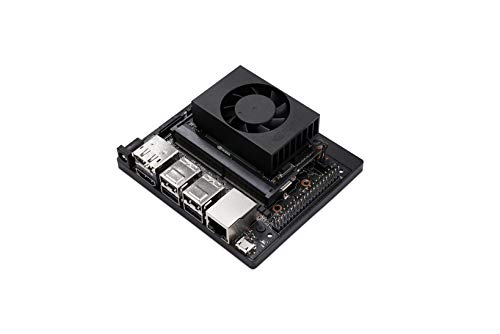
NVIDIA Jetson Xavier NX Developer Kit – the edge deployment pick
Edge pick – a developer kit, not a laptop
- Product type: Developer kit (edge AI board)
- Graphics: Not stated in the listing title – verify with the manufacturer documentation
- Memory: Not stated in the listing title – verify with the manufacturer documentation
- Storage: Not stated in the listing title – verify with the manufacturer documentation
- Display: None – requires an external monitor
- Operating system: Not stated in the listing title – verify with the manufacturer documentation
First, the essential honesty: the NVIDIA Jetson Xavier NX Developer Kit is not a laptop. It is a developer kit, a compact edge-AI board with its own processor module and carrier board, no keyboard, no screen, and no battery, and it appears in this roundup because the working life of an AI programmer does not end at training. Models must eventually run somewhere, and for a large class of projects that somewhere is a small, power-sipping computer bolted inside a robot, a camera system, a kiosk, or a piece of industrial equipment. The Jetson is where those deployments are prototyped.
Its role in a workflow is therefore downstream of every other pick here. You train or fine-tune on the Blade, the Raider, or the AORUS, export and optimise the model, and then discover whether it survives contact with edge hardware: tighter memory, a strict power envelope, and real-time expectations. Discovering that gap on a developer kit at your desk is immeasurably cheaper than discovering it in a product, which is why experienced edge practitioners keep one permanently on the bench.
The Xavier NX generation occupies the capable middle of the Jetson family story: substantially more AI throughput than the entry boards, in a module format designed to mirror production hardware. For computer-vision pipelines, robotics prototypes, and smart-camera experiments, it provides a realistic target that a laptop’s GPU, however fast, simply cannot simulate, because the constraints themselves are the lesson.
Set expectations about the experience accordingly. This is a board you connect to a monitor, keyboard, and power supply, running a Linux environment aimed at developers; there is no unboxing-a-laptop moment and no carrying it to a café. Its listing title states no memory or storage figures, so those details must be verified against the manufacturer documentation before planning a deployment around them, exactly as the specification box above records.
Why include it in a laptop roundup at all? Because readers shopping for AI programming hardware frequently stand at the fork between training machines and deployment targets, and confusing the two wastes money in both directions. Bought knowingly, as the edge-deployment companion to a real laptop from this list, the Jetson Xavier NX kit is a professional tool with a clear and honourable job.
Bought by mistake as a portable computer, it would be a disappointment with a barcode. The distinction is this review’s entire point, and the kit’s presence here is a service: it marks the boundary of the category, and it serves the growing number of AI programmers whose deliverable is not a notebook but a device.
Bench practice makes the Jetson more valuable, not less. Keep it mounted, powered, and networked beside the training laptop, with the export-and-test step scripted, and deployment checks become a habit rather than a project phase. Teams that test on target hardware weekly ship edge products with far fewer surprises than teams that meet the hardware for the first time at integration.
It also teaches restraint, the edge’s core curriculum. Models shrink, pipelines simplify, and engineers learn which accuracy points survive quantisation and which were vanity. Those lessons feed back into training decisions on the big machines, making the smallest item in this roundup an unlikely teacher for all the others.
Strengths
- Purpose-built edge target reveals deployment constraints a laptop cannot simulate
- Compact module format mirrors production Jetson hardware for prototyping
- Ideal companion purchase beside any training laptop in this roundup
Trade-offs
- Not a laptop: no screen, keyboard, or battery is included
- Listing title states no memory or storage figures to plan around
- Linux developer environment assumes comfort outside a consumer setup
Best for: a robotics prototyper seeking a bench target for testing whether trained models survive edge power and memory limits
Not suited for: a student seeking a first portable computer for coursework, because this developer kit is a board that requires external peripherals
As the deployment companion to a training machine, Check price on Amazon for the Jetson Xavier NX kit listing.
Comparison table
| Model | Processor | Graphics | Memory | Storage | Display |
|---|---|---|---|---|---|
| Razer Blade 18 | Intel Core i9-14900HX | RTX 4090 | 32GB RAM | 2TB SSD | 18″ UHD+ 200Hz |
| MSI Raider 18 HX | Intel Core i9-14900HX | RTX 4090 | 64GB DDR5 | 2TB NVMe SSD | 18″ UHD+ 120Hz |
| Gigabyte AORUS Master 16 | AMD Ryzen 9 9955HX3D | RTX 5090 | 32GB DDR5 | 2TB SSD | WQXGA 240Hz |
| Razer Blade 16 2026 | Intel Ultra 9 386H | RTX 5080 | 64GB DDR5 | 1TB SSD | 16″ QHD+ OLED 240Hz |
| MSI Raider 18 HX AI | Intel Core Ultra 9 285HX | RTX 5080 16GB GDDR7 | 64GB DDR5-5600 | 2TB NVMe SSD | 18″ QHD+ IPS 240Hz |
| NVIDIA Jetson Xavier NX Kit | Developer kit module | Not stated in title | Not stated in title | Not stated in title | External monitor required |
How much GPU memory and system RAM does local AI programming really need?
Work backwards from the largest model you genuinely intend to run, not the largest model you can name. Quantised large models for local inference and evaluation live comfortably inside the class of hardware gathered here, mid-size fine-tuning with modern parameter-efficient methods is realistic on these GPUs, and full fine-tuning of genuinely large models remains cloud or workstation territory regardless of what a laptop badge promises. The honest question is which of those three activities fills your week, and the answer sizes the GPU more reliably than any tier list.
System memory follows the data, not the model. If your pipelines stage corpora in RAM, run embedding jobs across big collections, or host a local serving stack with databases and vector stores, the 64GB machines stop being luxuries and become the specification. If your datasets stream from fast NVMe storage and your containers stay few, 32GB serves well, and the saving can fund the external storage that checkpoint discipline demands anyway.
Cooling is the third leg, and the least marketed. A training run is an hours-long negotiation between silicon and heatsink, and the 18-inch machines here hold their side of that negotiation longest. Portable practitioners should still choose the Blade 16 without guilt, simply scheduling the longest runs for docked, well-ventilated desk time. Lighter-duty readers, meanwhile, may find the touch machines in our i5 Touchscreen Laptops roundup sufficient for coursework that has not yet reached local training.
Evaluation work deserves its own paragraph in the sizing conversation, because it is where many local setups quietly spend most of their hours. Scoring a fine-tuned model against a test suite, running inference across a validation set, and comparing quantisation variants are all GPU-bound but bursty, and they reward the responsive, always-available nature of a local machine over the queue-and-bill rhythm of rented capacity. A practitioner evaluating daily should weight GPU tier and storage speed together, since result sets and model variants multiply faster than training checkpoints do.
Multimodal work shifts the balance again. Image and audio pipelines lean harder on preprocessing, which is CPU and memory work, and on dataset storage, which is capacity work, so the 64GB Raiders gain ground for vision and speech practitioners even against the newer GPU in the AORUS. Text-only practitioners, by contrast, can let the GPU lead the decision. The roundup is deliberately built so that either weighting lands on a coherent machine rather than on a compromise.
A realistic local AI workflow, from data to deployed model
A healthy local workflow has a rhythm these machines were chosen to support. Data arrives and is cleaned on the CPU, which is why the HX and flagship H processors matter; tokenisation and augmentation run wide across cores and memory; training or fine-tuning then occupies the GPU in long, hot, predictable blocks; evaluation and inference iterate quickly; and finally, for deployment projects, the exported model meets its target hardware, which is where the Jetson kit earns its bench space.
Checkpoint discipline threads through every stage. Save deliberately, name runs so that March’s experiment can be reconstructed in October, and keep the archive on storage sized for sediment rather than for a tidy weekend. The 2TB configurations here exist because their designers understood that an AI laptop’s drive fills with the by-products of curiosity, and that deleting yesterday’s checkpoints to fund today’s run is how reproducibility quietly dies.
Version control for code is table stakes; version thinking for data and models is the differentiator. Even a simple convention, dated folders, a notes file per run, seeds recorded, separates practitioners who can defend their results from those who can only repeat their demos. The hardware in this roundup removes the usual excuses: with this much memory, storage, and GPU, the bottleneck becomes method, and method is free.
Ergonomics close the laboratory tour. A machine that runs experiments for hours also hosts the human watching them, and an external monitor at eye height, a keyboard that does not punish a day of notebook work, and a chair that survives long evaluation sessions are part of the AI budget whether or not they appear in the laptop listing. The 18-inch machines partially excuse the external monitor; none of them excuses the chair.
Record-keeping for experiments deserves the same ergonomic respect. A simple, durable habit, one notes file per run, seeds and settings captured, results summarised in sentences rather than screenshots, turns a laptop full of checkpoints into a body of work that can be published, defended, or sold. Hardware this capable deserves documentation habits worthy of it.
Cloud versus local: placing these laptops honestly
None of these machines abolishes the cloud, and pretending otherwise would insult the reader. Frontier-scale training, bursty capacity for a launch week, and collaboration across a distributed team all remain natural cloud work. What a laptop of this class changes is the default: experimentation, prototyping, fine-tuning, evaluation, and private-data work can happen locally, privately, and without a meter running, which alters how freely a practitioner explores.
Privacy is the argument that grows with time. Datasets that cannot leave a building, client code under strict agreements, and personal projects trained on personal data all become straightforward when the compute sits on your own desk. The 64GB machines extend that argument to serving: a local stack that answers queries without any external call is a genuinely different product posture from an API dependency.
The mature setup is hybrid by design. Prototype locally on hardware like this, scale the proven run in the cloud, and test deployment on the bench kit. Each environment does what it is for, and the laptop, being the only one of the three that is always awake and always yours, becomes the centre of the workflow rather than a compromise within it.
Power and heat logistics complete the laboratory picture. These machines draw serious wattage under training loads, and a desk circuit shared with space heaters, kettles, and a second workstation will eventually introduce itself. Give the flagship its own outlet where possible, keep its vents a hand’s width from walls and books, and treat a cooling pad as ventilation assistance rather than decoration. Small courtesies to physics are repaid in sustained clocks.
Noise planning follows naturally. Overnight runs in a studio flat argue for the 18-inch machines’ larger, slower-turning cooling or for a closed door and a hallway between the laboratory and the bedroom. Practitioners who ignore the acoustic budget rarely abandon local training, but they do start scheduling it resentfully, and a workflow resented is a workflow shortened.
Finally, insure the work rather than the hardware. The laptops are replaceable in a week; the unrepeatable experiment, the unarchived dataset, and the notebook that existed only on one drive are not. An automatic backup that includes checkpoints and environment files is the least exciting purchase in this entire category and the one most likely to be thanked, tearfully, exactly once.
There is also a skills argument for local hardware that transcends any single project. Practitioners who own the whole stack, data, training, serving, and deployment testing on the Jetson, develop an intuition for costs and constraints that API-only workflows never teach. They learn what a gigabyte of VRAM feels like, what a dataloader bottleneck smells like, and why checkpoint discipline matters, because the hardware makes those abstractions physical. Employers and clients notice that intuition quickly.
Budget sequencing helps readers torn between rungs. Buy the machine whose GPU and memory fit the next eighteen months of intended work, not the next eighteen weeks, because AI projects grow into available headroom with suspicious reliability. If the choice is between the newest GPU at 32GB and the previous generation at 64GB, let your pipeline history decide: memory-bound histories should take the memory, architecture-chasing work should take the generation, and both answers are respectable.
Team purchases deserve a distinct note. A laboratory equipping several practitioners gains more from standardising on one configuration, shared images, shared spare chargers, and pooled operational knowledge, than from optimising each seat individually. The two Raiders make that standardisation easy at the heavy end, while the Blade 16 suits the travelling wing of the same team, and a shared Jetson bench serves everyone’s deployment testing from a single shelf.
Solo practitioners face the opposite temptation: buying for a imagined team of future collaborators. Resist it. One person’s workflow, honestly mapped, is the only specification that matters at this tier, and the money saved by not provisioning imaginary colleagues funds the storage, backup, and reference material that a real solo laboratory actually consumes.
Ergonomics close the laboratory tour. A machine that runs experiments for hours also hosts the human watching them, and an external monitor at eye height, a keyboard that does not punish a day of notebook work, and seating that survives long evaluation sessions are part of the AI budget whether or not they appear in a laptop listing. The 18-inch machines partially excuse the external monitor purchase; none of them excuses postponing the rest.
Record-keeping deserves the same respect as ergonomics. One notes file per run, seeds and settings captured, results summarised in sentences rather than screenshots, turns a drive full of checkpoints into a body of work that can be published, defended, or handed over. Hardware this capable deserves documentation habits worthy of it, and the habit costs nothing but consistency.
Ambient temperature is the laboratory variable nobody budgets for. A small room warmed by a training flagship becomes a slower laboratory by afternoon, because every cooling system in this roundup ultimately dumps its heat into the same air it breathes. Ventilation, a door ajar, or a fan that moves room air extends sustained performance more cheaply than any accessory sold for the purpose.
Finally, expect your second year with these machines to differ from your first. Projects grow, models grow, and the headroom that felt extravagant at purchase becomes the working margin you rely on, which is the entire argument for buying a rung above the present need in this category specifically. AI workloads expand to fill available silicon with a reliability that borders on a law of nature.
One more population deserves direct address: students entering machine-learning courses. Coursework itself rarely needs this tier, hosted notebooks cover introductory classes, but the student building a portfolio, entering competitions, or assisting in a research lab will outgrow hosted limits quickly and predictably. For them the Blade 16’s portability or the Blade 18’s screen becomes a multi-year instrument, and buying once, at the right tier, beats renting capability by the semester.
Career changers arriving from software engineering should note how much of their existing craft transfers. The dataloader is a pipeline, the serving stack is a backend, the experiment log is documentation, and the deployment test is integration testing wearing new clothes. The hardware simply raises the ceiling on familiar habits, which is why experienced engineers adapt to local AI work faster than the field’s mystique suggests.
Keep a small, dull spreadsheet of your own machine’s behaviour during the first month: run durations, temperatures as reported by system tools, and where each workload first felt constrained. That private dataset, unglamorous as it is, will specify your next purchase better than any reviewer’s table, and it converts the vague sense of a bottleneck into a named component with a number beside it.
And when the work outgrows even these machines, as the best work eventually does, the laptop does not retire. It becomes the development seat, the evaluation station, and the controller for larger rented runs, which is a graceful second career that only genuinely capable hardware gets to have.
Before ordering, run one final sanity pass over the mundane: confirm the desk depth fits an 18-inch chassis if that is your choice, confirm the bag fits a 16-inch one if it must travel, and confirm the room where overnight runs will happen can spare the warmth and the hum. AI hardware fails more purchases on furniture than on silicon, and the five minutes spent with a tape measure are the cheapest insurance in this entire guide.
Photograph your laboratory setup once it settles, cables, vents, and drive layout included; when something changes months later and a run misbehaves, that picture becomes the fastest diagnostic you own.
Label the external archive drive with its contents and its start date; future you, mid-deadline, will be grateful for the courtesy.
Common mistakes
- Importing desktop GPU memory figures into a laptop purchase, when laptop cards differ and only one title here states its VRAM
- Buying GPU tier while starving system memory, then watching data pipelines throttle the card the budget just bought
- Treating a developer kit as a laptop substitute and discovering at unboxing that no screen, keyboard, or battery exists
- Filling the internal drive with checkpoints until the operating system and the training run fight over the last gigabytes
- Ignoring cooling and scheduling overnight training in a warm room on a thin machine never given ventilation room
Software stack readiness is the final pre-purchase check. Confirm that your frameworks, drivers, and container tooling support the GPU generation you are buying, particularly with the newest architecture in the AORUS, where early adopters occasionally wait a release cycle for full library maturity. The 4090 machines invert that equation: their ecosystem is completely seasoned, every tutorial assumes them, and every error message has been seen and answered by someone before you.
Frequently asked questions
Can these laptops fine-tune large language models?
With parameter-efficient methods and sensible model sizes, yes: that is precisely the workload the RTX 4090, 5080, and 5090 machines here are gathered for. Full fine-tuning of the very largest models exceeds any laptop GPU memory, and honest planning routes that work to cloud or workstation hardware while the laptop handles prototyping and evaluation.
Why does only one pick state its VRAM in this guide?
Because only one listing title states it. The Raider 18 HX AI confirms 16GB of GDDR7 in its title; the other titles do not print a figure, so this guide records the absence rather than borrowing numbers from desktop cards or other configurations, and directs readers to manufacturer documentation for verification.
Is 64GB of system memory overkill for AI programming?
For inference-only work, it is generous. For pipelines that stage datasets in memory, run local serving stacks, or keep many containers alive beside training, it is the difference between a workflow and a juggling act, which is why three of the six picks here carry it.
What exactly is the Jetson Xavier NX kit for?
It is a developer board for prototyping edge deployment: testing whether a trained model runs acceptably within the power and memory limits of embedded hardware. It complements a laptop from this list; it does not replace one, having no screen, keyboard, or battery of its own.
Final recommendation
Match the machine to the stage of work that dominates your week. Training-heavy practitioners belong on the 18-inch Raiders or the Blade 18, memory-led pipelines on the 64GB trio, frontier tooling on the AORUS and its RTX 5090, and travelling researchers on the Blade 16, which somehow refuses to compromise either memory or GPU. Add the Jetson kit when deployment enters the picture, and the bench is complete. Business readers furnishing a small team rather than a laboratory may also weigh the manageability-first machines among the hP ProBook Laptops, though those serve a different master than local training.
Buy the headroom you will actually use, verify every figure a listing leaves unstated, and your local experiments will stop feeling like negotiations with your own hardware.


