What's inside
- Where to Buy
- Key Takeaways
- Quick Picks
- How the picks were chosen
- The six machines in detail
- Comparison table
- Which specification matters most for photogrammetry: RAM, GPU, or storage?
- From capture to mesh: where the hours actually go
- Storage and archive discipline for image-heavy work
- Common mistakes
- Frequently asked questions
- Final recommendation
As an Amazon Associate I earn from qualifying purchases. This post may contain affiliate links at no extra cost to you.
[SITE_DOMAIN] is reader-supported. When you buy through links on our site, we may earn an affiliate commission at no extra cost to you. Prices and availability change; check the Amazon listing for the current details.
Where to Buy
Lenovo ThinkPad P16 64GB Touch – Check price on Amazon
Dell Precision 7680 64GB 1TB – Check price on Amazon
HP ZBook 8 G1i AI Mobile Workstation – Check price on Amazon
HP ZBook Ultra 14 G1a – Check price on Amazon
HP ZBook Fury 16 G11 – Check price on Amazon
Dell Precision 7780 17.3 i9 – Check price on Amazon
The best laptops for photogrammetry are chosen by a ruthless little question: which resource does your software starve first? Reconstruction pipelines cycle through alignment, dense matching, meshing, and texturing, and each stage leans on a different pillar, processor cores, system memory, GPU memory, and storage throughput in turn. A machine generous in the wrong pillar still stalls, which is why this roundup gathers six workstations with deliberately different strengths, from 64GB memory flagships to the one configuration here stating 12GB of GPU memory.
Two honesty notes frame everything that follows. First, figures come only from listing titles: where a title does not name a graphics card, the specification boxes say so, and those machines should be verified against manufacturer documentation by anyone whose pipeline is GPU-led. Second, no invented benchmark numbers appear anywhere in this guide, because reconstruction times depend on dataset size, image resolution, and software settings more than on any laboratory figure a review could print.
The cast divides into philosophies. Lenovo and Dell each field a 64GB machine for memory-led work, Dell adds the GPU-led 7780, HP fields a current-platform all-rounder, a processor-led traditionalist, and a compact unified-memory wildcard, and every one of them runs Windows 11 Pro, because photogrammetry at this level is professional work with professional deployment needs.
Key Takeaways
- Memory leads: the ThinkPad P16, Precision 7680, and ZBook Ultra each carry 64GB for large datasets
- The Precision 7780 states the largest GPU memory here, 12GB on an RTX ADA 4000, for dense reconstruction stages
- Two listings do not state a discrete GPU in their titles, so GPU-led buyers must verify those configurations before ordering
- The 14-inch ZBook Ultra pairs unified memory with 2TB of storage, the field-review champion of the set
- Storage discipline matters everywhere: raw archives outgrow every internal drive in this roundup eventually
Quick Picks
| Pick | Processor | Graphics | Memory | Storage | Display |
|---|---|---|---|---|---|
| Lenovo ThinkPad P16 | Intel Core i7-14700HX | Not stated in title | 64GB DDR5 | 1TB PCIe SSD | 16″ 3840×2400 Touch |
| Dell Precision 7680 | Intel Core i7-13850HX | RTX 1000 6GB | 64GB RAM | 1TB NVMe SSD | 16″ FHD+ |
| HP ZBook 8 G1i | Intel Ultra 7 255H | RTX 500 Ada | 32GB DDR5 | 1TB SSD | 16″ FHD+ Touch |
| HP ZBook Ultra 14 G1a | AMD Ryzen AI Max PRO 390 | Radeon 8050S | 64GB unified RAM | 2TB SSD | 14″ 2.8K OLED Touch |
| HP ZBook Fury 16 G11 | Intel Core i7-13850HX | Not stated in title | 32GB DDR5 | 1TB PCIe SSD | 16″ WUXGA |
| Dell Precision 7780 | Intel Core i9-13950HX | RTX ADA 4000 12GB | 32GB RAM | 512GB NVMe SSD | 17.3″ FHD |
How the picks were chosen
Candidates were screened as workstations first and laptops second: professional operating system, at least 32GB of memory, at least 512GB of fast storage, and either a stated professional GPU or a processor and memory combination strong enough to anchor CPU-led pipelines. Consumer gaming machines, however powerful their graphics, were set aside because this audience buys driver stability, support arrangements, and sustained-load behaviour alongside raw speed.
Within that screen, machines were differentiated by their lead resource, because photogrammetry refuses a single ranking. Memory-led pipelines, huge image counts, high-resolution captures, and dense point clouds, point at the 64GB trio. GPU-led pipelines point at the Precision 7780 and its 12GB card, with the 7680 stated 6GB as the midfield answer. Processor-led pipelines point at the Fury and the i9 Dell. The guide job is mapping, not coronation.
Field realities completed the assessment: touchscreen inspection, wired networking for archive movement, warranty length for rough itineraries, and screen size for the supervision hours that processing demands. Readers arriving from adjacent 3D and AI work will find the same resource-first thinking in our i5 Touchscreen Laptops coverage of lighter machines, though those serve capture review rather than reconstruction itself.
The six machines in detail

Lenovo ThinkPad P16 – 64GB and a 4K touchscreen
Memory-led workstation pick
- Processor: Intel Core i7-14700HX, 20 cores
- Graphics: Not stated in the listing title – verify with the manufacturer documentation
- Memory: 64GB DDR5 RAM
- Storage: 1TB PCIe SSD
- Display: 16 inch touchscreen, 3840 x 2400
- Operating system: Windows 11 Pro
- Connectivity: Thunderbolt 4, Wi-Fi 6E, backlit keyboard
Photogrammetry is a memory discipline before it is anything else, and the ThinkPad P16 leads this roundup because its specification reads like it was written by someone who has watched a dense mesh build consume a lesser machine. Sixty-four gigabytes of DDR5 is the headline: large photo sets, hundreds of high-resolution images aligned and densified at once, stop being an exercise in swapping and become a straightforward overnight run. The 20-core Core i7-14700HX feeds that memory with the parallel throughput that feature extraction and matching stages reward.
The 3840 x 2400 touchscreen is the second, quieter argument. Inspecting a mesh means orbiting, zooming, and interrogating detail, and a high-resolution panel with touch input makes that inspection tactile in a way that speeds up quality judgements. Surveyors and heritage documenters reviewing capture coverage in the field will appreciate being able to pinch into a suspect region of a point cloud rather than trusting a thumbnail on a small screen.
Its listing title does not name a discrete GPU, and this guide records that absence honestly in the specification box rather than guessing. Photogrammetry pipelines lean on the GPU heavily during dense reconstruction in many software packages, so a buyer whose workflow is GPU-led should verify the exact graphics configuration of this listing against manufacturer documentation before ordering, and weigh the Dell machines below, whose titles state their NVIDIA hardware plainly.
What is stated, and stated strongly, is the workstation frame around the work: Windows 11 Pro for managed deployments, Thunderbolt 4 for fast ingest from card readers and external drives, Wi-Fi 6E, and the ThinkPad keyboard and chassis tradition that field crews value because equipment that travels to sites gets knocked about. The 1TB PCIe SSD is the one merely adequate figure, since raw photo archives outgrow internal drives quickly, and an external archive habit belongs in this machine budget.
Thermal character suits the workload. Reconstruction is a sustained, hours-long load, and a full-size mobile workstation chassis is built to hold clocks through it rather than sprint and fade. Expect fan presence during dense builds; expect also that the build finishes on schedule, which is the trade every professional in this category accepts gladly.
Field practicality completes the case. A touchscreen for review, a backlit keyboard for dim site cabins and evening processing, and a 16-inch panel large enough to judge coverage without an external monitor make the P16 a genuine one-machine field station. Crews who process where they capture, checking a site coverage before demobilising, will understand exactly what this configuration is for.
Against the Dells, the Lenovo argues memory and display: double the RAM of the Precision 7780, a sharper touchscreen than either, and a processor with cores to spare. Against the HPs, it argues simplicity: a single, capacious, Intel-based configuration with no platform ambiguity.
Choose it when your datasets are large, your software dense stage is CPU and memory led, and your quality control happens by eye and by hand on the machine itself.
Battery reality deserves a plain sentence for every machine in this roundup, this one included: reconstruction is plugged-in work, and the battery exists for capture review, travel, and the graceful handling of interruptions. The P16 uses its unplugged hours well, since review and annotation are light duties, and a field day structured around processing at base and reviewing on site plays directly to its strengths.
The ThinkPad ownership ecosystem adds a final, unglamorous comfort: docks, chargers, and parts are everywhere this class of machine works, and a practice equipping several seats will feel that availability the first time a cable fails the night before a survey.
Strengths
- 64GB DDR5 gives large photo sets room for alignment and dense builds
- 20-core i7-14700HX supplies parallel pace for extraction and matching
- 3840 x 2400 touchscreen makes mesh inspection direct and precise
Trade-offs
- Listing title does not state a discrete GPU, so verify graphics before ordering
- 1TB storage fills quickly with raw photo archives
- Sustained reconstruction keeps the cooling system audibly engaged
Best for: a surveyor seeking a 64GB field station whose 4K touchscreen speeds up coverage checks before leaving a site
Not suited for: a GPU-led pipeline owner seeking a stated NVIDIA card in the title, where the Dell configurations below declare theirs plainly
For memory-led field processing, Check price on Amazon on the ThinkPad P16 listing.

Dell Precision 7680 – 64GB with a stated RTX 1000
Balanced workstation pick with declared graphics
- Processor: Intel Core i7-13850HX
- Graphics: NVIDIA RTX 1000, 6GB
- Memory: 64GB RAM
- Storage: 1TB NVMe SSD
- Display: 16 inch FHD+
- Operating system: Windows 11 Pro
- Support: Pro Support Plus as listed, AI Copilot noted
The Precision 7680 is the roundup most completely declared workstation: 64GB of RAM like the Lenovo, and unlike the Lenovo, a graphics card named in the title, the NVIDIA RTX 1000 with 6GB of its own memory. For photogrammetry software whose dense reconstruction stage leans on the GPU, that declaration matters, because it lets a buyer plan around a known quantity rather than a documentation hunt. Six gigabytes of GPU memory suits small and mid-size projects comfortably and disciplines large ones into tiled or staged processing.
The Core i7-13850HX brings HX-class parallel throughput to alignment and matching, and the pairing of that processor with 64GB of system memory reproduces the P16 chief virtue: datasets stop negotiating with the swap file. Where the Dell differs is intent. The Precision line is Dell managed-fleet workstation family, and touches like Pro Support Plus in the listing speak to organisations that measure downtime in billable hours and prefer a support contract to a prayer.
The 16-inch FHD+ display is the specification that steps down. It is perfectly serviceable for processing supervision, yet it lacks the inspection fidelity of the ThinkPad 3840 x 2400 touchscreen, and practitioners who judge mesh quality on the internal panel will feel the difference. The honest reading is that this Dell expects a calibrated external monitor at the desk, where its HDMI output earns its keep, and treats the internal screen as the field and travel surface.
Storage matches the class standard at 1TB of NVMe, with the same counsel as elsewhere in this roundup: raw archives belong on external or network storage, and the internal drive serves active projects. Windows 11 Pro and the AI Copilot notation round out a listing aimed squarely at professional deployment rather than hobbyist experimentation.
In sustained builds the Precision behaves like the workstation it is, holding its performance through long reconstruction queues while its cooling makes the effort audible. Fleet buyers will also value the model consistency: a known configuration, a known support path, and no surprises between the first unit and the fifteenth.
Heritage teams, engineering firms, and survey practices standardising on one photogrammetry laptop could do far worse than standardise here, where every figure that matters is printed in the title and the support arrangement is printed beside it.
Its natural rival is the P16: choose the Dell for declared graphics and fleet support, the Lenovo for memory-equal processing with a far finer touchscreen. Between those two poles the rest of this roundup arranges itself.
For a single-machine practice wanting professional graphics, professional memory, and professional backup in one purchase, the 7680 is the most administratively comfortable answer on this page.
Dell fleet tooling extends the 7680 argument beyond the single purchase. Identical configurations simplify software images, spare-part shelves, and the quiet knowledge a technician accumulates about one chassis over years. Photogrammetry practices grow by seats, and a workstation that standardises gracefully is worth more than its specification suggests on day one.
The FHD+ panel has one more virtue worth naming: it is easy on the eyes during the long, static supervision of a build, where the work is watching progress bars and log lines rather than judging pixels. Judgement belongs on the calibrated external monitor this machine expects, and supervision belongs here.
Strengths
- Title states the RTX 1000 with 6GB, removing graphics guesswork
- 64GB RAM matches the roundup ceiling for dataset headroom
- Pro Support Plus suits organisations pricing downtime honestly
Trade-offs
- FHD+ internal display trails the ThinkPad for on-panel mesh inspection
- 6GB GPU memory disciplines very large projects into staged processing
- 1TB internal storage assumes an external archive routine
Best for: a practice manager seeking a fleet-standard workstation with declared graphics, 64GB of memory, and contracted support
Not suited for: a solo documenter seeking the finest internal screen for field review, where the 4K touchscreen configuration above leads
For the fully declared workstation route, Check price on Amazon on the Precision 7680 listing.

HP ZBook 8 G1i – the newer platform with RTX 500 Ada
Current-platform pick for mixed 3D duties
- Processor: Intel Ultra 7 255H
- Graphics: NVIDIA RTX 500 Ada
- Memory: 32GB DDR5
- Storage: 1TB SSD
- Display: 16 inch FHD+ touchscreen
- Operating system: Windows 11 Pro
- Connectivity: 2x Thunderbolt 4, Wi-Fi 7, 3-year warranty as listed
The ZBook 8 G1i represents the newer generation of mobile workstations, built on Intel Ultra 7 255H with an NVIDIA RTX 500 Ada for graphics, and its photogrammetry case rests on balance and currency rather than on any single towering figure. Thirty-two gigabytes of DDR5 handles small and mid-size projects gracefully, the 1TB SSD matches the class, and the Ada-generation GPU brings current drivers and current software support to the dense reconstruction stage.
That currency has practical value in this field. Photogrammetry packages update their GPU code paths continuously, and a current-generation professional card sits squarely in the supported present rather than at the trailing edge of a compatibility matrix. The listing positioning for engineers and designers matches that reality: this is a generalist professional machine that does photogrammetry well, rather than a single-purpose reconstruction rig.
The 16-inch FHD+ touchscreen supports the inspection workflow, orbiting and probing a mesh by hand, even if its resolution cannot match the ThinkPad panel for fine defect hunting. Two Thunderbolt 4 ports accelerate the ingest ritual, card readers, external SSDs, and docks all arriving at full speed, and Wi-Fi 7 keeps the machine current on new office and site networks.
The three-year warranty stated in the listing deserves emphasis, because photogrammetry laptops live rough lives: construction sites, archaeological trenches, vehicle mounts, and festival fields for event documentation. A long warranty on a machine with that itinerary is not a luxury line item; it is risk management, and HP printing it in the title signals the audience the ZBook expects to serve.
Memory is the honest ceiling. At 32GB, very large photo sets will push the machine toward staged processing sooner than the 64GB pair above, and practitioners whose typical project already strains that figure should buy accordingly. For the broad middle of professional work, though, surveys, inspections, product documentation, and cultural heritage projects of ordinary scale, the configuration is coherent and modern.
Efficiency is the Ultra platform side benefit: lighter processing, reviewing, and field tasks draw less and run cooler than the HX flagships, extending the useful field day when the work is capture review rather than dense building.
Set against the ZBook Fury below, this G1i trades raw processor cores for platform modernity and a touchscreen. Set against the Dells, it trades memory for warranty length and newer silicon. Those are legitimate trades, and many practices will take them.
Consider it the sensible new-purchase default for a practice whose projects are professional in scale but not extreme, and whose equipment refresh cycle rewards buying the current generation.
The G1i also suits the growing class of hybrid practitioners, those splitting a week between reconstruction, CAD review, and ordinary office work. A single-purpose rig idles during the office days; this balanced ZBook simply changes hats, and its efficiency on light duties stretches the field day when capture review is the only task.
Its touchscreen earns a second mention for client work. Walking a stakeholder through a mesh by hand, rotating to the exact facade or fracture under discussion, communicates faster than any rendered video, and practices that present findings in person will use that party trick weekly.
Strengths
- RTX 500 Ada brings current-generation professional graphics support
- Three-year warranty stated in the listing suits rough field itineraries
- Touchscreen and twin Thunderbolt 4 ports speed inspection and ingest
Trade-offs
- 32GB memory reaches its ceiling sooner on very large photo sets
- FHD+ resolution limits on-panel defect inspection detail
- Ultra H processor trails HX chips on the longest parallel builds
Best for: a consultancy seeking a current-generation workstation with a long warranty for mid-scale survey and inspection projects
Not suited for: a research team seeking maximum memory for huge heritage datasets, where the 64GB configurations above fit the work better
For the current-platform option, Check price on Amazon on the ZBook 8 G1i listing.

HP ZBook Ultra 14 G1a – 64GB unified memory in 14 inches
Compact pick with unified memory architecture
- Processor: AMD Ryzen AI Max PRO 390
- Graphics: Radeon 8050S integrated
- Memory: 64GB unified RAM
- Storage: 2TB SSD
- Display: 14 inch 2.8K OLED touchscreen
- Operating system: Windows 11 Pro
- Notes: Copilot+ PC, fingerprint reader as listed
The ZBook Ultra 14 G1a is the roundup beautiful anomaly: a 14-inch machine carrying 64GB of unified memory and 2TB of storage, specifications that embarrass laptops twice its travel weight. The unified architecture deserves explanation, because it changes the photogrammetry calculation. Memory is shared between processor and the integrated Radeon 8050S graphics rather than partitioned, so the GPU side of a reconstruction pipeline can draw from a far larger pool than a small discrete card fixed allocation, provided the software in use supports the platform well.
That proviso is the honest centre of this review. Photogrammetry packages vary in how completely they exploit AMD integrated graphics and unified memory, so a buyer committed to one package should confirm its behaviour on this architecture before ordering. Where support is good, the configuration is remarkable: huge datasets in memory, GPU stages fed from the same pool, and 2TB of internal storage swallowing raw archives that would exile other machines’ projects to external drives.
The 2.8K OLED touchscreen is the finest inspection surface in this roundup relative to size, crisp, contrast-rich, and touch-enabled for the orbit-and-probe workflow. In a 14-inch frame it makes the little HP the field-review champion: carry it around a site, check coverage on the spot, annotate problem areas, and process the first alignment pass in the vehicle before the drive home.
Portability rewrites the working pattern. At this size the workstation stops being equipment and becomes an accessory, present at captures rather than waiting back at the office, which catches coverage gaps while the crew and the scaffolding are still on site. That single advantage, rework avoided, can pay for the machine across a season of fieldwork.
The Ryzen AI Max PRO 390 also brings strong local AI capability, noted in its listing for local LLM and 3D work, which suits practices beginning to blend reconstruction with AI-assisted cleanup and classification. Windows 11 Pro and a fingerprint reader complete a specification that never reads like a compromise until the software-support question is asked.
Thermals in a compact chassis under sustained reconstruction deserve respect: plan ventilated, plugged-in processing for the longest builds, and let the machine efficiency handle the field review work it was born for.
Against the 16-inch workstations, the Ultra trades screen acreage and guaranteed software behaviour for memory, storage, and a frame that goes everywhere. It is the boldest configuration here, and for the right software stack, the smartest.
Practices already invested in AMD-friendly tooling, or willing to validate their package on the architecture, will find this the most forward-looking field machine in the set.
Validation homework, stated plainly, is the price of admission for this machine, and it is worth paying before rather than after purchase. Run your package’s own sample dataset on the architecture if a colleague or retailer unit is available, or confirm the vendor’s stated support in writing. An hour of diligence converts this from the roundup’s boldest pick into its most confident one.
The OLED panel also future-proofs the review side of blended work. Practices adding visualisation, client walkthroughs, and presentation renders to their reconstruction services will find this little screen punches far above its size in every client-facing moment.
Strengths
- 64GB unified memory lets graphics stages draw from a large shared pool
- 2TB SSD doubles the internal archive room of the 16-inch rivals
- 2.8K OLED touchscreen in a 14-inch frame excels at field coverage review
Trade-offs
- Software support for unified-memory graphics varies by package, so validate first
- Compact chassis asks for ventilation care during sustained builds
- Integrated graphics trail discrete cards in packages written for them
Best for: a field documenter seeking a go-everywhere 14-inch workstation whose unified memory and 2TB drive keep whole projects onboard
Not suited for: a studio seeking guaranteed behaviour in a package written for discrete NVIDIA graphics, where the Dell and ZBook Fury listings declare theirs
For the compact unified-memory route, Check price on Amazon on the ZBook Ultra 14 listing.
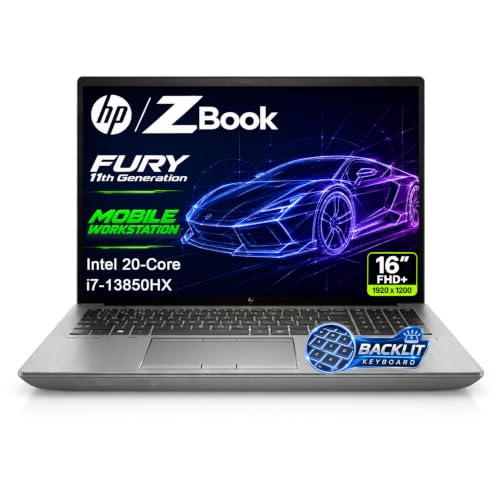
HP ZBook Fury 16 G11 – the traditional heavy lifter
Processor-led pick for CPU-bound pipelines
- Processor: Intel Core i7-13850HX, 20 cores, up to 5.3GHz
- Graphics: Not stated in the listing title – verify with the manufacturer documentation
- Memory: 32GB DDR5
- Storage: 1TB PCIe SSD
- Display: 16 inch WUXGA
- Operating system: Windows 11 Pro
- Connectivity: Thunderbolt 4, RJ-45 Ethernet, backlit keyboard
The Fury name is HP heavy line, and this G11 configuration leans into processor-led work: a Core i7-13850HX with 20 cores reaching up to 5.3GHz, 32GB of DDR5, and a chassis built for sustained professional loads. Photogrammetry pipelines whose alignment, matching, and meshing stages run primarily on the CPU will find the specification aimed at them with unusual directness.
Candour is required about graphics, as it was for the ThinkPad: this listing title does not state a discrete GPU, so the specification box records the absence and the buyer with a GPU-led package must verify the exact configuration before committing. What the title does state is a serious workstation skeleton: WUXGA display, Thunderbolt 4, and an RJ-45 Ethernet port, a small line that site and studio veterans will greet warmly, since wired networking remains the fastest, calmest way to move hundreds of gigabytes of imagery onto network storage.
The 16-inch WUXGA panel gives working room without the inspection sharpness of the 4K ThinkPad or the little Ultra OLED, positioning this machine as a processing engine first and a review surface second. At a desk with an external monitor, that ordering stops mattering; in the field, it is the trade the configuration makes for its processor emphasis.
Thirty-two gigabytes of memory places the Fury in the roundup middle band: ample for the broad professional middle of project sizes, staged territory for the largest datasets, where the 64GB machines continue working in one pass. Storage at 1TB repeats the class pattern and the class advice about external archives.
Build and serviceability are the Fury line traditional virtues, and practices that maintain their own equipment, upgrading memory or storage across a machine life, tend to gravitate to exactly this kind of full-size professional chassis. Windows 11 Pro fits the managed deployment story.
Sustained-load behaviour follows the workstation script: fans audible during dense builds, clocks held, work finished. The Fury does not pretend to be a travel accessory; it is the desk and site-cabin anchor of a processing workflow.
Compared with its ZBook sibling above, the Fury offers more cores and a wired port against the G1i newer platform, touchscreen, and longer stated warranty. Compared with the P16, it offers the Ethernet and the HP ecosystem against Lenovo memory and display.
For CPU-led pipelines in organisations already standardised on HP, the Fury is the natural, unglamorous, correct answer, and photogrammetry rewards correct answers more than glamorous ones.
The Fury’s serviceability story deserves its own emphasis. Full-size professional chassis are built to be opened, cleaned, and upgraded by the organisations that own them, and a practice that keeps machines for five years extracts real money from that design choice: a memory uplift in year three, a larger drive in year four, and fans cleaned rather than endured.
Its WUXGA panel, judged fairly, is the right screen for its actual job: supervising builds, managing files, and running the office half of a practice at a desk where a larger external display handles inspection. Specialisation is not deficiency.
Strengths
- 20-core i7-13850HX up to 5.3GHz targets CPU-led pipeline stages
- RJ-45 Ethernet moves large image archives calmly and quickly
- Full-size Fury chassis suits sustained loads and long service life
Trade-offs
- Listing title does not state a discrete GPU, so verify graphics first
- 32GB memory stages the largest datasets rather than swallowing them
- WUXGA panel is a working surface rather than an inspection showcase
Best for: an HP-standardised studio seeking a processor-led workstation with wired networking for archive-heavy reconstruction work
Not suited for: a field reviewer seeking the sharpest internal touchscreen for mesh inspection, where the ThinkPad and ZBook Ultra configurations lead
For the traditional heavy-lifter option, Check price on Amazon on the ZBook Fury listing.

Dell Precision 7780 – 17.3 inches and RTX ADA 4000 12GB
Large-screen pick with the biggest stated GPU memory
- Processor: Intel Core i9-13950HX
- Graphics: NVIDIA RTX ADA 4000, 12GB
- Memory: 32GB RAM
- Storage: 512GB NVMe SSD
- Display: 17.3 inch FHD
- Operating system: Windows 11 Pro
- Connectivity: HDMI, USB-C, Wi-Fi, Bluetooth as listed
The Precision 7780 closes the roundup with two superlatives: the largest screen, at 17.3 inches, and the largest stated GPU memory, 12GB attached to its NVIDIA RTX ADA 4000. For photogrammetry, that GPU figure is the argument in full. Dense reconstruction stages that spill out of a 6GB card keep working inside 12GB, larger mesh tiles process in fewer passes, and the professional Ada architecture brings the driver stability that production pipelines quietly depend on.
The Core i9-13950HX tops the processor table here, giving alignment and matching the strongest single-chip pace in the set, and the big chassis gives that chip and the Ada card room to sustain their work through the longest builds. This is a machine dimensioned like a desk that folds, and it should be bought as one: a fixed processing station for a studio, laboratory, or site office, not a daily traveller.
The compromises are equally clear-eyed. Storage is the roundup smallest at 512GB, a figure that raw photo archives will insult within a single large project, so external or network storage is not advice with this machine, it is a prerequisite, budgeted alongside the purchase. Memory at 32GB sits in the middle band, ample for most projects, staged for the largest, and the FHD resolution across 17.3 inches yields a softer inspection image than the ThinkPad dense 4K panel.
Windows 11 Pro, HDMI, and USB-C cover the studio connectivity basics, and the Precision badge carries the fleet-support expectations set by its smaller sibling. Practices already running Dell workstations will find the 7780 the natural flagship of their existing ecosystem.
Its working pattern is the overnight queue: load the day captures, stage the processing, and let the big machine grind while the team sleeps or shoots the next site. Few laptops anywhere are as honestly built for that single rhythm.
Against the 7680, the 7780 trades memory and internal storage for GPU memory, processor tier, and screen size, a trade that GPU-led pipelines should take and memory-led pipelines should refuse. The roundup discipline is precisely that: know which resource your software starves first.
For studios whose bottleneck history is written in GPU memory errors and tiled workarounds, this Dell is the release valve, and its storage shortfall is the cheapest problem in this entire article to solve externally.
It is the specialist flagship: narrow in its concessions, generous where its audience actually lives.
The 7780’s size buys one more advantage nobody lists: thermal patience. A large chassis with large fans moves air at lower speeds and lower pitch, and a studio running overnight queues in an adjoining room will appreciate a baritone hum over a smaller machine’s whine, even at equal measured performance.
It also anchors a desk properly. Peripherals, a calibrated monitor, and network storage gather around a machine that plainly is not leaving, and workflows ossify productively around that permanence: same ingest ritual, same queue, same archive path, every single project.
Strengths
- RTX ADA 4000 with 12GB stated GPU memory leads the roundup for dense stages
- Core i9-13950HX tops the processor table for alignment pace
- 17.3-inch screen gives processing supervision genuine room
Trade-offs
- 512GB storage makes external or network archives a prerequisite
- 32GB memory sits a band below the 64GB pair for huge datasets
- FHD across 17.3 inches softens fine mesh inspection detail
Best for: a studio seeking the largest stated GPU memory for dense reconstruction on a fixed processing station
Not suited for: a mobile surveyor seeking internal storage for whole raw archives, since this configuration carries the smallest drive here
When GPU memory is the known bottleneck, Check price on Amazon on the Precision 7780 listing.
Comparison table
| Model | Processor | Graphics | Memory | Storage | Display |
|---|---|---|---|---|---|
| Lenovo ThinkPad P16 | Intel Core i7-14700HX | Not stated in title | 64GB DDR5 | 1TB PCIe SSD | 16″ 3840×2400 Touch |
| Dell Precision 7680 | Intel Core i7-13850HX | RTX 1000 6GB | 64GB RAM | 1TB NVMe SSD | 16″ FHD+ |
| HP ZBook 8 G1i | Intel Ultra 7 255H | RTX 500 Ada | 32GB DDR5 | 1TB SSD | 16″ FHD+ Touch |
| HP ZBook Ultra 14 G1a | AMD Ryzen AI Max PRO 390 | Radeon 8050S | 64GB unified RAM | 2TB SSD | 14″ 2.8K OLED Touch |
| HP ZBook Fury 16 G11 | Intel Core i7-13850HX | Not stated in title | 32GB DDR5 | 1TB PCIe SSD | 16″ WUXGA |
| Dell Precision 7780 | Intel Core i9-13950HX | RTX ADA 4000 12GB | 32GB RAM | 512GB NVMe SSD | 17.3″ FHD |
Which specification matters most for photogrammetry: RAM, GPU, or storage?
The unsatisfying truth is that the answer rotates by pipeline stage, and the satisfying truth is that your own project history reveals it. Watch your current machine during a build: if the memory graph pins to the ceiling during alignment, RAM is your bottleneck and the 64GB machines are your shortlist. If the dense stage crawls or fails on GPU memory, the Precision 7780 stated 12GB is the specification to chase. If every stage waits on a nearly full drive or on archive transfers, storage and networking deserve the budget instead.
Project scale draws the second line. A few hundred images of a building facade is a different discipline from several thousand images of a quarry, a coastline, or a cathedral, and the larger practice should treat 64GB of system memory and a stated professional GPU as the combined floor. Smaller practices can thrive in the 32GB band for years, particularly with disciplined staging and overnight queues doing the heavy lifting.
Software identity draws the third line. Packages differ in how they exploit GPU architectures, unified memory, and multi-core scaling, so the correct final step before ordering is checking your package own hardware guidance against these titles. That check takes ten minutes and prevents the only genuinely expensive mistake in this category: a superb workstation whose strengths your software cannot use. Business buyers furnishing a broader team may also consult our hP ProBook Laptops roundup for the non-specialist seats.
Ground control and measurement accuracy form the professional edge of this discipline, and they interact with hardware in an underappreciated way: verification. Checking a model against control points, re-measuring known distances, and documenting residuals is inspection work, done by eye on a screen, often in the field. That is the third argument, after coverage review and client presentation, for the touchscreen machines in this set, and practices doing measured work should weight it accordingly.
Licensing and software cost belong in the same honest budget conversation as the laptop. Professional photogrammetry packages, support contracts, and the storage they demand can rival the hardware spend across a few years, and a practice speccing workstations should hold the whole picture at once. Buying one rung down on the laptop to fund the software tier that unlocks GPU acceleration is sometimes the fastest purchase on this entire page.
Training is the third leg of that budget stool. A new hire fluent in capture but new to processing will bottleneck a flagship workstation for months, while an experienced processor on the midrange ZBook out-produces them daily. Hardware decisions made alongside training decisions compound; hardware decisions made instead of them merely decorate.
From capture to mesh: where the hours actually go
A photogrammetry day begins before the laptop opens. Capture discipline, overlapping coverage, consistent exposure, and ground control where the project needs it, determines the ceiling of everything downstream, and no workstation in this roundup rescues a careless capture. The machines earn their money in the evening: ingest at wire speed, a first alignment to verify coverage while returning to the site is still possible, then the long dense stages queued overnight.
That evening verification pass is where the field configurations justify themselves. The ThinkPad 4K touchscreen and the little ZBook Ultra OLED exist for the moment a processor zooms into a suspect corner of a ruin or a roofline and decides whether tomorrow starts with a reshoot or with confidence. Catching a coverage gap on site costs an hour; catching it back at the studio costs a journey.
Meshing and texturing then reward patience and headroom in equal measure. Practitioners learn to schedule the heaviest stages like laundry, loaded before dinner, harvested in the morning, and the workstations here were chosen for exactly that temperament: sustained, unattended, uncomplaining throughput while nobody watches.
Storage and archive discipline for image-heavy work
Raw imagery is the least compressible asset in professional computing: projects arrive by the hundredweight and never shrink. A workable discipline separates three tiers, the active project on the internal drive, the recent archive on fast external or network storage, and the deep archive on redundant media that is verified, not merely written. Every machine in this roundup assumes that discipline; the 512GB Precision 7780 simply assumes it loudest.
Naming and metadata habits decide whether an archive is an asset or a landfill. Project folders carrying date, site, and capture device, plus a plain-text note of processing settings, let a mesh be rebuilt or defended years later, which matters when the deliverable is evidence: an insurance record, a conservation baseline, a survey dispute. The laptop is temporary; the archive is the practice.
Transfer speed is the hidden tax on all of it, which is why the Fury wired Ethernet and the Thunderbolt ports across this set earned their mentions. Moving a terabyte over a congested wireless network is an afternoon; over a cable it is a coffee, and practices bill by the afternoon.
Software settings deserve a paragraph of their own, because they move reconstruction times more than any hardware choice in this article. Image downscaling, depth-map quality, and mesh density settings trade hours against detail, and a professional workflow decides those trades per deliverable rather than by habit. The headroom in these six machines exists so that the decision can be made on quality grounds, with the schedule absorbing the cost, instead of the hardware dictating a lower setting by default.
Team division of labour follows the hardware map naturally. Capture specialists need the field-review machines, the ThinkPad touchscreen or the little Ultra, within arm’s reach of the site. Processing specialists need the fixed stations, the 7780 above all, where queues run undisturbed. A practice that buys one of each shape, rather than two of one shape, covers the whole workflow with less total machinery.
Deliverable thinking closes the loop. A mesh destined for a web viewer, a mesh destined for measurement, and a mesh destined for a conservation archive are three different products wearing one name, and they justify three different processing budgets. Specifying the deliverable before the build is the cheapest performance upgrade in photogrammetry, and it is entirely free.
Power logistics on site complete the field picture. Vehicle inverters, site generators, and the humble spare battery all shape what processing can happen away from the studio, and the efficient machines, the ZBook G1i and the little Ultra, stretch those supplies furthest. Practices working remotely, archaeologically, or in disaster documentation should treat watts as a specification alongside gigabytes.
Insurance and documentation of the equipment itself is the final dull essential. Serial numbers recorded, machines photographed, and data insured separately from hardware, because the archive is worth more than the laptop that made it. A stolen workstation is a bad week; a stolen sole copy of a heritage capture is a small cultural tragedy.
Looking ahead, the direction of this category is plain: memory ceilings keep rising, GPU acceleration keeps broadening, and the field-review machine keeps shrinking toward the camera bag. The six configurations here map that present honestly, and the resource-first method used to choose them will still be the right method when their successors arrive.
Client expectations deserve managing with the same care as datasets. A same-day mesh is a triumph of the field-review workflow, not a promise to build every contract around, and the practices that thrive set the overnight queue as the default rhythm and the field check as the quality gate. The hardware here supports either rhythm; the diary, not the laptop, decides which one a given project gets.
Collaboration across practices introduces file-format diplomacy. Meshes, point clouds, and orthomosaics travel between organisations with different software, and a workstation purchase is a good moment to audit the exchange formats your partners actually accept. Processing power spent building a deliverable nobody can open is the most elegant waste in the discipline.
Environmental care for the machines themselves rounds out the professional habits: dust is the tax that construction and field sites levy on cooling systems, and a soft brush and compressed air after dusty deployments preserve the sustained performance these workstations were bought for. The Fury’s serviceable chassis makes that care easiest; every machine here repays it.
Finally, keep a processing log, however brief. Project, settings, machine, duration, and outcome, one line each, builds the private dataset that specifies your next workstation better than any review can. After a year of logs, your bottleneck stops being an opinion and becomes a measurement, and the resource-first question that opened this guide answers itself from your own evidence.
Drone-based capture, now the default for survey and inspection work, deserves explicit mention because it sets the dataset scale for so many readers. A single flight programme can return thousands of images, and the processing laptop meets them all at once. That is the scenario the 64GB machines were born for, and practices flying regularly should read every 32GB specification in this roundup as an invitation to stage their work deliberately.
Heritage and conservation work sits at the opposite tempo and the same hardware. Captures there are irreplaceable by definition, a fragile fresco, a structure mid-restoration, a site about to change forever, and the processing values care over speed. The touchscreen inspection machines earn their place in that world, where a conservator’s eye, moving across a 4K or OLED surface, is the final quality instrument.
Insurance, real-estate, and construction documentation occupy the commercial middle: volume, deadlines, and deliverables that must simply be right. For those practices the fleet virtues, Dell’s support arrangements, HP’s warranty statements, Lenovo’s service ecosystem, matter as much as any core count, because a workstation awaiting repair during a documentation contract is a liability with a keyboard.
Education is the quiet fourth world. Universities and training programmes teaching reconstruction need machines that survive cohorts, image cleanly, and process teaching datasets without drama, and the midrange configurations here, honestly specced and professionally supported, serve that world better than any flagship would.
A word on monitors, since supervision hours accumulate. Even the finest internal panels here work within laptop geometry, and a large external display at the processing desk transforms the long builds from something endured into something comfortably overseen. Every machine in this roundup drives one happily, and the purchase belongs in the same budget conversation as the archive drives.
Colour matters less in this discipline than in photography, but contrast and resolution matter more, because the inspection task is reading geometry, not judging tone. That is why the 4K ThinkPad and the OLED Ultra punch above their price in perceived usefulness, and why the FHD panels are honestly described here as supervision surfaces rather than inspection instruments.
Keep one more habit from the survey world: redundancy in capture cards and cables. The finest workstation in this article processes nothing when the only card reader fails in a layby, and the cheapest items in the equipment case are the ones whose absence cancels the most expensive ones.
Seasoned processors also keep a known-good sample project on every machine, a modest dataset with a documented expected result. After any driver update, software upgrade, or hardware change, that sample runs first, and any surprise surfaces in an hour rather than inside a client’s deadline. It is the photogrammetry version of a pilot’s checklist, and it costs one folder of storage.
And when a practice outgrows a single workstation, as successful practices do, these machines cascade gracefully: the flagship becomes the queue station, the midrange becomes the field unit, and the field unit becomes the training seat. Buying professional hardware with that cascade in mind is how small practices build serious capability without ever making a heroic purchase.
Before the order is placed, one last check belongs to the software, not the hardware: open your package’s project history and note the largest dataset you processed in the past year, then buy for the project one size larger. Ambition grows into headroom in this field with complete reliability, and the workstation that felt generous in January is the one still earning compliments the following winter.
Keep the workstation’s own house in order while it keeps yours: a processing machine whose desktop, downloads, and drive root have become a thicket will eventually hide the file that matters inside the mess. A shallow, dated project structure, mirrored between the field unit and the studio station, is the cheapest reliability upgrade in this entire article.
Photograph the equipment case layout once it works, chargers, readers, cables, and workstation in their places; a repacked case after a long field day goes back together in minutes when the picture, not memory, gives the orders.
Label every drive with its project range and start date, so the archive shelf can be read at a glance by anyone on the team, including a new hire on their first morning.
Small courtesies compound into professional calm across a season.
Common mistakes
- Ranking laptops by GPU alone when your pipeline alignment stage is memory-bound and never touches the card
- Trusting a listing workstation badge without checking whether its title states the graphics your software requires
- Processing from the only copy of a capture, so one failed drive deletes a site visit along with the data
- Letting the internal drive fill with finished projects until active builds compete with archives for space
- Skipping the on-site coverage check and discovering a gap after the scaffolding, permit, or weather window has closed
Frequently asked questions
How much RAM do I need for photogrammetry?
For mid-scale projects, 32GB remains workable and describes half this roundup. For large image counts, high-resolution captures, or dense meshes built in a single pass, 64GB is the professional comfort zone, which is why three of the six machines here carry it.
Does photogrammetry need a professional GPU?
It needs a GPU your software supports well, with enough memory for your dense stages. The stated figures here run from 6GB on the Precision 7680 to 12GB on the Precision 7780, plus the ZBook Ultra unified-memory arrangement, whose usable pool depends on package support.
Can a 14-inch laptop really do this work?
The ZBook Ultra 14 G1a makes the case with 64GB of unified memory and 2TB of storage, provided your software exploits its architecture. Its screen size limits supervision comfort on the longest builds, which is why many owners pair it with an external monitor at the desk.
Why do two picks list no graphics card?
Their listing titles do not state one. This guide records specifications only from titles, marks the absence plainly, and directs GPU-led buyers to verify those configurations against manufacturer documentation before ordering.
Final recommendation
Decide by bottleneck and the choice makes itself: memory-led work belongs on the ThinkPad P16 or Precision 7680, GPU-led work on the Precision 7780, balanced current-platform work on the ZBook 8 G1i, processor-led HP shops on the Fury, and field-first practices on the astonishing little ZBook Ultra. Practices standardising a wider kit list will find the premium thin machines among the aSUS Zenbook Laptops useful companions for presentation and travel days between captures.
Whichever workstation you choose, pair it with capture discipline and an archive habit, and the mesh you deliver will owe as much to your method as to your machine, which is exactly how professional work should feel.


