What's inside
- Key Takeaways
- Quick Picks
- How We Chose These Picks
- Comparison Table
- How Much Memory Does Data Analysis Really Need?
- What Is the Right Way to Organise Data on an Analytics Laptop?
- Which Screen Size Suits Column-Heavy Work?
- How Do You Set Up a New Laptop for Analysis Work?
- Common Mistakes When Buying an Analytics Laptop
- Final Recommendation
- Frequently Asked Questions
- Related Guides
As an Amazon Associate I earn from qualifying purchases. This post may contain affiliate links at no extra cost to you.
widgetverdict.com is reader-supported. When you buy through links on our site, we may earn an affiliate commission.
Analysts shopping for the best affordable laptops for data analytics usually discover the same truth the hard way: spreadsheets, notebooks and BI tools do not punish a weak processor nearly as much as they punish a shortage of memory. A pivot over two million rows, a Python session holding three dataframes, a dashboard refreshing against a local extract — each one swells until the machine starts paging to disk, and then every subsequent click arrives late. This guide therefore ranks its six picks memory-first and storage-second, exactly the order the brief for the category demands, and reads every configuration strictly from its listing title so that the differences between similar-looking machines stay visible.
Those differences are real, and one family proves it. Two ThinkPad E16 listings appear here with the same badge and the same 16-inch brief, yet one carries an Ultra 5 225H with 16GB of memory and a 512GB drive plus a docking station, while the other steps up to an Ultra 7 255H, doubles the memory to 32GB, quadruples storage to 2TB and throws in a 500GB external hard drive. Treating them as interchangeable would be a disservice; they are different tools for different desk setups, and the reviews below keep them separate. A third Lenovo, an IdeaPad Slim 3, adds a touchscreen and a Ryzen processor to the conversation.
Beyond the Lenovo trio, ASUS fields the processor-heavy entry — a Vivobook 15 built around a Core i9-13900H with 32GB of memory and a 1TB drive — while Dell’s Inspiron 15 3530 pairs a touchscreen with Windows 11 Pro, and Acer’s Aspire 5 counters with the best wireless and port specification of the group. Screen sizes cluster at 15.3 to 16 inches, the working sizes for column-heavy work. None of these machines is a data-science workstation with a discrete GPU, and the guide says so plainly where that matters; they are affordable analytics laptops, graded on the memory, storage and screen room that everyday analysis actually consumes.
A note on the word “affordable” before the reviews begin. In analytics, the expensive laptop is often the cheap one: a machine that swaps during the month-end close, that forces an analyst to sample data they should have read whole, that fills its drive in year two and demands replacement in year three, costs more in time and errors than a correctly specified machine costs in money. The six listings here sit at the level where the core requirements — modern processor, at least 16GB of memory, an SSD with real room — stop being negotiable, and the buyer’s remaining decisions are about emphasis rather than adequacy. That is the right place for an affordable guide to live.
Key Takeaways
- Memory splits the field: three picks carry 32GB, three carry 16GB, and that gap decides how large a dataset stays fluid.
- The two ThinkPad E16 listings differ sharply — Ultra 5 with 16GB and 512GB plus a dock, against Ultra 7 with 32GB, 2TB and a bundled external drive.
- The ASUS Vivobook 15 brings the strongest processor here, a Core i9-13900H, with 32GB of memory and 1TB of storage.
- Touchscreens appear on the IdeaPad Slim 3 and the Dell Inspiron 15; the other four picks are conventional panels.
- Windows 11 Pro ships on both ThinkPads and the Dell; the IdeaPad, Vivobook and Aspire run Windows 11 Home.
- The Acer Aspire 5 lists USB4 with Thunderbolt 4 and Wi-Fi 6E, the richest connectivity specification of the six.
Quick Picks
| Pick | Badge | Why it earns a place |
|---|---|---|
| Lenovo ThinkPad E16 Gen 3 | Docked-desk starter | Ultra 5 225H, 16GB of memory, 512GB SSD and a docking station in the box. |
| Lenovo ThinkPad E16 (32GB / 2TB) | Storage maximalist | Ultra 7 255H with 32GB of memory, a 2TB SSD and a 500GB external drive bundled. |
| Lenovo IdeaPad Slim 3 (2026) | Touchscreen all-rounder | Ryzen 7 170, 16GB of memory and a 15.3-inch FHD+ touchscreen with a numeric keypad. |
| ASUS Vivobook 15 (i9) | Processor-heavy cruncher | Core i9-13900H with 32GB of memory, 1TB of storage and a physical webcam shield. |
| Dell Inspiron 15 3530 | Touch plus Pro | i7-1355U, 16GB of memory, a 1TB drive, FHD touchscreen and Windows 11 Pro. |
| Acer Aspire 5 15 | Connectivity pick | i7-1355U with USB4/Thunderbolt 4, Wi-Fi 6E and a 15.6-inch FHD IPS panel. |
How We Chose These Picks
Memory headroom anchored the selection, because analytics software treats RAM as its working desk. A browser-based BI session, a notebook kernel and a spreadsheet do not queue politely for memory; they occupy it simultaneously, and the machine either holds the working set or starts swapping. Three picks here carry 32GB and three carry 16GB, and rather than hiding that split, the guide makes it the primary axis of choice: 16GB serves reporting, dashboarding and moderate datasets well, while 32GB is the honest recommendation for analysts who keep large local extracts and multiple tools open all day.
Storage came second, graded on two axes — capacity and role. Capacity ranges from 512GB to the ThinkPad E16’s 2TB internal drive, and role matters because analytics data has a lifecycle: hot extracts belong on the internal SSD, archives and backups belong somewhere else. The 2TB ThinkPad’s bundled 500GB external drive speaks directly to that lifecycle, as does the Gen 3’s docking station to the desk side of the workflow. Listings were credited only for what their titles state, so a bundled dock or drive counts, and an assumed one does not.
Processors were read in context rather than ranked by badge fever. The Core i9-13900H in the ASUS is a genuinely high-power part that will chew through recalculations and script runs; the Ultra 7 255H and Ultra 5 225H in the ThinkPads are current-generation business processors; the i7-1355U in the Dell and Acer is an efficiency-leaning chip that favours quiet running over sustained crunch. Each suits a recognisable analyst, and the reviews name which. Screens, finally, were checked for the basics of column work: 15.3 inches and up, full HD or better, with touch treated as a genuine feature where listed rather than a gimmick.
One deliberate exclusion shapes the guide’s honesty. None of these listings names a discrete graphics processor, so none is presented as a machine-learning training rig. GPU-accelerated model training belongs to a different budget conversation; the analytics graded here — querying, cleaning, modelling in memory, visualising, reporting — is the daily work of most analysts, and it runs on memory and CPU far more than on graphics silicon.

Lenovo ThinkPad E16 Gen 3 — Docked-desk starter
Read this listing as a desk kit rather than a bare laptop. The ThinkPad E16 Gen 3 itself runs an Intel Ultra 5 225H processor with 16GB of DDR5 memory and a 512GB PCIe SSD behind a 16-inch display, with a backlit keyboard and Windows 11 Pro — and the listing bundles a docking station with it. That bundle changes the buying logic. An analyst whose laptop lives at one desk, driving an external monitor and a wired network, gets the two halves of the setup in a single order, with the ThinkPad’s business build and Pro operating system underneath.
The configuration sits at this guide’s entry point and should be graded there. Sixteen gigabytes of memory handles the reporting end of analytics comfortably: dashboards, scheduled extracts of moderate size, spreadsheet models that stay in the thousands-to-hundreds-of-thousands of rows, and notebook work against sampled or server-side data. The Ultra 5 225H is a current high-performance-series processor, so command responsiveness and recalculation speed will not be the complaint. The complaint, when it comes, will be memory pressure on the day a local dataset outgrows the desk — which is why its sibling listing exists.
Storage asks for the same realism. A 512GB drive is adequate when the data lives on servers and shared drives, as it does in most managed workplaces, and it tightens quickly when an analyst hoards local extracts, virtual environments and a downloads folder of CSVs going back two years. The dock helps here indirectly: a permanently attached external drive at the desk becomes painless when the laptop connects through one station every morning.
What this pick does better than any rival here is remove friction from a standard corporate setup. ThinkPad E-series machines are bought by IT departments precisely because they are predictable — Pro Windows, backlit keyboard, business support channels — and the bundled dock makes the predictability complete on day one. For a first analytics seat, a hot-desk pool machine, or a home office being built from nothing, that completeness has real value.
Buyers planning to grow into heavier local analysis should look at the next listing before ordering, because the jump between these two E16 configurations is the single biggest decision in this guide. But buyers who know their data lives elsewhere, and who value a ready-made desk, will find this the most sensibly packaged starter of the six.
Picture the analyst this machine fits. They arrive at a desk that is already wired — monitor, keyboard, network — plug in one connection through the dock, and spend the day in dashboards and scheduled reporting while the heavy data stays on company servers where it belongs. Their laptop is a window onto systems elsewhere, and a window does not need a warehouse behind it. The Gen 3’s specification is that window, well made: current processor, business operating system, a big 16-inch view, and no money spent duplicating storage the network already provides. Judged against that job description rather than against its bigger sibling, it is not the lesser machine at all — it is the correctly sized one, and the saving against the 2TB configuration can fund the monitor and peripherals that complete the desk.
- Processor: Intel Ultra 5 225H
- Memory: 16GB DDR5 RAM
- Storage: 512GB PCIe SSD
- Display: 16-inch
- Bundle named in listing: docking station
- Keyboard named in listing: backlit
- Operating system: Windows 11 Pro
Strengths
- The bundled docking station completes a desk setup in one purchase.
- Current Ultra 5 225H silicon keeps everyday analysis responsive.
- Windows 11 Pro and ThinkPad build suit managed workplaces.
Trade-offs
- 16GB of memory caps large local dataset work.
- 512GB of storage fills fast for extract-hoarding analysts.
- Its own sibling listing outguns it on every headline figure.
Best for: server-based analysts needing a docked desk that is ready on day one.
Not suited for: local-first analysts juggling multi-gigabyte extracts and several heavy tools at once.

Lenovo ThinkPad E16 (32GB / 2TB) — Storage maximalist
Same badge, different animal. This ThinkPad E16 listing specifies an Intel Core Ultra 7 255H, 32GB of DDR5 memory and a 2TB SSD, then adds a 500GB external hard drive to the bundle, all behind a 16-inch display with a backlit keyboard and Windows 11 Pro. Where the Gen 3 listing is a desk kit, this one is a data warehouse with a screen: the configuration for the analyst whose extracts, snapshots and project folders live on the machine itself, and who has been burned before by a drive or a memory ceiling.
The memory figure changes the character of the workday. Thirty-two gigabytes lets a notebook session hold a serious dataframe while a spreadsheet model stays open, a BI tool refreshes and the browser keeps its forty tabs of documentation — the actual texture of analytics work, which is parallel rather than sequential. The Ultra 7 255H, a step above its sibling’s processor, keeps recalculations and script runs brisk. Analysts who have watched a machine swap itself into a standstill mid-deadline will recognise this configuration as the one that removes the experience.
Storage tells a similar story in two parts. Two terabytes internally means the current year of extracts, environments and outputs can live on fast storage without triage, while the bundled 500GB external drive gives backups and archives a home that is not the same disk as the originals — a distinction that matters the first time a laptop is lost, stolen or simply fails before a deadline. Few listings at this level think about the backup half of storage at all; this one ships it in the box.
Honesty about the ceiling still applies. The listing names no discrete graphics, so GPU-dependent modelling stays out of scope, and the 16-inch panel, while roomy, is described in the title by size alone. Buyers are paying here for memory, storage and processor in a business chassis — a defensible allocation for analytics, where those three are the working tools, but worth stating so nobody orders expecting a visualisation showcase.
Between the two E16s, the choice is a forecast: how local will your data be in eighteen months? Analysts embedded in server-side teams can save with the Gen 3. Analysts who are the server — freelancers, small-team generalists, field researchers with a laptop full of the only copies — should buy this configuration and consider the premium insurance rather than indulgence.
There is a confidence argument embedded in this configuration that spec tables rarely capture. Analysts who trust their machine say yes to the bigger question — yes to pulling the full extract instead of the sample, yes to keeping the audit trail local, yes to rerunning the whole pipeline rather than a hopeful subset. Machines with ceilings teach their owners to pre-shrink every task, and the shrinkage becomes invisible habit. Thirty-two gigabytes and two terabytes do not merely speed up the work; they change which work gets attempted, and for a freelance or small-team analyst whose laptop is the entire data department, that change in ambition is the real return on the configuration’s premium.
- Processor: Intel Core Ultra 7 255H
- Memory: 32GB DDR5 RAM
- Storage: 2TB SSD, plus 500GB external HDD bundled
- Display: 16-inch
- Keyboard named in listing: backlit
- Positioning named in listing: work and data analysis
- Operating system: Windows 11 Pro
Strengths
- 32GB of memory removes the commonest analytics bottleneck.
- 2TB of internal storage ends extract triage for local-first work.
- The bundled external drive gives backups a separate home.
Trade-offs
- No discrete graphics are named for GPU-accelerated modelling.
- The display is specified by size alone in the listing.
- It is the premium configuration of the two E16 listings.
Best for: local-first analysts, freelancers and small-team generalists holding large extracts on the machine.
Not suited for: GPU-training workloads, or server-side analysts paying for storage they will never fill.

Lenovo IdeaPad Slim 3 (2026) — Touchscreen all-rounder
Lenovo’s IdeaPad Slim 3 arrives from the consumer side of the catalogue and earns its place on different terms: an AMD Ryzen 7 170 processor, 16GB of DDR5 memory, a 512GB SSD and a 15.3-inch FHD+ touchscreen, with a numeric keypad, a webcam and Windows 11 Home, in a chassis the listing describes as thin and light. The listing even makes a comparison claim — positioning the Ryzen against an Intel i7-1355U — which this guide reports as the seller’s framing rather than a verdict, while noting the practical point underneath it: this is a modern, capable processor for mainstream analysis.
Touch is the feature that separates this pick from the ThinkPads, and its value in analytics is specific rather than general. Nobody builds a pivot table by fingertip, but presenting one is another matter — scrolling a dashboard for a manager, pinching into a chart during a review, tapping through slides and data side by side. Analysts whose laptops double as presentation devices will use the touchscreen weekly; analysts at fixed desks with external monitors may never touch it, and should weigh the Dell’s Pro operating system or the Acer’s ports instead.
The numeric keypad deserves its sentence in an analytics guide, because data work is number entry more often than its glamorous reputation suggests: checking figures, keying parameters, correcting source data. A keypad on a 15.3-inch chassis is a small mercy repeated hundreds of times a week. The FHD+ resolution, slightly taller than standard full HD, also buys a few extra spreadsheet rows — a modest gain that column-and-row workers genuinely feel.
Grading the compromises: 16GB of memory places it with the Gen 3 ThinkPad at the reporting end of the field, 512GB asks the same storage discipline, and Windows 11 Home lacks the Pro features some workplaces require for domain joining and managed deployment. The IdeaPad is a personal machine rather than a fleet machine, and priced-positioned accordingly — which is precisely its audience: the self-funded analyst, the student moving into junior roles, the small-business owner doing their own numbers.
As an all-rounder it is hard to fault the balance. Current processor, touchscreen, keypad, sensible memory and storage, portable build — the Slim 3 covers the widest spread of ordinary analytics life of any pick here, asking only that heavy local dataset work stay within its memory ceiling.
Ownership texture matters at this end of the market, and the Slim 3’s details suggest a machine designed for a person rather than a department. The webcam is there for the call-heavy week; the thin-and-light build is there for the bag; the touchscreen is there for the meeting where the laptop gets turned around and shared. Even the 2026 model-year framing in the listing signals a current design rather than old stock being cleared. None of that makes it a fleet purchase, and it does not try to be. It is the pick for the analyst buying their own tool with their own money, who needs one machine to be competent at everything by Friday — analysis in the morning, presentation after lunch, coursework or a side project in the evening — and who will forgive its memory ceiling because everything else fits their life.
- Processor: AMD Ryzen 7 170
- Memory: 16GB DDR5
- Storage: 512GB SSD
- Display: 15.3-inch FHD+ touchscreen
- Extras named in listing: numeric keypad, webcam
- Build described in listing: thin and light
- Operating system: Windows 11 Home
Strengths
- Touchscreen suits presenting and reviewing data with others.
- The numeric keypad speeds figure-checking and data entry.
- Thin-and-light positioning travels better than the 16-inch picks.
Trade-offs
- 16GB of memory sets the ceiling for local dataset size.
- Windows 11 Home omits Pro management features.
- 512GB of storage needs server or cloud support for archives.
Best for: self-funded analysts and small-business owners who present from the same machine they analyse on.
Not suited for: domain-managed corporate fleets, or analysts living in very large local datasets.
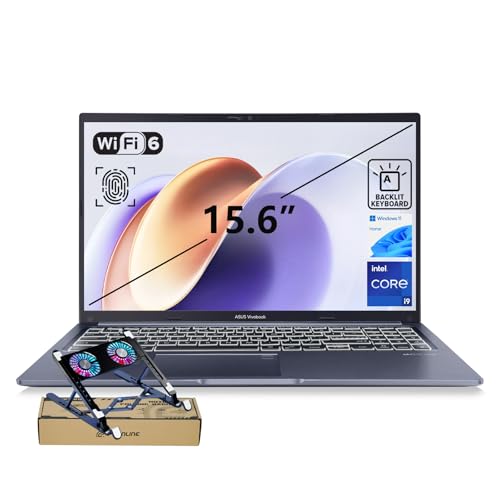
ASUS Vivobook 15 (i9) — Processor-heavy cruncher
ASUS takes the opposite bet from the efficiency-minded picks: a 15.6-inch full HD Vivobook 15 built around an Intel Core i9-13900H, a high-power processor from Intel’s performance line, with 32GB of memory and a 1TB SSD. Around that core the listing adds a backlit keyboard, a fingerprint reader, a physical webcam shield, Wi-Fi 6 and Windows 11 Home, in a blue finish, bundled as a PCO package. For analysts whose bottleneck is computation itself — long recalculations, script pipelines, simulation runs in a spreadsheet or a notebook — this is the configuration aimed at them.
Processor tiers deserve plain speaking. The i9-13900H belongs to the H series, Intel’s high-wattage mobile line, and it will sustain heavy multi-threaded work in a way the U-series chips in the Dell and Acer are not designed to. Paired with 32GB of memory, it makes this Vivobook the closest thing here to a compute seat: the machine for the analyst who runs the model rather than merely viewing its output, who iterates parameters, who waits on their own laptop more often than on any server.
The supporting details show a designer thinking about working life. A physical webcam shield answers the privacy question mechanically rather than by software promise. A fingerprint reader shortens the unlock ritual. The 1TB drive gives compute-heavy work room for its intermediate files, which simulation and pipeline work generate in surprising volume. Wi-Fi 6, a step behind the Acer’s 6E, is the one specification that dates the package slightly.
Trade-offs follow from the bet. High-power silicon in a mainstream chassis means the fans will be audible under sustained load and the battery will not be the reason to buy it; this is a desk-anchored cruncher that travels between desks rather than working all day from a sofa. Windows 11 Home, again, marks it as a personal or small-team machine rather than a managed fleet seat.
Analysts choosing between this and the 32GB ThinkPad E16 are choosing a bottleneck to eliminate: storage and backup completeness on the Lenovo, raw computation on the ASUS. Both are legitimate; the honest question is which wait — for the script to finish, or for the file to fit — interrupts your week more often.
A word about what the i9 does to the economics of waiting. An analyst who reruns a model forty times a week, shaving minutes each run, recovers hours a month — hours that are either billable, promotable or simply theirs. Against that arithmetic, the Vivobook’s premium over an efficiency-chip machine stops looking like indulgence and starts looking like the cheapest time on offer in this guide. The reverse also holds: an analyst whose heavy runs happen on a server gains nothing from the H-series chip and should not pay for it. Compute, like memory, should be bought where the queue actually forms, and this pick exists for the buyers whose queue forms at home.
- Processor: Intel Core i9-13900H
- Memory: 32GB RAM
- Storage: 1TB SSD
- Display: 15.6-inch FHD
- Extras named in listing: physical webcam shield, fingerprint reader, backlit keyboard
- Wireless named in listing: Wi-Fi 6
- Operating system: Windows 11 Home
Strengths
- The i9-13900H is the strongest sustained-compute processor here.
- 32GB of memory matches the compute with working room.
- The physical webcam shield settles privacy mechanically.
Trade-offs
- High-power silicon favours the desk over all-day battery work.
- Wi-Fi 6 trails the Wi-Fi 6E and docking picks on connectivity.
- Windows 11 Home limits managed-fleet deployment.
Best for: analysts running heavy recalculations, scripts and simulations locally on a desk-based machine.
Not suited for: quiet-office minimalists, or IT departments standardising on Pro-edition fleets.

Dell Inspiron 15 3530 — Touch plus Pro
Dell’s Inspiron 15 3530 combines two features that rarely meet at this level: a 15.6-inch full HD touchscreen and Windows 11 Pro. The rest of the listing is balanced mainstream fare — an Intel Core i7-1355U processor, 16GB of memory, a notably generous 1TB SSD, a webcam, HDMI and Wi-Fi 6, in a black business-styled chassis from Dell’s 13th-generation Inspiron line. It reads as a machine specified by someone who wanted the presentation-friendly screen of the IdeaPad and the workplace operating system of the ThinkPads, and refused to choose.
The 1TB drive is this pick’s quiet headline. At double the capacity of the IdeaPad, Acer and Gen 3 ThinkPad, it changes storage behaviour: a year of extracts, a local copy of the team’s shared folders and a couple of virtual environments can coexist without the weekly pruning ritual. For analysts whose data is local but whose compute is light — reporting, dashboarding, spreadsheet modelling — storage is often the binding constraint, and Dell is the pick that relaxes it cheapest in spirit.
The i7-1355U asks for the usual honest footnote. It is an efficiency-series processor: responsive for the bursty rhythm of analysis — open, filter, pivot, chart — and economical with power, but not built for the sustained multi-hour crunch the ASUS’s H-series chip shrugs off. Paired with 16GB of memory, the Inspiron sits squarely in the reporting-and-modelling tier, and within that tier its touchscreen and drive make it arguably the most comfortable daily companion here.
HDMI in the listing matters more than it looks: meeting-room screens and desk monitors still overwhelmingly speak HDMI, and a native port removes the dongle from the bag. Add the webcam for the hybrid meeting schedule and the Pro operating system for the office network, and the Inspiron presents as the hybrid worker’s specification — home desk, office desk, meeting room — drawn by someone who has lived that rotation.
Choose it when your analysis is presentational and your storage is local. Pass it by when the work turns computational, where the ASUS waits, or when memory-hungry local datasets dominate, where the 32GB ThinkPad E16 waits. As with every pick in this guide, the configuration is coherent; the task is matching its coherence to your week.
Dell’s business styling on this Inspiron deserves a mention, because the 3530 belongs to the generation where Inspiron machines dressed for the office rather than the coffee shop. In meeting rooms that styling is a small professional asset, and combined with the touchscreen it makes the machine a credible presentation device: turn it around, walk a stakeholder through the dashboard by touch, turn it back and keep working. Machines get judged in those rooms by people who never read a spec sheet, and a laptop that presents well quietly advances the analyst’s own reputation — an unfair truth of office life that a buying guide may as well acknowledge.
- Processor: Intel Core i7-1355U
- Memory: 16GB RAM
- Storage: 1TB SSD
- Display: 15.6-inch FHD touchscreen
- Ports named in listing: HDMI
- Wireless named in listing: Wi-Fi 6
- Operating system: Windows 11 Pro
Strengths
- 1TB of storage doubles most rivals here at this tier.
- Touchscreen and Windows 11 Pro is a rare pairing at this level.
- Native HDMI keeps meeting-room connections dongle-free.
Trade-offs
- The U-series processor is built for efficiency, not sustained crunch.
- 16GB of memory caps the largest local working sets.
- No backlit keyboard is named in this listing’s title.
Best for: hybrid workers mixing reporting, presenting and local file storage across home and office desks.
Not suited for: compute-bound modelling, or analysts who need 32GB of memory headroom.

Acer Aspire 5 15 — Connectivity pick
Acer’s Aspire 5 15 Slim is the specification-sheet diplomat of the group: a 15.6-inch full HD IPS display, an Intel Core i7-1355U with Iris Xe graphics, 16GB of LPDDR5 memory and a 512GB Gen 4 SSD, connected to the world by Wi-Fi 6E and a USB4 port with Thunderbolt 4 — the richest connectivity named in any listing here — plus a backlit keyboard, in a grey slim chassis. Analysts who dock, drive fast external storage or work on modern wireless networks will feel the difference those lines make.
USB4 with Thunderbolt 4 deserves explanation for buyers who have not met it. It is the one-cable standard: a single port that can carry a dock with monitors and peripherals, fast external SSDs for dataset hand-offs, and charging, at speeds that make moving a 40GB extract a minor event rather than a coffee break. The ThinkPad Gen 3 bundles a dock; the Acer instead builds the port that makes any good dock — or a colleague’s — work at full capability. For analysts who move between offices, client sites and home, that flexibility can outvalue a bundled accessory.
The IPS panel is the other considered choice. In-plane switching keeps colours and contrast stable at viewing angles, which matters when a screen is shared across a desk during a review — the everyday reality of analytics sign-off meetings. The listing’s Gen 4 SSD likewise keeps file operations brisk, even if 512GB asks for the now-familiar discipline about archives, and LPDDR5 memory is fast, efficient memory of the soldered kind, sized at the 16GB this tier shares.
Against its rivals the Aspire concedes raw compute to the ASUS, storage to the Dell and the big ThinkPad, and the Pro operating system to Dell and Lenovo. Its case is narrower and, for the right buyer, decisive: it is the best-connected machine in the guide, and analysis increasingly happens across connections — to docks, drives, networks and meeting rooms — rather than inside a sealed box.
Small teams standardising on USB-C docking will find this the natural seat; analysts who inherit whatever desk the day provides will find its port the one that never strands them. It closes the six as the reminder that a laptop’s specification includes its borders, not just its interior.
One more border-crossing talent: Wi-Fi 6E opens the 6GHz band where the network hardware supports it, which in newer offices and homes means a cleaner, less congested connection for the large file transfers analytics involves. Buyers cannot control the networks they join, but a machine that speaks the newest dialect of each — wireless, wired-through-dock, external storage — spends less of its life as the reason a transfer crawls. Connectivity ages more slowly than processors, too; the ports and radios bought today will still be the right ones when the machine is in its fourth year, which quietly extends the useful life of the whole purchase.
- Processor: Intel Core i7-1355U
- Graphics: Intel Iris Xe
- Memory: 16GB LPDDR5
- Storage: 512GB Gen 4 SSD
- Display: 15.6-inch FHD IPS
- Ports named in listing: USB4 / Thunderbolt 4
- Wireless named in listing: Wi-Fi 6E
Strengths
- USB4 with Thunderbolt 4 enables full one-cable docking.
- Wi-Fi 6E is the most modern wireless named in the guide.
- The IPS panel holds up when screens are shared in reviews.
Trade-offs
- 512GB of storage is the joint-smallest allocation here.
- 16GB of memory matches the tier’s ceiling, not its top.
- Windows edition is not stated in this listing’s title.
Best for: analysts moving between docks, offices and client sites, needing modern ports and wireless.
Not suited for: storage-heavy local archives, or buyers needing a stated Pro operating system.
Comparison Table
| Pick | Processor | Memory | Storage | Display |
|---|---|---|---|---|
| ThinkPad E16 Gen 3 | Intel Ultra 5 225H | 16GB DDR5 | 512GB PCIe SSD | 16-inch |
| ThinkPad E16 (32GB / 2TB) | Intel Ultra 7 255H | 32GB DDR5 | 2TB SSD + 500GB external HDD | 16-inch |
| IdeaPad Slim 3 (2026) | AMD Ryzen 7 170 | 16GB DDR5 | 512GB SSD | 15.3-inch FHD+ touchscreen |
| ASUS Vivobook 15 (i9) | Intel Core i9-13900H | 32GB RAM | 1TB SSD | 15.6-inch FHD |
| Dell Inspiron 15 3530 | Intel Core i7-1355U | 16GB RAM | 1TB SSD | 15.6-inch FHD touchscreen |
| Acer Aspire 5 15 | Intel Core i7-1355U | 16GB LPDDR5 | 512GB Gen 4 SSD | 15.6-inch FHD IPS |
How Much Memory Does Data Analysis Really Need?
Work backwards from the working set, not forwards from a budget. Add up a realistic busy hour: the operating system and background tools, a browser with documentation and a web BI session, the spreadsheet or notebook holding the largest dataset you touch monthly, and the chat and email clients that never close. For reporting-focused analysts that sum usually lands within 16GB with room to breathe — the tier of the ThinkPad Gen 3, IdeaPad, Dell and Acer in this guide. For analysts who load multi-gigabyte local files, run several kernels or keep a local database humming, the sum passes 16GB quickly, and every pass is paid for in swapping: the machine stays technically functional while feeling broken.
Datasets also grow. The extract that was 800MB last year is 1.4GB now, and the laptop bought for three years should be specced for the third year’s data, not the first week’s. That growth argument is the strongest case for the 32GB picks — the big ThinkPad E16 and the ASUS Vivobook — even for buyers whose current work fits in 16GB, provided the budget stretches without sacrificing storage entirely.
A final nuance: memory pressure announces itself as general slowness, and users often blame the processor. Before replacing any laptop for being “slow at data”, check memory usage during the worst hour of the week. The diagnosis decides whether the next machine needs a bigger processor or simply a bigger desk to work on — and in analytics, it is usually the desk.
What Is the Right Way to Organise Data on an Analytics Laptop?
Give data a lifecycle and storage stops being a crisis. Keep three zones: a working zone on the internal SSD for active projects and current extracts; an archive zone — the bundled external drive with the 2TB ThinkPad, a network share, or cloud storage — for finished projects and old snapshots; and a backup that copies the working zone somewhere physically separate. The bundled 500GB external drive in that ThinkPad listing is a ready-made archive zone, and its presence in the box is a quiet argument for that configuration.
Version discipline matters as much as location. Date-stamped extract folders, a naming habit the whole team shares, and a rule that raw data is never edited in place will save more projects than any processor upgrade. Analysts working in notebooks should keep environments per project, so that a broken library upgrade cannot take down last quarter’s reproducible report — and should count those environments in the storage budget, because they accumulate gigabytes quietly.
Security belongs in the same conversation. Analytics laptops carry other people’s data: customer records, payroll extracts, commercially sensitive forecasts. Full-disk encryption, a fingerprint reader where a listing offers one — the ASUS names one — and the physical webcam shield ASUS also lists are not paranoia; they are the baseline hygiene of a machine whose contents would embarrass its owner in a breach report.
Which Screen Size Suits Column-Heavy Work?
Analytics is a wide-format discipline. A dataset with thirty columns, a model with its formula bar and name manager open, a dashboard designed on a desktop monitor — all of them assume horizontal room, and the screen sizes in this guide reflect that: 15.3 inches at the smallest, 16 at the largest. The two 16-inch ThinkPads give spreadsheet grids the most breathing space, and their extra width is also what accommodates the working pattern of a chart beside its source table rather than stacked on top of it.
Resolution refines the picture. The IdeaPad’s FHD+ panel adds vertical pixels over standard full HD, which translates directly into visible rows; the Dell and IdeaPad touchscreens trade a little of the matte, glare-free character analysts often prefer for their interactivity. Buyers who work under harsh office lighting should weigh that trade, while buyers who present from the screen will usually accept it gladly. None of the listings here advertises a low-resolution panel — a relief, because a 1366 x 768 screen in this category would have been disqualified outright: too few rows, too much scrolling, too much of the dataset hidden at any moment.
The external monitor question completes the screen decision. A docked analyst — the ThinkPad Gen 3’s bundled-station buyer, the Acer’s USB4 buyer — can treat the laptop panel as the second screen and let a large desktop monitor carry the grids. A standalone analyst lives on the laptop panel alone and should weight its size and resolution accordingly. Decide which analyst you are before deciding which screen is “good enough”, because the answer flips with the desk setup.
How Do You Set Up a New Laptop for Analysis Work?
Start with the unglamorous foundations. Turn on full-disk encryption before any real data touches the machine, set up the backup routine — to the bundled external drive, a network share or a cloud target — and confirm it actually restores a test folder. Install the working stack in a deliberate order: the spreadsheet and BI tools, then the notebook environment with project-separated environments rather than one global install, then the database clients and drivers the team’s servers expect. An afternoon spent here prevents the classic first-month tangle where one global Python install slowly corrupts every project that shares it.
Then tune the machine to the analyst’s actual day. Pin the four or five tools that open every morning; set the largest datasets’ folders as local working copies with a sync or check-in habit the team agrees on; and configure autosave and version history in the spreadsheet and notebook tools before the first deadline tests them. Analysts who present should rehearse the meeting-room connection once — HDMI on the Dell, dock on the ThinkPads and Acer — rather than discovering a missing adapter in front of an audience.
Finally, schedule the maintenance that keeps the machine fast: a monthly archive sweep that moves finished projects out of the working zone, a quarterly check that the backup still restores, and a yearly review of whether the data has outgrown the configuration. The 16GB and 512GB picks reward this discipline most, but every machine in this guide stays quick longer under it — because analytics laptops rarely die of age; they drown in their own accumulated files.
Common Mistakes When Buying an Analytics Laptop
Buying the processor badge and starving the memory. A flagship chip behind 16GB of memory will still swap when the working set overflows, and swapping feels slower than a modest chip with room to breathe. In this guide’s terms: the 32GB configurations protect the workday more reliably than any single processor name.
Assuming two listings with the same model name are the same machine. The two ThinkPad E16s here differ in processor, memory, storage and bundle — a wider gap than many rival brands manage between different models. Always compare the configuration lines, never the badge alone, and check price on Amazon for the exact configuration being ordered.
Letting storage fill until the tools complain. Notebooks, BI caches and extract folders grow silently, and a nearly full SSD slows the machine while corrupting the analyst’s filing habits. Buy capacity for the third year, or adopt the archive-zone discipline from the start — ideally both.
Ignoring the operating system edition until IT objects. Windows 11 Pro versus Home decides domain joining, remote desktop hosting and some management features. Three picks here state Pro; where a listing says Home, or stays silent as the Acer’s does, workplace buyers should confirm the edition before a fleet order turns into a returns process.
Forgetting the backup until the first failure. Only one listing here bundles an external drive, and it is not a coincidence that it is also the storage flagship — local data without a copy elsewhere is a deadline waiting to be missed. Whatever machine is chosen, the first accessory purchase should be backup capacity, and the first week’s setup should include the routine that uses it.
Expecting a mainstream laptop to train models like a workstation. No listing in this guide names a discrete GPU, and none should be bought for GPU-accelerated training. These machines query, clean, model in memory and visualise — the bulk of analytics — and buyers with genuine training workloads need a different category and a different budget.
Final Recommendation
Decide by bottleneck and the six sort themselves. Memory and storage together point to the ThinkPad E16 in its 32GB, 2TB configuration, the guide’s most complete local-analysis seat, with a backup drive thoughtfully in the box. Pure computation points to the ASUS Vivobook 15, whose i9-13900H and 32GB make it the cruncher of the group. A ready-made docked desk points to the ThinkPad E16 Gen 3 with its bundled station. Presenting and hybrid work split between the IdeaPad Slim 3’s touchscreen all-round value and the Dell Inspiron’s rarer mix of touch, a 1TB drive and Windows 11 Pro. Movement between docks and modern networks crowns the Acer Aspire 5. Every pick respects the memory-first logic that analytics demands; the buyer’s task is simply to name their own constraint honestly and buy the machine that removes it.
One last calibration for buyers torn between the two 32GB machines, since they are the guide’s twin peaks. The ThinkPad E16 (32GB / 2TB) is the completeness play: more storage than the ASUS, a backup drive bundled, Pro Windows, business build — the machine for the analyst whose problem is the data itself. The Vivobook 15 is the velocity play: the strongest processor, matched memory, half the storage — the machine for the analyst whose problem is the computation. Data or velocity; most analysts know which queue they stand in, and the one who genuinely faces both should take the ThinkPad and let its Ultra 7 255H, hardly a slow processor, cover the compute side with room to spare.
Frequently Asked Questions
Is 16GB of memory enough for data analysis?
For reporting, dashboarding, spreadsheet modelling and notebook work against moderate or server-side data, yes — four picks in this guide run 16GB and will serve that work well. It stops being enough when large files are loaded locally alongside several heavy tools; that is the territory of the two 32GB picks, and most analysts know within a month which side of the line their work sits on. A practical test before buying: open your heaviest realistic workload on your current machine and read the memory usage at its worst moment. If that figure, with headroom added for dataset growth, sits comfortably under 16GB, the 16GB tier is honestly sufficient; if it crowds the ceiling or passes it, the 32GB tier is not a luxury but the correction of a measured problem.
Why do two ThinkPad E16 listings appear in one guide?
Because they are genuinely different configurations sold under one model name: an Ultra 5 machine with 16GB, 512GB and a docking station, against an Ultra 7 machine with 32GB, 2TB and a bundled external drive. Listing both, with the differences spelled out, is more honest than pretending the badge describes a single product. The wider lesson travels beyond Lenovo: in this market the model name is the chassis, and the configuration is the machine, so the configuration lines are always the ones worth reading twice.
Can these laptops handle Python and Jupyter notebooks?
Yes — notebook work in pandas and similar libraries is CPU-and-memory work, and every pick here has a modern processor with at least 16GB of memory. The 32GB machines will hold larger dataframes and more simultaneous kernels; the 16GB machines reward sampling and server-side querying for the biggest jobs. Keep one habit regardless of tier: restart kernels deliberately rather than letting a week’s sessions accumulate, because a notebook server that has been alive for six days is quietly holding memory that the data itself never asked for, and closing that gap is the cheapest performance upgrade available on any of these machines.
Do I need a discrete GPU for analytics?
For the mainstream of analytics — SQL, spreadsheets, notebooks, BI — no, and none of these listings names one. GPU acceleration matters for training larger machine-learning and deep-learning models locally. Analysts with that workload should shop the workstation category instead; everyone else is better served spending on memory and storage, as this guide’s picks do. There is a middle path worth knowing: many analysts prototype locally on samples and train on cloud or server GPUs only for final runs, a workflow every machine in this guide supports perfectly well through a browser and a remote session.
Which pick is best for working between several offices?
The Acer Aspire 5, whose USB4 port with Thunderbolt 4 and Wi-Fi 6E make it the most adaptable to unfamiliar docks and networks. The IdeaPad Slim 3 is the alternative for travellers who present as they go, thanks to its touchscreen and thin-and-light positioning. Between the two, the deciding question is what the travel consists of: docks and drives favour the Acer, audiences and meeting rooms favour the IdeaPad, and an analyst whose travel mixes both should weigh which inconvenience — a missing dock connection or a non-touch presentation — they would rather never meet again.
Does a docking station matter for analytics work?
It matters for the desk half of the job. A dock turns a laptop into a workstation with one connection — external monitor for the grids, wired network for the big transfers, peripherals waiting in place. The ThinkPad E16 Gen 3 bundles a station outright; the Acer Aspire 5 builds in the USB4/Thunderbolt 4 port that drives modern docks; the other picks can dock too, but buyers should confirm the exact ports on the listing they choose.
How much storage should an analyst budget for?
Count the current working set — extracts, environments, outputs, local copies of shared folders — then double it for growth across the machine’s life. That arithmetic lands many analysts at 1TB, which the ASUS and Dell provide internally; the 512GB picks assume archives live on a server, in the cloud or on an external drive like the one bundled with the 2TB ThinkPad. Remember also that an SSD wants breathing room to stay fast: a drive kept permanently above ninety percent full will slow its writes and complicate every tool that caches to disk, so the honest capacity of any drive in this guide is somewhat less than its headline figure — one more reason the doubling rule exists.
Related Guides
Analysts who also present visuals should compare screens in the roundup of affordable laptops for photography, where panel quality leads the judging. The touch question raised by two picks here gets a full treatment in the survey of affordable touchscreen laptops across clamshell and convertible designs. And if the memory-first logic of this guide appeals but the desk stays fixed, the portability-ranked guide to affordable lightweight laptops with honestly stated weights is the natural next step.



[…] and storage questions carry straight into analytics work, so the companion roundup of affordable laptops for data analysis, specced memory-first is a natural next read. Buyers weighing how a screen shapes editing should also see the guide to […]