What's inside
- Key Takeaways
- Quick Picks
- How We Chose These Picks
- Comparison: The Six Machines Side by Side
- How Do Refurbished Grades and Warranties Actually Differ?
- What Should You Check in the First Hour After a Refurbished Laptop Arrives?
- What Spares and Small Costs Should a Refurbished Buyer Plan For?
- How Long Will a Refurbished Business Laptop Stay Useful?
- Why Does Windows 11 Pro Appear on Every Pick Here?
- What Are the Common Mistakes When Buying a Refurbished Laptop?
- Final Recommendation
- Frequently Asked Questions
- Related Guides
As an Amazon Associate I earn from qualifying purchases. This post may contain affiliate links at no extra cost to you.
widgetverdict.com is reader-supported. When you buy through links on our site, we may earn an affiliate commission.
Every linked machine below sits on an Amazon listing whose titles state their core specifications and, where it applies, the word Renewed — check price on Amazon from each pick’s link and read the title as the contract. This guide covers the best 14 inch laptops refurbished channels are genuinely listing right now: retired business laptops, mostly Dell Latitude, HP EliteBook and Lenovo ThinkPad machines, that left corporate fleets and came back through a refurbisher’s bench. One further model is covered in prose because its refurbished supply moves through manufacturer outlets rather than a stable retail listing.
Refurbished is a word that covers three quite different transactions, and confusing them is how buyers get hurt. Amazon Renewed is a marketplace programme: a seller inspects, tests and cleans a used machine, grades its cosmetic condition, and backs it with the Renewed guarantee, which gives a defined route back if the machine does not work as described. Manufacturer-certified refurbishment is stricter — the maker’s own outlet replaces worn parts, reimages the drive and attaches a factory warranty — but those machines are usually sold on the maker’s outlet site, not through listings like these. Seller-refurbished, the third tier, means whatever the individual seller did on their own bench, and its quality lives or dies with that seller’s honesty. Every linked pick in this guide belongs to the first tier: the word Renewed is printed in each listing title, and this guide prints it in each badge, each spec box and each analysis, because a buyer deserves to see the machine’s status as often as its specification.
Why accept a used machine at all? Because the 14-inch business class is where corporate money bought quality that consumer ranges never see. A Latitude or ThinkPad from a fleet order was built to be serviced by an IT department, carried a keyboard designed for eight-hour days, and shipped with Windows Pro licences and ports that home laptops dropped years ago. Fleets retire machines on a calendar, not on condition — a three-year lease ends and a perfectly sound laptop goes to a refurbisher. The refurbished buyer is purchasing that calendar’s leftovers, and the discount exists because the machine has a past, not because it lacks a future.
The honest costs deserve naming early. A refurbished battery has already lived part of its life, and no refurbisher’s test restores lost capacity; plan on treating the battery as a consumable you may replace. Cosmetic grading is real grading — a machine described as acceptable may carry scuffs a new-laptop buyer would reject. Warranty cover, while genuine under the Renewed programme, is shorter and narrower than a new machine’s factory warranty. None of this disqualifies the route; all of it belongs in the decision, and the sections below return to each point with the checks that manage it.
What follows is organised around the refurbished buyer’s actual questions: what the tiers of refurbishment mean, how much memory and storage these ex-fleet machines carry, what to inspect in the first hour after the courier leaves, and which of these five machines suits a student, a home office, a small business or a traveller. The keyword promises 14-inch machines, and every pick here honours it — no size substitutions, no near-enough diagonals.
It is worth saying plainly who should walk past this entire category. A buyer who needs a machine to look untouched — a gift, a client-facing symbol, a personal standard — will not be talked into enjoying a graded scuff, and should not try; the new-laptop market exists for them. A buyer whose work is under a compliance regime that mandates new, warrantied-from-factory hardware likewise has no decision to make here. Everyone else is weighing a trade of cosmetics and battery youth against build quality and specification per pound spent, and for that majority the trade, made with the checks in this guide, is a sound one. The six machines below are where that trade is currently made most safely, on present listings, today.
Key Takeaways
- All five linked picks carry the word Renewed in their listing titles, and this guide repeats that status in every badge, spec box and verdict rather than letting it hide in fine print.
- Memory splits the field cleanly: the Latitude 5420 ships with 8GB, while the other four linked machines carry 16GB — the figure that decides how a refurbished laptop ages.
- Storage follows the same pattern, with 256GB on the Latitude 5420 and ThinkPad T14 and 512GB on the Latitude 5400, Latitude 5430 and EliteBook 640 G9.
- Every linked pick runs Windows 11 Pro, the fleet standard, which matters for buyers joining a work network or using Pro-only features.
- A refurbished battery is a part-used consumable: budget mentally for a replacement and check the cycle count during the return window.
- The EliteBook 840 G8 is covered in prose because its refurbished supply flows through manufacturer outlets and rotating listings rather than one stable verified title.
Quick Picks
| Pick | Badge | Why it is here |
|---|---|---|
| Dell Latitude 5420 (Renewed) | Renewed — Top Choice | The fleet staple in its most common form: Core i5-1135G7, a 1080p screen and Windows 11 Pro, with 8GB of memory as the declared compromise. |
| Dell Latitude 5400 (Renewed) | Renewed — Memory and Storage Value | An older Latitude generation carrying 16GB of memory and a 512GB SSD, the two figures refurbished buyers should protect first. |
| HP EliteBook 640 G9 (Renewed) | Renewed — Newest Hardware Here | A Core i5-1245 with 16GB, 512GB, Thunderbolt and a backlit keyboard — the most recent platform among the linked picks. |
| Dell Latitude 5430 (Renewed) | Renewed — Ten-Core Latitude | The 5430’s 10-core Core i5-1245U with 16GB and 512GB, from the generation fleets are retiring right now. |
| Lenovo ThinkPad T14 Gen 1 (Renewed) | Renewed — Keyboard and Ports Pick | ThinkPad typing, Thunderbolt 3 and HDMI with 16GB of DDR4 memory, for buyers who live on the keyboard. |
| HP EliteBook 840 G8 | Prose Pick — Outlet Route | The refurbished alternative bought through manufacturer outlets, where grading and warranty come from HP itself. |
How We Chose These Picks
Admission to the linked group required a listing title that states the machine’s screen size, processor, memory, storage and operating system, and — for this guide specifically — its refurbished status in plain text. That last condition is the guide’s spine. A refurbished laptop whose listing will not say so in its own title is asking the buyer to discover the fact later, and this guide declines to recommend discoveries of that kind. All five linked titles say Renewed outright, and the guide’s badges and spec boxes repeat the word so that no reader can finish a pick’s section unsure of what they are buying.
Ranking inside the group weighed the specifications in the order a second owner feels them. Memory came first, because a refurbished machine’s remaining life is set by whether its specification still clears modern workloads: 16GB is the comfortable figure, and the one 8GB pick is labelled with that compromise wherever it appears rather than excused. Storage came second, with 512GB treated as the roomy figure and 256GB as workable for cloud-centred owners. Processor generation came third — it matters, but a fleet Core i5 of any recent generation handles office work, and the guide ranks the newest platform highly without pretending the older ones are slow.
Every pick is a business machine, and that is deliberate. Consumer laptops reach the refurbished market too, but their original build — soldered memory, sealed batteries, flexing chassis — was not designed for a second owner, whereas these Latitudes, EliteBooks and ThinkPads were designed for IT departments who open them, service them and keep them running for years. A refurbished purchase is a bet on maintainability, and business hardware is where that bet is soundest. The prose pick extends the same logic to the manufacturer-outlet route for buyers who prefer the maker’s own grading.
A word about why this guide contains no consumer models at all, since readers will wonder. Refurbished consumer laptops exist in quantity, but their original engineering works against the second owner at every point the guide cares about: memory soldered at figures chosen for a price tag, batteries glued into sealed chassis, hinges and keyboards specified for a gentler life than a fleet imposes. A refurbished purchase asks a machine to begin again at the age where those economies start to bill their owner. Business hardware postpones every one of those bills, and postponement, in this market, is most of the value.
One thing this guide did not do is average away condition. Renewed listings are graded by their sellers, two listings with identical titles can arrive in different cosmetic states, and no guide can inspect the specific unit that will reach your door. What a guide can do — and what the how-to section below does — is hand you the inspection routine that turns the return window into your quality control, so the risk that remains is the managed kind.

Dell Latitude 5420 (Renewed) — Renewed — Top Choice
The Latitude 5420 is the machine the refurbished market is made of. Dell sold it to fleets by the thousand, fleets are retiring it on schedule, and the Renewed listing states its facts plainly: a Core i5-1135G7 processor, 8GB of memory, a 256GB SSD, a 14-inch 1080p screen, a webcam and Windows 11 Pro, sold as Renewed. It earns the top position here not by leading any single figure but by being the class’s centre of gravity — the model with the deepest pool of spare parts, the most documented servicing, and a specification that still matches what offices actually run.
Honesty requires the compromise to be named in the same breath as the praise: 8GB of memory is the floor of comfortable in 2026, not the target. An owner whose day is email, documents, a browser kept to a sane number of tabs and video calls will not feel the limit this year. An owner who keeps forty tabs, a spreadsheet estate and a photo library open together will feel it, and for that owner the 16GB picks below exist. The 5420’s saving grace is its breed: Latitude memory has historically been serviceable rather than sealed, so a confident owner — or any repair shop — can treat the figure as a starting point rather than a life sentence, though the listing title does not promise a configuration, and the buyer should confirm the delivered build on arrival.
The Renewed status shapes the ownership story more than the processor does. Expect a machine that has been tested, cleaned and graded, with cosmetic wear consistent with its grade, a battery that holds a partial measure of its original capacity, and the Renewed guarantee standing behind its function. The 5420’s fleet origins soften each of those: its battery is a replaceable part with wide availability, its chassis shrugs off the scuffs that grading describes, and its keyboard — the component a refurbished buyer touches most — was built for years of daily typing before it reached the refurbisher’s bench.
There is also a fleet-culture point in the 5420’s favour. Because so many organisations standardised on this model, the internet holds an answer to every question it can ask: every error message has been met before, every replacement part has a tutorial, every odd behaviour has a forum thread with a fix. A refurbished buyer is, in a sense, joining the largest support community in business computing, and that invisible infrastructure has real value to an owner without an IT department — which is to say, to exactly the buyer a refurbished guide serves.
- Status: Renewed (stated in the listing title)
- Screen: 14-inch, 1080p
- Processor: Intel Core i5-1135G7
- Memory: 8GB RAM
- Storage: 256GB SSD
- System: Windows 11 Pro, webcam fitted
Strengths
- The deepest refurbished supply of any model here, which keeps parts, batteries and servicing easy to find.
- A 1080p screen and Windows 11 Pro: the two fleet essentials are present, not trimmed.
- Business build and keyboard quality that consumer machines at this level rarely match.
Trade-offs
- 8GB of memory is the guide’s declared floor; heavy multitaskers should take a 16GB pick instead.
- 256GB of storage fills quickly for owners who keep media and photo libraries locally.
- As a Renewed unit, battery capacity is part-used and cosmetic grading varies by seller.
Best for: a home-office or small-business buyer taking the safest, most supportable entry into refurbished ownership, with a workload of documents, calls and browser work.
Not suited for: an owner who runs many heavy applications at once and cannot accept 8GB of memory as the machine’s starting figure.

Dell Latitude 5400 (Renewed) — Renewed — Memory and Storage Value
Step one generation back from the 5420 and the specification, oddly, steps up. The Latitude 5400’s Renewed listing promises 16GB of memory and a 512GB SSD behind a 14-inch screen, with Windows 11 Pro — the two figures this guide tells refurbished buyers to protect, present in full, on the older chassis. Its title names the processor only as an Intel Core i5 without a generation, and this guide claims no generation for it; what the title does guarantee is the memory and storage, which are the parts of a specification an owner feels every single day.
That trade — an earlier platform carrying the fuller specification — is often the refurbished market’s best arithmetic. Processor generations improve efficiency and peak speed, but office workloads rarely queue for either; they queue for memory when the tabs multiply and for storage when the drive fills. A buyer who understands that ordering will look at this 5400 and see a machine specified for longevity wearing an older badge, and the Renewed grading means its condition has been through the same inspection programme as the newer 5420 above.
The 5400 also carries the practical virtues of its era. Machines of its generation kept fuller port selections than their slimmer successors and were built while serviceability was still a selling point to fleet managers, so batteries and drives are straightforward replacements when their turn comes. For a buyer planning to keep a refurbished machine for years — the plan that makes refurbished arithmetic work — those qualities compound. What the buyer must accept is age itself: the platform is older, its battery has lived longer, and its remaining support horizon is shorter than the 5430’s below.
- Status: Renewed — the listing title says so
- Screen: 14-inch
- Processor: Intel Core i5 (generation not stated in the title)
- Memory: 16GB RAM
- Storage: 512GB SSD
- System: Windows 11 Pro
Strengths
- 16GB of memory and 512GB of storage — the longevity figures — on a refurbished business chassis.
- An era of Latitude design that favoured ports and straightforward servicing.
- Windows 11 Pro included, matching the fleet software standard.
Trade-offs
- The listing does not state the processor generation, so buyers must accept the Core i5 description as given.
- An older platform means a shorter remaining support horizon than the newer picks.
- Renewed condition and battery wear vary by unit and seller grading.
Best for: a value-led buyer who reads specifications in the right order and would rather have 16GB and 512GB on an older Latitude than thinner figures on a newer one.
Not suited for: a purchase governed by a specific software requirement tied to a stated, recent processor generation.

HP EliteBook 640 G9 (Renewed) — Renewed — Newest Hardware Here
HP’s EliteBook 640 G9 brings the most recent hardware in this guide into the refurbished market. Its Renewed listing reads like a current fleet order: a Core i5-1245 processor, 16GB of memory, a 512GB SSD, a 14-inch FHD screen at 1920 x 1080, Thunderbolt, a backlit keyboard and Windows 11 Pro — sold as Renewed, and labelled so here. The G9 generation is recent enough that many of these machines left short leases or cancelled orders rather than long service, though the guide makes no claim about any individual unit’s history; the Renewed inspection, not a guessed past, is what the buyer relies on.
The specification needs no apology anywhere. Sixteen gigabytes is the guide’s longevity figure, 512GB is the roomy storage figure, and the processor belongs to a generation whose efficiency flatters a part-used battery — a detail that matters more on a refurbished machine than on any other purchase, because the battery you receive has a history and a frugal platform stretches whatever capacity remains. Thunderbolt opens the modern docking story, so this machine can drive a desk setup of monitors and peripherals through one cable, and the backlit keyboard serves the early flights and dim rooms where fleet laptops earn their keep.
EliteBook build is the other half of the case. HP’s business line aims at the same fleet buyers as Dell’s Latitude, with aluminium-clad chassis, serviceable internals and security hardware pitched at IT departments. As a second owner you inherit all of that, plus the G9’s relative youth: driver support, firmware updates and parts supply all have longer to run than on the older picks. If the refurbished idea appeals but the age of most refurbished stock gives you pause, this is the pick that narrows the gap between used and new to the smallest distance in the guide.
- Status: sold as Renewed (see the listing title)
- Screen: 14-inch FHD (1920 x 1080)
- Processor: Intel Core i5-1245
- Memory: 16GB RAM
- Storage: 512GB SSD
- Extras: Thunderbolt, backlit keyboard, Windows 11 Pro
Strengths
- The newest platform among the linked picks, with the longest support horizon ahead of it.
- A complete specification: 16GB, 512GB, Thunderbolt and a backlit keyboard, nothing trimmed.
- An efficient processor generation that makes the most of a part-used battery.
Trade-offs
- Newer refurbished stock generally commands the strongest pricing in its class; check price on Amazon against the older picks.
- It remains a Renewed unit: cosmetic grade and battery wear are the seller’s inspection results, not factory-fresh figures.
- Buyers wanting a touchscreen should note the title describes a standard FHD panel.
Best for: refurbished value with the least possible age — a professional equipping a home office for years rather than a stopgap.
Not suited for: a buyer chasing the absolute lowest entry cost in the refurbished market, where the older Latitudes compete harder.
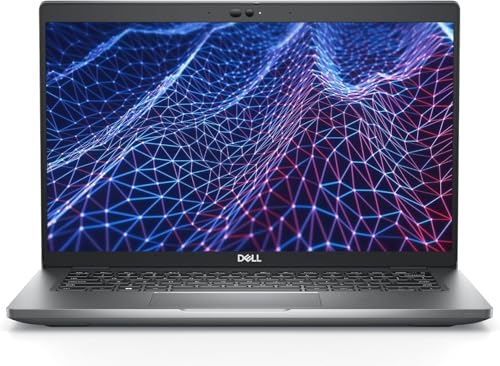
Dell Latitude 5430 (Renewed) — Renewed — Ten-Core Latitude
The Latitude 5430 is the current retirement wave: the model fleets bought in the largest numbers most recently, now arriving through refurbishers with the word Renewed printed at the end of its listing title — where this guide also prints it, in the badge and the spec box, rather than letting it trail behind the specification. That specification is strong: a 10-core Core i5-1245U, 16GB of memory, a 512GB SSD and a 14-inch FHD non-touch screen at 1920 x 1080, running Windows 11 Pro. Dell’s own title calls it the latest model of its line, and within the Latitude 5000 series’ recent history that is a fair description of where the 5430 sits.
Ten cores change the texture of ordinary work more than benchmark headlines suggest. The 1245U splits its cores between performance and efficiency types, which means the machine can hold a video call, a sync client, a browser estate and a document suite in parallel without the fan announcing the effort — the exact texture of a working day. Paired with 16GB and the roomy SSD, the 5430 is the linked pick least likely to make its second owner aware of its age, and the one whose specification would not embarrass a new-laptop guide.
Its refurbished story is the standard one, stated plainly: tested, cleaned, graded and sold as Renewed, with battery capacity part-used and cosmetics per the seller’s grade. The 5430’s youth works in the buyer’s favour on both counts — fewer years of fleet service behind it, and a platform whose parts and support will remain current longest alongside the EliteBook. The non-touch screen is the one specification to register consciously: buyers who sign documents or annotate by hand should look at touch-equipped machines, while everyone else gains a simpler, glare-friendlier panel.
- Status: a Renewed unit, per its listing title
- Screen: 14-inch FHD (1920 x 1080), non-touch
- Processor: Intel Core i5-1245U, 10-core
- Memory: 16GB RAM
- Storage: 512GB SSD
- System: Windows 11 Pro
Strengths
- A 10-core processor with 16GB and 512GB: the fullest all-round specification among the Dell picks.
- From the most recent fleet generation, so support and parts have the longest runway.
- Windows 11 Pro and an FHD panel complete a no-asterisk office specification.
Trade-offs
- The screen is non-touch, which rules it out for pen-and-finger workflows.
- Renewed grading still applies: inspect cosmetics and battery health on arrival, as with every pick here.
- Recent-generation refurbished Latitudes attract strong demand, so listings move quickly.
Best for: the refurbished route at its closest to buying the current fleet model, as far as the market allows.
Not suited for: annotation, signing or tablet-style use — the screen does not take touch.

Lenovo ThinkPad T14 Gen 1 (Renewed) — Renewed — Keyboard and Ports Pick
Some buyers shop refurbished specifically for a ThinkPad, and this Renewed T14 Gen 1 is the guide’s answer for them. The listing states a 14-inch Full HD screen at 1920 x 1080, a 10th-generation quad-core Core i5-10310U, 16GB of DDR4 memory, a 256GB SSD, Thunderbolt 3, HDMI and Windows 11 Pro, sold as Renewed. The ThinkPad case rests on things spec boxes capture badly — the keyboard’s depth and tactility, the TrackPoint, a chassis built to a durability standard — and on one thing the title captures well: 16GB of memory, the figure that keeps an older platform feeling willing.
The processor is the oldest named chip among the linked picks, and the guide will not dress that up. A quad-core 10th-generation i5 handles documents, calls, browsing and light data work without complaint, and its pairing with 16GB of memory matters more in daily use than its generation does. Where it will show its age is sustained heavy lifting — large compiles, big media exports, dense virtualisation — and buyers with those workloads should take the 10-core 5430 or the EliteBook instead. For the keyboard-led working day, though, the T14’s priorities are correctly ordered.
Ports deserve their own sentence in a refurbished guide, because older business machines often out-connect new consumer ones. Thunderbolt 3 brings single-cable docking and fast external storage; HDMI brings every meeting-room screen ever installed. The 256GB SSD is the specification to plan around — adequate for a cloud-centred owner, tight for local archives — and the T14’s serviceable design makes a later drive swap a realistic afternoon project rather than a write-off. As with every pick here, it arrives as a Renewed unit: inspected and graded, battery part-used, and covered by the Renewed guarantee if it fails to perform as described.
- Status: Renewed, printed at the end of its listing title
- Screen: 14-inch Full HD (1920 x 1080)
- Processor: Intel Core i5-10310U, 10th generation, quad-core
- Memory: 16GB DDR4 RAM
- Storage: 256GB SSD
- Ports named in title: Thunderbolt 3, HDMI; Windows 11 Pro
Strengths
- The ThinkPad keyboard and build, the reason this model’s refurbished following exists.
- 16GB of DDR4 memory keeps the older platform multitasking comfortably.
- Thunderbolt 3 plus HDMI covers docking and meeting-room screens without adapters.
Trade-offs
- The oldest processor here; sustained heavy workloads belong on the newer picks.
- 256GB of storage asks the owner to live partly in the cloud or plan a drive upgrade.
- Renewed condition varies by unit; the return-window inspection routine below matters.
Best for: a writer, administrator or keyboard-led worker who values typing feel and ports over processor youth.
Not suited for: a buyer running sustained heavy compute, who should take a newer platform from this same shortlist.
HP EliteBook 840 G8 — Prose Pick — Outlet Route
The EliteBook 840 G8 is the refurbished 14-inch machine this guide discusses without a link, and the reason is structural rather than qualitative. HP’s own refurbished and outlet channels carry this model in rotating configurations — memory, storage and condition grades change as ex-lease stock arrives — and third-party listings turn over too quickly for one verified title to anchor a recommendation. Rather than attach a link to a configuration that may not match what a reader finds, the guide covers the model in prose and explains how to buy it through the channel that suits it.
That channel is the manufacturer outlet, and it changes the refurbished bargain in the buyer’s favour in specific ways. An outlet machine is graded by the maker, typically reimaged with a clean system, and sold with a defined factory-backed warranty rather than a marketplace guarantee. The stock is whatever the lease returns supplied that month, so the buyer trades choice for provenance: you take the configuration on offer, in the grade described, with paperwork that names the warranty plainly. For a risk-averse buyer — a small business equipping several seats, a parent buying for a student far from home — that paperwork can be worth more than a wider choice of listings.
As hardware, the 840 G8 sits in the same fleet class as the linked picks: a slim aluminium business chassis, a 14-inch screen, and a specification that varies by outlet batch, which is exactly why this section quotes no figures for it. Shop it by checking the outlet listing’s stated memory and storage against the standards this guide uses elsewhere — 16GB and 512GB as the comfortable figures — and by confirming the warranty term in writing before paying. Bought that way, it is the cautious buyer’s refurbished route; bought through a random rotating listing without those checks, it is a lottery the guide cannot endorse.
- Status: refurbished via manufacturer outlet and rotating listings (described in prose; no single verified title)
- Screen: 14-inch class
- Processor: varies by outlet batch — confirm on the specific listing
- Memory: varies by batch — check against the 16GB standard used in this guide
- Storage: varies by batch — check against the 512GB comfortable figure
- Warranty: factory-backed on outlet units; confirm the term in writing
Strengths
- Maker grading and a factory-backed warranty give the clearest provenance in refurbished buying.
- The same slim EliteBook hardware that fleet buyers chose when it was new.
- Outlet paperwork suits businesses and parents who need the purchase documented.
Trade-offs
- Configuration is whatever the current batch offers; popular builds sell through quickly.
- No single stable listing means the buyer must verify every figure personally.
- Outlet pricing can sit above marketplace Renewed pricing for similar hardware.
Best for: a cautious buyer who values maker-backed grading and warranty paperwork over the widest choice of configurations.
Not suited for: selecting an exact specification today and having it arrive this week.
Comparison: The Six Machines Side by Side
| Pick | Status | Processor | Memory | Storage | Defining check |
|---|---|---|---|---|---|
| Latitude 5420 (Renewed) | Renewed | Core i5-1135G7 | 8GB | 256GB SSD | Confirm on arrival that 8GB suits your tab count; it is this pick’s declared ceiling. |
| Latitude 5400 (Renewed) | Renewed | Core i5 (generation unstated) | 16GB | 512GB SSD | Verify the delivered processor in system settings, since the title does not name its generation. |
| EliteBook 640 G9 (Renewed) | Renewed | Core i5-1245 | 16GB | 512GB SSD | Test the Thunderbolt dock you plan to use during the return window. |
| Latitude 5430 (Renewed) | Renewed | Core i5-1245U, 10-core | 16GB | 512GB SSD | Decide before ordering that a non-touch screen fits your work; it is the one fixed limit. |
| ThinkPad T14 Gen 1 (Renewed) | Renewed | Core i5-10310U | 16GB DDR4 | 256GB SSD | Check the battery report first; keyboard-led buyers forgive much, but not a dying battery. |
| EliteBook 840 G8 (prose) | Outlet refurbished | Varies by batch | Varies by batch | Varies by batch | Read the outlet listing’s own figures and get the warranty term in writing before paying. |
Consider also who sells machines like this and why the supply keeps flowing. Corporate leasing runs on three-to-four-year cycles across entire economies, which means the refurbished shelf is restocked by calendar rather than by chance, and popular fleet models remain available — with parts and knowledge to match — long after their launch. A buyer is therefore not snatching at a one-off bargain; they are stepping into a standing market with standing rules, programme guarantees and repeat sellers whose reputations depend on grading honestly. That ordinariness is reassuring, and it is the deepest reason this guide recommends the route at all.
How Do Refurbished Grades and Warranties Actually Differ?
The word refurbished describes a process, not a standard, and the three channels in this guide apply it differently. Amazon Renewed, the channel behind all five linked picks, requires sellers to inspect, test and clean each machine, to grade its appearance, and to back the sale with the Renewed guarantee — a defined promise that the product works and looks as described, with a route to replacement or refund if it does not. The guarantee is the substance; the grading is the description. A machine graded in excellent condition should arrive looking close to new, while lower grades trade visible wear for a lower price, and the functional promise is the same across grades.
Manufacturer-certified refurbishment adds the maker to the chain. Parts come from the maker’s supply, the drive image is the factory image, and the warranty is the maker’s own. It is the strongest form of the bargain and the least flexible: stock is limited to what returns and lease-ends supply, which is why the EliteBook 840 G8 above is an outlet conversation rather than a listing. Seller refurbishment without a programme behind it is the weakest form — the work may be excellent, but nothing external verifies it — and this guide’s insistence on titled, programme-backed listings is precisely a defence against drifting into that tier unknowingly.
Warranty reading deserves thirty seconds of any buyer’s time. Note what the cover promises (repair, replacement or refund), how long it runs, and who honours it — the marketplace programme, the seller, or the manufacturer. Note also what it excludes, which on refurbished machines typically includes the battery’s capacity: a battery that works but holds less than it once did is usually considered wear, not failure. That single clause explains why the inspection routine below treats battery health as information to gather early, while the return window — separate from the warranty — is still open.
What Should You Check in the First Hour After a Refurbished Laptop Arrives?
Treat the delivery day as an inspection appointment, because the return window is the refurbished buyer’s real quality control. Work through the machine in a fixed order. First, the outside: compare the cosmetic condition with the grade you bought, check the screen for marks and dead pixels against plain white and black backgrounds, and open and close the lid feeling for hinge looseness. Second, the inputs: type a paragraph on every row of the keyboard, test the trackpad’s click in all four corners, and plug something into every port. Third, the inside: confirm in the system settings that the delivered memory, storage and processor match the listing title you paid for — mismatches happen, and they are easiest to resolve on day one.
Then interrogate the battery, the component with a past. Charge it fully, note the time it takes, and read its health report — Windows records the battery’s design capacity and its current full-charge capacity, and the gap between those two numbers is the machine’s honest battery age. A refurbished battery holding a healthy majority of its design capacity is a fair outcome for the class; one holding very little is a reason to contact the seller while the window is open, or to price a replacement into the purchase with open eyes. Finish by running the machine on battery through an ordinary hour of your real work, because behaviour under load tells you more than any percentage.
Two smaller checks repay the minutes they take. Run the built-in diagnostics that business machines carry — Dell, HP and Lenovo all build hardware self-tests into their fleet models, reachable at startup — and let the machine examine its own fan, drive, memory and battery without the operating system’s politeness. Then leave the laptop asleep overnight and note the charge it loses; a machine that drains heavily in sleep may have a tired battery or a wakeful peripheral, and either is easier to raise with the seller on day two than in week six. Neither check requires expertise, only the decision to treat arrival day as part of the purchase.
Finally, set the machine up as if keeping it: apply system updates, install your applications, and use it properly for several days inside the window rather than leaving it boxed until a deadline forces the question. Refurbished faults are usually honest faults — a tired fan, a flaky key, a drive with little life left — and ordinary use surfaces them quickly. A machine that passes a week of real work after passing your first-hour inspection has told you most of what a new machine’s warranty would have covered anyway.
What Spares and Small Costs Should a Refurbished Buyer Plan For?
Honest refurbished arithmetic includes a small contingency, and planning it in advance is what separates a shrewd purchase from a hopeful one. The battery heads the list: not every machine will need one, but every buyer should know the replacement’s price and availability for their model before ordering — on these business lines both are favourable, which is a genuine part of their recommendation. A charger is the second item; refurbished units ship with a working adapter, but a second one for the desk or the bag is the purchase owners report valuing most, and fleet models share chargers across generations widely enough that spares are easy to source.
Storage is the third contingency, and it applies to the two 256GB picks. An owner who outgrows the drive has options in ascending order of effort: cloud storage for documents and photos, an external drive for archives, or an internal drive swap that business chassis make straightforward for a repair shop. None of these needs deciding on day one; what matters is that the path exists, so a full drive in year two is an errand rather than a crisis. Memory follows the same logic on models whose design allows it — confirm the delivered layout first, and treat any later upgrade as a planned improvement, not a rescue.
None of this contingency spending is hidden cost in disguise; it is the ordinary maintenance budget of any laptop, made visible because a refurbished machine starts part-way through its life. A new laptop’s owner will spend the same money later and call it upkeep. The refurbished buyer’s advantage is knowing the schedule in advance and choosing models — business models, with stocked parts and published service manuals — where every item on that schedule is cheap, available and documented.
How Long Will a Refurbished Business Laptop Stay Useful?
Longevity is the question that decides whether a refurbished purchase was clever or merely cheap, and the honest answer is built from three clocks running at different speeds. The first clock is performance: how long the processor and memory keep ordinary work feeling ordinary. On the evidence of the specifications here, the 16GB machines have years of comfortable service in them, because office workloads grow slowly and memory headroom absorbs that growth; the 8GB Latitude 5420 runs the same clock faster, which is why the guide frames it as a lighter-duty choice rather than a bad one.
The second clock is support: how long the maker keeps publishing firmware, drivers and security updates for the model. Business lines are supported far longer than consumer ones, because fleets keep machines in service and demand it — another dividend of buying ex-fleet hardware. The newer platforms in this guide, the EliteBook 640 G9 and Latitude 5430, stand earliest on that clock; the ThinkPad T14 Gen 1 stands latest, and a buyer planning a five-year ownership should weigh that ordering as seriously as any specification. The third clock is physical: hinges, fans, keyboards and batteries wearing out. Here the business build helps again, because every wearing part on these models is a documented, stocked spare rather than a sealed mystery.
Put the three clocks together and a realistic plan emerges. A 16GB refurbished machine from a recent generation, with its battery checked and perhaps replaced once, serves an ordinary workload for a span that makes its cost per year look very small. An older or thinner-specified machine serves a shorter span and should be bought with that span in mind — as a child’s first laptop, a spare, a travel machine — where a shorter horizon is a fair trade rather than a disappointment. Disappointment in refurbished buying almost never comes from the machine; it comes from a horizon the buyer never stated.
Why Does Windows 11 Pro Appear on Every Pick Here?
All five linked listings include Windows 11 Pro, and that uniformity is a fingerprint of their origin: fleets buy Pro, so ex-fleet machines carry Pro. For many home buyers the edition makes no daily difference, and this guide does not pretend otherwise. Where it does matter is specific: Pro supports joining a workplace domain and being managed by an employer’s IT, it includes BitLocker drive encryption controls and Remote Desktop hosting, and it gives the owner more say over update timing. A buyer who works from home on a company network, or who simply wants encryption switched on with full control, gets those things included here rather than as an upgrade errand.
Pro also interacts with refurbished buying in one practical way worth knowing: the licence travels with the machine. A properly refurbished unit arrives with its Windows installation activated and legitimate, and verifying that is part of the first-hour inspection — open the activation settings, confirm Windows reports itself activated, and confirm the edition matches the title’s promise of Pro. An unactivated or wrong-edition installation is a day-one conversation with the seller, not a problem to discover in month three. With that check passed, the software side of a refurbished purchase is as settled as the hardware side, and the machine can simply go to work.
What Are the Common Mistakes When Buying a Refurbished Laptop?
Chasing the newest generation while accepting thin figures is the error this guide’s ranking is built against. A newer badge with 8GB of memory will feel older, sooner, than an earlier platform carrying 16GB, because memory pressure is the friction owners actually feel. Read any refurbished listing in the order memory, storage, processor — the reverse of how titles are written — and the field sorts itself honestly.
Skipping the battery question comes next. Buyers ask about scratches and forget the one component guaranteed to have aged. Read the health report during the return window, price a replacement battery for the model you are considering before you buy, and treat a cheap, available battery as a point in that model’s favour — on business machines it usually is, which is part of why this guide sticks to business machines.
Assuming all refurbished offers carry the same backing is the third mistake. A programme-backed Renewed listing, a manufacturer outlet unit and an anonymous seller-refurbished offer are three different risk profiles wearing one word. Before paying, a buyer should be able to say which of the three they are holding and who honours the promise if the machine disappoints. If the listing cannot answer that, the discount is not a bargain; it is payment for risk you have not measured.
The last mistake is leaving the machine boxed. The return window is a feature of the purchase, as real as the processor, and it only works if used: inspect on day one, work on the machine all week, and let ordinary use cross-examine it. Buyers who do this almost never end up stuck with a bad refurbished laptop, because the bad ones announce themselves early to anyone paying attention.
Final Recommendation
For most buyers, the EliteBook 640 G9 (Renewed) and the Latitude 5430 (Renewed) are the two machines where refurbished value and remaining life balance best: recent platforms, full 16GB and 512GB specifications, and support horizons measured in years. The Latitude 5420 (Renewed) is the safe default for lighter workloads and the deepest parts supply; the Latitude 5400 (Renewed) is the specification-led value play for buyers who read figures in the right order; the ThinkPad T14 Gen 1 (Renewed) serves keyboard-led workers who accept an older processor for the typing and ports. The EliteBook 840 G8, bought through HP’s outlet with its warranty in writing, is the route for buyers who want the maker standing behind the grade. Whichever route you take, run the first-hour inspection and use the return window as the quality control it is designed to be. Buy the specification first, verify the condition second, and let the programme behind the listing carry the residual risk — in that order, refurbished stops being a gamble and becomes a method. That simple method, repeated patiently, is the whole of refurbished wisdom in this category.
Frequently Asked Questions
Does Renewed mean the laptop was broken and repaired?
Not usually. Most Renewed business laptops are ex-lease or ex-fleet machines retired on a schedule, then inspected, tested and cleaned by the seller before resale. Some units will have had a part replaced during that process — a drive or a battery, most commonly — but the typical refurbished Latitude or ThinkPad was never faulty; it was simply returned to a leasing company and resold. The Renewed guarantee exists for the minority that disappoint, and the inspection routine in this guide exists to find them early.
How long will a refurbished battery last?
Expect a part-used battery, not a new one. Refurbishers test that the battery works and holds charge, but its full-charge capacity will sit below its original design capacity, and how far below varies by unit. Windows reports both figures, so check them in the return window: a battery holding a healthy majority of its design capacity gives ordinary service, while a weak one is a reason to return the unit or budget for a replacement — which, on the business models in this guide, is a standard, widely stocked part.
Is 8GB of memory enough on a refurbished laptop?
For email, documents, video calls and a moderate browser load, yes — the Latitude 5420 in this guide is recommended on exactly those terms. For heavy multitasking, large spreadsheets, many simultaneous applications or a machine expected to feel fresh in four years, 16GB is the safer figure, and four of the five linked picks carry it. The honest rule is to match the figure to the workload you have, not the one you might acquire.
Can a refurbished laptop be upgraded later?
Business models are the most upgrade-friendly machines in the refurbished market, because fleets demanded serviceable designs: drives are typically replaceable, batteries are standard parts, and memory on many Latitude, EliteBook and ThinkPad models of these generations is socketed rather than sealed. The listing title does not guarantee a specific internal layout, so confirm the delivered configuration on arrival and treat any upgrade as a bonus the design allows, not a promise the listing made.
What should I do if the machine arrives in worse condition than its grade?
Use the programme’s guarantee promptly and document the difference: photograph the cosmetic issues, save the battery report, keep the packaging until the window closes, and note any specification mismatch against the listing title. Renewed purchases carry a defined route to replacement or refund when the product does not match its description, and claims made inside the return window, with evidence gathered on day one, are the straightforward kind. This is why the guide’s inspection routine happens on arrival rather than eventually.
Is a refurbished laptop a sensible buy for a student?
Yes, with the figures checked. A student needs reliability, a good keyboard, a full day of ordinary work and a machine a campus repair shop can service — a description that fits ex-fleet business laptops closely. Choose 16GB where the budget allows, verify the battery report on arrival, and the student gains a better-built machine than the same money buys new in consumer ranges, at the cost of cosmetic perfection they were going to lose in a backpack anyway.
Related Guides
Readers weighing screen sizes against each other may also find our shortlist of the best 15-inch editing laptops useful for colour-critical work, our roundup of the best 15-inch HP laptops for the wider HP range beyond the EliteBook line, and our guide to the best 15-inch laptops for students if this machine is headed for a lecture hall rather than an office.


