What's inside
- Key Takeaways
- Quick Picks
- How We Chose These Picks
- Comparison
- What does a home laptop actually do all day?
- How do you set up a home laptop for the whole family?
- Renewed, entry-level or mid-range — which route should a household take?
- What should a home laptop’s second year look like?
- Common Mistakes
- Final Recommendation
- Frequently Asked Questions
- Related Guides
As an Amazon Associate I earn from qualifying purchases. This post may contain affiliate links at no extra cost to you.
widgetverdict.com is reader-supported. When you buy through links on our site, we may earn an affiliate commission.
Before the tour begins, the practicalities: four laptops below are linked to their Amazon listings, where you can check price on Amazon and confirm the configuration in the listing title, and two are covered in prose because their specifications are chosen from menus. One linked pick is a Renewed listing — a professionally refurbished machine — and it is labelled as such everywhere it appears, because a home buyer deserves that fact in the headline, not buried in the footnotes.
The best 15 standard laptops for home use are not failed gaming machines or discounted flagships; they are a distinct species with its own excellence. A home laptop’s working day looks nothing like an office benchmark. It runs the family accounts and a grandchild’s video call, a teenager’s homework and a parent’s course, a decade of photographs, a library of scanned letters and the household’s entire paper trail — for five different users, at three different skill levels, on a machine that gets borrowed, moved, spilled towards, argued over and eventually inherited. Judged by that life, the virtues that matter are not peak speeds but patience, tolerance and stamina: a screen easy on eyes at kitchen-table distance, a keyboard that forgives, a camera that makes grandparents look present rather than pixelated, and enough durability that the machine survives being, by some distance, the most shared object in the house.
Six machines answer that description here, and they divide the household between them without a weak name among them. An HP Pavilion in a Renewed listing offers the gentlest possible entry — modern, light, and refurbished with its status declared in the open. Lenovo’s IdeaPad 1 is the new-machine equivalent: the honest minimum, bought fresh. Acer’s Aspire 3 is the quiet overachiever, with a Ryzen 7 and 16GB of memory for households whose “light use” keeps growing. HP’s touchscreen 15.6 is the family’s interactive centre, built for hands as much as keyboards. The prose picks — Dell’s Inspiron 15 and ASUS’s Vivobook Go 15 — round out the map for buyers who want the service network or the travel weight.
What this guide will not do is oversell. Home laptops are the most lied-about category in computing, because “fine for browsing and email” has excused a generation of dim screens, starving memory and keyboards that punish the very people who type most carefully. Every pick below is specified to a standard a household can actually live with for years — Full HD screens, solid-state storage, processors from real families — and where a pick’s limits bind, the limit is printed in its own section, in plain words, beside the pick it belongs to.
Key Takeaways
- The HP Pavilion 15 2026 is a Renewed (refurbished) listing — declared in its badge, its spec list and its analysis — pairing an efficient Intel N100 with 8GB of memory and a 256GB SSD for the lightest home duties.
- Acer’s Aspire 3 is the household overachiever: a Ryzen 7 5700U with 16GB of memory and a 512GB SSD, the strongest verified specification in this guide.
- HP’s 15.6 touchscreen model adds a Core i5, 16GB and 512GB behind a touch panel — the pick for families who tap as much as they type.
- Lenovo’s IdeaPad 1 is the new-machine floor: Ryzen 5 7520U, 8GB, 256GB, with a numeric keypad that home accounts quietly love.
- For home use, webcam quality, keyboard comfort and screen brightness outrank processor benchmarks — every pick was judged on the household’s day, not the lab’s.
Quick Picks
| Pick | Badge | Why it is here |
|---|---|---|
| HP Pavilion 15 2026 (Renewed) | Renewed Value | A refurbished, lightweight Pavilion with an N100 chip, 8GB and 256GB — Renewed status stated in its listing and here. |
| Lenovo IdeaPad 1 15.6 | Fresh-Box Floor | The new-machine minimum done properly: Ryzen 5, Full HD screen, numeric keypad. |
| Acer Aspire 3 15.6 | Household Overachiever | Ryzen 7 5700U, 16GB of memory and a 512GB SSD for homes whose light use grows. |
| HP 15.6 Touchscreen i5 | Family Touch Centre | A Core i5 with 16GB and 512GB behind a touchscreen the whole household will use. |
| Dell Inspiron 15 | Prose Pick | The service-network choice for homes; buy the configuration, not the name. |
| ASUS Vivobook Go 15 | Prose Pick | The light traveller of the home class; specifications vary by configuration. |
How We Chose These Picks
The household’s day was the test protocol. Each candidate was imagined through a week of real home duty: the morning’s email and news over coffee, a video call with family in another timezone, homework documents and school platforms in the afternoon, photographs sorted in the evening, a film or a match at night, and the household accounts on Sunday. Machines were scored on how gracefully they carried that week for users of mixed confidence — because a home laptop is operated by everyone, including the relative who describes problems as “the internet is broken again”.
Three specifications were treated as non-negotiable floors. The screen had to be Full HD, because home users read more text, at closer range, for longer, than almost any other class of buyer, and lesser resolutions tax exactly the eyes least able to spare it. Storage had to be solid-state, because the difference between an SSD and a spinning drive is the difference between a machine that feels willing and one that feels broken to a non-technical user. And the processor had to come from a current, efficient family, because home laptops are expected to last — the machine bought for a child’s primary school is asked, rudely but routinely, to survive into secondary school.
We also scored the machines on forgiveness, a criterion no benchmark publishes. Forgiveness is the wide key spacing that tolerates an imprecise typist, the hinge that survives being opened by the corner, the chassis that shrugs at the journey across a room in one hand, the speakers that stay intelligible when a call is taken beside a boiling kettle. Home laptops are not operated under laboratory conditions or by trained staff; they are operated by everyone, everywhere in the house, often while doing something else. The picks that scored highest were the ones that treated that reality as their design brief rather than as abuse.
Refurbished honesty governed the Pavilion’s inclusion. Renewed machines — professionally inspected, cleaned, tested and sold with a guarantee — are a legitimate and often excellent route into home computing, provided the status is declared and the buyer understands what the word does and does not promise. This guide includes exactly one Renewed pick, labels it in its badge, its specification list and its analysis, and discusses in its section what renewed ownership actually involves. The remaining criteria were the household’s quiet ones: webcam adequacy for family calls, keyboards that suit both hunt-and-peck and touch typists, speakers that carry a voice across a kitchen, and makers whose support a non-technical owner can actually reach.
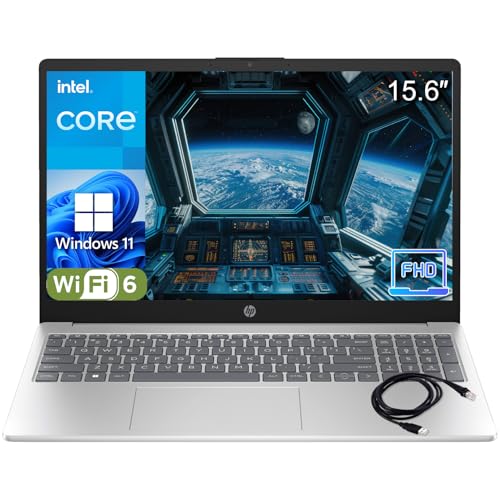
HP Pavilion 15 2026 (Renewed) — Renewed Value
The word in brackets is the most important word in this section: Renewed. This Pavilion 15 reaches its listing through Amazon’s refurbished channel, which means the machine has been professionally inspected, tested and cleaned, and is sold with the Renewed programme’s guarantee behind it — it is not a new laptop, and this guide will not let the sentence end anywhere that implies otherwise. What renewed buys a household is a modern, current-design machine — the listing describes a 2026 AI-ready Pavilion in Platinum White — at the gentlest end of the home-laptop market, with the side benefit that a refurbished machine is also a reused one. For the right home duties, that is not a compromise. It is the point.
The specification, as its listing states it, is tuned for efficiency over force: an Intel N100 processor with four cores, 8GB of memory, a 256GB SSD, a Full HD display and a numeric keypad, in a lightweight body the listing pairs with long battery life and a Microsoft Office 365 inclusion. The N100 is a chip designed for exactly the household stack — browsing, documents, streaming, calls, school platforms — and its efficiency is the kind that shows up as silence and cool running rather than as benchmark numbers. A machine that never gets hot, never gets loud, and lasts through a day of intermittent family use is a machine that fits a kitchen table the way a kettle does: unremarkably, essentially.
Renewed ownership, described plainly, involves three habits. Inspect the machine on arrival — screen, keyboard, ports, battery behaviour — while the return window is wide open, because the programme’s guarantee is strongest in its first days. Expect the possibility of light cosmetic marks that the grading allows; they are the visible part of the discount. And register the guarantee, keep the paperwork, and treat the first month as a probation the machine should pass easily. Households that follow those habits overwhelmingly report the same experience: a laptop that simply becomes the family computer, its refurbished origin forgotten by everyone except the bank account.
The limits match the specification’s honesty. Eight gigabytes of memory and an efficiency-class processor define a ceiling: this Pavilion is for the household’s centre — communication, documents, learning, entertainment — not for a teenager’s gaming ambitions or a parent’s new video-editing hobby, both of which should look at the Aspire 3 below. The 256GB drive suits a cloud-assisted household, where photographs live in a library service and documents in a synced folder. Within those borders, the renewed Pavilion is the most rational purchase in this guide: a current design, an efficient heart, a declared history, and money left over for the printer, the router and everything else a home network quietly demands.
A word about who refurbished machines quietly delight: the confident bargain-hunter in every family, the one who reads grading descriptions the way others read menus. For that buyer the Pavilion is not a compromise but a sport played well — a current design, verified and guaranteed, at the gentlest money in the guide. Households contain both temperaments, the cautious and the shrewd, and this guide’s two floor picks exist so that each temperament can buy without pretending to be the other.
- Status: Renewed — professionally refurbished listing, stated in the title
- Panel: 15 inch class Full HD display, per the listing
- Chip: Intel N100, four cores, efficiency-tuned
- Memory and storage: 8GB RAM with a 256GB SSD
- Extras in the listing: numeric keypad, Microsoft Office 365, Platinum White, lightweight build
Strengths
- Renewed value with the programme’s guarantee behind it
- Efficient, cool and quiet through a family day
- Current Pavilion design rather than an old model reheated
Trade-offs
- Refurbished status must suit the buyer — inspect on arrival
- 8GB of memory bounds heavier multitasking
- N100 ceiling excludes gaming and heavy creative work
Best for: households wanting a modern, gentle machine for everyday duties.
Not suited for: shoppers set on a brand-new machine with a long upgrade runway.

Lenovo IdeaPad 1 15.6 — Fresh-Box Floor
Where the Pavilion above is the refurbished route to a home laptop, the IdeaPad 1 is the same destination reached brand new, and the comparison between them is the most instructive in this guide. Lenovo’s listing describes a 15.6 inch Full HD machine with an AMD Ryzen 5 7520U, 8GB of LPDDR5 memory and a 256GB SSD, a numeric keypad, and a lightweight design pitched at students and home office use, in Abyss Blue. Bought new, it carries a new machine’s full warranty and an untouched battery; specified as it is, it asks the same discipline of its owner — this is a laptop for the household’s known duties, not for ambitions that arrive later.
Home life suits the IdeaPad 1 in specifics. The Ryzen 5 is a modern, frugal chip that keeps the everyday stack — browser, office documents, streaming, school platforms, family calls — moving without hesitation, and its efficiency stretches the battery across the intermittent rhythm of home use, where a laptop works in twenty-minute bursts between sleeps. The Full HD panel keeps homework text and recipe print crisp at counter distance. The numeric keypad, a feature this class often deletes, survives here and quietly becomes the household favourite at accounts time, when the family spreadsheet comes out and numbers are entered by the hundred.
The machine’s social qualities deserve their sentence. It is light enough to migrate — kitchen to sofa to spare room — without becoming an event, plain enough in design that no household member feels it is “someone’s” laptop rather than everyone’s, and backed by Lenovo’s enormous IdeaPad ecosystem of parts and knowledge when something eventually needs attention. A home laptop is infrastructure, and infrastructure should be boring in exactly these ways.
The ceilings are the family’s familiar ones, stated for the record: 8GB of memory will feel the weight of a household that keeps everything open at once, 256GB asks for cloud assistance with photographs and video, and the integrated graphics draw the line at light gaming. None of these will trouble the duties the machine is bought for. They will trouble the buyer who purchases it as a five-year main machine for a growing family workload — that buyer should step to the Aspire 3’s 16GB and Ryzen 7, and this guide’s comparison table exists to make that step legible.
As the fresh-box counterpart to the renewed Pavilion, the IdeaPad 1 completes a useful pair: same philosophy, two histories. Choose the Pavilion for value with a guarantee, the Lenovo for the untouched warranty and the slightly stronger chip — and either way, choose with the household’s actual week in mind rather than its most ambitious hour.
Grandparents deserve a specific mention in the IdeaPad’s ledger, because the machine suits them in ways spec sheets flatten: a big, clear screen for reading, a proper keyboard for the emails that are still composed like letters, a weight that can be moved from table to lap without a negotiation, and a price that does not make a gift of it feel like an occasion. Families buying for an older relative consistently overbuy processing and underbuy exactly these comforts; the IdeaPad 1 is the correction.
- Panel: 15.6 inch Full HD display, per the listing
- Chip: AMD Ryzen 5 7520U, efficiency-class and modern
- Memory and storage: 8GB LPDDR5 beside a 256GB SSD
- Layout: numeric keypad retained for home accounts
- Pitch: lightweight design aimed at students and home office use, Abyss Blue
Strengths
- New-machine warranty and battery, at the floor of the market
- Full HD screen where the class often cuts resolution
- Light and plain enough to be everyone’s machine
Trade-offs
- 8GB of memory is a present-tense answer
- 256GB needs a cloud partner for photo libraries
- Integrated graphics cap the household’s gaming
Best for: households buying new for communication, school and documents.
Not suited for: a family’s only machine across a long, growing span.

Acer Aspire 3 15.6 — Household Overachiever
Every category has one machine that reads like a misprint, and in home laptops it is the Aspire 3. Acer’s listing specifies a 15.6 inch Full HD notebook with an AMD Ryzen 7 5700U processor, 16GB of memory and a 512GB SSD, running Windows 11 Home. The Ryzen 7 badge and the 16GB figure belong, by the market’s usual logic, a full class above this one — they are the specification of machines bought for work, not for the kitchen table. Acer’s Aspire line has built its reputation on exactly this kind of allocation, spending the budget on the internals and declining to spend it on theatre, and the result is the home laptop for households whose “standard use” refuses to stay standard.
Consider what the headroom absorbs in a real house. The parent who takes up photo management discovers the library software runs properly. The teenager whose school project becomes a video discovers the export finishes before bedtime. The household spreadsheet with five years of tabs recalculates without the pause that teaches families to dread it. Sixteen gigabytes of memory is the specification that keeps absorbing these surprises, because memory is where growing workloads register first — and the Aspire 3 is the only linked pick in this guide that doubles the figure the others treat as standard.
The Ryzen 7 5700U is the right kind of strong for a home: an eight-core processor from a mature, efficient family, quick at everything the household stack contains and frugal enough to keep the machine cool and quiet through a day of intermittent use. Its integrated graphics handle the family’s light gaming and media duties without a discrete card’s cost or heat. The 512GB SSD doubles the storage of the two picks above it, which in household terms means the photograph library can live on the machine, backed up to the cloud, rather than exiled to it.
Acer’s savings show in the places Acer’s savings always show, and home buyers should know them: the Aspire’s materials are practical rather than premium, its speakers serve voices rather than scores, and its design is anonymous in the way of machines bought for work. None of that matters at a kitchen table. What matters is that the Aspire 3 is the pick in this guide least likely to be outgrown — the one whose specification answers not just the household’s present week but the week it will be having in three years, when the children are older, the courses are heavier, and the photographs number in the tens of thousands.
For the household that can only buy once and must buy for growth, this is the recommendation wearing the fewest asterisks. It is not the cheapest route in, nor the most charming machine here; it is the one whose owner, in year three, is least likely to be shopping again.
Home businesses are the Aspire’s secret constituency. The side venture, the freelance practice, the market stall that grew into a shop — these run on home laptops long before they justify office machines, and they run on exactly the Aspire’s strengths: memory for the accounts package and the browser and the design tool at once, storage for the product photographs, a processor that never makes a customer wait. If the household contains an enterprise in embryo, the overachiever is the pick whose headroom is really a business plan.
- Panel: 15.6 inch Full HD notebook display, per the listing
- Chip: AMD Ryzen 7 5700U, eight cores
- Memory and storage: 16GB RAM with a 512GB SSD
- System: Windows 11 Home
- Character: internals-first allocation, practical materials
Strengths
- 16GB and a Ryzen 7 out-spec the entire home class
- 512GB holds the family library locally
- The least likely pick here to be outgrown
Trade-offs
- Practical materials rather than premium finish
- Speakers are for voices, not film scores
- Anonymous design beside flashier household names
Best for: growing households buying once, for years.
Not suited for: households that prize finish and theatre over internal strength.

HP 15.6 Touchscreen i5 — Family Touch Centre
The second HP in this guide is a different animal from the first: new, touchscreen-equipped, and specified like a machine that expects to be the household’s interactive centre. Its listing describes a 15.6 inch touchscreen laptop with an Intel Core i5 processor, 16GB of memory and a 512GB SSD, a numeric keypad, Bluetooth and Wi-Fi, and long battery life, in silver, with an accessory bundle noted. That is the Aspire 3’s class of internal specification — Core i5, doubled memory, doubled storage — with a touch panel laid over it, and the combination makes this the pick for households whose members reach for screens as naturally as they reach for keyboards.
Touch at home is not a novelty; it is how half the household already computes. Children raised on tablets tap a laptop screen and are baffled when it ignores them. Grandparents find a direct finger more honest than a trackpad’s remote control. Cooks scroll with a knuckle, presenters tap through slides, and everyone zooms a map or a photograph with a pinch that no keyboard shortcut has ever made as satisfying. A home laptop with touch meets the household where its habits already are, and the HP’s full-size 15.6 inch panel gives those habits room — big enough for two heads at a recipe, three at a photograph.
The Core i5 and 16GB pairing gives the machine the same growth insurance as the Aspire: the household stack runs with margin, school and office software never strains, and the 512GB drive holds the local library. HP’s mainstream build brings the numeric keypad that home accounts appreciate, and the listing’s emphasis on battery life reflects the machine’s intended rhythm — carried around the house, used in bursts, charged occasionally rather than tethered. In silver, with an unremarkable, friendly design, it is styled to be borrowed without ceremony, which for a family machine is a genuine virtue.
The touchscreen’s taxes are modest but real. Touch panels add a measure of weight and a glossy surface that shows fingerprints and reflects ceiling lights more readily than matte screens — a consideration for bright kitchens. And buyers whose household is entirely keyboard-fluent are paying for a layer they will use monthly rather than daily; for them the Aspire’s purer allocation may argue louder. The HP’s case rests on knowing your family’s hands. If they tap, pinch and swipe by instinct, this is the most natural machine in the guide.
Accessory bundles, noted in the listing, deserve a buyer’s cool eye rather than excitement: judge the laptop on its own specification — i5, 16GB, 512GB, touch — and treat anything bundled as a bonus whose absence would not change the verdict. Judged that way, the verdict stands: this is the household’s interactive centre, and for touch-native families it is the first name on the list.
Video calls are where the HP touch earns a paragraph of its own. Propped on a kitchen counter, its big screen becomes the family’s window — grandparents at a size where expressions read, children performing for an audience of relatives, the whole household able to gather rather than queue. Touch makes the call controls reachable by whoever is nearest, which in a family call is a genuine feature. Machines are usually judged on how they serve one user; this one is judged, correctly, on how it serves a room.
- Panel: 15.6 inch touchscreen, per the listing
- Chip: Intel Core i5
- Memory and storage: 16GB RAM with a 512GB SSD
- Layout and wireless: numeric keypad, Bluetooth, Wi-Fi
- Finish: Silver; long battery life emphasised in the listing
Strengths
- Touch panel matches how households actually interact
- 16GB and 512GB give real growth headroom
- Full-size screen suits shared viewing and recipes
Trade-offs
- Glossy touch surface shows prints and reflections
- Touch layer is wasted on keyboard-only households
- Bundled accessories should not sway the decision
Best for: touch-native families, grandparents and shared screens.
Not suited for: matte-screen purists in very bright rooms.
Dell Inspiron 15 — Prose Pick
The Inspiron 15 appears in this guide for a reason that has nothing to do with any single specification: households keep computers for years, things eventually go wrong, and Dell’s service and parts ecosystem is the one a non-technical owner is most likely to navigate successfully. The Inspiron family spans a wide range of configurations under one name — which is why it is a prose pick, shopped by title rather than linked — and at its sensible home configurations it offers the same formula as the linked picks: a 15.6 inch Full HD screen, a modern Ryzen or Core processor, solid-state storage, and a full keyboard. What Dell adds is the afterlife: manuals, parts, repair shops on every continent that know the machine by heart.
For a home buyer, that afterlife is a rational thing to purchase. The household laptop will meet a cracked screen, a tired battery, a fan full of carpet dust, probably in that order, and the difference between brands at that moment is the difference between a repair and a replacement. Inspirons are built in the mainstream’s image — serviceable, documented, unexotic — and a competent local shop can return one to service with parts that exist. Families buying a machine to serve a child’s whole school career are buying that repairability whether they name it or not.
The shopping discipline is the one this guide applies to every family-name product: choose the configuration whose title states a Full HD panel, a current Ryzen 5 or Core i5 class processor, 16GB of memory if the household’s ambitions allow it, and at least 512GB of SSD — and walk past the listings that lead with the name and bury the numbers. Dell sells Inspiron 15s at the honest floor and at the comfortable middle; the middle is where home buyers belong.
Judged purely as a daily object, a well-chosen Inspiron is deliberately unremarkable — and for the household that wants its computer to be furniture rather than a hobby, unremarkable is the highest available praise. It will not be the most loved machine in this guide. It may well be the longest-serving.
There is a generational handover the Inspiron performs better than any pick here: the machine bought for a child’s school years, repaired once mid-life with parts any shop can source, and still serving as the household spare when the child leaves with a newer laptop. That arc — purchase, repair, demotion, long twilight — is the classic biography of a family computer, and Dell’s ecosystem is built to support every chapter of it. Buyers who think in arcs rather than in launches will recognise their machine.
- Screen class: 15.6 inch — choose Full HD configurations
- Processor guidance: current Ryzen 5 or Core i5 class, per the title
- Memory guidance: 16GB where the household budget allows
- Ownership: Dell’s parts and service reach is the family’s real feature
- Buying check: configuration from the title, never from the name
Strengths
- Repairability and parts availability lead the class
- Sensible configurations mirror the linked picks’ formula
- Built to be serviced anywhere on earth
Trade-offs
- The name spans weak and strong machines alike
- Design and materials are mainstream-plain
- Careless configuration shopping is richly punished
Best for: households planning a long service life with local repairs.
Not suited for: name-only shopping that skips the listing titles entirely.
ASUS Vivobook Go 15 — Prose Pick
The Vivobook Go 15 is the home class’s traveller — ASUS’s lightweight line for people whose “home” laptop spends its life being carried between home, campus, relatives and cafés. It is covered in prose because the Go family is sold across configurations that vary in chip, memory and panel, and the family’s promise — portability with the essentials intact — is better described than linked. What defines a Vivobook Go is intent: a 15.6 inch screen in a body designed to be picked up one-handed, fast charging in the family’s tradition, and a specification trimmed to the duties of communication, documents and media.
That intent suits a specific and common household pattern: the laptop that is technically shared but practically migrates — the student’s machine that comes home at weekends, the parent’s laptop that travels to a relative’s house to sort out their photographs, the spare that goes on holiday because the good camera’s cards need emptying somewhere. Weight decides whether those trips happen with the laptop or without it, and the Go’s design treats weight as the first specification rather than the last.
Shopping the family requires the usual vigilance, sharpened: confirm the panel is Full HD in the listing, because light machines are where lesser resolutions hide; confirm memory at 8GB minimum and treat 16GB configurations as the long-life choice; and confirm the processor belongs to a current family rather than a leftover one. A Go chosen with those three checks is a delightful household satellite. A Go chosen on its silhouette alone can disappoint in each of the three places the checks protect.
Within this guide’s map, the Vivobook Go is the satellite to the others’ desktops — not the household’s centre but its most mobile citizen. Homes with one laptop should start with the linked picks; homes adding a second, lighter machine for the family’s traveller will find the Go’s priorities exactly aligned with the job.
Students living between two homes — term-time rooms and family houses, or two parents’ houses — are the Go’s most natural owners, and the family’s most frequent travellers generally. For them the satellite’s virtues compound weekly: the bag stays light, the charger forgotten at one home is survived on the battery’s patience, and the machine’s arrival at either house is an event too small to plan around. Portability is rarely a family’s headline requirement, until the family’s geography makes it one.
- Screen class: 15.6 inch — verify Full HD in the listing title
- Family intent: the lightest carry in the home class
- Memory guidance: 8GB minimum, 16GB for longevity
- Charging: fast-charging tradition across the Go family
- Buying check: chip generation must be current, not leftover
Strengths
- Portability that makes the laptop actually travel
- Full-size screen in a satellite-weight body
- Suits students and relatives’-house duty perfectly
Trade-offs
- Configuration spread hides lesser panels and chips
- Trimmed specification beside the Aspire and HP touch
- A satellite, not a household’s sole centre
Best for: second machines and the family’s travelling member.
Not suited for: a household’s only computer for heavy duties.
Comparison
| Pick | Status and core | Memory and storage | Household role |
|---|---|---|---|
| HP Pavilion 15 2026 | Renewed listing; Intel N100, 15 inch class FHD | 8GB, 256GB SSD | The gentle, guaranteed refurbished entry |
| Lenovo IdeaPad 1 15.6 | New; Ryzen 5 7520U, 15.6 inch FHD | 8GB, 256GB SSD | The fresh-box floor for known duties |
| Acer Aspire 3 15.6 | New; Ryzen 7 5700U, 15.6 inch FHD | 16GB, 512GB SSD | The overachiever that absorbs growth |
| HP 15.6 Touchscreen i5 | New; Intel Core i5, 15.6 inch touch panel | 16GB, 512GB SSD | The interactive family centre |
| Dell Inspiron 15 | New; configuration family — target Ryzen 5 / Core i5 class | Configuration family — target 16GB and 512GB | The repairable long-server |
| ASUS Vivobook Go 15 | New; configuration family — verify FHD and current chip | Configuration family — 8GB minimum, 16GB preferred | The travelling satellite |
What does a home laptop actually do all day?
Picture the machine’s Tuesday, because the Tuesday is the truth of this category. It wakes on a kitchen counter for the news and the weather, hosts a video call with a daughter in another city at ten, and is carried — one-handed, by the corner, in the way that makes engineers wince — to the sofa for a grandchild’s cartoon at noon. The afternoon brings homework documents and a school platform that assumes a keyboard; the evening brings the photograph sort, the household accounts, a streamed film; and twice a year it becomes, without warning, the most important computer in the world, when the tax software or the insurance claim or the school application lives on it and nowhere else.
That day explains the guide’s priorities better than any benchmark. The camera matters because the ten o’clock call is the family’s connective tissue. The keyboard matters because homework and accounts are typed, not swiped. The screen matters because everyone in the house reads on it, including the eyes that can least afford strain. Battery and weight matter because the machine migrates. And reliability matters most of all, because the twice-a-year days admit no substitute. A home laptop is not a small office laptop; it is a household appliance with a keyboard, and it should be bought with an appliance’s seriousness about service life.
It also explains the guide’s forgiveness. Nobody’s Tuesday includes rendering, compiling or competitive gaming, so the absence of flagship power is no absence at all. The standard home laptop, specified honestly — as every pick here is — is not a compromise version of a real computer. It is the correct computer for the most common computing life there is.
How do you set up a home laptop for the whole family?
Give every regular user their own account from day one, including the children, with the adults holding the administrator rights. Separate accounts mean separate desktops, separate documents and separate blame, and they turn “someone deleted my homework” from a household incident into an impossibility. Set the machine to update itself automatically, because a home laptop’s security depends on updates that nobody in the house should have to remember, and turn on the built-in backup — to a cloud library, an external drive, or both — before the photographs start accumulating rather than after the first scare.
Then tune the machine for its least technical user, because that user defines the household’s support burden. Pin the video-call application, the browser and the documents folder where they can be found without a search. Raise the text size a notch if eyes in the house prefer it; set the screen to a comfortable brightness rather than a showroom glare. Save the Wi-Fi password in the machine’s notes and the router’s details on paper in a drawer, because the day the connection dies is the day nobody can look anything up.
Finally, agree the machine’s geography. A home laptop that lives in one sensible place — charged, findable, with its cable — serves the household; one that migrates to bedrooms and vanishes under laundry serves whoever hid it last. A small routine — it sleeps in the kitchen, it charges on Sundays — sounds trivial and is, in fact, the difference between a family computer and a family rumour. The picks in this guide are all light and patient enough to thrive under such a regime.
Renewed, entry-level or mid-range — which route should a household take?
The three routes in this guide are not a quality ranking; they are three different relationships with risk and time. The renewed route, represented by the Pavilion, converts money into a guarantee: you accept a machine with a past, professionally verified, and in exchange keep funds for the rest of the home network. It suits households whose duties are known and whose confidence with technology is high enough to inspect a delivery and use a return window — a small skill, honestly, and one this guide’s Pavilion section walks through step by step.
The entry route, the IdeaPad 1, converts money into simplicity: a new machine, a full warranty, an untouched battery, and a specification bounded on purpose. It suits the buyer who values the absence of questions — no history to inspect, no grading to interpret — over the renewed machine’s value edge, and whose household duties are as settled as the specification assumes. Families buying for a grandparent often belong here, because the person least able to troubleshoot deserves the machine with the fewest stories attached.
The mid-range route, the Aspire 3 and the HP touchscreen, converts money into time: headroom that postpones the next purchase by years. It suits the household that buys rarely and hates buying — the one that would rather spend once, correctly, than save twice, briefly. Spread across the extra years the 16GB machines deliver, the mid-range route is frequently the cheapest of the three per year of service, which is the only arithmetic a household appliance should ultimately be judged by. Choose the route that matches your household’s temperament, and the pick inside it nearly chooses itself.
What should a home laptop’s second year look like?
The second year is when a home laptop stops being a purchase and becomes a possession, and the picks here were chosen with that year in mind. The battery will hold slightly less than it did; the household will have installed more than it remembers; the children will be a year more ambitious and the photo library a year larger. Machines with headroom — the Aspire’s memory, the HP’s storage — absorb that growth invisibly. Machines at their ceiling — the 8GB picks on bounded duties — absorb it by asking for small disciplines: a library moved to the cloud, a downloads folder emptied, a game or two retired. Neither experience is a failure; they are the two honest shapes of ownership, and the buyer should choose between them knowingly at the start.
Maintenance in the second year is measured in minutes. A vacuum’s brush across the vents, an afternoon where the machine is allowed to finish its updates undisturbed, a backup checked rather than assumed — these small rituals are the whole of home-laptop husbandry, and every pick in this guide rewards them equally. The households that perform them retire laptops out of changed needs; the households that skip them retire laptops out of accumulated grievances, usually blaming the machine for the arithmetic of neglect.
There is a social second year too. The family computer becomes the family’s archive and its memory of itself — the photographs, the documents, the saved messages — and its trustworthiness compounds accordingly. That is the deepest reason this guide insists on honest specifications and declared statuses: a household can forgive a slow laptop, but it organises its life around a reliable one, and reliability begins with buying the machine that was actually described.
Common Mistakes
Buying by the phrase “fine for browsing and email” is the category’s original sin. That phrase has sold a generation of dim, low-resolution screens and memory-starved machines to households whose actual use — calls, photographs, school platforms, accounts — deserved better within a month. Read the specification, not the reassurance: Full HD, solid-state storage, a current processor family, and memory that matches the household’s growth. Every pick in this guide clears those bars openly; anything that will not state its numbers is asking you to lower them.
Underrating the webcam runs a close second. Home laptops live on family calls, and the camera is the household’s face to its distant members — yet buyers routinely choose on processor badges while the camera goes unexamined. A soft, dim camera makes grandparents look like witnesses in a documentary; a decent one makes them present. If your household calls weekly, the camera is a headline specification, whatever the advertisements say.
The third mistake is buying one machine for two incompatible jobs: the family centre and a teenager’s gaming rig, or the household appliance and a parent’s editing studio. The picks here are honest about their ceilings — the Pavilion and IdeaPad serve the centre, the Aspire and HP touch absorb growth, and none of them is a gaming machine. A household that respects those ceilings ends up with computers that succeed; one that ignores them ends up with one computer that fails at everything, expensively.
Final Recommendation
For the household buying its centre — one machine, mixed users, years of service — start with the Acer Aspire 3. Its Ryzen 7 and 16GB are the specification that absorbs a family’s growth, and its plainness is the right kind of plain for an appliance. If your family’s hands are touch-native, or the machine will serve grandparents and children daily, take the HP 15.6 touchscreen instead and enjoy the most natural interface in the guide.
Years of watching households buy computers leave one observation: the family that discusses its actual week before shopping — who will use the machine, for what, in which rooms, for how many years — almost never regrets the purchase, at any specification. The family that shops by advertisement and anxiety almost always does. This guide has tried to be that discussion in written form; the picks are simply where the discussion lands when it is held honestly.
Choose the renewed Pavilion if the budget is tight and the duties are known — it is an honest, guaranteed route to a modern machine, with its refurbished status worn openly and its efficiency perfectly matched to home rhythms. Choose the IdeaPad 1 for the same duties with a new machine’s warranty. Take the Inspiron when repairability is the household’s religion, and the Vivobook Go when the second machine must travel. A standard home laptop is a modest purchase with an immodest job: be the household’s memory, window and desk for years. Every pick here was chosen to be worthy of the job — and to keep being worthy of it quietly, year after year, in the background of a family’s life.
Frequently Asked Questions
What does “Renewed” mean for the Pavilion in this guide?
It means the machine is professionally refurbished: inspected, tested, cleaned and sold under the Renewed programme’s guarantee rather than as new stock. Expect a fully working current-design laptop, possibly with light cosmetic marks the grading allows, and inspect it promptly on arrival, inside the returns period. This guide labels the Pavilion’s status in its badge, specification list and analysis so the choice is made with open eyes.
How much memory does a home laptop need?
Eight gigabytes runs the household’s present stack — browsing, documents, calls, streaming — and the renewed Pavilion and IdeaPad 1 prove it can be enough for known duties. Sixteen gigabytes, as in the Aspire 3 and the HP touchscreen, is the figure for households whose use grows: more users, heavier school and office software, photo libraries managed locally. Buy 8GB for a bounded job and 16GB for a growing one, and be honest about which household yours is.
Is a touchscreen worth it for home use?
For many households, genuinely yes. Children, grandparents and cooks interact with screens by touch instinctively, and the HP’s panel turns the laptop into the family’s most approachable computer. There is a subtler benefit too: a touchscreen machine gets gathered around. People stand at it together, point at it, pass it hand to hand in ways a keyboard machine discourages, and the family computer becomes a family object rather than one person’s desk with visitors. Households that value that quality will not find it on a specification sheet, but they will notice its absence. Keyboard-fluent households will use it less and may prefer the Aspire’s internals-first allocation. Touch is a household-habit question, not a specification contest — answer it by watching how your family already treats every other screen in the house.
Can these laptops handle school and online courses?
Yes — that workload is their home ground. Documents, research, learning platforms, video lessons and calls sit comfortably inside every linked pick’s specification. One practical tip for course-heavy households: the machine’s camera and the room’s lighting decide how a student appears to a tutor far more than any processor does, so a seat near a window or a modest lamp aimed at the wall behind the screen will do more for a child’s online presence than any upgrade in this guide. The considerations are the camera for classes that require presence, the keyboard for essay-heavy courses, and storage for downloaded materials. Students whose courses add specialist software — engineering, media production — should weight the Aspire 3’s headroom or look at more powerful classes entirely.
How long should a standard home laptop last?
Four to six years is a fair expectation, with the battery the most likely midlife replacement and dust the most likely midlife ailment. The 16GB picks have the longest comfortable runways; the 8GB picks serve their span best when their duties stay bounded. A household that backs up its photographs and keeps the machine’s vents clear will usually retire a home laptop because the family changed, not because the computer failed.
Do I need antivirus and backup software?
Modern Windows arrives with capable built-in protection that updates itself, which covers most households provided updates are left on automatic. Add the browser’s own safeguards and a household rule that unexpected attachments and miracle prize notices go straight to the bin, and the family machine’s security posture is stronger than most offices managed a decade ago. The weakest link in home computing is rarely the software; it is the hurried click, and the defence against it is a house rule, not a purchase. Backup is the habit that matters more: the household’s photographs and documents should exist in two places — a cloud library, an external drive, ideally both — because the laptop’s failure modes include drops and spills that no software prevents. Set the backup up in the first week, while setting things up is still the evening’s entertainment.
Related Guides
Home is one lens among several, so compare across them: the extreme thrift of the best 150 dollar laptops shows the floor beneath this category and what it really costs, the premium field in the best 1500 dollar laptops shows the ceiling above it, and the gaming-leaning survey in the best 1500 dollar laptops gaming covers the household member whose needs point in an entirely different direction.



[…] is one maker among many, so place these picks in the wider field: the household shortlist in the best 15 standard laptops for home use shows how the IdeaPads compare with rival family machines, the extreme budget experiment in the […]