What's inside
- Key Takeaways
- Quick Picks
- How did we choose the best 16GB laptops?
- How do the six memory picks compare?
- How much RAM do you actually need in 2026?
- Does RAM speed or type matter as much as capacity?
- How can you tell if your current laptop needs more memory?
- What is the difference between soldered and socketed memory — and should you care?
- How should you set up a new 16GB laptop for smooth multitasking?
- How does memory interact with the rest of the specification?
- What does memory pressure feel like — and how do the picks differ?
- What mistakes do memory-focused buyers make?
- Final Recommendation
- How should you treat memory when buying for a student?
- What happens to a laptop that runs out of memory every day?
- Frequently Asked Questions
- Related Guides
As an Amazon Associate I earn from qualifying purchases. This post may contain affiliate links at no extra cost to you.
widgetverdict.com is reader-supported. When you buy through links on our site, we may earn an affiliate commission.
Memory is the specification that decides how a laptop feels at 4pm on a crowded working day, and the best 16gb laptops start from the figure that modern computing actually demands. This guide gathers six machines around that baseline — and, in the spirit of reading listings honestly, it includes two machines that exceed it, carrying 32GB and labelled as such wherever they appear. Sixteen gigabytes is the floor here, not a fiction we force onto every title.
The linked picks show the range the baseline can wear. There is an LG gram so light it seems to cheat, an ASUS Zenbook with an OLED screen and double memory, an Acer Swift Go that matches the 16GB brief exactly with a touchscreen, a Lenovo gaming machine whose 16GB is paired with serious graphics, and a Samsung convertible with 16GB and an AMOLED display. A modular Framework laptop, covered without a link, represents the one philosophy the others reject: memory you can change your mind about.
Why does this single number deserve its own guide? Because it is the one specification that cannot be negotiated with later on most modern machines, the one that separates a laptop that multitasks gracefully for five years from one that begins swapping and stuttering in its second. Screen sizes here run from 14 to 16 inches and purposes from travel to gaming; the memory discipline is what they share.
Key Takeaways
- Three linked picks carry exactly 16GB as their listing titles state: the Acer Swift Go 14, the Lenovo Legion Pro 5 and the Samsung Galaxy Book5 Pro 360.
- Two linked picks carry 32GB and are labelled as exceeding the baseline throughout: the LG gram 14 and the ASUS Zenbook 14.
- The gram 14 pairs its 32GB with a 512GB drive in a body weighing about 2.47 pounds — the traveller’s over-specification.
- The Legion Pro 5 is the gaming entry: 16GB of DDR5 beside an RTX 5060, in a chassis where memory upgrades remain possible in a way the ultraportables do not allow.
- The prose-only Framework Laptop 13 is the repairable alternative — the machine for anyone determined to keep memory a choice they can revisit.
Quick Picks
| Pick | Badge | Why it earns its place |
|---|---|---|
| LG gram 14 (32GB — exceeds the baseline) | 32GB upgrade pick — lightest here | Thirty-two gigabytes in a 2.47-pound body: the most memory per gram in this guide, by a wide margin. |
| ASUS Zenbook 14 (Ryzen AI 7, 32GB — exceeds the baseline) | 32GB upgrade pick — OLED | A WUXGA OLED screen, a 50-TOPS NPU and 32GB with a full terabyte — the guide’s most complete 14-incher. |
| Acer Swift Go 14 (16GB — exact baseline) | Exact 16GB match — touch | The listing states the brief precisely: 16GB of LPDDR5X in an Intel Evo touchscreen ultraportable. |
| Lenovo Legion Pro 5 (16GB — gaming exact match) | Exact 16GB — gaming | Sixteen gigabytes of DDR5 beside a Ryzen 9 and an RTX 5060 — the baseline with a graphics card attached. |
| Samsung Galaxy Book5 Pro 360 (16GB — convertible exact match) | Exact 16GB — AMOLED convertible | The title states 16GB beside a 512GB drive, wrapped around a folding 3K AMOLED touchscreen. |
| Framework Laptop 13 | The modular alternative | Choose 16GB now, change it later — the one machine here built around revisiting the memory decision. |
How did we choose the best 16GB laptops?
We treated the listing title as the only trustworthy source for the memory figure, and this guide’s picks divide exactly as those titles divide: machines stating 16GB, described as 16GB machines; machines stating 32GB, included because a search for a 16GB laptop is a search for a minimum, and described as 32GB machines every time they are mentioned. Any guide that quietly re-labels a 32GB listing as a 16GB pick — or pads a 16GB list with 8GB machines — has failed its readers before the first recommendation.
Memory alone, though, is a ticket rather than a destination. Each pick pairs its capacity with a current processor and a screen worth the machine around it: OLED on the Zenbook, AMOLED touch on the Samsung, a high-resolution touch panel on the Swift Go, WQXGA on the Legion. We excluded the many laptops that use 16GB as a fig leaf over weak displays and ageing silicon; the figure earns its place only inside a coherent machine.
We also deliberately included the repairability question. Most picks here solder their memory, making the purchase figure permanent — a fact their sections state. The Framework, the one prose-only pick, exists in the guide as the counter-argument: proof that a buyer who prioritises future flexibility over thinness still has somewhere to go.
A note on what we excluded, because the baseline’s popularity breeds impostors: the market is full of machines advertising 16GB in their names while shipping it in single-channel configurations that hobble their integrated graphics, and of listings whose 16GB figure describes a different variant from the one priced. The picks here were chosen from listings whose own titles carry the figure for the unit described — the standard this guide has applied to itself throughout, and the standard we commend to every reader at checkout.

LG gram 14 (32GB — exceeds the baseline) — 32GB upgrade pick — lightest here
Begin with the honest label: this gram 14 listing specifies 32GB of RAM, double this guide’s headline figure, alongside a 512GB SSD. It leads the guide because it embodies what the 16GB search is really about — a machine whose memory will never be the reason it feels old — delivered in the lightest serious laptop in this list. The listing’s own figures are startling: 0.67 inches thin and 2.47 pounds, with an Intel Core Ultra 7 355 inside and Thunderbolt 4 connectivity.
The gram formula trades on a magnesium-alloy chassis that feels almost implausibly light until you have carried it through an airport, at which point every other laptop feels like an anchor. LG also claims exceptional video-playback endurance for the line — the listing cites up to 36.5 hours of playback, a laboratory figure real workloads will not match, but indicative of the efficiency tuning. As a Copilot+ PC with dual AI engines, it handles current Windows’ on-device features without waking a fan, because there is barely a workload here that needs one at full voice.
The compromises are structural. The 512GB drive is the figure to interrogate — half the capacity of several rivals in the companion capacity guide — and the featherweight chassis, while durability-tested by LG, flexes more under a hand than an aluminium unibody. Integrated graphics close the gaming question. What remains is a traveller’s instrument with memory headroom most desktops would envy.
The gram’s party piece needs a practical translation: 2.47 pounds is the weight of a hardback book, which means the machine stops being a decision. Laptops above four pounds get left behind on marginal days — the quick café hour, the evening event, the trip where it might not be needed — and the work that would have happened on them does not happen. The gram goes everywhere because carrying it costs nothing, and its 32GB means the machine that arrives is never the lightweight compromise. LG’s durability testing on the line is the reassurance that the lightness is engineering rather than fragility, though a sleeve remains a wise companion.
The gram’s screen-to-body generosity deserves a closing note: LG fits its 14-inch panel into a chassis closer to a 13-inch machine’s footprint, so the bag slot it occupies is smaller than its screen promises. Travellers shop footprints as much as weights, and on both measures the gram cheats pleasantly.
LG’s gram durability testing — the line is validated against military-standard drop and vibration protocols — deserves mention precisely because the featherweight invites doubt. The chassis flexes by design philosophy, absorbing what a rigid shell transmits; owners’ longevity reports back the engineering.
- Memory: 32GB RAM — this listing EXCEEDS the 16GB baseline; labelled as such throughout
- Storage: 512GB SSD — the figure to weigh against your library
- Processor: Intel Core Ultra 7 355, Copilot+ PC
- Build: 0.67 in. thin, 2.47 lbs per listing title
- Ports: Thunderbolt 4 included
- Operating system: Windows 11 Home
Strengths
- 32GB of memory in the lightest chassis in the guide
- Battery tuning aimed at genuinely long mobile days
- Thinness and weight that change how often you bother carrying it
Trade-offs
- Not a 16GB machine — it doubles the baseline, which not every buyer wants to pay for
- 512GB drive is modest beside the memory generosity
- Lightweight chassis flexes more than unibody rivals
Best for: travellers and consultants chasing maximum memory headroom at minimum carried weight
Not suited for: local-storage collectors, or buyers set on a literal 16GB configuration

ASUS Zenbook 14 (Ryzen AI 7, 32GB — above the baseline) — 32GB upgrade pick — OLED
The second 32GB machine in this guide earns its place on completeness. The listing specifies an AMD Ryzen AI 7 445 with a neural processor rated up to 50 TOPS, 32GB of LPDDR5x memory and a 1TB SSD, behind a 14-inch WUXGA OLED display. Where the gram doubles memory and halves storage, the Zenbook doubles memory and keeps the terabyte — the specification with no asterisk at all, in a Jade Black chassis with a 180-degree lay-flat hinge.
Daily life with it is defined by the screen and the calm. OLED contrast makes documents, photographs and films all look a class above the mainstream, the Ryzen AI chip keeps the machine responsive under the pile-up of a modern working day, and Copilot+ features run on-device as intended. Windows 11 Pro suits the professional positioning, and the lay-flat hinge, trivial on paper, proves its worth every time a screen needs sharing across a desk.
Its boundaries are the ultraportable ones: integrated graphics, so creative GPU work and gaming stay light; soldered memory, so the 32GB — generous as it is — is the final figure; and a thin chassis tuned for productivity bursts rather than rendering marathons. Within those boundaries, this is the pick we would hand to the widest range of buyers in the guide.
There is a subtler Zenbook virtue worth recording: ASUS’s OLED care features and the panel’s tuning at low brightness make it an unusually good evening machine, and its fan profile in productivity work is tuned toward silence rather than spectacle. Knowledge workers underestimate how much of their computing happens in quiet rooms — libraries, bedrooms, late offices — where a whirring fan is a social fact. The Zenbook’s manners, married to its headroom, explain its all-rounder status here better than any single specification: it is the machine that behaves, everywhere, all day.
ASUS’s warranty and OLED-care programme on the Zenbook line is worth a checkout comparison, because panel confidence is part of what an OLED buyer purchases. Read the terms as you would any specification — the machine’s figures are generous, and its paperwork should match them.
The Zenbook’s keyboard deck stays cool over the wrists during sustained writing in a way that integrated-graphics rivals do not always manage — a thermal courtesy that long-form workers feel hourly. Headroom, in this machine, expresses itself as comfort as often as speed.
- Memory: 32GB LPDDR5x — this listing EXCEEDS the 16GB baseline
- Storage: 1TB SSD
- Display: 14-inch WUXGA OLED
- Processor: AMD Ryzen AI 7 445, NPU up to 50 TOPS per listing title
- Hinge: 180-degree lay-flat; backlit keyboard
- Operating system: Windows 11 Pro, Copilot+ PC
Strengths
- 32GB and a full terabyte — no capacity asterisk anywhere
- OLED display is the finest screen among the 14-inch picks
- Strong NPU and Pro Windows suit professional AI-era workloads
Trade-offs
- Exceeds the baseline rather than matching it — exact-16GB hunters, see the Swift Go
- Integrated graphics limit gaming and GPU creative work
- Memory is soldered; the 32GB is generous but final
Best for: professionals seeking one portable machine with headroom on every axis that matters
Not suited for: gamers, or buyers determined to pay only for exactly 16GB

Acer Swift Go 14 (16GB — exact baseline) — Exact 16GB match — touch
Here is the guide’s most literal answer. The Swift Go 14’s listing title states 16GB of LPDDR5X memory outright, paired with an Intel Core Ultra 7 155H processor, Intel Arc graphics and a 512GB SSD, in an Intel Evo thin-and-light chassis with a 14-inch 1920×1200 touchscreen. No relabelling, no over-delivery — the baseline itself, in a machine whose Evo certification guarantees the instant-wake, long-battery tuning that defines credible ultraportables.
The Swift Go’s character is cheerful competence. The taller 1200-line display suits documents better than the 1080p panels still common at its level, touch input earns its keep in markup and media control, and the Ultra 7 keeps the everyday stack — browser, documents, calls, light photo work — feeling immediate. Acer’s mainstream pricing discipline usually makes this the value-conscious route into the exact specification, though we state no prices here; check the listing against the figures in this section.
Know its ceilings. The 512GB drive is the ownership figure most likely to need managing by year two, the Arc integrated graphics are for acceleration rather than gaming, and the memory is soldered LPDDR5X — 16GB forever, which is either the correct amount bought honestly or a reason to step up to the 32GB picks above. As the exact-baseline representative, it carries the guide’s thesis in its purest form.
The Swift Go’s touchscreen deserves its defence, because touch on a laptop is easy to dismiss until a workflow adopts it. Marking up a document with a finger scroll and a tap, signing a form, pinching into a map or a photograph, handing the machine across a table and watching a colleague interact directly rather than narrate mouse movements — these are small, frequent mercies. Combined with the taller 1920×1200 panel, they make the Swift Go feel more modern than its mainstream price class suggests, and they cost the exact-baseline buyer nothing in the specification that matters.
The Swift Go’s port selection is a mainstream mercy worth naming: Acer tends to keep a practical spread on this line rather than pursuing USB-C minimalism, which spares the exact-baseline buyer the immediate dock purchase the premium picks assume. Small savings, honestly distributed.
Acer’s Swift Go packaging and included adapter are sensibly compact, a small thing that signals the line’s mainstream intelligence: the whole travelling system was considered, not just the laptop. Baseline buyers deserve that consideration as much as flagship ones.
- Memory: 16GB LPDDR5X — matches the baseline exactly, per listing title
- Storage: 512GB SSD
- Display: 14-inch 1920×1200 touch display
- Processor and graphics: Intel Core Ultra 7 155H, Intel Arc
- Platform: Intel Evo thin-and-light
- Model: SFG14-72T-718K per listing title
Strengths
- The exact 16GB specification in a certified Evo ultraportable
- Taller touchscreen is genuinely better for document work
- Mainstream positioning usually makes it the value route to the baseline
Trade-offs
- 512GB drive will need managing sooner than the 1TB picks
- Integrated Arc graphics are not for gaming
- 16GB is soldered and final — no mid-life upgrade
Best for: students and professionals after precisely the baseline, in a light touchscreen machine
Not suited for: gamers, or heavy multitaskers who already know they need 32GB
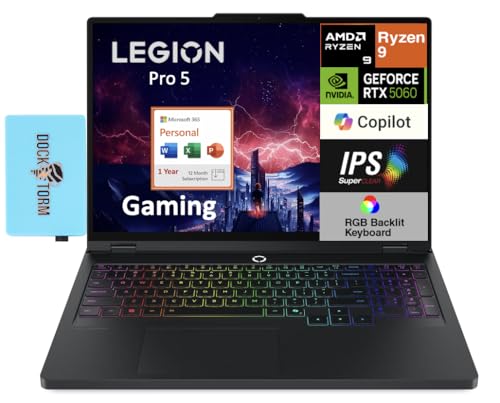
Lenovo Legion Pro 5 (16GB — gaming exact match) — Exact 16GB — gaming
In a gaming chassis, the 16GB figure reads differently, and this Legion Pro 5 listing states it plainly: 16GB of DDR5 alongside an AMD Ryzen 9 8945HX, a GeForce RTX 5060 with 8GB of video memory and a 1TB SSD, driving a 16-inch WQXGA display. For games, 16GB of system memory remains the comfortable mainstream figure — titles care far more about the RTX 5060’s own 8GB — and the DDR5 in a full-size Legion chassis belongs to the upgradeable tradition of gaming laptops rather than the soldered world of the ultraportables in this guide.
That distinction is the Legion’s quiet superpower here. Where the gram, Zenbook and Swift Go freeze their memory at purchase, a full-size gaming chassis typically lets a confident owner add memory later, when prices or needs change — verify the exact arrangement on the listing and in the service documentation, but the philosophy is built into the form factor. The machine’s day job, meanwhile, is uncompromised: desktop-class processor, serious cooling, a keyboard built for long sessions.
The trade-offs are the gaming class’s signature: weight, a large adapter, battery life for relocation rather than play, and fans that make themselves known at full stretch. Buyers whose memory question is really a gaming question — will 16GB feed modern titles alongside Discord, a browser and a capture tool? — get their answer here: yes, with the graphics card doing the heavy lifting it was bought for.
Gamers weighing the Legion’s 16GB against the 32GB machines elsewhere in this guide should understand where game performance actually lives. The RTX 5060’s own 8GB of video memory holds the textures and frame buffers; system memory feeds the game world, the operating system and the entourage of chat and capture tools. Sixteen gigabytes covers that entourage comfortably today, and the Legion’s chassis philosophy — built for owners, not sealed against them — means the question can be revisited if a future library demands it. It is the only linked pick here where the memory figure is a starting point rather than a destiny.
Lenovo’s Legion toolkit — the software that manages the Pro 5’s modes and fans — matters to its memory story too, because it exposes how the machine’s resources are being spent in real time. Owners who can see memory pressure can manage it; the Legion makes the invisible visible.
The Legion Pro 5’s bundled extras in its listing — the software subscription and port expander — should be activated and used rather than forgotten in the box; bundled value is only value when claimed. It is the gaming pick’s version of this guide’s standing advice: read what you actually bought.
- Memory: 16GB DDR5 — matches the baseline exactly, per listing title
- Storage: 1TB SSD
- Display: 16-inch WQXGA
- Processor and graphics: AMD Ryzen 9 8945HX, GeForce RTX 5060 8GB
- Bundled: MS 365 Personal and port expander per listing title
- Operating system: Windows 11 Home
Strengths
- Exact 16GB paired with the strongest gaming hardware in this guide
- Full-size chassis belongs to the upgrade-friendly tradition — verify arrangement per listing
- 1TB drive suits modern game libraries without rotation anxiety
Trade-offs
- Heaviest machine here, with the adapter to match
- Battery is for moving rooms, not for gaming sessions
- Fans are audible when the hardware is fully loaded
Best for: gamers seeking the baseline memory figure backed by real graphics power
Not suited for: commuters, or quiet-office workers who game only occasionally

Samsung Galaxy Book5 Pro 360 (16GB — convertible exact match) — Exact 16GB — AMOLED convertible
Samsung’s entry matches the baseline exactly — the listing states 16GB of memory with a 512GB drive — and spends its distinctiveness elsewhere: a 16-inch 3K AMOLED touchscreen at 120Hz on a 360-degree hinge, an Intel Core Ultra 7 256V processor and Windows 11 Pro. In this guide’s company, it is the pick for buyers whose memory needs are standard but whose screen needs are anything but.
The AMOLED panel justifies the machine almost alone. Colour and contrast of this order flatter photography, film and even the humble spreadsheet, the 120Hz refresh keeps pen input and scrolling fluid, and the convertible form turns the big screen toward presentations, annotation and media without a second device. The Ultra 7 256V is an efficiency-first chip, chosen for battery and responsiveness in mobile work rather than sustained throughput, and 16GB is exactly the right pairing for that mission.
Its limits mirror its mission: no discrete graphics, a 512GB drive that media-heavy owners will manage actively, and soldered memory that makes the 16GB a lifetime figure. Samsung phone owners will find the ecosystem integration — sharing, second-screen and call features — a genuine additional argument. For the buyer whose week is documents, calls, markup and media across several locations, this is the baseline wearing its most beautiful clothes.
A word for the Galaxy Book’s hinge over years, not minutes, because convertibles live or die by it. Samsung’s 360 mechanisms on this line are engineered for the daily fold — laptop to tent to tablet and back — and the Pro 360’s build treats that motion as the product rather than a feature. Owners who present weekly will fold this machine more times in a year than clamshell owners open theirs thoughtfully in five, and the mechanism’s confidence is what makes the form factor a tool instead of a novelty. Paired with the exact 16GB figure, it is the baseline for people whose screen must move.
Samsung’s Galaxy Book battery story completes its baseline case: the efficiency-first processor and the AMOLED’s variable appetite make it the 16-inch pick most likely to finish a mobile day unplugged. For presenters who work away from desks, that stamina is worth more than a benchmark tier.
The Galaxy Book’s Windows 11 Pro, stated in its listing, suits its presenter audience in one specific way: Pro’s presentation and remote-desktop tools are the ones shared workplaces standardise on. A convertible bought for meeting rooms should speak the meeting rooms’ language.
- Memory: 16GB — matches the baseline exactly, per listing title
- Storage: 512GB
- Display: 16-inch 3K AMOLED touchscreen, 120Hz, 360-degree hinge
- Processor: Intel Core Ultra 7 256V
- Model year: 2025 model per listing title
- Operating system: Windows 11 Pro
Strengths
- Exact 16GB with the most striking display in the guide
- Convertible hinge and pen support multiply the machine’s roles
- Efficiency-tuned processor suits mobile working days
Trade-offs
- 512GB drive asks media collectors to plan overflow storage
- Integrated graphics only
- 16GB is soldered — the figure is final
Best for: presenters, annotators and media lovers after the baseline under an AMOLED screen
Not suited for: gamers, or anyone whose local library already exceeds half a terabyte
Framework Laptop 13 — The modular alternative
The rest of this guide’s picks treat memory as a decision made once, at checkout, forever. The Framework Laptop 13 is the rebuttal: a modular machine designed so that memory, storage, ports and even the mainboard can be replaced by the owner with a screwdriver and a published guide. Configure it with 16GB and it matches this guide’s baseline; outgrow that figure and the upgrade is a pair of modules and ten minutes, not a new laptop.
The machine around the philosophy is a credible 13.5-inch ultraportable with a tall 3:2 display and a choice of Intel or AMD mainboards across its generations. It will not win a thinness contest against the gram or a beauty contest against the Zenbook, and its direct-sales model means configurations are chosen on Framework’s own store rather than through retail listings — which is exactly why it appears here without a purchase link.
The honest costs are a price premium for the modularity, a smaller company’s support footprint, and the discipline the concept asks of its owner: the upgrade path only pays if you actually keep the machine and use it. For buyers whose objection to modern laptops is precisely the soldered finality this guide keeps flagging, the Framework is not a compromise pick. It is the point.
Framework’s ecosystem has quietly become its own argument: mainboards from successive generations fit the same chassis, so the machine’s processor can be renewed without discarding its screen, keyboard and case, and a marketplace exists for the parts owners replace. The 16GB you install today is therefore not merely upgradeable memory — it is an entry ticket to a machine designed as a long-term platform. That philosophy will not suit buyers who replace laptops whole every three years, and it was never meant to. It suits the owner who finds the industry’s soldered consensus faintly insulting, and there are more of them every year.
Framework’s spare-parts pricing philosophy deserves the final word on the modular pick: parts are sold individually, at published prices, without requiring a service contract — the economic foundation that makes its upgrade promise real rather than rhetorical. A memory upgrade that costs a module, not a machine, is the entire argument in one sentence.
Framework’s community — its forums, its marketplace, its published CAD for printable accessories — has become part of the product: owners answer owners’ questions at a depth small companies cannot staff. Buying the modular pick buys a knowledgeable crowd along with the machine.
- Memory: user-configurable — 16GB matches this guide’s baseline; upgradeable by design
- Storage: user-replaceable NVMe modules
- Display: 13.5-inch with tall 3:2 aspect ratio
- Mainboard: Intel or AMD options by generation
- Design: modular ports and published repair guides
- Sales model: direct configurations rather than fixed retail listings
Strengths
- Memory and storage are decisions you can revisit, uniquely in this guide
- Published guides and available parts make repairs a realistic home project
- Tall 3:2 screen suits document-heavy work
Trade-offs
- Modularity carries a premium over equivalent fixed machines
- Smaller company’s support and retail presence
- Not the thinnest or lightest route to the baseline
Best for: owners who keep machines for many years and want the memory question to stay open
Not suited for: walk-in support devotees and hunters of the slimmest possible chassis
How do the six memory picks compare?
Read the memory column as this guide’s conscience: three exact 16GB listings, two clearly labelled 32GB listings and one machine whose memory is a dial rather than a fixture. The storage column carries the secondary warning — the two lightest picks halve the drive.
| Pick | Screen | Processor and graphics | Memory and storage | Character |
|---|---|---|---|---|
| LG gram 14 (32GB — exceeds the baseline) | 14-inch lightweight panel | Ultra 7 355, integrated graphics | 32GB (exceeds baseline), 512GB SSD | The featherweight overachiever |
| ASUS Zenbook 14 (Ryzen AI 7, 32GB — above the baseline) | 14-inch WUXGA OLED | Ryzen AI 7 445, integrated graphics | 32GB LPDDR5x (exceeds), 1TB SSD | The complete all-rounder |
| Acer Swift Go 14 (16GB — exact baseline) | 14-inch 1920×1200 touch | Ultra 7 155H, Intel Arc | 16GB LPDDR5X — exact, 512GB SSD | The honest baseline |
| Lenovo Legion Pro 5 (16GB — gaming exact match) | 16-inch WQXGA | Ryzen 9 8945HX, RTX 5060 8GB | 16GB DDR5 — exact, 1TB SSD | The gaming baseline |
| Samsung Galaxy Book5 Pro 360 (16GB — convertible exact match) | 16-inch 3K AMOLED touch, 120Hz | Ultra 7 256V, integrated graphics | 16GB — exact, 512GB | The beautiful baseline |
| Framework Laptop 13 | 13.5-inch 3:2 | Intel or AMD mainboards | 16GB configurable, upgradeable | The revisitable choice |
How much RAM do you actually need in 2026?
For the mainstream of modern work — heavy browsing, office applications, communication tools, media, light photo editing and study — 16GB is the figure at which the machine stops being part of the problem. It is not a generous figure; it is a sufficient one, which is precisely why it has become the baseline this guide is named for. Eight gigabytes, still sold in budget machines, now spends its life swapping; 16GB simply works.
The honest escalations are specific. Software development with containers or virtual machines, professional photo and video suites with large files, data analysis, and gaming surrounded by streaming and capture tools all eat into the twenties and beyond — which is why the 32GB gram and Zenbook sit in this guide, labelled as the over-baseline options they are. If your workload is on that list, buy the headroom now; soldered memory offers no second chance.
What about the far side — is 32GB wasted on ordinary work? Mostly, today: the extra sits idle through document days. Its value is insurance and longevity, bought at purchase because it cannot be bought later. Frame the decision as a five-year question rather than a this-month one, and most buyers land exactly where this guide’s picks are arranged: 16GB for the mainstream, 32GB for the heavy and the long-termist.
Does RAM speed or type matter as much as capacity?
Capacity first, and it is not close. A machine with 16GB of any modern memory type will out-multitask an 8GB machine with the fastest memory sold, every time, because the alternative to enough capacity is swapping to storage — a slowdown measured in orders of magnitude. Buyers should spend their attention on the gigabyte figure and treat type as a secondary refinement.
Within a capacity, the distinctions in this guide are still worth understanding. LPDDR5X, in the Zenbook and Swift Go, is low-power memory soldered close to the processor — efficient and quick, and permanent. The Legion’s DDR5 belongs to the conventional tradition where socketed upgrades may be possible. Apple’s unified architecture, in the companion guides, shares one pool between CPU and graphics. None of these change what you should buy; they change what you can change later, which the pick sections state for each machine.
Dual-channel configuration is the one technicality with real everyday effects, since integrated graphics borrow system memory and bandwidth. Modern machines in this class are configured sensibly from the factory, so it is a point to verify on obscure listings rather than a worry for any pick here.
How can you tell if your current laptop needs more memory?
The symptoms are distinctive once named. Applications that reload rather than resume, browser tabs that refresh when you return to them, a system that stutters when a video call joins an already busy desktop, and slowdowns that a restart mysteriously cures for a day — all are the fingerprints of memory pressure. Your operating system’s activity monitor will confirm it, showing memory pressure or heavy swap use during your ordinary busiest hour.
Run the test at your real peak, not on a quiet morning: the full stack of applications, the biggest document, the call, the capture. If pressure shows red there, your next laptop’s memory figure is decided — and if your current machine allows upgrades, a memory kit may buy it years for a fraction of a replacement. If it is soldered, you have learned the lesson this guide exists to teach, at the traditional tuition.
One false trail to avoid: a slow machine is not always a memory-starved one. A nearly full drive, a failing battery throttling the processor, or a single misbehaving application can mimic the symptoms. Check the monitor’s verdict before spending — the figure does not lie, but it does need reading.
What is the difference between soldered and socketed memory — and should you care?
Socketed memory sits in slots, held by clips, replaceable with a screwdriver and five minutes. Soldered memory is bonded directly to the board — thinner, more power-efficient, sometimes faster, and permanent. The industry’s drift to soldering is why guides like this one exist: when the figure cannot change, choosing it correctly at purchase becomes the whole game, and the honest labelling of 16GB versus 32GB listings becomes a consumer-protection issue rather than pedantry.
Should you care? In proportion to your ownership horizon and your workload’s growth. A three-year owner with mainstream needs can buy soldered 16GB with a clear conscience — the figure in the Swift Go and Galaxy Book picks will serve that whole span. A five-to-seven-year owner, or a professional whose tools grow greedier annually, should care intensely: either buy the headroom now, as the gram and Zenbook picks embody, or buy the philosophy that keeps the question open, as the Framework does.
There is a middle path worth knowing: business machines. The ThinkPad class in our companion guides often keeps memory and storage more accessible than consumer ultraportables, because fleets demand serviceability. If upgradeability matters but the Framework’s smaller-company model does not appeal, the corporate lines are where the socketed tradition survives — another reason this guide’s family treats business laptops as first-class citizens rather than grey alternatives.
How should you set up a new 16GB laptop for smooth multitasking?
Begin by auditing what starts with the machine. Every laptop accumulates launch agents — updaters, helpers, sync tools, manufacturer utilities of varying necessity — and on a 16GB system each one is a small tax on the baseline you bought. Disable the ones you do not recognise a use for, keep the ones you do, and repeat the audit quarterly; software installs restore these citizens faster than any spring cleaning removes them.
Then tune the two heaviest residents: the browser and the communication stack. Modern browsers offer memory-saver modes that put idle tabs to sleep — enable them, and let the forty-tab habit cost megabytes instead of gigabytes. Communication tools running as full browser instances are a quiet scandal of modern work; where a lightweight client exists, prefer it. None of this is necessary on day one of a 16GB machine, which is exactly why doing it on day one keeps day seven hundred feeling like day one.
Finally, learn your machine’s pressure gauge. The task manager’s memory view, checked during your busiest hour once a month, tells you whether your habits are drifting toward the ceiling — and on the soldered picks, that knowledge is for planning, not panic: the 32GB headroom machines forgive drift, and the exact-baseline machines reward the small disciplines above with years of uncomplaining service.
How does memory interact with the rest of the specification?
Memory does not perform alone, and buyers who fixate on it can build a lopsided machine in their heads: 32GB behind a dim screen is a fast mind in a dark room. The picks in this guide were filtered for coherence — each memory figure sits inside a machine whose processor, screen and storage justify it — and your own shortlist outside the guide should face the same audit. Ask what the memory is for, and check that the rest of the machine can use the answer.
The processor partnership matters most. Modern chips feed from memory constantly, and a strong processor with adequate memory outperforms a flagship processor starved of it in real multitasking — the crowd of resident applications that defines modern work cares about the pool, not the peak. That is why this guide’s exact-baseline machines, with current Core Ultra and Ryzen silicon, feel faster in a crowded afternoon than older flagships with more exotic specifications.
Storage speed is the third partner. When memory does run short, the system swaps to the drive, and a fast NVMe SSD disguises the shortage far better than the slow storage of older machines — one reason modern 16GB laptops feel more capable than the figure’s history suggests. The baseline is not standing still; the ecosystem around it keeps making it stronger.
What does memory pressure feel like — and how do the picks differ?
On an exact-baseline machine like the Swift Go, pressure announces itself politely: a tab reloads, an application resumes a beat slower, the fan sighs during the call-plus-everything hour. The disciplines in this guide keep those moments rare. On the 32GB machines, the same workload produces no announcement at all — the headroom absorbs the peak silently, which is either worth its premium or invisible, depending on how crowded your days run. On the Legion, pressure is a gaming question with a graphics answer; on the Framework, uniquely, pressure is a shopping decision you are allowed to postpone. Four philosophies, one figure — the guide’s whole argument in a single paragraph.
What mistakes do memory-focused buyers make?
Buying 8GB to save money is the most expensive economy in modern laptops, and it survives because the saving is visible at checkout while the cost is distributed across years of small frustrations. The baseline exists because workloads grew into it; a machine below it begins life already swapping. If the budget truly cannot reach a coherent 16GB machine, a refurbished business laptop at the baseline serves better than a new machine below it.
Misreading the listing is the second error, and this guide has modelled the defence throughout: a 32GB machine is a fine purchase and a false ’16GB’ claim, an 8GB variant hides under many a familiar model name, and the only authority is the figure in the exact listing’s own title. Read it, match it against the guide’s spec boxes, and let discrepancies — in either direction — be stated rather than assumed away.
Forgetting the graphics share is the quiet third. On machines with integrated graphics — most of this guide — the GPU borrows from system memory, so the 16GB you bought is also the graphics memory you use. It is another reason the baseline sits where it does, and why gaming on integrated graphics at high resolutions argues for the 32GB picks or the Legion’s discrete card.
Confusing memory with storage is the fourth mistake, and it survives because both are measured in gigabytes and marketed in the same breath. They are different organs: memory is the desk, storage is the filing cabinet, and a machine can have a vast cabinet and a tiny desk — the 512GB picks here with their exact 16GB are balanced, but the market sells 8GB machines with terabyte drives to buyers who read the bigger number. When a listing leads with storage, find the memory figure before reading another word.
Final Recommendation
The recommendations sort by temperament. For the exact baseline in its purest form, the Swift Go 14 is the honest mainstream answer and the Galaxy Book5 Pro 360 its beautiful convertible counterpart, while the Legion Pro 5 proves the same 16GB can front a serious gaming machine. For buyers who hear ’16GB’ as a floor, the gram 14 wraps 32GB in the lightest body here and the Zenbook 14 pairs 32GB with a terabyte and the guide’s best 14-inch screen. The Framework stands apart for owners who refuse to let the question close.
Whichever you choose, let the discipline of this guide travel with you to the listing: find the memory figure in the seller’s own title, confirm it matches the machine you think you are buying, and remember that on five of these six machines the number is forever. Choose it as a five-year decision and the laptop will repay you in the only currency memory deals in — days when the machine never once makes you wait for it to catch up with your own thoughts.
Keep the listing’s specification — a screenshot suffices — with your records. On soldered machines the memory figure is part of the machine’s identity, and when the laptop is handed down or sold years from now, that record is what lets its second owner plan as carefully as you did.
Register the machine, learn its memory gauge, and audit its startup citizens once a quarter. The baseline rewards light stewardship with a long, uncomplaining life — which is all it ever promised, and all most of us ever needed.
A final perspective for the undecided: memory is the one specification whose adequacy you will test every single day, in the aggregate of a hundred small moments, and the one whose inadequacy you can never patch with an accessory. Screens can be supplemented with monitors, storage with drives, ports with docks — memory stands alone as the figure that must be right inside the box. That is why a whole guide can be written about a single number without exhausting it, and why the number deserves your most careful reading at the moment of purchase.
One closing practicality: when the new machine arrives, resist migrating the old one’s clutter wholesale. A fresh 16GB system deserves a fresh start — the applications you used this month, the files you opened this season — and the discipline takes an afternoon that pays itself back across the machine’s whole life, in speed you can feel and storage you never miss. The same discipline applies to accounts and licences: sign in fresh, let the cloud restore what it holds, and keep a written note of what the machine contains — the baseline runs best on a system that was assembled deliberately rather than inherited whole, ever, at all.
How should you treat memory when buying for a student?
Buy for the final year, not the first. A course that begins with documents and browsing can end with statistics software, development environments, design tools or a dissertation surrounded by two hundred browser tabs of sources. The baseline in this guide is the floor for that arc; the labelled 32GB picks are the insurance policy for the heaviest courses. What argues against economising is the soldered reality — a student cannot upgrade the machine in third year when the workload arrives. Matched with a durable chassis and a drive that survives four years of accumulated coursework, the right memory figure at purchase is the difference between a laptop that graduates with its owner and one replaced mid-degree at the worst possible moment.
What happens to a laptop that runs out of memory every day?
It ages in dog years. Constant swapping writes enormous volumes to the SSD, wearing the drive while slowing the system; applications crash or lose state at the worst moments; and the owner develops the restart rituals and tab superstitions that masquerade as workflow. The insidious part is adaptation — people blame themselves, their habits, their software, rarely the specification chosen years earlier. If your current machine lives in that state, the kindest upgrade is the one this guide is organised around, and the kindest version of it is bought with enough headroom that the state never returns: the baseline as a minimum, more when the workload argues for it, verified in the listing before the box is ever opened.
Frequently Asked Questions
Is 16GB of RAM enough for gaming?
Yes, as a system figure — modern titles are far more sensitive to the graphics card and its own video memory, which is why the Legion Pro 5 pairs its 16GB with an RTX 5060 carrying 8GB. Where extra system memory helps gaming life is around the game: streaming, voice chat, browsers and capture tools. Pure players are well served at 16GB; player-creators should consider the 32GB route.
Why does this guide include 32GB laptops?
Because buyers searching for 16GB are setting a minimum, and the gram 14 and Zenbook 14 listings state 32GB outright. Excluding them would hide two of the strongest machines in the class; mislabelling them as 16GB would be dishonest. They are flagged as exceeding the baseline in their badges, spec boxes, analysis and comparison cells, so every reader knows exactly what each listing contains.
Can I add more RAM to these laptops later?
To the Framework, yes — that is its founding idea. To the Legion Pro 5, quite possibly, since full-size gaming chassis follow the socketed tradition — verify the arrangement for the exact unit. To the gram, Zenbook, Swift Go and Galaxy Book, no: their memory is soldered, and the figure at purchase is the figure for life, which their sections state plainly.
Is 16GB enough for programming and development?
For web development, scripting and most coursework, yes comfortably. The escalations are containers, multiple virtual machines, large local datasets and heavy IDE-plus-emulator stacks, which push into 32GB territory. Developers in those camps should treat the labelled 32GB picks here as their shortlist rather than stretching the baseline.
Does more RAM make a laptop faster at everything?
No — memory removes a bottleneck rather than adding speed. A machine with enough RAM runs at its processor’s pace; a machine without enough runs at its storage’s pace, which is far slower. Beyond sufficiency, extra memory idles. That is why this guide frames 16GB as the baseline of sufficiency and 32GB as insurance for heavy work and long ownership, not as a universal upgrade.
Is 16GB enough for a laptop that must last five years?
For mainstream workloads, yes — with the disciplines in this guide: sane startup habits, a browser memory-saver, and a workload that stays in the office-and-creative mainstream. For workloads already pressing the ceiling today, five years argues for the labelled 32GB picks. The honest variable is not the calendar but your own application’s appetite.
Does 16GB help with everyday speed, or only with heavy work?
Everyday speed is where most owners feel it, because everyday computing is multitasking: the browser, the documents, the calls and the music are one combined workload, and 16GB is the figure at which that combination stops negotiating with itself. Heavy work raises the ceiling question — answered by the 32GB picks — but the baseline’s gift is an ordinary day without a single reload, stutter or forced closure.
When does 16GB stop being enough, and does soldered memory change the decision?
Sixteen gigabytes stops being enough when your normal peak — not an occasional project — keeps the memory gauge under pressure: tabs reload during calls, large photo or video files stutter beside other apps, or containers and virtual machines compete for space. At that point the answer on a soldered machine is a replacement, because the gram, Zenbook, Swift Go and Galaxy Book cannot be opened up for more memory later. That permanence is why borderline buyers should step to a labelled 32GB pick now, or choose the Framework Laptop 13, where adding memory remains a planned upgrade rather than a new purchase.
Related Guides
Memory rarely gets chosen alone — these guides cover the capacity pairing and the neighbouring screen-size questions: Best 17.3 4K laptops Best 17.3 laptops Best 17.3 screen laptops for battery performance



[…] arrive with size and budget questions attached — these guides cover the neighbouring ground: Best 16GB laptops Best 17.3 4K laptops Best 17.3 […]