What's inside
- Key Takeaways
- Quick Picks
- How We Chose These Picks
- How Do HP’s 17-Inch Lines Compare With Each Other?
- How Do You Decode HP’s Badges and Model Numbers?
- Why Does HP’s Support Ecosystem Matter More Than Rivals’?
- What Should You Verify When an HP 17 Arrives?
- How Long Will an HP 17 Serve, and What Decides It?
- What Are the Common Mistakes When Buying an HP Big-Screen Laptop?
- Final Recommendation
- Frequently Asked Questions
- Related Guides
As an Amazon Associate I earn from qualifying purchases. This post may contain affiliate links at no extra cost to you.
widgetverdict.com is reader-supported. When you buy through links on our site, we may earn an affiliate commission.
Three of the HP machines below link to the exact listings whose titles we verified, so the processor, memory and storage under discussion are the ones in the box. The other three are handled in prose, because HP’s big-screen back catalogue is a place where a careless link would mislead more than it helped.
Anyone shopping the best 17 Hewlett Packard laptops quickly discovers that HP sells the same seventeen inches under more names than any rival: OmniBook, Envy, Pavilion and the plain “HP 17” badge all compete for the same desk. That sprawl is not an accident. HP is the incumbent of this category, the brand whose big laptops fill offices, classrooms and kitchen tables, and its catalogue reflects decades of accumulated lines, renamed lines and lines that refuse to die. Sorting that catalogue — knowing which badge means premium, which means mainstream, and which means a reseller’s custom configuration — is the real work of this guide.
The naming matters because the badges predict the ownership experience. An OmniBook is HP’s current consumer direction, the name that replaced Pavilion on new designs. The unadorned HP 17 listings are the company’s volume workhorses, frequently configured generously by the partners who sell them. Envy is the older premium tier, still circulating in strength. And Pavilion, the name a generation of buyers grew up with, now survives mainly in remaining stock and the used market. Six picks follow, three of them current and linked, three of them lines you will meet while shopping and should understand before money moves.
It also helps to know why HP, of all makers, ended up owning this size. The 17-inch laptop was always the desktop-replacement format, and HP spent decades as the default supplier to the households and small firms who buy desktop replacements. Its big machines are in the world in numbers no rival matches, which feeds everything this guide has noted: the deep parts ecosystem, the partner channel’s confidence in configuring them, the used market’s depth. Shopping HP at this size is shopping the category’s centre of gravity.
A word about how to read the linked listings, because HP’s big-screen market has a habit buyers must learn: many HP 17 configurations reach Amazon through authorised sellers who fit upgraded memory and storage to a base machine. The result is often excellent value — more RAM than HP’s own retail configurations offer — but it makes the listing title, and the warranty terms behind it, documents to read rather than decorations to skip. This guide flags that pattern wherever it touches a pick.
Key Takeaways
- The OmniBook 3 17.3 is HP’s current mainstream big-screen design: Core 5 power, a full HD panel and the badge that replaced Pavilion on new machines.
- The linked HP 17 with an i7-1355U carries the most generous configuration here — 32GB of memory and a terabyte of SSD storage, plus a bundled SD card — under Windows 11 Pro.
- The HP 17.3 Ryzen 5 7430U build is the balanced one: 16GB of memory, a 300-nit display, fast charging and Windows 11 Pro for business and study.
- OmniBook 7 is the premium step in HP’s current naming, covered in prose because no stable pool listing represents it.
- Envy 17 and Pavilion 17 remain worth understanding: one is the older premium tier, the other the retired mainstream name you will meet in remaining stock.
Quick Picks
| Pick | Badge | Why it is here |
|---|---|---|
| HP OmniBook 3 17.3 | The Current Mainstream | HP’s present-day big-screen all-rounder under its newest badge, with a Core 5 processor and a full-size deck. |
| HP 17 (Core i7, 1TB) | The Generous Configuration | An i7-1355U with 32GB of memory and a terabyte of storage, aimed at business users who keep machines for years. |
| HP 17.3 (Ryzen 5 7430U) | The Balanced Build | Sixteen gigabytes of memory, a brighter 300-nit panel and fast charging in Natural Silver. |
| HP OmniBook 7 17 | The Premium Step | The upper tier of HP’s new naming, for buyers who want the big screen with better materials and displays. |
| HP Envy 17 | The Older Premium | The previous flagship consumer line, still circulating with strong builds worth identifying carefully. |
| HP Pavilion 17 (older stock) | The Retired Name | The mainstream badge OmniBook replaced, still found in remaining stock and the used market. |
How We Chose These Picks
We should also admit what a single-brand guide cannot do: it cannot tell you whether HP is the right brand for your desk at all, only how to shop it well once the question is settled. The cross-brand roundups linked at the end of this article handle the wider argument. What this guide promises instead is narrower and, for the committed HP buyer, more useful — that no badge in the catalogue will be a mystery to you by the final section, and no listing will be able to sell you an era at the wrong price.
A single-brand guide earns its keep differently from a general roundup. The question is not which laptops exist but how one maker’s own catalogue divides against itself, so we chose picks to map HP’s 17-inch territory rather than to crown a single winner: the current mainstream design, the volume line in its two most instructive configurations, the premium tier above them, and the two legacy names a shopper will inevitably encounter. Read together, the six explain the whole shelf.
For the linked three, verification followed the rule this site applies everywhere: the listing title is the contract. Each title states its screen size, processor, memory and storage outright, and the analysis below claims nothing beyond what those titles support. Where a configuration appears to be a seller-assembled upgrade — a pattern the generous HP 17 below displays — we say so and explain what it means for warranty and checking, rather than pretending the machine rolled off HP’s line in exactly that form.
Price positioning inside the brand needed care as well, because HP’s own tiers overlap in the market: a discounted premium model from last season routinely sits beside a current mainstream model at similar money, and a guide that ranked by badge alone would mislead at exactly that junction. Where such collisions occur in this guide, we call them out and hand the reader the comparison that matters — specification against specification — rather than declaring a winner by heraldry.
The prose three were chosen for coverage of reality. OmniBook 7 matters because it is where HP wants premium buyers to go, even though no pool listing could be pinned for it. Envy 17 matters because its machines fill the premium used and remaining-stock market. Pavilion 17 matters because its name still fronts a mountain of listings that a buyer must learn to date at a glance. A guide to HP’s big laptops that skipped any of the three would leave its reader less armed, not more.
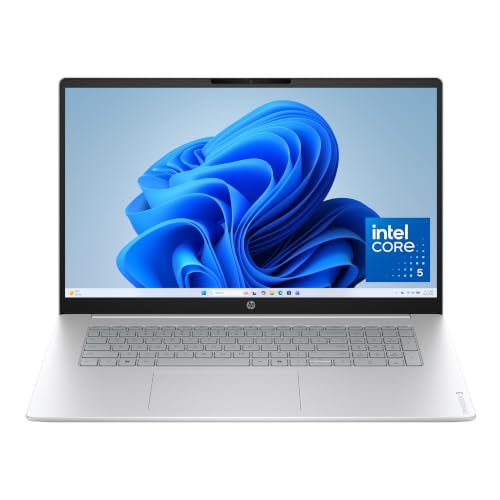
HP OmniBook 3 17.3 — The Current Mainstream
Start with the badge, because the badge is the news. OmniBook is the name HP revived and rebuilt its consumer range around, retiring the Pavilion badge that had fronted its mainstream laptops for decades. This machine — the OmniBook 3 17.3, model 17-dk0099nr, in Glacier Silver — is the big-screen member of that new order’s entry tier. Its listing lays out a full HD 17.3-inch display, an Intel Core 5 120U processor, 8GB of memory, a 512GB SSD and Intel integrated graphics under Windows 11 Home: the specification of a family and study laptop, drawn with a clean sheet.
Understanding the “3” in the name unlocks HP’s whole current shelf. OmniBook tiers climb by number, and the 3 marks the accessible end — plastic construction, standard panels, efficiency processors — while higher numbers add materials, displays and power. Knowing that, the OmniBook 3’s compromises stop looking like flaws and start looking like a map: this is the machine for buyers who want HP’s current platform, current support and a current warranty at the size, without paying for the tiers above. Its successor-proofing is real, too — a current design means drivers, parts and documentation aimed at the future rather than the archive.
The Core 5 120U suits that brief precisely. It is an efficiency-architecture chip that keeps the machine quiet and cool through documents, browsing, school platforms and video, and the wide deck fits the numeric keypad that 17-inch buyers quietly insist on. The boundary, as with most entry configurations, is the 8GB of memory: fine for the workload described, tight for the forty-tab multitasker. Buy this machine for what it is — HP’s present tense at family money — and it will not pretend to be anything else.
Its size deserves one practical paragraph, because the OmniBook shares the class’s geometry: it will want a 17-inch sleeve, a desk with depth, and a charger that travels when it travels. HP helps here more than most — its chargers for this class are common, standardised parts, so a second adapter for the other end of the house is a trivial purchase rather than a hunt. Small mercies of that kind accumulate across years of ownership, and they are a genuine, if unglamorous, argument for the incumbent brand.
One comparison inside this guide is worth making explicit. Against the two unbadged HP 17 listings below, the OmniBook trades raw configuration for provenance: it is the pick whose specification is most certainly HP’s own retail build, sold and supported as such. For some buyers that certainty outranks extra gigabytes; for others it does not. Either way, the choice is now yours to make with eyes open, which is what a single-brand guide is for.
There is a quieter benefit to buying the current badge that families feel in year two rather than week one: everything about the machine is findable. The support page exists and is current, the charger is a standard part, the forum threads about its quirks are being written by thousands of simultaneous owners rather than archaeologists of a discontinued line. Mainstream machines are sometimes mocked for being ordinary, but ordinariness at scale is a support network, and for a household’s only big computer it is worth real money.
- Display: 17.3-inch full HD
- Processor: Intel Core 5 120U
- Memory: 8GB RAM
- Storage: 512GB SSD
- Graphics: Intel integrated graphics
- Identity: Windows 11 Home, Glacier Silver, model 17-dk0099nr — HP’s current retail build
Strengths
- The current HP platform and badge, with support and parts aimed forward rather than backward.
- A clean, honest mainstream specification with the numeric keypad the size exists for.
- Glacier Silver styling that sits comfortably in shared home spaces.
Trade-offs
- 8GB of memory is the configuration’s ceiling for comfortable multitasking.
- Windows 11 Home rather than Pro, which matters to some business buyers.
- Entry tier materials; the premium feel lives further up the OmniBook ladder.
Best for: families and students set on HP’s current big-screen design, bought new and supported.
Not suited for: power users, who should climb to the configurations below and above it.

HP 17 (Core i7, 1TB) — The Generous Configuration
If the OmniBook is HP’s retail present, this listing is the volume line at full stretch. Its title announces a 17.3-inch full HD thin-and-light business laptop built around an Intel Core i7-1355U, fitted with 32GB of memory and a 1TB SSD, supplemented by a 512GB SD card for expanded storage, running Windows 11 Pro with Wi-Fi 6 and a Copilot key, in silver. Read that again slowly: the memory and storage figures are double and quadruple what entry configurations carry, and they transform what the machine is for.
Thirty-two gigabytes of memory is the specification of a keeper. It is the amount that lets a business user run accounting software, a browser’s worth of supplier portals, video calls and a decade of accumulated documents simultaneously, in year one and in year five, without the slow paging that makes old laptops feel old. The terabyte of SSD storage removes the other great ageing pressure — the full drive — and the bundled SD card, while a modest thing, is a thoughtful overflow for archives and camera work. The i7-1355U sits at the efficient end of Intel’s i7 family, favouring quiet, cool running over benchmark fireworks, which suits a business machine that must also survive meetings.
Now the homework this guide promised. Configurations like this one commonly reach the market through HP’s partner channel, where the selling partner fits the upgraded memory and storage. That is not a warning sign — the parts are standard, the value is real — but it makes two checks obligatory. Confirm how the warranty is honoured and by whom, HP or the seller, before purchase. And verify on delivery that the machine reports the full 32GB and the full terabyte in its system settings, keeping the listing title as your evidence until it does. A buyer who performs those two checks gets flagship endurance of specification at volume-line money.
The bundled SD card invites a word of proportion. It is not a second drive and should not be treated as one — card storage is for archives, media libraries and camera offloads, the data whose loss would annoy rather than wound. Used that way, it quietly extends the machine’s useful storage beyond its already generous terabyte, and it signals something about the configuration’s intent: this build was assembled by someone expecting the owner to accumulate things. Most laptops are bought by people who accumulate things. The match is not a coincidence.
Windows 11 Pro completes the business picture: it is the edition with the management and security features small companies actually use, and its presence signals who this configuration was assembled for. For the home buyer, Pro costs nothing and occasionally helps; for the business buyer, its absence in the picks around this one is a genuine differentiator. This is the HP 17 for the person who keeps a laptop until it owes them nothing.
Think about who actually exhausts a laptop like this, because it is rarely the person who buys it. It is the business that grows into it: the sole trader who becomes an employer, the bookkeeper whose client list triples, the family firm whose records migrate from a shoebox to a database. Configurations are bets on the future, and 32GB with a terabyte is the bet that the future will be busy. Buyers who have ever replaced a laptop a year early because it ran out of memory will recognise the economics instantly — the generous configuration is not the expensive option; the premature replacement is.
- Display: 17.3-inch 1080p panel
- Processor: Intel Core i7-1355U
- Memory: 32GB RAM — the deepest fit in this guide
- Storage: 1TB SSD, plus a 512GB SD card bundled for expansion
- System: Windows 11 Pro, Wi-Fi 6, Copilot key
- Finish: Silver, thin-and-light business positioning
Strengths
- Memory and storage figures that remove the two commonest reasons laptops get replaced early.
- Windows 11 Pro and Wi-Fi 6 complete a coherent business specification.
- An efficiency-tuned i7 keeps the machine quiet in meetings and offices.
Trade-offs
- Seller-configured builds require the buyer to confirm warranty arrangements before ordering.
- The panel remains full HD; the generosity is in memory and storage, not resolution.
- Verify the fitted memory and storage on delivery against the listing title.
Best for: business users and long-keepers set on one purchase serving for many years.
Not suited for: shoppers who put display sharpness ahead of configuration depth.

HP 17.3 (Ryzen 5 7430U) — The Balanced Build
The third linked HP wears no glamorous badge either, but its title is the most quietly complete of the three. It specifies a 17.3-inch full HD display at 300 nits of brightness, an AMD Ryzen 5 7430U processor, 16GB of memory, a 512GB SSD, Windows 11 Pro, Copilot AI features, Bluetooth 5.4, WiFi 6, fast charging and an HD webcam, in Natural Silver, positioned for business and student use. Almost every line of that addresses a real daily friction, and the combination is what balance looks like when a listing bothers to achieve it.
Linger on the 300 nits, because it is the detail casual buyers skip and experienced ones hunt for. Brightness decides whether a screen stays readable in a bright kitchen, a conservatory office or a classroom with windows, and mainstream big laptops often ship with dimmer panels that wash out in exactly those rooms. This build’s brighter panel, paired with the fast-charge support that rescues a forgotten morning plug-in, shows a configuration assembled by someone thinking about where laptops are actually used. The HD webcam and current wireless standards complete the call-ready, travel-ready picture.
The Ryzen 5 7430U is an established mainstream chip rather than a headline act, and paired with 16GB of memory it hits the configuration this guide keeps recommending as the sensible centre: enough memory for real multitasking, an SSD that keeps the machine responsive, a processor that will not embarrass itself in any ordinary task. Against the i7 build above, you trade memory depth and storage for the brighter screen and a generally newer-feeling fit-out; against the OmniBook, you gain memory, brightness and Pro. Which trade is right depends on whether your days are limited by files or by rooms — a genuinely personal question, and a pleasant one to be able to ask at this level of the catalogue.
Natural Silver, the finish named in the title, is worth a sentence for buyers who will look at this machine daily for years: it is the conservative choice that hides wear gracefully, shrugs off the fingerprints that darker finishes advertise, and suits the mixed company of offices and lecture halls. Aesthetics rank below specification in every guide on this site, and rightly — but a machine’s appearance is the one specification you perceive in every single session, and there is no virtue in pretending otherwise.
Students should note the positioning in the title is earned. The combination of a readable screen for bright lecture halls, fast charging between classes, a proper webcam for remote seminars and Pro-edition Windows for any institutional requirement makes this the most campus-complete of the linked three — provided the campus bag is rated for the size, a refrain this category never escapes.
A detail for the video-call generation: the combination in this build of a proper HD webcam, current WiFi 6 and Bluetooth 5.4 for headsets is the unglamorous specification that decides whether a laptop feels modern in 2026. Meetings are where big laptops now spend their public lives, and a machine that joins quickly, sounds clear and holds a connection in a busy house earns its keep in the first week. The Ryzen build’s title reads like a checklist because, in this respect, it is one — and every box that matters is ticked.
- Display: FHD 17.3-inch panel, 300 nits brightness
- Processor: AMD Ryzen 5 7430U
- Memory: 16GB RAM
- Storage: 512GB SSD
- System: Windows 11 Pro, Copilot AI, fast charge support
- Connectivity: WiFi 6, Bluetooth 5.4, HD webcam, Natural Silver finish
Strengths
- The 300-nit panel stays readable in the bright rooms where mainstream screens wash out.
- 16GB of memory and Windows 11 Pro hit the sensible centre of business and study needs.
- Fast charging and current wireless standards round out a genuinely complete build.
Trade-offs
- Storage stays at 512GB, where the i7 build above offers a terabyte.
- The 7430U is a proven mainstream chip rather than the newest silicon.
- Like its siblings, it is a wide machine that demands a properly sized bag.
Best for: students and professionals whose work happens in bright, varied rooms.
Not suited for: archivists and media hoarders, who need the terabyte build instead.
HP OmniBook 7 17 — The Premium Step
Above the OmniBook 3 sits the rest of HP’s new ladder, and its 17-inch rung is the OmniBook 7. We cover it in prose for a specific reason: it is not present in this site’s verified pool, so no listing can be linked here with the confidence this guide requires. What can be said responsibly is what the tier means within HP’s system, because that is what a shopper comparing badges actually needs. The 7 denotes the premium mainstream tier — better build materials than the 3, more display ambition, stronger standard configurations — the shelf where HP asks for serious money and must justify it against rivals’ flagships.
The buying logic at this tier changes. Down at the OmniBook 3’s level, the questions are about adequacy: enough memory, enough brightness, a warranty that exists. At the OmniBook 7’s level, the questions become about preference: panel quality, keyboard feel, the sound of the speakers, the exact weight in the hand. Buyers cross-shopping this tier should handle machines where possible, or at least buy from listings whose full specification — panel type and brightness, battery, exact processor — is published completely, because at premium prices an unspecified detail is an unacceptable one.
Timing flatters this tier in one predictable way: when a new OmniBook generation lands, the outgoing premium models are discounted by retailers clearing the shelf, and a 7 from last season at a reduced figure is one of the more reliable bargains in HP’s whole catalogue. The specification does not change when the price does. Buyers with patience and a saved search on the exact model code are positioned to catch that moment, and this tier — where the starting figures are highest — is where the saving is largest in absolute terms.
When a stable, fully specified OmniBook 7 17 listing is in front of you, judge it against the linked i7 HP 17 in this guide rather than against the OmniBook 3. That comparison — premium provenance and materials versus a partner-configured machine with deeper memory and storage — is the real decision at the top of HP’s big-screen shelf, and reasonable buyers land on both sides of it.
Households with an existing HP should weigh one soft factor: continuity. Chargers, docks, habits of keyboard and the location of every setting carry across a brand in ways that never appear on a specification sheet, and a family standardised on HP loses less time to a new machine than one switching ecosystems. That continuity is worth something at every tier — it is part of why the incumbent’s catalogue can be a maze and still be the right place to shop — and at the premium tier, where the machine will serve longest, it is worth the most.
- Position: the premium tier of HP’s current OmniBook naming, above the 3
- Expect: better materials and display ambition than the entry OmniBook tier
- Configurations: vary; demand the full published specification before paying premium money
- Comparison point: judge it against the i7 HP 17’s memory and storage depth
- Status in this guide: described in prose because no pool-verified listing represents it
Strengths
- HP’s current premium direction for buyers who want the badge’s best mainstream expression.
- Materials and displays a clear step above the entry OmniBook tier.
- A coherent upgrade path within one brand for loyal HP households.
Trade-offs
- No verified listing here, so the specification hunting is the buyer’s own work.
- Premium pricing invites comparison with strong partner-configured builds below it.
- Tier numbers communicate rank, not specifications; the details still decide.
Best for: HP loyalists shopping the premium tier who will verify the full specification.
Not suited for: bargain hunters, whose money works harder lower in this guide.
HP Envy 17 — The Older Premium
Before OmniBook, Envy was the name HP’s premium consumer ambitions wore, and the Envy 17 was its big-screen flagship: slimmer metal construction, ambitious displays and prices to match. The line’s machines remain thick on the ground — in remaining stock, in the refurbished channel and in the used market — which is why a guide to HP’s 17-inch catalogue must teach you to read one. An Envy 17 in good order is still a genuinely desirable laptop; an Envy 17 bought blind is a lottery ticket with a nice keyboard.
The reading method is configuration discipline. Envy builds varied widely across the line’s life — panels from standard full HD to far sharper options, processors across several generations, memory and storage in many combinations. The model name guarantees the tier, not the contents. On any listing, establish the exact processor generation, the panel fitted and the memory amount, and let those three facts — not the badge, not the photography — set the price you are willing to pay. Sellers who publish all three are the sellers to reward.
Where do the good ones surface? Retailers clearing the last of a premium line tend to discount in steps rather than all at once, and the refurbished channel grades Envy machines against their original tier, which flatters their prices relative to newer mainstream stock of similar capability. A buyer watching two or three reputable channels with the target specification written down — processor generation, panel, memory — will usually see the right machine within a few weeks. The Envy rewards the prepared shopper more than the impulsive one, which is perhaps the most premium thing about it.
Set against the new OmniBook ladder, the Envy’s position is the connoisseur’s corner: yesterday’s premium at today’s discount, with the caveat that battery age and warranty status now belong in the calculation. Buyers comfortable with that arithmetic will find machines here that the new catalogue, at the same money, does not match for materials and display. Buyers who are not should climb the current ladder instead, and this guide has shown them the rungs.
One Envy-specific trap deserves naming, because it catches even careful buyers: the display photograph. Premium lines were marketed with their best panels, and listing photographs — often the maker’s own catalogue images — show that best panel regardless of the build being sold. A standard-panel Envy photographed beautifully is still a standard-panel Envy. The defence is the one this guide keeps repeating, applied with extra suspicion at the premium tier: the specification text governs, the photograph decorates, and any listing that will not state its panel in words has answered your question by refusing to.
- Position: HP’s previous premium consumer tier, now in stock-clearance and used channels
- Display: fitted panels run from full HD upward across the line’s life — identify the exact one in the unit offered
- Processor: spans generations across the line’s life; the exact chip sets the value
- Build: slim metal construction was the line’s signature
- Battery: age belongs in the price calculation on any used example
Strengths
- Premium materials and displays at yesterday’s prices when the right build appears.
- A deep pool of stock means choice for buyers willing to read specifications.
- Still a handsome, capable machine in its better configurations.
Trade-offs
- The badge guarantees the tier, never the contents; every unit needs reading.
- Battery age and warranty status vary with the individual machine.
- No current-model support horizon compared with the OmniBook ladder.
Best for: specification-literate buyers hunting premium build at a discount.
Not suited for: badge-led shoppers, full stop.
HP Pavilion 17 (older stock) — The Retired Name
Pavilion was, for a very long time, simply what HP’s mainstream laptops were called, and the Pavilion 17 carried that name at this size through many generations. OmniBook has replaced it on new designs, which reclassifies every Pavilion 17 you will now meet: remaining retail stock, refurbished units and used machines. Understanding that reclassification is the entire skill. A Pavilion listing is not a current product wearing an old name; it is an older product, and it should be priced, checked and warrantied as one.
None of that makes it a bad purchase. Pavilion 17s were the default family laptop for years precisely because the formula worked — big screen, honest specification, a price households could reach — and a well-kept later-generation example still does everything a family asks. The checks are the familiar ones, sharpened by age: establish the processor generation, prefer machines with solid-state storage already fitted, ask after battery health, and confirm what warranty, if any, stands behind the sale. A seller offering a Pavilion at new-machine money is telling you something; a seller pricing it as the older stock it is may be offering the strongest value of any pick here.
Schools and charities deserve a sentence in the Pavilion’s story, because fleets of them were bought for exactly those institutions, and their retirement sales are where the deepest, most uniform stock appears. A batch retired from a school has lived a supervised life on a timetable — charged nightly, used at desks, serviced centrally — and its machines often arrive with their histories documented by the institution itself. For a buyer equipping a study room or a community space, that channel is the Pavilion market at its most honest.
There is a sentimental footnote that is also practical. Because Pavilion sold in such numbers, its machines enjoy the deepest ecosystem of the three prose picks: chargers, batteries, keyboards and documentation are everywhere, and a competent owner can keep one alive for years. For the household that maintains rather than replaces, the retired name still has a working future.
Grandparents are the Pavilion’s secret constituency, and the fit is logical rather than sentimental. A big screen that makes text generous, a keyboard with a numeric pad for the household accounts, a machine whose problems any local repair shop has seen a hundred times — this is the specification of the family computer that gets inherited, maintained and kept. If you are buying for a parent, a honestly priced Pavilion with an SSD and a healthy battery may serve them better than a newer, smaller, cleverer machine ever will.
- Position: HP’s retired mainstream badge, replaced by OmniBook on new designs
- Where found: remaining stock, refurbished channels and the used market
- Processor: identify the generation; later builds remain entirely capable
- Storage: prefer units already fitted with an SSD
- Ecosystem: the deepest pool of parts and documentation of any pick here
Strengths
- Honestly priced examples can be the best value on this page.
- An enormous installed base means parts and knowledge are everywhere.
- The formula — big screen, sensible specification — aged well.
Trade-offs
- Every example is older stock and must be priced and checked as such.
- Battery health and warranty cover vary entirely by seller.
- No current-platform support horizon.
Best for: value hunters and maintainers who price age honestly.
Not suited for: households set on a new machine under a full manufacturer warranty.
How Do HP’s 17-Inch Lines Compare With Each Other?
| Pick | Where it sits | Specification character | Panel | Buy it as |
|---|---|---|---|---|
| HP OmniBook 3 17.3 | Current mainstream, entry tier | Core 5 120U, 8GB, 512GB | 17.3-inch full HD | The new, warrantied default |
| HP 17 (i7, 1TB) | Volume line, partner-configured | i7-1355U, 32GB, 1TB + SD card | 17.3-inch full HD | The long-keeper’s configuration |
| HP 17.3 (Ryzen 5) | Volume line, balanced build | Ryzen 5 7430U, 16GB, 512GB | 17.3-inch full HD, 300 nits | The bright-room all-rounder |
| HP OmniBook 7 17 | Current premium tier | Verify the full published specification | A step up in ambition | The loyalist’s upgrade |
| HP Envy 17 | Previous premium tier | Panel, chip and memory differ across the line’s builds — read the exact unit | Full HD and above, by build | The connoisseur’s discount |
| HP Pavilion 17 | Retired mainstream | Generation-dependent | 17.3-inch class | The honestly priced veteran |
How Do You Decode HP’s Badges and Model Numbers?
HP’s names encode rank more reliably than they encode contents. Within the current system, OmniBook’s number is the tier: 3 is the accessible rung, and the numbers climb through the premium mainstream to the 7 and beyond, with materials, displays and standard configurations improving as they climb. The unbadged “HP 17” line plays by older rules — it is the volume series, where the listing’s configuration, often partner-fitted, matters more than any badge. Envy and Pavilion are historical strata: premium and mainstream respectively, both now read as dates as much as descriptions.
The model code after the name — the string like 17-dk0099nr on the OmniBook in this guide — is the machine’s true identity. Feed that code to HP’s support site and you get the exact original specification, the driver set and the warranty terms for that build. This is the single most powerful checking move available to an HP buyer, and it works on every pick in this guide, new or old: the code converts a listing’s claims into a manufacturer’s record. Make it a habit and HP’s sprawling catalogue stops being a maze and becomes a filing system.
One more decoding habit protects buyers in the refurbished channel: the grade words. Terms for used condition are not standardised across sellers, and one shop’s top grade is another’s middle. Translate every grade into specifics before paying — battery health percentage, cosmetic description of the actual unit, warranty length in months — and treat a listing that offers only an adjective as unfinished. HP’s machines reward this diligence because their specifications are so checkable; the model code and the system screens will confirm or deny everything a grade merely implies.
Finally, learn to spot the partner-configured listing, because HP’s channel makes them common. The tells are generous memory and storage figures beyond HP’s standard retail builds, business language in the title, and a seller name that is a systems integrator rather than a big-box retailer. These listings are a legitimate and often excellent route to value — the i7 pick in this guide is one — provided the warranty question is asked before purchase rather than after a failure.
Why Does HP’s Support Ecosystem Matter More Than Rivals’?
Every laptop in this guide will, at some point in a long life, need something: a driver after an operating system update, a battery in year four, a keyboard after an accident involving tea. The speed and price of that moment is where HP’s scale converts into ownership quality. The company publishes service documentation for its lines, stocks parts through a wide channel, and is recognised by every independent repair shop on every high street. A charger for a 17-inch HP is a commodity; a charger for an obscure brand’s discontinued flagship is a research project.
This ecosystem argument applies unevenly across the six picks, and the gradient is instructive. It is strongest for the volume lines and the retired Pavilion, whose installed bases are enormous, and it is the quiet reason those older machines remain rational purchases: they can be kept alive. It is weakest — or rather, least tested — for the newest OmniBook designs, though HP’s history suggests their parts pipeline will fill in as the fleet ages. When you buy any machine in this guide, you are also buying its future repair bill, and HP’s size is a standing discount on that bill.
The practical translation is a shopping habit: before paying for any laptop here, spend two minutes confirming that its battery and charger are listed as available parts for your region. On a new machine that check feels premature. On a machine you intend to keep for six years, it is the difference between maintenance and replacement, and it costs less time than reading this paragraph did.
What Should You Verify When an HP 17 Arrives?
Unbox with the listing title open beside you. In the system settings, confirm the processor, the memory total and the storage capacity match what the title promised — on a partner-configured machine this check is not pedantry but the substance of the deal, and discrepancies are far easier to resolve in the returns window than after it. Register the product with HP using the serial number, which starts the warranty record cleanly and unlocks the support pages for your exact model code.
While the returns window is open, also test the unglamorous failure points that photographs never show: every key on the wide keyboard including the numeric pad, the hinge’s resistance through its full arc, the speakers at the volume of a real film, and the machine’s behaviour waking from sleep with your peripherals attached. Big laptops live or die by these daily touches, and a unit that passes a structured first day almost always settles into years of unremarkable service — which is, in the end, the highest praise a household appliance can earn.
Then run the machine through its first day deliberately. Connect it to your Wi-Fi and confirm the wireless standard behaves with your router. Make a video call and judge the webcam and microphones in the room where calls will actually happen. Type a full page on the keyboard, run your heaviest ordinary file, and listen to the fans under that load. Check every port with something you own. A big laptop is a multi-year appliance; an hour of structured checking on day one is the best-spent hour in the whole purchase — not against catastrophe, but against the slow discovery of a mismatch you could have returned.
How Long Will an HP 17 Serve, and What Decides It?
Ask owners of dead laptops what killed them and the answers are rarely dramatic: the memory filled the experience with waiting, the drive filled with files, the battery stopped holding a morning. Processors almost never appear in the story. That is why this guide weights memory, storage and battery so heavily across all six picks — they are the three clocks ticking inside every machine here, and the picks differ mainly in how far each clock has to run. The i7 build’s deep configuration is a long clock; the OmniBook 3’s 8GB is a shorter one; a used Pavilion’s clock has simply been running already.
Software support sets the outer limit. A machine must keep receiving operating system and security updates to remain safe on a network, and that horizon is generous for current machines and genuinely finite for the oldest prose picks. Before buying any previous-generation HP, check that its processor sits inside the current Windows support list; a machine outside it is a machine with an expiry date printed in someone else’s documentation, however healthy its hardware feels.
The owner’s habits write the middle chapters. Heat is the accelerant of every ageing process in a laptop, and big machines used on beds and sofas suffocate quietly against soft furnishings; a hard surface or a cheap stand extends a life measurably. Batteries prefer the middle of their range to either extreme. Storage kept below roughly three-quarters full keeps the drive quick and the machine patient. None of this is expertise — it is housekeeping, and across six years it is worth more than the difference between two of the processors in this guide.
What Are the Common Mistakes When Buying an HP Big-Screen Laptop?
Shopping by badge nostalgia leads the list: the buyer who loved a Pavilion a decade ago and orders one today at current money has bought a memory, not a machine. Read the generation, not the name. The mirror-image mistake is dismissing the unbadged HP 17 listings as somehow lesser, when their partner-fitted configurations — as the i7 pick here proves — can out-spec the branded tiers at the same shelf.
A subtler mistake is comparing across eras with a straight face: putting a discounted Envy’s materials against a current OmniBook’s warranty and support horizon as if only one of those columns existed. Both columns are real, and different households should weight them differently — the confident maintainer takes the Envy, the busy family takes the warranty — but a comparison that hides either column is not a comparison at all. Decide which household yours is before the listings start flattering you.
Skipping the warranty question on a configured build is the second error, and the easiest to avoid: one message to the seller before purchase settles who honours the cover and for how long. Third, buyers compare HP’s tiers by their numbers alone, as if a 7 were automatically the right purchase, when the correct comparison is specification against specification at the prices in front of you today. And fourth, the perennial size mistake: forgetting that every machine in this guide is seventeen inches wide, with a bag, a desk and a charger to match.
Final Recommendation
One last word for the buyer standing between generations, because HP’s catalogue makes that the commonest position of all: there is no disgrace in either direction. The current badge buys time and support; the older badge buys specification and substance. What is never right is buying the older machine at the newer machine’s price, or the newer machine while believing it carries the older one’s depth of configuration. This guide has tried to make both errors impossible to commit by accident.
HP’s 17-inch shelf resolves into three honest answers. For the buyer who wants the current platform with no homework, the OmniBook 3 17.3 is the clean purchase — modest in memory, sound in everything else, and supported as HP’s present tense. For the buyer who keeps machines for years and loads them heavily, the i7 HP 17’s 32GB and terabyte make it the configuration that will still feel adequate when its siblings are being replaced, provided the warranty check is done. For bright rooms and balanced needs, the Ryzen 5 build’s 300-nit screen and 16GB split the difference with real intelligence. Above and behind those three, the OmniBook 7, the Envy and the Pavilion reward the readers who have learned this guide’s one lesson: at HP, the badge tells you the era and the tier, but the specification tells you the truth. Check price on Amazon against the listing title, run the model code through HP’s support pages, and buy the machine the documents describe.
Frequently Asked Questions
What replaced the HP Pavilion line?
OmniBook. HP rebuilt its consumer range around the revived OmniBook name, with numbered tiers replacing the old Pavilion structure on new designs across every size the company sells, this one included. Pavilion machines still circulate as remaining stock, refurbished units and used laptops, and they can be good value — but they are previous-generation products and should be priced and checked as such.
Are the high-memory HP 17 listings on Amazon legitimate?
Generally, yes. HP’s partner channel commonly fits upgraded memory and storage to volume-line machines, producing configurations beyond HP’s standard retail builds. The correct response is not suspicion but verification: confirm who honours the warranty before buying, and check on delivery that the system reports the memory and storage the listing title promised.
What does the number in OmniBook 3 or OmniBook 7 mean?
It is the tier within HP’s current consumer system. Lower numbers mark the accessible end — simpler materials, standard panels, efficiency processors — and higher numbers bring better construction, more ambitious displays and stronger standard configurations. The number tells you the rank; the specification sheet still tells you the machine.
Which of these HP laptops suits a small business best?
The two volume-line builds in this guide, because both carry Windows 11 Pro. Between them, the i7 configuration’s 32GB of memory and terabyte of storage suit heavier, longer service, while the Ryzen 5 build’s brighter screen and fast charging suit people who move between rooms and sites. The OmniBook 3’s Home edition is the one to skip for business use.
How can I find the exact original specification of an HP laptop?
Use the model code — the alphanumeric string in the listing, such as the code in the OmniBook’s title in this guide — on HP’s support website. It returns the machine’s original build specification, drivers and warranty information. It is the most reliable way to check any HP listing, new, configured or used, against the manufacturer’s own record. The same lookup also reveals the machine’s original warranty start, which on a used purchase tells you how much of its supported life has already been spent — a number worth knowing before the negotiation begins, not after it ends.
Is the Envy 17 still worth buying?
In the right configuration, from the right seller, and at the right price, yes. The better Envy builds brought premium materials and displays that still impress, and the used and remaining-stock pool prices them attractively. The conditions are discipline: identify the exact processor, panel and memory in the unit offered, and count battery age and warranty status in the price.
Related Guides
To see how HP’s offerings fare against every brand at this size, our general roundup of the best 17.3 laptops puts them head to head with LG, ASUS and Acer. If the i7 configuration caught your eye, the dedicated shortlist of 17-inch laptops built around i7 processors compares it with rivals from other makers. And for buyers whose shortlist is narrowing to one brand at a strict budget, our guide to 17-inch ASUS laptops on a strict budget covers the neighbouring shelf.


