What's inside
- Key Takeaways
- Quick Picks
- How We Chose These Picks
- How Do the Six Compare for Graphics Work?
- Which Graphics Workload Is Actually Yours?
- How Do You Judge a Graphics Panel Beyond Its Resolution?
- How Should You Set Up a Big Graphics Laptop Once It Arrives?
- What Are the Common Mistakes When Buying a Laptop for Graphics?
- Final Recommendation
- Frequently Asked Questions
- Related Guides
As an Amazon Associate I earn from qualifying purchases. This post may contain affiliate links at no extra cost to you.
widgetverdict.com is reader-supported. When you buy through links on our site, we may earn an affiliate commission.
Each linked machine below resolves to the listing whose title names its graphics hardware in full, because in this category the GPU — its tier, its memory, its certification — is the purchase. The two prose picks close the field where listings scatter across generations too widely to pin responsibly.
The search for the best 17 inch laptops for graphics starts with a seduction: the big screen. Seventeen inches is the size where a design canvas stops feeling like a porthole, where a video timeline shows its whole length, where a 3D viewport and its tool panels can finally coexist. But the screen is only the stage. Graphics work is performed by the graphics processor, and at this size the range of GPUs on offer runs from a featherweight discrete card in a traveller’s chassis to a certified professional card in a workstation — machines united by a diagonal and divided by everything that matters.
A note on vocabulary before the picks, because this category’s marketing abuses it. “Graphics laptop” is printed on machines with integrated graphics, on gaming machines, on workstations and on anything with a large screen and a hopeful seller. The phrase carries no standard, and this guide therefore never uses it as evidence: every claim below is attached to a named card, a stated memory figure or a certified programme. When a listing elsewhere offers you a graphics laptop without naming its graphics hardware in full, it has offered you a screen and a rumour.
So this guide ranks by the work, not the width. Photo editing asks for an accurate, high-resolution panel and competent acceleration. Video asks for GPU encoding and effects throughput. 3D and CAD ask for graphics memory and, in professional contexts, certified drivers. Gaming asks for raw frame rate. Four linked machines map those demands: a light LG with a discrete card and the sharpest panel here, a value Acer whose RTX 5060 does double duty, a 2022 Alienware whose esports screen still turns heads, and a Dell workstation whose professional GPU is in a class of its own. Two prose picks — MSI’s and ASUS’s flagship gaming lines — mark the territory above them.
Honesty notes, up front, in the spirit this site keeps: one pick is a 2022 machine and is labelled as such wherever it matters; the lightest pick’s graphics card is an entry-level discrete unit and is praised only within that truth; and no panel in this guide should be bought for colour-critical work on a listing’s word alone — the sections below explain what to verify. Graphics buyers, more than any others, purchase specifications that photographs cannot show.
Key Takeaways
- The LG gram Pro 17 pairs an RTX 5050 with a WQXGA touchscreen and 32GB of memory in a travel-light chassis — the designer’s road machine here.
- The Acer Nitro V 17’s RTX 5060 is the value graphics engine of the guide, serving gaming, rendering and video acceleration behind a full HD panel.
- The Alienware X17 R2 is a 2022 flagship: an RTX 3070 Ti and an extraordinary 480Hz panel, bought today as a used or remaining-stock proposition.
- The Dell Precision 7780’s RTX ADA 4000 with 12GB is professional, certified graphics — a different category from every gaming card here.
- MSI’s Raider GE78 and ASUS’s ROG Strix Scar 17 are covered in prose as the flagship gaming tier where this category’s ceiling sits.
Quick Picks
| Pick | Badge | Why it is here |
|---|---|---|
| LG gram Pro 17 (RTX 5050) | The Travelling Studio | A discrete RTX card and a WQXGA touchscreen in LG’s light 17-inch chassis, with 32GB of memory and storage of a terabyte. |
| Acer Nitro V 17 (RTX 5060) | The Value Engine | A current RTX 5060 with 16GB of memory doing gaming, rendering and encoding work at full HD. |
| Alienware X17 R2 (2022) | The Esport Screen | A 2022 flagship whose 480Hz panel and RTX 3070 Ti still define high-refresh big-screen play. |
| Dell Precision 7780 | The Certified Professional | An RTX ADA 4000 professional GPU with 12GB of graphics memory in a 17.3-inch mobile workstation. |
| MSI Raider GE78 | The Flagship Raider | MSI’s top 17-inch gaming line, where the highest mobile GPU tiers live. |
| ASUS ROG Strix Scar 17 | The Ceiling | ASUS’s flagship 17-inch gaming line, the performance reference for the whole category. |
How We Chose These Picks
A graphics guide must begin by refusing the category’s favourite confusion: that a big screen makes a graphics laptop. It does not. The panel displays the work; the GPU performs it; the memory feeds it; the cooling sustains it. Our selection therefore started from graphics hardware verified in listing titles — the card’s exact name, and its memory where the title states it — and only then asked whether the surrounding machine honoured the card: enough system memory beside it, a panel worthy of its output, a chassis that could cool it through a long render rather than a short benchmark.
The four linked picks were chosen to span the honest range of the brief rather than to crowd its middle. A creator who travels, a gamer-creator on a value budget, an esports player buying yesterday’s flagship, and a professional whose software demands certification do not need the same machine, and a guide that pretended otherwise would fail all four. Each pick’s section therefore names its workload first and its specifications second, and states its ceiling in the same breath as its strengths.
We also made a generation decision worth declaring. This category’s used market is unusually rational — yesterday’s flagships retain real capability and are priced by people who know it — so the guide admits one dated flagship, clearly labelled, rather than pretending graphics value only exists in current stock. The X17 R2’s inclusion follows the same rule as every other pick: its title was verified, its age is printed wherever it matters, and its section is written as a used-market brief rather than a launch review. Readers who prefer new-only shopping can simply let the other three linked picks carry their decision.
The prose picks exist because the flagship gaming tier — where this category’s absolute performance ceiling sits — is sold across so many GPU configurations and generations that no single listing could represent it without misleading. For those lines, the guide teaches the configuration discipline instead: which pairing of card and panel to seek, and which to refuse, at whatever figure the market is asking on the day you shop.

LG gram Pro 17 (RTX 5050) — The Travelling Studio
LG’s gram Pro takes the line’s founding idea — a 17-inch screen you can actually carry — and answers the question its integrated-graphics siblings cannot: what if the traveller also needs a real GPU? The listing specifies an Intel Core Ultra 9 386H processor, NVIDIA GeForce RTX 5050 graphics, 32GB of LPDDR5X memory, a 1TB NVMe SSD and a WQXGA touchscreen, in bronze, under Windows 11 Home. That is a creator’s specification drawn inside a traveller’s chassis, and the combination has no direct rival in this guide.
Calibrate the RTX 5050 honestly before admiring it. It is the entry tier of NVIDIA’s current discrete range — a genuine graphics card, with dedicated memory and the full acceleration toolkit for video encoding, 3D viewport work and GPU-assisted creative effects, and simultaneously not the card for maximum-settings gaming or heavy production rendering. Its correct comparison is not the RTX 5060 below but the integrated graphics it replaces: against those, it transforms what the machine can do, turning a presentation laptop into a portable studio for photo work, design, video editing at sensible resolutions and 3D work at sensible scales.
There is a subtler creative dividend in the specification that deserves naming: memory symmetry. Thirty-two gigabytes of system memory beside a discrete GPU means the machine rarely has to choose between the file and the program — the large document stays open while the export runs, the reference library stays mounted while the scene renders. Creative flow is mostly the absence of small waits, and this configuration removes more of them than any single headline component could. It is the least photographable virtue in the entire guide and, across a working year, possibly the most valuable one.
The panel completes the creator argument. WQXGA resolution at 17 inches gives design and photo work the pixel density that full HD cannot, and the touchscreen serves the pen-adjacent, hands-on rhythm of reviewing and marking up visual work. Around it, 32GB of memory keeps large files and many layers comfortable, and the terabyte of storage holds a working library rather than a selection from one. The gram Pro’s buyer is the designer, photographer or video editor whose studio must fit in a bag — and who has accepted, knowingly, an entry discrete card as the price of the fit.
Thermals are the honest footnote. A slim, light chassis cannot shed heat like a gaming rig, so sustained rendering will run at the pace the cooling allows rather than the pace the card’s badge implies. For bursty creative work — edit, adjust, export, move on — that is no hardship at all. For overnight render queues, it is the wrong tool, and the workstations and gaming machines below exist to say so.
Bronze, the finish in the title, is worth a sentence in a creator guide because this machine will sit in client-facing rooms. The gram Pro dresses like a business flagship rather than a gaming rig, and for the freelancer whose laptop is part of their presentation, that discretion is a professional feature. Studios are judged by their surfaces more often than their owners admit; a machine that looks like a consultancy tool and renders like a studio is a combination with commercial value beyond its specification.
- Display: 17-inch WQXGA touchscreen — the sharpest panel in this guide
- Graphics: NVIDIA GeForce RTX 5050 — entry-tier discrete, a transformation over integrated graphics
- Processor: Intel Core Ultra 9 386H, per the listing title
- Memory: 32GB LPDDR5X RAM
- Storage: 1TB NVMe SSD
- Identity: Windows 11 Home, bronze finish, gram line’s travel-first chassis
Strengths
- A discrete GPU and a high-resolution touch panel in a genuinely portable 17-inch machine.
- 32GB of memory and a terabyte of storage match the creator brief without asterisks.
- The strongest photo and design proposition here for anyone who works away from a desk.
Trade-offs
- The RTX 5050 is entry-tier discrete; heavy rendering and top-end gaming exceed its brief.
- A slim chassis limits sustained performance under long, hot workloads.
- Colour-critical buyers should still verify the individual panel’s credentials before relying on it.
Best for: designers, photographers and editors whose studio has to travel with them.
Not suited for: production renderers or gamers chasing maximum settings.

Acer Nitro V 17 (RTX 5060) — The Value Engine
The Nitro V 17 — configuration ANV17-41-R8ML — is this guide’s argument that graphics power and graphics work are not the same purchase. Its listing pairs a 17.3-inch full HD IPS panel with an NVIDIA GeForce RTX 5060, 16GB of memory, a 512GB SSD, WiFi 6 and dual-fan cooling under Windows 11 Home. In the general big-screen guide this machine appears as a gaming pick; here it matters because the RTX 5060 is a genuinely capable graphics processor for creation as well — and it arrives at the value end of the category.
Consider what that card does outside games. Video editors feel it in timeline playback and export acceleration. 3D tools feel it in viewport rendering and GPU render modes. Streaming and recording software feel it in hardware encoding that leaves the processor free. Even the current generation of AI-assisted photo and video features draws on exactly this hardware. A buyer whose week mixes play with any of those workloads gets two machines’ worth of use from the Nitro’s one card — the definition of value in a category where dedicated creator laptops charge heavily for the same silicon.
Students of game development and 3D art should read this pick as their specific answer, because their workload is the Nitro’s workload in miniature: engines and editors that reward a current card, scenes sized by coursework rather than by production, and evenings that end in the games the coursework imitates. A machine that serves the degree and the hobby in the same chassis, at this end of the category’s pricing, is not a compromise for that reader — it is the syllabus and the reward in one box.
The panel draws the boundary of the proposition. Full HD at 17.3 inches is the right resolution for the card’s gaming strengths and entirely serviceable for video and 3D work, but it is not a colour-critical display, and photographers should read it as a good general screen rather than a proofing instrument. Sixteen gigabytes of memory is the correct minimum partner for the card; the 512GB drive is the configuration’s one tight figure, and creative libraries will outgrow it on a schedule the buyer should plan for with external or upgraded storage from the start.
Cooling is where the Nitro’s gaming bones pay creative dividends. Dual fans in a large chassis sustain the card’s performance through exports and renders that would throttle a slim machine into slowness — the unglamorous engineering that separates a graphics laptop from a laptop that merely contains a graphics card. For the mixed-use buyer, that sustained pace, at the value end of this category, is the whole argument.
There is a community dividend to buying the value gaming chassis for creative work: Nitro owners are numerous, vocal and generous with their settings. Every export preset, fan curve and driver quirk for this class of machine has been documented by someone who solved it at 2 a.m. and posted the answer. A creator on a flagship workstation buys support from a vendor; a creator on a Nitro buys it from a crowd, and on many evenings the crowd answers faster.
- Display: 17.3-inch full HD IPS
- Graphics: NVIDIA GeForce RTX 5060 — current-generation, gaming and creation alike
- Memory: 16GB RAM
- Storage: 512GB SSD — plan expansion for creative libraries
- Cooling: dual-fan system in a full-size chassis
- Connectivity: WiFi 6, Windows 11 Home, model ANV17-41-R8ML
Strengths
- A current RTX card accelerating games, video, 3D and AI-assisted tools in one machine.
- Dual-fan cooling sustains graphics performance through long creative sessions.
- The value position of this guide’s linked picks by a clear margin.
Trade-offs
- The full HD panel is a general screen, not a colour-proofing instrument.
- 512GB of storage fills quickly under games and creative projects alike.
- Gaming design and charger dependence come with the territory.
Best for: mixed-use creators and players after one card that does both jobs.
Not suited for: colour-critical photographers or anyone needing a full day unplugged.
Alienware X17 R2 (2022) — The Esport Screen
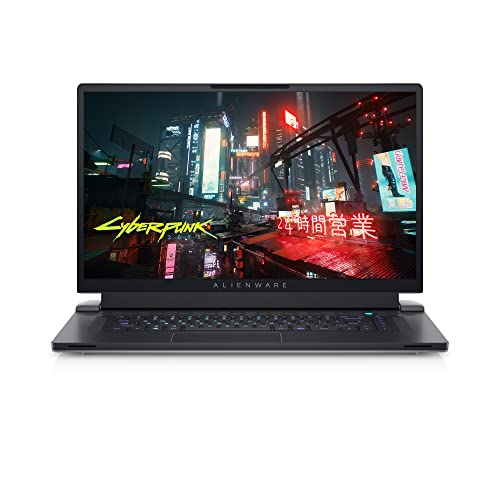
Date first, because this pick’s date is its defining fact: the X17 R2 is a 2022 flagship, and everything admirable and everything cautionary about it follows from that. Its verified title specifies a 17.3-inch full HD display at 480Hz with a 3ms response, an Intel Core i9-12900H processor, 16GB of memory, a 1TB SSD, an NVIDIA GeForce RTX 3070 Ti with 8GB of GDDR6 graphics memory, Killer Wi-Fi 6 and Windows 11 Home, in Lunar Light. In its year, this was close to the fastest big gaming laptop money could buy. The question this section answers is what that means now.
The panel remains the headline, because 480Hz is still an extraordinary figure. Refresh rate at that level serves one master: competitive play, where the screen redraws so quickly that motion clarity becomes a genuine input advantage in fast shooters. Nothing else in this guide — nothing in most guides — offers it. For the esports player, an X17 R2 in good order is not a compromise purchase but a targeted one: the specific instrument their discipline rewards, at used or remaining-stock money rather than flagship money.
Ownership of a dated flagship has one pleasure the spec sheet cannot convey: the machine was built without a budget committee. Its keyboard, its hinges, its speakers and its cooling all belong to the year when this model was the manufacturer’s argument for its own excellence, and they feel like it in the hand today. Buyers cross-shopping a new mid-range machine against a used X17 are choosing between newer silicon and older luxury, and for the esports purpose — where the panel is the point — the luxury happens to contain the exact instrument required.
The RTX 3070 Ti has aged with dignity. Its 8GB of graphics memory and its generation’s architecture still drive current games at full HD impressively and handle GPU-accelerated creative work capably, though the newest titles and the heaviest ray-traced workloads now belong to later cards. The i9-12900H was a performance flagship of its generation and remains a strong processor by any ordinary measure. What has genuinely aged is everything chemical and mechanical: the battery, the fans, the thermal paste — which is why this pick must be bought as the used-market discipline elsewhere in this batch teaches, with condition evidence demanded and a service budgeted.
For graphics work beyond gaming, read the X17 as a fast machine with a specialist screen rather than a creator’s instrument: the panel was built for speed, not for colour proofing, and its full HD resolution suits its purpose. Buyers whose graphics means frame rates will find this the most exciting pick in the guide. Buyers whose graphics means colour should take their excitement to the gram Pro or the Precision, and leave this thoroughbred to its own track.
Lunar Light, this machine’s pale finish, was Alienware’s signature when new and remains the fastest way to identify the model across a room — a trivial point with a practical edge in the used market, where photographs of the actual unit matter and a distinctive finish makes substituted stock photographs easier to spot. Ask for images of the specific machine, its ports and its keyboard deck, and let the seller’s willingness to provide them grade the seller before the machine is graded at all.
- Display: 17.3-inch full HD, 480Hz, 3ms — an esports instrument
- Graphics: NVIDIA GeForce RTX 3070 Ti, 8GB GDDR6
- Processor: Intel Core i9-12900H — 2022’s performance flagship class
- Memory: 16GB RAM
- Storage: 1TB SSD
- Identity: Killer Wi-Fi 6, Windows 11 Home, Lunar Light — a 2022 model, stated openly
Strengths
- A 480Hz panel that competitive players cannot find elsewhere in this guide at any age.
- The RTX 3070 Ti and i9 pairing remains genuinely fast for full HD play and GPU work.
- Alienware’s flagship build and cooling were engineered without compromise.
Trade-offs
- A 2022 machine: battery, fans and thermals carry four years of life — buy on condition evidence.
- The panel serves speed, not colour accuracy or resolution.
- Newer cards have taken the performance crown; this is value through age, not despite it.
Best for: competitive players who know exactly why a 480Hz screen matters.
Not suited for: colour-critical creators, or warranty-first buyers set on a new machine.

Dell Precision 7780 — The Certified Professional
Every other graphics card in this guide is a gaming card that can work. The Precision 7780’s NVIDIA RTX ADA 4000 — specified in its listing with 12GB of graphics memory — is a professional card that only works, and the difference is the subject of this section. Professional GPUs carry certified drivers for engineering, CAD and content-creation applications: tested, vendor-supported configurations that firms buy because their software contracts, their clients and their insurers care. In a 17.3-inch mobile workstation with an Intel Core i9-13950HX, 32GB of memory and Windows 11 Pro, that certification is the product; the speed is almost a by-product.
The 12GB of graphics memory deserves its own emphasis, because VRAM is the specification 3D work actually starves on. Large assemblies, dense scenes, high-resolution texture sets and GPU-rendered frames all live in graphics memory before they live anywhere else, and when it runs out, the work slows by orders of magnitude rather than by percentages. Twelve gigabytes places this machine in the serious tier for CAD, BIM, simulation visualisation and 3D production — territory the gaming cards in this guide visit only briefly, on their best behaviour, with their fingers crossed.
Set the expectations correctly and the Precision is magnificent; set them by gaming logic and it will confuse you. Its full HD panel is a working display, not a showpiece. Its 512GB fitted SSD assumes the professional pattern of network and external storage. Its weight, cost of ownership and cooling noise belong to infrastructure, not to lifestyle. None of that is a flaw in a machine bought to run a practice’s critical software for five years — it is the specification of seriousness, and the buyers who need it will recognise their own requirements in every line.
Longevity in this class has a specific meaning worth stating. A workstation’s useful life is set less by its speed — which ages gracefully — than by its software support: the years for which its certified drivers are maintained against the applications it runs. Dell’s Precision line is bought by institutions that plan in those years, and the individual professional buying one inherits that planning horizon. Against a gaming machine whose drivers chase new titles, the workstation’s drivers chase stability — and for billed work, stability is the performance metric that pays.
For the graphics buyer whose work is professional but not certification-bound — the independent video editor, the freelance 3D artist — this machine poses a genuine question against the gaming picks: certified stability and 12GB of VRAM, or newer consumer silicon at a friendlier cost of ownership? There is no universal answer, which is precisely why both kinds of machine are in this guide. Answer it from your software’s requirements page, and the Precision either becomes obviously necessary or obviously excessive within a minute.
Procurement departments understand a virtue of this machine that individual buyers sometimes miss: it is a standard. A firm can buy Precision 7780s across a team, image them identically, stock one shelf of parts and train one support routine — an operational calm that a mixed fleet of gaming bargains can never offer. The graphics professional choosing for a practice rather than a person should price that calm into the comparison, because across five years and several seats it is frequently the largest number in the whole calculation.
- Display: 17.3-inch full HD — a working panel in a workstation chassis
- Graphics: NVIDIA RTX ADA 4000, 12GB — professional, certified GPU
- Processor: Intel Core i9-13950HX
- Memory: 32GB RAM
- Storage: 512GB NVMe SSD — plan network or external capacity
- System: Windows 11 Pro, mobile workstation build in grey
Strengths
- Certified professional graphics for CAD, engineering and creation software.
- 12GB of graphics memory handles scenes and assemblies that starve gaming cards.
- A serviceable workstation chassis engineered for a long professional life.
Trade-offs
- Cost of ownership and weight belong to the infrastructure class.
- The panel and fitted storage are working specifications, not luxuries.
- For uncertified, purely creative work, gaming silicon may serve better per unit of money.
Best for: engineers, CAD and 3D professionals whose software rewards certification and VRAM.
Not suited for: gamers, or home users whose graphics needs are recreational.
MSI Raider GE78 — The Flagship Raider
Above the value gaming tier sits the flagship tier, and MSI’s Raider GE78 is its 17-inch standard-bearer: the line where MSI fits the strongest mobile graphics cards it offers, the fastest panels in its catalogue and cooling systems sized without apology. It is a prose pick because the Raider’s listings span those GPU tiers and panel options across generations, and the machine’s whole meaning lives in which combination a given listing carries. A Raider with the top card is this category’s performance summit; a Raider with a lesser one is a handsome chassis awaiting its argument.
The shopping discipline is therefore pairing discipline, stated once for both flagship prose picks: read the graphics card’s full name and tier first, the panel’s resolution and refresh second, and the processor third — the reverse of mainstream laptop shopping, because in this class the GPU is the machine. Establish the card’s graphics memory as part of its name; at flagship level, the same card family can carry different memory in different laptops, and 3D and high-resolution gaming workloads feel that difference directly.
Budgeting for a Raider should include the desk it implies. Flagship gaming machines are ecosystems: the high-wattage charger that lives with them, the headset and mouse that complete them, the stand that gives their cooling room to work, the external storage that a game-and-project library eventually demands. None of that diminishes the machine; it merely insists that the flagship figure in a listing is the entry fee to a way of working, and the prepared buyer prices the whole way of working before admiring the card.
Who is the Raider for, in a guide that already contains an RTX 5060 value pick and a certified workstation? The player-creator for whom the laptop is the studio and the arena at once — the streamer rendering and broadcasting from one machine, the game developer testing on their own hardware, the 3D hobbyist whose scenes have outgrown politeness. For them the flagship tier is not indulgence but headroom, bought once and used daily. For everyone else it is a magnificent answer to a question they have not asked, and this guide’s cheaper picks will serve them better and quieter.
The Raider’s lighting and design language deserve one honest sentence: it announces itself as a gaming flagship in every room it enters, which is a feature at a LAN event and a negotiation in a client meeting. Creators who present from their machines should weigh that social specification alongside the silicon ones — or accept, as many do, that the work it produces in the meeting matters more than the lid that produced it. Either way, the choice should be made knowingly, and now it can be.
- Position: MSI’s flagship 17-inch gaming line
- Graphics: the strongest mobile tiers MSI offers — read the exact card and its memory per listing
- Display: high-refresh gaming panels; confirm resolution and rate on the build offered
- Cooling: full-size flagship engineering for sustained GPU loads
- Buying rule: GPU first, panel second, processor third — the flagship order
Strengths
- The performance ceiling of MSI’s range, with cooling to sustain it.
- One machine for top-tier play and serious GPU creation work.
- Flagship panels match the cards’ ambitions.
Trade-offs
- Configurations scatter across listings; the badge alone specifies nothing.
- Weight, noise and cost of ownership are flagship-class commitments.
- Far more machine than mixed light use can justify.
Best for: player-creators whose one machine must be both studio and arena.
Not suited for: anyone whose graphics work is occasional.
ASUS ROG Strix Scar 17 — The Ceiling
The Scar is where ASUS’s Republic of Gamers line stops negotiating. Its 17-inch flagship machines carry the strongest graphics configurations in the company’s catalogue, esports-grade panels and cooling built for the longest sessions, and they define — as the Strix name did in this batch’s budget guide, from the opposite direction — what the top of this category looks like. Prose is again the honest format: Scar listings vary by GPU tier, panel and generation, and the line is bought by configuration, never by name alone.
What distinguishes the Scar in a flagship conversation is focus. Where the Raider splits its identity between spectacle and speed, the Scar’s identity is competitive performance — the fastest panels, the most aggressive cooling profiles, keyboards and software tuned for players who measure milliseconds. Creators cross-shopping it should note the corollary: its panels serve refresh before colour, and its virtues are the arena’s virtues. As a pure graphics-performance reference, though, it is the ceiling against which every other pick in this guide can be located.
What a ceiling is for is worth a word of its own. Most readers of this guide will not buy a Scar, and the pick earns its place anyway: a known ceiling converts every other price in the category into information. The Nitro is not merely cheaper than the Scar — it is cheaper by a specific distance, in exchange for specific surrenders this guide has named. Buyers who know the ceiling negotiate the middle of the market with clear eyes, and a guide that hid the top of its own category would be protecting its readers from the most useful number in it.
The buying advice mirrors the Raider’s with one addition: because Scar machines are bought by enthusiasts, the used pool contains both cherished examples and machines that have lived at full throttle for years. Condition evidence — temperatures under load, fan behaviour, battery state — separates them, and at flagship prices that evidence is worth more than any single specification upgrade between adjacent listings. Buy the documented machine, not the dramatic one.
One Scar-specific consideration for the creator cross-shopping it: ASUS’s flagship line has historically offered its strongest configurations with panels aimed at players, while creator-leaning buyers in the same catalogue are served by other lines entirely. The Scar’s presence in a graphics guide is therefore deliberately narrow — it is here as the performance ceiling and as the competitive player’s instrument, not as a designer’s recommendation. Guides earn trust by what they refuse to claim on a manufacturer’s behalf, and this pick’s refusal is printed in its own section.
- Position: ASUS’s flagship 17-inch gaming line, the category’s reference ceiling
- Graphics: top-tier configurations — verify the exact card and memory per listing
- Display: esports-first panels; refresh prioritised over colour proofing
- Cooling: aggressive, sustained-load engineering
- Used rule: condition evidence outranks specification differences at this level
Strengths
- The performance reference for 17-inch gaming graphics.
- Cooling and panels engineered for competitive play at the highest level.
- A creator-capable GPU tier for those who also render and edit seriously.
Trade-offs
- Flagship pricing and flagship running costs, in every generation.
- Panels prioritise speed; colour-critical work belongs elsewhere in this guide.
- Listings vary too widely for any single configuration to be recommended blind.
Best for: competitive players and power users buying the ceiling deliberately.
Not suited for: colour proofers, commuters, or the merely curious.
How Do the Six Compare for Graphics Work?
| Pick | Graphics hardware | Panel character | Strongest workload | Read it as |
|---|---|---|---|---|
| LG gram Pro 17 | RTX 5050 discrete | WQXGA touchscreen — sharpest here | Photo, design, portable editing | The travelling studio |
| Acer Nitro V 17 | RTX 5060 | Full HD IPS — general purpose | Gaming plus video and 3D acceleration | The value engine |
| Alienware X17 R2 | RTX 3070 Ti, 8GB (2022) | Full HD 480Hz — pure speed | Competitive esports play | The specialist instrument |
| Dell Precision 7780 | RTX ADA 4000, 12GB, certified | Full HD working panel | CAD, engineering, heavy 3D | The professional tool |
| MSI Raider GE78 | Flagship tiers, per listing | High-refresh flagship panels | Top-end play and creation combined | The summit, configuration permitting |
| ASUS ROG Strix Scar 17 | Top-tier, per listing | Esports-first panels | Competitive performance ceiling | The reference point |
Which Graphics Workload Is Actually Yours?
Photo editing is a panel purchase disguised as a computer purchase. Its GPU demands are modest — acceleration helps, nothing requires a flagship — while its panel demands are absolute: resolution for detail, and colour behaviour you can trust. That is why the gram Pro, with the weakest discrete card among the linked gaming-capable picks and the strongest screen, leads this guide for photographers. Judge photo machines screen-first, and be suspicious of any guide that ranks them by graphics card.
Video editing is a throughput purchase. Timeline smoothness, effects acceleration and export speed all draw on the GPU, and the current-generation cards in the Nitro and the flagship lines earn their keep here daily. Memory matters beside the card, storage speed matters underneath it, and the panel matters least of the four workloads in this section — most editors proof on the timeline, not against a colour standard. 3D and CAD invert the order again: graphics memory first, because scenes live in VRAM; certification next, if the work is professional; raw speed last, because a stable viewport beats a fast crash in every studio that bills by the hour.
A fifth workload hides inside the other four and deserves extraction: streaming and content production, where the machine must play or edit and broadcast simultaneously. That dual duty is precisely where a strong GPU with hardware encoding changes from luxury to infrastructure, and it is the workload most likely to justify the flagship prose picks to a buyer who is neither a pure gamer nor a certified professional. If your graphics work has an audience watching it live, buy the card for the broadcast, not merely for the canvas.
Gaming, finally, is a frame-rate purchase with a panel attached. The card decides the settings, the refresh rate decides how much of the card’s work you can see, and the two must be bought as a pair — the X17 R2’s whole existence is that pairing, executed by 2022’s flagship logic. Decide which of these four workloads pays your bills or fills your evenings, and the table above stops being a ranking and becomes a set of directions, each pick pointing at its own reader.
How Do You Judge a Graphics Panel Beyond Its Resolution?
Start with the admission that listing titles rarely carry the numbers that matter most. Brightness, colour gamut coverage and accuracy are panel facts that live in full specification sheets and serious reviews, not in headlines — which is why this guide claims panel virtues only where a title or a line’s established character supports them, and why colour-critical buyers must do one step of homework beyond any guide: find the exact panel’s measured behaviour before the machine is bought for proofing.
The working distinctions are three. Resolution decides detail: full HD is a gaming and general-work standard, while WQXGA-class panels earn their premium in design, photo and dense-interface work. Refresh rate decides motion: beyond the standard 60Hz, higher rates serve competitive play and, in creation, smoother timeline scrubbing — pleasant, but never a substitute for colour quality. Gamut and accuracy decide truth: whether the red you approve is the red the client receives. A panel can win any one of these contests while losing the other two, and the X17’s 480Hz speedster and the gram Pro’s sharp touchscreen are this guide’s standing proof that “best screen” is a question with three different answers.
External displays complicate the panel question productively. Many graphics buyers run the laptop panel as the working surface and a larger external monitor as the proofing surface, which reframes what the built-in screen must be: bright and accurate enough for the road, while the desk monitor carries the colour-critical burden. Buyers planning that two-screen life should weight the gram Pro’s portability and the workstation’s connectivity more heavily, and the built-in panel’s absolute quality slightly less — a legitimate reordering that no single-screen ranking can make for them.
One habit protects every graphics buyer regardless of workload: view your own work, in your own software, during the returns window, on the actual unit. Panels vary between individual machines more than brochures admit, and the unit on your desk — not the model in the review — is the one your clients will effectively see. An hour of honest looking on day two is worth a month of specification reading.
How Should You Set Up a Big Graphics Laptop Once It Arrives?
The first evening decides whether a graphics machine becomes an instrument or an appliance, and it should be spent on verification before customisation. Confirm in the system settings that the graphics card reports its full name and memory as the listing promised — in this category, that single screen is the receipt for the entire purchase. Run your heaviest real file, not a benchmark: the scene, the timeline, the project whose behaviour you actually know, and watch whether the machine’s pace matches the promise while its fans tell you the cost of the pace.
Then build the desk the work deserves. Graphics laptops earn an external monitor conversation sooner than any other class — the 17-inch panel for the road and the timeline, a larger calibrated display for proofing at base — and the machine’s ports should be tested against that plan while returns are still painless. Set the colour-critical software to the correct working spaces before the first client file opens, not after the first client complains. Back up the factory state. Register the warranty. These are clerical acts, and they are the difference between a tool that is ready and a purchase that is merely present.
Finally, learn the machine’s thermal personality before the deadline forces the lesson. Every pick in this guide has a pace it can hold for eight hours and a pace it can hold for eight minutes, and professional work is scheduled in the first of those currencies. A long test render on a quiet weekend, temperatures observed and fan behaviour noted, converts the specification sheet into knowledge — and knowledge, in graphics work, is the only specification that never depreciates.
What Are the Common Mistakes When Buying a Laptop for Graphics?
Ranking by screen size leads the list, and this guide was organised against it from the first paragraph: the diagonal displays the work while the GPU performs it, and a 17-inch machine with integrated graphics is a cinema, not a studio. The second mistake is reading the card’s name without its tier or its memory — the same family name spans cards of very different capability, and VRAM quietly decides which 3D scenes load and which refuse.
There is also the storage amnesia peculiar to this category: graphics files are the largest files most people own, and a machine bought for them fills its drive on a schedule that astonishes buyers trained by documents. Two of this guide’s linked picks carry a terabyte for a reason, and the two that carry half of that should be bought with the expansion already chosen — an external drive, a network volume, a planned upgrade — rather than with the intention of thinking about it later, because later in graphics work arrives in the middle of a deadline.
Third, buyers confuse gaming panels with creator panels, purchasing refresh rate when their work needed colour truth, or colour truth when their discipline needed refresh. The workloads section above exists to prevent exactly that trade. Fourth, the workstation error in both directions: paying for certification your software never checks, or discovering — mid-contract — that your software’s support requires the certification you declined. And fifth, forgetting the entourage: colour work wants a calibration habit, 3D work wants storage, gaming wants a desk and a headset. The GPU is the headline of this category, never the whole of it.
Final Recommendation
If you finish this guide still torn between two picks, let the tie be broken by the file you open most: its size, its software, its deadline behaviour. Graphics purchases fail in the specific, never in the general — a machine is wrong for a scene, a timeline, a title — and the buyer who names their heaviest ordinary workload honestly has already made the decision the rest of the shopping merely ratifies.
One last discipline belongs to every pick in this guide equally: drivers. Graphics performance is a living thing, revised monthly by its makers, and the owner who updates deliberately — after releases settle, before deadlines loom — owns a measurably better machine in month six than the owner who never looks. Workstation owners should follow their certified channel; gaming owners, the current release; both should treat the driver page as part of the hardware they bought.
Buy for the workload in front of you, in the order this guide ranked them. Photographers and designers who travel: the gram Pro 17, whose panel and portability serve the work and whose RTX 5050 is honestly sized for it. Mixed creators and players watching value: the Nitro V 17, whose RTX 5060 is the hardest-working card per unit of money here. Competitive players: the X17 R2, bought on condition evidence, for a screen nothing else in this guide can imitate. Professionals whose software keeps a certification list: the Precision 7780, without a second thought, because its 12GB certified card is not an upgrade but a requirement met. And readers whose ambitions exceed all four should shop the Raider and Scar listings by GPU first, panel second, with the discipline this guide taught. Check price on Amazon against the full graphics specification in the listing title — card, memory, panel — because in graphics, the specification is the machine.
Frequently Asked Questions
Is integrated graphics ever enough for graphics work?
For light photo editing, simple design work and media tasks, modern integrated graphics — particularly the stronger implementations — are genuinely capable, and many working designers use them daily without ever feeling the absence of a discrete card. The honest boundary is not a brand or a badge but a behaviour: the moment your software begins borrowing system memory to feed its graphics work, or your viewport stops moving at the speed of your hand, the integrated era of that workload has ended. The line is crossed by 3D work, heavy video effects, GPU rendering and modern gaming, where a discrete card stops being an upgrade and becomes the tool itself. This guide’s picks all carry discrete or professional graphics because its brief begins where integrated graphics end.
How much graphics memory do I need?
It depends on the size of what you build, and on how your software behaves when memory runs short — some tools slow down gracefully, others stop entirely and take the session with them. Professionals learn their own consumption the unglamorous way, by watching the monitor during their heaviest real project, and that ten-minute observation is worth more than any general figure a guide can print. Photo and video work at sensible resolutions is comfortable with mainstream discrete cards. Large 3D scenes, dense CAD assemblies and high-resolution texture work consume graphics memory directly, and there the Precision’s 12GB in this guide marks the serious tier. When a workload’s documentation states a VRAM figure, treat it as a floor with headroom added, not as a target to meet exactly.
What does GPU certification actually get a professional?
Tested, vendor-supported driver configurations for professional applications — CAD, engineering and creation suites — where the software maker guarantees behaviour on certified hardware and publishes the exact combinations it has validated, so a firm can standardise on them with confidence. For firms, that guarantee carries contractual and support weight beyond raw speed. Independent creators whose software does not require certification can often spend the same money more effectively on newer consumer silicon, which is why this guide presents both routes rather than prescribing one.
Is a 2022 flagship like the X17 R2 still a sensible buy?
For its specific gift, yes, and the gift has not been replicated by newer machines at friendlier money in the years since it launched. Its 480Hz panel remains rare at any price, and its RTX 3070 Ti still performs strongly at full HD. The purchase must be made as a used-market transaction: condition evidence for battery, fans and thermals, a service budgeted, and no expectation of a new machine’s warranty. Bought that way, it is a targeted instrument; bought carelessly, it is a four-year-old flagship with four-year-old chemistry.
Does a higher-resolution screen always help graphics work?
It helps the work that lives in detail — photo, design, dense interfaces, fine retouching at full magnification — and taxes everything else it touches: the GPU renders more pixels per frame, and battery and performance pay for them. Gaming at native high resolution is the classic trap, pairing a sharp panel with settings the card cannot sustain. Match resolution to workload as this guide’s picks do: sharp for the studio, fast for the arena, adequate for the office.
Can one laptop serve both gaming and professional 3D work?
Yes, with eyes open about which master it serves best on the days when both masters call at once. Flagship gaming machines like the Raider and Scar lines carry GPUs powerful enough for serious 3D, and many independents work exactly that way. What they do not carry is certification, and their panels serve speed before colour. If your contracts or your software’s support terms mention certified hardware, the workstation route in this guide is not optional; if they do not, the flagship gaming route is a legitimate and often delightful answer.
Related Guides
Readers still deciding on size will find the full field in our roundup of the best 14-inch laptops sold refurbished, where yesterday’s graphics flagships trade at their friendliest. The editing brief one size down is covered in our guide to the best 15-inch laptops for editing, and brand loyalists can survey HP’s big-screen shelf in our roundup of 17-inch Hewlett Packard laptops.


