What's inside
- Key Takeaways
- Quick Picks
- How Did We Shortlist Cards for 5.1 Speaker Duty?
- Analog or Optical: Which 5.1 Connection Should You Use?
- What Does Bass Management Actually Do in a 5.1 Setup?
- How Does PC-Based 5.1 Compare With a Receiver-Based System?
- What Should You Check Before Buying a 5.1 Card?
- Which 5.1 Sound Card Fits Your Speaker System?
- How Do the Six 5.1 Picks Compare Side by Side?
- Where Should the Speakers and Subwoofer Actually Sit?
- How Long Will a 5.1 Card Stay Relevant?
- How Should You Set Up a 5.1 Card Step by Step?
- Do Games and Films Ask Different Things of a 5.1 Card?
- What Mistakes Ruin Otherwise Good 5.1 Systems?
- How Do You Hunt Down Hum and Buzz in a 5.1 System?
- Final Recommendation
- Frequently Asked Questions
- Related Guides
As an Amazon Associate I earn from qualifying purchases. This post may contain affiliate links at no extra cost to you.
widgetverdict.com is reader-supported. When you buy through links on our site, we may earn an affiliate commission.
Where to buy: Amazon carries every card and external box in this roundup, and the Quick Picks table links each name to the listing we checked. One practical tip before you order: confirm whether your speaker system expects analog inputs or an optical feed, because that single fact eliminates half this page and makes the right card obvious.
The best 5 1 sound cards exist for a simple reason — a PC surrounded by five speakers and a subwoofer needs six channels of clean, correctly routed audio, and the average motherboard delivers that job to a crowded corner of the board with shared grounds and hopeful shielding. Films lose their steering, games lose their rear cues, and the centre channel — the one carrying dialogue — picks up a faint buzz that no volume of software tweaking fully removes. A dedicated card gives each channel its own properly converted output, whether that means a row of analog jacks feeding a powered 5.1 speaker set or an optical output carrying an encoded stream to a receiver or soundbar.
This guide is organised around the two honest ways a 5.1 system connects. Analog output keeps decoding inside the PC and suits the classic powered speaker sets that defined desktop surround. Optical output suits compact home-theatre corners where an AV receiver or a capable soundbar does the decoding instead. The six picks below cover both paths at several budgets, and the buying-guide sections explain bass management, channel testing and the settings that decide whether six speakers sound like a cinema or like a committee arguing.
Key Takeaways
- Decide analog versus optical first: powered 5.1 speaker sets want discrete analog outputs, while receivers and many soundbars want an optical feed.
- The Sound Blaster X4 is the most flexible pick here, offering discrete 7.1 analog output and optical from an external box.
- The AE-5 Plus adds Dolby Digital and DTS decoding, which matters for film libraries played from the PC itself.
- The Xonar SE remains the budget benchmark for a straightforward analog 5.1 speaker set.
- Bass management and speaker-distance settings in the card’s software matter more to the final sound than small differences in converter specification.
- Virtual surround over headphones is a different feature from true 5.1 speaker output — this guide ranks real multichannel output first.
Quick Picks
| Pick | Badge | Why it earns its place |
|---|---|---|
| ASUS Xonar SE | Best budget analog 5.1 | Six honest channels and a headphone amplifier at the friendliest step in the category. |
| Creative Sound Blaster Z SE | Best all-round internal 5.1 | Discrete analog outputs, optical, and a mature software suite with proper speaker setup tools. |
| Creative Audigy Fx Pro | Best compact upgrade | A low-profile route to real 5.1 output for small cases and older PCs. |
| Creative Sound Blaster AE-5 Plus | Best for film decoding | Dolby Digital and DTS decoding plus strong output quality for a PC that doubles as a movie machine. |
| ASUS Strix SOAR | Best analog channel count | Full 7.1 analog outputs that run a 5.1 set today and leave two channels in reserve. |
| Creative Sound Blaster X4 | Best external 5.1 hub | Discrete surround outputs, optical and headphone surround in a box that also serves consoles and laptops. |
How Did We Shortlist Cards for 5.1 Speaker Duty?
The first requirement was genuine multichannel output — not a stereo card with a surround sticker, but hardware that can address front, centre, subwoofer and rear channels as separate citizens. We checked how each card exposes those channels: discrete analog jacks for powered speakers, optical output for receiver-based systems, or both. Cards offering both paths scored for flexibility, because speaker systems change and a card bought for a desktop set often ends its life feeding a receiver in a bigger room.
Software decided the second tier of the ranking. A 5.1 system lives or dies by its setup tools — per-channel level trims, speaker distance compensation, crossover control that sends bass to the subwoofer instead of straining small satellites, and a test routine that walks sound around the room so a swapped cable announces itself immediately. We favoured cards whose suites treat speaker configuration as a first-class feature rather than a hidden advanced page. Decoder support formed the third filter: a PC that plays discs, rips and streams with Dolby Digital or DTS soundtracks benefits when the card or its software handles those formats natively instead of folding them down to stereo by default.
We also interrogated each card’s behaviour at the boundaries owners actually meet: switching between speakers and headphones without a restart, surviving a sleep-and-wake cycle with its settings intact, and holding channel levels after a driver update. Surround hardware lives a domestic life of interruptions, and a card that needs its setup ritual repeated monthly will quietly train its owner to stop bothering — after which the finest converter in the world is playing through a misconfigured system. Reliability of configuration counted, in our scoring, almost as heavily as quality of conversion.
Listening checks used the material 5.1 systems actually play: film scenes with dialogue anchored against effects, a concert recording with genuine rear ambience, and games whose audio designers bother with the rear channels. Notes were cross-checked on two speaker arrangements — a nearfield desktop set and a small living-room layout — because a card that only behaves at a desk has not finished the job this category promises.
Analog or Optical: Which 5.1 Connection Should You Use?
Analog output is the traditional PC arrangement and still the most direct. The card converts all six channels and sends them down three stereo cables to a powered speaker system whose amplifiers simply make them louder. Every format the PC can decode becomes available, including the lossless multichannel audio in games, which no optical connection can carry uncompressed. The costs are cable bulk and dependence on the card’s own conversion quality — which is, of course, exactly what the picks in this guide are chosen for. If you own or are buying a powered 5.1 speaker set with analog inputs, this is your path, and the Xonar SE, Z SE, AE-5 Plus and Strix SOAR all walk it.
Optical — the Toslink connection — plays by different rules. A single slim cable carries either two uncompressed channels or a compressed 5.1 stream in Dolby Digital or DTS form, decoded at the far end by a receiver or soundbar. That suits a small home-theatre corner beautifully: one cable, no ground-loop hum, and decoding handled by the device that also switches your video. The catch surprises many buyers — most PC audio, especially games, is born as uncompressed multichannel, and an optical link cannot carry it without real-time encoding. Cards and software that offer Dolby Digital Live or DTS Connect style encoding bridge that gap; without encoding, optical from a PC means stereo for games and bitstreamed 5.1 only for films that already carry it.
The practical verdict is unglamorous. Desktop speaker set: analog, no debate. Receiver or soundbar across the room: optical, ideally with an encoding-capable card such as the X4 or Z SE handling the PC side. Both: choose a card with both output types and stop thinking about it, which is precisely the flexibility the top of this ranking rewards.
What Does Bass Management Actually Do in a 5.1 Setup?
Small satellite speakers cannot reproduce deep bass, and asking them to try produces distortion, rattling enclosures and dialogue that sounds thin because the centre speaker is busy failing at explosions. Bass management is the card software’s answer: a crossover point, typically somewhere in the region where the satellites give up, below which all bass from every channel is redirected to the subwoofer — the one box in the system built for the job. Set correctly, the satellites relax into clarity, the subwoofer handles the weight, and the “.1” in 5.1 stops being a boom box in the corner and becomes the foundation of the whole presentation.
Getting it right takes ten unhurried minutes. Tell the software honestly whether each speaker is small or large — in most PC systems, everything is small. Start with a crossover in the commonly suggested region, play a scene with both dialogue and effects, and adjust in small steps until voices stay anchored and full while the subwoofer’s location disappears; a subwoofer you can point at is a subwoofer set too high or crossed over too eagerly. Distance settings deserve the same care: measure, do not guess, because the card uses those figures to delay channels so that sound from every speaker arrives together at your seat. Films mixed for a centred listener reward this pedantry immediately.
How Does PC-Based 5.1 Compare With a Receiver-Based System?
A receiver-based home theatre treats the PC as one source among many, decoding at the receiver and driving passive speakers with real amplification. It is the grander architecture, and for a dedicated cinema room it remains the right one. The sound-card route answers a different geography: one room, one desk or small seating area, powered speakers that carry their own amplifiers, and a PC that is already the source for games, streams and files. In that geography the card wins on cost, simplicity and immediacy — no receiver to house, no video switching to configure, and game audio arrives in full uncompressed multichannel over analog connections, something an optical link to a receiver cannot promise without encoding compromises.
The honest limitation is scale. Powered desktop speaker sets fill small rooms convincingly and run out of authority in large ones, where a receiver and passive speakers take over. Many households therefore treat the card as the first storey of a house they may extend: the Z SE’s optical output or the X4’s dual nature lets the same purchase serve the desktop years and then hand over gracefully to a receiver later. Buy the card for the room you have, keep one eye on the room you want, and the six picks below divide neatly along exactly that line.
What Should You Check Before Buying a 5.1 Card?
Three physical facts decide compatibility before any question of sound quality. First, the slot: internal cards need a free PCIe slot that is not smothered by an oversized graphics card, and low-profile cases need the Audigy Fx Pro’s shape or an external unit. Second, power: the AE-5 Plus and Strix SOAR ask for supplementary power leads, so confirm a spare connector exists inside the case before the card arrives. Third, the speaker system’s inputs — count them. A powered set with three analog inputs wants an analog card; a set or bar with only optical wants a card whose optical story you have read carefully, encoding included.
Software deserves one check as well. Your operating system version and the card’s driver support should overlap comfortably, and households that reinstall systems often should favour the mature suites whose profiles export and restore painlessly. None of this is glamorous, but 5.1 is a system purchase disguised as a component purchase, and systems reward people who read the connections page before the reviews page.
Which 5.1 Sound Card Fits Your Speaker System?
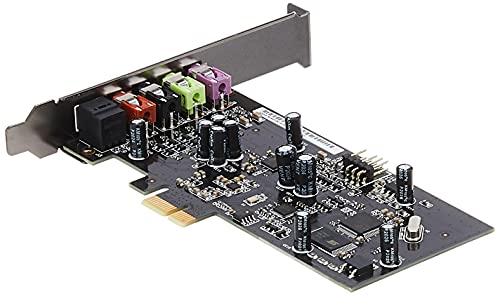
ASUS Xonar SE — Best budget analog 5.1
The Xonar SE has become the default first answer for desktop surround because it understands the assignment: six channels of clean analog output, a headphone amplifier for late hours, and software that covers speaker configuration without burying it. Fed into a desktop surround speaker system, it removes the two onboard-audio signatures that ruin film nights — the faint buzz under quiet scenes and the rear channels that sound like an afterthought — and replaces them with stable, evenly matched output. Its converter is a hi-res-capable codec rather than an exotic discrete design, and in surround duty that distinction matters less than channel consistency, which the Xonar SE delivers.
Owners of older speaker sets will appreciate how undemanding the card is: no supplementary power lead, a short installation, and outputs that map plainly to the three cables a 5.1 set expects. The software’s speaker test and level trims cover the essentials of the setup ritual described above. What you do not get is format decoding breadth or an optical path with live encoding for games, so receiver-based rooms should look further down the page. As the entry point to real 5.1 from a PC — the step where films stop sounding like stereo with echoes — it remains remarkably hard to argue with.
Long-term owners report the same quiet satisfaction we found in testing: the card disappears. It does not nag for attention, its settings survive updates, and the speaker set it feeds simply sounds like itself on a good day, every day. For a secondary PC, a family machine or a first surround build, that invisibility is a feature worth paying a little for — and here, you barely pay at all.
Music listeners sometimes worry that a surround-first budget card will neglect stereo, and the Xonar SE acquits itself respectably: two-channel material plays cleanly through the front pair with the subwoofer joining via bass management when configured. It is not the stereo instrument our companion guide celebrates, but as the single card in a machine that must do everything adequately, it holds up its end without drama.
- Channels: 5.1 analog output
- Playback: up to 192 kHz / 24-bit
- Headphone output: dedicated amplifier stage
- Form factor: internal PCIe, no extra power lead
- Software: speaker configuration, EQ and test tones
Strengths
- Clean, evenly matched analog channels at an entry-level position
- Simple installation suits older and compact PCs
- Headphone amplifier covers late-night listening without extra hardware
Trade-offs
- No live encoding for optical game audio to a receiver
- Software polish trails the Creative suite
- Converter refinement is adequate rather than luxurious
Best for: desktop speaker sets running 5.1 on a sensible budget. Not suited for: receiver-based rooms needing encoded optical output.

Creative Sound Blaster Z SE — Best all-round internal 5.1
The Z SE is the card we would install in a PC that has not yet decided what its surround life looks like, because it keeps every door open. Discrete analog outputs feed a powered speaker set today; the optical output stands ready for a receiver tomorrow; and the software suite — the mature Sound Blaster Command environment — provides the speaker setup, bass management and per-channel trims that 5.1 systems need to sound intentional. Its converter stage posts strong figures for the class, and in practice the presentation is clean and even across channels, with a centre output that keeps dialogue planted exactly where the screen says it should be.
The SE revision refined the original Z formula with updated software and broader surround handling, including virtual surround profiles for headphones that share the desk. That headphone side is genuinely useful in a 5.1 household — the speakers rest after midnight while the card folds a multichannel mix into a convincing headphone image — but it never compromises the speaker path, which remains the reason to buy. A beamforming microphone array rides along for voice work; treat it as a bonus. Judged as an internal 5.1 card for mixed film, game and music duty, the Z SE is the most complete answer here that does not ask flagship money.
Installation and daily manners reinforce the recommendation. The card needs no supplementary power, its outputs are clearly grouped, and the software remembers separate profiles for speakers and headphones so the evening transition takes one click. Owners upgrading from onboard audio will feel the difference most in the rear channels, which gain the level stability to place a game’s approaching footsteps or a concert recording’s hall ambience with conviction rather than suggestion.
There is a maturity to the Z SE’s everyday behaviour that spec sheets cannot convey. Profiles switch without pops, the speaker test is honest about which channel is which, and the equaliser — if your room needs a gentle hand — applies per configuration rather than globally, so headphone corrections never leak into the speaker setup. Rooms are individuals; the Z SE is the card here that most readily admits it.
- Channels: 5.1 discrete analog, 7.1 virtual headphone surround
- Outputs: analog speaker jacks plus optical
- Headphone drive: amplifier rated for high-impedance models
- Form factor: internal PCIe card
- Software: Sound Blaster Command with full speaker setup
Strengths
- Analog and optical outputs cover both 5.1 connection philosophies
- Speaker setup tools are thorough and easy to live with
- Clean, even channel matching flatters film dialogue
Trade-offs
- No built-in Dolby Digital or DTS decoding of the AE-5 Plus kind
- Microphone array features go unused in speaker-focused rooms
- Shield cover styling will not suit every build’s interior
Best for: mixed-use PCs running surround speakers now, with a receiver possible later. Not suited for: film purists who need onboard format decoding above all.

Creative Audigy Fx Pro — Best compact upgrade
The Audigy line is one of the oldest names in PC audio, and the Fx Pro carries it into the present as a compact, low-profile card aimed at a specific and common problem: a small or ageing PC whose onboard audio cannot feed a 5.1 speaker set with any dignity. The card provides real multichannel analog output in a half-height-friendly form, with Creative’s software handling speaker configuration and a headphone output for quiet hours. In surround terms it is deliberately unambitious — and that restraint is the point. It converts a machine that wheezes through films into one that steers sound around the room properly.
Expectations should be set by its role. Converter and amplifier refinement sit in the honest-working class rather than the enthusiast tier, and the feature list skips the decoding and processing breadth of the AE-series. What it offers instead is reliability and fit: small cases, office PCs moonlighting as media machines, and older desktops whose owners would rather spend on speakers than on the card feeding them. In those systems the Fx Pro’s 5.1 output is not a compromise at all — it is the missing piece, priced and sized like one.
There is also a quiet argument for the Audigy in simplicity. Its software surface is smaller, its profiles fewer, and a family PC benefits from audio that simply works after a ten-minute setup. Paired with a modest powered speaker set, it produces the essential 5.1 experience — anchored dialogue, enveloping effects, a subwoofer doing foundational work — without asking its owner to develop opinions about converter architecture.
Consider the Fx Pro the card of second computers and hand-me-down speaker sets. A retired office tower, a spare-room TV corner, a teenager’s first film setup — these are systems where the alternative to the Audigy is not a flagship card but no surround at all, and against that alternative its clean six channels look rather grand.
- Channels: 5.1 analog surround output
- Form factor: low-profile internal PCIe card
- Headphone output: front listening covered in software profiles
- Software: Creative control suite with speaker setup
- Fit: small cases and older desktops
Strengths
- Low-profile design fits cases the flagship cards cannot enter
- Real discrete 5.1 output at a modest step in the range
- Undemanding installation and software suit shared family PCs
Trade-offs
- Converter refinement trails the Z SE and AE-5 Plus
- No optical path for receiver-based expansion
- Feature set is functional rather than generous
Best for: compact and older PCs gaining their first true 5.1 speaker output. Not suited for: enthusiasts building a long-term flagship media PC.
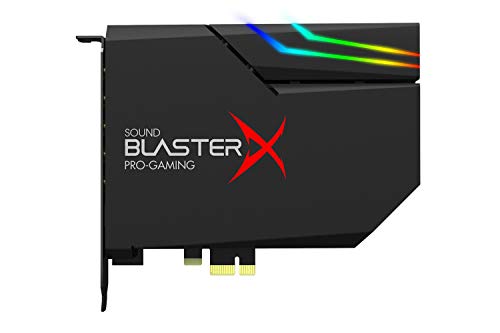
Creative Sound Blaster AE-5 Plus — Best for film decoding
Ask a PC to be a cinema and a decoding question appears: film soundtracks arrive wearing Dolby Digital and DTS, and somebody in the chain must unwrap them into six channels. The AE-5 Plus answers by decoding both formats itself, which makes it the natural card for a PC that plays a film library — discs, rips and downloads — through powered surround speakers. Its analog outputs then carry properly decoded, properly steered audio, with the card’s ESS-based converter stage keeping dialogue clear at low evening volumes where lesser outputs smear consonants into the score.
The same hardware serves games with discrete surround and headphones with virtual processing, and the RGB lighting will divide opinion exactly as gaming hardware always does. Our counsel from the stereo guide applies unchanged: build one clean profile for films, keep processing honest, and let the card’s fundamentals do the persuading. Those fundamentals are strong — a capable headphone amplifier, hi-res playback support, and output quality a clear step above the budget tier. For the PC that anchors a small home-theatre corner with powered speakers, the AE-5 Plus is the most cinema-literate card in this guide.
One practical note for film households: decoding at the card pairs beautifully with media-player software that passes the soundtrack through untouched, giving you a single, predictable chain from file to speaker. Set the speaker configuration once in the Creative suite, confirm the channel test walks around the room in order, and film night stops involving settings menus entirely — which is, in the end, what home theatre is supposed to feel like.
Concert recordings make an unexpected showcase for the AE-5 Plus. A well-recorded live performance uses the rear channels for hall ambience rather than tricks, and the card’s even channel voicing keeps that ambience continuous around the listener instead of splitting the room into a stage and an echo. It is the pick whose surround presentation most often disappears into the event itself.
- Channels: 5.1 discrete analog, 7.1 virtual headphone surround
- Decoding: Dolby Digital and DTS supported
- DAC: ESS converter with hi-res playback support
- Headphone drive: amplifier for demanding models
- Form factor: internal PCIe with RGB lighting
Strengths
- Onboard Dolby Digital and DTS decoding suits film libraries
- Strong converter and amplifier stages for the class
- Discrete outputs keep powered speaker setups simple
Trade-offs
- RGB lighting requires an extra power connection and setup
- Software leans toward gaming presentation
- Optical users gain less from its talents than analog users
Best for: PC-based film nights through powered 5.1 speakers. Not suited for: minimalists who want a card with no gaming personality at all.

ASUS Strix SOAR — Best analog channel count
The Strix SOAR approaches surround from the maximalist side: a full bank of analog outputs for 7.1 speaker systems, which makes it the card to choose when a 5.1 set is today’s arrangement rather than a life sentence. Run five channels and the subwoofer now; the extra pair of outputs waits patiently for the day a larger room or a second-hand speaker bargain turns the system into 7.1. Its ESS-based converter stage and headphone amplifier come from ASUS’s enthusiast line, and the sound across channels is correspondingly assured — clean, dynamic and evenly voiced, with rear effects placed rather than smeared.
ASUS’s Sonic Studio software gives the SOAR a different flavour from the Creative cards: profiles are visual, routing is explicit, and the gaming heritage shows in conveniences like quick switching between speaker and headphone configurations. The card’s physical presence is substantial — a full-size board with a shroud that expects a windowed case to justify it — and it asks for supplementary power, so compact builds should look at the Audigy or Xonar instead. For a dedicated media-and-gaming tower, though, the SOAR’s combination of channel count and conversion quality makes it the analog ceiling of this roundup.
Film listeners will find its dynamics persuasive: quiet dialogue scenes hold their intimacy, and the card hands loud passages to the speakers without the compression that betrays an output stage running out of composure. It is, in short, the card for the reader who looked at the 5.1 requirement and immediately wondered about the room after this one.
The SOAR also rewards listeners who bi-amp nothing, tweak little and simply play things loudly: its output stages hold together at levels where lesser cards begin to sound strained through efficient speakers. Restraint is still advised — neighbours remain a physical format no card can decode — but headroom is a genuine virtue in action soundtracks, and this card has it.
- Channels: 7.1 analog output (runs 5.1 with channels in reserve)
- DAC: ESS converter, hi-res playback support
- Headphone drive: dedicated amplifier stage
- Form factor: full-size internal PCIe, supplementary power
- Software: Sonic Studio with profile routing
Strengths
- Full analog channel count future-proofs the speaker system
- Converter and amplifier quality sit at enthusiast level
- Confident dynamics suit film and game soundtracks alike
Trade-offs
- Full-size card and power lead exclude compact cases
- Gaming styling and software will not charm every owner
- Optical path is secondary to its analog mission
Best for: media towers planning to grow from 5.1 toward 7.1 speakers. Not suited for: small-form-factor PCs or optical-first rooms.
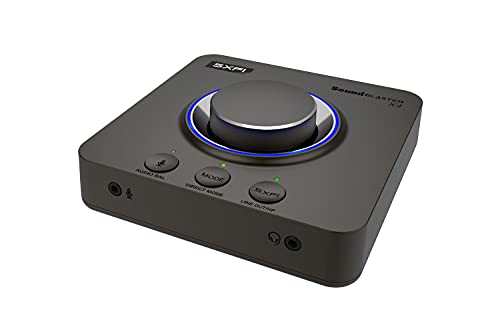
Creative Sound Blaster X4 — Best external 5.1 hub
The X4 refuses to live inside a PC, and for 5.1 purposes that refusal is its genius. As an external USB unit it offers discrete analog surround outputs for a powered speaker set, an optical output for a receiver, and headphone surround processing — all reachable from a dial on the desk rather than a slot inside a case. A laptop that could never host a PCIe card gains full 5.1 speaker output; a desktop gains an audio hub that also welcomes a console through its optical input. In mixed households where the “PC” might be a work laptop by day and a media machine by night, the X4 is the only pick here that follows the listener instead of the tower.
Its headphone side carries Creative’s Super X-Fi processing, which aims for a speaker-like image from compatible profiles — a flourish film fans may enjoy — while the speaker path stays honest and direct. The converter stage is modern and quiet, channel matching is even, and the physical volume control encourages the good habit of setting software levels once and riding the dial. Trade-offs are the external ones: a box on the desk, a USB cable, and a price that reflects the flexibility. For the reader whose 5.1 ambitions cross devices, nothing else in this guide is even attempting the same job.
Setup deserves a compliment, too. Because every connection lives on the back of one accessible unit, the channel-checking ritual — the walk-around test tone that catches swapped cables — takes minutes rather than an afternoon behind a tower. When a system is easy to verify, it stays verified, and the X4’s owners are the ones whose rear-left speaker is definitely the rear-left speaker.
Renters and students develop a particular affection for the X4’s portability: the entire surround brain of the system unplugs in one motion and moves house in a laptop bag, leaving only speakers behind. In a life stage where addresses change yearly, an audio investment that travels this easily protects itself against the usual fate of built-in hardware.
- Channels: 7.1 discrete analog output (5.1 fully covered), optical in and out
- Connections: USB host, optical input for consoles
- Headphone features: surround processing with Super X-Fi
- Form factor: external desktop unit with hardware dial
- Compatibility: PCs, laptops and consoles
Strengths
- Discrete surround plus optical covers every 5.1 arrangement
- Works with laptops and consoles that cannot take a card
- Accessible connections make setup and channel checks painless
Trade-offs
- External box and cabling need permanent desk space
- Costs more than internal cards of similar conversion quality
- Super X-Fi benefits depend on profile setup and taste
Best for: 5.1 systems shared between a PC, a laptop or a console. Not suited for: tidy-desk purists who want audio hardware hidden inside the case.
How Do the Six 5.1 Picks Compare Side by Side?
| Pick | Form | Speaker output | Optical | Best use |
|---|---|---|---|---|
| ASUS Xonar SE | Internal | 5.1 analog | No | Budget desktop speaker set |
| Sound Blaster Z SE | Internal | 5.1 analog | Yes | All-round internal choice |
| Audigy Fx Pro | Internal low-profile | 5.1 analog | No | Compact and older PCs |
| Sound Blaster AE-5 Plus | Internal | 5.1 analog | Yes | Film decoding at the card |
| ASUS Strix SOAR | Internal | 7.1 analog | Yes | Growing toward 7.1 |
| Sound Blaster X4 | External USB | 7.1 analog | In and out | Multi-device 5.1 hub |
The pattern in the table is a story about where decoding and flexibility live. Budget internal cards convert six channels honestly and stop there, which is enough for the classic desktop speaker set. The middle of the range adds optical escape routes and, in the AE-5 Plus, format decoding for film libraries. The X4 moves the whole conversation outside the case. None of these philosophies is wrong; the mistake is buying one while your room quietly requires another, which is why the analog-versus-optical section sits near the top of this guide rather than the bottom.
Where Should the Speakers and Subwoofer Actually Sit?
A sound card can only steer sound correctly to speakers that are roughly where the format assumes they are. The centre belongs directly in front of the listener, at ear height or angled toward it, because dialogue localisation forgives nothing. Front left and right form a triangle with the seat — about as far apart as each is from the listener — with their tweeters near ear level and a slight inward angle toward the chair. Rear speakers surprise most newcomers: they belong to the sides and slightly behind, at or just above ear height, aimed across the listening position rather than directly at it, because their job is envelopment and cue placement, not a second stage behind your head.
The subwoofer plays by looser rules because deep bass is effectively omnidirectional, but “anywhere” still has limits. Corners reinforce output — sometimes helpfully, sometimes into boom — while a spot along the front wall near the main speakers usually integrates most smoothly with the satellites’ crossover region. The old crawl test remains undefeated: place the subwoofer temporarily at your seat, play something bass-rich, and walk the room’s edges listening for where the bass sounds even rather than swollen; that spot is where the subwoofer wants to live. Ten minutes of this theatre saves months of wondering why films sound fat on Tuesdays.
Nearfield desktop systems compress all of this onto a desk, and the principles survive the compression. Keep the front trio on the desk’s front edge to avoid reflections off the surface, raise tweeters toward ear level with stands or angled pads, and let the rears sit on stands or shelves behind the chair rather than exiled to the floor. A card like the Z SE or X4 can compensate for distance differences in software, but no delay setting can fix a speaker pointing at a wall.
How Long Will a 5.1 Card Stay Relevant?
Longer than almost anything else in a PC. Surround formats at the consumer level change slowly, the 5.1 layout has been the lingua franca of film and game audio for decades, and a card’s core duties — convert six channels cleanly, route them sensibly, drive a headphone — are not exposed to the annual churn that dates graphics hardware. Owners routinely carry a good card through two or three system builds, which reframes the price discussion: the difference between the budget and mid-range picks in this guide, spread across a decade of film nights, is trivially small. That is an argument for buying the card your room actually wants rather than the cheapest card that technically qualifies.
The one future worth planning for is the output migration already underway: speakers and bars increasingly speak HDMI and wireless, while the PC side remains stubbornly analog, optical and USB. Cards with both analog and optical paths — or an external box like the X4 that speaks everything — are hedges against that migration, letting today’s purchase mediate between a PC and whatever the next speaker system turns out to be. Flexibility, in this category, is not a luxury feature; it is the longevity feature.
How Should You Set Up a 5.1 Card Step by Step?
Connect first, configure second, judge last. Wire the speaker set with the card’s outputs matched to the speaker inputs by name — front, centre/subwoofer, rear — then run the card software’s channel test and physically walk the sound around the room, correcting any swapped cable before touching a single level. Next, declare every speaker “small” in the configuration unless you genuinely own full-range towers, set the crossover where your satellites’ documentation suggests they fade, and enter honest distance figures for each speaker measured from your seat. These three declarations — size, crossover, distance — do more for the final sound than any other settings in the suite.
Before levelling anything, spend one session simply confirming the system with content you love. Play the opening of a favourite film and a circuit of a familiar racing game, and note anything that distracts — a rear channel that shouts, a centre that whispers, a subwoofer that arrives half a beat emotionally late. Distractions are data; the levelling session that follows exists to remove them one at a time, and it goes far better with a written list than with a vague sense of dissatisfaction.
Then set levels with dialogue, not explosions. Play a familiar film scene at evening volume and trim the centre channel until voices sit naturally against the score; nudge the rears until they suggest space without announcing themselves, and adjust the subwoofer until its position vanishes. Finally, save separate profiles for speakers and headphones if the card offers them, and set your media player to hand the card the soundtrack in the form the card expects — decoded formats to the AE-5 Plus, clean multichannel PCM elsewhere. Twenty minutes of this discipline is the difference between owning six speakers and owning a 5.1 system.
Do Games and Films Ask Different Things of a 5.1 Card?
They do, and understanding the difference prevents the most confusing disappointment in this category. A film arrives with its surround mix finished — six channels, authored in a studio, needing only faithful delivery. Any card here that outputs clean analog 5.1, or bitstreams the soundtrack over optical, completes the assignment. A game, by contrast, mixes its audio live: the engine calculates where sounds belong as you move, and outputs uncompressed multichannel PCM. That is why analog connections treat games so well and why optical connections need live encoding to carry game surround at all. A household that games heavily on speakers should weight the analog path — or an encoding-capable setup — far more heavily than a film-only household needs to.
Games also expose channel-matching flaws that films forgive. A film’s rear channels carry ambience and effects at the mixer’s chosen moments; a game’s rears carry information — the opponent behind you, the vehicle approaching off-screen — rendered continuously and comparatively. Uneven channel levels or a converter stage that compresses dynamics will blur exactly the cues competitive players bought speakers to hear. The Z SE, the AE-5 Plus and the ASUS card, with their stronger output stages, hold an edge here that their specification sheets only hint at.
Music, the third citizen, asks for the least and notices the most. Stereo recordings played through a 5.1 system should stay stereo — front pair plus subwoofer via bass management — unless you deliberately choose an upmixing mode for a party. Every card in this guide handles that discipline correctly, and the ones with per-configuration profiles make it a single click rather than a settings expedition. Resist any card or mode that insists on spreading music across all six speakers by default; enthusiasm is not fidelity.
What Mistakes Ruin Otherwise Good 5.1 Systems?
The most common is a wiring error nobody checks: centre and subwoofer share a cable in most analog sets, and swapping their plugs produces a system where dialogue booms and bass whispers — owners then blame the card. Run the channel test; it exists for exactly this. The second mistake is declaring satellite speakers “large” out of optimism, which sends them bass they cannot reproduce and starves the subwoofer of its job. Honesty in the setup page is free performance.
A quieter mistake is neglecting the rear speakers’ levels for months because films still “sound fine”. Rear channels set too low collapse the system’s envelopment into a wide stereo with occasional surprises, and the owner concludes that 5.1 itself is overrated. Revisit the level trims after a fortnight of listening — ears calibrate, rooms settle, furniture migrates — and expect to adjust once more before the system truly beds in. Surround, like espresso, rewards a second tuning.
Optical buyers make a characteristic error of their own: expecting game audio to arrive at the receiver in 5.1 without live encoding, then concluding the card is broken when the receiver reports stereo. Films bitstream fine; games need encoding or analog. A fourth mistake is placing the centre speaker wherever the desk allows — above the monitor pointing at the ceiling, or below it aimed at the desk surface — when that channel carries the words the whole scene depends on. Angle it at ear level. And finally: judging a new card with the volume simply louder. Match levels before forming opinions, in surround even more than in stereo, because six channels of slightly-louder will always sound like six channels of better.
How Do You Hunt Down Hum and Buzz in a 5.1 System?
Surround systems multiply cables, and every cable is an invitation for noise to move in. The classic offender is the ground loop: speakers, PC and subwoofer plugged into different outlets create a loop that hums at mains frequency, most audibly through the subwoofer. The first fix costs nothing — power the whole system from one outlet strip so every component shares a ground reference. The second is routing: keep analog audio cables away from power bricks and the thicket behind a desk, crossing power cables at right angles when crossing is unavoidable. Analog’s honesty is its charm and its vulnerability; treat its cables with a little respect and it repays you in silence.
Noise that changes with screen activity — a whine that follows the mouse or swells when a game loads the graphics card — tells a different story: interference entering through the PC itself. Rear outputs on the card are far better shielded than front-panel case jacks, whose long internal leads act as antennas, so confirm the speaker set is plugged into the card and not the case. If the whine persists, the external X4 sidesteps the entire environment, which is one reason it anchors this guide’s recommendations for electrically noisy builds. Optical connections are immune to this whole family of problems by design — light does not hum — and for a troublesome room that immunity alone can justify the optical route.
Work the problem in order: one strip for power, cables dressed away from bricks, card outputs rather than case jacks, and only then exotic remedies. Nine systems in ten fall silent somewhere in those four steps, and the tenth usually reveals a genuinely faulty cable that a swap exposes in a minute.
Final Recommendation
Whichever card you choose, budget the same evening for the setup ritual in this guide — channel test, honest speaker sizes, measured distances, dialogue-led levels. A mid-range card configured with that care will outperform a flagship left on its defaults, and the ritual costs nothing but attention. The hardware below earns its ranking only when the system around it is allowed to work.
If your 5.1 life centres on a powered speaker set beside a desktop PC, start with the Z SE — it converts cleanly, configures thoroughly and keeps an optical door open for the room you might build next — and step down to the Xonar SE without shame when the budget is firm, because its six honest channels deliver the essential experience. Choose the AE-5 Plus when a film library is the heart of the system, the Strix SOAR when 7.1 is already pencilled into the future, the Audigy Fx Pro when the case is small or the PC is old, and the X4 when the system must serve more than one machine. Get the connection type right first and any of these six will make your old setup sound like it was guessing.
One last encouragement for the hesitant: every pick in this guide can be installed, configured and judged inside a single evening, and the judgement requires no expertise beyond knowing how your favourite scenes used to sound. Surround done properly announces itself not with spectacle but with the absence of distraction — you stop noticing speakers and start noticing the film. That is the standard these six cards were chosen against, and it is within easy reach of any of them.
Frequently Asked Questions
Can a 5.1 sound card feed a soundbar?
Yes, if the connection types agree. Most soundbars accept optical, so a card with an optical output — the Z SE, AE-5 Plus or X4 — can feed one, remembering that game audio needs live encoding to travel as 5.1 over optical. Analog-fed soundbars are rare; analog outputs are really for powered speaker sets and receivers.
Do I need a 5.1 card if my motherboard already has surround outputs?
Not automatically. If your onboard outputs are quiet and your speaker set is modest, live with them a while. A dedicated card earns its place when you hear hiss or buzz under quiet scenes, when rear channels sound uneven, or when you need features onboard audio lacks — decoding, encoding or serious setup tools.
What is the difference between 5.1 output and virtual surround?
True 5.1 output sends six separate channels to six speaker positions. Virtual surround takes a multichannel mix and processes it for headphones or two speakers, simulating spaciousness. Both are useful, but they are different products: this guide ranks real speaker output first and treats headphone virtualisation as a supporting feature.
Why does my subwoofer seem to do nothing on music?
Usually because the speakers are declared “large” in the card’s software, so no bass is redirected, or the crossover sits too low for your satellites. Declare the speakers small, set a sensible crossover, and stereo music will route its low end to the subwoofer as intended — the .1 channel is created by bass management, not only by film mixes.
Is 5.1 still worth it when 7.1 and Atmos exist?
For the rooms most PCs live in, emphatically yes. The overwhelming majority of film and game content is mixed with 5.1 as its foundation, the layout fills small and medium rooms completely, and two fewer speakers means two fewer placement compromises. Cards like the Strix SOAR and X4 keep a 7.1 upgrade path open, but a well-set-up 5.1 system beats a badly placed 7.1 system every evening of the week.
Can one of these cards also improve my headphone listening?
Every pick here includes a headphone output with a real amplifier stage, and several add virtual surround for games and films. The Z SE and AE-5 Plus are the strongest headphone performers of the internal cards, while the X4 adds its surround processing externally. For music-first headphone listening, our stereo guide ranks the dedicated options.
Related Guides
Keep reading with best 7.1 gaming sound cards for headphone surround, best 2.0 soundbars for small TVs and bedrooms, and best 2.1 soundbars under 400 for systems with a separate subwoofer.


