What's inside
- Key Takeaways
- Quick Picks
- How We Chose These Picks
- What Makes a Keyboard Right for a Tablet Rather Than a Desk?
- What Does an Hour of Typing Reveal That a Minute Cannot?
- Which Shortcuts Turn a Tablet Into a Writing Machine?
- What Stand or Case Completes the Setup?
- How Do the Six Compare at a Glance?
- How Do You Pair and Set Up a Bluetooth Keyboard With an Android Tablet?
- Why Did Android’s Keyboard Story Turn Out Standalone?
- How Should You Care for a Keyboard That Lives in a Bag?
- Who Gets the Most From a Tablet Keyboard?
- What Mistakes Do Android Tablet Keyboard Buyers Keep Making?
- Final Recommendation
- What Is the Honest Case Against Bothering With One at All?
- How Do You Test a Keyboard Before You Commit?
- What Happens When the Tablet Is Replaced?
- How Quiet Is Quiet Enough?
- What About Writing in Languages and Layouts Beyond the Default?
- Which Keyboard Suits Which Kind of Writer?
- What Is the First Week With a Tablet Keyboard Like?
- How Does a Tablet Keyboard Change the Laptop Question?
- Frequently Asked Questions
- Related Guides
As an Amazon Associate I earn from qualifying purchases. This post may contain affiliate links at no extra cost to you.
widgetverdict.com is reader-supported. When you buy through links on our site, we may earn an affiliate commission.
Where to buy: the four Logitech keyboards below carry checked Amazon links; the final two picks are prose-only discussions of iPad keyboard cases, included to draw the map honestly rather than to sell you the wrong ecosystem.
An Android tablet with a good keyboard stops being a screen you watch and becomes a machine you write on. The best android tablet bluetooth keyboards turn café tables, train trays and kitchen counters into workable desks, and they do it without the commitment of a laptop: the tablet stays a tablet for reading and video, then pairs in seconds when an email grows teeth or a document needs real sentences. That flexibility is the whole category, and it is why the details that matter are not the ones on a gaming keyboard’s box. What matters is how the keys feel after an hour, how painlessly the keyboard hops between devices, how it travels, and whether it remembers that its partner is a tablet — with a tablet’s angles, a tablet’s battery anxieties and a tablet’s habit of being used everywhere except a desk.
Four of this guide’s picks are Logitech keyboards with verified listings, because Logitech has spent a decade refining exactly this product while rivals drifted in and out. They divide the territory cleanly: the classic all-rounder, its slimmer modern successor, the ultra-portable sheet of keys built for Android and Windows travellers, and the desk-bound dial keyboard with a cradle for the tablet itself. The last two sections step outside the shop window to discuss the keyboard-case world — and why its most famous names belong to a different tablet ecosystem entirely, which Android owners need to understand before they spend anything.
Key Takeaways
- The Logitech K380 remains the default answer: comfortable keys, multi-device switching and manners with every platform.
- The Pebble Keys 2 K380s is its slimmer, more customisable successor for people who carry their keyboard daily.
- The Keys-To-Go is the traveller’s extreme: a sealed, spill-resistant sheet built for Windows and Android on the move.
- The K480 trades portability for a built-in cradle and a switching dial, suiting a fixed desk or kitchen counter.
- Famous keyboard cases like the Combo Touch and ZAGG Pro Keys are iPad products; Android owners should not buy them by mistake.
- Judge a tablet keyboard by an hour of typing, not a minute: key feel and layout decide everything.
Quick Picks
| Pick | Badge | Why it earns its place |
|---|---|---|
| Logitech K380 | The default answer | Comfortable round keys, multi-device Bluetooth and a decade of refinement for tablet typists. |
| Logitech Pebble Keys 2 K380s | The slim successor | A thinner, lighter take on the formula with customisable keys and Easy-Switch across three devices. |
| Logitech Keys-To-Go | The traveller’s sheet | A sealed, ultra-portable keyboard with a built-in cover, made for Windows and Android on the move. |
| Logitech K480 | The desk cradle | A switching dial and an integrated cradle that holds the tablet at reading angle on a fixed desk. |
| Logitech Combo Touch | The iPad benchmark (prose-only) | The keyboard case Android owners admire and must not buy: it is built for iPad, discussed here for contrast. |
| ZAGG Pro Keys | The iPad alternative (prose-only) | Another respected iPad keyboard case, covered in prose to complete the map of what Android cannot use. |
How We Chose These Picks
We chose for the tablet life rather than the desk life. Every linked pick had to pair over Bluetooth without a receiver, because tablets have no ports to spare; switch between devices, because a tablet keyboard that cannot also serve a phone or a laptop is half a tool; and travel without complaint, because a keyboard that stays home is a keyboard that fails its only job. Key feel was judged as typists judge it — travel, spacing, noise in shared spaces — and listings were verified so that every specification quoted here comes from the maker’s own description.
The two prose-only sections follow this guide’s standing honesty rule. The keyboard-case category is dominated by iPad products, and Android shoppers meet those names constantly in search results and recommendations aimed at a different ecosystem. Rather than pretend the category does not exist, or worse, link an Android reader to an incompatible case, we discuss the two most respected examples in prose, explain exactly what they are, and leave the buying links for hardware an Android tablet can actually use.
What Makes a Keyboard Right for a Tablet Rather Than a Desk?
Proportion, first of all. A tablet keyboard lives in the same bag as the tablet, often in the same sleeve, so its size and weight are not specifications but a daily decision about whether it comes along at all. The picks here divide that decision honestly: the K380 and Pebble Keys are bag-sized, the Keys-To-Go is pocket-adjacent, and the K480 opts out of the journey entirely in exchange for holding the tablet itself. None of those is the wrong answer; the wrong answer is buying the desk keyboard for a travelling life, or the travel sheet for a desk where its compromises buy nothing.
Second, the typing itself has to respect shared spaces. Tablet keyboards are used in libraries, cafés, lectures and trains, where a loud, clattery board is a social problem. All four Logitech picks type quietly by design, with the low-profile keys the category settled on years ago. And third, the keyboard must forgive the tablet’s angles: there is no screen hinge to adjust, so the pairing of keyboard with a case, a stand or the K480’s cradle is part of the product, and this guide treats it as such in every pick.
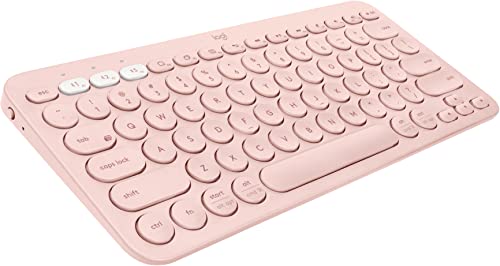
Logitech K380 — The default answer
The K380 is the keyboard this category is measured against, and its verified listing’s plain title — a multi-device Bluetooth keyboard — undersells a decade of accumulated good decisions. The round keys are the visible signature, but the substance is spacing and feel: the K380 types like a small laptop keyboard rather than a novelty, with enough travel and separation that an hour of writing stays comfortable and accurate. Its multi-device pairing lets one keyboard serve the tablet, the phone and the laptop in rotation, which is how tablet keyboards are actually lived with, and its Bluetooth manners extend across Android, Windows, Chrome OS and Apple’s platforms without drama.
For the Android tablet owner specifically, the K380’s virtues compound. It is light enough to be the bag’s permanent resident, tough enough to have earned its reputation in exactly that role, and quiet enough for every shared space a tablet visits. It has no backlight and no stand, and this guide names those absences plainly: the stand is your case’s job, and the backlight is the first thing the successor generation and rivals advertise against it. Neither absence has dented its position, because the fundamentals — feel, pairing, portability, price tier — are the ones that decide a year of use. If you buy one keyboard from this page and never think about the category again, buy this one.
There is a confidence in recommending a product this established that newer rivals cannot borrow. The K380’s behaviour with a new tablet is a known quantity, its quirks are documented by years of owners, and its replacement, if the bag ever eats it, is identical. In a category full of anonymous boards that vanish from sale between seasons, that continuity is a feature a working writer can bank on.
- Connection: Bluetooth multi-device pairing
- Character: round keys, laptop-like spacing, quiet typing
- Platforms: Android alongside Windows, Chrome OS and Apple systems
- Role: the all-round bag keyboard for tablet typists
Strengths
- The most comfortable typing feel in its class and tier.
- Multi-device pairing matches how tablets are actually used.
- A decade of refinement and owner knowledge behind it.
Trade-offs
- No backlight for dark rooms and night trains.
- No stand or cradle, so the tablet’s case must provide the angle.
- Round keys divide opinion among touch-typists raised on squares.
Best for: most Android tablet owners who write regularly and carry their keyboard. Not suited for: typists who need backlighting or an integrated stand above all.

Logitech Pebble Keys 2 K380s — The slim successor
The Pebble Keys 2 K380s is Logitech revisiting its own classic with a decade’s hindsight, and its verified listing names the changes: a slim, portable, compact Bluetooth keyboard in Tonal Graphite with customisable keys and Easy-Switch buttons for moving between three paired devices. The design language is the Pebble line’s — flatter, lighter, more deliberately styled — and the typing feel follows it, with quieter, shallower keys that suit the short, frequent writing sessions of tablet life: the email answered properly, the document edited on a train, the notes taken in a meeting where a louder board would announce itself.
Choose it over the original K380 when the bag is small and the aesthetic matters, and when the customisable shortcut keys will genuinely be used — Logitech’s software lets the function row bend toward your own habits, which heavy tablet writers appreciate more than they expect. Choose the original when long-form typing comfort is the whole brief, because its deeper keys still win the marathon. This is the happiest kind of product argument, between a classic and its own refinement, and the Android tablet owner wins either way. The K380s also speaks to the sustainability-minded buyer through Logitech’s recycled-materials construction in this line, a consideration its listing family wears openly.
In daily service the Easy-Switch behaviour is the feature that justifies the generation change. Tablet, phone and laptop sit one key-press apart, and the keyboard becomes the single input for a three-screen life rather than a tablet accessory that happens to pair elsewhere. For the student or freelancer whose desk is wherever they are, that is the modern shape of the product, and the Pebble Keys is its most polished expression at this tier.
- Connection: Bluetooth with Easy-Switch across three devices
- Design: slim, portable, compact, Tonal Graphite finish
- Keys: customisable shortcuts through Logitech software
- Character: quiet, shallow keys for shared spaces
Strengths
- The slimmest, lightest route into the K380 formula.
- Customisable keys reward writers with fixed habits.
- Three-device switching suits the modern multi-screen day.
Trade-offs
- Shallower keys lose the long-form marathon to the original K380.
- Style-led design will not suit buyers who want a tool aesthetic.
- Still no backlight, as with its predecessor.
Best for: daily carriers and multi-device writers who value slimness and shortcuts. Not suited for: marathon typists who prize key depth above portability.

Logitech Keys-To-Go — The traveller’s sheet
The Keys-To-Go is the extreme point of this category, and its verified listing states the brief without blushing: a Bluetooth keyboard for Windows and Android with a built-in cover, slim and compact, for the tablet life lived in motion. The design is a sealed sheet of keys under a fabric-like surface, which produces the two properties travellers actually need. It shrugs off the crumbs, dust and coffee-adjacent accidents of café tables that would kill an open keyboard, and it slides into a bag — or against the tablet itself — taking almost no space and adding almost no weight. This is the keyboard that is simply always there.
The trade is feel, and honesty requires describing it accurately. The Keys-To-Go’s typing is a membrane whisper rather than a mechanical conversation: perfectly serviceable for emails, notes, messages and document edits, less satisfying across a three-thousand-word writing session than the K380’s real keys. Travellers understand this bargain instinctively, because the best keyboard is the one in the bag, and the Keys-To-Go is in the bag when every rival has been left at home for reasons of bulk. Its Android-and-Windows-first positioning is also refreshing in a category that often treats Android as an afterthought; the shortcut layout speaks your tablet’s language natively.
Pair it with a tablet case that provides a stand angle and the combination is the lightest writing desk in this guide — lighter than many laptops’ chargers. For journalists, field workers, students between lectures and anyone whose writing happens in other people’s spaces, that lightness is not a compromise. It is the product.
- Connection: Bluetooth, positioned for Windows and Android
- Design: sealed, ultra-slim sheet with a built-in cover
- Finish: Graphite
- Character: spill-resistant, silent, always in the bag
Strengths
- The most portable serious keyboard in this guide.
- Sealed surface forgives café and travel conditions.
- Android-first shortcuts respect the platform it serves.
Trade-offs
- Membrane feel loses long sessions to real-keyed rivals.
- No stand, so the tablet case must do that work.
- Minimal key travel will not convert mechanical-keyboard loyalists.
Best for: travellers and field writers who need a keyboard that is always present. Not suited for: desk writers whose sessions run to thousands of words.

Logitech K480 — The desk cradle
The K480 makes the opposite bet from everything above it: instead of travelling light, it stays home and holds the tablet for you. Its verified listing describes a wireless multi-device keyboard for Windows, macOS, iPadOS, Android and Chrome OS, and its defining hardware is the integrated cradle along its top edge, sized to prop a tablet or phone at a reading angle, together with a dial that switches the keyboard between paired devices by turning rather than by key combination. On a kitchen counter, a workshop bench or a fixed desk, that arrangement is quietly perfect: the tablet stands itself, the keyboard waits, and a recipe, a video call or a document is always one glance away.
The dial deserves more credit than nostalgia gives it. Switching between the tablet in the cradle and the laptop beside it becomes a physical gesture rather than a settings visit, and households where one keyboard serves a shared tablet and a computer feel the benefit daily. The K480 is heavier and larger than its siblings and makes no apology for it; weight is what keeps the cradle stable, and size is what allows full, comfortable keys. Judge it as furniture rather than luggage and it is the most characterful keyboard in this guide — the one that turns a tablet into a small workstation that lives in one beloved place.
Android owners running a home hub, a kitchen screen or a desk tablet will find it the natural anchor for that setup. It is also, not coincidentally, the pick most likely to still be in service in a decade, because stationary things that work tend to be kept, and the K480 works.
- Connection: Bluetooth multi-device with a physical switching dial
- Defining feature: integrated cradle holding tablet or phone at an angle
- Platforms: Android and Chrome OS alongside Windows, macOS and iPadOS
- Role: the fixed-desk and kitchen-counter workstation
Strengths
- The cradle solves the tablet angle problem permanently.
- The switching dial makes multi-device life physical and instant.
- Full-size comfort for long desk sessions.
Trade-offs
- Size and weight end the travel conversation before it starts.
- Its design generation shows beside the slimmer Pebble line.
- One fixed angle from the cradle, however well chosen.
Best for: fixed tablet stations at desks, counters and benches. Not suited for: anyone whose keyboard must live in a bag.
Logitech Combo Touch — The iPad benchmark (prose-only)
The Combo Touch is the keyboard case that defines its category: a detachable case with a precision trackpad, backlit keys and a kickstand, fitted precisely to specific iPad models, and it is the product Android owners most often admire in a colleague’s hands and then go shopping for. This section exists to say the essential thing clearly and kindly: it is an iPad product. Its fit, its connector and its design assume Apple’s tablet, and no version of it will wrap an Android tablet or pair with one as intended. Admiration is appropriate; purchase, for an Android owner, would be an expensive misunderstanding.
Why include it at all? Because it explains the Android market’s shape. Apple’s Smart Connector ecosystem let case-makers build keyboards that draw power from the tablet and fit it like clothing, and the Combo Touch is that idea perfected. Android’s fragmented tablet landscape never standardised an equivalent, which is why this guide’s linked picks are standalone Bluetooth keyboards: they are not the lesser option but the platform’s actual answer, universal where the case is bespoke. An Android owner who understands that stops envying the case and starts appreciating the freedom of a keyboard that outlives any single tablet.
- Platform: iPad only, model-specific fits
- Form: detachable keyboard case with trackpad and kickstand
- Status here: prose-only contrast, not an Android option
- Lesson: Android’s answer is the standalone Bluetooth keyboard
Strengths
- The benchmark fit and finish of the keyboard-case idea.
- Trackpad and backlighting in a case-weight package, for iPad owners.
- Explains, by contrast, exactly what Android buyers should shop for instead.
Trade-offs
- Incompatible with Android tablets in fit and design.
- Tied to specific iPad generations, so it ages with one device.
- No link is offered here, deliberately.
Best for: iPad owners, and Android owners learning the map. Not suited for: any Android tablet, under any circumstances.
ZAGG Pro Keys — The iPad alternative (prose-only)
ZAGG built its name on tablet accessories, and the Pro Keys is its respected entry in the same iPad keyboard-case territory: a detachable keyboard case with backlit keys and multi-device pairing ambitions, fitted to specific iPad generations. Like the Combo Touch, it is a genuinely good product that belongs to another ecosystem, and it appears in this guide for the same cartographic reason — Android shoppers searching for tablet keyboards will meet its name, its reviews and its recommendations constantly, nearly all of them written for iPad buyers.
The practical guidance mirrors the previous section. If your tablet is an iPad, the Pro Keys and Combo Touch are a legitimate argument to have. If your tablet runs Android, the argument is already settled by physics and fit, and your money belongs with the standalone keyboards above — which, unlike any case, will still fit your next tablet, your phone and your laptop. ZAGG’s broader accessory range includes universal products worth an Android owner’s separate investigation, but this specific, famous keyboard case is prose-only here because honesty about ecosystems is worth more than a link.
- Platform: iPad, generation-specific fits
- Form: detachable keyboard case with backlit keys
- Status here: prose-only contrast, not an Android option
- Maker note: ZAGG’s universal accessories are a separate question
Strengths
- A respected name with a long tablet-accessory history.
- Backlit, detachable design that iPad owners rate highly.
- Completes the map of names Android shoppers will encounter.
Trade-offs
- Built for iPad fitments, not Android tablets.
- Case keyboards retire with the tablet they fit.
- No link is offered here, deliberately.
Best for: iPad owners comparing case keyboards. Not suited for: Android tablet owners, however good the reviews sound.
What Does an Hour of Typing Reveal That a Minute Cannot?
Everything that decides whether the keyboard gets used in month three. A minute of typing tests whether the keys work; an hour tests whether your hands forgive them. Small errors of spacing compound into fatigue, a slightly cramped right-hand cluster starts bending punctuation into neighbouring keys, and a board that felt snappy in the shop begins to feel like it is arguing with your fingers. This is why the K380’s reputation rests on something as unglamorous as key spacing copied from real laptops, and why this guide keeps steering long-form writers toward it and its deeper-keyed design despite its younger rivals’ charms.
The hour also reveals noise honestly. A keyboard that is merely audible in a shop is loud in a library at midnight, and the tablet life is lived in other people’s quiet. All four linked picks were chosen partly for their manners in that test. And the hour reveals your own habits: whether you live in the function row, whether your writing is shortcuts or sentences, whether the keyboard’s layout serves the way your hands already think. Buy for the hour, and the minutes take care of themselves.
Which Shortcuts Turn a Tablet Into a Writing Machine?
The ones that keep your hands on the keys. Android’s system navigation — home, back, recent apps, search — lives on the function rows and modifier keys of keyboards designed for the platform, and learning them converts the tablet from a screen you keep reaching for into a machine you drive. Text editing shortcuts follow the conventions your fingers may already know from desktop life: selection, copying, jumping by word. The Pebble Keys 2 adds customisable keys on top of that foundation, letting a writer park their own most-used commands where their hands expect them.
Spend the first week deliberately. Print or save the shortcut list for your keyboard, practise the five you will use hourly, and let the rest arrive naturally. By the second week the reaching stops, the writing speeds up in a way no processor could have delivered, and the tablet-plus-keyboard stops feeling like an improvisation. That transformation — not the hardware alone — is what the owners who rave about this category are actually describing.
What Stand or Case Completes the Setup?
The one you already own, in most cases, used more deliberately. A folio case with a stable landscape angle is the standard partner for the K380 and Pebble Keys, and its stability matters more than its cleverness: a stand that collapses mid-sentence teaches its owner to leave the keyboard at home. Tablet stands with several angles suit desk workers who sit for hours, because the screen can rise toward eye level while the keyboard stays low — the ergonomic split a laptop’s hinge forbids, and one of this category’s hidden superiorities over laptops themselves.
The Keys-To-Go assumes this arrangement entirely, being only a keyboard by design, while the K480 abolishes the question with its cradle. Whichever route you take, test the combination in the places you actually write — the train tray, the café’s small table, the kitchen counter — because stability is a property of the pair, not of either half alone. A wobbling tablet above a good keyboard is a bad workstation; a steady one above any keyboard in this guide is a pleasure.
How Do the Six Compare at a Glance?
| Keyboard | Link status | Form | Character |
|---|---|---|---|
| Logitech K380 | Verified link | Standalone, bag-sized | Comfortable all-rounder |
| Logitech Pebble Keys 2 K380s | Verified link | Standalone, slim | Customisable modern successor |
| Logitech Keys-To-Go | Verified link | Sealed sheet with cover | Traveller’s always-present board |
| Logitech K480 | Verified link | Desk keyboard with cradle | Fixed-station workstation |
| Logitech Combo Touch | Prose-only | iPad keyboard case | Benchmark of another ecosystem |
| ZAGG Pro Keys | Prose-only | iPad keyboard case | Respected iPad alternative |
The table is really two tables sharing a page: four keyboards an Android tablet can use today, divided by whether they travel or stay, and two famous names that belong to iPad owners. Keeping those halves separate in your mind is the single most valuable thing this guide can do for an Android shopper.
How Do You Pair and Set Up a Bluetooth Keyboard With an Android Tablet?
The pairing itself is a minute’s work: charge or load the keyboard, put it into pairing mode, and select it in the tablet’s Bluetooth settings, choosing the correct device slot on multi-device keyboards so your phone and laptop keep their own. The setup that matters happens next. In the tablet’s settings, find the physical keyboard options and confirm the layout matches your language and region, because a mismatched layout is the invisible cause of most ‘this keyboard types the wrong symbols’ complaints. Set the on-screen keyboard to hide when the physical one connects, if your tablet offers the choice, so the screen gives its space back to your document.
Then arrange the physical desk, however temporary. The tablet needs an angle — from its case, a stand, or the K480’s cradle — that puts the screen at reading height without bending your neck into the keyboard, and the keyboard needs to sit where your wrists stay neutral. Learn your keyboard’s Android shortcuts in the first week: the search, home and recent-apps keys turn the combination from a typing trick into a genuine laptop alternative, because your hands stop leaving the keys. A setup done this deliberately, once, is what separates tablet-keyboard owners who swear by the arrangement from those who tried it once in an airport.
Why Did Android’s Keyboard Story Turn Out Standalone?
Because Android tablets come from many makers in many sizes, and a case must fit one body exactly while a Bluetooth keyboard fits every body approximately forever. The iPad’s single-manufacturer line let case-makers invest in precision; Android’s diversity rewarded universality instead. The result looks like a compromise only until you follow a keyboard across a life: the K380 bought for one tablet serves its successor, a phone, a laptop and a television box, while the finest case retires with the single device it was moulded for. Universality compounds, and compounding is the quiet mathematics of accessories.
There is a second, practical consequence. A standalone keyboard can be replaced, upgraded or shared without touching the tablet’s protection, and the tablet can shed it entirely when the day is for reading. The two halves evolve separately, each bought when its own merits justify it. Android owners who internalise that stop shopping for the case that does not exist and start building the pairing that does — which is, section by section, what this guide has been describing.
How Should You Care for a Keyboard That Lives in a Bag?
Mostly by respecting what bags do. A keyboard carried daily meets crumbs, grit, cable ends and the occasional leaking bottle, and its survival is decided by small habits: a sleeve or a pocket of its own, a shake and a wipe when it comes home, and a charge before the long trip rather than during it. The Keys-To-Go’s sealed surface was designed for exactly this life and forgives what the others merely tolerate, which is worth remembering if your bag is closer to a tool kit than a briefcase.
Batteries in this category are long-lived and undemanding; the failure mode is neglect measured in months, not days. A keyboard that will not wake is usually a keyboard that was never fed, and the cure is the monthly top-up habit this guide has already prescribed. Treat the board as the tool it is — kept clean, kept charged, kept in its place — and any of the four linked picks will outlast the tablet it was bought for, which is the category’s whole economic argument in one sentence.
Who Gets the Most From a Tablet Keyboard?
Writers of the unglamorous kind: the student whose essays live on a tablet because the laptop stayed home, the professional whose email has outgrown thumb-typing, the traveller whose reports are written in other people’s cities, the note-taker whose meetings produce actions rather than doodles. For each of them the keyboard is not an accessory but the difference between the tablet as a consumption screen and the tablet as the machine they actually produce things on. The purchase pays for itself the first time a long document gets written in a place no laptop was present.
It also serves the household’s second screen economy. The tablet on the K480’s cradle becomes the kitchen’s recipe screen, message centre and video-call station; the tablet with a K380 in the bag becomes the spare computer that houseguests, children and emergencies all borrow. Keyboards multiply a tablet’s roles in a way no other accessory does, which is why this guide treats the category as a small investment in the tablet’s whole life rather than a typing nicety.
What Mistakes Do Android Tablet Keyboard Buyers Keep Making?
The expensive one opens this guide’s prose sections: buying an iPad keyboard case for an Android tablet, seduced by reviews written for another ecosystem. Check the platform in the product’s name before anything else in its description. The second mistake is buying by size alone — a keyboard too small for your hands turns every session into a negotiation, and the miniature boards that look charming beside a tablet are where long emails go to die. Type on the class of keyboard before committing if you can; if you cannot, the K380’s proven spacing is the safe harbour.
Third, buyers forget the stand. A keyboard without an angle for the tablet is half a workstation, and the missing half gets improvised from books and bags until it is finally bought properly. Fourth, they ignore the switching story, then resent a keyboard that must be re-paired every time the phone needs it. Fifth, they charge nothing and label Bluetooth unreliable, when the keyboard’s battery was simply empty — these boards run for very long stretches per charge, which is precisely why their owners forget charging exists. A monthly top-up habit ends the category of complaint entirely.
Final Recommendation
For most Android tablet owners, the Logitech K380 is the keyboard this guide would buy first and defend longest: the typing feel, the multi-device manners and the bag-friendly build are the category’s fundamentals, executed by the company that defined them. The Pebble Keys 2 is its rightful successor for carriers who want the slimmer body and customisable shortcuts, the Keys-To-Go is the traveller’s answer that trades feel for permanent presence, and the K480 turns a fixed tablet station into a small workstation with its cradle and dial. The two prose-only names complete your education rather than your basket: admire the Combo Touch and the Pro Keys as iPad owners’ benchmarks, and spend your own money on the keyboards your tablet can actually marry. Do that, and the tablet in your bag becomes the writing machine it was always one good keyboard away from being.
One closing encouragement for the hesitant: this is the rare technology purchase whose value is testable within a week and reversible within a return window, yet whose benefits compound for years across devices you have not bought yet. Few accessories can say as much. Pick the board that matches your writing’s biography, learn its shortcuts, and let the tablet surprise you.
What Is the Honest Case Against Bothering With One at All?
It deserves a hearing, because some tablet owners should not buy a keyboard. If your tablet’s life is video, reading and the occasional message, the on-screen board is genuinely sufficient and a physical keyboard becomes bag weight in search of a purpose. If your writing is long, daily and desk-bound, a laptop may simply be the correct machine and the tablet a companion rather than a rival. This guide’s category earns its money in the wide middle between those lives — the writing that is real but mobile, frequent but not desk-chained — and readers outside that middle should save their money with the guide’s blessing.
The test is the last fortnight. Count the times you avoided writing something properly because the tablet was the device in your hand. If the count is zero, close this page happily. If it is five, you have already paid for a keyboard in friction; the purchase merely converts the payment into hardware. Most Android tablet owners who run that count are surprised by it, which is why the category keeps growing while nobody describes it as exciting.
Excitement was never the category’s offer. The offer is a tablet that answers back at full sentences, in any room, on any day, for years of devices to come — and the four keyboards above deliver it at four different weights of commitment. That is enough. Buy the one your writing recognises, and get back to the writing.
If a single image should carry the decision, let it be your next journey: the tablet on a tray table, the keyboard beneath your hands, and a piece of writing that exists because the tools were light enough to be there. Everything in this guide was chosen to make that image ordinary.
How Do You Test a Keyboard Before You Commit?
Type something real. Not your name, not a pangram — a paragraph of the writing you actually do, at your actual speed, including its punctuation and its numbers. In a shop that takes ninety seconds and reveals more than an hour of specification reading: whether the spacing suits your hands, whether the right-hand keys crowd your punctuation, whether the board flexes or stays planted, whether its sound would embarrass you in a quiet room. Online, the equivalent discipline is to buy from a channel with a painless return and to run the same paragraph test in the first evening, while the decision is still reversible.
Then test the life around the typing. Pair it to the phone and switch back. Put it in the bag and take it out in another room. Prop the tablet at its working angle and write at the distance you will actually sit. A keyboard that passes the paragraph but fails the bag, or charms the desk and collapses the routine, has told you its answer — and the four linked picks in this guide were chosen because each of them passes its own version of that whole examination, in the life it was designed for.
What Happens When the Tablet Is Replaced?
The keyboard stays, and that sentence is the category’s economic soul. Tablets are replaced on a two-to-four-year rhythm in most households, and every accessory moulded to one body dies on that schedule while every universal accessory crosses over. A K380 or Pebble Keys bought today will pair with the next tablet in seconds, already familiar to its owner’s hands, its cost already amortised. Multiply that by a phone and a laptop served in the same years and the standalone keyboard becomes one of the best-value objects in a technology household — a fact that only becomes visible across the second device, which is why first-time buyers underestimate it and second-time buyers never hesitate.
Plan for that longevity when you buy. Choose the keyboard whose feel you would want for five years, not the one matched to this tablet’s colour. Keep its pairing slots organised by device so the household’s growing fleet stays one key-press apart. The board that results becomes infrastructure — the rare accessory that graduates from purchase to fixture — and fixtures are bought once, carefully, exactly as this guide has tried to help you do.
How Quiet Is Quiet Enough?
Quiet enough that the person at the next library desk never looks up. That is the real specification of this category, and it is why the loud, proud mechanical boards of desktop gaming have no place in it despite their charms. Tablet keyboards live at close quarters — lectures, night trains, shared offices, a partner asleep in the next room — and their low-profile keys were an acoustic decision before they were a slimness one. All four linked picks type at a murmur, with the Keys-To-Go’s sealed membrane the quietest of all and the K380’s deeper keys the most audible while remaining entirely civilised.
Writers who work at night or in shared spaces should weight this as heavily as feel, because a keyboard you are embarrassed to use in the room where the writing happens is a keyboard that will be left behind. The category’s silence is not an absence of quality. It is one of its defining engineering achievements, bought with exactly the key travel that marathon typists then debate — which is why this guide’s picks argue about depth and quiet in the same breath, and why your own writing hours should settle which side of that argument you live on.
What About Writing in Languages and Layouts Beyond the Default?
Android handles this better than its reputation suggests, and keyboard buyers with multilingual lives should know it. The operating system lets a physical keyboard’s layout be set independently, and it can switch between layouts as the on-screen language changes, so a writer moving between languages is not condemned to memorising two boards. What matters at purchase is the legend printed on the keys themselves: buy the layout you learned on, because your fingers read the keys in the first weeks even if they stop needing to later. The Logitech boards in this guide are sold in the major regional layouts through ordinary channels, which is another quiet advantage of buying from the category’s biggest maker.
Dead keys, accented characters and language-specific punctuation all live in that layout setting, and the five minutes spent configuring it correctly is the difference between a keyboard that feels native and one that feels translated. Multilingual households — and Android’s global user base means there are millions of them — should treat that setup as part of the purchase, as this guide’s setup section intends.
Which Keyboard Suits Which Kind of Writer?
Match the board to the biography of your writing. The long-form writer — essays, reports, the novel in the drawer — belongs with the K380, whose keys were built for duration. The everywhere writer, whose work is a hundred short acts of text across three devices, belongs with the Pebble Keys 2 and its switching and shortcuts. The travelling writer, whose desk is a succession of other people’s furniture, belongs with the Keys-To-Go and its indifference to conditions. The stationary writer, whose tablet lives in one beloved place, belongs with the K480 and its cradle. Each of those is a complete answer; the only wrong answers are the mismatches, and they are wrong in ways the first month will explain rudely.
If your biography spans two of those lives, prioritise the one where the writing earns or learns the most, and let the keyboard be slightly wrong for the other. A K380 travels adequately and a Pebble Keys writes long adequately; adequacy in the second role is the normal price of excellence in the first. What you should not do is buy the average of two lives and serve neither — the category’s four-way split exists precisely so that nobody has to.
What Is the First Week With a Tablet Keyboard Like?
Adjustment, then conversion. The first days are spent learning the layout’s small decisions — where this board puts its punctuation, how its function row behaves, which key wakes the tablet — and every typist’s fingers file a few complaints. By the end of the week the complaints stop, because hands are adaptable and these layouts were refined by millions of earlier hands. What remains is the discovery phase: the café table that becomes an office, the train journey that produces an essay, the email answered at the length it deserved.
Give the pairing that week before judging it, and arrange the stand and the shortcuts during it rather than after. Owners who abandon tablet keyboards almost always abandon them in the first three days, with the stand untested and the layout unlearned. Owners who persist past the week rarely go back, because the tablet they own afterwards is a genuinely different machine from the one they bought.
How Does a Tablet Keyboard Change the Laptop Question?
It postpones it, for many owners indefinitely. A good tablet plus a good keyboard covers the writing, browsing, communication and media of most lives, leaving the laptop as the specialist tool for the work only it can do. Households discover the tablet quietly absorbing the shared duties — homework, forms, letters, calls — while the laptop’s appearances grow rarer and more purposeful. That is not an argument against laptops; it is the argument for buying the keyboard before replacing one, because the keyboard is the smaller purchase that reveals how much laptop you actually still need.
Students feel this first, which is why this guide sits in a batch beside the laptop round-ups and links back to them. The tablet-and-keyboard and the affordable laptop are the two honest answers to the same budget, and the right one depends on whether the work is documents-and-browsing or applications-and-files. Read both guides with your own week in mind, and the answer usually announces itself.
Frequently Asked Questions
Will any Bluetooth keyboard work with an Android tablet?
Almost any modern Bluetooth keyboard will pair and type, which is the platform’s great advantage. The differences are in layout, shortcuts and feel: keyboards designed with Android in mind, like the four linked here, map their function keys to your tablet’s system, while a random desktop board may type perfectly and navigate awkwardly.
Do I need a keyboard with a trackpad?
Most tablet writers do not, because the screen itself is the pointing device and it sits within reach. Trackpads earn their place when the tablet is propped beyond touching distance, as in some desk setups. The famous trackpad cases are iPad products in any case, so Android owners should solve distance with a separate mouse if it arises.
How long do these keyboards run between charges?
A long time by the standards of wireless gear — tablet keyboards are famously frugal, and owners measure their charging in occasional top-ups rather than weekly rituals. Exact endurance varies by model and backlight use; the four here are all known for stretching far beyond a working trip. Build the monthly top-up habit and the question answers itself.
Can one keyboard serve my tablet, phone and laptop?
Yes, and it should. The K380, Pebble Keys 2 and K480 are all built around multi-device pairing with quick switching, which is the natural shape of a modern desk and bag. Pair each device to its own slot once, and the keyboard becomes the single input for the whole arrangement.
What if my keyboard types the wrong symbols?
The layout setting, almost always. Android lets you choose the physical keyboard’s language and layout independently of the device it is attached to; match it to the legends printed on your keys and the symbols return to their homes. It is a settings visit, not a defect.
Is a keyboard case better than a standalone keyboard for Android?
The famous cases are iPad-only, so for Android the standalone keyboard is not the lesser option but the available one — and it carries real advantages: it fits your next tablet too, serves your phone and laptop, and lets the tablet stay a tablet when you travel light. Android’s universality is a feature wearing a compromise’s clothing.
Related Guides
The rest of this batch’s map is drawn here: Best 6.5 Speakers for Cars, Doors and DIY Builds, Best 6.5 Inch Car Speakers for a Real Factory Upgrade, and Best 6.5 Component Speakers That Run Well Without an Amp.



[…] neighbouring decisions for students and their setups live here: Best Android Tablet Bluetooth Keyboards for Typing Anywhere, Best 6.5 Speakers for Cars, Doors and DIY Builds, and Best 6.5 Inch Car Speakers for a Real […]