What's inside
- Key Takeaways
- Quick Picks
- How We Chose These Picks
- Comparison Table: Graphics Memory Is the Headline
- Why Is VRAM the Number That Ends Arguments About ML Laptops?
- How Does the NVIDIA Driver Story Actually Work on Linux?
- When Does a Laptop Stop Being the Right Place to Train?
- How Should an ML Laptop Be Configured During Its First Week?
- What Should a Data Pipeline Demand From the Rest of the Machine?
- How Do Screens and Keyboards Matter to Work That Is Mostly Terminals and Curves?
- Buying Errors That Only Appear at the First Real Training Run
- How Long Will an ML Laptop Stay Useful Before the Field Moves Past It?
- Final Recommendation
- Frequently Asked Questions
- Related Guides
As an Amazon Associate I earn from qualifying purchases. This post may contain affiliate links at no extra cost to you.
widgetverdict.com is reader-supported. When you buy through links on our site, we may earn an affiliate commission.
A note on how to shop this list of the best laptops for linux machine learning: five of the six entries below link to Amazon listings whose titles state the graphics hardware outright, and those titles are the only authority this guide uses for graphics memory — where a title prints a VRAM figure, the guide repeats it; where it does not, the guide says so and tells you to read the listing before ordering. The sixth entry is not a laptop at all, and it is included deliberately, for reasons that will become clear shortly.
Every serious discussion of the best laptops for linux machine learning eventually collides with the same uncomfortable, liberating fact: a laptop is a compromise machine for this work, and the honest guide is the one that maps the compromise precisely instead of pretending it away. Training modern models wants graphics memory in quantities no laptop offers, cooling that no thin chassis sustains, and a power budget that no battery survives. And yet the laptop remains where machine learning is actually learned, prototyped, debugged and demonstrated — on trains, in labs, at the client site where the cloud account is not reachable. The machines below were chosen for that real workload: CUDA development under Linux, dataset preparation, fine-tuning at sane scales, inference experiments, and the long preprocessing pipelines that surround the glamorous parts.
Linux is not an incidental choice for this work; it is the native habitat. The CUDA toolchain, the container ecosystem that packages it, the cluster schedulers your code will eventually meet — all of them assume a Linux userland, and running that userland directly on the laptop removes an entire layer of translation that Windows-based arrangements impose. What Linux asks in return is respect for its driver model, and a good portion of this guide is about that bargain: which graphics hardware behaves under it, what the installation actually involves, and where the sharp edges remain.
Read the VRAM figures in this guide with unusual care, because they are the numbers that will govern your daily experience. Three of the five linked listings state a graphics-memory figure in their titles, and those three figures are quoted exactly. Two listings name the GPU without stating its memory, and for those machines the guide discusses the processor and the platform while directing you to the listing itself for the memory figure — a small discipline that prevents the most expensive misunderstanding in this category, which is discovering a model’s memory size after the return window closes.
Key Takeaways
- The ThinkPad P16 carries the largest stated graphics memory in this guide — an RTX 3500 Ada named with 12GB in its listing — alongside 64GB of system memory and a 2TB drive.
- Two further listings state 8GB of graphics memory in so many words: the Legion 5’s RTX 5060, printed with its GDDR7 type, and the Precision 7680’s professional RTX 2000 Ada.
- The ROG Strix and MSI Katana listings name RTX 5070 and RTX 4070 graphics without printing a memory figure, so their listings must be read carefully before ordering anything at all.
- Every linked machine pairs its GPU with at least 32GB of system memory, and two of them double that figure, because dataset preparation and preprocessing work starves quietly on less.
- The sixth pick is a desktop-or-eGPU route, included because some training workloads should never be assigned to a laptop at all — and because knowing where the laptop’s job ends makes choosing among the five real laptops considerably easier.
Quick Picks
| Pick | Badge | Why it is here |
|---|---|---|
| Lenovo ThinkPad P16 | The VRAM Leader | An RTX 3500 Ada with 12GB stated in the listing, 64GB of RAM and 2TB of storage in a workstation chassis. |
| Lenovo Legion 5 | The Current-Generation Contender | An RTX 5060 with 8GB of GDDR7 stated, driven by an Ultra 9 processor and 32GB of memory. |
| Dell Precision 7680 | The Certified Workstation | An RTX 2000 Ada with 8GB stated, 64GB of memory and a 20-core Intel processor. |
| ASUS ROG Strix G16 | The High-Refresh Outlier | RTX 5070 graphics and a Ryzen 9 processor behind a 300Hz QHD+ panel; memory figure not stated in the title. |
| MSI Katana A15 AI | The Previous-Generation GPU Pick | RTX 4070 graphics with a Ryzen 9 and 32GB of memory; memory figure not stated in the title. |
| Desktop or eGPU route | The Off-Laptop Answer | For training loads that outgrow laptop graphics memory entirely; discussed in prose, no link. |
How We Chose These Picks
The selection began with a hard filter: discrete NVIDIA graphics, because CUDA is the ecosystem this guide’s readers are buying into, and under Linux the practical CUDA path runs through NVIDIA’s driver stack. Integrated graphics, however capable for display work, do not enter this conversation. The second filter was system memory — 32GB as the floor — because the unglamorous halves of machine learning, data loading and preprocessing and feature engineering, are system-memory workloads that happen to sit next to a GPU. The third filter was storage, since datasets and checkpoint histories expand to fill whatever they are given, and the fourth was the chassis: a machine asked to run its GPU at full draw for hours needs cooling designed for that duty, which is why gaming and workstation bodies dominate and thin ultraportables are absent.
Within that filter, two families emerged, and the guide keeps both because they serve different buyers. The workstation family — the ThinkPad P16 and the Precision 7680 — brings professional RTX Ada graphics, 64GB memory configurations and the support culture of machines sold to engineering organisations. The gaming family — Legion, ROG Strix, Katana — brings consumer GeForce graphics and high-refresh screens at aggressive positioning, accepting a support culture aimed at players rather than practitioners. Under Linux both families run the same CUDA stack; the difference is everything around the GPU.
Specification discipline in this guide is strict and worth repeating: graphics memory is asserted only where a listing title prints it. That is why the P16 is described with 12GB, the Legion and Precision with 8GB, and the ROG and MSI with no figure at all. GPU generations are discussed qualitatively — newer architectures bring newer CUDA capabilities and better efficiency — without inventing benchmark results, because synthetic scores predict training experience far worse than memory capacity and cooling do.
One exclusion deserves explanation, because readers will wonder: no thin-and-light machine appears here, however impressive its processor. Machine learning’s sustained loads are a thermal problem before they are a silicon problem, and a chassis designed around silence and thinness answers sustained load by slowing down. Every body in this guide is thick enough to be honest about heat. That single physical fact eliminates an entire shelf of otherwise excellent laptops, and it is why this category’s guides always seem to recommend the same unfashionable shapes: the shape is the specification.

Lenovo ThinkPad P16 — The VRAM Leader
The P16’s listing reads like a direct answer to this guide’s opening argument. It names an NVIDIA RTX 3500 Ada with 12GB of graphics memory, an Intel Core i7-14700HX processor, 64GB of DDR5 system memory and a 2TB SSD, behind a 16-inch UHD+ 4K+ display. Twelve gigabytes is the largest graphics-memory figure stated anywhere in this guide, and in machine-learning terms it is a qualitative threshold, not an incremental one: it is the difference between fine-tuning a mid-size model locally with room for a reasonable batch, and watching the allocator fail while a smaller configuration explains that the model was almost going to fit.
The supporting cast matters as much as the headline. Sixty-four gigabytes of system memory means dataset preprocessing, tokenisation and the inevitable pandas-shaped stages of the pipeline stop competing with the browser and the IDE for room. Two terabytes of storage means a dataset library, several model checkpoints per experiment and a container image collection can coexist without a weekly eviction. The HX-class processor is a desktop-grade part in a mobile chassis, chosen for sustained throughput rather than battery elegance — the correct priority for a machine whose defining task pins both CPU and GPU for hours.
- Graphics as printed in the listing: NVIDIA RTX 3500 Ada, 12GB
- Processor: Intel Core i7-14700HX
- System memory fitted: 64GB DDR5
- Storage: 2TB SSD
- Display: 16-inch UHD+ 4K+
- Sign-in: fingerprint reader, per the listing
Strengths
- The most graphics memory stated in this guide, and the headroom shows up exactly where ML work hurts.
- 64GB of system memory removes the preprocessing bottleneck that shadows lesser configurations.
- A workstation chassis and support culture built for sustained, professional loads.
Trade-offs
- This is a heavy, desk-anchored machine; its portability is between rooms, not between cities.
- Workstation pricing reflects its professional graphics and support, not gaming value.
- Even 12GB is a ceiling real training programmes will meet — the desktop route exists for a reason.
Best for: a practitioner fine-tuning and experimenting locally at scales where graphics memory decides what is possible.
Not suited for: a student whose ML work is coursework-scale inference and notebooks, who would carry workstation weight for capacity they never touch.
Under Linux, the professional RTX line has one further quiet virtue: it is the hardware population of corporate Linux workstations, so its driver behaviour is exercised by engineering organisations with support contracts and loud voices. Quirks surface early and get fixed in the open. A practitioner buying this machine is buying into that population, and for a tool this central to a working life, the company a GPU keeps is a legitimate specification.

Lenovo Legion 5 — The Current-Generation Contender
The Legion 5 represents the gaming family’s strongest current argument. Its listing specifies a 16-inch WQXGA 240Hz display, an Intel Core Ultra 9 275HX processor, an NVIDIA GeForce RTX 5060 with 8GB of GDDR7 graphics memory stated outright, 32GB of DDR5 system memory and a 1TB NVMe M.2 SSD, with Gigabit LAN and Wi-Fi 7. Read as an ML machine rather than a gaming one, that is a coherent package: a current-generation GPU with a known memory figure, a top-tier processor for the data pipeline, and cooling designed around the assumption that the GPU will be run hard for long stretches — which is precisely the assumption training makes.
Eight gigabytes is the honest middle of laptop ML. It fine-tunes small models, runs inference generously, handles vision workloads at sensible resolutions, and teaches its owner the discipline of batch sizes and gradient checkpointing that larger memory would let them postpone learning. Many practitioners would argue that discipline is a feature: the techniques that make a model fit in 8GB are the same techniques that make it affordable on rented cloud hardware later. The Legion’s wired Ethernet also deserves a practitioner’s nod — dataset transfers measured in tens of gigabytes are a wired job, and a built-in port beats a dongle forgotten in another bag.
- Graphics as printed in the listing: NVIDIA GeForce RTX 5060, 8GB GDDR7
- Processor: Intel Core Ultra 9 275HX
- System memory fitted: 32GB DDR5
- Storage: 1TB NVMe M.2 SSD
- Display: 16-inch WQXGA at 240Hz
- Networking: Gigabit LAN and Wi-Fi 7, per the listing
Strengths
- A stated 8GB figure on a current-generation GPU removes the category’s commonest guessing game.
- Cooling designed for sustained gaming loads translates directly to sustained training loads.
- Built-in wired networking respects the reality of dataset-sized transfers.
Trade-offs
- 8GB will refuse some fine-tuning jobs outright; the ceiling is real and arrives without negotiation.
- Gaming styling and a 240Hz panel serve the ML buyer only incidentally.
- Support and documentation cultures aim at players, so Linux ML questions are self-answered.
Best for: practitioners set on current-generation CUDA hardware with a known memory figure, in a chassis built to run it hard.
Not suited for: large-model fine-tuning ambitions, which will hit the 8GB wall in the first month.
The Linux experience on a gaming chassis like this one follows a familiar pattern worth stating plainly: the GPU itself is the well-supported part, because NVIDIA’s driver does not care what badge the laptop wears, while the garnish — keyboard lighting, fan-curve utilities, mux switching — is where vendor Windows software does work the Linux user must replicate or forgo. A practitioner who buys the Legion for its GPU and cooling, expecting to manage the garnish themselves, will be satisfied. A buyer expecting every gaming feature to survive the distribution change is shopping for disappointment in the wrong aisle.

Dell Precision 7680 — The Certified Workstation
Dell’s Precision line exists for buyers whose software vendors certify specific hardware, and this 7680 configuration brings that culture to ML work. The listing names a 16-inch FHD+ display, an NVIDIA RTX 2000 Ada with 8GB of graphics memory, an Intel processor described as 20-core i7-13850HX, 64GB of DDR5 memory and a 1TB SSD. Set beside the P16, it trades graphics memory for nothing in system memory — the same 64GB — which makes it the pick for pipelines whose heavy half is data preparation: enormous joins, image corpora being decoded and augmented, feature stores being built locally before a single tensor moves.
The professional Ada graphics carry the workstation driver’s attention and a long support horizon, and Precision machines are sold with the expectation of years in service under demanding owners. For an ML practitioner embedded in an organisation — a research group, an engineering firm — that expectation matters: parts, documentation and firmware follow a professional cadence, and the machine’s Linux behaviour is documented by the same population that runs Linux on workstations professionally. The FHD+ panel is the one modest note, chosen for endurance over spectacle; practitioners driving external monitors will never look at it long enough to care.
- Graphics as printed in the listing: NVIDIA RTX 2000 Ada, 8GB
- Processor: Intel i7-13850HX, described in the listing as 20-core
- System memory fitted: 64GB DDR5
- Storage: 1TB SSD
- Display: 16-inch FHD+
- Positioning in the listing: mobile workstation for engineering and design
Strengths
- 64GB of system memory matches the guide’s leader, feeding data-heavy pipelines properly.
- Professional graphics with a stated 8GB and a workstation support horizon behind them.
- A 20-core processor keeps preprocessing and compilation off the critical path.
Trade-offs
- 8GB of graphics memory is the binding constraint for model work, as with the Legion.
- The FHD+ screen is a tool, not a pleasure, for anyone working undocked.
- Workstation pricing buys support culture that independent buyers may never use.
Best for: a practitioner inside an organisation, whose pipeline is data-heavy and whose IT culture speaks workstation.
Not suited for: a hobbyist chasing the most GPU per unit of spend, where the gaming picks argue harder.
There is a longevity argument specific to this class that ML buyers should hear. Models and frameworks churn yearly, but a workstation’s useful life is set by its memory, its cooling and its maker’s support window, and Precision machines are specced by fleet buyers who intend five years of service. A practitioner whose work is inference, experimentation and pipeline engineering — rather than frontier training — can expect this machine to remain adequate long after its graphics cease to be fashionable, which is the correct definition of adequate in a field that manufactures obsolescence as a marketing strategy.
ASUS ROG Strix G16 — The High-Refresh Outlier
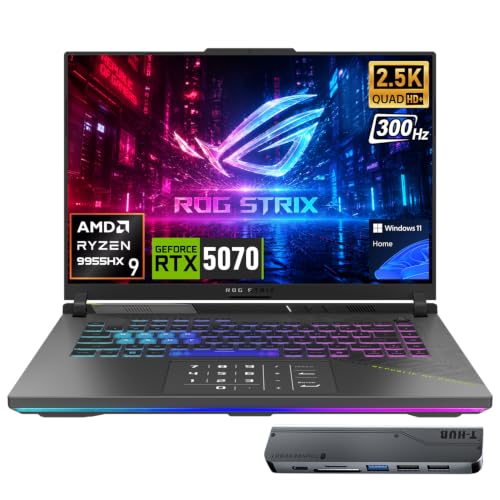
Honesty first, because this pick demands it: the Strix listing names GeForce RTX 5070 graphics and an AMD Ryzen 9 9955HX processor with 32GB of DDR5 memory and a 1TB SSD behind a 16-inch QHD+ 2.5K 300Hz IPS display — and it does not state a graphics-memory figure. That omission matters more in this category than in any other, so the instruction is direct: open the listing, find the VRAM figure for the exact configuration, and let that number, not the GPU’s name, decide whether this machine fits your models. GPU names describe a family; memory describes what the family member in the box can actually hold.
What can be said from the listing is still substantial. The Ryzen 9 9955HX is a high-end mobile processor that will not bottleneck a data pipeline. Thirty-two gigabytes of system memory meets this guide’s floor. The terabyte of storage is the practical minimum for a dataset library. And the ROG line’s cooling is engineered for the worst case its designers imagine, which is a summer gaming session — a duty cycle training resembles closely enough that the translation is favourable. Buyers who also game will find the 300Hz panel self-explanatory; buyers who do not should treat it as a pleasant irrelevance attached to a serious GPU chassis.
- Graphics as printed in the listing: GeForce RTX 5070 — memory figure not stated in the title
- Processor: AMD Ryzen 9 9955HX
- System memory fitted: 32GB DDR5
- Storage: 1TB SSD
- Display: 16-inch QHD+ 2.5K IPS at 300Hz
- Keyboard: 4-zone RGB backlit, per the listing
Strengths
- A flagship-class processor removes the CPU from the list of possible bottlenecks.
- ROG cooling is designed for sustained full-load running, training’s exact demand.
- The QHD+ panel doubles as an excellent data-exploration and visualisation screen.
Trade-offs
- The unstated VRAM figure makes pre-purchase verification mandatory rather than optional.
- Gaming features and lighting are spend that ML work never recovers.
- As with all gaming chassis, Linux garnish — lighting, fan utilities — is owner-managed.
Best for: a practitioner who games as seriously as they train and will verify the memory figure in the listing before ordering.
Not suited for: shoppers unwilling to open the listing and confirm the memory figure themselves before ordering.
The Strix also illustrates a market truth worth internalising: gaming laptops are where current-generation GPUs arrive first and cheapest, because that market’s volume dwarfs the workstation market’s. A Linux ML buyer willing to do the verification work — confirm the memory, accept the garnish compromises, manage the driver themselves — can ride that volume to hardware a workstation budget would not reach. The guide includes this pick for exactly that buyer, with the verification step treated as part of the product rather than a footnote to it.

MSI Katana A15 AI — The Previous-Generation GPU Pick
The Katana makes the case for buying one GPU generation behind the frontier. Its listing names an RTX 4070 — again without a graphics-memory figure in the title, so the same listing check applies — driven by a Ryzen 9-8945HS processor, with 32GB of DDR5 memory and a 1TB SSD behind a 15.6-inch QHD 165Hz display, and MSI’s Cooler Boost 5 named among its features. A previous-generation flagship-adjacent GPU is not a consolation prize in this field. The CUDA ecosystem supports it fully, the frameworks target it as a mainstream install, and the accumulated public knowledge about its behaviour under Linux is deeper than for any newer part, because thousands of owners have already had your problems in public.
The A15’s configuration around the GPU is balanced in the way this guide keeps demanding: memory at the 32GB floor rather than below it, storage at the terabyte a dataset library needs, a processor strong enough that preprocessing is never the story. The QHD panel at 165Hz is a gaming specification that happens to make a fine visualisation screen. Cooler Boost branding aside, the substantive point is that MSI designs this chassis to reject the heat of a fully loaded GPU indefinitely, and indefinite full load is the literal definition of a training run.
- Graphics as printed in the listing: RTX 4070 — memory figure not stated in the title
- Processor: AMD Ryzen 9-8945HS
- System memory fitted: 32GB DDR5
- Storage: 1TB SSD
- Display: 15.6-inch QHD at 165Hz
- Cooling named in the listing: Cooler Boost 5
Strengths
- A mature GPU platform whose Linux behaviour is documented by a large owner base.
- Balanced support specifications — memory and storage both meet this guide’s working floors.
- Cooling engineered for sustained loads rather than benchmark-length bursts.
Trade-offs
- The VRAM figure must be confirmed in the listing; the title does not provide it.
- A previous generation forgoes the newest architecture’s efficiency and CUDA features.
- MSI’s Linux-facing documentation is thinner than the workstation makers’.
Best for: a value-conscious practitioner who prefers a proven GPU generation with deep public documentation.
Not suited for: teams whose framework roadmap depends on the newest architecture’s specific capabilities.
There is a budgeting insight inside this pick that applies across the guide. The money a previous-generation GPU saves can be redirected at the parts of an ML setup that never appear in GPU comparisons: a larger external drive for datasets, a second monitor for watching training curves, a proper backup arrangement for checkpoints that represent weeks of compute. Practitioners consistently underfund those surroundings and overfund the graphics badge; the Katana is the pick for a buyer who has noticed that pattern in themselves and intends to correct it.
Desktop or eGPU Route — The Off-Laptop Answer
The sixth pick is a refusal, offered respectfully: some machine-learning workloads should not be assigned to a laptop at all, and recognising them before purchase is worth more than any single recommendation above. When the work is training models whose memory demands start where laptop graphics end, or running jobs measured in days, the correct machine is a desktop — where a full-size graphics card carries substantially more memory than any mobile part, where cooling is a solved problem, and where the GPU can be upgraded without replacing the computer around it. This pick is prose-only by nature: it is a direction, not a product, and no single listing could represent it honestly.
The external-GPU variant deserves its nuance. An eGPU enclosure over Thunderbolt lets a thin laptop borrow a desktop card at a desk, and for inference, experimentation and moderate fine-tuning it can be a genuinely elegant arrangement — one light machine that travels, one powerful dock that stays home. Its limits are equally real: the link’s bandwidth taxes some workloads, Linux configuration demands patience, and the combined cost approaches a desktop’s while delivering a fraction of its thermal freedom. Treat the eGPU as a bridge for a specific workflow, not as a way to make a laptop into something it is not.
Most practitioners end at the hybrid this pick implies: a capable laptop from the five above for development, prototyping and demonstration, and rented or owned desktop-class compute for the training runs that matter. That is not a failure of laptop buying. It is the shape of the field, and a guide that pretended otherwise would be selling its readers a very expensive lesson.
- Form: a desktop workstation, or a desktop graphics card in a Thunderbolt enclosure
- Graphics memory: desktop cards exceed every figure stated in this guide
- Cooling: full-size chassis solve the sustained-load problem outright
- Upgrade path: the graphics card can be replaced without replacing the machine
- Relationship to the laptop picks: complement for heavy training, not a substitute for a portable machine
Strengths
- Graphics memory beyond the laptop ceiling, at the exact point the ceiling binds.
- Sustained full-power running without thermal negotiation.
- An upgrade path measured in one component rather than one computer.
Trade-offs
- Immobile by definition; the work must come to the desk.
- An eGPU bridge adds configuration complexity and a bandwidth tax.
- Total spend across laptop and desktop exceeds either alone.
Best for: a practitioner whose training ambitions have honestly outgrown mobile graphics memory.
Not suited for: a learner whose work is notebooks, inference and coursework — the laptops above already cover that life completely.
Notice what the desktop route does to the laptop decision itself: it relaxes it. A practitioner who knows heavy training has a home elsewhere can choose among the five laptops by the interactive virtues — memory for pipelines, storage for datasets, a screen for curves, a chassis that travels to the lab — rather than forcing one mobile GPU to be both a development tool and a datacentre. Several of this guide’s readers will find that the Legion or the Katana, bought without anxiety, plus occasional rented compute, outperforms the P16 bought with anxiety, at lower total cost. The P16 remains the answer for work that must be local. The route exists so that “must” gets examined honestly.
Comparison Table: Graphics Memory Is the Headline
| Pick | Graphics (as listed) | VRAM stated in title | System memory | Storage | Character |
|---|---|---|---|---|---|
| ThinkPad P16 | NVIDIA RTX 3500 Ada | 12GB | 64GB DDR5 | 2TB SSD | The local fine-tuning ceiling of this guide |
| Legion 5 | NVIDIA GeForce RTX 5060 | 8GB GDDR7 | 32GB DDR5 | 1TB NVMe SSD | Current generation, known quantity |
| Precision 7680 | NVIDIA RTX 2000 Ada | 8GB | 64GB DDR5 | 1TB SSD | Data-pipeline workstation |
| ROG Strix G16 | GeForce RTX 5070 | Not stated — check the listing | 32GB DDR5 | 1TB SSD | Flagship CPU, verification required |
| MSI Katana A15 AI | RTX 4070 | Not stated — check the listing | 32GB DDR5 | 1TB SSD | Proven generation, balanced build |
| Desktop / eGPU route | Desktop-class card of your choosing | Exceeds laptop figures | As configured | As configured | Where oversized training belongs |
Why Is VRAM the Number That Ends Arguments About ML Laptops?
Because machine learning’s memory appetite is not a preference; it is arithmetic. A model’s weights occupy memory. Its gradients occupy roughly the same again. The optimiser’s state multiplies the bill further, and the activations for whatever batch you are processing queue behind all three. When the sum exceeds the card’s memory, the job does not slow down — it stops, with an out-of-memory error that no amount of processor speed can argue with. That cliff edge is why this guide treats a stated VRAM figure as the single most valuable line in a listing, and why two of its five laptop picks carry an explicit instruction to go and read that figure before ordering.
The practical consequences sort buyers cleanly. Inference and experimentation are comparatively frugal and live comfortably inside 8GB for a wide range of useful models. Fine-tuning is where the bill arrives: parameter-efficient methods exist precisely to shrink it, and they extend an 8GB machine’s reach considerably, while full fine-tuning of anything ambitious walks straight to the 12GB pick or off the laptop entirely. A buyer who knows which of those activities constitutes their actual work can size a purchase correctly in one step; a buyer who guesses will guess wrong in the expensive direction half the time and the inadequate direction the other half.
System memory plays the same game one level up. Datasets are decoded, augmented and batched by the CPU before the GPU sees them, and a machine that swaps during data loading starves a GPU that cost more than the rest of the laptop combined. That is the entire justification for this guide’s 32GB floor and its respect for the two 64GB configurations: in ML, the glamorous component performs only as well as the unglamorous ones feeding it.
How Does the NVIDIA Driver Story Actually Work on Linux?
New Linux ML users often arrive expecting the driver to be the hard part, because folklore says so. The modern reality is more specific. NVIDIA publishes a proprietary driver that carries the CUDA runtime the frameworks depend on, and every major distribution packages it; the installation is a documented procedure measured in minutes, with the genuine caveats living at the edges — Secure Boot signing for the kernel module, the choice between the distribution’s package and the vendor’s runfile, and the discipline of matching driver, CUDA toolkit and framework versions as a set rather than as independent accidents.
The container path has quietly become the professional default, and it changes the calculus in the laptop buyer’s favour. With the driver installed on the host and the CUDA stack carried inside containers, the fragile version-matching moves into images that can be pinned, shared and rebuilt — the same images that run on a cloud instance or a lab server. A laptop set up this way behaves like a small node of the infrastructure its owner will eventually use at scale, which is precisely the mental model worth learning on. It also means the laptop’s distribution choice matters less than its driver currency, freeing the buyer to choose a distribution for its desktop and community rather than for its CUDA folklore.
Two honest warnings complete the picture. First, hybrid graphics — the integrated-plus-discrete arrangement inside most of these laptops — asks the user to understand which GPU is rendering and which is computing; the tooling for this is mature, but it is a concept Windows hides and Linux exposes. Second, suspend and power behaviour with the proprietary driver improves steadily and still rewards a current kernel and driver pairing. Neither warning is a reason to avoid the platform. Both are reasons to buy hardware with a large Linux population, whose owners document the answers before you need them.
A closing driver note for buyers choosing between the workstation and gaming families: the graphics driver does not know which family your laptop belongs to, and neither does CUDA. The same stack serves an RTX Ada in a Precision and a GeForce in a Katana, which means the Linux ML experience equalises quickly after installation day, and the families’ differences reassert themselves in the surrounding territory — support contracts, chassis serviceability, screen and keyboard, the documentation culture you will live inside. Choose the GPU by memory and generation; choose the family by the life you want around it.
When Does a Laptop Stop Being the Right Place to Train?
The signals are consistent enough to list. Jobs begin queuing for the GPU while you wait, and your calendar reorganises around the machine’s availability rather than the reverse. Batch sizes shrink to fit memory until the experiment being run is no longer the experiment you designed. A training run’s heat and noise exile the laptop from the room you live in, so the work happens in a place you are not. And the checkpoint folder becomes the most valuable directory you own while living on a single drive in a bag that travels. Each signal says the same thing: the workload has become infrastructure, and infrastructure wants a fixed address, redundant storage and a graphics card sized by a desktop’s rules.
None of that diminishes the laptop’s role; it clarifies it. Development, debugging, data exploration, prototyping and demonstration remain laptop work even in organisations with serious clusters, because they are interactive and human-paced. The mature setup this guide’s sixth pick describes — laptop for the interactive ninety percent, desktop or rented compute for the batch ten percent — is not a compromise adopted by people who could not afford better. It is the architecture the field itself converged on, and buying a laptop that plays its half of that architecture well is the actual goal.
There is a budget version of the same signal-reading that students should learn early. When a coursework model refuses to fit, the correct responses are technique — smaller batches, gradient checkpointing, parameter-efficient fine-tuning, mixed precision — and those techniques are not workarounds for poor hardware; they are the professional skill set, practised identically on rented hardware by people watching a meter run. A student who learns them on an 8GB laptop arrives at serious compute with habits that save real money. A student who never meets a memory limit arrives with habits that cost it. Scarcity, in this one corner of the field, is a curriculum.
How Should an ML Laptop Be Configured During Its First Week?
Sequence matters more than speed. Update the firmware under the shipped Windows first, while the maker’s updaters are effortless, and make recovery media. Install your distribution, then the NVIDIA driver through the distribution’s own packaging — not a downloaded runfile — so that kernel updates and driver updates arrive as one maintained set. Verify the GPU is visible to the system and to a container before installing any framework; that single check separates driver problems from framework problems for the entire life of the machine, and every later troubleshooting session will silently thank you for it.
Then build the working environment the way you would build it on a server: a containerised CUDA stack pinned to versions, a datasets directory with room to grow, a checkpoints directory with a backup destination that is not the same drive, and a small benchmark script — your own model, your own data, a fixed number of steps — whose runtime you record. That script is the machine’s baseline. After every driver or distribution update, rerunning it tells you within minutes whether the update helped, hurt or broke something, replacing the vague anxiety that otherwise follows every system change in this field.
Finally, set the power expectations deliberately. Training is plugged-in work; configure the machine’s battery behaviour for the interactive work — coding, reading, inference demos — and accept that the GPU’s serious hours happen at a desk with the charger attached and the cooling unobstructed. A laptop configured with that honesty in week one will still be a trusted tool in year three, which is more than can be said for most of the hardware this field burns through.
What Should a Data Pipeline Demand From the Rest of the Machine?
Ask a room of practitioners what their GPU did yesterday and most will describe a machine that waited: for a dataset to download, for images to decode, for a tokeniser to finish, for a checkpoint to write. The pipeline around the GPU is where laptop specifications quietly earn or waste the GPU’s price. Processor cores feed data loaders; this guide’s listings span from strong mobile chips to the HX-class parts in the P16 and Legion, and the difference shows up not in training steps but in the minutes surrounding them, multiplied by every epoch of every run. System memory holds the decoded, shuffled, augmented working set — the reason 64GB configurations stop being extravagant the first time a corpus is prepared locally rather than streamed.
Storage speed and capacity complete the pipeline. Datasets are read repeatedly and randomly; checkpoints are written in large, urgent bursts; container images accumulate versions. The terabyte drives fitted across this guide are the practical floor, and the P16’s two terabytes acknowledge what dataset libraries become by year two. A buyer comparing two machines with equal GPUs should let the pipeline decide: the one with more memory, more storage and more cores will finish more experiments per week, which is the only throughput figure that has ever mattered.
Networking is the pipeline’s forgotten segment. Datasets increasingly live elsewhere — object storage, a lab server, a public repository — and the trip from there to the laptop is part of every project plan. The Legion’s built-in Gigabit LAN is a small listing detail with outsized practical value in that world, and the other picks lean on Wi-Fi and docks to do the same work. Whichever route a machine takes, plan the first dataset transfer before the machine arrives; nothing teaches the value of wired networking like watching a progress bar estimate tomorrow.
How Do Screens and Keyboards Matter to Work That Is Mostly Terminals and Curves?
More than the gaming ancestry of these chassis suggests. ML work at a laptop is reading work — code, logs, loss curves, dataset samples — punctuated by long waits in which the machine, not the human, is busy. The 16-inch panels across this guide earn their size during the reading: a training curve beside a terminal beside an editor is a three-pane argument that smaller screens settle by hiding two of the panes. The P16’s UHD+ resolution suits the visualisation half of the job, plotting dense results legibly; the Precision’s FHD+ panel trades that legibility for endurance and for a price that funds its memory instead, a trade its organisational buyers make deliberately.
The high-refresh panels on the gaming picks deserve an honest sentence: refresh rate does nothing for a training run. What those panels do offer is resolution and size — the Legion’s WQXGA and the Strix’s QHD+ are genuinely good data screens — bundled into the chassis that gaming volume makes affordable. Buy them for the pixels and the cooling, enjoy the smoothness as a tax refund, and never let a hertz figure outrank a memory figure in this category’s arithmetic.
Keyboards and trackpads, finally, are the interface for the interactive ninety percent: the notebooks, the debugging, the thousand small corrections between runs. The workstation picks carry keyboards designed for that punishment by makers whose customers type for a living. The gaming picks carry keyboards designed for visibility in the dark, which is a different virtue — and one that, in a dim lab during a long evening run, turns out not to be worthless either.
Buying Errors That Only Appear at the First Real Training Run
The defining error of this category is buying the GPU’s name and discovering its memory later. Names describe families; configurations within a family differ, and the two picks in this guide whose listings omit the figure exist to teach the habit of checking. The second error is its cousin: sizing the purchase for the tutorial you are following today rather than the work visible one course ahead, in a field where each stage’s models are larger than the last stage’s.
A third error is starving the support act — choosing 16GB of system memory or a half-terabyte drive to reach a GPU badge, then watching data loading and storage become the ceiling the GPU never gets to test. A fourth is ignoring the chassis: a thin machine with a strong GPU will throttle through a long run until its sustained performance resembles a lesser machine’s, a fact that no burst benchmark will confess. A fifth is treating the cloud as an afterthought rather than a component — the buyer who plans the laptop-plus-rental architecture from the start consistently out-produces the buyer who insists the laptop do everything, at any budget.
The last error is skipping the baseline. Owners who never record what their machine did when new cannot tell whether an update changed anything, and in a stack with this many moving parts — kernel, driver, CUDA, framework — that uncertainty compounds into weekends. The benchmark script takes an hour to write in the first week and pays that hour back at the first suspicious slowdown.
How Long Will an ML Laptop Stay Useful Before the Field Moves Past It?
Longer than the field’s marketing suggests, provided the memory figures were sized honestly at purchase. Frameworks churn and architectures age, but a machine with 32GB or 64GB of system memory, a terabyte or more of storage and a GPU whose memory fits your class of models remains a sound development and inference node for years, even as frontier training migrates to bigger hardware — which it was always going to do. The purchases that expire quickly are the ones sized exactly for today’s tutorial; the ones sized for the work beyond it keep being assigned new jobs: yesterday’s training machine becomes today’s inference demonstrator and tomorrow’s data-prep node without ever leaving the desk.
The longevity lever a buyer controls completely is the unglamorous specification set. Graphics generations date in public, but memory and storage date in private, inside your own workflow, and they date slower. A machine bought with headroom in both can absorb years of dataset growth and framework bloat before either becomes the reason for replacement. That is why this guide’s workstation picks, with their 64GB configurations and the P16’s two terabytes, are best understood as longevity purchases wearing performance clothing — and why the gaming picks, balanced at 32GB and a terabyte, are sized to the same horizon rather than to a single product cycle.
Final Recommendation
Start from the workload, not the catalogue. If your machine learning is fine-tuning and experimentation that must happen locally, the ThinkPad P16 is the guide’s summit: the largest stated graphics memory, 64GB of system memory, 2TB of storage, and a workstation’s support culture. If your work is data-pipeline-heavy inside an organisation, the Precision 7680 matches the system memory and trades graphics room for a 20-core processor and Dell’s workstation discipline. The Legion 5 is the current-generation value in a chassis built for sustained load, with its 8GB stated plainly. The ROG Strix and the Katana reward buyers who verify the unstated figure in the listing — the first with a flagship processor and cooling, the second with a proven generation’s deep documentation. And when the training outgrows all of them, the desktop route is not a defeat but the plan working as designed. Buy the memory your models need, feed it properly, keep its checkpoints backed up somewhere that is not the same drive, and let the laptop be the best development node it can be rather than a small, hot imitation of a server — because a well-chosen ML laptop, honestly sized and honestly cooled, will carry the interactive whole of your practice for years while the heavy training visits the hardware built for it.
Frequently Asked Questions
How much VRAM do I actually need for learning machine learning?
For coursework, notebooks, inference and learning the tooling, the 8GB configurations in this guide are genuinely sufficient, especially with the parameter-efficient fine-tuning methods that modern courses teach early. For full fine-tuning of larger models, graphics memory becomes the hard ceiling it is described as in this guide, and the 12GB pick — or off-laptop compute — enters the conversation. Size the purchase to the stage beyond the one you are in.
Why does this guide only include NVIDIA graphics for Linux ML?
Because the practical machine-learning ecosystem — CUDA, the major frameworks’ acceleration paths, the container images the field shares — is built overwhelmingly on NVIDIA’s stack, and under Linux that stack is the documented, travelled road. Other vendors’ compute platforms exist and are progressing, but a buyer whose goal is to run the field’s standard tooling with the least friction is buying CUDA compatibility, and that means NVIDIA hardware.
Is a gaming laptop a sensible machine for ML development?
Yes, with eyes open about the garnish. The GPU and cooling — the components ML actually stresses — are exactly what gaming chassis engineer hardest, and the Legion, Strix and Katana in this guide are included on that merit. What does not transfer is the vendor’s Windows software layer for lighting and fan control, and a support culture aimed at players. Buy the hardware, expect to manage the trimmings under Linux yourself.
Should I install CUDA from NVIDIA’s website or through my distribution?
Prefer the maintained path: the driver through your distribution’s packaging, and the CUDA stack inside containers wherever your workflow allows. That arrangement keeps kernel and driver updates arriving as a tested set and lets framework environments be pinned and rebuilt as images. Direct vendor installers have their place in specialised setups, but they make the owner responsible for version-matching that the container model exists to eliminate. Whichever route you take, record the working combination — kernel, driver, CUDA, framework — in your project notes the moment it first trains successfully. That one line of documentation converts every future update from a leap of faith into a controlled experiment with a known-good state to return to, and it is the habit that most reliably separates practitioners whose environments survive the year from those whose environments are rebuilt every term.
Can an external GPU turn my ultrabook into an ML machine?
Partly, and the guide’s sixth pick treats it as a real option with real limits: a desktop card in a Thunderbolt enclosure brings desktop graphics memory to a desk-bound laptop for inference and moderate training, at the cost of link bandwidth, configuration patience and a combined price approaching a desktop’s. For a single-machine household it can be the right bridge; for sustained heavy training, a desktop remains the honest destination.
Why do two picks in this guide not state a VRAM figure?
Because their listing titles do not state one, and this guide asserts graphics memory only where the listing prints it. The RTX 5070 in the ROG Strix and the RTX 4070 in the MSI Katana are named without a memory figure in their titles, so the guide directs you to the listing itself for that number. It is the most important number in the category; sourcing it from the actual listing beats inheriting it from a model-name assumption.
Related Guides
Machine learning sits at the crossing of several decisions this series treats separately, and three of them follow naturally from this one: the dual-booting guide, for practitioners who need a Windows partition preserved beside their Linux environment, our tour of laptops that run Linux as their native system, including the makers who preinstall it, and the compatibility guide, which teaches the verification habits this page applied to graphics memory, extended to every component in a machine.



[…] machine, so these companion pieces continue the same line of thought in adjacent territory: the machine-learning laptop guide, where discrete graphics and graphics memory take over the criteri…, our dual-booting guide, for splitting one drive between Windows and Linux without either side […]