What's inside
- Key Takeaways
- Quick Picks
- How We Chose These Picks
- Why Does Per-Cell Charge Control Matter So Much?
- How Fast Should an AA Charger Actually Be?
- What Should You Check Before Mixing Old and New Cells?
- How Do You Build a Rotation System That Actually Sticks?
- What Does a Refresh or Conditioning Cycle Actually Do?
- How Should You Store Charged Spares Between Uses?
- How Do You Charge a Mixed Drawer of Cells Without Chaos?
- What Should Parents of Toy-Heavy Households Do Differently?
- How Do You Test a New Charger During Its First Week?
- Why Do Some Cells Leak or Swell, and What Should You Do?
- How Much Do Rechargeables Actually Save a Household?
- What Changes When You Add a Camera Flash to the Mix?
- How Do You Know When a Cell Has Reached the End?
- What About Charging at Work or in a Shared Office?
- Which AA and AAA Chargers Earned a Detailed Look?
- How Do the Six Chargers Compare Side by Side?
- What Are the Most Common Mistakes With AA and AAA Chargers?
- Final Recommendation
- Frequently Asked Questions
- Related Guides
As an Amazon Associate I earn from qualifying purchases. This post may contain affiliate links at no extra cost to you.
**[widgetverdict.com] is reader-supported. When you buy through links on our site, we may earn an affiliate commission.**
Where to buy: every charger below is sold through Amazon, and each linked name takes you to that exact listing so you can confirm bay count, plug type and what is included in the box before ordering.
The best battery chargers aa aaa owners can buy share one unglamorous trait: they stop charging when a cell is full instead of cooking it slowly on a timer. That single difference decides whether a set of rechargeable AAs survives two hundred cycles or fades after forty. Households run more NiMH cells than they realise — remotes, game controllers, camera flashes, kids’ toys, wireless mice, headlamps — and a charger that treats each cell individually keeps all of them useful for years.
This guide compares six chargers that cover the realistic spread of home use, from a four-bay Panasonic unit with a proper LCD to a sixteen-bay BONAI station built for families who burn through cells every weekend. Bay count matters less than charge control, so the sections below explain how termination detection works, why independent channels beat paired slots, and how to match a charger to the way your household actually uses batteries.
One more thing shapes this shortlist: honesty about what a charger cannot do. No unit here resurrects a cell that has been shorted, leaked or left flat for five years, and none charges lithium AA-format cells, which are a different product entirely despite sharing a shape. Everything below is NiMH territory, with one pick also speaking NiCd, and the buying advice assumes standard household and hobby loads rather than industrial cycling.
Prices in this category tempt buyers toward the cheapest box on the shelf, yet the charger is the one component that touches every cell you own. A poor one taxes every set it meets, while a good one quietly extends the life of cells bought years apart. That leverage is why this guide spends more words on charge control than on bay counts and buttons.
Key Takeaways
- Independent channels matter more than raw speed, because cells in a pair rarely empty at the same rate.
- An LCD that reports per-cell progress helps you spot a tired cell before it drags down a whole set.
- Four bays suit most couples and solo users; eight or sixteen bays pay off in toy-heavy family homes.
- USB-powered chargers travel well but charge slowly from weak laptop ports, so check the input rating.
- Retire cells that come off the charger warm and still show low capacity in your devices.
Quick Picks
| Charger | Badge | Why it earns a place |
|---|---|---|
| Panasonic BQ-CC65 eneloop pro Quick Charger with LCD | Best for flash and camera users | A proper per-cell LCD and quick-charge circuitry from the maker of eneloop cells themselves. |
| Energizer Recharge Pro Rechargeable AAA and AA Battery Charger | Best starter bundle | Ships with four AA NiMH cells included, so the kit works the day it arrives. |
| Amazon Basics Smart Battery Charger for AA and AAA NiMH Batteries | Best simple four-bay value | Smart charging with LED indicators and stated overcharge protection in a compact NA-plug body. |
| EBL LCD Battery Charger Smart Individual 907 AA AAA | Best mid-price display pick | Individual smart channels with an LCD, covering both NiMH and NiCd cells. |
| POWEROWL 8 Bay AA AAA Battery Charger, USB High-Speed | Best USB-powered eight-bay | Eight independent slots powered over USB, handy for desks, vans and travel kits. |
| BONAI AA AAA Battery Charger 16 Bay for NiMH Rechargeable Batteries | Best for large households | Sixteen independently controlled bays on a standard American AC plug. |
How We Chose These Picks
We shortlisted chargers that detect a full charge per cell rather than relying on a fixed timer, because timer-only units are the main reason inexpensive NiMH sets die early. Each pick also had to accept both AA and AAA sizes without adapters, show its charging state clearly enough to read at a glance, and come from a maker with a track record in rechargeable batteries rather than a one-season storefront brand.
Where a listing title states a feature — an LCD panel, a USB port, overcharge protection — we treated that as the verified specification and said so plainly. Where the title stays silent about charge current or termination method, the spec boxes below mark that honestly instead of filling the gap with a guessed number.
We also weighed the physical side of ownership: whether the unit stands stably with cells loaded, whether its indicators can be read from across a room, and whether it asks for a proprietary power brick that will inevitably get lost. Chargers live unglamorous lives in drawers and on shelves, and the ones people keep using are the ones that stay out of the way until the moment a device dies.
Finally, we favoured chargers whose listings describe their own behaviour plainly. A maker willing to state charge time, protection features and what is excluded from the box is a maker whose other claims deserve more trust, and that editorial signal tracked closely with the units owners keep for years rather than replace within a season.
We also discounted any charger whose slots force cells into fixed pairs, however attractive its price or bay count looked, because that single design choice undermines everything else this guide values. Readers will notice no paired-slot unit appears below, and that absence is deliberate rather than an oversight of the shortlist.
Why Does Per-Cell Charge Control Matter So Much?
NiMH cells signal fullness with a tiny voltage dip at the top of the charge, and a smart charger watches for that dip on every slot separately. Pair-charging designs, still common on bargain units, watch two cells as one circuit, so a fuller cell keeps absorbing current while its emptier partner catches up. That overcharge heat is what shortens cell life, and it explains why two identical batteries bought on the same day can perform very differently after a year in a paired charger.
Independent channels also let you charge one cell or three cells without hunting for a matching partner, which suits real household patterns: a wireless mouse dies alone, a headlamp takes two, a controller takes two more. Chargers in this guide all handle odd counts gracefully, and the detailed sections note which ones report each slot separately on a display.
How Fast Should an AA Charger Actually Be?
Speed is a trade, not a trophy. Pushing a full charge into an AA cell in under an hour generates heat that ages the chemistry, while a gentle overnight rate can leave you short when a camera flash is needed at short notice. The middle ground most households want is a two-to-four-hour full charge for typical AA capacities, with the option to top up a single cell faster when the charger supports a quick mode, as the Panasonic at the top of this list does.
Heat you can feel through the cell wall after charging is the simplest field test. A cell that finishes mildly warm is fine; one that finishes hot enough to be uncomfortable is being pushed too hard or has developed high internal resistance and should be retired. Several picks below include temperature or overcharge safeguards in their listings, and those protections matter more than headline charge times.
What Should You Check Before Mixing Old and New Cells?
Sets work best when their members share age, brand and capacity, because the weakest cell in a device limits the whole string and gets driven hardest. A charger with per-cell readouts quietly becomes a sorting tool: charge a mixed drawer of cells, note which ones finish suspiciously fast or run hot, and group the healthy ones together for demanding jobs like flashes and game controllers.
Keep a simple rotation habit. Mark new sets with a small dot of paint or a dated sticker, store charged spares in a separate pouch from empties, and never return a half-used cell to the charged pouch on memory alone. The chargers below all make this easier by showing slot-by-slot status, so a glance tells you which cells are ready and which are still cooking.
How Do You Build a Rotation System That Actually Sticks?
A rotation system fails when it depends on memory, so build it out of objects instead. Two small pouches or boxes, one marked with a green dot and one with a red dot, hold charged and spent cells respectively, and the rule of the house is that a cell travels only between a device, the charger and those two boxes. Within a fortnight the system runs itself, and the mysterious drawer of ambiguous batteries disappears.
Label sets, not single cells. Four AAs bought together get the same tiny paint mark and live, charge and retire together, because a set that shares a history ages evenly and performs predictably in multi-cell devices. When one member of a set fails, retire the set from demanding work together; the survivors can finish their days in a wall clock or a remote, where a weak cell harms nothing.
What Does a Refresh or Conditioning Cycle Actually Do?
Some chargers offer a refresh mode that discharges a cell and charges it back up, sometimes repeatedly. On modern low-self-discharge NiMH cells this is mostly a diagnostic: a cell whose capacity returns after a refresh was suffering from voltage depression after long storage, while a cell that stays weak afterwards is genuinely worn out. Run a refresh when a set misbehaves, not on a calendar schedule.
Conditioning cannot repair physical damage, reversed cells or internal shorts, and a charger that promises resurrection is overselling. Think of refresh as a stethoscope rather than a cure. The display-equipped picks in this guide make the results of a refresh visible, which is precisely why they earned their places over cheaper blind units.
How Should You Store Charged Spares Between Uses?
NiMH cells hold their charge best in a cool, dry place away from metal objects that could bridge their terminals. A plastic case or the original retail tray beats a loose handful in a drawer, where a stray coin or paperclip can short a cell and quietly ruin it. Low-self-discharge cells, the kind most households now own, keep the bulk of their charge for many months on a shelf.
Keep spares at room temperature rather than in a fridge; the old refrigerator advice belongs to earlier chemistries and mostly adds condensation risk. Before a trip or an event, top up the sets you plan to carry, because a cell charged yesterday still outperforms one charged in spring, however good its shelf manners are.
How Do You Charge a Mixed Drawer of Cells Without Chaos?
Start by emptying the drawer onto a table and sorting by size and brand, discarding anything leaking, rusted or swollen without ceremony. Charge each brand group on its own run, watch the finish times, and pencil the date on the cells that behave. By the end of one weekend the drawer becomes three honest groups: front-line sets for cameras and controllers, second-line cells for clocks and remotes, and a recycling bag.
Resist mixing brands inside one device even when capacities look similar on paper, because discharge curves differ enough to strand the weaker cell early. If a device needs four cells and you own three good ones plus a stranger, buy a fresh set of four instead; the stranger will cost you the shot, the save file or the torch beam at the exact moment it matters.
What Should Parents of Toy-Heavy Households Do Differently?
Toys change the arithmetic completely. A household with ride-ons, talking plush, train sets and a games console can cycle forty cells a week, and at that volume the charger stops being an accessory and becomes infrastructure. Buy bays for the peak, not the average: the week before a birthday or a holiday is when a small charger turns into a queue and disposables sneak back into the shopping basket.
Keep the charging station somewhere children do not treat as a toy itself, but close enough to the toy storage that swapping cells is a ten-second job. Teach older children the two-pouch rule and the system largely runs itself; the charger’s real job in a family home is making the right thing the easy thing, every single evening.
How Do You Test a New Charger During Its First Week?
Run one known-good set of cells first and note the charge time against the maker’s claim, then run your oldest, most suspicious set and watch how the unit behaves. A good charger finishes the healthy set evenly, takes noticeably longer or flags problems on the tired set, and never leaves any cell too hot to hold comfortably. That contrast tells you more than any single charge cycle can.
Next, charge a single cell alone and a mixed pair of sizes, confirming the unit handles odd loads without complaint, since odd loads are what real life delivers. Finally, leave a finished set in place overnight once, deliberately, and check in the morning that nothing is warm and nothing has been quietly baking. A charger that passes those three evenings has earned its shelf space.
Write the results on a sticky note inside the battery box. Dates and impressions recorded in week one become the baseline that lets you spot decline in year two, when a set that once ran a controller for a month starts lasting a fortnight and you need to know whether the cells, the charger or the controller changed.
Why Do Some Cells Leak or Swell, and What Should You Do?
Leaks in rechargeable NiMH cells are rarer than in disposables but not unknown, usually following physical damage, a dead short or years of service past sensible retirement. A white crust at the seal, a bulged wrapper or a cell that rocks on a flat surface instead of lying still are all retirement signals. Remove such cells from service the day you notice them, not after one more try.
Handle a leaking cell with a tissue, wash your hands afterwards, and send it to battery recycling rather than the household bin. Never charge a cell that has leaked, swollen or been punctured, whatever the charger promises; no refresh mode repairs a broken seal, and a charger is entirely the wrong place to test your luck.
How Much Do Rechargeables Actually Save a Household?
The arithmetic depends on how many disposables your home burns, but the pattern is consistent: a device used daily, like a games controller or a wireless mouse, repays its rechargeable cells within a couple of months, while a clock that sips power for two years on one alkaline barely justifies the swap. Convert the hungry devices first and let the savings fund cells for the rest.
Count the environmental side honestly too. Every rechargeable cell that completes a few hundred cycles replaces a few hundred disposables that would otherwise head for landfill or recycling streams, and the chargers in this guide are what make those long lives possible. A disposable in a landfill is a small thing; a household’s decade of them is not.
What Changes When You Add a Camera Flash to the Mix?
Flashes are the sternest household test a NiMH cell faces, because recycle time depends on the cell delivering strong current repeatedly without sagging. Sets that feel fine in a remote can embarrass themselves in a speedlight, which is why photographers keep dedicated, marked flash sets and charge them on display-equipped units that reveal a fading member early.
If your flash work is occasional, borrow the household’s best set rather than buying a dedicated one, but return it to the charger the same evening. Flash duty punishes cells left sitting half-drained, and a set topped up after every outing will outlast a neglected premium set by a wide and somewhat unfair margin.
How Do You Know When a Cell Has Reached the End?
A healthy NiMH cell accepts a charge in roughly the expected time, delivers most of its capacity in service, and repeats that performance month after month. The end announces itself through small betrayals: a set that once powered a controller for weeks now fades in days, a cell that finishes charging suspiciously quickly because there is little left inside it to fill, or warmth during a gentle charge that never used to appear.
Confirm the verdict before recycling. Charge the suspect alone, rest it overnight, and try it in a forgiving single-cell device like a torch. If it fades there too, the cell has given its service and earned its retirement. Keeping genuinely dead cells in circulation is the most common reason households conclude, wrongly, that rechargeables do not work.
What About Charging at Work or in a Shared Office?
A small four-bay unit on a desk quietly solves the office version of the battery problem: wireless keyboards and mice that die mid-morning, presentation remotes that fail in front of an audience, and the shared torch in the facilities cupboard. Keep one labelled set in service and one on charge, and the swap takes seconds without a trip to a stationery cupboard full of disposables.
Office buyers should favour the simple LED units here over the display models, because a charger that colleagues can operate without instruction is a charger that actually gets used. The display models earn their keep at home, where one owner learns their readings and benefits from the detail over years of cycling.
Which AA and AAA Chargers Earned a Detailed Look?

Panasonic BQ-CC65 eneloop pro Quick Charger with LCD — Best for flash and camera users
Panasonic builds this charger around its own eneloop and eneloop pro cells, and that shows in the details that matter: each of the four positions reports on an LCD panel, so you can watch a single cell lag behind its neighbours and pull it from service before it ruins a set. For photographers running speedlights, that visibility is worth more than extra bays, because a flash recycles only as fast as its weakest cell allows.
The quick-charge circuitry suits people who discover empty cells an hour before they need them. Used daily it will age cells a little faster than a slow overnight unit, so treat quick mode as the exception and standard charging as the routine. The USB port on the body is a thoughtful travel touch, letting one wall outlet handle both the charger and a phone overnight in a hotel room.
Owners pairing this charger with eneloop pro cells for wedding and event photography describe the same routine: four sets rotate through the day, the LCD flags any cell that finishes oddly fast, and that cell is benched before the next job rather than during it. That kind of quiet quality control is what separates a charger used by people who bill for their shots from one bought on impulse.
One practical note for travellers: the LCD makes this the charger to pack when a trip involves ceremonies, matches or performances where a dead flash is not an option, because a ten-second glance before leaving the room confirms every cell. At home it earns a permanent spot rather than a drawer, since a charger that is visible gets used and a charger that is stored gets forgotten.
Verdict in one line: the BQ-CC65 is the charger this guide would hand to a working photographer without a moment’s hesitation. Its display, pace and pedigree align in a way few rivals manage at any size.
For wedding shooters the calculation is simple: one missed flash cycle during a first dance costs more than this charger ever will.
- Bays: 4 independent positions for AA or AAA NiMH cells
- Display: LCD indicator panel showing per-cell charge state
- Extra port: USB charging port for a phone or small device
- Termination detail: Missing from the title; the Panasonic handbook is the authority here
- Power source: The title omits it, so Panasonic documentation decides the matter
Strengths
- Per-cell LCD reporting exposes weak cells early
- Quick charging rescues last-minute shoots and trips
- Made by the same company behind eneloop cells
Trade-offs
- Four bays fill quickly in a toy-heavy household
- Quick mode trades some cell lifespan for speed
- Costs more than basic four-bay alternatives
Best for: photographers and anyone who depends on matched sets of high-drain cells.
Not suited for: families who need to cycle a dozen or more cells at once.

Energizer Recharge Pro Rechargeable AAA and AA Battery Charger — Best starter bundle
Most charger purchases stall on a silly problem: the charger arrives and the household owns no rechargeable cells to put in it. Energizer solves that by packing four AA NiMH cells with this Recharge Pro, turning it into a working kit rather than the start of a second shopping trip. The stated three-hour full charge lands in the sensible middle ground discussed earlier — quick enough for same-evening use, gentle enough for regular cycling.
Treat this as the gateway charger for a home converting its remotes and controllers from disposables. The four included cells will not cover a whole house, so budget for a second set once the habit sticks, and note that AAA cells are supported by the charger but not included. Its appeal is simplicity: plug it in, read the indicators, and stop thinking about batteries for a while.
The included cells also make this the easiest unit here to give as a gift to a parent or a student, because nothing else needs buying and the instructions fit on a card. Once the household sees a controller run for weeks on one charge cycle, the second set of cells and a spot for the charger near the television tend to follow without any persuading.
Expect the included cells to handle remote and controller duty for years before fading, and expect to outgrow the four bays before you outgrow the charger itself. When that day comes, this unit retires gracefully to a bedroom or office as the second charger, which is a better fate than most starter electronics get and a sign the original purchase was well judged.
Verdict in one line: the Recharge Pro is the friendliest first step a disposable-burning household can take this year. Included cells, an honest charge time and a trusted name remove every excuse to delay switching.
Grandparents’ houses run on remotes and hearing-aid-adjacent gadgets; a simple bundled kit like this one removes the friction entirely.
- Bays: 4 positions for AA or AAA NiMH cells
- Included cells: 4 NiMH rechargeable AA batteries in the box
- Charge time: listing states a full charge in 3 hours
- Display type: Missing from the title; the Energizer handbook is the authority here
- Input power: The title omits it, so Energizer documentation decides the matter
Strengths
- Included AA cells make it a complete starter kit
- Three-hour charge time balances speed and cell care
- Simple operation suits first-time rechargeable users
Trade-offs
- Only four bays once the household converts fully
- No AAA cells included despite AAA support
- Fewer readouts than LCD-equipped rivals
Best for: households buying their first rechargeable setup for remotes and controllers.
Not suited for: enthusiasts who want per-cell diagnostics on a screen.

Amazon Basics Smart Battery Charger for AA and AAA NiMH Batteries — Best simple four-bay value
The Amazon Basics smart charger is the pick for people who want protection features without paying for a display. Its listing states overcharging protection outright, which is the safeguard that matters most in a charger that will live plugged in behind a television or on a kitchen counter for months at a time. LED indicators keep the interface honest and simple: a cell is charging, or it is done.
Four bays and a fixed North American plug define its role clearly. It belongs in one room, serving the devices in that room, rather than travelling the world. Households often end up happiest with two modest chargers in different rooms instead of one large station everyone queues for, and this unit is priced and sized for exactly that pattern.
In daily service the Basics unit disappears into the background, which is the compliment basic chargers should aim for. Its LEDs are visible in a dim room without lighting it up, the cells seat with a positive click, and the body stays cool enough through a full load that nobody worries about the shelf it sits on. Buy two for two rooms and the whole question of where to charge simply goes away.
Renters and dorm residents tend to like this charger for a mundane reason: it asks for nothing. No app, no firmware, no account, no proprietary cable — a plug, four slots and two colours of light. In shared housing that simplicity also means housemates can use it correctly without a briefing, and cells stop vanishing into other people’s controllers still half charged.
Verdict in one line: the Basics charger is the quiet second unit every converted household eventually wishes it owned. Stated protection, compact size and a fair brief make it the default spare-room recommendation here.
If the living-room charger is always busy, this is the unit to station by the bed for torches and bedside gadgets.
- Bays: 4 bays for AA and AAA NiMH rechargeable batteries
- Indicators: LED indicators for charge status
- Protection: overcharging protection stated in the listing title
- Plug: NA plug fitted for North American outlets
- Charge current per slot: Missing from the title; the Amazon Basics handbook is the authority here
Strengths
- Overcharge protection stated in the listing
- Compact body suits a permanent countertop spot
- LED status is readable without instructions
Trade-offs
- Fixed NA plug limits international travel use
- No screen for per-cell health detail
- Four bays may bottleneck larger households
Best for: a second-room charger for the living room or home office.
Not suited for: travellers who need multi-voltage or USB input.

EBL LCD Battery Charger Smart Individual 907 AA AAA — Best mid-price display pick
EBL’s 907 pairs the two features that extend cell life most: genuinely individual channels and a screen to watch them with. Individual control means a single AAA for a kitchen scale charges on its own schedule instead of being yoked to a partner, and the LCD turns the vague question of whether a cell is still good into something you can observe across a few cycles.
NiCd support is a niche but real advantage for owners of older garden tools and hobby gear whose packs and cells predate the NiMH era. Everyone else can ignore that line of the spec sheet and enjoy the display. If your drawer holds cells from three brands and two decades, this is the charger that helps you sort the keepers from the recyclables.
The 907 rewards a few minutes of attention the first week you own it. Watch how long each of your older cells takes compared with a fresh set and the display starts telling a story about your whole collection: which brand aged gracefully, which bargain cells were never the bargain they seemed. That knowledge changes buying habits faster than any review can.
Gardeners with older solar lights and NiCd-era tools will find the chemistry flexibility quietly valuable, since those legacy cells can share the same bench charger as the household AAs instead of demanding a second unit. Everyone else should simply enjoy the screen. Either way, the 907 sits at the sweet spot between the blind budget boxes and the laboratory analysers.
Verdict in one line: the EBL 907 turns a chaotic cell drawer into a collection you actually understand. Individual channels plus a screen deliver insight that blind chargers simply cannot offer their owners.
Hobbyists reviving older RC gear will appreciate that the same bench unit handles their legacy cells and the household’s modern ones.
- Channels: smart individual charging slots
- Chemistries: NiMH and NiCd rechargeable batteries
- Sizes: AA and AAA cylindrical cells
- Display: LCD screen stated in the product name
- Input power: Missing from the title; the EBL handbook is the authority here
Strengths
- Individual channels handle odd cell counts easily
- LCD makes cell health visible over time
- NiCd compatibility rescues older equipment
Trade-offs
- Menu and display add a small learning curve
- Bay count trails the largest stations here
- NiCd support is wasted on all-NiMH homes
Best for: owners of mixed-age cell collections who want visibility.
Not suited for: shoppers who only ever charge brand-new matched sets.
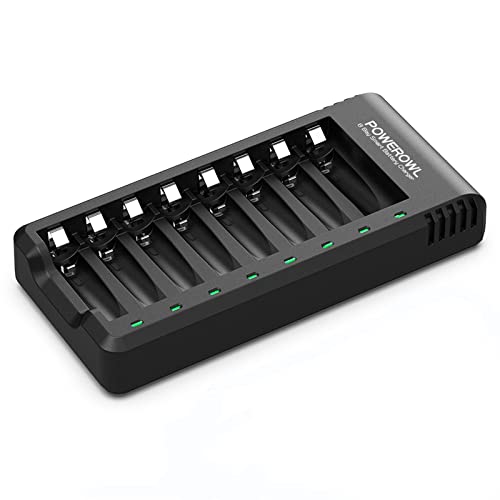
POWEROWL 8 Bay AA AAA Battery Charger, USB High-Speed — Best USB-powered eight-bay
Eight bays over USB is a specific and useful combination. The POWEROWL can live on a desk hub, in a camper van, or in a travel bag, drawing power from the same bricks and ports that already charge everything else you own. Independent slots mean the eight bays behave like eight small chargers, so a pair for a controller and a single for a mouse can finish at different times without penalty.
The honest caveat sits in the listing itself: no adapter is included, and USB power is only as strong as the port feeding it. A tired laptop port will stretch charge times considerably, while a healthy multi-amp wall brick keeps things brisk. Buy this charger because the USB flexibility fits your life, and feed it from a decent source.
Charging from a power bank on a campsite or in a site cabin is where this POWEROWL earns fans that mains units cannot reach. Lanterns, headlamps and a couple of handheld games can all cycle through it overnight from one large power bank, and in the morning the same bank tops up a phone. Few chargers on this page can claim a second life off the grid.
A word about expectations: eight bays fed from USB will not match a mains station for turnaround when every slot holds a drained high-capacity AA. Plan overnight cycles and it delights; demand a full fleet in one hour and it disappoints. Matched to realistic routines — charge while you sleep, swap in the morning — it is one of the most flexible designs in this roundup.
Verdict in one line: the POWEROWL is the travel and desk charger for people whose outlets are already spoken for. Eight independent USB-fed slots cover more real situations than its modest footprint suggests at first glance.
Festival crews and market traders, who live on power banks for days, can keep every lantern and radio alive from this one hub.
- Bays: 8 bays for AA and AAA NiMH cells
- Channels: independent slot charging
- Input: USB powered; no adapter included per the listing title
- Charge speed note: high-speed charging claimed in the listing title
- Wall adapter: not included, per the listing title
Strengths
- USB input works with hubs, bricks and power banks
- Eight independent slots cover a family’s daily churn
- Packs flat for travel and off-grid kits
Trade-offs
- No wall adapter in the box
- Charge speed depends heavily on the USB source
- Plastic build feels lighter than mains units
Best for: desk setups, van life and travel kits short on outlets.
Not suited for: anyone expecting mains-charger speed from any USB port.

BONAI AA AAA Battery Charger 16 Bay for NiMH Rechargeable Batteries — Best for large households
Sixteen bays sounds excessive until a household counts its battery-powered toys, holiday lights, lanterns and game controllers in one sitting. The BONAI station exists for that household. Independent control on every bay is the critical detail: a sixteen-bay unit that charged in locked pairs would waste half its advantage, while this one lets you drop in any number of cells in any mix of AA and AAA.
It runs from a standard American AC plug, which keeps charge rates consistent in a way USB stations cannot promise, and LED indication per bay keeps a full load manageable at a glance. Remember that cells are not included, so the true cost of the setup includes the two or three dozen NiMH cells a station like this exists to serve. Our companion guide to the best battery nimh chargers goes deeper on chemistry behaviour if you want to understand what those cells are doing on the charger.
The BONAI also suits landlords, Scout leaders and anyone maintaining a fleet of shared devices, where cells vanish into equipment and return in unpredictable numbers. Sixteen independent bays swallow a whole returned fleet at once, and by morning every lantern and torch is ready to go out again. In that setting the purchase pays for itself in disposable batteries never bought.
Measure the shelf before ordering, because sixteen bays plus elbow room for hands is a commitment of counter space. Owners who give it a proper home near the utility sink or the games cupboard report the same effect: the household stops buying disposables entirely within a month, because there is always a charged cell within arm’s reach and never a reason to improvise.
Verdict in one line: the BONAI station is fleet infrastructure, and big households will wonder how they managed without it. Sixteen independently controlled bays end the charging queue for good in homes that need them.
Church halls, rental cottages and clubhouses with shared torches and microphones are exactly the fleets this station was born to serve.
- Bays: 16 bays for NiMH rechargeable AA and AAA cells
- Control: independent control per bay with LED light indication
- Plug: standard American AC charging plug
- Included cells: batteries not included, per the listing title
- Chemistry scope: NiMH only per the listing title
Strengths
- Sixteen bays end charging queues in big families
- Independent control suits mixed AA and AAA loads
- Mains power keeps charge times predictable
Trade-offs
- Batteries not included raises the total outlay
- Footprint demands a permanent home on a shelf
- Overkill for apartments with few battery devices
Best for: large families and holiday-light enthusiasts with deep cell drawers.
Not suited for: minimalists who own eight rechargeable cells in total.
How Do the Six Chargers Compare Side by Side?
| Charger | Format and capacity | Standout trait |
|---|---|---|
| Panasonic BQ-CC65 eneloop pro Quick Charger with LCD | 4 bays, AA and AAA | LCD panel plus a USB charging port |
| Energizer Recharge Pro Rechargeable AAA and AA Battery Charger | 4 bays, AA and AAA | Batteries included in the box |
| Amazon Basics Smart Battery Charger for AA and AAA NiMH Batteries | 4 bays, AA and AAA | Stated overcharging protection |
| EBL LCD Battery Charger Smart Individual 907 AA AAA | Individual slots, AA and AAA | LCD readout with NiCd support |
| POWEROWL 8 Bay AA AAA Battery Charger, USB High-Speed | 8 bays, AA and AAA | USB input with independent slots |
| BONAI AA AAA Battery Charger 16 Bay for NiMH Rechargeable Batteries | 16 bays, AA and AAA | Independent control on every bay |
Read the table by workload rather than by bay count alone. A four-bay charger with a good display teaches you more about your cells than a sixteen-bay unit you never study, while a big station quietly wins on sheer throughput during the December toy season. Most homes land happily in the middle: eight bays, independent slots, and a power source that matches where the charger will actually live. A useful tiebreaker is where the charger will live: kitchen counters favour compact footprints and quiet indicators, workshops favour big bays and bright LEDs, and travel bags favour USB input above almost everything else. If two finalists remain tied, choose the one whose indicators you can read from where you will actually stand — across a kitchen, down a hallway, or in a dark tent — because a display you cannot see is a feature you do not own.
What Are the Most Common Mistakes With AA and AAA Chargers?
- Leaving cells on a timer-only charger for days, which bakes them slowly and halves their useful life.
- Charging mismatched pairs in a paired-slot unit and blaming the batteries when performance sags.
- Mixing freshly charged cells with half-used ones in a camera flash, then missing shots as the weak cell collapses.
- Feeding a USB charger from the weakest port in the house and concluding the charger itself is slow.
- Throwing away healthy cells that only needed a few full cycles after months sitting discharged in a drawer.
The drawer problem deserves one more word, because it is the mistake behind most others. Cells stored without any system — charged and empty jumbled together — make every device unreliable and every charger look guilty. A labelled two-pouch system, charged spares in one and empties in the other, fixes more battery frustration than any upgrade on this page.
Finally, resist the urge to judge a charger by its first evening. NiMH cells that sat in a warehouse for a year often need two or three cycles to reach full stride, and a charger condemned on night one may simply have been waking its cells up. Judge the pairing after a fortnight of normal use, when charge times and runtimes have settled into their honest pattern.
One last quiet mistake: buying a second charger identical to the first when the household’s real problem was location, not capacity. A modest unit in the room where devices actually die prevents more disposable purchases than a flagship stationed two floors away, which is why this guide keeps recommending distributed, boring, always-plugged-in charging points.
Final Recommendation
If you buy one charger from this list, make it the Panasonic BQ-CC65: the per-cell LCD teaches good habits, quick charging covers emergencies, and it is built by the company whose cells most enthusiasts already trust. Families should skip straight to the BONAI sixteen-bay station or the POWEROWL eight-bay, depending on whether mains power or USB flexibility suits the room where charging will happen.
Budget a thought for the cells themselves while choosing. A premium charger fed with bargain cells still produces bargain runtime, and a modest charger fed with quality low-self-discharge cells performs above its station. The pairings that work best in reader households are boring ones: reputable cells, a charger with per-cell control, and a shelf where both live permanently.
Whichever unit you choose, pair it with a simple rotation system and retire cells that finish hot or fade fast. Do that, and the charger you buy this year quietly removes disposable batteries from your shopping list for good — one remote, one controller, one flash at a time, until the junk drawer holds spares you actually trust.
Start this weekend: sort the drawer, mark your sets, and put the charger where everyone can reach it. The technology in these six units is mature and forgiving — it is the habit, once built, that pays you back every week afterwards.
Frequently Asked Questions
Can I charge AA and AAA cells at the same time?
Yes, on every charger in this guide. Independent slots treat each position separately, so a pair of AAs and a single AAA can share the unit and each finishes on its own schedule. Paired-slot designs are the exception to avoid, since they force two cells to share one charging decision. As a rule of thumb, plan one full set of spares for every set in active service. Keep one spare set per heavily used device and the system absorbs birthdays, guests and holiday toys without stress.
How long should a full charge take?
For typical AA NiMH capacities, two to four hours is the healthy middle ground. Much faster charging builds heat that ages cells, while very slow overnight units are fine for spares you do not need until morning. The Energizer in this guide states three hours, which sits right in that sensible window. If a charger offers a slower overnight mode, using it for routine top-ups is the kindest setting of all. A charger that runs noticeably cooler also tends to be kinder to the shelf and the cells alike.
Why do my rechargeable AAs die quickly in some devices?
Usually one weak cell is dragging down a set. Devices wired in series run only as long as their weakest member, and that member then gets over-discharged, which damages it further. Rotate sets together, mark them by purchase date, and use a charger with per-cell readouts to catch the laggard early. Sorting by charger behaviour, as described above, usually rescues two or three good cells from every suspect handful. Age gaps of more than a couple of years inside one set usually show up as exactly this symptom.
Is it safe to leave cells in the charger after they finish?
Smart chargers that detect fullness and drop to a maintenance level are designed for it, and the picks here include stated overcharge protection where the listing claims it. Even so, the tidy habit is to move finished cells to your charged pouch within a day, which also keeps your rotation honest. A cell that repeatedly finishes far earlier than its set-mates is telling you it wants retirement, not another chance. Warmth during active charging is normal; heat an hour after the indicator turns green is not.
Do I need to fully discharge NiMH cells before recharging?
No. Modern NiMH chemistry does not need deep discharge cycles, and routinely running cells flat shortens their life. Top them up whenever convenient. An occasional full cycle can help a charger gauge an older cell, but it is a diagnostic, not a ritual. Topping up a half-used cell before a long day is always acceptable and often wise. Deep discharges belong to the NiCd era, and even there they were more ritual than requirement.
Should I buy more cells or a bigger charger first?
Buy cells first if your charger has spare bays standing empty, and buy bays first if charged spares never survive the weekend. Most households discover the true bottleneck is neither: it is the absence of a system, which is why this guide keeps returning to labelled sets and the two-pouch rule. Fix the system, then spend money on whichever limit remains. Count your weekly cell traffic honestly for one week before deciding; the number surprises most people.
Can these chargers handle lithium AA-size cells?
No, and the distinction matters. Lithium cells in AA clothing run at a higher voltage and need dedicated charging electronics; putting one on a NiMH charger is both ineffective and unwise. Every pick in this guide is for NiMH rechargeables, with the EBL also accepting NiCd, and their listings say so. Check the chemistry printed on any cell before it goes near a charger.
Related Guides
Charging behaviour changes when the chemistry is the whole point of the purchase, so readers comparing formats should continue to our guide on best automatic battery chargers for the vehicle and workshop side of the family.
And once your household cells are sorted, the maintenance question moves to the garage: our look at best battery float chargers explains how long-term float charging keeps a stored car or motorcycle ready without cooking its battery.


