What's inside
- Key Takeaways
- Quick Picks
- How These Mini Picks Were Chosen
- Comparison Table
- How to Choose a Mini Projector for Presenting Without Embarrassing Yourself
- What Image Size Can a Mini Projector Honestly Handle?
- Battery, USB-C or Mains: How Should a Travelling Projector Be Powered?
- How Do You Design Slides That Flatter a Small Projector?
- What Happens When the Meeting Moves Outdoors?
- How Reliable Is Casting From a Phone, Really?
- What Should Live in the Bag Beside the Projector?
- How Long Do Mini Projectors Stay Useful?
- How Do You Keep a Mini Presentable in Front of Clients?
- What Is the Real Difference Between These Minis and a Compact Projector?
- How Should a Team Share One Mini Projector Fairly?
- Common Mistakes
- Final Recommendation
- Frequently Asked Questions
- Related Guides
As an Amazon Associate I earn from qualifying purchases. This post may contain affiliate links at no extra cost to you.
[SITE_DOMAIN] is reader-supported. When you buy through links on our site, we may earn an affiliate commission.
Before you buy: the model names in the headings below link to live Amazon listings, and in this category the listing page matters more than usual, because mini projectors are sold on charm as much as specification. Confirm any brightness figure, battery capacity or native resolution on the listing itself; where a title below stays silent on a number, this guide says so instead of guessing.
The best business presentation mini projectors promise a seductive idea: a presentation that travels in a jacket pocket, sets up on a coffee table, and turns any spare wall into a meeting screen. The idea is real, and so are its limits. This guide exists to hold both truths at once, because a mini projector bought with clear eyes delights its owner weekly, while one bought on brochure promises gets returned after a single washed-out client pitch.
Brightness is the limit that defines the class. Most titles in this guide do not even print a lumen figure, which tells you where these machines sit in the brightness hierarchy: they are huddle-room and small-group tools, happiest in dimmed rooms, at modest image sizes, in front of a handful of viewers. Only the Epson CO-FH02 states a figure — 3000 lumens of color and white brightness — and that number is precisely why it anchors the serious end of this list. Everything else here asks you to manage light rather than overpower it.
Resolution needs the same honesty. Several titles speak of 1080p in careful ways: the KODAK Luma 150 accepts a 1080p input, the AKASO models carry 1080P support language, while the Aurzen D1R air claims native 1080P outright and the Epson is a Full HD 1080p machine by its title. Input support and native resolution are different promises. A projector accepting a Full HD signal may still paint far fewer pixels on the wall, and small text is where that difference introduces itself.
What minis offer instead of power is freedom. Battery operation appears across the KODAK and AKASO titles, Android systems and Roku TV appear in others, and the Aurzen can even run from a power bank over USB-C. A presenter can walk into a borrowed room, a café corner or a client’s office and be showing slides in minutes, without negotiating for the house projector, its remote, or the one cable that fits it. That independence is the product. Buy it for the independence, size your expectations to a small room and a dimmed blind, and the class makes complete sense.
Key Takeaways
- Brightness is this class’s honest ceiling: only the Epson CO-FH02 states a figure in its title, 3000 lumens of color and white brightness, and the rest leave lumens unstated.
- The KODAK Luma 150 and Luma 350, plus both AKASO models, are battery powered per their titles, enabling cord-free presenting in borrowed spaces.
- 1080p wording varies in meaning: input support on the Luma 150, support language on the AKASO pair, native 1080P claimed by the Aurzen D1R air, Full HD on the Epson.
- The Luma 350 is the presenter-friendly kit: Android OS, tripod stand and EVA case, Miracast and DLNA casting, auto vertical keystone and dual 1.5W speakers, all stated.
- The Aurzen D1R air runs from USB-C and even a power bank, with Roku TV built in, per its title.
- These are small-room tools for small groups; none of the six should be asked to light a boardroom or a conference stage.
Quick Picks
| Pick | Badge | Why it earns its place |
|---|---|---|
| KODAK Luma 150 Mini Projector | Pocketable battery presenter | A mini projector with battery power and 1080p input support, for slides in small, dimmable rooms. |
| AKASO Mini Projector | DLP pocket model with remote | A pocket-sized DLP with HDMI and WiFi, a rechargeable battery, stereo speakers and a remote control in the title. |
| AKASO WT50 Mini DLP Projector | Android inside, battery inside | A DLP mini with WiFi and Bluetooth, a built-in battery and an Android system for app-led presenting. |
| KODAK Luma 350 Smart Mini Projector | The complete travelling kit | A smart mini with Android OS, tripod stand and EVA case, Miracast and DLNA casting and auto vertical keystone. |
| Epson EpiqVision Flex CO-FH02 1080p Projector | The serious end of mini | A Full HD smart streaming projector stating 3000 lumens of color and white brightness from a 3-chip 3LCD design. |
| Aurzen Roku TV D1R air Portable Projector | USB-C and power-bank freedom | A Roku TV portable claiming native 1080P, powered over USB-C with power-bank support and Dolby Audio in its title. |
How These Mini Picks Were Chosen
Portability had to be structural, not decorative. A candidate needed to present itself as mini, pocket-sized or portable in its own title, and to back that posture with the features that make portability real: battery power, a built-in smart system, casting, or power options like USB-C that free it from a fixed socket. A merely small projector that still demands a laptop, a cable and a mains point is a desktop machine in a smaller coat, and it was judged as one.
Honesty of specification earned the second vote. Titles that state a brightness figure, a native resolution or a battery plainly were credited; titles that blur input support into resolution language were described precisely as written, neither upgraded nor mocked. In a category where marketing leans hard on implication, the discipline of reading exactly what a title promises is the buyer’s main protection.
Presenting features formed the third filter: casting through Miracast or WiFi, a remote for advancing slides from across a small room, speakers for voice and video, and keystone correction for the improvised angles that borrowed rooms impose. A mini projector’s working life is improvisation, so the tools of improvisation matter more here than in any installed category.
Finally, each pick had to survive the small-room test in our reasoning: a dimmed huddle room, four to six viewers, an image around forty to sixty inches, slides with large type. Every model here can plausibly pass that test on its title’s evidence. None was credited with passing a larger one, and the reviews say so wherever the temptation to exaggerate usually creeps in.
KODAK Luma 150 Mini Projector — The pocketable battery presenter
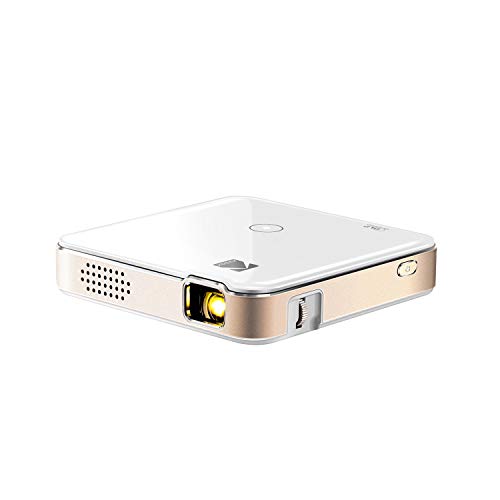
The Luma 150’s title is admirably short, and its brevity is the review. KODAK promises a mini projector, a battery, and 1080p input — and nothing else. No lumen figure, no speaker claim, no casting protocol, no smart system. Read generously, that is a focused tool: a pocketable box that takes a Full HD signal from your laptop or phone and puts a picture on a nearby wall without a mains cable. Read carelessly, it is a blank cheque for assumptions, and this guide declines to fill it in.
The battery is the feature that justifies the product. A presenter who carries power with the projector can work in rooms where sockets are scarce, distant or already claimed: a client’s office, a café table, a site cabin, a classroom corner. Setup becomes a matter of placing the box, aiming it and starting, and teardown is faster still. For short sessions — a pitch, a walkthrough, a team stand-up with slides — that frictionlessness is worth more than specification depth.
The 1080p wording deserves its precise reading: input, not native output. The Luma 150 will accept your Full HD deck and show it; the fineness of the result on the wall is a separate question the title leaves open, so verify the native resolution on the listing if small text features in your material. Design your slides boldly — large type, few words, strong contrast — and the distinction fades into the background where, for this class of machine, it belongs.
No brightness figure appears in the title, so treat this as a dim-room instrument. Close the blinds, keep the image modest, seat the audience near, and the Luma 150 performs the job it was sold for. Ask it to fight a sunlit boardroom and it will lose politely. Buyers whose presenting life is a series of small, controllable rooms can look at the Luma 150 on Amazon, confirm the current price there, and check the native resolution line before deciding.
A closing observation on the smallest KODAK: its restraint makes it the easiest machine here to lend. There is almost nothing to configure, nothing to break in a menu, and nothing for a borrower to return in a strange state. Organisations that keep one mini purely for lending could do worse than choose the model with the fewest settings to disturb.
- Form: mini projector, per listing title
- Power: battery, per listing title
- Signal: 1080p input stated in title
- Brightness, native resolution, speakers and casting: Not stated in the listing title — verify with the manufacturer documentation
Strengths
- Battery power removes the socket hunt
- Pocketable mini format travels anywhere
- Accepts 1080p input from modern sources
Trade-offs
- No brightness figure in its title
- 1080p wording covers input, not output
- No casting or speaker claim in title
Best for: a field presenter, tutor or salesperson running short sessions in small, dimmable rooms.
Not suited for: a bright boardroom or any audience seated far from a large image.

AKASO Mini Projector — A DLP pocket model with the presenter’s basics covered
AKASO’s pocket-sized DLP reads like a checklist written after interviewing travelling presenters. HDMI for the laptop, WiFi for casting, a rechargeable battery for socket-free rooms, stereo speakers for voice and video, and a remote control so the presenter can advance slides without returning to the machine. Even the updated Type-C mention speaks to modern charging habits. Where the Luma 150 offers purity, this AKASO offers coverage.
DLP is the display technology named here, the same family found in many portable designs, and the title pairs it with 1080P support language. As with its rivals, read that as signal acceptance rather than a native-resolution promise, and confirm the native figure on the listing if your decks carry small text. For bold slides, product photos and video clips — the daily diet of small-room presenting — the practical difference narrows considerably.
The remote deserves more credit than remotes usually get. In a small room the presenter stands, moves, points at the wall and talks; a remote keeps that flow unbroken, while its absence tethers the speaker to a laptop trackpad. Stereo speakers extend the same courtesy to audio: a testimonial video or a remote guest’s voice can play to a huddle group without a separate speaker being unpacked, charged and paired.
Brightness, again, is the unspoken limit: no lumen figure appears in this title, so the dim-room rule applies in full. Keep the image at the modest end, seat viewers close, and treat strong daylight as this machine’s natural predator. Presenters who live that life will find the AKASO’s completeness winning, and its Amazon listing is the place to verify today’s price along with the native resolution its headline leaves open.
- Display: DLP, pocket-sized, per listing title
- Signal: 1080P support language in title; HDMI named
- Wireless: WiFi stated in title
- Power: built-in rechargeable battery; updated Type-C noted
- Audio: stereo speakers stated
- Control: remote control included per title
- Brightness figure: Not stated in the listing title — verify with the manufacturer documentation
Strengths
- Remote keeps the presenter mobile
- Battery, WiFi and HDMI cover most rooms
- Stereo speakers handle voice and video
Trade-offs
- Brightness goes unquoted in its title
- Native resolution needs listing confirmation
- Small-room light discipline still applies
Best for: a trainer or consultant presenting to huddle-sized groups in borrowed rooms.
Not suited for: sunlit spaces or audiences beyond a small circle of chairs.
AKASO WT50 Mini DLP Projector — Android inside, battery inside
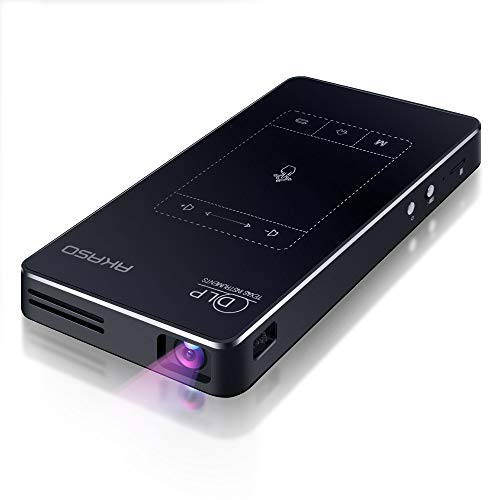
The WT50 pushes the mini idea one step further: why carry a source at all? Its title lists a built-in Android system alongside the battery, WiFi and Bluetooth, which means the projector can run apps and hold content itself. A presenter can arrive with nothing but the WT50, open the deck or the streaming app from the machine’s own interface, and present. For repeat sessions — the same training module, the same sales story — that self-containment is a genuine workflow, not a gimmick.
Bluetooth joins the connection list here, the wireless audio and accessory route: a Bluetooth speaker for a bigger voice in a larger huddle, or headphones for a private screening. WiFi covers casting and the Android system’s online life, and the title names phones, including iPhone, among its intended partners. The DLP engine and 1080P language mirror its sibling’s, with the same reading: signal support in the headline, native resolution to be confirmed on the listing.
Android inside a projector carries a household caveat worth stating plainly. The experience depends on the system’s version and upkeep, which a title cannot convey; buyers whose presenting depends on one specific app should confirm that app’s availability on the listing or through the maker’s documentation. Where the app story works, though, the WT50 removes the laptop from the bag entirely, and for some presenters that removal is the whole point of the mini category.
As ever in this guide, no lumen figure is printed, so dim rooms and modest images define the stage. Within that stage the WT50 is the most independent machine here after the smart KODAK, and arguably the most independent outright, since its battery frees it from the wall as thoroughly as its Android frees it from the laptop. Check the WT50’s Amazon page for its current price and for the native resolution detail, and judge it as the self-contained presenter it claims to be.
- Display: DLP portable, per listing title
- System: built-in Android system stated
- Wireless: WiFi and Bluetooth named in title
- Power: built-in battery stated
- Signal: 1080P language in title; phone use named
- Brightness figure and speaker detail: Not stated in the listing title — verify with the manufacturer documentation
Strengths
- Android system removes the laptop entirely
- Bluetooth adds speaker and accessory options
- Battery completes the self-contained brief
Trade-offs
- App experience depends on system upkeep
- No brightness figure in its title
- Speaker provision unstated in its title
Best for: a repeat-session presenter carrying one self-contained box between small venues.
Not suited for: app-critical workflows that demand a guaranteed, current Android environment.
KODAK Luma 350 Smart Mini Projector — The complete travelling kit
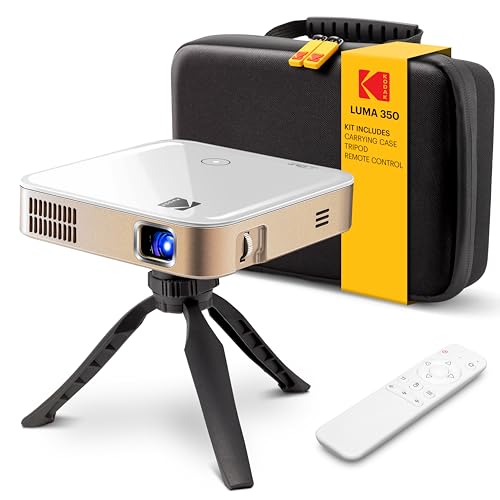
The Luma 350 reads as KODAK’s answer to every complaint lodged against its smaller sibling. Where the Luma 150’s title offers three facts, the 350’s offers a kit list: a built-in Android OS, a tripod stand and EVA case in the box, Miracast and DLNA casting, auto vertical keystone, and dual 1.5W speakers. Someone at KODAK clearly watched presenters improvise with books, bags and borrowed stands, and decided to ship the improvisation’s replacements.
The tripod and case deserve top billing because they solve the mini category’s most common failure: placement. A mini projector on a wobbly stack of paperbacks produces a wobbly presentation, while the same machine on its own tripod, at a sensible height, with auto vertical keystone squaring the result, produces a professional one. The EVA case then protects that professionalism in transit, which matters for equipment that earns its living in bags and car boots.
Casting breadth is the second upgrade. Miracast serves many Windows and Android devices, DLNA covers media sharing from phones and network sources, and the Android OS underneath means the projector can also work alone with its own apps. Dual 1.5W speakers are modest on paper — this guide will not pretend otherwise — but for narration, video clips and a remote voice in a huddle room they are a real, stated provision rather than silence.
The familiar limits still apply: no lumen figure appears in the title, and the resolution language of the smaller KODAK’s family should be verified on the listing before text-heavy use. Within the small-room discipline, though, the Luma 350 is the most thoughtfully assembled presenter in this guide, a kit rather than a component. Its Amazon listing carries today’s price, and the tripod-and-case inclusion should be weighed when comparing that figure against barer rivals.
One practical consequence of that completeness deserves spelling out: the Luma 350 is the pick least likely to generate accessory purchases. Rival minis quietly assume a stand, a case and a speaker will materialise from somewhere; KODAK put the stand and case in the box and the speakers in the chassis, so the price on its listing is closer to the whole cost of presenting than its rivals’ prices are. Compare totals, not stickers, and this machine’s value sharpens considerably.
- System: built-in Android OS, per listing title
- Kit: tripod stand and EVA case included per title
- Casting: Miracast and DLNA named in title
- Correction: auto vertical keystone stated
- Audio: dual 1.5W speakers stated
- Form: smart mini projector, pocket format
- Brightness figure and native resolution: Not stated in the listing title — verify with the manufacturer documentation
Strengths
- Tripod and case solve placement and transport
- Auto vertical keystone speeds improvised setups
- Miracast and DLNA widen casting coverage
Trade-offs
- Dual 1.5W speakers suit small groups only
- No brightness figure in its title
- Native resolution needs listing confirmation
Best for: a mobile professional presenting in varied small venues who wants one complete kit.
Not suited for: larger groups needing volume and brightness beyond huddle scale.

Epson EpiqVision Flex CO-FH02 1080p Projector — The serious end of mini
The CO-FH02 breaks the category’s pattern by behaving like a grown-up projector that happens to travel. Its title states Full HD 1080p, a smart streaming design with Android TV, Wi-Fi and Bluetooth, and — uniquely in this guide — a brightness figure: 3000 lumens of color and white brightness from a 3-chip 3LCD system. Every one of those lines answers a weakness the other five titles leave open, which is why this Epson anchors the list despite sitting at its largest, least pocketable end.
Start with the number. Three thousand lumens, quoted for colour as well as white, moves the machine from dim-room-only duty into rooms with ordinary lighting at sensible image sizes. Slides stay legible, faces on a video call stay visible, and the presenter stops negotiating with the blinds. For a small meeting room that hosts clients, that headroom is the difference between a mini projector as a compromise and a mini projector as the room’s actual solution.
Native Full HD carries the second half of the argument. Text renders at the resolution the laptop sent, so the CO-FH02 can show the spreadsheet, the contract clause and the dashboard that its smaller rivals would soften. Android TV supplies the streaming and app layer, Bluetooth covers audio accessories, and the Epson badge brings the 3LCD colour behaviour that the brand’s business line is known for — all in a body its title still files under portable.
The trade is the category’s founding virtue: this is the least mini mini here, the one most likely to live in a single room and travel occasionally rather than daily. Buyers whose presenting is a circuit of borrowed spaces may prefer the battery KODAK and AKASO models. Buyers whose circuit is one important small room should start here, and the CO-FH02’s Amazon listing will confirm its current price against the smaller machines’ charms.
There is also a confidence dividend in carrying the guide’s only fully specified machine. The presenter who knows the brightness figure, the resolution and the platform in advance walks into the room with one less unknown, and that calm shows. Uncertainty is the mini category’s tax; the CO-FH02 is the pick that pays the least of it.
- Resolution: Full HD 1080p, per listing title
- Brightness: 3000 lumens of color and white brightness
- Display system: 3-chip 3LCD technology
- System: Android TV smart streaming stated
- Wireless: Wi-Fi and Bluetooth named in title
- Battery provision: Not stated in the listing title — verify with the manufacturer documentation
Strengths
- Only stated brightness figure in this guide
- Native Full HD suits text-dense decks
- Android TV covers streaming without extras
Trade-offs
- Least pocketable design in this line-up
- No battery claim in its title
- Still a small-room machine at heart
Best for: a client-facing small meeting room needing real brightness and Full HD in a portable body.
Not suited for: daily pocket carry between venues with no mains power.
Aurzen Roku TV D1R air Portable Projector — USB-C and power-bank freedom
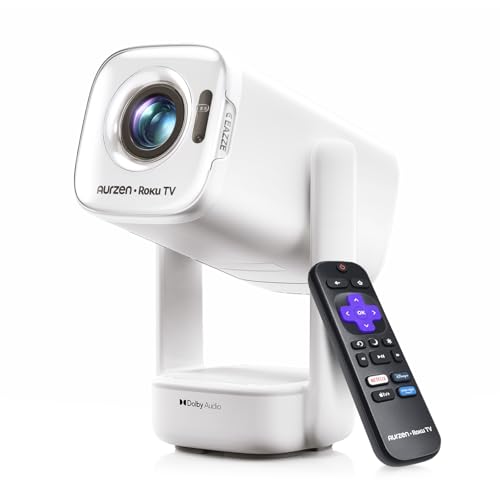
The D1R air attacks a different constraint: not the socket’s absence, but its inconvenience. Its title declares USB-C power with power-bank support, which means this projector can run from the same battery pack that rescues phones, or from a laptop-class USB-C supply, in places where the wall socket is across the room or behind furniture. For outdoor evening presenting, market stalls, site visits and garden-office setups, that power flexibility is a feature with real working consequences.
Roku TV built in supplies the smart layer, a familiar television interface that most households already know how to drive, with WiFi and Bluetooth alongside. The title claims native 1080P — note the word native, which distinguishes this claim from the input-support language elsewhere in the guide — and names Dolby Audio for its sound. Taken together, the D1R air presents itself as a self-contained entertainment-and-slides box that happens to sip power from almost anything.
Business buyers should still apply the class discipline. No lumen figure appears in the title, so brightness expectations belong in the dim-room, modest-image register, and the title’s own emphasis leans toward home and outdoor movies. A presenter borrowing it for work should design bold slides, control the light, and keep the group small — the same rules as its rivals, softened by the convenience of its power and platform.
Where the D1R air wins is the unplanned session: the evening pitch on a terrace, the training video in a marquee, the deck shown in a room whose sockets were designed for another century. If your presenting life includes such places, this Aurzen deserves its shortlist place, and a visit to its Amazon listing will settle the current price and let you confirm the brightness detail its title omits.
- Resolution: native 1080P claimed in listing title
- Power: USB-C powered; power bank supported
- System: Roku TV built in, per title
- Wireless: WiFi and Bluetooth named in title
- Audio: Dolby Audio named in title
- Brightness figure and internal battery: Not stated in the listing title — verify with the manufacturer documentation
Strengths
- Power-bank operation frees placement completely
- Native 1080P claim exceeds rivals’ wording
- Roku TV is familiar to most users
Trade-offs
- No brightness figure in its title
- Entertainment lean may not suit formal rooms
- No internal battery stated in its title
Best for: an outdoor or pop-up presenter working where mains sockets are scarce or distant.
Not suited for: a formal boardroom expecting installed-equipment brightness.
Comparison Table
| Model | Resolution wording | Stated brightness | Power story | Standout trait |
|---|---|---|---|---|
| KODAK Luma 150 | 1080p input | Unstated in title | Battery | Minimal pocketable presenter |
| AKASO Mini Projector | 1080P support language | Unstated in title | Rechargeable battery | Remote, stereo speakers, WiFi |
| AKASO WT50 | 1080P language | Unstated in title | Built-in battery | Android system, Bluetooth |
| KODAK Luma 350 | Unstated in title | Unstated in title | Kit format | Tripod, case, Miracast, auto keystone |
| Epson CO-FH02 | Full HD 1080p | 3000 lumens color and white | Mains, portable body | Android TV, 3-chip 3LCD |
| Aurzen D1R air | Native 1080P claimed | Unstated in title | USB-C, power bank | Roku TV built in |
How to Choose a Mini Projector for Presenting Without Embarrassing Yourself
Begin with the room you cannot change. If your presenting happens in one small room you control, the Epson CO-FH02’s stated brightness and Full HD picture make it the safe centre of this guide. If your rooms are borrowed and unpredictable, prioritise the freedoms: battery power from the KODAK and AKASO models, or the Aurzen’s power-bank appetite, because a projector that cannot switch on in the venue provided is worse than a dim one.
Design your material to the machine, or choose the machine your material demands. Bold slides, large type and high contrast forgive every resolution shortcut in this category; dense spreadsheets forgive none of them. Presenters whose credibility travels in small print should either carry the CO-FH02 or accept that a mini is the wrong tool for that deck, and no amount of pocketable charm changes the arithmetic of pixels.
Count the objects in your bag as part of the specification. A bare projector plus laptop plus cable plus speaker is a kit pretending to be a product. The Luma 350’s tripod and case, the WT50’s built-in Android, and the D1R air’s Roku TV each delete items from that bag, and deletions are what mini presenting is actually buying. The lightest total system wins, not the lightest single box.
Rehearse the failure modes before a client does it for you. Run the projector from its battery to empty once, present in the brightest room you regularly face, and cast from the phone you actually carry. A mini that survives your rehearsal will survive your diary; one that fails rehearsal was never going to survive contact with a paying audience.
What Image Size Can a Mini Projector Honestly Handle?
Smaller than the marketing photographs suggest. In a properly dimmed room, the battery minis here will hold a watchable forty to sixty inches for slides with bold type, which across a huddle table feels generous. Push toward a hundred inches and the same output spreads across four times the area, contrast thins, and text that was crisp becomes approximate. The physics is indifferent to enthusiasm.
The Epson CO-FH02 plays by different numbers because it states some: 3000 lumens of color and white brightness supports a larger, more confident image in ordinary room light, though even it should be kept sensible when text matters. The honest method for any pick is a rehearsal at the intended size with your smallest real slide. If the footnote survives the back chair, the size is right; if it does not, shrink the image before you shrink the font of your credibility.
Distance helps more than specifications do. Moving the audience one metre closer does more for perceived sharpness than any setting in the menu, because the eye’s limits, not the projector’s, set the threshold for small text. Mini presenting is an intimate format by design: small image, close viewers, short throw of attention. Work with that intimacy instead of staging a cinema and wondering why it disappoints.
Battery, USB-C or Mains: How Should a Travelling Projector Be Powered?
Internal batteries, the route taken by both KODAK Luma models and both AKASO machines per their titles, offer the cleanest setup: place, aim, present. Their discipline is charging. A battery projector that leaves the office at half charge is a paperweight with a lens, so the carrying routine must include a charge check the night before, and presenters should know their machine’s realistic session length rather than its optimistic one.
USB-C power, the Aurzen D1R air’s route, trades the internal battery for ubiquity. Power banks, laptop chargers and car adapters all become projector supplies, and a flat internal battery can never strand you because there is no internal battery to go flat. The cost is a cable, however short, and a power bank large enough for the session, which belongs in the bag as deliberately as the projector itself.
Mains power, the CO-FH02’s presumed world, is the least romantic and most reliable: full brightness for as long as the meeting lasts, no arithmetic about remaining charge. Its constraint is geography. The travelling presenter learns to carry an extension lead and to scout sockets on arrival, small humiliations that the battery and USB-C models exist to abolish. Choose the power story that matches the rooms you actually enter, not the ones you wish you entered.
How Do You Design Slides That Flatter a Small Projector?
Mini projectors reward decks built like posters. One idea per slide, type sizes that would look oversized on a laptop, and a ruthless contrast between text and background turn the class’s modest output into a virtue, because the audience reads everything instantly and the presenter talks instead of apologising. If a slide needs a paragraph, the paragraph belongs in a handout, not on a wall lit by a pocketable lamp.
Photographs and charts need the same generosity. Choose images with strong shapes and few fine details, rebuild charts with thicker lines and larger labels, and avoid brand palettes whose pale tints vanish under modest brightness. The AKASO and KODAK machines will show such material warmly; they will punish a delicate dashboard screenshot without negotiation, and no picture mode in their menus will rescue it.
Carry a test slide and use it without embarrassment. One dense page, shown for ten seconds at setup, tells you the room’s truth: if it reads, proceed; if it squints back at you, shrink the image, dim the lights or move the chairs before the audience arrives to reach the same conclusion. Presenters who test look professional; presenters who hope look surprised, in public, at the worst moment.
What Happens When the Meeting Moves Outdoors?
Evening is the mini projector’s accomplice. As daylight fades, modest output stops being a limitation and starts being sufficient, which is why the Aurzen D1R air’s title speaks of outdoor movies and why battery models find second careers on terraces and in gardens. A business presenter can borrow that physics: the product launch at dusk, the training session in a marquee after dinner, the site briefing shown on a cabin wall. In twilight, a pocketable machine and a power bank outperform a boardroom projector that never left the building.
Outdoor presenting adds its own disciplines. Wind moves improvised screens, so a flat wall beats a hanging sheet; ambient light from street lamps and windows still counts, so position the image in the darkest available patch; and sound escapes outdoors in a way it never does in a room, which argues for seating the group close and keeping video clips short. The machine’s modest speakers, adequate across a table, become whispers across a lawn.
Power planning turns serious outside, because there is no socket to fall back on when the plan fails. Battery presenters should arrive with a full charge and a finished deck, not a half-edited one that burns lamp time on revisions. The USB-C route shines here: a second power bank is a cheap insurance policy, swappable in seconds, and the Aurzen’s appetite for ordinary power banks means the insurance can be bought at any electronics shop on the way to the venue.
How Reliable Is Casting From a Phone, Really?
Casting is the feature that demos beautifully and behaves variably, because it depends on the venue’s network as much as on the projector. Miracast, named in the Luma 350’s title, creates a direct link between many Windows and Android devices and the projector, which sidesteps venue WiFi entirely. DLNA shares media from phones and network storage. WiFi-based casting on the AKASO models and the smart platforms on the Epson and Aurzen each assume a network that guests may or may not be allowed to join.
The professional habit is to treat casting as the convenience and the cable as the guarantee. Carry the short HDMI lead that fits your laptop, plus the adapter your phone would need, and let casting be the pleasant surprise when the venue’s network cooperates. Presenters who stake a client meeting on an untested network are gambling with someone else’s first impression, and the stake is rarely worth the saved thirty seconds.
Rehearse casting at home with the exact phone and laptop you travel with, on the projector you will actually carry. Pairing quirks, name collisions in the device list and resolution negotiations all reveal themselves in rehearsal, where they are funny, rather than in the meeting, where they are not. Once a pairing has worked twice, it tends to keep working; the first success is the one to schedule deliberately.
What Should Live in the Bag Beside the Projector?
The bag is part of the product. Beyond the machine itself, a working mini kit holds the charging cable and its plug, a short HDMI lead, the adapter ring for modern laptops, a microfibre cloth for the lens, and a small stand unless the projector brought its own, as the Luma 350 does with its tripod. A spare set of batteries for the remote, where the remote takes them, weighs nothing and has saved more presentations than most specification upgrades.
Content deserves a backup path as physical as the cables. Keep the deck on the laptop, on the phone and on a small USB stick, because each of this guide’s machines offers a different doorway in — HDMI, casting, or its own Android or Roku system — and a presenter with three copies can use whichever doorway the venue leaves open. The WT50 and Luma 350 can even hold the show themselves through their Android systems, which turns the laptop from a necessity into a spare.
Finally, pack for the room’s light, not its furniture. A short strip of gaffer tape tames a cable across a doorway, a travel blackout cloth subdues one bright window, and a folded white sheet has rescued more improvised screens than any accessory sold for the purpose. None of this is glamorous, and all of it is the difference between a presenter and a person carrying a projector.
How Long Do Mini Projectors Stay Useful?
A mini’s working life is set less by its lamp than by its connections and its software. The smart models here — the Android pair from KODAK and AKASO, the Android TV Epson, the Roku Aurzen — age at the speed of their platforms, which is why the HDMI port matters so much as insurance: a projector whose apps fade can still serve for years as a dumb, bright-enough display for a laptop or a streaming stick, and that second career is honourable.
Batteries age on their own schedule. A battery mini used weekly and charged sensibly will serve for years, with session lengths gradually shortening; presenters who track that decline can plan around it, while those who discover it live get a memorable evening. The power-bank route avoids the issue structurally, since the battery is external, replaceable and shared with the rest of the bag’s electronics.
Physically, minis suffer from travel rather than use: lenses scratched in unprotected bags, vents clogged with the dust of a hundred rooms, remotes lost in venues that kept them as souvenirs. The Luma 350’s included EVA case acknowledges this reality in its title. Owners of the other models should buy the case the listing offers or improvise one, because the cheapest longevity upgrade in this entire category is a padded box.
How Do You Keep a Mini Presentable in Front of Clients?
Client-facing presenting with a mini is a staging exercise. Arrive before the client, choose the wall with the least light falling on it, and set the image size conservatively — a smaller, punchier picture reads as confidence, while a vast, washed one reads as overreach. Hide the cables you can, tape the ones you cannot, and put the projector on its stand or a stable surface at a height that keeps its fan noise away from the client’s ears.
Open with a title slide that flatters the machine: bold type, a strong photograph, nothing delicate. First impressions calibrate the audience’s generosity for everything that follows, and a deck that starts within the projector’s strengths buys patience for the denser slides later. Keep a glass of water and the remote in the same place throughout; small rituals of calm are visible, and clients read the presenter’s composure as part of the proposal.
Close the session as deliberately as you opened it. End on a summary slide rather than a desktop full of files, switch the projector off before packing the conversation away, and let the last image the client sees be your conclusion rather than your notifications. The mini’s portability means the room returns to normal in a minute, which clients experience as polish — the meeting happened, impressed, and vanished without a trace of scaffolding.
What Is the Real Difference Between These Minis and a Compact Projector?
The boundary is intent. The machines in this guide are built around absence — absent sockets, absent installation, absent luggage — and their titles advertise batteries, pockets and power banks. Compact projectors, the neighbouring category, assume a home base: a shelf, a socket, a room they return to, with portability as a bonus rather than a founding principle. A buyer choosing between the shelves should ask where the projector will sleep, not just where it will work.
That intent shows in the specification balance. Minis spend their budgets on batteries, smart systems and casting, accepting modest, often unstated brightness. Compacts spend theirs on the picture, accepting a cable. Neither allocation is wrong; they are answers to different diaries. The consultant sleeping in a different town each night and the team lead equipping one huddle room will read this guide and its compact sibling and reasonably choose opposite machines.
Hybrids exist at the seam, and the CO-FH02 is this guide’s example: portable in name, but specified like a room machine, with stated brightness and Full HD. Such models serve buyers whose travel is occasional and whose rooms are important, and they often end up as the only projector a small business owns. Recognising which side of the seam your life sits on is the cheapest decision in this entire category.
How Should a Team Share One Mini Projector Fairly?
Shared minis fail on logistics more than technology. A booking habit — even a shared calendar entry and a named shelf — prevents the double-claimed afternoon and the projector that migrates permanently into one person’s boot. Attach the kit list to the booking: machine, charger, cable, remote, stand. The person returning the kit checks it against the list, because the next user’s session depends on the previous user’s honesty at the shelf.
Charging etiquette is the second rule, and it should be absolute: the projector goes back on charge when it comes back through the door, every time, without exception for short sessions. Battery machines forgive almost everything except being borrowed flat. Teams that adopt the rule stop thinking about power entirely, which is the state every shared tool should aspire to.
Finally, agree the settings truce. Shared machines accumulate other people’s picture modes, keystone corrections and volume levels; a laminated reset card — the three menu steps that restore the house standard — ends the archaeological dig each new user otherwise performs. The Luma 350’s auto keystone reduces that dig on the geometry side, but every shared mini benefits from a documented normal to return to.
Common Mistakes
Reading input support as native resolution. A title saying a projector accepts a 1080p signal is describing its doorway, not its picture. The Luma 150’s wording is input language, the Aurzen’s is a native claim, and the Epson states Full HD plainly; confusing those three sentences is the category’s most expensive reading error.
Staging a mini in a bright room at cinema size. Modest, mostly unstated brightness is the class’s physics. A sunlit room and a hundred-inch ambition will defeat every battery model here, so control the light, shrink the image, or hire the room a bigger machine.
Forgetting the charging routine. Battery freedom is rented nightly. The presenter who skips the charge check eventually performs the battery’s death in front of clients, a finale no remote control can advance past.
Arriving without a placement plan. A mini on a wobbling pile of magazines projects a wobbling picture. The Luma 350 ships a tripod for a reason; owners of the other models should pack a small stand or a stable surface strategy with equal seriousness.
Final Recommendation
For business presenting that must actually persuade, the Epson CO-FH02 is the mini to buy first: it is the only pick stating its brightness, the clearest about its Full HD resolution, and the one whose Android TV platform needs no accessory to start working. It stretches the definition of mini, and in exchange it removes the category’s two biggest risks — dimness and soft text — in a single purchase.
The travelling specialists divide the remaining honours. The KODAK Luma 350 is the most complete kit for a presenter working varied small venues, its tripod, case, casting and keystone forming a system rather than a gadget. The AKASO WT50 serves the laptop-free presenter, the smaller AKASO serves the remote-in-hand trainer, the Luma 150 serves the minimalist, and the Aurzen D1R air serves presenters working venues with no reachable sockets.
Buy the mini whose freedoms match your rooms, rehearse it once in private, and it will present you faithfully for years. Buy any mini as a boardroom substitute, and it will correct your expectations in front of an audience. The pocket projector is a specialist that rewards specialists: small rooms, close audiences, bold material, charged batteries.
Frequently Asked Questions
Can a mini projector handle a client pitch?
Yes, in a small room with controlled light, a modest image and bold slides — the conditions this guide keeps repeating because they are the category’s physics. For a large or bright room, or a deck full of small print, hire or install a full-size machine instead.
What does 1080p input support actually mean?
It means the projector accepts a Full HD signal from your device, as the Luma 150’s title states. It does not promise that the projected picture contains Full HD detail; native resolution is a separate figure, claimed outright by the Aurzen and stated plainly by the Epson.
Which of these minis runs without any mains power?
The KODAK Luma 150 and Luma 350 line and both AKASO models are battery powered per their titles, while the Aurzen D1R air can run from a power bank over USB-C. The Epson CO-FH02’s title makes no battery claim, so plan on a socket for it.
How long will a battery mini last through a meeting day?
Titles here confirm battery power without printing session lengths, so check the listing for the figure and rehearse with your own machine. Treat any battery projector as a per-session tool that gets charged the night before, not an all-day utility.
Do these projectors have speakers worth using?
Some state them plainly: stereo speakers on the AKASO mini, dual 1.5W speakers on the Luma 350, Dolby Audio on the Aurzen. Expect voice-and-video adequacy for a huddle group rather than room-filling volume, and add a Bluetooth speaker for larger circles where a title supports one.
Can a mini projector replace a television for a small office’s video calls?
For occasional calls in a dimmable room, the brighter and smarter models here — the CO-FH02 above all — can carry faces and shared screens comfortably. Daily, all-day call duty in a bright room belongs to a television or a full-size projector, whose brightness and speakers are built for that endurance.
Is the Epson CO-FH02 too big to count as a mini?
It sits at the portable end of this guide rather than the pocket end, and its title frames it as a portable streaming projector. In exchange for the extra size it brings the only stated brightness figure and a Full HD picture, which many business buyers will gladly trade pocketability for.
Related Guides
Mini presenting borders on several neighbouring shelves. Our round-up of compact projectors sized for small rooms continues the size conversation, our guide to consumer projectors for relaxed home viewing shows what these machines do after hours, and our look at data projectors at 4000 lumens for bright rooms covers the full-power alternative when a mini reaches its limit.


