What's inside
- Key Takeaways
- Where to Buy
- Quick Picks
- How the Picks Were Chosen
- Side-by-Side Comparison
- How to Choose a Compact Camera for RAW Editing
- The RAW Workflow, Step by Step
- Exposure Strategy for RAW: Protect the Highlights
- Colour Grading Small-Sensor Files With Restraint
- Building an Archive That Outlives Its Software
- From Pocket to Print: The Last Step of the Workflow
- Culling: The Editor’s First and Hardest Skill
- Learning to See in RAW: A Month of Exercises
- Common Mistakes
- Frequently Asked Questions
- Final Recommendation
As an Amazon Associate I earn from qualifying purchases. This post may contain affiliate links at no extra cost to you.
[SITE_DOMAIN] is reader-supported. When you buy through links on our site, we may earn an affiliate commission at no extra cost to you. Prices and availability change; check the Amazon listing for the current details.
A JPEG is a decision somebody else made. The camera chose the white balance, baked in a contrast curve, discarded shadow detail it judged unnecessary, and handed over a finished file that resists further argument. The best compact cameras with raw support refuse that arrangement: they hand over the sensor’s unprocessed measurements and let the photographer make the decisions later, at a desk, with time to think. This roundup gathers six pocketable cameras bought by people who edit — three Leicas of very different sizes and prices, a Panasonic enthusiast compact, Sony’s pocket flagship, a Fujifilm fixed-lens favourite, and a Ricoh that earns its place in prose alone.
RAW on a small sensor is a more interesting bargain than RAW on a large one. A big sensor’s JPEGs already carry generous headroom; a compact’s files live closer to their limits, so the extra latitude RAW preserves — shadow detail under a street lamp, highlight texture in a bright sky, white balance that can be rebuilt after mixed lighting — changes outcomes rather than merely polishing them. The cost is equally real: files several times larger than JPEGs, an editing step between shooting and sharing, and card and disk budgets that grow teeth.
Each review below names the camera’s RAW format as model-class knowledge — DNG on the Leicas, RW2 on the Panasonic, ARW on the Sony, RAF on the Fujifilm, DNG again on the Ricoh — stated carefully as the format family each line is known for, while every hardware fact is held to what the listing titles actually print. Several of these titles are bundles or bare model names, and the spec boxes say so where that is the case.
Key Takeaways
- RAW buys editing latitude that matters most exactly where compact sensors are weakest: shadows, mixed light and bright skies.
- The Leica D-Lux 8 and LX100 II share a 17MP-class Four Thirds foundation and fast Leica zoom philosophy; the D-Lux 8 records DNG, the Panasonic RW2.
- The Leica Q3 sits at the set’s summit as a full-frame fixed-lens camera — its listing title is minimal, so its specification belongs to Leica’s documentation.
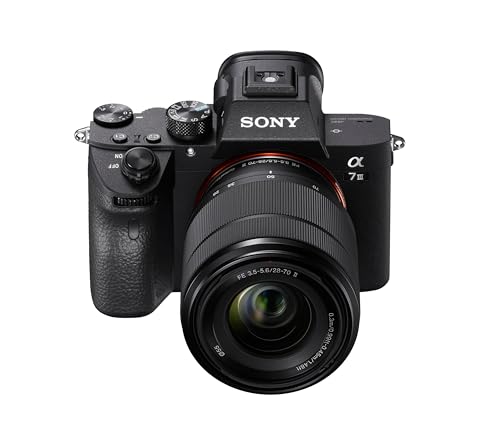
- The Sony RX100 VII’s bundle title states a 20.1MP stacked 1-inch sensor and a 24-200mm lens, with ARW files for editors who travel light.
- The Ricoh GR III is covered in prose only, because no clean Amazon listing for it was found at research time — its review explains how to verify a listing independently.
Where to Buy
- Leica D-Lux 8 — Check price on Amazon
- Panasonic LUMIX LX100 II — Check price on Amazon
- Leica Q3 — Check price on Amazon
- Sony RX100 VII — Check price on Amazon
- Fujifilm X100V (Silver) — Check price on Amazon
The Ricoh GR III is discussed in full below without a purchase link, for the reason stated in its review.
Quick Picks
| Pick | Best for | Sensor | RAW format (model class) | Check |
|---|---|---|---|---|
| Leica D-Lux 8 | Editors wanting DNG from a premium compact bundle | 17MP 4/3-inch CMOS | DNG | Check price on Amazon |
| Panasonic LUMIX LX100 II | Enthusiast editing with a fast Leica zoom | Four Thirds 21.7MP multi-aspect | RW2 | Check price on Amazon |
| Leica Q3 | Full-frame fixed-lens photography, edited seriously | Not stated in the listing title | DNG | Check price on Amazon |
| Sony RX100 VII | Travel editing across a 24-200mm range | 20.1MP 1-inch stacked CMOS | ARW | Check price on Amazon |
| Fujifilm X100V (Silver) | Fixed-lens street work with film-simulation JPEGs as the safety net | Not stated in the listing title | RAF | Check price on Amazon |
| Ricoh GR III | Pocket street photography with DNG discipline | Not stated in the listing title | DNG | Prose-only — no link |
How the Picks Were Chosen
The entry ticket was a RAW workflow that a serious editor would respect, in a body that still qualifies as a compact. That filter admits fixed-lens cameras with large sensors and enthusiast zooms with fast glass, and it excludes two crowds: compacts whose RAW mode is a buried afterthought with crippled buffer behaviour, and interchangeable-lens systems wearing compact costumes. Six names survived, spanning Four Thirds, 1-inch, APS-C-class and full-frame territory, because RAW’s value proposition shifts with sensor size and a useful guide should show the whole slope.
Titles were audited line by line. Bundle listings — the D-Lux 8 and RX100 VII here — were read for their box contents as well as their cameras, because a bundle’s card and bag change the real cost of starting a RAW workflow, which eats storage at a rate JPEG shooters find startling. Bare titles, like the Q3’s and X100V’s, were treated as pointers to documentation rather than as specifications. The editing axis also reaches beyond this page: readers building a desk for RAW work will find our guide to compact cameras with image stabilization relevant for the slow-shutter side of the craft, since stabilised bodies let RAW shooters hold ISO down in the first place.
The Ricoh GR III required a judgement call, and it is disclosed rather than buried: no clean Amazon listing for the camera was found at research time, so the model is reviewed in prose, at full depth, with no link and no image, and with guidance for verifying any listing a reader finds elsewhere. A buying guide that only covers what it can link to would be a poorer guide.

Leica D-Lux 8
Best for: editing with DNG files from a premium compact, plus a bundle arriving with card, bag, tripod and cleaning kit already sorted from the start onward.
Not suited for: minimalists counting grams — the bundle’s tripod and bag signal a small system, and the camera’s premium positioning makes it a deliberate purchase rather than a spare.
- Sensor: 17MP 4/3-inch CMOS
- RAW format (model class): DNG
- Bundle contents stated in the title: 64GB memory card, camera bag, tripod, cleaning kit
- Model number in the title: 19191
- Lens range and aperture: Not stated in the listing title — verify with the manufacturer documentation
The D-Lux 8’s proposition to editors begins with three letters: DNG. Leica’s compact records Adobe’s open RAW format, which means its files open in virtually every serious editor ever made, need no manufacturer-specific converter, and will still open in twenty years when proprietary formats have become archaeology. For a photographer building a long-term archive, that openness is not a convenience but a preservation strategy, and it distinguishes the Leica from every proprietary-format rival in this set.
The hardware foundation, as titled, is a 17MP Four Thirds sensor — a generous light bucket for a compact, giving DNG files the shadow depth and colour nuance that make RAW worth shooting. The bundle framing suits the workflow: a 64GB card is a sensible starting denomination for RAW shooting, the bag and tripod acknowledge that this camera will be worked rather than merely carried, and the cleaning kit is a small, honest admission that lenses used daily get dirty. Editors should still budget for more storage; RAW appetites grow.
What the title withholds is the lens. No range, no aperture is printed, and a buyer comparing the D-Lux 8 against the LX100 II’s fully stated Leica zoom should pull the lens specification from Leica’s documentation before deciding. The two cameras are philosophical siblings — Four Thirds sensors, Leica zoom doctrine, enthusiast controls — separated by brand, interface and format choices, and the lens figures are exactly the ground on which the comparison should be fought.
Consider the D-Lux 8 in the context of a print. Seventeen megapixels from a Four Thirds sensor, preserved in DNG, is enough for a handsome mid-size print with room to crop modestly — and printing is where RAW’s virtues stop being theoretical. On screen, a well-exposed JPEG and a well-graded RAW can look like cousins; on paper, under a viewer’s nose, the graded file’s shadow transitions and colour separation declare themselves. Photographers who print even occasionally should weight that difference heavily, because it is the difference between a file that survives enlargement and one that merely survives a feed. The D-Lux 8’s bundle tripod, an accessory stills photographers actually use for the long exposures of blue hour, nudges the whole package toward that considered, print-minded way of working.
Strengths
- DNG recording gives the most portable, future-proof RAW workflow in this set.
- A 17MP Four Thirds sensor provides genuine editing depth in a compact body.
- The bundle anticipates RAW ownership: card, bag and tripod included in the title.
Trade-offs
- The lens specification is absent from the title and must be verified in Leica’s materials.
- Premium Leica positioning means paying for the badge as well as the hardware.
- Bundle extras are only value if the tripod and bag match the owner’s actual habits.
Editors drawn to the DNG route can examine the bundle’s current composition on the D-Lux 8 page — Check price on Amazon.

Panasonic LUMIX LX100 II
Best for: an enthusiast who edits RW2 files from a fast Leica zoom and shoots interiors, streets and travel scenes at conversational distances.
Not suited for: high-volume event work where hundreds of RW2 files a night would turn the editing desk into a bottleneck and the card budget into a line item.
- Sensor: Large Four Thirds, 21.7MP, multi-aspect
- Lens: 24-75mm Leica DC Vario-SUMMILUX, f/1.7-2.8
- RAW format (model class): RW2
- Connectivity stated in the title: Wi-Fi and Bluetooth
- Display: 3-inch LCD
- Model code in the title: DC-LX100M2
If the D-Lux 8 is the format philosopher of this set, the LX100 II is its working engineer. Panasonic’s RW2 files are the house RAW format of the Lumix line, supported by every major editor, and the camera feeding them is specified with unusual completeness in its own title: a 21.7MP multi-aspect Four Thirds sensor and a 24-75mm Leica zoom at f/1.7-2.8. That lens matters to editors specifically, because fast glass at capture time means lower ISO at capture time, and low-ISO RW2 files are where shadow recovery and colour grading have the most to work with.
The multi-aspect sensor deserves an editor’s attention. Shooting in different frame shapes without discarding the lens’s image circle encourages deliberate composition — a panoramic sweep for a landscape, a squarer frame for architecture — and RAW files preserve whichever shape was chosen with full data. Combined with the camera’s physical-control culture, the LX100 II suits a workflow in which decisions are made at the scene and refined at the desk, rather than deferred entirely to software.
Wi-Fi and Bluetooth, both title-stated, close the loop for hybrid workers: a frame can travel to a phone for a quick share while the RW2 original waits for the evening’s proper edit. That two-track discipline — JPEG-speed communication, RAW-depth archive — is how many working photographers actually operate, and this camera supports it without accessories or cables.
The LX100 II also teaches a lesson about where RAW quality is truly manufactured: in the lens, months before the editor opens the file. Chromatic fringing, soft corners and flare are baked into raw data just as surely as exposure is, and no converter fully removes them. A Leica-designed zoom that controls those flaws optically hands the editor a cleaner negative to grade, which is why experienced RAW shooters speak of good glass as a file-quality feature rather than a sharpness luxury. Panasonic’s decision to print the lens’s full name and aperture range in the title is, in this light, an editor-facing specification — it describes the quality of the raw material itself, not merely the camera’s silhouette.
Strengths
- The fastest stated lens in the set feeding a large Four Thirds sensor — ideal RAW raw material.
- RW2 support across all major editors keeps the workflow conventional and robust.
- Connectivity is title-stated, enabling a share-now, edit-later two-track routine.
Trade-offs
- RW2 is proprietary; converters must support the model, unlike the D-Lux 8’s universal DNG.
- 75mm caps the framing; distant subjects arrive small in the file and stay that way.
- The control-rich body asks for a learning investment casual shooters may not repay.
The LX100 II’s current listing, in black as titled, is available for review here — Check price on Amazon.

Leica Q3
Best for: a photographer who edits full-frame DNG files from a fixed lens and treats a compact as the main camera, not the spare.
Not suited for: variety on a single walk — a fixed-lens camera frames the world one way, and an editor who crops aggressively to simulate other focal lengths will waste the sensor’s gift.
- Model: Leica Q3 Compact Digital Camera
- RAW format (model class): DNG
- Colour stated in the title: Black
- Model number in the title: 19080
- Sensor resolution and lens specification: Not stated in the listing title — verify with the manufacturer documentation
The Q3 is the summit of the fixed-lens compact idea, and its listing title is three pieces of information long: a name, a model number, a colour. Everything the camera is famous for — its full-frame sensor, its fast fixed wide lens, its hybrid viewing experience — lives in Leica’s documentation rather than in this title, and the review respects that boundary while still explaining the camera’s place in a RAW roundup. That place is simple: the Q line records DNG, and DNG from a full-frame sensor is the deepest editing material any compact in this set can offer.
Depth changes editing behaviour. With abundant resolution and dynamic range, an editor can crop moderately without apology, relight a scene’s balance in post, and print at sizes that end arguments about whether a compact was a real camera. The fixed lens, often framed as the Q3’s limitation, is in the editing context a discipline: compositions are made by walking, the file’s quality is spent on one honest frame rather than spread across a zoom’s compromises, and the photographer’s style coheres around a single perspective.
The Q3’s ownership proposition is equally uncompromising. This is a camera bought instead of a system, by a photographer who has decided that one focal length, mastered completely, outweighs a bag of alternatives. Editors who recognise themselves in that sentence will find the DNG workflow here the purest in the roundup; editors who do not should let the zoom-equipped cameras below argue their case. Readers comparing the Q3 with its 43mm sibling will find that conversation continued in our guide to autofocus rangefinder cameras, where the whole Q family is weighed on focusing grounds.
There is an economic honesty to address with the Q3. Its price could buy a zoom compact, a second body and a shelf of storage, and for many photographers that basket is objectively the wiser purchase. The Q3’s buyer is purchasing something else: the removal of decisions. One lens means the archive coheres; a fixed focal length means the photographer’s eye is trained by the camera rather than consulted by it; DNG from a full-frame sensor means the editing desk never meets a file it cannot push. Photographers who have owned systems and felt their creativity dilute across options often describe the Q format as a relief. That relief is the product. The specification, which must be confirmed in Leica’s documentation since the title withholds it, is merely how the relief is engineered.
Strengths
- Full-frame DNG files give editors the deepest material available in a fixed-lens compact.
- A single-lens discipline produces stylistic coherence across a body of work.
- Leica’s build and interface culture suit photographers who keep cameras for many years.
Trade-offs
- The title states almost nothing; the entire specification must be confirmed in Leica’s documentation.
- One focal length, permanently — the camera’s virtue and its wall are the same wall.
- The summit positioning carries a summit price; the listing should be studied, not skimmed.
Serious editors can study the current Q3 listing and its terms on the product page — Check price on Amazon.

Sony RX100 VII
Best for: a travelling editor who shoots a harbour at 24mm and a distant bell tower at 200mm before breakfast, then grades ARW files on a train.
Not suited for: studio-style still-life work where the camera sits on a tripod for hours — the pocket flagship’s speed and range are wasted, and its small body offers little to mount or tether around.
- Sensor: 20.1MP 1-inch stacked CMOS
- Lens: 24-200mm
- RAW format (model class): ARW
- Bundle contents stated in the title: two 64GB memory cards and a case
- Model code in the title: DSC-RX100M7
Sony’s ARW format is the RAW dialect of the Alpha ecosystem, and the RX100 VII speaks it with a traveller’s accent. The bundle title is uncommonly informative: a 20.1MP stacked 1-inch sensor, a 24-200mm lens, two 64GB cards and a case. For RAW shooters the card detail is not garnish — ARW files from a full day’s travel shooting will fill a card with a speed that startles JPEG converts, and a two-card rotation is precisely the working pattern the format demands. The bundle, in effect, pre-builds the first month of a RAW travel workflow.
The zoom range transforms what RAW means on the road. Editing latitude is precious at 200mm, where distant subjects arrive through haze and contrast falls; an ARW file lets the editor restore punch, rebalance a grey sky and recover the shadow side of a far building in ways a JPEG of the same scene would refuse. At 24mm the same latitude serves interiors and landscapes. No other camera in this set lets one pocket body gather such varied raw material in a single walk.
The stacked sensor’s speed adds a final editorial gift: decisive moments captured in bursts can be culled at the desk, with the best frame — the sharpest expression, the cleanest gesture — selected from a sequence rather than hoped for in a single exposure. RAW and burst shooting are natural partners, and the storage bill is their joint tax. The included cards are the down payment.
Travel editing has a rhythm the RX100 VII fits unusually well. The day’s shooting is opportunistic and fast — markets, viewpoints, transport, weather — and the evening’s grading happens in fragments: a train seat, a cafe table, a hotel bed with a laptop balanced on knees. ARW files reward that rhythm because they tolerate the imperfect exposures that opportunism produces; the tower shot grabbed as the light broke can be balanced at leisure, the market portrait shot a stop hot can be talked down. A camera that demanded perfect exposure in the moment would punish travel’s pace. This one banks the raw material and lets the evening arbitrate, which is precisely the compact-RAW bargain at its most useful.
Strengths
- A 24-200mm range gives ARW files unmatched subject variety from one pocket body.
- Two 64GB cards in the bundle match RAW’s real storage appetite from day one.
- Stacked-sensor speed supports burst culling — an editor’s approach to decisive moments.
Trade-offs
- ARW is proprietary; the editing chain must support the model, as with RW2 and RAF.
- Telephoto RAW files through haze need grading skill to shine; the format enables, not guarantees.
- Bundle value depends on needing the cards and case, which most RAW travellers genuinely do.
Travelling editors can confirm the bundle’s present contents on the RX100 VII listing — Check price on Amazon.

Fujifilm X100V (Silver)
Best for: a street photographer who edits RAF files at night after shooting all day at one focal length, with Fujifilm’s film simulations as the JPEG safety net for quick shares.
Not suited for: zoom-dependent assignments — market days, travel variety, family events across a hall — where one fixed frame turns from discipline into deprivation.
- Model: Fujifilm X100V Digital Camera
- RAW format (model class): RAF
- Colour stated in the title: Silver
- Sensor and lens specification: Not stated in the listing title — verify with the manufacturer documentation
The X100V holds a unique position in RAW culture: it is the camera most associated with not needing RAW at all. Fujifilm’s film simulations produce JPEGs so characterful that many owners shoot JPEG-only happily for years. Yet the camera records RAF, Fujifilm’s proprietary RAW format, and the editors who use it describe a two-layer workflow — simulations for the day’s quick output, RAF originals archived beneath for the frames that deserve a full grade. That duality is the X100V’s real pitch to this roundup: RAW as insurance and as art material, carried in a body that never pressures its owner to use it.
The listing, characteristically for this family, states a name and a colour and stops. Sensor and lens figures belong to Fujifilm’s documentation, and the buyer should read them there. What can be said from the model’s class is the shape of the ownership: a fixed lens that teaches seeing, a silver two-tone body that gets carried because it is enjoyed, and a file ecosystem in which RAF support across editors is mature and complete. Street photographers editing RAF learn its particular colour behaviour — Fujifilm’s sensors render with a distinct palette that editors either love or route around with profiles.
Against the X100VI in the low-light roundup, the V is the previous generation’s expression of the same idea, and its presence here is a reminder that RAW workflows age gracefully: a RAF file from this body edits in today’s software exactly as well as it did at launch, which is more than can be said for the JPEG engines of its contemporaries.
The X100V’s silver finish plays a subtler role in its RAW story than aesthetics suggest. Owners carry cameras they enjoy looking at, and a carried camera accumulates the varied, unplanned frames — the odd light in a stairwell, a stranger’s gesture, rain on a cafe window — that become an archive’s most graded and most loved files. The camera’s JPEG simulations handle the shareable present; its RAF files quietly stock the future. Many owners report that their relationship with the camera inverts over time: bought for the simulations, kept for the archive. That inversion is available only because the RAW layer was there, unobtrusive, from the first day — a design wisdom that spec-led comparisons rarely capture.
Strengths
- RAF archiving beneath beloved film-simulation JPEGs gives a two-layer workflow in one body.
- Fixed-lens discipline builds a coherent street style that editors can grade consistently.
- A mature model with deep community knowledge of its files and their behaviour.
Trade-offs
- The title is specification-free; sensor and lens details require Fujifilm’s documentation.
- One focal length governs every frame, for better and for worse.
- RAF colour has a distinct character that some editors must profile around.
The silver X100V’s current listing can be examined directly on its page — Check price on Amazon.
Ricoh GR III
Best for: street photography shooting DNG files from a camera living in a shirt pocket and operated one-handed between one heartbeat and the next on the daily pavement ahead.
Not suited for: planned, deliberate productions — the GR philosophy is reactive and minimal, and a shoot built around tripods, tethered review and lens changes belongs to other cameras entirely.
- Model: Ricoh GR III
- RAW format (model class): DNG
- Sensor and lens specification: Not stated in the listing title — verify with the manufacturer documentation
The Ricoh GR III is covered in this guide without a purchase link, because no clean Amazon listing for it was found at research time. That sentence is printed once, plainly, because a guide that quietly omitted the GR from a RAW compact roundup would mislead its readers: the GR line is one of the defining pocket cameras for serious street photographers, and its DNG recording is central to why. Ricoh’s choice of the open DNG format matches the D-Lux 8’s archival logic — files that open everywhere, forever, with no proprietary gatekeeper.
The GR philosophy is reduction. A fixed wide lens, a body shaped for one hand, controls pared to what street work uses, and a snap-focus culture that pre-sets the lens for the distances street scenes actually happen at. For RAW shooters the appeal compounds: the camera asks almost nothing at capture time, deferring every decision the format allows to the desk. Photographers who shoot GR describe days of hundreds of quiet frames and evenings of ruthless, rewarding culls — a workflow closer to film contact-sheet discipline than to phone photography.
Because this entry carries no link, the reader’s verification duty is spelled out in full. A listing found elsewhere should be checked for the exact model name — GR III, not a sibling variant — the seller’s identity, the included accessories, and the camera’s condition if the offer is used; the manufacturer’s documentation remains the authority for sensor and lens figures. A camera this specialised rewards careful buying, and a prose-only entry that sends readers out well briefed serves them better than a dubious link would.
The GR’s cult status among street photographers rests on a paradox editors appreciate: it is the camera least interested in being operated. Pre-set focus distances, a lens that wakes instantly, and a body that can be fired from the hip or the pocket’s edge mean the photographer’s attention stays on the street rather than the device. The DNG files that result carry that spontaneity home — frames caught at the edge of intention, graded later into coherence. In a set full of cameras that reward deliberation, the GR III rewards instinct, and its absence from the linked listings is a gap in the marketplace rather than in the model’s credentials.
Strengths
- DNG recording matches the most open, editor-friendly format in this set.
- The pocket-first, one-hand design gets carried more than any rival here — and carried cameras make photographs.
- A devoted street-photography culture surrounds the model with technique and settings knowledge.
Trade-offs
- No verified listing accompanies this entry; sourcing the camera requires independent homework.
- The minimal, reactive design omits comforts that deliberate shooters rely on.
- A fixed wide lens is the whole framing vocabulary — scenes are approached on foot or not at all.
This model is covered as guidance only. Readers who locate a listing through another retailer should verify the model name, seller and condition against Ricoh’s documentation before buying, since no listing is endorsed here.
Side-by-Side Comparison
| Pick | Sensor (as titled) | RAW format (model class) | Defining trait |
|---|---|---|---|
| Leica D-Lux 8 | 17MP 4/3-inch CMOS | DNG | Bundle with card, bag, tripod, cleaning kit |
| Panasonic LUMIX LX100 II | Four Thirds 21.7MP multi-aspect | RW2 | Fast f/1.7-2.8 Leica zoom |
| Leica Q3 | Not stated in the listing title | DNG | Full-frame fixed-lens flagship of the line |
| Sony RX100 VII | 20.1MP 1-inch stacked CMOS | ARW | 24-200mm range, two-card bundle |
| Fujifilm X100V (Silver) | Not stated in the listing title | RAF | Film-simulation JPEG culture over RAF archive |
| Ricoh GR III | Not stated in the listing title | DNG | Prose-only entry; no clean listing found |
It is worth pausing on the two bundles in the table, because they reveal how manufacturers imagine RAW ownership beginning. Both the D-Lux 8 and the RX100 VII arrive with storage in the box — a recognition that a RAW camera without cards is a promise without paper. The D-Lux 8 adds the apparatus of deliberation, a bag and a tripod; the Sony adds a second card and a case, the apparatus of motion. Even the packaging, read carefully, teaches the difference between the two cameras’ philosophies.
How to Choose a Compact Camera for RAW Editing
Which RAW format fits the software already owned?
Format is a workflow decision before it is a camera decision. DNG — from the D-Lux 8, Q3 and GR III — opens in everything, including older software and open-source editors, and archives without anxiety. RW2, ARW and RAF are each fully supported by the major commercial editors, but support arrives per model and can lag a launch; an editor committed to a particular program should confirm the specific camera is on its supported list. Photographers planning to switch editors someday should weight DNG’s portability heavily, because a decade of proprietary files is a migration project, while a decade of DNG is a folder copy.
How much storage does honesty require?
Budget storage before the camera, not after the first full card. RAW files from these sensors run several times the size of their JPEG equivalents, bursts multiply them, and a travel week can produce a library measured in hundreds of gigabytes. The RX100 VII’s bundle — two 64GB cards — illustrates the working scale. Add a desk drive and a backup habit, and price the whole system; a RAW camera bought without its storage ecosystem is a sports car bought without tyres. Our guide to Canon compact cameras with Wi-Fi is a useful companion read here, because wireless transfer habits shape how painlessly large files move from camera to desk.
Zoom flexibility or fixed-lens depth?
The set splits cleanly. Zooms — the LX100 II, D-Lux 8 and RX100 VII — gather varied raw material and suit travel and family documentation, where the scene chooses the focal length. Fixed lenses — the Q3, X100V and GR III — gather consistent material and suit projects and street work, where the photographer chooses the distance. Editors feel the difference at the desk: zoom archives need per-frame grading attention across varied compositions, while fixed-lens archives grade in harmonious groups. Neither is superior; they are different relationships between a walk and an evening at the screen.
Is the editing habit real, or aspirational?
The most expensive RAW camera is the one whose files are never edited. Somebody whose phone photos already pile up unreviewed should be honest about whether a compact’s RAW workflow will fare better — the cameras here reward a weekly editing ritual and punish neglect with full cards and unshared photographs. For the genuinely undecided, the X100V’s pattern is instructive: beautiful JPEGs for daily life, RAW archived beneath for the frames that matter. It is the lowest-risk way to discover whether the editing life fits.
The RAW Workflow, Step by Step
A sustainable RAW routine has five movements. Capture generously, with exposure aimed at protecting highlights, because RAW forgives lifted shadows far more readily than blown skies. Ingest the same day, into dated folders, applying a consistent naming scheme while the memory of the shoot is fresh. Cull ruthlessly before editing anything — the delete key is the workflow’s most underpriced tool, and grading fifty frames deeply beats grading five hundred shallowly. Grade in passes: exposure and white balance first, colour second, local adjustments last, with the photograph rested overnight before final export whenever deadlines allow. Archive the RAW originals untouched by the edits, so every grade remains a reinterpretation rather than a destruction. Photographers who build this loop find that the cameras in this set stop being gadgets and become darkrooms that fit in a coat.
One refinement separates mature workflows from enthusiastic ones: presets built from the photographer’s own finished work, not downloaded from strangers. A personal preset encodes a colour taste and applies it as a starting point, cutting per-file time while deepening stylistic consistency. The fixed-lens cameras in this set make preset-building easier, because their files share a rendering character that a zoom’s varied frames do not.
Exposure Strategy for RAW: Protect the Highlights
RAW changes exposure doctrine. JPEG shooters expose for the mid-tones and accept the camera’s rendering; RAW shooters expose for the highlights, because highlights that clip to pure white are gone forever, while shadows several stops down can be lifted from a good file with modest noise penalties — especially from the larger sensors in this set. The practical technique is to watch the brightest meaningful area of the scene — a sky, a lit face, a white facade — and set exposure so it sits just below clipping, then let the shadows fall where they will. At the desk, the grade rebuilds the scene’s balance from that protected anchor. This doctrine, often called exposing to the right when taken to its histogram extreme, is the single habit that most separates photographers who benefit from RAW from photographers who merely store it.
Colour Grading Small-Sensor Files With Restraint
Grading compact files is an exercise in knowing when to stop. The temptation, armed with sliders that can rebuild a scene entirely, is to grade every frame into a cinematic postcard; the result, across an archive, is a sameness that erases the places photographed. A better discipline grades for memory: restore the colour the room actually had, deepen the sky to the blue that was felt rather than the blue of a film poster, and let each location keep its accent. Fixed-lens cameras help by giving an archive a consistent base rendering to grade from; zooms demand a lighter touch per frame. Above all, grade in a consistent environment — the same screen brightness, the same room light — because colour decisions made under a kitchen’s warm bulbs at midnight will look startling in daylight, and the file will be blamed for the room.
Building an Archive That Outlives Its Software
RAW photography is a promise made to a future self, and archives are where that promise is kept or broken. The disciplines are unglamorous and absolute: files live in at least two places, one of them not in the same building as the camera’s desk; folder structures use dates and plain words rather than the importing software’s private logic; and every few years the archive is audited, a sample of old files opened in current software to confirm they still read. DNG owners start ahead in that audit, which is a concrete reason the format appears three times in this set. Proprietary-format owners are not doomed — RW2, ARW and RAF are supported by deep ecosystems — but they carry a standing obligation to watch that support and convert if it ever thins. An archive is a garden, not a vault: it survives by tending, and the photographers who tend theirs are the ones whose grandchildren open the files.
From Pocket to Print: The Last Step of the Workflow
Printing is the audit that exposes a workflow’s honesty. A graded RAW file printed at a modest size reveals whether the editing served the photograph or the screen’s flattery: shadow detail either separates or clots, colour either sings or shouts, and sharpening either crisps edges or draws halos around them. The cameras in this set, from the 17MP D-Lux 8 upward, hold enough honest data for prints that reward that scrutiny, provided the grade respected the file. Make one print from every serious shoot, even a small one, and pin it where the editing happens. Within a season, the prints will have retrained the grading hand more effectively than any tutorial, because paper does not refresh, does not glow, and does not forgive.
Culling: The Editor’s First and Hardest Skill
Every RAW workflow drowns or swims at the cull. A day’s street shooting can yield four hundred frames; grading all of them is a sentence, and grading none of them is a waste of a fine camera. The sustainable method is staged and unsentimental: a first pass at speed, deleting only the technically dead — missed focus, ruined exposure, the accidental frame of a pavement; a second pass for expression and composition, marking the strongest tenth; and a final pass, ideally after a night’s sleep, in which the marked frames compete against each other rather than against the photographer’s hopes for them. Keep the rejects for a month before deleting, because culling judgement improves with distance and a frame dismissed on Tuesday can reveal itself in June. The cameras in this set, particularly the burst-friendly RX100 VII and the prolific little GR III, generate the volume that makes this discipline necessary — and the DNG, RW2, ARW and RAF files they produce are patient enough to wait for it.
Learning to See in RAW: A Month of Exercises
New RAW shooters often ask what the format feels like once the novelty fades, and in practice it feels like a second chance built into every frame. A month of deliberate exercises teaches it faster than a year of casual shooting. Spend one week exposing strictly for highlights and grading the shadows back, until the histogram’s right edge becomes a familiar border. Spend another shooting only scenes of mixed light — kitchens at dusk, bars, stations — and rebuilding white balance at the desk until colour temperature becomes a number with a face. Give a third week to a single fixed focal length, or to one end of a zoom locked with tape, and grade the resulting set as one group to feel how consistency simplifies editing. In the fourth week, print the five best frames of the month. By its end, the abstract promise of RAW — latitude, patience, reinterpretation — has become muscle memory, and the camera chosen from this set stops being equipment and becomes an instrument whose limits the owner can play.
Common Mistakes
- Shooting RAW and editing nothing. Unedited RAW files look flat by design; a photographer unwilling to grade is better served by a good JPEG engine and honesty.
- Underexposing to protect highlights past the point of sense. RAW lifts shadows gracefully within limits; files shot two stops dark out of fear return noise, not safety.
- Ignoring the format’s software implications. Buying a proprietary-format camera before confirming editor support turns the first import into a troubleshooting session.
- Treating the GR III’s absence of a link as an absence of merit. The prose-only status records a listing problem at research time, not a judgement on the camera.
- Formatting cards before the archive is verified. RAW files are irreplaceable originals; two confirmed copies exist before any card is wiped, without exception.
- Deleting the JPEG reference too early. The camera’s own rendering is a useful grading target and a record of intent; keep the pairs together until the grade is finished and exported.
Frequently Asked Questions
What does RAW actually preserve that JPEG discards?
Colour depth, shadow and highlight detail, and an undecided white balance. A JPEG commits to 8-bit colour and a baked rendering; a RAW file keeps the sensor’s fuller measurements, so an editor can rebuild exposure and colour decisions that the camera would otherwise have made permanently in a fraction of a second.
Which cameras here record DNG?
As model-class knowledge: the Leica D-Lux 8, the Leica Q3 and the Ricoh GR III record DNG. The Panasonic LX100 II records RW2, the Sony RX100 VII records ARW, and the Fujifilm X100V records RAF. All six formats are editable in mainstream software, with DNG offering the broadest compatibility.
Why is the Ricoh GR III not linked?
Because no clean Amazon listing for it was found at research time. Rather than invent a link or omit a defining model from the category, the guide reviews it in prose at full depth and explains how to verify a listing found through another seller: exact model name, seller identity, condition and accessories, checked against Ricoh’s documentation.
Does RAW make a small sensor behave like a big one?
No — it makes a small sensor behave like the best version of itself. RAW cannot invent light the sensor never captured, but it preserves everything the sensor did capture, which is why the gains feel largest in difficult light: dim rooms, bright skies, mixed colour. The format narrows the gap; it does not repeal physics.
How large are the files, realistically?
Several times their JPEG equivalents, varying by sensor and scene content. The practical consequence is visible in the bundles in this set: cards of 64GB are the working denomination, and a travel RAW shooter should carry at least two, with a nightly offload habit to a second device.
Should RAW and JPEG be recorded together?
For most owners in this set, yes, at least at first. The JPEG provides the day’s shareable output and a reference rendering to grade toward, while the RAW waits beneath as the archival master. The cost is card space, which the bundle-sized cards in this roundup anticipate. Photographers who later find their grading fully replaces the camera’s rendering can drop to RAW-only with confidence earned rather than assumed.
Is DNG genuinely better than the proprietary formats?
Better at compatibility and archival certainty; not inherently better in image quality, since a DNG and a proprietary file from the same exposure carry the same sensor data. The difference is institutional rather than optical: DNG’s open specification means any future software can read it, while proprietary formats depend on continued support. For a five-year workflow the distinction is trivial; for a thirty-year archive it is the whole argument.
One final consideration belongs before the verdict, because it quietly governs satisfaction with every camera in this set: the screen at the editing desk. Grading RAW files on a dim, uncalibrated laptop panel is like mixing music through a phone speaker — the decisions are real but the evidence is not. A reasonably accurate monitor, viewed in consistent light, transforms what these files can become, and it costs less than the difference between several cameras compared here. Readers assembling a desk around a new compact should budget the display into the same decision, a point our wider camera coverage returns to whenever the editing side of photography is discussed.
How should a first RAW camera be chosen from this set?
By the photographer’s existing gravity. A traveller already shooting wide-ranging subjects will use the RX100 VII’s zoom daily and its ARW files nightly. A street photographer will feel the X100V’s or GR III’s fixed frame as freedom rather than fence. A methodical enthusiast who prints will extract the most from the D-Lux 8’s or LX100 II’s Four Thirds DNG and RW2 files. The wrong first RAW camera is the one bought for an imagined photographic life; the right one extends the life already being lived, one graded evening at a time.
That discipline, finally, is what unites six otherwise dissimilar cameras: each assumes an owner who finishes photographs rather than merely collecting them, and each repays the finishing with files that keep their side of the bargain for decades.
Final Recommendation
Choose by format and by focal philosophy together. DNG loyalists building a forever archive should start with the D-Lux 8’s bundle — Four Thirds depth, open format, the starter kit included — and step up to the Q3 only when a full-frame fixed lens is the deliberate centre of a photographic life. Zoom editors are best served by the LX100 II’s stated fast Leica glass over RW2, or the RX100 VII when the road demands 200mm and the bundle’s two cards. The X100V remains the graceful on-ramp: simulations for today, RAF for the frames that deserve more. And the GR III, linkless here, may still be the right camera for the pocket street shooter willing to source it carefully. RAW rewards commitment in exact proportion to the commitment given, so buy the camera whose files will actually be edited — then go and make files worth the trouble.
Related guides
- Best Small Body Cameras
- Best Used Full-Frame Mirrorless Cameras: Second-Hand Bodies Worth Buying in 2026
- Best Thermal Imaging Cameras Hunting: Six Handheld Thermal Monoculars for Night Observation
- Best Mirrorless Cameras for Bird Photography: Crop Reach, Fast Bursts and the Lens Question Answered First