What's inside
- Where to Buy
- Key Takeaways
- Quick Picks
- How We Chose These Picks
- Comparison
- How to Choose a Convertible for Pen Work
- How Does Screen Size Change the Way a Pen Feels?
- Why Does Pen Inclusion Matter More Than Pen Support?
- Can These Pens Replace a Dedicated Drawing Tablet?
- What Should a Note-Taker Prioritise Over an Artist?
- Where Should the Pen Live When It Is Not in Your Hand?
- Common Mistakes When Buying a Stylus Convertible
- Final Recommendation
- Frequently Asked Questions
- Related Guides
As an Amazon Associate I earn from qualifying purchases. This post may contain affiliate links at no extra cost to you.
[SITE_DOMAIN] is reader-supported. When you buy through links on our site, we may earn an affiliate commission.
Where to Buy
Pen shoppers should open these six listings in a particular order, because only some of them talk about a pen at all. Start at the HP OmniBook 7 Flip, whose title prints the words Active Pen outright. Move next to the Lenovo Yoga 7a OLED, which names a Lenovo Yoga Pen Gen 2 in its title. The 8-inch mini laptop closes the talkative group by stating Stylus Support in so many words. The remaining three — the Lenovo Yoga 7a 16, the HP OmniBook X Flip and the Samsung Galaxy Book3 360 — say nothing about a pen in their titles, and their pages are where a careful buyer goes to interrogate the configuration rather than to admire it.
Anyone searching for the best convertible laptops with stylus support deserves one distinction before any product names: a pen that is supported and a pen that is included are different purchases wearing similar clothes. Support means the screen carries a digitiser layer that can read a compatible pen’s strokes. Inclusion means a pen is in the box. This guide audited all six titles for both facts, and the result should calibrate your expectations of the whole category — two titles name a pen, one title states stylus support, and three titles, including one from a line famous for its pen, say nothing at all. Where a title is silent, the spec boxes below print that silence verbatim instead of letting a brand’s reputation answer for it.
Why insist on the distinction? Because the pen changes what a convertible is. With a working stylus, the folded screen becomes a notebook that never runs out of pages, a markup surface for contracts and proofs, a sketchbook, a signing pad, a maths worksheet. Without one, the same hinge delivers a touchscreen — pleasant for tapping, poor for handwriting, hopeless for drawing. Buyers who order on an assumed pen and receive a bare touchscreen have not bought a slightly worse machine; they have bought a different tool. Everything in this guide is organised around preventing that specific disappointment, which is why the pen evidence for each pick is graded as strictly as its processor.
The six machines also span an unusual range of sizes and intentions. Five are full laptops between 13.3 and 16 inches, carrying current AI-era processors from Intel and AMD, Copilot+ badges, and screens from FHD+ up to 2K and OLED. The sixth is an 8-inch pocket machine that states its stylus support more plainly than machines many times its size — a useful reminder that pen honesty is a choice manufacturers make, not a feature of expensive hardware. Read the reviews with your own pen habits in hand: daily handwriting, occasional signatures, or full illustration work each point to a different winner.
Key Takeaways
- Only two titles name a pen in the box: the HP OmniBook 7 Flip (Active Pen) and the Lenovo Yoga 7a OLED (Lenovo Yoga Pen Gen 2).
- The 8-inch mini laptop is the only other pick whose title addresses the pen at all, stating Stylus Support without naming an included pen.
- Three titles — Yoga 7a 16, OmniBook X Flip and Galaxy Book3 360 — are silent on pens, so their spec boxes carry the not-stated sentence.
- Pen pressure and tilt figures appear in none of the six titles; treat any such number found elsewhere as documentation to verify, not listing evidence.
- The OmniBook 7 Flip pairs its named pen with the strongest all-round specification here: Ultra 7-258V, 32GB of memory and Thunderbolt 4.
- Screen size is a pen decision too — the 16-inch picks give the hand a desk-sized canvas, the 13.3-inch Samsung a bag-sized one.
Quick Picks
| Pick | Badge | Why it earns a place |
|---|---|---|
| HP OmniBook 7 Flip 16 | Pen named, power to match | Active Pen printed in the title, over an Ultra 7-258V, 32GB of memory, Thunderbolt 4 and WiFi 7. |
| Lenovo Yoga 7a 2-in-1 16 | The big quiet canvas | A 16-inch 2K touch display and Ryzen AI 5 430 — with a title that never mentions a pen. |
| HP OmniBook X Flip | The 2K professional | 16-inch 2K IPS at 400 nits, Ultra 7 256V, 1TB SSD and Thunderbolt 4; pen evidence absent. |
| Lenovo Yoga 7a OLED 24GB | Pen Gen 2, OLED glass | A named Lenovo Yoga Pen Gen 2 over a 16-inch WUXGA OLED touch panel and 24GB of memory. |
| Samsung Galaxy Book3 360 | The portable AMOLED | 13.3-inch FHD AMOLED touch with a Core i7-1360P; the title leaves its pen story untold. |
| Mini Laptop 2-in-1 8in | The pocket notebook | An 8-inch Windows 11 Pro machine stating Stylus Support, with 12GB of memory and a 1TB SSD. |
How We Chose These Picks
Selection began with the pen evidence and only then moved to the specification, which reverses the order most guides use and is deliberate. A stylus guide that ranks by processor first will happily crown machines whose listings never mention a pen — a technically accurate, practically useless result. So each candidate’s title was read for three pen facts: a named pen, a stated support claim, or silence. Machines with named pens lead. Machines with silence were admitted only when the rest of the title justified the interrogation they demand of the buyer, and their reviews carry the locked not-stated wording in the pen row so the gap cannot be missed.
Beyond the pen, we required the convertible format to be explicit in the title — Flip, Yoga, 360 or 2-in-1 — and the specification to be current enough that pen work would not be undermined by a struggling processor or a cramped memory figure. Handwriting and drawing applications are not demanding, but they run alongside browsers, calls and documents, and a machine that stutters under that combined load makes pen work feel broken when it is merely underpowered. The 8-inch mini laptop survives this filter on different grounds: its stated stylus support and pocket format serve a note-taking niche that the full-size machines cannot enter, and its inclusion keeps the guide honest about how wide the pen-convertible idea really stretches.
One exclusion is worth naming. Drawing tablets and pen displays were left out entirely, however good their pens, because they are peripherals rather than convertible laptops; a reader who needs a computer that folds and writes will not be served by a screen that must be plugged into one. Everything below stands alone as a complete machine.

HP OmniBook 7 Flip 16 — The pen is printed in the title
HP does the single most valuable thing a stylus listing can do: it names the pen. The words Active Pen sit in the OmniBook 7 Flip’s title alongside the hardware, so a buyer is not asked to infer inclusion from a product family or a lifestyle photograph. That clarity caps a specification with no obvious weak line — an Intel Core Ultra 7-258V, 32GB of DDR5 memory, a 512GB SSD, a 16-inch FHD+ touchscreen, an Intel Arc 140V GPU credited with up to 47 TOPS, Thunderbolt 4, WiFi 7, an infrared webcam and Windows 11 Pro, inside a Copilot+ PC. Sixteen inches of folding screen is a desk-sized canvas: documents annotate at full size, sketches breathe, and two windows sit side by side in laptop mode without either becoming a postage stamp.
The person this serves best is the annotator whose pen work is professional and daily — the reviewer marking proofs, the teacher grading on screen, the consultant sketching diagrams in meetings — and who wants one machine to absorb their whole working day afterwards. The 32GB of memory and the current Ultra processor mean the pen is not attached to a compromise computer; calls, documents and creative applications run alongside the ink without negotiation. The infrared webcam and Pro edition of Windows suit the managed, security-conscious settings where such annotation work usually happens.
What the title still withholds is the pen’s own specification — its pressure levels and tilt behaviour are nowhere in the listing, and this guide will not invent them. An illustrator choosing between this and a dedicated drawing setup needs those figures from HP’s documentation before deciding. Storage, at 512GB, is the one merely adequate line in an otherwise generous build, worth noting for anyone whose annotated archives run large. Those are refinements, though, on the strongest pen-evidenced package in the guide. Annotators ready to act can check the OmniBook 7 Flip listing on Amazon to confirm the pen ships with the configuration shown.
There is also a posture argument for sixteen inches that smaller convertibles cannot make. Folded flat, this screen approximates a sheet of A3-adjacent workspace, so a full document page can be marked up at reading size with the pen travelling natural distances rather than cramped ones. Tent mode turns the same panel into a presentation surface a small group can gather around. The size that makes it less of a sofa tablet makes it more of a drafting table, and pen users — more than any other convertible buyers — are drafting-table people.
- Display: 16-inch FHD+ touchscreen
- Processor: Intel Core Ultra 7-258V
- Memory: 32GB DDR5
- Storage: 512GB SSD
- Pen: Active Pen — named in the listing title
- Pen pressure and tilt: Not stated in the listing title — verify with the manufacturer documentation
- Ports and wireless: Thunderbolt 4, WiFi 7
- Operating system: Windows 11 Pro
Strengths
- A named Active Pen removes the inclusion gamble entirely.
- 32GB of memory and an Ultra 7-258V give the ink a powerful computer underneath.
- Thunderbolt 4, WiFi 7 and an IR webcam complete a professional kit.
Trade-offs
- Pen pressure and tilt figures are absent from the title.
- 512GB of storage is modest beside the 1TB picks in this guide.
- A 16-inch tablet is a desk surface, not a one-handed reader.
Best for: a professional annotator who wants a pen named in the title and a 16-inch FHD+ canvas backed by 32GB of memory. Not suited for: an illustrator whose decision hinges on a specific pen pressure figure, because the listing title publishes none.
Working rhythm matters with a pen this central. A machine that wakes fast, signs you in by face, and opens the notes application without hesitation gets used for the thirty-second annotation as readily as for the hour-long session — and thirty-second annotations are where pen computers quietly earn their price, capturing the markups and signatures that would otherwise wait for a desk, a printer and a scanner. The OmniBook 7 Flip’s infrared webcam and current silicon are aimed at exactly that frictionlessness. Judge it by how invisible it makes the start of pen work, not only by how the pen feels once started.

Lenovo Yoga 7a 2-in-1 16 — A 2K canvas with an unanswered pen question
Lenovo’s Yoga 7a arrives with the screen pen users dream about and a title that never mentions the pen at all. The display is a 16-inch 2K LCD touchscreen — sharper than the FHD+ panels around it, large enough to draw on at natural scale. The processor is AMD’s Ryzen AI 5 430, credited in the title with up to 50 AI TOPS, supported by 16GB of LPDDR5X memory and a 512GB SSD. Around that core sit WiFi 7, a backlit keyboard, a fingerprint reader and a 1080P webcam, running Windows 11 Home under the Copilot+ banner. As a convertible laptop specification, it is coherent and current. As a stylus listing, it is a question mark wearing a famous name.
The Yoga line’s pen reputation is precisely the trap this guide exists to disarm. Reputation is earned by other models, other configurations, other boxes. This title does not state that a pen is included, does not state that a pen is supported, and does not name a pen model — so the spec box below records the pen row with the locked not-stated sentence, and the review’s advice is blunt: treat pen capability as unverified until Lenovo’s documentation for this exact configuration confirms both support and inclusion, and price in a separate pen if the answer is support-only.
Judged purely as a machine, there is plenty to like. The 2K resolution at sixteen inches keeps pen strokes and fine detail crisp, the Ryzen AI silicon is current, and WiFi 7 plus a fingerprint reader cover the modern checklist. A buyer whose pen needs are occasional — signatures, light markup — and who verifies support before ordering may find this the value sweet spot of the guide. A buyer whose work is the pen should not start here; they should start with the two picks whose titles name their pens, and come back only with documentation in hand. The curious can open the Yoga 7a listing on Amazon as the first step of that verification, not as a substitute for it.
Size, at least, needs no verification: sixteen inches of 2K glass is a generous drawing surface by any measure, and the 2-in-1 hinge folds it flat for exactly the desk-based pen sessions this guide keeps returning to. If the documentation confirms the pen story, the hardware underneath is ready. If it does not, no screen, however sharp, rescues the purchase for a pen-led buyer — which is why this review grades the silence as the headline fact.
- Display: 16-inch 2K LCD touchscreen
- Processor: AMD Ryzen AI 5 430, up to 50 AI TOPS as stated
- Memory: 16GB LPDDR5X
- Storage: 512GB SSD
- Pen: Not stated in the listing title — verify with the manufacturer documentation
- Wireless: WiFi 7
- Sign-in and camera: Fingerprint reader, 1080P webcam
- Operating system: Windows 11 Home
Strengths
- A 16-inch 2K panel is the sharpest large canvas in this guide.
- Ryzen AI 5 silicon with 50 TOPS of stated AI performance is fully current.
- WiFi 7, fingerprint sign-in and a 1080P webcam cover the modern basics well.
Trade-offs
- The title is completely silent on pen support and pen inclusion.
- Windows 11 Home omits the Pro management features of the HP picks.
- 512GB of storage matches the class but does not lead it.
Best for: a 16-inch 2K folding canvas bought with pen support verified in Lenovo’s documentation before ordering. Not suited for: purchases that hinge on the pen being confirmed by the listing itself, because this title never mentions one.
There is a version of this purchase that works out well, and it is worth describing so buyers can aim at it. You confirm from Lenovo’s pages that this configuration supports a current Lenovo pen, you order the pen alongside the machine, and you receive a 2K folding canvas with a matched stylus and WiFi 7 — a combination that on paper out-draws half this guide. The review’s caution is not that this outcome is unlikely; it is that the listing does not promise it, and the difference between a researched purchase and an assumed one is entirely in who did the checking. Be the buyer who checked, and this Yoga becomes a recommendation instead of a gamble.
HP OmniBook X Flip — Bright 2K professionalism, pen unproven
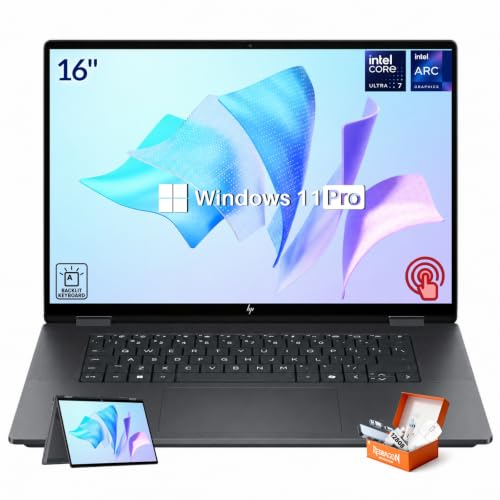
The OmniBook X Flip’s title is a model of specification writing in every respect except the one this guide cares about most. It gives an Intel Core Ultra 7 256V, 16GB of LPDDR5X memory, a full 1TB SSD, a 47 TOPS NPU, a 16-inch 2K IPS display with a stated 400 nits of brightness, Intel Arc 140V graphics, Thunderbolt 4, Wi-Fi 6E, a backlit keyboard, Copilot+ status and Windows 11 Pro. That 400-nit figure deserves attention from pen users specifically: drawing and annotating happen in ordinary rooms under ordinary light, and a bright panel keeps strokes and fine lines legible where dimmer screens turn tentative. The 2K resolution at this size is the other pen-relevant gift, keeping ink edges clean.
And yet — no pen. Not named, not claimed, not hinted. HP sells pens, HP’s Flip line gestures at pen work, and none of that appears in this title, so the pen row below carries the same locked sentence as the Yoga’s. The correct buyer behaviour mirrors the previous review: verify support and inclusion against HP’s documentation for this configuration, and treat any pen as a separate purchase until the paperwork says otherwise. It is a small errand, and skipping it is how a 2K annotating desk becomes a 2K touchscreen with regrets attached.
As a professional laptop, the X Flip arguably carries the most balanced title in the guide — the 1TB SSD fixes the storage modesty of its OmniBook 7 sibling, and the Pro operating system, Thunderbolt and backlit keyboard suit a working desk completely. A pen-optional professional, or a pen-led one who completes the verification, gets a machine with no structural weakness. Those ready to begin can look at the OmniBook X Flip listing on Amazon and then take the pen question to HP’s own pages, where it can actually be answered.
Think of this pick as the guide’s control case: it demonstrates that a superb convertible specification and a proven stylus proposition are independent variables. The display brightness and resolution would serve ink beautifully if the digitiser story checks out. The review’s restraint is not a judgement on the machine, which is excellent on paper, but on the evidence — and in a stylus guide, evidence about the stylus is the whole assignment.
- Display: 16-inch 2K IPS, 400 nits as stated
- Processor: Intel Core Ultra 7 256V, 47 TOPS NPU
- Memory: 16GB LPDDR5X
- Storage: 1TB SSD
- Pen: Not stated in the listing title — verify with the manufacturer documentation
- Ports and wireless: Thunderbolt 4, Wi-Fi 6E
- Operating system: Windows 11 Pro
Strengths
- A 400-nit 2K panel keeps ink and fine detail legible in bright rooms.
- 1TB of storage leads the full-size picks in this guide.
- Thunderbolt 4 and Windows 11 Pro complete a desk-ready professional kit.
Trade-offs
- No pen is named or claimed anywhere in the title.
- Wi-Fi 6E sits a step behind the WiFi 7 picks here.
- 16GB of memory is the class standard rather than a headroom figure.
Best for: a professional who wants a bright 16-inch 2K panel and 1TB of storage, and will confirm the pen position in HP’s documentation. Not suited for: an order placed today on the assumption that an HP pen ships in this box, since the title gives no basis for that assumption.
Brightness is the specification pen users underrate until a bright room teaches them. Sketching and annotating involve staring at fine lines against white or dark canvases for long stretches, often under mixed lighting that a dim panel cannot overcome. The X Flip’s stated 400 nits is the only brightness figure published by any title in this guide, which makes it — like the mini laptop’s support sentence — a small act of listing honesty worth rewarding. Combined with the 2K resolution, it describes the screen in this guide most likely to stay legible through a summer afternoon in a glass-walled office, pen in hand.

Lenovo Yoga 7a OLED — A named Gen 2 pen over OLED glass
Lenovo answers the pen question properly in this title: a Lenovo Yoga Pen Gen 2 is named outright, which moves this machine into the guide’s small top tier of listings that say what they ship. The pen draws on a 16-inch WUXGA OLED touchscreen — and OLED is a meaningful pen surface, its perfect blacks and saturated colour making ink, diagrams and artwork look like they sit on paper rather than behind glass. The computer underneath is an AMD Ryzen AI 7 445 with 24GB of LPDDR5X memory, a 1TB SSD, Wi-Fi 7 and Windows 11 Pro. That 24GB figure is a thoughtful middle step: more headroom than the 16GB standard, aimed at people who keep a drawing application, a browser and a call open together.
This is the illustrator-leaning pick of the six, and the reasoning is layered. The named pen removes the inclusion risk. The OLED panel flatters colour work and makes long annotation sessions easy on the eyes. The memory and storage figures support a working archive of artwork and documents rather than a demo. Wi-Fi 7 and the Pro operating system keep the machine current in managed settings. A student of design, a hobbyist artist graduating from a tablet, or a professional whose drawing is frequent but not studio-exclusive will find the pieces arranged in their favour.
The standing caveat applies to its pen as to the HP’s: pressure levels and tilt behaviour are not printed in the title, so a working illustrator whose technique depends on tilt shading must pull those figures from Lenovo’s documentation before treating this as a drawing-tablet replacement. WUXGA resolution, while ample, is also a step below the 2K panels of its Yoga sibling and the OmniBook X Flip, a difference visible mainly in the finest detail work. Neither point dents the central fact: this is a pen you can read about in the listing, attached to a screen worth drawing on. Artists can check the Yoga 7a OLED listing on Amazon to confirm the Gen 2 pen accompanies the configuration on sale.
Daily annotation benefits from the OLED in a quieter way, too. Dark-mode documents and note applications render with true black backgrounds, so an evening of marking up text happens on a screen that is not glowing grey at the edges. Combined with the pen, the machine becomes the guide’s most inviting evening desk — the one you would leave folded open, pen beside it, the way a notebook lives on a kitchen table.
- Display: 16-inch WUXGA OLED touchscreen
- Processor: AMD Ryzen AI 7 445
- Memory: 24GB LPDDR5X
- Storage: 1TB SSD
- Pen: Lenovo Yoga Pen Gen 2 — named in the listing title
- Pen pressure and tilt: Not stated in the listing title — verify with the manufacturer documentation
- Wireless: Wi-Fi 7
- Operating system: Windows 11 Pro
Strengths
- A named Yoga Pen Gen 2 ends the inclusion question at the title.
- OLED glass gives ink and artwork true blacks and rich colour.
- 24GB of memory and 1TB of storage suit a real working archive.
Trade-offs
- Pen pressure and tilt remain unpublished in the title.
- WUXGA resolution trails the 2K panels elsewhere in the guide.
- OLED care habits — varying content, minding static elements — come with the panel.
Best for: an illustrator or heavy annotator who wants a named pen, an OLED canvas and 24GB of memory in one 16-inch convertible. Not suited for: a technique built on a specific tilt or pressure specification, because neither figure appears in the listing title.
Consider the household division of labour this machine suits once the pen is settled. The same OLED panel that flatters artwork also flatters the streamed film and the family photo library, and the 24GB of memory means the drawing application need not evict everything else each time it opens. Convertible purchases often fail socially rather than technically — bought for one person’s pen work, resented by everyone else’s needs. This Yoga’s specification is broad enough to be the household’s best screen as well as its owner’s drawing desk, and that breadth is a legitimate part of its value.
Samsung Galaxy Book3 360 — Judged here by its pen silence
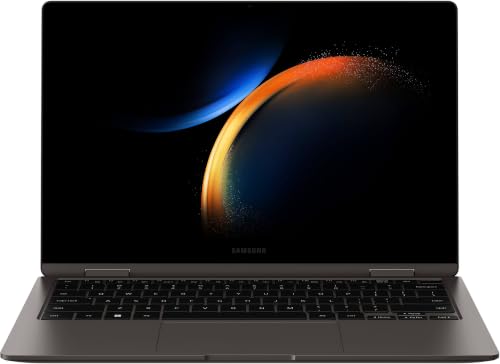
This Samsung appears in this guide under a different lens than in the 13-inch guide, and the lens is unforgiving. The hardware case remains attractive: a 13.3-inch FHD AMOLED touch screen — the most hand-friendly drawing surface size in the guide — driven by an Intel Core i7-1360P with 16GB of memory and a 512GB SSD, in a slim graphite 2-in-1. Samsung’s pen heritage across its devices is famous, and many readers will arrive at this listing expecting that heritage to settle the pen question. The title, however, settles nothing: it mentions no pen, no support claim, no digitiser. In a stylus guide, that silence is the review’s headline, and the spec box records it with the locked sentence.
Why include a machine whose pen story is untold? Because readers will consider it anyway — the AMOLED screen and the Samsung name guarantee that — and a guide that omitted it would leave those readers alone with their assumption. The responsible treatment is the one given here: admire the panel, respect the processor, and state plainly that pen support and pen inclusion for this configuration must be established from Samsung’s documentation before a pen-led purchase. If the documentation confirms support, a separately bought pen over AMOLED at 13.3 inches is a genuinely lovely handwriting setup, light enough to hold and rich enough to enjoy.
If the documentation does not confirm it, the machine remains a fine small convertible for touch and typing, and the pen-led buyer walks away having lost nothing but an afternoon’s reading. That asymmetry — verify first, lose nothing — is the correct posture toward every silent title in this guide. Samsung’s screen will tempt you to skip the errand; the whole point of this review is that you should not. Tempted readers can visit the Galaxy Book3 360 listing on Amazon for the configuration details, then take the pen question to Samsung’s specification pages.
Portability is this pick’s consolation and its charm. Thirteen-point-three inches folded flat is the one size here that works propped on a forearm in a corridor or balanced during a site walk-through, the moments when pen notes actually get taken in field jobs. Should its pen support verify, that mobility becomes a real differentiator against the desk-bound 16-inch machines — the best pen is, on many days, the one attached to the machine you actually carried.
- Display: 13.3-inch FHD AMOLED touch screen
- Processor: Intel 13th Gen Evo Core i7-1360P
- Memory: 16GB
- Storage: 512GB SSD
- Pen: Not stated in the listing title — verify with the manufacturer documentation
- Ports: Not stated in the listing title — verify with the manufacturer documentation
Strengths
- An AMOLED panel at 13.3 inches is the most portable quality canvas here.
- The Core i7-1360P and 16GB of memory keep pen applications fluid.
- The smallest footprint in the guide suits field notes and travel.
Trade-offs
- The title offers no pen evidence of any kind.
- Ports go entirely unlisted, complicating desk setups.
- Its screen gives the hand far less room than the 16-inch picks.
Best for: a mobile note-taker who values a 13.3-inch AMOLED screen and will establish the pen position from Samsung’s documentation first. Not suited for: anyone treating the Samsung name as proof a pen is included, because the listing title provides no such proof.
Set this Samsung’s pen silence beside its other silences and a pattern emerges: the title is a screen-and-processor advertisement, not a specification sheet. That was a defensible choice for a consumer listing, but a stylus guide must grade what is printed. Buyers who proceed should proceed in the right order — Samsung’s documentation first, pen compatibility second, the order button third — and should also confirm which pens the documentation names, since a support confirmation without a named compatible pen still leaves a purchase to research. None of this diminishes the AMOLED panel, which remains the prettiest surface in this guide; it simply refuses to let beauty testify about hardware it does not describe.

Mini Laptop 2-in-1 8in — The pocket machine that says the words
End with the smallest machine and the plainest pen sentence in the guide: Stylus Support, stated outright in an 8-inch mini laptop’s title. This pocket PC runs Windows 11 Pro on an Intel N95 with 12GB of LPDDR5 memory and a startling 1TB SSD, adding Wi-Fi 6, Bluetooth 5.2, a G-Sensor for orientation, HDMI and Type C connections. The 2-in-1 format at this size means something different than it does at sixteen inches: the screen folds and rotates for a device held like a paperback, written on like a pocket notebook, and carried in a coat rather than a bag. Its stylus support is not a creative studio claim; it is a handwriting claim, and for handwritten notes it is the honest scale of the tool.
Who carries such a thing? Field workers logging notes and signatures at the point of work, inspectors and surveyors moving room to room, medical and warehouse staff whose records are short forms and quick marks, and travellers who want a real Windows machine that vanishes into a jacket. For those readers the specification is oddly well judged — 12GB of memory keeps Windows 11 Pro breathing, the terabyte of storage swallows years of forms and photographs, and the port selection, HDMI included, lets the pocket machine present and dock like a grown-up when it returns to a desk.
Its limits are the limits of eight inches. Nobody should draft long documents on this keyboard or draw finished art on this canvas, and the N95 processor is a light-duty part for light-duty tasks. The title also states support rather than naming an included pen, so expect to supply your own and confirm compatibility. Within its brief, though, it does something the famous names in this guide mostly did not: it answers the pen question in the title, in plain words. Pocket-note readers can see the mini laptop listing on Amazon to check what ships with the current unit.
There is a lesson in this little machine’s presence here. Pen support is not a premium feature that trickles down when budgets allow; it is a digitiser decision and a sentence in a listing. The manufacturers of the silent titles in this guide could end the uncertainty with four words, and the fact that an unbranded 8-inch device manages it should recalibrate how much deference buyers owe the famous ones. Judge listings by what they state — this one states more, relative to its size, than most.
- Display: 8-inch, 2-in-1 format
- Processor: Intel N95
- Memory: 12GB LPDDR5
- Storage: 1TB SSD
- Pen: Stylus Support — stated in the listing title; an included pen is not named
- Wireless: Wi-Fi 6, Bluetooth 5.2
- Connections: HDMI, Type C
- Operating system: Windows 11 Pro
Strengths
- Stylus Support is stated in the title — rarer honesty than the big brands managed.
- 12GB of memory and a 1TB SSD are generous at this size.
- A true pocket format makes pen notes available anywhere.
Trade-offs
- Support is stated but no pen is named as included.
- Eight inches excludes long typing and finished artwork.
- The N95 is a light-duty processor for light-duty work.
Best for: a field worker or traveller who wants stated stylus support and Windows 11 Pro in an 8-inch pocket format. Not suited for: anyone planning long documents or detailed drawing, because an 8-inch screen and keyboard set hard physical limits.
A word about the G-Sensor, an easily missed line in the mini laptop’s title. Orientation sensing is what lets a tiny convertible behave like a tablet — rotating its display as you turn it, presenting a form the right way up to the person signing it. In field work that small courtesy is the difference between a device that feels purpose-built and one that feels shrunk. It costs the buyer nothing and signals that the machine’s designers understood its actual job, which is more than can be said for several larger listings in this guide.
Comparison
| Pick | Screen | Pen evidence in title | Memory / Storage | Processor |
|---|---|---|---|---|
| HP OmniBook 7 Flip 16 | 16-inch FHD+ touch | Active Pen named | 32GB / 512GB SSD | Ultra 7-258V |
| Lenovo Yoga 7a 16 | 16-inch 2K LCD touch | Not stated in the listing title | 16GB / 512GB SSD | Ryzen AI 5 430 |
| HP OmniBook X Flip | 16-inch 2K IPS 400 nits | Not stated in the listing title | 16GB / 1TB SSD | Ultra 7 256V |
| Lenovo Yoga 7a OLED | 16-inch WUXGA OLED touch | Yoga Pen Gen 2 named | 24GB / 1TB SSD | Ryzen AI 7 445 |
| Galaxy Book3 360 | 13.3-inch FHD AMOLED touch | Not stated in the listing title | 16GB / 512GB SSD | Core i7-1360P |
| Mini Laptop 8in | 8-inch 2-in-1 | Stylus Support stated | 12GB / 1TB SSD | Intel N95 |
How to Choose a Convertible for Pen Work
Grade the pen evidence before anything else, using the three tiers this guide applies. A named pen in the title is a purchase you can make today. A stated support claim is a purchase plus a pen to source and a compatibility check to run. Silence is a research project: support and inclusion both unknown until the manufacturer’s documentation for the exact configuration answers them. None of these tiers is a trick, but they are not interchangeable, and the price difference between tiers is often exactly one pen and one week of delay.
Then match the canvas to the hand’s work. Sixteen inches suits desk annotation, drawing and document markup at natural scale; it is a surface you sit at. Thirteen inches suits the carried notebook — meetings, site visits, lectures — where the machine travels to the writing rather than waiting for it. Eight inches suits the pocket jotter and nothing larger. Resolution and brightness refine the choice within a size: 2K panels keep fine ink crisp, 400 nits keeps it visible in bright rooms, OLED keeps it beautiful in dark ones.
Finally, interrogate the pen itself once inclusion is settled. Pressure sensitivity governs how line weight responds to your hand; tilt governs shading strokes; neither figure appears in any title in this guide, so both belong on the documentation checklist for artist-grade work. Note-takers can safely care less — handwriting forgives modest pen specifications — while illustrators should treat an unverifiable pen specification as a reason to choose a different pick, however lovely its screen.
How Does Screen Size Change the Way a Pen Feels?
Pen feel is partly geometry. On a 16-inch canvas the hand rests on glass the way it rests on a desk pad, the wrist anchors, and strokes come from the fingers and forearm in natural proportion — drawing feels like drawing. Shrink the canvas and the hand crowds the work, the wrist hangs off an edge, and long strokes become arm movements the screen is too small to reward. That is why the size ladder in this guide maps so cleanly onto tasks: sixteen inches for illustration and full-page markup, thirteen for notes taken at a desk or table, eight for jottings captured wherever the worker happens to be standing. None of these is a lesser pen experience in the abstract; each is the right size for a different physical situation, and choosing by situation rather than by specification is the reliable route through this category.
Why Does Pen Inclusion Matter More Than Pen Support?
Because support without a pen is a capability you cannot use on the day the machine arrives, and the gap between the two is filled with friction: choosing a compatible pen from a market of near-identical models, waiting for delivery, discovering whether the pen you chose carries the pressure behaviour you expected. An included pen collapses all of that into the original purchase, matched by the manufacturer to the digitiser in the screen. Support still matters — it is the difference between a machine that can grow a pen and one that never will — but a buyer comparing two listings should price the support-only machine as the laptop plus a pen plus the errand, because that is what it is.
Can These Pens Replace a Dedicated Drawing Tablet?
For notes, markup, diagrams and a great deal of illustration, yes — the named-pen picks in this guide put a digitiser and a full computer in one folding body, which is most of what most drawing workflows need. The replacement fails at the professional edge, where a dedicated tablet’s published pressure curve, tilt behaviour and pen ergonomics are the product. No title here publishes pressure or tilt figures at all, so a working illustrator cannot confirm equivalence from listing evidence. The honest sequence is to check the manufacturer’s pen documentation; if the figures meet your technique, the convertible consolidates two devices into one, and if they do not, the convertible remains an excellent note and markup machine beside the tablet you keep.
What Should a Note-Taker Prioritise Over an Artist?
Different things, and confusing the two lists wastes money in both directions. A note-taker needs the pen present, the machine light or handy, the battery dependable and the notes application fast to open — raw pen specifications barely register, because handwriting is undemanding. An artist needs the pen’s pressure and tilt documented, the panel’s colour and resolution high, and the screen large enough to draw at natural scale. This guide’s mini laptop is a note-taker’s triumph and an artist’s toy; the Yoga 7a OLED reverses that judgement exactly. Naming which kind of pen user you are is the cheapest accuracy available in this category.
Where Should the Pen Live When It Is Not in Your Hand?
Ask this before ordering, because the answer decides whether the pen survives the year. Some convertibles garage the pen inside the body, some magnetise it to an edge, some offer a loop or a case, and some — the support-only listings especially — leave the problem entirely to you. A pen with a home gets charged, travels and is present for the unscheduled signature; a pen without one migrates to a drawer. None of the six titles here describes its pen storage, which makes it one more documentation question — a small one that experienced pen users have learned to ask first rather than last.
Common Mistakes When Buying a Stylus Convertible
The defining error of this category is treating a product line’s pen reputation as a listing’s pen promise. Three of the six titles here are silent on pens, including one from the most pen-associated line in computing, and every one of those silences has produced real buyers with real surprises. Read the title, not the brand story. A companion error is the reverse snobbery: dismissing the unbranded mini laptop’s plainly stated support because the machine is small and cheap, when its listing is more honest than the famous ones.
Shoppers also conflate touchscreen with pen screen. Every pick here has a touch display; touch responds to fingers and crude capacitive tips, while real pen work needs the digitiser that support statements and named pens imply. Ordering a touch-only understanding of a silent title is how annotation plans die. A third mistake is neglecting the pen’s own specifications until technique suffers — pressure and tilt are unpublished in all six titles, and the artist who discovers that after purchase has bought a research project. Finally, buyers forget the pen’s practicalities: where it stores, how it charges, what a replacement costs. A pen that lives loose in a bag is a pen that gets lost before the machine’s second year.
Storage and memory deserve their own paragraph in a pen guide, because ink accumulates. Years of notebooks, annotated PDFs and layered artwork grow quietly, and the picks here divide sharply: the 1TB machines (X Flip, Yoga OLED, mini laptop) absorb that growth without housekeeping, while the 512GB picks ask their owners to archive deliberately. Memory divides them again — the OmniBook 7 Flip’s 32GB and the Yoga OLED’s 24GB keep drawing applications comfortable beside a browser and a call, where 16GB remains adequate rather than generous. Pen buyers tend to keep machines a long time, since their notebooks live on them; buy the headroom that long ownership implies.
One closing practicality unites every pick here: the first week with a pen computer should be spent building the habit, not judging the hardware. Keep the machine folded open where you work, pen beside it, and route every signature, sketch and margin note through it instead of reaching for paper out of reflex. Buyers who do this discover within days whether their pen use is the daily reality the purchase assumed — and if it is not, they have learned it inside the return window rather than after it. The hinge and the digitiser reward commitment quickly; they punish dabbling indefinitely.
Final Recommendation
Let the evidence tiers lead. Buyers who want the pen settled today should choose between the two listings that name one: the HP OmniBook 7 Flip for its 32GB of memory, Thunderbolt 4 and professional completeness, or the Lenovo Yoga 7a OLED for its OLED canvas and 24GB middle path — with pressure and tilt figures checked in documentation if drawing technique depends on them. The Yoga 7a 16 and OmniBook X Flip are excellent convertibles whose pen stories must be verified before a pen-led order, and the Galaxy Book3 360 asks the same errand of Samsung admirers. The little 8-inch machine, alone in stating support at pocket size, owns the field-notes niche outright. In this category the pen is the product and the laptop is its vehicle; buy the listing that proves the pen, and the vehicle will not disappoint you.
Battery life threads through pen work in a way spec sheets rarely acknowledge. A convertible used for ink spends long stretches with its screen on and its processor nearly idle — reading, annotating, pausing — which is the gentlest workload a laptop knows, and most of these machines will stretch impressively under it. The strain arrives when pen sessions mix with video calls and heavy applications, draining at ordinary laptop rates. No title in this guide publishes a battery figure, so endurance joins pressure and tilt on the documentation checklist; a field note-taker in particular should confirm the number before trusting a full shift to any of these machines.
Frequently Asked Questions
Which of these laptops definitely include a pen?
Two titles name one: the HP OmniBook 7 Flip lists an Active Pen and the Lenovo Yoga 7a OLED lists a Lenovo Yoga Pen Gen 2. The 8-inch mini laptop states Stylus Support without naming an included pen. The other three titles say nothing about pens, so inclusion cannot be claimed for them from listing evidence.
What pen pressure levels do these machines offer?
None of the six listing titles publishes a pressure or tilt figure, so this guide reports none. Those specifications live in the manufacturers’ pen documentation, and any artist whose technique depends on them should read that documentation for the exact model before ordering.
Can I use any stylus with a convertible that supports pens?
No. Pen support means a specific digitiser technology, and a compatible pen must match it. An included or manufacturer-named pen is matched by construction; a separately bought pen should be chosen from the manufacturer’s compatibility documentation for your exact model, not by appearance or price.
Is a 16-inch convertible too big for handwriting?
For desk handwriting, no — sixteen inches approximates a full document page, which is why annotators favour it. For handwriting while standing or walking, yes: the 13.3-inch Samsung and especially the 8-inch mini laptop are the sizes that stay manageable away from a surface.
Does the Galaxy Book3 360 work with a pen?
Its listing title does not say. Samsung’s pen heritage makes support plausible, but plausibility is not evidence, and this guide marks the pen row as not stated. Confirm support and inclusion in Samsung’s documentation for this configuration before buying it for pen work.
Do I need a special pen for the mini laptop?
Its title states Stylus Support without naming a pen, so a pen must be sourced and its compatibility confirmed against the manufacturer’s documentation for this model. The support statement guarantees a digitiser is present to support something; the documentation is what names the something.
Which pick is best for signing documents all day?
Signing is the least demanding pen work there is, so choose by handling rather than pen specification: the 8-inch mini laptop for signatures captured on the move, the Galaxy Book3 360 — once its pen position is verified — for desk signing in a portable machine, and either named-pen 16-inch pick for an office that signs as part of a larger annotation workflow.
Are replacement pens expensive if I lose the included one?
Manufacturer pens are priced as accessories rather than commodities, and a lost pen is an annoying purchase — another reason the storage question in this guide matters. Before ordering any pick here, note the replacement route the manufacturer offers for its pen and whether third-party compatible pens exist for that digitiser, so a loss is an errand rather than a crisis.
Related Guides
Artists weighing these pen machines against drawing-first hardware should read the best convertible tablet laptops for artists, where the pen leads every judgement next. Readers who arrived here from the size question will find the portable end compared in the best 13-inch convertible laptops and their real 13.3-to-14-inch span.


