What's inside
- Key Takeaways
- Quick Picks
- How These Picks Were Chosen
- Side-by-Side Comparison
- How to Choose a Detachable
- Detachable, Convertible, or Tablet with a Keyboard Case?
- What Should a Renewed-Buying Checklist Include?
- How Important Is the Keyboard in a Detachable?
- Common Mistakes
- Final Recommendation
- Frequently Asked Questions
- Related Guides
As an Amazon Associate I earn from qualifying purchases. This post may contain affiliate links at no extra cost to you.
[SITE_DOMAIN] is reader-supported. When you buy through links on our site, we may earn an affiliate commission.
Five of the six machines below are linked directly to their Amazon listings, where the current price and the full stated configuration can be checked, line by line, against each review. The sixth is covered in prose only, for a reason its review explains in full: every current listing for it is a renewed unit, and this guide links only to listings it can stand behind as new — a distinction worth understanding fully, and checking personally, before any money moves in this category.
The best detachable laptops make a promise no convertible can keep: the keyboard comes off. What remains is a true tablet — held in one hand, read like a magazine, passed around a table, propped on a kitchen counter — and when work calls, the keyboard clicks back and the tablet becomes a laptop again, with no hinge pretending to be a compromise between the two. The six machines here pursue that promise at every level of seriousness: Microsoft’s current Surface Pro as the category’s reference design, an ASUS ProArt with a creator-grade AMOLED screen, two mid-range Windows tablets from smaller names, a compact 10.1 inch AWOW for the lightest possible kit, a budget 12 inch machine with a magnetic keyboard, and Dell’s business detachable, present in prose because the new market has moved on from it.
Detachables live or die on details that laptop guides rarely discuss, so this one discusses them at length. The keyboard is the first: in this category it is an accessory that behaves like a component, and whether it is included, backlit, firmly attached, or magnetically eager to separate at the wrong moment shapes daily life more than a processor generation does. The kickstand or its absence is the second — a tablet that cannot prop itself is a tablet that must be held, and held tablets get set down, and set-down tablets stop being used. The third is the pen and touch story, because a detachable’s tablet half earns its existence through handwriting, sketching, and annotation in a way a laptop’s screen never has to.
Performance spans the full range in this guide, and the titles state it with their usual candour. At the top, two Snapdragon-powered flagships carry 16GB of memory and storage up to a terabyte, positioned by their makers as Copilot+ AI machines. In the middle, Intel-powered Windows tablets offer 16GB of memory and half-terabyte drives from brands a buyer may need to research. At the accessible end, an N95 machine and a magnetic-keyboard budget design trade power for price and simplicity. Every review that follows judges its machine as a tablet first and a laptop second, because that is the order in which a detachable justifies itself.
One more framing note before the picks: all five linked machines run Windows, which makes this the most software-uncomplicated guide in the series — no platform boundary divides them. The differences that matter are instead physical and financial: screen quality, keyboard execution, storage, and the question of how much tablet a buyer actually needs once the novelty of detachment settles into routine.
Key Takeaways
- The Surface Pro (2026) is the category reference: a 13 inch Snapdragon X2 Plus tablet with 16GB of memory and a 512GB SSD, badged as a Copilot+ PC.
- The ASUS ProArt PZ13 carries the guide’s finest screen — a 13.3 inch 2.8K AMOLED touchscreen — with a terabyte of storage and Windows 11 Pro.
- The Fusion5 and the generic 12 inch machine deliver mid-range Windows detachable specifications — 16GB and 12GB of memory, 512GB drives — from smaller brands that reward a careful listing read.
- The AWOW is the compact budget option at 10.1 inches, with an Intel N95, 12GB of memory, and 36W PD charging.
- The Dell Latitude 7320 Detachable is prose-only because every current Amazon listing for it is renewed; its review sets out the checks a renewed purchase demands.
- In detachables, the keyboard, the stand, and the pen story matter as much as the processor — each review grades them explicitly.
Quick Picks
| Pick | Badge | Why it is here |
|---|---|---|
| Microsoft Surface Pro (2026) | Category Reference | A 13 inch Snapdragon X2 Plus Copilot+ tablet with 16GB of memory and a 512GB SSD. |
| ASUS ProArt PZ13 | Creator Screen | A 2.8K AMOLED touchscreen, a terabyte of storage, Wi-Fi 7, and Windows 11 Pro. |
| Fusion5 2 in 1 Laptop | Mid-Range Muscle | A 12 inch 2K Windows tablet with keyboard, 16GB of DDR5 memory, and a 512GB SSD. |
| AWOW 10.1 2-in-1 Tablet | Compact Budget | A 10.1 inch detachable with an Intel N95, 12GB of memory, and a 256GB SSD. |
| 2-in-1 Laptop Tablet 12in 2K | Magnetic Value | A 12 inch 2K Windows tablet with a magnetic keyboard, 12GB of memory, and a 512GB SSD. |
| Dell Latitude 7320 Detachable | Prose-Only Pick | A business detachable available only as renewed listings — covered without a link, with buying checks. |
How These Picks Were Chosen
The admission test was mechanical before it was editorial: a machine qualified only if its keyboard genuinely detaches, leaving a self-contained tablet — not a 360-degree hinge, however flexible, and not a laptop with a touchscreen, however nice. That single rule separates this category from the convertible guides elsewhere in this series, and it shaped a shortlist with a distinctly different centre of gravity, because true detachables are rarer than convertibles and their makers are a different cast: Microsoft and ASUS at the flagship end, specialist and budget brands filling the space beneath.
Specification verification followed the series’ standing discipline. Linked picks needed titles that state processor, memory, storage, and screen plainly enough to review without invention; the two flagships and the three smaller-brand machines all clear that bar, though the budget listings required the careful reading their reviews describe. The Dell Latitude 7320 Detachable failed a different test — not specification, but market condition. It is a business detachable of genuine quality whose new stock has left the market; every current listing is renewed. Rather than link a renewed unit under a guide’s implicit promise of new, or drop a machine many business buyers specifically seek, the guide covers it in prose with its market status stated in the open and the renewed-buying checks set out in full.
The final selection principle was spread of intent, as in every guide here: a flagship for the professional, a creator machine for the visual worker, mid-range muscle for the value buyer, compact and budget options for the light traveller, and the business veteran for the buyer who shops the renewed market deliberately. A reader should be able to locate their own pattern of use in at least one review — and to eliminate the other five with confidence, which is the other half of a shortlist’s job.

Microsoft Surface Pro (2026) — Category Reference
Every category has the product that defines its expectations, and in detachables that product remains Microsoft’s. The Surface Pro listed here is the 2026 edition: a 13 inch premium 2-in-1 built around a Snapdragon X2 Plus processor, with a touchscreen display, 16GB of memory, a 512GB SSD, Windows 11, and Copilot+ PC branding, in black. The specification reads like the category’s centre of gravity — no figure extreme, every figure right — and that balance is the Surface Pro’s long-standing argument: it is the detachable against which the others are measured, bought by people who want the form factor’s promise kept by the company that invented its modern form.
The Snapdragon X2 Plus places this generation firmly in the ARM-based, efficiency-first era of Windows, and for a detachable that emphasis is doubly apt. A tablet is held, carried in a hand, used on a lap and a train tray; efficiency is what lets it be those things for a full day rather than a morning. The Copilot+ designation marks the machine as part of Microsoft’s AI-PC class, with on-device AI capability intended for the assistant and creative features woven through current Windows — features that, in a machine designed to be picked up for quick tasks, suit the grab-and-go rhythm of tablet life. The compatibility corollary from this series’ other guides applies unchanged: mainstream software runs well, and a specialist legacy program deserves an ARM check before the Surface becomes its only home.
Sixteen gigabytes of memory and a half-terabyte SSD are the working specification of a professional’s only computer, which is what the Surface Pro is bought to be. Documents, design files, a photo library in reasonable order, and the full sprawl of a working week fit inside that envelope, and the touchscreen earns its keep across all of it — annotating a contract in tablet mode at a café table, signing, sketching, presenting, then reattaching the keyboard for the email that follows. The detachable rhythm sounds like a marketing sequence until an owner lives it for a month; then it becomes simply how work is done.
Two buying notes belong in the open. The keyboard in this category is the component that turns the tablet into the laptop of the product’s name, and buyers should confirm on the listing exactly what the purchase includes and what is sold separately, since Surface-family accessories have historically been line items rather than assumptions. The same care applies to pen support. Neither note diminishes the machine; both are the ordinary diligence of buying in a category where the headline product is, by design, only half of the working whole. Begin the category here: examine the Surface Pro’s listing, price the complete kit rather than the tablet alone, and let every rival below argue against that total.
For the professional whose work is meetings, documents, travel, and presentation, this remains the detachable most likely to be chosen twice — once at purchase, and again every day when its owner reaches for it instead of the laptop it replaced. Longevity of affection is not a specification, but in a category built on a habit — detach, read, reattach, type — the machine that sustains the habit without friction is the machine that wins, and the Surface line has had more generations than any rival to learn that lesson.
Real-estate and field professionals make an instructive test case for this machine, because their working day is the detachable rhythm in its purest form: documents reviewed on site in tablet mode, photographs annotated where they were taken, forms completed standing, then the keyboard reattached in the car or the office for the report that closes the job. A laptop interrupts that flow with its hinge; a plain tablet interrupts it at the report. The Surface Pro’s professional specification exists for days shaped exactly like that, and its presence at the top of this guide reflects how completely it serves them.
- Display: 13 inch touchscreen
- Processor: Snapdragon X2 Plus
- Memory and storage: 16GB RAM, 512GB SSD
- Operating system: Windows 11, Copilot+ PC
- Finish: Black
- Keyboard and pen inclusion: Not stated in the listing title — verify with the manufacturer documentation
Strengths
- The category’s reference design, in its current generation
- An efficiency-first Snapdragon platform suited to tablet life
- 16GB and 512GB make it a credible only computer
Trade-offs
- The complete kit’s cost depends on accessory inclusion — verify it
- ARM platform asks a compatibility check for legacy software
- A single 13 inch size, where rivals span 10 to 13.3 inches
Best for: professional life split between meetings, annotation, travel, and desk work on one machine.
Not suited for: legacy Windows software without ARM support, or a buyer counting the tablet’s price as the whole kit’s.

ASUS ProArt PZ13 — Creator Screen
The ProArt PZ13 is the detachable for the person who looks at screens professionally. Its title specifies a 13.3 inch 2.8K AMOLED touchscreen, a Snapdragon X Plus processor in X1P-42 form with 45 TOPS of AI capability, 16GB of memory, a terabyte of storage, a backlit keyboard, Wi-Fi 7, Bluetooth 5.4, a webcam, Windows 11 Pro, and a bundled DKZ USB hub. That is the most complete detachable specification in this guide, and its centre of gravity is unmistakable: the AMOLED panel, with the deep blacks and colour behaviour that draw photographers, illustrators, and video workers to the technology, in a machine that detaches for the sketchbook half of their process.
Consider the workflow this machine is assembled for. Reference photographs reviewed on a panel that shows shadow detail honestly; sketches and edits made directly on the screen in tablet mode; a terabyte of local storage holding the working archive rather than a token selection; and Windows 11 Pro underneath it all, running the traditional creative applications that a professional’s plug-ins and habits depend on. The ProArt name is ASUS’s creator line, and the PZ13 carries that brief into the detachable form more completely than any rival here — the Surface is the better generalist, but the ProArt is the specialist, and specialists know their screens.
The supporting figures reward a close read. Wi-Fi 7 and Bluetooth 5.4 are the current wireless standards, a generation ahead of most of this guide, and they suit a machine that will move large files and pair with modern peripherals for years. The 45 TOPS figure quantifies the AI acceleration the Snapdragon platform brings to creative tools that use it. The included USB hub acknowledges the detachable’s perennial port economy and solves it in the box, and the backlit keyboard — explicitly stated here, where the Surface’s title is silent — completes a specification that keeps answering questions the other listings leave open.
The counters are the flagship pair: a price position at the top of this guide, and the same ARM-platform compatibility check that applies to the Surface, sharpened for creative professionals whose plug-in collections may include older components. Both are manageable with open eyes. A creator whose applications are confirmed current will find in the PZ13 the most capable detachable in this guide, full stop. Go to the ProArt PZ13’s Amazon listing to verify the terabyte configuration and the hub’s inclusion, and compare its complete-kit total against the Surface’s — that comparison, between the generalist reference and the creator specialist, is this category’s real final.
There is a travel dimension to the creator case as well. Location photographers and travelling illustrators have historically carried a laptop for power and a tablet for drawing, accepting the pair’s combined weight as the cost of the work. A detachable of this specification collapses the pair into one object with one charger and one backup routine, and for the professional whose income travels with them, that simplification is worth as much as any single figure in the title.
Video work deserves a specific note in the ProArt’s ledger, because the detachable form serves it in an unexpected way: the tablet half becomes a reference monitor and a timeline-scrubbing surface, held or propped where a laptop cannot go, while the AMOLED panel’s contrast shows the footage’s shadows as they will appear on good screens. Editors who have only ever worked at a fixed desk underestimate that mobility until a client review happens on a sofa, in a studio corner, wherever the work actually is. The PZ13 is built for a creative practice that moves, and its specification never forgets it.
- Display: 13.3 inch 2.8K AMOLED touch
- Processor: Qualcomm Snapdragon X Plus X1P-42, 45 TOPS
- Memory and storage: 16GB, 1TB
- Operating system and extras: Windows 11 Pro, backlit keyboard, DKZ USB hub included
- Wireless and camera: Wi-Fi 7, Bluetooth 5.4, webcam
- Form: detachable 2-in-1, per the listing title
Strengths
- A 2.8K AMOLED screen — the finest display in this guide
- A terabyte of storage for a working creative archive
- Current wireless standards and a hub included in the box
Trade-offs
- The flagship price position of the category
- Creative plug-ins deserve the ARM compatibility check
- A specialist’s machine, more than a family would use
Best for: photography, illustration, and design work split between screen-critical editing and sketching.
Not suited for: a plug-in collection anchored to older components, or a household tablet budget.

Fusion5 2 in 1 Laptop — Mid-Range Muscle
Fusion5 occupies the territory the flagships leave open: a Windows 11 tablet with its keyboard included, a 12 inch 2K touchscreen, an Intel 15th generation quad-core processor, 16GB of DDR5 memory, and a 512GB SSD, with a built-in cooling fan and assembly in the USA stated in the title. Read that specification without the brand names attached and it competes a class above its position — the memory and storage match the Surface’s, the screen resolution is a genuine step above basic, and the keyboard’s inclusion in the product’s very name removes the accessory ambiguity that complicates the flagship purchases.
The cooling fan is the detail that rewards attention, because it signals engineering intent. Small Windows tablets are usually passively cooled, which caps sustained performance when the processor works hard for long stretches; an active fan, deliberately designed in, suggests this machine is meant to hold its pace through a working session rather than sprint and fade. For a buyer whose tablet doubles as the machine for long documents, video calls, and media work at a desk, sustained behaviour matters more than benchmark peaks, and the title’s willingness to headline a fan — an unglamorous component — reads as honesty about that priority.
The 2K resolution at 12 inches deserves its sentence as well. At tablet distances, that pixel density renders text and images with a crispness the budget machines below cannot match, and 12 inches is the size class where a detachable balances hand-held reading against a keyboard wide enough for real typing. Buyers torn between the AWOW’s compactness and the flagships’ screens will find this machine sitting deliberately in the gap, asking to be judged as the middle done properly rather than the flagship done cheaply.
The diligence notes are the smaller-brand pair, stated plainly. A buyer should read the listing completely — confirming the keyboard’s inclusion and the exact configuration — and should weigh the maker’s support arrangements with the seriousness this series recommends for any lesser-known name, because a detachable’s keyboard and hinge are components that may need their maker years from now. None of that erases the specification’s value. Weigh the Fusion5’s listing on its stated figures, and it stands as the guide’s clearest example of mid-range money spent on the components that govern daily use.
Home and small-office buyers may find this machine’s shape particularly apt: it is the detachable as a shared household computer, passed from desk to couch, its keyboard present rather than misplaced, its storage deep enough for family photographs and documents together. Flagships serve their owners; a machine like this serves a household, and its specification — generous where sharing stresses a machine, modest where it does not — seems to understand that assignment.
Small practices — the bookkeeper, the tutor, the tradesperson running a one-person office — are another constituency this Fusion5 fits with unusual precision. Such buyers need a machine that presents professionally at a client’s table, works a full day at a home desk, and costs what a small practice can justify without a finance conversation. A detachable with a real keyboard, deep storage, and a sharp screen answers that brief in a single purchase, and the fan’s promise of sustained pace suits the end-of-month sessions when the machine earns its keep in one long sitting.
- Display: 12 inch 2K touchscreen
- Processor: Intel 15th generation quad-core CPU
- Memory and storage: 16GB DDR5 RAM, 512GB SSD
- Operating system: Windows 11, tablet with keyboard
- Cooling: built-in cooling fan, per the listing title
- Origin note: built in USA, per the listing title
Strengths
- Flagship-class memory and storage at a mid-range position
- A keyboard included and named in the product itself
- Active cooling for sustained working sessions
Trade-offs
- A smaller brand — research support arrangements before buying
- No AI-PC branding or current-generation wireless claims
- Screen quality claims rest on resolution rather than panel type
Best for: a household or home-office detachable with real typing, long sessions, and shared family files.
Not suited for: a buyer needing a flagship maker’s service network, or creator-grade screen requirements.

AWOW 10.1 2-in-1 Tablet — Compact Budget
The AWOW is the smallest machine in this guide by a clear margin, and its review should begin by honouring the use case that size serves. A 10.1 inch 2-in-1 tablet with a detachable keyboard, an Intel N95 processor, 12GB of memory, a 256GB SSD, Wi-Fi 6, and 36W PD charging is not a failed attempt at a Surface; it is a successful attempt at the lightest complete Windows kit that still types. It goes in the small bag, the glove compartment, the site cabin, the bedside drawer — the places a 13 inch flagship does not — and it answers email, documents, browsing, and media when it gets there.
The specification inside that small frame is more serious than the size suggests. Twelve gigabytes of memory is a figure several larger machines in this series’ guides do not match, and it keeps the browser-and-documents workload fluid in a way the 4GB and 8GB budget class cannot. The 256GB SSD is a proper solid-state drive of workable size — double the internal storage of the budget bundles elsewhere in this series of guides — and the N95 is a known efficiency-class Intel processor whose behaviour in exactly this kind of machine is well understood: entirely adequate for the web, office, and media duties the AWOW is bought for, and not a creative workstation, as its own positioning concedes.
Charging deserves its line: 36W PD means the machine refills through the USB-C Power Delivery ecosystem, from the same class of charger that serves phones and other tablets. For a device whose whole argument is travelling light and living in small spaces, charger commonality is not a footnote — it is the difference between a dedicated brick in every bag and one shared charger serving the household’s devices. Wi-Fi 6 completes a connectivity story that is, again, a step above what the compact class usually offers.
The limits are size’s own. A 10.1 inch screen crowds documents that a 12 or 13 inch panel holds comfortably, and its keyboard — detachable and included in the concept — is a compact typing surface that suits messages and edits better than a novel’s first draft. Buyers should choose the AWOW the way its maker built it: as the second computer, the travel spare, the child’s or grandparent’s manageable Windows machine, the field worker’s reporting tool. Look at the AWOW’s Amazon listing with that role in mind, and its specification reads not as a compromise but as a fit.
There is also a gift and family dimension here that the flagships cannot serve: this is the detachable whose loss, breakage, or hand-me-down is a shrug rather than an insurance claim. First computers, spare computers, and computers for environments with sawdust, flour, or small children all obey that arithmetic, and a machine with honest memory and storage at this size and positioning fills those roles without a single wasted capability.
Healthcare-adjacent and care settings offer one more lens on the AWOW’s size: a machine that can be carried room to room in one hand, set down anywhere, and replaced without a capital decision is a genuinely different tool from a flagship that must be minded. Checklists, notes, video calls with family, reference material at the point of care — the workload is light, the movement is constant, and the budget is real. The AWOW’s specification, generous in memory and storage for its class, keeps that light workload from ever feeling strained, which is the whole art of designing at this size.
- Display: 10.1 inch touchscreen
- Processor: Intel N95
- Memory and storage: 12GB RAM, 256GB SSD
- Keyboard: detachable, per the listing title
- Charging and wireless: PD 36W charging, Wi-Fi 6
- Operating system: Windows, per the 2-in-1 tablet positioning in the title
Strengths
- The lightest complete Windows kit in this guide
- 12GB of memory and a 256GB SSD exceed budget-class norms
- PD charging shares the household’s existing chargers
Trade-offs
- A 10.1 inch screen and compact keyboard limit long typing
- An efficiency-class processor for everyday duties only
- A smaller brand behind the name
Best for: a travel spare, a first computer, or field reporting in tight spaces and small bags.
Not suited for: long-form writing at a desk, or a primary family archive of photographs.
2-in-1 Laptop Tablet 12in 2K — Magnetic Value
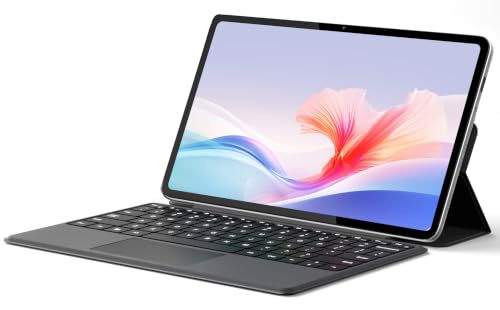
This machine arrives without a brand name, and the review will treat it exactly as it presents itself: a budget Windows 11 tablet with a magnetic keyboard, specified — on paper — with surprising ambition. The title lists a 12 inch 2K touchscreen, 12GB of memory, a 512GB SSD, two cameras, stereo speakers, two full-featured Type-C ports, and a portable design in Ash Black. The storage figure matches the Surface’s, the screen resolution matches the Fusion5’s, and the dual full-featured USB-C ports are a connectivity provision some flagships would be pleased to print. The absence is equally clear: no processor is named anywhere in the title, and that silence is the most important line in the listing.
Let the implications be stated in order. Without a named processor, a buyer cannot place this machine’s performance from the title at all — it should be assumed to be everyday-class, suitable for browsing, documents, media, and light applications, and the assumption should be verified against the full listing and the manufacturer’s documentation before purchase, as the spec box directs. A seller who prints memory, storage, cameras, speakers, and ports but omits the processor has told the buyer something, and the wise response is curiosity rather than either panic or faith. Machines in this class can be entirely serviceable; they are bought successfully by readers who verify, and regretted by readers who assume.
What can be judged from the title is genuinely promising for its tier. The magnetic keyboard is the detachable mechanism in its simplest, lightest form — no hinge hardware, instant separation, a tablet unencumbered when the keyboard stays behind. Two cameras serve the video-call and document-scanning life of a small tablet properly. Stereo speakers acknowledge that a tablet’s media half matters. The 512GB SSD, if the delivered configuration matches the title, gives this budget machine a local library the 256GB AWOW cannot hold, and the twin Type-C ports allow charging and an accessory at once — the small daily mercy that single-port tablets deny their owners nightly.
The buying method for this pick is therefore verification itself, performed in a specific order: confirm the processor from the listing’s full details or the maker’s documentation; confirm the memory and storage of the exact configuration; confirm what the magnetic keyboard includes and how it attaches; and weigh the seller’s returns terms as part of the product, because at this end of the market the returns path is a component of the purchase. Performing those checks and finding the answers sound is where this guide’s deepest value sits. A buyer unwilling to perform them should spend the difference on the Fusion5, whose title answers in advance. Either decision is respectable; only the unexamined one is not.
Students on the tightest budgets are this machine’s natural constituency, and for them one more virtue deserves naming: its specification spends nothing on branding. The memory, storage, and screen that a student touches daily are all present at figures the brand-name budget class rarely reaches, and the economies were taken in the nameplate and the processor’s anonymity instead. A student who verifies carefully may be getting the most hardware per unit of currency in this entire guide — which is, in the end, the oldest bargain in computing, offered on the oldest terms: read everything.
A word about expectations belongs here too, because budget detachables fail their owners most often in the imagination rather than in the hardware. Expecting this machine to behave like the flagships — instant everything, premium materials, a service network in every city — is misreading its proposition. Expecting instead a verified specification, a serviceable tablet, a workable keyboard, and storage that embarrasses machines twice its price will find the proposition kept. The gap between those two buyers is not money; it is the ten minutes of verification this review keeps recommending.
- Display: 12 inch 2K touchscreen
- Processor: Not stated in the listing title — verify with the manufacturer documentation
- Memory and storage: 12GB RAM, 512GB SSD
- Keyboard and system: magnetic keyboard, Windows 11
- Cameras, audio, ports: 2 cameras, stereo speakers, 2 full-featured Type-C ports
- Finish: Ash Black
Strengths
- A 512GB SSD and 2K screen at a budget position
- Two full-featured Type-C ports — charge and connect at once
- A magnetic keyboard for the lightest detachable arrangement
Trade-offs
- The processor is unnamed — performance must be verified, not assumed
- An unbranded machine with a seller-dependent support story
- Magnetic attachment is lighter-duty than a latched keyboard
Best for: a careful budget buyer — especially a student — willing to verify the full listing before ordering.
Not suited for: a purchase made on trust without verification, or demanding applications of any kind.
Dell Latitude 7320 Detachable — Prose-Only Pick
The Dell Latitude 7320 Detachable is included in this guide in prose only, and the reason must be stated without euphemism: every current Amazon listing for this machine is a renewed listing. There is no new listing for this guide to link, and the renewed status is not a detail to be softened — it is the defining fact of buying this machine today, shaping its price, its condition, its warranty, and the checks its buyer must perform. Readers who want a new detachable should choose among the five linked picks above. Readers who shop the renewed market deliberately — a large, rational constituency, especially for business hardware — will find the 7320 Detachable one of the most interesting machines in that market, and this review is written for them.
The machine’s appeal begins with its pedigree. The Latitude line is Dell’s business family, and the 7320 Detachable was its enterprise entry in this form factor: a detachable built for managed fleets, corporate deployment, and the service arrangements that surround them. Business hardware of this class was specified for a working life of daily professional use, supported by a maker’s enterprise ecosystem, and built to a standard that consumer tablets of its era rarely matched. When such machines leave corporate service and enter the renewed market, they carry that build and specification heritage with them — which is precisely why experienced buyers watch for them.
A renewed purchase, however, is a transaction with its own discipline, and the checks are not optional. First, the seller: buy only from a renewer whose programme states its grading, its testing, and its warranty in writing, and treat the warranty’s length as part of the product’s specification. Second, the battery: a renewed machine’s battery has a history, and the listing or the seller should be able to speak to its health — a detachable with a tired battery has lost the portability that is its whole argument. Third, the accessories: confirm whether the keyboard and any pen are included, since detachable accessories are the items most often separated from renewed units, and price their absence honestly. Fourth, the condition grade: cosmetic grading varies between sellers, and the screen — the component a tablet lives through — deserves a specific question. Fifth, the returns path: a renewed purchase should be made only where a problem in the first weeks can be returned without argument.
Performed with that discipline, a renewed Latitude purchase can deliver business-class detachable hardware at a fraction of its original cost, and for a buyer equipping a small team, a study, or a household office, the arithmetic is compelling. Skipped, the same purchase is a lottery. This guide’s position is the one it takes throughout: the machine is genuinely recommendable, the market condition is genuinely material, and the two facts belong in the same paragraph — which is why the 7320 Detachable stands here in prose, unlinked, with its status in the open and its checks in full.
One closing note for the renewed-curious reader who has never bought this way: the checks above are not a warning against the market but a description of how its successful buyers behave. Fleets of renewed business machines serve small companies, schools, and households for years, bought by people who treat grading, battery, warranty, and accessories as specifications equal to any processor. The Latitude 7320 Detachable rewards exactly that reader, and this guide is content to point at it — clearly labelled — rather than pretend the new market still stocks it.
Small organisations deserve a paragraph of their own in this review, because they are the renewed Latitude’s most natural buyers. A practice, charity, or start-up equipping five desks faces a multiplication problem: five new flagships is a capital event, while five renewed business machines — bought from one reputable renewer, at one grade, with one warranty conversation — is an operating decision. The uniformity matters as much as the saving: identical machines mean identical behaviour, shared accessories, and support that generalises. That is how the renewed business market quietly equips a large share of the world’s small offices, and the 7320 Detachable is squarely the kind of machine it does it with.
- Form: business detachable tablet with keyboard, from Dell’s Latitude line
- Market condition: available renewed only — no new listing is linked in this guide
- Specification figures: Not stated in the listing title — verify with the manufacturer documentation
- Buying checks: seller grading and warranty in writing, battery health, keyboard and pen inclusion, screen condition, returns path
- Positioning: enterprise-class detachable of its generation
- Link status in this guide: prose-only, deliberately
Strengths
- Enterprise build and support heritage from Dell’s Latitude line
- Renewed pricing puts business hardware within small-budget reach
- A detachable designed for managed professional fleets
Trade-offs
- Available renewed only — condition and battery carry a history
- Keyboard and pen inclusion must be confirmed per listing
- Warranty depends on the renewer, not on a new-product promise
Best for: a deliberate renewed-market buyer equipping a small team or home office with business hardware.
Not suited for: a buyer needing a new machine with a full manufacturer’s warranty, or a purchase made without checking battery and accessories.
Side-by-Side Comparison
| Machine | Screen | Memory | Storage | Status |
|---|---|---|---|---|
| Microsoft Surface Pro (2026) | 13 inch touch | 16GB | 512GB SSD | Linked, new |
| ASUS ProArt PZ13 | 13.3 inch 2.8K AMOLED touch | 16GB | 1TB | Linked, new |
| Fusion5 2 in 1 | 12 inch 2K touch | 16GB DDR5 | 512GB SSD | Linked, new |
| AWOW 10.1 2-in-1 | 10.1 inch touch | 12GB | 256GB SSD | Linked, new |
| 2-in-1 Laptop Tablet 12in 2K | 12 inch 2K touch | 12GB | 512GB SSD | Linked, new |
| Dell Latitude 7320 Detachable | Business detachable class | Not stated in the listing title | Not stated in the listing title | Prose-only, renewed market |
How to Choose a Detachable
Choose by the tablet first. The defining question of this category is what the machine does in the hours when its keyboard is elsewhere — reading, annotating, presenting, watching, sketching — and a buyer whose honest answer is “very little” should save the detachable premium and buy a convertible or a laptop instead. A buyer whose answer names real tablet hours should then grade the candidates on the tablet virtues: screen quality for reading and drawing, which peaks at the ProArt’s AMOLED; size for holding and carrying, which peaks at the AWOW’s 10.1 inches; and the pen and stand arrangements that turn a slab into a tool.
Then price the complete kit, never the tablet alone. In this category the purchase is a system — tablet, keyboard, perhaps pen, perhaps hub — and the listings differ in what they include, from the ProArt’s bundled hub and stated backlit keyboard to the budget machines’ magnetic boards. Write the full kit’s contents for each candidate before comparing totals, because the cheapest tablet with an expensive keyboard can cost more than the flagship whose box was complete. The Surface’s review states the discipline for its own listing; apply it to all six, the Dell included, where accessory inclusion is a per-unit question.
Finally, match the processor platform to the software life. The two flagships are ARM-based Snapdragon machines, with the efficiency and the compatibility check that platform carries; the remaining linked picks are Intel Windows machines with the traditional software world fully open and, in the budget case, an unnamed processor to verify. None of these is the wrong answer — but they are different answers, and the buyer’s software list, as ever in this series, is the arbiter.
Detachable, Convertible, or Tablet with a Keyboard Case?
The three forms blur in marketing and separate in use. A convertible keeps its keyboard permanently, folding it behind the screen — always present, always adding its weight to the tablet mode. A detachable removes the keyboard entirely, so the tablet mode is a true tablet, at the cost of a connection that must be made and unmade and a keyboard that can be left behind. A tablet with an aftermarket keyboard case improvises the same trick with a general-purpose accessory, usually with the least rigid typing feel of the three. Buyers who type more than they hold should choose the convertible’s permanence; buyers who hold more than they type should choose the detachable’s purity; and buyers in the middle should be honest about which side of the middle their last month of computing actually fell on, because the hinge cannot be changed after purchase.
What Should a Renewed-Buying Checklist Include?
The Dell’s review lists the checks in its own context; here they are as a portable method for any renewed detachable. Establish the seller’s grading standard and warranty in writing before ordering. Ask specifically about battery health, and treat an evasive answer as an answer. Confirm the accessory manifest — keyboard, pen, charger — item by item, and price any absence. Read the cosmetic grade’s definition rather than its adjective, and ask about the screen separately from the body. Confirm the returns window and who pays its postage. And on arrival, test everything in the first week: every port, the keyboard’s attachment, the touchscreen’s full surface, the battery’s real behaviour. A renewed purchase made this way is a disciplined acquisition; made any other way, it is a hope with a tracking number.
How Important Is the Keyboard in a Detachable?
Important enough that it should be shopped as a product in its own right. A detachable’s keyboard is where the category’s compromises concentrate: it must be light enough to preserve the tablet’s portability, rigid enough to type on for hours, and attached firmly enough to survive a lap, a train table, and a bag. The titles here tell three different keyboard stories — the ProArt’s stated backlit board, the Fusion5’s keyboard built into the product’s identity, the budget machine’s magnetic arrangement — and each implies a different typing life. A professional writer should weight the keyboard’s quality and inclusion as heavily as the processor; an owner detaching mainly to read and annotate can let the tablet half lead. The keyboard is also the component most likely to be a separate purchase or a renewed omission, which is why every review in this guide returns to its inclusion.
Common Mistakes
Pricing the tablet and forgetting the kit. A detachable’s working cost includes whatever the box omits — keyboard, pen, hub — and those omissions differ by listing. Two machines compared on tablet price alone can reverse their order the moment both are priced as complete working kits.
Treating renewed as a synonym for cheap. A renewed business machine is a different product from a new consumer one, with its own grading, battery history, and warranty logic. Bought with the checklist, it is often the smartest money in the category; bought as a mere discount, it is the most common source of detachable disappointment.
Buying flagship screen size for a hand-held life. A 13 inch tablet is a desk-and-lap instrument; a 10 inch tablet is a hand instrument. Owners who buy the large screen for its specifications and then discover they never hold the machine have purchased a laptop with extra steps. Match the size to the hand, not the spreadsheet.
Skipping the processor question on a budget listing. A title that names everything except the processor is asking to be verified, and the verification takes minutes at the listing or in the manufacturer’s documentation. The buyer who skips it has not saved time; they have deferred a surprise.
Final Recommendation
The Surface Pro (2026) is the recommendation for the professional mainstream: the category’s reference design, in its current Snapdragon generation, with the balanced specification that makes it a credible only computer for meeting-and-desk life. The ASUS ProArt PZ13 outranks it for one defined reader — the creator whose screen is a professional instrument — and that reader should not hesitate, because the AMOLED panel, the terabyte, and the complete in-box kit justify the flagship step. Value in the middle belongs to the Fusion5, whose memory, storage, included keyboard, and active cooling serve a household or home office with uncommon completeness. The AWOW is the compact answer, the generic 12 inch machine is the verified-budget answer, and the Dell Latitude 7320 Detachable closes the guide as the renewed market’s serious option — unlinked by design, recommended with its checks attached, and all the more trustworthy for standing in the open about what it is, what it costs, and what its buyer must verify before the order is placed.
Frequently Asked Questions
Why is the Dell Latitude 7320 Detachable not linked?
Because every current Amazon listing for it is a renewed listing, and this guide links only to listings offered as new. The machine is covered in prose so that buyers who shop the renewed market deliberately can still read an honest assessment — including the checks that market demands: the seller’s grading and warranty in writing, the battery’s health, keyboard and pen inclusion, screen condition, and the returns path.
Is a detachable as good a laptop as a normal laptop?
For documents, communication, browsing, and the mainstream professional workload, yes — the flagships here carry processors, memory, and storage equal to good laptops, and their keyboards serve full working days. The differences appear at the edges: a detachable’s keyboard and stand arrangement is less rigid on a lap than a laptop’s hinge, and its port selection is usually leaner. Buyers whose work is desk-and-meeting centred feel no compromise; buyers who type for hours on sofas and trains should test the form’s manners against their habits.
Do detachables work well for handwritten notes?
That is one of the form’s founding purposes: the tablet half, freed from its keyboard, lies flat like paper and presents a full-screen canvas for handwriting, annotation, and sketching. The flagships are positioned for exactly this work. Because pen inclusion and support vary by listing, a buyer for whom handwriting is central should confirm the pen arrangements for the specific machine on its listing and in the manufacturer’s documentation before ordering.
What is the advantage of a magnetic keyboard?
Simplicity and lightness. A magnetic attachment, as on the budget 12 inch pick here, connects and separates instantly with no hinge hardware, and leaves the tablet entirely unencumbered when the keyboard stays behind. The trade is rigidity: a magnetic board generally offers a less firmly planted typing feel than a latched or hinged design, which matters to long-form writers and very little to buyers whose typing comes in messages and edits.
Can a detachable replace both a laptop and a tablet?
That is the category’s promise, and at the flagship level it is kept: the Surface Pro and the ProArt PZ13 each carry the specification to serve as a household’s or a professional’s single machine, typing at desks and reading on couches without a second device. At the budget level the replacement is partial — the AWOW and the generic machine replace a tablet completely and a laptop for everyday duties. The honest test is the buyer’s most demanding weekly task; if the detachable covers it, the two-device era can end.
Related Guides
Detachables border the other flexible forms covered elsewhere in this series of laptop guides, several of which answer the neighbouring questions a detachable buyer typically asks next, about folding business machines, about screens for the rooms these tablets travel between, and about the journeys they are bought to accompany: best business convertible laptops for folding machines specified for the working week, best tvs for small bedroom for the room where a detachable’s media half spends its evenings, and best camper tvs for screens that suit the long trips a portable machine like these is bought to accompany.


