What's inside
- Where to Buy
- Key Takeaways
- Quick Picks
- How We Chose These Picks
- Comparison Table
- How to Choose
- Why Does Audio Decide More Hybrid Meetings Than Video?
- What Should You Test in the First Week With a New Conference Camera?
- How Do Conference Cameras Change the Way People Behave in Meetings?
- Common Mistakes
- Final Recommendation
- FAQ
- Related Guides
As an Amazon Associate I earn from qualifying purchases. This post may contain affiliate links at no extra cost to you.
[SITE_DOMAIN] is reader-supported. When you buy through links on our site, we may earn an affiliate commission.
Where to Buy
Amazon lists all six systems in this guide, and the purchase to scrutinise is not the camera but the architecture. Five of the six are 360-degree all-in-one units that sit in the middle of a table — the Owl Labs Meeting Owl 3, the Meeting Owl 4 Plus, the TOUCAN 360 Conference Camera, the KanDao Meeting Pro and the NexiGo Meeting 360 Ultra. The sixth, the Yealink UVC34, is a video bar that mounts at the display and faces the room from one side. They solve the same problem with opposite geometry, and no amount of specification comparison substitutes for choosing the geometry first.
The best meeting room cameras are bought for the people who are not in the room. Everyone at the table can hear everyone else; the remote participant gets a compressed, badly lit, echoing version and spends the meeting deciding whether to interrupt. A dedicated conference camera exists to close that gap — to make the person on the screen a participant rather than an audience. Microphone reach, speaker tracking and a camera that shows faces rather than a fisheye panorama are the whole substance of that job.
A note on vocabulary, because listings blur it deliberately: a conference camera in this guide always includes microphones, and almost always a speaker, in the same housing as the lens. That integration is what separates the category from a webcam on a tripod. When a title prints microphone counts, pickup distances or noise handling, it is describing the half of the product your remote colleagues will judge most harshly, and this guide weighs those lines accordingly.
Two design philosophies divide the field. The 360-degree units place camera, microphones and speaker in a single centrepiece, see in every direction, and use AI tracking to cut the panorama into a view that follows whoever is speaking. The video bar keeps the traditional arrangement — one wide lens at the front of the room, a microphone array aimed at the table — and suits rooms where everyone faces a screen. Huddle rooms and boardrooms are different countries, and this guide treats them that way.
Budgets in this category behave counterintuitively: the camera is rarely the expensive part of a hybrid room. The display, the table, the acoustic treatment and the lost productivity of bad meetings all outweigh it, which argues for buying the unit whose stated evidence fits the room rather than the unit whose price fits an arbitrary hardware line. A camera undersized for its room taxes every meeting held in it, indefinitely, at a rate no purchase saving survives.
Platform certification is the third axis. Several titles here state certification for Microsoft Teams, and most state compatibility with Zoom and Google Meet by name. In an organisation standardised on one platform, that printed certification is a procurement fact, not a feature bullet, and the reviews below record exactly which platforms each title names.
Key Takeaways
- Five picks are 360-degree table-centre units; the Yealink UVC34 is a front-of-room video bar with a stated 120-degree lens — choose geometry before specifications.
- The Meeting Owl 4 Plus states 4K capture; the Meeting Owl 3 and TOUCAN state 1080p; the KanDao title states no resolution at all.
- The Meeting Owl 3 states an 18-foot microphone pickup radius, the only mic reach figure in any title here.
- The Yealink UVC34 states eight microphones — the largest mic count printed in this guide.
- The NexiGo Meeting 360 Ultra aims at medium to large rooms with a multi-camera setup and stated 8K capture.
- Teams certification is stated by both Owl models and the Yealink; Zoom and Google Meet compatibility is named across most titles.
Quick Picks
| Pick | Badge | Why it made the cut |
|---|---|---|
| Owl Labs Meeting Owl 3 | Best proven 360 unit | 360-degree 1080p, AI speaker tracking and a stated 18-foot mic pickup, certified for Teams. |
| Meeting Owl 4 Plus | Best 4K 360 unit | 360-degree 4K with automatic focus, zooming and noise equalizing in one centrepiece. |
| Yealink UVC34 | Best video bar | 4K bar with 8 microphones, speaker, 120-degree lens and AI auto framing for huddle rooms. |
| TOUCAN 360 Conference Camera | Best straightforward 360 | 1080p 360-degree camera with 4 noise-reduction mics, speaker and AI tracking. |
| KanDao Meeting Pro | Best tracking feature set | 360-degree camera with AI tracking, smart zooming and automatic focus in its title. |
| NexiGo Meeting 360 Ultra Gen 3 | Best for larger rooms | Multi-camera all-in-one with stated 8K capture and AI framing for medium to large rooms. |
How We Chose These Picks
Geometry came first, deliberately. We kept both architectures in the guide — table-centre 360 units and the front-of-room bar — because room shape decides between them more honestly than any specification does, and a guide that crowned one architecture would fail half the rooms its readers sit in.
Stated capture came second, read strictly from the titles. Resolution claims in this category range from 1080p to a stated 8K capture, and one title — the KanDao — prints no resolution at all. Where a title is silent, the spec box says so; a conference camera’s real quality lives in its lens, processing and microphones, and we refused to fill silences with assumptions.
Audio evidence came third. Microphone counts and pickup distances are the figures remote participants actually experience, so the stated 18-foot pickup of the Meeting Owl 3 and the eight-microphone array of the Yealink were weighed as primary evidence, not footnotes.
Room size claims were audited for honesty rather than taken at face value. One title names its territory as medium to large rooms; another names huddle rooms; the rest leave size implicit in pickup figures and architecture. We treated explicit room-size language as a credibility signal — a maker that tells you where its camera does not belong is a maker whose other claims deserve a fairer hearing — and the reviews reflect that weighting.
Finally, platform facts: certifications and named compatibilities were recorded exactly as printed, because IT buyers purchase against platform standards, and a camera that is merely rumoured to work with the company platform is a support ticket in a box.

Owl Labs Meeting Owl 3 — Best proven 360 unit
The Meeting Owl 3 suits the organisation that wants the established answer: a 360-degree conference camera whose title states 1080p HD capture, AI-driven speaker tracking, an 18-foot microphone pickup, certification for Microsoft Teams, and compatibility with Zoom and Google Meet, in a plug and play package. That combination — proven architecture, printed mic reach, named platforms — is why this unit remains the default recommendation for a standard boardroom even with a newer sibling below it.
Longevity in an organisation is a specification too, and this model has the strongest claim to it here. A unit that has already survived years of firmware updates, platform changes and daily use across thousands of estates carries evidence no launch title can print: it has been debugged by the market. IT departments standardise on such units because the failure modes are known, the accessories exist, and the behaviour in a difficult room is a matter of record rather than promise. For a buyer furnishing twenty rooms, that record is worth more than a resolution increment.
The 18-foot pickup figure is the specification remote participants would vote for. It describes a circle of intelligibility around the unit: everyone seated within that radius is heard as a participant, and the person at the far end of a long table stops sounding like they are calling from another building. Most conference frustration is audio frustration wearing a video costume, and this title is the only one in the guide that quantifies its audio reach.
There is also the question of what the unit does to the room’s furniture politics. A centrepiece camera claims the table’s middle, displacing the water jug and the notebook pile, and it asks the room to organise itself around a device. Rooms adapt quickly — the Owl’s silhouette becomes as normal as a conference phone once was — but the first week involves a negotiation that facilities teams should anticipate, especially in rooms with strong aesthetic owners.
Speaker tracking does the corresponding work for the picture. A static 360 panorama shows remote viewers a room of small faces; AI tracking that follows the active speaker converts the feed into something closer to a directed broadcast, cutting to the person talking and holding the room view when discussion opens up. For hybrid meetings where remote attendees must read reactions and interrupt naturally, that behaviour is the difference between attendance and participation.
The 1080p ceiling is its honest limit, and on large room displays the newer 4K sibling below will render faces with more detail. Certification breadth also deserves a precise reading: Teams certification is stated outright, Zoom and Google Meet are named as working platforms. For a standard room with a standard table, check the Meeting Owl 3 on Amazon — its title is the most completely argued of the 360 units here.
- Capture: 360-degree 1080p HD, per the listing title
- Tracking: AI-driven speaker tracking, per the listing title
- Microphone pickup: 18-foot radius, per the listing title
- Certification: Certified for Microsoft Teams, per the listing title
- Compatibility: Zoom and Google Meet named, per the listing title
- Setup: Plug and play, per the listing title
Strengths
- Only title here stating a microphone pickup distance — 18 feet.
- Teams certification printed, with Zoom and Google Meet named.
- Speaker tracking turns a panorama into a watchable meeting feed.
Trade-offs
- 1080p capture sits below the 4K stated by its successor and the Yealink.
- Centre-table geometry needs a table the unit can sit in the middle of.
- Speaker count and output are not detailed in the title.
Best for: standard boardrooms running hybrid meetings on Teams, Zoom or Google Meet, with tables up to the stated pickup radius.
Not suited for: a room where participants all face one screen in rows, since a centre-table 360 unit has no centre to sit at in theatre layout.
Deployment simplicity compounds this unit’s case in real organisations. Plug and play, in the title, means the camera survives being moved between rooms by non-technical staff — and conference cameras live or die by exactly that, because the unit that needs an IT visit gets used for one meeting a month while the unit that just works gets used for all of them.

Meeting Owl 4 Plus — Best 4K 360 unit
The Meeting Owl 4 Plus suits the organisation that has already accepted the 360 architecture and wants its current ceiling. Its title states a 360-degree 4K smart video conference camera with microphone and speaker built in, automatic focus, zooming and noise equalizing, certified for Microsoft Teams. Each phrase answers a known complaint about the previous generation’s class: resolution for large displays, focus behaviour, and audio levelling for rooms where voices vary.
Buyers upgrading from the Owl 3 should note what carries over: the architecture, the table discipline and the platform certification all persist, so the upgrade is a like-for-like swap that staff absorb without retraining. That continuity is a deliberate mercy in a category where each generation could have reinvented the workflow, and it lowers the real cost of stepping up to 4K below what the hardware difference suggests.
Noise equalizing deserves unpacking, because it addresses the hybrid meeting’s most corrosive problem. In any room, one participant sits near the unit and booms while another sits far away and fades; remote listeners ride the volume control instead of following the argument. Automatic levelling that pulls voices toward a common level is unglamorous signal processing, and it does more for meeting comprehension than another increment of video resolution ever will. Its presence in the title signals where this generation spent its engineering.
Executive rooms are where this generation’s refinements concentrate their value. A leadership meeting mixes quiet voices, overlapping discussion and participants leaning back beyond the easy pickup of lesser units, while the remote attendees are often the people whose comprehension matters most. Automatic focus that holds a leaning speaker, zooming that tightens without drama, and levelling that keeps the quiet CFO audible beside the emphatic sales director — the title’s feature list reads like minutes from a thousand executive meetings that went slightly wrong.
The 4K capture serves a specific scenario: the large room with a large display, where remote participants appear life-size and 1080p softness becomes visible, and where the in-room screen shows the far site’s faces at a scale that rewards detail. Automatic zooming pairs with it, tightening on speakers so the extra resolution lands on faces rather than on the whole room’s wallpaper.
Recording and streaming culture gives 4K a second justification in some organisations. Rooms that double as webinar studios or town-hall broadcast points feed audiences beyond the meeting itself, and a 4K master gives producers cropping freedom when they reframe a speaker for a recording. If your large room’s camera will be asked to perform for an audience as well as a meeting, the resolution stops being a luxury and becomes the archive’s insurance.
What the title does not give is a microphone pickup distance to set against the Owl 3’s stated 18 feet, nor named Zoom and Google Meet compatibility beyond the Teams certification it prints. Platform-diverse organisations should verify their stack against the product page. Organisations standardised on Teams and furnishing bigger rooms can check the Meeting Owl 4 Plus on Amazon as the current top of this architecture.
- Capture: 360-degree 4K, per the listing title
- Audio: Microphone and speaker built in, noise equalizing, per the listing title
- Focus: Automatic focus and zooming, per the listing title
- Certification: Certified for Microsoft Teams, per the listing title
- Microphone pickup distance: Not stated in the listing title — verify with the manufacturer documentation
- Zoom and Meet compatibility: Not stated in the listing title — verify with the manufacturer documentation
Strengths
- 4K capture is the highest stated resolution among the single-unit 360 cameras here.
- Noise equalizing targets the volume imbalance that ruins hybrid comprehension.
- Teams certification printed in the title.
Trade-offs
- No mic pickup distance stated, unlike the Owl 3’s 18-foot figure.
- Zoom and Google Meet are not named in the title.
- Current-generation pricing sits at the top of the Owl range.
Best for: Teams-standardised organisations furnishing larger rooms with big displays, where 4K and audio levelling both earn their keep.
Not suited for: a small huddle room, where its 4K capture and room-filling design exceed what four chairs around a screen can use.
The generational question — this or the Owl 3 — resolves by room rather than by budget. Standard rooms with standard displays gain little from 4K and lose the older unit’s stated pickup figure; large rooms with wall-size screens gain visibly. Buy the generation your room’s display can actually show.

Yealink UVC34 — Best video bar
The UVC34 suits the room the 360 units cannot serve: the huddle room where everyone sits on one side, facing a display. Yealink’s title describes a 4K video conference camera system for PC and huddle rooms, working with Teams and Zoom, built as an all-in-one bar with a webcam, eight microphones and a speaker, a 120-degree wide-angle lens, AI auto framing and plug and play setup. It is the only bar in this guide, and its review is an argument for the architecture as much as for the model.
Small rooms also forgive a bar’s fixed position in a way worth noting: in a huddle space, nobody presents from the far wall, nobody sits with their back to the screen, and the conversation’s geography is stable from meeting to meeting. Stability is what a fixed camera exploits. The bar does not need to be clever about where people might be, because in its room, people are always in the same four chairs — and its AI framing spends its effort on polish rather than search.
Geometry decides it. In a huddle room, the table’s far side is a wall with a screen; a centre-table 360 unit would spend half its view on that wall and put every participant at the edge of its panorama. A bar under the display sees the room the way the remote participant should: all faces in one frame, at conversational scale, with the 120-degree lens wide enough to include the person at the table’s near corner without distortion swallowing the person at its far end.
Yealink’s background matters to how this bar should be read. The maker built its name on conference phones and room systems for the same platforms its title names, so the UVC34 arrives from the audio side of the industry rather than the webcam side. That heritage shows in the specification’s priorities — the microphone array leads, the framing AI follows — and in the huddle-room brief itself, which is a telephony use case: small groups, one screen, conversation first and presentation second.
Eight microphones is the largest array count printed in any title here, and in a bar the array’s job is beamforming — aiming its hearing at whoever speaks while rejecting the room’s noise. Paired with AI auto framing, which recomposes the shot as people lean, stand or join, the bar approximates a camera operator for rooms too small to justify one. The speaker in the same housing completes the loop: one device, one cable discipline, one volume control.
One more huddle-room reality favours the bar: these rooms turn over fast, with back-to-back half-hour calls and no reset time between groups. A fixed bar is always in position, always framed, always ready when the next group sits down, while a portable unit drifts — borrowed, unplugged, left in the wrong room. Permanence is a workflow feature, and in high-turnover spaces it may be the deciding one.
The bar’s limits are the architecture’s. It sees one direction, so a room where discussion happens around a full table — people with their backs to the display — defeats it, and its stated huddle-room brief should be read as a boundary, not modesty. Within that brief, check the Yealink UVC34 on Amazon: eight stated microphones and a 120-degree lens is a serious specification for a small room.
- Type: All-in-one video bar for PC and huddle rooms, per the listing title
- Capture: 4K, per the listing title
- Lens: 120-degree wide angle, per the listing title
- Microphones: 8 microphones with built-in speaker, per the listing title
- Framing: AI auto framing, per the listing title
- Platforms: Teams and Zoom named, per the listing title
Strengths
- Eight-microphone array is the largest mic count stated in this guide.
- 120-degree lens frames a huddle table from the display wall in one shot.
- Bar geometry serves rooms where a centre-table unit cannot sit.
Trade-offs
- One-direction view fails around full tables where backs face the screen.
- No 360 capability for rooms that deliberate in the round.
- Google Meet is not named in the title, unlike several rivals.
Best for: huddle rooms and small meeting spaces where everyone faces the display, on Teams or Zoom.
Not suited for: a boardroom table of twelve in the round, since a front bar cannot see the half of the table facing away from it.
There is a cabling elegance to the bar that facilities managers appreciate quietly. One unit at the display, power and USB in one place, nothing in the middle of the table competing with laptops and coffee — the room resets itself between meetings. In small rooms used twenty times a week, that tidiness is a feature with a measurable effect on how often the technology gets used at all.
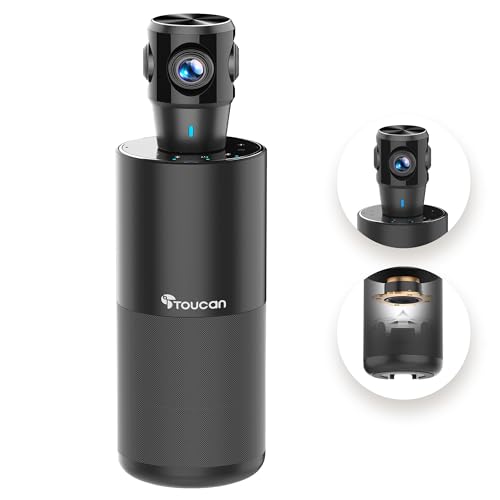
TOUCAN 360 Conference Camera — Best straightforward 360
The TOUCAN suits the small organisation that wants the 360 experience without a platform commitment or a flagship budget line. Its title describes a 360-degree video conference camera with 1080p HD capture, four noise-reduction microphones, a speaker, AI tracking, and compatibility with Zoom, Google Voice, Microsoft Teams and more, for PC, Mac and tablet. The breadth of that platform list is its personality: this is the unit for mixed, informal, bring-your-own-laptop meeting cultures.
Education and community use is an underrated habitat for a unit like this. A camera that works with PC, Mac and tablet, and speaks to whichever platform a guest brings, fits classrooms running hybrid lessons, clinics running remote consultations from ordinary rooms, and clubs whose meetings moved online and never fully came back. In those settings the operator is rarely technical, the platform changes with the visitor, and a forgiving generalist outperforms a certified specialist that expects a standardised estate around it.
Noise reduction in the microphones addresses the small office’s actual acoustic enemies — the air conditioner, the street outside, the colleague typing at the same table. Four mics with noise reduction will not match the reach claims of the Owl 3’s stated 18 feet, and this title prints no pickup distance, so its honest territory is the small-to-medium room where the table is never far from the unit. Within that territory, clean audio at short range beats ambitious audio at long range.
Price discipline is the context this unit is usually bought in, and it deserves a fair statement: for a small team, the difference between a generalist 360 camera and a certified flagship is often the difference between equipping every room and equipping one room beautifully. Hybrid equity argues for coverage — a good camera in three rooms serves remote staff better than a perfect camera in one — and the TOUCAN’s specification is written for exactly that arithmetic.
AI tracking keeps the TOUCAN in the modern conversation: the feed follows the speaker rather than presenting a static panorama, which is the behaviour remote participants now expect. The tablet compatibility in the title is a small phrase with real consequences for ad-hoc spaces — a camera that works with a tablet can turn a spare room, a site office or a classroom corner into a meeting space without a dedicated PC.
Support expectations should be set to the generalist tier as well. A unit like this is maintained by firmware updates and common sense rather than by an enterprise service contract, and for a small organisation that is usually the right trade — the camera costs less partly because nobody is staffing a helpdesk for it. Buyers who need guaranteed response times for a boardroom that hosts investors should weight the certified platforms above accordingly.
Buyers should register what the title leaves open: no certification language, no pickup distance, no resolution above 1080p. Organisations with IT standards to satisfy should look at the certified Owls or the Yealink. Teams that meet across whatever platform the client prefers can check the TOUCAN 360 on Amazon as the generalist of this guide.
- Capture: 360-degree 1080p HD, per the listing title
- Microphones: 4 noise-reduction microphones, per the listing title
- Audio out: Built-in speaker, per the listing title
- Tracking: AI tracking, per the listing title
- Compatibility: Zoom, Google Voice, Microsoft Teams and more; PC, Mac and tablet, per the listing title
- Microphone pickup distance: Not stated in the listing title — verify with the manufacturer documentation
Strengths
- Broadest platform list in this guide, including Google Voice and tablets.
- Noise-reduction microphones target small-office acoustic noise directly.
- AI tracking delivers the modern speaker-following feed at 1080p.
Trade-offs
- No platform certification stated, unlike both Owl models and the Yealink.
- No microphone pickup distance printed for larger rooms.
- 1080p ceiling matches the Owl 3 but without its stated reach figure.
Best for: small teams meeting across mixed platforms and devices, in rooms where the table stays close to the unit.
Not suited for: a procurement process that requires printed platform certification, since this title claims compatibility without certification.
The TOUCAN’s natural habitat is the organisation whose meeting rooms were never designed as meeting rooms: the converted office, the shared workspace, the classroom after hours. A unit that asks only for a table centre and a laptop, and speaks to every platform the week invents, fits that world better than a certified installation ever will.
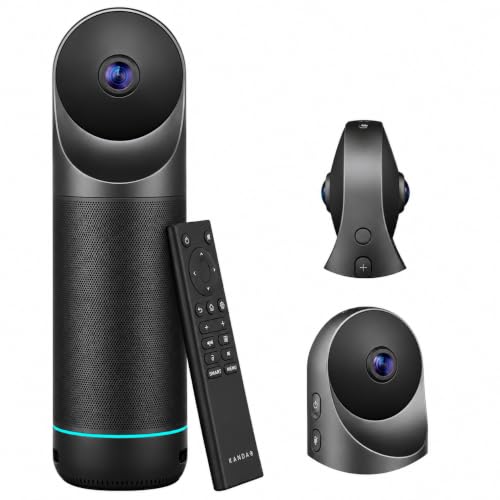
KanDao Meeting Pro — Best tracking feature set
The KanDao Meeting Pro suits the buyer who shops by behaviour rather than by badge. Its title describes a 360-degree video conference camera with microphones and speakers, AI tracking, smart zooming and automatic focus. Three of those five claims describe how the camera directs its own picture — tracking the speaker, zooming intelligently, holding focus — which is the software layer where conference cameras increasingly differ.
KanDao’s wider catalogue context helps a buyer place this unit: the company is known for 360 cameras across consumer and professional lines, so the Meeting Pro is a specialisation of an existing craft rather than a webcam maker’s experiment. In a category where several brands arrived from adjacent markets, that depth in the core technology — stitching, optics, the geometry of the panorama — is a legitimate reason to shortlist it despite its title’s silences.
Smart zooming is the phrase to weigh. A 360 camera’s raw material is a panorama in which every face is small; the product the remote viewer watches is a crop. How a unit chooses, sizes and moves that crop — smoothly toward a new speaker, without the seasick panning of early systems — determines whether the feed feels directed or merely surveilled. KanDao’s title puts its zooming behaviour in print alongside tracking and focus, a combination aimed squarely at that viewing experience.
Presentation behaviour is where smart zooming quietly earns its money. In a working meeting, speakers stand, gesture at whiteboards and hand over to colleagues across the table; a camera that reframes smoothly through those transitions keeps remote attention on the argument, while one that jumps or hunts reminds everyone on the call that they are watching through a machine. KanDao’s emphasis on the directing layer suggests an understanding that the feed’s manners matter as much as its measurements.
The silence in this title is equally informative: no resolution is stated. Buyers comparing spec sheets will find that gap glaring, and this guide’s rule is to record it rather than fill it — the spec box below marks resolution as not stated in the listing title, and a purchaser for whom a printed resolution is a procurement requirement should verify it on the product page or choose a rival whose title commits. What can be said is that KanDao is a camera maker whose 360 imaging is its core trade, and the feature set printed here is coherent with that specialism.
Microphone count and pickup distance are likewise unstated, so larger rooms are a gamble on paper. The standard room — eight chairs, one table, no unusual acoustics — is the environment this feature set was evidently tuned for, and buyers furnishing anything more exotic should treat the pilot month described below as mandatory rather than optional. A camera whose strengths are behavioural can only be audited by behaviour, in the room, with the people who will live with it. For a standard room where the tracking behaviour is the priority, check the KanDao Meeting Pro on Amazon and confirm the unstated figures on its page before committing a whole estate to it.
- Capture: 360-degree video conference camera, per the listing title
- Tracking: AI tracking with smart zooming, per the listing title
- Focus: Automatic focus, per the listing title
- Audio: Microphones and speakers built in, per the listing title
- Resolution: Not stated in the listing title — verify with the manufacturer documentation
- Microphone count: Not stated in the listing title — verify with the manufacturer documentation
Strengths
- Tracking, smart zooming and automatic focus form the fullest directing feature set titled here.
- 360 imaging is the maker’s core specialism.
- Microphones and speaker built in keep the one-unit table discipline.
Trade-offs
- No resolution stated in the title — a real gap for spec-led procurement.
- No microphone count or pickup distance printed.
- No platform certification or named compatibility in the title.
Best for: buyers who prioritise how the feed behaves — tracking, zooming, focus — in a standard-size room.
Not suited for: procurement checklists requiring a printed resolution and platform certification, since this title states neither.
There is a sensible pilot strategy with a unit like this: buy one, run it in the busiest hybrid room for a month, and let the remote participants vote. Tracking quality is experiential in a way resolution figures are not, and a single month’s feedback settles arguments that specification sheets leave open. The Meeting Pro is the pick in this guide most likely to win that pilot on feel.

NexiGo Meeting 360 Ultra Gen 3 — Best for larger rooms
The NexiGo Meeting 360 Ultra suits the room the others apologise to: the medium-to-large meeting space named outright in its title. NexiGo describes an enhanced all-in-one conference camera system in its third generation, with a multi-camera setup, 8K capture, AI-powered framing and auto tracking, for medium to large meeting rooms. Scale is the entire pitch, and the multi-camera phrase is its mechanism.
Installation planning separates this system from the plug-and-play centrepieces, and buyers should schedule it honestly. A multi-camera array needs positions chosen, cables considered and the room’s lighting assessed, ideally before the furniture is finalised. That is a half-day of thought rather than an integrator’s contract, but it is not nothing, and organisations that plan it get the system’s real capability while those that improvise get an expensive panorama with extra parts.
A single 360 lens asked to cover a large room faces a resolution budget: its panorama spreads finite pixels across every wall, and faces at the far end shrink below recognition. A multi-camera setup attacks that budget directly, dedicating sensors to zones of the room so the crop the remote viewer sees is drawn from a camera that was actually pointed that way. The stated 8K capture belongs to the same strategy — headroom resolution that survives cropping. Read together, the title describes a system engineered against the large room’s specific physics.
Boardrooms and training rooms are the two spaces this system was evidently drawn for. A boardroom’s long table defeats single-lens units by distance; a training room defeats them by movement, with a presenter walking a wall of whiteboards while thirty seats stay still. A multi-camera array with AI framing addresses both geometries without an operator, and the all-in-one system framing keeps the purchase to one line item rather than a integrator’s project — a meaningful distinction for organisations without AV staff.
AI-powered framing and auto tracking complete the large-room brief, because in a big room the director’s problem multiplies: more speakers, wider spacing, people standing to present. A system that reframes across a multi-camera array without a human operator is selling the absence of a technician, which in a large organisation is a recurring saving rather than a one-off feature.
Future-proofing claims should be discounted gently here as everywhere: an 8K capture figure describes today’s headroom, and platforms, codecs and room habits will all move during the system’s life. What endures is the multi-camera geometry, which no software update can retrofit into a single-lens unit. Buy the geometry for the decade and the resolution for today, in that order.
Proportion is the caution. In a small room this system is overcapacity — cost, complexity and capability aimed at square metres you do not have — and its title, to its credit, says so by naming medium to large rooms as its territory. Organisations furnishing those rooms can check the NexiGo Meeting 360 Ultra on Amazon; everyone else should let its honesty redirect them to the smaller units above.
- Type: All-in-one conference camera system, multi-camera setup, per the listing title
- Capture: 8K capture, per the listing title
- Framing: AI-powered framing and auto tracking, per the listing title
- Room size: Medium to large meeting rooms, per the listing title
- Generation: Gen 3, enhanced, per the listing title
- Platform certification: Not stated in the listing title — verify with the manufacturer documentation
Strengths
- Multi-camera design attacks the large-room resolution problem at its source.
- Stated 8K capture provides cropping headroom no single-lens rival claims.
- Room-size brief is printed honestly: medium to large rooms.
Trade-offs
- Overcapacity and overcomplexity for huddle and standard rooms.
- No platform certification named in the title.
- Multi-camera setup implies more installation than a single centrepiece unit.
Best for: medium and large meeting rooms where single-lens 360 units leave far-end faces too small to read.
Not suited for: a four-person huddle room, where its multi-camera array and stated room class exceed the space by design.
Generation three matters in a category this young. Conference-camera AI has improved visibly year on year, and a third-generation system embodies two rounds of lessons about tracking errors, framing jumps and room acoustics that first-generation units taught their owners the hard way. Buyers of the Ultra are paying partly for that accumulated correction.
Comparison Table
| Camera | Architecture | Stated capture | Stated audio | Platforms named |
|---|---|---|---|---|
| Owl Labs Meeting Owl 3 | 360 table unit | 1080p HD | 18-foot mic pickup | Teams certified; Zoom, Google Meet |
| Meeting Owl 4 Plus | 360 table unit | 4K | Mic and speaker, noise equalizing | Teams certified |
| Yealink UVC34 | Video bar | 4K, 120-degree lens | 8 microphones and speaker | Teams, Zoom |
| TOUCAN 360 | 360 table unit | 1080p HD | 4 noise-reduction mics, speaker | Zoom, Google Voice, Teams |
| KanDao Meeting Pro | 360 table unit | Not stated in the listing title | Mics and speakers, count not stated | Not stated in the listing title |
| NexiGo Meeting 360 Ultra | 360 multi-camera system | 8K capture | Not stated in the listing title | Not stated in the listing title |
How to Choose
Walk into the room and look at the table; it will tell you the architecture. If people sit around it in the round, a centre-table 360 unit is the geometry that sees everyone, and your choice narrows to the four table units plus the NexiGo system for big rooms. If everyone sits facing a display, the Yealink bar’s 120-degree lens and eight microphones serve that room better than any panorama.
Size the room next, using stated figures where they exist. The Owl 3’s printed 18-foot pickup radius is a measurable promise: pace your table’s length against it. Large rooms with distant seats argue for the NexiGo’s multi-camera approach or the Owl 4 Plus’s 4K headroom. Small rooms forgive almost everything, which is the TOUCAN’s and the bar’s shared territory.
Match the platform facts to your IT standard. Teams-certified units — both Owls — simplify procurement in Teams organisations; the Yealink names Teams and Zoom; the TOUCAN names the broadest list without certification language; the KanDao and NexiGo titles leave platform specifics to their product pages. In a regulated estate, those printed words are the decision.
Acoustics deserve a budget line of their own in the same decision. No camera in this guide can out-process a glass-walled, hard-floored room’s echo, and the money difference between two candidate units is sometimes better spent on a rug, soft furnishings or ceiling treatment that improves every device in the room. Buy the camera for the room you have after that modest mercy, not before it.
Finally, weigh behaviour against specification. Tracking quality, framing smoothness and audio levelling decide how meetings feel, and they are the properties titles can only gesture at. Where a rollout is large, pilot one unit in the busiest room and let remote participants — the true customers of every camera in this guide — deliver the verdict.
Why Does Audio Decide More Hybrid Meetings Than Video?
Because comprehension fails through the ears first. A remote participant can follow a soft picture indefinitely, reading slides and faces at reduced fidelity, but a sentence lost to echo, distance or volume imbalance is simply lost — and meetings are made of sentences. The specifications in this guide that predict meeting quality most reliably are therefore the audio ones: the Owl 3’s stated 18-foot pickup, the Yealink’s eight stated microphones, the Owl 4 Plus’s noise equalizing, the TOUCAN’s noise-reduction array.
There is a simple diagnostic any team can run before spending anything: record one ordinary meeting on a phone placed at the table’s centre and one from a laptop at its end, then listen to both on headphones. The gap between the two is the room’s acoustic signature, and it predicts whether a new camera will sound transformative or merely adequate. Teams that run this test buy with their ears informed, and they argue about the result far less than teams that shop from specification sheets alone.
Room behaviour multiplies whatever the hardware provides. A unit placed at a table’s centre hears everyone at conversational distance; the same unit pushed to a sideboard hears the nearest voice and the room’s reflections. Before blaming any camera in this guide for poor audio, check its placement, the room’s hard surfaces and whether participants have learned to speak toward the table’s middle — the unglamorous variables that decide what the microphones are given to work with.
What Should You Test in the First Week With a New Conference Camera?
Run the worst meeting, not the best one. Seat the softest speaker at the table’s far end, let two people talk over each other, have someone present standing at the screen, and keep a remote colleague on the call whose only job is to report what they actually heard and saw. That single session exercises tracking, pickup, levelling and framing under the conditions that generate complaints, while the purchase can still be exchanged.
Include the room’s ordinary chaos in that test while you are at it: the air conditioner cycling, the door opening on corridor noise, the participant who joins late and drags a chair. Conference cameras are marketed in silent showrooms and used in buildings, and the first week is the only cheap opportunity to learn which of those two environments yours resembles.
Test the platform path your organisation actually uses — joining from the room system, from a laptop, from a phone — and test the move between rooms if the unit will travel. A camera that performs in its showcase meeting but fails the Tuesday stand-up’s quick start has failed the only test that matters, which is whether people keep using it in week six.
How Do Conference Cameras Change the Way People Behave in Meetings?
A tracking camera introduces a mild stage effect: people speak toward the unit, take turns more cleanly and project slightly, because being framed feels like being heard. Well-run hybrid teams exploit this deliberately — the chair watches the remote participants’ tile, invites them by name, and lets the camera’s attention teach the room its manners. The technology’s best effect is not optical at all; it is the social cue that someone elsewhere is present and following.
The same effect has a shadow worth managing. Participants seated outside a bar’s frame or beyond a unit’s comfortable pickup can drift into second-class attendance, present but effectively invisible to the remote side. Seating plans in hybrid rooms should be drawn with the camera’s stated field and pickup in mind — the 120-degree lens and the 18-foot radius in these titles are, among other things, seating-plan documents.
Common Mistakes
Buying resolution for a room whose problem is audio tops the list in this category. A 4K picture of a meeting nobody remote can hear clearly is an expensive screensaver; audit your current complaints first, and let their ratio of sound to picture set your priorities among these titles.
Ignoring geometry runs second. A 360 unit in a theatre-layout room and a bar in an in-the-round boardroom are the same mistake in mirror image — capable hardware pointed at the wrong arrangement of chairs. The room’s seating plan is a specification, and it outranks every figure in the comparison table.
Assuming compatibility equals certification is the procurement error. Titles in this guide use both languages precisely: some claim certification for a platform, others name compatibility, others say nothing. In an organisation with platform standards, the difference decides whether IT blesses the purchase or inherits it as a problem.
Forgetting the far site is the human error behind many disappointing rollouts. A camera tuned while everyone sits in the same room, admiring the picture on the room’s own display, has not been tested at all — the customer is the person on the call, in another building, on headphones. Every evaluation in this category should be run from the remote chair, and every complaint from that chair should outrank in-room impressions.
Placing the unit wherever the cable reaches completes the set. Centre-table units belong at the centre, bars belong centred under the display, and a camera exiled to a corner by a short cable will underperform its specification every day it sits there. Buy the cable length the correct placement requires; it is the cheapest performance upgrade in the category.
Final Recommendation
For the standard boardroom, the Owl Labs Meeting Owl 3 remains the balanced buy: stated 1080p capture, AI speaker tracking, the guide’s only printed microphone pickup distance and Teams certification in one proven unit. Step up to the Meeting Owl 4 Plus for larger rooms on Teams where 4K and noise equalizing will be felt, and choose the Yealink UVC34 wherever the room faces a screen — its eight microphones and 120-degree lens are the huddle room’s correct answer. The TOUCAN serves mixed-platform small teams, the KanDao rewards buyers who prioritise tracking behaviour, and the NexiGo Ultra is the large room’s specialist. Every hybrid meeting has two rooms in it, and the camera you choose is the window between them — pick the one whose stated geometry, audio and platform facts match the room your people actually sit in, and the people on the screen stop being an audience.
FAQ
What is the difference between a 360 conference camera and a video bar? A 360 unit sits at the table’s centre and sees in every direction, using tracking to follow speakers. A video bar like the Yealink UVC34 mounts at the display and frames the room from one side with a wide lens. Seating geometry decides which your room needs.
How large a room can a Meeting Owl cover? The Owl 3’s title states an 18-foot microphone pickup radius, which suits standard boardrooms. For medium to large rooms, the NexiGo Meeting 360 Ultra’s multi-camera design and the Owl 4 Plus’s 4K capture are the picks aimed at that scale.
Do these cameras work with Zoom, Teams and Google Meet? Most titles name their platforms: both Owls state Teams certification, the Owl 3 also names Zoom and Google Meet, the Yealink names Teams and Zoom, and the TOUCAN names Zoom, Google Voice and Teams. The KanDao and NexiGo titles leave platforms unstated — verify on their pages.
Is 4K necessary in a conference camera? Not in small rooms. It earns its place on large displays and in large rooms, where remote faces appear near life-size and crops are drawn from the panorama. The Owl 4 Plus and Yealink state 4K; the NexiGo states 8K capture for cropping headroom.
Where should a 360 camera sit on the table? At the centre, equidistant from the regular seats, with its stated pickup radius — 18 feet on the Owl 3 — covering the farthest chair. Off-centre placement quietly converts the nearest seats into loud ones and the far seats into whispers, whatever the hardware.
Can one camera serve several meeting rooms? The plug-and-play table units are designed to move, and several titles say so. In practice, estates standardise one model per room type so any employee can walk into any room and start the meeting without learning new hardware.
Related Guides
Cameras built for a very different kind of room — the inside of a drain line — are covered in our sewer camera guide for home inspectors. For cameras as creative instruments rather than meeting tools, the Sony portrait camera guide takes up the full-frame systems built for deliberate photography.


