What's inside
- Key Takeaways
- Quick Picks
- How Did We Separate the Certified Stations From the Compatible Ones?
- What Does Qi2.2 at 25W Actually Change?
- Why Does the Watch Puck Deserve Your Attention?
- What Powers the Station Itself?
- Which of These Six Stations Belongs on Your Nightstand?
- How Does a Folding Station Change Travel?
- What Makes a Station Good at a Desk, Specifically?
- What Should You Do When One Spot on the Station Stops Working?
- A Side-by-Side Look at the Six iPhone Charging Stations
- How Do You Set Up a 3-in-1 Station So It Charges Well Every Night?
- Can a Wireless Station Replace Wired Charging Entirely?
- What Mistakes Do Buyers Make With 3-in-1 Stations?
- Which Format Survives a Busy Household Best?
- How Do You Keep Wireless Charging Kind to Your Phone’s Battery?
- How Do You Read a Charging Station Listing Like a Sceptic?
- Final Recommendation
- Frequently Asked Questions
- Related Guides
As an Amazon Associate I earn from qualifying purchases. This post may contain affiliate links at no extra cost to you.
**[widgetverdict.com] is reader-supported. When you buy through links on our site, we may earn an affiliate commission.**
One cable for the phone, one puck for the watch, one pad forgotten in a drawer for the earbuds — the bedside tangle is what the best multi device wireless chargers for iphone exist to end. All six picks here are 3-in-1 stations built around the same daily trio: an iPhone on a magnetic pad, an Apple Watch on its own charger, and AirPods on a third spot. They divide, however, into two honest classes. Two are certified Qi2.2 stations rated at 25W from Belkin and Anker; the other four are magnetic stations whose titles promise compatibility and convenience without the Qi2 certification or a stated wireless wattage, and this guide keeps that line bright.
Amazon carries all six, and the shopping mistake to avoid is treating the classes as equals because the product photos look alike. Magnetic alignment — the satisfying snap as the phone centres itself — is something every pick here offers in some form. Certified Qi2.2 at 25W is a different claim: a standardised power level with the testing behind it, and the reason the Belkin and Anker cost what they cost. Decide which class you are buying before comparing colours, and the rest of the decision becomes pleasantly small. Travellers lean foldable, desk workers lean toward stands, and everyone should check that their phone case plays well with magnets — a topic this guide returns to, alongside the wired side of the charging world, where the same certification-versus-claims lesson applies to cables and bricks.
Key Takeaways
- Belkin and Anker are the certified tier: both titles state Qi2.2 and 25W, with magnetic alignment for recent iPhones plus dedicated Watch and AirPods spots.
- The Acer, Anlmz, unbranded dock and GETPALS stations are magnetic 3-in-1 designs whose titles do not claim Qi2 certification — expect alignment and convenience, with wireless speeds set by what the phone negotiates rather than a headline figure.
- Foldable designs dominate this list because the same station that lives on a nightstand can fold flat into a travel pouch.
- Anker includes its adapter in the box per its title and is explicitly a non-battery charger — it powers devices, it does not store charge.
- Your case matters: thick or metal-backed cases can weaken the magnetic hold and slow or break wireless charging on any of these stations.
Quick Picks
| Pick | Badge | Why it earns its place |
|---|---|---|
| Belkin Qi2.2 25W 3-in-1 Foldable | Best certified station | Qi2.2 at 25W with MagSafe-compatible magnetic alignment for iPhone, plus Watch and AirPods charging, in a folding travel body. |
| Anker Prime 25W Qi2 3-in-1 Foldable Charger | Best for travel | Qi2.2-certified, palm-sized and foldable, with AirCool design and the adapter included — a complete kit in one box. |
| Acer 3-in-1 MagSafe Foldable Station | Best mid-tier folder | A palm-sized folding magnetic stand for iPhone, Watch and AirPods from a familiar electronics name, built for desk and travel. |
| Anlmz 3-in-1 Charging Station | Best bedside stand | An upright fast-charge stand for iPhone, Watch and AirPods with an 18W adapter in the box, aimed at desk and nightstand duty. |
| 3-in-1 Foldable Magnetic Charger Dock | Best simple travel pad | An unbranded folding magnetic pad covering iPhone generations back to the 12, plus Watch and AirPods, with no frills to break. |
| GETPALS 3-in-1 Wireless Charging Station | Best wide-compatibility stand | A stand-format station whose title spans iPhone 18 down to 12, Watch Series 12 back to 2 including SE and Ultra, and AirPods generations. |
How Did We Separate the Certified Stations From the Compatible Ones?
The first pass read titles the way a standards body would. A station earned the certified label here only when its own title named the standard and the wattage: Qi2.2 and 25W appear in both the Belkin and Anker titles, and those two picks are described with those figures throughout this guide. The other four titles speak of magnetic compatibility, fast charging or broad device support without naming Qi2, so their reviews describe alignment, format and included accessories — the things their titles actually establish — and decline to invent a wattage for them.
Format was the second sort, because a 3-in-1 station is furniture as much as electronics. Folding designs from Belkin, Anker, Acer and the unbranded dock suit travellers and small nightstands; upright stands from Anlmz and GETPALS suit desks, where the phone doubles as a clock and notification screen at a readable angle. The third sort was completeness of the box: Anker states its adapter is included, Anlmz includes an 18W adapter, and where a title is silent about the wall adapter, the review notes that silence, because a station powered by an undersized adapter you already own is a station charging slowly for reasons that look mysterious.
Device span closed the sorting. Every pick covers the same trio, but the GETPALS title is unusually explicit about generations — iPhones from the newest down to the 12, Watch models back to Series 2, several AirPods generations — which matters in households running older hardware. Newer is not automatically better here; a station is only as useful as its ability to charge the devices actually on your nightstand tonight.
What Does Qi2.2 at 25W Actually Change?
Qi2 is the wireless charging standard that brought magnetic alignment into the open ecosystem: a ring of magnets snaps the phone into the exact centre of the charging coil, every time, so energy transfers efficiently instead of leaking away as heat through a badly placed phone. The 2.2 generation raises the ceiling to 25W for phones that support it, which in practical terms means a top-up during a shower and a coffee restores a serious share of the battery rather than a token slice. Both certified picks state that figure in their titles, and both are described as MagSafe compatible, since the magnetic behaviour iPhone owners know is the same experience.
Alignment is the unsung half of the standard. On an old flat pad, a phone nudged a centimetre off centre by a notification buzz could spend the night barely charging; on a magnetic station, placement is binary — it snaps or it visibly has not. That reliability, more than raw speed, is what changes mornings. The 25W ceiling then matters most to people whose charging happens in fragments: the desk worker who lifts the phone fifty times a day benefits from every docking being efficient, while the overnight charger mostly benefits from the snap.
Heat management is the third strand, and the one Anker’s AirCool naming points at. Wireless charging always wastes some energy as warmth, and faster wireless charging wastes more in absolute terms; a station designed to shed that heat protects both the phone’s battery and the charge rate, since phones throttle charging when hot. None of this requires buying the certified tier — but it does mean the certified tier’s price buys engineering, not merely a logo.
Why Does the Watch Puck Deserve Your Attention?
Buyers compare phone pads and forget that the Apple Watch charger is the component most likely to annoy them. The watch charges from a small puck with its own magnetic alignment, and on a good station that puck sits at an angle that lets the watch lie flat or rest on its side for nightstand clock duty. On a poor one, the watch dangles, slides, or needs a specific strap arrangement to stay connected. All six picks integrate a watch spot into the station; the folding designs tuck it into the fold, the stands raise it beside the phone.
Watch charging speed is its own quiet divide in this category generally, and the honest position for this guide is that none of the six titles makes a specific fast-charge claim for the watch, so none is made here. What can be said is structural: a dedicated watch position that holds the puck firmly, on a station fed by an adequate adapter, will charge a watch overnight without drama, which is the rhythm nearly all owners live by. If your watch must refill in the half hour before a run, that is a use case to verify model by model — and a reason the adapter question, covered next, is not pedantry.
What Powers the Station Itself?
A 3-in-1 station is three chargers sharing one appetite, and the wall adapter is the meal. When phone, watch and earbuds charge together, the adapter must supply the sum, or the station rations — usually by slowing the phone, the hungriest guest. Anker settles the question by including its adapter, per its title; Anlmz includes an 18W adapter, which tells you its station’s ambitions are sized accordingly; and for the picks whose titles do not name an adapter, the practical advice is to use a healthy USB-C adapter of at least the class these stations typically expect, and to retire the ancient low-power brick from a drawer, whose inadequacy will masquerade as a faulty station.
Cable quality plays a supporting role. The cable between adapter and station carries everything, and a damaged or ultra-thin cable can throttle a station as surely as a weak adapter. Use the cable in the box first, establish the station’s normal behaviour, and only then experiment. Owners who grasp this unglamorous paragraph will never spend an evening, as many have, angrily reviewing a perfectly good station that was simply underfed.
Which of These Six Stations Belongs on Your Nightstand?
Read the reviews as two shortlists: the certified pair first, then the magnetic four, with format — folding or standing — as the tiebreaker inside each class.

Belkin Qi2.2 25W 3-in-1 Foldable — Best certified station
Belkin’s long history of making the accessories Apple sells in its own stores hangs behind this station, and the specification is the point: Qi2.2 at 25W, MagSafe-compatible magnetic alignment, and charging for iPhone, Apple Watch and AirPods in a body that folds for travel. The title names iPhone generations 17 through 15 — the models whose wireless hardware can exploit the higher rate — and that honesty about generations is characteristic: this is a station aimed at current phones, promising them certified speed, and folding flat when the nightstand becomes a hotel desk.
In daily life the Belkin’s argument is that nothing about it needs thinking about. The phone snaps, the watch finds its puck, the earbuds take their pad, and the 25W ceiling means the phone is meaningfully refuelled even when it only rests there during breakfast. Folded, it asks little of a travel pouch; unfolded at home, it holds its shape like furniture rather than a cable with ambitions. Buyers paying the certified premium should expect exactly this absence of drama, and should also note what the title does not promise: no adapter is named in it, so confirm the box contents and feed the station from a capable USB-C adapter of your own if needed.
- Standard: Qi2.2, stated in the title, with 25W wireless output for the phone
- Devices: iPhone 17/16/15 named, plus Apple Watch and AirPods
- Format: foldable travel charging station with magnetic alignment
- Adapter: the title does not state that one is included, so check the listing’s box contents before ordering
Strengths
- Certified 25W Qi2.2 charging for recent iPhones
- Folds flat, suiting both nightstand and luggage
- Belkin’s accessory track record and documentation depth
Trade-offs
- Premium pricing follows the certification
- Adapter inclusion is not stated in the title
- Older iPhones charge, but cannot use the 25W ceiling
Best for: a recent iPhone with Watch and AirPods, charged at home and on trips from one certified station. Not suited for: a household wanting the lowest possible spend, where the magnetic-only picks below do the overnight job. Order the Belkin when certification and speed are the requirements, not the decorations.

Anker Prime 25W Qi2 3-in-1 Foldable Charger — Best for travel
Anker’s Prime station matches the Belkin’s headline — Qi2.2 certification, 25W, MagSafe-compatible magnetic charging for iPhone, Watch and AirPods — and then wins the travel argument on completeness: the title states the adapter is included, calls the design palm-sized and travel-ready, names its AirCool approach to heat, and clarifies that the unit is a charger, not a battery. That last clarification matters more than it appears; shoppers regularly mistake folding chargers for power banks, and Anker has headed the misunderstanding off in its own title.
The AirCool point deserves its sentence: at 25W, wireless charging generates warmth that can slow charging and age batteries if it lingers, so a station designed around moving heat away is engineering aimed at the standard’s real weakness. In a hotel room the whole kit — station plus its matched adapter — removes the two classic travel failures, the forgotten adapter and the phone found at dawn still nearly empty because it slid off a pad. Anker’s title even reaches forward to an iPhone 18 Pro, a reminder that Qi2.2 stations are bought for the phone you have and the next one too.
- Standard: Qi2.2-certified, 25W, per the title
- Devices: iPhone, Apple Watch and AirPods in one folding station
- Box: adapter included and stated; the unit is a charger only, with no battery inside
- Cooling: AirCool design named in the title
Strengths
- Complete travel kit with matched adapter in the box
- Certified 25W with explicit heat-management design
- Palm-sized fold suits the smallest packing style
Trade-offs
- Not a power bank — it needs a wall outlet to work
- Certified tier pricing, like the Belkin
- Small size means a small footprint for large phones to balance on
Best for: frequent travellers with a recent iPhone who want one certified kit that always works in a hotel. Not suited for: charging away from outlets entirely, since this station stores no power of its own. Pack the Anker Prime and the three-device bedtime routine travels with you unchanged.

Acer 3-in-1 MagSafe Foldable Station — Best mid-tier folder
Acer’s entry takes the folding magnetic formula — a palm-sized stand, MagSafe-compatible, covering iPhone, Apple Watch and AirPods — and offers it from a mainstream electronics brand without the certified tier’s headline. Its title calls it a fast charger and names compatibility reaching to an iPhone 18, but does not claim Qi2 certification or print a wireless wattage, and this review follows that lead: expect the magnetic snap, the tidy three-device routine and a folding body that works on a desk and in a bag, with charging pace governed by the phone and station negotiating within the older magnetic norms.
That positioning is respectable rather than disappointing. Most charging happens overnight, where the difference between certified speed and ordinary magnetic speed dissolves into sleep, and the Acer’s stand format adds the desk benefit of a propped phone for video calls and standby clock duty. Where it cannot argue is the fragmented day: the user who docks in twenty-minute bursts between meetings is precisely the user the 25W pair serves better. Know your rhythm and the Acer’s value either appears or evaporates honestly.
- Standard: magnetic, MagSafe-compatible; the title states no Qi2 certification
- Devices: iPhone, Apple Watch and AirPods, in a foldable stand format (model S3)
- Wireless wattage: the title gives no figure, so judge it as an overnight and desk charger rather than a speed tool
- Format: palm-sized and foldable, for desk or travel
Strengths
- Folding stand format doubles as a phone prop
- Mainstream brand behind an unpretentious design
- Covers the full trio without extra cables
Trade-offs
- No certified 25W claim to lean on
- Speed in short daytime docks will trail the Qi2.2 pair
- Adapter inclusion is not stated in the title
Best for: a desk or nightstand where the phone charges for long stretches and a stand angle is useful. Not suited for: fragmented daytime charging that depends on a certified 25W top-up rate. Choose the Acer when the routine is overnight and the budget prefers sense over speed.

Anlmz 3-in-1 Charging Station — Best bedside stand
The Anlmz commits to the stand life: an upright fast-charge station for iPhone, Apple Watch and AirPods, sold with an 18W adapter in the box and a title spanning iPhones from the newest back to the 8 — though the magnetic alignment story realistically begins with the 12 generation, and older models without magnets will sit less certainly. Its promise is the tidy nightstand: no tangled cables, the phone held at a glanceable angle, the watch and buds in their places, everything fed from the included adapter so the setup works the night it arrives.
An included adapter at a stated 18W is quietly informative. It tells you the station’s total appetite and removes the underfeeding failure described earlier in this guide. It also frames expectations: this is a station engineered for the overnight sum of three devices, not for headline wireless speed, and its title makes no Qi2 claim to contradict that reading. For the bedside — where the phone becomes an alarm clock, the watch charges nightly and the buds recover from the day — that is a coherent, honest product, priced by its class rather than by certification.
- Standard: magnetic wireless station; no Qi2 certification is claimed in the title
- Devices: iPhone, Watch and AirPods on one stand
- Box: 18W adapter included, per the title
- Format: upright stand for desk and bedside, not a folding travel design
Strengths
- Adapter included, so the station is correctly fed from day one
- Upright angle suits alarm-clock and desk use
- One footprint replaces three separate cables
Trade-offs
- Stand format travels poorly compared with the folders
- No certified high-wattage wireless claim
- Pre-magnet iPhones in its span will not snap into alignment
Best for: a fixed nightstand or desk where three Apple devices charge together every night. Not suited for: regular travel, where the folding picks pack flatter and safer. Set the Anlmz up once with its own adapter and the bedtime cable hunt ends.

3-in-1 Foldable Magnetic Charger Dock — Best simple travel pad
No brand, no certification claims, no wattage headline — this folding magnetic dock is the list’s minimalist, and its title contents itself with the essentials: a 3-in-1 foldable magnetic wireless charger for iPhone generations 17 down to 12 including the Pro Max and Plus sizes, plus Watch and AirPods, shaped as a travel charging pad. In a category where listings often shout, that restraint reads almost as a feature. What you are buying is the geometry: three charging positions that fold into one flat pad, magnetic alignment for the phone, and nothing else to configure.
Travel is its natural brief. A flat pad survives luggage better than a hinged stand, deploys on any hotel nightstand in seconds, and folds away without a ceremony of cables. At home it suits the second-location role — the guest room, the kitchen counter — where a certified station would be overkill. The unknowns are the honest price of the unbranded tier: adapter inclusion and wireless pace are not stated in the title, documentation will be thin, and longevity is a wager. For a pad that may live in a travel kit and work a dozen nights a year, many buyers will take that wager knowingly.
- Standard: magnetic wireless; the title claims no Qi2 certification
- Devices: iPhone 17 through 12 families, Watch and AirPods
- Format: foldable flat travel pad
- Adapter and wattage: neither is stated in the title, so plan to feed it from a capable USB-C adapter you trust
Strengths
- Flattest, simplest travel format in the guide
- Magnetic alignment across the magnetic iPhone generations
- No setup, no moving stand parts to snap
Trade-offs
- Unbranded support and documentation
- No stated adapter, wattage or certification
- Flat pad gives no viewing angle for the phone
Best for: a travel kit or second room where a flat three-device pad covers the night. Not suited for: a primary desk station, where a stand’s viewing angle earns its keep daily. Toss this dock in the bag and the hotel-nightstand problem is solved cheaply and flatly.
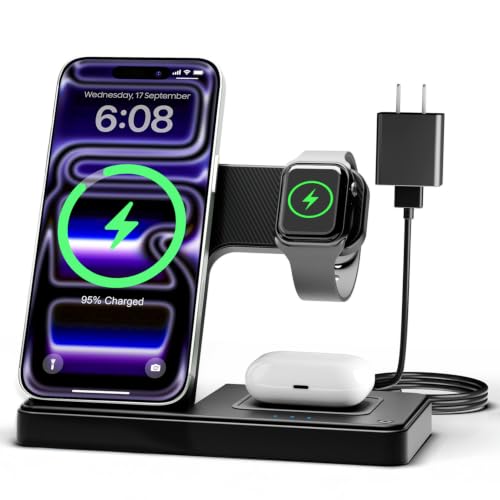
GETPALS 3-in-1 Wireless Charging Station — Best wide-compatibility stand
GETPALS wrote the most encyclopaedic title in this guide, and its breadth is the product: iPhone 18 Pro Max down through the 12, Watch Series 12 back to 2 including SE and Ultra, AirPods 5 back through Pro generations — a stand for households whose Apple devices span years rather than a single upgrade cycle. The mixed household is real: a new phone, a partner’s older watch, a teenager’s inherited AirPods, all needing one nightstand to work. A station that explicitly spans those generations answers the compatibility question before it is asked.
The format is a stand, keeping the phone upright and visible, and the charging story is the magnetic class norm: alignment and overnight reliability, with no Qi2 certification or wattage figure claimed in the title. One caution from the pool notes deserves repeating in plain terms: near-identical GETPALS listings circulate, so order from the listing you actually reviewed rather than a lookalike. Within this guide it appears once, as it should. For the family charging shelf — the hallway table where everyone’s devices migrate at night — the GETPALS breadth is a genuinely practical virtue.
- Standard: magnetic wireless station; no Qi2 claim appears in the title
- Devices: iPhone 18 down to 12 families, Watch Series 12 to 2 plus SE and Ultra, AirPods 5 to 3 and Pro — all per the title
- Format: upright stand
- Wireless wattage: no figure is stated in the title, so treat pace as overnight-class
Strengths
- Widest stated device span in this guide
- Stand format suits a shared family charging spot
- Covers older Watches many stations forget
Trade-offs
- No certified speed claim for newer iPhones
- Lookalike listings demand care when ordering
- Stand is a home fixture, not a travel piece
Best for: a mixed-generation Apple household charging a phone, an older Watch and AirPods on one stand. Not suited for: a single newest-iPhone owner who would actually use certified 25W speed. Put the GETPALS where the family’s devices already gather and it will quietly serve all of them.
How Does a Folding Station Change Travel?
Before these stations, the travel charging kit was an exercise in redundancy: phone cable, watch puck on its own cable, earbuds cable, and a multi-port adapter to feed them, all tangled around a passport. A folding 3-in-1 reduces that to one station and one adapter — in the Anker’s case, an adapter already in the box — and the packing gain is larger than the object suggests, because what disappears is not volume but decisions. The hotel routine becomes identical to the home routine, and identical routines are what survive jet lag.
Hotels test charging gear in specific ways. Nightstands sit far from outlets, so the station’s cable length matters more than it does at home; surfaces are unfamiliar, so a flat pad like the unbranded dock forgives a cluttered table while a stand wants a clear, level spot. Cruise cabins, trains and relatives’ spare rooms repeat the pattern. The seasoned move is to charge everything during the evening rather than overnight in strange rooms — devices full by bedtime, station packed before sleep — which also removes the dawn scramble when a checkout is early. None of the six stores power, remember: a folding station is a distribution point for a wall outlet, and on a long flight it rests in the bag while a separate power bank, a different product entirely, does the airborne work.
One travel habit protects the gear itself: fold the station the way it wants to fold, without forcing a hinge past its stop, and keep the magnetic faces clean. A grain of sand trapped between phone and pad is a scratch waiting for pressure, and hotel desks collect grit invisibly. A wipe with a sleeve before docking is a two-second ritual that frequent travellers perform without thinking, like shaking out shoes at the beach house door.
What Makes a Station Good at a Desk, Specifically?
The desk asks different questions than the nightstand. A stand earns its place by holding the phone at a reading angle for standby clock displays, video calls and glanceable notifications, turning charge time into screen utility; that is the Anlmz and GETPALS argument, and the Acer’s folding stand splits the difference. A flat pad at a desk, by contrast, invites the phone to become a coaster — present but useless while charging. Desk workers also dock and lift constantly, and here magnetic alignment pays its highest dividend: every return to the pad is a certain connection, no fumbling for a cable with the other hand on a keyboard.
Heat and noise join the desk criteria. A station beside a laptop lives in already-warm air, and a phone that throttles its charge because the afternoon sun crosses the desk will seem mysteriously slow on a schedule. Move the station out of the sun stripe, give it air, and the mystery usually resolves. Silence matters too — none of these six advertises a fan for itself, and at desk distance that absence is a feature; the only sounds in a good setup are the soft clicks of magnets seating.
Cable routing is the desk’s final exam. A station whose cable exits toward the wall, with the run hidden behind the desk edge, disappears into the workspace; one trailing across the keyboard’s territory gets unplugged in a fit of tidiness and never quite returns to duty. Set the routing once, with the same care as the placement, and the station becomes infrastructure — the compliment all desk tools aspire to.
What Should You Do When One Spot on the Station Stops Working?
Diagnose by isolation. If the phone spot falters, test the phone on a cable: a phone that charges happily by wire points back at the station or its alignment, while a phone that misbehaves everywhere has its own problem. If the watch spot falters, reseat the watch, clean the puck’s face, and try the watch on its original puck if you still own it — watch chargers are sensitive to debris and to cases or straps that lift the watch a millimetre too far. AirPods troubles usually resolve to the case: confirm the case itself supports wireless charging and that it is centred on its pad, since a small case on a generous pad has room to sit wrongly.
The shared suspect in every multi-device failure is the power supply. A station is three chargers behind one adapter, and an adapter that has aged, been swapped for a weaker one, or feeds through a damaged cable will starve the station in ways that look like individual spot failures — the phone slow, the watch intermittent, the buds forgotten. Return the station to its included adapter where it has one, or to a known capable adapter and the box cable, before concluding anything is broken. Most “dead station” stories end at that step, with the station innocent and the drawer-brick guilty.
If a spot is genuinely dead, the station’s other spots usually still serve, and the pragmatic pattern is to demote the unit — to the guest room, the office, the travel bag — and let a new station take the primary nightstand. Electronics triage of that kind is not defeat; it is how a household extracts full value from gear whose failures are partial, which describes most charging gear at the end of its life.
A Side-by-Side Look at the Six iPhone Charging Stations
| Station | Certification in title | Format | Adapter in title | Defining trait |
|---|---|---|---|---|
| Belkin Qi2.2 25W Foldable | Qi2.2, 25W | Folding | Not stated | Certified speed with a travel fold |
| Anker Prime 25W Qi2 | Qi2.2-certified, 25W | Folding, palm-sized | Included | Complete kit with AirCool design |
| Acer 3-in-1 Foldable | None claimed | Folding stand | Not stated | Mainstream-brand magnetic folder |
| Anlmz 3-in-1 Station | None claimed | Upright stand | 18W adapter included | Bedside stand ready out of the box |
| Foldable Magnetic Dock | None claimed | Flat folding pad | Not stated | Simplest travel geometry |
| GETPALS 3-in-1 Station | None claimed | Upright stand | Not stated | Widest stated device span |
The certification column is the honest summary of this whole category: two stations carry a standard and a number, four carry magnets and good intentions. Both classes charge your devices tonight; they differ in how fast, and in how much paperwork stands behind the promise.
How Do You Set Up a 3-in-1 Station So It Charges Well Every Night?
Placement first. Put the station where the phone genuinely spends the night — not where you aspire to put it — with the cable run tidy enough that nothing drags the station when you reach for water at 3 a.m. Feed it from its own adapter where one is included, or from a capable USB-C adapter where it is not, and give the cable a little slack so the station sits flat and unstressed. Then do the first-night test deliberately: dock all three devices, confirm each one shows charging — the phone’s battery icon, the watch’s charging screen, the AirPods case light — and check again after ten minutes, when a marginal connection will have confessed by warming up or dropping out.
Cases are the variable most likely to sabotage the routine. A magnetic case designed for this ecosystem snaps through and charges as intended; a thick rugged case, a wallet case with cards, or anything with a metal plate can weaken the hold, misalign the coils and slow charging or stop it. If a new case coincides with charging trouble, the case is the first suspect, and the test is free: one night without it. The same applies to the watch strap — a loop-style band may need to be opened or arranged so the watch sits flush on its puck, a five-second habit that becomes automatic.
Finally, learn your station’s normal warmth. Wireless charging is mildly warm by nature; a station that suddenly runs hot, or a phone that comes off it hot morning after morning, is reporting a misalignment, a case problem or a failing adapter. Because the routine is nightly, deviations announce themselves quickly to anyone paying slight attention — which is the real maintenance schedule for these devices: none, beyond noticing.
Can a Wireless Station Replace Wired Charging Entirely?
For the daily rhythm, nearly. Overnight wireless charging covers the phone, watch and buds with less friction than any cable routine, and the certified pair’s 25W ceiling covers most daytime top-ups too. The moments wired charging still wins are specific: the truly flat phone that must be usable in ten minutes, the long video call that drains while it runs, and troubleshooting days when a cable removes variables. Many owners end up hybrid without deciding to — station at the bedside, one cable in the car and desk drawer — and that is a sensible equilibrium rather than a failure of the wireless idea.
Battery health enters the conversation here, and deserves calm. Wireless charging’s extra warmth is real but modest in a well-aligned magnetic setup, and the dominant factors in a phone battery’s life remain total cycles, heat extremes and time spent at full charge. A magnetic station that aligns properly and a phone lifted off in the morning is not a battery-aging plot; it is ordinary modern use. Owners who keep phones for many years can enable their phone’s own charge-limit features and let the station be convenient, which is the balanced reading of the evidence rather than either panic or dismissal.
There is also a generational patience to wireless setups: a good station outlives the phone it was bought for. Qi2.2 hardware bought for today’s handset will serve the next one, and the magnetic four will still be charging older devices in spare rooms years from now. That longevity argues for buying the class you actually need rather than the class you might need someday — someday hardware has a way of arriving after the standard has moved again — and for keeping the box’s adapter with the station through every house move, since separated pairs are how underfeeding begins.
The same hybrid thinking applies across the house: wired fast charging has its own champions in Best Chargers for Google Pixel Phones, the torch-and-camera corner runs on the small cells of Best Rechargeable CR123A Batteries and Chargers, and even a boat’s nightstand can host a folding station within reach of the serious hardware in Best On-Board Marine Battery Chargers. Each device family gets the charging it was designed for; the station’s job is simply to own the Apple corner of that map.
What Mistakes Do Buyers Make With 3-in-1 Stations?
The headline mistake is buying the word “MagSafe” as though it were a speed. Magnetic compatibility describes the snap; the certified standard and wattage describe the charge. A buyer who pays for a magnetic-only station expecting 25W behaviour has been misled by vocabulary, sometimes deliberately by a listing, which is why this guide separates the classes so bluntly. The second mistake is underfeeding: pairing a new station with the weakest adapter in the house and concluding the station is slow, when the adapter was the ceiling all along.
Third comes case blindness — ordering a station and a chunky metal-backed case in the same week, then blaming whichever arrives second. Fourth is expecting a folding charger to be a power bank; the Anker title’s explicit “non-battery” clarification exists because that misunderstanding is so common. And fifth, travellers buy stands for luggage and folders for desks, discovering at the hotel that a stand’s hinge and a suitcase were never friends. Format follows itinerary; it really is that simple.
Which Format Survives a Busy Household Best?
Homes with children, pets and horizontal surfaces under siege should shop with a sceptic’s eye for stability. A stand holds a phone up where small hands and cat paws find it interesting; a flat folding pad keeps the same phone low, heavy-side down, and far less throwable. Neither is childproof, but the pad’s failure mode is a phone sliding onto carpet, while a stand’s can be a phone tipping off a nightstand edge. Households also generate the multi-generational device mix the GETPALS was built for, and a shared station in a hallway — visible, communal, first come first served — often outperforms the theoretically fairer plan of a station per bedroom, because one good routine beats three neglected ones.
Durability questions deserve plain answers. Hinges are the moving part on every folder here, and they wear by cycles; a station folded twice a day for travel lives a harder life than one folded twice a year, which is an argument for the Anker or Belkin at the heavy-use end, where build budgets are larger. Magnetic faces scratch before they fail, cables fray before electronics die, and adapters quietly age out of spec. A station should be bought the way a kettle is bought: as a five-year appliance whose daily decency matters more than its first-week novelty, and whose replacement, when it comes, will be the same class bought again with better information.
How Do You Keep Wireless Charging Kind to Your Phone’s Battery?
The balanced habits are few and undramatic. Keep the phone aligned — a well-seated magnetic connection wastes the least energy as heat, which is the entire design premise of these stations. Avoid charging in a hot room or a sunlit window when you can, not because one afternoon matters but because heat is cumulative in battery aging. Use your phone’s built-in charge management — optimised charging and, on models that offer it, a charge limit — and let those features handle the overnight hours intelligently. Then stop thinking about it: a phone is a tool with a consumable battery, and the station’s convenience is worth more to most owners than the marginal difference between perfect and ordinary battery care over a three-year ownership.
What does not help: elaborate rituals of unplugging at exact percentages, refusing wireless charging on principle while fast-charging by cable at higher temperatures, or storing a phone in a refrigerator of good intentions. The evidence-minded owner aligns the phone, feeds the station properly, keeps the setup out of the sun, and gets on with the day — which is, not coincidentally, exactly the behaviour these six stations were designed to make effortless.
How Do You Read a Charging Station Listing Like a Sceptic?
Listings in this category reward a particular reading order. Start with the standard: is a certification named — Qi2, Qi2.2 — or only compatibility language? Then the wattage: is a number attached to the phone pad, and does it belong to the standard or float free as marketing? Then the box: adapter included or not, and if included, at what rating? Then the devices: which generations are named for phone, watch and buds, and does your household’s actual hardware appear? A listing that answers all four cleanly, as the certified pair here largely do, has earned trust structurally; a listing that answers with adjectives has told you what it is.
Photographs deserve the same discipline. Lifestyle images show scale badly; look instead for the shot with a hand, a phone of known size, or the folded unit beside something familiar. Count the cables in the tidy desk photograph and notice whether the watch puck’s cable vanishes behind the furniture — every station has exactly one cable, and honest photography shows where it goes. Finally, read the one-star complaints for pattern rather than verdict: repeated reports of the same dead spot or the same hinge failure describe a product, while scattered grievances describe shipping. Scepticism of this kind takes ten minutes and is the difference between buying a station and buying a photograph of one.
Final Recommendation
One last consideration belongs to the gift-buyers and the household upgraders: a 3-in-1 station is among the safest technology gifts precisely because its compatibility question is answerable — iPhone, Watch, AirPods, done — and because even the magnetic class delivers the daily delight of the snap and the tidy nightstand. Buy the certified tier for the person whose phone is new, the stand formats for the person whose nightstand is permanent, and keep the receipt until the first full night’s charge has proven the trio works together in their home, with their case, on their devices.
If your iPhone is recent and your days are fragmented, buy the certified tier and be done: the Anker Prime for its complete travel kit and included adapter, the Belkin for its folding furniture-grade feel — both deliver Qi2.2 at 25W with the paperwork to prove it. If your charging is overwhelmingly overnight, the magnetic four are honest value: the Acer for a folding stand from a known brand, the Anlmz for a bedside stand that works out of the box, the flat dock for the travel bag, and the GETPALS for a household spanning many device generations. Choose by class first, format second, and the station will disappear into your routine — which, for a device whose whole purpose is the last thirty seconds of your day, is the highest praise available.
Frequently Asked Questions
Will these stations charge an iPhone 12 or 13 at 25W?
No — the 25W ceiling belongs to the newer phones named in the certified picks’ titles, and older magnetic iPhones charge at their own lower wireless limits. They still benefit from the magnetic alignment and the three-device convenience; they simply cannot use headroom their hardware predates.
Does “MagSafe compatible” mean the same as Qi2 certified?
It does not. Compatible describes magnetic alignment with the iPhone’s ring; Qi2 certification is a tested standard with defined power levels, and Qi2.2 is the generation that reaches 25W. Listings for the four non-certified picks here use compatibility language, and their reviews in this guide treat them accordingly.
Can I charge AirPods that only have a Lightning case?
Only if that case supports wireless charging — the case, not the earbuds, is what sits on the pad. Many AirPods cases do; the oldest ones do not. Check your case’s specification, and remember the earbuds themselves never touch the charger directly.
Why does my phone charge slowly on the station but fast on a cable?
Three usual causes: the station belongs to the magnetic class without a high-wattage claim, the adapter feeding it is undersized, or a case is degrading the alignment. Test in that order — bare phone, known-good adapter — and the culprit normally identifies itself within one evening.
Is it fine to leave the phone on the station all night, every night?
Yes, that is the use these stations are designed for. Modern phones manage their own charge, and many offer limits or optimised charging in settings for owners who keep devices for years. The station’s part is alignment and steady power; the phone decides the rest.
Will a 3-in-1 station work through a phone case?
Through a magnetic case made for this ecosystem, yes, as intended. Through thick, metal or wallet cases, results range from slower charging to none at all. When in doubt, the one-night bare-phone test separates case problems from station problems instantly.
Can two people share one 3-in-1 station?
Sequentially, yes; simultaneously, only for one person’s trio, since there is one phone pad, one watch puck and one earbuds spot. Couples usually solve it with a station each, or with one station plus a single pad for the second phone. The shared-station households that succeed are the ones where charging times naturally stagger — different bedtimes, different wake times — and the station never becomes contested territory at midnight.
How long should a 3-in-1 station last?
Years, if the household’s habits are gentle: hinges folded without force, cables unstressed, the unit kept out of steam and direct sun. The components that age first are mechanical — cable insulation, hinge tension, the watch puck’s surface — rather than the charging electronics. A station entering its fourth year with a fraying cable should have the cable replaced or the unit retired, because the cable is the one part whose failure mode involves exposed conductors near bedding.
Do these stations charge Android phones too?
A Qi-compatible Android phone will generally charge on the phone pad, since the underlying wireless standard is shared, though magnetic alignment depends on the phone or its case, and the watch puck is Apple Watch only. Households split between platforms often keep the station for the Apple devices and a separate pad or cable for the Android phone — a small duplication that avoids nightly negotiation.
What should I do with my old single-device pads?
Demote them rather than binning them: a spare pad in the kitchen, office or car console remains useful long after the nightstand upgrades to a 3-in-1. Working electronics with a genuine second role are not clutter. Pads that are cracked, intermittently dead or fed by frayed cables should be recycled through an e-waste route instead — partial reliability is the one trait a charger should never be forgiven.
Related Guides
Beyond the Apple corner: Android fast charging is covered in Best Chargers for Google Pixel Phones, small rechargeable cells in Best Rechargeable CR123A Batteries and Chargers, and the heavy-duty end of charging in Best On-Board Marine Battery Chargers.
Related guide: Best Anker Wireless Chargers
Related guide: Best Upright Wireless Fast Chargers


