What's inside
- Key Takeaways
- Quick Picks
- How Were These Six Chosen From the Wider Poly Catalogue?
- Should You Choose a Mono or a Stereo Headset?
- What Do DECT, Bluetooth and Wired Connections Each Do Best?
- The Six Plantronics and Poly Picks in Detail
- Which Poly and Plantronics Models Differ Most in Daily Use?
- How Do You Set Up a Work Headset So Callers Hear You Properly?
- What Goes Wrong Most Often With Office Headsets?
- How Should a Team Buyer Roll Headsets Out Across an Office?
- Why Does the Boom Microphone Still Beat Earbuds for Work Calls?
- What Is the Difference Between Certified, Compatible and Simply Working?
- How Do You Keep a Headset Comfortable Across a Full Shift?
- Why Do Call Centres Still Choose Wired Headsets?
- What Should You Know About Hygiene and Shared Headsets?
- Which of These Six Fits Your Working Pattern?
- How Does Wireless Range Behave Inside Real Buildings?
- Why Do Mute Discipline and Call Controls Matter More Than Specs?
- What Does the Second Year With a Poly Headset Look Like?
- How Should You Read a Headset Listing Without Being Misled?
- What Changes When the Office Is a Spare Bedroom?
- How Do You Troubleshoot the Three Failures Everyone Meets?
- What Do Supervisors Actually Hear on Call Recordings?
- How Should You Budget Across a Team Without Buying Twice?
- Final Recommendation
- Frequently Asked Questions
- Related Guides
As an Amazon Associate I earn from qualifying purchases. This post may contain affiliate links at no extra cost to you.
widgetverdict.com is reader-supported. When you buy through links on our site, we may earn an affiliate commission.
Where to buy: Plantronics headsets now sell under the Poly name, and the six listings in this guide are the current Amazon pages for each model — order from the model page itself so the connector variant and included adapter match what arrives.
Anyone searching for the best plantronics headsets in 2026 is really shopping the Poly catalogue, because Plantronics headsets have carried Poly branding since the two companies merged — the listings in this guide say so themselves, several naming both brands in one breath. What survives the rebrand is the original Plantronics obsession: the transmitted voice. These are headsets built for people whose work is talking — support desks, dispatchers, receptionists, sales teams — and every pick here is judged first on how the other end of the call hears you.
The six split cleanly into three wired Blackwire models for computer-based work, one DECT wireless headset for desk phones, and two single-ear wireless models for people who move. That spread is deliberate. A headset is a tool fitted to a phone system and a working pattern, and the wrong match is not a slightly worse headset — it is a headset that does not connect to your day at all.
Single-ear versus dual-ear is the other great divide, and this guide refuses to declare a winner. Mono headsets keep one ear on the room: colleagues, doorbells, children, the office around you. Stereo headsets close the room out and put both ears in the meeting. Both choices are correct for somebody, and the picks below argue each case on its merits.
Key Takeaways
- Plantronics lives on as Poly; the listings here use both names, and the products are the current line, not old stock.
- The Blackwire 5220 is the connectivity champion, offering USB-C, USB-A and a 3.5mm plug in one wired headset.
- The Blackwire 3210 is the mono wired option for workers who must keep an ear on the room.
- The CS540 remains the desk-phone specialist, a DECT wireless convertible with three wearing styles.
- The Voyager 4310 UC pairs a charge stand with a USB-A Bluetooth adapter for PC work, while the Voyager 5200 targets mobile callers.
- Every pick carries a noise-cancelling microphone; in this range, your voice is the product.
Quick Picks
| Pick | Badge | Why it earns its place |
|---|---|---|
| Poly Blackwire 5220 | Three-plug wired flagship | USB-C, USB-A and 3.5mm connections with a flexible boom and over-ear stereo fit. |
| Poly Blackwire 3220 | The straightforward stereo desk pick | Hi-fi stereo sound and a noise-cancelling mic over a simple USB connection with adapter included. |
| Poly Blackwire 3210 | Mono wired for room awareness | Single-ear design that keeps one ear free while the boom handles your voice. |
| Plantronics CS540 (Poly) | Desk-phone DECT classic | Convertible wearing styles and wireless freedom built specifically for desk phone systems. |
| Poly Voyager 4310 UC with Charge Stand | Wireless UC with a home base | Bluetooth adapter for the PC, direct Bluetooth for the phone, and a stand that keeps it charged and findable. |
| Poly Voyager 5200 | The mobile caller’s earpiece | A lightweight single-ear Bluetooth headset with voice controls, made for calls taken anywhere. |
How Were These Six Chosen From the Wider Poly Catalogue?
We filtered the catalogue by working pattern first and features second. Three patterns dominate Plantronics buying: the computer-based agent or home worker who lives in Teams and Zoom, the desk-phone user whose handset is the job, and the mobile professional whose calls happen in cars, corridors and client sites. The six picks give each pattern a wired and wireless answer where the catalogue allows it.
Connector honesty shaped the wired choices. Modern laptops ship USB-C only, older desktops offer USB-A, and phones and controllers still speak 3.5mm. A headset that covers more of that map survives more desk changes, which is why the 5220’s three-way connectivity earns it the top wired slot and why the 3220’s included USB-C and USB-A adapter arrangement matters more than its spec sheet suggests.
We also required a noise-cancelling microphone on every pick, without exception. In music headphones a mediocre microphone is a footnote; in this category it is a product failure, because the buyer is purchasing how they sound to other people. All six listings state microphone noise cancellation explicitly, and it anchors the analysis of each model below.
Legacy respect played a part too. The CS540’s design has served desk-phone users for years, and its continued presence in the catalogue reflects a job that has not changed: answering a desk phone while both hands stay free. We included it not from nostalgia but because no newer pattern has replaced that job.
We left out music-first Bluetooth headphones that carry the same branding heritage, because this keyword belongs to work communication. A headset guide that wandered into entertainment audio would fail the receptionist, the agent and the dispatcher who arrived here with a shift to equip. Every pick had to earn its place in a working day; versatility for films and playlists counts only where a pick’s listing claims it, as the stereo Blackwires legitimately can.
Availability discipline closed the selection. Models had to be current listings with their defining accessories — adapters, stands, bases — described in the listing itself, so that what this guide recommends is what a buyer can actually order and receive as a complete working system.
If your shortlist also includes consumer noise cancelling for travel days, Best Bose Headsets shows how differently a music-first brand approaches the same ears.
Should You Choose a Mono or a Stereo Headset?
The mono case rests on awareness. Receptionists greet people who walk up mid-call; parents working from home hear the household; warehouse and retail staff take calls amid physical surroundings that matter for safety. A single-ear headset also runs lighter across a full shift and leaves hairstyles, glasses arms and earrings with one less negotiation.
The stereo case rests on concentration and call quality at your end. Two ears receiving the caller doubles the information your brain uses to separate speech from your own room’s noise, and in a loud home or office that difference is the gap between following a meeting and enduring it. Stereo also serves media between calls — training videos, webinars, music on a break — without swapping devices.
Hybrid workers should count their environments. A quiet spare room argues stereo; a kitchen table in a busy house argues mono, or stereo with discipline about volume. There is no professional consensus because there is no single workplace; there is only your room, your callers and your shift length, and the picks below are written against those variables rather than a league table.
What Do DECT, Bluetooth and Wired Connections Each Do Best?
Wired USB is the reliability baseline: no charging, no pairing, no interference, and a connection the computer recognises before the meeting starts. Its leash is the cost — you will stand up once a week still wearing it, and the cable will find every edge of your desk. For fixed workstations handling call after call, that trade is overwhelmingly worth making.
DECT, the technology inside the CS540, was built for voice over distance within a building. A DECT headset talks to its own base station rather than your phone’s Bluetooth radio, which historically means generous range around an office floor and audio dedicated to the call rather than shared with other devices. It serves one anchor point — the desk phone — and serves it single-mindedly.
Bluetooth is the flexible middle: it pairs with phones, tablets and computers, travels between them, and frees you from the desk within a room or two. Its compromises are pairing management, battery discipline and the occasional negotiation when two devices both want the headset. The Voyager models exist for workers who accept those small frictions in exchange for movement.
The Six Plantronics and Poly Picks in Detail

Poly Blackwire 5220 — Three-plug wired flagship
The Blackwire 5220 makes the strongest connectivity argument in this guide: one wired headset offering USB-C, USB-A and a 3.5mm plug, so the same unit serves a new laptop, an old desktop and a phone or controller without adapters bought separately. Add a flexible boom microphone, noise cancellation, an ergonomic over-ear stereo design and explicit Teams and Zoom positioning, and you have the wired pick for people whose hardware changes more often than their job does.
The flexible boom deserves its sentence. Boom position decides microphone performance more than any electronic processing: near the corner of the mouth, your voice dominates; dropped to the chin, the room joins in. A boom that bends and stays bent lets each wearer find that spot once and keep it, across hundreds of calls.
Over-ear stereo fit suits the long-meeting end of home work, cushioning both ears and closing down household noise. The work-from-home framing in the listing is accurate — this is a headset for a person, a laptop and a calendar full of video calls, equally ready for the softphone queue.
- Connection: wired USB-C, USB-A and 3.5mm
- Microphone: flexible boom, noise cancelling
- Fit: over-ear stereo, ergonomic design
- Platforms named in listing: Microsoft Teams, Zoom
- Use framing: work from home
- Cable: fixed wired connection — no battery to manage
Strengths
- Three connection types future-proof it against almost any desk change.
- The adjustable boom lets each wearer set microphone position precisely.
- Stereo over-ear fit serves long meetings and media between calls.
Trade-offs
- The cable still tethers you to the desk like every wired model.
- Stereo coverage shuts out the room, which some roles cannot accept.
- It offers no wireless fallback for pacing during long calls.
Best for: home workers and agents whose calls run through a computer all day.
Not suited for: reception staff needing one ear permanently on the room, who should take the 3210 instead.

Poly Blackwire 3220 — The straightforward stereo desk pick
The 3220 strips the wired stereo idea to its essentials: hi-fi stereo sound, a noise-cancelling microphone, over-ear fit and a PC connection via USB-C with a USB-A adapter in the arrangement. Its listing speaks of virtual meeting platforms generally rather than naming two, which fairly describes its role — a dependable, platform-agnostic desk headset for the worker who wants to plug in and be understood.
Hi-fi stereo is not a vanity feature in a work headset. Callers occupy one channel of your attention for hours; fuller sound reduces listening fatigue in a way that compounds across a week. Training material, recorded calls reviewed for quality, and the occasional Friday playlist all benefit from a headset that treats incoming audio as more than intelligibility.
Choose the 3220 over the 5220 when your desk is stable: one computer, one connection type, no phone or controller needing the 3.5mm plug. You give up flexibility you would never use and keep the same family voice quality and fit philosophy.
- Connection: wired USB-C with USB-A adapter for PC
- Sound: hi-fi stereo
- Microphone: noise-canceling
- Fit: over-ear design
- Platforms: virtual meeting platforms generally, per listing
- Power: bus-powered over the cable, nothing to charge
Strengths
- Adapter-included USB covers both current and older computers.
- Hi-fi stereo eases listening fatigue across long call days.
- Simple, single-purpose design keeps setup to one plug.
Trade-offs
- No 3.5mm option for phones or controllers.
- Wired-only, with the usual desk tether.
- No formal platform certification is claimed in the listing.
Best for: desk workers on one computer who want stereo clarity without extras.
Not suited for: hot-deskers moving between machines and phones daily, where the 5220’s plug collection earns its keep.

Poly Blackwire 3210 — Mono wired for room awareness
The 3210 is the wired mono member of the family: a single-ear design with a noise-cancelling microphone, connecting to PC or Mac over USB-C or USB-A, with Teams and Zoom named in the listing and an Amazon Exclusive tag on this variant. It exists for the worker who must never be fully inside the call — the ear that stays free is a job requirement, not a compromise.
Mono listening changes how a shift feels. Your free ear keeps you socially present: you hear your name called, the door, the colleague’s question that cannot wait for your call to end. Across eight hours, that presence is the difference between a headset you tolerate and one you forget, and the lighter single-sided build helps the forgetting along.
The microphone carries the full responsibility here, since the caller cannot be helped by your hearing both channels. The listing’s noise-cancelling claim is therefore the heart of the product: your voice, isolated from the room your open ear is busy monitoring.
- Connection: wired USB-C or USB-A to PC/Mac
- Fit: single-ear (mono) design
- Microphone: noise-canceling boom
- Platforms named in listing: Teams, Zoom
- Variant note: Amazon Exclusive per listing
- Power: wired, no charging required
Strengths
- One free ear keeps you present in the room throughout every call.
- Light single-sided build suits full-shift wear.
- Named platform support matches mainstream meeting software.
Trade-offs
- Mono incoming audio is a poorer fit for media and training video.
- Noisy rooms reach your working ear unfiltered.
- Still wired, so movement stays within cable reach.
Best for: reception, support and home workers who must hear their surroundings while on calls.
Not suited for: analysts in loud shared offices needing both ears sealed against the room, who belong in the 5220.
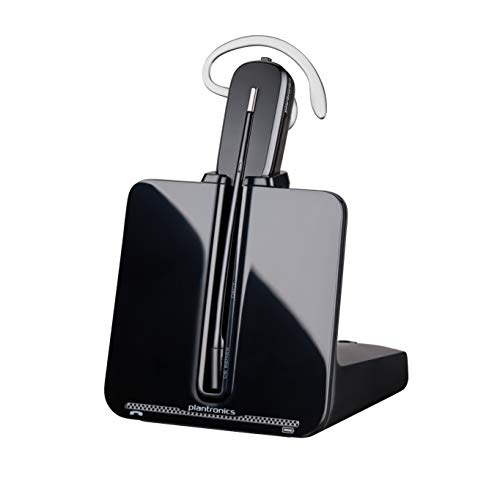
Plantronics CS540 (Poly) — Desk-phone DECT classic
The CS540 answers the oldest question in this category: how do I take desk-phone calls without holding a handset or staying seated? It is a wireless DECT headset, single-ear and convertible across three wearing styles, connecting to a desk phone with a noise cancelling microphone. Its longevity in the catalogue is itself evidence — desk-phone workflows change slowly, and this design fits them precisely.
Convertible wearing styles are the thoughtful detail. Over-the-ear hooks, a headband and a neckband arrangement suit different heads, hairstyles and glasses; a headset worn nine hours a day must fit the individual, not the average. The single-ear format matches the desk-phone world, where the user is usually also greeting visitors, handling paperwork and hearing the office.
DECT’s building-scale range is the quiet superpower: calls survive a walk to the printer, the filing cabinet or the colleague two offices away, on a dedicated voice link rather than a shared Bluetooth pairing. The boundary of the product is equally clear — it serves the desk phone, and only the desk phone, so computer-softphone workers should look at the Voyagers instead.
- Connection: DECT wireless to desk phone via base
- Fit: single-ear mono, convertible — 3 wearing styles
- Microphone: noise canceling
- Brand note: Plantronics design sold under Poly
- Range: building-scale DECT link to its base station
- Calls: desk phone only — no computer or mobile pairing
Strengths
- Purpose-built for desk phones, with no computer assumptions.
- Three wearing styles let each user fit it to their own head.
- DECT range frees you from the chair during long calls.
Trade-offs
- It cannot serve softphones, mobiles or meeting apps.
- The base station claims desk space and a power outlet.
- Mono audio only, in keeping with its desk-phone brief.
Best for: receptionists, office managers and anyone whose working day arrives through a desk phone.
Not suited for: remote workers whose calls live entirely in laptop apps, who need a UC model instead.
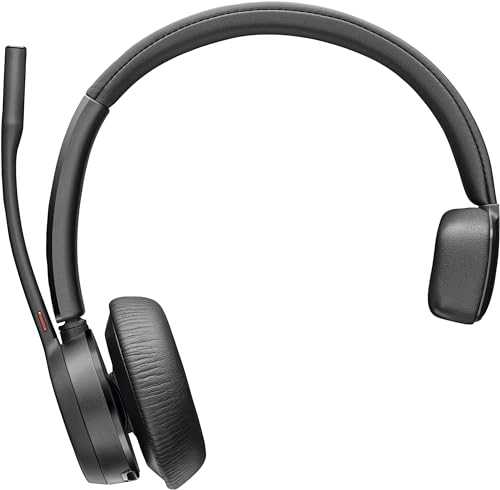
Poly Voyager 4310 UC with Charge Stand — Wireless UC with a home base
The Voyager 4310 UC is the modern desk answer: a single-ear wireless headset that connects to a PC or Mac through a USB-A Bluetooth adapter, pairs with a mobile phone over Bluetooth directly, and works with Teams, Zoom and more per its listing. The bundled charge stand is not an accessory afterthought — it gives the headset a home, a charge and a findable silhouette on a crowded desk.
The adapter-based PC connection matters for call quality and reliability. A dedicated USB Bluetooth adapter, tuned for the headset, sidesteps the variable Bluetooth stacks inside assorted laptops and presents the headset to meeting software as a known quantity. Meanwhile the phone pairing keeps personal and mobile calls on the same ear, so one device covers the whole voice day.
Mono format again signals the intended user: someone senior enough to be interrupted. Managers, coordinators and consultants take calls while remaining available to the room, and the 4310 is shaped for exactly that rhythm — on the stand when idle, on the ear when ringing, in the corridor when the call runs long.
- Connection: USB-A Bluetooth adapter for PC/Mac; Bluetooth for mobile
- Fit: single-ear headset with microphone
- Included: charge stand
- Platforms named in listing: Teams, Zoom and more
- Wireless type: Bluetooth
- Variant note: UC configuration with adapter
Strengths
- The stand solves charging and storage in one desk object.
- Adapter-based PC pairing is more predictable than laptop Bluetooth.
- One headset covers computer meetings and mobile calls.
Trade-offs
- The PC adapter is USB-A, awkward on USB-C-only laptops without a hub.
- Mono audio underserves media-heavy roles.
- Bluetooth range ties you to the building area near your desk.
Best for: managers and hybrid workers splitting calls between a computer and a mobile.
Not suited for: media producers needing stereo monitoring, who should stay with a wired stereo Blackwire.

Poly Voyager 5200 — The mobile caller’s earpiece
The Voyager 5200 leaves the desk behind entirely. It is a single-ear Bluetooth headset with a noise-cancelling microphone, ergonomic design, voice controls and a lightweight build, connecting to mobile phones and tablets over Bluetooth. Its natural habitat is the car between sites, the walk between meetings, the school run that doubles as a call window.
Voice controls are the feature that defines mobile use: answering, rejecting and checking status without finding a phone screen at 60 miles an hour or with hands full of shopping and keys. In an earpiece, hands-free must mean more than a wireless link — it must mean the controls themselves respect the situation, and that is the 5200’s design brief.
Its smallness cuts both ways across a working week. The same earpiece that disappears during a call also disappears into coat pockets, car consoles and the wrong bag on the wrong morning. Mobile professionals who adopt the 5200 should give it a fixed home — one pocket, one charging spot, one place in the car — because an earpiece’s reliability is mostly a geography problem, and geography is solvable on day one.
Wind and street noise are the mobile caller’s tax, and the noise-cancelling microphone is the countermeasure this listing leads with. No earpiece makes a motorway quiet, but callers consistently report the difference between a headset designed for mobile noise and a pair of music earbuds pressed into service. The 5200 is the former, unapologetically.
- Connection: Bluetooth to mobile and tablet
- Fit: single-ear, ergonomic design
- Microphone: noise-canceling
- Controls: voice controls stated in the listing
- Build: lightweight
- Computer use: not its brief — no UC adapter included
Strengths
- Voice controls suit driving and other hands-busy moments.
- Featherweight single-ear format disappears during long wear.
- Mobile-first microphone tuning fights street and wind noise.
Trade-offs
- No desk-phone or dedicated PC adapter path.
- Single ear limits media listening to background duty.
- Small size makes it the easiest pick here to misplace.
Best for: field staff, drivers and mobile professionals whose calls happen away from desks.
Not suited for: contact-centre agents on a fixed softphone queue, who are better served by the Blackwire range.
Which Poly and Plantronics Models Differ Most in Daily Use?
| Model | Connection | Ears | Built for |
|---|---|---|---|
| Blackwire 5220 | USB-C, USB-A, 3.5mm wired | Stereo | Computer calls on changing hardware |
| Blackwire 3220 | USB-C/USB-A wired | Stereo | A stable single-desk setup |
| Blackwire 3210 | USB-C/USB-A wired | Mono | Calls plus room awareness |
| CS540 | DECT to desk phone | Mono | Desk-phone freedom |
| Voyager 4310 UC | Bluetooth adapter + Bluetooth | Mono | PC and mobile in one ear |
| Voyager 5200 | Bluetooth | Mono | Mobile calls anywhere |
The table exposes the range’s logic: one stereo wired pair for computer focus, then a ladder of mono options trading connection types. Buyers torn between two rows should ask a single question — where do my calls physically arrive? A desk phone, a laptop, a mobile, or a mixture names the row; everything else is refinement.
Buyers comparing across office brands will find a useful contrast in Best Sennheiser Headsets, where EPOS tuning puts speech clarity ahead of almost everything else.
How Do You Set Up a Work Headset So Callers Hear You Properly?
Position the boom first. The microphone should sit roughly two finger-widths from the corner of your mouth, not in front of your lips — plosives and breath noise live directly ahead of the mouth, while your voice carries fine from the corner. On the flexible-boom Blackwires, bend once and verify on a test call; on the Voyagers, rotate the earpiece until the boom naturally lands in that zone.
Set the computer’s input device explicitly. Operating systems cheerfully default to a laptop’s built-in microphone even with a fine headset attached, and the wearer never knows — they hear perfectly through the headset while sounding distant to everyone else. Check the meeting app’s settings once, on day one, and after any major system update.
Record yourself before your first important call. Every platform offers a test or an echo service; thirty seconds of hearing your own transmitted voice teaches more about boom position and room echo than any manual. Adjust, re-record, and only then take the headset into a meeting that matters.
What Goes Wrong Most Often With Office Headsets?
Buying for the wrong phone system leads the list. A DECT desk-phone headset cannot join a Zoom call; a UC Bluetooth model cannot ring a traditional handset without additional hardware. The catalogue’s breadth makes this mistake easy and entirely avoidable: name your call source before naming a model.
Second comes ignoring the ears question. Stereo headsets bought for front-desk roles isolate staff from visitors; mono headsets bought for noisy analysis floors leave workers straining to hear. The role decides, and roles are knowable before purchase.
Third, wireless buyers neglect the charging ritual until a headset dies mid-call in week two. The 4310’s stand exists precisely to make charging the default state of an idle headset; Voyager 5200 users should build the same habit around their own routine — a headset that lives in one place gets charged, a headset that lives anywhere gets lost flat.
Gamers in the household often ask why play headsets feel different, and Best Redragon Headsets explains how gaming priorities reshape comfort and microphone design.
How Should a Team Buyer Roll Headsets Out Across an Office?
Standardise by role, not by building. Agents on a softphone queue, front-desk staff, managers and field staff are four different purchases wearing one category name, and this guide’s six picks map onto those roles almost one-to-one. A single-model mandate saves purchasing effort and costs daily comfort everywhere the fit is wrong.
Pilot with the loudest critics. Give the new model to the two heaviest callers for a fortnight; their complaints surface boom, fit and pairing issues at a rate no specification review matches. Only then order at volume, and keep a small pool of the alternative wearing style — mono where stereo is standard, and the reverse — for the inevitable exceptions.
Plan the unglamorous accessories with the headsets: spare ear cushions and tips, a labelled charging spot per desk, and a short printed setup card covering input-device selection. Most headset dissatisfaction in offices traces to these small absences rather than to the headsets themselves, and all of them are cheaper to fix in the purchase order than in the complaints that follow.
Why Does the Boom Microphone Still Beat Earbuds for Work Calls?
Distance is destiny in microphone design. A boom places the capsule centimetres from the mouth, where your voice is dramatically louder than the room; processing then has an easy separation to perform. Earbud microphones sit at the ear, where voice and room arrive at comparable levels, and even excellent processing is reconstructing rather than selecting.
That is why every pick in this guide — wired, DECT or Bluetooth — keeps a boom or a pronounced microphone stalk despite earbuds dominating consumer audio. For a worker whose reputation travels down a phone line, the boom is not an old-fashioned affectation. It is the entire point of the category, and Plantronics’ decades in this niche show in how consistently the range refuses to give it up.
What Is the Difference Between Certified, Compatible and Simply Working?
Headset marketing leans hard on platform names, and buyers deserve a cleaner map. Some listings in this guide name Microsoft Teams and Zoom directly — the Blackwire 5220 and 3210 and the Voyager 4310 UC among them — which signals the manufacturer has built and positioned the product for those platforms, including call-control behaviour from the headset where the platform supports it. Other listings, like the Blackwire 3220’s, speak of virtual meeting platforms in general terms: the headset is a standard USB audio device that every platform will use happily, without platform-specific promises.
In daily practice the gap is narrower than the labels suggest. Audio flows either way; your voice sounds the same. What differs is the choreography around the call — answering from a headset button, mute states staying in sync between headset and app, the small frictions that accumulate across forty calls a day. Heavy platform users should weight the named-platform models; occasional meeting joiners will never notice the distinction.
What no listing here should be read as promising is that a headset repairs a bad meeting setup. A certified headset on a laptop still using its built-in microphone delivers a certified-looking purchase and a terrible call. The platform names describe the headset’s manners, not a guarantee about your configuration.
How Do You Keep a Headset Comfortable Across a Full Shift?
Shift-length comfort is an engineering problem with personal variables. Weight distribution leads: a mono headset hangs its modest mass on one ear and headband, while a stereo model spreads more equipment across both. Neither wins universally — some wearers develop a sore ear under mono concentration, others a sore neck under stereo ambition — which is why the CS540’s three wearing styles deserve more respect than their bullet point suggests.
Rotate the variables you control. Alternate the wearing ear on mono models day by day where the boom allows it. Loosen and reseat a stereo headband at breaks rather than wearing one fixed clamp for eight hours. Keep glasses arms outside the cushion line where possible, and treat any recurring hotspot as fit information: the headset is telling you its geometry and your head disagree at that point, and a small positional change usually resolves what endurance cannot.
Heat management matters in warm offices. Over-ear cushions insulate; a two-minute headset-off break each hour resets both skin and attention. Workers who cannot break — live queue agents — should favour the lightest model their role permits, which in this guide usually means a mono Blackwire or a Voyager rather than the stereo wired pair.
Why Do Call Centres Still Choose Wired Headsets?
Walk a call centre floor and the cables tell a story about failure modes. A wired headset cannot be flat at shift start, cannot be paired to a neighbour’s computer, cannot wander home in a pocket, and cannot introduce wireless interference into a room containing three hundred other headsets. Each of those is a real operational cost that wireless freedom repays only where movement is genuinely part of the job.
Cost per seat compounds the argument. Wired models need no charging infrastructure, no battery replacement cycle and no spares pool sized for pairing casualties. Supervisors can also standardise the wearing experience: every agent’s microphone sits at the same boom distance, which keeps call quality consistent enough to coach against.
None of this makes wired morally superior — it makes it matched to stationary, high-density work. The moment the role involves walking a floor, greeting arrivals or working from three locations a week, the calculus flips and the DECT and Bluetooth picks in this guide become the operational choice rather than the indulgence.
What Should You Know About Hygiene and Shared Headsets?
Shared headsets are a fact of shift work, and the category has settled practices worth copying at home. Ear cushions and microphone windscreens are the contact surfaces; both should be treated as personal where possible and replaceable where not. A headset issued per agent, even an inexpensive wired one, usually outperforms a premium model passed hand to hand, because fit settings, boom bend and hygiene all stay personal.
Where sharing is unavoidable, wipe cushions between users with a cloth appropriate for the material, and replace foam windscreens on a schedule rather than on visible failure — they harbour more than they show. Supervisors should hold a small stock of these consumables; their absence is the usual reason a sharing pool degrades into a drawer of headsets nobody will wear.
Home workers are not exempt from the logic. A headset worn daily accumulates the same wear in slower motion, and a cushion refresh in year two restores both comfort and the acoustic seal your callers benefit from. Budget the consumables when you buy the headset and the product’s working life stretches noticeably.
Which of These Six Fits Your Working Pattern?
Picture your busiest hour rather than your average day. If it is four video calls deep at one desk, the stereo wired models were designed inside that picture: the 5220 if your hardware varies, the 3220 if it does not. If the hour includes visitors, deliveries and a room that needs you, mono is your format — the 3210 wired, or the Voyager 4310 UC if the hour also includes corridor conversations and a mobile that keeps ringing.
If your busiest hour arrives through a ringing desk phone while your hands are in paperwork, stop deliberating: the CS540 exists for that hour and nothing else in this guide does its job. If the hour happens at motorway speed or between client sites, the Voyager 5200 is the only pick that treats your situation as its home ground.
Two-pattern workers — desk mornings, mobile afternoons — are the 4310’s natural constituency, and should resist buying two cheaper headsets instead. One headset that covers both patterns keeps your voice consistent to callers and your habits simple; two headsets means two charging rituals, two fits and one of them always in the wrong building.
How Does Wireless Range Behave Inside Real Buildings?
Range figures are measured in conditions no office provides: open air, line of sight, no competing equipment. Inside a building, walls, metal shelving, lift shafts and human bodies all tax a wireless link, and the two wireless technologies in this guide respond differently. DECT, designed for building-scale voice, generally holds its link through more architecture between you and the base; Bluetooth, designed for personal-area connections, fades sooner but pairs with the phone in your pocket rather than a fixed base.
The practical test is your own floor plan. A Voyager user whose calls stay within a room or two of the desk will never find the edge; a CS540 user roaming a small office, stockroom and corridor circuit is using DECT as intended. Buyers in sprawling or reinforced-concrete workplaces should place base stations centrally and elevated, and should treat any range claim as a best case rather than a promise about their particular walls.
Audio degradation gives warning before a link dies: syllables clip, then words drop. Experienced wireless users learn their building’s dead spots the way they learn its draughty corners, and route long calls around them. None of this is a defect in a specific model — it is the physics every wireless headset negotiates, and the reason wired picks remain in this guide for the most call-critical seats.
Why Do Mute Discipline and Call Controls Matter More Than Specs?
Ask experienced callers what separates a professional headset from a merely good one and most describe controls, not audio. The mute you can find by touch without looking, the answer button that works from the ear rather than the screen, the volume rocker your fingers locate mid-sentence — these micro-interactions happen hundreds of times a week, and each fumble is audible to the other party.
Mute discipline deserves its own habit. The safest mute is the one whose state you can verify without asking the room: a boom raised to mute where the design supports it, a button whose position your thumb knows, a platform indicator you have learned to glance at. Every model family in this guide approaches control placement slightly differently, which is another argument for standardising per role — muscle memory should not have to survive a headset swap.
Voice controls on the Voyager 5200 extend the same philosophy to situations where hands and eyes are occupied. Answering by voice at the wheel is not a novelty feature; it is the control surface arriving where the user actually is. Buyers comparing spec sheets should spend as long imagining a day of controls as a day of audio.
What Does the Second Year With a Poly Headset Look Like?
Office headsets age in predictable places. Cushions flatten and crack at the fold, boom hinges loosen, cables fray where they meet the connector, and Bluetooth batteries lose their first slice of capacity. The wired Blackwires typically outlast the wireless models in fleet service simply because they contain fewer ageing systems — no battery, no radio pairing to drift — and their failure points are visible and mechanical.
The Voyager pattern ages around its battery and its ear fit. A stand-charged 4310 lives a gentler battery life than a 5200 charged in bursts from car adapters, and both reward owners who keep firmware and companion software current where the model supports it. DECT’s CS540, sitting in offices for years, tends to retire through changing phone systems rather than personal failure — a reminder that in this category the infrastructure often dates before the headset does.
Buyers planning a three-year horizon should therefore ask an infrastructure question alongside the product question: will this desk still have a desk phone, will this laptop still offer USB-A, will this role still be room-based? The headset that survives is the one whose connection survives, and the listings’ connector details — the least glamorous lines in this guide — are where that future is written.
How Should You Read a Headset Listing Without Being Misled?
Start with the connection line, because it silently vetoes everything else. A listing that says desk phone means a base station and a handset ecosystem; USB means a computer; Bluetooth alone means phones and tablets first. Buyers who begin with microphone claims and discover the connection last have the reading order backwards, and it is the most common source of returns in this category.
Next, translate the wearing description into your shift. Single-ear and double-sided are not quality tiers; they are different relationships with the room around you. Then examine what the listing claims about the microphone — noise cancelling appears on every pick in this guide, which tells you it is table stakes for the category rather than a differentiator, and the real separation lies in boom adjustability and placement.
Treat platform names as information about controls and positioning rather than audio quality, and treat words like professional and premium as decoration. The listings in this guide reward literal reading: every pick’s genuine strengths — a 3.5mm plug here, three wearing styles there, a charge stand in the box — are stated plainly, and the honest limitations are visible in what each listing does not claim. A model that never mentions computers will not serve a computer, however hopeful the buyer.
Finally, check the variant. Several families here span mono and stereo, UC and standard, with and without stands, and marketplace listings occasionally blur them. The model number and the included-items list are the ground truth; confirm both against the role you are buying for before the order, not after the unboxing.
What Changes When the Office Is a Spare Bedroom?
Home working rearranged this category’s priorities. The office supplied a desk phone, a standard laptop and a room full of colleagues; the home supplies whatever laptop you own, a doorbell, a dog and a meeting schedule indistinguishable from the office’s. Headsets that thrived at home during that shift share traits visible across this guide: multi-device tolerance, comfort across unstructured days, and microphones that forgive untreated rooms.
The Blackwire 5220’s plug collection is a home-work feature in disguise — the work laptop, the personal desktop and the phone all meet one headset. The Voyager 4310’s stand imposing a small ritual of order on a kitchen-table desk is another. Even the humble wired models gained: no pairing negotiation with a laptop that also serves family duty at weekends.
Employers buying for home staff should note that the failure pattern moved too. Office headsets failed mechanically; home headsets fail logistically — left in the other room, uncharged, or claimed by a teenager for gaming. Issuing a stand-equipped or wired model, and a labelled spare cushion set, prevents more lost calls than any specification upgrade on the market.
How Do You Troubleshoot the Three Failures Everyone Meets?
The first failure is sounding distant while hearing perfectly. Nine times in ten the computer has kept its built-in microphone as the input while sending audio to your headset, so callers get the laptop’s far-field version of you. The fix lives in the meeting app’s device settings, and the habit worth building is checking it whenever a new headset, dock or update enters your setup.
The second failure is the wireless headset that connects to the wrong device — the phone in your bag answering while your laptop meeting waits. Bluetooth’s willingness is the culprit. The discipline is to pair deliberately, forget pairings you no longer use, and, on adapter-based models like the Voyager 4310 UC, let the USB adapter be the computer’s single point of contact so the negotiation happens in one known place.
The third failure is comfort that collapses in week three: a hotspot, a slipping ear hook, a boom that will not stay where it was bent. These are fit problems with mechanical answers — a different wearing style on the convertible CS540, a reseated headband notch, a boom re-bent closer to the mouth’s corner. Owners who treat the first fortnight as a fitting period, adjusting one variable at a time, almost always land on a configuration their head accepts for years.
Underneath all three sits a principle worth stating plainly: headsets are worn systems, not appliances, and small setup investments repay themselves daily. An hour spent on input settings, pairing order and fit in the first week is the difference between a tool and an irritation.
What Do Supervisors Actually Hear on Call Recordings?
Quality teams listen to calls the way customers do — once, at conversational speed, without patience for reconstruction. On those recordings, headset differences announce themselves immediately. A boom microphone at the correct distance produces a voice that sits forward and even; a distant or poorly placed microphone produces the thin, roomy sound that listeners unconsciously grade as less competent, however unfair that grading is.
Background discipline shows up too. The noise-cancelling microphones across this guide cannot erase a television in the next room, but they consistently shave the office wash — keyboards, neighbouring calls, air handling — that otherwise competes with the agent’s words. Supervisors coaching from recordings ask for boom position first and headset upgrades second, because the recordings prove position is the larger variable.
There is a lesson in that for individual buyers. Your callers are running the same unconscious grading as those quality teams. The headset is, in a literal sense, your professional voice at work, and the modest discipline of setting it up properly — boom placed, input selected, one test recording made — is the cheapest credibility available in this entire category.
How Should You Budget Across a Team Without Buying Twice?
Headset budgets fail in a familiar sequence: a cheap first purchase, a month of complaints, and a second purchase that costs more than buying correctly once. The arithmetic of this category punishes false economy because the product is worn for thousands of hours; a small daily friction multiplied by a team’s call volume dwarfs any saving on the invoice.
The smarter allocation spends where the role touches the customer. Front-line agents and client-facing staff get the model fitted to their pattern even when it is the dearer option; occasional internal callers can take the simpler wired models without any caller ever knowing. Accessories belong in the first budget, not a later rescue: spare cushions, windscreens and one backup wired headset per team cost little and prevent the improvised purchases that quietly wreck standardisation.
Individual buyers face the same logic at household scale. If calls are your income, the headset is a tool of the trade and should be bought like one — fitted, warranted by a reputable listing, and replaced on wear rather than on failure mid-call. The six picks in this guide span the sensible price territory for that thinking; below it lies the false economy, and above it lies jewellery.
Final Recommendation
Match the headset to the wire your calls arrive on. Computer-based workers should default to the Blackwire 5220 for its unmatched plug flexibility, choosing the 3220 for a fixed stereo desk or the 3210 when one ear must stay on the room. Desk-phone loyalists have exactly one correct answer here, the CS540, while mobile professionals split between the Voyager 4310 UC for desk-plus-phone duty and the Voyager 5200 for life in motion. Get that first decision right and the Plantronics range stops looking complicated — it becomes what it has always been, a set of voices, each fitted to a way of working.
One closing thought for buyers still hovering between wired and wireless: choose the failure you prefer. Wired fails by tethering you; wireless fails by asking for charge and pairing attention. Neither failure is dramatic, both are daily, and your temperament already knows which one will annoy you less by March. Buy for the annoyance you tolerate, set the headset up with the care this guide describes, and your callers will hear the best version of you from the first meeting onward.
Frequently Asked Questions
Are Plantronics and Poly the same headsets?
Yes — Plantronics headsets are now sold under the Poly brand, and several listings in this guide carry both names. The Blackwire, CS and Voyager families continue under Poly with the same design lineage.
Which of these works with a traditional desk phone?
The CS540 is the desk-phone pick, connecting over DECT to its base. The other models serve computers and mobiles; check your phone system’s compatibility before assuming any adapter arrangement.
Can I use the Voyager 4310 UC with my phone as well as my PC?
Yes. The listing describes PC and Mac connection through a USB-A Bluetooth adapter and mobile connection over Bluetooth, which is exactly the hybrid pattern the UC configuration is built for.
Is mono or stereo better for call centre work?
It depends on the floor. Quiet centres often prefer stereo for focus; busy, visitor-facing environments favour mono so staff stay aware. Both formats appear in this guide because both answers are right somewhere.
Do the wired Blackwire headsets need charging?
No. Wired models draw power over their cable and are ready whenever they are plugged in — one of the main reasons call centres standardise on them.
Which pick should a driver buy?
The Voyager 5200, whose voice controls and mobile-first microphone tuning are designed for calls taken on the move. Desk-based alternatives assume a chair, a screen and two free hands at setup time.
Can one headset cover both my desk phone and my computer?
Not among these six. The CS540 serves desk phones over DECT, while the Blackwire and Voyager UC models serve computers and mobiles. Workers with both systems usually keep the CS540 at the desk phone and a UC model at the computer, or consolidate their calls onto one system and buy accordingly.
Why does my new headset sound fine to me but poor to callers?
Almost always because the computer is still using its built-in microphone for input while sending sound to your headset. Open the meeting app’s audio settings, select the headset as the microphone explicitly, and make a short test recording to confirm before your next real call.


