What's inside
As an Amazon Associate I earn from qualifying purchases. This post may contain affiliate links at no extra cost to you.
A sale PC monitor is the most practical bargain in computing, because the monitor is the part of the setup that is looked at all day, and a good display makes every task easier, from gaming to spreadsheets to video calls. Monitors go on sale more often than any other PC component, because makers and retailers discount them regularly to clear stock, to match a seasonal event, or to compete with a rival, and a buyer who knows which models are worth waiting for can get a genuinely good display for the price of a mediocre one. This guide is about those models: the PC monitors that are worth buying at full price and even better when the price drops.
Sale prices change constantly, and a guide that quoted a specific sale price would be out of date before it was published, so this guide does not chase prices. Instead, it focuses on the models that are worth waiting for, and on how to judge a sale when it appears. A good sale on a PC monitor is a discount on a monitor that was already good at full price, while a bad sale is a discount on a monitor that was never worth buying, and the difference matters more than the size of the discount. The models in this guide are all monitors that reviewers recommend at full price, which means a sale price is a genuine saving rather than a trap.
The PC monitor category covers every use, from competitive gaming to home office work to watching films, and the right monitor depends on which of those matters most. A gamer needs a high refresh rate and a fast response time, and will trade some colour accuracy for speed. A home office worker needs a sharp image, comfortable ergonomics and good connectivity, and will value a USB hub and a good stand over a gaming feature. A buyer who mostly watches films and browses the web needs a clear, bright image and good speakers, and will value simplicity over features. This guide covers all of those uses, and the buying guide at the end explains how to spot a real sale, what to check before buying, and when to wait for a better discount.
The models in this guide were chosen because they go on sale regularly and because they are worth buying when they do. Some are budget models that are discounted to a price that makes them almost impossible to ignore, and those are the best bargains for a buyer who needs a second monitor or a first monitor for a new setup. Some are popular mid-range models that are discounted during the big seasonal sales, and those are worth waiting for because the discount is predictable. All of them are real, current products from established display brands, with documented specification sheets and a track record in reviews and in everyday use.
Verified purchase links and product images are added once the store catalogue is connected. The comparison weighs the things that matter for a PC monitor bought on sale: the panel type and how good it looks, the refresh rate, the resolution, the colour accuracy, the ergonomics, and the practical details such as the stand, the ports and the warranty, because a sale monitor with a short warranty or a missing cable can cost more in the long run than a full-price monitor with a proper warranty. A sale is only a bargain if the monitor is right, and the models in this guide are right.
Quick picks: best sale pc monitors
| # | Product | Where to buy |
|---|---|---|
| 1 | LG 27MP400-B | Check on Amazon |
| 2 | Samsung Smart Monitor M5 27-inch | Check on Amazon |
| 3 | ASUS VA24EHF | Check on Amazon |
| 4 | Dell S2421HN | Check on Amazon |
| 5 | HP 24mh | Check on Amazon |
Quick Comparison
| Monitor | Key Specs | Best For |
|---|---|---|
| LG 27MP400-B | 27-inch 1080p IPS, 75 Hz, slim bezels | Best budget sale PC monitor |
| Samsung Smart Monitor M5 27-inch | 27-inch 1080p VA, smart TV apps built in | Best sale PC monitor for streaming |
| ASUS VA24EHF | 24-inch 1080p IPS, 100 Hz, 1 ms | Best sale 24-inch PC monitor |
| Dell S2421HN | 24-inch 1080p IPS, 75 Hz, slim design | Best sale PC monitor for office work |
| HP 24mh | 24-inch 1080p IPS, 75 Hz, built-in speakers | Best sale PC monitor for home use |
| Acer SB220Q | 22-inch 1080p IPS, 75 Hz, ultra-slim | Best small sale PC monitor |

LG 27MP400-B
The LG 27MP400-B is the best budget sale PC monitor in this guide, because it is the model that gives a buyer the most screen for the least money. The 27-inch IPS panel runs at 1080p and 75 hertz, with slim bezels and a clean design that suits a desk that is used for work, study and everyday computing. The IPS panel has wide viewing angles and decent colour accuracy, and the monitor is a genuine all-round display, not a compromised panel, which is why it appears in so many budget setup guides and why retailers discount it so often.
The everyday performance of the 27MP400-B is strong for the money. The 27-inch screen is large enough for two windows side by side, and the 1080p resolution is sharp enough for documents, web browsing and video, although it is less sharp than a 1440p panel of the same size. The 75 hertz refresh rate is a small but noticeable improvement over 60 hertz, and the monitor feels smoother in everyday use. The IPS panel keeps colours consistent across the screen, which matters for a display that is looked at all day, and the monitor has a reader mode that reduces blue light for long reading sessions.
As a sale purchase, the 27MP400-B is a strong bet, because it is already affordable at full price, and a sale discount makes it one of the cheapest ways to get a large, good-looking monitor. A sale price on this monitor is a genuine saving, because the monitor is already good value, and the discount does not come with a shorter warranty when bought from a reputable retailer. Check the warranty length and the return policy before ordering, and test the monitor with a solid colour test when it arrives to check for dead pixels and backlight bleed.
The trade-offs are the 1080p resolution, which looks soft on a 27-inch screen compared with a 1440p panel, and the stand, which adjusts for tilt only and cannot be raised or lowered. The monitor has no USB hub and no built-in speakers, so a buyer who needs those features should look elsewhere or add them separately. But as a large, affordable PC monitor to buy on sale, the 27MP400-B is hard to beat, and it fits a buyer on a tight budget, a student who needs a large screen for study, and anyone who wants a second monitor for a home office.
Check price on Amazon: LG 27MP400-B

Samsung Smart Monitor M5 27-inch
The Samsung Smart Monitor M5 27-inch is the best sale PC monitor in this guide for streaming, and it is the choice for a buyer who wants a display that works as a monitor and as a television. The 27-inch VA panel runs at 1080p and 60 hertz, with smart TV apps built in, which means the monitor can stream films and shows without a computer connected, using only a Wi-Fi connection and the included remote control. The VA panel has a high contrast ratio, which means deep blacks and vivid colours for films, and the monitor is designed to be a complete entertainment centre on a desk.
The streaming performance of the M5 is its strongest point. The built-in smart platform includes the major streaming apps, and the monitor can be used for films, shows and music without turning on the computer, which is a genuine convenience for a bedroom or a small room. The monitor also works as a normal PC display, with HDMI inputs for a computer or a console, and it has a range of productivity features, including a built-in web browser, a screen mirroring mode for a phone, and a remote desktop mode that can connect to a PC over the network. Reviewers praise the versatility in particular, because the M5 is the only monitor in this guide that can replace both a display and a television.
As a sale purchase, the M5 is a good bet, because Samsung discounts its smart monitor range regularly, and a sale price on this model is a genuine saving on a display that is already good value at full price. Check the warranty length and the return policy before ordering, and test the monitor with a solid colour test when it arrives to check for dead pixels. The monitor comes with a remote control, and the box should include the power cable and the remote, because a missing remote is a common problem with sale units that have been returned.
The trade-offs are the 1080p resolution, which looks soft on a 27-inch screen, and the 60 hertz refresh rate, which means the monitor is not suitable for competitive gaming. The VA panel has narrower viewing angles than an IPS panel, and the monitor has no height adjustment on the stand. But as a PC monitor that also streams films without a computer, the M5 is in a class of its own, and it fits a buyer who wants a monitor and a television in one, a student in a small room, and anyone who wants a simple, versatile display at a sale price.
Check price on Amazon: Samsung Smart Monitor M5 27-inch

ASUS VA24EHF
The ASUS VA24EHF is the best sale 24-inch PC monitor in this guide, and it is the choice for a buyer who wants a fast, sharp display for the lowest outlay. The 24-inch IPS panel runs at 1080p and 100 hertz, with a one-millisecond response time and a frameless design that suits a multi-monitor setup. The 100 hertz refresh rate is a genuine improvement over 60 hertz, and the monitor feels smoother in games and in everyday use, which is a rare quality in a budget display. The IPS panel has wide viewing angles and decent colour accuracy, and the monitor is a genuine gaming display at a budget price.
The everyday performance of the VA24EHF is strong for the money. The 24-inch screen is the right size for a desk that is short on space, and the 1080p resolution looks sharp at this size, because the pixels are smaller than on a 27-inch panel. The 100 hertz refresh rate makes fast games feel smooth and scrolling feel fluid, and the monitor supports adaptive sync for tear-free gaming. The IPS panel keeps colours consistent across the screen, and the monitor has a low blue light mode and a flicker-free backlight, which are genuine comfort features for a display that is looked at all day.
As a sale purchase, the VA24EHF is a strong bet, because it is already affordable at full price, and a sale discount makes it one of the cheapest ways to get a fast, sharp monitor. A sale price on this monitor is a genuine saving, because the monitor is already good value, and the discount does not come with a shorter warranty when bought from a reputable retailer. Check the warranty length and the return policy before ordering, and test the monitor with a solid colour test and a fast-moving game when it arrives.
The trade-offs are the small screen, which is less immersive than a 27-inch display, and the stand, which adjusts for tilt only. The monitor has no USB hub and no built-in speakers, so a buyer who needs those features should look elsewhere. But as a fast, sharp 24-inch monitor to buy on sale, the VA24EHF is one of the best in this guide, and it fits a gamer on a tight budget, a buyer with a small desk, and anyone who wants a second monitor for a multi-display setup.
Check price on Amazon: ASUS VA24EHF

Dell S2421HN
The Dell S2421HN is the best sale PC monitor in this guide for office work, and it is the choice for a buyer who wants a clean, sharp display for documents, spreadsheets and video calls. The 24-inch IPS panel runs at 1080p and 75 hertz, with slim bezels and a clean, modern design that suits an office. The IPS panel has wide viewing angles and accurate colours, and the monitor is backed by the warranty and support that Dell is known for, which matters more when buying on sale, because a good warranty is the protection against a monitor that fails after a few weeks.
The office performance of the S2421HN is excellent. The 24-inch screen is the right size for a desk that is used for work, and the 1080p resolution looks sharp at this size. The 75 hertz refresh rate is a small improvement over 60 hertz, and the monitor feels smoother in everyday use. The IPS panel keeps colours consistent across the screen, and the monitor has a low blue light mode and a flicker-free backlight, which are genuine comfort features for a display that is looked at for eight hours a day. Reviewers praise the design in particular, because the slim bezels and the clean stand make the S2421HN look more expensive than it is.
As a sale purchase, the S2421HN is a strong bet, because Dell discounts it regularly, and a sale price from Dell or a reputable retailer comes with the full warranty and the full return policy. A sale price on this monitor is a genuine saving, because the monitor is already good at full price, and the discount does not come with a shorter warranty when bought from an authorised seller. Check the warranty length and the return policy before ordering, and test the monitor thoroughly when it arrives, because a sale monitor should be tested just as carefully as a full-price one.
The trade-offs are the small screen, which is less immersive than a 27-inch display, and the stand, which adjusts for tilt only and cannot be raised or lowered. The monitor has no USB-C input and no built-in speakers, so a laptop user who wants a single-cable setup should look elsewhere. But as a clean, sharp office monitor to buy on sale, the S2421HN is one of the best in this guide, and it fits a buyer who works from home, a professional who needs a reliable display for documents and video calls, and anyone who values a good warranty as much as a good price.
Check price on Amazon: Dell S2421HN
HP 24mh
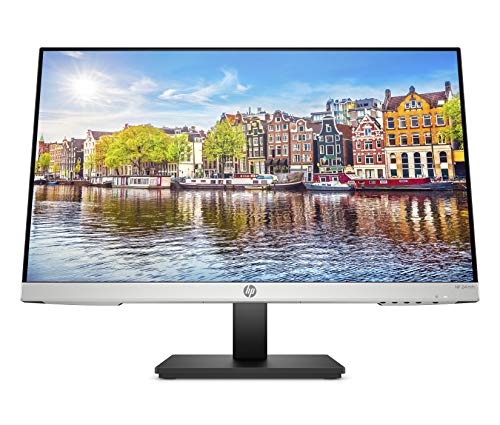
The HP 24mh is the best sale PC monitor in this guide for home use, and it is the choice for a buyer who wants a simple, complete display with built-in speakers and a clean design. The 24-inch IPS panel runs at 1080p and 75 hertz, with slim bezels and a micro-edge design that looks modern on any desk. The IPS panel has wide viewing angles and decent colour accuracy, and the built-in speakers are a genuine convenience for video calls and for watching films, because they remove the need for separate speakers on a desk that is short on space.
The home performance of the 24mh is strong. The 24-inch screen is the right size for a desk in a bedroom or a living room, and the 1080p resolution looks sharp at this size. The 75 hertz refresh rate is a small improvement over 60 hertz, and the monitor feels smoother in everyday use. The built-in speakers are better than the speakers in most budget monitors, and the monitor has a low blue light mode that reduces eye strain during long sessions. Reviewers praise the simplicity in particular, because the 24mh is easy to set up, easy to use, and easy to live with, with no complicated menu and no gaming features that a home user will never touch.
As a sale purchase, the 24mh is a good bet, because HP discounts it regularly, and a sale price on this monitor is a genuine saving on a display that is already good value at full price. Check the warranty length and the return policy before ordering, and test the monitor with a solid colour test when it arrives to check for dead pixels and backlight bleed. The monitor comes with an HDMI cable in the box, and the box should include the power cable and the stand, because a missing cable is a common problem with sale units.
The trade-offs are the small screen, which is less immersive than a 27-inch display, and the stand, which adjusts for tilt only. The monitor has no USB hub and no USB-C input, so a laptop user who wants a single-cable setup should look elsewhere. But as a simple, complete home monitor to buy on sale, the 24mh is one of the best in this guide, and it fits a buyer who wants a monitor with speakers, a family who needs a display for homework and films, and anyone who wants a clean, easy setup at a sale price.
Check price on Amazon: HP 24mh
Acer SB220Q
The Acer SB220Q is the best small sale PC monitor in this guide, and it is the choice for a buyer who wants a compact, affordable display for a small desk or a second screen. The 22-inch IPS panel runs at 1080p and 75 hertz, with an ultra-slim design and a frameless bezel that makes the monitor look modern despite its size. The IPS panel has wide viewing angles and decent colour accuracy, and the monitor is a genuine all-round display, not a compromised panel, which is why it appears in so many budget setup guides and why retailers discount it so often.
The everyday performance of the SB220Q is strong for the money. The 22-inch screen is the right size for a small desk, a dorm room or a second monitor, and the 1080p resolution looks sharp at this size, because the pixels are smaller than on a larger panel. The 75 hertz refresh rate is a small improvement over 60 hertz, and the monitor feels smoother in everyday use. The IPS panel keeps colours consistent across the screen, and the monitor has a low blue light mode and a flicker-free backlight, which are genuine comfort features for a display that is looked at all day.
As a sale purchase, the SB220Q is a strong bet, because it is already one of the most affordable monitors available, and a sale discount makes it almost impossible to ignore for a buyer who needs a second screen or a first monitor for a new setup. A sale price on this monitor is a genuine saving, because the monitor is already good value, and the discount does not come with a shorter warranty when bought from a reputable retailer. Check the warranty length and the return policy before ordering, and test the monitor with a solid colour test when it arrives.
The trade-offs are the small screen, which is less immersive than a 24-inch or 27-inch display, and the stand, which adjusts for tilt only. The monitor has no USB hub, no built-in speakers and no height adjustment, so a buyer who needs those features should look elsewhere. But as a small, affordable PC monitor to buy on sale, the SB220Q is one of the best in this guide, and it fits a buyer with a small desk, a student who needs a second screen, and anyone who wants a compact display for the lowest outlay.
Buying Guide
How to spot a real sale
A real sale is a discount on a monitor that was already good at full price, while a fake sale is a discount on a monitor that was never worth buying, and the difference is in the model rather than the percentage. Check the model against reviews before buying, and be suspicious of a monitor that is only ever sold on sale, because a monitor that is always discounted was never worth its original price. Check the price history if it is available, because a genuine sale is a price that is lower than the usual selling price, not lower than an inflated original price that the monitor never actually sold for.
Budget monitors and what to expect
A budget PC monitor is a compromise, and the buyer should know what is being traded for the low price. A budget monitor usually has a 1080p resolution, a 60 or 75 hertz refresh rate, a tilt-only stand and no USB hub, and those are acceptable trade-offs for a buyer who needs a display for everyday computing. A budget monitor should still have an IPS panel, because an IPS panel has wide viewing angles and consistent colours, while a budget TN panel has poor viewing angles and washed-out colours that are tiring to look at all day. The models in this guide all have IPS or VA panels, and that is the minimum a buyer should accept.
Seasonal sales and when to wait
Monitor prices follow a predictable seasonal pattern, with the biggest discounts during the autumn sales, the end-of-year sales and the spring clearance events. A buyer who can wait a few weeks can often save a significant amount, while a buyer who needs a monitor immediately will pay full price. The models in this guide are discounted regularly, so waiting is usually rewarded, but a sale price that is already good should not be passed up in the hope of a slightly better one, because the stock may run out and the next sale may be months away.
Warranty and returns on a sale monitor
The warranty is the most important part of a sale purchase, because it is the protection against a monitor that fails after a few weeks. A sale monitor bought from an authorised retailer should have the full warranty, and a sale monitor with a shorter warranty or no warranty is not a bargain, no matter how large the discount. The return policy matters just as much, because a monitor with a dead pixel or excessive backlight bleed should be returnable within at least thirty days. Check the warranty length, the return window and who pays the return shipping before ordering.
What to check when the monitor arrives
When a sale monitor arrives, test it before the return window closes. Display a solid white, black, red, green and blue screen in turn and look for dead pixels, stuck pixels and uneven backlighting. Check every port with a cable, and check the stand adjustment and the on-screen menu. If the monitor has a dead pixel in the centre of the screen or excessive backlight bleed, return it immediately, because those faults do not improve with time and they will be visible in every document and every film.
Size and resolution for a PC monitor
A 24-inch monitor at 1080p is the sweet spot for a budget PC display, because the resolution looks sharp at that size and the monitor is affordable. A 27-inch monitor at 1080p is cheaper but looks soft, because the pixels are stretched across a large area, and it is only worth buying for a buyer on a tight budget. A 27-inch monitor at 1440p is sharper, but it costs more and needs a more powerful graphics card for gaming. Match the size and the resolution to the desk and the graphics card, because a monitor that is too big for the desk or too demanding for the card is a waste of money.
Do not buy a monitor just because it is on sale
The most expensive monitor is the one that is bought on sale and never used, or the one that is bought on sale and returned because it was the wrong model. A sale price is only a saving if the monitor is the right one, and a buyer who needs a 24-inch office monitor should not buy a 27-inch gaming monitor just because it is cheaper, even on sale. Decide what is needed first, then watch for a sale on the right model, and be patient, because the models in this guide go on sale regularly, and the right monitor at the right price is worth waiting for.
Second monitors and dual setups
A sale PC monitor is often bought as a second display, and a second monitor is one of the best upgrades for productivity, because it allows a document on one screen and a browser on the other, or a video call on one screen and notes on the other. A second monitor does not need to match the first, and a budget sale monitor is a good choice for a second screen, because it is used for reference rather than for primary work. The second monitor should be positioned at the same height as the first, with the same brightness, so the eyes do not have to adjust when moving between screens, and a monitor arm is worth considering, because it allows both monitors to be positioned precisely.
Frequently Asked Questions
When is the best time to buy a PC monitor on sale?
The biggest discounts on PC monitors appear during the autumn sales, the end-of-year sales and the spring clearance events, when retailers discount stock to make room for new models. A buyer who can wait a few weeks can often save a significant amount, while a buyer who needs a monitor immediately will pay full price. The models in this guide are discounted regularly, so waiting is usually rewarded, but a sale price that is already good should not be passed up in the hope of a slightly better one, because the stock may run out.
Is a cheap sale monitor worth buying?
A cheap sale monitor is worth buying if it is a good model at a discount, and it is not worth buying if it is a poor model at any price. Check the model against reviews before buying, and be suspicious of a monitor that is only ever sold on sale. The models in this guide are all monitors that reviewers recommend at full price, which means a sale price is a genuine saving. A monitor with an IPS panel, a decent stand and a full warranty is worth buying on sale, while a monitor with a TN panel, a tilt-only stand and no warranty is not.
How much should I expect to save on a sale PC monitor?
A good sale on a PC monitor is a discount that makes a real difference, and the size of the discount depends on the model and the timing. A popular model during a seasonal sale is often discounted by a meaningful amount, while a budget model being cleared can be discounted by more. The exact saving matters less than whether the monitor is the right one, because a large discount on the wrong monitor is not a saving, and a modest discount on the right monitor is a genuine bargain.
Should I buy a sale monitor from a marketplace seller?
A sale monitor from a marketplace seller can be a good buy, but it needs more care than a purchase from an authorised retailer. Check the seller rating, the warranty length and the return policy, and be suspicious of a price that is far below every other seller, because it can be a sign of a grey import with no warranty or a refurbished unit sold as new. A monitor bought from an authorised retailer has the full warranty and a clear return policy, and that protection is worth a slightly higher price.
What is the best size for a PC monitor on sale?
24 inches at 1080p is the best size for most budget PC monitors, because the resolution looks sharp at that size and the monitor is affordable. 27 inches at 1080p is cheaper per inch but looks soft, and it is only worth buying for a buyer on a tight budget who wants a large screen. 27 inches at 1440p is sharper, but it costs more. The right size depends on the desk, the distance to the screen, and the graphics card, and a buyer with a small desk should choose 24 inches while a buyer with a large desk can choose 27 inches.
Do sale monitors have the same warranty?
A sale monitor bought from an authorised retailer should have the full warranty, and a sale monitor with a shorter warranty or no warranty is not a bargain, no matter how large the discount. Check the warranty length before ordering, and be suspicious of a seller who does not state the warranty clearly. A monitor with a dead pixel or a fault should be returnable within at least thirty days, and the return policy should be checked before the monitor is ordered, not after it arrives.
Is a 75 Hz monitor better than 60 Hz?
Yes, slightly. A 75 hertz monitor shows a new frame every thirteen milliseconds, compared with every sixteen milliseconds for a 60 hertz monitor, and the difference is noticeable in scrolling and in mouse movement, which look smoother. A 75 hertz refresh rate is not as dramatic as 144 hertz, but it is a genuine improvement, and it is a common feature on budget monitors, where it costs little to implement. A buyer who spends long hours in front of a monitor will notice the difference, and a 75 hertz monitor is worth choosing over a 60 hertz model at the same price.
Conclusion
The best sale PC monitor is the one that was already worth buying at full price, and the sale price is simply the reward for waiting. The LG 27MP400-B is the best budget buy, the Samsung Smart Monitor M5 is the best for streaming, the ASUS VA24EHF is the best 24-inch display, the Dell S2421HN is the best for office work, the HP 24mh is the best for home use, and the Acer SB220Q is the best small monitor. Any of them is worth watching for a discount, and the right choice is the one that matches the desk, the use and the budget. Decide what is needed, watch the models in this guide, and buy when the sale price appears on the right monitor.