Our Top Picks
 Rogue R67S Unlocked 4G LTE Smartphone for T-Mobile6.78 x 3.13 x 0.39 inches0.5 poundsCheck on Amazon



What's inside
- How a cellular booster actually works
- T-Mobile bands a booster must understand
- CellSpot and femtocells: a different species entirely
- Coverage area claims and building reality
- Antenna separation and the oscillation trap
- FCC rules and registering a booster with the carrier
- A methodical installation, step by step in spirit
- When a booster is the wrong answer
- Troubleshooting after the novelty fades
- Choosing among booster models without drowning in listings
- Emergency calls, visitors, and multi-carrier households
- Gain, output power, and the uplink nobody advertises
- Check prices on Amazon
- What good looks like a month later
As an Amazon Associate I earn from qualifying purchases. This post may contain affiliate links at no extra cost to you.
A phone that shows one trembling bar in the kitchen and none in the back bedroom is not suffering from a mysterious fault; it is reporting exactly how much signal survives the journey through walls, roofing, and distance. As an Amazon Associate we earn from qualifying purchases. This guide explains the equipment sold to T-Mobile subscribers under names like extender and booster, separates genuine cellular amplifiers from the network boxes the carrier itself supplies, and lays out the band support, antenna discipline, registration duties, and honest coverage expectations that decide whether an installation transforms a home or merely decorates a shelf.
Vocabulary causes the first confusion in this category, because the word extender describes at least three unrelated products. A cellular signal booster receives the carrier’s outdoor signal through a rooftop or window antenna, amplifies it, and rebroadcasts it indoors through a second antenna. A Wi-Fi range extender repeats a home wireless network and has nothing whatsoever to do with cellular bars, despite sharing shelf space and search terms. A carrier-supplied femtocell, sold to T-Mobile customers under the CellSpot name in its main period, generates a miniature cellular signal of its own by borrowing the household broadband connection as backhaul.
Each of those devices answers a different underlying problem, and buying the wrong category wastes money in a predictable direction. A booster cannot help a home where no usable signal exists outside to amplify. A femtocell cannot help where broadband is absent, unreliable, or capped tightly. A Wi-Fi extender cannot add a single cellular bar, although it can rescue the Wi-Fi Calling feature that sometimes makes cellular bars irrelevant. The diagnostic work in this guide therefore begins outdoors, with the signal that actually arrives at the building, before any product category earns consideration.
T-Mobile’s network adds its own specifics to the general booster story. The carrier built much of its rural and suburban reach on low-band spectrum, most distinctively the 600 megahertz holdings known as band 71, which older booster designs predating that allocation cannot amplify. Its capacity layers lean on mid-band holdings in the 1900 megahertz PCS range and the AWS range near 1700 and 2100 megahertz. A booster that ignores band 71 may perform beautifully in a city apartment and fail completely at a farmhouse whose only outdoor signal rides that low band, so band support is the first specification to verify rather than a footnote.
How a cellular booster actually works
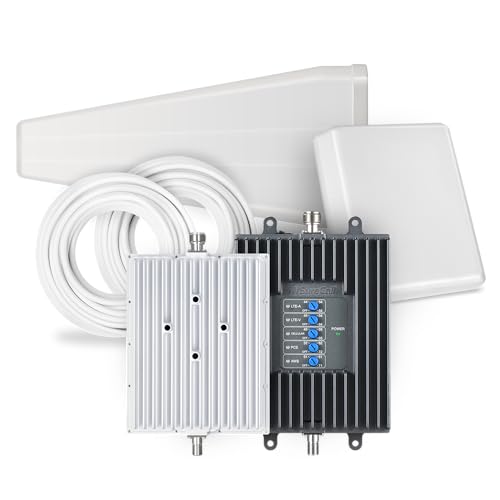
A booster system contains three functional parts connected by coaxial cable. The donor antenna, mounted outside or in an attic, collects the carrier’s downlink signal from the serving tower. The amplifier unit receives that faint signal, applies a rated amount of gain measured in decibels, and also amplifies the phone’s weaker uplink transmissions on the return path. The indoor antenna then distributes the strengthened downlink across the rooms where people actually use their phones, while collecting their uplink responses for the journey back. Every conversation travels this chain twice, once in each direction, which is why installation quality echoes through call quality so noticeably.
Gain figures dominate product listings, and they deserve translation into plain meaning. A decibel scale is logarithmic, so an amplifier offering 65 decibels of gain is not slightly stronger than one offering 50; it multiplies signal power by a vastly larger factor. More gain helps when the outdoor signal is weak but present, because the amplifier has more to work with across a longer or lossier cable run. Gain cannot manufacture signal from silence, however, and an amplifier fed by an unusable outdoor signal will faithfully amplify noise and interference into a louder version of the same disappointment.
The donor signal’s quality matters as much as its raw strength. Engineers distinguish between received power and the signal-to-interference balance that determines whether a phone can decode data at useful speed. A rooftop antenna pointed toward a distant tower may deliver a clean, decodable signal even at modest power, while a stronger reflection arriving off metal cladding may carry interference that limits throughput. Phones report bars from a simplified view of this picture, which is why a booster installation sometimes improves real performance more, or less, than the change in displayed bars suggests.
Reading signal in decibels instead of bars
Every smartphone can report its received signal in decibel-milliwatts, usually through a field-test screen or a diagnostic application, and that number guides installation far better than bar counts. Readings near negative 70 indicate a strong signal, readings around negative 100 describe a weak but workable one, and readings approaching negative 120 approach the edge of usability for most purposes. Walking the exterior of a building with that readout visible reveals which wall, corner, or elevation hears the tower best. Recording readings at several candidate antenna positions, at different times of day, turns antenna placement from folklore into measurement.
The same readout disciplines expectations indoors after installation. A successful booster raises indoor readings substantially near its indoor antenna and moderately at the edges of its coverage area. Readings that improve beside the amplifier but collapse one room away point to building materials absorbing the rebroadcast, or to an indoor antenna positioned where its signal cannot spread. Readings that fluctuate wildly or worsen after installation suggest the oscillation problem covered later in this guide, where the two antennas hear each other and the amplifier protects itself by reducing gain or shutting down.
T-Mobile bands a booster must understand
Band 71, occupying spectrum around 600 megahertz, is the carrier’s long-distance layer. Low frequencies travel far from each tower and penetrate building materials more forgivingly than higher bands, which is precisely why the carrier uses them for countryside coverage and deep indoor reach in suburbs. Phones in fringe areas frequently camp on band 71 as their lifeline connection, delivering modest data speeds with remarkable tenacity. A booster without band 71 support is blind to that lifeline, and rural buyers in particular should treat its inclusion as non-negotiable unless measurement proves their outdoor signal arrives on another band.
Band 12, around 700 megahertz, is the older low-band layer that predates the 600 megahertz expansion in many markets. Plenty of towers still broadcast it, and plenty of phones still rely on it where band 71 was deployed later or not at all. Well-designed multi-band boosters for this carrier cover both low bands alongside the mid-band layers, because a phone chooses its serving band dynamically and may shift between them as conditions change through the day. A booster covering only one low band can leave the phone stranded whenever the network steers it toward the other.
The mid-band layers carry the capacity story. Band 2 at 1900 megahertz, inherited from the PCS allocation, serves dense areas and older deployments across many cities. Band 4 and its extension band 66 cover the AWS frequencies, with downlink near 2100 megahertz and uplink near 1700 megahertz, and they shoulder heavy traffic in metropolitan markets. These higher frequencies weaken faster through walls and foliage than the low bands, so a home can enjoy a strong outdoor mid-band signal that fades to nothing two rooms inside, which is exactly the failure pattern a booster exists to correct.
Newer mid-band holdings in the 2.5 gigahertz range, known as band 41, power much of the carrier’s fastest service, and they sit outside the design envelope of most consumer boosters built under the established signal-booster rules. Buyers should therefore calibrate expectations: a booster purchase is principally about rescuing voice reliability and baseline data on the low and traditional mid bands, not about reproducing the peak speeds a phone shows near a flagship urban site. For many households that trade is entirely satisfactory, because the difference between no service and dependable service outweighs the difference between dependable and spectacular.
Confirming which band your phone actually uses
Band support only matters relative to the band arriving at your own roofline, so measurement precedes purchase here as well. Field-test screens on both major phone platforms can display the serving band or the channel information from which the band is derived, and third-party diagnostic applications present the same data more readably. Checking at the times when service frustrates you most, typically evenings when networks load heavily, captures the realistic case rather than the flattering morning one. If the phone camps on band 71 outdoors, the booster shortlist begins with models that amplify it, whatever their other virtues.
Neighbours can mislead this investigation in either direction. A house across the road may be served by a different tower sector with a different band mix, and a booster that rescued their kitchen may be deaf to the band serving yours. Terrain, tree cover, and even the orientation of a metal roof reshape the picture from one plot to the next. The only trustworthy survey is the one taken at your own walls, which is why this guide returns to measurement at every decision point rather than recommending a universal model for every T-Mobile household.
CellSpot and femtocells: a different species entirely
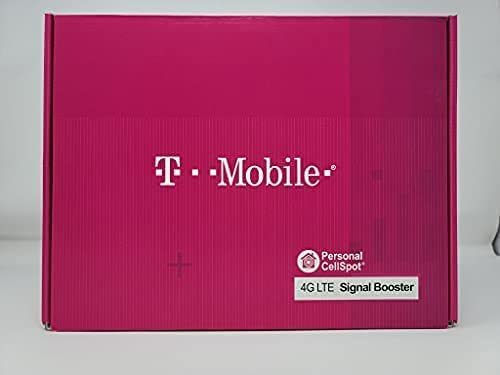
The CellSpot name has covered more than one product across its history, and untangling them prevents a common purchasing error. The carrier offered a router optimised for Wi-Fi Calling under the name, and separately offered a true femtocell that plugs into home broadband and creates a small private cellular cell indoors. That femtocell asks nothing of the outdoor signal, because it manufactures coverage from the internet connection instead. Phones within its modest radius register on it as though a tiny tower had moved into the hallway, gaining full-strength service for calls and data that then travel over the household’s broadband.
Comparing a femtocell with a booster exposes a clean philosophical split. The booster is carrier-agnostic hardware amplifying whatever compatible signal exists outdoors, owned outright and answerable to booster regulations. The femtocell is carrier equipment tied to one network and one account, dependent on broadband quality, and typically obtained through the carrier rather than the open market. A household with strong broadband and no outdoor signal at all is a femtocell household. A household with a usable outdoor signal and mediocre broadband, data caps, or a wish to stay independent of carrier programmes is a booster household.
Femtocell limitations deserve the same clear-eyed treatment as booster limitations. Its coverage radius is usually smaller than a well-installed booster’s, sometimes confined to a few rooms around the unit. Calls may hand over imperfectly when a user walks out of its range mid-conversation, depending on network configuration. The device consumes broadband capacity for every call and data session it carries, and its location registration matters for emergency calls, since the carrier needs to know where the miniature cell physically sits. None of this disqualifies the approach; it simply defines the households it serves best.
Availability of carrier femtocells changes with network strategy, and programmes expand, pause, or retire as technology shifts toward Wi-Fi Calling and denser outdoor networks. Readers should verify current availability directly with the carrier rather than assuming a programme described in older articles still operates. Second-hand femtocells circulate in resale channels, yet they are typically bound to accounts and provisioning systems, so a used unit may refuse to activate for a new household. That provisioning tether is the strongest practical argument for the booster route when both are technically viable.
Where Wi-Fi Calling fits the same problem
Wi-Fi Calling deserves promotion from footnote to full alternative, because for many homes it solves the indoor coverage problem at no hardware cost beyond the network already installed. The phone routes calls and texts through the household wireless network using the carrier’s systems, presenting the same number and behaviour to callers. Modern phones from both major platforms support the feature on this carrier, and enabling it is a settings change rather than a purchase. Its prerequisites are a broadband connection with reasonable stability and a wireless network that reaches the rooms where calls happen.
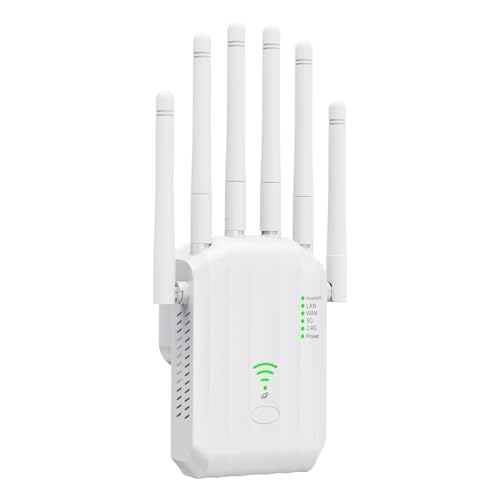
The catch is that indoor Wi-Fi has its own coverage geography, and dead zones in wireless coverage often overlap the rooms where cellular service also fails, such as basements, extensions, and garden offices. That overlap is where networking equipment enters a cellular discussion legitimately. Readers whose Wi-Fi fades at the edges of the house may find that studying best ac1200 range extenders clarifies how a modest repeater can carry Wi-Fi Calling into a stubborn room, provided the main network is healthy and the extender is placed where it still hears a strong signal to repeat.
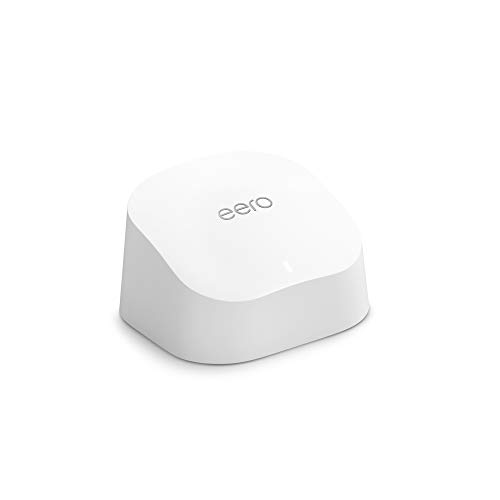
Larger or more demanding homes often skip repeaters in favour of a mesh system that blankets the building with coordinated coverage, and for those readers our guide to best mesh wifi 6 routers explains how modern mesh kits handle roaming between nodes, which matters when a call begun in the kitchen must survive the walk to a home office. Wi-Fi Calling also shifts the failure analysis: call problems stop implicating the tower and start implicating the router, the broadband line, and local interference. Households comfortable maintaining their network gain a flexible tool, while households that struggle with router administration may prefer a booster’s set-and-forget character.
Coverage area claims and building reality
Booster listings advertise coverage in square feet, and those figures describe idealised open-plan spaces fed by a strong outdoor signal. Real homes subdivide that area with materials that tax radio waves unevenly. Drywall and wood framing cost a little signal, brick and stone cost more, and metal lath, foil-backed insulation, low-emissivity window coatings, and concrete can each impose severe losses. A booster rated for a generous area may therefore cover a timber-framed house fully while serving only the central rooms of a masonry house with foil-lined walls, without anything being wrong with the equipment.
The outdoor signal’s strength bends the coverage figure just as powerfully. Amplifier gain is finite, and the indoor rebroadcast starts from whatever the donor antenna delivered minus cable losses along the run. A weak rural signal, even after full amplification, may produce a modest indoor bubble around the indoor antenna rather than whole-house coverage. Manufacturers’ larger coverage numbers generally assume a strong donor signal that suburban homes near towers can supply. Reading coverage claims as best-case ceilings, and planning antenna placement around the rooms that matter most, keeps expectations aligned with physics.
Multi-antenna systems exist for homes that outgrow a single indoor antenna’s reach. Some amplifiers support a second indoor antenna through a splitter, dividing the output to serve two zones such as opposite wings or separate floors. Splitting divides power as well as geography, so each zone receives less than a single-antenna installation would deliver, and cable quality matters more with every added metre. Homes with genuinely difficult layouts sometimes do better with a higher-gain amplifier and carefully routed low-loss cable than with the largest headline coverage figure on a listing.
Antenna types and what they trade away
Indoor antennas come principally in panel and dome forms, with small whip styles appearing on compact desktop units. A panel antenna mounts on a wall and projects its signal in a directional lobe into the room, suiting long spaces and corridors. A dome antenna mounts on a ceiling and spreads signal in a wide downward pattern, suiting open central areas. Directionality is a tool rather than a ranking: a panel aimed down a hallway can outperform a dome whose energy disperses into rooms nobody uses, while a dome above a family room serves seating in every direction impartially.
The donor antenna outside makes an equivalent choice between reach and forgiveness. A directional Yagi-style antenna concentrates its sensitivity toward one tower direction and delivers the strongest donor signal at rural distances, at the cost of demanding careful aiming. An omnidirectional antenna accepts signals from every direction with less peak performance, suiting suburban sites where the serving tower is near, unknown, or likely to change. Aiming a Yagi is patient work, rotating it in small steps while watching the decibel readout settle, and locking it down only after the best heading has survived observation at several times of day.
Antenna separation and the oscillation trap
Every booster installation lives or dies on the separation between its two antennas. If the indoor antenna’s rebroadcast reaches the donor antenna at meaningful strength, the amplifier hears its own output and tries to amplify it again, creating a feedback loop engineers call oscillation. Modern boosters detect this condition and protect themselves by reducing gain or shutting down, which presents to the owner as mysteriously poor performance. The amplifier is not broken in that moment; it is obeying its safeguards because the installation gave it an impossible geometry.
Separation is measured in more than metres, because building structure contributes isolation that distance alone does not describe. A roof between the antennas, with the donor above it and the dome below a ceiling, can provide excellent isolation across a short vertical span. Two antennas at opposite ends of one open loft may oscillate despite a longer tape-measure distance, because nothing blocks the path between them. Manufacturers publish recommended minimum separations for their kits, often in the range of several metres horizontally or a smaller vertical distance with a roof intervening, and those figures assume typical construction rather than a metal-roofed open plan.
Practical installation therefore proceeds iteratively rather than by decree. Mount the donor antenna at the position the outdoor survey favoured, place the indoor antenna provisionally, power the system, and watch both the amplifier’s indicators and the phone’s decibel readout over some minutes. Oscillation warnings, gain reduction lights, or fluctuating readings instruct the installer to increase separation, add structural shielding to the path, or re-aim a directional donor away from the indoor antenna’s lobe. Permanent cable runs and drilled holes should follow, not precede, this provisional stage, however impatient the household feels.
Cable quality, length, and routing discipline
The coaxial cable joining the antennas is part of the radio system, not a mere wire. Every metre of cable consumes some of the donor signal before amplification and some of the amplified signal before rebroadcast, with thinner cable families losing more per metre than their thicker counterparts. Kits supply cable chosen to balance loss against flexibility, and substituting a longer run of inferior cable silently taxes the whole installation. Where a long run is unavoidable, upgrading the cable grade usually recovers more performance than upgrading the amplifier itself.
Routing choices add quieter pitfalls. Tight bends, crushed sections underfoot, and connectors left finger-loose each introduce loss or intermittent behaviour that mimics equipment failure. Outdoor connections deserve weather sealing, because moisture creeping into a connector corrodes the contact surfaces and degrades the donor signal across a season rather than overnight. Drip loops where cable enters the building, gentle bend radii, and a final check that every connector is snug complete an installation that will still be performing when the novelty has worn off and the household simply expects dial tone everywhere.
FCC rules and registering a booster with the carrier
Signal boosters in the United States operate under a specific regulatory framework that buyers inherit the moment they power one on. The Federal Communications Commission’s rules for consumer signal boosters, developed with carrier cooperation, require devices to carry proper certification, include built-in safeguards against interference, and be operated only with the consent of the carrier whose spectrum they amplify. This is not bureaucratic decoration. A malfunctioning or badly installed booster can interfere with a tower sector serving hundreds of other subscribers, which is why the framework treats registration and safeguard features seriously.
Registration with T-Mobile is the subscriber’s part of that bargain. The carrier provides a registration process, historically through an online form recording the booster owner’s details, the device, and the location where it operates. Completing it costs a few minutes and places the installation inside the consent framework the rules require. Owners who move a booster to a new address should update the registration accordingly, since the record’s purpose is to let the carrier locate a booster quickly if interference is ever traced to it. Keeping the registration confirmation with household documents mirrors the paperwork discipline recommended for any regulated radio equipment.
Certification labels separate legitimate boosters from the grey-market amplifiers that periodic enforcement actions target. A compliant consumer booster states its certification plainly, ships with the antennas and cables its approval covers, and incorporates automatic gain control and oscillation shutdown as the rules demand. Listings that promise enormous gain figures, omit certification information, or market wideband amplifiers of industrial character to household buyers are describing equipment outside the consumer framework. Buying inside the framework protects the purchaser twice over: the safeguards genuinely improve behaviour, and the device cannot become a compliance problem in its own home.
What the carrier can and cannot ask of you
Within the consent framework, the carrier’s practical requests are modest: register the device, operate it as certified without modifying its antennas or cables into unapproved configurations, and cooperate if interference is reported. The carrier cannot reasonably object to a properly certified, properly registered booster merely because it prefers selling its own solutions, since the regulatory settlement deliberately preserved a consumer booster market. Conversely, a subscriber’s rights stop at the boundary of harmful interference, and a booster that continues operating after an interference notice invites enforcement attention. Both sides of that settlement are worth understanding before purchase rather than after a letter arrives.
Rural installers occasionally encounter a second regulatory neighbour in the form of homeowners’ associations and local rules about rooftop antennas. A donor antenna is small beside a television aerial, yet mounting anything on a roof can intersect with association covenants or rental agreements. Checking those constraints before drilling, and considering an attic or window mounting where rules bristle, avoids the deflating discovery that a working installation must come down. Attic mounting costs some signal through roofing material, a trade the decibel survey can price precisely before commitment.
A methodical installation, step by step in spirit
Good installations begin with the outdoor survey already described, performed at the hours when the household most resents its coverage. Note the decibel readings at each candidate donor position, the serving band at each, and any direction where readings strengthen markedly, because that gradient points toward the tower. Choose the donor position for signal quality first and cable convenience second, since a prettier cable route to a weaker signal penalises every call for years. Photograph the survey positions with their readings if memory might blur them before installation day arrives.
With the donor antenna mounted, run the cable by the least lossy practical route to the amplifier’s chosen home. The amplifier wants a ventilated indoor spot near a power outlet, roughly central to the area needing coverage, and positioned so its status lights can be seen without moving furniture. Connect the indoor antenna on its own cable, place it provisionally, and only then apply power. The first power-up is a measurement session, not a celebration: confirm the amplifier reports no oscillation fault, walk the coverage area with the decibel readout, and compare room-by-room figures against the pre-installation baseline recorded during diagnosis.
Adjustment follows measurement in small, single changes. Rotate a directional donor a few degrees and re-read. Move the indoor antenna a metre along the ceiling and re-read. Raise the donor on its mast if the survey suggested height was helping. Each change should be judged on the readings in the worst room the household cares about, not on the flattering figure beside the amplifier. When the worst room reaches a workable level and the amplifier shows full, calm operation, fix the cables permanently, seal the outdoor connections, and record the final readings as the installation’s birth certificate for later troubleshooting.
Power, surge, and the unglamorous details
Boosters run continuously, so their power arrangements deserve the same tidiness as their radio arrangements. A surge-protected outlet guards the amplifier against the mains events that rural lines deliver during storms, and a small uninterruptible supply can keep the booster alive through brief outages for households where the phone is the emergency lifeline. Cable entries deserve a proper bushing or sealant where they pass through walls, both for weather and for the insects that regard an unsealed hole as an invitation. Labelling the amplifier’s power supply prevents a future helper from unplugging the household’s coverage to charge a vacuum cleaner.
Lightning awareness belongs in any discussion of rooftop antennas, however small. A donor antenna on a mast raises the same grounding questions as other roof hardware, and local electrical codes govern how such installations should be bonded. Installers in storm-prone regions should follow the kit maker’s grounding guidance and local code rather than improvising, and should route the entry point with the same care given to satellite and aerial installations. These paragraphs cannot substitute for local code, but they can prevent the commoner failure of treating the antenna as though weather ended at the waterproof connector.
When a booster is the wrong answer
Honest guidance requires naming the situations where no booster will rescue a household. If the outdoor survey finds no decodable signal on any band the carrier operates locally, amplification has nothing to work with, and the femtocell or Wi-Fi Calling routes become the realistic options. If the outdoor signal is strong but the indoor problem affects only data-hungry applications in one far room, a networking solution may serve better than a radio one. If the household’s frustration is actually with the carrier’s capacity at peak hours, where a strong signal still crawls each evening, a booster will faithfully amplify that congestion rather than cure it.
Some households discover during diagnosis that their real need is internet service itself rather than phone coverage, particularly in rural properties where the mobile network doubles as the home connection. In that situation the conversation shifts toward dedicated cellular routers with external antenna ports, a category examined in our guide to best 4g routers, where the antenna discipline described here applies with even greater force because the router’s own aerials can often be replaced by a properly aimed outdoor pair. A booster and a cellular router solve neighbouring problems, and confusing them leads to installations that improve phone bars while the household’s laptops still starve.
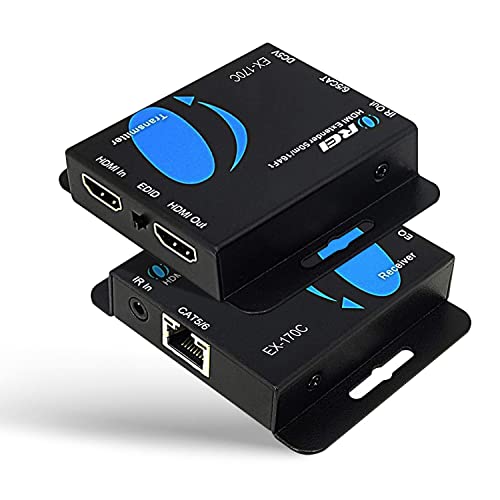
Outdoor workspaces create another neighbouring case. A workshop, barn, or garden office beyond the house may sit outside the indoor antenna’s bubble while enjoying a clear view of the tower, and sometimes the correct tool there is not a bigger booster but a data link of a different kind. Readers weighing that option can compare it against the approach in our guide to best long range outdoor wifi extenders, which treats the problem as extending the home network outward rather than amplifying the carrier inward. Choosing between those philosophies depends on whether the outbuilding needs phone service for handsets or data service for computers, and some properties eventually install both.
Vehicles, desks, and other booster shapes
The booster principle scales down as well as up. Vehicle kits use a small external antenna on the roof, a compact amplifier, and an interior cradle or low-power antenna that serves the cabin of a car or the cab of a work truck. Their coverage bubble is deliberately tiny, which suits a space measured in cubic metres rather than square ones, and their gain is limited accordingly. Rural drivers whose routes cross fringe coverage find these kits genuinely useful, provided expectations stay anchored to the same rule: the road must offer some signal for the amplifier to amplify.
Single-room desktop units occupy the smallest home niche, combining amplifier and indoor antenna in one enclosure that sits near a window. Their donor arrangements vary, some using a window-mounted aerial and some relying on proximity to the glass. These units suit a home office, a basement desk, or a single stubborn bedroom rather than a whole dwelling, and their modest claims are usually honest ones. Buying a desktop unit for a three-storey problem disappoints, but buying a whole-house system for one desk wastes money and invites oscillation in a space too small to separate the antennas properly.
Troubleshooting after the novelty fades
Installations that performed well in spring sometimes sag by autumn, and the causes are usually environmental rather than electronic. Foliage that was bare during installation now fills the donor path with water-laden leaves, a neighbour’s new metal-clad extension reflects interference into the survey’s sweet spot, or the carrier reorients a sector and quietly changes which direction deserves the Yagi’s attention. Repeating the outdoor survey in the new season, before condemning the equipment, distinguishes a moved target from a failed amplifier. Donor re-aiming is normal maintenance in fringe areas, not an admission that the original installation was wrong.
Sudden total failure tells a different story and rewards a connector-first investigation. Check that the amplifier has power and shows its normal indicator pattern, then work along the cable path inspecting every junction for looseness, corrosion, or rodent damage in attics and crawl spaces. A donor antenna that has rotated in storm wind can degrade service without any electronic fault at all, which a glance through binoculars may reveal. Substituting a known-good cable section, where the kit allows, isolates faults faster than speculation, and keeping the installation’s birth-certificate readings nearby turns guesswork into comparison.
Interference complaints deserve prompt, humble attention if they ever arrive. The correct response to a carrier notice is to power the booster down, verify the installation against the separation and aiming guidance, and contact the carrier’s registration channel to discuss what was observed. Most such episodes trace back to oscillation from an antenna moved during redecoration or a cable substituted during renovation. A household that registered its device and kept its documentation handles the episode as a maintenance conversation, which is precisely the outcome the regulatory framework was designed to produce.
Performance expectations for data
Voice reliability improves first and most visibly in a successful installation, because voice needs little bandwidth and tolerates conditions that data cannot. Data speeds improve where the limiting factor was signal quality at the phone, and they improve less where the serving sector is simply busy. Streaming and large downloads indoors will reflect the band the phone lands on, with low-band connections offering steadiness over spectacle. Households should judge a booster by dropped calls disappearing, messages sending from the basement, and calls surviving a walk between rooms, rather than by chasing the speed figures a phone displays outside a flagship urban site.
Latency and uplink behaviour merit a mention because remote work exposed their importance. The uplink path, from phone to tower, is usually the weaker direction because handsets transmit at low power, and a booster’s uplink amplification is therefore doing quiet heroic work during video calls from inside a house. An installation that raises the donor antenna’s view of the tower improves that direction disproportionately. Users whose calls froze when they turned their camera on often find that symptom, specifically, relieved by a well-aimed donor even when headline download figures barely move.
Choosing among booster models without drowning in listings
A sane shortlist emerges from four filters applied in order. First, band coverage must include the bands your survey actually found, with band 71 present wherever it serves the property. Second, certification and registration support must be plain, because the regulatory framework is part of the product whether listings emphasise it or not. Third, the kit’s antenna types and cable lengths must suit your building’s geometry, including the separation your floor plan can honestly provide. Fourth, gain should match the donor situation, with higher gain reserved for weaker donor signals and longer cable runs rather than treated as a universal virtue.
Within the survivors of those filters, differences narrow to build quality, indicator clarity, warranty handling, and the honesty of documentation. A maker whose manual explains oscillation, separation, and registration in plain language is telling you how the company behaves after the sale. A maker whose listing leads with enormous coverage figures and never mentions the outdoor signal is telling you the same thing, less flatteringly. Support responsiveness matters in this category more than in most, because installation questions are situational and a helpful answer about antenna geometry can rescue an otherwise returned product.
Households should also decide in advance how they will judge success, because returns windows are finite and impressions drift. Write down the three rooms and the three activities that define the problem, such as calls from the kitchen, messages from the basement, and a video call from the study. Judge the installed booster against that list after a week of ordinary use, including at least one busy evening. An installation that clears the written list has earned its place even if a distant corner still shows modest readings, and one that fails the list should be adjusted or returned while adjustment and return remain possible.
Budgeting the whole installation honestly
The amplifier kit is the headline cost, yet the complete installation may also involve a mast, upgraded cable for a long run, a second indoor antenna for a difficult floor plan, surge protection, and possibly a professional installer for roof work the household should not attempt itself. Pricing the whole project before ordering prevents the common pattern of a kit stranded in its box awaiting one more component. Professional installation is not an admission of defeat; roof access, grounding, and long cable runs are legitimate trades, and a good installer brings the measurement discipline this guide describes as standard practice.
Against that total, weigh the alternatives with equal honesty. A femtocell through the carrier may carry little or no hardware cost where the programme offers one, but commits the household to broadband dependence. Wi-Fi Calling may cost nothing beyond network improvements the household wanted anyway, such as a mesh system that also fixes streaming in the back bedroom. A carrier change is the unspoken fourth option in areas where a rival network’s tower simply stands closer, and the outdoor survey technique in this guide evaluates that option too, since a phone from another network can be surveyed the same way before anyone signs anything.
Emergency calls, visitors, and multi-carrier households
Coverage equipment intersects with emergency calling in ways worth stating plainly. A booster amplifies the carrier’s own signal, so emergency calls through it carry the location information the network normally derives, whereas a femtocell depends on its registered address and Wi-Fi Calling depends on the emergency address recorded in the phone’s settings. Households relying on Wi-Fi Calling should confirm that registered address is current, especially after a move. Households relying on a booster should remember that it needs mains power, which returns the conversation to the surge and backup discussion earlier in this guide.
Visitors expose another difference between the approaches. A booster serves any compatible handset that walks through the door, including guests on the same carrier and, for multi-band models covering shared frequencies, sometimes guests on other networks whose bands overlap. A femtocell generally serves only handsets belonging to its own carrier’s accounts, and Wi-Fi Calling serves only those who join the household wireless network and have the feature enabled. Homes that host family for long stretches, run a small lodging business, or employ carers from several networks often value the booster’s indifference to whose phone it is amplifying.
Multi-carrier households should survey before assuming one box serves everyone. Partners frequently hold subscriptions on different networks whose towers stand in different directions and whose band plans diverge. A booster aimed and filtered for one carrier’s bands may do nothing for the other, and some households end up pairing a booster for the weaker service with Wi-Fi Calling for the stronger one. Vehicle kits raise the same question in miniature, since a family car carries every network its occupants use. The survey habit, applied per carrier, prevents the expensive assumption that coverage equipment is universal.
Renters and the non-invasive installation
Renters face the booster question with one hand tied, because the best donor positions often sit on a roof they may not modify. Window-mounted donor arrangements, balcony rail clamps, and attic placements inside the rented envelope can still deliver worthwhile results, particularly where the outdoor signal is suburban-strong and only the building’s construction defeats it. Suction and clamp mounts avoid drilled holes, and cable can enter through a window using flat pass-through sections designed for the purpose. The decibel survey tells a renter quickly whether such a compromise position hears enough signal to justify the attempt.
Landlord conversations go better when the tenant can describe the equipment accurately: a certified, registered consumer device, a small antenna, and no transmission beyond amplifying the carrier’s own licensed signal within the home. Presenting the registration step proactively reassures a cautious property owner that the installation sits inside a regulated framework rather than beside it. Where a landlord refuses any antenna outright, the femtocell and Wi-Fi Calling routes involve no exterior hardware at all, which is why this guide treats them as parallel answers rather than consolation prizes.
Gain, output power, and the uplink nobody advertises
Listings compete on gain because it is a single impressive number, yet a booster’s real behaviour emerges from the interaction of gain, maximum output power, and automatic gain control. Output power caps how strong the indoor rebroadcast can be, so two amplifiers with similar gain can produce noticeably different indoor bubbles when fed by a healthy donor signal. Automatic gain control quietly reduces amplification when the donor signal is strong, preventing overload distortion that would otherwise degrade the very signal the owner bought the device to improve. A booster operating near a tower spends much of its life in that managed state, which is normal behaviour rather than underperformance.
The uplink direction hides inside these specifications with less fanfare and more consequence. Phones transmit at modest power, and the path from an indoor handset through the indoor antenna, amplifier, cable, and donor antenna back to the tower must preserve enough of that whisper for the tower to hear. Kits with balanced uplink gain tend to hold calls at the edge of coverage where downlink-only thinking would predict failure. Buyers comparing finalists should look for published uplink figures alongside the headline downlink gain, and should treat a listing that publishes neither with the suspicion reserved for any missing specification.
Noise figure completes the technical trio that separates careful designs from loud ones. Every amplifier adds some noise of its own, and a lower noise figure preserves more of the donor signal’s clarity through the amplification process. In fringe installations where the donor signal arrives barely above the noise floor, that preservation can decide whether data sessions hold together or dissolve into retransmissions. Manufacturers of serious equipment publish the figure; its absence from a listing aimed at rural buyers is information in itself, and it belongs on the shortlist checklist beside band coverage and certification.
Keeping the installation honest over years
Networks evolve underneath a fixed installation, and a booster bought for today’s band plan may meet a changed one after a carrier refarms spectrum or retires an older layer. The practical defence is the survey habit repeated every year or two, confirming that the bands arriving at the roof still match the bands the amplifier covers. Phones usually adapt to network change silently, which can mask a booster that has become a spectator for the household’s new serving band. When readings indoors stop matching the birth certificate while the outdoor survey explains why, the equipment conversation reopens on evidence rather than frustration.
Documentation closes the loop between the installation year and every year after. Keep the kit’s manual, the registration confirmation, the survey notes, and the final readings together, and note any change made during troubleshooting with its date and its effect. A future installer, a buyer of the house, or the same owner three winters later will thank that envelope. Coverage equipment rewards households that treat it as part of the building’s systems, maintained and recorded like the furnace or the water heater, rather than as a gadget whose context evaporates when its box is recycled.
One further expectation deserves setting before any purchase: neighbouring properties and the wider network remain part of the picture after installation. A booster rebroadcasts indoors at modest power by design, and a correctly separated installation confines its benefit to the household that installed it, which is exactly what the rules intend. Owners in dense housing who hope a single amplifier will quietly serve a whole building are describing a different class of system with a different approval path. Keeping ambitions at the scale the equipment was certified for protects both the installation’s performance and its owner’s standing with the carrier whose spectrum carries every call.
Seasonal rhythm deserves a line in that same envelope. Foliage, snow load on a donor mount, and storm-season cable movement all nudge performance across a year, and a household that re-checks readings each spring catches drift while it is still a five-minute adjustment. The check needs no new equipment and no carrier involvement: the same phone, the same readout screen, the same three rooms recorded at installation. Comparing those figures against the envelope’s notes converts vague impressions about coverage getting worse into a dated, measurable story that either clears the equipment or indicts a specific change in the environment around it.
Check prices on Amazon
Live listings for the shortlist in this guide are pulled from Amazon below, so prices and availability are always current at the moment you look.


What good looks like a month later
A successful installation becomes boring, which is the highest compliment infrastructure can earn. Phones live on whichever surface they were last set down, calls happen from the room the caller happens to occupy, and nobody in the household can remember the amplifier’s location without thinking. The decibel readings recorded at installation remain in a drawer or a notes application, ready for the season when foliage or a carrier change makes the system interesting again. Registration paperwork sits with the household documents, and the booster’s indicator glows its uneventful colour behind a plant or a bookshelf.
That boredom is worth contrasting with the outcomes this guide has tried to steer readers away from: the unregistered amplifier of uncertain certification amplifying a band the household does not use, aimed by guesswork, oscillating quietly against its own indoor antenna while its owner blames the carrier. The distance between those two outcomes is not money, since modest certified kits exist, but method. Survey first, match bands second, separate the antennas third, register the device fourth, and measure again last. Households that follow that order rarely join the chorus of reviewers declaring that boosters do not work.
It is equally worth remembering what even the best installation cannot promise. A booster will not turn a fringe low-band connection into the showcase speeds of a dense urban network, will not conjure service where the survey found silence, and will not repair a congested sector at the hour everyone streams. What it can do, reliably and within a clear regulatory framework, is carry the signal that already reaches your roofline into the rooms where your life happens, at a strength your phone was designed to use. For the household that has been walking to one window to make every call, that single change rearranges the geography of the home, and the window by the driveway goes back to being just a window.