What's inside
- Key Takeaways
- Quick Picks
- How We Chose These Picks
- What Can the Best 100.00 Studio Monitors Honestly Do?
- Which Budget Studio Monitors Tell the Truth at a Desk?
- How Do the Six Pairs Compare at a Desk?
- How Should You Set Up a Budget Pair to Hear the Truth?
- How Much Does the Room Matter at This Budget?
- Which Pair Fits Your Kind of Music?
- Should You Buy Second-Hand or Save for the Next Tier?
- What Mistakes Do First-Time Monitor Buyers Make?
- Final Recommendation
- Frequently Asked Questions
- How Will You Know When You Have Outgrown a Budget Pair?
- Related Guides
As an Amazon Associate I earn from qualifying purchases. This post may contain affiliate links at no extra cost to you.
widgetverdict.com is reader-supported. When you buy through links on our site, we may earn an affiliate commission.
Where to buy: the Edifier and PreSonus picks below link to checked Amazon listings, and we flag clearly which are sold as a pair and which older listings describe a single box, because in this price class that distinction is where most buying mistakes happen.
Every home studio starts with the same impossible shopping trip: find the best 100.00 studio monitors — a genuine pair of speakers, near a hundred-dollar budget, that tell the truth about a mix. The honest news is that the laws of physics accept no bribes at this level. A small box cannot reproduce deep bass, a low-cost amplifier cannot deliver concert volume in a large room, and no badge can turn a multimedia speaker into a mastering tool. The useful news is that the best designs in this class spend their limited budget on the things that matter at a desk — a reasonably flat midrange where voices and most instruments live, controlled treble that does not fatigue, and stereo imaging stable enough to place a vocal in the centre and keep it there — while being honest about the bass they cannot make.
This guide compares six options around the hundred-dollar line, most of them sold as complete pairs, which is the only sane way to buy at this budget. Four carry checked listings; two further pairs are covered without links because their availability drifts in and out of this price class, and we would rather describe them honestly than pretend a price we are forbidden to print is stable. Read the bass expectations carefully: the skill of mixing on small monitors is real and learnable, and the final sections teach the headphone-check and reference-track habits that let a modest pair produce mixes which travel to other systems surprisingly well.
Key Takeaways
- The Edifier MR4 is the default recommendation in this class: a balanced, studio-tuned pair with both balanced and unbalanced inputs.
- The Edifier MR3 trades a little low-end weight for Bluetooth and a more lifestyle-friendly feature set.
- PreSonus Eris 3.5 remains the beginner benchmark, with front controls and a headphone output that suit a first desk.
- The Eris E4.5 buys a bigger woofer and a fuller low end for rooms and listeners that can use it.
- At this budget, everything is nearfield: these speakers are designed for a desk at arm’s length, not for filling a living room.
- Bass below the woofer’s honest reach must be checked on headphones; every experienced small-monitor mixer works that way.
Quick Picks
| Pick | Badge | Why it earns its place |
|---|---|---|
| Edifier MR4 | Best overall in this class | The most studio-minded tuning here, with balanced inputs rarely seen at this level. |
| Edifier MR3 | Best with Bluetooth | A compact pair that mixes casual listening and first productions without changing speakers. |
| PreSonus Eris 3.5 | Best first pair for beginners | Friendly front-panel controls and a long track record in starter studios. |
| PreSonus Eris E4.5 | Best low-end weight here | A larger woofer that gives bass instruments more honest representation at the desk. |
| Mackie CR3-X | Best multimedia crossover | A pair built for desks that split time between production, gaming and everyday listening. |
| JBL Professional 104 | Best compact coaxial design | A single-point-source pair that images precisely in very small rooms. |
How We Chose These Picks
We judged this class by what a hundred-dollar pair can actually be asked to do. Tonal balance came first, weighted toward the midrange: a speaker that renders voices, guitars, pianos and dialogue truthfully gives a beginner mixes that translate, while a speaker that flatters with boosted bass and sparkling treble teaches habits that collapse on every other system. We listened for treble that informs without drilling, because budget tweeters that shout make every mix duller than it should be once the producer compensates.
Inputs and controls were weighted unusually heavily, because at this level the speaker is often the entire studio’s front end. Balanced inputs matter to anyone connecting an audio interface amid the electromagnetic noise of a desk full of computers. Front-panel volume and a headphone socket matter to the producer working at midnight in a shared house. Bluetooth mattered only as a bonus; a wireless convenience never outranked wired honesty in these rankings.
Finally, we applied the pair test ruthlessly. Listings in this class occasionally describe a single speaker in language a hurried buyer reads as a pair, and a monitoring setup with one speaker is not a setup at all. Every linked pick below is sold as a pair unless its review says otherwise in plain words, and the buying-mistakes section returns to this trap because it catches more first-time buyers than any sonic flaw in this guide.
What Can the Best 100.00 Studio Monitors Honestly Do?
It can give you a truthful nearfield picture of everything from the upper bass upward, at the moderate volumes a desk demands, in a small or untreated room where expensive monitors would mostly amplify the room’s problems. That is not a consolation prize; it is the working reality of a generation of producers who learned on speakers in this class and released music mixed on them. The midrange honesty is the product. Stereo imaging at close range is genuinely good on the better designs here, good enough to learn panning, reverb depth and vocal placement — the skills that separate a mix from a pile of sounds.
What it cannot do is reproduce the bottom octave. Kick drum fundamentals, bass synthesiser weight and cinematic rumble live at frequencies a four-inch woofer in a small cabinet physically cannot move enough air to render. The speaker will not distort a warning; it will simply leave the region quiet, and an inexperienced mixer, hearing too little bass, adds more until the mix is mud on any system with real low end. The countermeasures are technique, not money: check bass on headphones, compare against reference tracks constantly, and learn your pair’s translation by listening to finished mixes in cars and kitchens. The how-to section below builds that routine step by step.
It also cannot fill a room. These are nearfield instruments voiced for a listener a metre away, in the sweet spot between two speakers angled at the ears. Asked to soundtrack a party across a lounge, they will sound thin and strained, not because they are bad but because they are being used as the wrong tool. Judge every pick below at a desk, at desk distance, at desk volume — the conditions their designers optimised for and the conditions your mixes will be made under.
Which Budget Studio Monitors Tell the Truth at a Desk?
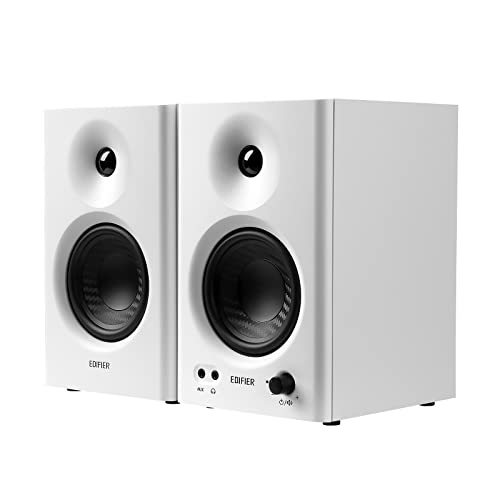
Edifier MR4 — Best overall in this class
The MR4 is what happens when a lifestyle speaker company reads the studio brief properly. Start with the inputs, because they announce intent: alongside the unbalanced connections every budget speaker offers, the MR4 provides balanced TRS inputs, the connection an audio interface wants to make and the one that rejects the hum and buzz a computer desk radiates. In this price class that single feature separates speakers designed for production from speakers merely marketed at it, and it is the first reason the MR4 leads this guide.
The tuning follows the same philosophy. Edifier voices the MR4 comparatively flat, with a monitor mode that resists the bass-and-treble smile cheaper speakers use to impress in a shop demo. Voices sit where they were recorded, acoustic guitars keep their wood rather than acquiring a plastic sheen, and the silk-dome tweeter delivers detail without the metallic edge that makes budget monitoring fatiguing across a long session. A front volume control and headphone output handle the midnight workflow, and rear-panel adjustments let you trim the bass and treble to a desk against a wall — the placement nearly every buyer actually has, which pushes bass up and needs exactly that trim.
Limits remain the class’s limits. The four-inch woofer’s low end rolls away where bass music lives, maximum volume suits a desk rather than a rehearsal, and the cabinets are functional rather than beautiful. None of that distinguishes the MR4 from its rivals; what distinguishes it is that everything it does attempt, it attempts honestly. For a first pair bought to learn mixing on, or a small second setup for editing dialogue and video, it is the most defensible way to spend this budget we know.
- Format: powered pair, sold together
- Woofer: 4-inch class
- Inputs: balanced TRS and unbalanced RCA, plus front auxiliary
- Controls: front volume and headphone output, rear tone trims
- Tuning: monitor-oriented, comparatively flat voicing
- Use: nearfield desk monitoring
Strengths
- Balanced inputs at this price make interface connections clean and hum-free.
- Honest, fatigue-free tuning that teaches mixing habits which transfer to other systems.
- Rear tone trims acknowledge the against-the-wall placement most desks impose.
Trade-offs
- Deep bass is absent by physics and must be checked on headphones.
- Maximum volume is desk-scale, not room-scale.
- No Bluetooth, for buyers who wanted one pair for everything.
Best for: beginner and intermediate producers building a first honest desk setup around an audio interface.
Not suited for: bass-heavy electronic producers who will not adopt a headphone-check routine.

Edifier MR3 — Best with Bluetooth
The MR3 answers the way many desks actually live now: production in the evening, everything else all day. It is the smaller, more connected sibling in Edifier’s monitor line, adding Bluetooth streaming and hi-res audio certification to a compact pair that still takes its wired monitoring seriously. The producer who edits video in the morning, takes calls through the afternoon and mixes at night can leave one pair of speakers on the desk for all of it, and that consolidation — at this budget, in small rooms — is a real feature rather than a compromise to apologise for.
Sonically it sits a step below the MR4 in ambition and should be chosen with that understood. The smaller cabinet gives up low-end weight, the tuning leans a touch more toward pleasant than forensic, and critical mixing decisions at the frequency extremes deserve the headphone check even more than usual. Through the midrange, though, the family resemblance holds: voices are clear, dialogue editing is easy, and the speakers never commit the budget sins of booming or screaming that make cheap audio tiring by lunch.
Where the MR3 wins is friction. Bluetooth pairing for a phone, a wired feed from the interface, front controls where your hand expects them — the pair disappears into a routine. For creators whose work is video-first, podcast-led or split between production and ordinary desk life, that disappearance may be worth more than the MR4’s extra studio purity. Choose between the siblings by asking which hours dominate your desk: the mixing hours argue for the MR4, all the other hours argue, persuasively, for this one.
- Format: powered pair, sold together
- Character: compact cabinet for small desks
- Wireless: Bluetooth streaming for everyday listening
- Inputs: wired connections for interface and computer use
- Controls: front-panel volume within easy reach
- Use: mixed production and everyday desk audio
Strengths
- Bluetooth makes one pair serve production and daily listening alike.
- Compact footprint suits the small desks this budget usually lives on.
- Clear midrange keeps dialogue and voice work easy to judge.
Trade-offs
- Less low-end weight and forensic flatness than the MR4.
- Wireless listening is for convenience, not for critical mixing decisions.
- Small cabinets reach their volume limit early in larger rooms.
Best for: video creators, podcasters and desk generalists who want one pair for work and everything else.
Not suited for: producers whose priority is the flattest possible mixing reference above all convenience.

PreSonus Eris 3.5 — Best first pair for beginners
If the budget studio monitor has a default answer, generations of beginners have made it the Eris 3.5. PreSonus built the Eris line as the friendly front door to its studio ecosystem, and the smallest pair carries that philosophy completely: front-panel volume, a headphone output that mutes the speakers when you plug in, an auxiliary input for a phone, and rear tone controls labelled in plain language. A first-time buyer can unbox these, connect a laptop or interface, and be listening within minutes without a manual — a virtue not to underestimate in a category whose customers are, by definition, new.
The sound is tuned for clarity at close range. The three-and-a-half-inch woofer defines the limits honestly — this is the smallest driver in the guide, and the low end is a suggestion of bass rather than a rendering of it — but the midrange and treble are articulate, dialogue and acoustic instruments are easy to follow, and the stereo image at a desk is stable and precise. For podcast editing, video work, songwriting demos and learning the grammar of mixing, that clarity is the curriculum. PreSonus also sells the matching ecosystem — interfaces, software, a subwoofer for later — so the pair can be the first piece of a growing rig rather than a dead end.
Its age and popularity bring one caution: the Eris 3.5 name has covered successive generations and countless bundle listings, so read the listing’s generation and contents carefully and confirm you are buying the current pair, not a single or an older revision in a bundle’s fine print. Judged on its own terms — the friendliest, most proven first step into monitoring — it remains exactly what its sales history says it is.
- Format: powered pair, sold together
- Woofer: 3.5-inch class, the smallest here
- Controls: front volume, headphone output, auxiliary input
- Tuning controls: rear high and low frequency adjustments
- Ecosystem: matches PreSonus interfaces and Studio One software
- Use: beginner nearfield monitoring and content editing
Strengths
- The most beginner-friendly controls and connections in this guide.
- Clear, articulate presentation that suits dialogue, podcasts and demos.
- A huge owner community and ecosystem to grow into.
Trade-offs
- The smallest woofer here means the least bass information of any pick.
- Similar model names across generations demand careful listing reading.
- Serious mixing ambitions will outgrow it sooner than the larger pairs.
Best for: first-time buyers, podcasters, video editors and songwriters starting a home studio.
Not suited for: producers mixing bass-heavy genres who need maximum low-end information now.

PreSonus Eris E4.5 — Best low-end weight here
The E4.5 is the Eris idea with the one upgrade this class feels most: a larger woofer. Moving from a three-and-a-half-inch to a four-and-a-half-inch driver does not conjure sub-bass — nothing in this guide performs that trick — but it extends the honest region downward far enough that bass guitars, kick drums and the weight of a piano register as information rather than implication. Mixers who work on singer-songwriter material, rock, or anything whose low end is played rather than synthesised will feel the difference in every session, because fewer decisions need to be outsourced to the headphone check.
Around that driver, the E4.5 keeps the family virtues: front volume and headphone convenience, rear acoustic tuning controls to tame a desk against a wall or in a corner, and a voicing that aims for clarity without the budget tweeter’s glare. It is also a noticeably larger presence on the desk, which cuts both ways — the cabinets need the space they occupy, and small desks should measure before falling in love. At moderate volumes in a bedroom studio, though, this is the pair in the guide that sounds most like the idea of a studio monitor a beginner carries in their head.
One buying note specific to this long-lived model: it has been sold for years in pairs, in bundles and occasionally alongside single-speaker listings for its bigger siblings, so confirm the listing describes two speakers before checkout, as with every pick here. Given that confirmation, the E4.5 is the choice for the buyer who reads the MR4’s review nodding along but keeps thinking about bass. That instinct, at a desk with the space for it, is worth obeying.
- Format: powered pair, sold together
- Woofer: 4.5-inch class, the largest among the linked picks
- Controls: front-panel volume knob and a socket for headphones
- Tuning: rear acoustic controls for placement compensation
- Character: fuller low-mid weight than the 3.5-inch models
- Use: nearfield monitoring in small rooms with desk space
Strengths
- The most informative low end available among this guide’s linked pairs.
- Placement tuning controls suit real bedroom-studio corners and walls.
- Retains the beginner-friendly Eris front-panel layout.
Trade-offs
- Larger cabinets crowd genuinely small desks.
- Still a nearfield pair: deep bass and room-filling volume remain out of reach.
- Long model history means listings vary; verify the pair and the generation.
Best for: producers of guitar-based, acoustic and rock material who want the fullest sound this budget allows.
Not suited for: tiny desks, or electronic producers expecting sub-bass from any speaker at this level.
Mackie CR3-X — Best multimedia crossover
Mackie’s CR series never pretended to be mastering monitors, and that honesty is its charm. The CR3-X pair is built for the desk that produces in the morning and plays in the evening: a studio-adjacent tuning with a little more warmth than the forensic picks, a front headphone output, a volume knob where your hand falls, and a design language — including the green accent ring owners either love or learn to ignore — that belongs to a creative desk rather than a laboratory. Mackie, a company with genuine live-sound heritage, voices these to be enjoyable at the volumes real rooms use.
For production work, the CR3-X handles the learning phase well. Dialogue is clear, demos translate acceptably, and the speakers forgive the untreated rooms and corner placements that a first setup inevitably involves. What they will not do is reveal the last layer of detail in a dense mix or render bass decisions trustworthy; the small woofer and the friendly tuning both say so plainly. Treat them as the speakers a creator grows through, and their value is obvious — particularly for streamers and video makers whose audio work is voice-first and whose audience hears the result on earbuds anyway.
Availability in this price class drifts, which is why this pick carries no link: the pair moves in and out of the hundred-dollar neighbourhood with bundles and seasons. When it sits at the line, it is the most likeable all-rounder here for a multimedia desk. When it drifts above it, the MR4’s studio discipline is the better spend for production-first buyers, and this becomes the pair to watch for on its way back down.
- Format: powered pair, sold together
- Character: warm, multimedia-friendly tuning
- Controls: a front knob for volume and a headphone socket
- Heritage: Mackie live-sound lineage
- Use: voice-first creation, streaming, casual production
- Note: pricing drifts around this guide’s budget line
Strengths
- The most enjoyable everyday listening of any pair in this guide.
- Voice and dialogue clarity suits streamers and video creators.
- Forgiving of the untreated rooms first setups live in.
Trade-offs
- Tuning flatters slightly, so critical mixes need extra reference checks.
- Small woofer limits bass information, as with the 3.5-inch class generally.
- Price moves around the budget line rather than sitting on it.
Best for: streamers, video creators and multimedia desks splitting time between work and play.
Not suited for: mix engineers-in-training who need the flattest reference this budget can buy.
JBL Professional 104 — Best compact coaxial design
The JBL 104 pair makes a different engineering bet from everything else here: a coaxial driver, with the tweeter mounted at the centre of the woofer, so high and low frequencies arrive from the same point in space. At a desk, where the listener sits close and moves around the sweet spot while reaching for keyboards and coffee, that point-source behaviour pays out as imaging that stays coherent when other small speakers smear. Voices lock to the centre and stay there; stereo effects keep their shape at the odd angles real work involves. For editors cutting dialogue against picture, that stability is a working tool.
JBL’s professional division lends the pair its tuning philosophy: a reference-leaning balance in a cabinet small enough for the most crowded desk, with front controls and a headphone output, and Bluetooth in the BT variant for the everyday-listening hours. The bass story is the small-cabinet story once more, and maximum volume is modest even by this class’s standards — the 104 is the most deskbound pick in the guide, and proud of it. In a genuinely small room, at genuinely nearfield distance, its coherence can make larger, louder pairs sound vague by comparison.
Like the Mackie, it appears here without a link because its price wanders relative to this guide’s line and its variants — standard and Bluetooth — are easy to confuse in a hurried listing. Buy the variant deliberately, confirm the pair, and the 104 rewards the small-room editor with the most precise stereo picture this budget can draw.
- Format: powered pair, sold together
- Driver: coaxial design, tweeter at the woofer’s centre
- Character: point-source imaging for very close listening
- Controls: volume and headphones handled from the front panel
- Variants: standard and Bluetooth versions exist
- Use: compact desks, dialogue editing, small rooms
Strengths
- Coaxial imaging stays stable as you move around the desk.
- The smallest footprint here, for genuinely crowded workspaces.
- Professional-division tuning keeps voices honest and centred.
Trade-offs
- The lowest maximum volume in this guide.
- Bass information is minimal; headphone checks are non-negotiable.
- Two variants invite listing confusion, so buy deliberately.
Best for: dialogue editors, small-room producers and anyone whose desk is measured in centimetres to spare.
Not suited for: listeners who want any sense of room-filling sound or bass weight.
How Do the Six Pairs Compare at a Desk?
| Pair | Sold as | Woofer class | Standout trait | Watch out for |
|---|---|---|---|---|
| Edifier MR4 | Pair | 4-inch | Balanced inputs, flat tuning | No Bluetooth |
| Edifier MR3 | Pair | Compact class | Bluetooth and hi-res certification | Less low-end weight |
| PreSonus Eris 3.5 | Pair | 3.5-inch | Beginner-friendly front controls | Least bass information |
| PreSonus Eris E4.5 | Pair | 4.5-inch | Fullest low end here | Largest cabinets |
| Mackie CR3-X | Pair | 3-inch class | Warm multimedia tuning | Price drifts around the line |
| JBL Professional 104 | Pair | Coaxial compact | Point-source imaging | Modest maximum volume |
How Should You Set Up a Budget Pair to Hear the Truth?
Geometry first, because it is free and it matters more than any feature in this guide. Form a triangle: the two speakers and your head at its three corners, roughly equal sides, tweeters at ear height, each cabinet angled inward until you can barely see its inner side wall. A pair sitting flat on a desk, pointing at your chest, separated by a monitor’s width by accident, is not a monitoring system yet — it is two radios. Foam pads or small stands that lift the tweeters to ear level and decouple the cabinets from the desk’s resonance are the highest-value accessories in this entire price class, ahead of any cable ever sold.
Then manage the wall. A desk against a wall — the universal arrangement — reinforces bass unevenly and blurs the low midrange, which is why several picks here carry rear bass trims. Pull the speakers even a hand’s width forward if you can, engage the trim if the sound thickens, and resist compensating for missing deep bass by turning anything up; the missing region is missing, and honesty about it is the setup’s foundation. Set your interface or system volume so the speakers’ own knob lives in its middle range, where channel balance between the pair is most accurate, and mark your usual mixing level — experienced engineers mix quietly, checking loud briefly, because ears fatigue and loud monitoring lies about balance.
Finally, build the translation routine that makes a small pair professional. Keep two or three reference tracks you know intimately, in the genre you produce, and play them at the start of every session to calibrate your ears to the room that day. Check every mix on headphones for the bass region your speakers cannot show, then on one ordinary system — a car, a kitchen speaker, a phone — before calling it finished. Producers are often surprised how well mixes from this routine travel. The speakers were never the whole system; the routine is the rest of it, and it costs nothing but discipline.
How Much Does the Room Matter at This Budget?
More than the difference between any two speakers in this guide, and admitting that is the beginning of wisdom in small studios. A bare-walled bedroom adds its own resonances to everything you hear: it thickens some bass notes, cancels others, and smears the stereo image with early reflections from the side walls and desk surface. Expensive monitors in that room mostly give you a more expensive version of the same confusion, which is why this guide spends its sympathy on setup and routine rather than upselling. The encouraging truth is that the fixes at this level are household objects. A rug, curtains, a bookshelf full of uneven books on the rear wall, soft furnishings where they naturally live — each absorbs or scatters a little of the room’s misbehaviour, and together they move a bedroom measurably toward a studio.
Speaker position negotiates with the room as well. Symmetry is the first law: equal distances to the side walls, the listening position a reasonable distance off the rear wall, and the pair clear of corners, which act as bass amplifiers you did not ask for. If your desk forces asymmetry, favour the setup that keeps the two speakers’ surroundings as alike as possible, because a stereo image that leans will teach you panning decisions that are wrong everywhere else. Small rooms also reward the smaller picks here more than pride expects: a compact pair exciting less of the room’s bass behaviour can deliver a clearer picture than a larger pair fighting the walls, one of the few places in audio where spending less genuinely buys more truth.
Learn the room with your ears before treating it with your wallet. Play a familiar track and walk slowly around the space; the places where the bass swells and vanishes are the room’s fingerprints, and your mixing chair should not sit in the worst of them. Move the desk a little, listen again, and stop when the picture at the chair is as even as the room allows. That hour of furniture shuffling, done once, improves every mix you will ever make in that room — a return no accessory in this price class can match.
Which Pair Fits Your Kind of Music?
Podcasters, voice editors and streamers should weight clarity and convenience above everything, because their product is a voice at conversational level. The Eris 3.5’s friendly front panel and articulate midrange, or the JBL 104’s locked-down centre image, serve that work directly, and the bass neither pair can reproduce is largely absent from the human voice anyway. Spend the savings on the microphone and the room’s soft furnishings, in that order, and the setup will out-perform its price on every recording.
Singer-songwriters and acoustic producers live in the midrange too, but their instruments bring low-end information that matters — the body of a guitar, the weight of a piano, the kick of a cajon. The E4.5’s fuller reach or the MR4’s honest balance with its headphone-check discipline both fit; choose by desk space and by whether balanced inputs serve your interface. Rock and indie mixers should follow the same logic, adding reference tracks from their own genre as the discipline that keeps small speakers honest about guitars that mask each other.
Electronic and hip-hop producers face this class’s hardest truth and should hear it plainly: the frequencies your genre is built from are the ones these speakers cannot reproduce, and no pick here changes that. The professional workflow at this budget is monitors for balance, imaging and the midrange story, plus good headphones — not the speakers’ rivals but their partners — for every bass decision. Producers who adopt that split early release music that translates; producers who demand sub-bass from a four-inch woofer spend the year fighting mud. The MR4 plus headphones is this guide’s recommended electronic starter system, and its total discipline matters more than any single component.
Should You Buy Second-Hand or Save for the Next Tier?
The used market in this class is treacherous in a specific way: the speakers are cheap enough that shipping, wear and missing accessories eat the saving, and amplifiers in powered speakers age invisibly until they hiss, hum or fail. A used pair you can hear before buying, from a seller who kept the boxes and cables, can be a genuine bargain — studio gear is often sold by people upgrading rather than by people escaping a fault. A used pair bought blind at a small discount against the new price is usually a false economy, because the warranty and the returns window you surrender are worth most of the difference at this level.
Saving for the next tier is the better question, and the honest answer is: only if your room and routine are ready for it. The tier above buys larger woofers, deeper bass and finer detail, all of which a treated room and a disciplined mixer can use — and all of which an untreated room and a beginner’s habits will largely waste. The producers who grow fastest tend to buy this class, work it hard for a year or two while treating the room and building the reference routine, and then upgrade with ears trained to hear exactly what the extra money buys. Arriving at the next tier with those ears is worth more than arriving early without them.
What Mistakes Do First-Time Monitor Buyers Make?
The expensive mistake is the single speaker: a listing for one cabinet, priced like half a pair, bought in a hurry and discovered at unboxing. Read for the words pair or two speakers, count the boxes in the product images, and be suspicious of any price that looks like a bargain against this guide’s class. The second mistake is buying by woofer size alone, as if diameter were a quality score; tuning and placement decide what you hear, and a well-voiced four-inch pair at ear height will teach you more than a boomy larger pair on a shelf. Third is judging in a shop or a video demo at high volume, where the flattering speakers win — bring your own reference track, listen at your real mixing level, and favour the pair that sounds almost boring, because boring is what truth sounds like before you learn to love it.
Two quieter errors follow buyers home. Placing speakers asymmetrically — one in a corner, one in open space — guarantees a stereo image that leans, and no mix survives it; symmetry matters more than any single placement rule. And treating the first pair as the last purchase leads to skimping on the unglamorous supports: pads or stands, a basic interface if the computer’s output hisses, and eventually room treatment in the form of soft furnishings that most bedrooms already own. Spend in that order and a hundred-dollar pair becomes the centre of a system worth several times its price.
Final Recommendation
Buy the Edifier MR4 if one pair must be named: its balanced inputs, honest tuning and placement trims make it the closest thing to a real studio tool this budget produces, and it will keep teaching you long after the beginner phase ends. Choose the MR3 when your desk’s life is half production and half everything else, the Eris 3.5 when friendliness and the PreSonus ecosystem matter most, and the E4.5 when your music is played on real instruments and you can spare the desk space its fuller sound requires. The Mackie and the JBL serve their narrower briefs beautifully — the multimedia desk and the tiny room — and either can be the right answer worn honestly. Whichever pair comes home, lift it to ear height, learn it with reference tracks, and check your bass on headphones: a hundred-dollar pair used with that discipline has launched more real music than many rooms full of expensive speakers used without it.
Frequently Asked Questions
Are studio monitors better than normal speakers for listening to music?
They are different rather than simply better. A monitor aims to reveal a recording as it is, including its flaws, while a consumer speaker aims to flatter it. Many listeners love the honesty for acoustic and vocal music and find it unforgiving of poor recordings and bass-light at parties. If your desk is primarily for enjoyment, the warmer picks here — the MR3 and the Mackie — split the difference gracefully.
Do I need an audio interface to use these speakers?
No, but you will probably want one. Every pair here can connect directly to a computer’s headphone output with the right cable, which is enough to start. An interface adds a clean, hiss-free output, a proper volume knob, balanced connections for speakers like the MR4, and the inputs you will want the day a microphone or instrument enters the picture. Most producers buy one within the first year.
Can I add a subwoofer to a budget pair later?
Yes, and several makers in this guide sell matching subwoofers designed for exactly that upgrade. Add it after you know your room and your pair, place it carefully, and set its level by reference tracks rather than enthusiasm — a subwoofer turned up until you can hear it is almost always too loud. In small or shared rooms, good headphones remain the cheaper and more neighbourly bass solution.
Why do my mixes sound bass-heavy everywhere except my desk?
Because your speakers could not show you the bass you were adding. Small woofers under-report the low end, so you compensated by instinct, and systems with real bass reveal the surplus. The fixes are the routine from this guide: reference tracks at the start of the session, headphone checks for the bottom octave, and a final listen on an ordinary system before release. Within a few mixes the compensation instinct recalibrates.
How loud should I mix on speakers this size?
Quietly enough to hold a conversation over the music without raising your voice is the classic working level for nearfield mixing, with brief louder checks to feel the low end and the energy. Your ears stay fresh for hours, balance decisions made quietly survive loud playback better than the reverse, and your neighbours remain your friends. If you regularly want more volume than this class gives, the answer is a larger room and a larger speaker budget, not turning these past their design.
How Will You Know When You Have Outgrown a Budget Pair?
The signs are specific, and none of them is boredom. You have outgrown the pair when your mixes translate everywhere except in one region you can name — when the headphone check keeps overruling the speakers on the same decision, when clients’ revisions cluster on details you genuinely cannot hear at your desk, or when your room has been treated, your routine is disciplined and the remaining errors in your work trace back to resolution the speakers do not have. That diagnosis usually arrives after a year or more of serious work, and it points to a precise upgrade rather than a vague one: you will know whether you need deeper bass, finer detail or simply more volume in a bigger room, because the pair taught you where its own edges are.
Until those signs appear, resist the upgrade itch with the accessories that compound: stands or pads if the speakers still sit on the desk, an interface if the computer’s output is the noisiest link, a second reference — a single mono speaker or a good pair of headphones — for the checks that stereo nearfields do badly. Each of those purchases survives the eventual speaker upgrade and keeps paying rent in the next system. The producers who build studios that punch above their budgets are almost never the ones who replaced speakers twice; they are the ones who surrounded a decent pair with geometry, routine and patience, and let the mixes make the argument.
Can I use these speakers for watching films and gaming?
Happily, with expectations set by their design. Dialogue will be clearer than most television speakers manage, stereo effects will place properly at your desk, and games gain the directional honesty that monitoring voicing provides. What you will not get is cinematic rumble or the exaggerated excitement entertainment speakers are tuned for; explosions will be reported rather than felt. For a desk that mixes work and play, the MR3 and the Mackie lean furthest toward enjoyment, while the MR4 stays the purist’s choice for the working hours.
What cables do I actually need to connect a pair?
For most pairs here, one cable carries the signal from your computer or interface to the main speaker, and a supplied link cable connects the main speaker to its passive partner — confirm that link cable is in the box, because it is the accessory most often lost in used purchases. Interface owners should use the balanced cables their outputs call for where the speaker supports them, as the MR4 does. Keep signal cables away from power bricks and USB hubs where you can; the faint buzz that appears only when the computer works hard is almost always a cable routed past a noisy power supply, and rerouting is a free repair.
Why does one speaker have all the controls and connections?
Most budget pairs are a powered main speaker and a passive partner: the amplifier, inputs and controls live in one cabinet to keep the pair affordable, and the second cabinet receives its signal through the link cable. This is normal in the class and not a quality shortcut that should worry you, but it does mean the main speaker’s position is fixed by your connections, and the pair should be set up with the powered unit on the side your cables and controls favour. A small number of designs power both cabinets; at this budget the shared-amplifier layout is the standard architecture.
How long should a pair in this class last?
With ordinary care — sane volumes, no drinks balanced on the cabinets, ventilation for the amplifier — a budget pair should serve through the whole learning phase and into a second role as editing or secondary speakers afterwards. The components most likely to age first are the amplifier electronics and any foam or rubber driver surrounds, which is another reason the used market rewards caution. Treat the pair as the multi-year instrument it is, and its cost per finished mix becomes one of the smallest numbers in your studio.
Should the speakers face me directly or point straight ahead?
Angled toward your ears is the nearfield standard, because tweeters beam their highest frequencies in a narrow cone and a pair pointing straight ahead from a desk delivers its clearest sound to the wall behind you. The classic test is simple: sit in your working position and adjust each cabinet until you can just see a sliver of its inner side. Then fine-tune with a familiar vocal recording — the voice should hang in a stable centre image between the speakers, and small angle changes that sharpen that image are the ones to keep. Revisit the angles after any desk rearrangement; monitors remember nothing, and a cabinet nudged by cleaning will quietly unbalance your stereo picture for weeks if you let it.
Is it a problem if my desk forces the speakers close together?
A narrow separation narrows the stereo stage but does not ruin monitoring, provided the triangle stays roughly equilateral — if the speakers must sit closer together, sit a little closer yourself so the geometry survives. The coaxial JBL pair tolerates tight, close setups best in this guide, which is why it is recommended for crowded desks. What you should not do is place one speaker on the desk and the other on a shelf at a different height to gain width; a level, symmetrical narrow setup beats a wide, lopsided one every time.
Do I need to break in new studio monitors?
Drivers do loosen slightly in their first hours, and some owners hear a small softening of an initially tight low end, but the larger change is in the listener: your ears are calibrating to a new reference, and mixes that sounded strange in week one often sound right in week three because you have learned the pair. Give any new pair a fortnight of reference-track listening before judging it harshly, and do not make irreversible mix decisions in the first sessions. If something still sounds plainly wrong after that — a buzz, a rattle, one side louder than the other — that is a fault to report, not a break-in phase to endure.
What should I do if I hear hiss when nothing is playing?
A faint hiss at very close range is normal for powered speakers in this class and inaudible at a working distance in a real room; a hiss you can hear from your chair is a setup problem. Work through it in order: turn the speakers down and the source up, because gain staged backwards amplifies noise; try a different source to separate the computer’s output from the speakers; use balanced connections where both ends support them; and move signal cables away from power supplies. Persistent hum that changes when you touch a cable is a grounding or cable fault, and replacing one inexpensive cable fixes more home studios than any other single act.
Can I mount a budget pair on the wall or on stands?
Stands are the better idea in nearly every room: they place the tweeters at ear height, free desk space, decouple the cabinets from the desk’s resonances and let you set the listening triangle precisely. Wall mounting fixes the speakers to the room’s most bass-reinforcing surface and removes your ability to fine-tune distance, so treat it as a last resort for desks that genuinely have no alternative, and use the rear bass trims several picks provide if you go that route. Whichever support you choose, stability is a safety feature as much as a sonic one — a wobbling stand under a powered speaker is an accident rehearsing.
Are the tone controls on the back a sign of a lesser speaker?
No — they are an acknowledgement of reality. Professional rooms tune their monitors to their spaces with far more elaborate tools; a pair of simple high and low trims is the budget version of the same idea, letting a speaker placed against a wall or in a corner shed the bass thickening that placement imposes. Use them in small steps, judge with reference tracks rather than test tones, and write down the settings you settle on. The speakers that pretend placement does not matter are not more honest; they are merely less equipped for the room you actually have.
Related Guides
Keep exploring with our companion guides: best studio monitors for home recording, best audio interfaces for beginners and best headphones for mixing.
Related guides
- Best 3.0 Qualcomm Quick Chargers: QC 3.0 Adapters That Still Earn Their Outlet
- Best Time Machine Compatible Hard Drives: Mac-Ready and Reformatted Picks
- Best 3D Mechanical Engineering Laptops: Certified Workstations for CAD and Simulation
- Best Tattoo Printers: Thermal Stencil Machines for Clean, Lasting Transfers



[…] exploring with our companion guides: best 100 hz gaming monitors, best monitors for photo editing and best usb-c monitors for […]