What's inside
- Key Takeaways
- Quick Picks
- How did we choose these picks?
- What do the four operating systems actually feel like day to day?
- How do remotes and voice control change the ranking?
- Does panel quality still matter once the software is chosen?
- What happens to a smart TV in its third and fifth years?
- Which 32 inch smart TVs are worth your money?
- How do the six picks compare side by side?
- How do you set up a smart TV so the platform serves the room?
- What mistakes do smart TV buyers keep making?
- Final Recommendation
- Frequently Asked Questions
- Related Guides
As an Amazon Associate I earn from qualifying purchases. This post may contain affiliate links at no extra cost to you.
widgetverdict.com is reader-supported. When you buy through links on our site, we may earn an affiliate commission.
Where to buy: verified Amazon listings back five of the six televisions below, each linked in the table, its review and the comparison. Sony’s W830K, the sixth, stands at the class’s premium end and is covered in prose without a link, because this guide links only what it could verify cleanly at checking time.
Buy a 32-inch television and you are really buying an operating system with a screen attached. That is the argument of this guide to the best 32 inch smart TVs, and the six picks are arranged to prove it. The panel class is remarkably uniform — 32-inch screens, mostly Full HD, watched in bedrooms, kitchens, small flats and spare rooms — while the software layered on top differs so completely that two televisions from the same maker, in the same series, with the same panel philosophy, become different products to live with. TCL’s S3 appears twice in this list, once running Google TV and once running Roku, and those two reviews are written as the guide’s centrepiece: same hardware family, two operating systems, two distinct daily experiences. Around them sit Hisense’s Fire TV entry, Samsung’s Tizen-powered F6000, Insignia’s Fire TV F20, and Sony’s premium Google TV set in prose.
Why does the operating system deserve top billing at this size? Because a 32-inch set is used in short, frequent sessions by everyone in the household, and short sessions are decided by software: how fast the set wakes, how the home screen is organised, whose recommendations it shows, how search behaves, how the remote feels in the dark. Picture differences within this class are real but modest; software differences are encountered twenty times a day. Choose the panel and you have chosen a specification. Choose the operating system and you have chosen a routine.
Key Takeaways
- The operating system is the product at 32 inches: Google TV, Roku, Fire TV and Tizen organise the same streaming services into four different daily routines.
- TCL’s S3 appears in both Google TV and Roku editions, letting this guide compare platforms on near-identical hardware.
- Google TV recommends; Roku files; Fire TV integrates with Alexa and Amazon; Tizen polishes within Samsung’s ecosystem.
- Hisense’s A4 and Insignia’s F20 both run Fire TV but aim at different rooms: a 2025 main-bedroom set and a value-led all-rounder respectively.
- Sony’s W830K, covered in prose, is the premium Google TV route, bought for picture processing and brand rather than for value.
- Households should standardise on the platform their main set already runs, unless that platform is the reason they are shopping.
Quick Picks
| Pick | Badge | Why it earns its place |
|---|---|---|
| TCL 32-inch S3 with Google TV | The recommendation engine | The S3 panel driven by Google TV’s suggestions, Google Assistant and a voice remote. |
| TCL 32-inch S3 with Roku TV | The same set, filed neatly | Near-identical hardware wearing Roku’s grid, with Alexa, Google Assistant and HomeKit compatibility. |
| Hisense 32-inch A4 Fire TV | The Alexa-native 2025 set | Fire TV with Alexa built in, DTS Virtual:X processing and a slim bezel, in the guide’s newest model year. |
| Samsung 32-inch F6000, Tizen | The polished ecosystem set | HDR, Object Tracking Sound Lite and Knox security inside Samsung’s One UI Tizen. |
| Insignia 32-inch F20 Fire TV | The value Fire TV route | Fire TV and an Alexa voice remote at the accessible end of the class, with free and live TV. |
| Sony 32-inch W830K | The premium prose pick | Google TV with Sony’s picture-processing pedigree, at a price that buys refinement rather than size. |
How did we choose these picks?
The brief demanded a platform census, not a panel contest. The four operating systems a 32-inch buyer will genuinely meet are Google TV, Roku, Amazon’s Fire TV and Samsung’s Tizen, and the six picks cover all four, with Fire TV represented twice at different price positions and Google TV represented twice at different altitudes of the market. Size was fixed at 32 inches throughout, and smart capability was the entry ticket: unlike its 24-inch sibling guide, this one contains no dumb sets, because the keyword and the class have converged on smart as the default.
The TCL duplication is deliberate and is the guide’s methodological spine. Reviewers usually compare platforms across different hardware and then argue about which differences were the panel’s fault. By taking one series in two software editions, this guide can attribute the differences to the operating system with unusual confidence, and readers who already trust TCL’s hardware can choose their software in isolation. The same discipline, inverted, applies to the two Fire TV sets: same platform, different hardware generations and positions, showing what the platform does and does not standardise.
Verification followed the house rule. Five models carry confirmed listings whose titles state size, resolution language and platform, and only those titles’ claims are treated as specifications. The Sony is analysed in prose at the level of its known positioning — a premium Google TV set — without a link and without invented detail, because its role in the guide is to mark the class’s ceiling, and a ceiling can be described honestly without a checkout button.
What do the four operating systems actually feel like day to day?
Google TV behaves like a concierge. Its home screen is a recommendation surface assembled from your services, your history and its own editorial sense, and its search, spoken into the voice remote, hunts across services at once. Days with Google TV start with a suggestion rather than a decision, which tired viewers experience as kindness and decisive viewers occasionally experience as noise. Its profiles let a household separate recommendations by person, a feature whose value grows with the number of people sharing the set.
Roku behaves like a well-kept filing cabinet. Apps sit in a grid you arrange; nothing moves unless you move it; search is even-handed among services and reports where a title can be watched and on what terms. Days with Roku start with your own intention, executed in two or three clicks, identical in every room where Roku runs. Fire TV behaves like a shop with a cinema inside it: Amazon’s services and storefront are woven through the home screen, Alexa answers from the remote, and households invested in Prime and Echo devices feel the integration as convenience. Tizen, in Samsung’s One UI form, behaves like a concierge employed by one hotel group: polished, quick and curated, most rewarding when the rest of your technology — phone, soundbar, appliances — belongs to the same group.
None of these temperaments is a defect. Each is a bet about how a household decides what to watch, and the reviews below score the sets against their own bets rather than against a single ideal. The buyer’s task is self-knowledge: do you browse or do you know, do you share the set with children or guests, does your house already speak Alexa’s language or Google’s? Answer those and the platform ranking writes itself.
There is also the question of what a 32-inch smart set replaces, which shapes how it should be judged. In many homes it retires an older dumb television plus a tangle of boxes, sticks and remotes, and its triumph is consolidation: one appliance, one remote, one account structure. Measured against that predecessor, even the humblest platform here is a revelation in tidiness. In other homes it replaces nothing, colonising a room that previously had no screen, and its triumph is presence. Buyers in the first situation should weight interface quality highest, since they are choosing the household’s new default; buyers in the second should weight simplicity, since they are adding a screen to a room that managed without one and will resent any set that demands administration. The six picks divide along that line as cleanly as along any other, and naming your situation honestly is the fastest route through this guide.
How do remotes and voice control change the ranking?
Hold the remote in the dark and the platform contest becomes physical. The remote is operated by touch, half asleep, often by the household member least interested in technology, and its layout governs the nightly basics — volume, pause, back, the microphone button — more than any menu design does. Voice remotes, supplied with most of these platforms in some form, relocate search from the directional pad to speech, and for titles with long names, children’s requests and accessibility needs, that relocation is transformative. Households should note which assistant the voice button summons, because that assistant’s competence at finding programmes across services is the platform’s competence, compressed into a button.
Voice also redistributes power in the household. A child who cannot yet spell a programme’s name can ask for it; a grandparent who cannot face a grid can ask too. Conversely, households wary of microphones in bedrooms should weigh the platforms’ mute and account controls with the same seriousness they give picture quality, and should know that Roku’s model, leaning on external assistants, keeps the set itself comparatively quiet. None of this appears in a resolution figure, and all of it appears in the first week of ownership, which is the recurring lesson of this size class: the interface is the appliance.
Does panel quality still matter once the software is chosen?
Yes, within bounds the guide should state plainly. All six sets serve rooms where viewing distances forgive a great deal, and none of them will be mistaken for a flagship living-room panel. Within that shared humility, differences persist: Samsung’s HDR support steadies streamed films, Sony’s processing reputation is the reason its premium exists, and the LED panels from TCL and Hisense have carried their brands’ value reputations for years. Viewing angle is the panel trait small rooms actually test, since bedroom and kitchen audiences sit off-axis constantly, and it is the trait least visible in a specification title. The practical advice is to audition the exact set from your actual seat during the return window, with the programme types you watch most, and to let that half hour overrule any paragraph in this guide, including this one.
Sound follows the same pattern: bounded, but not irrelevant. Small sets carry small speakers, and the branded processing on the Hisense and Samsung picks is aimed at the dialogue clarity that bedroom and kitchen viewing runs on. If the 32-inch set is destined to be a small flat’s only television, budget a thought for a compact soundbar later; if it is a bedroom or kitchen set, the built-in arrangements here, honestly auditioned, will usually close the question.
What happens to a smart TV in its third and fifth years?
Year three is when the class divides. Well-maintained platforms — and all four systems here are maintained platform-wide rather than model by model — still wake briskly, still carry current versions of the major apps, and still receive security attention. The hardware, meanwhile, has usually been faultless, which is why software maintenance is the true lifespan of a smart television and why this guide keeps returning to model year and update habits as purchasing criteria rather than trivia. A 2025 set bought today is not merely newer; it is further from the day its maker stops caring, and that distance is measurable in years of service.
Year five asks a different question: what does the household do when the set slows or an app withdraws? Platforms with uniform interfaces make replacement painless, because the new set behaves like the old one. Households that standardised can also demote an ageing set to a kitchen or workshop, where its duties shrink to one or two services it still runs well. The sets in this guide were chosen partly for that demotion path: none of them depends on a single exotic feature, so each can retire gracefully into a smaller role rather than into a cupboard. Buy with the demotion in mind and a 32-inch smart television becomes a decade of service across two or three postings, which is the class’s real value story.
Which 32 inch smart TVs are worth your money?

TCL 32-Inch Class S3 1080p with Google TV (32S350G) — The recommendation engine
Begin the TCL pair with the Google TV edition, because its personality is the louder of the two. The verified title specifies a 32-inch 1080p LED smart TV running Google TV, with Google Assistant built in, a voice remote, and Alexa compatibility declared alongside. The hardware half of that description — TCL’s S3 panel — it shares with its Roku sibling below. Everything else in this review is software, and the software is an argument that a television should meet you halfway.
Google TV’s home screen assembles rows from your services: the series you abandoned mid-season, the film a service thinks tonight’s mood wants, live and trending material interleaved. In a bedroom, at the end of a day, that assembly is the product. The set reduces the nightly question from an open search to a shortlist, and the voice remote’s cross-service search handles the occasions when you do know what you want, naming a title and receiving its whereabouts across apps rather than inside one. Profiles keep a partner’s horror habit from colonising your recommendations and keep children’s material in its own lane, provided the household invests ten minutes in setting them up.
The panel beneath behaves as the S3 line’s reputation suggests: a Full HD LED picture that flatters streaming and broadcast at bedroom distances, with the dual-assistant flexibility — Google built in, Alexa compatibility — that makes the set unusually easy to adopt into either smart-home camp. The 2023 model year is the edition’s one dated note, and Google TV’s account-based updating softens it, since the platform’s features travel with the service more than with the model year.
Choose this edition if your household browses, shares the set across tastes, and lives in Google’s account world. Its sibling below is the same panel wearing a filing clerk’s uniform, and readers who feel a small resistance to being recommended at will know immediately that the clerk is their set.
There is a subtle software point in the Google edition’s favour that only appears after months: its recommendations improve with the household’s viewing in a way a static grid cannot, surfacing the documentary a service added quietly, the returning series a partner mentioned once. That learning curve is the concierge earning his keep, and it is why Google TV households tend to report, a year in, that the set feels like theirs. The same learning is what its critics call presumption. Both descriptions are accurate reports of one mechanism, and the buyer’s temperament is the only honest arbiter between them.
- Size and resolution: 32-inch class, 1080p LED, per the verified listing title
- Platform: Google TV, Google Assistant built in, voice remote
- Compatibility: Alexa compatibility declared in the title
- Model: 32S350G, 2023 model year
Strengths
- Recommendation-led home screen suits indecisive, end-of-day viewing.
- Cross-service voice search is the strongest in this guide.
- Profiles separate a shared set’s tastes by person.
Trade-offs
- Being recommended at can irritate viewers who always know their programme.
- 2023 model year is a generation behind the guide’s 2025 sets.
- Full value requires the household to live in Google accounts.
Best for: browsing households, Google account users and shared bedrooms. Not suited for: viewers who want a static, self-arranged app grid.
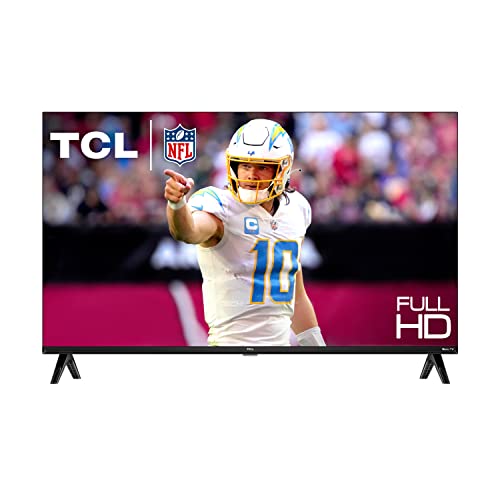
TCL 32-Inch Class S3 1080p with Roku TV (32S350R) — The same set, filed neatly
Now hold the hardware still and change only the mind. This S3’s verified title mirrors its sibling’s almost word for word — 32-inch class, 1080p LED, streaming Full HD television — with Roku TV in the platform slot and compatibility declared for Alexa, Google Assistant and Apple HomeKit. A reader comparing the two titles might conclude the sets are interchangeable. A household living with each for a month would conclude the opposite, and the distance between those conclusions is exactly why operating systems headline this guide.
Roku’s edition greets you with a grid. Your apps, in your order, today as yesterday, with a banner of promotion kept to the margins and a search that reports a title’s availability across services without steering you toward a house brand. The experience is deliberately unmagical, and its virtues compound in shared spaces: a guest, a grandparent, a babysitter can operate this set within a minute of first seeing the remote, and the household’s viewing history is not performed on the home screen for every visitor. Where the Google edition is a concierge who knows your tastes, the Roku edition is a cabinet that keeps your files and minds its business.
The triple-assistant compatibility in the title is broader than its sibling’s, HomeKit included, and it reflects Roku’s platform neutrality: Roku sells no rival assistant, no storefront of its own to protect, and so cooperates with everyone’s. Voice control arrives through those external assistants and Roku’s own remote ecosystem rather than through a built-in house assistant, a small philosophical difference that matches the platform’s whole stance. The panel, the size, the Full HD streaming diet: all as in the sibling review, because they are the same hardware family’s honest capabilities.
Choose the Roku S3 if your household knows what it wants to watch, shares the set with people outside its accounts, or runs Roku elsewhere and values one interface everywhere. Choose the Google S3 if you want to be met halfway. The panel will not settle the argument; your evenings will.
Roku’s edition has its own slow-burning virtue: indifference to fashion. Its interface changes at a glacial pace by industry standards, which interface designers call stagnation and households call peace. A set whose home screen in year four is the home screen you learned in year one never generates the small domestic incident of a menu rearranged overnight, and in spare rooms and grandparents’ bedrooms that stability is worth more than any season’s new feature. The filing cabinet does not redecorate itself, and that is precisely the service being purchased.
- Size and resolution: 32-inch class, 1080p LED, per the verified listing title
- Platform: Roku TV
- Compatibility: Alexa, Google Assistant and Apple HomeKit, per the title
- Model: 32S350R, 2023 model year
Strengths
- The most legible interface in the guide for guests and mixed households.
- Neutral search and the broadest assistant compatibility here.
- Identical interface to any other Roku in the house.
Trade-offs
- No recommendation engine to rescue an indecisive evening.
- Voice control leans on external assistants rather than a built-in one.
- Same 2023 baseline as its sibling, for buyers counting model years.
Best for: decisive viewers, shared and guest-serving rooms, Roku households. Not suited for: browsers who want the set to suggest the evening’s programme.

Hisense 32-Inch Class A4 Fire TV (32A4NF, 2025) — The Alexa-native 2025 set
Hisense’s A4 enters the platform contest carrying Amazon’s colours, and its verified title makes two claims its rivals should note: a 2025 model year, the freshest in this guide, and DTS Virtual:X sound processing in a slim-bezel design. Fire TV is the platform, Alexa is built in, and the combination addresses the household for whom voice is not a feature but the household’s operating system already — the home where lights, timers and music all answer to the same name.
Fire TV’s home screen is the most assertive of the four platforms: Amazon’s services and suggestions occupy the front of the shop, and viewers who are Prime subscribers experience that as a well-stocked lobby while others experience it as advertising. The honest review holds both reactions as valid and notes the deciding variable is the household’s existing subscriptions. What is not contested is the platform’s competence at the mechanics — fast search by voice, a deep app catalogue, and routines that let the bedroom set join the house’s Alexa choreography, dimming and playing as part of a goodnight command.
The Virtual:X processing earns its paragraph in a 32-inch context. Bedroom viewing runs on dialogue at low volume, and kitchen viewing runs on dialogue against appliances; processing that widens the soundstage and lifts voices addresses both. Hisense’s slim bezel keeps the object discreet on a dresser or wall, and the 2025 baseline means the set starts life at the front of its maker’s software queue, a longevity argument this guide weighs seriously at every size.
Against the other Fire TV set below, this A4 is the newer, more deliberately designed article, and against the TCL pair it is the choice when Alexa’s name is the one your house answers to. Platform loyalty is the whole game at 32 inches, and this is Fire TV’s strongest hand in the guide.
Hisense’s A4 also deserves its due as the set most likely to be bought twice. Households that furnish a main bedroom with it and find the platform and the processing agreeable tend to solve the kitchen or spare room with the same badge a season later, and Hisense’s range makes that standardisation easy across sizes. A television that earns a second purchase is offering evidence no review can manufacture, and the A4’s combination of freshness, processing and platform is calibrated to earn exactly that verdict from Alexa households.
- Size and resolution: 32-inch class, FHD 1080p, per the verified listing title
- Platform: Fire TV, Alexa built in
- Sound and design: DTS Virtual:X; slim bezel design
- Model: 32A4NF, 2025 model year
Strengths
- Newest model year in the guide, with the longest software runway.
- Alexa integration serves voice-run households natively.
- Sound processing targeted at dialogue in real rooms.
Trade-offs
- Fire TV’s Amazon-forward home screen divides households.
- Value peaks for Prime and Echo households; others subsidise integration they skip.
- Slim-bezel elegance is wasted in postings where the set is rarely seen front-on.
Best for: Alexa households furnishing a main bedroom or kitchen in 2026. Not suited for: Google or Roku households seeking one interface across rooms.

Samsung 32-Inch Class Full HD F6000 (2025) — The polished ecosystem set
Samsung’s F6000 is the guide’s argument that polish is a platform feature. Its verified title lists HDR, Object Tracking Sound Lite, Knox Security and One UI Tizen on a 2025 Full HD model, and living with the set means living inside Samsung’s idea of how a television should present itself: curated home screen, quick settings that stay out of the way, and an interface that matches the company’s phones and larger televisions gesture for gesture. Households already inside that world will find this the most finished 32-inch experience in the guide, and the finish is not superficial — it is the accumulated result of the largest television software operation in the industry.
Tizen’s temperament is curation. The platform promotes Samsung’s own services and partners within a tidy frame, and its app catalogue covers the mainstream streaming world completely while remaining a garden with walls. Viewers whose services are the household names will never meet the walls. Viewers with niche services, local apps or a sideloading habit will meet them in the first week, and for those households the open grids of Roku or the account breadth of Google TV are the honest alternatives. Knox Security, the enterprise branding in the title, translates for a bedroom set into a maker that treats platform patching as an institutional duty, which in a category plagued by abandoned software is a form of longevity insurance.
HDR support gives the F6000 a picture argument its platform rivals mostly do not make at this size: streamed films with steadier highlights and shadow detail, on a panel specified by a maker whose picture processing is its founding skill. Object Tracking Sound Lite similarly borrows the flagship programme’s direction, tying sound to action within the limits of a small chassis. Neither feature turns a 32-inch set into a cinema, and the review does not claim otherwise; both mark a set built downward from excellence rather than upward from a price.
Buy the F6000 if Samsung’s ecosystem already runs your house or if you simply want the class’s most refined object. Its platform commitment is total, which is its strength for the converted and its caveat for everyone else.
The F6000’s case strengthens further in the household where the 32-inch set is a teenager’s room screen that doubles for console play. Samsung’s platform carries a gaming-adjacent polish inherited from its flagship line, and the set’s HDR support gives console pictures a steadiness its platform rivals at this size mostly do not claim. It will not be mistaken for a dedicated gaming television, and this guide’s high-refresh companion exists for that appetite, but as the second screen that must also be the second gaming screen, the Samsung’s credentials are the most complete in this list.
- Size and resolution: 32-inch class, Full HD, per the verified listing title
- Picture and sound: HDR support; Object Tracking Sound Lite
- Platform: One UI Tizen, with Knox Security
- Model year: 2025
Strengths
- The most polished hardware-and-software package in the guide.
- HDR support is a genuine picture differentiator at this size.
- Institutional platform maintenance suits a set bought for years.
Trade-offs
- Tizen’s curated garden suits mainstream services better than niche ones.
- Full value assumes a Samsung-leaning household.
- Refinement is priced into the proposition, even in a second room.
Best for: Samsung households and buyers who want the class’s most finished set. Not suited for: niche-service viewers and platform nomads.

Insignia 32-inch Class F20 Series Fire TV — The value Fire TV route
Every platform in this guide deserves a value doorway, and Fire TV’s is Insignia’s F20. The verified title is compact: a 32-inch class F20 series LED HD smart Fire TV, with a voice remote with Alexa and free and live TV. That compactness is the proposition. Insignia, as a retailer house brand, builds the set Amazon’s platform team would sketch if asked for the essential Fire TV at 32 inches and nothing beyond the brief: current platform, voice remote, the free-content surfaces that make Fire TV economical to feed, and a panel honestly labelled HD.
The HD label deserves the same candour applied elsewhere in this batch of guides. Where its 1080p rivals in this list promise Full HD in their titles, the F20’s title says HD, and at 32 inches across a bedroom that difference is smaller than the words suggest — visible in fine text and the closest seating, quiet at pillow distance. Buyers should nonetheless choose knowingly: if this set will serve as a small flat’s only screen, watched from a sofa at moderate range with films as its main diet, the Full HD picks above are the safer long-term answer. If it is a bedroom, kitchen or spare-room set, the F20’s allocation of its budget toward platform and remote rather than panel is defensible and often wise.
Within the Fire TV family, the comparison with the Hisense A4 is the instructive one. Same platform, same assistant, same free-content strengths; the A4 adds a newer model year, branded sound processing and a slimmer design, while the F20 keeps the proposition lean. Households furnishing a second or third room, landlords equipping a let, students setting up a first flat — these are the F20’s natural constituencies, and for them its leanness is not a compromise but the correct shape of the purchase.
Free and live TV, named in the title, completes the value logic. A set whose platform surfaces free content prominently can serve a room honourably without adding a subscription to the household’s stack, and at 32 inches that completeness — buy the set, plug it in, watch — is a feature in itself.
Landlords and hosts form a constituency for the F20 worth naming separately. A furnished let needs a set that a tenant can use without instruction, that surfaces free content without the landlord’s subscriptions, and whose replacement, in the worst case, is an errand rather than an event. The F20’s combination of a current platform, a voice remote and a lean proposition answers that brief directly, and its HD panel is no liability in rooms where the television is an amenity rather than a shrine. Property furnishing is a legitimate lens for this class, and through it the Insignia looks less like the budget option and more like the professional one.
- Size and class: 32-inch class F20 series, LED HD, per the verified listing title
- Platform: Smart Fire TV, voice remote with Alexa
- Content: free and live TV highlighted in the title
- Character: the lean, value-positioned Fire TV set
Strengths
- The accessible doorway into Fire TV at this size.
- Voice remote included in a value proposition.
- Free and live content suits rooms without subscription ambitions.
Trade-offs
- HD rather than the Full HD claimed by most rivals here.
- No branded sound processing to match the Hisense or Samsung.
- Fire TV’s Amazon-forward interface applies in full.
Best for: spare rooms, rentals, students and second-set furnishing on a disciplined budget. Not suited for: a small flat’s only screen, where Full HD earns its place.
Sony 32-inch W830K — The premium prose pick
Sony’s W830K occupies the position in this class that Sony occupies in most classes: the premium alternative, bought by people who believe picture processing is a craft and that the badge’s discipline shows on screen. It runs Google TV, which places it in this guide’s taxonomy beside the TCL S3’s Google edition — same operating system family, very different altitude. The comparison is the point of including it. A buyer can have Google TV’s recommendation engine on a value panel with a voice remote, as the TCL offers, or on Sony’s hardware with the company’s processing pedigree, at a price that reflects the difference. Neither choice is irrational; they are the same software decision at two levels of seriousness about the picture.
It is covered in prose, without a link, and the guide will describe it at the level that honesty allows: a 32-inch Google TV set from the maker whose name is shorthand for picture quality, positioned well above the value sets in this list. Buyers considering it should audition it against the Samsung F6000 in particular, since those two sets divide the premium end of the class between Google’s openness and Samsung’s polish, and the choice between them is the class’s most interesting argument for a buyer with the budget to have it.
Who should pay the premium? The viewer whose 32-inch set is a primary screen in a small flat, watched closely and often, with films as the main diet — the one posting in this guide’s world where panel processing earns daily wages. For a bedroom’s casual viewing or a kitchen’s company, the premium buys refinement the posting cannot display, and the guide’s value picks serve those rooms better. Premium is a posting decision before it is a brand decision, and the W830K is included so that the posting that deserves it can find it named.
Small flats give the W830K its strongest brief, and it is worth picturing the posting concretely. In a studio or a compact one-bedroom, the 32-inch set is not the second screen but the screen: films on Friday, sport on Saturday, the news at breakfast, all from a sofa three or four feet away. At that distance and with that diet, processing quality stops being a badge and becomes the texture of every evening, and Sony’s premium is simply the price of that texture. The guide’s value picks are the right answers to second-room questions; the Sony is the right answer to a first-room question asked at a second-room size.
- Size and platform: 32-inch class, Google TV
- Positioning: the class’s premium tier, bought for processing and brand
- Buying route: verify the exact listing at the seller; no link in this guide
Strengths
- Sony’s picture-processing pedigree at the class’s premium end.
- Google TV’s openness rather than a walled platform.
- The right ceiling for a small flat’s primary screen.
Trade-offs
- Premium pricing buys refinement many postings cannot display.
- No verified link in this guide; purchase requires your own checking.
- Same operating system as a far cheaper pick, which sharpens the value question.
Best for: small-flat primary viewing and Sony loyalists who watch closely. Not suited for: casual bedroom or kitchen postings, or value-first furnishing.
One further divide between the platforms deserves recording because households discover it slowly: how each system treats live and free television. Roku and Fire TV both surface free, ad-supported channels prominently, turning a 32-inch set into something close to a modern broadcast appliance, while Google TV integrates live sources into its recommendation fabric and Tizen curates its own free channel offering within Samsung’s frame. A household that watches a great deal of free live material — news, classic series, local channels — will feel these editorial choices weekly, and should weigh them alongside the subscription services when choosing. The set is a window onto two catalogues, the one you pay for and the one you do not, and platforms differ as much in the second window as in the first.
How do the six picks compare side by side?
| Pick | Operating system | Resolution language in its title | Defining trait |
|---|---|---|---|
| TCL S3, Google edition | Google TV | 1080p | Recommendations, Assistant built in |
| TCL S3, Roku edition | Roku TV | 1080p | Neutral grid, HomeKit compatibility |
| Hisense A4 | Fire TV | FHD 1080p | 2025 model, DTS Virtual:X |
| Samsung F6000 | One UI Tizen | Full HD | HDR, Knox, ecosystem polish |
| Insignia F20 | Fire TV | HD | Value route, free and live TV |
| Sony W830K | Google TV | Premium tier; verify at seller | Processing pedigree, prose only |
How do you set up a smart TV so the platform serves the room?
Setup is where platform choice becomes daily reality, and thirty deliberate minutes repay themselves for years. Sign in with the household’s real accounts, then arrange the home screen for the room’s actual audience: the main viewer’s services first, a guest-friendly row of free content where the set serves visitors, children’s profiles configured before the first child finds the remote rather than after. On Google TV, build the profiles; on Roku, arrange the grid and remove the tiles nobody uses; on Fire TV, set the parental and purchase controls that its storefront makes necessary; on Tizen, connect the phone and soundbar ecosystem pieces while the manuals are still open.
Then attend to the two settings every platform buries. Find the picture mode that matches the room’s light and disable the shop-floor vividness these sets ship with, because a bedroom at night is not a showroom. Find the sound mode that favours dialogue, and if the set offers a volume limiter or night mode, enable it for any set sharing a wall with a sleeping person. Finally, teach the household the one trick the platform does best — voice search, casting, headphone listening — in person, on the first evening. A smart television’s intelligence is only ever the intelligence its household has been shown.
Energy and standby behaviour close the practical survey. A 32-inch LED set is a modest load, but smart platforms differ in their sleeping habits: some wake instantly from a networked standby that sips power continuously, others offer deeper sleep at the cost of a slower first screen in the morning. Households that switch at the wall, and campers or rentals that must, should test their chosen set’s cold-start behaviour in the first week, because a platform that punishes being switched off will train the household into leaving it sipping instead. Small numbers, nightly paid, and entirely avoidable with one informed setting — a fitting last example of this class’s governing truth that the software, not the screen, is where ownership is lived.
What mistakes do smart TV buyers keep making?
The first is choosing the panel and inheriting the platform by accident, then spending years annoyed by a home screen they never selected. This guide’s entire structure exists to reverse that order. The second is fragmenting the household: a Roku main set, a Fire TV bedroom set and a Google TV kitchen set multiply remotes, accounts and shouted instructions, and the friction is paid nightly. Standardise unless you have a reason. Third, buyers underrate the guest test — a set whose home screen performs the household’s viewing history to every visitor is a social liability in a spare room, and platforms differ honestly on this point.
Fourth, buyers ignore the update horizon. A smart television is a computer with a panel attached, and its useful life is set by its maker’s software maintenance as much as by its hardware; model year and platform-wide update habits, both weighed in the reviews above, are longevity features. Fifth, buyers skip the first-week audition from the real seat, with real programmes, while returns are still simple. Software can be rearranged and sound modes can be found, but a panel that disappoints from your pillow will disappoint for years, and the time to learn that is the first week.
A word about children and the spare-room set completes the platform picture, because the 32-inch screen is frequently the one children are given. The relevant platform features are not the catalogues but the boundaries: profiles that keep adult recommendations out of a child’s row, purchase controls that keep a remote’s button from becoming a transaction, and watch-time habits the software can support rather than undermine. Google TV’s profiles, Fire TV’s account controls and Roku’s sheer plainness each implement a philosophy of childhood, and parents should choose the philosophy they recognise as their own. The set will be operated by the smallest hands in the house more often than the spec sheet imagines, and a platform chosen for those hands ages gracefully with the family.
Accessibility belongs in the same paragraph of honest accounting. Voice search serves viewers for whom a directional pad is a barrier; screen-reader and magnification features, present in varying depth across these platforms, serve viewers for whom the menu itself is the obstacle. Households buying for an older relative should audition these features specifically, in the shop or in the first week at home, because their quality differs between platforms in ways no title line advertises. The best operating system in this guide is partly a moral judgement about who gets to use the television unassisted, and the guide declines to pretend otherwise.
One last scenario belongs in the record: the household that buys a 32-inch set as a monitor-adjacent screen for a home office or a study, where it shows reference material, a second match or a video call while the main work happens elsewhere. For that posting, wake speed and the platform’s casting routes outrank everything, and the Roku and Google editions of the S3, with their broad compatibility, hold a small structural advantage. Name the posting before the platform and the ranking, as ever in this guide, rearranges itself around the truth of the room.
Final Recommendation
Let the household’s habits pick the operating system, and let the operating system pick the set. If your evenings are browsing evenings and your accounts live with Google, the TCL S3’s Google edition is the class’s sweet spot, with Sony’s W830K waiting in prose for the small-flat viewer who wants that same software on premium hardware. If your house values calm, neutrality and one interface in every room, the Roku edition of the same TCL is the guide’s most defensible single recommendation. Alexa households should choose between Hisense’s polished 2025 A4 for a main bedroom and Insignia’s lean F20 for everywhere else, and Samsung households should simply buy the F6000 and enjoy the class’s most finished object. The screen sizes are identical and the panels are cousins; what you are really choosing is the mind the television will think with, every evening, for years — so choose the mind your household already speaks to.
Frequently Asked Questions
Can the same television model really feel different with another operating system?
Yes, and this guide’s TCL pair is the demonstration. The S3 hardware in Google TV and Roku editions wakes to different home screens, searches differently, treats guests differently and ages at its platform’s pace. Owners interact with the software hundreds of times for every once they contemplate the panel, so the felt difference is the larger one.
Which operating system is best for children?
The one whose profiles and controls you will actually configure. Google TV’s profiles separate children’s recommendations cleanly, Roku’s simplicity limits what a child can stumble into, and Fire TV’s controls suit Amazon-account households. All three demand the same ten minutes of parental setup; the platform matters less than the minutes.
Should my bedroom TV match my living-room TV’s platform?
Usually, yes. One interface across rooms means one remote logic, one set of accounts and no relearning at midnight. Depart from the household platform only when it is itself the problem — a walled garden missing a service you need, or a recommendation wall you want out of the spare room.
Is the Insignia’s HD panel a deal-breaker?
Only for the postings where resolution is the job: a small flat’s sole screen watched closely with films. For bedrooms, kitchens and spare rooms at normal distances, its platform-first allocation is reasonable, and the guide includes it knowingly rather than by oversight. Read its trade-offs and decide by your room, not by the label’s prestige.
How long will these smart platforms stay usable?
Platform-wide maintenance is the guide’s best predictor: Roku’s uniform updates across model years, Google TV’s account-tied evolution, Fire TV’s Amazon backing and Samsung’s institutional patching all point to multi-year support, with the 2025 models holding the longest runway. A set whose apps still update in year five is a set still doing its job.
Why is the Sony not linked like the others?
Because this guide links only listings verified cleanly at checking time, and the Sony’s role — marking the premium ceiling of the class — can be described honestly in prose. Buyers persuaded by its case should verify the exact listing and specification at the seller, as with any premium purchase.
What if my favourite service is missing from a platform?
Check before buying, because catalogue gaps are platform-specific and occasionally regional. The mainstream services are present across all four systems here, but niche, local or specialist apps are where gardens have walls. If one service is non-negotiable, let it veto the platform, and remember that a casting route from a phone can patch a single missing app without changing the whole purchase.
Do I need an aerial with a smart TV?
Not for streaming, which arrives by Wi-Fi, and several picks here emphasise free and live content delivered over the internet. An aerial still serves households that want broadcast channels in their familiar form, or a fallback when the broadband fails. Decide by your street’s signal and your household’s habits rather than by habit alone.
Related Guides
Continue with Best 40 Inch 4K TVs: The Size Class That Moved to 42 and 43, Best 2160p 120Hz TVs for Gaming and Fast Sport and Best 10.1 Inch Tablets for Movies, Reading and Everyday Apps.


