What's inside
- Key Takeaways
- Quick Picks
- How Did We Choose These MacBook Air Chargers?
- How Much Wattage Does a MacBook Air Really Need?
- What Should Travel in the Bag With a MacBook Air?
- How Does the MacBook Air Itself Handle Different Chargers?
- How Does the Air Differ From the Pro as a Charging Customer?
- Which Charger Suits Your MacBook Air? The Six Picks in Detail
- Which Charger Fits Which MacBook Air Owner?
- How Do You Charge an Air in Cars, Cafés and Other People’s Offices?
- How Do the Six MacBook Air Chargers Compare Side by Side?
- How Should You Set Up a Second Charging Station for Your Air?
- What Should You Check in the First Week With a New Charger?
- What Mistakes Do MacBook Air Owners Make When Buying a Charger?
- How Long Will One of These Chargers Serve Across Air Generations?
- What Should a New Air Owner Buy First: a Spare Charger or a Better Cable?
- How Should You Pack an Air and Its Charger for a Working Trip?
- Final Recommendation
- What Should You Do When a MacBook Air Charger Stops Keeping Up?
- Frequently Asked Questions
- Related Guides
As an Amazon Associate I earn from qualifying purchases. This post may contain affiliate links at no extra cost to you.
widgetverdict.com is reader-supported. When you buy through links on our site, we may earn an affiliate commission.
Where to buy: the six chargers below are all sold on Amazon, linked from the quick picks table to the listings we checked. Laptop chargers attract sloppy lookalike listings, so confirm the wattage and the laptop generations named in the listing title match your MacBook Air before ordering.
The best chargers for MacBook Air answer a question Apple’s own box leaves open. The Air is a light, all-day laptop, and its charging needs are modest next to the Pro line — yet owners still end up needing a second charger for the office, a smaller one for travel, or a stronger one that can feed the Air and a phone from the same block. The six picks here cover that spread deliberately: a 30W charger built specifically for the Air across its M-series generations, a 100W Anker with a 6ft cable for people who want one charger to rule every device they own, two 65W GaN designs from Anker and Amazon Basics, a 118W MacBook Pro-class charger that also serves the Air, and UGREEN’s three-port 65W block for shared desks.
One principle runs through the whole guide and is worth stating before the reviews: with USB-C Power Delivery, a bigger charger cannot bully a smaller laptop. The Air asks for what it can use and the charger complies, so wattage above the Air’s own appetite is headroom — useful for a second device, a future laptop, or a faster top-up where the machine supports it — never a hazard. That is why this guide can honestly include chargers from 30W to 118W for the same laptop, and why the real decisions are about ports, cables, size and what else the charger must feed.
Key Takeaways
- The Air’s needs are modest: a 30W charger matched to it, like the first pick, covers ordinary charging without bulk.
- Oversizing is safe — USB-C PD is negotiated, so a 100W or 118W charger harms nothing and buys headroom.
- The Anker 100W is the one-charger-for-everything pick, with a 6ft cable in the box and a foldable body.
- At 65W, the choice is shape: Anker’s Nano is the compact single-purpose block, Amazon Basics the one-port GaN value shape, UGREEN the three-port desk hub.
- The 118W MacBook Pro charger suits households where an Air and a Pro share one charging point.
- Cable inclusion varies by pick — check the spec boxes before assuming a lead is in the box.
Quick Picks
| Pick | Badge | Why it earns its place |
|---|---|---|
| Mac Book Air Charger 30W USB C | Best Matched to the Air | A 30W block whose listing names the Air 13 and 15 across the M-series generations. |
| Anker 100W USB C Laptop Charger | Best One-Charger Setup | 100W, foldable, with a 6ft cable included — enough for the Air and everything else. |
| Anker Nano 65W GaN II Charger | Best Compact 65W | GaN II construction and a foldable body make this the travel-friendly 65W block. |
| Mac Book Pro Charger 118W USB C | Best for Pro and Air Households | 118W aimed at the Pro line and explicitly compatible with the Air as well. |
| Amazon Basics 65W GaN Charger | Best One-Port GaN | A single-port 65W GaN charger with PD 3.0 and a foldable plug, kept simple. |
| UGREEN Nexode 65W USB C Charger | Best Three-Port Desk Pick | 65W across three ports with a GaN II chip, for the Air plus phone plus earbuds. |
How Did We Choose These MacBook Air Chargers?
Every pick had to name the Air, or the MacBook line that includes it, in its own listing — a charger that merely has a USB-C plug is not automatically a laptop charger anyone should trust. Wattage had to be stated plainly, and the set as a whole had to cover the Air’s real situations: an exact-match spare, a travel block, a desk hub, and a household charger shared with a hungrier machine. That is why the wattages range so widely; they are answers to different questions, not a league table.
We also weighed what the listing tells you about the physical object. Foldable prongs matter in a bag. A cable in the box matters because a laptop lead is not the same as the short phone cable in your drawer — the Anker 100W’s included 6ft cable is a genuine part of its value. Port count mattered in the other direction: a three-port block is a desk hub, not a travel charger, and we judged it as one. Chargers with unclear listing identities, and anything connected to recalled products, were excluded before any of this began.
How Much Wattage Does a MacBook Air Really Need?
Less than a Pro, and the listings here reflect that: the Air-specific pick is a 30W charger whose title names the Air 13 and 15 inch models across the M1 through M5 generations. That is the machine’s home territory — enough for full working charging, where the laptop fills while you use it. Step up to 65W and the difference is not the Air’s survival but its schedule and its company: headroom for a brisk top-up, and spare capacity concepts begin to matter once a phone joins the same block.
The 100W and 118W picks need framing rather than fear. Neither forces anything into the Air; Power Delivery is a request-and-supply conversation in which the laptop is the one asking. Owners buy that headroom for three reasons: the charger also serves a Pro or another hungry laptop, it also serves as the household’s single travel charger for every device, or it future-proofs the desk against the next machine. All three are legitimate. What is not legitimate is buying 118W expecting the Air itself to charge four times faster than on 30W — the laptop’s own ceiling governs, always.
What Should Travel in the Bag With a MacBook Air?
The Air’s whole identity is lightness, so its travel charger should honour it. Foldable prongs are the first feature to demand — the Anker 100W and the Anker Nano 65W both fold, and the Amazon Basics has a foldable plug — because exposed prongs snag linings and scratch screens in a shared compartment. The second feature is cable discipline: a charger with its cable included, like the Anker 100W’s 6ft lead, is one object to remember; a bare block plus a loose cable is two, and the forgotten one is always the cable.
Then decide the travel charger’s second job. If the trip involves a phone that also needs feeding at the hotel, a 65W block gives the Air its charge with room to spare for a phone afterwards, and UGREEN’s three-port design does both at once from a single socket — valuable in older hotels and airport lounges where sockets are rationed. If the trip is purely the Air and a phone that charges overnight from anything, the little 30W Air-matched block is the lightest honest answer. Buy for the trip you actually take, not the expedition you imagine.
How Does the MacBook Air Itself Handle Different Chargers?
The Air’s side of the conversation is worth understanding, because it explains every recommendation in this guide. Inside the laptop, a controller negotiates with whatever charger is attached and draws what the machine can use for its current state — charging the battery, running the system, or both at once under load. Connect the matched 30W charger and the Air runs its ordinary life: working while filling, at the pace its designers chose. Connect a 65W or 100W charger and the Air takes what it wants from a larger offer; the surplus is not forced anywhere, it simply remains available, which is why a shared household charger is a safe idea rather than a risk.
Connect too little and the negotiation still works — it merely produces a poorer outcome. A small phone block attached to an Air will often hold the battery steady during light use or add charge slowly while the machine sleeps, and owners discover this in hotel rooms and conclude wrongly that any USB-C charger is a laptop charger. The distinction this guide insists on — laptop chargers by listing, not by plug shape — exists for that moment. The Air is forgiving about what it accepts; it is not forgiving about arithmetic, and a working day needs a charger in its own tier.
Battery care follows from the same picture. The Air manages its own charging curve, easing off as the battery fills and learning from routines where the software offers it, so the choice of charger among the picks here is about pace and convenience, not about protecting the battery from a stronger block. What does age a battery is heat and time, and neither is meaningfully changed by choosing the 65W pick over the 30W one for a desk. Buy for your sockets and your schedule; the laptop’s own management handles the rest, quietly, the way it was designed to.
There is one more behaviour worth knowing: the Air reports its charging state honestly, and a moment in the battery menu will tell you whether the attached charger is keeping up under your current workload. If a new setup leaves the percentage falling while you work, the charger is undersized for that workload — a diagnosis worth making in the first week, while returns are easy, rather than after months of assuming the laptop itself is at fault. The picks in this guide were sized to pass that test for the Air’s real workloads, from the matched 30W upward.
How Does the Air Differ From the Pro as a Charging Customer?
The two machines share a plug and little else. A MacBook Pro under load — rendering, compiling, driving displays — can out-eat a modest charger while it works, which is why Pro chargers are sized generously and why the 118W pick in this guide leads with the Pro’s name. The Air’s appetite is of a different order: its efficiency is its identity, its workloads are lighter by design, and a charger in the 30W to 65W band covers its working life with room to spare. Owners cross-shopping this guide from the Pro side should recalibrate: what is excess for the Air is merely adequate for its sibling.
The distinction matters most in shared households, where one charger drawer serves both machines. A charger bought for the Air alone — the matched 30W pick — will keep a Pro alive in an emergency and disappoint it in daily service; a charger bought for the Pro serves the Air without the Air ever noticing the surplus. The asymmetry argues for sizing shared purchases to the larger machine, a rule stated earlier in this guide and worth repeating here because it is the single most common cross-purchase mistake Mac households make. Size for the Pro, share with the Air, and both machines stop having charger opinions.
For the Air-only household, the same comparison is liberating rather than cautionary. Your machine is the easy customer in Apple’s line-up: it forgives a wide range of chargers, travels light, and asks little. The freedom should be spent on shape and placement — the travel block, the desk hub, the matched spare — rather than on wattage you will never draw. That is the spirit in which the six picks here were chosen, and it is why the smallest of them is a first-class recommendation rather than a budget apology.
Which Charger Suits Your MacBook Air? The Six Picks in Detail
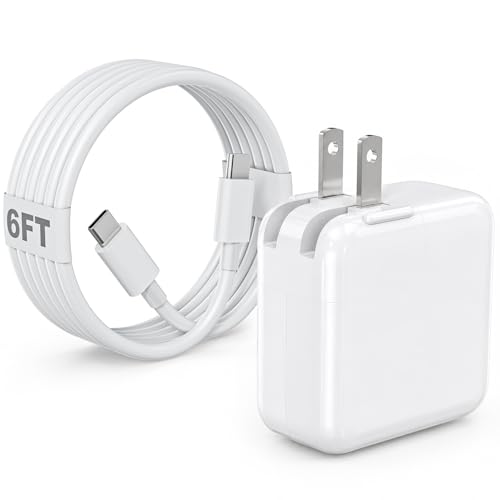
Mac Book Air Charger 30W USB C — Best Matched to the Air
This is the spare-charger pick, and its listing is admirably specific: a 30W USB-C charger for the MacBook Air 15 and 13 inch, naming the M5, M4, M3, M2 and M1 generations. That specificity is what a replacement purchase needs. The charger that came with an Air is a known quantity; the risk in buying a second is ending up with something underpowered that leaves the laptop treading water during a working day, or something vague about which machines it serves. A block that names your exact laptop line and generation range removes the guessing.
Thirty watts is the Air’s home tier, so expect like-for-like behaviour: the laptop charges while you work, fills overnight without drama, and the block stays small enough to live in the bag or the office drawer permanently. What it will not do is moonlight. There is no headroom worth mentioning for a second hungry device and no ambition toward the Pro line; if the household later adds a bigger MacBook, this charger stays with the Air it was bought for. As a dedicated second charger — the office one, the downstairs one — that focus is a feature, and the listing’s plainness about it is refreshing.
- Output: 30W (per listing title)
- Named fit: MacBook Air 15 and 13 inch, M5 through M1 generations
- Format: USB-C charging block
- Role: matched spare or second charger for the Air
Strengths
- Names the Air and its generations explicitly — no compatibility guessing.
- Matched wattage keeps the block small enough to live in the bag.
- Behaves like the charger the Air was designed around.
Trade-offs
- No headroom for a Pro or a second hungry device.
- A single-purpose purchase that stays with the Air.
- Cable inclusion is not stated in the title — check the listing contents.
Best for: a second charger that lives at the office or in the travel bag.
Not suited for: a desk where the Air shares its charger with a MacBook Pro.

Anker 100W USB C Laptop Charger — Best One-Charger Setup
Anker pitches this as the household’s single laptop charger: its listing describes a compact, foldable 100W USB-C charger with a 6ft cable included, for MacBook Pro and Air among other laptops. For an Air owner, 100W is not about the Air at all — it is about everything else the charger will meet. The partner’s Pro, the work laptop, the tablet, the phone on the same cable: one block and one long lead, by the front door or in the bag, that never has to ask what it is feeding.
The included 6ft cable deserves emphasis because laptop cables are where one-charger setups usually fail. A phone lead is too short for a desk and often not rated for laptop duty; a proper 6ft cable reaches from a floor socket to a desk, from a hotel socket to the bed, and arrives chosen by the maker for the block it serves. Foldable construction completes the travel case. The honest cost of the strategy is concentration: lose this one charger and every device in the house is on rations, which is an argument for keeping the Air’s original block as the understudy rather than a reason against the pick.
- Output: 100W (per listing title)
- Included: 6ft cable stated in the listing title
- Form: compact, foldable
- Named fit: MacBook Pro and Air in the listing title
Strengths
- One charger genuinely covers the Air and every hungrier laptop in the house.
- The included 6ft cable is the right length and duty for laptop use.
- Foldable body travels without snagging or scratching.
Trade-offs
- The Air alone cannot use the headroom — you are buying for the household.
- A single point of failure if it becomes the only charger you own.
- Larger than the 30W matched block for pure Air duty.
Best for: a household standardising on one charger for every laptop it owns.
Not suited for: a minimalist who wants the smallest possible Air-only spare.
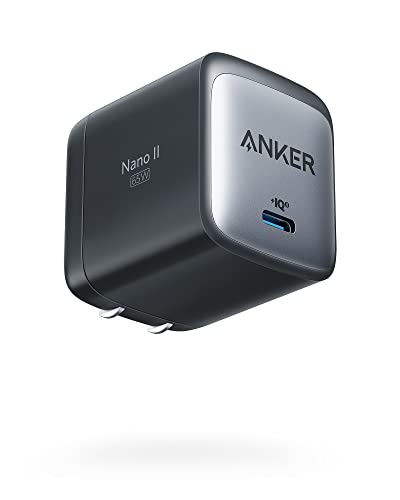
Anker Nano 65W GaN II Charger — Best Compact 65W
The Nano is Anker’s GaN II design in its most travel-friendly form: the listing describes a 65W PPS USB-C charger, fast, compact and foldable. GaN II is the technology story — gallium nitride components let a 65W charger shrink toward the size once reserved for phone blocks — and 65W is the versatile wattage: the Air charges with room to spare, a phone fast-charges from the same block, and the whole arrangement fits a jacket pocket in a way the Air’s owner, of all people, should appreciate.
PPS is worth a sentence for the mixed household: it is the programmable part of the USB-C PD standard that lets a charger fine-tune its output for devices, notably Samsung phones, that ask for exactly that. It makes this block a better shared charger than its single-purpose shape suggests. What it does not have is a crowd of ports — this is one block serving devices in turn or through the laptop, not a desk hub — and no cable is part of the title’s proposition, so your own laptop-rated lead completes it. As the charger that lives in the Air’s bag, it is the pick we would pack.
- Output: 65W (per listing title)
- Technology: GaN II, with PPS
- Form: compact, foldable
- Named fit: iPhone models and laptops in the listing title
Strengths
- 65W versatility in a body that travels like a phone charger.
- PPS support makes it a genuinely good shared block for mixed devices.
- Foldable design suits the bag an Air owner actually carries.
Trade-offs
- Not a multi-port hub; devices take turns or charge through the laptop.
- Cable not stated as included — supply a laptop-rated lead.
- Pro owners pushing a big machine hard may want the 100W class.
Best for: the Air’s travel bag, where one small block must cover laptop and phone.
Not suited for: a fixed desk that charges three devices at the same time.

Mac Book Pro Charger 118W USB C — Best for Pro and Air Households
This charger’s listing leads with the Pro — a 118W USB-C fast charger compatible with MacBook Pro and Air across the M-series generations, iPad Pro and Samsung devices also named — and that ordering tells you its job. It is the shared household charger for a home where the Pro is the demanding machine and the Air is one of several mouths to feed. The Air, as established, will take only what it asks for; the Pro gets a charger sized for its appetite; nobody maintains two separate laptop chargers in the same drawer.
Judged purely as an Air charger it would be excess, and the review should say so plainly: an Air-only household gains nothing from 118W that 65W does not already provide, and pays for it in size. Judged as the one-charger answer for a mixed Mac household, it is the most capable listing here. The unbranded nature of the listing is the caution — with a charger at this output, read the seller information carefully and test it on arrival with the machine it matters least to inconvenience. Capability, though, is not in doubt on paper: this is the ceiling of the guide.
- Output: 118W (per listing title)
- Named fit: MacBook Pro and Air, M-series generations, in the listing title
- Also named: iPad Pro and Samsung devices
- Role: shared high-output household charger
Strengths
- Sized for the Pro while explicitly compatible with the Air.
- One charger retires the two-laptop, two-charger drawer problem.
- The highest output in this guide for future, hungrier machines.
Trade-offs
- Pure excess for an Air-only household, in size as much as watts.
- An unbranded listing — seller details need a careful read.
- The Air will never use most of what it offers.
Best for: a home where a MacBook Pro and an Air share one charging point.
Not suited for: an Air-only owner chasing faster charging the laptop cannot accept.

Amazon Basics 65W GaN Charger — Best One-Port GaN
Amazon Basics takes the 65W GaN idea and strips it to the essentials: its listing describes a one-port GaN USB-C wall charger with Power Delivery PD 3.0, a foldable plug and a portable build for fast charging. One port, clearly stated, is the design philosophy — this charger does one device properly rather than three devices partially, and for an Air that charges at a desk or bedside where it is the only laptop in the conversation, that is a defensible and tidy philosophy.
The Basics badge sets expectations correctly: this is the straightforward, specification-first option rather than the design-object option, and its virtues are the ones that matter over years — GaN efficiency in a portable body, a current PD standard, prongs that fold away in a bag. Against the Anker Nano at the same wattage, the contest is PPS and brand ecosystem against Basics simplicity; against the UGREEN, it is one honest port against three shared ones. Households that already own good cables and charge one thing at a time will find nothing here to argue with.
- Output: 65W (per listing title)
- Ports: one-port design
- Standard: Power Delivery PD 3.0, GaN
- Form: foldable plug, portable
Strengths
- One port, fully committed: the Air gets the charger’s whole attention.
- GaN build with a foldable plug travels as well as it desks.
- PD 3.0 is the current, standard negotiation — no proprietary tricks.
Trade-offs
- A phone must wait its turn; there is no second port.
- No PPS is claimed in the title, unlike the Anker Nano.
- Cable is not part of the stated proposition.
Best for: a single-laptop desk that values simplicity over ports.
Not suited for: a shared desk where a phone and earbuds charge alongside the Air.

UGREEN Nexode 65W USB C Charger — Best Three-Port Desk Pick
UGREEN’s Nexode answers the desk question: its listing describes a 65W USB-C charger block with three ports, a GaN II chip, a compact body and foldable construction — a wall charger designed, in its own words, as a three-in-one. On a real desk that means the Air charges from one port while a phone and earbuds take the others, and the power strip loses two of its usual occupants. For the Air owner whose laptop is the anchor of a small device ecosystem, this is the charger that organises the whole shelf.
The arithmetic needs the usual honesty: 65W is the total the three ports share, so the Air charging alongside two other devices receives a portion, not the whole. In practice a desk day forgives that — the Air sips while it works, the phone fills, the earbuds trickle — but a user who wants the Air’s fastest possible top-up should give it the block to itself or choose a single-port pick. UGREEN’s Nexode line is an established name in this category, and the GaN II chip keeps the shared body compact. As a desk hub rather than a travel block, it is the most sociable charger in this guide.
- Output: 65W total (per listing title)
- Ports: 3-port wall charger
- Technology: GaN II chip
- Form: compact, foldable
Strengths
- Three ports clear the phone and earbud chargers off the desk.
- GaN II keeps a multi-port block genuinely compact.
- Foldable construction lets a desk hub travel when it must.
Trade-offs
- The 65W is shared; the Air gets a portion when ports are busy.
- Not the fastest route to a full Air battery under load.
- More block than a single-device traveller needs to carry.
Best for: one socket feeding the Air, a phone and earbuds side by side.
Not suited for: a traveller who charges one device at a time and counts grams.
Which Charger Fits Which MacBook Air Owner?
The student is the Air’s archetypal owner: one laptop, three charging locations — desk in a rented room, library, café table — and a bag that carries everything. The student’s correct purchase is the travel-shaped one: the Anker Nano 65W, small enough to live in the bag permanently, strong enough to cover the laptop and fast-charge the phone that shares the student’s life. The matched 30W block is the alternative for the student whose original charger stays at the desk, making the bag the second location rather than the only one. What the student should not buy is the desk hub; there is no desk fleet to feed, and the ports would serve an audience of one.
The professional working between home and office has the two-desk problem, and its cheapest solution is a charger per desk with no carrying at all. Here the Amazon Basics earns its keep at one desk — one port, one laptop, no decisions — while the original charger or the Nano covers the other. Professionals who present from the Air, in rooms where the socket is across the floor, should weight the Anker 100W’s included 6ft cable heavily: reach is the feature that decides whether the laptop survives the afternoon session, and it cannot be improvised on the day.
The household with two Macs is the case the 118W pick was chosen for. A Pro and an Air sharing one charging point, one drawer, one travel bag: a charger sized for the Pro and compatible with the Air retires the duplication, and the Air loses nothing by drinking from the larger well. The same household should resist buying the Air-matched 30W as its spare, because a spare that cannot serve the Pro properly is half a spare. Shared infrastructure should be sized for the largest machine and shared downward — the rule this whole guide quietly follows.
The new Air owner, finally, often needs no charger at all yet, and this guide would rather say so than sell one. The moment to buy is the moment a second location becomes real — the job that allows hybrid work, the course that meets in a library, the household that gains a second Mac. Buying against that moment, with the location in mind, produces the right charger the first time. Buying speculatively produces the drawer of almost-right blocks that every long-term laptop owner eventually regrets.
How Do You Charge an Air in Cars, Cafés and Other People’s Offices?
The café is the Air’s natural second home, and it teaches the value of the compact picks. Café sockets live under tables and behind banquettes, shared with strangers and guarded by etiquette: arrive with a small charger and a cable of civilised length, take the charge you need, and leave the socket as you found it. The Anker Nano’s foldable, pocketable shape is the café charger perfected; a desk hub with three cables is a guest who has brought too much luggage. The café rule generalises to every borrowed socket — trains, libraries, client offices — where the charger that asks least of the room is the one that gets welcomed back.
The car is the harder environment, and this guide’s honesty requires saying that the wall chargers reviewed here do not belong in it. An Air in a car needs a car charger built for the socket, of the kind covered in our car charging guide, with output in the laptop tier. What transfers from this guide is the principle: size for the machine, respect the negotiation, and do not expect a phone-class adapter — in a car any more than at a wall — to feed a laptop’s working day. The Air owner who works from the road should own both tools and confuse neither with the other.
Other people’s offices complete the tour, and they reward the charger that is self-explanatory. A guest charger should need no negotiation with the room: one block, one cable, plugged in where offered, removed without trace. The matched 30W spare, kept in the bag for exactly these visits, has a social virtue the bigger picks lack — it looks like what it is, asks for one socket, and leaves no tangle behind. Professional life runs on such small courtesies, and a charger, of all objects, can afford to be courteous.
How Do the Six MacBook Air Chargers Compare Side by Side?
| Pick | Output (per title) | Ports | Cable included | Character |
|---|---|---|---|---|
| Air Charger 30W | 30W | USB-C block | Not stated | The matched spare |
| Anker 100W | 100W | USB-C block | 6ft cable included | One charger for the house |
| Anker Nano 65W | 65W | USB-C block | Not stated | The travel block |
| 118W Pro Charger | 118W | USB-C block | Not stated | Pro-first, Air-compatible |
| Amazon Basics 65W | 65W | One-port | Not stated | Simple, single-device |
| UGREEN Nexode 65W | 65W | 3-port | Not stated | The desk hub |
How Should You Set Up a Second Charging Station for Your Air?
Choose the location by friction, not by symmetry. The right second station is wherever the laptop most often finds itself low and far from the main charger — the office desk, the kitchen table where morning work happens, the bag that leaves the house daily. Set the station up completely: charger plugged in and staying there, cable routed to where the laptop actually sits, and nothing about the arrangement requiring assembly. A second station that must be fetched and plugged in each time is a charger in a drawer wearing a station’s clothes.
Match the station to its location’s other duties. A desk station in a home office will inevitably be asked to feed a phone, and that is the UGREEN three-port pick’s audition — or the moment to accept a separate small phone block beside it. A bag station should be judged by bag rules: folds flat, one cable, nothing to snag, which is the Nano’s audition. A bedside station, where the Air charges overnight beside its owner, can be the household’s most modest charger, because the night forgives everything and the matched 30W pick is suddenly the correct size again.
Test the station in its first week under a real workload. Work from that desk for a day with the laptop plugged in, and glance at the battery at the end: full or filling is success; a slow decline means the setup is undersized for the work, however correct it looked on paper. That single test, done early, separates the stations that will serve for years from the ones that will be quietly abandoned by spring — and abandonment, not failure, is how most second chargers actually die.
What Should You Check in the First Week With a New Charger?
Run the working-day test described earlier in this guide: a full day of your real workload, plugged into the new charger, ending with a glance at the battery. Full or filling is the pass mark. A slow decline under your heaviest ordinary load means the tier is wrong for your life — not for the Air in the abstract — and the first week is when exchanging up a class costs nothing but the decision. Owners routinely skip this test and discover the mismatch in the third month, in a meeting, at the worst moment; the week-one test exists to move that discovery somewhere harmless.
Check the physical marriage of charger and socket too. A block that sits loosely, sags in a vertical socket, or crowds its neighbours will be a daily irritation out of proportion to its size, and the slim and foldable picks in this guide exist partly as answers to bad socket geometry. Live with the arrangement for the week — plug and unplug at the real desk, in the real bag — rather than judging it on the shop counter of your kitchen table. Chargers are furniture for electricity; like furniture, they should be sat with before the receipt fades.
Finally, register the boring details while they are fresh: keep the packaging until the week is passed, note which cable belongs to the new setup, and put the displaced charger somewhere deliberate — the spare drawer, the travel bag, the other desk — rather than letting it begin its drift toward the household’s cable limbo. A charger with an assigned place stays findable for years. The first week is when that assignment happens, and it is worth the two minutes it takes.
What Mistakes Do MacBook Air Owners Make When Buying a Charger?
The most expensive mistake is buying wattage as if it were speed. A 118W charger does not charge an Air four times faster than a 30W one, because the laptop sets the pace; oversizing buys company-keeping and future-proofing, not minutes. The second mistake is the opposite panic — grabbing any USB-C block from a drawer, including a feeble phone charger, and concluding the Air is faulty when it barely holds its charge through a working day. The Air needs a charger in its own tier, which is why every pick here is a laptop charger by listing, not by hope.
Third, owners forget the cable. A laptop needs a lead rated for laptop duty and long enough for real rooms; a short phone cable behind a powerful block produces a setup that looks right and performs badly. Fourth, travellers buy a second charger identical to the bulky original instead of using the spare purchase to fix what annoyed them — weight, prongs, ports. And fifth, shared households buy an Air-only 30W spare, then discover the Pro in the family cannot use it properly. Buy the spare for the household you have, not the laptop you started with.
How Long Will One of These Chargers Serve Across Air Generations?
Longer than the laptop it is bought for, in most cases — and the listings here quietly prove it. The Air-specific pick names five generations of the machine, from M1 to M5, because the charging conversation has remained stable while the silicon inside the laptop changed beyond recognition. A USB-C Power Delivery charger is therefore one of the few technology purchases that genuinely survives an upgrade cycle: the block bought for today’s Air will greet tomorrow’s with the same negotiation and the same result.
That longevity changes how to buy. A charger is not a per-laptop accessory to be minimised but a piece of household infrastructure to be chosen once and chosen well — which argues for the versatile middle of this guide, the 65W class, when the purchase is meant to serve a household across machines and years, and for the matched 30W when the purchase is honestly a single laptop’s spare. Both strategies are coherent; the incoherent one is buying the cheapest block that works this month and re-buying at every upgrade, paying the infrastructure price in instalments of frustration.
Cables, as ever, are the exception to the longevity story: they flex, fray and get left in conference rooms, and they should be budgeted as consumables beside the charger’s permanence. Keep one known laptop-rated spare in the house, and the setup this guide describes — a charger per location, a cable per charger — will outlast the Air it was assembled for and be waiting, correctly sized, for its successor.
What Should a New Air Owner Buy First: a Spare Charger or a Better Cable?
The cable, more often than new owners expect. The charger that came with the Air is a known quantity doing its job at the main location; what the second location usually lacks is not a second block but a second complete setup, and a setup is charger plus cable. Owners who buy the spare block first discover the omission at the office desk, phone-cable in hand, wondering why the new station feels unfinished. Buy the pair as one decision — block and laptop-rated lead, assigned to one place — and the second station works from its first morning.
The exception proves the rule usefully. If the original charger itself is the problem — left somewhere irrecoverable, damaged, or commandeered by another machine in the household — then the block is the purchase and the cable follows it. And if the second location is a bag rather than a desk, the foldable picks in this guide bundle the decision differently again: their value is the marriage of block and portability, with the cable as the one separate choice. In every version, the principle survives: a charging station is a system, and systems should be bought whole.
How Should You Pack an Air and Its Charger for a Working Trip?
Pack the charger as deliberately as the laptop, because on a working trip the two are one tool. The block goes in the bag’s outer compartment or the pocket it always occupies — not loose in the main space, where it will migrate to the bottom and take the cable with it — and the cable coils beside it, loosely, the way cables that live long are always coiled. At the destination, the first act after the laptop opens is the charger going into the room’s best socket and staying there for the duration; a trip charger that returns to the bag each evening is a trip charger that will one morning be discovered in the bag, in another city, by a laptop at a fifth of its battery.
Choose the travelling unit by the trip’s shape, using the picks in this guide as the menu. One night, one hotel, a phone that charges from anything: the matched 30W spare or the original block, and no further thought. A week of desks and borrowed sockets: the Nano, folded, with the phone sharing it in the evenings. A trip where the laptop must present, teach or demonstrate in rooms of unknown wiring: the Anker 100W, because its 6ft cable is the difference between a socket’s location mattering and not mattering. The trip decides; the bag merely obeys — and a bag packed by that rule has never yet been the reason a working trip went short of power.
Final Recommendation
Start from the Air’s own scale. A second charger that simply matches the machine — the 30W pick — is the right buy for most owners, and the Anker Nano 65W is the right upgrade when the bag also carries a phone. Choose the Amazon Basics if one honest port is your philosophy, the UGREEN if your desk is a small ecosystem, and the Anker 100W or the 118W charger only when a hungrier laptop genuinely shares your home. The Air was designed to disappear into your day; its charger should be chosen to do exactly the same.
What Should You Do When a MacBook Air Charger Stops Keeping Up?
Diagnose before replacing, because the charger is accused more often than it is guilty. Start with the cable: swap in a known laptop-rated lead and watch the battery over an hour of ordinary work. Cables fail at their ends, invisibly, and a charger condemned for a cable’s crime is a common household injustice — one reason this guide keeps returning to the cable as half the circuit. Next, try the charger in a different socket and the laptop on a different charger if one can be borrowed; the pattern of what changes isolates the culprit in minutes.
Check the workload’s honesty too. An Air that once kept up on a modest charger may now run video calls, an external display’s worth of windows and a sync storm simultaneously — a heavier life than the charger was sized for. In that case nothing has failed; the household has outgrown a tier, and the correct purchase is the step up this guide maps out, from matched 30W to the 65W class, rather than a like-for-like replacement that will disappoint identically. Chargers should be sized for the life the laptop lives now.
When the charger itself is the culprit — running hot, connecting intermittently, or simply dead — replace it without ceremony and without a period of making do on a phone block. The picks in this guide exist at every tier the Air needs, and a week spent nursing a dying charger costs more in friction than the replacement costs in money. Retire the old one from service entirely; a suspect charger kept as the spare has a way of becoming the main charger on the worst possible morning.
Frequently Asked Questions
Can I use a MacBook Pro charger on a MacBook Air?
Yes. USB-C Power Delivery is negotiated, so the Air requests what it can use and the bigger charger supplies that amount. The 118W pick in this guide lists the Air among its compatible machines for exactly this reason. The reverse — a small Air charger on a Pro — is safe too, just slow under load.
Is 30W enough for a MacBook Air?
It is the tier the Air was designed around, and the Air-specific pick here is a 30W charger naming the 13 and 15 inch models across the M-series. For working-while-charging and overnight fills it is sufficient. Owners who also charge a phone from the same block, or who want headroom, step up to the 65W picks.
Will a 65W charger charge my Air faster than a 30W one?
It can help where the Air supports a brisker intake, and it certainly helps when the block is shared, because there is more total to go around. But the laptop’s own ceiling governs, so expect an improvement in convenience and shared capacity rather than a transformation. Buy 65W for versatility, not for a promised number of minutes.
Do I need a special cable for a MacBook Air charger?
You need a USB-C cable rated for laptop charging and long enough for the room — the two qualities phone leads most often lack. That is why the 6ft cable bundled with the Anker 100W matters in this guide. A cable that came with a phone may work in a pinch, but a dedicated laptop lead is the reliable half of the setup.
How many chargers should a MacBook Air owner have?
Two is the number that changes life: one where the laptop sleeps, one where it travels or works away from that spot. The second is the purchase this guide mostly serves. Match it to its location — matched 30W for the drawer, compact 65W for the bag, three-port 65W for the desk — and the original charger becomes the spare instead of the single point of failure.
Should I buy an Apple-made charger instead of a third-party one?
Not for the Air’s sake — the laptop negotiates identically with any sound USB-C PD charger, and the third-party picks in this guide come from makers with long records in exactly this category. The case for the maker’s own accessories is about simplicity and support rather than electricity. Buy on shape, ports and the location the charger will serve; the Air will not reward brand loyalty with a single extra watt, because the negotiation, not the badge, sets the terms.
Can I use the same charger for my MacBook Air and my iPhone?
Yes, and it is one of the quiet pleasures of the USB-C era. Any charger in this guide will charge an iPhone at the phone’s own requested rate — the laptop block’s surplus simply goes unused — and the 65W picks are sized to serve the Air at a desk and the phone in the same hour. Travellers exploit this ruthlessly: one block, two cables, and the bag carries a complete charging kit for both machines.
Does it matter which USB-C port I plug the charger into on the Air?
For charging, no — the Air accepts power through its USB-C ports without favouritism, and the negotiation is identical either way. Choose the port that keeps the cable out of your way at that desk. The only port discipline worth keeping is about the cable itself: a lead that is yanked sideways daily at an awkward angle will fray at that end first, whichever port it calls home.
Related Guides
The Air sits between phone chargers and full laptop gear, and its neighbours are worth reading. Best Gan Laptop Chargers goes deeper on the technology behind the compact picks here, Best Dual Usb C Wall Chargers covers two-port blocks for shared sockets, and Best Internal Hard Drives is the next upgrade conversation once power is sorted.


