What's inside
- Key Takeaways
- Quick Picks
- How did we judge headsets by the sound of accuracy?
- Why does recognition accuracy depend more on the microphone than the software?
- Wireless or wired for dictation: what does the accuracy evidence of design say?
- Which pick suits which kind of dictator, in one pass?
- How do dictation headsets differ from the headsets used for meetings?
- Which six headsets make speech-recognition software hear you properly?
- How do the six dictation picks divide by connection and ear?
- How should you set up a dictation headset for the best recognition accuracy?
- What should a dictator do with an old headset when upgrading?
- How should a new dictator build the first month around a new headset?
- What else, besides the headset, decides a dictator’s accuracy?
- What mistakes do dictation buyers keep making?
- Final Recommendation
- Frequently Asked Questions
- Related Guides
As an Amazon Associate I earn from qualifying purchases. This post may contain affiliate links at no extra cost to you.
widgetverdict.com is reader-supported. When you buy through links on our site, we may earn an affiliate commission.
Where to buy: the six headsets below link to checked Amazon listings from Philips, ECS, Koss and specialist voice-recognition sellers, the corner of the market that builds for dictation rather than meetings.
The best sounding wireless headsets for dictation need one term defined before any product makes sense: sounding. In this guide, sounding does not mean rich bass, wide soundstage or any of the pleasures of music. It means how clearly your voice arrives at speech-recognition software, Dragon and its rivals, so the words on screen match the words you said. A dictation headset is judged by accuracy percentages and correction counts, not by how a favourite album feels, and every pick below was chosen on that definition.
Now an honesty note that shapes the whole guide. Dictation specialists overwhelmingly work wired, because a USB connection hands the software a stable, full-quality audio stream and never introduces Bluetooth compression or a flat battery into an accuracy-critical task. The verified specialist market reflects that: the Philips SpeechOne in this guide is a genuine wireless dictation headset with a docking station, while the ECS WordCommander line and the other specialist picks are USB headsets, included because they define the sound quality the software rewards and because most dictation buyers, once they understand the accuracy stakes, choose the cable on purpose. We label every pick’s connection plainly rather than dressing wired products in wireless language.
No medical claims appear in this guide, deliberately. Dictation headsets are productivity tools for people who write, report, code, practise law or medicine, or simply think faster than they type. What they promise is recognition accuracy and comfort across long speaking sessions. Judged on that promise, the six below span the professional wireless flagship, a family of wired accuracy specialists in single and dual ear, and an accessible entry point that has served dictation users for years.
Key Takeaways
- In dictation, sounding means voice clarity for recognition software: the metric is how few corrections you make, not how music feels.
- The Philips SpeechOne is this guide’s genuine wireless dictation headset, with a docking station and status light built for professional workflows.
- Most specialist dictation headsets are wired USB by design, because a stable audio stream protects recognition accuracy; the WordCommander picks are labelled wired honestly.
- An in-line sound card, a WordCommander signature, keeps audio quality consistent across different computers instead of depending on each machine’s built-in audio.
- Single-ear models suit dictators who monitor their surroundings or a recorder; dual-ear models suit those who want their own voice isolated and clear in both ears.
- Microphone placement and a noise-cancelling boom matter more for accuracy than any speaker specification, because the software can only recognise the signal it receives.
Quick Picks
| Pick | Badge | Why it earns its place |
|---|---|---|
| Philips SpeechOne Wireless Dictation Headset | The true wireless professional | A genuine wireless dictation headset with docking station and status light, from Philips’ professional speech line. |
| Voice Recognition USB Headset for Dragon (Single-Sided) | The Dragon-focused specialist | A single-sided USB headset sold specifically for Dragon NaturallySpeaking, with a noise-cancelling boom tuned for recognition. |
| ECS WordCommander Dual Ear USB Headset | The accuracy-first dual | Dual-ear WordCommander with a premium in-line sound card, built so the computer’s audio quality stops mattering. |
| ECS WordCommander Single Ear USB Headset | The accuracy-first single | The WordCommander’s in-line sound card and boom in a single-ear frame for dictators who keep one ear on the room. |
| ECS WordCommander Single Ear USB-C Headset | The USB-C update | The single-ear WordCommander formula with a USB-C connection for current laptops that have retired USB-A. |
| Koss CS100 Speech Recognition Headset | The budget classic | Koss’s long-running speech-recognition headset: the accessible entry point for new dictators testing the workflow. |
How did we judge headsets by the sound of accuracy?
The judging started from the software’s point of view. Speech recognition fails on mumbled consonants, clipped word endings, fluctuating volume and background noise, so we favoured headsets whose design attacks exactly those failures: boom microphones that hold a fixed, close distance to the mouth, noise cancellation aimed at rooms rather than at music, and audio paths that deliver a consistent signal to the computer. A headset that keeps your voice at a steady level and distance gives the recogniser the stable input it was trained on.
Specialist pedigree counted heavily. Dictation is a small, demanding market, and the brands in this guide, Philips’ speech division, ECS and its WordCommander line, and sellers who build headsets specifically for Dragon, exist because general-purpose headsets kept disappointing professional dictators. We weighted product lines designed and sold for voice recognition over meeting headsets with dictation mentioned in passing, and we read every connection type honestly, wireless where it truly is, wired where the accuracy argument demands it.
Comfort and workflow closed the selection. Dictation sessions run for hours and involve a rhythm of speaking, listening back and correcting, so weight, ear configuration and controls that handle playback and recording without a keyboard all mattered. The set that resulted spans one wireless flagship, wired specialists in both ear configurations and both USB generations, and a budget classic, so a buyer can enter at any tier and know exactly what the next tier buys.
One more discipline governed the wording of this guide, and it is worth stating for buyers comparing it with others. Where a connection is wired, the guide says wired, in the pick’s own section and in the comparison table, even inside an article whose keyword says wireless. Where a claim comes from a maker, it is the maker’s claim. Dictation buyers are professionals who measure things for a living, and a guide that respects their measurements in its own sentences is the least they should expect from the genre.
We also respected the boundary of this guide’s competence. Nothing here evaluates headsets as assistive technology or comments on any condition; the picks are productivity instruments judged on recognition accuracy, comfort and workflow. Buyers with clinical or formal accessibility needs deserve advice from specialists in those fields, and the most honest sentence in a buying guide is sometimes the one that points elsewhere.
Why does recognition accuracy depend more on the microphone than the software?
Speech-recognition software is remarkably good with clean input and remarkably helpless with dirty input. It cannot recover a consonant the microphone never captured, separate your voice from a television it was blended with at the capsule, or stabilise a signal that swells and fades as a headset shifts on your head. This is why dictation professionals obsess over the unglamorous end of the chain: a boom that holds the microphone at one fixed distance, off-axis enough to avoid breath blasts, close enough that your voice dominates the room by simple geometry.
Noise cancellation in a dictation headset serves the software, not your ears. Its job is to strip the steady sounds of an office, air conditioning, a fan, a colleague’s call, out of the signal before the recogniser hears them, because every competing sound is a chance for the software to guess wrong. The specialist headsets in this guide build that cancellation into boom designs refined over years of dictation use, which is precisely the experience a general headset, tuned to make you sound pleasant to humans, does not accumulate.
The audio path completes the argument. The WordCommander line’s in-line sound card exists because computers vary wildly in their built-in audio quality; a headset that carries its own sound processing delivers the same signal to the software on a new laptop and an old desktop alike. Consistency is accuracy’s best friend. A recogniser profile trained on one stable voice signal keeps improving, while a wandering signal forces it to keep relearning the same speaker.
Wireless or wired for dictation: what does the accuracy evidence of design say?
The honest answer is that the specialist market has voted with its product lines, and it voted wired. USB headsets dominate professional dictation because the connection is one less variable: no Bluetooth codec compressing your voice to save bandwidth, no battery sagging at hour three, no pairing deciding that today the headset is a music device. When a professional’s income runs through recognised text, that conservatism is not nostalgia. It is risk management, and this guide respects it by labelling the wired picks as wired.
Wireless earns its place where movement is part of the work. The Philips SpeechOne exists for dictators who pace, who move between a desk and an examination or inspection space, or whose workflow involves dictating while handling documents and objects. Philips built it as a professional system, docking station, status light and all, rather than as a consumer headset with dictation hopes, and its wireless link is engineered for speech rather than borrowed from a music product. That is the standard a wireless dictation headset must meet, and it is why this guide contains one rather than six.
For the home and office dictator who sits to write, the practical advice is simple: buy the wired specialist and spend the savings on the things that further protect accuracy, a quiet room corner, a consistent microphone position and time spent training your recognition profile. Buy the SpeechOne when your body, not your desk, is where the dictation happens. Either way, choose by workflow, and let no headline convince you that a connection type is a personality.
Which pick suits which kind of dictator, in one pass?
The mobile professional takes the SpeechOne, because it is the only pick that treats movement as a first-class requirement. The Dragon loyalist takes the Dragon-focused USB headset, because allegiance to one software deserves hardware sold for exactly it. The multi-computer professional takes a WordCommander, choosing ears by environment and plug by laptop, because the sound card is the closest thing dictation has to a portable constant. The beginner takes the Koss, because the first question in dictation is whether the habit fits the mind, and it should be asked cheaply.
Notice what that pass never does: it never asks which headset sounds best with music, which has the most features or which costs the most. Dictation buying is refreshingly single-minded once the definition of sounding is accepted. Voice in, text out, corrections counted. The six picks divide that single-mindedness by workflow, and a reader who can describe their workflow in one sentence can choose from this guide in about the same time.
How do dictation headsets differ from the headsets used for meetings?
A meeting headset is judged by other people; a dictation headset is judged by software, and the software is the stricter critic. Humans forgive a wandering microphone, a coloured voice and a room behind the words, because brains are magnificent error-correctors. A recogniser forgives none of it, because its whole task is deciding which word a sound was, and every inconsistency in the signal is a fresh coin toss. That is why dictation headsets obsess over fixed boom geometry, stable levels and boring, identical audio paths, traits that would barely register in a meeting review.
The wearing priorities differ too. Meeting headsets are worn for other people’s schedules; dictation headsets are worn for your own output, in sessions you control, with a rhythm of speaking, reviewing and correcting that rewards light weight and honest playback over call controls and platform buttons. A buyer crossing from one category to the other should expect the products to feel related but opinionated in opposite directions, like a sprinter’s shoe and a hiker’s boot. Both are footwear; neither substitutes, and dictation is enough of a discipline to deserve its own equipment.
Which six headsets make speech-recognition software hear you properly?

Philips SpeechOne Wireless Dictation Headset — The true wireless professional
The SpeechOne is the headset this guide’s title imagines, and it earns the position by being a professional dictation system rather than a wireless headset with ambitions. Philips’ speech division builds for people whose work is spoken text, and the SpeechOne package shows it: a wireless headset, a docking station that charges it and anchors the connection, and a status light that tells a room, and any recording workflow, when dictation is live. For professionals who dictate while moving, reviewing documents, examining, inspecting or simply pacing out a difficult paragraph, it removes the cable without removing the discipline.
The wearing design suits long sessions: a lightweight headset built to be forgotten, with the microphone positioned for the consistent, close capture that recognition software rewards. Philips pairs the hardware with its professional dictation ecosystem, so the SpeechOne fits workflows where recordings move from voice to text through established software rather than a phone app. The sound that matters here is your voice as the recogniser receives it: steady, forward and free of the room, which is the only definition of sounding this guide recognises.
Professional is also the price word. The SpeechOne sits far above the wired specialists below, and a seated dictator gains little from its freedom. Its battery and dock also add a routine the wired picks never ask for. Buy it when movement is genuinely part of your dictation, or when your workflow already runs on Philips’ professional speech tools. In that habitat it has no real rival in this guide, because it is the only pick that never asks you to choose between wireless and serious.
A word on who should not buy the SpeechOne, because its price demands the honesty: the occasional dictator, the seated writer and the professional whose organisation has not standardised on Philips’ ecosystem will each find the wired specialists below deliver their accuracy at a fraction of the commitment. The flagship’s freedom is real, and so is its specialisation. This guide recommends it warmly to the mobile professional and just as warmly steers everyone else down the page.
Ownership of the SpeechOne also plugs a dictator into Philips’ professional service world, where dictation hardware is maintained like the practice equipment it is. For an individual that means parts and support with a long memory; for a practice it means a fleet that can be standardised, serviced and budgeted. The headset’s price includes that world, and buyers comparing it with consumer wireless prices are comparing a system with a gadget, which this guide has tried, from its first honesty note, never to do.
The status light deserves more than its spec-line mention, because it solves a social problem in professional rooms. Dictation often happens where others work, examine or wait, and a visible signal that recording is live changes behaviour around the dictator without a word being spent. Philips, which sells into legal and medical offices where such signals carry procedural weight, understands that the light is not decoration. It is part of why the SpeechOne is a system a practice can standardise on, rather than a headset an individual happens to like.
- Connection: wireless with docking station
- Extras: status light for dictation state
- Line: Philips professional speech products
- Use: professional dictation workflows
Strengths
- True wireless freedom built for dictation
- Dock keeps charging and connection anchored
- Status light suits professional recording habits
Trade-offs
- Professional-tier price
- Battery routine the wired picks avoid
- Freedom wasted on seated dictators
Best for: professionals who dictate while moving, handling documents or working away from a fixed desk.
Not suited for: seated writers who would pay flagship money for a cable’s job.
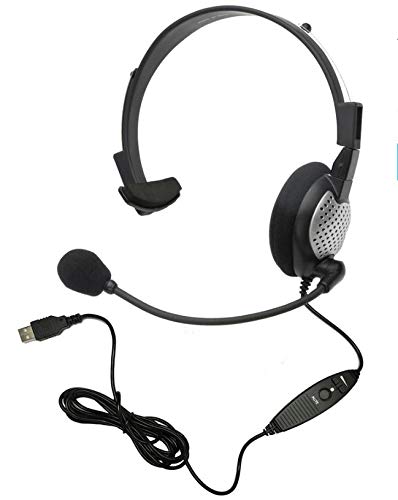
Voice Recognition USB Headset for Dragon (Single-Sided) — The Dragon-focused specialist
Some headsets are discovered by dictation users; this one was built for them and says so in its name. Sold specifically for Dragon NaturallySpeaking in its Home, Premium and Professional editions, it is a single-sided USB headset whose entire brief is recognition accuracy: a noise-cancelling boom microphone that holds the capsule where Dragon likes it, and a wired USB connection that hands the software an uncompressed, uninterrupted signal. There is no ambiguity about what it is for, which in this market is a form of honesty worth rewarding.
The single-sided design suits the dictation rhythm of speaking, glancing at the screen and listening to your surroundings or a playback device with the free ear. Writers who dictate drafts while household life continues, professionals who monitor an office while producing reports, and anyone who dislikes the sealed-in feeling of dual-ear headsets will recognise the appeal. USB plug-and-play keeps setup to a single connection, and the headset asks nothing of Bluetooth menus or battery routines across a long writing day.
Its limits are the specialist’s limits. It is wired, whatever the guide’s title wishes, and this page labels it so. It is a speech instrument, not a listening device, and the single earpiece will not flatter music or a film. The brand is a specialist seller rather than a household name, so buyers trade ecosystem polish for focus. For a Dragon user whose current headset is a meeting cast-off, this is the most direct upgrade in the guide: same desk, same software, a microphone finally aimed at the right target.
The single-sided format also helps dictators who work alongside a second audio source, a transcription foot pedal’s playback, a colleague’s dictation or a meeting running quietly in the room. One ear belongs to the software’s world and one to the room’s, and for report-driven professions that split attention is a workflow rather than a compromise. The headset’s narrowness, criticised in other contexts, is precisely what makes it fluent in this one.
A practical tip belongs with this pick: because it is sold for specific Dragon editions, buyers should confirm their software version against the listing before ordering, and then run the headset through Dragon’s own audio setup the day it arrives rather than trusting defaults. Ten minutes inside the software’s calibration, with the boom in its working position, is the highest-value ten minutes in the whole dictation setup, and this headset’s narrow purpose makes that ritual feel natural rather than fussy.
There is a useful discipline this headset imposes on new Dragon users: because it does one thing, it invites its owner to set up one thing properly. Microphone position checked, training passages read, profile saved. Buyers who arrive from gaming headsets often report that the specialist’s narrowness is what finally made them do the setup their accuracy had been waiting for. In that sense the product’s value includes the behaviour it encourages, a pattern the whole specialist tier shares and the generalist market rarely manages.
- Connection: wired USB
- Style: single-sided headset
- Microphone: noise-cancelling boom
- Positioning: built for Dragon NaturallySpeaking editions, per the listing
Strengths
- Purpose-built for Dragon recognition
- Boom geometry tuned for consistent capture
- Single ear keeps the room audible
Trade-offs
- Wired, despite the category’s wireless hopes
- Speech-first sound, not for entertainment
- Specialist seller, smaller ecosystem
Best for: Dragon users upgrading from a general-purpose headset to a recognition-first tool.
Not suited for: buyers who need one headset for dictation and media alike.
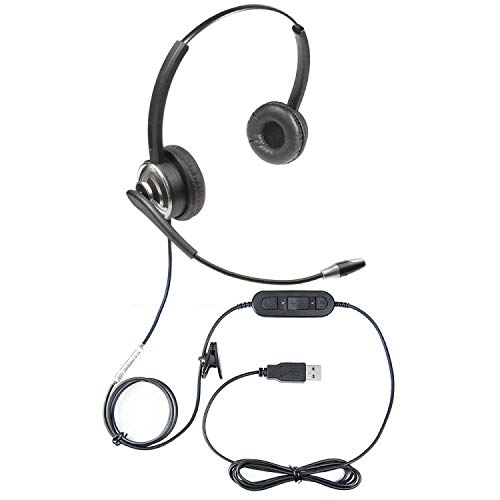
ECS WordCommander Dual Ear USB Headset — The accuracy-first dual
The WordCommander line rests on an insight most headset makers never reach: the weakest link in dictation is often the computer’s own audio circuitry. ECS answers with a premium in-line sound card built into the headset’s cable, so the signal your voice travels through is the headset’s own, identical on a new laptop and a decade-old desktop. For professionals who dictate on several machines, or whose recognition profile must behave the same everywhere, that consistency is not a luxury. It is the difference between a profile that keeps improving and one that keeps starting over.
This dual-ear version wraps that electronics story in the configuration focus-minded dictators prefer. Two earpieces close the room down, playback of your dictated text returns clearly to both ears for the correction pass, and the noise-cancelling boom with its flexible Pro-Flex wire positions precisely and stays where it is put. ECS sells the WordCommander family explicitly for voice-to-text work, and the build reflects a tool expected to be used daily by people who bill for the words it produces.
The costs are a cable, as with every wired specialist here, and a price above the entry tier, justified by the sound card rather than by styling. Dual-ear wear also shuts out the room, which some dictators dislike. Buyers who dictate in one place, on one good computer, may never feel the sound card’s benefit; buyers who move between machines will feel it in the first week, when the recognition accuracy they trained at home simply follows them to the office.
Professionals who dictate in open offices will find the dual-ear model’s isolation does social as well as acoustic work: it signals unavailability more clearly than any door sign, protecting the long dictation sessions that produce a day’s billable text. Interruption management is part of accuracy, because a broken train of thought costs more words than a misheard consonant. The dual WordCommander defends both the signal and the session, which is why focused dictators keep choosing it.
The dual-ear WordCommander’s Pro-Flex wire deserves its sentence. Boom arms on dictation headsets are repositioned constantly, by hands that are thinking about sentences rather than equipment, and a wire-form boom that bends, holds and survives that handling for years is a mechanical kindness. It also means two dictators sharing one headset can each set their own geometry without fighting a memory hinge. Small mechanisms decide long ownerships, and ECS sweats them because its customers notice nothing else as often.
The dual-ear WordCommander’s playback quality matters more than its capture story in one specific hour: the correction pass. Listening back to dictated text through the same headset that captured it, at the same levels, trains a dictator’s ear for what the software heard, and errors start to make sense as signal problems rather than mysteries. Professionals who correct by ear develop a feedback loop that steadily improves their dictation technique itself. A dual-ear specialist is therefore partly a teaching tool, and its price includes lessons no course sells separately.
- Connection: wired USB
- Style: dual-ear headset
- Audio: premium in-line sound card
- Microphone: noise-cancelling boom, Pro-Flex wire
Strengths
- In-line sound card normalises every computer
- Dual-ear focus for dictation and playback
- Boom positions precisely and holds
Trade-offs
- Wired connection only
- Priced above entry dictation headsets
- Dual-ear fit shuts out the room
Best for: professionals dictating across multiple computers who need identical accuracy everywhere.
Not suited for: single-desk users whose one computer already sounds fine.

ECS WordCommander Single Ear USB Headset — The accuracy-first single
Everything the dual-ear WordCommander argues about signal consistency, this single-ear version argues too, and then it changes the wearing philosophy. One earpiece leaves the other ear open to the office, the home or the clinic corridor, for dictators whose work is interrupted by design: the professional who takes questions mid-report, the writer who monitors a household, the practitioner whose door is never really closed. The in-line sound card keeps the recognition signal identical across machines, and the noise-cancelling boom on its Pro-Flex wire keeps the capsule at the distance accuracy prefers.
In practice the single-ear WordCommander suits the dictate-and-listen workflow where playback comes through a speaker or a separate device and the headset’s job is purely capture. It is lighter across a long day than its dual-ear sibling, quicker to lift and replace between interruptions, and kinder to wearers who run warm or wear glasses that fight dual-ear frames. ECS’s dictation focus shows in the tuning: this is a microphone with an earpiece attached, in the correct order of priorities for the job.
The trade-offs mirror its sibling’s, minus the isolation. You give up the sealed focus and the stereo playback of corrections, and you keep the cable and the specialist price. Against the Dragon-focused single-sided pick above, the WordCommander justifies its step up through the sound card and build rather than through a different wearing idea. Dictators choosing between the two single-ear specialists should decide whether cross-machine consistency is a real feature of their week; if it is, this is the one.
The single-ear WordCommander’s lightness compounds across a dictation career in the same way grams compound across a headset career: necks and jaws keep the ledger. Professionals who dictate for decades, and there are many in law, medicine and writing, increasingly choose the lightest adequate tool for every hour they can. This model is the WordCommander family’s answer to that arithmetic, full electronics at half the wearing presence.
Consider this single-ear model the introvert of the family in the best sense: it does its one job, capture, with the family’s full electronics, and declines the dual-ear model’s second job of shutting the world out. Professionals whose dictation is woven through an interactive day, questions answered, doors opened, colleagues consulted, will find its priorities match their calendar with unusual precision. The WordCommander badge promises the signal; the single ear promises the life around the signal stays audible.
The single-ear WordCommander has a quiet advantage in shared professional offices: it signals availability. Colleagues read a dual-ear headset as a closed door and a single-ear one as a person who can be approached, and in practices where the dictator is also the decision-maker, that social signal protects the interruptions that matter while the boom protects the text from the ones that do not. Tool choice is partly choreography, and this configuration choreographs a working day where dictation and leadership alternate without costume changes.
- Connection: wired USB
- Style: single-ear headset
- Audio: premium in-line sound card
- Microphone: noise-cancelling boom, Pro-Flex wire
Strengths
- Sound-card consistency in a single-ear frame
- Light, interruption-friendly wearing style
- Dictation-first microphone tuning
Trade-offs
- No isolation for focus or playback
- Wired only
- Specialist price over generic USB headsets
Best for: dictators who are interrupted by design and work across more than one computer.
Not suited for: writers wanting sealed focus and stereo correction playback.

ECS WordCommander Single Ear USB-C Headset — The USB-C update
This version exists because laptops changed their ports faster than dictation changed its habits. The WordCommander single-ear formula, in-line sound card, noise-cancelling boom on a Pro-Flex wire, dictation-first tuning, arrives here with a USB-C connection, so it plugs straight into the current generation of slim laptops without an adapter living permanently in the cable. For a professional whose new machine offers only USB-C, that is not a cosmetic difference; it is the difference between a headset that travels in the laptop bag and one that needs a dongle chaperone.
Nothing about the accuracy story changes with the connector, and that is the point. The sound card still normalises the signal, the boom still holds its position, and a recognition profile trained on the USB-A version’s behaviour will feel at home here, because ECS kept the audio chain the same and changed only the plug. Single-ear wear keeps the room audible, and the whole headset remains a capture instrument first, built for people whose output is text and whose patience for corrections is professionally limited.
Choose it over its USB-A sibling purely on ports, and over the dual-ear model purely on wearing philosophy; the family is deliberately modular that way. The cable remains a cable, the price remains specialist, and a buyer whose machines are all USB-A gains nothing here. But for the growing population whose dictation desk is a modern ultrabook, this is the WordCommander that simply plugs in, and in a category where consistency is the entire product, simply plugging in is a feature with real value.
There is a final, forward-looking point in this model’s favour: USB-C is where every laptop line is converging, so this is the WordCommander variant least likely to be orphaned by the buyer’s next computer. Dictation setups are long-lived chains of habits and profiles, and choosing the connector with the longest future protects the whole chain. It is the family’s most future-proof member, bought not for what it adds but for what it will never subtract.
There is also a travel argument for the USB-C model that desk-bound comparisons miss. A dictator who works between an office, a home and a laptop on the road carries one cable ecosystem now, and a headset that joins it natively removes the last adapter from the bag. Bags matter to professionals whose office is portable, and every removed adapter is a removed failure at a hotel desk the night before a deadline. The plug is small; the reliability it buys is not.
Fleet and practice buyers should note the USB-C version’s standardisation value as offices refresh their laptops. A dictation setup is a chain, headset, profile, software, habits, and the chain breaks embarrassingly when a new computer’s ports orphan the first link. Stocking the USB-C WordCommander alongside its USB-A sibling keeps the chain intact across a mixed fleet, with identical audio behaviour at both ends. It is an unglamorous product whose entire purpose is preventing a small, stupid interruption to professional work, and it fulfils that purpose completely.
- Connection: wired USB-C
- Style: single-ear headset
- Audio: premium in-line sound card
- Microphone: noise-cancelling boom, Pro-Flex wire
Strengths
- Native USB-C for current laptops
- Same sound-card consistency as the family
- No adapter needed in the laptop bag
Trade-offs
- USB-A machines need the sibling instead
- Wired, like the whole specialist class
- Single-ear only, no dual option at this plug
Best for: dictators whose current laptop speaks USB-C only and who want the WordCommander chain unchanged.
Not suited for: USB-A desktop users, who should buy the original and save the difference.

Koss CS100 Speech Recognition Headset — The budget classic
Every specialist category needs an honest front door, and for dictation the CS100 has been it for years. Koss, a headphone maker with a history far longer than the dictation market, sells the CS100 explicitly as a speech-recognition computer headset, and its proposition is simple: a boom microphone positioned for voice capture, a wired connection, and a price low enough that a curious writer can test whether dictation fits their brain without a professional budget meeting first. Many long careers in spoken text started on exactly this kind of headset.
The CS100’s role in a dictator’s life is usually transitional, and there is no shame in that. It will show you your realistic accuracy, your correction habits and whether you think in sentences or in fragments, at a cost that forgives a no answer. If the answer is yes, the WordCommander family above waits with sound cards and refined booms; if the answer is no, the CS100 retires to calls and classes having done its job. Its sound, judged by this guide’s definition, is competent and consistent, the two adjectives a beginner’s recognition profile most needs.
The limits are plain. The build is basic, the connection belongs to an older generation of computer audio, and heavy daily professional use will outgrow its refinements within a year. It also shares the wired reality of the specialist class. None of that undermines its place here. Dictation is a habit before it is a hardware tier, and the CS100 remains the cheapest honest way to find out whether the habit is yours.
The CS100 also earns its place in a professional’s drawer as the emergency spare. Dictation-dependent workers cannot afford a silent day when a flagship fails, and a known, adequate headset that any computer accepts is the simplest safeguard in this guide against that day. Bought as a beginner’s tool and kept as a professional’s backup, the little Koss may be the hardest-working purchase in the entire category, which is a fitting close for the guide’s most modest pick.
The CS100’s age carries one more advantage: its behaviour is a known quantity across an enormous installed base of dictation users, forums and software guides. A beginner troubleshooting accuracy at midnight will find more accumulated wisdom about this headset than about any flagship in the guide. Being the product everyone has owned is a form of support no manufacturer can buy, and for a first headset, that crowd of predecessors may be worth more than a specification advantage.
The CS100 also serves a second population honestly: the occasional dictator. Not everyone produces text by voice daily; some dictate a monthly report, a semester’s feedback or a season’s correspondence, and for them the specialist tier’s refinements would never repay their cost. A headset that is adequate, labelled for the job and priced for occasional use respects that reality. Koss has kept the CS100 in its line because that customer is real and numerous, and this guide keeps it for the same reason: the right tool at the right duty cycle beats the best tool at the wrong one.
- Connection: wired computer headset
- Style: speech-recognition headset with boom
- Maker: Koss
- Use: entry-level dictation and voice recognition
Strengths
- Most accessible price in the guide
- Purpose-labelled for speech recognition
- Ideal first headset for testing dictation
Trade-offs
- Basic build for daily professional use
- Older-generation connection
- Accuracy ceiling below the specialists
Best for: new dictators who want to test the workflow honestly before investing in the specialist tier.
Not suited for: professionals whose billable output already depends on recognition accuracy.
How do the six dictation picks divide by connection and ear?
| Pick | Form | Connection | Standout trait |
|---|---|---|---|
| Philips SpeechOne | Over-head wireless | Wireless, dock | True wireless professional system |
| Dragon USB Headset | Single-sided | Wired USB | Built and sold for Dragon |
| WordCommander Dual | Dual-ear | Wired USB | In-line sound card, focus fit |
| WordCommander Single | Single-ear | Wired USB | In-line sound card, open ear |
| WordCommander USB-C | Single-ear | Wired USB-C | Sound card for modern laptops |
| Koss CS100 | Headset | Wired | Budget entry classic |
Read the connection column as this guide’s honesty policy in miniature: one wireless professional system and five wired specialists, because that is what the dictation market actually makes. The WordCommander trio then divides by ear and port, the Dragon headset by software allegiance, and the Koss by budget. A buyer who understands those three axes, connection, configuration and commitment, can choose from this table alone and choose well.
How should you set up a dictation headset for the best recognition accuracy?
Position before software. Put the boom so the microphone sits just off the corner of your mouth, close enough that a quiet speaking voice registers strongly, far enough that breath and plosives miss the capsule. Then never move it casually again: recognition profiles learn a voice at a distance and a level, and a boom that wanders teaches the software a moving target. The Pro-Flex booms and specialist designs in this guide exist to make that consistency physical rather than remembered.
Train in the room you will work in, at the volume you will actually use, which for most people is a calm conversational level rather than a stage voice. Run the software’s training passages with the headset in its working position, correct mistakes properly during the first weeks instead of deleting and retyping, and keep the same headset on the same computer where possible, since the WordCommander’s sound-card trick is popular precisely because consistency compounds. Accuracy is a habit the software and the hardware build together.
Finally, manage the session like a speaker, not a typist. Dictate in complete thoughts, speak punctuation deliberately until it becomes automatic, and take the correction pass with fresh ears rather than mid-flow. The headsets in this guide will deliver your voice faithfully; the remaining accuracy lives in the unglamorous disciplines of position, consistency and patience, and no purchase can substitute for any of them.
What should a dictator do with an old headset when upgrading?
Keep it, if it still works, and demote it rather than discarding it. A previous headset becomes the travel spare, the second-desk option or the loaner that converts a colleague, and because recognition profiles are partly headset-specific, it also remains the one device your oldest, most-trained profile knows perfectly. Dictation professionals accumulate headsets the way writers accumulate notebooks, each one holding a stage of the practice. The upgrade path in this guide is therefore not a replacement schedule; it is a small fleet forming, with the Koss at one end as the eternal spare and the flagship at the other as the daily instrument.
The only true retirement case is a boom that no longer holds its position, because a wandering microphone quietly taxes every sentence it captures. Retire for mechanics, demote for everything else, and the economics of the specialist tier soften considerably: these are tools bought for years and cascaded through roles, not gadgets replaced on a cycle.
How should a new dictator build the first month around a new headset?
Week one belongs to setup and training: boom position fixed, software profile created in the working room, vocabulary added before it is needed. Dictate low-stakes text, correspondence and notes, and correct every error properly, because the profile learns from corrections and starves on deletions. Expect accuracy to climb noticeably across this week with any pick in this guide; that climb is the training working, and abandoning a headset during it mistakes the process for the product.
Weeks two to four belong to volume and honesty. Move real work onto dictation gradually, keep one familiar task on the keyboard as a control, and count corrections per page once a week rather than trusting impressions. By the end of the month the numbers will say which tier of this guide your workflow justifies, whether the entry classic is enough or the sound-card specialists have earned their upgrade. Dictation bought on evidence stays bought; dictation bought on hope gets returned, and the month’s discipline is what separates the two.
What else, besides the headset, decides a dictator’s accuracy?
The room is the silent second headset. A quiet corner with soft surfaces, a door that closes and a fan that can be paused will lift any pick in this guide by more than a tier of hardware. Dictators who cannot change rooms can change hours, dictating before the household or office reaches full volume, and many professionals guard an early quiet hour for exactly the drafts that matter most. The software notices what the calendar already knows: voices are clearest when the world is not competing with them.
Vocabulary is the third factor, and the most trainable. Recognition software improves fastest when its owner teaches it the names, terms and phrases their work actually contains, rather than correcting the same surname four hundred times a year. An afternoon spent adding your professional vocabulary to the profile pays accuracy dividends on every subsequent page. The headsets above deliver the signal; the room protects it; the vocabulary aims it. Dictation excellence is that tripod, and no single purchase, however professional, replaces the other two legs.
What mistakes do dictation buyers keep making?
The defining mistake is shopping by music standards. A headset praised for bass and soundstage may deliver a voice signal that is coloured, distant or processed for pleasantness, and recognition software punishes all three. In this category, sounding means clarity to a machine listener. Judge a dictation headset by the corrections it saves you in a week of real work, and let your music headphones keep their separate, honourable job.
Second, buyers assume wireless is the premium choice and wired is the compromise. For dictation the specialist market runs the other way: wired USB dominates because it protects the signal, and the one wireless pick here earns its place through professional system design, not through the mere absence of a cable. Choosing a consumer wireless headset for serious dictation, because the word wireless felt like an upgrade, is how accuracy budgets get spent on the wrong feature.
Third, people change everything at once: new headset, new computer, new software version, new room. Recognition accuracy is a trained relationship, and changing every variable destroys the baseline that tells you what improved. Change one thing, dictate for a week, and measure corrections honestly before changing the next. The WordCommander sound card exists to remove one of those variables permanently; your habits should remove the others.
Fourth, beginners skip training and blame the microphone. Even the SpeechOne cannot rescue a profile that was never taught its owner’s voice, accent and vocabulary. The first hours with any pick in this guide belong to the software’s training and to your own practice with spoken punctuation. Hardware sets the ceiling; training decides how close to it you work.
Final Recommendation
For most dictators, the recommendation is the ECS WordCommander that matches your ports and your ears: dual-ear USB for focus, single-ear USB for awareness, single-ear USB-C for a modern laptop. The family’s in-line sound card is the most practical accuracy technology in this guide, because it makes your voice a constant in a world of variable computers. Dragon devotees who want a headset sold for their exact software should take the Dragon-focused pick and enjoy its directness.
The Philips SpeechOne stands alone for the mobile professional, the one dictator here who never has to choose between wireless and serious, at a professional price that seated writers should decline with thanks. The Koss CS100 remains the right first step for the curious. Every pick was judged by the only definition of sounding that dictation recognises: how faithfully your voice reaches the software, and how few corrections stand between your speech and your text.
Set the boom once, train the profile properly, and let the headset disappear, because in dictation the best-sounding voice is the one the software never makes you think about twice.
Frequently Asked Questions
What does sounding mean for a dictation headset?
It means the clarity and consistency of your voice as speech-recognition software receives it, not musical quality. A great dictation headset keeps your voice close, steady and separated from the room, so the recogniser makes few mistakes and you make few corrections. Bass, soundstage and entertainment tuning are irrelevant here, and can even work against accuracy.
Is wireless or wired better for dictation accuracy?
The specialist market answers wired, because a USB connection avoids Bluetooth compression, battery variation and pairing surprises, and consistency is what recognition profiles feed on. The exception is a purpose-built professional wireless system like the Philips SpeechOne, designed for speech from the start. Consumer wireless headsets are the risky middle: wireless convenience without dictation engineering.
What is an in-line sound card, and why does it matter?
It is audio processing built into the headset’s cable, as on the WordCommander line, so your voice reaches the computer through the headset’s own electronics rather than each machine’s built-in audio. Different computers stop sounding different, and a recognition profile trained on one machine behaves the same on another. For multi-computer professionals, that consistency is a genuine accuracy feature.
Can I use a normal meeting headset for Dragon instead?
You can, and many people start that way. The limits appear as correction counts: a meeting headset’s microphone placement, tuning and audio path are optimised for sounding pleasant to people, not for feeding a recogniser a stable signal. Specialist headsets exist because professionals measured the difference in corrections per page and decided it was worth a dedicated tool.
Should I choose single-ear or dual-ear for dictation?
Choose by workflow. Single-ear models suit dictators who are interrupted, monitor a room or listen to playback elsewhere. Dual-ear models suit those who want focus and clear stereo playback during the correction pass. Accuracy itself is similar when the boom and electronics are shared, as the WordCommander pair shows, so let your environment rather than the spec sheet decide.
Do these headsets make medical or accessibility claims?
No, and this guide makes none on their behalf. These are productivity tools for producing text by voice, used by writers, professionals and anyone who prefers speaking to typing. Any question about a medical condition or a formal accessibility requirement belongs with a clinician or an accessibility specialist, not with a headset buying guide.
Related Guides
Dictation sits beside several other voice-first categories; the guides below follow the microphone into meeting platforms, single-ear phone work and the road.
- Best mono Bluetooth phone headsets for voice-first work
- Best Zoom headsets for clear speech on video calls
- Best Microsoft Teams headsets with certified call control


