What's inside
- Key Takeaways
- Quick Picks
- How We Chose These Picks
- Comparison
- What Does 4K PRO-UHD Mean, and How Is It Different From 4K UHD?
- How Bright Should an Affordable 4K Projector Be?
- Which of These Projectors Actually Suits Gaming?
- How Do You Place a 4K Projector Without a Ceiling Mount?
- What Should You Budget Beyond the Projector Itself?
- Should You Buy a Screen, or Project Onto a Wall First?
- How Does HDR Behave on Projectors in This Price Class?
- What Changes When the Whole Household Shares One Projector?
- How Long Will These Projectors Stay Satisfying?
- What Should a First-Time Buyer Check on the Listing Page?
- How Do You Judge a Projector During Its First Weekend?
- Common Mistakes
- Final Recommendation
- Frequently Asked Questions
- Related Guides
As an Amazon Associate I earn from qualifying purchases. This post may contain affiliate links at no extra cost to you.
widgetverdict.com is reader-supported. When you buy through links on our site, we may earn an affiliate commission.
Shoppers hunting the best affordable 4k projectors quickly discover that affordable means something relative inside this class: relative to flagship home cinema machines that cost several times more, not relative to a bargain television. Every model below delivers a 4K-class picture from a recognised maker, yet the six reach that picture by very different roads — laser and lamp light, pixel-shifting 3LCD panels and a native UHD claim, streaming built in or deliberately left out. Reading those roads honestly matters more than chasing the sharpest badge on a box.
A naming lesson sits at the centre of this guide. Epson prints 4K PRO-UHD on its three entries here, and that phrase describes pixel shifting: Full HD chips moved rapidly so the screen shows a 4K-class image. Optoma prints 4K UHD on the UHZ36, a different construction carrying a different claim. Neither wording makes the other machine dishonest, but a buyer who treats the two labels as identical will misunderstand what each company is actually selling, so each review below names the system its own title names.
Linked titles lead to the Amazon listings, where you can check price on Amazon and read complete seller specifications. This guide states only facts printed in those listing titles: brightness where a title gives it, refresh and lag figures where a title gives them, silence where a title stays silent. That discipline keeps the comparisons below grounded in promises a seller has actually made, rather than in numbers borrowed from a sibling model or a review of a different year’s machine.
Six machines also cannot be ranked on one axis without lying to somebody. A games room, a cinema room and a family room will each crown a different winner from this same list, so the reviews below argue from rooms and routines outward to specifications, never the reverse. Read for the machine whose compromises land where your household will never notice them.
There is also a quieter division running through the six: three carry their streaming brains inside the cabinet or lean toward games, while others present themselves as pure displays awaiting instruction. That division decides daily convenience more than any resolution label, because a projector used by the whole household must start easily for the least technical person in it, every single time, without a phone call to whoever installed it.
Prices inside this class move with seasons and stock, which is another reason this guide argues from construction and role rather than from any figure printed today. The machine that suits your room this month will still suit it when a sale ends, and a ranking built on roles survives the calendar in a way that a ranking built on discounts never can.
Key Takeaways
- Affordable in the 4K class means below the flagship tier, and the Epson LS11000 is this guide’s deliberate step-up anchor rather than a bargain pick.
- Epson’s 4K PRO-UHD wording signals pixel shifting from 3LCD chips, while Optoma’s 4K UHD wording on the UHZ36 signals a different route to a UHD image.
- The XGIMI Horizon 20 carries the fullest gaming and streaming title here: 3200 ISO lumens, Google TV with licensed Netflix, Dolby Vision and a stated 1ms input lag.
- ViewSonic’s LX700-4K pairs a stated 3500 lumens with 240Hz and 4.2ms lag language aimed squarely at Xbox players.
- The Epson Home Cinema 2350 is the only pick whose title builds streaming in, via Android TV, alongside a stated 2800 lumens.
- Two picks use laser light — the Optoma UHZ36 and the step-up LS11000 — so lamp replacement disappears from their ownership maths entirely.
Quick Picks
| Pick | Badge | Why it earns its place |
|---|---|---|
| Optoma UHZ36 4K Laser Projector | Laser light, UHD claim, no streaming baggage | A 4K UHD laser home theatre projector in black, for buyers who want lamp-free light and already own a source they trust. |
| Epson Home Cinema 3800 4K PRO-UHD | The pixel-shift film specialist | A 3-chip 3LCD projector whose title pairs 4K PRO-UHD with HDR technology, aimed at film-led rooms. |
| Epson Home Cinema 2350 4K PRO-UHD | Streaming built into a 4K-class Epson | Android TV inside, a stated 2800 lumens of colour and white brightness, HDR10 and HLG, plus a 10 W speaker and Bluetooth. |
| XGIMI Horizon 20 4K Triple Laser | The feature-stacked gaming and streaming flagship | RGB triple laser, 3200 ISO lumens, Google TV with licensed Netflix, Dolby Vision, optical zoom and lens shift, 240Hz and 1ms lag claims. |
| Epson Home Cinema LS11000 4K Laser | The premium step-up anchor | Laser light, 2500 lumens of colour and white brightness, HDR10+, a stated 1.2 million to one dynamic contrast and motorised lens shift and focus. |
| ViewSonic LX700-4K Laser Gaming | The Xbox-minded laser gamer | A stated 3500 lumens, 240Hz, 4.2ms input lag, dual HDMI, optical zoom and keystone, with SuperColor and HDR in the title. |
How We Chose These Picks
We bounded this class by role first. A candidate had to present itself as a home theatre or home projector in its own listing title, carry a 4K-class claim in that title, and come from a maker with a recognisable projector line behind it. Anonymous boxes quoting heroic brightness beside a 4K logo failed that test, because a projector is a five-year appliance whose fan, filter and light engine will eventually need a company still answering emails.
Light source earned its own scoring column. Laser models remove lamp purchases from the ownership ledger and switch on without a warm-up ritual, while lamp models ask less commitment on day one and repay it with a known future expense. Neither answer won automatically; we scored whether each listing made its light source plain, since a buyer comparing total cost across five years deserves that fact stated rather than excavated.
Gaming figures were credited only where a title printed them. Refresh rates and input lag numbers appear in the XGIMI and ViewSonic titles in plain figures, so those two machines carry the gaming argument in this guide. Models whose titles stay silent on lag were judged as film machines, and their reviews say so, because inventing a lag figure for a quiet title would mislead exactly the buyers most sensitive to that number.
Placement flexibility closed the scoring. Optical zoom and lens shift appear in several titles below, and they matter because affordable 4K projectors usually land on media units and side tables rather than surveyed ceiling mounts. A machine that can square and size its picture from an imperfect perch saves its owner a weekend of brackets, ladders and compromise, so titles naming those tools earned credit that raw brightness alone could not buy.
Finally, we weighted honesty of specification as a virtue in itself. Titles that print figures — lumens, lag, contrast, speaker wattage — expose themselves to checking, and this guide rewards that exposure with trust. Titles that stay silent were not punished with invented numbers; they were judged on role and reputation instead, and their spec boxes record the silence in plain words so no reader mistakes an absence for an oversight.
We also considered who answers when something goes wrong. Established projector lines carry manuals that assume real rooms, firmware that arrives when formats shift, and service channels that recognise their own model numbers. That infrastructure is invisible in a specification table, yet it decides whether a fault becomes a replacement part or a retired machine, so it weighed on every borderline call in this selection.
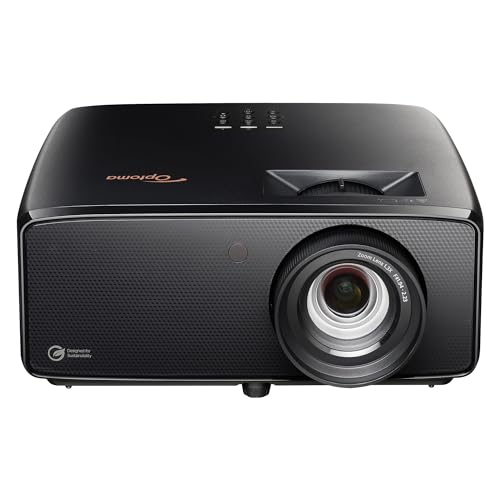
Optoma UHZ36 4K Laser Projector — Laser light, UHD claim, no streaming baggage
The UHZ36 opens this guide because its title makes the cleanest promise of the six: 4K UHD, laser light, HDR, home theatre intent. Optoma’s wording claims a UHD picture rather than a shifted one, and that distinction is the first thing a film household should register. On a large screen, fine detail in crowd scenes, knitwear and distant architecture is the entire reason for entering the 4K class, and this machine stakes its identity on delivering that detail directly.
Laser light changes the ownership rhythm around the picture. There is no lamp ageing toward a dim final season and no replacement part waiting in a drawer; the projector simply switches on, shows its film, and switches off. Households that project several nights a week feel that difference most, because lamp hours accumulate quietly during sport, series episodes and children’s matinees until a lamp machine’s running cost stops looking theoretical.
HDR appears in the title without a named format beside it, so this review credits the UHZ36 with HDR support and nothing narrower. Buyers whose libraries lean on a specific HDR variant should confirm format handling on the listing itself before ordering. What the title does establish is intent: this is a dark-room film machine, sold in black, with no streaming platform advertised and no speaker figure quoted, which reads as a deliberate display-first design.
That display-first stance shapes the ideal setup. Pair the UHZ36 with the streamer, console or disc player already in the rack, route sound to a soundbar or receiver, and the projector’s silence about apps stops mattering entirely. Buyers wanting one box that streams by itself should read the Epson 2350 review below instead. Buyers wanting a permanent picture engine at the heart of a settled room will recognise this Optoma’s priorities as their own.
Ownership of the UHZ36 settles into a calm pattern once installation ends. Laser light output stays consistent across seasons, so a picture balanced in winter still looks balanced two summers later, and brightness settings chosen for a favourite screen rarely need revisiting. Owners migrating from lamp machines often remark on the missing ritual: no hour counter anxiety, no dim final months, no spare lamp ageing in a cupboard beside the batteries.
Sound planning matters more here than with the streaming picks, because the title promises a picture engine and leaves audio to the room. A soundbar beneath the screen restores the scale that a wall of image demands, and dialogue anchored near the picture beats louder sound arriving from behind the audience. Budget the bar alongside the projector and the UHZ36’s display-first design stops reading as an omission.
- Resolution claim: 4K UHD, per listing title
- Light source: laser
- HDR: stated in listing title
- Streaming platform: not stated in listing title
- Brightness figure: not stated in listing title
Strengths
- Laser light removes lamp replacements from ownership
- 4K UHD wording rather than a pixel-shift label
- Display-first design suits an existing source rack
Trade-offs
- No streaming platform named in its title
- Brightness figure absent from its title
- HDR format left unspecified in its title
Best for: a settled film room with its own streamer, player and sound already chosen.
Not suited for: households wanting one self-contained box that streams without extra hardware.

Epson Home Cinema 3800 4K PRO-UHD — The pixel-shift film specialist
Epson’s Home Cinema 3800 carries the PRO-UHD label, and this guide treats that label with respect and precision at once. Pixel shifting moves its 3LCD chips so rapidly that the projected image holds far more detail than a native 1080p picture, and at cinema sizes the gain over plain Full HD is plain to see. What it is not is a native 4K chip, and buyers comparing it against the Optoma above should hold that construction difference clearly in mind.
The 3-chip 3LCD engine is the second half of the argument. Three chips handle colour simultaneously, so bright scenes keep their saturation instead of trading colour against white brightness. Costume dramas, animated films and televised sport all lean on that behaviour: a scarlet dress, a green pitch and a blue evening sky can share one frame without any of them surrendering intensity to the others.
HDR technology is stated in the title, again without a named variant, so the honest credit is HDR support from a maker whose tone handling in this line is its calling card. Shadow detail in night scenes and highlight control in bright exteriors are where HDR earns its keep on a projector, whose contrast ceiling sits below a good television’s; careful mapping matters more than peak brightness claims at this level.
Placement and routine suit a room that hosts film nights on a schedule. The 3800 asks for a settled position and repays it with the most cinema-minded picture among the three Epsons here. It carries no streaming platform in its title and no gaming figures, so its buyer is a film watcher first. Households dividing evenings between films and fast games should weigh the ViewSonic and XGIMI below before settling here.
A 3800 rewards viewers who sit closer than television habits suggest. Pixel shifting holds its detail at seating distances where plain Full HD softens, so a household can choose a larger screen without retreating across the room. That freedom changes furniture decisions: the sofa stays where conversation wants it, and the screen grows to meet the viewers instead of the viewers retreating to meet the screen.
Colour consistency across a long evening is the quieter gift. Scenes lit by candles, stadium floods and noon sun follow one another in a sports-and-film household, and the 3LCD engine keeps each register believable without mode hopping. Owners tend to set one good picture mode, confirm the HDR behaviour on a demanding scene, and then forget the menus for months, which is precisely the relationship a film projector should offer.
- Resolution claim: 4K PRO-UHD (pixel-shifted)
- Technology: 3-chip 3LCD
- HDR: HDR technology stated in listing title
- Streaming platform: not stated in listing title
- Brightness figure: not stated in listing title
Strengths
- Pixel-shifted detail well beyond plain 1080p
- 3LCD colour holds saturation in bright scenes
- Cinema-first tuning from Epson’s home line
Trade-offs
- PRO-UHD is shifting, not a native 4K chip
- No gaming figures printed in its title
- No built-in streaming named in its title
Best for: film-led households that watch on a schedule and value colour-rich big pictures.
Not suited for: competitive players who shop by refresh rate and lag figures first.

Epson Home Cinema 2350 4K PRO-UHD — Streaming built into a 4K-class Epson
The Home Cinema 2350 answers a different household question from its 3800 sibling: what if the projector simply handled streaming itself? Android TV is built in per its title, so films and series start from the projector’s own interface without a stick, box or laptop joining the setup. For rooms where the projector travels between a media unit and a garden wall, that self-containment simplifies every single session from unpacking to final credits.
Its title is also the most forthcoming of the Epson trio about brightness, stating 2800 lumens of both colour and white brightness. Stating both figures matters, because colour brightness is the number that predicts whether a sunlit cartoon or a floodlit match keeps its punch. At 2800 lumens the 2350 is equipped for rooms with curtains rather than blackout discipline, provided screen size stays sensible and expectations about daytime contrast stay honest.
HDR10 and HLG are both named, which sharpens the streaming case: broadcast and streamed HDR content arrives in those formats, and the title also claims low latency, a pairing that suits casual gaming alongside viewing. A 10 W speaker and Bluetooth are printed as well, so sound can start from the machine itself and move to a Bluetooth speaker when the room wants more weight. Few titles in this guide itemise their conveniences so completely.
The compromises follow from that convenience. A built-in platform ages on a software schedule the owner does not control, while the display-first picks above will outlive several generations of streaming sticks. The 2350’s buyer accepts that trade knowingly, gaining a projector that a guest can operate without instructions. Families wanting the fewest possible boxes between an idea and a film will find this Epson’s arithmetic persuasive.
Travel exposes the 2350’s design logic most clearly. One machine, one cable and a wall produce a film night at a relative’s house, because the streaming, the speaker and the picture all live in the same carry case. Bluetooth pairing to a portable speaker upgrades garden sound in minutes. Few projectors in this class forgive improvised venues so completely, and households that lend their projector out will value that forgiveness weekly.
Parents should note how the built-in platform changes supervision. Android TV profiles and familiar app layouts mean children meet the same interface they already know from the family television, rather than a tethered laptop’s desktop. The projector stops being father’s fragile equipment and becomes household infrastructure, which is the moment a purchase like this starts repaying its cost in unplanned, ordinary use.
- Resolution claim: 4K PRO-UHD (pixel-shifted)
- Technology: 3-chip 3LCD
- Brightness: 2800 lumens colour and white, per title
- Streaming: Android TV built in
- HDR: HDR10 and HLG named in title
- Sound: 10 W speaker, Bluetooth stated
Strengths
- Android TV removes the separate streamer
- Both colour and white brightness stated at 2800 lumens
- Bluetooth plus a 10 W speaker cover sound flexibly
Trade-offs
- Built-in platform ages on a software schedule
- Pixel-shifted PRO-UHD rather than native UHD
- Low latency claimed without a printed figure
Best for: families wanting a self-contained projector that streams, speaks and pairs over Bluetooth.
Not suited for: purists who prefer a dumb display fed by sources they replace themselves.

XGIMI Horizon 20 4K Triple Laser — The feature-stacked gaming and streaming flagship
No title in this guide itemises ambition like the Horizon 20’s. RGB triple laser light, 3200 ISO lumens, a picture up to 300 inches, optical zoom and lens shift, IMAX Enhanced and Dolby Vision, Google TV with licensed Netflix, then a gaming coda of 240Hz and 1ms input lag. A buyer should read that list slowly, because it describes a machine attempting to be the streaming hub, the cinema projector and the gaming display of a household simultaneously.
Licensed Netflix inside Google TV deserves emphasis, since unofficial app routes on projectors often deliver reduced resolution or awkward remotes. A licensed badge in the title signals the streaming experience is sanctioned and complete, which matters for a machine pitched as the room’s main screen. Dolby Vision and IMAX Enhanced extend that pitch toward enthusiasts who collect films in premium formats and want a projector that acknowledges them by name.
The gaming figures are stated rather than hinted: 240Hz and 1ms input lag. Buyers should still read the listing closely for the resolution at which those figures apply, because titles compress conditions; but the presence of printed numbers separates this XGIMI from rivals whose gaming suitability is left as an implication. For a household where a console shares the big screen with film nights, that explicitness is genuinely useful evidence.
Optical zoom and lens shift complete the placement story, letting the picture be sized and squared from where furniture allows the machine to sit. The Horizon 20’s risk is breadth itself: a projector doing everything must be judged feature by feature against specialists, and its price of admission within this class reflects the stacking. Buyers who will actually use streaming, gaming and premium HDR formats weekly get value from the stack; film-only households may be paying for talents that stay dormant.
Heat, fan behaviour and sheer presence deserve a sentence for a machine this ambitious. A triple laser engine driving a 300-inch capability belongs on a substantial unit or mount, with clearance for airflow on every side the manual demands. Placed properly, the Horizon 20 becomes the room’s single display for everything, and households consolidating around one screen will accept its footprint as the cost of consolidation.
The licensed Netflix point returns at resale and hand-me-down time. Streaming completeness is the first thing relatives ask about when a projector changes homes, and a sanctioned Google TV installation answers without caveats or sideloading folklore. Machines whose app stories need footnotes age awkwardly; this one’s headline features remain its headline features years later, which protects the value of choosing the stacked model.
- Resolution claim: 4K, per listing title
- Light source: RGB triple laser
- Brightness: 3200 ISO lumens, per title
- Streaming: Google TV with licensed Netflix
- HDR: Dolby Vision and IMAX Enhanced named
- Gaming: 240Hz and 1ms input lag stated
- Maximum image: 300 inches stated
Strengths
- Licensed Netflix inside Google TV
- Printed gaming figures: 240Hz, 1ms lag
- Optical zoom and lens shift ease placement
Trade-offs
- Breadth means paying for features some homes never open
- Gaming figures’ conditions need listing confirmation
- Triple-laser flagship positioning within this class
Best for: mixed households splitting the big screen between films, streaming series and fast console games.
Not suited for: single-purpose film rooms that would leave its gaming and app talents idle.

Epson Home Cinema LS11000 4K Laser — The premium step-up anchor
The LS11000 sits in this guide under a clear label: it is the step-up pick, the machine showing what the next tier buys, and calling it a bargain would insult the reader. Its title reads like an enthusiast’s checklist — laser light, 4K PRO-UHD from 3-chip 3LCD, HDR10+, 2500 lumens of colour and white brightness, a dynamic contrast figure of 1.2 million to one, motorised lens shift and focus, and a 120Hz figure. Each item answers a limitation that owners of lesser projectors eventually notice.
Motorised lens adjustments deserve their own paragraph, because they transform installation from a ladder exercise into a remote-control task. Focus and shift dialled in from the sofa let an owner perfect geometry after the mount is fixed, and revisit it when a screen is upgraded. In a dedicated room where the projector hangs beyond easy reach, that convenience stops being a luxury and becomes the difference between a picture that is nearly right and one that is exactly right.
The stated dynamic contrast figure speaks to the LS11000’s dark-room ambitions. Basements and cinema rooms reward contrast more than raw brightness, and a laser engine that can modulate its light scene by scene is built for precisely those spaces. HDR10+ adds dynamic metadata handling for supported content. Combined with laser light’s freedom from lamp swaps, the package targets owners who install once and then simply watch for years.
Why include a step-up machine in an affordable guide at all? Because some readers arrive with a flagship budget wearing an affordable search term, and steering them to the honest ceiling of this class serves them better than pretending the class tops out lower. Everyone else should read the LS11000 as a measuring stick: it defines which features the other five surrender, and its presence makes those surrenders visible rather than hidden.
Installation day with the LS11000 feels different from the other five. The mount goes up, the machine hangs beyond comfortable reach, and then the remote takes over: focus sharpening degree by degree, the image shifting into the screen’s borders without a ladder appearing. Owners who have aligned lesser projectors by hand recognise immediately what the motorised lens money bought, and they tend to mention it before they mention the picture.
Longevity planning suits this pick’s buyer. Laser light, a sealed-feeling enthusiast build and Epson’s home cinema lineage suggest a decade-shaped horizon, across which screens, sources and seating may all change while the projector remains. The 120Hz figure gives gaming a doorway without redefining the machine, so a household whose children grow into consoles finds the LS11000 already prepared for the room’s second life.
- Resolution claim: 4K PRO-UHD (pixel-shifted)
- Light source: laser
- Technology: 3-chip 3LCD
- Brightness: 2500 lumens colour and white, per title
- Contrast: 1.2 million to one dynamic, per title
- Lens: motorised shift and focus stated
- Refresh: 120Hz stated in title
Strengths
- Motorised lens shift and focus from the sofa
- Laser light with a stated high dynamic contrast
- HDR10+ named explicitly in its title
Trade-offs
- Premium step-up pricing, not a bargain
- Pixel-shifted PRO-UHD construction
- Over-specified for casual twice-a-month viewing
Best for: dedicated-room owners installing once and expecting years of film-first service.
Not suited for: budget-led buyers, for whom this machine is a measuring stick rather than a candidate.

ViewSonic LX700-4K Laser Gaming — The Xbox-minded laser gamer
ViewSonic aims the LX700-4K at a player before a film collector. Its title leads with 3500 lumens and a 4K UHD laser claim, then spends its remaining words on gaming evidence: 240Hz, Xbox in the headline, dual HDMI, and 4.2ms input lag. That ordering tells a buyer exactly which evenings this machine was designed around — console sessions on a wall-sized screen, with films welcomed but not consulted during the design meeting.
Printed lag and refresh figures give gamers something testable to hold. A 4.2ms input lag claim, read alongside the listing for its operating conditions, places responsiveness at the centre of the pitch, while 240Hz signals headroom for high-frame-rate play where a source supports it. Buyers should confirm on the listing which resolution those figures attach to, a standard caution with compressed titles, but the willingness to print numbers at all distinguishes this ViewSonic from vaguer rivals.
Brightness at a stated 3500 lumens suits the social reality of gaming rooms, where lights stay partly up, friends drift in and out, and nobody wants tournament focus conditions for a kart race. Laser light keeps that brightness consistent across years of heavy use without lamp budgeting. Optical zoom and keystone correction help the machine settle onto a shelf or mount without demanding a surveyed installation.
SuperColor and HDR round out a title that still remembers films exist. The LX700-4K will host movie nights happily, yet its identity stays gaming-led, and its lack of a named streaming platform means a console or stick supplies the apps. For a household whose big screen exists mainly so four players can read a split screen from the sofa, that is not a compromise at all; it is the correct allocation of engineering money.
Group gaming exposes why the LX700-4K’s brightness figure matters socially. Four players reading a bright split screen under half-raised lights need punch more than they need perfect black, and a stated 3500 lumens aims exactly at that scene. Single-player horror in a darkened room still works, but the machine’s centre of gravity stays with the sofa full of friends and the console that never leaves the unit.
Dual HDMI quietly solves the two-console household. A PlayStation and an Xbox, or a console and a PC, can both stay connected, ending the cable swapping that slowly loosens ports and tempers. Combined with optical zoom for shelf placement, the ViewSonic reads as designed by people who watched how games rooms actually accumulate hardware, rather than how brochures imagine they look.
- Resolution claim: 4K UHD, per listing title
- Light source: laser
- Brightness: 3500 lumens, per title
- Gaming: 240Hz and 4.2ms input lag stated
- Inputs: dual HDMI stated
- Lens tools: optical zoom and keystone stated
Strengths
- Gaming figures printed plainly in its title
- Stated 3500 lumens suits lights-up play
- Laser light keeps heavy-use brightness steady
Trade-offs
- No streaming platform named in its title
- Gaming figures’ conditions need listing confirmation
- Film-first buyers get tools they may underuse
Best for: console-led households wanting a wall-sized, lights-up gaming screen with film ability in reserve.
Not suited for: streaming-first families expecting apps inside the projector itself.
Comparison
| Pick | Headline facts from its listing title | Room it suits first |
|---|---|---|
| Optoma UHZ36 4K Laser Projector | 4K UHD, laser light source, HDR stated | A dedicated dark film room |
| Epson Home Cinema 3800 4K PRO-UHD | 4K PRO-UHD pixel shifting, 3-chip 3LCD, HDR technology | A living room arranged around film nights |
| Epson Home Cinema 2350 4K PRO-UHD | 4K PRO-UHD, Android TV, 2800 lumens, HDR10/HLG, 10 W speaker | A family room with curtains, not blackout blinds |
| XGIMI Horizon 20 4K Triple Laser | 4K RGB triple laser, 3200 ISO lumens, Dolby Vision, 240Hz, 1ms lag | A main living space serving every kind of viewing |
| Epson Home Cinema LS11000 4K Laser | 4K PRO-UHD laser, 2500 lumens, HDR10+, motorised lens, 120Hz | A dedicated cinema room or treated basement |
| ViewSonic LX700-4K Laser Gaming | 4K UHD laser, 3500 lumens, 240Hz, 4.2ms lag, dual HDMI | A games room where lights rarely go fully down |
What Does 4K PRO-UHD Mean, and How Is It Different From 4K UHD?
Epson’s PRO-UHD machines shift their Full HD 3LCD chips at speed, doubling the detail the eye receives and producing a picture that sits far closer to 4K than to 1080p at cinema sizes. The construction is honest engineering with a long track record, and side by side with a plain Full HD projector the gain in texture is obvious. The label nonetheless describes a technique, not a native 4K panel, and precision about that costs the buyer nothing.
Optoma’s UHD wording on the UHZ36 and ViewSonic’s on the LX700-4K make the plainer claim. A shopper comparing titles should therefore ask a construction question before a sharpness question: which system built this image? At typical seating distances on screens around one hundred inches, both approaches satisfy most viewers completely, which is why this guide weighs light source, placement tools and gaming figures alongside the resolution label rather than beneath it.
How Bright Should an Affordable 4K Projector Be?
Titles in this guide state brightness in two dialects: plain lumens on the Epsons and ViewSonic, ISO lumens on the XGIMI. Treat cross-dialect comparisons cautiously and lean on the room instead. A curtained living room hosting evening films asks far less of a projector than a games room with lamps burning, and screen size multiplies the demand with every extra foot of diagonal.
Where a title stays silent, as the Optoma and the 3800 do, resist filling the gap from memory of a sibling model. Check the listing, note the figure the seller commits to, and compare like with like. Brightness also interacts with HDR: a projector that maps HDR carefully at moderate brightness will please film watchers more than a brighter machine that flattens shadow detail into grey, which is why this guide never ranks these six by lumens alone.
Which of These Projectors Actually Suits Gaming?
Start with the printed evidence. The XGIMI Horizon 20 states 240Hz and 1ms input lag; the ViewSonic LX700-4K states 240Hz and 4.2ms, names Xbox in its headline and fits dual HDMI. The Epson 2350 claims low latency without a figure, and the LS11000 prints a 120Hz figure within a cinema-led title. The 3800 and UHZ36 make no gaming claims at all, and their reviews judge them as film machines accordingly.
Then confirm conditions on the listing, because refresh and lag figures attach to particular resolutions and modes. A player chasing high-frame-rate competitive titles cares about the figure at the resolution the console will actually output. Casual and co-operative players, meanwhile, will find even the film-led picks perfectly responsive for the games most households play together, provided expectations are set by genre rather than by leaderboard ambitions.
How Do You Place a 4K Projector Without a Ceiling Mount?
Begin with the screen wall and work backwards: measure the distance available, then check whether the machine’s zoom range can fill your target size from that perch. Optical zoom, printed in the XGIMI and ViewSonic titles, buys flexibility that digital resizing cannot, because it changes the optics rather than discarding pixels. Lens shift, motorised on the LS11000 and stated on the Horizon 20, squares the image without tilting the machine into keystone territory.
Keep the projector’s lens near screen-centre height where possible, ventilate its sides, and run cables before committing to furniture positions. A media unit behind the sofa suits several of these machines well. Finally, focus at the size you will actually use, after the lamp or laser has warmed for several minutes, since focus set on a cold machine can drift a fraction as components reach working temperature.
What Should You Budget Beyond the Projector Itself?
The projector is the largest line, rarely the only one. A screen, even a modest fixed frame, returns more visible quality per coin than any accessory, because it gives the image a flat, neutral, bordered surface. Sound follows: only the 2350 prints a speaker figure and Bluetooth here, so most buyers should reserve something for a soundbar at minimum, since wall-sized pictures paired with tiny sound feel unfinished within one film.
Mounts or a suitable unit, a long HDMI cable rated for 4K sources, and a surge protector complete the honest list. Lamp-led ownership adds a future lamp to the ledger, while the three laser picks convert that unknown into nothing. Streaming hardware joins the budget for the display-first machines. Adding these lines before ordering prevents the common pattern of a superb projector arriving into a room unprepared to show what it can do.
Should You Buy a Screen, or Project Onto a Wall First?
A smooth, pale wall gives an honest audition and costs nothing, which is why most households in this class begin there. Walls, however, carry texture, sockets, slight colour casts and no border, and each flaw taxes the image quietly. A screen removes all four taxes at once and adds the black frame that makes projected contrast feel deeper than measurement alone explains.
Timing the screen purchase after a month of wall viewing works well, because by then the household knows its true image size, seating distance and tolerance for ambient light. Buy the screen for the size you settled into, not the size ambition suggested on day one. Every projector in this guide looks better on a surface chosen that way, and none of them can compensate for a screen bought for a different room.
How Does HDR Behave on Projectors in This Price Class?
Projectors cannot reach the peak brightness of a good television, so their HDR is an exercise in tone mapping: compressing a wide brightness range into a narrower one while protecting detail at both ends. Titles here name HDR generally, HDR10 and HLG on the Epson 2350, and Dolby Vision on the XGIMI. Those names tell you which signals each machine is built to interpret, not how brightly highlights will blaze.
Judge HDR on scenes you know: a candlelit interior, a snowy mountainside, a night street under neon. A projector handling HDR well keeps texture in all three rather than winning one and surrendering two. If a title names no HDR format at all, treat HDR as a secondary consideration for that model and let its other strengths argue the case.
What Changes When the Whole Household Shares One Projector?
A shared projector accumulates competing demands quickly: films at night, sport on weekends, games after school, photographs at family gatherings. Machines with built-in streaming and printed gaming figures absorb that variety without extra boxes, while display-first models rely on the rack of sources the household already owns. Neither approach fails; they simply place the variety inside the projector or beside it.
The deciding question is who operates the system. If one enthusiast runs every session, a display-first machine plus good sources is elegant. If grandparents, children and guests all start sessions independently, built-in platforms and simple remotes earn their keep nightly. Match the machine to the least technical person who will use it alone, and the whole household’s experience improves at once.
How Long Will These Projectors Stay Satisfying?
Satisfaction in projection tracks the room more than the calendar. A machine matched to its screen size, seating distance and light conditions can please for many years, because films do not become more demanding at the pace games do. Laser picks add output stability to that equation, holding their brightness while lamp models slowly spend theirs, which is why heavy households feel the laser premium differently from occasional viewers.
Software is the counterweight. Built-in platforms receive updates on a maker’s schedule and eventually slow, while display-first machines inherit whatever new source the household buys next. Planning which half of the system you prefer to refresh — the projector or the box feeding it — is the most useful longevity question a buyer in this class can ask before ordering.
What Should a First-Time Buyer Check on the Listing Page?
Confirm the exact model name against the title of the review you read, because projector families reuse near-identical numbers across years and regions. Then read the brightness figure in its stated dialect, the HDR formats named, and the lens tools listed, checking each against the room measurements you made earlier. Discrepancies between a roundup and a listing should always be resolved in the listing’s favour.
Warranty terms and return windows deserve the same attention as specifications, since a projector’s suitability only reveals itself across several evenings of real viewing. A household that tests promptly, in its own room, with its own sources, keeps the option of exchanging a mismatched machine while the window stands open, which is worth more than another evening of reading reviews.
How Do You Judge a Projector During Its First Weekend?
Watch three things you already know well rather than demo material chosen to flatter. A favourite film tests colour memory, a familiar series episode tests dialogue clarity and fan behaviour during quiet scenes, and a match or game tests motion and brightness under your room’s real lighting. A projector that handles your own catalogue gracefully will handle anything the year brings it.
Adjust one variable at a time. Picture mode first, then brightness for the room’s evening state, then focus after the machine has warmed. Households that change everything at once never learn which setting earned the improvement, and they keep fiddling for weeks. Methodical first weekends end with a machine nobody touches again except to switch it on.
Common Mistakes
Treating every 4K label as the same construction ranks first. PRO-UHD pixel shifting and a UHD claim describe different engineering, and a buyer who never asks which system a title names cannot weigh the answer. Read the wording, then decide how much the distinction matters at your screen size and seating distance, rather than assuming the badge settles it.
Ranking by the largest brightness number comes next. Figures arrive in different dialects, attach to different modes, and say nothing about HDR mapping or colour behaviour. A games room and a cinema room want different brightness profiles entirely. The room you own should arbitrate between these six, not a single number pulled from whichever title shouts loudest.
Ignoring placement tools until installation day causes the weekend of regret familiar to projector owners. A machine without the zoom or shift your room needs will be tilted, keystoned and quietly resented. Check the throw and adjustment story against your measured distances before ordering, while the solution is still a different model rather than a new bracket, a moved sofa and a compromise nobody mentions again.
Finally, forgetting the rest of the chain: a 4K projector fed by an old cable, a standard-definition stream or the wrong output setting will be blamed for pictures it never received. Set the source to its best output, use a cable rated for the job, and give the machine a surface worth projecting onto before judging its resolution claim.
One more error deserves naming: buying for the room you plan to renovate rather than the room you own tonight. Projectors are unusually honest about physics, and a machine chosen for a future blackout cinema will sulk in this year’s beige living room. Choose for current walls, current light and current seating, then let a future renovation justify a future upgrade on its own merits.
Equally costly is assuming the largest image is automatically the best one. Every added foot of diagonal spreads the same light thinner and magnifies every flaw in source and surface alike. A slightly smaller picture with strong brightness and clean focus beats a vast, washed one on every evening except the first, when size alone still impresses the neighbours.
Final Recommendation
Choose by the evenings you actually host. Film-led rooms that settle in weekly should look first at the Epson 3800 for its colour-rich shifted picture, or step deliberately to the LS11000 when the room is dedicated, the mount is permanent and motorised lens control plus laser light justify the premium anchor’s place at the top of this class. Both reward patience and a proper screen.
Households wanting the projector to run the whole evening should take the 2350’s built-in Android TV and stated 2800 lumens, or the Horizon 20 when gaming figures, Dolby Vision and licensed Netflix all matter at once. Players whose big screen exists for consoles start with the LX700-4K and its printed lag claim. The UHZ36 remains the quiet choice for a display-first laser room. Whichever name wins, buy the screen and sound its picture deserves, because that pairing decides satisfaction long after the badge is forgotten.
A closing word on patience: this class rewards buyers who measure their wall, count their sources and name their room’s main evening before opening a single listing. Do those three small tasks and the correct name among these six usually becomes obvious, because each machine was built around a recognisably different answer to the same six evenings a week.
If a single sentence must carry the guide, let it be this one: the affordable 4K projector worth owning is the one whose light source, streaming story and placement tools match the room already standing in your home, because projectors reward fit far more reliably than they reward ambition.
Measure the wall, count the sources, name the room’s main evening, and then trust the match those answers point to. The six machines above divide cleanly once a household knows itself: laser or lamp, streaming inside or beside, cinema first or games first, step-up ceiling or sensible middle. Answer honestly and the projector that arrives will feel less like a purchase and more like furniture the room had been missing, which is the quiet test every recommendation in this guide was written to pass.
Throw distance deserves a tape measure before it deserves an opinion, because a foot of error at the shelf becomes inches of missing picture at the wall. A projector also changes how a room sounds, since its fan joins the soundtrack of every quiet scene and rewards placement behind the seating where possible. Owners who calibrate nothing else should at least choose the picture mode named for cinema, which usually tames the oversaturated defaults aimed at showroom shelves. Curtains earn their cost on the first bright Saturday of sport, when a room that felt dark enough in January suddenly washes out at noon. Keeping the lens clean sounds trivial until a thumbprint blooms across a night sky in a favourite film and cannot be unseen. A spare HDMI cable in the drawer has saved more film nights than any single specification printed on any box in this guide.
Frequently Asked Questions
Is pixel-shifted 4K PRO-UHD a real 4K picture?
It is a real and visibly sharper picture than 1080p, built by shifting Full HD chips rapidly so the eye receives 4K-class detail. It is not a native 4K panel, and this guide labels it as shifting wherever an Epson title uses the PRO-UHD wording, so buyers can weigh the construction honestly.
Which pick here needs no lamp replacements?
Three titles name laser light: the Optoma UHZ36, the XGIMI Horizon 20 with its RGB triple laser, and the Epson LS11000. The ViewSonic LX700-4K is also a laser model per its title. Laser ownership removes lamp purchases and warm-up rituals from the routine.
Can I game on the Epson Home Cinema 3800?
You can connect a console and play, but its title makes no gaming claims, so keen players should compare the printed figures elsewhere in this guide: 240Hz and 1ms on the XGIMI, 240Hz and 4.2ms on the ViewSonic, and a low-latency claim on the 2350.
Do any of these projectors stream without extra hardware?
Two titles say so directly. The Epson 2350 builds in Android TV, and the XGIMI Horizon 20 runs Google TV with licensed Netflix. The remaining picks expect a console, stick, player or computer to supply applications.
What screen size suits this class?
The only maximum printed in these titles is the Horizon 20’s 300 inches, an outer limit rather than a recommendation. Most households in this class land between roughly one hundred and one hundred thirty inches, where brightness, seating distance and room width stay in balance.
Why is the LS11000 in an affordable guide at all?
Because it marks the honest ceiling of the class. Labelled plainly as the premium step-up, it shows exactly which features — motorised lens work, laser light, HDR10+, a stated high dynamic contrast — the lower-priced picks surrender, which makes every other comparison in this guide easier to judge.
Related Guides
Projector hunting rarely stops at resolution. Our companion round-up of affordable laser projectors for lamp-free ownership widens the light-source argument, the basement projectors built for dark rooms guide takes contrast and black levels into treated spaces, and the battery projectors for cord-free movie nights collection covers the evenings that leave the house entirely.



[…] the naming lesson, the natural next reads in this series are: start with our guide to affordable 4K projectors, continue to our guide to affordable laser projectors, and finish with our guide to basement […]