What's inside
- Key Takeaways
- Quick Picks
- How We Chose These Picks
- Why Does the Microphone Matter More Than the Drivers for Streaming?
- How Do You Monitor Your Own Voice Without Ruining the Game Audio?
- How Do the Six Streaming Headsets Compare?
- How Do You Set Up a Headset Stream Chain That Sounds Professional?
- What Should a Growing Channel Upgrade First?
- How Do You Handle a Co-Stream or a Guest on a Headset Setup?
- How Does Your Room Become Part of Your Microphone?
- What Does a Streaming Headset Need to Survive a Six-Hour Broadcast?
- How Do You Look Right on Camera in a Headset?
- How Should a Duo or a Team Choose Matching Headsets?
- How Do You Keep a Stream Schedule From Eating Your Headset’s Lifespan?
- What Does the Audience Actually Hear Through a Stream’s Compression?
- How Do You Choose Between the Two HyperX Wireless Picks?
- What Mistakes Do Gaming-and-Streaming Buyers Keep Making?
- Final Recommendation
- Frequently Asked Questions
- Related Guides
As an Amazon Associate I earn from qualifying purchases. This post may contain affiliate links at no extra cost to you.
widgetverdict.com is reader-supported. When you buy through links on our site, we may earn an affiliate commission.
Where to buy: every model in this roundup is a genuine headset sold on Amazon — headphones and microphone in one device — chosen because a streamer’s audience judges the voice first and the game audio second. Prices and bundles in this category move often, so the guide argues from design and duty rather than from any figure that would date before your first broadcast.
The best headsets for gaming and streaming carry a double burden no ordinary gaming headset is designed for. To your squad they are a gaming headset: positional audio, comfort, a mute you can hit mid-fight. To your audience they are a broadcast microphone with a stream attached, and audiences are less forgiving than squads — a voice that is thin, distant or drowned in room echo reads as amateur within ten seconds, whatever the gameplay is doing. This guide therefore judges its six picks as streaming instruments first and gaming instruments a close second.
One scope decision needs stating before the picks, because the streaming shelves are full of a different product wearing this category’s clothes. Standalone streaming microphones — the desk-standing USB mic kits that dominate creator recommendations — are not headsets, and they are excluded here on purpose. A reader who wants a headset wants the microphone to follow their head, the monitoring in their ears and the whole apparatus off the desk. The single honourable border case is Audio-Technica’s StreamSet, which is not a mic kit at all: it is a headset whose microphone happens to be a broadcast cardioid condenser, and it leads this guide precisely because it collapses the two products into one.
The remaining five picks divide by connection and temperament: the EKSA E1000 and Rampage RM-K90 make the wired USB case at the category’s accessible end, while the HyperX Cloud III S, Logitech G522 and HyperX Cloud Jet carry the wireless argument — batteries up to a remarkable 120 hours, detachable microphones, and the freedom to stand, gesture and perform that streaming increasingly demands. Every review grades the outgoing voice as strictly as the incoming game.
Key Takeaways
- The Audio-Technica StreamSet is the broadcast pick: a cardioid condenser microphone and 24-bit/96 kHz conversion inside a headset.
- Standalone desk microphone kits were excluded deliberately — this is a headset guide, and the StreamSet is the headset-form exception.
- The HyperX Cloud III S is the endurance wireless pick, with a 120-hour battery and a detachable mic.
- Logitech’s G522 brings a full-band microphone and tri-connect wireless to PC streamers who live on camera.
- The EKSA E1000 and Rampage RM-K90 prove a wired USB headset can carry a starting stream without embarrassment.
- The Cloud Jet is the lightest wireless route into the category for smaller setups and second headsets.
Quick Picks
| Pick | Badge | Why it earns its place |
|---|---|---|
| Audio-Technica ATH-M50xSTS-USB StreamSet | Best broadcast voice in a headset | A cardioid condenser microphone, sidetone and 24-bit/96 kHz conversion built on the M50x studio lineage. |
| EKSA E1000 | Best wired USB starter for streams | 7.1 surround, a noise cancelling mic and plug-and-play USB for PC, PS5 and PS4 at the accessible end. |
| HyperX Cloud III S Wireless | Best wireless endurance | A 120-hour battery, 2.4GHz and Bluetooth connections and a detachable mic across platforms. |
| Rampage RM-K90 | Best wired with streaming looks | RGB presentation, 50mm drivers and a noise-cancelling mic for PC, PS5, PS4 and laptop creators. |
| Logitech G522 Lightspeed | Best full-band mic for PC creators | Tri-connect wireless, a full-band microphone and LIGHTSYNC RGB in Logitech’s current creator flagship shape. |
| HyperX Cloud Jet Wireless | Best light wireless alternative | HyperX’s wireless headset in its lightest form, for streamers who prize freedom over feature lists. |
How We Chose These Picks
The microphone was the first filter and the harshest. Every pick here had to offer a plausible broadcast voice — by capsule quality, by processing, or by geometry — because a streaming headset with a weak microphone is a gaming headset wearing a costume. That filter is why the StreamSet leads: its cardioid condenser is a microphone a podcaster would accept, mounted on the headset a gamer would wear, with sidetone circuitry so the wearer hears their own voice as the audience does.
The second filter was the category boundary itself. Desk microphone kits, however excellent, were excluded, because their ergonomics answer a different question — a fixed position, a treated room, a performer who stays seated and centred. Headset microphones follow a moving performer, reject the room by proximity, and leave the desk clear for the game. Readers who actually want the desk-mic answer should buy one knowingly; readers here want the headset answer, and this guide refuses to blur the two.
Connection spread came third. Streaming desks are PC desks first, so USB and PC-native wireless dominate, with console compatibility — PS5 and PS4 appear across the wired picks and the Cloud III S’s platform list — treated as the valuable second life it is. Battery endurance was weighed as a streaming property specifically: a headset that dies mid-broadcast is a production failure, which is why the Cloud III S’s 120 hours reads in this guide as a professional feature rather than a luxury.
Finally, we kept one eye on the camera. A streaming headset is seen as much as heard, and the picks divide honestly by presentation: the StreamSet’s studio sobriety, the Rampage and G522’s RGB eventfulness, the HyperX pair’s clean discretion. None of those is the correct look; each is the correct look for a different channel.
Why Does the Microphone Matter More Than the Drivers for Streaming?
Because the audience’s loyalty is to a voice. Viewers forgive ordinary gameplay, ordinary graphics settings and an ordinary win rate; they do not forgive a voice that hurts to listen to, because the voice is the programme and everything else is illustration. A streamer’s microphone is therefore not an accessory specification — it is the product being sold, delivered through a headset that also has to win firefights.
The physics favour the headset form more than the desk-mic industry admits. A boom places the capsule centimetres from the mouth, where the voice is overwhelmingly the loudest sound, and that proximity is worth more than any processing: the room, the keyboard and the household all arrive at the capsule quieter than the voice by simple distance. Cardioid patterns, as on the StreamSet and the noise-cancelling booms below, sharpen the advantage by favouring the front of the capsule over its surroundings.
What the audience hears as quality is mostly consistency: the same voice at the same level in the quiet introduction and the shouted climax. Sidetone — hearing yourself in your own ears, as the StreamSet provides — is the headset technology that produces it, because a performer who can hear themselves stops drifting, leaning and shouting. Judge every pick in this guide by whether it helps its wearer sound like the same person for three consecutive hours.
How Do You Monitor Your Own Voice Without Ruining the Game Audio?
Monitoring is the streamer’s version of the musician’s foldback: a portion of your own microphone signal returned to your ears, so your performance is informed rather than guessed. Too little and you drift off-mic and shout over your own game; too much and you hear yourself twice — once through the air, once through the cups — which produces the peculiar hesitancy of a person listening to their own echo. The StreamSet’s sidetone circuitry exists to make this a dial rather than a dilemma.
Headsets without hardware sidetone borrow the feature from software: streaming applications and console settings can return the mic signal, at the cost of a whisper of latency that some performers feel and others never notice. Wireless picks add their own small delays, which is why the wired StreamSet and the wired pair hold an honourable advantage for monitoring purists — the voice in your ears is your voice now, not your voice a blink ago.
The practical setup is simple and worth the ten minutes: set game audio first, at the level your ears want; bring the monitor up until your speaking voice sits naturally inside the game’s quiet moments; then speak at performance volume and check the balance survives excitement. Record thirty seconds and listen back as an audience member. That recording, not the specification sheet, is your microphone’s real review.

Audio-Technica ATH-M50xSTS-USB StreamSet — Best broadcast voice in a headset
The StreamSet is what happens when a studio-audio company takes the streaming headset seriously. Audio-Technica built it on the M50x lineage — the closed studio headphone that recording engineers have used as a reference for years — and mounted a cardioid condenser microphone where gaming headsets put a commodity capsule. The supporting numbers are broadcast numbers: a 24-bit/96 kHz converter for the microphone path, and sidetone circuitry so the wearer monitors their own voice as the audience hears it. Its listing names podcasting and gaming in one breath, and for once the pairing is engineering rather than marketing.
Condenser is the word that matters. The dynamic and electret capsules in ordinary headsets are forgiving and dull; a condenser is detailed and honest, capturing the texture of a voice — the thing audiences actually bond with — at the price of also capturing the room. In a reasonably quiet streaming space that trade is pure profit: the StreamSet wearer sounds like a person in a studio, because by capsule standards they are. Podcasters who game, and gamers who podcast, are the same person in this headset, which is its entire design thesis.
The USB connection keeps the arrangement a one-cable production: no interface, no mixer, no gain staging beyond the converter the headset carries itself. For a creator whose desk is also a workplace, that simplicity is a workflow feature — the broadcast rig is the thing you are already wearing, and striking the set at midnight is taking off a headset.
Its demands are the studio’s demands. A condenser in an untreated, noisy room will faithfully broadcast the room, so the StreamSet rewards the streamer who has hung the curtains and closed the door — and gently exposes the one who has not. It is also a wired, deliberate instrument in a guide with wireless performers below. Buy it when the voice is the channel’s foundation; it is the only pick here a radio producer would nod at, and it leads this guide for that reason.
- Type: Streaming headset, USB
- Microphone: Cardioid condenser
- Conversion: 24-bit/96 kHz
- Monitoring: Sidetone circuitry
- Lineage: ATH-M50x studio headphones
- Use: Podcasting and gaming
Strengths
- Broadcast-grade condenser voice no rival here matches.
- Sidetone keeps the performer consistent for hours.
- One USB cable replaces a desk-mic production chain.
Trade-offs
- Condenser honesty exposes untreated, noisy rooms.
- Wired connection in a guide of wireless performers.
- Studio sobriety will not satisfy RGB tastes.
Best for: podcasters and voice-led streamers who game in a reasonably quiet room. Not suited for: creators broadcasting from a loud, echoing space.

EKSA E1000 — Best wired USB starter for streams
The E1000 is the headset a first stream gets bought, and it understands the assignment: a USB connection that works the moment it is plugged into a PC, 7.1 surround sound for the game, a noise cancelling microphone for the audience, and RGB light for the camera — the complete streaming checklist in one wired, accessible package. Compatibility runs to PS4, PS5 consoles and laptops alongside the PC, and EKSA’s listing even names call centre use, which tells you the microphone was designed to work for a living.
USB is the quietly correct choice at this level. It bypasses the variable quality of a PC’s analogue jack, presents the headset to streaming software as a proper digital device, and makes the whole setup reproducible — the same plug, the same levels, every broadcast. For a new streamer whose enemy is friction, a headset that removes three troubleshooting categories before the first stream is worth more than a marginal audio upgrade.
The 7.1 surround deserves the standard honest footnote: it is virtual processing widening the soundstage, valuable for immersion and for the cinematic end of a game catalogue, and many competitive players will park it off for cleaner positional stereo. The RGB, meanwhile, is not a footnote at all for a streamer — on camera, a headset is a costume piece, and the E1000 dresses like it knows.
Its ceiling is the starter’s ceiling. The microphone is a good noise-cancelling gaming mic rather than a broadcast instrument, and a growing channel will eventually hear the difference against the StreamSet. But channels grow on consistency, not capsules, and the E1000’s plug-and-play reliability is a consistency machine. As the first headset of a streaming career, it is the sensible end of this guide.
There is one more audience for it worth naming: the streamer who broadcasts from a console in the living room as often as from the PC. The E1000’s compatibility list — PS4, PS5, laptop — makes it the wired pick that follows the content around the house without a second purchase, and a channel filmed in two rooms on one headset has a coherence that two different headsets would have to be tuned into.
- Connection: Wired USB
- Audio: 7.1 surround sound
- Microphone: Noise cancelling
- Presentation: RGB light
- Compatibility: PC, PS4, PS5, laptop
- Also listed for: Call centre use
Strengths
- Digital USB simplicity for a first streaming setup.
- Noise cancelling mic presentable from day one.
- Camera-ready RGB without a separate lighting thought.
Trade-offs
- Mic is gaming grade, not broadcast grade.
- Virtual surround is a preference, not a law.
- Wired tether at a desk that may want to perform standing.
Best for: new streamers wanting one wired purchase that covers game, voice and camera. Not suited for: established channels chasing a signature broadcast voice.

HyperX Cloud III S Wireless — Best wireless endurance
One hundred and twenty hours. The Cloud III S’s battery figure is the largest in this guide by a margin that changes behaviour: a streamer can broadcast daily for weeks between charges, and the headset simply stops being a device whose charge state anyone tracks. Around that endurance HyperX builds the rest of the wireless streaming case — 2.4GHz and Bluetooth connections, multi-platform compatibility, and a detachable microphone that lets the headset leave the desk and become ordinary wireless headphones when the broadcast ends.
The Cloud lineage matters here as it did in its wired generation: this is a family of headsets whose reputation rests on comfort across long sessions, and streaming sessions are the longest sessions in gaming. A headset worn for a six-hour charity stream is judged by its fourth hour, and the Cloud III S was designed by people who know that arithmetic. The detachable mic completes the comfort story socially — no boom in frame when the content is a reaction video or a co-stream where another microphone leads.
Wireless discipline still applies at the margins. The 2.4GHz link is the streaming connection — Bluetooth is for the phone between broadcasts — and a performer who stands, gestures and works a room will still want the microphone check ritual before going live, because freedom of movement is also freedom to drift off-axis. These are professional habits rather than flaws, and the headset rewards them.
Against the G522 below, the Cloud III S argues endurance and understatement; against the StreamSet, it argues freedom against fidelity. A streamer whose production is movement — standing segments, couch co-streams, a set that is a room rather than a desk — should take the 120 hours and never look back. It is the wireless pick for people who broadcast like they mean it, daily.
- Connection: 2.4GHz wireless and Bluetooth
- Battery: 120 hours
- Microphone: Detachable
- Compatibility: Multi-platform
- Lineage: HyperX Cloud comfort family
Strengths
- 120-hour battery removes charging from the production calendar.
- Detachable mic gives the headset an off-duty life.
- Cloud-family comfort for the longest broadcasts.
Trade-offs
- Voice fidelity sits below the StreamSet’s condenser.
- Freedom invites drifting off the microphone’s axis.
- Understated looks for camera-led channels.
Best for: daily streamers and standing performers who broadcast for hours. Not suited for: seated voice-first creators in treated rooms.

Rampage RM-K90 — Best wired with streaming looks
The RM-K90 is the wired pick that dresses for the camera. Rampage pairs RGB headphones with 50mm drivers and a noise-cancelling microphone, across PC, PS4, PS5 and laptop — the full console-and-desk circuit — in a design that understands a streamer’s headset is seen by the audience for the entire broadcast. Where the EKSA E1000 is the starter’s toolkit, the RM-K90 is the starter’s stage costume, and it would be a mistake to sneer at that: presentation is a streaming discipline, and this headset has more of it than picks costing considerably more in spirit.
The 50mm drivers give the game audio a physicality that suits the spectacle end of streaming — the explosions and engine notes that clip well — while the noise-cancelling microphone handles the voice with the category’s standard competence. Wired connection keeps the production simple and the latency at zero, which matters for the rhythm and reaction content where a performer’s timing is the show.
Its honest position is the accessible tier’s: the microphone is a streaming-adequate noise-cancelling unit rather than a broadcast instrument, and the build’s ambitions are presentational rather than heirloom. A channel that grows will graduate its microphone first — to the StreamSet’s condenser — and the RM-K90 will retire to the second PC or the guest seat with its dignity intact, having carried the early streams it was bought for.
Buy it as a beginning with its eyes open. For a new creator whose budget must also cover the camera, the lights and the game itself, a wired headset that sounds respectable, looks like an event and never needs charging is not the compromise of the setup — it is frequently the smartest line in it.
- Connection: Wired
- Drivers: 50mm
- Microphone: Noise-cancelling
- Presentation: RGB lighting
- Compatibility: PC, PS4, PS5, laptop
Strengths
- Camera presence the sober picks cannot offer.
- 50mm drivers suit spectacle-heavy content.
- Wired zero-latency simplicity for reaction content.
Trade-offs
- Microphone is adequate rather than signature.
- RGB aesthetic commits the channel’s look.
- Build aims at presentation over longevity.
Best for: new creators whose headset must perform on camera as well as on air. Not suited for: minimalist channels built on a sober studio look.

Logitech G522 Lightspeed — Best full-band mic for PC creators
The G522 is Logitech’s creator flagship in this guide, and its microphone is the headline: a full-band mic, in Logitech’s framing, built to carry more of the voice’s natural bandwidth than the narrowband capsules gaming grew up with. Around it, the G522 assembles the modern PC streaming specification — tri-connect wireless spanning Lightspeed, Bluetooth and a USB A-to-C wired mode, LIGHTSYNC RGB for the camera, and advanced audio for the game — in a black design aimed squarely at the PC desk.
Tri-connect is the working streamer’s feature, because a streaming desk is a junction: the game on the primary link, the phone or a second machine on Bluetooth, a wired fallback when the battery or the moment demands it. The G522 treats that junction as its home rather than as an edge case, which is the correct reading of how creators actually work — the headset that can hear everything the desk produces is the headset that stays on the head.
The full-band microphone deserves its context. A voice carried with more of its natural range sounds less like a call and more like a presence, and for talk-led content — commentary, podcasts-in-all-but-name, the long conversational streams that build loyal audiences — that difference compounds across hours. It will not out-condenser the StreamSet in a treated room, but it brings the broadcast ambition into a wireless, camera-lit, PC-native package, which is the combination most working streamers actually shop for.
Its boundary is the PC itself: this is a desk headset for a computer-centred channel, and console-first creators should look at the Cloud III S’s platform breadth instead. Within the PC streaming world, the G522 is the most complete single purchase in this guide — the one that asks the fewest follow-up purchases of its owner.
Logitech’s ecosystem gravity is the final consideration, offered neutrally: a desk already running the brand’s mice, keyboards and cameras will find the G522’s software and lighting language familiar, and a channel’s visible setup gains coherence when its parts speak one design dialect. Streamers building a desk from zero can treat that as a tiebreaker; streamers with an established mixed desk should treat the microphone and the tri-connect as the argument, and they are argument enough.
- Connection: Tri-connect — Lightspeed, Bluetooth, USB A-to-C
- Microphone: Full-band mic
- Presentation: LIGHTSYNC RGB
- Platform: PC centred
- Finish: Black
Strengths
- Full-band voice for talk-led content.
- Three connection modes cover the whole streaming desk.
- RGB and design built for the camera’s side of the desk.
Trade-offs
- PC-centred in a guide with broader travellers.
- Condenser purists will still graduate to the StreamSet.
- Feature richness asks a setup session to tame.
Best for: PC streamers whose content is conversation-led and camera-facing. Not suited for: console-first creators needing platform breadth.
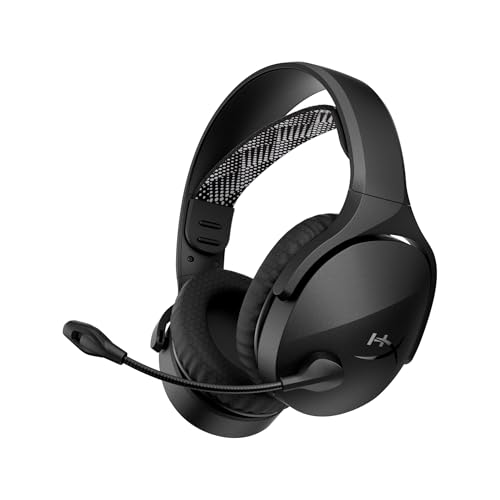
HyperX Cloud Jet Wireless — Best light wireless alternative
The Cloud Jet closes the guide as the wireless category’s lighter step. HyperX positions it simply — a wireless gaming headset, wireless connectivity, the Cloud name — and that simplicity is its honest character: this is the pick for the streamer whose setup is small, whose sessions are social, and whose priority is a headset that disappears rather than one that dominates the desk’s specification list.
Lightness is a streaming feature in disguise. A performer wearing a headset through a broadcast, a raid into another channel, and the after-stream hangout accumulates wearing hours that dwarf a normal gaming session, and grams compound across them. The Jet’s place in the HyperX family — beneath the Cloud III S’s endurance flagship role — is to trade the longest feature list for the easiest wearing, and streamers whose content is personality rather than production will find that trade correctly priced.
It is also the natural second headset of this guide: the one a duo owns for the co-host, the one that travels to a friend’s setup for a couch co-stream, the spare that saves the broadcast when the main headset’s battery finally surprises somebody. Wireless freedom plus family comfort plus a name the streaming world already trusts is a complete argument for that role.
Its limits are the honest ones of its tier. Broadcast ambition belongs to the StreamSet and the G522; endurance belongs to its bigger Cloud sibling; the Jet’s microphone and audio serve gaming and streaming competently rather than exceptionally. Buy it for the wearing and the freedom, in full knowledge of what the saved weight cost, and it will be exactly the headset it promised to be.
- Connection: Wireless
- Type: Gaming headset
- Family: HyperX Cloud line
- Character: Lightweight wireless design
- Use: Gaming and streaming
Strengths
- Lightest wireless wearing in this guide.
- Cloud-family comfort at the accessible wireless tier.
- Ideal second headset for co-hosts and travel.
Trade-offs
- Voice and features sit below the flagship picks.
- Endurance crown belongs to the Cloud III S.
- Specification list is deliberately short.
Best for: social streamers and co-host setups wanting wireless without weight. Not suited for: voice-led channels needing a signature microphone.
How Do the Six Streaming Headsets Compare?
| Headset | Connection | Microphone | Battery | Streaming character |
|---|---|---|---|---|
| Audio-Technica StreamSet | Wired USB | Cardioid condenser, sidetone | None needed | Broadcast voice |
| EKSA E1000 | Wired USB | Noise cancelling | None needed | Starter all-rounder |
| HyperX Cloud III S | 2.4GHz and Bluetooth | Detachable | 120 hours | Endurance performer |
| Rampage RM-K90 | Wired | Noise-cancelling | None needed | Camera-first value |
| Logitech G522 | Tri-connect wireless | Full-band | Rechargeable | PC creator flagship |
| HyperX Cloud Jet | Wireless | Headset mic | Rechargeable | Lightweight social |
How Do You Set Up a Headset Stream Chain That Sounds Professional?
The chain is shorter than the desk-mic world’s, which is the headset’s production advantage: microphone, headset, streaming software, broadcast. Professional sound from that short chain comes from three disciplines. First, gain: set the microphone level so your loudest performance moment stays below distortion with room to spare, because a stream’s climax is exactly where amateur audio tears. Second, processing in moderation: a noise gate to silence the room between sentences, light compression to even the performance, and nothing else until your ears can hear what each tool does.
Third, the room — the cheapest broadcast upgrade in existence. Soft furnishings near the desk, a door that closes, a PC whose fans are not aimed at the microphone. The StreamSet’s condenser will reward these most visibly, but every pick in this guide sounds a class better in a tamed room, because every microphone ever made is partly a recording of the space it sits in.
Test the chain the way the audience meets it: record locally, watch the recording on a phone speaker — the device most of your audience uses — and judge the voice’s clarity there. A chain that survives the phone speaker survives anything, and a chain tuned only on your own headset is tuned for an audience of one.
What Should a Growing Channel Upgrade First?
The microphone, when the room allows it — which is why this guide’s order doubles as an upgrade path. A channel that began on the EKSA E1000 or the RM-K90 and has built an audience has earned the StreamSet’s condenser, provided the room has been tamed enough to deserve it; the same money spent before the room is ready buys a more detailed recording of the room. Sequence matters: furnishings, then capsule, then everything else.
Comfort is the second upgrade, and it is really an endurance purchase. A streamer whose sessions lengthen with success will feel a starter headset’s limits in the neck before the ears, and the Cloud III S’s combination of family comfort and a 120-hour battery is the upgrade that makes a six-hour broadcast physically unremarkable. Upgrade the wearing before the audience can hear you tiring — they can, earlier than you think.
What not to upgrade: the game audio side, almost ever. Every pick here delivers game sound well past the threshold an audience can perceive through a stream’s compression. The voice is the channel; spend there, and let the drivers rest.
How Do You Handle a Co-Stream or a Guest on a Headset Setup?
Guests expose every weakness in a streaming audio setup, because a guest arrives with their own headset, their own levels and their own idea of how close a microphone should be. The host’s disciplines are gain-matching and patience: bring the guest’s voice to your level in the call software rather than asking them to perform louder, and accept that their room is now part of your broadcast. A headset-based guest — boom near the mouth, room demoted by proximity — is dramatically easier to host than a guest on laptop speakers and optimism, which is an argument for keeping a spare headset like the Cloud Jet for the local co-host and strong opinions for the remote one.
For in-room co-streams, the pattern that works is one headset each and a shared awareness of the mute. Two open voices in one room will find each other’s microphones; the flip and detach gestures in this guide’s picks become stagecraft. Rehearse the hand signals before the broadcast, not during it — the audience should see a performance, not a negotiation.
The deeper point is that streaming is increasingly social, and headset setups scale socially better than desk-mic cathedrals do. A second headset is a complete second station; a second desk microphone is a second production. Channels built on guests and co-hosts should buy their headsets in that spirit from the start.
How Does Your Room Become Part of Your Microphone?
Every microphone records two things: the voice in front of it and the room around it, in a ratio decided by distance and surfaces. Hard rooms — bare walls, wooden floors, a desk against a corner — return the voice to the capsule a millisecond later as echo, and the audience hears that echo as cheapness without knowing its name. This is why two streamers with the same headset can sound a class apart, and why this guide keeps prescribing curtains with the same confidence as capsules.
The headset form is itself a room treatment. A boom centimetres from the mouth makes the voice so much louder than the room at the capsule that even an untreated bedroom becomes workable — the ratio is the treatment. Condensers narrow that advantage by hearing everything more faithfully, which is the StreamSet’s one demand: give its honesty a room that deserves it, with soft material on the wall behind the camera and the door closed, and it will return a studio sound from a spare bedroom.
Test your room before you upgrade anything in it. Record thirty seconds of speech at broadcast level, in broadcast position, and listen on a phone. If the room is the problem, you will hear it — a hollowness, a tail on every sentence — and fifty pounds of soft furnishings will outperform five hundred of microphone. Streamers who learn this order of operations save money in a sequence the industry does not advertise.
What Does a Streaming Headset Need to Survive a Six-Hour Broadcast?
Endurance is a system, not a specification. The wearing comes first: weight, clamp and cushion material decide whether hour five feels like hour one, and the Cloud family’s long-session design — in both the III S and the Jet — exists because HyperX learned that lesson across a decade of tournament desks. Heat management follows: a headset that runs warm shortens broadcasts more reliably than any battery, and mid-stream breaks should be planned as production beats — a scene change, a video roll — that let ears breathe invisibly.
The battery is the second system, and its failure is the only one the audience witnesses live. The Cloud III S’s 120 hours removes the variable; every shorter-battery pick demands the ritual instead — charge after the broadcast, check before it, and keep the wired fallback or a second headset within reach of the chair. Professionalism in streaming is mostly the art of never letting the audience see a logistics problem.
The voice is the third system, and it tires like any instrument. Sidetone or monitoring keeps the performer honest at hour five, when the unconscious drift begins; water within reach is a microphone accessory; and the streamers who sound identical at the start and the end of a marathon are not gifted — they are managed, by exactly these unglamorous arrangements.
How Do You Look Right on Camera in a Headset?
A streaming headset occupies the centre of the frame for the entire broadcast, which makes it the channel’s most-seen piece of design — closer to a logo than to a peripheral. The picks divide by intention. The StreamSet and the HyperX pair read as professional understatement: the channel is the content, the equipment recedes. The RM-K90 and the G522’s LIGHTSYNC RGB read as event: the setup is part of the show, and the lighting is a promise about the energy of the content.
Neither reading is superior, but a mismatch is expensive. A sober, analysis-led channel wearing RGB spectacle borrows credibility it then has to repay; a hype-led channel in studio black undersells its own first impression. Choose the headset your thumbnail would choose, and keep the rest of the visible setup — background, lighting, the chair — in the same register, because audiences read coherence as competence before a word is spoken.
Practicalities complete the picture: a detachable or retractable boom clears the frame for the segments where the headset is a headphone; a cable, where one exists, should be routed out of shot and out of gesture range; and the pre-live camera check should include the headset’s position, because a boom riding high or a cup askew is the kind of detail a chat will mention so the performer does not have to wonder.
How Should a Duo or a Team Choose Matching Headsets?
Teams and duos face a version of the office standardisation problem with higher emotional stakes: two voices that must sound like one programme. Matching headsets are the shortcut — the same capsule, the same proximity habits, the same processing — and a duo that buys as a pair spends its production time on content instead of on equalising two different microphones into reluctant agreement. The Cloud III S and the G522 both suit the pattern; a duo on StreamSets sounds like a radio station that happens to play games.
Where budgets differ, match the microphone character rather than the model: pair a condenser-led host with the fullest-voiced second headset available, set gains so the quieter personality is not the quieter signal, and record a test conversation before the first live show. Audiences forgive two different voices; they do not forgive two different volumes.
The spare logic applies with double force. A duo with one spare headset — the Cloud Jet is sized and priced for the role — owns a complete understudy station: a guest seat, a failure replacement, a travel rig. Streaming teams discover, usually mid-incident, that redundancy is a content feature, because the show that never stops sounds more professional than the show that sounds perfect until it stops.
How Do You Keep a Stream Schedule From Eating Your Headset’s Lifespan?
Daily broadcasting is the hardest use a headset ever sees — harder than the call centre, because the performer also throws it on a desk in celebration and drops it in defeat. The parts die in a predictable order: cushions first, compressed by daily hours; the boom’s hinge second, swung ten thousand times; the battery third, on wireless picks, cycled by a production calendar rather than by play. A streamer who knows the order can budget for it, replacing cushions as a consumable and treating the rest as the multi-year equipment it is.
Habits extend every interval. The headset goes on a stand, not on the desk where drinks and elbows live. The boom is moved by its base. The cable, where one exists, is given slack and a fixed route, because a cable that is yanked daily is a cable with a date on it. None of this is precious; it is the difference between equipment that serves a channel for years and equipment that becomes a recurring expense disguised as bad luck.
There is also a succession plan worth making early: when the main headset is eventually upgraded, the old one becomes the spare, the guest seat, the travel rig. Streaming setups accrete in layers, and a channel that plans the layers spends its money once. The picks in this guide were chosen partly for how gracefully they descend that ladder — a StreamSet does not stop being an excellent podcast headset because a newer one arrived.
What Does the Audience Actually Hear Through a Stream’s Compression?
A stream is not a hi-fi medium. The platform compresses, the viewer’s phone speaker narrows, and the laptop in the kitchen flattens what remains — which reframes every buying decision in this guide. The differences that survive that gauntlet are the coarse, important ones: a voice that is close and clear or distant and echoing, levels that hold steady or lurch, a room that is quiet or obviously a kitchen. The differences that do not survive are the audiophile ones, and money spent chasing them for a stream is money spent on an audience of one — the streamer, in their own headset, where no revenue lives.
This is liberating news for buyers. It means the EKSA E1000’s competent noise-cancelling voice, properly gained in a decent room, reaches the audience far closer to the StreamSet than the spec sheets suggest — and it means the StreamSet’s genuine superiority shows up exactly where compression cannot hide it: in presence, consistency and the absence of fatigue across a long broadcast. Buy for the coarse virtues first. They are the ones with viewers attached.
It also means the test that matters is the phone test this guide keeps prescribing. If a recording sounds clear on a phone speaker in a noisy room, the chain is finished, whatever the forums say. Streamers who internalise that stop shopping and start broadcasting, which was the point of the equipment all along.
How Do You Choose Between the Two HyperX Wireless Picks?
Two picks in this guide share a surname, and the choice between them is the cleanest in the category. The Cloud III S is the flagship pattern: the 120-hour battery, the detachable microphone, the multi-platform reach — a headset bought as the centre of a streaming setup and expected to hold that position for years. The Cloud Jet is the satellite pattern: lighter, simpler, bought to accompany rather than to anchor — the second seat, the travel rig, the headset of a streamer whose production is deliberately minimal.
Buy the III S if the headset will be worn daily and broadcast nightly; its endurance converts directly into reliability, and reliability is the currency a growing channel banks. Buy the Jet if the wearing is social and intermittent, or as the partner purchase beside a III S — the two together form a complete two-seat streaming station with a shared family feel, shared comfort language and no weak seat for a guest to inherit.
What not to do is buy the Jet as a cheaper III S. The saving is real and so is the difference, and a daily broadcaster will meet the difference in the battery and the feature list within a month. Siblings are not substitutes; they are a system, and this guide lists both because the system is the sensible purchase for half the channels reading it.
What Mistakes Do Gaming-and-Streaming Buyers Keep Making?
The category’s founding mistake is buying a desk microphone kit for a headset job — a performer who moves, a desk with no room, a game that needs the player’s hands and head free — and discovering the mismatch on air. The second is the reverse snobbery: dismissing headset microphones entirely, when the StreamSet’s condenser and the G522’s full-band mic have closed most of the gap for most rooms. The third is gain staging by hope: levels set in a quiet menu, torn apart by the first exciting moment, in front of the audience the streamer most wanted to impress.
Fourth, buyers treat the room as somebody else’s problem and then blame the microphone for recording it. Fifth, wireless performers skip the pre-live microphone check and broadcast a drifting, off-axis voice for an hour. Finally, new streamers upgrade the audible-to-them side — drivers, surround, RGB — while the audience only ever hears the microphone. Spend where the audience lives.
Final Recommendation
If the voice is the channel, take the StreamSet and tame your room to deserve it: nothing else in headset form will make you sound this much like a broadcaster, and its one-cable USB production is the simplest professional chain in this guide. If the performance is the channel — movement, guests, long live hours — take the Cloud III S and its 120-hour battery, or the G522 if your world is a PC desk and your content is conversation.
Starting out is not a lesser decision, and this guide refuses to treat it as one: the EKSA E1000 for plug-and-play seriousness, the RM-K90 when the camera matters from day one, the Cloud Jet when wireless lightness is the whole brief. A streaming headset is the instrument your audience hears you through — choose the one whose voice sounds like the channel you intend to become, and then go and become it on schedule.
Whatever you choose, spend the first evening on the unglamorous setup — gain, monitor level, a test recording judged on a phone — because that evening is worth more than the price difference between any two picks in this guide. Equipment inaugurates a channel; setup is what makes it sound like one, and the streamers who learn that order early are the ones still broadcasting when the others are still shopping.
Frequently Asked Questions
Is a headset microphone really good enough for streaming?
For most channels, yes — and for voice-led channels in decent rooms, the StreamSet’s cardioid condenser is good enough for podcasting, full stop. Headset mics win on proximity and consistency; desk mics win on capsule choice in treated rooms. The honest question is not which is better but which matches your room, your movement and your desk.
Why were standalone streaming microphones excluded?
Because they are not headsets. A desk mic kit assumes a fixed performer, a treated space and room on the desk; this guide serves readers who want the microphone to follow their head and the desk left clear. The StreamSet is included precisely because it delivers a broadcast condenser inside the headset form rather than beside it.
Wired or wireless for a streamer?
Wired for seated, voice-first production — the StreamSet’s sidetone and zero latency are a monitor-perfect combination. Wireless for performers who stand, gesture and host: the Cloud III S and G522. Many established channels own both, wired for the desk and wireless for the room, which is a pattern this guide endorses. The deciding factor is rarely audio quality, since both routes now clear the audience’s threshold comfortably; it is the shape of your performance — a seated commentator and a standing host are different productions, and they should not be forced into the same connection.
What does sidetone do, and do I need it?
Sidetone returns your own voice to your ears as you speak. It keeps your level and distance consistent across a long broadcast, because you can hear drift the moment it happens. Performers who have used it rarely give it up; the StreamSet builds it in, and software can approximate it for the other picks.
How important is battery life for streaming?
More than for gaming, because a battery failure mid-broadcast is a production failure in public. The Cloud III S’s 120 hours effectively deletes the concern; shorter-battery wireless picks demand a charging ritual. Either way, the pre-live check — battery, levels, mute — is the professional’s non-negotiable minute.
Can these headsets handle console streaming from a PS5?
Several name the consoles directly: the EKSA E1000 and RM-K90 list PS5 and PS4 among their wired connections, and the Cloud III S is multi-platform. Console streaming rewards the same properties as PC streaming — a clear boom and a reliable connection — with the wired picks offering the simplest plug-in-and-broadcast path.
Related Guides
The console that anchors many a first stream gets its dedicated shortlist in best nintendo switch headsets, sized for handheld and family play. Players who want their ears open to the room while they perform will find their designs in best open ear gaming headsets. And when the audience is a class rather than a channel, best headsets for online school covers the volume-limited picks for learners.
Related guide: Best Headsets For Pc And Ps5



[…] whose PS5 sessions turn into broadcasts should continue to best headsets for gaming and streaming, where the microphones take centre stage. The household’s other console is covered by best […]