What's inside
- Key Takeaways
- Quick Picks
- How We Chose These Picks
- Comparison
- What Does a Theatre Room Actually Need Around the Projector?
- How Do You Mount and Align a Theatre Projector Once, Properly?
- Lamp, LED or Laser — Which Light Source Suits a Theatre?
- What Does HDR Actually Do on a Projector?
- How Big Should the Screen Be, and How Far Should You Sit?
- How Should You Pair Sound with a Theatre Projector?
- What Simple Calibration Steps Improve Every Picture Here?
- How Do You Plan Throw Distance Before the Mount Goes Up?
- What Will Ownership Cost Beyond the Purchase?
- Which Streaming Source Should Feed the Projector?
- How Does a Theatre Projector Handle Sport and Ordinary Television?
- Common Mistakes
- Final Recommendation
- Frequently Asked Questions
- Related Guides
As an Amazon Associate I earn from qualifying purchases. This post may contain affiliate links at no extra cost to you.
widgetverdict.com is reader-supported. When you buy through links on our site, we may earn an affiliate commission.
The search for the best theater projectors under 1000 is really a search for the point where home cinema stops being a compromise. Below this band, projectors ask you to forgive something fundamental — dimness, softness, washed colour. Inside it, the six machines below stop apologising: two BenQ models split between colour-purist LED cinema and bright-room entertainment, two Epson three-chip designs bring their no-rainbow, colour-brightness doctrine to 4K PRO-UHD and 1080p, an Optoma keeps the classic DLP lamp tradition alive, and a ViewSonic pairs serious brightness with dual HDMI. The band named in the keyword is a framing device, not a price tag — no figure is attached to any pick here, because listings move; follow a linked name to Amazon and check price on Amazon on the day you buy.
One honesty note must precede everything, because this band is where resolution language gets slippery. The Epson Home Cinema 2350 below wears a “4K PRO-UHD” badge, and that badge means pixel-shifting: the projector’s chips render a 1080p-class image shifted at high speed to put more pixels on screen than a plain 1080p machine, producing a picture visibly sharper than 1080p and visibly short of native 4K. That is a legitimate, effective technology — and it is not native 4K, and this guide will not call it that. Buyers who understand the distinction buy the 2350 happily for what it is; buyers who discover it afterwards feel deceived by a badge rather than served by a machine.
What actually separates these six is philosophy. DLP models chase contrast and response speed through a spinning colour system; three-chip LCD models chase colour brightness and freedom from rainbow artefacts by splitting light three ways; LED light sources trade peak brightness for colour breadth and freedom from lamp changes. The reviews below judge each machine inside its own philosophy first, then against the room you are most likely to build: a living room that darkens, a dedicated space that truly blacks out, or a family room that must do both cinema and Saturday sport.
Key Takeaways
- BenQ’s HT2060 is the colour purist’s pick: an LED engine with DCI-P3 and Rec.709 gamut claims, vertical lens shift and a fast 8.3ms response at 120Hz.
- BenQ’s TH575 is the bright-room entertainer, stating 3800 lumens and a game mode for family rooms that never fully darken.
- Epson’s Home Cinema 2350 brings 4K PRO-UHD pixel-shifting, Android TV and 2800 lumens of colour and white brightness — pixel-shifted, not native 4K.
- Epson’s Home Cinema 980 is the straightforward 1080p three-chip route for buyers who value simplicity and colour honesty.
- Optoma’s HD146X keeps the traditional DLP lamp formula: a Full HD picture with the class’s familiar contrast character.
- ViewSonic’s PX700HDH states 3700 lumens and dual HDMI for a theatre that doubles as a gaming and sports room.
Quick Picks
| Pick | Badge | Why it made the cut |
|---|---|---|
| BenQ HT2060 1080p Home Theater Projector | The colour purist | LED light, wide-gamut claims, lens shift and fast response in one cinema-first design. |
| BenQ TH575 1080p Home Entertainment Projector | The bright-room entertainer | 3800 stated lumens and a game mode for rooms that stay social. |
| Epson Home Cinema 2350 4K PRO-UHD Projector | The pixel-shifted streamer | 4K PRO-UHD, Android TV and three-chip colour brightness. |
| Epson Home Cinema 980 1080p Projector | The honest 1080p Epson | Three-chip 3LCD colour at native 1080p with no badges to decode. |
| Optoma HD146X 1080p Home Theater Projector | The DLP traditionalist | Full HD DLP in the classic lamp-projector mould. |
| ViewSonic PX700HDH 1080p Projector | The dual-HDMI all-rounder | 3700 stated lumens, dual HDMI and SuperColor for a mixed-use room. |
How We Chose These Picks
Theatre duty imposes a hierarchy that brighter-is-better marketing ignores. Colour quality came first, because a cinema picture is judged in skin tones, shadow detail and the slow gradients of a night sky, and the listings that speak about colour — gamut coverage, three-chip architecture, LED engines — were weighted accordingly. Brightness came second, and was read in context: a figure is only meaningful against the room it must serve, so the guide separates the dark-room instruments from the family-room ones instead of ranking lumens in a single column. Placement flexibility came third, because a theatre projector lives in one position for years; lens shift, zoom range and throw decide whether that position can be the right one.
Response figures were admitted only where a title states them — the HT2060’s 8.3ms at 120Hz and the TH575’s latency claims appear below because BenQ prints them, and no lag figure has been invented for the models whose titles stay silent. Resolution claims were translated into plain language wherever a badge obscures them, following the PRO-UHD note in the introduction. Finally, every pick had to justify itself as a theatre machine rather than a bright presentation box: a projector that cannot do a convincing black in a dark scene is a meeting-room tool wearing cinema clothes, whatever its lumen count.
Sound was judged as a stopgap, never a solution. Several picks carry built-in speakers — the HT2060’s twin 5W chambers, the 2350’s 10W unit — and those speakers serve a first weekend or a bedroom install honestly. A theatre, though, is sound as much as picture, and every review below assumes an external system joins the room sooner or later; the projector’s job is the image, and it is graded on that job alone.

BenQ HT2060 1080p Home Theater Projector — The colour purist
The HT2060 is built around a single conviction: that in a dark room, colour is king. Its light source is LED rather than a lamp, and the listing pairs that engine with DCI-P3 and Rec.709 wide colour gamut claims — the two standards that define cinema and broadcast colour respectively. An LED engine also changes ownership: no lamp to dim across a few thousand hours and replace at the dramatic moment, instant on and off, and colour that stays where it was calibrated. For a dedicated theatre that hosts two or three films a week for a decade, that steadiness is the feature the owner actually experiences.
Placement is where the HT2060 separates itself from brighter rivals. Vertical lens shift is named in the title — a mechanical adjustment that moves the image without tilting the machine or invoking keystone correction — alongside a 1.3x zoom and 2D keystone for the rooms that need it. Lens shift is the difference between a projector mounted exactly where the ceiling allows and a picture that lands exactly where the screen demands; theatres are built around that difference. The stated response, 8.3ms at 120Hz, makes this cinema-first machine a credible gaming guest as well, and HDMI 2.0 with S/PDIF output covers the connection basics, with twin 5W speakers aboard for the interim before a sound system arrives.
The honest limits are brightness and resolution, in that order. An LED engine tuned for gamut does not chase the lumen figures of the entertainment models below, so the HT2060 belongs in a room that can darken properly — which is, of course, the room it was designed for. Its 1080p resolution is native and unapologetic: at theatre seating distances, with this colour performance, the picture’s richness argues that pixels were never the bottleneck. Buy the HT2060 for a black-walled room and a film-first diary, and it is the most considered machine in this guide.
- Resolution: 1080p with HDR, per the listing title
- Light source: LED, per the listing title
- Colour: DCI-P3 and Rec.709 wide colour gamut claims, per the listing title
- Response: 8.3ms at 120Hz, as stated in the listing title
- Placement: vertical lens shift, 2D keystone, 1.3x zoom, per the listing title
- Sound and connections: built-in 5Wx2 speakers, HDMI 2.0, S/PDIF, per the listing title
Strengths
- Wide-gamut LED colour aimed squarely at film.
- Lens shift makes permanent mounting honest work.
- No lamp to replace across the machine’s life.
Trade-offs
- LED output suits dark rooms, not bright family spaces.
- Native 1080p in a band where rivals advertise 4K badges.
- Built-in speakers are a stopgap, as on every pick here.
Best for: a dedicated, darkened theatre room where films come first. Not suited for: a bright open-plan lounge expected to shine at midday.
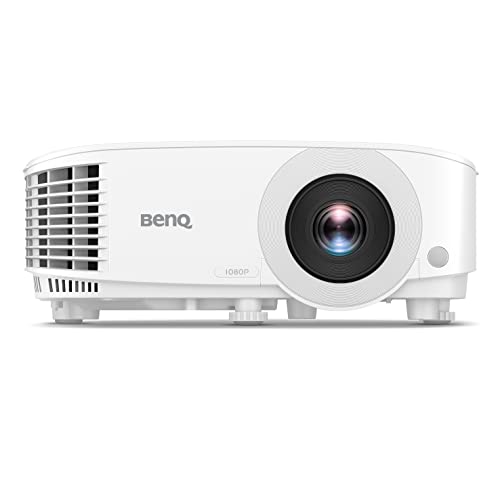
BenQ TH575 1080p Home Entertainment Projector — The bright-room entertainer
BenQ calls the TH575 a home entertainment projector, and the distinction from “home theater” is deliberate and honest. Its headline figure is 3800 lumens — light output aimed at rooms with curtains rather than blackout, at Sunday sport with friends drifting through, at family film nights where someone always leaves a lamp on. In those rooms, brightness is not a vanity metric; it is the difference between a picture that holds its contrast against ambient light and one that dissolves into grey. The TH575 is the pick for households whose viewing is social first and cinematic second.
Gaming is designed in rather than tolerated: the title states low latency figures and an Enhanced Game Mode, with dual HDMI to keep a console and a streamer connected without cable swapping. A 1.1x zoom and auto vertical keystone cover placement in rooms where the projector must fit the furniture rather than command it, and 3D readiness serves the collectors who still keep that library. The three-year warranty named in the listing is worth a sentence, because entertainment projectors live harder lives than theatre machines — more hours, more hands, more occasions — and a stated warranty term is part of the product.
Set against the HT2060, the TH575 trades colour-gamut ambition for light, and the trade is visible in a dark room: put both in a blacked-out theatre and the LED machine’s colour depth wins the evening. Put both in a real family room at 7 p.m. in June and the contest reverses completely. The TH575’s wisdom is knowing which room most households actually have. Buy it for the room you live in, not the room in the brochure, and it will be used constantly — the highest compliment a projector can earn.
- Resolution: 1080p, per the listing title
- Brightness: 3800 lumens, as stated in the listing title
- Latency: low latency with Enhanced Game Mode, figures as stated in the listing title
- Connections: dual HDMI, per the listing title
- Placement: 1.1x zoom, auto vertical keystone, per the listing title
- Warranty: 3 year warranty stated in the listing title
Strengths
- Brightness that survives real family-room light.
- Game mode and dual HDMI suit console households.
- Forgiving placement for rooms that cannot be rearranged.
Trade-offs
- Colour depth steps back behind the HT2060 in darkness.
- Entertainment tuning flatters sport more than slow cinema.
- Native 1080p only, with no pixel-shift story to tell.
Best for: family rooms hosting sport, games and films under imperfect darkness. Not suited for: a blacked-out cinema room chasing reference colour.

Epson Home Cinema 2350 4K PRO-UHD Projector — The pixel-shifted streamer
The 2350 is the convenience champion of this band, and its badge needs the translation promised in the introduction: 4K PRO-UHD is Epson’s pixel-shifting system, which renders an image beyond 1080p by shifting its three LCD chips at high speed. The result on screen is genuinely sharper than the 1080p picks here — fine detail, text and texture all resolve more cleanly — while remaining a step below a native 4K projector’s rendering. Buyers who accept that sentence buy one of the most satisfying pictures in the band; the technology is mature, effective and honest once it is described plainly.
Three-chip 3LCD architecture carries Epson’s signature advantage: colour brightness equal to white brightness, stated here at 2800 lumens of both. Where single-chip designs quote a white figure that colour scenes cannot match, the 2350’s colour output is its headline output, and saturated scenes — sport, animation, games — hold their punch. There are no colour-wheel rainbows for sensitive viewers, a real consideration in households where one family member sees artefacts nobody else believes in. HDR10 and HLG support are named, along with low latency positioning, a 10W speaker and Bluetooth.
Android TV built in completes the convenience story: the streamer is the projector, the remote is the only remote, and the first film can play within the hour of the box opening. For many households that integration is worth more than a specification tier, because a theatre that requires a checklist to start is a theatre that gets used on weekends only. The 2350 asks its buyer to accept pixel-shifted resolution and a brightness figure tuned for dim rather than dark-defying rooms, and in exchange removes nearly every friction between the sofa and the film. In this band, that is a formidable offer.
- Resolution: 4K PRO-UHD pixel-shifting — not native 4K — per the listing title
- Architecture: 3-chip 3LCD, per the listing title
- Brightness: 2800 lumens colour and white brightness, as stated in the listing title
- HDR: HDR10 and HLG, per the listing title
- Platform: Android TV smart streaming built in, per the listing title
- Sound: 10W speaker and Bluetooth, per the listing title
Strengths
- Sharper than 1080p, with three-chip colour honesty.
- Built-in Android TV removes the external streamer entirely.
- No rainbow artefacts for sensitive viewers.
Trade-offs
- Pixel-shifted resolution is not native 4K, whatever the badge implies.
- Brightness serves dim rooms rather than bright ones.
- Streaming integration ages on the platform’s clock.
Best for: households wanting one-box streaming with a sharper-than-1080p picture. Not suited for: a buyer who requires true native 4K rendering.

Epson Home Cinema 980 1080p Projector — The honest 1080p Epson
The Home Cinema 980’s listing title is the shortest in this guide, and there is something refreshing in its restraint: a 3-chip 3LCD 1080p movie projector, full stop. What that compact description guarantees is Epson’s core doctrine — three chips, one for each primary colour, so colour brightness is engineered rather than inferred, and no colour wheel spins between the light and the screen. For households that include a rainbow-sensitive viewer, or anyone who simply prefers the calm, stable character of LCD projection, the 980 is the band’s straightforward route to that picture.
A title this spare leaves the detailed specification to the listing page, and the spec box below records that honestly rather than borrowing figures from sibling models. What can be said from the architecture is meaningful: 1080p native resolution at theatre distances is a mature, well-understood picture; three-chip colour holds saturation in bright scenes where single-chip designs thin out; and Epson’s Home Cinema line is built for living rooms that darken rather than caves that black out. The 980’s role in this guide is the baseline of integrity against which badge-heavy rivals are measured.
Buyers should approach it as the purist’s simple option: confirm the full specification on the listing, pair it with a proper screen and an external sound system, and enjoy a machine whose appeal is the absence of gimmicks. In a band full of competing claims, a projector that promises a good 1080p picture and delivers exactly that has a dignity of its own — and for many rooms, particularly second rooms and first theatres, dignity plus darkness is the whole recipe.
- Resolution: 1080p, per the listing title
- Architecture: 3-chip 3LCD, per the listing title
- Brightness: Not stated in the listing title — verify with the manufacturer documentation
- Streaming platform: Not stated in the listing title — verify with the manufacturer documentation
- Latency figure: Not stated in the listing title — verify with the manufacturer documentation
- Placement features: Not stated in the listing title — verify with the manufacturer documentation
Strengths
- Three-chip colour with no rainbow artefacts.
- Native 1080p with no badge language to decode.
- A simple, cinema-first brief without streaming bloat.
Trade-offs
- The title leaves key figures to be confirmed on the listing.
- No pixel-shifting, so 1080p is the ceiling.
- An external streamer and sound system are assumed.
Best for: viewers who want three-chip colour honesty at native 1080p. Not suited for: a buyer who needs every figure certified before shortlisting.

Optoma HD146X 1080p Home Theater Projector — The DLP traditionalist
The HD146X represents the classic formula that built the home-theatre hobby: a single-chip DLP projector, a lamp light source, Full HD resolution, and a design brief that says “vibrant home theater” and means it. DLP’s character is well known to anyone who has lived with it — crisp edges, strong perceived contrast in mixed scenes, and a picture with a particular snap that its devotees recognise instantly. Optoma has refined this recipe across generations, and the HD146X is its mature expression in this band: no streaming platform to age, no badge to translate, just a projection engine and the connections a theatre needs.
The lamp at its heart cuts both ways, and its bargain deserves to be stated plainly. A lamp delivers strong brightness at this level of the market and keeps the machine’s purchase commitment moderate; it also dims gradually across its life and eventually asks for a replacement, which is a known, budgetable event rather than a failure. Owners who project nightly should treat the lamp as a consumable on a schedule, the way a car treats tyres. The traditionalist accepts that bargain because the picture-per-commitment of lamp DLP remains formidable, and because a lamp change at year four restores the machine to day-one brightness in ten minutes.
As with the Epson 980, the listing title here is terse, and the detailed figures live on the listing page; the spec box records the title’s silence where it occurs. What the HD146X offers this guide is representation: the DLP lamp tradition, judged on its enduring merits. For a first dedicated theatre in a darkened room — screen, seats, sound system, this projector at the back — it remains a combination that has made a great many households happy, and its simplicity means the only platform that can age out is the one you plug into it.
- Resolution: 1080P Full HD, per the listing title
- Technology: DLP home theater projector, per the listing title
- Brightness: Not stated in the listing title — verify with the manufacturer documentation
- Latency figure: Not stated in the listing title — verify with the manufacturer documentation
- Zoom and shift: Not stated in the listing title — verify with the manufacturer documentation
- Streaming platform: Not stated in the listing title — verify with the manufacturer documentation
Strengths
- Classic DLP contrast character and crispness.
- No onboard platform to date the machine.
- Lamp brightness restored fully at each replacement.
Trade-offs
- The lamp is a consumable with a replacement in its future.
- Colour-wheel rainbows affect a minority of viewers.
- Key figures must be confirmed on the listing page.
Best for: a first dedicated theatre built around a screen and sound system. Not suited for: a household that wants streaming built into the projector.

ViewSonic PX700HDH 1080p Projector — The dual-HDMI all-rounder
ViewSonic’s PX700HDH states its case in numbers: 1080p resolution, 3700 lumens, dual HDMI, a 1.1x optical zoom, and a brief spanning home theater, movies and gaming. That is the specification of a room that refuses to specialise — films on Friday, a console tournament on Saturday, the match on Sunday — and the brightness figure is the foundation of the claim. At 3700 stated lumens, the PX700HDH holds a watchable, contrast-bearing picture in the semi-darkness of real living rooms, where the TH575 is its natural rival and the dark-room purists concede the field.
Dual HDMI sounds like a small thing until a household lives with one port: the streamer and the console both stay connected, the Blu-ray player joins through the receiver, and nobody performs the reach-behind-the-unit ritual in the dark. SuperColor, ViewSonic’s colour technology named in the title, is the brand’s answer to the brightness-versus-colour trade — an attempt to keep saturation alive at high output. Judged as a generalist, the PX700HDH’s coherence is its virtue: every stated feature serves the mixed-use room, and nothing in the specification is decorative.
The compromises are the generalist’s usual ones. A purist’s dark-room screening will expose the colour depth it traded for light, just as it does on the TH575; placement relies on zoom and keystone rather than the HT2060’s lens shift. But households are not laboratories, and the projector that serves three duties well beats the specialist that serves one duty brilliantly and two duties resentfully. If your room’s diary is mixed, the ViewSonic is built for your diary.
- Resolution: 1080p, per the listing title
- Brightness: 3700 lumens, as stated in the listing title
- Connections: dual HDMI, per the listing title
- Zoom: 1.1x optical zoom, as stated in the listing title
- Colour: SuperColor technology, per the listing title
- Intended use: home theater, movie and gaming, per the listing title
Strengths
- High stated brightness for semi-dark rooms.
- Dual HDMI ends the cable-swapping ritual.
- One machine credibly covers films, games and sport.
Trade-offs
- Dark-room colour depth trails the HT2060’s LED.
- No lens shift for demanding permanent mounts.
- Native 1080p only in a badge-conscious band.
Best for: mixed-use rooms splitting time between films, consoles and matches. Not suited for: a single-purpose cinema chasing reference colour in darkness.
Comparison
| Pick | Resolution | Light / architecture | Signature feature |
|---|---|---|---|
| BenQ HT2060 | 1080p native | LED | Lens shift, wide-gamut claims |
| BenQ TH575 | 1080p native | 3800 lumens stated | Enhanced Game Mode |
| Epson Home Cinema 2350 | 4K PRO-UHD pixel-shift | 3-chip 3LCD, 2800 lumens | Android TV built in |
| Epson Home Cinema 980 | 1080p native | 3-chip 3LCD | Badge-free colour honesty |
| Optoma HD146X | 1080p Full HD | DLP, lamp | Classic theatre formula |
| ViewSonic PX700HDH | 1080p native | 3700 lumens stated | Dual HDMI, SuperColor |
What Does a Theatre Room Actually Need Around the Projector?
The projector is the room’s engine, but the room is the experience, and three companions decide more evenings than any specification. The screen comes first: a fixed, matte, properly sized screen returns contrast and colour that a wall spends, and it gives the picture a border that tells the eye where cinema begins. Size the screen to the seating, not the wall — a picture whose edges sit inside comfortable peripheral vision immerses; one that forces head-turning merely exhausts. Sound comes second, and it is not close: a modest soundbar transforms a projector evening more than a projector tier does, and a proper surround system transforms it beyond recognition. Every pick here assumes external sound joins eventually.
Light control is the third companion and the cheapest. Blackout curtains on the windows that matter, a door that closes, and the discipline to dim the hallway light will do more for the HT2060’s blacks or the 2350’s colour than any settings menu. Seating and throw complete the room: the projector’s position is chosen from the screen size and the model’s zoom range, the seats from the picture’s geometry, and the remote’s home from the arm of the chair where the films are actually watched. Build the room in that order — screen, sound, darkness, then the machine that serves them — and any of these six will feel like the right choice.
There is a temptation, once the room works, to keep upgrading the projector and neglect the room’s remaining honest gains, and experienced owners learn to resist it in a specific order. After the screen and basic sound, the next money belongs to seating that supports a two-hour sit without negotiation, because discomfort ends more films early than any picture flaw. Then come the small civilities: a side table that keeps drinks off the floor and away from remotes, a blanket within reach in a room kept cool for the equipment, lighting on a dimmer or a single shaded lamp for the intervals. None of these appear in a projector’s specification, and all of them appear in the memory of a great screening. The machine starts the evening; the room is what the guests describe afterwards, and a theatre budget that remembers the room produces better nights than one spent entirely on lumens and badges.
How Do You Mount and Align a Theatre Projector Once, Properly?
Permanence is the theatre projector’s privilege, so spend the hour it deserves. Establish the screen first, perfectly level, at its final height. Then calculate the projector’s position from the screen size and the model’s throw range — the zoom figures stated in these listings, 1.3x on the HT2060 and 1.1x on the TH575 and PX700HDH, define how much placement freedom the ceiling gives you. Mount the machine square to the screen in both axes before touching any correction: a projector that hangs level and centred needs no keystone, and a picture corrected electronically is a picture spending resolution on geometry.
Reach for lens shift where the model offers it — the HT2060’s vertical shift exists precisely to reconcile a ceiling’s fixed joists with a screen’s fixed centre. Focus at the screen with a helper or a long HDMI cable and patience, using a detailed scene rather than a menu, and refocus after the first full film, when the mount and machine have settled at working temperature. Route cables once, in trunking or through the ceiling void, with the power and signal separated where practical; a theatre that shows no cables looks intentional, and intentional rooms get used. Finally, save the picture settings per source — film, game, sport — because the room’s three duties want three slightly different pictures, and the owner who saves them stops negotiating with menus in the dark.
Lamp, LED or Laser — Which Light Source Suits a Theatre?
Two of the three light-source families live in this guide, and their bargain is worth stating cleanly. A lamp, as in the Optoma tradition, buys brightness generously and asks for a replacement on a schedule measured in thousands of hours; its light dims gradually, so the picture at hour three thousand is a dimmer relative of the picture at hour one, restored fully by a fresh lamp. An LED engine, as in the HT2060, starts at a more modest output, holds that output with remarkable steadiness for a span that outlasts most ownership, and frees the owner from the lamp errand entirely — at the cost of the bright-room headroom a lamp provides.
The right answer is a diary question. A theatre that screens nightly burns lamp hours at a rate that makes the LED’s permanence genuinely economical, while a weekend room may take a decade to trouble a lamp. Laser engines, the third family, sit above this band’s usual territory and appear in this site’s dedicated laser guides; within the band, the lamp-versus-LED decision is really about whether your room needs brightness now or consistency forever. Neither answer is a compromise — they are different machines for different evenings.
One further distinction hides inside the light-source question and deserves daylight: fan noise follows brightness and heat, and a theatre is a quiet room where a projector’s fan becomes part of the soundtrack during a film’s silent passages. Machines working hard in bright modes speak loudest, which is one more argument for matching output to the room — a projector loafing in its cinema mode in a dark room is a quiet projector, while the same machine straining against daylight announces itself. Ceiling mounting distance helps, a hush box helps more, but the cheapest silencer is a room dark enough that the machine never has to shout. When you read the six reviews above, hear them as well as see them: the theatre you build is an acoustic space too, and the projector that fits its light will usually fit its silence.
What Does HDR Actually Do on a Projector?
High dynamic range promises brighter highlights and deeper shadows than standard video, and on a television with a thousand nits in reserve it delivers both. A projector works with a fraction of that light, so HDR on any machine in this band is an exercise in tone mapping: the projector interprets the HDR signal and compresses its extremes into the range the screen can show, preserving the gradations that make a sunset sky or a candlelit face look layered rather than flat. The listings here name HDR10 on the Epson 2350 — with HLG beside it for broadcast content — and HDR in the HT2060’s title, and in both cases the honest expectation is richer mid-tones and smoother highlights, not television-style fireworks.
Room darkness decides how much of that promise survives. HDR’s shadow detail lives near black, exactly where ambient light does its damage, so the same film that looks sculpted in a blacked-out theatre looks merely pleasant in a lamplit lounge. This is one more reason the guide keeps sorting these machines by room rather than by badge: an HDR signal fed to a bright-room entertainment projector is not wasted, but its finest work is. Owners should also feed HDR from a source that sends it properly — a streaming box or disc player set to output it — because a projector cannot invent the signal a source withheld.
How Big Should the Screen Be, and How Far Should You Sit?
Theatre geometry has a sweet range that showrooms routinely violate. Sit too far from a modest screen and the picture becomes a television with extra steps; sit too close to a huge one and the image overwhelms peripheral vision, turning action scenes into head movements. The working rule most installers use places the main seats so the screen fills a comfortable, cinema-like portion of the view — for a typical room, that lands between two and a half and four metres from screens in the 100-to-120-inch class. The picks here are sized for exactly that territory, and their zoom ranges assume it.
Resolution interacts with distance honestly. At four metres, the difference between the HT2060’s native 1080p and the 2350’s pixel-shifted rendering narrows to fine texture; at two and a half metres on a 120-inch screen, the Epson’s extra rendering shows in faces, fabrics and text. Brightness interacts too: every step up in screen size spreads the same lumens thinner, so the household tempted by the largest screen the wall allows should remember it is spending the brightness it bought. Choose the size your seating and your light can honour, and the picture will look expensive at any of these six price positions.
How Should You Pair Sound with a Theatre Projector?
Projection inverts the usual living-room layout: the picture is at the front, the projector is at the back, and the sound must be persuaded to live with the picture rather than with the machine. The clean solution routes every source through an AV receiver or a soundbar at the screen wall, with a single long HDMI run to the projector carrying picture only. The HT2060’s S/PDIF output and the 2350’s Bluetooth exist for the interim arrangements — a powered speaker near the screen, fed from the projector — and they serve a first season honourably, provided the speaker sits with the picture, because dialogue that arrives from behind the audience unravels the illusion faster than any picture flaw.
Scale the sound ambition to the room’s diary. A bedroom theatre is honestly served by a good soundbar; a dedicated room earns a receiver and separate speakers, with the centre channel — the dialogue channel — given the budget’s respect. Subwoofers in projected rooms carry a placement warning: a projector on a shelf shares its furniture with vibrations, so the subwoofer belongs on the floor, decoupled, away from the projector’s perch. None of the six picks will object to any of this; they were all designed assuming the sound would eventually be someone else’s job, done properly.
What Simple Calibration Steps Improve Every Picture Here?
Start by leaving the showroom settings behind: choose the cinema or film picture mode, which on every serious projector is the closest to honest colour the factory offers, and resist the dynamic modes whose saturation flatters a shop floor and fatigues a film. Set brightness with a dark scene — the control should sit where shadow detail just survives — and contrast with a bright one, where clouds should keep their texture rather than merging into white. These two adjustments, made in your room on your screen, outperform any list of numbers copied from the internet.
Colour temperature is the third lever: the warmer, D65-style settings are where film colour lives, and eyes adjust to them within a single scene. Sharpness should be lowered until text edges stop glowing with artificial halos; projectors ship with it raised, and nearly every picture in this guide improves when it is tamed. Finally, revisit focus and settings after a month. Lamps settle, mounts settle, and the owner who spends one evening re-checking geometry and greyscale owns a measurably better theatre than the one who never looks back — a truth that holds from the HD146X’s classic lamp to the HT2060’s LED alike.
How Do You Plan Throw Distance Before the Mount Goes Up?
Throw distance — the gap between lens and screen — is decided by the screen’s width and the projector’s zoom range, and it should be calculated before a single hole is drilled. The zoom figures in these listings are the working numbers: a 1.3x zoom, as on the HT2060, lets the same screen size be achieved from a band of distances a third wide, while a 1.1x zoom, as on the TH575 and PX700HDH, narrows that band to a tenth, so the mount’s position must be chosen more precisely. Measure the room’s available depth, place the screen size inside the zoom’s middle rather than at either extreme — optics are happiest mid-range, and a mount placed mid-zoom forgives the measurement errors every real room contains.
Ceiling realities then edit the plan: joists dictate fixing points, light fittings occupy the centre line, and a ceiling fan can veto the ideal position entirely. This is where the HT2060’s lens shift earns its keep a second time, reconciling a mount displaced by structure with a picture that must land centred. Table placement is the honest alternative many first theatres choose — a low table between the seats, the projector at picture height, no drilling at all — at the cost of cables crossing the room’s social space. Either way, the discipline is identical: screen first, arithmetic second, hardware last, and a test projection with the machine on a ladder or a stack of boxes before anything becomes permanent.
What Will Ownership Cost Beyond the Purchase?
The honest ledger of a theatre projector has three recurring lines. Lamp machines — the Optoma tradition — will ask for a replacement lamp on a multi-year cycle, priced as a consumable and fitted in minutes; budget for it the day the machine arrives and it never arrives as a shock. Filters and vents ask for attention rather than money: a vacuumed filter and clear vents keep brightness and fan noise where they began, and the five-minute habit, kept quarterly, is the cheapest performance maintenance in the hobby. The third line is the room’s own evolution — the screen, the soundbar, the blackout curtains — which most owners buy in stages and should count as part of the theatre’s cost from the start, because the projector was always only the engine of a larger machine.
Against that ledger, the LED and three-chip designs argue their thrift: the HT2060 removes the lamp line entirely, and the Epsons’ mature platform carries no consumable beyond filters and time. None of the six, though, hides an expensive secret — no proprietary cartridges, no subscription standing between the owner and the picture. The band’s economics are part of its appeal: a known purchase, a small and predictable upkeep, and a decade of evenings divided across both until the cost per film is measured in pennies.
Which Streaming Source Should Feed the Projector?
Only one pick here, the Home Cinema 2350, carries its streaming platform inside, and the other five invite a decision worth making deliberately. A dedicated streaming box or stick brings the household’s accounts, a familiar remote and updates on a tech company’s schedule rather than a projector maker’s; it also travels between displays, so the same library appears on the bedroom television and the theatre alike. A disc player remains the quality reference — physical media still feeds a projector the most generous signal available, and collectors with shelves of films will route everything through a receiver that switches between disc and streamer.
Cable length is the practical footnote that decides real installations: the source usually lives at the screen wall with the sound, and a single long HDMI run carries the picture back to the projector, so buy that cable at the length the room measures, rated for the signal the highest source sends. Wireless HDMI exists and tempts, but a theatre is a permanent room, and permanent rooms reward permanent cables — tested once across the floor before they vanish into trunking, so a faulty lead is discovered while returning it is still an errand rather than an excavation. Choose the source for the library you own and the remote your household already understands, and the projector — whichever of the six — will simply do its one job beautifully.
How Does a Theatre Projector Handle Sport and Ordinary Television?
Films are shot at a stately pace; sport is not, and a theatre projector moonlighting on match day faces motion rather than colour as its examination. The bright entertainment picks — the TH575 and the PX700HDH, with their high stated lumens — are built for exactly this double life, because a daytime match in a social room is a brightness contest before it is anything else. The dark-room specialists can show sport beautifully at night, when their colour depth turns floodlit grass into something almost painterly, but they should not be asked to fight a sunny afternoon and a room full of people moving between the kitchen and the sofa.
Ordinary television — the news at breakfast, a series episode at lunch — is the duty these machines should be excused from. A projector’s ceremony of darkening, warming and settling suits events, not grazing, and households that force the theatre to be the everyday television wear its lamp and their patience simultaneously. The healthy arrangement keeps a television for the grazing and the projector for the occasions, which is why so many theatre rooms hide the screen’s rival rather than replacing it. Judge these six as event machines and every one of them is generous; judge them as appliances and the category itself will seem flawed, when the flaw is only in the assignment.
Common Mistakes
Reading “4K” badges at face value leads the list, and this guide has spent its honesty budget on it deliberately: PRO-UHD and its cousins are pixel-shifting systems, excellent and misdescribed in equal measure, and the buyer who knows the difference is delighted while the buyer who discovers it is not. The second mistake is buying brightness for a dark room or colour for a bright one — matching the machine’s philosophy to the room’s light is the whole game at this level, and the TH575 and HT2060 exist as proof that the same brand answers the question two opposite ways. Third, owners mount the projector where the ceiling is convenient rather than where the throw demands, then pay for the convenience in keystone correction forever.
Skipping the screen is the fourth error: a theatre built on a textured wall spends the colour and contrast its projector was bought for. Fifth, buyers run the built-in speakers for a year and conclude projection sounds thin, when the machine was always waiting for the sound system the room deserved. The last mistake is future-proofing anxiety — delaying a theatre for a native-4K badge at twice the commitment while the films go unwatched. A room in use beats a room in planning, every evening of the year.
Final Recommendation
Match the philosophy to the room and the choice makes itself. The HT2060 is the recommendation for a dedicated dark theatre: LED colour, lens shift and lamp-free ownership in the band’s most considered design. The Home Cinema 2350 is the recommendation for the household that wants streaming simplicity and a sharper-than-1080p picture from one box, bought with clear eyes about pixel-shifting. The TH575 and PX700HDH serve the social room — sport, games and films under imperfect darkness — with the ViewSonic’s dual HDMI suiting the multi-device household. The Home Cinema 980 and HD146X are the traditionalists’ pair, three-chip LCD and lamp DLP respectively, for buyers building a screen-and-sound theatre the classic way. Whichever name you mount, the band’s promise holds: at this level, with the room darkened and the sound sorted, the picture stops feeling like a compromise and starts feeling like the reason the room exists. If the decision still feels tangled after the six reviews, simplify it to the two questions this guide has asked throughout: how dark does your room honestly get at the hour you watch, and what fills most of your evenings — films in the dark, or everything else in the light? The first answer picks the philosophy; the second picks the name, and between them they have never yet chosen wrong.
Frequently Asked Questions
Is 4K PRO-UHD the same as native 4K?
No. PRO-UHD is pixel-shifting: the projector renders a high-resolution image by shifting its panels at speed, producing a picture clearly sharper than 1080p and short of a native 4K panel’s pixel-for-pixel rendering. It is a legitimate and effective system — the Home Cinema 2350’s picture is the proof — but it should be bought as what it is. Viewers seated far from very large screens may never perceive the difference; viewers who know they want native rendering should shop the native-4K guides.
How many lumens does a theatre actually need?
In a truly dark room, fewer than marketing suggests — the HT2060’s LED output, tuned for colour, fills a theatre screen convincingly because darkness does the heavy lifting. As ambient light rises, the requirement climbs steeply, which is why the entertainment picks state 3700–3800 lumens. The honest method is to judge your room at the hour you actually watch: blackout-dark rooms buy colour, lamplit rooms buy lumens, and no figure on a box can make that decision for you.
DLP or 3LCD for a home theatre?
DLP offers crispness and strong mixed-scene contrast, with a colour wheel that a minority of viewers perceive as rainbow fringes. Three-chip LCD offers colour brightness equal to its white figure and no rainbows, in machines like the two Epsons here. Neither is universally better; households should, where possible, let the rainbow-sensitive member watch a DLP demonstration before committing, because that single sensitivity settles the question more decisively than any specification comparison.
Do you need a screen, or is a wall enough?
A smooth pale wall is enough to begin, and many households begin there happily. A dedicated screen is the first upgrade most theatres should buy: it returns contrast at the borders, flattens colour across the picture, and its black frame does quiet psychological work in making the image read as cinema. At this band’s level, the screen routinely improves the picture more than stepping up one projector tier would.
Can these projectors handle gaming?
Where a title states a latency figure, trust it as the guide does: the HT2060 states 8.3ms at 120Hz and the TH575 publishes its low-latency game mode, making both credible gaming machines. For models whose titles are silent, treat gaming as casual-grade until the listing confirms a figure. Theatre projectors as a class have closed the gap on gaming displays enormously, but the stopwatch figures belong to the listings that print them.
How long should a theatre projector last?
The chassis and electronics of any pick here should serve a decade of evenings; the variables are the light source and the platform. Lamp models renew themselves with each lamp change, LED models hold steady without one, and the 2350’s Android TV will age on a software clock the picture itself ignores — an external streamer restores its youth in an afternoon. Buy the picture, maintain the vents, and time will treat the machine kindly.
Is this band wasted on a small room?
No — a small room simply reorders the priorities. Short seating distances flatter the 2350’s extra rendering and the HT2060’s colour, screen sizes settle at the modest end where every pick here is bright, and the entertainment models’ lumens become headroom rather than necessity. The band buys picture quality and placement manners, and both pay their rent in a small theatre as surely as in a large one.
Related Guides
For match-day brightness and speed, continue to our projectors chosen for sports games. The self-focusing flagships live in our auto-focus laser projectors round-up, and for the budget end of the hobby, our projectors under the three-hundred band judge the entry class honestly.



[…] the wall calls for films instead of drawings, our home theater projectors in the three-figure band cover the cinema side of the craft. Match-day scale and brightness are weighed in the projectors […]