What's inside
- Key Takeaways
- Quick Picks
- How Did We Shortlist External 5.1 Sound Cards Without Fooling Ourselves?
- What Is the Difference Between Real 5.1, Optical Passthrough, and Virtual 7.1?
- Why Did Analogue 5.1 Speaker Sets Become Orphaned?
- How Do the Six Adapters Compare on Surround Delivery?
- What Should You Check in the First Ten Minutes After an Adapter Arrives?
- Which Endpoint Should Decide Your Purchase?
- How Do You Set Up an External 5.1 Adapter Correctly?
- What Should You Know About the Cables Themselves?
- What Mistakes Do Buyers Make With External Surround Adapters?
- Final Recommendation
- Frequently Asked Questions
- Related Guides
As an Amazon Associate I earn from qualifying purchases. This post may contain affiliate links at no extra cost to you.
[widgetverdict.com] is reader-supported. When you buy through links on our site, we may earn an affiliate commission.
Shopping for the best external 5.1 channel sound cards means wading through some of the slipperiest labelling in PC audio. Boxes shout 5.1, 7.1, and “true surround” at price points where true discrete surround is barely plausible, and three genuinely different technologies hide behind the same badges. This guide’s first job is translation. Below, every pick is labelled by what it actually does: whether it can feed a real five-speaker set with analogue channels, whether it passes a multichannel stream out over optical SPDIF for something else to decode, or whether its surround is a virtual effect applied to headphones in software. Once those categories are clear, the six picks sort themselves surprisingly quickly, because most buyers only truly need one of the three.
Where to buy: each product name below links to its Amazon listing, which is where you should confirm the exact port layout before ordering — on inexpensive USB audio gear, the photograph of the connector panel is worth more than the headline. Sellers of this class of hardware sometimes revise a unit’s casing or bundle while keeping the listing, so check that the optical port, the analogue jacks and any included cables shown match what the description in this guide relies on. If the listing’s images disagree with its title, believe the images and choose a different pick.
Key Takeaways
- “5.1” on a USB box can mean three different things: real analogue channels for speakers, an optical passthrough carrying an encoded stream, or virtual processing for headphones. Only the first one drives a speaker set by itself.
- True analogue 5.1 needs three stereo outputs — front, centre/subwoofer, and rear — so count the jacks, not the badges.
- Optical SPDIF output is a delivery method, not surround by itself: something downstream, such as a receiver or a speaker set with a decoder, must turn the stream into channels.
- Virtual 7.1 is a headphone effect. It can be enjoyable in games, but it is software, and no dongle turns two headphone drivers into eight speakers.
- Claims on this class of hardware are quoted here as the manufacturers’ claims; inexpensive adapters vary in driver polish and in how honestly their surround modes behave.
- The right pick depends on your endpoint: a legacy 5.1 speaker set, an AV receiver, or a pair of headphones each point at a different product below.
Quick Picks
| Pick | Badge | Why it is here |
|---|---|---|
| Phefop 7.1 USB Sound Card Optical | Optical in and out | A CM6206-based aluminium adapter whose listing claims both optical input and output alongside its surround modes. |
| Optimal Shop USB 6-Channel 5.1 Adapter | Analogue 5.1 outputs | A long-running budget adapter built around six-channel analogue output plus SPDIF, aimed squarely at older 5.1 speaker sets. |
| Cubilux 7.1 USB Sound Card | Headphone surround | An aluminium USB card with a wide stated sample-rate range, line-in and stereo mic input, oriented toward headphone listeners. |
| Newfame USB 5.1 Sound Card SPDIF | Optical passthrough | A plug-and-play adapter whose headline job is a 5.1-channel SPDIF optical output for PCs feeding external decoders. |
| StarTech 7.1 USB Audio Adapter | Established brand option | A long-sold adapter from a mainstream accessories maker, offering up to 7.1 with digital SPDIF and analogue 3.5 mm connections. |
| USB Sound Card 6-in-1 Optical | USB 3.0 hub-style | A six-in-one adapter claiming true 7.1, 48 kHz sampling and optical in/out as a home-theatre hub for a PC. |
How Did We Shortlist External 5.1 Sound Cards Without Fooling Ourselves?
The selection rule for this category was evidence over adjectives. A pick had to show, in its listing, the physical means of its surround claim: analogue jacks in the right number for discrete output, an optical port for passthrough duty, or an explicitly headphone-oriented design for virtual processing. Products whose titles promised cinema from a single stereo jack with no other mechanism were excluded, however cheerful their marketing. We also favoured variety of mechanism over variety of badge: this shortlist deliberately contains analogue-first, optical-first and headphone-first designs so the comparison teaches the category instead of repeating one product six times.
Two honesty rules governed the write-ups. First, manufacturer claims are reported as claims — when a listing says “true 7.1” or “noise reduction,” that is the seller’s language, and we say so rather than laundering it into a verified fact. Second, chipset names are mentioned only where the listing itself names them, as with the Phefop’s CM6206, because the chip inside this class of adapter genuinely shapes driver behaviour and channel handling, and a named chip is at least a checkable fact. Everything else is described by ports, stated rates and intended use, which are the things a buyer can verify on arrival.
What Is the Difference Between Real 5.1, Optical Passthrough, and Virtual 7.1?
This section is the spine of the guide, because confusing these three ideas is how buyers end up with the wrong box. Real, discrete 5.1 analogue surround means the sound device itself produces six separate channels of audio — front left and right, centre, subwoofer, and surround left and right — and sends them out as analogue signals, conventionally through three 3.5 mm stereo jacks. A powered 5.1 speaker set with matching analogue inputs receives those channels and simply plays them. The decoding happened in your PC’s software or the adapter’s chip; the speakers are passive endpoints for channels that already exist. When a listing says “6 channel” and shows three output jacks, this is the arrangement on offer, and it is the only one that makes a legacy analogue speaker set surround without any other equipment.
Optical passthrough is a different philosophy. The adapter provides a Toslink SPDIF output, and the multichannel audio travels down the fibre as an encoded digital stream — typically Dolby Digital or DTS from a film, or an encoded stream from a game where encoding is supported. The adapter is not creating six analogue channels; it is handing a package to a receiver, soundbar or speaker system with a built-in decoder, and that downstream device does the surround work. This route is excellent when the decoder already exists in your room, and pointless when it does not: plug an optical cable into a speaker set with no decoder and you will hear stereo at best. It also explains why film fans love passthrough — a DVD or streaming soundtrack already encoded in Dolby Digital can pass through untouched, bit-perfect, while game audio may need live encoding that this class of adapter generally does not provide.
Virtual 7.1 is the third animal: a signal-processing effect that takes a stereo or multichannel mix and reshapes it with delays, EQ and crossfeed so that two headphone drivers suggest sounds arriving from around you. The better implementations genuinely help in games, where a rear footstep cue rendered convincingly is useful information. But it is an interpretation layered onto headphones, not channels delivered to speakers, and it cannot be fed into a speaker set at all. When a headphone-oriented dongle advertises 7.1, read it as “surround-flavoured headphone processing.” None of this makes virtual processing a scam — it makes it a different product, and the picks below are labelled so you buy the one you meant to.
Why Did Analogue 5.1 Speaker Sets Become Orphaned?
Understanding why this category exists at all helps you buy within it calmly. Through the two-thousands, the standard gaming PC carried a sound card or motherboard audio with three analogue outputs, and speaker makers sold millions of powered 5.1 sets designed to plug straight into them: three cables, six channels, no receiver, no decoder, no fuss. Then laptops ate the desktop market, motherboard audio shrank to a single stereo jack, and HDMI began carrying audio to TVs and receivers digitally. The speaker sets did not wear out — their amplifiers and drivers are as capable as ever — but the ports they were designed for quietly vanished from new computers.
That orphaning created the exact market these six adapters serve, and it explains their price tier. The buyer is not purchasing innovation; they are purchasing continuity — a bridge between a good speaker set from one era and a computer from another. Judged as bridges, the questions change: not “which has the most dazzling processing,” but “which carries my six channels across, reliably, with drivers that still behave on a current operating system.” It also explains why the oldest design in this roundup may be the most proven bridge of all: it has been carrying that traffic for years while the computers at both ends changed around it.
The same history clarifies the optical picks. As analogue outputs disappeared, the surviving digital standard on PCs became the optical port — and then that began disappearing too, especially from laptops. An adapter whose job is restoring an optical output is serving the receiver-era equivalent of the same orphan problem. Both halves of this guide, analogue and digital, are really one story: audio equipment outlives the computers it connects to, and small adapters are how the generations shake hands.

Phefop 7.1 USB Sound Card Optical — Optical in and out
The Phefop is the most ambitious of the inexpensive adapters here, and unusually, its listing names its foundation: a CM6206 chip inside an aluminium enclosure, with optical SPDIF input and output both claimed. That optical input is the detail that separates it from most of the shelf — nearly every budget adapter can send digital audio out, but very few accept a digital feed in, which opens tricks like routing a console or a TV’s optical output through the PC’s audio chain. Its surround branding says 7.1 while the product name also says 5.1 external sound card, a small labelling muddle that is typical of this tier and exactly why this guide insists on judging by ports: judge this one as a flexible optical-and-analogue adapter whose surround delivery to speakers runs through its SPDIF output to a decoder, with headphone surround handled as processing.
The aluminium shell is more than cosmetics at this level. Budget USB audio lives or dies on interference rejection and connector solidity, and a metal enclosure with firmly mounted ports survives desk life better than the crackly plastic shells of the cheapest dongles. The listing also claims noise reduction, which we report as a claim — in practice, moving the conversion outside the PC case on a USB cable already removes the worst motherboard interference, and any further reduction is a bonus rather than a basis for purchase. Set expectations at “capable utility adapter with an unusually complete port list” and the Phefop makes sense; set them at “home cinema processor” and nothing at this level will satisfy you.
The optical input also gives the Phefop a second career as a diagnostic and capture path. A PC can receive a digital feed from another device without the ground-loop hum that analogue patching between two machines often introduces, because light does not carry electrical noise between chassis. For streamers taking console audio into a PC, or for anyone who has chased a buzz through three different cables, that isolation is a practical feature hiding inside an unglamorous specification.
- Chipset stated in listing: CM6206
- Connections claimed: optical SPDIF input and output, USB to PC or laptop
- Enclosure: aluminium
- Surround reading: optical delivery to a decoder, headphone processing for virtual modes
Strengths
- Optical input is rare in this class and enables console-through-PC routing
- Named chipset gives buyers a checkable fact instead of pure adjectives
- Metal enclosure promises better durability and shielding than plastic shells
Trade-offs
- Mixed 5.1/7.1 labelling requires the buyer to think in ports, not badges
- Speaker surround depends on owning a decoder downstream
- Noise-reduction wording is a manufacturer claim, not a measured figure
Best for: tinkerers who want optical flexibility in both directions — a console or TV feeding in, a receiver fed out — from one inexpensive box. If your speaker set needs three analogue jacks fed directly, the Optimal Shop design below is the honest match for that job.
Optimal Shop USB 6-Channel 5.1 Adapter — Analogue 5.1 outputs
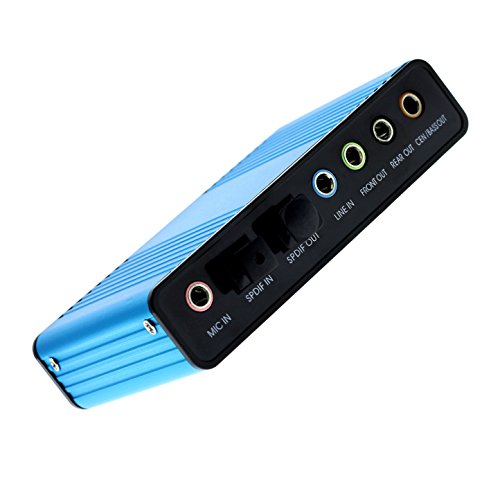
This unassuming blue adapter is the closest thing in the roundup to a time capsule, and that is a compliment. It has been sold for years in essentially this form: a USB 2.0 external sound card offering six-channel 5.1 surround output with SPDIF alongside. The six-channel analogue output is the point. Owners of older powered 5.1 speaker sets — the kind with three colour-coded 3.5 mm plugs and no digital input at all — are this product’s entire reason to exist, because a modern laptop gives them no way to use the rear and centre channels they paid for. This adapter restores those channels over a single USB connection, which is why it keeps selling while glossier dongles come and go.
Realism about the tier matters. This is utility hardware: the conversion quality serves films, games and casual music perfectly adequately, and nobody should buy it expecting an audiophile DAC stage. Driver behaviour on this class of CMedia-style adapter can require selecting the correct speaker configuration inside Windows — telling the system you have a 5.1 set, then using the test tones to confirm each channel lands on the right speaker — and that five-minute ritual is part of ownership. The SPDIF port adds a second life as a digital feed to a receiver, making the little blue box a reasonable spare to keep in a drawer for whatever audio emergency a household PC produces next.
One more audience keeps this adapter in production: small venues and offices. A community hall PC driving a powered speaker arrangement, a classroom machine feeding more than stereo, a shop’s background-music system with a subwoofer — these are unglamorous jobs where the requirement is simply that six channels come out of a computer that has one USB port to spare. Equipment chosen for such rooms is valued for being replaceable and understood, and a design that has been stable for years, with behaviour any technician can predict, fits that brief precisely.
- Connection: USB 2.0 to PC
- Output story: 6-channel 5.1 analogue surround plus S/PDIF
- Colour/finish: blue housing, as listed
- Surround reading: discrete analogue channels for powered speaker sets
Strengths
- Genuine analogue multichannel output for legacy 5.1 speaker sets
- Long market presence means its behaviour and drivers are well understood
- SPDIF included as a bonus path to a receiver
Trade-offs
- Conversion quality is utility-grade, not hi-fi
- Windows speaker configuration needs manual confirmation for correct channel mapping
- Design and port layout are dated next to newer aluminium adapters
Best for: reviving an analogue-input 5.1 speaker set on a PC or laptop that lacks the outputs — the single clearest use case in this whole guide. Headphone listeners chasing processing effects will find the Cubilux below aimed at them instead.

Cubilux 7.1 USB Sound Card — Headphone surround
The Cubilux is honest about its centre of gravity if you read past the 7.1 in its name: the listing describes a full aluminium alloy USB-A external sound card for headphones, with a stated sample-rate span of 48 kHz to 384 kHz, line-in and a stereo microphone input. This is a headphone and headset device. Its surround is the virtual kind — processing applied to two channels — and judged on those terms it is a sensible product: a metal-bodied DAC/amp dongle that lifts a laptop’s headphone output, adds proper inputs for a headset mic and a line source, and offers surround flavouring for games as a software extra rather than a physical promise.
The wide stated sample-rate range should be read the way hi-res figures always should be: as a ceiling describing the converter’s design class, not as content you will routinely feed it. What matters more in daily use is that Cubilux, as a maker, specialises in exactly these small audio adapters, and the build reflects it — the alloy shell and the inclusion of both line-in and mic-in make it as useful for a podcaster’s backup chain or a musician sketching ideas as for a gamer. What it will not do is feed a 5.1 speaker set: there are no multichannel analogue outputs here, and no optical port either. Buying it for speakers would be the category error this guide exists to prevent.
There is a subtler virtue in the Cubilux’s input pair worth naming. A line-in that arrives over USB gives a laptop a clean stereo capture path for digitising a cassette deck, recording a keyboard’s output, or feeding a stream from an external source — tasks that a headphone-jack-only machine either cannot do or does through a hissy microphone input never designed for line level. Buyers sometimes discover months later that the little adapter they bought for gaming quietly became their general-purpose audio doorway, and designs with honest inputs age into that role far better than output-only dongles.
- Connection: USB-A to laptop or PC
- Stated sample-rate span in listing: 48 kHz–384 kHz
- Inputs: line-in and stereo microphone input
- Enclosure: full aluminium alloy
- Surround reading: virtual processing for headphones
Strengths
- Proper line-in and mic-in make it a small recording-capable hub, not just an output
- Aluminium build is a tier above plastic dongles
- Headphone-first design is coherent — everything on it serves that use
Trade-offs
- No multichannel analogue outputs and no optical port for speaker systems
- The 7.1 label describes processing, which buyers must not mistake for channels
- USB-A connection may need an adapter on USB-C-only laptops
Best for: headphone and headset users who want a solid metal USB upgrade with real inputs for a microphone or line source. Speaker-set owners should keep scrolling — this one was never meant for them, and it is better at its own job for that focus.

Newfame USB 5.1 Sound Card SPDIF — Optical passthrough
The Newfame’s listing is admirably narrow about its purpose: a portable USB external sound card whose headline is a 5.1-channel SPDIF optical output, plug-and-play, for PC, laptop and desktop use across gaming, music and streaming. Translated through this guide’s framework, that means the Newfame is a delivery device. It exists to get a digital multichannel stream out of a computer that lacks an optical port — most laptops, many compact desktops — and into the receiver, soundbar or powered speaker system that will decode it. Films are its home turf: a movie soundtrack already encoded for surround can travel down the fibre exactly as authored, with the decoding happening in equipment designed for it.
Two expectations need managing. The first is games: a film’s pre-encoded track passes through happily, but a game’s live multichannel audio only becomes a surround stream on an optical connection if something encodes it in real time, and adapters at this level generally pass what the PC gives them rather than performing that encoding. Set the PC to output an encoded format where the content provides one and you are fine; expect magic and you will get stereo. The second expectation is analogue: keep a pair of ordinary headphones or a stereo speaker need in mind and this class of adapter covers basic output too, but its reason to exist is the optical port, and buyers with no decoder downstream should choose an analogue-first pick instead.
Portability deserves a sentence of its own here, because the Newfame’s natural habitat is the laptop bag rather than the permanent desk. The scenario is common: a laptop that lives in an office all week becomes the film machine at a partner’s flat, a holiday rental or a parents’ house where a proper receiver sits waiting. A pocketable adapter that turns the laptop into a respectable source for that receiver — with the soundtrack arriving in its authored surround format — earns its space in the bag in a way a fixed internal card never could.
- Connection: USB, plug-and-play positioning
- Headline feature: 5.1-channel SPDIF optical output
- Use cases named in listing: gaming, music, streaming on PC and laptop
- Surround reading: encoded stream delivered to an external decoder
Strengths
- Adds an optical output to machines that never had one
- Film and streaming soundtracks pass to a receiver in their authored format
- Portable form suits laptops that dock at a TV or receiver
Trade-offs
- Worthless for surround without a decoder-equipped device downstream
- Live game surround over optical depends on encoding the adapter does not promise
- Analogue side is basic utility audio rather than a headphone upgrade
Best for: laptop and small-PC owners whose receiver or decoder-equipped speaker system is one optical port away from proper film surround. If there is no decoder in your room, this pick solves a problem you do not have — the analogue adapters above are your category.
StarTech 7.1 USB Audio Adapter — Established brand option
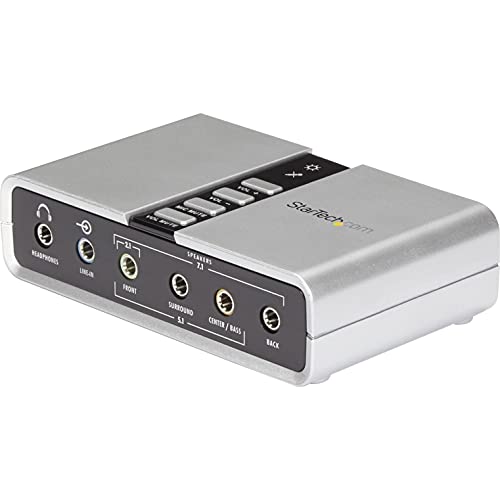
StarTech occupies a particular niche in accessories: the unglamorous, businesslike option that IT departments buy when a port needs to exist and keep existing. This adapter, sold under the ICUSBAUDIO7D model name for a very long time, offers up to 7.1 surround with digital SPDIF and analogue 3.5 mm connections for a laptop or PC. That combination — analogue multichannel outputs plus an optical path in one unit — makes it the generalist of this roundup: it can feed an analogue speaker set directly, or hand a digital stream to a receiver, and its maker publishes proper support documentation of the kind the no-name end of this market rarely bothers with.
The “up to 7.1” wording deserves the guide’s standard translation: the analogue outputs cover multichannel speaker configurations, and the real-world channel count you experience depends on configuring Windows correctly and on your speaker set matching the outputs. Nothing about that is a criticism — it is the physics of the category — but buyers should plan the five minutes of speaker-setup testing as part of installation. What the StarTech premium buys, relative to the cheapest adapters, is predictability: a known model number, a maker that answers support queries, and a design that has been stable long enough for every quirk to be documented somewhere. For a work machine or a family PC that must simply behave, predictability is a feature.
It is also the pick most likely to be found in workplace spares drawers, and that context explains its design priorities. When a training room’s PC loses its audio or a workstation must drive a speaker arrangement for presentations, the person fixing it needs a device whose drivers install without drama and whose port layout matches the diagram in the manual. The StarTech’s long production run means that manual, and a decade of accumulated troubleshooting knowledge, actually exists — an unglamorous asset that no specification table captures.
- Model: ICUSBAUDIO7D, as listed
- Surround: up to 7.1 via analogue 3.5 mm connections
- Digital: SPDIF output included
- Maker profile: mainstream accessories brand with formal support channels
Strengths
- Analogue multichannel and optical output in a single adapter
- Established maker with documentation and support infrastructure
- Stable, long-lived design with well-documented behaviour
Trade-offs
- Typically costs more than functionally similar no-name adapters
- Utilitarian design and cabling, with no premium materials
- Channel configuration still needs manual verification in Windows
Best for: buyers who want one adapter that covers both analogue speakers and an optical feed, from a maker that will still exist next year. Pure headphone users pay for outputs they will never plug in; the Cubilux spends the same money in their direction instead.

USB Sound Card 6-in-1 Optical — USB 3.0 hub-style
The final pick is the maximalist entry: a six-in-one USB 3.0 sound card whose listing claims true 7.1 surround, 48 kHz sampling and SPDIF optical in and out, positioning itself as a PC home-theatre hub. We include it with the guide’s claim discipline fully switched on. “True 7.1” is the seller’s phrase, and the honest reading of a hub-style unit like this is that its value lies in consolidation — many connection types in one desktop box — rather than in verified superiority of its surround implementation. The stated 48 kHz sampling is, interestingly, the most believable number in its title: it matches the rate films and games actually use, and a maker willing to print a modest, realistic figure may be describing the product more carefully than one printing astronomical ceilings.
Who is a hub like this for? The desk with everything: a PC that feeds a TV, a receiver that wants optical, headphones that live on the desk, perhaps a console joining through the optical input. One box that keeps all of those plugged in permanently, switched by the PC’s device selection, removes the daily cable shuffle that makes people abandon surround setups entirely. The risks are the usual ones for unbranded multi-function units — driver polish, documentation thinness, and build that serves function over feel. Buy it as a connection hub with surround capabilities, verify every port on arrival while returns are easy, and it can be the pragmatic centre of a messy entertainment desk.
The hub format also answers a cabling reality: Toslink cables, analogue leads and headphone plugs all prefer to stay connected. Every reconnection is a small chance to bend a pin, loosen a socket or simply decide that tonight’s film is not worth the effort. A permanent hub removes that friction, and for households where the surround system currently goes unused because setup is a chore, removing friction is worth more than any processing mode. Judge this pick as furniture for your connections first and as a sound device second, and its place in the roundup makes sense.
- Connection: USB 3.0
- Claimed in listing: true 7.1 surround, 48 kHz sampling
- Digital: SPDIF optical input and output
- Format: six-in-one desktop adapter/hub
- Surround reading: seller-claimed; judge by the ports you verify on arrival
Strengths
- Optical in and out plus broad connectivity in one permanent desk fixture
- Realistic stated sampling rate matches film and game content
- Hub format suits entertainment PCs with several audio partners
Trade-offs
- Headline surround claim is unverified seller language
- Unbranded support and documentation are thinner than StarTech’s
- Does several jobs adequately rather than one job exceptionally
Best for: entertainment-desk consolidation, where one box keeping PC, TV, receiver and headphones connected matters more than any single specification. Listeners who know their endpoint precisely — analogue speakers, optical decoder, or headphones — will be better served by the specialist picks above it.
How Do the Six Adapters Compare on Surround Delivery?
| Adapter | Analogue multichannel | Optical SPDIF | Surround character |
|---|---|---|---|
| Phefop 7.1 USB Optical | Headphone/stereo focus | Input and output claimed | Optical delivery plus headphone processing |
| Optimal Shop 6-Channel | Yes — 5.1 analogue outputs | Output | Discrete channels for powered speaker sets |
| Cubilux 7.1 USB | No | No | Virtual processing for headphones only |
| Newfame USB 5.1 SPDIF | Basic stereo | Output | Encoded stream to an external decoder |
| StarTech ICUSBAUDIO7D | Yes — up to 7.1 analogue | Output | Discrete channels plus a digital path |
| 6-in-1 Optical USB 3.0 | Hub-dependent | Input and output | Seller-claimed 7.1 in a consolidation hub |
Let the second and third columns do the deciding. If your speaker set eats analogue channels, only the rows with real analogue multichannel belong on your shortlist. If a receiver does your decoding, the optical column is your shortlist. If neither column matters because you listen on headphones, you were never really shopping for 5.1 at all — you were shopping for a good headphone output, which is a liberating realisation that the wider headphone guide in this series, best sound cards for headphones, explores properly.
What Should You Check in the First Ten Minutes After an Adapter Arrives?
Budget audio rewards a brisk arrival inspection, because the difference between a good unit and a dud is usually audible immediately and returns are easiest early. Start with the physical audit: every port named in the listing should exist on the unit in your hand, the optical socket should grip its cable with a positive click, and the analogue jacks should hold a plug without wobble. Then the stereo sanity check: play a familiar track on headphones or stereo speakers and listen for the obvious faults — channel imbalance, crackle when the cable moves, a hum that changes when you touch the case. Any of those is a return, not a troubleshooting project.
Next, the surround verification this category demands. Configure the multichannel layout in Windows, run the channel test tones, and physically confirm each tone’s location, including the subwoofer’s low thump and the surrounds behind you. For an optical unit, play a film scene with a known surround mix and confirm the receiver reports the encoded format rather than stereo PCM. Finally, the microphone check if you will use it: record thirty seconds of speech and listen back for the electrical whine that betrays poor shielding. Ten minutes of this turns a gamble into a verified tool, and it converts the vague anxiety budget adapters cause into a simple pass-or-fail you control.
Which Endpoint Should Decide Your Purchase?
Work backwards from the last device in your chain. If it is a powered 5.1 speaker set with analogue inputs — the classic three-plug arrangement — your adapter must produce the channels itself, which points to the Optimal Shop or the StarTech. Test on arrival with the Windows speaker test, which plays a tone from each channel in turn; if the rear tone comes from the front speakers, the software configuration, not the hardware, is almost always the culprit, and swapping the output mode from stereo to 5.1 in the sound settings fixes it.
If your endpoint is an AV receiver, a soundbar with optical input, or a speaker system with a built-in decoder, your adapter is a courier, not a creator: the Newfame, the Phefop or the hub-style unit simply need to present the stream cleanly. Configure your player software to pass the encoded soundtrack through rather than decoding it to stereo first — that single setting is the difference between genuine surround and a stereo downmix arriving by an expensive route. Buyers whose endpoint is digital should also read our best external sound cards with digital out guide, which covers the converter end of this market where some devices only translate formats rather than process sound at all.
There is a fourth endpoint worth a paragraph because it generates so much confusion: the television. A PC connected to a TV over HDMI already sends audio — including multichannel audio — down that cable, and in that arrangement an external adapter adds nothing unless the TV is passing sound onward to a receiver and doing it badly. Where an adapter does help a TV-centred room is with the sources that are not the PC: a console feeding optical into a Phefop-style input, or a laptop joining the room temporarily. If your PC reaches the TV by HDMI and the sound already arrives correctly, your surround problem, if you have one, lives in the TV’s output settings rather than in anything on this page.
If your endpoint is headphones, be honest that channel count is irrelevant to you and spend on conversion quality and a decent amp stage instead. And if your endpoint does not exist yet — you are buying the adapter first and speakers later — buy for the speakers you have genuinely budgeted, not the ones in the brochure, because an analogue speaker set and a decoder-based system send you to different picks in this guide.
How Do You Set Up an External 5.1 Adapter Correctly?
Connect everything before powering opinions. Plug the speaker set’s three analogue cables into the adapter’s outputs, matching front, centre/subwoofer and surround pairs; connect the adapter to a USB port on the PC itself rather than through an unpowered hub; then open the Windows sound settings, select the adapter as the default device, and open its configuration panel to choose the 5.1 speaker layout explicitly. Run the channel test and walk around the room: centre dialogue tone from the centre speaker, subwoofer tone felt more than heard, surround tones clearly behind you. If two channels are swapped, the usual cause is the centre/subwoofer and surround cables trading places at the adapter — a thirty-second fix once you know it exists.
For optical setups, the ritual differs: connect the Toslink cable until it clicks, set the adapter as default, then set your film player to passthrough or bitstream output so the encoded track leaves the PC untouched. Confirm success at the receiver, whose display should light its Dolby or DTS indicator; if it shows plain PCM stereo, the player is decoding early, and the setting to change lives in the player, not in Windows. Game players should temper expectations as discussed — stereo or virtual processing may be the realistic outcome over optical, and many players quietly prefer the analogue route for games and the optical route for films, using each where it is strongest.
Subwoofer placement deserves its minute during setup, because no adapter setting can rescue a badly placed sub. Low frequencies interact with the room itself: a subwoofer jammed into a corner gains boomy emphasis, one placed beside your listening seat can feel disconnected from the front speakers, and the crossover point where the small speakers hand bass duties downward determines whether male voices sound chesty or thin. Start with the sub at a front corner a short distance from the wall, the crossover at the speaker maker’s suggested point, and then adjust by ear with a film scene you know well — an engine rumble should feel anchored to the screen, not to the corner of the room. Ten unhurried minutes of this teaches you more about your particular room than any further purchase could.
Finish by setting levels per channel. Budget speaker sets rarely balance themselves, and a centre channel two notches too quiet will make film dialogue vanish under music no matter how correct the wiring is. Most media players and the Windows configuration panel offer per-channel trims; five minutes here is the cheapest surround upgrade available.
What Should You Know About the Cables Themselves?
Adapters get the attention, but cables decide whether a correct purchase actually works. Analogue multichannel runs on ordinary 3.5 mm stereo leads, and the commonest failure is not quality but identity: three identical-looking black cables, one of which carries the centre and subwoofer channels combined on a single stereo plug. Label both ends of each lead before routing them behind furniture, because the centre/subwoofer pairing is the one everyone guesses wrong, and guessing wrong presents as “dialogue comes from the floor and bass comes from the middle of the screen.” A strip of tape and a marker during installation saves an evening of crawling later.
Optical cable has its own etiquette. Toslink fibre carries light around corners happily but objects to being bent sharply, kinked behind a receiver, or trodden flat under a rug; route it with gentle curves and a little slack. The connectors are keyed and click home positively — if an optical plug feels vague, it is not seated, and a partially seated plug is a classic cause of dropouts that get blamed on the adapter. Keep the protective caps until the moment of connection, because dust on the lens face of the fibre scatters the signal. And buy the length you need rather than the longest available: a modest run in good condition beats a coiled excess of cable radiating trip hazards behind the television.
Finally, power and interference housekeeping applies to the analogue half of any of these setups. Keep analogue leads away from parallel runs alongside mains cables where you can, cross power cables at right angles when crossing is unavoidable, and if a hum appears, change one thing at a time — a different USB port for the adapter, a different mains socket for the speaker set — until the hum’s behaviour tells you which loop it lives in. Methodical single changes find hums; frantic re-cabling merely rearranges them.
What Mistakes Do Buyers Make With External Surround Adapters?
The defining mistake is buying the badge instead of the mechanism — ordering a headphone dongle for a speaker set, or an optical courier for speakers with no decoder, then blaming the category. Second is forgetting that Windows defaults to stereo: a correctly wired 5.1 adapter configured as a stereo device in the sound settings will behave exactly like a stereo device, and this single oversight generates a large share of the disappointed reviews in this category. Third is expecting live game surround over optical without an encoder anywhere in the chain; films and games are different animals on a digital connection, and planning for that difference prevents the most common letdown.
Fourth, buyers daisy-chain the adapter through whatever USB hub is nearest, including unpowered ones shared with drives and dongles, then chase intermittent dropouts that were really power and bandwidth squabbles. Give the audio adapter a direct port. Fifth, some buyers stack virtual surround processing on top of a real 5.1 speaker feed, smearing the channel separation they paid for; processing belongs on the headphone path only. Finally, there is the collector’s mistake: buying the hub-style everything-box when one known endpoint would have been served better by a specialist. Surround satisfaction comes from matching one chain correctly, not from owning every port type at once.
Final Recommendation
Match the mechanism to the room and this category stops being confusing. Owners of analogue 5.1 speaker sets should buy the Optimal Shop for a pure revival job, or the StarTech when the same adapter must also feed a receiver optically and come with a support department attached. Owners of decoder-equipped systems should buy the Newfame as a straightforward optical courier, or the Phefop when an optical input for a console makes the desk tidier. The Cubilux is the pick we would hand a headphone user who wandered into this category by mistake and deserves to leave with the right product, and the six-in-one hub serves the genuinely multi-device entertainment desk that values consolidation over specialisation.
If your recording ambitions ever join the surround setup — commentary over gameplay, a podcast from the same desk — remember that none of these adapters is a recording interface, and the distinctions in our best pci sound cards for recording guide will matter more than another surround mode. Our own first purchase from this page, for the commonest real-world job of resurrecting a good old analogue 5.1 speaker set on a modern laptop, would be the unglamorous blue Optimal Shop: it does the one thing its name promises, with the right number of jacks, and in this category that plain honesty is the rarest feature of all.
Frequently Asked Questions
Can a USB adapter really output 5.1 surround?
Yes, in two legitimate ways: by producing six analogue channels for a powered speaker set, as the Optimal Shop and StarTech do, or by passing an encoded multichannel stream over optical SPDIF to a decoder, as the Newfame and Phefop do. What a USB adapter cannot do is create surround in a device that has no way to receive it — the endpoint always has to match the mechanism.
Why does my 5.1 adapter only play stereo?
Almost always configuration. Windows defaults new audio devices to stereo, so open the sound settings, select the adapter, and choose the 5.1 layout in its configuration panel, then run the channel test. For optical connections, also check that your film player is set to passthrough; a player decoding to stereo upstream leaves the adapter nothing multichannel to carry.
Is virtual 7.1 worth anything for gaming?
As a headphone effect, it can be. Good virtual processing gives directional cues a sense of behind-you placement that plain stereo lacks, which some players find genuinely useful. It is still processing applied to two drivers, not seven channels of audio, and preferences vary enough that it should be a bonus feature in a purchase, never the foundation of one.
Will these adapters work with a games console?
Generally, this class of USB adapter is built for PCs and laptops, and console USB audio support is narrower and model-dependent. The more reliable console route in this roundup is indirect: a console’s optical output feeding an adapter with optical input, like the Phefop, or feeding a receiver directly. Check the specific listing’s stated compatibility before assuming USB plug-and-play on any console.
Why do rear speakers stay silent in some games even with a 5.1 adapter?
Because the game, the operating system and the adapter each hold one piece of the decision. The game must be outputting a multichannel mix — check its audio settings for a speaker configuration option. Windows must be configured for a 5.1 device, as covered in the setup section. And over an optical connection, the game’s live mix needs an encoder somewhere, which this class of adapter generally lacks, so the analogue route is the dependable path for game surround. Work through the three layers in that order and the silent rears almost always turn out to be a setting, not a fault.
Do I need USB 3.0 for surround audio?
No. Multichannel audio uses a tiny fraction of even USB 2.0 bandwidth, and several picks here are USB 2.0 devices that handle 5.1 without strain. A USB 3.0 badge on the hub-style pick reflects its port generation, not an audio requirement. What matters is a direct, stable connection — not a shared unpowered hub — whatever the generation.
How can I tell whether my speaker set needs analogue or optical?
Look at its inputs, not its marketing. Three 3.5 mm sockets — often colour-coded green, black and orange or yellow — mean the set expects discrete analogue channels, so choose an analogue-output adapter. A single square optical socket means the set contains a decoder and expects an encoded digital stream, so choose an adapter with SPDIF output. A set offering both accepts either route; films favour the optical path, games usually favour analogue. A set with only one stereo jack is a stereo set whatever its box claimed, and no adapter will make it surround.
Can I use one of these for recording my voice or instruments?
Only in the most basic sense. Some picks include a microphone input suitable for chat, and the Cubilux’s line-in can capture a stereo source, but none of these is a recording interface with proper preamps and monitoring. If recording is a real goal rather than an afterthought, budget for an interface and treat surround playback as a separate purchase.
Related Guides
Three neighbouring questions tend to follow this one. If the digital connection turned out to be the heart of your setup, the digital-output guide linked above separates true sound cards from simple format converters so you know which you own. If the surround research ended with the realisation that you listen on headphones after all, the headphone guide linked in the comparison section ranks amp stages instead of channel counts. And if your desk also records — streams with commentary, voiceovers, a podcast — the recording guide linked in the recommendation explains where sound cards stop and audio interfaces begin. Each of those guides assumes you have absorbed this one’s central lesson: in PC audio, the port and the mechanism are the product, and the badge is only advertising. Keep that lesson and the next adapter you ever buy — for a future laptop, a different room, a speaker set you have not met yet — will be chosen in minutes rather than evenings, because you will start where this guide started: by counting the jacks on the equipment you already own and asking what, precisely, needs to travel between them.
Related guides
- Best Gaming Keyboard: Six Boards From Rapid-Trigger Esports Picks to Macro Flagships
- Best 3.0 Qualcomm Quick Chargers: QC 3.0 Adapters That Still Earn Their Outlet
- Best Time Machine Compatible Hard Drives: Mac-Ready and Reformatted Picks
- Best 3D Mechanical Engineering Laptops: Certified Workstations for CAD and Simulation


