What's inside
- Key Takeaways
- Quick Picks
- How did we judge AC1200 extenders without believing their box speeds?
- How do the six best ac1200 range extenders compare on class, generation and job size?
- Where should you plug in a range extender for the best result?
- Extender, mesh system or wired access point: which does your home need?
- How do you set up an extender so devices roam sensibly?
- What speeds should you honestly expect through an extender?
- How do you secure and maintain an extended network?
- How do you extend Wi-Fi to a garden office or outbuilding?
- What should you do in the first week with a new extender?
- What mistakes do range extender buyers keep making?
- Final Recommendation
- Frequently Asked Questions
- Related Guides
As an Amazon Associate I earn from qualifying purchases. This post may contain affiliate links at no extra cost to you.
widgetverdict.com is reader-supported. When you buy through links on our site, we may earn an affiliate commission.
Where to buy: five extenders below link to verified Amazon listings, and one long-running rival is covered without a link because no matching listing passed our verification pool for this guide. Households hunting the best ac1200 range extenders usually have one room the router forgot — a back bedroom, a garden office, a nursery where the monitor’s feed stutters — and a budget that prefers a plug-in fix over a whole new mesh system.
An AC1200 extender rebroadcasts your existing Wi-Fi on two bands whose combined headline figure gives the class its name. That headline needs translating before it misleads anyone: it is a theoretical maximum shared across bands and devices, not a speed any single laptop will see. What an extender really sells is usable signal where there was none, at a price that keeps the existing router employed.
Three of the five linked models here deliberately exceed the class named in the title, and this guide labels them honestly rather than pretending otherwise. TP-Link’s RE550 is an AC1900 model, its AX3000 and RE500X are Wi-Fi 6 designs rated above AC1200, and they are included because shoppers comparing AC1200 units meet them in the same listings and deserve to know what the extra money buys — and what it cannot fix.
Placement will decide your result more than model choice will. Every review below assumes the discipline the guide sections teach: the extender belongs halfway to the dead zone, inside the router’s good signal, not inside the dead zone itself. Buy the right model and place it wrongly, and you have purchased a very efficient rebroadcaster of a bad signal.
Key Takeaways
- TP-Link’s RE315 is the current AC1200 default, with a signal indicator that makes good placement easy.
- TP-Link’s RE220 is the budget AC1200 veteran for a single modest dead zone.
- TP-Link’s RE550 is an AC1900 step up — faster than AC1200 class — for busier homes and wired backhaul tricks.
- TP-Link’s AX3000 extender is a Wi-Fi 6 model well above AC1200, suited to modern routers and many devices.
- TP-Link’s RE500X is an AX1500 Wi-Fi 6 middle step, above AC1200, with OneMesh potential.
- Netgear’s EX3700 is the prose-only alternative for households loyal to the Netgear app and ecosystem.
Quick Picks
| Pick | Badge | Why it made the cut |
|---|---|---|
| TP-Link RE315 AC1200 WiFi Extender | The current AC1200 default | A dual-band AC1200 plug-in with a smart signal indicator and OneMesh compatibility. |
| TP-Link RE220 WiFi Extender | The budget AC1200 veteran | TP-Link’s long-running affordable extender for modest dead zones and simple needs. |
| TP-Link RE550 AC1900 WiFi Extender | Above class: AC1900 muscle | An AC1900 extender — a class above AC1200 — with three bands of headroom for busier homes. |
| TP-Link AX3000 WiFi 6 Range Extender | Above class: Wi-Fi 6 AX3000 | A Wi-Fi 6 extender rated AX3000 — well above AC1200 — for modern routers and device-dense homes. |
| TP-Link RE500X AX1500 WiFi Extender | Above class: AX1500 middle step | An AX1500 Wi-Fi 6 extender — above AC1200 — balancing modern efficiency with a mid-level price. |
| Netgear EX3700 | Prose-only: the Netgear loyalist’s route | Netgear’s long-running AC750-class wall-plug extender, covered without a link as the alternative ecosystem’s representative. |
How did we judge AC1200 extenders without believing their box speeds?
We started from the physics every extender obeys. A single-radio extender repeats traffic on the same channels it receives, which costs throughput on every hop; dual-band designs spend one band talking to the router and the other serving devices, which is why all serious picks here are dual-band. Judgements therefore weigh band management and antenna design above the headline number printed largest on the box.
Placement aids were scored as performance features, because in real homes they are. A signal-strength indicator on the unit, or a competent app that reports link quality, decides whether owners find the halfway sweet spot or abandon the extender in the dead zone and blame the brand. Models that help their owners place them well earned their positions partly on that honesty.
Router compatibility and network naming came next. Extenders that can share the router’s network name — through mesh-style features such as TP-Link’s OneMesh with a compatible router, or simple same-SSID setup — spare households the ritual of switching networks room to room. We noted which models offer that path and which leave you with a separate _EXT network as their default personality.
Finally, we priced the class against its alternatives honestly. An extender is the right tool for one or two dead zones in an otherwise healthy network. A home with dead zones everywhere needs a mesh system or a wired access point, and this guide says so in its own sections rather than selling extenders as universal medicine.
We excluded single-band repeaters and no-name units whose firmware support evaporates within a year, because an extender is network infrastructure with a security surface, not a disposable gadget. Every pick here comes from a maker with a track record of updates and support pages that still exist — a criterion invisible in speed tests and decisive across a five-year ownership.

TP-Link RE315 AC1200 WiFi Extender — The current AC1200 default
The RE315 is what the modern AC1200 extender looks like when a manufacturer sweats the details owners actually meet. Its headline is the class standard — dual-band AC1200 — but its defining feature is a signal indicator that tells you, in plain light, whether the socket you chose sits inside the router’s good coverage. That single lamp prevents the category’s most common failure more effectively than any antenna claim.
Performance in a correctly chosen socket is the class at its best: a back bedroom gains a connection that streams, calls and browses without the evening collapse, and the 5GHz band serves the devices near the extender while 2.4GHz reaches the awkward corners. Owners should expect a well-placed extender’s honest yield — strong usability, not router-adjacent speed records — and the RE315 delivers that yield consistently.
OneMesh compatibility adds a growth path. Paired with a compatible TP-Link router, the RE315 joins a unified network with one name and roaming behaviour that spares devices the cling-to-a-dead-signal problem. Without such a router it still works as a conventional extender, which makes it a safe purchase for households whose router may change before the extender does.
The Ethernet port earns its keep in two disguises: wiring the extender to a distant games console or television for a stabler feed, or — in access-point mode with a cable run — turning it into a proper wired-fed broadcaster that escapes the repeating penalty entirely. That second mode is the connoisseur’s secret and this unit supports it gracefully.
Choose the RE315 as the default AC1200 answer: a current design, honest placement help and enough flexibility to survive your next router. Households whose dead zone is one room and whose expectations are calibrated will find it the easiest model here to live with.
Renters in particular should note its socket manners: it occupies one outlet without demanding the furniture rearrangement a mesh node on a table can require, and it leaves the flat as it found it. For a technology whose entire purpose is improving a home temporarily and reversibly, that lightness of footprint is a design virtue in itself.
Its app experience respects non-specialists: the placement readout speaks in plain good-or-move terms rather than decibel riddles, and the setup remembers that the person holding the phone is standing in a hallway, not administering a data centre. Accessibility of process is why some extenders get installed well and others get installed approximately, and the RE315 is firmly in the first camp.
Its indicator lamp also teaches the household a permanent lesson about their home’s radio geography: which walls eat signal, which hallway is charmed, where the router’s kingdom truly ends. Owners who have placed one extender well tend to solve every later network question faster, because the house’s invisible map has been made visible once, in light, on the wall.
A baby-monitor camera in the rescued nursery is the test many young parents actually buy it for, and its steady, boring competence at that one job — a feed that simply never drops at 3am — explains the loyalty these mid-class extenders inspire. Drama-free infrastructure becomes part of the household’s sense of safety, which is a heavy responsibility for a hallway plug to carry well.
- Class: AC1200 dual-band, the class this guide is named for
- Placement: intelligent signal indicator on the unit
- Mesh path: OneMesh with compatible TP-Link routers
- Port: Ethernet for a wired device or access-point mode
- Antennas: external, adjustable for the socket’s orientation
- Setup: TP-Link Tether app or WPS button
- Coverage role: one to two problem rooms
- Extras: access-point mode for cable-fed installs
Strengths
- Signal lamp makes good placement findable
- OneMesh path unifies the network name
- Ethernet port doubles as access-point mode
Trade-offs
- Repeating still costs throughput versus wired options
- OneMesh needs a compatible TP-Link router
- Covers a dead zone, not a whole failing network
Best for: a family whose back bedroom drops video calls, placing the extender in the hallway socket the indicator approves, under a OneMesh router
Not suited for: a large house with dead zones in every direction
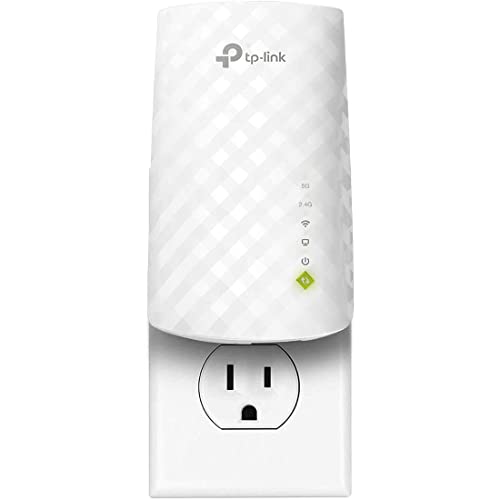
TP-Link RE220 WiFi Extender — The budget AC1200 veteran
The RE220 has been solving small Wi-Fi problems for years, and its longevity is itself a specification: a design this old that still sells has survived millions of real hallways. It offers the AC1200-class dual-band formula in a compact plug-in body at the friendly end of the price ladder, aimed squarely at the household with one annoying room and no appetite for a network project.
Its virtues are simplicity’s virtues. Setup through the Tether app or WPS is a ten-minute job, the unit disappears into a socket without blocking a room’s life, and the signal it delivers to a spare bedroom, a garage corner or a landing is the difference between a room online and a room offline. For email, browsing, music and standard streaming, that difference is the whole product.
Calibrate expectations to its veteran status. There is no OneMesh growth path of the newer models’ polish, its throughput under load is the class’s modest end, and a household of simultaneous gamers and 4K streamers will find its ceiling quickly. It is a one-room remedy, and it is most loved by owners who bought it as exactly that.
The Ethernet socket still appears, which rescues a smart television or an older console that prefers a wire, and access-point behaviour with a cable is possible for the households that later run one. Budget hardware that keeps a second career available ages better than budget hardware that cannot, and the RE220’s second career is respectable.
Pick the RE220 when the problem is small, the budget is smaller and the network is otherwise healthy. It is the extender equivalent of a reliable spare tyre: not the car’s best wheel, and absolutely the right thing to own when the need is specific and immediate.
Grandparents’ houses are its spiritual home: one unit, set up by a visiting relative in minutes, quietly keeping a tablet and a smart speaker alive in the room the router forgot. Technology that an infrequent visitor can install and the household never has to think about again has a value that specification tables, fixated on ceilings, consistently underrate.
It also serves as the household’s diagnostic tool. Before investing in mesh, a cheap extender placed by the halfway rule reveals whether the dead zone is a local shadow or a symptom of a dying router — information worth its modest price either way, because the two diagnoses lead to entirely different shopping lists.
Do not overlook it for a home’s least glamorous dead zones — the utility room hosting a smart meter hub, the garage with a connected door opener, the loft where a camera watches. Such devices need reliability, not speed, and a veteran extender sipping power in a corner socket is often the most proportionate infrastructure a household can buy.
Its cheapness invites a liberating experiment: buy it to learn your house. Even if a mesh system eventually replaces it, the RE220 will have mapped your dead zones, taught the halfway rule and probably retired to the garage socket for a second career. Few households regret owning one, which cannot be said of most networking experiments at any price.
- Class: AC1200 dual-band in a compact plug-in body
- Placement: app-guided setup; choose the halfway socket
- Mesh path: conventional extender behaviour
- Port: Ethernet for one wired device
- Antennas: internal design keeps the profile tidy
- Setup: Tether app or WPS
- Coverage role: a single modest dead zone
- Extras: access-point possibility with a cable run
Strengths
- Lowest-fuss route to one room back online
- Compact body vanishes into a socket
- Ethernet port gives it a second career
Trade-offs
- No modern OneMesh polish
- Throughput ceiling shows under heavy loads
- Not a whole-home coverage strategy
Best for: a tenant whose spare-room desk loses the router by evening, who needs browsing and calls restored from one hallway socket
Not suited for: a household of simultaneous gamers and 4K streamers

TP-Link RE550 AC1900 WiFi Extender — Above class: AC1900 muscle
Honesty first, because this guide promised it: the RE550 is not an AC1200 extender. It is an AC1900 model, rated a full class above the title’s class, and it sits here because shoppers meet it on the same shelf and deserve a translation. What the extra class buys is headroom — more capacity on its bands, stronger radios and three external antennas that hold a router link across distances where AC1200 units begin to negotiate.
That headroom shows in busy homes. Where several people stream, call and game through one extended zone, the RE550’s link to the router stays composed longer, and its served speeds sit nearer the top of what repeating technology allows. It remains an extender — the repeating tax still applies — but it pays the tax from a larger income, and large households feel the difference every evening.
OneMesh compatibility with suitable TP-Link routers brings the unified-name, roaming-friendly network within reach, and the Ethernet port supports both a wired device and access-point duty. In a large home with one stubborn wing, an RE550 fed by cable in access-point mode is a genuinely strong architecture that happens to wear an extender’s name and price.
Size is its domestic cost: the RE550 is a substantial plug-in that may crowd a double socket and draws the eye in a minimalist hallway. Its appetite for a well-chosen socket is also greater — feed it a weak router signal and its muscle merely repeats weakness at higher specifications. Placement discipline matters more, not less, as extenders grow stronger.
Choose the RE550 if your dead zone serves a crowd, your router sits far from it, or you plan the cable-fed access-point trick. It is the step up for households that tried the class below and found its ceiling — bought knowingly, as an AC1900 instrument, not as an AC1200 with a confusing badge.
Its antennas deserve a practical word: aim them vertically for same-floor coverage, angle them when the extended zone sits a floor away, and resist the aesthetic urge to fold them flat for tidiness. Antenna orientation is free performance, and on a unit bought specifically for link strength, folding away the strength to please the eye is the one unforced error left to make.
Large homes should also hear its access-point confession plainly: many RE550s end their lives happily cable-fed, outperforming every repeating extender in this guide from the end of an Ethernet run. Buying it for repeating today and graduating it to wired duty after a renovation is a legitimate two-act plan, and few networking purchases offer a second act at all.
Households running a small business from home find its headroom translates into professionalism: the card machine, the video doorbell and the accounts laptop in the extended zone stop competing for a thin repeated link. When the network carries income, the step above the base class stops being an upgrade and becomes a business expense with a clear conscience.
For a household office that hosts clients on video, its composed link protects the professional surface: no frozen frames mid-sentence, no apologetic re-dials. The premium over AC1200 is, in that setting, not a speed purchase but a reputation purchase, and it should be justified to the budget in exactly those words.
- Class: AC1900 — above the AC1200 class of this guide
- Bands: dual-band with greater capacity than AC1200 models
- Antennas: three external antennas for link strength
- Mesh path: joins OneMesh networks on compatible routers
- Port: Ethernet for wired device or access-point mode
- Placement: signal guidance via app and indicators
- Size: large plug-in body; check socket crowding
- Role: busy extended zones and long router links
Strengths
- Headroom keeps busy extended zones composed
- Strong antennas hold longer router links
- Access-point mode suits large-home wings
Trade-offs
- It is AC1900, not AC1200 — buy it knowingly
- Big body can crowd a double socket
- Muscle cannot fix a weak placement
Best for: a busy family whose garden office sits far from the router, serving two workers’ calls and a teenager’s gaming from one extended zone
Not suited for: a single quiet room needing only email and browsing

TP-Link AX3000 WiFi 6 Range Extender — Above class: Wi-Fi 6 AX3000
Another honest label: this is a Wi-Fi 6 extender rated AX3000, which places it well above the AC1200 class this guide is named for, in both wireless generation and headline capacity. It belongs in the comparison because the modern shopper’s real question is often whether to buy the class they searched for or the generation their new router already speaks — and for Wi-Fi 6 households, this is the extender that speaks it back.
Wi-Fi 6’s gifts are efficiency gifts: better handling of many simultaneous devices, smarter scheduling of small transmissions, and stronger performance in the crowded spectrum of flats and terraces. An AX3000 extender paired with a Wi-Fi 6 router extends those efficiencies into the dead zone, so a hallway full of phones, tablets, consoles and smart plugs stops behaving like a queue at a single door.
Bandwidth headroom is the other half: its bands can carry a router link fat enough that the repeating tax leaves genuinely fast service at the far end, including credible support for 4K streaming and large downloads in the extended zone. Paired with a gigabit connection and a modern router, it is the only extender here that does not ask the household to lower its ambitions at the bedroom door.
The conditions are real. Fed by an old Wi-Fi 5 router, much of its generational advantage evaporates, and its price sits at the top of this guide’s range, where a mesh system begins to compete for the same money. Households with several dead zones should compare honestly: one AX3000 extender fixes a zone brilliantly; a mesh fixes a pattern.
Buy it if your router is Wi-Fi 6, your device count is high and your dead zone is singular but demanding. It is the future-facing pick of this line-up — purchased, to repeat the guide’s promise, as an AX3000 Wi-Fi 6 instrument that outclasses the AC1200 title, not as a member of it.
Smart homes feel its generation most: dozens of bulbs, plugs, cameras and speakers sipping small transmissions are exactly the traffic Wi-Fi 6’s scheduling was built to civilise. An extended zone that hosts the house’s gadget population — often the hallway and landing zones — stops being the network’s bottleneck when this unit takes over its airspace.
Its purchase also simplifies a household’s upgrade story: router already Wi-Fi 6, extender now matching, phones and laptops current — the whole chain speaks one generation and the mysterious half-speed mysteries that plague mixed-generation networks become rarer. Coherence is an underrated network feature, and this extender completes it for homes that started the upgrade at the router.
Its Ethernet port at this performance level tempts a specific architecture: place the unit where its wireless link to the router is strongest, then wire the desk or console from there. That hybrid — wireless across the house, wired across the room — delivers most of a cable run’s stability with none of its installation, and this model has the headroom to make the trick feel permanent.
Content creators working from the rescued room — uploads running while calls proceed — stress an extender in ways families do not, and this is the only model here whose headroom keeps both duties civilised simultaneously. If your livelihood leaves the house through that room’s connection, the flagship’s price divides across every working day it serves.
- Class: AX3000 Wi-Fi 6 — well above AC1200
- Efficiency: Wi-Fi 6 multi-device handling (OFDMA-era design)
- Router fit: pairs best with Wi-Fi 6 routers
- Mesh path: OneMesh options with compatible routers
- Port: Ethernet for wired feed or access-point mode
- Antennas: external high-gain design
- Placement: app and indicator guidance
- Role: demanding single zones in device-dense homes
Strengths
- Extends Wi-Fi 6 efficiency into the dead zone
- Headroom leaves fast service after the repeating tax
- Handles many simultaneous devices gracefully
Trade-offs
- Advantages shrink behind an old Wi-Fi 5 router
- Top-of-guide pricing neighbours mesh systems
- Fixes a zone, not a pattern of dead zones
Best for: a device-dense flat with a Wi-Fi 6 router, whose home office at the corridor’s end must hold calls, cloud drives and a console at once
Not suited for: a household on an old Wi-Fi 5 router with one sleepy spare room

TP-Link RE500X AX1500 WiFi Extender — Above class: AX1500 middle step
The RE500X is the middle step this comparison needed, labelled as plainly as its siblings: an AX1500 Wi-Fi 6 extender, rated above the AC1200 class, priced and powered between the veteran AC1200 models and the AX3000 flagship. For a household whose router has moved to Wi-Fi 6 but whose dead zone is an ordinary bedroom, it is often the most rational money in the guide.
Its Wi-Fi 6 efficiency features serve the modern device pile-up — phones, laptops, doorbells, plugs — with less contention than Wi-Fi 5 extenders manage, while its AX1500 capacity covers streaming, calls and downloads in the extended zone without the flagship’s surplus. The repeating tax still applies, as it does to every extender here, but the taxed remainder is a thoroughly modern connection.
OneMesh compatibility gives it the unified-network path with suitable TP-Link routers, and the Ethernet port keeps the wired-device and access-point options open. That combination — current generation, mesh path, wired flexibility, mid price — is why this model so often ends arguments in households that cannot decide between buying cheap and buying future-proof.
Its limits are the middle child’s limits: a power user with gigabit ambitions will find the AX3000’s headroom worth the step, and a household behind a Wi-Fi 5 router gains little from its generation. It also inherits the extender family’s placement law — halfway, in good signal — with no exemption for being modern.
Choose the RE500X if your router is Wi-Fi 6, your dead zone is ordinary and your horizon is the next several years. It is the balanced modernisation pick: above the AC1200 class in generation and rating, honest about it, and sized to the problem most homes actually have.
It is also the natural gift to a household from its one technical member: modern enough to be respectable, simple enough to be forgiven, and priced so the gift does not become an obligation. Set up in one visit with OneMesh enabled, it tends to disappear from the family’s conversation entirely, which is the highest compliment networking equipment can be paid.
For flats with thick walls, its 2.4GHz behaviour deserves the deciding vote: that band’s wall-penetrating patience, served with Wi-Fi 6 efficiency, is what carries the connection through brick and bathroom tile to the room that needs it. Headline capacity impresses in open plan; in old masonry, penetration is the specification that pays the rent.
Students in shared houses give it a particular workout — one router, five tenants, a dead-zone bedroom — and its Wi-Fi 6 fairness under contention is exactly what that parliament of devices needs. A class below would serve the same room measurably worse at the evening peak, which is when shared houses judge their networks and remember their verdicts.
Its balance also suits the phased renovation: this room extended properly now, the rest of the house meshed later, with the RE500X folding into OneMesh duty or access-point service when the bigger system arrives. Purchases that survive the next architecture are the cheapest purchases a household makes, whatever their ticket said.
- Class: AX1500 Wi-Fi 6 — above AC1200 class
- Efficiency: Wi-Fi 6 handling for many devices
- Mesh path: OneMesh-ready for unified naming with TP-Link routers
- Port: Ethernet for a wired device or access-point mode
- Antennas: external, adjustable
- Placement: signal indicator and app guidance
- Setup: Tether app or WPS
- Role: ordinary dead zones in modern-router homes
Strengths
- Wi-Fi 6 efficiency at a mid-level price
- OneMesh path plus Ethernet flexibility
- Sized honestly for ordinary dead zones
Trade-offs
- Generation wasted behind Wi-Fi 5 routers
- Less headroom than the AX3000 model
- Placement law applies in full
Best for: a household that upgraded to a Wi-Fi 6 router last year and needs its ordinary back bedroom brought up to modern standard
Not suited for: a gigabit power user chasing maximum extended-zone speed
Netgear EX3700 — Prose-only: the Netgear loyalist’s route
Netgear’s EX3700 represents the other household name in this category, and it is covered without a sales link deliberately: no listing for it passed through our verified pool for this guide, so treat this as a design briefing and research current availability through reputable retailers if the Netgear route is your preference. Brand loyalty in networking is not foolishness — an app your household already knows has real value.
A specification honesty note matters here too: the EX3700 is an AC750-class unit, below even the AC1200 class of this guide’s title, and its dual-band service suits browsing, email, music and standard-definition-to-HD streaming in a single modest room. Buyers who need the extended zone to carry heavy modern loads should look at the class above, whichever brand’s badge the box wears.
Its wall-plug form and Netgear’s setup flow are its charms: a compact unit, a familiar app experience for households with Netgear routers, and an Ethernet port for the television or console that wants a wire. In guest rooms, garages and grandparents’ spare bedrooms — the classic extender postings — its modest envelope matches the actual duty with nothing wasted.
Netgear households weighing it against this guide’s linked TP-Link models should compare ecosystems, not just classes: the app you will open at midnight, the router it must befriend, the support pages you will search. Cross-brand extending generally works at the standard level, but same-brand pairings usually set up faster and behave better with proprietary mesh-style features.
Consider the EX3700 route if your home already runs Netgear and your dead zone’s appetite is modest. Verify the exact model’s class and current pricing at purchase, because long-running model names accumulate variants, and the household that reads the small print gets the extender it thought it bought.
Long-running Netgear ownership brings one more quiet benefit: a deep library of community answers for every odd behaviour, because thousands of households have met them before you. When a unit misbehaves at midnight, the probability that a forum post describes your exact symptom is a form of support no specification can list, and veteran models accumulate it like interest.
Travellers and second-home owners also press units of this class into seasonal service — the holiday flat, the caravan’s pitch-side cabin — where a modest extender matching the site’s router can civilise a week of connectivity. Verify any such unit’s class before relying on it for work, but for holiday browsing its parish is exactly right.
Its modest class also suits it to the caravan and holiday-let circuit inside a family’s own life: left in a drawer, deployed in minutes wherever the clan lands, forgiven its ceilings because holiday traffic is browsing and music. Equipment with a seasonal parish earns its storage space, and few networking boxes are small or cheap enough to qualify.
Finally, its existence in this guide is a reminder that networking is an ecosystem decision wearing a product’s clothes. The best extender for a Netgear house may be a Netgear extender of a lower class, and the best for a TP-Link house a TP-Link — a truth the linked picks honour by explaining themselves rather than by pretending rivals do not exist.
- Class: AC750 — below this guide’s AC1200 class; verify at purchase
- Form: compact wall-plug extender
- Bands: dual-band for basic extended service
- Port: Ethernet for one wired device
- Setup: Netgear app and web setup flows
- Ecosystem: happiest alongside Netgear routers
- Role: modest single-room duties
- Form factor note: protrudes modestly from the socket
Strengths
- Familiar app for Netgear households
- Compact plug suits guest rooms and garages
- Ethernet port serves a wired television
Trade-offs
- AC750 class is below AC1200 expectations
- Modest ceiling for modern heavy loads
- Expect to hunt current stock through electronics retailers
Best for: a grandparent’s spare bedroom in a Netgear-router household, needing browsing and music restored with an app the family already knows
Not suited for: a home office expecting 4K streaming and large downloads
How do the six best ac1200 range extenders compare on class, generation and job size?
| Pick | Standout trait | Watch out for | Suits |
|---|---|---|---|
| TP-Link RE315 AC1200 WiFi Extender | AC1200 with placement lamp and OneMesh | Throughput halving on repeated traffic | The default single dead zone |
| TP-Link RE220 WiFi Extender | Veteran value for one modest room | Modest ceiling under load | Small problems, small budgets |
| TP-Link RE550 AC1900 WiFi Extender | AC1900 headroom above the title class | Large body and placement demands | Busy zones, longer links |
| TP-Link AX3000 WiFi 6 Range Extender | Wi-Fi 6 AX3000 performance ceiling here | Needs a modern router to shine | Modern, device-dense homes |
| TP-Link RE500X AX1500 WiFi Extender | AX1500 Wi-Fi 6 balance point | Middle headroom, middle price | Modern routers, ordinary rooms |
| Netgear EX3700 | Netgear ecosystem’s modest-room option | AC750 class, below the title class | Netgear homes, light duties |
Class is the table’s first lesson, and this guide has labelled it without flinching: two true AC1200 models, one AC1900, two Wi-Fi 6 designs above the class, and one AC750 below it. That spread is the real market shoppers face, and the honest response is not to pretend the classes are equal but to match each to its job — light rooms to light classes, crowds and modern routers to the heavier instruments.
Generation is the second lesson. Wi-Fi 6 extenders earn their premium only behind Wi-Fi 6 routers, where their efficiency features engage; behind older routers they behave as expensive members of the class below. Let your router’s generation, which you already own, arbitrate the generation you buy, and the comparison table becomes a decision rather than a catalogue.
Where should you plug in a range extender for the best result?
The halfway rule governs everything: the extender belongs in a socket that still receives strong router signal, roughly midway between router and dead zone. There it repeats a healthy signal onward. Placed inside the dead zone itself — the instinctive but fatal choice — it faithfully amplifies weakness, and the household concludes that extenders do not work, when in fact geography did not.
Use the tools the better models provide. The RE315’s signal lamp, the apps’ link-quality readouts and a phone’s Wi-Fi analyser all measure the same truth: test candidate sockets, watch the indicator, and choose the farthest socket that still shows a strong router link. Ten minutes of socket experiments outperform any antenna upgrade ever sold.
Height and obstacles refine the choice. A socket at waist-to-chest height, away from metal appliances, fish tanks and thick chimney breasts, gives the signal a fair start. Kitchens are hostile territory — microwaves, fridges, tile — so the hallway socket usually beats the kitchen socket even when the kitchen is geographically closer to the garden room you are rescuing.
Extender, mesh system or wired access point: which does your home need?
Count the dead zones honestly. One or two problem rooms in an otherwise healthy network is extender territory, and this guide’s picks solve it for the price of a family takeaway. Dead zones in most rooms describe a router problem or a building problem, and there a mesh system — several cooperating nodes with a dedicated communication discipline — is the honest recommendation despite its higher price.
The wired access point is the connoisseur’s answer wherever a cable can go. A single Ethernet run to the problem area, feeding an extender in access-point mode or a dedicated access point, escapes the repeating tax entirely and delivers the router’s full quality at the far end. Homes being renovated should pull that cable while walls are open; it is the cheapest permanent speed money can buy.
Powerline adapters occupy the middle ground for buildings where Wi-Fi repeating struggles and cable cannot run, sending network traffic over the mains wiring with variable success depending on the circuits. Treat them as a experiment with a returns policy rather than a plan, and keep the extender — simpler, predictable — as the default first attempt for a single dead zone.
How do you set up an extender so devices roam sensibly?
Network naming decides whether your phone behaves. A separate _EXT network forces devices to choose, and they choose badly — clinging to a fading router signal in the bedroom rather than joining the extender beside them. Where your extender and router support a unified system such as OneMesh, enable it; where they do not, setting the extender to broadcast the same name and password as the router often persuades devices to roam more gracefully, though behaviour varies by device.
Band steering helps the unified illusion. Let the extender offer both bands under the shared name and allow devices to settle where they perform best: 5GHz for speed near the extender, 2.4GHz for reach through walls. Manually splitting bands into separate names is a diagnostic tool, not a lifestyle — reunify once the network behaves.
Walk the house with a video call running after setup. The call’s survival through the hallway, up the stairs and into the rescued room is the only roaming test that matters, and it takes four minutes. If it drops at a threshold, adjust the extender one socket nearer the router and walk again; roaming quality is tuned by geography, not by settings menus.
What speeds should you honestly expect through an extender?
Expect usefulness, not miracles. A single-hop dual-band extender in a good socket typically delivers a solid fraction of the router’s local speed to the extended zone — enough for 4K streaming, video calls and ordinary downloads — while the same setup in a poor socket delivers a fraction of a fraction. The class headline, whether AC1200 or AX3000, describes laboratory ceilings shared across bands, not a promise to any one device.
Measure before and after with the same tool in the same spots, and judge the purchase by the dead zone’s transformation: a room that could not hold a call now holding it all evening is a success no speed figure captures. If the numbers disappoint, move the extender before returning it; placement fixes more installations than upgrades do.
Gamers and home workers with zero tolerance for variance should treat the extender as a bridge to a wired solution: use its Ethernet port for the desk or console, or graduate that room to access-point mode with a cable. The extender family’s honest ceiling is convenience, and knowing where convenience ends is part of buying it well.
How do you secure and maintain an extended network?
An extender inherits your router’s password discipline, so start there: a strong, unique Wi-Fi password and WPA2 or WPA3 security as your devices allow. During setup, change any default admin credentials the extender’s interface offers, because a network is only as private as its least-configured box, and extenders sit quietly in hallways for years accumulating trust.
Firmware is the maintenance that matters. Manufacturers patch vulnerabilities and improve stability over a model’s life; check the app for updates a few times a year, and enable automatic updates where offered. An extender forgotten at its first firmware is a small, permanent risk plugged into your wall, and five minutes of attention retires it.
Audit the network annually with fresh eyes: which devices are connected, whether the extender still sits in its optimal socket after furniture moved, whether a new router has made a mesh upgrade sensible. Networks are gardens, not monuments, and the households with the fewest midnight outages are the ones that weed them occasionally.
How do you extend Wi-Fi to a garden office or outbuilding?
Distance and weather rewrite the rules outdoors. An extender in the house’s garden-side room may serve a near outbuilding; a far one usually defeats repeating entirely, because the signal must cross open air and two external walls. For those, the honest solutions are a buried or overhead Ethernet run to an access point, or a dedicated outdoor point-to-point wireless bridge — both beyond this guide’s plug-in class, and both cheaper than a season of dropped calls.
Powerline occasionally rescues the middle distances where the outbuilding shares the house’s consumer unit, but treat it as a trial. If the garden office is a workplace rather than a hobby room, invest in the cable: it converts the building’s connectivity from a daily negotiation into a utility, and every extender lesson in this guide is, at heart, an argument for giving important rooms a signal they do not have to share.
What should you do in the first week with a new extender?
Live with the placement before finalising it. Sockets that test well at noon can disappoint at 8pm when neighbours’ networks wake and the microwave works the dinner shift, so give the chosen socket a few evenings before declaring victory. If performance sags predictably at peak hours, one socket closer to the router usually trades a little coverage for a lot of consistency.
Name and document what you built: photograph the extender’s socket, note the admin details in the household’s password records, and tell the family which network behaviour to expect in the rescued room. Networks fail socially when only one person understands them; a household that shares the map can reboot, reposition and forgive its infrastructure without a specialist’s visit.
What mistakes do range extender buyers keep making?
Placing the extender in the dead zone is the founding error of the category, repeated in millions of homes. The unit can only repeat what it hears, and in a dead zone it hears a whisper. Every guide section above returns to the halfway rule because it is the difference between the product working and the product being returned, and no model in this comparison is exempt from it.
Believing the class number is the second error. AC1200 is a shared theoretical ceiling, not a speed; AC1900 and AX3000 raise the ceiling without repealing the repeating tax or the placement law. Buyers who understand what the numbers are — capacity labels across bands — choose calmly; buyers who read them as promises choose angrily and review unfairly.
Expecting one extender to heal a whole failing network is the third. A house where the router’s signal dies in four directions needs a mesh system or wired access points, and an extender stretched across that duty disappoints everyone. Match the tool to the pattern: extenders for zones, systems for patterns.
Forgetting the router’s age distorts Wi-Fi 6 purchases specifically. An AX-class extender behind a wheezing Wi-Fi 5 router is a sports exhaust on a family hatchback — louder, not faster. Check the router’s generation before paying for the extender’s, and if both are due, the router is usually the first upgrade the house actually feels.
Leaving setup half-finished completes the set: default admin passwords unchanged, firmware never updated, the extender still broadcasting a separate network nobody joins. Twenty minutes of finishing — unify the name, update the firmware, walk the call test — converts a gadget plugged in a hallway into infrastructure the household can forget, which is the highest state networking ever reaches.
Final Recommendation
For the shopper this guide’s title describes, the TP-Link RE315 is the recommendation: a true AC1200 extender with the placement lamp that prevents the category’s classic failure, plus a OneMesh path for the future. The RE220 remains the value veteran for one modest room, and between them the honest AC1200 class is well served.
Step above the class knowingly when your home demands it: the RE550’s AC1900 headroom for crowds and distance, the RE500X’s AX1500 Wi-Fi 6 balance for modern routers, the AX3000 flagship for device-dense homes with demanding zones. The Netgear EX3700 route suits loyal households with light duties, researched through retailers with its AC750 class understood.
Whichever unit arrives, spend its first evening on geography: test three sockets, watch the indicator, walk a video call through the rescued room. Extenders are the rare technology where the user’s ten minutes matters more than the manufacturer’s specifications, and a well-placed modest extender will outperform a badly placed flagship in your home every single night.
Frequently Asked Questions
Will an AC1200 extender give me 1200Mbps in my bedroom?
No — and neither will any class headline. The figure is a theoretical maximum shared across both bands and all devices under laboratory conditions. What a well-placed AC1200 extender delivers is a strong, usable connection in a room that lacked one: streaming, calls and downloads at a solid fraction of your router’s local performance. Judge it by the room’s transformation, not the box’s arithmetic.
Should I buy a Wi-Fi 6 extender for a Wi-Fi 5 router?
Usually not as a first move. Much of Wi-Fi 6’s efficiency engages only when both ends speak it, so behind a Wi-Fi 5 router an AX extender behaves largely like a costly member of the older class. Upgrade the router first, or buy the AC1200 model that matches your current network and revisit generations when the router changes.
Can one extender cover my whole house?
One extender covers a zone — typically one or two rooms beyond its socket. A whole house with widespread weak signal needs a mesh system or wired access points, and stretching an extender across that duty is the classic disappointment this guide warns against. Count your dead zones honestly and buy for the pattern you actually have.
What is OneMesh, and do I need it?
OneMesh is TP-Link’s system for letting compatible routers and extenders form one unified network with a single name and smarter roaming between nodes. You do not need it — a conventional extender works with any router — but with a compatible router it removes the separate _EXT network and the device cling that comes with it, which many households find worth choosing an extender for.
Extender or powerline: which is better for a garden office?
Try the extender first if a halfway socket exists with decent router signal, because it is simpler and cheaper. Powerline can win where Wi-Fi cannot reach at all, provided the office shares suitable mains circuitry — results vary by wiring, so buy with a returns policy. A buried or external Ethernet cable to an access point beats both and is worth considering for a permanent office.
Why does my extender’s network end in _EXT?
That is the extender broadcasting its own network name, the conventional default. Devices must join it explicitly, which is why phones cling to the router instead. Unified systems like OneMesh remove the suffix by design; alternatively, renaming the extended network to match your router’s name and password often encourages smoother roaming, though behaviour varies by device.
Do extenders slow down the whole network?
An extender adds traffic on the channels it repeats, so devices near the router can see some cost at busy moments, but a well-placed dual-band unit confines most of that cost to its own link. The household-wide slowdowns people blame on extenders usually trace to poor placement forcing endless retransmissions — another reason the halfway rule is this guide’s refrain.
How long should an extender last before I replace it?
Expect several years of service, with replacement driven by your router’s generation rather than by failure: when the household moves a wireless generation, the extender should follow. Firmware support ending is the other retirement signal, because an unpatched network device is a liability regardless of how bravely it still repeats a signal.
Related Guides
Best 4K HDR HDMI extenders Best mesh Wi-Fi systems for large homes Best Wi-Fi routers for home offices



[…] Best AC1200 range extenders Best HDMI cables for 4K HDR Best projector setups for media rooms […]
[…] outdoor security cameras Best smart locks for front doors Best solar panels for doorbell […]