What's inside
- Key Takeaways
- Quick Picks
- How Did We Choose These Picks?
- What Makes Wear OS Different for Training?
- How Much Battery Does a Training Week Actually Need?
- Our Six Picks in Detail
- How Do the Six Compare Side by Side?
- How Do You Set Up a Wear OS Watch for Serious Training?
- What Mistakes Do Android Fitness Watch Buyers Make?
- How Accurate Is Wrist Heart Rate, Really?
- What About Swimming, Strength and the Sports Beyond Running?
- How Long Will a Wear OS Watch Stay Current?
- Which Size and Strap Choices Matter for Training?
- How Do You Use a Readiness Score Without Becoming Its Servant?
- What Should Your First Month of Data Actually Change?
- Final Recommendation
- Frequently Asked Questions
- Related Guides
As an Amazon Associate I earn from qualifying purchases. This post may contain affiliate links at no extra cost to you.
widgetverdict.com is reader-supported. When you buy through links on our site, we may earn an affiliate commission.
Finding these watches: all six picks below link to checked Amazon listings — Google’s two Pixel Watch generations, Samsung’s Galaxy Watch 7 and 8, OnePlus’s battery-endurance outlier and, clearly labelled as the ageing budget route, the Fossil Gen 6 — so you can compare the current Wear OS fitness field without wading through renewed or mislabelled stock.
Ask for the best Android smartwatches for fitness and you are asking a narrower question than it first appears. This guide is deliberately restricted to Wear OS — the watches that pair with Android phones and run Google’s platform — because that is where the interesting fitness fight now happens: Fitbit’s health brain folded into Google’s Pixel Watch, Samsung’s sensor-heavy Galaxy line with its own coaching layer, and OnePlus attacking the whole field on battery life. Multi-platform sports watches from Garmin and Amazfit are excellent, and we cover them elsewhere, but they are not Android-platform watches; including them here would dodge the actual question, which is what to wear if your phone, your apps and your next upgrade all live in Google’s ecosystem.
Within Wear OS, fitness quality is decided less by the spec sheet than by three lived realities: whether the heart-rate sensor holds on during the intervals that matter, whether the battery survives the training week you actually keep rather than the one you describe, and whether the health app turns your data into decisions or merely into charts. The six watches below were judged on exactly those terms, with a fourth filter applied throughout — honesty about age. One pick here is an older model whose platform support has ended; it stays in the guide because its price tempts many buyers, but it is labelled for what it is, and the TicWatch Pro 5, which readers often ask about, is addressed in prose because no verified Amazon listing exists for it.
Key Takeaways
- This guide is Wear OS only: every pick pairs with Android phones and runs Google’s platform, with Fitbit or Samsung health layers on top.
- Pixel Watch models own the most coherent health story — Fitbit tracking, readiness and ECG — but demand the most frequent charging.
- Galaxy Watch 7 and 8 bring the deepest sensor arrays and Samsung Health coaching, with some headline features happiest inside Samsung’s phone ecosystem.
- The OnePlus Watch 2 is the endurance answer, stretching Wear OS battery life from a day toward the better part of a week.
- The Fossil Gen 6 is yesterday’s watch at today’s tempting price: capable hardware, but Wear OS updates for it have ended, and buyers should price that in.
- For fitness specifically, dual-frequency GPS and a heart-rate sensor that survives intervals separate the serious picks from the lifestyle ones.
Quick Picks
| Pick | Badge | Why it earns its place |
|---|---|---|
| Google Pixel Watch 3 (45mm) | The Fitbit-brained trainer | Fitbit’s full health suite, readiness and cardio load guidance, and a bigger, brighter case that finally suits training wrists. |
| Samsung Galaxy Watch 7 | The sensor maximalist | Samsung’s BioActive sensor stack, dual-frequency GPS and Energy Score coaching in a compact case at a now-friendly price. |
| Samsung Galaxy Watch 8 | The current Samsung flagship-lite | The newest Galaxy health features and refined design, carrying the platform’s latest coaching and sleep tools. |
| OnePlus Watch 2 | The endurance outlier | A dual-chip design that stretches Wear OS to multiple days, with dual-frequency GPS for runners who hate charging. |
| Google Pixel Watch 5 (45mm) | The newest Google flagship | The latest Pixel Watch generation with the freshest Fitbit features and the longest support runway in this guide. |
| Fossil Gen 6 | The ageing budget route | Once-premium Wear OS hardware at clearance money — bought knowing its software updates have ended. |
How Did We Choose These Picks?
Eligibility was strict: a watch had to run Wear OS, pair with Android phones as its home platform, and offer a fitness story deeper than step counting — onboard GPS, structured workout tracking, and a health app with recovery or readiness interpretation. That filter is why you will not find Garmin, Amazfit or Fitbit’s own Versa line here, fine watches all, but citizens of other platforms covered in our other guides. It is also why the TicWatch Pro 5 appears only in this paragraph: Mobvoi’s dual-display watch is a legitimate Wear OS fitness contender with devoted fans, but with no verified Amazon listing available to us, it is covered as prose-only context rather than a linked pick — ask for it by name at retailers you trust, and know its endurance-first design remains its calling card.
Within the eligible field we weighted training truth over lifestyle gloss. Dual-frequency GPS matters because city runners and trail users both lose routes to single-band drift; heart-rate performance during intervals matters because a sensor that lags thirty seconds behind your effort teaches you to ignore it; and battery testing was judged against a training week — five workouts, sleep tracking nightly, notifications on — rather than a idle desk day. Health interpretation counted heavily: raw data is abundant in 2026, but a watch that tells you whether to push or rest, in language tied to your own baselines, is the one still being worn in month nine.
Age honesty completed the selection. The Pixel Watch 5 and Galaxy Watch 8 are the current flagships with the longest update runways; the Pixel Watch 3 and Galaxy Watch 7 are their predecessors at friendlier prices with years of life left; the OnePlus Watch 2 holds a unique endurance niche; and the Gen 6 is included precisely so its tempting discount can be evaluated with its ended update support stated in daylight. Six watches, six distinct reasons to buy, no pretending the field is larger than it is.
What Makes Wear OS Different for Training?
Wear OS earns its place on a training wrist through integration rather than any single sensor. Your workouts live beside Google Maps navigation for the run to the trailhead, YouTube Music or Spotify downloaded for phone-free miles, Google Wallet for the coffee after, and an assistant that can log water or start a timer with your hands full of barbell. Strava, Nike Run Club, adidas Running and a bench of third-party training apps install natively — a depth of software choice that Garmin’s and Amazfit’s walled gardens cannot match, and the main reason platform-loyal athletes accept Wear OS’s battery compromises.
The platform’s fitness centre of gravity, though, is split between two health empires. Google’s watches speak Fitbit: readiness scores, cardio load targets, sleep stages and an app refined over a decade of mainstream use. Samsung’s watches speak Samsung Health: Energy Score, body composition from the wrist, advanced sleep coaching and, on recent models, vascular and antioxidant indices that push toward wellness-monitoring territory. Both are genuinely good; they differ in temperament, Fitbit the encouraging coach with a subscription tier for its deepest insights, Samsung the data-rich lab that occasionally reserves its cleverest tricks for Galaxy phone owners. Choosing a Wear OS fitness watch is therefore really choosing which of those two brains you want interpreting your body — the hardware sections below will keep returning to that fork.
How Much Battery Does a Training Week Actually Need?
Do the arithmetic of a real training week and Wear OS’s reputation problem becomes precise. Five GPS workouts at an hour each, continuous heart-rate and sleep tracking, an always-on display during waking hours: that load empties a Pixel Watch in roughly a day to a day and a half, a Galaxy Watch in a day and a half to two, and the dual-chip OnePlus in three to four. None of these figures is a scandal; they are the price of bright screens, full operating systems and app stores. The scandal is only in the mismatch — buyers expecting a sports watch’s week from a smartwatch’s architecture, then abandoning sleep tracking by Wednesday because the charger lives downstairs.
The practical solutions are habits, not hardware. Charge during the shower and the desk-bound hour after lunch, and even the Pixel’s daily appetite becomes invisible. Turn the always-on display off during training blocks and let raise-to-wake work. Download music and maps on Wi-Fi so the radio sips rather than gulps. And if your training genuinely includes multi-day events, dawn-to-dusk ultras or festival weekends away from sockets, let the OnePlus Watch 2’s endurance — or a platform change you will find in our other guides — make the decision for you. Battery honesty up front is what separates the picks below from the drawer-fillers.
One boundary of this guide deserves repeating before the detailed reviews, because readers arrive with mixed expectations: nothing here is a medical device for diagnosis, whatever the sensor list implies. ECG features screen and flag; sleep apnoea features suggest and refer; readiness scores summarise trends. The watches are superb at telling you what deserves a professional’s attention and entirely unqualified to replace that attention, and the most sophisticated owners use them exactly that way — as the reason for the appointment, never as the appointment itself. With that said, the six watches below represent the strongest interpretation of health data the Android platform has ever offered, and the differences between them are differences of temperament, ecosystem and endurance rather than of basic competence.
Our Six Picks in Detail

Google Pixel Watch 3 (45mm) — The Fitbit-brained trainer
The Pixel Watch 3 in its 45 millimetre size is the generation where Google’s watch stopped apologising to athletes. The larger case brought a bigger, brighter display that stays readable at a glance mid-interval, slimmer bezels that make data fields feel generous rather than squeezed, and battery life stretched to roughly a day and a half of real training use — still not a week, no longer an embarrassment. Underneath, the health engine is Fitbit at full strength: Daily Readiness each morning, Cardio Load and Target Load guidance that finally gives Fitbit users the training-load language Garmin owners have enjoyed for years, plus ECG, blood oxygen, skin temperature deviation and loss-of-pulse safety features that underline Google’s health ambitions.
For runners specifically, this is the most considered Pixel yet. GPS tracks cleanly, the Fitbit exercise interface surfaces pace and heart rate without fuss, and automatic workout detection rescues the commutes and dog walks you forgot to start. The integration story completes the appeal: Google Maps wrist navigation for new routes, Wallet for the post-run coffee, and the deepest bench of third-party running apps in the business a tap away. Paired with a Pixel phone the experience is seamless; paired with other Android phones it remains nearly so, which cannot be said of its Samsung rivals’ best features.
The debits are the platform’s familiar ones. Fitbit Premium gates the deepest readiness and sleep insights after the trial period, so budget the subscription into the watch’s true cost if those features are your reason for buying. Charging is a daily-to-two-day habit that must fit your routine, and the domed glass design, while beautiful, asks for a case protector if your training involves barbells, climbing or manual work. As the previous flagship at a friendlier price than its successor, though, the Watch 3 is arguably this guide’s sweet spot: nearly all of Google’s current fitness intelligence, in the size athletes asked for, without the launch-day premium.
- Case: 45mm aluminium, domed Actua display
- Display: AMOLED, high brightness for outdoor glances
- GPS: onboard, with offline Google Maps support
- Battery: roughly 24–36 hours depending on always-on use
- Strap: fluoroelastomer Active band standard
- Health: Fitbit readiness, Cardio Load, ECG, SpO2, temperature, sleep stages
Strengths
- Fitbit’s readiness and cardio-load coaching is the most actionable training guidance on Wear OS.
- The 45mm case finally gives athletes a Pixel with room for data fields.
- Works at full strength with any Android phone, not just Google’s own.
Trade-offs
- Deepest Fitbit insights sit behind Premium after the trial.
- Battery demands a near-daily charging habit during heavy training weeks.
- Domed glass is exposed; contact-sport trainers should add protection.
Best for: Android runners and gym trainers who want Fitbit’s brain, Google’s apps and a case sized for data. Not suited for: multi-day adventurers or anyone allergic to subscriptions and daily charging.

Samsung Galaxy Watch 7 — The sensor maximalist
Samsung builds fitness watches the way it builds phones: by winning the specification war and letting the software argue afterwards. The Galaxy Watch 7’s BioActive sensor combines heart rate, ECG and body-composition analysis in one stack, its GPS locks on dual frequencies for cleaner city traces, and Samsung Health wraps the harvest in an Energy Score each morning plus sleep coaching that has grown genuinely insightful. The listing anchoring this pick is the compact 40 millimetre case, which suits smaller wrists and disappears under a cuff between sessions — athletes wanting a larger dial will find sibling sizes in the same range.
Body composition from the wrist is the feature rivals still cannot copy: a fingertip on the buttons for fifteen seconds returns skeletal muscle, body fat percentage and body water estimates that, used as trends rather than gospel, give strength trainers a feedback loop no other Wear OS watch offers. Add race-time predictions for 5K through marathon, personalised heart-rate zones derived from your own data, and advanced sleep analysis including sleep apnoea screening features in supported regions, and the Watch 7 reads as a wellness laboratory that also tells time.
The asterisks are about ecosystem gravity. ECG and blood-pressure features, where offered, require a Samsung phone and Samsung’s Health Monitor app in many regions, and the watch is plainly happiest paired with a Galaxy handset. Battery life lands around a day and a half in training use — respectable, not remarkable — and Samsung’s two-app arrangement (Galaxy Wearable plus Samsung Health) takes an afternoon to stop feeling like paperwork. At its now-discounted position against the Watch 8, though, the 7 is the value play of Samsung’s line: the same sensor philosophy, the same coaching core, for meaningfully less money.
- Case: 40mm aluminium (this listing), Armor Aluminum build
- Display: Super AMOLED, sapphire crystal
- GPS: dual-frequency onboard GPS
- Battery: roughly 1–1.5 days in training use
- Strap: sport band standard, quick-swap system
- Health: BioActive sensor — HR, ECG, body composition; Energy Score; sleep coaching
Strengths
- Body composition analysis is unique in this guide and genuinely useful for strength training trends.
- Dual-frequency GPS produces the cleanest urban running traces here.
- Now the value entry into Samsung’s current sensor generation.
Trade-offs
- Some health features need a Samsung phone; other Androids get a reduced set.
- Battery life is mid-pack — plan on charging every day or two.
- Samsung’s app arrangement takes setup patience to tame.
Best for: data-hungry trainers, especially Galaxy phone owners, who want the deepest sensor stack on Wear OS. Not suited for: Pixel or OnePlus phone owners wanting every feature unlocked, or battery minimalists.

Samsung Galaxy Watch 8 — The current Samsung flagship-lite
The Galaxy Watch 8 is Samsung’s current word on the subject, and its refinements are the kind that compound daily rather than headline once. The case design has been slimmed and squared at the edges — the “cushion” profile that sits flatter on the wrist and slides under cuffs and gloves more politely than its predecessor — while the health suite pushes further into anticipatory wellness: an Energy Score refined by another year of data, bedtime guidance that suggests rather than merely records, vascular load monitoring during sleep, and antioxidant index readings that, whatever their novelty, signal where Samsung believes the category is heading. This listing is the 40 millimetre model, the compact end of the range.
For fitness, the Watch 8 polishes the Watch 7’s strengths rather than replacing them. Dual-frequency GPS remains, the BioActive sensor remains, and the coaching layer adds a running coach feature that builds personalised programmes toward your chosen distance — the first time Samsung’s guidance has felt like a plan rather than a dashboard. Wear OS in its latest form, with Gemini-era assistant features arriving across the platform, keeps the smart side current, and Samsung’s update commitment gives the Watch 8 the longest runway of any Samsung in this guide.
Why buy the 7 instead? Money, mostly — the 8’s improvements are refinements, and a discounted 7 delivers the same training core. Why buy the 8? Because watches are worn for years, and the newest platform, freshest battery and longest support window compound in your favour every month you own it; because the slimmer case genuinely wears better in training and in bed; and because the running coach and sleep guidance are the features owners actually cite. If your phone is a Samsung, this is the default recommendation of the guide — the current flagship-lite, bought once and kept.
- Case: 40mm (this listing), slimmed cushion-profile case
- Display: Super AMOLED, sapphire crystal, high outdoor brightness
- GPS: dual-band satellite positioning built in
- Battery: a day to a day and a half of training use
- Strap: sport band on Samsung’s refined lug system
- Health: Energy Score, running coach, bedtime guidance, vascular load, antioxidant index
Strengths
- The newest Samsung health features, including a genuine running coach programme.
- Slimmer case wears noticeably better for sleep tracking and under cuffs.
- Longest Samsung support runway in this guide.
Trade-offs
- Launch pricing makes the discounted Watch 7 the rational rival.
- Headline health features remain happiest with a Galaxy phone.
- Battery life improves only modestly over the Watch 7.
Best for: Samsung phone owners buying for the long term who want the freshest coaching and sleep tools. Not suited for: bargain hunters — the Watch 7 covers the core for less — or non-Samsung owners wanting full features.

OnePlus Watch 2 — The endurance outlier
Every Wear OS conversation eventually hits the battery wall, and the OnePlus Watch 2 is the watch built by people who decided to walk around it. Its trick is architectural: two chipsets and two operating systems share the case, with a frugal real-time OS handling the always-on basics — time, notifications, health sampling — and the full Wear OS processor waking only when you demand apps and maps. The result is the only mainstream Wear OS watch whose battery conversation happens in days rather than hours: around three to four days of genuine smartwatch use, stretching further in its power-saver mode, while still running Google’s full platform when asked.
Nor is endurance the whole story. The Watch 2 carries dual-frequency GPS that runners rate highly, a bright AMOLED under sapphire crystal, a stainless case with military-grade toughness credentials, and OHealth software that covers the fitness fundamentals — workouts, sleep, stress, heart-rate variability — with less fuss than either giant’s suite. For the athlete whose week includes a weekend away, a festival, a multi-day ride or simply a principled refusal to charge a watch nightly, this is the Wear OS answer that requires no apology.
The compromises live in polish and ecosystem depth. OHealth’s coaching is shallower than Fitbit’s readiness or Samsung’s Energy Score — you get excellent data and must bring more of your own interpretation. The case comes in one large size that smaller wrists should try before committing, there’s no cellular option in most configurations, and OnePlus’s update cadence, while improved, lacks the track record of Google’s or Samsung’s. None of that dents the core proposition: if battery anxiety is the reason your current smartwatch lives in a drawer, the Watch 2 is the pick in this guide designed to bring you back.
- Case: 46mm stainless steel, sapphire crystal
- Display: AMOLED, bright outdoor panel
- GPS: dual-frequency onboard GPS
- Battery: roughly 3–4 days smart mode; longer in power saver
- Strap: fluoroelastomer sport strap
- Health: workouts, sleep, HRV, stress via OHealth; Wear OS apps on demand
Strengths
- Multi-day Wear OS battery life — the category’s endurance benchmark.
- Dual-frequency GPS and rugged build suit serious outdoor training.
- Full Google apps and services available whenever the big chip wakes.
Trade-offs
- One large case size only; small wrists must test the fit.
- Health coaching is thinner than Fitbit’s or Samsung’s interpretation layers.
- No ECG or body composition — the sensor set is capable, not maximal.
Best for: endurance-minded Android athletes and travellers who want Wear OS without the daily charger. Not suited for: small wrists, or buyers who want the watch to coach them in depth.

Google Pixel Watch 5 (45mm) — The newest Google flagship
The Pixel Watch 5 in 45 millimetres is Google’s current flagship and the natural heir to everything the Watch 3 pick above established: the Fitbit health engine, the readiness and training-load coaching, the clean Android integration — carried forward onto the newest hardware with the freshest sensors, the most efficient processor generation in the line, and, most importantly for a purchase meant to last, the longest software runway in this guide. Buying the current Pixel Watch is buying the platform’s future feature drops first: Google’s habit of debuting health capabilities on its newest watch and cascading them later is well documented, and owners of the 5 will stand at the front of that queue for years.
In training terms the refinements are cumulative rather than revolutionary — GPS that locks faster and holds through city canyons, heart-rate tracking that keeps its composure deeper into interval sessions, a display that reads at a glance in hard sunlight, and battery life nudged in the right direction by efficiency gains. The Fitbit side continues its march from tracker to coach: readiness in the morning, load targets through the week, sleep insight that connects to both. For an athlete embedded in Google’s world — Pixel phone, Google accounts, Strava and Spotify on the wrist — this is the most complete expression of the Wear OS fitness idea currently sold.
The familiar cautions apply with undiminished honesty. The deepest Fitbit features live behind Premium, the battery remains a charge-every-day-or-two companion rather than a weekly one, and the Watch 3 above delivers the large majority of this experience for less money now that it is the previous generation. The case for the 5 is time: newest sensors, newest battery, longest support. If you keep a watch three to four years — and fitness buyers who find their platform usually do — that arithmetic favours the flagship, and this 45 millimetre model is the flagship in the size trainers actually asked Google to build.
- Case: 45mm, recycled aluminium, domed display design
- Display: AMOLED Actua, high brightness
- GPS: onboard with offline maps support
- Battery: about a day, stretching toward two when the display rests
- Strap: Active band standard; wide accessory range
- Health: latest Fitbit suite — readiness, cardio load, ECG, SpO2, temperature, sleep
Strengths
- Newest Google hardware with the longest update and feature-drop runway.
- Fitbit coaching at its most complete, in the athlete-friendly 45mm size.
- Full-strength experience on any Android phone, seamless on Pixel.
Trade-offs
- Flagship pricing while the Watch 3 covers most of the same ground for less.
- Premium subscription still gates the deepest Fitbit insights.
- Battery life remains a daily-habit design, not a weekly one.
Best for: Google-ecosystem athletes buying a watch to keep for years, who want new health features first. Not suited for: value hunters content with the Watch 3, or anyone needing multi-day battery.
Fossil Gen 6 — The ageing budget route
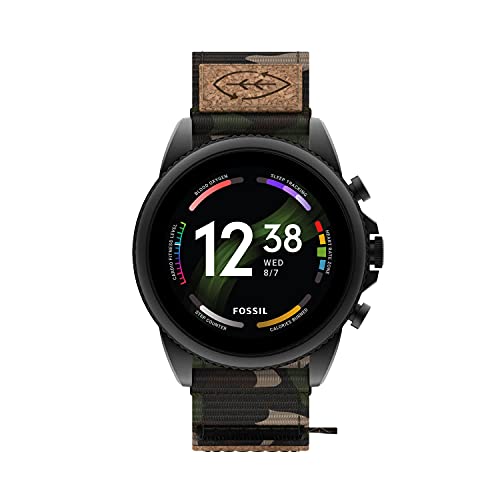
This pick comes with its warning printed on the label, because honesty is the entire reason it is here. The Fossil Gen 6 was a genuinely good Wear OS watch: a 44 millimetre stainless case with proper rotating crown, a bright AMOLED, the Snapdragon Wear 4100+ platform that kept the interface fluid, onboard GPS, heart-rate and blood-oxygen sensing, fast charging that refilled the battery with coffee-break speed, and Fossil’s fashion-house styling in more colourways than the tech brands bother with. As hardware, much of that remains pleasant today, and its clearance pricing undercuts everything else in this guide by a distance that will tempt any bargain hunter who finds it.
Now the sentence that must accompany any recommendation: Fossil has exited the smartwatch business, and Wear OS updates for the Gen 6 have ended. The watch runs the last Wear OS version it received and will not receive the platform’s future — no new Google features, no new health capabilities, and an app ecosystem that will slowly age around it. Security support is finished. None of this makes the Gen 6 stop working — it tracks workouts, shows notifications and tells time exactly as it did — but it converts the purchase from an investment into a consumable: buy it expecting a couple of good years as a basic fitness-and-notifications watch, not a platform with a future.
Who should still consider it? The buyer whose budget is absolute, who trains with a phone nearby anyway, who values the stainless case and crown at a price the current models cannot approach, and who reads this section and shrugs. That buyer exists and deserves a guide that respects them. Everyone else — anyone planning to keep a watch beyond the short term, anyone who cares about Google’s newest health features, anyone buying a gift that should not age visibly — should stretch to the Galaxy Watch 7 or Pixel Watch 3 above and buy the future instead of the past.
- Case: 44mm stainless steel, rotating crown
- Display: AMOLED touchscreen
- GPS: onboard GPS
- Battery: roughly a day; notably fast charging
- Strap: varies by configuration, standard lugs
- Health: heart rate, SpO2, workout tracking via Wear OS apps
- Support status: Fossil exited smartwatches; Wear OS updates have ended
Strengths
- Premium-feeling hardware — steel case, crown, bright screen — at clearance pricing.
- Fast charging remains genuinely best-in-class convenient.
- Still covers the fitness and notification fundamentals competently today.
Trade-offs
- Software updates have ended; the platform will age around the watch.
- No readiness coaching ecosystem comparable to Fitbit or Samsung Health.
- Battery life was a day when new and will not improve with age.
Best for: strict budgets and short horizons, bought with full knowledge of its ended support. Not suited for: long-term owners, gift buyers, or anyone wanting current Google health features.
How Do the Six Compare Side by Side?
| Watch | Health brain | GPS | Battery | Phone notes | Character |
|---|---|---|---|---|---|
| Pixel Watch 3 (45mm) | Fitbit | Onboard | ~1–1.5 days | Any Android | Coached trainer |
| Galaxy Watch 7 | Samsung Health | Dual-frequency | ~1–1.5 days | Best with Galaxy | Sensor maximalist |
| Galaxy Watch 8 | Samsung Health | Dual-frequency | ~1–1.5 days | Best with Galaxy | Current flagship-lite |
| OnePlus Watch 2 | OHealth | Dual-frequency | ~3–4 days | Any Android | Endurance outlier |
| Pixel Watch 5 (45mm) | Fitbit (latest) | Onboard | ~1–1.5 days | Any Android | Newest flagship |
| Fossil Gen 6 | Wear OS apps | Onboard | ~1 day | Any Android | Ageing bargain |
How Do You Set Up a Wear OS Watch for Serious Training?
Out of the box, every watch here is configured for a lifestyle brochure rather than a training block, so spend twenty minutes bending it to your sport. Set your heart-rate zones from a real test or a recent hard effort rather than the age-based defaults, which misplace zones for almost everyone who trains regularly. Download your music and your home maps over Wi-Fi before the first run, so the watch is not burning battery on connections mid-workout. Arrange the exercise screen for the three numbers you actually steer by — most runners want pace, heart rate and elapsed time — and demote the rest to secondary pages where curiosity can visit without cluttering effort.
Then fix the two settings that quietly ruin more workouts than any sensor: notifications and auto-pause. Silence everything except calls during exercise, because a watch that buzzes about email at kilometre eight is training you to hate it. Decide auto-pause by discipline — useful for city running with traffic lights, infuriating for trail and track work — and set it once per sport profile rather than globally. Finally, wear the watch a finger’s width higher and a notch tighter for sessions than for the desk; optical heart rate is a contact sport, and half the “inaccurate sensor” complaints in this category are loose straps wearing a disguise.
What Mistakes Do Android Fitness Watch Buyers Make?
The first mistake is buying the watch your phone’s rival makes and expecting full citizenship: Samsung’s cleverest health features assume a Galaxy phone, and while the Galaxy watches work well with other Androids, the buyer who never learns which features were withheld feels vaguely cheated for years. Match the watch to the phone you own, or consciously accept the reduced set. The second mistake is ignoring the subscription line in the Fitbit column — readiness and the deepest sleep analysis renew monthly, and the Pixel watches’ true cost of ownership includes that decision.
Third, buyers compare battery claims recorded in smartwatch-saving modes against their own always-on, GPS-heavy reality, then blame the watch. Fourth, they buy the ageing bargain without reading its support status — the Gen 6 section above exists because that mistake is expensive in disappointment even when it is cheap in money. And fifth, they never export or review their data: a season of workouts locked inside one app, never examined, is potential wasted. Sit with the app monthly, look at the trends the watch has been patiently assembling, and let them change one thing about next month’s training. That ritual, more than any sensor, is what a fitness watch is for.
How Accurate Is Wrist Heart Rate, Really?
Every watch in this guide measures heart rate the same physical way — green light into the wrist, reflected light read back, blood flow inferred — and every one of them is therefore brilliant at some moments and approximate at others. Steady-state work is the technology’s home turf: an easy run, a spin class at constant effort, a night’s sleep. There, the current Pixel and Galaxy sensors track chest straps closely enough that the differences stop mattering for training decisions. Intervals, hill surges and anything involving gripping — rowing, lifting, racquet sports — stress the system, because forearm muscles shift the sensor and rapid changes expose the smoothing algorithms every brand applies. Expect a few seconds of lag at the start of a hard effort and treat the first spike of any interval with suspicion.
The good news is that Wear OS offers the escape hatch the closed platforms make awkward: external sensors. A Bluetooth chest strap pairs to these watches or to the training apps running on them, and for the athlete whose programme is built on precise zones — marathon blocks, threshold work, return-from-injury protocols — that pairing converts a very good fitness watch into an instrument-grade one for the sessions that demand it. The rest of the week, wrist sensing’s convenience wins, and the readiness and sleep data, which depend on resting and overnight readings where optical sensors are at their best, remain trustworthy throughout. Judge these watches, in other words, as excellent physiologists of your recovery and good-enough witnesses of your hardest minutes — and budget for a strap if your hardest minutes are the ones you train by.
What About Swimming, Strength and the Sports Beyond Running?
Running dominates smartwatch marketing because it is easy to film, but the training week of a real Android user is a miscellany, and these watches divide interestingly once the sports diversify. In the pool, all six track laps and lengths with the usual caveat that optical heart rate underwater is indicative at best; Samsung’s and Google’s swim modes handle open-water GPS for those who venture beyond the lane ropes. The watches are rated for immersion to pool and shower depths, with the OnePlus and Galaxy models carrying the more serious water credentials of the group — rinse any of them after salt or chlorine and the seals will repay the courtesy.
Strength training is where expectations need managing across the whole category. Rep counting exists, exercise recognition exists, and both remain charmingly fallible; the serious lifter uses the watch for rest timers, heart-rate context and session logging, and lets a notebook or app track the actual programme. Samsung’s body-composition trend line, checked weekly under consistent conditions, is the one strength-specific feature here with genuine long-term value. Cycling splits the field on screen size and glove-friendly controls — the 45 millimetre Pixels and the big OnePlus read best at arm’s length on a stem mount — while hikers should note that offline maps live most comfortably on the Google watches, with Samsung close behind. No Wear OS watch is a triathlon instrument in the Garmin sense, and pretending otherwise helps nobody; what they are is excellent all-round training companions for the mixed, urban, gym-and-road weeks that most owners actually live.
How Long Will a Wear OS Watch Stay Current?
Software lifespan is the hidden specification of this entire category, and the Gen 6’s story is the cautionary tale that proves it. Google and Samsung now publish multi-year update commitments for their current watches — the Pixel Watch 5 and Galaxy Watch 8 sit at the front of that promise, with their predecessors a step behind but still inside the tent — and in a platform where the health features themselves evolve by update, that commitment is worth real money. A watch that receives three more years of Wear OS and health-suite improvements is a different product from one frozen at purchase, even if the hardware were identical, which is why this guide ranks current generations above discounted ancestors wherever the price gap can be stretched.
OnePlus occupies the middle ground: its update policy for the Watch 2 covers a respectable window and its dual-OS architecture means the frugal side of the watch ages slowly, but the company’s track record is shorter than the two giants’ and buyers should weight that honestly. The practical rule that falls out of all this: buy the newest generation your budget reaches, from a maker whose core business is phones or health, and the watch will still feel current when its strap needs replacing. Buy the orphan or the experiment, however charming, and you are renting.
Which Size and Strap Choices Matter for Training?
Two of this guide’s listings are the compact 40 millimetre Galaxy models and two are the larger 45 millimetre Pixels, and the size question deserves more than a wrist-measuring footnote because it changes training itself. A larger case buys glanceability — pace and heart rate readable at the bottom of a swing, in rain, at dusk — and a larger battery cell, which is why the big Pixels exist. A smaller case buys sleep comfort, cuff compatibility and a sensor that sits flatter on a slim wrist, which is why the compact Galaxies track so many wrists so well at night. Neither is the athlete’s choice in the abstract; the athlete’s choice is the largest watch you can sleep in comfortably, because the recovery data earned at night steers the training done by day.
Straps complete the equation. The fluoroelastomer sport bands boxed with every pick here are the right default for training — they rinse, they grip when wet, they tolerate sunscreen — but their adjustment holes are spaced for the average wrist, and athletes between holes should look at woven or hook-and-loop sport straps that cinch to the millimetre. A watch fastened one notch too loose will slide during intervals and smear the heart-rate trace that your readiness score is built from; fastened correctly, a finger’s width above the wrist bone, the same watch becomes the reliable instrument its reviews promised. Fit, once again, is a feature.
How Do You Use a Readiness Score Without Becoming Its Servant?
Readiness scores — Fitbit’s Daily Readiness, Samsung’s Energy Score — are the defining software of this guide’s watches, and they reward a particular relationship. Used well, the score is a second opinion consulted after your own: you wake, you judge your body honestly, then you glance at the number and let agreement confirm the plan or disagreement prompt one question — what did it see that I missed? Poor sleep you had normalised, a resting heart rate creeping up ahead of an illness, a training load quietly compounding. That is the score earning its keep, as an early-warning system with a memory better than yours.
Used badly, the score becomes a permission slip that overrides a body you know better than it does, and athletes abandon good sessions to a low number born of one restless night, or chase a high number into a workout their legs had already voted against. The manufacturers’ own framing is the sane one: the score summarises sleep, recent load and heart-rate variability trends, nothing more mystical, and it improves as your baselines deepen across the first month of wear. Give it that month before judging it, wear the watch to bed consistently so its inputs are honest, and keep the final vote where it belongs. The watches in this guide are excellent advisors. None of them is your coach, your doctor or your conscience, and the fittest owners treat the number as the start of a decision rather than the end of one.
What Should Your First Month of Data Actually Change?
A fitness watch justifies itself only if something is different in month two because of what it measured in month one, so here is the review ritual this guide recommends for every pick above. At the end of week four, sit with the app and ask three questions of the data. First, what does my sleep actually look like — not the duration you would have claimed, but the timing, the consistency, and the readiness scores that followed your worst nights? Most owners discover their bedtime wanders by hours across the week, and fixing that single variable moves readiness more reliably than any supplement or gadget setting.
Second, where does my training load really sit? The cardio-load and training-status views on these watches exist to expose the classic amateur pattern — three heroic days, four empty ones — and to replace it with the duller, fitter rhythm of consistent moderate work punctuated by deliberate hard days. If the watch’s load curve and your memory of the month disagree, believe the curve and adjust next month’s plan by one notch, not by a revolution. Third, what is my resting heart rate doing across weeks rather than days? That slow trend is the closest thing a wrist offers to a fitness oracle: drifting down as fitness builds, twitching up ahead of illness and overreach, and worth more than any single workout’s numbers. A watch that teaches you those three readings has paid for itself in knowledge; the rest — the badges, the rings, the streaks — is decoration, pleasant enough, but decoration all the same.
Finally, a word about trying these watches rather than merely reading about them: wrist fit decides more purchases in this category than any review can, so use the return window deliberately. Wear the watch for three full days — a training day, a desk day and a night where sleep tracking matters — and judge the strap at hour fifteen, not minute fifteen. The right Wear OS fitness watch disappears into the week it is meant to measure; the wrong one reminds you it is there every hour, and no sensor suite compensates for that.
Final Recommendation
If your phone is a Samsung, buy the Galaxy Watch 8 for the years or the Galaxy Watch 7 for the value — the sensor stack and coaching are the deepest on this platform. If your loyalties are Google’s, the Pixel Watch 5 is the flagship to keep, and the Pixel Watch 3 is the same idea at yesterday’s price; either gives you Fitbit’s readiness brain, the feature owners here actually live by. If charging a watch feels like feeding a pet, the OnePlus Watch 2 stands alone as the Wear OS fitness watch that respects your weekends. And the Gen 6? Buy it only the way you would buy a film camera in 2026 — knowingly, cheaply, and for the pleasure of the hardware rather than the promise of a future.
Frequently Asked Questions
Do these watches work with iPhones?
Effectively no. Modern Wear OS watches are Android companions; Samsung’s and Google’s current models do not pair with iOS in any supported, full-featured way. iPhone owners should look at the Apple Watch or at multi-platform watches like Garmin’s, which we cover in other guides.
Which is better for running, Pixel Watch or Galaxy Watch?
Both record excellent runs. Samsung counters with dual-frequency GPS and race predictions; Google answers with Fitbit’s cleaner app, cardio-load targets and readiness guidance that plans the week around the run. Phone ownership usually decides it: Galaxy owners get Samsung’s full feature set, everyone else gets more of Google’s.
What does Fitbit Premium actually add?
The Daily Readiness score in full, deeper sleep analysis and scores, a library of guided programmes and the most detailed health-metrics trends. The watches track and display plenty without it, but the coaching layer that distinguishes Pixel Watches is partly subscription-powered — factor that into comparisons.
Can I leave my phone at home on a run?
Yes for tracking: every pick here has onboard GPS and can store music. For calls, messages and live safety features you need either the phone nearby or an LTE configuration of the watch on a carrier plan, which is a separate purchase decision from the GPS models listed here.
Is the Fossil Gen 6 still worth buying?
Only as a knowingly short-term bargain. The hardware remains pleasant and the price is low, but Fossil has left the business and Wear OS updates for the Gen 6 have ended, so buy it for what it does today rather than anything it might become.
Why is there no Garmin in a fitness guide?
Because this guide answers the Android-platform question specifically: Wear OS watches that live inside Google’s ecosystem. Garmin’s watches are superb multi-platform instruments that pair with Android phones without running Android’s watch platform, and they get their own dedicated coverage elsewhere on this site.
How often will I really charge a Wear OS fitness watch?
Plan on a rhythm, not a number: the Pixel and Galaxy watches in this guide settle into a charge every day or two during training blocks — most owners top up while showering or at a desk — while the OnePlus Watch 2 stretches the same habits across three to four days. If that daily rhythm sounds like a burden rather than a routine, it is the single most reliable predictor that a multi-platform sports watch would suit you better, and it is better discovered now than in week three.
Does LTE matter for a fitness watch?
Only if your training regularly leaves the phone behind and you still need calls, messages or emergency contact on those outings — early-morning solo runs are the classic case. LTE versions cost more, often carry a monthly carrier fee, and drain the battery faster on workout days, so most owners in this guide’s audience are better served by the GPS models listed here plus a phone in a belt for the long sessions. Decide by your actual routes and safety needs rather than by the feature’s theoretical comfort, and remember that every pick above tracks a complete, mappable workout with no connection at all.
Related Guides
Keep comparing with the best Android smartwatches for Pixel phones, the best Android smartwatches for men and the best affordable women’s smartwatches.
Related guides
- Best 3.0 Qualcomm Quick Chargers: QC 3.0 Adapters That Still Earn Their Outlet
- Best 3D Mechanical Engineering Laptops: Certified Workstations for CAD and Simulation
- Best Tattoo Printers: Thermal Stencil Machines for Clean, Lasting Transfers
- Best Affordable Android Phones: Value Measured Across Four Years


