What's inside
- Key Takeaways
- Quick Picks
- How We Chose These Picks
- Why Did the 5.25-Inch Bay Disappear?
- What Else Can a 5.25-Inch Bay Do in a Modern Build?
- The Six Optical-Drive Mid-Towers, Pick by Pick
- How Do the Six Compare Side by Side?
- How Do You Install an Optical Drive in a Modern Build?
- What Mistakes Do Optical-Bay Buyers Keep Making?
- How Long Will This Class of Case Remain Available?
- How Does Airflow Work Around a Bank of Drive Bays?
- Which Optical Drive Should Actually Go in the Bay?
- How Does a Disc Library Become a Digital Archive?
- Final Recommendation
- Frequently Asked Questions
- Related Guides
As an Amazon Associate I earn from qualifying purchases. This post may contain affiliate links at no extra cost to you.
[widgetverdict.com] is reader-supported. When you buy through links on our site, we may earn an affiliate commission.
Where to buy: all six towers below are sold through the linked listings; this is a shrinking shelf, so if a model fits your drive and your desk, treat availability itself as part of the decision.
The best mid tower pc cases with optical drive support are, by the standards of the modern case market, survivors. A decade ago the 5.25-inch bay was so universal that nobody listed it as a feature; today a mid-tower that still offers one is a deliberate product aimed at a deliberate buyer. That buyer exists in real numbers: the person with a shelf of installation discs and film libraries to rip, the office that still receives media on DVD, the musician whose back catalogue lives on CD, the retro builder assembling a machine that reads what it plays. This guide is written for them, without apology and without nostalgia doing the thinking.
It is worth understanding why the bay vanished, because the reason shapes what remains. Optical media lost its job in stages: software moved to downloads, films moved to streaming, operating systems moved to USB installers, and the front of the PC case was reclaimed for the thing modern hardware actually needs — uninterrupted airflow. A solid bank of drive bays behind the front panel is a wall, and case design spent the last decade tearing that wall down in favour of mesh and fans. The cases that kept a bay therefore kept it for a reason: a budget design that never stopped serving offices, a silence-focused design that treats the bay as one option among several, or a storage build that wants bays of every size. The six picks below cover those reasons, and each one’s bay provision is stated in its title — or, in one case, honestly flagged where the title stays silent.
One expectation should be set before the picks. An optical bay in a modern case is a standard 5.25-inch opening; the drive itself is bought separately, and the case owes the buyer the bay, the mounting and the front access — nothing more. Buyers should also think about what else the bay can become: with the right adapter hardware, a 5.25-inch opening hosts hot-swap drive cages, fan controllers, card readers or plain storage drawers. A case with two bays is not merely a case that reads discs; it is a case with two units of front-panel possibility, and several picks below are interesting for exactly that reason.
Key Takeaways
- The 5.25-inch bay survives in three kinds of case: budget office designs, silence-focused designs with removable cages, and storage builds that want every bay size.
- Two picks state dual 5.25-inch bays in their titles — the SilverStone PS13B and the Rosewill Retro NAS — the rest offer a single bay or a removable cage.
- The be quiet! Pure Base 600 is the quiet pick: two pre-installed fans, a removable ODD cage and an adjustable top cover for balancing silence against cooling.
- The Zalman T8 and T6 are the budget route, each with a 5.25-inch ODD bay and one pre-installed 120mm fan.
- The Rosewill Retro is a NAS in a mid-tower’s clothing: six 3.5-inch HDD bays beside its dual optical bays and three 140mm fans.
- The Thermaltake Versa H21’s title does not state its bay count — verify the front bays on the full listing before ordering.
Quick Picks
| Pick | Badge | Why it earns its place |
|---|---|---|
| Thermaltake Versa H21 ATX Mid Tower | The long-serving budget shell | A plain SPCC ATX mid-tower from a line that has served office and home builds for years. |
| SilverStone PS13B ATX Tower (2x 5.25 Bays) | The twin-bay traditionalist | Two 5.25-inch bays declared in the name itself, in a compact ATX tower from a case specialist. |
| Zalman T8 ATX Mid Tower (5.25 ODD Bay) | The budget gaming-trim option | An ODD bay plus an RGB strip, a 120mm fan, 240mm radiator and 295mm GPU support. |
| Zalman T6 ATX Mid Tower (5.25 ODD Bay) | The patterned-mesh workhorse | ODD support with a pre-installed 120mm fan and USB 3.0, sized for ATX down to ITX boards. |
| be quiet! Pure Base 600 ATX Tower | The silence-first design | Removable ODD cage, repositionable drive slots, two fans and an adjustable top, from the silence specialists. |
| Rosewill Retro NAS ATX Mid Tower (Dual 5.25 Bays) | The sleeper storage build | Six 3.5-inch HDD bays, dual 5.25-inch bays, three 140mm fans and 360mm radiator support in retro dress. |
How We Chose These Picks
The first filter was the keyword itself: a mid-tower ATX case in which an optical drive can actually be installed. That sounds like a low bar until you try to shop it — the overwhelming majority of current mid-towers offer no 5.25-inch opening at all, and a further slice advertise compatibility they deliver only through brackets and improvisation. Where a pick’s listing title states the bay outright, we say so; the one pick whose title is silent on bays, the Thermaltake, is included for its long record in this class and is flagged in its spec box and its review so the buyer verifies rather than assumes.
The second filter was range of intent. A single-bay budget case and a dual-bay storage tower both answer this keyword, but for different machines, and a guide that listed six near-identical budget shells would fail the reader whose actual project is a quiet office PC or a home server wearing a retro face. So the six spread deliberately: two budget Zalmans, a traditional twin-bay SilverStone, the silence-engineered Pure Base 600, the long-serving Versa H21, and the Rosewill that treats the optical bay as one citizen in a city of drive bays. Between them they cover the realistic reasons a person still buys this class of case in the present market.
Finally, we weighed what each case offers besides the bay, because the bay alone is a hole in a panel. Included fans, radiator support, GPU clearance and board range all appear in the titles below and all shaped the ordering: a case that reads discs and also cools a modern graphics card is a different proposition from one that reads discs and little else, and the reviews keep that wider accounting in view throughout.
Why Did the 5.25-Inch Bay Disappear?
The bay’s decline tracks the jobs it used to do. It began as the home of the floppy drive’s larger ancestors and matured into the optical era’s standard: CD-ROM, then DVD, then Blu-ray, each generation of drive sliding into the same 5.25-inch opening. Around it lived a supporting cast — fan controllers with knobs, reservoir bays for early liquid cooling, hot-swap caddies, even small drawers. The bay was the PC’s front porch, and everything that wanted front access moved in.
Three changes emptied the porch. Distribution went digital, so the optical drive’s weekly work vanished for most users within a few years. Front-panel fashion turned to uninterrupted glass and mesh, which a bank of bay covers interrupts both visually and aerodynamically. And storage consolidated: the 3.5-inch and 2.5-inch drives that once shared the front migrated to trays behind the motherboard and on the shroud, leaving the front of the case with nothing to hold. Makers did not conspire against optical drives; they followed the airflow, and the airflow had no use for a walled front. What survives, and what this guide collects, are the designs with a constituency stubborn enough — offices, archivists, media collectors, storage builders — to keep the opening in production.
What Else Can a 5.25-Inch Bay Do in a Modern Build?
Plenty, and dual-bay cases should be valued partly as possibility. The most useful second career for a spare bay is storage: adapter cages exist that turn a 5.25-inch opening into a hot-swap home for 3.5-inch or 2.5-inch drives, which is how a twin-bay case becomes a small server’s front-loading archive. Card readers are the second career — a panel that puts SD and microSD slots at the front serves photographers who would otherwise dangle a reader from a cable. Fan and lighting controllers still exist in bay form for builders who like physical knobs. And the humblest option, a lockable drawer, turns out to be the one owners mention with real affection: dongles, adapters and the one cable that always vanishes live in the computer now.
The discipline is to buy the bay for a job you actually have. A bay bought speculatively tends to stay a blanking plate, which is harmless, but a dual-bay case bought for a single drive and no second purpose pays in front-panel airflow for possibility it never uses. The Rosewill below escapes that criticism by filling its front with storage intent from the start; the SilverStone PS13B’s second bay asks the buyer to have a plan, or at least a drawer in mind.
The Six Optical-Drive Mid-Towers, Pick by Pick
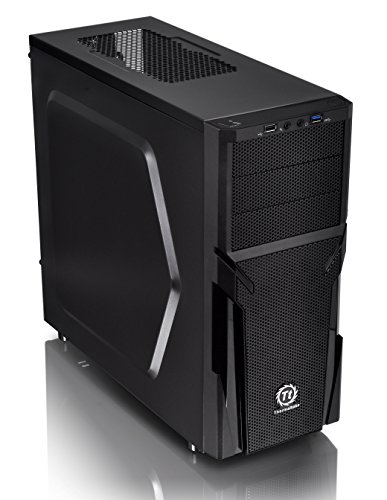
Thermaltake Versa H21 ATX Mid Tower — The long-serving budget shell
The Versa H21 is the elder of this guide: an SPCC steel ATX mid-tower from Thermaltake’s Versa line, a family that has been the default answer to “a plain case for a plain build” for longer than most case designs survive. Its listing title is almost aggressively unadorned — a chassis code, a material, a form factor — and that plainness is the product. This is the case bought by the pallet for office fleets and one at a time for home builds that need a box, a board and a disc drive, without a lighting plan or a glass panel anywhere in the conversation.
Honesty requires the flag this guide promised in its selection notes: the H21’s title does not state its front bay provision, and in a guide whose entire subject is the optical bay, that silence must be handled plainly rather than papered over. The Versa line’s long service in office builds — the environment where optical drives persisted longest — is why the case is here, but the buyer should confirm the bay arrangement on the full listing before ordering, and the spec box below records the position in exactly those terms. A guide that invents a bay count for its lead pick would deserve no trust on the other five.
What can be said from the title is the shape of the proposition: steel construction rather than plastic theatre, an ATX mid-tower footprint, and a design old enough that its compatibility with standard parts is a matter of long record rather than launch claims. For the buyer assembling a disc-reading workhorse — a ripping station, a legacy-software machine, an office PC that must read what clients still mail on DVD — the H21’s appeal is that nothing about it is experimental. Pair it with a separately bought optical drive, confirm the bays as advised, and the result is the least interesting computer in the building, which for this job is a compliment.
- Form factor: ATX mid tower, SPCC steel construction, black
- Optical bay provision: the number of 5.25-inch bays is not given in this listing’s title — check the bay layout on the full listing before ordering
- Chassis code: CA-1B2-00M1NN-00, per the listing title
- Included fans and radiator support: not broken down in the listing title — confirm on the full listing
Strengths
- A long-serving office-class design with an unbroken record of standard-parts compatibility.
- Steel, plain and unshowy — the right temperament for workstations and utility builds.
- From a major maker’s budget line, so availability and support are not exotic.
Trade-offs
- The title’s silence on bays makes listing verification a required step, not a courtesy.
- Nothing in the title promises modern cooling figures; hot gaming hardware should look at the Zalmans or the Rosewill.
- The design predates current front-panel fashion, for buyers who care about that.
Best for: a utility build — office machine, ripping station, legacy-media PC — where a steel ATX shell and a disc drive matter more than any specification race. Not suited for: a buyer who needs the bay count guaranteed in writing before purchase, or a high-heat gaming build.
Practical buyers should open the Versa H21 listing and confirm its front bay layout first, since that single fact decides this pick.

SilverStone PS13B ATX Tower (2x 5.25 Bays) — The twin-bay traditionalist
SilverStone puts the feature in the product name: the PS13B is an ATX tower with two 5.25-inch bays, declared before any other specification gets a hearing. That ordering reflects the maker — SilverStone has served the storage-and-server end of the case market for years, and the PS13 is its Precision-series take on the traditional tower: a case that assumes the front of a computer is for drives and access, not for a light show. For the buyer whose project genuinely involves two front devices — an optical drive and a hot-swap cage, a burner and a card reader — this is the most direct answer in the guide.
Two bays change the build’s possibilities in ways one bay cannot. The classic pairing is an optical drive above a removable-drive cage, turning the machine into a small archive station: discs read in the top bay, hard drives swapped in the lower one for backup rotation. Another pairing suits media work — a Blu-ray reader beside a fan controller or a reader panel. The point is that the PS13B does not ask the buyer to choose which front device matters most; it leaves the second opening as working space rather than as a blanking plate, and in the current market simply finding that choice in an ATX tower takes searching.
The restraint cuts the other way for gaming hardware, and the review should say so. The title declares the bays and the tower format and little else — no radiator figures, no GPU ceiling, no fan count — so a buyer planning a hot graphics card inside a PS13B is planning beyond the paperwork and should verify cooling provision on the full listing with the same care the H21 asks for its bays. Judged on its own terms, as a traditional drive-fronted tower from a maker that understands that format deeply, the PS13B is the guide’s purest expression of the keyword: the bay is not accommodated here, it is the headline.
- Form factor: ATX tower, black (PS13B-x)
- Optical bays: 2 x 5.25-inch, stated in the listing title
- Radiator support and GPU ceiling: the listing title gives no figures — confirm cooling provision on the full listing
- Included fans: not stated in the listing title
Strengths
- Dual 5.25-inch bays, declared in the name, from a storage-savvy case maker.
- The second bay is genuine working space for a swap cage, reader or controller.
- A traditional tower layout that office and archive builds already understand.
Trade-offs
- The title is silent on cooling figures, so gaming builds must verify before committing.
- A front given to bays is a front not given to intake mesh — airflow expectations should be set accordingly.
- Buyers with only one front device pay for a second opening they may never fill.
Best for: an archive or media workstation that will actually use two front devices — optical plus swap cage is the classic pairing. Not suited for: a single-drive gaming build that would rather spend the front panel on intake airflow.
Twin-device builders can open the PS13B listing to check its fan provision against the heat their components will make.

Zalman T8 ATX Mid Tower (5.25 ODD Bay) — The budget gaming-trim option
The T8 is what happens when the budget end of the market refuses to choose between the old feature and the new trimmings. Zalman’s title lists a 5.25-inch ODD bay and, in the same breath, an RGB lighting strip with a control button, a pre-installed 120mm fan, USB 3.0, support for a 240mm radiator and for graphics cards up to 295mm. That combination — a disc bay inside a case with gaming-era lighting and liquid-cooling room — is rarer than it sounds, because the two eras of case design mostly refused to overlap. The T8 overlaps them at a budget position, and for the buyer whose build is genuinely both things, a game machine and a disc reader, it is the natural first look.
The figures deserve their honest frame. A 240mm radiator and a 295mm card ceiling describe a mid-range build, not a flagship one: a mainstream graphics card and a sensible processor, liquid-cooled if desired, sit comfortably inside those limits, while the longest current cards simply do not fit and the buyer should not pretend otherwise. One pre-installed fan is a starting point in the familiar budget pattern — the airflow path exists, and filling the remaining mounts is the owner’s afternoon. None of this is hidden; the title states every figure, which at this end of the market is itself a form of respect.
The RGB strip with its own control button is worth a sentence because it signals the intended owner precisely: someone building a presentable gaming PC who also, unfashionably and entirely reasonably, wants to install a DVD drive for a game library, a media collection or an older relative’s discs. The T8 does not make that buyer apologise or improvise with external USB drives dangling off the desk. It puts the bay in the front, the light on the case, and the whole proposition at the price tier where most first builds actually happen.
- Form factor: ATX mid tower, black; also described as compact ATX in the title
- Optical bay: 1 x 5.25-inch ODD bay, stated in the listing title
- Included fan: 1 x 120mm; lighting: RGB strip with control button
- Radiator support: 240mm; maximum GPU length: 295mm
- Front connectivity: USB 3.0 named in the title
Strengths
- The rare budget case that combines an optical bay with gaming trim and radiator room.
- Every deciding figure — bay, radiator, card ceiling — is stated in the title.
- The lighting strip’s hardware button keeps control simple, with no software demanded.
Trade-offs
- The 295mm ceiling excludes the longest current graphics cards.
- One fitted fan leaves the cooling system to be completed by the buyer.
- 240mm radiator support suits mid-range processors, not flagship liquid builds.
Best for: a budget gaming build that also reads discs — the two-era machine this case was plainly designed for. Not suited for: a flagship card over 295mm, or a silent-office build where the lighting strip is unwanted furniture.
Two-era builders should open the T8 listing to confirm their card sits inside its stated 295mm ceiling.
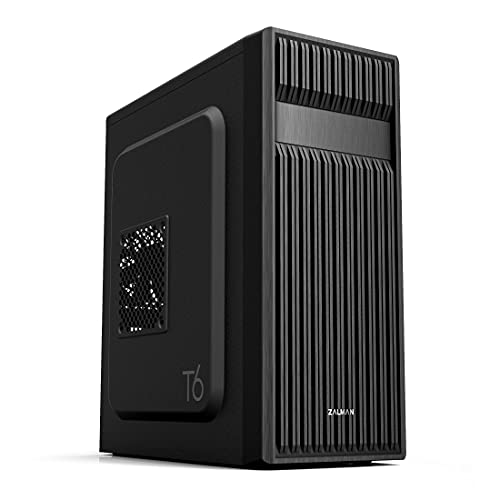
Zalman T6 ATX Mid Tower (5.25 ODD Bay) — The patterned-mesh workhorse
The T6 is the T8’s plainer sibling in spirit: the same commitment to the 5.25-inch bay at the budget tier, traded down from lighting strips to a patterned mesh front and a workhorse brief. Zalman’s title states a pre-installed 120mm fan, 5.25-inch ODD support, USB 3.0, and board support running from ATX through mATX to ITX, with gaming and workstation use both named. Where the T8 dresses the proposition up, the T6 puts on overalls: this is the case for the build that has work to do — a workstation that still installs from disc, a home office machine, a family PC whose media library is physical.
The patterned mesh front is the functional heart of the design. In a case whose front must also host a drive bay, mesh everywhere else on that panel is how intake survives: air enters around the bay rather than being asked to pass through it. That matters for the workstation duty the title names, because workstations run long hours under sustained load, and a budget case that starves its components to preserve a bay would fail the very machines it courts. The mesh does not make the T6 an airflow champion — one pre-installed fan remains a starting provision, as with its sibling — but the panel design shows the bay and the breathing were considered together rather than one sacrificed to the other.
Board support down to ITX in an ATX tower sounds like a footnote and is actually a small mercy: it means the case outlives platform changes in either direction, hosting a smaller board for a media build now and a full ATX workstation board later. For the buyer this guide most expects — someone maintaining a practical machine in a market that keeps trying to sell them a light show — the T6’s virtues are durability of purpose and honesty of specification. It is the pick least interested in being photographed and most interested in being used, and its price tier has always respected that ordering.
- Form factor: ATX mid tower, black, patterned mesh front design
- Optical bay: 5.25-inch ODD support, stated in the listing title
- Included fan: 1 x 120mm pre-installed
- Motherboard support: ATX, mATX and ITX, per the listing title
- Front connectivity: USB 3.0 named in the title
- Radiator and GPU figures: not stated in this listing’s title — verify on the full listing if either matters to your build
Strengths
- Mesh around the bay keeps intake alive in a front that also hosts a drive.
- Board support from ATX to ITX lets the shell survive platform changes.
- A workstation-honest design with no lighting tax added to the price.
Trade-offs
- One fitted fan, as with its sibling, is a beginning rather than a cooling system.
- Radiator and card figures are absent from the title and must be checked on the listing.
- The plain styling will not serve a build that is also a desk display.
Best for: a workstation or home-office build that installs from disc and runs long hours, in a shell that can host boards of any size later. Not suited for: a showcase build, or a liquid-cooled plan whose radiator size must be guaranteed from the title.
Workstation builders can open the T6 listing to confirm radiator clearance for their exact cooling plan.

be quiet! Pure Base 600 ATX Tower — The silence-first design
The Pure Base 600 approaches the optical bay from the opposite philosophy to every budget pick here: the bay is an option the owner controls, not a fixture the case imposes. be quiet!’s title describes a removable ODD cage — take it out when the build has no drive and the space returns to airflow and cable room; leave it in and the machine reads discs — alongside repositionable HDD slots, two pre-installed fans, support for water cooling up to 360mm, and an adjustable top cover. That top cover is the maker’s signature in miniature: it can be opened for cooling or closed for silence, letting the owner tune the machine’s character rather than accepting the factory’s choice.
This is the pick for the machine that shares a room with people. be quiet! builds its reputation on the proposition that a PC’s noise is a design outcome, not a law of nature, and the Pure Base line is where that proposition meets a sensible price: insulated, deliberate, and fitted with the maker’s own fans chosen for their acoustic manners. Two pre-installed fans from this maker are worth more, in a quiet room, than four anonymous fans in a louder shell — the relevant currency is not airflow alone but airflow per decibel, and it is the currency this entire product line is denominated in.
The removable cage deserves emphasis because it resolves the keyword’s central dilemma more elegantly than any other pick here. The buyer who needs an optical drive today and may not need one in three years is not forced to choose a case identity forever: install the drive now, remove the cage at the next rebuild, and the case converts from this guide’s category into a clean modern tower without being replaced. Combined with the 360mm water-cooling support — generous in a case with a bay at all — the Pure Base 600 is the connoisseur’s answer to the keyword: silence, options, and the bay kept on the owner’s terms.
- Form factor: ATX midi tower, black
- Optical provision: removable ODD cage, stated in the listing title
- Drive layout: repositionable HDD slots, per the listing title
- Included fans: 2 pre-installed
- Water cooling: support up to 360mm; top cover adjustable for airflow or silence
Strengths
- The removable ODD cage lets the case outgrow the optical era without being replaced.
- Silence engineering from the specialist maker — the quietest brief in this guide.
- 360mm water-cooling support is generous for any case that still offers a bay.
Trade-offs
- The silence brief costs more than the budget picks’ plain steel approach.
- Insulated, adjustable designs reward owners who tune them; left thoughtlessly, the top stays shut under load.
- Maximum GPU length is not given in the title — long-card buyers must verify on the listing.
Best for: a quiet-room machine — studio, study, living-adjacent office — that needs a disc drive now and the option to retire it later. Not suited for: the tightest budgets, or a flagship card whose length cannot be verified before purchase.
Quiet-build planners should open the Pure Base 600 listing to confirm graphics card clearance for their chosen model.

Rosewill Retro NAS ATX Mid Tower (Dual 5.25 Bays) — The sleeper storage build
The Rosewill Retro is the pick that reveals what the optical bay becomes when a storage builder gets hold of it. Its title reads like a small server’s specification wearing a retro case’s name: six 3.5-inch HDD bays, dual 5.25-inch bays, three 140mm fans pre-installed, 360mm radiator support and USB-C, all wrapped in what Rosewill calls a sleeper design — an exterior that looks unassuming, even old-fashioned, over hardware that is anything but. The intended machine is a DIY NAS or home server that also reads discs: the optical bays ingest a physical media library onto the six hard drives behind them, which is a workflow with a real and growing constituency.
Six 3.5-inch bays is the figure that reorganises the whole build. That is a genuine array — enough spindles for a mirrored, parity-protected home archive with room to grow — in a mid-tower that sits under a desk rather than in a rack. The three pre-installed 140mm fans matter in direct proportion: hard drives in a stack make steady, unglamorous heat, and large fans moving air slowly across them are the correct engineering answer, quieter and more effective than small fans spinning hard. The 360mm radiator support and USB-C then keep the same shell credible as a workstation, which is the sleeper concept executed properly: the case does not care whether it is a server on weekdays and a gaming machine on weekends.
The retro styling is a taste decision the buyer should make with eyes open. To some eyes it is charming — a machine that looks like it belongs to an earlier, friendlier era of computing, and that does not advertise the value of the array inside it, which in a shared house is its own security feature. To other eyes it is simply beige-adjacent nostalgia at odds with a modern desk. Either way, the substance underneath is the most storage-serious proposition in this guide, and the dual optical bays are not decoration on it: they are the intake doors of the archive, the reason the machine can swallow a shelf of discs and turn it into files.
- Form factor: ATX mid tower, retro sleeper styling
- Optical bays: dual 5.25-inch bays, stated in the listing title
- Storage: 6 x 3.5-inch HDD bays, per the listing title
- Included fans: 3 x 140mm pre-installed
- Radiator support: 360mm; front connectivity: USB-C named in the title
Strengths
- Six HDD bays plus dual optical bays make a genuine rip-and-archive server in a tower.
- Three 140mm fans are the right cooling answer for a stack of hard drives.
- Radiator support and USB-C keep the same shell credible as a modern workstation.
Trade-offs
- The retro exterior is a strong taste statement that will not suit every desk.
- A storage-first layout is more case than a single-drive gaming build needs.
- Six spinning drives make their own noise floor, whatever the fans do.
Best for: a DIY NAS or media-archive build that ingests physical discs onto a real hard-drive array, in a shell that hides its seriousness. Not suited for: a minimalist desk setup, or a buyer who wants one drive bay and maximum glass.
Archive builders can open the Rosewill Retro listing to plan their drive layout against its six HDD bays before ordering drives.
How Do the Six Compare Side by Side?
| Case | 5.25-inch bays | Included fans | Radiator | Defining trait |
|---|---|---|---|---|
| Thermaltake Versa H21 | Verify on listing | Check listing | Check listing | Long-serving steel budget shell |
| SilverStone PS13B | 2 | Check listing | Check listing | Twin-bay traditional tower |
| Zalman T8 | 1 | 1 x 120mm | 240mm | Budget gaming trim, RGB strip |
| Zalman T6 | 1 | 1 x 120mm | Check listing | Patterned mesh workhorse |
| be quiet! Pure Base 600 | Removable cage | 2 | Up to 360mm | Silence-first, adjustable top |
| Rosewill Retro NAS | 2 | 3 x 140mm | 360mm | Six HDD bays, sleeper server |
The table’s first column is the shopping order: decide how many front devices the machine will genuinely host, and the field narrows itself. One drive and no second plan points to the Zalmans or the Pure Base; two devices point to the SilverStone or the Rosewill; a drive today and uncertainty tomorrow is the Pure Base’s removable cage exactly. Only after the bay count should the other columns speak — they separate a silent room from a server stack from a budget game machine, and each pick leads one of those conversations.
How Do You Install an Optical Drive in a Modern Build?
The mechanical job has not changed in twenty years, which is part of the category’s charm. The drive slides into the 5.25-inch bay from the front, after the bay’s cover plate is removed, and secures with screws or the case’s tool-less rails depending on the design. It then needs two connections: power from the supply, on the same SATA power standard as any hard drive, and data to the motherboard, on a SATA data cable to any free port. There are no jumpers to set and no drivers to hunt; every current operating system recognises a SATA optical drive the moment it appears, and the drive shows up as a lettered drive ready to read.
Two modern details deserve attention. First, motherboard SATA ports are fewer than they were — check that the board has a port to spare after its hard drives and SSDs are counted, especially on smaller boards. Second, decide the drive’s duties before buying the drive itself: a plain DVD drive, a Blu-ray reader and a Blu-ray burner are three different purchases at three different levels, and the case is indifferent between them while the wallet is not. Owners of large film libraries sometimes also keep an external USB optical drive as a second reader for parallel ripping; the internal bay remains the primary because it is always connected, always powered and never lost in a drawer.
What Mistakes Do Optical-Bay Buyers Keep Making?
The commonest mistake is assuming the bay is standard equipment and discovering, case unboxed, that the chosen tower has none — the mistake this entire guide exists to prevent, and the reason every pick’s bay provision is examined rather than presumed. The second mistake is forgetting that the case provides the opening, not the drive: the optical drive is a separate purchase, and a build budget that ends at the case leaves the bay an empty promise. The third is buying dual bays for a single device and no plan, paying in front airflow for a blanking plate’s company; the second bay should have a job — swap cage, reader, drawer — or the single-bay cases are the honester buy.
The fourth mistake belongs to gaming builders: reading the bay as the headline and skipping the card and radiator figures beneath it. The T8’s 295mm ceiling and 240mm radiator support describe a mid-range machine, and a flagship card bought on the assumption that any ATX tower swallows it will disprove the assumption expensively. The fifth is neglecting the SATA count — a board whose ports are consumed by storage leaves the optical drive connected to nothing. Each of these mistakes is a reading failure rather than a product failure, and each is preventable in the ten minutes before ordering rather than the ten days of a return.
How Long Will This Class of Case Remain Available?
Honestly assessed: the class is contracting, and this guide does not pretend otherwise. Each product cycle, fewer new designs include the bay, and the survivors are increasingly either budget fixtures that change slowly — the Zalman and Thermaltake pattern — or specialist designs with a defined constituency, like the Pure Base’s removable cage and the Rosewill’s storage brief. Nothing in that trend makes a present purchase unwise; a case is not a subscription, and a tower bought today serves its machine for a decade regardless of what the market does next. If anything, the trend argues for buying the right case when it is found rather than assuming a better optical-bay case will be designed next year.
The practical advice that follows is modest. If your workflow genuinely runs on discs — archives, media libraries, legacy software, office media — choose from this class now, while the choice includes good designs rather than leftovers, and consider the removable-cage philosophy if your need might fade: it is the one design that does not ask you to predict the decade. If your need is occasional, an external USB drive honestly serves it, and the modern airflow case can be bought without compromise. The worst purchase is the hedge — a bay case bought just in case, for a workflow that never arrives, in a machine that breathes through a wall for no reason.
How Does Airflow Work Around a Bank of Drive Bays?
The physics are straightforward: a 5.25-inch bay is a box, a drive inside it is a second box, and air does not pass through boxes. A case whose front is given to bays must therefore breathe around them — through mesh sections beside or below the bay stack, through the bottom intake, or through a top panel the design leaves open. The picks here show the three strategies plainly. The Zalman T6 wraps its bay in patterned mesh so the front breathes around the drive. The Pure Base 600 offers an adjustable top cover, letting the owner trade a sealed, quiet front for top ventilation when the build runs hot. The Rosewill simply fits three large fans and a storage layout that expects steady, unhurried airflow rather than a wind tunnel.
For the buyer, the working rule is to match the case’s breathing strategy to the hardware’s heat. A workstation processor and a mid-range card generate a load any of these strategies handles; a flagship card in a sealed-front bay case is a mismatch no fan purchase fully repairs, because the intake restriction is architectural. This is also why the guide keeps the gaming ambitions of each pick attached to its stated figures rather than its bay: the bay decides whether discs can be read, but the breathing decides what else the machine can be, and confusing the two questions is how a buyer ends up with a beautiful archive case trying to cool a card it was never shaped for.
Which Optical Drive Should Actually Go in the Bay?
The case is indifferent, but the workflow is not, and three broad choices cover the realistic needs. A DVD drive is the utility option: it reads and writes the discs that offices, schools and older software still circulate, and it asks the least of the budget. A Blu-ray reader is the media option, aimed at film libraries — it plays and rips high-definition discs to the storage behind it, which is the Rosewill’s entire reason for existing and a common PS13B pairing. A Blu-ray burner is the archivist’s option, writing data back to disc for the kind of offline, offsite backup that no cloud subscription replicates; organisations with retention habits and photographers with delivery traditions are its natural owners.
Two checks apply whichever drive is chosen. The interface should be SATA, matching every bay in this guide without adapters. And the drive’s depth should be glanced at in a compact-fronted case, because a minority of drives run long and a bay shared with a top radiator or a cable bundle can be shallower than the standard suggests. Beyond that, the drive market is mature to the point of dullness — the differences between reputable drives are small, the tray mechanisms are all adequate, and the buyer’s energy is better spent on the case decision this guide covers than on agonising over the mechanism that slides into it.
How Does a Disc Library Become a Digital Archive?
Since so many of these cases are bought for exactly this project, the workflow deserves a plain description. The machine at the centre of it is unglamorous: an optical drive in the bay, storage behind it, and software that reads each disc and writes a file — a film becoming a video file on the array, a CD becoming lossless audio in the library, an installation disc becoming an image file the machine can mount forever after. The work is slow in the way shelving books is slow: each disc takes its minutes, the pile shrinks one unit at a time, and the correct posture is a stack of discs beside the keyboard and a long afternoon, not a search for a faster method.
Three habits separate an archive that lasts from a folder that rots. Name files by a system decided before the first disc, because renaming two hundred files later is nobody’s afternoon. Keep the working copy and a backup copy on different physical drives — the Rosewill’s six bays make that easy, and a single drive holding the only copy of a ripped library is a loss waiting for its moment. And keep the original discs, at least the ones that matter, boxed somewhere cool: the archive is a convenience, the discs are the masters, and a scratched master with no backup is the one failure the whole project was supposed to retire. The case’s role in all of this is humble and essential — it is the piece of furniture that lets the drive, the storage and the afternoon coexist in one machine.
Final Recommendation
The Pure Base 600 is this guide’s recommendation for most buyers, because its removable cage is the only design that refuses to make the optical decision permanent: drive in today, cage out at the next rebuild, silence throughout. The Rosewill Retro is the recommendation for the archive builder, where the dual bays feed six hard drives and the case is a server in disguise. The PS13B serves the twin-device traditionalist, the T8 the budget builder who wants the bay and the gaming trim together, the T6 the workstation that prefers mesh to lighting, and the Versa H21 the utility build that wants steel and simplicity. Our own money, for a machine that must read discs in a room with people in it, goes to the Pure Base — the one case here that treats the 5.25-inch bay not as a relic to apologise for, but as a choice the owner keeps. Whichever case you choose, count your front devices honestly, budget for the drive itself beside the case, and check the SATA ports on your board before the order — three small disciplines that separate the machines still reading discs happily in five years from the ones whose bays stayed empty behind their covers, waiting for a workflow that was never honestly scheduled.
Frequently Asked Questions
Does the case include the optical drive itself?
No. A case with optical drive support provides the 5.25-inch bay, the mounting and the front access; the drive is a separate purchase that slides into that bay and connects by SATA power and data like any other drive. Budget for both, and choose the drive by its duties — DVD, Blu-ray reading or Blu-ray burning are different products at different levels.
Can a 5.25-inch bay hold anything besides an optical drive?
Yes, and dual-bay cases should be valued with this in mind. Adapter cages turn a bay into a hot-swap home for hard drives or SSDs, card reader panels put memory slots at the front, fan controllers still exist in bay form, and simple drawers give the desk’s loose adapters a home inside the machine. The SilverStone PS13B and Rosewill Retro, with two bays each, are the picks that leave room for a second career beside the drive.
Will an optical drive slow down a modern PC?
No. A SATA optical drive sits idle at no meaningful cost, draws power only when it works, and touches neither the processor’s performance nor the graphics card’s. Its real costs are the ones this guide has discussed: the front panel space it claims, the airflow a bay bank can restrict, and the SATA port it occupies. On performance, the drive is a passenger, not a brake.
How many SATA ports does an optical drive need?
One data port on the motherboard and one power connector from the supply. The port count is worth checking before purchase on builds with several hard drives and SSDs, because smaller motherboards carry fewer SATA ports than they once did. If the board is full, the drive cannot be connected regardless of the case’s bay — a planning detail that belongs on the pre-order checklist beside the card length.
Is a bay case a bad choice for a gaming PC?
Not inherently — it is a choice with terms. The Zalman T8 pairs its bay with a 240mm radiator allowance and a 295mm card ceiling, which describes a capable mid-range gaming machine, and the Rosewill adds 360mm radiator support. What a bay case will not do is match a pure airflow design’s front intake, so flagship hardware at the thermal edge belongs in a case designed for it. Match the case’s stated figures to the build’s actual parts and the bay costs a gaming PC nothing it will miss.
Why not simply use an external USB optical drive?
For occasional use, you should — it is the honest alternative and this guide says so. The internal bay wins when the drive is used constantly: it is always connected, draws power from the supply rather than a port, cannot be lost or borrowed, and keeps the desk clear. Ripping stations, archive builds and office machines that read media daily earn the bay; a laptop-era user who reads one disc a quarter does not, and no case purchase should pretend otherwise.
What should I check on a second-hand or older-stock bay case?
Three things, all cheap to verify. The bay covers and any tool-less rails should be present, since a missing cover leaves the front open and the original rails are hard to source years later. The front-panel connectors should match your motherboard’s headers — older cases occasionally carry front audio or USB wiring from a previous standard. And the case’s fan mounts should be counted against your cooling plan, because a design from an earlier era may offer fewer or smaller mounts than a modern build expects. None of these is a reason to avoid an older design — the Versa H21’s longevity is a virtue — but each is a two-minute check that belongs before the purchase rather than after the unboxing.
Related Guides
- Best Fanless PC Cases
- Best Living Room PC Cases
- Best PC Cases With PSU Shroud
- Best NZXT PC Cases
- Best Cooler Master PC Cases
- Best Pc Cases Workstation
- Best Diy Pc Cases


