What's inside
- Key Takeaways
- Quick Picks
- How did we choose these six outdoor units?
- Why does an outdoor access point still need a router indoors?
- How far will outdoor Wi-Fi actually reach?
- How do the six outdoor units compare side by side?
- What should you plan before mounting anything outside?
- How do you install an outdoor access point step by step?
- What mistakes do buyers make with outdoor Wi-Fi?
- Final Recommendation
- Frequently Asked Questions
- Related Guides
As an Amazon Associate I earn from qualifying purchases. This post may contain affiliate links at no extra cost to you.
widgetverdict.com is reader-supported. When you buy through links on our site, we may earn an affiliate commission.
Where to buy: each of the six units below links to its checked Amazon listing. Before you compare speeds, read the first section carefully, because the honest truth about this shopping category changes what you should actually buy.
Here is the fact that has to come before any recommendation: almost nothing sold under the search term best outdoor wireless routers is really a router. The products in this guide are outdoor wireless access points. An access point broadcasts Wi-Fi from a wired network connection; it does not sit at the edge of your internet service, hand out addresses to your devices, translate traffic for the modem, or make routing decisions. That work belongs to a router, and for every pick below except in one limited repeater case, that router lives indoors, upstream, doing the jobs the outdoor unit never attempts. If you mount one of these on a barn wall and plug nothing intelligent behind it, you will have a very weatherproof radio connected to a network that does not exist.
That is not a reason to walk away from the category. It is the reason the category exists. Running a cable out of the house and putting a sealed, weather-rated radio at the far end is exactly how farms, yards, workshops, guest houses, marinas and camera networks get real coverage, and it beats stretching an indoor signal through two exterior walls and forty metres of wet air. The access points below are built for that job: they take power over the same Ethernet cable that carries their data, they shrug off rain and dust to a stated sealing standard, and several of them join managed systems that let one app look after radios indoors and out. Buy one with your eyes open about the division of labour and it will serve for years. Buy one expecting a self-contained router and the disappointment is guaranteed.
The six picks divide into three families. Three are TP-Link Omada units at two speed classes and two sealing grades, aimed at readers who want managed networking. Two are BrosTrend units pitched at simpler point-to-point yard and farm coverage, one on the older Wi-Fi 5 generation and one on Wi-Fi 6. The last is a WAVLINK extender that can work as an access point or lean on a repeater mode when no cable run is possible. Between them they cover the realistic ways people actually light up outdoor space, and the sections below keep returning to the same practical questions: how the unit gets power, how it is sealed, what feeds it, and what happens on the day the weather tests the marketing.
Key Takeaways
- Outdoor units sold under this search term are access points, not routers: an indoor router must sit behind them assigning addresses and managing traffic.
- Power over Ethernet is the standard feeding method here, so one cable run carries both data and power to the mounting point.
- Sealing grades differ across the six picks, from IP65 through IP67 to IP68, and the right grade depends on how exposed the mounting spot really is.
- The three Omada picks join a managed platform with mesh and roaming features; the BrosTrend and WAVLINK picks aim at simpler standalone setups.
- A repeater mode, offered by the WAVLINK, trades throughput for freedom from trenching cable.
- Antenna design matters outdoors: the high-gain and multi-antenna picks target distance across open ground rather than rooms.
Quick Picks
| Pick | Badge | Why it earns its place |
|---|---|---|
| TP-Link Omada EAP650-Outdoor | The full-spec flagship | AX3000 Wi-Fi 6, the strongest sealing grade in this guide and full Omada management for serious outdoor coverage. |
| TP-Link Omada EAP610-Outdoor | The weather-sealed value | The same IP68 sealing and Omada platform at the AX1800 class, for yards that do not need flagship throughput. |
| TP-Link Omada EAP603-Outdoor | The sheltered-mount Omada option | AX1800 with IP65 sealing for eaves, porches and covered structures where direct storm exposure is limited. |
| BrosTrend AC1200 Outdoor Access Point | The simple standalone | A gigabit-fed Wi-Fi 5 unit with passive PoE in the box, aimed at barns, yards and camera links without a management platform. |
| BrosTrend AX3000 Outdoor Access Point | The high-gain reach pick | Wi-Fi 6 AX3000 with high-gain antennas and gigabit PoE, positioned for long throws across open property. |
| WAVLINK AX1800 Outdoor Extender | The flexible-mode extender | Works as an access point or a repeater, carries four external antennas and seals to IP67 for awkward sites. |
How did we choose these six outdoor units?
The first filter was honesty of category: every pick had to be a genuine outdoor-rated wireless unit with weather sealing stated in its own listing title, not an indoor access point a seller photographed on a fence. The second filter was power. Outdoor radios live where wall sockets do not, so each pick here is fed by Power over Ethernet, with an injector included according to its title, which keeps the installation to a single cable run. The third filter was spread of intent. Managed Omada deployments, simple standalone links and one repeater-capable extender solve different problems, and a useful guide has to represent all three rather than crown six versions of the same box.
Claims discipline mattered throughout. Sealing grades, speed classes and device counts quoted below come from the listing titles themselves and are attributed to the manufacturers. Where a title stays silent about something a buyer might assume, such as a mounting kit detail or a controller licence, the pick sections say the title does not state it instead of guessing. Outdoor networking punishes assumptions more than most categories, because the mistake is usually discovered at the top of a ladder in February.
Why does an outdoor access point still need a router indoors?
Picture the chain between the internet and a phone standing in your garden. The modem or fibre terminal hands a public connection to your router. The router assigns private addresses, keeps a table of which device asked for what, applies your network rules and passes traffic in both directions. A switch or a cable run then carries that organised network out to the access point, which is essentially a radio translator: Ethernet in, Wi-Fi out, and the same in reverse. Remove the router and the chain has no organiser. Devices can sometimes see the access point’s signal, but there is no address assignment, no route to the internet and no coherent network to join.
This is also why the managed picks below talk about controllers and platforms. An Omada access point can be adopted into a system where a controller coordinates settings, roaming and updates across many radios, but the routing still happens at a gateway. Readers with a satellite connection will notice two picks name Starlink compatibility in their titles; that simply means the access point sits happily behind the satellite router and extends its network outdoors, which is exactly the architecture this section describes. Once the division of labour is clear, shopping gets easier, because you stop asking which outdoor unit routes best and start asking which one seals best, reaches furthest and fits the management style you want.
Understanding this split also protects your wallet in a subtler way. Because the outdoor unit is not the router, it does not need replacing when your internet service changes, your provider swaps its modem, or you upgrade the indoor network’s brains. The radio on the barn wall keeps doing its one job while the indoor equipment evolves around it, and a managed unit may gain features through the platform without anyone climbing a ladder. Conversely, a failing or outdated indoor router can make a perfectly healthy outdoor radio look broken, since every address and route it depends on comes from indoors. When outdoor coverage misbehaves, the diagnostic habit worth building is to test the indoor network first, then the cable, and only then suspect the weatherproof box at the end of the run. That order of suspicion will save most households at least one unnecessary replacement purchase over the life of the installation.
There is one partial exception in this guide, and it deserves precise wording. The WAVLINK unit lists a repeater mode alongside its access point mode. As a repeater it listens to an existing indoor Wi-Fi network and rebroadcasts it, which removes the cable run but still does not make it your router: the indoor network it repeats remains in charge. Repeating also costs throughput, because the radio spends part of its time talking back to the house. It is a legitimate tool for a garden office that cannot be cabled, and a poor substitute for a cable anywhere a cable can actually go.

TP-Link Omada EAP650-Outdoor — The full-spec flagship
- Speed class: AX3000 Wi-Fi 6, dual band (per listing title)
- Sealing: IP68 weatherproof (per listing title)
- Power: PoE, injector included (per listing title)
- Platform: Omada managed, with mesh, roaming and WPA3 named in the title
- Positioning: long range outdoor coverage (per listing title)
The EAP650-Outdoor is the pick for the reader who is building outdoor coverage as part of a real network rather than bolting on a single radio and hoping. Its AX3000 class is the highest in this guide alongside the BrosTrend AX3000, which matters when the outdoor space hosts more than a phone and a speaker: think a workshop with laptops and a printer, a holiday let whose guests stream in the evening, or a yard carrying several cameras whose feeds all travel back through this one radio. Dual-band Wi-Fi 6 gives modern devices the cleaner 5 GHz band at working distances while the 2.4 GHz band handles the long, slow conversations with sensors and cameras at the fence line.
The IP68 grade is the strongest sealing claim among the six titles here, and it is worth understanding what that buys. The first digit speaks to dust ingress, the second to water, and the higher water figure describes a unit built to survive harsher immersion-style exposure than a merely splash-resistant housing. On a pole above a yard, on a gable end facing the prevailing weather, or on a marina post, that margin is the difference between checking the unit after every storm and forgetting it exists. Sealing is never a substitute for correct mounting and a drip loop in the cable, but starting with the toughest housing in the group removes one whole category of worry.
Omada management is the third leg of this pick’s case. The title names mesh and roaming, which in practice means a phone walking from the house to the barn can be handed between radios as part of one coordinated system instead of clinging to a fading indoor signal. WPA3 support is also named, bringing the current generation of wireless encryption to the outdoor segment of the network rather than leaving the garden as the weak door. For a reader already running Omada indoors, this unit drops into the same controller view; for a reader starting fresh, it is the outdoor end of a platform that can grow room by room and building by building.
The honest constraints are about expectations and ecosystem. This is an access point in the full sense discussed above: it needs your indoor router, a cable run and a PoE feed, and its best behaviour arrives inside the Omada system rather than as a lone unmanaged radio. Readers who want a single box, a phone app and no platform thinking should look at the BrosTrend picks instead. Readers who do want the platform get the most complete outdoor radio in this guide.
Strengths
- Highest sealing grade in this guide, suited to genuinely exposed mounting positions.
- AX3000 Wi-Fi 6 capacity shared between a busy workshop, guests or camera traffic.
- Mesh and roaming support plus WPA3 are all confirmed in its title, so the outdoor zone joins the managed network properly.
Trade-offs
- Needs an indoor router and a cable run; nothing about it works standalone.
- Its management strengths are wasted on a reader who will never open the controller.
- Flagship positioning makes it the considered purchase of the Omada trio, not the impulse one.
Best for: a property building managed outdoor coverage on an exposed site, with an indoor router already in place. Not suited for: a renter who needs garden Wi-Fi tonight without running any cable.
Check the current listing for the EAP650-Outdoor if your mounting point faces real weather and your network plan extends beyond one radio; the sealed housing and the Omada feature set are the two things to confirm against your site.

TP-Link Omada EAP610-Outdoor — The weather-sealed value
- Speed class: dual-band Wi-Fi 6 at the AX1800 tier, per the manufacturer’s title
- Sealing: IP68 weatherproof (per listing title)
- Power: fed by PoE, with the injector supplied in the box
- Platform: Omada managed; the title lists mesh, roaming and WPA3 among its headline features
- Positioning: long range outdoor coverage, in the manufacturer’s wording
The EAP610-Outdoor keeps the two things that matter most outdoors and trims the one thing many sites never use. What it keeps is the IP68 housing, identical in grade to the flagship above, and the full Omada platform membership with mesh, roaming and WPA3 named in its title. What it trims is throughput class, stepping down from AX3000 to AX1800. For the classic outdoor workload that is a trade with very little pain attached: a couple of cameras, phones on a patio, a laptop in a summer house, a smart lock and some garden sensors. None of that comes close to troubling an AX1800 radio, and the money saved buys cable, a mounting pole or the second unit that actually fixes a dead corner.
There is a discipline worth copying here, which is matching the radio to the traffic rather than to the brochure. Outdoor links are usually limited by distance, foliage and the client’s own small antenna long before the access point’s headline class becomes the bottleneck. A phone at the bottom of a garden does not know whether the radio behind the house wall is AX1800 or AX3000; it knows how clean the signal is at its own position. Spending on sealing and placement, as this pick does, improves the garden experience more reliably than spending on a higher class number mounted in the wrong place.
Within the Omada family this unit also plays a useful supporting role. A property can run the EAP650 at the busiest outdoor node, perhaps covering a workshop yard, and use EAP610 units at quieter outposts such as a gate, a greenhouse or a boathouse, all adopted into the same controller with the same network names and the same roaming behaviour. That mix-and-match logic is precisely what a managed platform is for, and it is why this pick reads less like a cut-down flagship and more like the standard-issue radio of the system.
The limits mirror its sibling’s. It is not a router, it wants its cable and its PoE feed, and readers outside the Omada orbit should weigh whether they will use the management layer at all. Its title also positions it for long range, which should be read as a manufacturer claim shaped by antenna design and open ground, not a promise that one unit covers a wooded smallholding. Within those honest boundaries, it is the Omada pick most households should buy first.
Strengths
- IP68 sealing matches the flagship, so exposed mounts lose nothing.
- Full Omada membership with mesh, roaming and WPA3 in the title.
- AX1800 class fits typical garden, camera and outbuilding traffic comfortably.
Trade-offs
- Less aggregate capacity than the AX3000 picks for very busy outdoor nodes.
- Still needs the indoor router, cable run and PoE arrangement behind it.
- Standalone users get a capable radio but leave the platform value unused.
Best for: an Omada household covering a patio, garden and outbuildings from one or two exposed mounts. Not suited for: a single high-traffic outdoor workspace where dozens of devices compete all day.
If the EAP610-Outdoor matches your traffic, look at its listing with your mounting height and cable length in mind; the sealing grade and the injector in the box are the details that decide the installation.
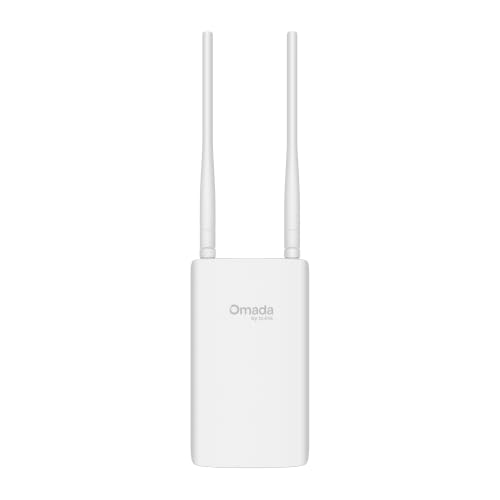
TP-Link Omada EAP603-Outdoor — The sheltered-mount Omada option
- Speed class: AX1800 tier, dual band, on Wi-Fi 6 (title wording)
- Sealing: rated IP65 against weather, per the manufacturer’s title
- Power: PoE feed; the title confirms an injector is bundled
- Platform: joins the Omada system; its title cites mesh capability, roaming support and WPA3 security
- Positioning: long range coverage for outdoor zones, per the manufacturer
The EAP603-Outdoor is the member of the Omada trio whose spec sheet tells you exactly where it belongs: under shelter. Its sealing grade is IP65 rather than the IP68 of its two siblings, and that single step down redraws the map of sensible mounting points. Under an eave, inside a porch roof, on the wall of a covered carport or within a ventilated equipment enclosure, an IP65 unit is protected from the direct driving rain and standing exposure that the higher grade is built to endure. On a bare pole in an open field, the same unit is being asked to live beyond its stated design, and no saving justifies that gamble.
Judged in its proper habitat, the pick makes a clean case. The radio itself is the same AX1800 dual-band Wi-Fi 6 proposition as the EAP610, with the same Omada management layer, the same mesh and roaming behaviour, and WPA3 security carried over from its siblings. A covered terrace serving a café corner, a farm shop under a canopy, or a home patio beneath a pergola roof all present the same profile: real outdoor networking, genuine weather in the air, but a roof between the unit and the worst of the sky. For those sites the EAP603 delivers the platform experience without paying for sealing the location never tests.
Placement thinking is the skill this pick rewards. Walk the site and watch where water actually goes during rain: which walls stay dry, where the eaves throw their drip line, which corner the wind drives weather into. The EAP603 belongs in the dry shadow of the building, high enough to clear heads and furniture, with its cable entering from below so moisture runs away from the port. Mounted with that care, its working life should be unremarkable, which is the highest compliment networking hardware can earn.
What it cannot do is forgive a hopeful installation. A reader whose only viable mount is fully exposed should step up to one of the IP68 siblings rather than save money here and spend it later on a replacement. The title is also silent about any bundled mounting hardware specifics, so check the listing contents against your wall or pole before the ladder comes out. Treat this as the right radio for sheltered outdoor space and it is arguably the smartest value in the Omada line-up; treat it as a cheaper EAP610 and it will eventually correct you.
Strengths
- Same AX1800 radio and Omada feature set as its IP68 sibling.
- IP65 sealing is genuinely sufficient for eaves, porches and covered structures.
- Lets a managed network reach sheltered outdoor zones at the trio’s friendliest tier.
Trade-offs
- Not the pick for a bare pole or a wall that takes direct storm weather.
- Mounting hardware specifics are not stated in the listing title.
- Shares the platform requirement: router, cable and PoE behind it.
Best for: covered patios, porches, canopies and carports joining an Omada network. Not suited for: open-field poles, gable ends or any mount with no roof between unit and sky.
Review the EAP603-Outdoor listing once you have chosen its sheltered mounting point; confirm the injector is in the box and picture the cable’s drip loop before you commit.

BrosTrend AC1200 Outdoor Access Point — The simple standalone
- Speed class: AC1200, dual band 5 GHz and 2.4 GHz (per listing title)
- Sealing: IP65 weatherproof (per listing title)
- Power: passive PoE, injector included (per listing title)
- Feed: gigabit Ethernet (per listing title)
- Positioning: yard, farm, barn and IP camera use (per listing title)
Not every property wants a managed platform, and the BrosTrend AC1200 is built for the reader who just needs a working link between the house and a barn. Its title speaks the plain language of that job: gigabit-fed, dual band, weatherproof to IP65, powered by a passive PoE injector included in the box, and aimed squarely at yards, farms, barns and camera duty. There is no controller to adopt it into and no ecosystem to join. You run the cable, mount the unit, configure the network name, and the barn has Wi-Fi. For a great many agricultural and workshop setups, that simplicity is not a compromise at all; it is the entire requirement.
The generational honesty belongs up front: AC1200 is Wi-Fi 5, not Wi-Fi 6. The newer standard’s efficiency tricks for crowded airspace are absent here, and a reader outfitting a busy rental property should look at the AX picks instead. But consider what a barn link actually carries. A couple of cameras, a phone, perhaps a laptop on a workbench and some sensor traffic. Wi-Fi 5 handles that load without drama, and the gigabit Ethernet feed stated in the title means the wired side is not the bottleneck either. The money not spent on a newer radio class often covers the outdoor-rated cable and the surge protection the installation genuinely needs.
Passive PoE deserves one careful sentence, because it differs from the standardised PoE of the Omada picks. A passive injector puts a fixed voltage on the cable whenever it is plugged in, rather than negotiating with the device first. That is perfectly serviceable inside this unit’s own kit, since the injector ships with it, but the cable run should only ever feed this access point, and the injector should not be swapped casually with networking gear from other systems. Label both ends of the run, keep the injector with the unit, and the arrangement is safe and dull, which is what farm infrastructure should be.
As for range, the title’s long range language should be read the way all outdoor range claims should: as a statement about open ground and clear line of sight. A unit on the house wall aimed at a barn across an open yard is in its element. The same unit trying to serve through a metal-clad building will struggle, because sheet metal is close to a perfect radio wall. Plan the mount so the radio sees the space it serves, and this unpretentious pick will do the job it was bought for, season after season.
Strengths
- Standalone simplicity: no controller, no platform, no ecosystem commitment.
- Gigabit feed and included passive PoE injector keep the install self-contained.
- Title names its real habitats honestly: yard, farm, barn and camera links.
Trade-offs
- Wi-Fi 5 radio, so crowded-airspace efficiency features of Wi-Fi 6 are absent.
- IP65 sealing suits walls and shelter, not the harshest exposed mounts.
- Passive PoE must stay paired with its own injector and dedicated cable run.
Best for: a house-to-barn or house-to-workshop link where one radio and no platform is the goal. Not suited for: a multi-building property that wants unified management and roaming across every radio.
Look over the BrosTrend AC1200 listing with a tape measure on your cable route; if the run is clear and the mount is on a wall, this is the low-fuss way to light the barn.

BrosTrend AX3000 Outdoor Access Point — The high-gain reach pick
- Speed class: AX3000 Wi-Fi 6, dual band (per listing title)
- Antennas: high gain design (per listing title)
- Sealing: IP65 housing against the weather (title figure)
- Power and feed: PoE, gigabit Ethernet (per listing title)
- Compatibility note: universal compatibility including Starlink named in the title
Where the AC1200 BrosTrend is the simple link, this AX3000 sibling is the reach tool. The title leads with long range and high-gain antennas, and that pairing defines the intended scene: a large property where the radio must throw a usable signal across real distance — down a long yard, across to an RV pad, over a farmyard to cameras watching gates and pens. High-gain antennas concentrate the radio’s energy into a flatter, further-reaching pattern rather than a round bubble, which is why this style of unit serves open ground so well and why placement direction matters more than it does for a patio radio.
The Wi-Fi 6 AX3000 class gives that reach a modern engine. More aggregate capacity means the far end of the link can carry several active devices at once: the RV streaming in the evening while the yard cameras upload and a phone browses from the porch. The title also names universal compatibility and calls out Starlink explicitly, which reflects how many rural properties now feed their networks from a satellite terminal. In that architecture this unit is the outdoor extension of the satellite router’s network, exactly the access point role this guide opened with, and the gigabit PoE feed keeps the wired side honest.
Reach claims deserve the usual translation. High gain helps most when the path is open; trees in leaf, outbuildings and terrain folds all tax a long link, and the receiving device’s own modest antenna is half the conversation. Mount high, aim deliberately, and test from the actual spots where people will stand with phones rather than from beside the unit. A signal that looks heroic at the fence post by the house may be merely decent at the far gate, and decent, honestly measured, is what planning should assume.
The sealing grade is IP65, a step below the Omada flagships, so the same shelter logic applies: a wall mount under an eave or a pole with the unit’s own housing shedding weather is the intended life, not submersion-grade exposure. Readers whose sites combine extreme distance with extreme exposure face a genuine either-or in this guide, and the EAP650 is the tiebreaker for the weather half. For the more common pairing of long throw and ordinary rooftop-or-wall mounting, this BrosTrend is the distance specialist of the six.
Strengths
- High-gain antenna design aimed at open-ground distance rather than room coverage.
- AX3000 Wi-Fi 6 capacity for several simultaneous devices at the far end.
- Starlink compatibility named in the title, suiting rural satellite-fed properties.
Trade-offs
- Directional reach rewards careful aiming; a careless mount wastes the antenna design.
- IP65 sealing trails the IP68 Omada picks for the harshest sites.
- No managed platform, so multi-unit properties configure each radio individually.
Best for: large open properties pushing Wi-Fi to an RV pad, far gate, pens or a distant yard corner. Not suited for: a small patio where a high-gain pattern overshoots the space and a basic radio would do.
Check the BrosTrend AX3000 listing against a sketch of your property; the antenna style and the gigabit PoE feed are the two specs that decide whether it fits your longest link.

WAVLINK AX1800 Outdoor Extender — The flexible-mode extender
- Speed class: AX1800 Wi-Fi 6 (per listing title)
- Modes: access point and repeater (per listing title)
- Sealing: IP67 weatherproof (per listing title)
- Antennas: four external antennas, 8 dBi class (per listing title)
- Device figure: up to 256 devices, manufacturer figure in the title
The WAVLINK earns its place by refusing to choose between the two ways of reaching outdoors. Wired as an access point over its PoE feed, it behaves like the other picks in this guide: a proper radio at the end of a cable, fed by the indoor router. Switched to repeater mode, it instead listens for the house network and rebroadcasts it, which rescues the situations where trenching or drilling a cable route is genuinely impossible — a rented property, a garden office across a paved yard the landlord will not let you lift, a seasonal pitch. No other pick here offers that second path, and for some readers it is the whole ballgame.
The repeater bargain must be stated plainly, because the title will not state it for you. A repeating radio splits its airtime between talking to the house and talking to your devices, so throughput drops, and the placement puzzle doubles: the unit must sit where it can still hear the indoor network clearly while also seeing the space it serves. That usually means a position partway between house and target, mounted high, tested in both directions. Used with that understanding, repeater mode is a respectable bridge. Used as a lazy default when a cable could have been run, it leaves performance on the table every single day.
As hardware, the unit is respectably specified. Four external 8 dBi antennas give it an adjustable, visibly directional presence, the IP67 sealing sits between the IP65 picks and the IP68 Omada pair, and the title’s device figure of up to 256 connections is a manufacturer ceiling that at least signals the intended scale: farms, yards, RV sites and garages are all named. AX1800 Wi-Fi 6 keeps the radio current, and Starlink compatibility is named for the satellite-fed properties that dominate this corner of the market.
The external antennas cut both ways. They can be angled to shape coverage, which fixed internal antennas cannot, but they also present more surface to wind and more joints to weather, so the mount needs to be firm and the installation checked after the first hard storm. Readers who want the set-and-forget sealed puck style should look at the Omada picks. Readers who want options — cable today, repeater tomorrow, antennas they can aim — will find this the most adaptable unit in the guide.
Strengths
- Access point or repeater operation covers both cable-possible and cable-impossible sites.
- Four aimable external antennas let the installer shape the coverage pattern.
- IP67 sealing sits a grade above the IP65 picks for exposed positions.
Trade-offs
- Repeater mode costs throughput and demands careful halfway placement.
- External antennas need a firm mount and a post-storm check.
- The 256-device figure is a ceiling claim, not a promise of busy-network performance.
Best for: a garden office, RV pitch or rented property where the cable route may change or cannot exist. Not suited for: a permanent high-traffic installation where a cabled access point would always serve better.
Read the WAVLINK listing with both of its modes in mind and decide which one your site truly needs; that single decision matters more than any other line in its spec list.
How far will outdoor Wi-Fi actually reach?
Every title in this guide gestures at distance, and none of them can tell you the number that matters, because outdoor range is a property of a place, not of a box. Radio energy leaves the antenna and immediately starts negotiating with the world: open air absorbs it slowly, rain and wet foliage absorb it faster, and solid obstacles take their toll in proportion to their density. A signal crossing sixty metres of mown grass arrives in far better shape than the same signal crossing twenty metres that happen to include a brick wall, a metal shed and a mature hedge. This is why experienced installers talk about paths rather than radii, and why a coverage promise measured on a test field should be treated as an upper bound drawn in pencil.
The two bands behave like different tools. The 2.4 GHz band travels further and bends around obstacles more forgivingly, which is why cameras at a gate and sensors in a greenhouse live on it happily at distances where 5 GHz has faded. The 5 GHz band carries far more data but spends its energy sooner, so the fast connection a laptop enjoys on the patio becomes a modest one at the bottom of a long garden. A well-planned outdoor setup accepts this division instead of fighting it: near the buildings, devices feast on the fast band; at the edges, the long band keeps everything connected, if more slowly. Judging an outdoor unit by whether a phone shows full speed at the fence misunderstands what the fence connection is for.
Antenna style bends these rules without breaking them. The high-gain design of the BrosTrend AX3000 concentrates energy into a flatter pattern, pushing the useful path further across open ground at the cost of coverage above and below the antenna’s plane. The WAVLINK’s four external antennas can be angled to rake signal along a yard rather than wasting it on the sky. The Omada pucks spread their energy in the rounder pattern that suits a working area where people and devices move in every direction. None of these is superior in the abstract; each is a bet about the shape of your land, and the property itself settles which bet pays.
When a single unit cannot honestly cover the ground, the correct answer is a second unit, placed where the first one’s signal is still respectable, rather than a more powerful shout from the house. Managed systems make that growth graceful, since the Omada picks can be adopted into one controller and share network names and roaming behaviour. Standalone units can also multiply, but each addition is its own configuration and its own cable run to plan. Either way, the map comes first: pace the property, mark where people actually work and gather, note the obstacles, and let that sketch, not a headline figure, decide how many radios the land needs.
How do the six outdoor units compare side by side?
| Pick | Class | Sealing | Defining trait |
|---|---|---|---|
| TP-Link Omada EAP650-Outdoor | AX3000 Wi-Fi 6 | IP68 | Managed flagship for exposed sites |
| TP-Link Omada EAP610-Outdoor | AX1800 Wi-Fi 6 | IP68 | Same sealing, calmer capacity |
| TP-Link Omada EAP603-Outdoor | AX1800 Wi-Fi 6 | IP65 | Omada radio for sheltered mounts |
| BrosTrend AC1200 | AC1200 Wi-Fi 5 | IP65 | Standalone barn and yard link |
| BrosTrend AX3000 | AX3000 Wi-Fi 6 | IP65 | High-gain reach across open ground |
| WAVLINK AX1800 | AX1800 Wi-Fi 6 | IP67 | Access point or repeater flexibility |
Read the table as three questions in disguise. First, managed or standalone: the Omada column rewards readers building a system, while BrosTrend and WAVLINK reward readers solving one link. Second, exposure: IP68, IP67 and IP65 are not a ladder of goodness so much as a match between housing and habitat, and overbuying sealing for a sheltered porch wastes money that placement would spend better. Third, distance shape: the high-gain and multi-antenna designs throw signal along open ground, while the Omada pucks spread it around a working area. Your property map answers all three questions before price enters the conversation.
What should you plan before mounting anything outside?
Start at the router and walk the route the cable will take. Outdoor installations live or die on the cable run: use cable rated for outdoor or burial use as your route demands, keep the total length within Ethernet’s hundred-metre ceiling, and leave a service loop at each end so a connector can be re-terminated later without replacing the run. Where the cable enters the building is a weather decision as much as a networking one; seal the penetration, form a drip loop so water runs off the cable instead of along it, and consider surge protection where lightning is a local habit, because a long outdoor copper run is an invitation during storms.
Mounting height is a compromise between reach and reality. Higher placement clears fences, vehicles and hedges, and generally serves open ground better, but every metre of height is a metre of ladder work for the installer and for whoever resets the unit in year three. Aim for the height your site actually needs, fix the mount to structure rather than cladding where you can, and photograph the installation before you come down; the picture of which cable goes where is worth a great deal on the day something stops working.
Power planning deserves its own paragraph, because PoE has limits that surprise first-time installers. The injector lives indoors near the router or switch, and the cable carries its power outward, losing a little along the way. Standard Ethernet distances keep that loss well within what these units expect, but a run cobbled together from couplers, patch panels and leftover indoor cable adds resistance and failure points at every joint. One continuous outdoor-rated run from injector to unit is the boring, correct answer. If the route needs to pass through an outbuilding where a switch already lives, a PoE switch at that midpoint can restart both the distance and the power budget, which is how larger properties chain their coverage building by building.
Finally, plan the network itself. Decide the network name and whether the outdoor zone shares the house network or sits as its own segment for cameras and guests. Managed platforms make that segmentation tidy; standalone units may need the separation arranged at the indoor router instead. Write down the admin credentials and store them with the house documents, not on a sticky note attached to the router. Outdoor gear is forgotten for years at a time, and the reader who documents the install is the reader whose future self fixes problems in minutes.
How do you install an outdoor access point step by step?
Bench-test everything indoors first. Connect the injector, the cable and the access point on the kitchen table, adopt or configure the unit, update its firmware while the connection is easy, and confirm a phone can join through it. Every problem found at the table is a problem not found at the top of a ladder. Then run the cable, leaving the final mount until the route is proven, and test again from the mounting position with the unit temporarily fixed before any drilling becomes permanent.
With the unit live at its post, walk the coverage area slowly with a phone, checking the spots that matter: the workshop bench, the far gate, the RV door, the camera positions. Signal shown beside the unit means little; signal at the point of use means everything. Adjust antenna angles on the multi-antenna picks, nudge the mount if a hedge or a metal shed is shadowing a corner, and only then tighten everything down, seal the cable entry and weatherproof the connector joint as the manufacturer directs.
Finish with the boring steps that separate an installation from a hope. Label both cable ends. Record the unit’s position, network name and credentials in your house notes. Set a calendar reminder to glance at the mount after the first major storm and again each spring. Outdoor electronics rarely fail dramatically; they loosen, weep and corrode quietly, and a two-minute inspection catches the story early.
What mistakes do buyers make with outdoor Wi-Fi?
The founding mistake is the one this guide opened with: expecting an access point to be a router, then blaming the unit when no network materialises behind it. Close behind comes mounting by convenience — placing the radio where the cable was easy rather than where the coverage is needed, often low, behind foliage or against a metal wall that swallows the signal. A third classic is ignoring the cable itself: indoor cable pressed into outdoor service degrades in sunlight and moisture, and a run that works in June can be a corroded mystery by March.
Buyers also misread sealing grades in both directions. Some assume any unit labelled weatherproof can live on a bare pole in coastal weather, which overstates IP65; others pay for the highest grade to mount under a deep porch roof, which wastes money. And the repeater mistake deserves its place: choosing repeater mode to avoid an afternoon of cable work, then living for years with halved throughput and a temperamental link. Each of these errors is cheap to avoid at the planning stage and oddly expensive to forgive afterwards.
Final Recommendation
Match the pick to the property, not to the headline. If you are building a managed network and your mount faces real weather, the EAP650-Outdoor is the complete answer, with the EAP610-Outdoor as its sensible partner for quieter corners and the EAP603-Outdoor covering the sheltered zones. If your need is one honest link to a barn or across a big yard, the BrosTrend pair splits by generation and reach, and if your site cannot take a cable at all, the WAVLINK’s repeater mode is the pragmatic bridge. Whichever you choose, remember that the radio is the visible tip of a system whose invisible parts — the indoor router, the cable, the mount — decide whether it delights or disappoints. A garden that keeps its connection through the first winter storm, with nobody in the house giving the network a second thought, is the true test of an outdoor installation, and it is a test any of these six can pass when each is given the job it was actually built to do.
Frequently Asked Questions
Can an outdoor access point work without any router?
No. An access point broadcasts a network that something else must create and manage. Your indoor router assigns addresses and routes traffic to the internet; the outdoor unit extends that network’s reach. The WAVLINK’s repeater mode still depends on an existing indoor network to repeat.
What is the difference between IP65, IP67 and IP68 here?
The grades describe tested resistance to dust and water, rising with the numbers. In this guide the Omada EAP650 and EAP610 carry IP68, the WAVLINK carries IP67, and the EAP603 and both BrosTrend units carry IP65. Match the grade to the exposure of the actual mounting point rather than treating the biggest number as automatically necessary.
How does Power over Ethernet help an outdoor install?
PoE sends power along the same Ethernet cable that carries data, so a single run from indoors feeds the outdoor unit with no socket needed at the mount. Each pick here includes an injector according to its listing title; note the BrosTrend AC1200 uses a passive injector that should stay paired with its own unit.
Will one outdoor unit cover my whole property?
That depends on distance, terrain, foliage and buildings, and no title claim can answer it for your land. Open ground with clear sight lines is the friendly case; metal buildings and dense trees are the hard ones. Larger or awkward properties usually do better with two thoughtfully placed units than one heroic one.
Is a repeater as good as a cabled access point?
It is more flexible and less capable. Repeating avoids the cable run but costs throughput and requires a halfway position that hears the house well. Where a cable can be run, a cabled access point is the stronger long-term answer; where it cannot, the WAVLINK’s repeater mode is a reasonable compromise.
Can these units extend a satellite internet connection?
Yes, in the access point role. Two titles in this guide name Starlink compatibility directly, and the architecture is the same for any satellite router: the outdoor unit joins the router’s network by cable and rebroadcasts it outside. The satellite terminal and its router remain in charge of the connection itself.


