What's inside
- Key Takeaways
- Quick Picks
- How Did We Judge Microphone Quality From Listings?
- Condenser or Dynamic: What Is the Real Difference at a Desk?
- What Does Cardioid Actually Buy You?
- Why Does the Connection Chain Decide Your Ceiling?
- How Do You Test a Microphone Before Your Audience Does?
- How Does Gain Staging Make or Break a Headset Voice?
- How Should You Treat a Room for Voice Recording?
- Podcasting, Streaming, Meetings: Do They Need Different Microphones?
- What Should Streamers Know About Monitoring Their Own Voice?
- How Long Does It Take to Sound Like Yourself on a New Microphone?
- Why Is Every Pick Here Wired?
- Do Pop Filters and Windscreens Matter on a Boom?
- How Do the Six Voices Compare?
- What Do Buyers Misunderstand About Headset Microphones?
- How Do You Protect Your Voice Across Long Sessions?
- After the Headset, What Should You Upgrade First?
- Final Recommendation
- Frequently Asked Questions
- Related Guides
As an Amazon Associate I earn from qualifying purchases. This post may contain affiliate links at no extra cost to you.
widgetverdict.com is reader-supported. When you buy through links on our site, we may earn an affiliate commission.
Where to buy: Amazon lists all six headsets compared here, and the spread is wider than the gaming shelf suggests, running from a software-tuned Logitech to two Audio-Technica broadcast instruments that treat the microphone as the entire point.
Most headset microphones are an afterthought, a stalk added because the product category demands one. The best headsets with great mic quality invert that priority: the microphone is the product, and the headphones attached to it are the monitoring system. This guide takes that inversion seriously by mixing worlds that rarely share a page. Two picks are genuine broadcast and streaming instruments from Audio-Technica, one with a cardioid condenser microphone on an XLR connection, one a broadcast stereo headset with a dynamic cardioid boom built for commentary booths. Against them stand the strongest microphone offerings of the gaming world, Logitech’s Blue VO!CE-equipped G Pro X and EKSA’s detachable-mic E900 Pro, a retractable-mic Razer Kraken, and a Jabra work headset whose noise-cancelling mic serves meeting rooms. Judging them on one scale is the point: your audience cannot tell which world your headset came from, only whether your voice arrived clearly.
That honesty cuts both ways. A broadcast headset will not flatter a gamer with surround processing, and a gaming headset will not give a streamer a broadcast chain. What follows separates the two ambitions cleanly, explains the microphone technologies in plain terms, and matches each of the six to the voice work it genuinely serves: streaming and commentary, competitive team chat, content recording, or the daily meeting schedule.
Key Takeaways
- The Audio-Technica ATH-M50xSTS carries a cardioid condenser microphone with XLR output, a broadcast-grade chain that needs an audio interface or mixer to shine.
- The Audio-Technica BPHS1 is a purpose-built broadcast stereo headset with a dynamic cardioid boom, designed for commentary and on-air work.
- Logitech’s G Pro X answers with software: Blue VO!CE processing on a detachable boom, plus a USB DAC, for streamers on a PC.
- EKSA’s E900 Pro offers a detachable noise cancelling microphone over USB, so the mic can be removed when only listening matters.
- The Razer Kraken hides its microphone entirely, retracting it into the cup when voice is not needed.
- Jabra’s Evolve 30 II brings a noise-cancelling microphone and Teams certification to the single-ear work headset format.
Quick Picks
| Pick | Badge | Why it earns its place |
|---|---|---|
| Logitech G Pro X | The software-tuned gaming pick | Blue VO!CE microphone processing, a detachable boom, 50mm drivers, and a USB DAC for PC streamers and team players. |
| Audio-Technica ATH-M50xSTS | The condenser streaming pick | A cardioid condenser microphone and 45mm drivers on an XLR StreamSet built for creators who run an interface. |
| Audio-Technica BPHS1 | The broadcast booth pick | A broadcast stereo headset with a dynamic cardioid boom microphone, made for commentary and live production. |
| Razer Kraken | The retractable-mic all-rounder | A lightweight aluminium frame and a noise isolating microphone that slides away when the game goes quiet. |
| EKSA E900 Pro | The detachable-mic USB pick | USB delivery with 7.1 surround, 50mm drivers, and a noise cancelling microphone that unplugs for listening-only hours. |
| Jabra Evolve 30 II | The work-call clarity pick | A single-ear wired headset with a noise-cancelling microphone, call control, and Microsoft Teams certification. |
How Did We Judge Microphone Quality From Listings?
A listing cannot let you hear a microphone, so this guide judged the evidence a title can carry: capsule technology, pickup pattern, connection chain, and processing. Condenser versus dynamic is a real engineering fork with audible consequences, and both appear here. Cardioid patterns, named by Audio-Technica and implied by the noise cancelling designs elsewhere, describe a microphone that favours the mouth and discounts the room. The connection matters as much as the capsule: an XLR chain hands your voice to professional equipment unprocessed, a USB chain processes it inside the headset’s own electronics or companion software, and a 3.5mm chain leaves the work to whatever it plugs into.
Processing was treated as a legitimate path rather than a cheat. Logitech’s Blue VO!CE exists because a raw capsule in a bedroom sounds like a bedroom, and software that gates, compresses, and polishes can lift a gaming microphone toward broadcast respectability. The broadcast picks take the opposite path, capturing cleanly and trusting the chain. Neither philosophy wins in the abstract; the winner is the one that matches your desk. As ever in this series, figures absent from a title, and the BPHS1’s title is admirably brief, are reported as absent rather than reconstructed from reputation.
Condenser or Dynamic: What Is the Real Difference at a Desk?
A condenser microphone, the ATH-M50xSTS’s technology, uses a charged diaphragm that responds to fine detail and quiet nuance. It hears your voice’s texture, which is why broadcast and studio work favours it, and it also hears the room’s texture: the fan, the traffic, the echo off a bare wall. A condenser rewards a treated space and punishes an untreated one, and it typically needs proper gain from an interface, which the M50xSTS’s XLR output assumes you own. A dynamic microphone, the BPHS1’s technology, moves a coil instead; it is less sensitive, tougher, and famously forgiving. It hears the voice in front of it and largely ignores the room behind, which is why commentary booths at loud sporting events run dynamics.
For a streamer in a quiet, soft-furnished room, the condenser’s detail is a genuine upgrade, the difference between a voice that sounds present and one that sounds telephoned. For a commentator, a podcaster recording in a kitchen, or anyone whose room cannot be tamed, the dynamic’s forgiveness is worth more than detail it would only use to describe your refrigerator’s hum. Gaming microphones sit in a third place: small capsules, usually electret, whose raw capture is modest but whose processing, Blue VO!CE being the headline example here, is designed to manufacture the clarity the capsule cannot. Choose the technology that matches your room before you match it to your ambitions.
What Does Cardioid Actually Buy You?
Cardioid names a heart-shaped sensitivity pattern: strong in front of the microphone, weak at its sides, weakest behind it. On a boom headset the geometry is a gift, because the capsule points at your mouth while the room, your keyboard, and your PC’s fans sit in the pattern’s weaker zones. Both Audio-Technica picks state cardioid designs, and the practical consequence is a voice that stays forward when the environment gets loud, without any software deciding what counts as noise. The pattern has one demand: position. A cardioid boom swung too far from the mouth loses its advantage twice, capturing less voice and relatively more room, so the thirty seconds spent bending a boom correctly outperform any processing toggle.
Noise cancelling microphones in the gaming and office picks pursue the same goal by different means, using additional capsule information or electronics to subtract ambient sound. The Jabra Evolve 30 II and the EKSA E900 Pro both advertise the approach, and for voices in genuinely noisy places, a call centre floor or a room with children, electronic help earns its place. The subtlety is that aggressive cancellation can nibble at soft consonants and make a voice sound processed on quiet days. The best outcome in this whole category is a microphone whose pattern does the work passively, with electronics as a reserve rather than a crutch.
Why Does the Connection Chain Decide Your Ceiling?
Follow a voice from mouth to audience and count the conversions. On the M50xSTS, the condenser capsule feeds an XLR cable into your interface, where gain, conversion, and any processing are handled by equipment chosen for the purpose; the ceiling is set by that equipment, and it is high. On the G Pro X, the detachable boom feeds a USB DAC supplied in the box, and Logitech’s software applies the Blue VO!CE chain; the ceiling is set by that software, and it is consistent from PC to PC. On the Kraken’s 3.5mm plug, the ceiling is set by whatever input receives it, superb on a good interface, ordinary on a tired laptop jack. The E900 Pro’s USB path and the Evolve 30 II’s USB options sit between, standardising the chain at the cost of capping it.
None of this makes one chain correct. It makes each chain a commitment. XLR commits you to owning and learning an interface. USB commits you to the maker’s processing choices. Analogue commits you to the quality of your existing inputs. Streamers building a desk for years should think in chains rather than products, because the microphone you buy today will be judged against the interface, software, and room it joins, and the six picks below were chosen to represent the strongest version of each commitment.
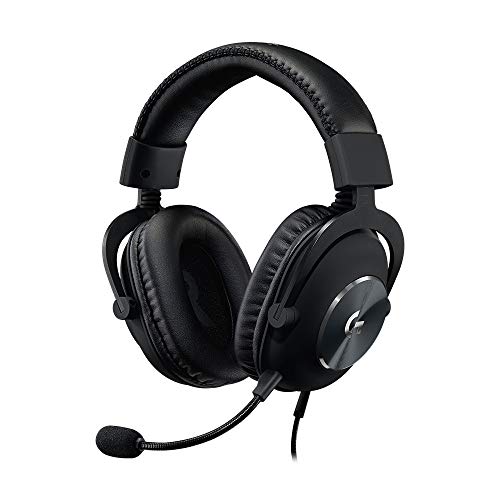
Logitech G Pro X — The software-tuned gaming pick
The G Pro X is the gaming world’s most serious answer to the broadcast world, and its weapon is Blue VO!CE. Logitech bought the microphone company Blue and folded its processing into this headset: the detachable boom’s raw signal passes through filters that gate background noise, even out volume, and add the polish listeners associate with a produced voice. For a streamer broadcasting from a bedroom, that chain is transformative, because it manufactures in software the control a treated studio gives a condenser. The title also lists DTS 7.1 surround and 50mm drivers for the listening side, spare memory foam pads in the box, a USB DAC, and a carrying bag, a package that reads like a creator’s starter kit rather than a mere headset.
Its microphone honesty requires one caveat: the magic lives in the USB path and the software. Run the G Pro X through its DAC on a PC and Blue VO!CE is available; plug the 3.5mm cable into a controller and you have a good plain boom microphone, not a processed broadcast voice. That is not a flaw so much as a definition of the product: it is a PC streaming instrument that also plays games everywhere else. The detachable boom keeps the design civilised for listening-only hours, and the spare pads acknowledge that a headset worn daily wears its cushions. For team players, the same processing that flatters a stream also makes callouts unusually intelligible, which in competitive play is a tactical feature wearing a cosmetic disguise.
- Microphone: detachable boom with Blue VO!CE processing via the USB path
- Drivers: 50mm, stated in the listing title
- Sound: DTS 7.1 surround on the PC path
- Connections: USB and 3.5mm
- In the box per the title: spare memory foam pads, USB DAC, carrying bag
- Platforms named: PC, Xbox, PS5, PS4
Strengths
- Blue VO!CE processing lifts a gaming microphone toward produced, broadcast-style clarity on PC.
- The supplied USB DAC standardises the chain, so the voice sounds the same on any computer.
- Detachable boom and spare pads suit a headset that alternates between streaming and pure listening.
Trade-offs
- The signature processing is a PC-and-USB affair; console use over 3.5mm gets the plain microphone.
- Software tuning takes an evening of experimentation before the voice sounds like yours rather than a preset.
- It remains a gaming capsule underneath, so a treated-room condenser like the M50xSTS still captures more natural detail.
Best for: a PC streamer or competitive player who wants one headset to produce a polished voice without buying an interface. Not suited for: a console-first player, because the processing that justifies this model stays behind on the PC.
Study the G Pro X listing on Amazon for its software requirements, since Blue VO!CE lives in Logitech’s desktop application.

Audio-Technica ATH-M50xSTS — The condenser streaming pick
The M50xSTS is what happens when a respected studio headphone grows a broadcast microphone. Audio-Technica took the M50x monitoring lineage, with 45mm drivers stated in the title, and fitted a cardioid condenser boom, creating the StreamSet: a single unit that monitors like a studio headphone and captures like a small broadcast chain. The output is XLR, and that connector is the whole philosophy in metal. Your voice leaves the headset as a professional analogue signal, ready for an interface or mixer where gain and conversion are handled by equipment built for the task. Nothing is processed, compressed, or decided for you inside the headset.
That purity defines both its excellence and its demands. You must own, or budget for, an audio interface with a microphone input and proper gain; plug this headset into a gaming controller fantasy and nothing happens, because XLR is not a gaming connection. In return, a streamer or creator gets the most natural voice in this guide, with condenser detail that flatters a quiet, reasonably soft room and monitoring that tells the truth about the mix. The title names gaming, content creation, and music production as its worlds, and the order is telling: this is a creator’s instrument that games, not a gaming headset that creates. Buy it as the centre of a desk you are building deliberately.
- Microphone: cardioid condenser boom, broadcast style
- Output: XLR, requiring an interface or mixer with a microphone input
- Drivers: 45mm, stated in the listing title
- Lineage: StreamSet based on the M50x monitoring family
- Uses named: gaming, content creation, music production
- Processing: none inside the headset; the chain you connect decides everything
Strengths
- Condenser capture delivers the most detailed, natural voice available in this roundup.
- XLR output integrates with professional interfaces, mixers, and broadcast chains without adapters.
- Studio monitoring drivers make it a genuine two-purpose instrument for creators who also mix audio.
Trade-offs
- It is unusable without an interface or mixer, an additional purchase the gaming picks do not demand.
- A condenser hears the room as faithfully as the voice, so an echoing space will be documented in detail.
- No surround processing or gaming software accompanies it; the chain you build is the whole feature set.
Best for: a streamer or creator with an audio interface who wants a broadcast-grade voice and studio monitoring in one unit. Not suited for: a plug-and-play gamer with no interface, since this headset cannot connect to a controller or a plain laptop jack at all.
Read the M50xSTS listing on Amazon alongside your interface’s specifications, confirming its microphone input and gain range suit a condenser boom.

Audio-Technica BPHS1 — The broadcast booth pick
The BPHS1 does not court gamers, streamers, or the home office. Its title is a broadcast specification in miniature: broadcast stereo headset, dynamic cardioid boom microphone. This is the headset family you see on commentators at sporting events and hear on radio remotes, built for voices that must cut through crowd noise, weather, and the general chaos of live production. The dynamic cardioid capsule is the reason. Dynamic microphones shrug off loud environments, handle close, emphatic speech without complaint, and reject the room behind the speaker, which in a stadium or a press box is not a preference but a survival trait.
For home creators, that same forgiveness is the attraction. A podcaster recording at a kitchen table, a commentator calling matches from a spare room, or a streamer whose neighbours rehearse drums will all sound better through a dynamic boom that ignores their surroundings than through a condenser that documents them. The headset side is stereo monitoring built for long production shifts rather than entertainment, so expect a workmanlike listen rather than a cinematic one. The listing title does not detail connectors or cable arrangements, and broadcast headsets traditionally serve professional inputs, so verify the termination against your interface or mixer in Audio-Technica’s documentation before ordering. This is a professional tool with a professional assumption: the buyer runs a chain worthy of it.
- Microphone: dynamic cardioid boom, broadcast grade
- Designation: broadcast stereo headset
- Monitoring: stereo headphones built for production work
- Connectors and cable: the listing title does not itemise them, so Audio-Technica documentation is the required check against your interface or mixer
- Processing: none; the dynamic capsule’s pattern does the noise work passively
- Intended world: commentary, live production, broadcast voice work
Strengths
- Dynamic cardioid capture stays intelligible in loud, untreated environments where condensers drown in room sound.
- Broadcast build and purpose make it the natural choice for commentary and live voice work.
- The passive pattern needs no software, so the voice is identical on any chain that accepts it.
Trade-offs
- Connector details are absent from the title, so professional buyers must verify termination before purchase.
- Monitoring is functional rather than luxurious; music lovers will find it plain beside the M50xSTS.
- Its broadcast focus brings no gaming conveniences, no surround, no detachable lifestyle features.
Best for: a commentator, podcaster, or live producer recording in a real, noisy room. Not suited for: a casual gamer seeking a single plug for a controller, because this broadcast tool expects a professional chain.
Pair the BPHS1 listing on Amazon with Audio-Technica’s documentation for its connector specification before committing it to your setup.
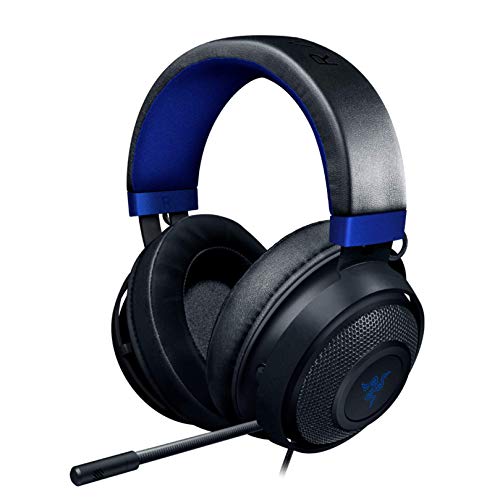
Razer Kraken — The retractable-mic all-rounder
The Kraken’s microphone trick is disappearance. Its retractable noise isolating microphone slides out for the match and vanishes into the earcup when the match ends, leaving a clean pair of headphones for music, films, or the train. That single mechanism solves a social problem other booms ignore: a gaming headset with a fixed stalk announces itself everywhere, while the Kraken passes as ordinary headphones the moment its mic retreats. The lightweight aluminium frame in its title supports the same double life, keeping the headset comfortable across the long, mixed sessions of a device that is part game gear, part daily headphone.
As a microphone, the Kraken’s unit is a noise isolating design, which in Razer’s usage means the capsule and its housing are arranged to favour the voice over the surroundings rather than to cancel electronically. It is a clear, serviceable team-chat voice, honest about its tier: it will not produce a stream, but it will carry callouts cleanly across PC, PS4, PS5, Switch, Xbox One, Xbox Series X and S, and mobile, the widest platform list in this guide, all through one 3.5mm connection. That universality is the Kraken’s deeper argument. Every other pick here asks for a specific chain; the Kraken asks for any headphone jack in the house. For a younger player, a shared family headset, or a second headset that travels, that simplicity outranks specifications it never claimed to chase.
- Microphone: retractable, noise isolating design that stores inside the earcup
- Frame: lightweight aluminium, stated in the listing title
- Connection: 3.5mm headphone jack
- Platforms named: PC, PS4, PS5, Switch, Xbox One, Xbox Series X and S, mobile
- Colour: black and blue
- Processing: none stated; the receiving device’s input shapes the final voice
Strengths
- The retracting microphone converts the headset into inconspicuous everyday headphones in one motion.
- One 3.5mm connection covers the widest platform spread in this roundup.
- Aluminium frame keeps long sessions light while feeling sturdier than all-plastic rivals.
Trade-offs
- Its voice is a good team-chat voice, not a streaming voice; creators should look at the Logitech or Audio-Technica picks.
- Analogue-only connection means a poor input on the receiving device will cap its quality.
- The retractable mechanism is a moving part that rough handling can eventually loosen.
Best for: a multi-platform player who wants one headset for matches and music, with a microphone that hides when unused. Not suited for: an aspiring streamer, whose audience will hear the gap between this chat mic and a processed or broadcast chain.
Check the Kraken listing on Amazon for its cable length, since a headset this universal tends to travel between rooms.

EKSA E900 Pro — The detachable-mic USB pick
The E900 Pro builds its microphone story around a decision more headsets should copy: the noise cancelling microphone detaches. For voice work, it plugs in and delivers EKSA’s noise-managed capture over a USB connection with 7.1 surround on the listening side and 50mm drivers doing the playback. For music, films, or a flight, the boom comes off and the headset stops looking like equipment. Detachability also extends the product’s life in a quiet way, because the microphone assembly, historically the most fragile part of a gaming headset, becomes a replaceable component rather than a fatal organ.
USB delivery defines its character as surely as the G Pro X’s DAC defines that model’s: the sound and the microphone processing are consistent on every PC, PS4, PS5, Xbox One, or laptop it meets, per the platforms in its title, with no dependence on the receiving device’s analogue quality. The trade is that the chain is closed; you cannot route this microphone through an interface to grow into broadcast habits later. Within its closed world, though, the E900 Pro is complete: surround for immersion, a detachable noise cancelling mic for clarity, and driver size stated plainly. It suits the player who wants a finished answer rather than a component in a growing system, and there is no shame in that preference; most desks are finished answers.
- Microphone: detachable, noise cancelling
- Connection: USB
- Drivers: 50mm, stated in the listing title
- Surround: 7.1 processing delivered over the USB connection
- Platforms named: PC, PS4, PS5, Xbox One, laptop, office use
- Listening mode: microphone removes fully for headphone-only use
Strengths
- A detachable microphone serves voice sessions and pure listening without compromise or a dangling boom.
- USB consistency makes its voice predictable across every machine in the house.
- Stated 50mm drivers and surround processing keep the gaming side of its brief fully equipped.
Trade-offs
- The closed USB chain cannot grow into an interface-based broadcast setup later.
- A detached microphone is a losable microphone; it needs a designated drawer or pouch.
- Its noise cancelling is electronic assistance, not the passive pattern discipline of the broadcast picks.
Best for: a PC and console player who wants a complete, consistent voice-and-surround package with a removable mic. Not suited for: a creator planning an XLR future, since nothing in this chain carries forward to that world.
Look over the E900 Pro listing on Amazon for how the microphone attaches, since that joint is the feature you will use daily.

Jabra Evolve 30 II — The work-call clarity pick
The Evolve 30 II represents the office’s answer to the microphone question, and its priorities are instructively different. This 2025 edition is a single-ear wired headset: one ear covered for the call, one ear open to the room, because office workers must hear colleagues, doorbells, and their own voice naturally while they talk. Its noise-cancelling microphone exists to keep a meeting professional in a shared space, and its Microsoft Teams certification with call control means the buttons on the device speak the platform’s language directly, answering and muting inside the software rather than merely adjusting a volume.
Connections show the same pragmatism: a 3.5mm jack plus USB-A and USB-C cover the laptop generations an office actually contains. As a voice instrument, the Evolve’s microphone is tuned for speech intelligibility over long, ordinary days rather than for production; nobody will record a podcast on it, and everybody will understand a stand-up through it. Its presence in this guide is a useful calibration. Great mic quality is contextual, and for the millions whose voice work is meetings, a certified, noise-cancelling, single-ear Jabra delivers more real-world clarity per day than a broadcast condenser they would never connect properly. Judge it as the professional baseline against which the gaming and broadcast picks’ extra ambitions must justify themselves.
- Wearing style: single-ear, wired
- Microphone: noise-cancelling, stated in the listing title
- Certification: Microsoft Teams certified, with call control
- Connections: 3.5mm jack, USB-A, USB-C
- Edition: 2025 edition, black
- Monitoring: one ear open to the room by design
Strengths
- Teams certification and call control integrate the headset with the platform office workers actually use.
- Single-ear wearing keeps you present in your room while your voice stays professional on the call.
- Three connection options cover essentially every work laptop in service.
Trade-offs
- Single-ear listening is wrong for games, films, and music, where the other five picks all serve better.
- Its microphone targets meeting clarity, not recording quality, so creators need a different instrument.
- Wired-only operation keeps you at the desk the wireless office models would let you leave.
Best for: a professional whose voice work is meetings, and who wants certified clarity with one ear on the room. Not suited for: a gamer or streamer, because a single-ear work headset refuses both halves of that job.
Review the Evolve 30 II listing on Amazon for its control unit, which is where its Teams integration physically lives.
How Do You Test a Microphone Before Your Audience Does?
Record, never guess. Every platform you use, Discord, Teams, your streaming software, offers a local recording or test path, and ninety seconds there tells you more than any specification. Record three samples: your normal speaking voice, your excited voice at the volume a big play produces, and thirty seconds of your room’s ordinary noise with you silent. The first sample judges clarity, the second judges whether your level clips when you react, and the third reveals what your microphone hears when you are not performing for it. Adjust boom position before touching any software control, because geometry fixes problems that processing only disguises.
Then listen back on a different device, ideally the phone or laptop your audience might use, at a modest volume. Broadcast voices survive small speakers; thin, distant ones evaporate there. If your voice disappears on a phone speaker, the fix is usually proximity, a closer boom, a touch more gain, rather than a new headset. Make this recording ritual a habit after any change, a new headset, a new room, a new interface setting. The creators whose voices always sound professional are not lucky; they are the ones who test before the audience arrives.
How Does Gain Staging Make or Break a Headset Voice?
Gain is the least glamorous and most decisive setting in voice work. Too little and your voice arrives buried under the hiss of everything downstream straining to hear it; too much and every emphatic syllable clips into distortion that no listener can un-hear. The correct method takes one minute. Set the input gain so your loudest expected moment, a laugh, a celebration, a firm interruption, peaks comfortably below the maximum, then leave it alone. Speaking voices vary less than owners fear, and a gain staged for your loudest honest moment handles your ordinary voice with headroom to spare. This discipline matters most on the XLR chain, where the M50xSTS hands you raw signal and professional responsibility together, but it applies inside every USB headset’s software too.
Compression, the processing Blue VO!CE and streaming software both offer, exists to forgive imperfect gain by levelling the difference between your quiet asides and your loud reactions. Use it as a safety net rather than a strategy: heavy compression on an already hot signal produces the flat, fatiguing voice listeners describe as sounding like a call centre. The broadcast world stages gain carefully and compresses lightly, and the dynamic BPHS1 helps by tolerating hot, close speech gracefully. Copy that order of operations, gain first, processing second, and any microphone in this guide will sound a tier better than its price of admission suggests.
How Should You Treat a Room for Voice Recording?
Walk into your recording space and clap once. The flutter of echoes you hear is what a sensitive microphone hears constantly, smeared under every word. Soft surfaces are the cure, and they need not be expensive or permanent: a rug, curtains drawn during recording, a bookshelf rather than a bare wall behind you, a cushion fort that would embarrass you in a photograph and delight you in a recording. Position matters as much as material. Record facing into the room’s softest corner rather than toward its hardest wall, and keep the microphone’s sensitive side toward you and its rejecting side toward the noisiest object, a window, a fan, a PC tower.
Dynamic microphones forgive a room that cannot be treated, which is the BPHS1’s enduring argument for podcasters in rentals and commentators in press boxes. Condensers repay treatment lavishly. If your heart is set on the M50xSTS, spend the first improvement money on the room rather than on a costlier interface, because the interface will faithfully convert the echo you refused to fix. Streamers should also tame the desk itself: a boom that picks up every keyboard impact through the table is reporting your furniture, and a small isolation pad or a repositioned keyboard quiets the transmission more than another software gate.
Podcasting, Streaming, Meetings: Do They Need Different Microphones?
They need different virtues. Podcasting rewards intimacy and consistency: a voice recorded close, at a steady level, in episodes that must match across months. The dynamic BPHS1 and the condenser M50xSTS both serve, the choice hinging on your room, and both beat any gaming chain for a flagship podcast sound. Streaming rewards presence under chaos, because the voice competes with game audio, alerts, and excitement; processing that levels and polishes, the G Pro X’s speciality, earns its keep there, and the E900 Pro’s consistent USB voice serves smaller streams well. Meetings reward intelligibility and reliability above beauty, which is the Evolve 30 II’s whole design brief, certified controls included.
The practical consequence is that a household can rationally own two of these six without extravagance: a broadcast or processed pick for the creative desk, and the Jabra for the working week, each used where its virtues count. What rarely works is the reverse assignment, the meeting headset asked to carry a podcast, or the condenser asked to survive a call centre floor. Match the instrument to the performance, and the microphone question that opens this guide mostly answers itself.
What Should Streamers Know About Monitoring Their Own Voice?
Hearing yourself while you speak, called sidetone or direct monitoring, changes how you perform. Without it, streamers shout over their own game audio and exhaust their voices; with a clean, low-latency monitor feed, they speak at conversation level and let the gain do the work. Interfaces paired with the Audio-Technica picks typically offer direct monitoring as a hardware feature, while USB headsets handle it in software with varying grace. Whichever path you use, keep the monitored level modest: you need awareness of your voice, not a second performance of it in your ears. Latency is the enemy here, because a delayed echo of your own speech disrupts fluency faster than almost any other fault, so prefer the direct hardware path whenever your chain offers one.
Monitoring also completes the testing ritual described earlier. Record with the monitor on, listen back with it off, and compare how the performed voice and the captured voice differ. Most new streamers discover they were performing for the monitor rather than the recording, pushing emphasis that the microphone never needed. Correcting that gap, performing for the file, is the quiet skill that separates channels that sound produced from channels that sound strained, and it costs nothing but attention.
How Long Does It Take to Sound Like Yourself on a New Microphone?
About a week of honest use, and the delay surprises people. A new chain changes what you hear of yourself, so you unconsciously adjust your delivery toward the old sound, leaning in, projecting, or swallowing endings. Record daily during that week and the drift becomes visible, then correctable. By the second week most voices settle into the new chain’s character, which is why snap judgements made in the first hour mislead so many buyers into returning microphones that were about to become favourites. The processed picks shorten the adjustment because their software presents a finished voice immediately; the raw broadcast chains ask more patience and repay it with a sound that is unmistakably yours rather than a preset’s.
Ask a trusted listener to compare recordings across the week without telling them which is which. Their blind preference is better evidence than your own monitoring, because you hear your intentions while they hear only the result. Keep the winning settings written down, boom distance, gain figure, processing toggles, in a note attached to the desk. Microphone quality is partly equipment and partly this small archive of decisions, and the archive is what survives a software update, a new PC, or a borrowed laptop on the road.
Why Is Every Pick Here Wired?
Because voice quality is where wireless still pays its toll. A radio link must compress and manage the microphone’s signal alongside the incoming audio, and while modern wireless gaming headsets sound perfectly respectable, the ceiling this guide is chasing, broadcast capture, lives on cables. XLR is wired by definition, USB chains are wired by design, and even the humble 3.5mm Kraken keeps its voice uncompressed by staying analogue. If your priority order puts freedom first and voice second, wireless headsets elsewhere on this site will serve you happily. If voice leads, as this keyword demands, the cable is not an inconvenience to apologise for; it is part of how the quality is achieved, and the six picks wear theirs without embarrassment.
There is a reliability dividend too. A wired microphone cannot suffer pairing confusion, interference from a neighbour’s router, or a battery expiring mid-interview. Professionals reach for cables in high-stakes recording for the same reason they reach for dynamic microphones in loud rooms: the boring technology fails less. Treat the cable as a feature with a shape, route it kindly, keep it out of the chair’s path, and it will repay you with years of unconsidered service.
Do Pop Filters and Windscreens Matter on a Boom?
More than their price suggests. The explosive consonants in words like podcast and broadcast send a puff of air that a close microphone registers as a thump, and the small foam windscreen most booms wear exists to break that puff before it lands. If your recordings thump on hard consonants, the fixes are embarrassingly physical: angle the boom slightly off the direct line of your breath, move it a finger’s width further away, and confirm the foam is present and intact. Software de-plosive tools exist, but they repair what geometry prevents for free. Broadcast engineers obsess over these centimetres because audiences forgive many things and forgive mouth noise last. A minute spent on boom angle is the highest-value minute in this entire guide.
How Do the Six Voices Compare?
| Headset | Microphone technology | Chain | Natural home |
|---|---|---|---|
| Logitech G Pro X | Boom with Blue VO!CE processing | USB DAC or 3.5mm | PC streaming and team play |
| Audio-Technica ATH-M50xSTS | Cardioid condenser boom | XLR into interface | Creator desks with an interface |
| Audio-Technica BPHS1 | Dynamic cardioid boom | Professional broadcast chain | Commentary and live production |
| Razer Kraken | Retractable noise isolating | 3.5mm anywhere | Multi-platform team chat |
| EKSA E900 Pro | Detachable noise cancelling | USB | PC and console voice play |
| Jabra Evolve 30 II | Noise-cancelling, Teams certified | 3.5mm, USB-A, USB-C | Meetings and office calls |
The table’s lesson is that microphone quality is a chain, not a component. The two Audio-Technica models own the highest ceilings and the steepest requirements. The Logitech owns the highest floor for an ordinary bedroom. The Jabra owns the working week. Choose the chain you will actually build, and the quality follows.
What Do Buyers Misunderstand About Headset Microphones?
The deepest misunderstanding is that a better microphone fixes a bad room. It does the opposite: better microphones, especially condensers, reveal rooms more faithfully. A soft rug and a closed door improve more recordings than any upgrade in this guide. The second misunderstanding is that noise cancelling on a microphone means silence for your listeners. It means reduction, and a barking dog beside you will attend every meeting regardless of the badge on the box. Position and pattern accomplish what electronics promise.
Third, buyers test a microphone by asking a friend how it sounds on a call where the friend’s own equipment is the bottleneck, then return a headset that was never the problem. Record locally and judge the file. Fourth, streamers set levels once, at speaking volume, and clip every celebration for a month; set gain against your loudest moment. Fifth, owners neglect the humble windscreen and boom foam, which tame plosives and breath for pennies, and chase software instead. The microphone sections of this guide reward the buyer who fixes the room, the position, and the level before spending anything at all.
How Do You Protect Your Voice Across Long Sessions?
Voice workers forget that the instrument includes a throat. A well-set chain protects it indirectly: when your monitoring is clear and your gain is honest, you stop pushing your voice to feel heard, and conversation-level speaking can carry a six-hour stream or a full commentary shift. Hydration is the unglamorous companion rule, water within reach before the session rather than after the damage, and a microphone positioned close enough that you never lean and strain toward it. The headsets in this guide all place their booms near the mouth for exactly this reason; honour the design by keeping your posture as close as the boom is.
There is also a confidence dividend to sounding clear. Speakers who trust their chain stop apologising for their audio, stop asking whether they can be heard, and spend the meeting or the stream on the subject instead. That ease is audible, and it is part of what audiences mean when they call a voice professional.
Schedule silence the way you schedule content. Short breaks between segments let both the voice and the ears reset, and recordings made after a break consistently sound fresher than those ground out at the end of a marathon. Your audience hears fatigue before you feel it, which makes the break a quality decision rather than a comfort one.
After the Headset, What Should You Upgrade First?
The room, almost always. The order of returns in voice work runs position, room, gain discipline, and only then equipment, which is why this guide keeps sending money toward rugs and curtains instead of toward a second headset. If the room is treated and the habits are sound, the next upgrade depends on your chain. USB owners gain most from software literacy, learning their processing suite properly before replacing hardware that was never the limit. XLR owners gain from interface quality, since the M50xSTS and BPHS1 will faithfully report a better converter and cleaner gain. Analogue owners gain from the input they plug into, which is why a Kraken on a good interface out-sings itself on a tired laptop jack.
Resist upgrading two links at once. Change one element, record the comparison, and keep the change only if the file improves; otherwise you will own a desk of expensive maybes and no knowledge of which purchase mattered. Voice quality is a system that rewards methodical owners, and the six headsets here are best understood as well-chosen starting points in systems their owners will tune for years.
One shared-desk scenario deserves a direct answer before the verdict: two people recording together in one room. Two sensitive microphones in one space hear each other, and the bleed muddies both voices. The dynamic BPHS1’s tight pattern is the classic solution, one per speaker, booms close, gain modest, because its rejection keeps each voice in its own channel. Condensers can work in a treated room at greater distances, but for a kitchen-table two-hander, dynamic discipline wins, and this is the scenario where the broadcast pick most plainly outclasses every gaming option in the guide.
Final Recommendation
For a creator building a real desk, the ATH-M50xSTS is this guide’s summit: a condenser voice and studio monitoring in one XLR instrument, provided an interface waits for it. For voice work in untameable rooms, the BPHS1’s dynamic forgiveness is the professional’s answer and the podcaster’s friend. Most readers, though, will be best served by the G Pro X, whose Blue VO!CE processing delivers the largest improvement to an ordinary room with the least additional equipment, and whose gaming credentials need no apology. The E900 Pro suits the player who wants that USB consistency with a microphone that comes off, the Kraken suits the household that needs one headset to go everywhere quietly, and the Evolve 30 II remains the meeting professional’s calibrated baseline. Buy the chain that matches your room and your ambitions, position the boom with care, and your voice will arrive the way you meant it.
Frequently Asked Questions
Is a condenser microphone always better than a dynamic?
No. A condenser captures more detail, including the detail of a bad room. A dynamic captures less and forgives more. Quiet, treated spaces favour the M50xSTS’s condenser; loud, ordinary rooms favour the BPHS1’s dynamic. The room chooses the technology.
Do I need an audio interface for the Audio-Technica picks?
For the M50xSTS, yes: its XLR output is designed for an interface or mixer with a microphone input and proper gain. The BPHS1 is likewise a professional-chain product, so verify its connector against your equipment in Audio-Technica’s documentation before buying.
Does Blue VO!CE work on consoles?
The processing lives in the USB and PC software path. On a console over the 3.5mm connection, the G Pro X works as a good conventional boom headset, but the produced, filtered voice that defines the model is a PC experience.
Can a gaming headset microphone be good enough for streaming?
The G Pro X demonstrates that it can, within limits. Its processed voice is entirely credible for streaming and commentary at an amateur and semi-professional level. A dedicated broadcast chain still captures a more natural voice, which is why the Audio-Technica models exist.
Does microphone quality matter for ordinary team gaming?
More than players assume. Callouts are information delivered under time pressure, and a clear voice gets understood the first time while a muffled one spends the round being repeated. The G Pro X and E900 Pro both earn their keep here even for players who never stream a minute.
Can two people record in one room with these headsets?
Yes, with the dynamic BPHS1 as the natural tool: one per speaker, booms close, gain kept modest, so each microphone’s cardioid rejection keeps the other voice out. Sensitive condensers in the same room will hear both speakers and complicate the edit, unless the space is well treated and the speakers sit far apart.
Why does my voice sound thin on my headset microphone?
Usually distance. A boom sitting too far from the mouth captures a weak, room-heavy signal. Bend the boom so its tip sits near the corner of your mouth, raise the input gain moderately, and re-record a test before changing any other setting.
Will a better headset microphone help my meeting transcripts?
Noticeably. Automated transcription is an unforgiving listener, and a close, noise-managed voice produces minutes that need far less correction. The Evolve 30 II’s certified clarity and the processed G Pro X voice both transcribe well; a distant laptop microphone produces the garbled records everyone has learned to ignore.
How close should a boom microphone sit?
Near the corner of your mouth, roughly two finger-widths away, angled slightly so your breath passes beside rather than into the capsule. That position maximises voice against room and minimises plosive thumps. Verify it with a recording, because the right distance feels closer than most people first guess.
Single-ear or dual-ear for voice work?
For meetings, single-ear designs like the Evolve 30 II keep you aware of your room and your own voice. For streaming, commentary, and gaming, dual-ear monitoring isolates you with the programme sound, which every other pick here provides. Match the format to the work.
Related Guides
- Best Xbox Series X Headsets
- Best Motorcycle Communication Headsets
- Best Bass Headsets PC
- Best Noise-Canceling Mic Headsets


